


To find the best free product analytics software for SaaS startups in 2026, I worked through G2 reviews and evaluated 20 tools to finalize: Contentsquare, FullStory, Heap by Contentsquare, LogRocket, Mixpanel, Pendo, PostHog, Statsig, and Userpilot.
After enough product launches where the data either wasn't there or didn't make sense, I've learned that free product analytics tools vary far more than their landing pages suggest. This guide is about matching those differences to the kind of SaaS startup you're actually running.
For an early-stage SaaS team, the analytics tool you pick quietly sets the ceiling on what questions you can even ask. A free plan can look generous right up until the month you double your event volume, or the week you need retention data that turns out to live behind a paywall. Knowing where each free tier bends and where it breaks is worth more than any feature checklist.
So I worked through the top products on G2's product analytics software category page, judged each on what it genuinely hands you for free, how it behaves under real startup conditions, and the exact point where it nudges you toward a paid plan. Here's what I found about the best free product analytics software for SaaS startups in 2026.
*Tools are listed alphabetically. These tools offer free trials, free forever options, or freemium models.
Here's a side-by-side look at free plan limits and pricing before diving into the full reviews.
| Tool | G2 Rating | What the free plan offers | Paid plan starts at |
| Contentsquare | 4.6/5 ⭐ |
|
Growth from $49/month |
| FullStory | 4.5/5 ⭐ |
|
Custom pricing |
| Heap by Contentsquare | 4.4/5 ⭐ |
|
Custom pricing |
| LogRocket | 4.6/5 ⭐ |
|
Team from $99/month |
| Mixpanel | 4.5/5 ⭐ |
|
Custom pricing |
| Pendo | 4.4/5 ⭐ |
|
Custom pricing |
| PostHog | 4.5/5 ⭐ |
|
Pay-as-you-go pricing |
| Statsig | 4.7/5 ⭐ |
|
$150/month |
| Userpilot | 4.6/5 ⭐ |
|
$299/month |
*All pricing details mentioned in this article are based on publicly available data at the time of publication and are subject to change. Verify current pricing on each vendor's pricing page.
The product analytics market is on track to climb from roughly $18.12 billion in 2026 to about $41.36 billion by 2030, growing close to 23% a year. For a SaaS startup, all that growth mostly shows up as noise: more tools, more overlapping claims, more free tiers that each define "free" a little differently. Cutting through it starts with knowing exactly what each plan gives you.
I began on G2's product analytics software category page, which collects tools offering free plans, free trials, or freemium models. I took the products near the top of the page and put each one's free plan or trial to work the way a startup actually would: how fast events start flowing, how far you can get analytically before paying, how real the free limits are, and what specifically trips the upgrade.
Alongside my own testing, I read through verified G2 reviews from Small-Business reviewers in the computer software and IT services industries, looking for the patterns that only show up at scale: what startup teams reach for daily, what wears thin after a few months, and how each free plan holds up once it's load-bearing. The G2 review data here was pulled in 2026, drawing on the most recent Small-Business reviews available for each product, and some quotes are lightly edited for clarity.
The screenshots featured in this article may be a mix of those taken from the vendor's G2 page or from publicly available materials.
A note on Smartlook: it still appears on G2's free product analytics category page, but I have left it off this list because Cisco is winding the product down. Smartlook passed its end of sale on May 31, 2026, so no new accounts or subscriptions are being sold, and support for existing paid plans runs only through August 31, 2027 before the platform is fully retired. Cisco's official end-of-life bulletin has the complete timeline.
Running nine tools side by side surfaces things a spec sheet never will. These are the questions I kept asking of each one:
To be included on this list, a tool must:
*This data was pulled from G2 in 2026. Some reviews may have been edited for clarity.
While digging through the G2 reviews of Contentsquare, what struck me is that most tools on this list count what users do, while Contentsquare is more interested in why they do it. It's an experience analytics platform at heart, with replays, heatmaps, and funnels sitting alongside error and performance monitoring, and that qualitative lens is what reviewers say sets it apart from the event-first crowd. For a SaaS startup still figuring out where users stall, that's a different kind of answer than a funnel alone gives you.
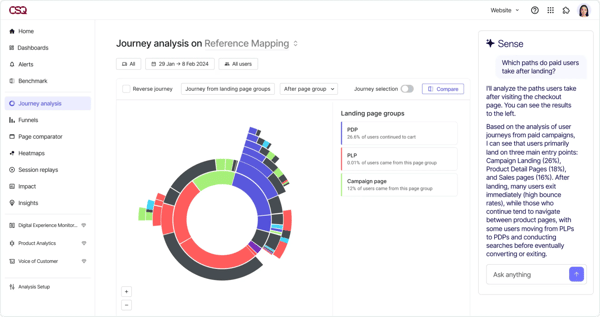
G2 reviewers kept coming back to how visual the understanding feels. They describe spotting friction points, drop-offs, and engagement drivers quickly because the replays, heatmaps, and journey views work together rather than as separate tabs. Several also pointed to Sense AI, Contentsquare's built-in assistant that scans your data and surfaces optimization opportunities on its own. A few also noted you can even connect it to LLMs over MCP. For a lean software team, though, the real unlock I saw reviewers highlight is the free-forever plan: up to 200,000 monthly sessions on one project, with replays, heatmaps, funnels, basic surveys, and that combined quantitative-and-qualitative picture.
For a lean software team, the free plan comfortably supports early validation. Reviewers describe feeling the pull to upgrade when they need more than the 200,000 monthly sessions, longer data retention, or the advanced analysis modules beyond the core replays, heatmaps, and funnels. The Growth plan is the only publicly listed paid tier, starting around $49/month, while Pro and Enterprise shift to sales-led pricing keyed to your session volume and the modules you turn on.
"I am using Contentsquare for long time and i like the feature of customer behavior analytics that let use know where users move, click and scroll. Contentsquare will help me to increase conversions by fixing dropoff points. it is ease to use and it reduce customer frustration in long run."
- Contentsquare review, Sourabh C.
Best for: Startups that care as much about the "why" as the "what" and want heatmaps, replay, and journey analysis sitting beside their metrics on a plan that never expires.
Not ideal for: Very small teams that only need lightweight event tracking and would rather skip the learning curve of a deep, feature-rich platform.
"The platform is a bit heavy, thus it is slowing down my computer. Also, it is a bit expensive and thus cannot be accessible to a bigger number of companies. Support is not available fast but the CSM are helpful."
- Contentsquare review, Mariza B.
The visual layer is its own category worth knowing. Browse the best heatmap software on G2 to see how a SaaS startup can map where users click, scroll, and stall.
Going through the FullStory reviews, the number that kept jumping out at me is the free session allowance, one of the largest of any tool here at up to 30,000 sessions a month. For a SaaS startup whose first analytics instinct is to watch how real people move through the product, that headroom is what reviewers say lets them do a lot of watching before money enters the conversation, and the 12 months of data and analytics retention means those sessions don't vanish a few weeks later. For an early-stage tech team still building its user base, that is enough runway to lean on replay as its main way to understand and debug behavior before it can justify a dedicated QA or analytics hire.
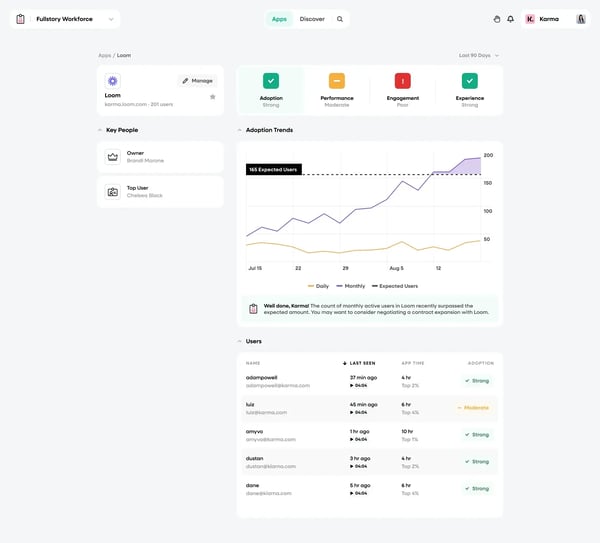
One thing I noticed reviewers setting expectations on: the free tier is session replay first. They describe it as shining at watching individual sessions and debugging with the core tools and basic integrations, while the heavier aggregate layer, heatmaps, funnels, and dashboards, sits on the paid plans. What G2 reviewers from software teams keep praising is an unusually clean UI and helpful docs that make the snippet easy to drop in, plus how flexibly it lets them track things they didn't anticipate needing. Reading through them, the takeaway I landed on is that a lean startup should treat free FullStory as a powerful "watch what happened" tool, with pattern-spotting across thousands of users as the paid step.
For a startup software team, the free plan is strong for validation and debugging. What I saw reviewers point to as the trigger to pay is needing the aggregate layer, heatmaps, funnels, dashboards, or AI session summaries, all of which sit on the paid plans. FullStory's pricing is sales-led, so paid tiers are quote-based and scale with your session volume, with mobile capture usually a separate add-on. Confirm current pricing on FullStory's page before you plan around it.
"Easy to use, highly customizable, and super fast to integrate with our platform! It also allows us to personalize onboarding experiences based on different user roles. Highly recommended for reducing first-time user drop-off and boosting engagement with new feature."
- FullStory review, Kogi K.
Best for: SaaS startups whose first analytics need is watching real sessions to debug and understand behavior, and who want a large free session allowance to do it on.
Not ideal for: Teams that need aggregate analytics, heatmaps, and funnels from day one without paying, since those sit on the paid plans.
"It would be easier to use if the interface was more user friendly and had all the sessions for various categorized by day/time in the dashboard."
- FullStory review, MaryAnn K.
Reading the Heap by Contentsquare reviews, the question I kept seeing it answer is this: what if you didn't have to decide which events to track before you started? Instead of instrumenting each one by hand, reviewers describe how Heap automatically captures interactions and lets them define events after the fact, which is a real head start for a SaaS startup that doesn't yet know which behaviors matter.
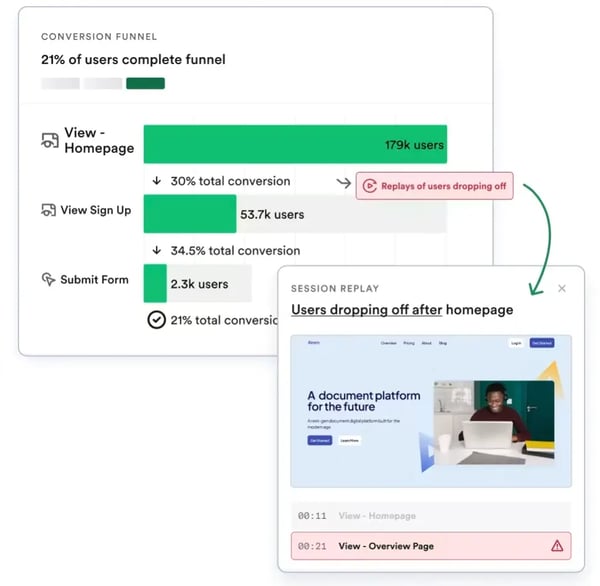
Autocapture is the theme G2 reviewers from software teams return to most, the sense that they can answer questions they didn't anticipate at setup, plus a visual analyzer and easy segment building that let non-engineers explore without writing queries. What came through as I read further is that the free plan lines up well with where an early-stage startup sits: up to 10,000 monthly sessions with the core charts, funnels, and journey views, unlimited enrichment sources, guides integrations, SSO, and six months of data history. That's enough room for a lean team to find its footing before the paid tiers, which reviewers note are custom-quoted and sold as annual contracts.
For an early-stage startup, the free plan suits products under 10,000 monthly sessions. What reviewers point to as the upgrade trigger is more sessions, longer retention than the six months, and add-ons like session replay and heatmaps. Heap by Contentsquare's paid tiers are custom-quoted annual contracts, so confirm current pricing with the vendor before you plan around it.
"My team has used Heap for product analytics about three years now and we've made good use of it. We review it constantly to improve our product. Heap captures a lot of information about user events, so often tracking does not have to be thought out ahead of time. Its visual analyzer tool is wonderful at helping us look at any page in our product and knowing what our users do on that page."
- Heap by Contentsquare review, Tyler J.
Best for: Startups that want analytics live fast without instrumenting every event, and that value analyzing retroactively as their read on the product changes.
Not ideal for: Budget-conscious teams that want transparent, self-serve paid pricing, since Heap's paid tiers are quote-based annual contracts.
"Some advanced reports can feel complex at first, and there is a learning curve when working with more detailed analyses. Pricing may also be on the higher side for smaller teams or startups. Occasional performance lag is noticeable when working with very large datasets."
- Heap by Contentsquare review, Deep G.
Want the qualitative layer too? See the best session replay software on G2 to pair recordings with your analytics.
A bug report that arrives with the exact session attached, console logs, network requests, and all. That's the everyday reality reviewers say LogRocket creates for engineering-led startups, sitting where product analytics and frontend monitoring overlap and pairing session replay with error tracking so fixing something doesn't start with a guessing game.
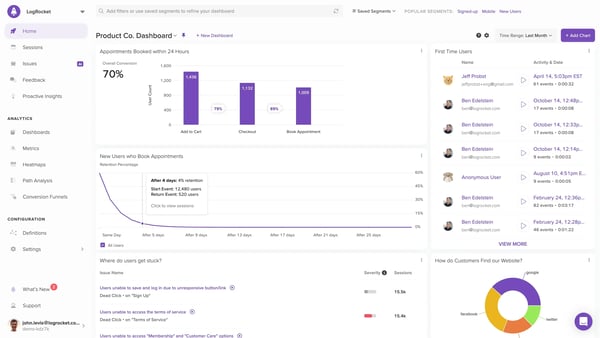
What I kept seeing in the reviews, especially from people in support and engineering, is that replays are the fastest route to clarity: instead of asking a user to reproduce a problem, they watch what actually happened, with stack traces, source maps, and network requests right there, and cut the engineer-to-support-to-customer loop down by several rounds. Reading through them, the picture I formed of the free Developer plan is that it's deliberately modest, 1,000 sessions a month, one project, and a month of data retention, but it covers web and native mobile replays, filters and search, and conversion funnels, which is enough for a lean engineering team to prove the core debugging loop on a single product before the heavier analytics layer becomes most useful higher up the tiers.
For a small engineering team that is also shipping features, getting the exact failing session instead of a vague bug report is time a startup does not have to spend reproducing the problem, which is often the difference between fixing it today and letting it sit in the backlog.
For a lean engineering team, the free plan for developers fits a single small product or an early evaluation. What reviewers point to as the triggers to upgrade are more monthly sessions than the 1,000 you get free, longer retention than a month, and the product and UX analytics layer (funnels, heatmaps, path analysis) that becomes most useful higher up. LogRocket's Team plan starts around $99/month for higher session volumes, with the deeper analytics and AI unlocking on the plans above it. Confirm current tiers on LogRocket's pricing page before you plan around it.
"I use the session replay and the network usage constantly. I'm a software developer, and so this really helps me debug my software. It's really useful to see the user details and scrub through the times and see how they interacted with the app. Usually a customer reports an issue, and then I have their email. I immediately go to log rocket and type in their email and then pull up their relevant session."
- LogRocket review, Alexander F.
Best for: Engineering-led startups that want session replay and error context sitting beside product usage data, so they can debug and understand behavior in one place.
Not ideal for: Teams whose main need is high-volume product analytics on a free plan, since the free session cap is on the smaller side.
"The search and filtering UI feels a bit cumbersome to use, especially since different filters are scattered across multiple places, and the session replay UI can be extremely slow to load."
- LogRocket review, Noah P.
If a SaaS startup wants one event-based analytics platform that balances depth with a free tier it won't outgrow next quarter, Mixpanel is the pick reviewers keep coming back to. Funnels, retention, flows, and behavioral cohorts are all here, and what G2 reviewers from software teams stress is that the free plan hands a growing product unlimited seats, so the whole team can dig into the data without per-seat fees getting in the way.
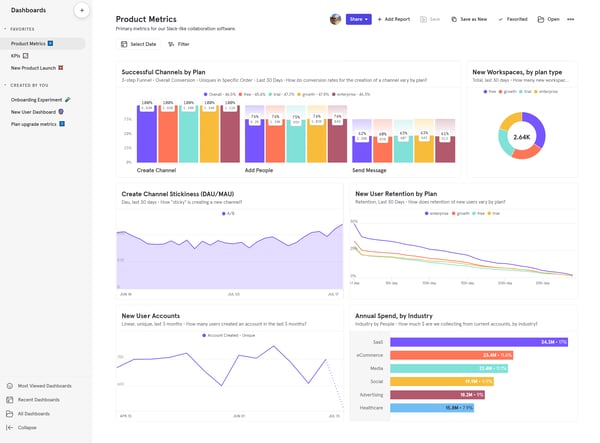
What came through as I read the reviews lines up with the article's wider take: a clean, quick reporting experience where someone can build a cohort analysis live during a call, plus the integrations, session replays, and ingestion and export API access that let a lean team wire Mixpanel into the rest of its stack. Reviewers do note the free plan caps saved reports and session replays, and that pricing is usage-based once you outgrow it, so the variable a startup should watch is its event design, not just its headcount.
For most early-stage products, the free plan covers what a startup needs to find its footing. What reviewers point to as the upgrade trigger is needing unlimited saved reports beyond the free cap, higher session-replay limits, or the advanced behavioral cohorts that sit on the paid tier. Mixpanel's paid pricing is usage-based and custom-quoted, so the variable a startup should model before committing is its event design, not just its headcount. Confirm current pricing on Mixpanel's page before you plan around it.
"I use Mixpanel a lot at Typedesk. It offers a lot of functionality, and I can quickly move through funnels and user flows to understand what people are actually doing. The integrations are solid, and performance has been consistently good for us. I've never run into issues with speed or with things breaking."
- Mixpanel review, Diana H.
Best for: SaaS startups that want a serious, self-serve event analytics platform with a free tier generous enough to last well past the earliest days.
Not ideal for: High-volume products that will blow past a million events quickly and don't want usage-based costs rising with every tracked event.
"I find the pricing model fairly aggressive as you scale. While the free tier is generous, the cost per event on the Growth plan can climb quickly once you go beyond the initial 1M event limit, and it starts to feel like the pricing spikes as soon as you cross that threshold."
- Mixpanel review, Prat O.
Mapping out your measurement stack? See how the right digital analytics software rounds it out on G2.
Reading the Pendo reviews, the appeal becomes clear fast: what if spotting a friction point and fixing it happened in the same place? That's Pendo's whole bet. It blends product analytics with in-app guidance, so SaaS startup teams can watch how users behave and then nudge them with a guide, tooltip, or NPS survey, no code required. For a SaaS startup pouring its energy into adoption and onboarding, that loop is the draw.
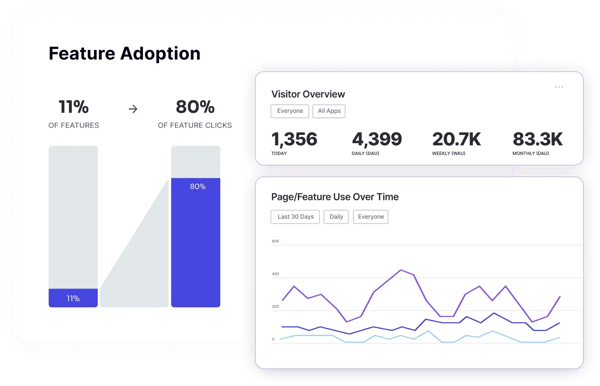
Two things come through clearly in the reviews. G2 reviewers from software teams praise the depth of the feature-level usage analytics, and they call the NPS dashboard genuinely intuitive, the kind of read that tells you at a glance what's catching on and what's being ignored. The free-forever plan backs that up with real substance: product analytics, in-app guides, NPS surveys, retroactive analytics, integrations, and a full year of data retention, with no credit card to start. For a lean startup, that's enough to prove the tool earns its place before pricing turns custom.
For an early-stage product, the free-forever plan is built for evaluation and getting your first read on adoption. What reviewers point to as the upgrade trigger is needing more than the free plan allows, whether that's deeper guide and survey creation, more advanced segmentation, or the broader analytics that come with the paid tiers. Pendo's paid pricing is custom-quoted and sold as annual contracts, so confirm current terms with the vendor before you plan around it.
"I love the level of detail in the 'Feature Use' analytics, which lets me see exactly how many accounts are interacting with specific UI elements like the 'Date Range Document'. The NPS dashboard is also incredibly intuitive, offering a clear visual breakdown of promoters, passives, and detractors, along with real-time response rates. Overall, it's a powerful all-in-one solution that helps turn complex user behavior data into actionable product insights."
- Pendo review, Verified User in Information Technology and Services
Best for: Product-led startups under 500 MAUs that want usage analytics and in-app onboarding guidance working together in one tool.
Not ideal for: Teams already past a few hundred active users, or those that want transparent self-serve pricing rather than an annual, MAU-based quote.
"The pricing per MAU meant that we could only use the product for a small portion of our users."
- Pendo review, Verified User in Computer Software
Focused on adoption and onboarding? Explore the best digital adoption platform software on G2 to pair in-app guidance with your analytics.
For an engineering-led startup, PostHog is tough to argue with, and the reviews make the case better than any pitch. It's an open-source, all-in-one platform that bundles product analytics, session replay, feature flags, experiments, and surveys, and what G2 reviewers from software teams keep calling out is the most generous free tier in the category by a comfortable stretch.
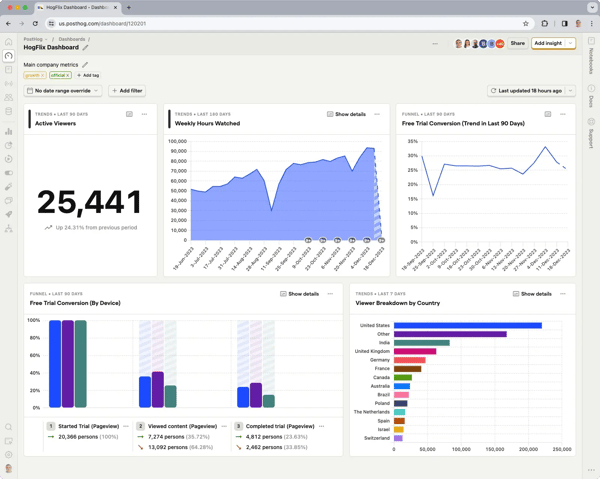
The recurring note in those reviews is the value of getting analytics, replay, and feature flags in one place rather than stitching three separate tools together, with the feature flags singled out as especially strong. Reading further, what stood out to me is how concrete that generosity gets for a lean team: unlimited tracked users and team members, API access, SSO through Google, GitHub, or GitLab, and no credit card to start, which can carry a startup across multiple products before pay-as-you-go pricing ever kicks in. For a technical founder wiring up the first stack, that means analytics, replay, and feature flags come from one free tool instead of three separate subscriptions to manage and pay for.
For a lean engineering team, the free tier resets monthly and covers a lot of ground before anything locks. What reviewers point to as the trigger is simply exceeding a free allowance, at which point PostHog moves to its transparent, usage-based pay-as-you-go pricing that scales with what you actually consume. Confirm current rates and any platform add-ons on PostHog's pricing page before you plan around it.
"PostHog is one of the most useful tools for understanding what users actually do inside a product. I really like that analytics, funnels, session recordings, feature flags, experiments, surveys, and dashboards are all connected in one place, rather than being split across several different tools. The session replay feature is especially valuable because it lets us observe real user behavior, spot friction points, and better understand where and why users drop off."
- PostHog review, Amirhossein A.
Best for: Developer-first startups that want analytics, session replay, and feature flags in one place, with the most generous free tier and usage-based pricing as they scale.
Not ideal for: Non-technical teams that want a guided, narrow tool, since PostHog's breadth can feel overwhelming before you find your footing.
"The main downside is the learning curve. Because PostHog is very flexible and technical, it takes some time to properly design events, funnels, and dashboards. However, once set up, it becomes much more powerful than simpler analytics tools."
- PostHog review, Juan O.
Shipping features safely? See the best feature management software on G2 to pair flags and experiments with your analytics.
Reading the Statsig reviews, what comes through is a tool built around a tighter loop than most here: ship a feature, flag it, measure its real impact, and decide, all in one place. It bundles experimentation, feature flagging, product analytics, and session replay on a single data layer, and G2 reviewers from software teams keep describing the same payoff, that they can tie a release directly to whether it moved the metric, rather than guessing from a click heatmap.
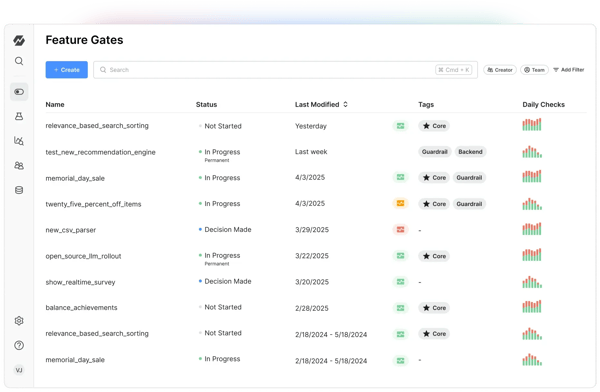
What G2 reviewers from software teams stress is how far that reaches a small team. They describe non-engineers running their own A/B tests once the setup is in place, automatic statistical analysis that reads results for people who aren't data scientists, and a warehouse-native mode that keeps the source of truth in Snowflake or BigQuery. For an engineering-led SaaS startup that wants to move fast without breaking releases, that combination of safe rollouts and built-in measurement is the draw, and the free-forever plan is generous enough to prove it on a real product before pricing enters the picture.
For a lean engineering team, the free-forever plan covers a real amount of experimentation and analytics before anything locks. What reviewers point to as the upgrade trigger is event volume, since Statsig's paid pricing is usage-based and event-metered, so the variable a startup should model is its event design, not just its headcount. Confirm current rates on Statsig's pricing page before you plan around it.
"It's been really helpful for collecting user activity on our platform, like tracking which pages people visit, how long they stay there, session recordings, and overall site performance. At this point, web analytics has become a central part of how we run the platform, and the dashboard makes it easy to gather a lot of data and spot issues we might be having."
- Statsig review, Verified User in Computer & Network Security
Best for: Engineering-led startups that want experimentation, feature flags, and product analytics working off one set of data, with a free-forever plan to prove it.
Not ideal for: Non-technical teams wanting a guided, narrow analytics tool, or anyone who'd rather avoid usage-based, event-metered pricing as they scale.
"I found the setup a little difficult. At times it honestly feels like there's a lot going on, which can make the initial experience a bit overwhelming. I also noticed it makes a lot of server requests, possibly because of our NextJS deployment."
- Statsig review, Verified User in Computer & Network Security
Among the tools here, Userpilot is the one reviewers reach for when product analytics and no-code in-app engagement need to live together, onboarding flows, tooltips, checklists, banners, and NPS surveys, all built so a product manager can measure behavior and act on it without pulling in engineering. For a product-led SaaS startup, that combined loop is the whole pitch.
.png?width=600&height=305&name=Userpilot%20(1).png)
The catch I kept seeing flagged is that, unlike most tools on this list, Userpilot has no free plan. You get a 14-day free trial, and after that pricing starts at $299/month, so if a permanent free tier is a hard requirement, this is the outlier to evaluate during the trial and budget for if you move ahead. What G2 reviewers from software teams emphasize is the speed it gives a non-technical team: at a product-led startup, a PM can ship an in-app walkthrough, a survey, or an announcement without spending engineering bandwidth the team would rather point at the roadmap. The analytics underneath tell you whether those flows are working, a tight measure-and-act loop that just happens to sit behind a paid plan rather than a free tier.
With no free tier, the decision point for a startup is the end of the 14-day trial. Pricing starts at $299/month, which covers 3 seats, 10 user segmentation, unlimited domains, and a full year of data retention with the core engagement and analytics features. Beyond that, Userpilot's higher tiers move to custom, sales-negotiated pricing that unlocks advanced analytics, session replays, and deeper segmentation as you scale. Confirm current tiers on Userpilot's pricing page before you plan around it.
"Userpilot makes it pretty straightforward to build onboarding flows, tooltips, and other in-app prompts without turning it into a huge project. It is one of those tools that feels useful quickly, and I like that it also gives visibility into user behavior instead of leaving you to guess."
- Userpilot review, Elias R.
Best for: Product-led startups that want behavior analytics and no-code in-app onboarding built together, and that are comfortable paying after the trial.
Not ideal for: Bootstrapped teams that need a permanent free analytics tier, since Userpilot is trial-only with no free plan.
"The out-of-the-box analytics is great. It's a no-brainer to check, with tons of useful insights. I use it to identify my power users, and when I see heavy in-app usage, I reach out and speak with them directly."
- Userpilot review, Michal J.
For a SaaS startup, free plans fit best if you're:
They start to strain the moment analytics becomes load-bearing, when a growing product needs longer data retention, deeper analysis, or volumes that overrun the free caps, and the features behind paywalls turn from nice-to-have into blockers right when the team can least afford the friction.
For a SaaS startup, it usually comes down to three pressures, and which one hits first depends on how each tool meters you:
The economics of crossing those lines differ by model, and a startup should know which one it's signing up for. Usage-based tools like Mixpanel and PostHog ramp gradually with consumption, so cost tracks how much you actually use. Session-based tools like LogRocket (from around $99/month) scale with recorded volume. MAU-based platforms like Pendo and Userpilot (from $299/month) tend to jump in larger, quote-based steps that often land in the thousands per year. The practical move for a lean team is to run a real workload through the free tier first; you'll usually have your answer inside a couple of weeks.
Have more questions? Find more answers below.
Mixpanel is the strongest all-around free choice for most SaaS startups thanks to its million-event free tier, unlimited seats, and depth of funnels and retention. PostHog is the best fit for developer-first teams that want analytics, session replay, and feature flags bundled together. Pendo is worth a look if you want usage analytics tied to in-app onboarding, within its 500-MAU free ceiling.
PostHog has the most generous free tier overall, with 1 million events a month plus 5,000 session recordings and 1 million feature flag requests, all resetting monthly with unlimited team members. Mixpanel matches the 1-million-event allowance with unlimited seats. FullStory stands out specifically for session replay, offering up to roughly 30,000 free sessions a month.
Yes, several tools here offer genuine free-forever plans, including Mixpanel, PostHog, Pendo (up to 500 MAUs), Heap (up to 10,000 sessions), and Contentsquare. The constraints are volume caps, limited data retention, and advanced features locked behind paid tiers, all of which press harder as your product grows.
Among the tools covered here, Userpilot is the main one without a free plan, it offers a 14-day free trial and then starts at $299/month.
Event-based tools like Mixpanel and PostHog measure usage by counting discrete user actions (events), which is ideal for funnels, retention, and behavioral analysis. Session-based tools like LogRocket and FullStory measure usage by recorded sessions and lean toward session replay and visual debugging. Many startups end up using one of each; the right starting point depends on whether your first question is "what are users doing" or "why did this break."
PostHog, fairly clearly. It's open-source, developer-friendly, and bundles analytics, session replay, feature flags, and experiments behind a single generous free tier, with an excellent API and SQL-like querying. LogRocket is also a strong fit for engineering-led teams that want session replay paired with frontend error tracking.
Heap is built around automatic event capture, so it records interactions without you instrumenting each one ahead of time, and you define events retroactively. Contentsquare and FullStory also auto-capture a lot of behavioral data. The trade-off with autocapture is that the data can be noisy and require cleanup, so some teams still tag their most important events manually.
Yes. PostHog includes session recordings in its free tier, FullStory offers a large free session-replay allowance, and Contentsquare bundles session replay into its free plan alongside heatmaps. LogRocket also centers on session replay, with smaller free session caps. If watching real sessions is a priority, several of these cover it without paying.
It varies by pricing model. Usage-based tools scale gradually, with PostHog moving to pay-as-you-go after the free tier and Mixpanel's paid pricing metered by usage. Session-based tools price by volume, with LogRocket from about $99/month. MAU-based platforms like Pendo and Userpilot (from $299/month) tend to jump in larger, quote-based annual steps, often into the thousands per year. Always verify current pricing on each vendor's page, as these change.
Heap is among the quickest to get value from, since autocapture and a simple snippet mean you're collecting data almost immediately. Mixpanel and PostHog take a little more thought around event design but reward it with deeper analysis. Tools that pair analytics with engagement, like Pendo and Userpilot, can take longer to configure because you're setting up guides and flows alongside tracking.
Often, yes, at least early on. Many startups pair an event-based analytics tool (for funnels and retention) with a session-replay tool (for the qualitative "why"). Some platforms, like PostHog and Contentsquare, try to cover both in one product, which can reduce tool sprawl. The key is to avoid duplicating spend and data once you settle on what your team actually relies on day to day.
For product-led growth, the tools that come up most are the ones that pair analytics with in-app action. Pendo and Userpilot are built squarely for PLG, tying usage data to onboarding flows and in-app guidance so a team can both measure adoption and drive it. Mixpanel and PostHog are the heavier analytics picks PLG teams lean on for funnels, retention, and experimentation. There's no single most-trusted winner; the right fit depends on whether your priority is in-app engagement (Pendo, Userpilot) or deep behavioral analysis (Mixpanel, PostHog).
The fastest path to a usable answer tends to come from tools that need little setup. G2 reviewers point to Heap's autocapture and Mixpanel's quick, self-serve reporting as the ones that get a startup from question to answer soonest, since you're not instrumenting every event before you can analyze. Contentsquare's visual layer (heatmaps and session replay) also surfaces friction quickly. Statsig stands out for tying a release directly to whether it moved a metric, which shortens the loop from shipping to deciding.
PostHog and Statsig lean developer-first, with strong APIs, SSO, and warehouse-native options that wire cleanly into an engineering stack. Mixpanel is the one G2 reviewers most often credit with solid CRM and integration support, syncing behavioral data to show which accounts are most active. For a SaaS startup, confirm the specific connectors you need (your CRM, warehouse, or CI tools) on each vendor's page, since integration depth varies by plan tier.
Heap and Contentsquare are among the quickest, since autocapture and a single snippet mean data starts flowing almost immediately, no upfront tagging required. FullStory is similarly fast if your first question is "what did this user actually do," since session replay needs little configuration. Mixpanel and PostHog reward a bit more thought around event design, but that investment pays off in deeper analysis later.
Mixpanel is the standout here. G2 reviewers describe building cohort analyses live during a call, no SQL required, which is exactly the kind of self-serve that gets a whole startup team using it rather than just the data person. Heap's visual analyzer and segment builder are similarly approachable for non-engineers. PostHog offers SQL-like querying for those who want it, but its no-code views work too; just expect a slightly steeper first run-in with the UI.
This is more about pricing model and data ownership than a feature any tool markets directly. Warehouse-native options matter most here: Statsig and Mixpanel can keep your source of truth in your own warehouse (Snowflake, BigQuery), which reduces the risk of data living only inside one vendor. PostHog's open-source codebase and export options give a startup similar control. If migration safety is a real concern, prioritize tools with strong export APIs and warehouse sync, and confirm current data-portability terms with each vendor.
Lean teams without an analyst do best with autocapture and self-serve reporting. Heap (autocapture, no manual tagging), Mixpanel (fast, no-SQL cohorts), and Contentsquare (visual heatmaps and replay) all let a non-specialist get answers without writing queries. Pendo and Userpilot suit product-led teams that want analytics plus in-app action in one place. The common thread: pick a tool whose free tier surfaces insight without needing someone whose full-time job is the data.
For early validation, a free-forever plan and low setup cost matter most. Mixpanel and PostHog carry an early-stage team a long way for free on funnels and retention; Heap's autocapture is ideal when you don't yet know which behaviors matter; and Statsig's experimentation lets you test an assumption and measure its real impact rather than guess. Contentsquare and FullStory add the qualitative "why" through replay. The free tier is there precisely so a startup can test these assumptions before committing budget.
Heap is built around exactly this, automatic event capture that records interactions without you instrumenting each one ahead of time, so you can define events retroactively. Contentsquare and FullStory also auto-capture a lot of behavioral data with minimal setup. The trade-off across all three is that autocaptured data can be noisier and need some cleanup, so many startups still tag their few most important events by hand.
The best free product analytics tool for your startup is less about which one wins a feature shootout and more about which kind of question you ask first. Are you trying to see what users do at scale, or watch why a single session went sideways? That answer narrows the field faster than any spec comparison.
If you want broad event analysis, Mixpanel or PostHog will carry you a long way for free. If your instinct is to watch real sessions, FullStory or LogRocket lead with replay. If autocapture appeals because you don't yet know what to track, Heap is built for that, and if adoption and onboarding are the priority, Pendo and Userpilot tie analytics to in-app guidance. The free tier is there to let you test that fit on your own product before you commit to a budget.
Wire one into a real release, give it a couple of weeks of actual usage, and let the data, and how naturally your team reaches for it, make the call.
Building out your startup's experimentation stack? Explore the best A/B testing tools on G2 to validate product changes with confidence.


I evaluated 25+ tools to find the seven best session replay software that made the cut. They...
.png) by Tanuja Bahirat
by Tanuja Bahirat

As part of the marketing team at a budding B2B startup, I've been directly involved in product...
.png) by Shreya Mattoo
by Shreya Mattoo
You've run the A/B test, shipped the redesign, and users are still dropping off at the same...
 by Gunisha