


Trying to schedule meetings shouldn’t feel harder than the work those meetings are meant to accomplish.
And yet, between juggling clients in different time zones, coordinating internal teams, managing no-shows, and finding a time that actually works for everyone, scheduling can quietly become one of the biggest productivity drains in a business — especially when managing distributed teams, client-facing bookings, and overlapping time zones.
That’s what pushed me to take a closer look at the best business scheduling software on the market today. I evaluate software for a living, and over the past few months, I’ve spent a lot of time digging into how modern scheduling tools are actually used, not just how they’re marketed. I looked at platforms designed for everything from client appointment booking and workforce shift planning to resource scheduling and field service coordination. The goal was to find the right tools and see if they hold up when real teams depend on them every day.
What stood out to me almost immediately is how different scheduling needs can be depending on the business. A service provider booking client appointments has very different requirements than an operations leader managing rotating shifts or a distributed team working across multiple time zones. That’s why I didn’t approach this as a one-size-fits-all comparison. Instead, I have focused on tools in the business scheduling software category that are highly rated on G2 and consistently praised for solving specific scheduling challenges well.
Here are my top picks for the best business scheduling software for 2026, each selected based on how well it supports the teams it’s built for.
Business scheduling tools have become one of those things I only notice when they’re missing or not working well. When schedules live in disconnected calendars, emails, and spreadsheets, everything slows down.
In fact, nearly 43% of professionals report spending at least 3 hours per week just scheduling meetings — time that could otherwise be spent on focused work. Meetings themselves already take up a significant portion of our time: many professionals now spend about 11.3 hours a week in meetings, and inefficient scheduling only adds to that overhead.
As I dug into these tools, what stood out most was how much they reduce mental overhead. Instead of juggling time zones, reminders, and availability rules manually, the best business scheduling software handles those details quietly in the background. Across G2 reviews, users frequently point to automation — like real-time availability syncing, automated reminders, and routing rules — as the biggest driver of time savings.
I saw tools that made it easier for clients to book time without endless back-and-forth, others that helped teams manage shifts and coverage more predictably, and some that tied scheduling directly into sales or service workflows so nothing lived in isolation.
Once teams get used to having scheduling automated and centralized, it’s hard to imagine going back. In review after review, I noticed the same pattern: when scheduling works well, reliability improves, and meetings start on time more often. That consistency is what separates basic calendar tools from business scheduling software that actually supports how modern teams operate at scale.
To build this list, I started with the G2 Grid Report for business scheduling software to identify tools that consistently perform well across customer satisfaction and market presence. From there, I analyzed hundreds of G2 user reviews, using AI to surface recurring themes around usability, automation, flexibility, and reliability.
I looked closely at how each tool supports scheduling in real-world workflows. Some platforms are scheduling-first, while others embed scheduling within CRMs, sales tools, or collaboration suites. I evaluated each product based on how well it handles scheduling in its intended context, not just on feature volume. The tools that made this list stood out for solving specific scheduling challenges well, based on both real user feedback and Grid performance.
The screenshots featured in this article may include a mix of the software’s G2 product profile page and official website.
As I narrowed this list down, a few patterns kept surfacing in G2 reviews and data. The tools that stood out to me were those that removed scheduling friction in a way that proved to be reliable, intuitive, and flexible enough for real business use. Here are the factors I weighed most heavily when finalizing my recommendations.
In total, I evaluated more than a dozen business scheduling tools while researching this article, but only six solutions made the final list. These were the tools that consistently performed well across G2 Grid positioning, user satisfaction, and real-world scheduling scenarios.
The list below contains genuine user reviews from the Business Scheduling Software category. To be included in this category, a solution must:
If you’re still refining your criteria, it can also help to explore which meeting management software fits the way your team actually runs meetings day to day.
*This data was pulled from G2 in 2026. Some reviews may have been edited for clarity.
When I started using Zoom Workplace for my day-to-day meetings, I didn’t think much beyond “this is how I join calls.” Over time, though, it quietly became my default tool for scheduling meetings. Whether it’s internal syncs, interviews, or cross-team discussions, Zoom Workplace has been the one constant I’ve relied on to keep the calls running smoothly without friction.
What surprised me most as Zoom Workplace evolved into much more than a video meetings tool. Scheduling meetings feels easier when calendars, chat, files, and agendas live in the same place. I don’t have to jump between apps to coordinate availability or follow up after a meeting — everything happens in context. That experience closely matched what I kept seeing across G2 reviews, especially around reliability and ease of scheduling across devices.
One feature I didn’t expect to use as much as I do is Zoom’s AI Companion. Meeting summaries and suggested action items reduce the mental load that follows back-to-back meetings. Instead of scrambling to capture notes, I can focus on the conversation itself, knowing follow-up is handled. For teams that spend significant time in meetings, this kind of support makes scheduling feel more purposeful instead of exhausting.
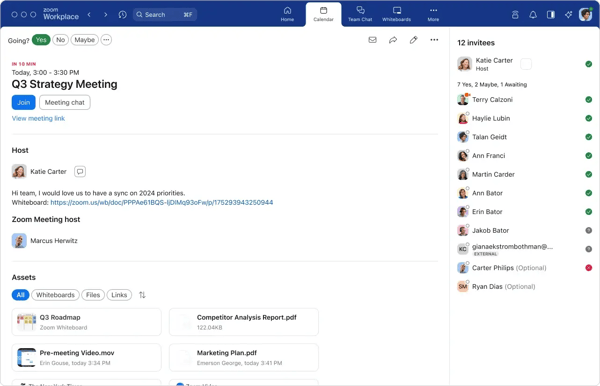
Zoom Workplace also enhances the overall meeting experience. Features like multi-speaker view, breakout rooms, persistent chat, and real-time document collaboration make sessions more interactive and structured. Whether it’s a one-on-one check-in or a larger team workshop, the platform adapts without requiring additional tools. That flexibility supports a range of internal scheduling needs.
Another strength is its cross-platform compatibility. Zoom Workplace works across desktops, browsers, tablets, and mobile devices on major operating systems, allowing teams to join or schedule meetings from virtually anywhere. G2 reviewers often cite device reliability and ease of access as key advantages, particularly for remote or hybrid teams working across locations.
Zoom Workplace also integrates with a wide range of third-party tools, including Salesforce, Slack, Jira, Microsoft 365, and Google Workspace. Calendar synchronization helps prevent double bookings while keeping availability accurate. These integrations allow scheduling to remain connected to broader workflows instead of operating in isolation.
Beyond integrations, the platform scales from one-on-one calls to larger workshops and webinars without requiring separate systems. Teams can host internal syncs, training sessions, and multi-participant meetings using features like breakout rooms and role-based controls. This flexibility makes scheduling adaptable as organizations grow or operate across departments. For teams that need one platform to handle varied meeting formats, scalability reduces tool complexity while maintaining consistency.
At its core, Zoom Workplace provides a consolidated environment where meetings and scheduling coexist with messaging and collaboration tools. According to G2 themes, teams that depend on advanced booking hierarchies or intricate routing rules may find purpose-built scheduling software more configurable for those scenarios. However, many users highlight the convenience of keeping communication and scheduling unified within one platform.
Because the platform is built around video meetings, performance naturally aligns with network conditions. A small number of G2 reviewers reference occasional responsiveness considerations in low-bandwidth environments, though these instances tend to be situational rather than systemic. With stable internet access, Zoom Workplace continues to serve as a reliable coordination tool for distributed teams.
Overall, Zoom Workplace earns its place among the highest-rated tools in the business scheduling category because it treats scheduling as part of everyday collaboration rather than a separate task. With a 4.5/5 rating on G2 and tens of thousands of reviews, it’s best suited for teams that want scheduling, meetings, and communication to live together in one reliable workspace — especially those already operating in a remote or hybrid environment.
“What I like best about Zoom Workplace is how reliable and easy it is for managing all my professional meetings with current and potential clients in one place. I work with freelancing clients, potential clients, and interviewers, and Zoom makes scheduling, joining, and conducting meetings seamless. The interface is easy, and the built-in features, such as screen sharing and automatic meeting transcripts, make all my discussions more efficient and productive. It’s also great that I can access meetings from any device without complications.”
- Zoom Workplace review, Osheen J.
“One aspect I find challenging about Zoom Workplace is that it can sometimes feel a bit overwhelming. With such a wide range of features and settings, it’s easy to get lost or spend extra time trying to locate what you need. The platform also relies heavily on a stable internet connection, so even minor bandwidth drops can cause audio glitches or video freezes, which is especially frustrating during important meetings. Additionally, updates are occasionally released at inconvenient times, requiring you to wait before you can join a call. While Zoom Workplace generally functions well, there are times when the experience is not as smooth as I would like.”
- Zoom Workplace review, Pablo Gaztelu C.
If your meetings often extend into ongoing customer conversations, explore the best customer service software for small businesses to see how teams manage support beyond scheduled calls.
As I researched Salesforce Sales Cloud, it became clear that scheduling does not function as a standalone feature within the platform. Meetings, follow-ups, and calls are directly connected to leads, contacts, and opportunities, which makes scheduling feel like an extension of pipeline management rather than a separate calendar task.
What stood out to me most from G2 reviews is how deeply scheduling is embedded into the CRM. Sales reps can schedule meetings directly from lead or opportunity records, and those activities automatically roll up into reporting and forecasts. That context matters, especially for teams managing multi-stage deals, because meetings aren’t just calendar events — they’re signals of deal progress. From what I saw across G2 reviews, this visibility is one of the biggest reasons teams rely on Salesforce for scheduling at scale.
Automation is another major strength. Workflow rules, alerts, and task automation reduce the amount of manual follow-up required after meetings are scheduled. Instead of logging activities separately, interactions remain tied to the pipeline automatically. For data-driven sales teams, this helps ensure that scheduling supports revenue operations rather than adding administrative overhead.
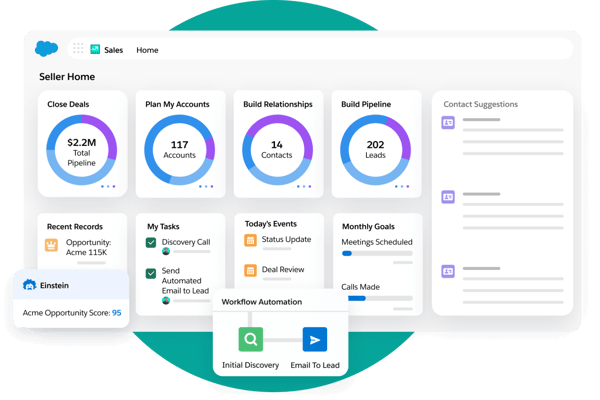
The platform also performs well in complex organizational environments. Role-based permissions, customizable workflows, and structured approval processes allow scheduling to operate consistently across departments. Native integrations with tools like Outlook and Gmail further connect email and calendar activity directly into the CRM, helping maintain data continuity.
Mobile accessibility strengthens Salesforce’s scheduling capabilities for distributed and field-based teams. The mobile app allows reps to manage meetings, update records, and track follow-ups while on the move. This ensures scheduling activity stays aligned with pipeline updates even outside the office, which is particularly valuable for enterprise and field sales organizations.
Another advantage frequently mentioned in G2 reviews is Salesforce’s extensibility. Through integrations and AppExchange applications, teams can layer additional functionality onto scheduling workflows to match evolving business processes. This flexibility supports long-term scalability, especially for organizations operating across multiple territories, product lines, or sales structures that require tailored automation over time.
Salesforce Sales Cloud offers extensive flexibility in configuring scheduling workflows, particularly for teams managing multi-stage sales processes or custom automation rules. Based on recurring patterns across G2 reviews, this depth can require dedicated admin support or structured onboarding during initial setup. However, once workflows are properly configured, many users note that the system becomes highly intuitive and stable, allowing organizations to align scheduling closely with their revenue operations.
That same depth of customization can also surface in day-to-day use within highly configured environments. From G2 feedback I analyzed, some users reference UI responsiveness, delayed updates, or configuration limitations depending on how deeply workflows and integrations are layered. That said, reviewers frequently emphasize that, once properly optimized and maintained, the platform remains reliable and well-suited for structured, process-driven sales teams.
Overall, Salesforce Sales Cloud remains a strong fit for organizations that want scheduling tightly connected to pipeline visibility, automation, and structured revenue processes. Its depth and configurability make it especially well-suited for mid-market and enterprise teams that prioritize control, scalability, and long-term alignment with CRM-driven sales operations.
“Salesforce has a pretty robust system, and there are so many options for customization according to your needs. It can be as complex as you want and as easy as you need. Customer support is also fairly good; they contact you via email and get on a call with you to understand the issue fully.”
- Salesforce Sales Cloud review, Pritkumar P.
“Honestly, there’s very little to genuinely dislike about Sales Cloud once you understand how powerful the platform is. If anything, the only challenge is that its flexibility can feel overwhelming at first. There’s a lot you can do. But this is also what makes it so strong in the long run. With a bit of setup and guidance, the system becomes incredibly intuitive and stable.
In day-to-day use, the experience is smooth, reliable, and dependable. Any initial complexity pays off immediately once you start tailoring the platform to your business.
In short: there’s nothing I would consider a real drawback — just a learning curve that comes with having a platform this capable.”
- Salesforce Sales Cloud review, Emre Y.
When I researched HubSpot Sales Hub, what stood out immediately from G2 reviews was how approachable it felt compared to heavier CRMs. Scheduling meetings, tracking leads, and following up with prospects all happen inside a system that doesn’t feel intimidating, even if you’re not a sales ops expert. For teams that want scheduling to live naturally inside their sales process — without a steep setup phase — HubSpot makes that transition easy.
Scheduling in HubSpot is tightly connected to contact records and deal activity. Sales reps can share booking links, sync calendars, and schedule meetings directly from the CRM, which keeps conversations and follow-ups in one place. From what I saw across G2 feedback, this simplicity is one of HubSpot’s biggest strengths, especially for small to mid-sized teams that want fast adoption without heavy customization.
Another area where HubSpot stands out is how well scheduling works alongside automation. Meetings can trigger workflows, task creation, and follow-up sequences automatically, which reduces manual work for reps. Instead of scheduling being a standalone action, it becomes part of a broader engagement flow that supports lead nurturing and deal progression.
Reporting also plays a role in the scheduling experience. Because meetings, emails, and calls are logged automatically, teams get visibility into how scheduling activity ties back to pipeline performance. Managers can see which reps are booking meetings consistently and where prospects tend to drop off, all without relying on manual updates.
HubSpot’s ease of implementation is another theme that surfaced repeatedly in G2 reviews. Many users highlight how quickly teams can start using meeting links and automation features without requiring significant admin involvement. For growing teams that want structure without heavy configuration, this balance between functionality and usability can be a strong advantage.
Beyond workflow simplicity, the platform also supports AI-powered lead management tools that enhance scheduling context. Predictive lead scoring, deal forecasting, and engagement insights help teams prioritize the right prospects before and after meetings are booked. Instead of scheduling being purely calendar-driven, it becomes informed by data signals that guide follow-ups and pipeline focus, which many growing teams see as a meaningful productivity advantage.
That said, HubSpot Sales Hub emphasizes clarity and structured workflows within its CRM framework. Based on recurring patterns across G2 reviews, teams operating highly complex sales processes or intricate scheduling logic may require deeper customization than the platform typically prioritizes. However, many reviewers connect this balance to HubSpot’s ease of use and faster adoption, particularly for small to mid-sized teams seeking streamlined implementation.
HubSpot’s scheduling functionality also integrates most seamlessly within its broader ecosystem of marketing and CRM tools. According to recurring G2 feedback, organizations relying heavily on a wide mix of external systems may need additional coordination to maintain flexibility across platforms. For businesses already aligned within HubSpot’s environment, though, this cohesion reduces the need for third-party connectors and keeps scheduling tightly integrated with revenue workflows.
Overall, HubSpot Sales Hub earns its place on this list because it is consistently strong in usability and adoption. Its 4.4/5 rating on G2, backed by 13,500+ verified reviews, reflects that broader user experience and sustained market trust. With 89% of users indicating they would recommend it, the data reinforces what I observed during my research. For teams prioritizing structured automation without heavy operational overhead, HubSpot stands out as a practical and scalable option.
“Easy to use and quick to adopt. HubSpot is one of the most intuitive sales platforms I’ve used. Sales reps can get started fast without heavy training, which boosts adoption and helps keep pipeline data accurate. Excellent pipeline and deal tracking. The pipeline view is clean, visual, and genuinely effective. Deal stages, tasks, notes, and communication history are all easy to manage in one place, which makes it simpler to stay organized and keep deals moving forward. Strong email + meeting workflow. Sales Hub really stands out with tools such as email templates and tracking, meeting links with calendar sync, sequences for outreach automation, and built-in logging of conversations and activities. Together, these features make it easier for sales teams to streamline follow-ups without losing personalization.”
- HubSpot Sales Hub review, Rene M.
“Setting up more sophisticated features can have a steep learning curve, and some tools need higher tiers to reach their full capabilities. The UI can occasionally feel sluggish or crowded, and there may be sporadic delays in synchronizing with external inboxes. Additionally, I wish there were more flexible choices for reporting and sequence modification without requiring upgrades."
- HubSpot Sales Hub review, Fatima A.
Calendly is one of those tools that does exactly what it promises — and does it well. When I started researching Calendly, what stood out immediately was how much friction it removed from scheduling across different use cases. Instead of emails going back and forth or availability getting misaligned, Calendly turns booking time into a simple, self-serve action. Whether teams are scheduling client meetings, internal check-ins, interviews, or sales calls, that simplicity consistently leads to faster responses and fewer coordination delays.
What makes Calendly particularly effective is its focus on speed and intelligent routing. Meetings are assigned based on rules like availability, geography, or ownership. This is an especially impactful feature for sales teams handling inbound leads, recruiting teams scheduling interviews, or customer-facing teams managing onboarding and support calls. Across the board, meetings happen faster, follow-ups feel more immediate, and less time is lost coordinating schedules.
Calendly also fits cleanly into a wide range of existing workflows. It integrates natively with CRMs like Salesforce and HubSpot, along with calendars such as Google Calendar, Outlook, and Microsoft 365. That means meetings booked through Calendly are automatically logged, availability stays accurate, and teams don’t have to manually update records. For organizations that rely on shared calendars or CRMs as a source of truth, this integration keeps scheduling connected rather than siloed.
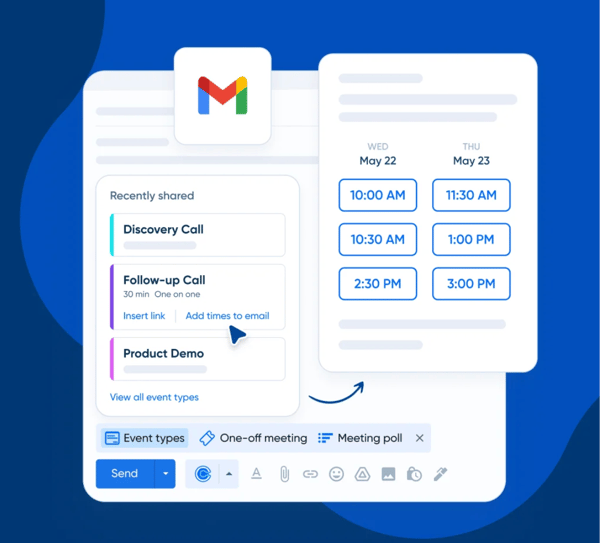
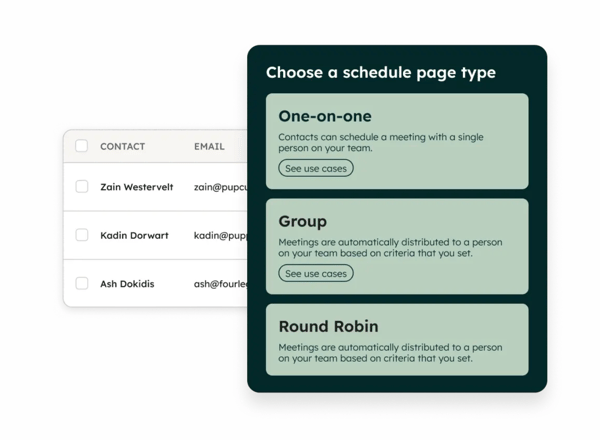
Another area where Calendly shines is flexibility for team-based scheduling. Whether it’s round-robin assignments for SDR teams, panel interviews, or collective meetings with multiple stakeholders, Calendly supports a range of scheduling flows without adding complexity for the person booking the meeting. This comes up frequently in sales, recruiting, and customer success use cases, where coordination across multiple calendars is usually a headache.
Calendly’s impact shows up clearly when looking at how teams use it in real-world scenarios. SaaS companies often embed scheduling links directly on landing pages, recruiting teams use it to coordinate interviews across multiple stakeholders, and customer success teams rely on it to allow clients to self-book onboarding sessions or support calls. Across these use cases, scheduling speed directly influences pipeline velocity, retention, and operational efficiency. By removing coordination bottlenecks, Calendly helps teams move from intent to conversation with fewer barriers.
Another strength frequently highlighted in G2 reviews is how intuitive Calendly feels once availability preferences are configured. The initial setup process is structured in a way that allows individuals and teams to define booking rules, buffers, and availability without needing technical support. Because the interface is straightforward and visually clean, new users can begin sharing booking links quickly without undergoing extensive training.
That said, based on patterns across G2 reviews, Calendly is most effective as a scheduling layer rather than a full CRM or sales management system. Teams that require deep deal tracking, forecasting, or advanced analytics typically integrate it with other platforms to cover those needs. For organizations already operating within a CRM ecosystem, however, this separation can actually keep scheduling lightweight and easier to deploy, without adding unnecessary complexity to the booking experience.
Additionally, recurring G2 feedback notes that some advanced features, such as deeper routing logic, customization, and analytics, are available only on higher-tier plans. While this can increase costs as teams scale or require more control over scheduling workflows, many users point out that the core scheduling functionality remains accessible and reliable even on lower tiers, making it suitable for straightforward use cases without overpaying for features they may not need.
Overall, Calendly earns its place on this list because of how reliably it removes scheduling friction without adding operational complexity. Recognized as a Leader on G2 with a 4.7/5 rating across 2,400+ reviews, it also sees 97% of users rating it 4 or 5 stars and 94% saying they would recommend it. For teams where meeting speed directly impacts revenue, hiring timelines, or customer onboarding, that combination of usability and buyer confidence makes Calendly a practical and scalable choice.
“Calendly is most valuable for how flexible it is around scheduling logic. The ability to create different event types, each with its own rules, availability, and conditions, makes it easy to handle a wide range of use cases w/o manual coordination. The advanced settings (buffers, limits, availability controls) are useful since I have different needs and types of external meetings. They allow me to protect my time, avoid overbooking, and adapt scheduling rules to different stakeholders and contexts.
Overall, it reduced back and forth, removed friction from coordination, and made scheduling predictable and scalable, especially in an environment like mine, where calendars are already overloaded.”
- Calendly review, Samanta J.
“The main drawback with Calendly is that some of the more useful features, like advanced integrations and customization, are locked behind the paid plans. For smaller teams or individual users, the free version can feel a bit limited. Also, first-time users sometimes find it a little confusing to set up their availability. Other than that, once it’s set up, it works smoothly.”
- Calendly review, Akash M.
If you’re thinking beyond booking links, it can also help to explore calendar software to see how teams manage availability, time blocking, and day-to-day scheduling at a broader level.
CRMOne stood out to me as a platform built for teams that want everything in one place without the overhead of a traditional enterprise CRM. With a 4.8/5 rating on G2 across more than 1,000 reviews and recognition as a High Performer, it has already built strong satisfaction among users. Instead of stitching together separate tools for sales, marketing, customer communication, and follow-ups, CRMOne brings those workflows together into a single, cloud-based system. For small to mid-sized businesses, especially, that simplicity can make a noticeable difference in day-to-day operations.
What I found most compelling from G2 reviews about CRMOne is how approachable it feels. The interface is clean and intuitive, which lowers the barrier for teams that are new to CRM software. Scheduling reminders, tracking leads, and managing pipelines doesn’t require deep technical knowledge, and that ease of use shows up as a consistent theme across user feedback. Teams can get up and running quickly without extensive onboarding or IT support.
CRMOne’s scheduling capabilities are closely tied to its workflow automation. Rather than offering a standalone booking experience, scheduling happens as part of broader processes, assigning leads, triggering reminders, and following up across channels. This works well for service-driven businesses where conversations happen over email, messaging apps, or social platforms and need to stay connected to a single customer record.
Many G2 reviewers also highlight how built-in automation reduces repetitive manual work, particularly for follow-ups and lead assignment. For small teams without dedicated operations roles, having automation embedded directly into scheduling and communication workflows helps maintain consistency without adding process overhead.
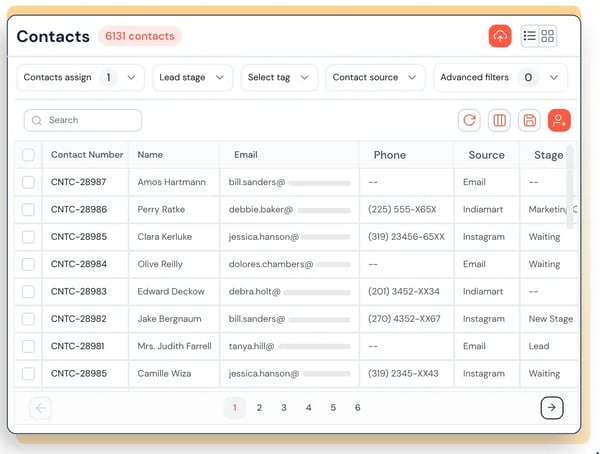
Another area where CRMOne performs well is omnichannel communication. Managing customer interactions across email, social, SMS, and messaging apps from one dashboard helps teams avoid missed follow-ups and disconnected conversations. For businesses that rely on consistent client touchpoints, like agencies, consultancies, or real estate firms, this centralized view supports more reliable scheduling and engagement.
CRMOne stands out for its affordability compared to the features included. With tiered pricing across Launch, Grow, and Scale plans, teams can begin with core CRM functionality and gradually unlock advanced automation, AI lead scoring, and enterprise security controls as their needs evolve. Even entry-level plans include deal pipelines, appointment scheduling, unified inbox capabilities, and campaign tools, which reduces the need for additional software. As organizations scale, higher tiers introduce unlimited workflows, custom dashboards, territory management, and SSO-enabled security.
Customer support is another area that receives positive attention in G2 reviews. Users frequently describe the support team as responsive and proactive in walking through setup questions, workflow configurations, and troubleshooting concerns. Beyond email assistance, higher-tier plans offer live chat and priority phone support, which can be especially helpful for teams implementing advanced automation or AI-driven features.
That said, based on patterns across G2 reviews, CRMOne offers fewer advanced customization options and third-party integrations than some larger CRM platforms. For businesses operating within highly specialized workflows or relying on extensive integration ecosystems, this may require additional configuration or supplementary tools. However, many small and mid-sized teams note that this streamlined approach keeps the system easier to manage and quicker to deploy.
Mobile functionality is also described in G2 feedback as more limited compared to the desktop experience. For teams that rely heavily on managing pipelines, scheduling, or reporting while on the move, this may affect day-to-day convenience. Users who primarily work from desktop environments generally report a smoother experience once workflows are established.
Overall, CRMOne earns its place on this list because it balances usability, affordability, and breadth of features. It’s best suited for small and mid-sized businesses that want scheduling, sales, marketing, and communication workflows to live together without the complexity or cost of enterprise CRM platforms.
“CRMOne offers a clean and user-friendly interface that makes it easy to manage leads and customer data in one place. The customizable workflows and organized dashboards help sales teams stay aligned and work more efficiently, while the support team is responsive whenever assistance is needed.”
- CRMOne review, Verified User in Information Technology and Services.
“The customization options for reports are very limited, making it hard to generate the specific data we need.”
- CRMOne review, Verified User in Dairy.
If you’re comparing CRMs with very different approaches, understanding the different types of CRM software can help clarify which model fits your sales and scheduling workflows best.
Qualified feels fundamentally different from the other tools on this list because scheduling isn’t the starting point — it’s the outcome. Instead of asking prospects to find a booking link or wait for follow-up, Qualified focuses on engaging website visitors in real time and moving the right ones straight into scheduled meetings. For Salesforce-based sales teams, this approach turns website traffic into a live, high-intent sales channel rather than a passive lead source.
What stood out to me about Qualified is how deeply it’s built around Salesforce. Every interaction, whether it’s a chat, a qualification step, or a booked meeting, flows directly into Salesforce without manual syncing. This tight integration keeps scheduling connected to account ownership, deal stages, and pipeline activity, which is especially valuable for teams running account-based or enterprise sales motions. On G2, Salesforce Integration is Qualified’s highest-rated feature at 97%, reinforcing how central this alignment is to the platform’s value.
At the center of the platform is Piper, Qualified’s AI-powered digital SDR. Piper autonomously engages inbound visitors, asks qualification questions, and books meetings based on predefined rules. Instead of relying on human SDRs to monitor inbound traffic or respond manually, Qualified automates the early stages of engagement. For teams dealing with high volumes of website traffic, this significantly reduces response times and helps ensure high-value visitors don’t slip through the cracks.
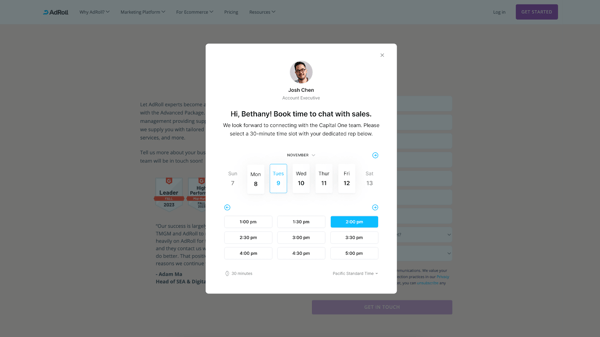
Qualified also excels at real-time engagement. Sales reps can jump into live chats, calls, or screen-sharing sessions directly from the website when a high-intent visitor is identified. This immediacy changes how scheduling works—meetings aren’t booked days later, they often happen in the moment. From a conversion standpoint, that shift can have a meaningful impact on pipeline velocity.
Personalization and targeting controls are another strength. Teams can customize messaging based on visitor behavior, account data, page activity, or intent signals. This allows scheduling conversations to feel contextual rather than generic, particularly in account-based marketing environments.
Security and analytics further strengthen the platform. Qualified offers enterprise-grade security along with detailed conversation intelligence, enabling teams to analyze visitor behavior, refine qualification flows, and coach reps using real interaction data. Over time, this helps make meeting booking more strategic rather than reactive.
That said, based on recurring feedback in G2 reviews, Qualified delivers the strongest results for teams already operating within Salesforce and generating consistent inbound website traffic. Organizations using other CRM systems — or those with lower website volume — may not see the same return on investment. However, for Salesforce-native teams running high-intent inbound motions, this allows deeper CRM alignment and faster meeting conversion without additional middleware or syncing tools.
Additionally, G2 reviewers note that advanced AI workflows and routing logic require thoughtful onboarding and configuration. Teams may need time to fine-tune playbooks and qualification criteria before seeing full performance gains. While this initial setup can slow time-to-value, it also gives teams greater control over qualification rules and personalization, which becomes a strength once optimized.
Overall, Qualified earns its place on this list because it rethinks scheduling as part of real-time buyer engagement. It’s best suited for B2B sales organizations that want to convert website traffic into booked meetings faster, reduce manual SDR effort, and keep everything tightly aligned with Salesforce.
“The AI chatbot engages visitors in a way that feels natural and relevant, and it does a good job of qualifying intent before passing conversations to sales. That has made a noticeable difference in the quality of inbound leads we receive.
The Salesforce integration is another big plus. Data syncs cleanly, routing works as expected, and it fits smoothly into our existing sales process. We also like how much control we have over targeting and messaging, whether that’s based on the page someone is on, their level of intent, or the account they belong to.”
- Qualified review, Yashraj D.
“The backend of the platform can be a bit confusing to navigate, but our team has really helped us get the hang of it and is always happy to help when we can't figure it out.”
- Qualified review, Alex P.
To better understand how G2 protects the integrity of its reviews as AI-generated content grows, check out a detailed overview of its approach to authentic, verified feedback.
Have more questions? These are the ones I see come up most often!
Calendly and Zoom Workplace are strong options for scheduling across multiple time zones. Calendly automatically adjusts availability based on the invitee’s location, while Zoom Workplace handles time zone conversions well for global teams scheduling internal meetings.
Calendly stands out for its automated email and SMS reminders, which help reduce no-shows. CRMOne also offers reminder automation as part of its workflow tools, making it useful for service-driven teams managing repeat appointments.
Salesforce Sales Cloud supports resource and meeting coordination when scheduling is tied to CRM workflows and approvals. Zoom Workplace also works well for managing shared meeting spaces and internal scheduling within collaboration environments.
CRMOne is well-suited for field service teams that need scheduling tied to customer records and omnichannel communication. Salesforce Sales Cloud can also support field teams when scheduling is connected to service or sales operations.
Calendly is a popular choice for managing both team and client appointments due to its round-robin and group scheduling options. CRMOne also performs well for teams that want appointment scheduling embedded within a broader CRM workflow.
While dedicated workforce management tools specialize in shift planning, CRM-based platforms like Salesforce can support shift coordination through custom workflows and automation for larger organizations.
Calendly is one of the strongest platforms for online booking, allowing customers and prospects to self-schedule meetings directly from booking links or embedded widgets. CRMOne also supports online appointment booking for service-based businesses.
For service providers, Calendly works well for simple, client-facing appointment booking, while CRMOne is better suited for teams that need scheduling combined with customer management, follow-ups, and communication history.
Zoom Workplace, Salesforce Sales Cloud, HubSpot Sales Hub, and Calendly all offer mobile apps that allow users to manage meetings, schedules, and notifications while on the go.
Calendly integrates natively with CRMs like Salesforce and HubSpot, making it a strong scheduling add-on. Salesforce Sales Cloud and CRMOne offer built-in scheduling capabilities directly within their CRM environments, while Qualified integrates deeply with Salesforce for real-time meeting booking from website interactions.
After reviewing these tools side by side, one thing became clear to me: business scheduling works best when it fits naturally into how a team already operates. The strongest platforms aren’t necessarily the ones with the most features, but the ones that reduce friction in the moments where scheduling actually matters, whether that’s booking client meetings, coordinating sales follow-ups, or routing high-intent conversations in real time.
What I also noticed across G2 reviews is that scheduling doesn’t live in isolation anymore. For some teams, it’s most effective when embedded in a CRM or collaboration platform, such as Salesforce, HubSpot, or Zoom Workplace. For others, especially service providers and client-facing roles, dedicated tools like Calendly stand out because of how quickly they remove back-and-forth and make booking feel effortless. And for inbound-focused sales teams, Qualified fills a very specific gap by turning scheduling into a conversion opportunity.
If there’s one takeaway here, it’s this: the best business scheduling software doesn’t just help you find time on a calendar. It supports how your team communicates, follows up, and moves work forward without unnecessary delays. Choosing the right tool comes down to understanding where scheduling sits in your workflow and picking a platform that strengthens that process instead of complicating it.
If scheduling is just one part of how your team runs meetings, it’s also worth exploring AI meeting assistants to see how teams automate notes, follow-ups, and next steps.


Let AI shortlist the best tool for your use case Ask AI 1 Click on the button below2...
.png) by Devyani Mehta
by Devyani Mehta

It all started with a single, painfully awkward meeting.
 by Washija Kazim

G2 Grid® Report · Summer 2026 Best Sales Engagement Software Updated May 26, 2026 View...
.png) by Shreya Mattoo
by Shreya Mattoo