


I evaluated 20+ tools using G2 Data and reviews to finalize the 7 best audio conferencing software. These are Slack, JustCall, LoopUp, PowWowNow, Voximplant, Spike, and XTIUM Unified Communications as a Service.
After working through hundreds of G2 reviews, one thing became clear: a bad audio conferencing experience has real operational costs. A call drops mid-demo. A customer is put on hold while someone fumbles a dial-in code. An executive briefing that dissolves into "can you hear me now." The question isn't whether you need the best audio conferencing software. It's which one won't let you down when the conversation actually matters.
I built this list using G2's Winter 2026 Grid Report, AI-assisted analysis across hundreds of verified G2 user reviews, and cross-referencing with IT leaders, sales teams, and support organizations that depend on voice daily. I didn't personally test every platform.
The recommendations below reflect consistent patterns across verified user feedback rather than individual opinions or feature lists alone. Visuals and product references are sourced from G2 listings and publicly available documentation. By the end of this list, you'll know which platform fits where your team actually works and which ones to skip.
Let's get into it.
*These tools are top-rated in their category based on G2's latest Winter 2026 Grid Report. I've included their strengths and pricing details to help you choose the right platform for your operations and reliability workflows.
What separates a strong audio conferencing platform from a frustrating one isn't the feature list. It's what doesn't break. Call stability under load. Audio clarity when half the room is remote and half is in a conference room. Dial-in flows that don't require extra effort for an external guest to join.
What I kept seeing across G2 reviews is that teams rarely switch platforms because they found something better. They switch because the current one failed at the wrong moment: a dropped prospect call, a support escalation where the customer couldn't hear the agent, or an all-hands disrupted by poor audio. The situations differ, but the pattern is the same.
The platforms below serve very different use cases. Some are built for developer-controlled, API-driven voice infrastructure, while others focus on high-volume sales, customer support, or simple dial-in meetings. I called out those differences because one mistake surfaced repeatedly in the review data: teams choosing a platform that didn't match how they actually work. The right choice depends on where audio conferencing fits into your workflow and what failure costs your business.
I started with G2's Grid Winter 2026 Reports to shortlist leading audio conferencing platforms based on verified user satisfaction and market presence across small teams, mid-market organizations, and enterprises. That narrowed the field to tools earning real, sustained business use, the ones people actually run on, built into operations.
From there, I ran AI-assisted analysis across hundreds of verified G2 reviews to surface what consistently comes up in day-to-day communication workflows: call reliability, audio clarity under load, how easy it is for external participants to join, integration with collaboration and CRM tools, and how well platforms scale from a quick internal sync to a high-stakes customer call. That analysis is where the sharper distinctions between tools started to emerge.
Because I haven't personally used every platform here, I cross-referenced those findings with feedback from IT leaders, sales teams, support organizations, and ops groups that depend on audio conferencing daily. All visuals and product references come directly from G2 vendor listings and publicly available documentation.
My criteria comes from analyzing large volumes of verified G2 reviews alongside sustained exposure to sales, support, IT, and operations teams for whom audio isn't optional.
What I was looking for wasn't which tools could place a call. It was which ones hold up when usage scales, participants join from mixed environments, and a failed call has real consequences. These are the criteria I kept in mind:
Below, you'll find authentic user reviews from the audio conferencing software category. To be considered in this evaluation, platforms must meet the following baseline criteria:
This data was pulled from G2 in 2026. Some reviews may have been edited for clarity.
What stood out to me is how naturally audio huddles fit into Slack's broader communication model. Channels, threads, and voice conversations all live in the same place, which helps teams keep context intact while making decisions quickly.
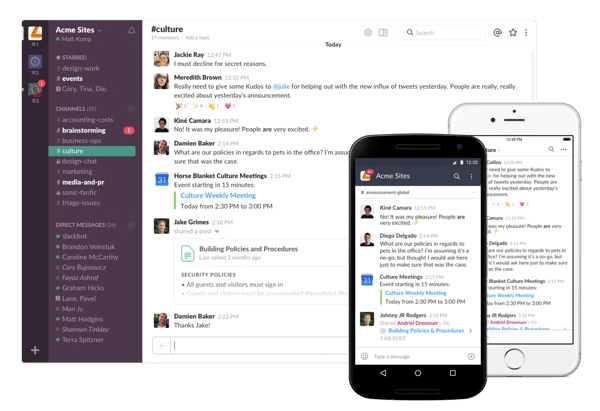
Slack channels interface
Decision-making is where Slack quietly does its heaviest lifting. Huddles stay anchored to the exact channel where related messages, files, and context already live, so nothing gets reconstructed from scratch mid-call. The decision-making feature scores 76% on G2, and what stood out to me across the reviews is how often teams connect that persistent context to faster collaboration. For organizations managing multiple workstreams at once, keeping conversations and their surrounding context together reduces the friction that typically slows decisions down.
What stood out when I went through Slack's reviews is how naturally huddles fit into the flow of work that's already happening. When a dashboard, a doc, or a live code snippet is already sitting in the channel, jumping into a huddle feels completely natural. No tab switching, no "can you share your screen real quick," no lost momentum. If your team lives in async most of the day, that seamless shift into voice and back is the kind of thing you stop noticing because it just works.
Ease of setup scores 95% on G2, well above the 88% category average. What that score reflects in practice is dedicated channels for sprints, incidents, or campaigns keeping huddles scoped to exactly the people who need to be there. For teams juggling multiple workstreams simultaneously, that structure is the difference between focused execution and a notification environment nobody can navigate.
A monitoring tool fires an alert, shared metrics appear in the channel, and before anyone has to ask, the huddle is already happening. Engineering, product, marketing, and operations teams move into response mode without skipping a beat. What stood out to me across G2 reviews is how often teams describe that kind of cross-functional coordination as a practical advantage. With 92% of reviewers rating support positively, organizations also describe having reliable guidance as they expand these workflows over time.
I saw that external collaboration comes up often in G2 reviews. Negotiations, compliance discussions, joint troubleshooting with partners, all of it happens inside a space that carries a full searchable history right alongside the voice interaction. Once conversations, decisions, and context live in the same place, it becomes much harder to justify managing those interactions anywhere else.
Adoption ease is what allows Slack's voice capabilities to actually get used rather than remain a feature teams know exists but never reach for. Starting a huddle, joining one, following through after it ends, all of it just clicks regardless of technical background. Reminders, pinned items, reactions, the small stuff that keeps decisions from evaporating. That's the kind of functionality that shows up constantly in user feedback.
Slack has no built-in way to log decisions made during huddles or channel conversations. G2 reviews flag this when important agreements can vanish into the scroll and become difficult to locate later. Cross-functional teams moving at speed feel this most. Persistent message history and searchable threads keep the broader conversation record accessible and intact, though structured decision logging requires external tooling.
High-traffic channels with many contributors can become difficult to manage pretty quickly, and from what I see G2 users flagging, discussions go sideways fastest when nobody owns the thread. Teams coordinating large groups through high-stakes conversations feel this pressure most. The threads, huddles, and channel controls built into Slack continue to give teams solid ways to pull the conversation back on track when things spiral.
Slack is the strongest fit for organisations where alignment can't wait for a scheduled call, where voice, context, and async communication need to operate from a single environment rather than across separate tools that hand off awkwardly between them.
"I love the ability to have threads and huddles in Slack. This makes collaboration so much easier and cleaner, preventing messy channels. Huddles allow the team to quickly call each other, add others to calls, and share screens swiftly."
- Slack review, Clarke R.
"Sometimes, too many channels and notifications can become overwhelming if they're not managed well. It also becomes hard to track important decisions when conversations are spread across multiple threads and DMs."
- Slack review, Piyush G.
Audio huddles keep quick conversations moving, but when meetings need faces and shared screens, the best video conferencing software on G2 covers what audio alone can't.
JustCall throws out the rulebook on what a calling platform should feel like. Audio conferencing, outbound calling, and support workflows all collapse into one ruthlessly efficient environment, and the operational clarity that follows is hard to overstate. Reach, accessibility, and call visibility are baked into every layer. If your team bleeds client conversations from nine to nine, this is the platform that was built for exactly that chaos.
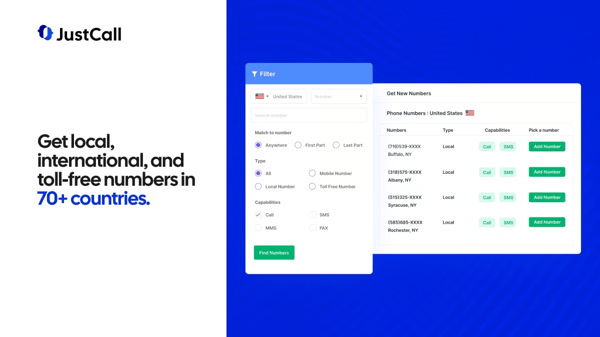
JustCall calling dashboard
Single-click dialing sounds like a small win until you see how often it comes up in G2 reviews from teams onboarding new users. Ease of setup scores 91% on G2, and from what I saw in the feedback, that number holds up in practice. Follow-up scheduling, call recordings, prospect history, everything your sales workflow needs, sitting in one place without hunting across tabs.
Device flexibility is what I see G2 reviewers consistently highlight as one of JustCall's most practical strengths. Laptops, desktops, and mobiles are all reachable without a single personal number in the mix. Calls, texts, missed logs, all tracked in one place without manual reconciliation eating into anyone's day. Managing multiple numbers across campaigns or client segments from a single dialer keeps things clean, and ease of use scoring 92% on G2 reflects that cleanliness at scale.
G2 reviews consistently highlight CRM integration as one of JustCall's most practical strengths that makes manual note-taking feel prehistoric. Calls logged, recordings captured, action items tied to customer records automatically, all of it reflected in a 93% ease of doing business score on G2. Context survives every handoff without anyone scrambling. And if you are a manager who has ever coached from self-reported activity data, you already know how much cleaner real conversation records make that conversation.
What stood out to me across G2 reviews is how often recordings show up outside their original purpose. Accuracy checks, onboarding, quality assurance across regions and time zones, all of it runs off the same call library. Context that would otherwise evaporate in a customer success handoff stays intact and accessible.
I also noticed in reviews how often teams describe audio conferencing and recorded calls as part of the same workflow rather than separate tools, helping conversations move from internal alignment to customer interactions without losing context.
Automation is another feature G2 users often highlight. AI voice agents absorb routine inquiries, manual call volume drops, and agents stop burning hours on interactions that never needed a human in the first place. After-hours coverage improves without adding a single headcount. Support operations get predictable, and that predictability compounds fast. The numbers that come back from early deployments never fail to surprise me.
Fast support is something every platform promises. What stood out to me across G2 reviews is how consistently JustCall backs it up. Teams running high call volumes across all working hours describe the support team as prompt, effective, and never leaving you hanging mid-crisis. No extended downtime, no ticket black holes, no waiting three days for a callback. The consistency of that feedback across day-to-day operations is what makes it notable.
Call quality on JustCall is not always a guaranteed experience. Audio dropping or breaking up mid-conversation is something G2 reviews bring up, particularly on international or mobile connections. If your business runs heavy cross-border call volumes, this is a constraint worth factoring in. Stable network environments are a different story, though, with call performance holding up reliably across daily workflows.
Custom reporting is more limited for teams building highly tailored analytics views around specific KPIs, and some G2 users called this out in reviews I evaluated. RevOps and sales leadership teams tracking granular performance data will run into this ceiling faster than most. The built-in dashboards do a solid job covering core call activity and CRM-connected metrics for day-to-day visibility, though.
JustCall does not waste your time with features built for anyone other than sales and support teams, and that focus is exactly what makes it hit differently. CRM-connected conversations, operational clarity, reach that holds firm across devices and time zones. For teams where client conversations are the whole game, this one belongs in the conversation.
"Justcall is one of the best customer support software that we use for our business. This tool enables us to contact our clients and send them audios or video messages through laptops, mobile phones, desktops, etc. The software is completely cloud-based and can be accessed from multiple remote areas."
- JustCall review, Umesh K.
"One of the main and only disadvantages of using just call is that sometimes the call quality drops suddenly just because there is an unavailability of internet connection. This mostly happens when we are travelling because the device is not able to get a stable internet connection. Rest, this software is good in customer support and meetings."
- JustCall review, Aman A.
Pair enterprise audio conferencing with the best team chat apps for 2026 to keep context, follow-ups, and decisions in one place between calls.
LoopUp is infrastructure first, collaboration tool second, and that distinction matters more than it sounds. Audio clarity, controlled access, and predictable execution are the foundation every call is built on. What stood out to me across G2 reviews is how consistently enterprises and professional services firms cite the infrastructure-first approach as the reason they stay. This pattern comes through most clearly among teams running large volumes of structured calls.
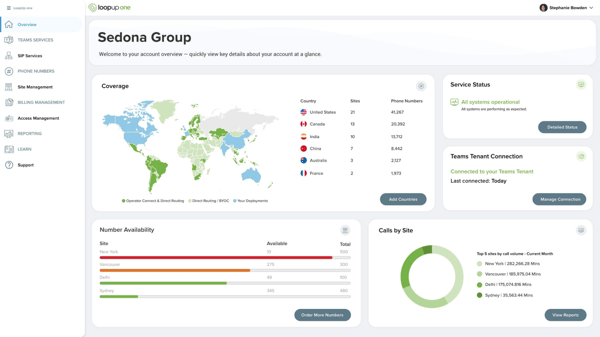
LoopUp overview dashboard
What stood out to me across G2 reviews is how much emphasis teams place on meeting access. Browser-based access removes the need for software downloads, and the "call me now" feature allows participants to join by answering their phone. That simplicity is reflected in LoopUp's 97% meeting requirements score on G2. Teams often point to reduced friction for external participants, especially during client calls and partner meetings.
Audio clarity and speaker identification sound like table stakes until you sit through a call where neither exists. LoopUp makes that experience feel like a distant memory. Participants follow who is speaking without interrupting, without asking "sorry, who was that," without losing the thread entirely. Ease of use scores 93% on G2, and for executive briefings, reporting calls, and client discussions where orderly conversation drives outcomes, that clarity is everything.
Granular call data at this level is something G2 reviewers consistently highlight as a differentiator. LoopUp surfaces it all directly in the interface: who called, how long they stayed, start and end times, dial-in numbers, the works. Call history, invitations, and recordings are all manageable without breaking a sweat. If your compliance or reporting workflows live and die on complete audit trails, this is the platform that was built with that pressure in mind.
G2 reviews note that screen sharing, content markup, file exchange, run inside the same environment as the audio call without so much as a hiccup. No "hold on, let me pull that up in another tool." No rhythm-breaking pivots mid-presentation. For client briefings, interviews, and cross-functional sessions where visual context is half the conversation, you get everything you need without ever leaving the call environment.
Outlook and Microsoft Teams integration on LoopUp is the kind of thing that makes you wonder why every platform takes so long to figure this out. Schedule, join, and manage all from the calendar your team already lives in. No toggling, no training overhead, no "which system do I use for this?" Quality of support scores 86% on G2, and from everything I pulled from the review data, that seamless calendar alignment is where adoption stops being a battle.
No on-premise hardware. No software dependencies. No maintenance overhead eating into IT budgets that already have enough on their plate. The pay-per-use model ties conferencing costs directly to actual usage, and for organizations running high call volumes, that predictability is worth its weight in gold. The moment that cost structure registered with me, it reframed what "enterprise conferencing infrastructure" actually needs to look like.
LoopUp does not support ad-hoc session configuration. Every meeting type runs through a structured setup process, and that rigidity is something G2 reviewers consistently flag. Enterprise teams with diverse and fast-changing meeting needs will bump into this more than others. What LoopUp consistently delivers in return is predictable, controlled call execution that holds up reliably at scale.
Joining a LoopUp call by phone means dealing with a link and a separate access code, two steps where one would do. Not exactly frictionless, and if you are someone who jumps between devices mid-call, you will feel that friction fast. Mobile-first participants, particularly those scrambling to rejoin after a dropped connection, find this the most cumbersome part of the experience. It does come up in G2 reviews fairly consistently. The audio quality and call reliability that LoopUp is built on remains rock solid once you are in, though.
Some platforms try to do everything and end up mastering nothing. LoopUp made the opposite bet, and it paid off spectacularly. Operator support, external accessibility, and predictable call quality are locked in at every level. For organizations where a dropped call or a confused external participant is an operational problem, this is the one engineered for exactly that standard. The case built itself the deeper I went into the data.
"This meeting solution has provided us with the best experiences of web and browser-based conferences without the need for software downloading for the guests to join our meetings. While video calling on this platform, we face no ambiguity in assessing who is speaking and the information about the clients and guests of the meetings. Also, sharing content with the conference attendants has become easier than ever through the screen share feature."
- LoopUp review, David S.
"The only drawback I had was that I sometimes had trouble phoning into sessions. My connection was lost a few times, and I wasn't able to re-join the conference. A colleague had to phone me to invite me to the conference. Aside from that, I would have no problems."
- LoopUp review, Rebecca T.
PowWowNow is built around removing friction from the meeting experience. Scheduling, joining, and running calls all stay straightforward, and that simplicity comes through consistently in G2 reviews. What I found particularly notable is that teams with very different levels of technical experience describe adopting the platform quickly and continuing to rely on it well beyond the initial rollout.
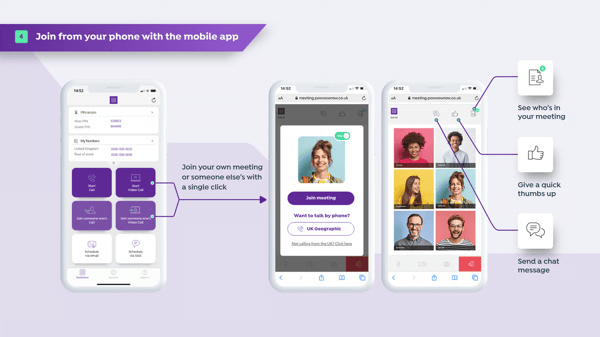
PowWowNow conferencing interface
The all-in-one setup is one of the themes I kept coming back to in the G2 reviews. Audio, video, screen sharing, webinars, and recordings all live within the same interface, eliminating the need to switch between tools. The 96% ease-of-use score on G2 aligns closely with what I saw in the feedback. Reviews consistently describe non-technical participants navigating the platform confidently from the start, reducing the operational friction that often slows meeting adoption.
Scheduling a meeting, inviting participants, and launching the session, done in minutes flat. Drag-and-drop calendar integration and a clean interface do the heavy lifting without asking anything complicated from the person setting it up. Guests join without installations or account creation, slowing things down. One pattern I kept seeing in the reviews is that reliable meeting starts become the norm rather than the exception.
Dependability is one of the themes that comes up most consistently in PowWowNow reviews. Dial-in options keep participants connected whether they are traveling, battling patchy WiFi, or hopping time zones. Continuity across locations and devices without a single workaround required. For teams spread across the map, that flexibility is the difference between a meeting that happens and one that falls apart.
What stood out to me in PowWowNow reviews is how straightforward participation feels. Chat, polls, and Q&A tools pull participants in without a single advanced configuration setting required. No third-party tools bolted on awkwardly, no setup headaches mid-session. That simplicity shows up in its 91% meets requirements score on G2 and comes through clearly in feedback from teams running training sessions and client briefings.
Quality of support scores 87% on G2, and that number has teeth. Dial-in options keep calls running across locations and devices. G2 reviewers consistently describe that reliability as holding up even for distributed and hybrid teams operating across multiple time zones — a scenario where connectivity failure tends to matter most.
Meeting downtime is a productivity killer, and PowWowNow attacks it from every angle. Quick scheduling, straightforward joining, zero technical drama between your team, and an active session. That consistency compounds fast across remote and hybrid workflows, keeping momentum locked in, one call at a time. Teams stop thinking about the logistics and start focusing on the work, and that shift happens faster than you'd expect.
Deep ecosystem integrations and custom reporting are not PowWowNow's strong suit. If you are trying to plug it into a broader CRM or productivity stack, you will hit that wall pretty fast. G2 reviewers are pretty clear about this when their workflows demand more. Teams with complex reporting needs or multi-tool workflows are the ones who run up against this boundary most. The built-in toolset does cover straightforward meeting needs cleanly, though, with no unnecessary friction for day-to-day conferencing.
Audio quality can take a hit in larger sessions or when participants dial in from weaker mobile connections. From what surfaces across G2 reviews, this is a pattern worth keeping in mind if your meetings regularly scale up in attendance or your team is spread across patchy networks. The core dial-in experience and audio reliability that PowWowNow is known for continue to hold up strongly for everyday conferencing needs.
PowWowNow earns its place by making meetings reliably uneventful. Simplicity, accessibility, and dependable execution make it a strong fit for organizations that want conferencing to work without constant attention.
"What I'd hypothetically love most about PowWowNow is its all-in-one platform for scheduling, video calls, screen sharing, and recordings. It's like a Swiss Army knife for meetings! I find it user-friendly, even for non-tech-savvy folks. The interactive features like polls, Q&A, and chat keep things dynamic, which is perfect for webinars. Also, the initial setup is super smooth. Signing up, installing the app, and scheduling the first meeting takes like 2 minutes max with drag-and-drop calendar integration, clear UI, and minimal tech fuss."
- PowWowNow review, Zeeshan S.
"The user interface is old, and it lacks some of the latest capabilities found in rival applications such as Zoom or Teams. Audio quality can vary, and customer service response times could be improved. Integration with calendars and other business tools is restricted, reducing workflow efficiency."
- PowWowNow review, Ajay T.
One thing became increasingly clear as I reviewed the Voximplant feedback: it serves a very different audience from most platforms in this category. Instead of delivering a predefined conferencing experience, it gives development teams the tools to build one. That emphasis on APIs, automation, and flexibility consistently comes through in the review data and makes it especially compelling for technically mature organizations.
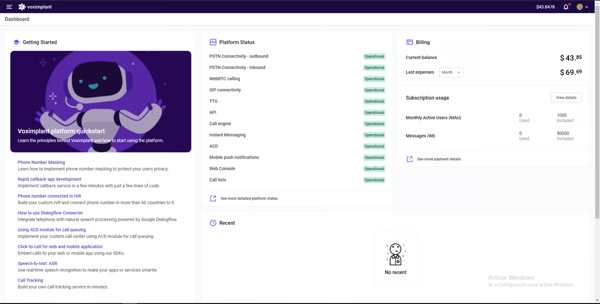
Voximplant developer dashboard
What G2 reviews highlight consistently is how fragmented communication stacks drain product velocity, and how Voximplant addresses that directly. Voice, video, and messaging unified into a single programmable layer, with calls automated, conversations routed, and real-time interactions managed without traditional telephony infrastructure slowing things down. The support experience scores 99% on G2, and that number tells me everything about how seriously Voximplant takes technical engagement.
What stood out to me across G2 reviews is how often teams describe the onboarding experience as surprisingly clean for a platform sitting this deep in the technical stack. Web interface access, Google-based authentication, and zero advanced configuration required to get started. Teams are building and testing conferencing flows within days of signing up. If your engineering team is used to weeks of setup before touching anything meaningful, Voximplant will catch you pleasantly off guard.
Automation is what G2 reviewers consistently highlight as the standout capability here. Audio conferencing is embedded directly into workflows alongside automated call handling, chatbots, and support logic, all scaling customer communication without adding a single headcount. Support teams, marketplace operators, voice-first product builders, this platform was engineered for exactly that ambition. 97% of G2 reviewers confirm it delivers without flinching, and that consistency across technically demanding builds comes through clearly across the review data.
Dedicated working groups. Frequent implementation calls. Technical teams are embedded directly into the build process alongside yours. Voximplant's approach to client collaboration reads less like vendor support and more like a development partnership, and the G2 review base is vocal about exactly that. Complex custom builds stay on track, implementation timelines hold, and the depth of that engagement comes through consistently across G2 reviews.
What G2 reviews consistently back up is how quickly teams reach MVP using prebuilt components paired with flexible APIs. Prebuilt components paired with flexible APIs accelerate experimentation without locking your architecture into a corner. Ease of use scores 94% on G2. Voice-based social platforms, automated support systems, embedded conferencing use cases, rapid iteration across all of it, without breaking a sweat.
Channel flexibility is where Voximplant's platform ambition really crystallizes. Audio conferencing is woven seamlessly into messaging and chat experiences, operating as one cohesive communication layer across voice-based social platforms, automated support systems, and embedded conferencing use cases. User journeys that flow without interruption across every touchpoint. The deeper you look at how teams are building on this, the more that architectural vision becomes apparent across the review data.
There is no ready-to-use conferencing interface with Voximplant. Building and configuring communication flows from scratch demands real development resource investment, and G2 reviewers expecting a plug-and-play setup do flag this as a surprise. Teams without dedicated engineering capacity will find this the steepest part of getting started. What the platform brings to the table in terms of API depth, automation capability, and flexibility is genuinely hard to match elsewhere, though.
Troubleshooting complex communication flows is not a walk in the park. There is no clean linear diagnostic path, and edge cases that crop up during early implementation come up in G2 reviews more than once. Developer-heavy teams in the thick of their first build are the ones who run into this most. The platform's communication logic is robust and adapts cleanly to evolving requirements once it's in place.
Voximplant is built for a specific kind of team, and that specificity is exactly what makes it special. API-level control, automation depth, and channel flexibility that technically mature teams will recognize as something rare. Custom, scalable audio conferencing experiences built exactly the way your product demands. What comes through across the G2 review base is that for teams where conferencing is something you engineer, Voximplant sits in a category of its own.
"We create Golos, a voice-based social media platform featuring audio conferences, voice chats, and other functions. We would like to note in particular while working with Voximplant is their professionalism in communicating with clients. The Voximplant team created a group chat and allocated a working group to deal specifically with our project. They were also always available for conference calls with developers. Voximplant has been doing it all for free because they believe in our product!"
- Voximplant review, Vitaly D.
"There are certain limitations in customization if you do not use code. Despite these drawbacks, I still consider the platform to be very powerful."
- Voximplant review, Ing. Saúl Peña A.
Managing client communication across channels? Read about the top video communication software on G2 to find platforms built for voice, video, and async in one place.
What G2 reviewers highlight consistently is how Spike reshapes traditional email into a chat-style workspace where voice and video calls sit right alongside messages — closing a gap most platforms have been slow to address, with no context switching required. Productivity hub, communication tool, and conferencing layer rolled into one. Small teams that live in their inbox but crave faster, more human interaction will find something here that clicks immediately.
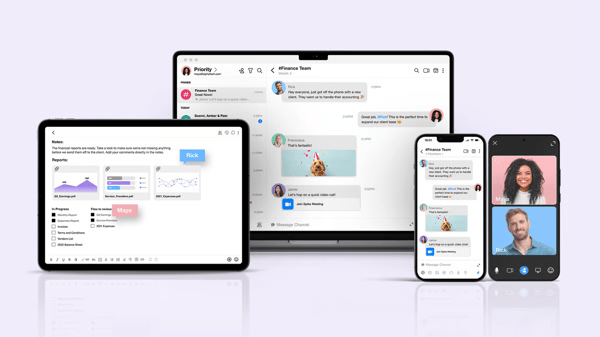
Spike unified inbox and voice calling interface
What stood out to me across G2 reviews is that this goes well beyond a quality-of-life upgrade. Spike fundamentally rewires how teams experience communication, turning long email threads into real-time conversations with voice calls initiated directly from within them. No meeting scheduling, no context loss, no unnecessary back and forth. Ease of setup scores 95% on G2, and for small teams that need to be running without technical overhead eating up their afternoon, that number lands exactly where it should.
HD audio, video, screen sharing, call recording, all of it available without ever leaving the conversation where the work is actually happening. The jump from typing to talking takes seconds, and that transition is so seamless your team stops treating it as a mode switch altogether. For small teams where every minute of friction compounds, keeping collaboration this continuous is the whole point.
What G2 reviewers flag consistently is the productivity drain of juggling multiple apps to do one job. Spike answers that question by consolidating email, chat, tasks, calendars, and audio and video calls into a single interface. No app switching, no attention fragmentation, no "wait, which tool are we using for this?" 93% of G2 reviewers confirm it meets their needs, and that score reflects a platform actually delivering on a promise most tools only gesture at.
Inbox chaos is one of those slow productivity drains that nobody budgets time to fix, and Spike attacks it with surgical precision. Unsubscribe from emails, block unwanted senders, and flip between chat view and original email formatting in a single click. High message volumes stop feeling like a flood and start feeling manageable. That level of inbox control comes up repeatedly in G2 reviews as a meaningful differentiator.
Spike turns post-call follow-through into something that just happens automatically. Tasks, reminders, and shared files wired directly into every voice interaction, no heroic thread-holding required. Quality of support scores 92% on G2, and what G2 reviews talk about consistently is how quietly that accountability discipline compounds across small teams over time. The people doing the work stop worrying about the process, and that shift is worth more than any feature list suggests.
Writing quality slipping under deadline pressure is something every fast-moving team knows intimately, and Spike's built-in assistant tackles that without making a fuss. Draft concise, focused emails directly within conversations; responses go out faster, clarity stays intact. Communication consistency builds across the team over time without anyone having to police it. The impact on team-wide writing standards comes clearly across G2 reviewer accounts.
Spike is not a lightweight tool by any stretch. The workspace packs email, chat, tasks, calendars, and calls into a single view. G2 reviewers flag the density when they are after something more focused and distraction-free. If you like clean, minimal interfaces, this one will take some getting used to, and that adjustment period is real. The unified workspace keeps everything you need in one place, though, with zero jumping between apps to get work done.
Load times can drag when Spike has been sitting idle, and reviewers on G2 flag this specifically when they need quick access to a conversation or call. If your day kicks off with back-to-back communication, that sluggish startup can throw off your rhythm. Users who depend on instant availability are the ones who run into this most. The core communication and collaboration experience Spike delivers remains fast and responsive once the platform is running.
What comes through consistently across Spike reviews is that small teams need fewer tools to get more done, and Spike delivers exactly that. Inbox stress cut, communication centralized, voice calls woven into the fabric of daily work. For teams ready to stop juggling and start flowing, this one makes a case that is hard to walk away from.
"Spike gives me the liberty and flexibility I need to not just handle emails but also to collaborate with colleagues, share files amongst ourselves, and also organise chats."
- Spike review, Belia L.
"The UI can be better. I have my calendars and emails synced up, and somehow I find the UI a little too clustered."
- Spike review, Nikita S.
XTIUM Unified Communications as a Service was built for organizations that have had enough of managing carrier dependencies, hardware overhead, and vendor sprawl on their own. One fully managed cloud environment handling voice, conferencing, chat, and collaboration without anyone inside your IT team losing sleep over infrastructure.
XTIUM Unified Communications platform
What G2 reviewers highlight consistently is subscription sprawl as a persistent operational drain, and how XTIUM consolidates that into one managed environment. Direct chat, group messaging, presence status, multi-party audio and video conferencing, visual voicemail, one platform, zero coordination chaos between separate tools. Communication workflows stay predictable across the organization, and 96% of G2 reviewers' ratings positively confirm that help is there when operational questions inevitably surface.
Managed vendor responsibility is where XTIUM earns its place in serious enterprise conversations. Your IT team redirects focus toward higher-value work almost immediately, carrier relationships handled, hardware cycles owned, infrastructure maintenance off the agenda entirely. That smoothness comes through consistently across G2 reviews.
Web-based administration on XTIUM is the kind of setup that makes raising a support ticket for a routine adjustment feel like a distant memory. Adding or removing services, updating user configurations, and changing service levels are all handled through a portal that anyone on the team can navigate. Ease of admin scores 83% on G2. Across G2 migration accounts, that accessibility advantage over rigid in-house systems comes up repeatedly.
What the G2 review base highlights consistently is how XTIUM's approach to migration differs from the industry norm. Phone systems, third-party software, and existing tools are all integrated cleanly without rebuilding the communication stack from scratch. The operational chaos that typically defines unified communications migrations gets taken completely off the table. G2 reviewers note that this approach to implementation is less common in the category than it should be.
Support quality at XTIUM is a differentiator by design, and from what I've read on G2, it's built by a team that treats every ticket like communication downtime and has a price tag attached. Routine issues, complex problems, multi-year relationship accounts, all handled with the same responsiveness that keeps organizations coming back. 89% of G2 reviewers rate doing business with XTIUM positively, for organizations where communication continuity is non-negotiable, that score reflects a support experience G2 reviewers consistently describe as reliable under pressure.
Visual voicemail management and video conference room integration are where XTIUM quietly overdelivers. Voicemail handled visually without dialing in, video conferencing snapping directly into existing room systems without a single additional configuration touch. The elegance of that execution comes through clearly across G2 reviewer accounts.
The mobile app does not always match the reliability of the desktop experience. Performance hiccups when you are away from your desk are something G2 users flag when depending on it for day-to-day communication on the go. If your team is largely field-based or remote, that is worth knowing upfront. The voice, conferencing, and collaboration features that XTIUM is built around remain dependable and consistent on desktop, though, keeping core operations running without a hitch.
Switching to a managed service means giving up some of the administrative permissions your team previously held over in-house systems. IT teams accustomed to direct system access will feel that loss of granular control, and it does come up in G2 feedback pretty regularly. That said, the breadth of what XTIUM handles continues to run seamlessly under the hood, freeing your team up for higher-value work.
What the G2 review base reflects clearly is why XTIUM holds a strong position in the managed UCaaS category. Voice, conferencing, and collaboration under one vendor, one roof, one throat to grab when something needs fixing. For organizations where communication reliability is non-negotiable, this platform delivers the kind of managed consistency that gets under your skin fast.
"Easy connect, no lack. So very useful for business especially Direct & Group Chat, Presence Status, Multi-party Audio & Video Conferencing, Video Conference Room Integration, Visual Voicemail Management."
- XTIUM review, MD Quamrul H.
"The cost of the software license subscription could be higher."
- XTIUM review, Calvin C.
| Software | G2 rating | Free plan | Ideal for |
|---|---|---|---|
|
Slack |
4.5/5 |
Yes |
Team collaboration with integrated calls and messaging |
|
JustCall |
4.3/5 |
Trial available (limited) |
Sales & support communication with phone/dial features |
|
PowWowNow |
4.3/5 |
Yes |
Simple conference calls and webinars |
|
LoopUp |
4.3/5 |
No |
Business-oriented high-quality conferencing |
|
Voximplant |
4.8/5 |
No |
Embeddable communications for apps and custom workflows |
|
Spike |
4.6/5 |
Yes |
Unified communication with simple audio meetings |
|
XTIUM Unified Communications as a Service |
4.2/5 |
No |
Managed UCaaS across distributed enterprise teams |
*These software products are top-rated in their category, based on G2's 2026 Winter Grid® Report.
Got more questions? G2 has the answers!
Slack and JustCall lead on integrations. Slack connects natively to hundreds of productivity, project tracking, and Google Workspace tools, keeping audio huddles anchored to the work already happening in channels. JustCall's CRM integration is one of its most consistently cited strengths in G2 reviews — calls are logged, recordings captured, and action items tied to customer records automatically, earning a 93% ease of doing business score. Voximplant adds API-level integration depth for engineering teams embedding conferencing into existing product stacks and custom workflows.
Spike and Slack are the strongest fits. Spike converts traditional email threads into real-time chat conversations with voice and video calls built directly in, consolidating email, chat, tasks, and calls into one workspace without requiring teams to switch tools. Slack organizes communication into channels where audio huddles launch instantly from within the same context — no scheduling required. XTIUM is purpose-built for distributed enterprise teams that need managed voice, conferencing, and messaging across multiple regions under a single vendor.
JustCall is the strongest for call recording and transcription within sales and support workflows — recordings capture context automatically, and the call library supports quality assurance, onboarding, and accuracy checks across teams. Slack records huddles for internal use, keeping voice context accessible in the same channel where follow-up threads live. LoopUp prioritizes audio clarity and speaker identification, scoring 93% on ease of use on G2, and surfaces granular call data — who joined, how long they stayed, start and end times — directly in the interface for teams that need complete records.
Slack addresses notification overload through structured channels, threads, and huddle scoping — dedicated channels for sprints, incidents, or campaigns keep conversations targeted to the people who need to be in them. G2 reviews flag that high-traffic channels can become harder to navigate without clear ownership, and Slack's thread-based model is the mechanism for pulling conversations back on track. Spike applies inbox management tools — including unsubscribe, sender blocking, and chat-view toggling — to reduce message volume friction for remote workers managing high email loads alongside ongoing voice and chat communications.
Slack stands out here. Persistent message history, searchable threads, and channel organization keep decisions, context, and conversations accessible over time — G2 reviews consistently highlight this as a practical advantage for remote teams that rely on historical context to stay aligned without scheduled calls. Voximplant holds the highest G2 rating in this list at 4.8/5, and its API infrastructure supports voice-first platforms where conversation data needs to persist across custom architectures. Spike's unified inbox also keeps communication records searchable across email and chat in a single environment.
Slack scores 95% on ease of setup on G2 and is consistently described in reviews as the environment where channels, files, and quick voice interactions operate as a single seamless workspace. Spike scores 95% on ease of setup as well, applying that simplicity to a consolidated email, chat, and calling model that keeps remote coordination centralized. PowWowNow leads on pure meeting ease with a 96% ease-of-use score on G2 — scheduling, joining, screen sharing, and dial-in all accessible without technical configuration for any participant, internal or external.
Voximplant earns the strongest technical trust signal in this category, with a 99% quality of support score on G2 and consistent reviews from developer and engineering teams describing the vendor relationship as a technical partnership rather than standard support. LoopUp and XTIUM are the two platforms most cited by enterprise IT and delivery teams for infrastructure reliability — LoopUp's 97% meeting requirements score and XTIUM's fully managed UCaaS model both reflect sustained confidence from technically demanding organizations that depend on communication continuity.
Slack is the primary example in this list. Dedicated channels scoped to sprints, incidents, or specific campaigns keep audio huddles anchored to the work already in progress, with context, files, and decisions staying searchable in the same place. G2 reviews consistently describe that structured channel model as a practical advantage for cross-functional teams managing multiple workstreams simultaneously. XTIUM organizes enterprise communication through direct chat, group messaging, and multi-party conferencing inside a single managed platform, removing the need to coordinate across separate tools or vendors.
XTIUM and LoopUp set the highest bar for reliability across distributed teams. XTIUM's fully managed UCaaS platform handles carrier relationships, hardware cycles, and infrastructure maintenance under a single vendor, with 96% of G2 reviewers rating support positively. LoopUp's infrastructure-first approach and enterprise-grade audio stability make it a consistent choice for organizations where dropped calls have direct operational cost. JustCall's device flexibility — calls and texts tracked across laptops, desktops, and mobiles without personal numbers — also supports distributed teams operating across time zones with consistent visibility.
Slack is the clearest answer here. Huddles launch directly from any channel without scheduling, and screen sharing is available from within the same context as the ongoing conversation — G2 reviewers consistently describe that as the reason teams stop treating voice as a separate mode of work. Spike allows teams to jump from a message thread directly into a voice or video call in seconds, with the same frictionless transition. PowWowNow supports instant dial-in meetings with no installation or account creation required from guests, keeping the path from decision to active call as short as possible.
The feature wars in audio conferencing have largely settled. What I'm seeing shift now is buyer expectation. AI-driven noise suppression and real-time transcription are becoming table stakes. When evaluating platforms, ask what the vendor is actively shipping. The current feature list is just where they were, the roadmap is where they are going.
Watch the consolidation trend closely. More teams are folding standalone audio into broader UCaaS stacks, consolidating everything into one operation. If that's where your organization is headed, it changes which pricing model, which integrations, and which vendor relationship actually matter in your decision.
The last thing I'd flag is external participant experience. It's the weakest link for most teams and the least examined during procurement. Platforms that have invested here will pull ahead. If your calls regularly include clients, partners, or anyone outside your network, weigh that criterion higher than you probably are right now.
Want to improve team collaboration? Explore leading video conferencing software on G2 to help your teams run clearer meetings and reduce communication friction.


If you work in a customer-facing role, outbound calling is probably part of your daily...
 by Mary Clare Novak

You can have the best sales pitch in the world, but if you don’t know what happens after your...
.png) by Devyani Mehta
by Devyani Mehta

Recently updatedSummer 2026 Grid® Report · Published May 26, 2026 The 10 best Auto...
 by Harshita Tewari