


This guide was last updated on March 17, 2026. A newer report has since been published. The tools below reflect the scores from G2's Summer 2026 Grid® Report.
Based on verified G2 reviews and the latest Grid® placement.
*Liked and disliked highlights are summarized from verified G2 user reviews.
The tools below have also been exhaustively tested and evaluated, and continue to hold their place among the best AI content creation platforms on G2.
After working as a content writer and marketer, I’ve reached a point where the question is no longer whether AI belongs in content creation, but which is the best AI content creation platform that actually delivers results.
With tighter deadlines and growing content demands, teams can’t afford tools that slow them down or produce shallow output. To find what truly works, I spent weeks testing and evaluating the most talked-about AI content creation platforms on G2, from visual-first tools like Canva and AKOOL to writing-focused platforms like Jasper, Creaitor, and Hypotenuse AI, as well as content and communication platforms like Birdeye, Creatify AI, and SOCi.
I analyzed verified user reviews, explored product demos, and compared how these tools perform in real marketing workflows, from blog creation and SEO to design, video, and brand communication.
What quickly became clear is that these platforms are not interchangeable. Some prioritize speed, others focus on brand control, collaboration, or scalability. A few stand out as production-ready tools marketers can rely on every day.
This guide highlights the best AI content creation platforms based on real-world usage, not marketing claims, so you can choose the right tool with confidence.
*These AI content creation platforms are top-rated in their category, according to G2’s Winter 2026 Grid Report. I’ve included pricing details and standout use cases for an easy comparison.
According to HubSpot, 43% of marketers now use generative AI to create content, and G2’s Winter 2026 Grid Report shows a 57% user adoption rate for AI content creation platforms, proving these tools are becoming mainstream in marketing teams. Managing the creative process efficiently isn’t just about producing content faster; it’s about maintaining consistency, quality, and originality across every channel.
As I explored and analyzed these tools, one question guided me throughout: Which AI platforms actually help creators work smarter, not just faster? My shortlist answers that question.
AI content creation platforms have evolved far beyond simple text generation. The best ones now function as full creative partners, helping teams ideate, write, design, and publish across multiple formats. Many of the top-rated platforms on G2 offer integrated workflows that handle everything from campaign planning and long-form writing to image generation and video editing. This shift reflects a broader industry move toward unified creative ecosystems rather than one-off, task-specific tools.
Adoption rates are rising steadily, proving these tools aren’t just trendy; they’re becoming essential for modern marketing teams. A study by Adobe’s Future of Creativity found that 57% of decision-makers believe generative AI will play a significant role in their organization, helping address some of content creators’ most important challenges.
“We've used Jasper quite a bit for long-form, and the biggest advantage is consistency; once you dial in brand voice and structure, it's easier to scale.”
Read full thread →I started by analyzing top-rated tools on G2’s Grid® Reports, focusing on those with strong user satisfaction scores and a consistent volume of recent reviews. I used AI-assisted analysis to identify recurring themes in user feedback, such as “intuitive content workflows,” “authentic AI writing quality,” and “limited creative control.” My goal was to spotlight tools that real content teams rely on, not just those making bold marketing claims.
I looked closely at how each platform handled AI-assisted writing, video generation, collaboration, and brand consistency while factoring in ease of use, scalability, and pricing transparency. Platforms with strong performance in workflow automation, brand tone control, and multi-format creation naturally stood out.
I, then, used AI-assisted analysis to dig into hundreds of verified G2 reviews, feature demos, and official walkthroughs from each vendor’s G2 page for platforms I couldn't test directly.
The screenshots and examples included here come from my testing sessions and product visuals available on G2 profiles.
When evaluating the best AI content creation platforms, I focused on how well each tool balances creativity, usability, and control. I wanted to find platforms that don’t just generate text or visuals, but truly enhance how teams collaborate, create, and maintain brand quality at scale.
The list below contains genuine user reviews from the AI Content Creation category. To be included in the category, each platform needed to:
Across all the G2 reviews I studied, these eight platforms consistently appeared as the most recommended tools for teams looking to scale creativity efficiently while keeping their brand voice intact.
*This data was pulled from G2 in 2026. Some reviews may have been edited for clarity.
Canva’s biggest strength, according to G2 reviewers, is how quickly it lets you turn ideas into polished visuals without needing formal design skills. The platform is built around templates and a drag-and-drop editor, a feature users consistently come back to.
Whether it’s social posts, presentations, documents, or simple videos, reviewers talk about starting with a template and having something usable in minutes. That reliability shows up in the data, too. Canva meets the requirements of 93% of G2 users, reflecting how well its core design workflow matches what most teams actually need.
What I see G2 reviewers appreciate most is how approachable Canva feels for non-designers. You don’t need to understand layout theory or advanced design tools to create content that looks professional. The editor is straightforward, and small tweaks like swapping colors, fonts, or images feel intuitive rather than technical. That ease translates directly into adoption: according to G2 Data, Canva scores 96% for ease of use and 95% for ease of setup, which lines up with how often users say they were productive almost immediately.
Another strength Canva leans into is consistency at scale for everyday content. Features like templates, brand kits, and reusable layouts help teams keep visuals aligned even when multiple people are creating assets. G2 reviewers note that this is especially helpful for marketing and internal teams that need to move fast without constantly reviewing brand details. Instead of reinventing designs, teams reuse what already works, which speeds things up and reduces rework.
AI-powered content creation is another area where Canva has expanded meaningfully. Reviewers frequently mention tools like Magic Design, AI-generated text suggestions, background removal, image generation, and automated resizing as practical time-savers rather than novelty features. Instead of starting from a blank page, users can generate layout ideas, draft copy, or transform visuals with a prompt and then refine the result inside the same editor. What stands out is that Canva’s AI feels embedded into the workflow rather than bolted on; it enhances speed and experimentation without making the platform feel technical or overwhelming.
Collaboration is another area where Canva gets consistent praise. Reviewers often describe it as a shared workspace rather than just a design tool. Real-time editing, comments, and easy sharing keep feedback tied directly to the design instead of scattered across emails or chat tools. That makes Canva practical not just for designers, but for stakeholders who want to review or make small edits without friction.
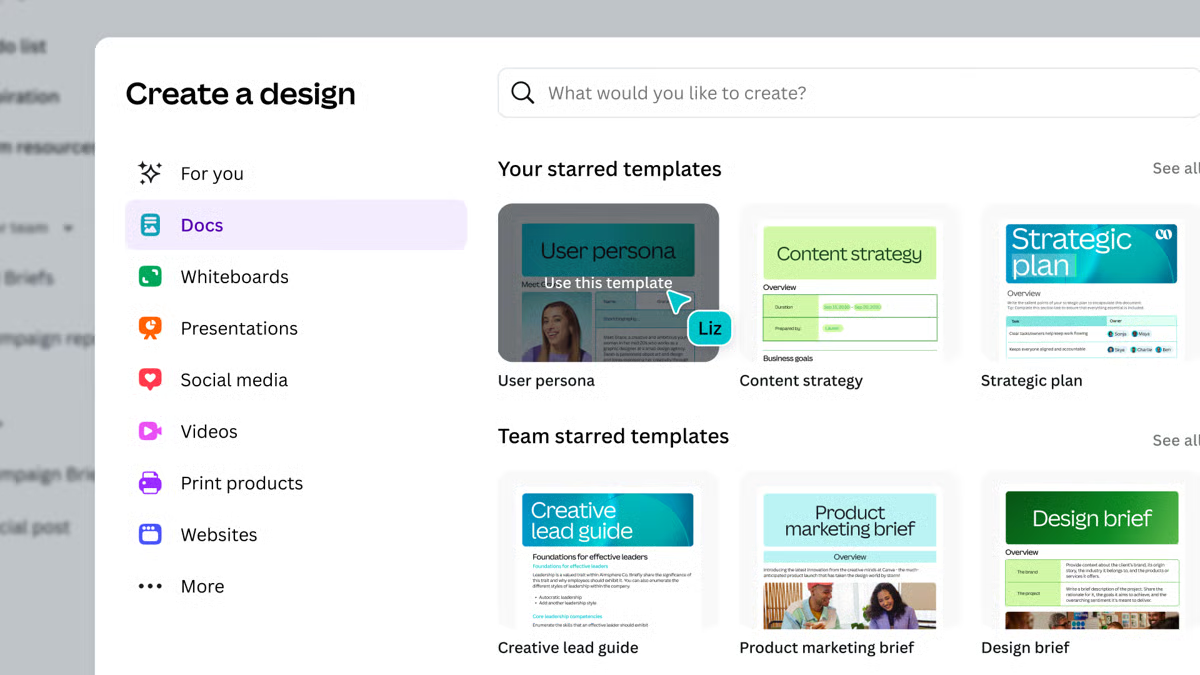
Canva also stands out for how broadly it’s used across teams. From social graphics to presentations and internal docs, reviewers talk about relying on one tool instead of juggling multiple design platforms. This versatility is a big reason Canva fits so naturally into day-to-day workflows, especially for small businesses and growing teams that want speed and simplicity over specialized tools.
Canva really shines when the goal is to move fast and get something polished out the door. That same structure, though, can feel restrictive for teams doing highly customized design work. If your projects require intricate layouts, fine-grained typography control, or complex illustrations, Canva may not offer the level of flexibility you’re used to in more advanced design software. For teams focused on quick, repeatable content, this limitation is often an acceptable trade-off.
Canva is also very effective as a shared workspace when teams are small to mid-sized and creating content regularly. As usage scales, some reviewers note that managing large libraries of designs, templates, and shared assets can take more effort. With strong organization practices, larger teams can still succeed on the platform, but Canva tends to feel most comfortable for teams that prioritize simplicity and speed over enterprise-style content governance.
Overall, Canva works because it stays focused on what most teams need most: fast, accessible visual content creation. For teams that care about speed, collaboration, and consistency more than deep design complexity, it’s a dependable platform that fits naturally into everyday work.
“I like that Canva is the app because the full-size software can only be used on a PC or a laptop, which has been converted into a simple app with full features. Next, in the Canvas, we can create a YouTube thumbnail, logo, or anything in just 5 minutes. With the help of Canva, I am running my YouTube channel without a designer. In the early stages, I couldn't afford to edit, so I created it myself with the help of Canva."
- Canva review, Priya S.
“You have to know what you're looking for and what you're using. There are graphics and shapes that you cannot manipulate the dimensions or colors of, which can become a time sink. The same goes for image frames or mockups. There are clear limitations, and I think it's important for any organization to have a design system or guidelines for when and what they use the platform for.”
- Canva review, Aiyoko I.
AI content works best when it supports a clear marketing foundation. This article walks through the core concepts of marketing and includes a practical planning template teams can use to stay aligned.
When Birdeye is viewed through the AI Content Creation Platform lens, what stands out most is how it helps teams generate customer-facing content directly from real interactions. Instead of treating AI as a blank-page writing tool, Birdeye focuses on creating responses, messages, and engagement content from existing reviews, feedback, and conversations.
A major theme across G2 reviews is how Birdeye’s AI helps teams keep up with response volume. Users talk about AI-assisted replies that make it easier to respond to reviews and messages quickly without manually drafting every response. This is especially useful when response quality matters but time is limited. According to G2 Data, Birdeye meets the requirements of 95% of users, which aligns with how reliably teams depend on these AI-driven content workflows in daily operations.
Another area reviewers highlight is consistency. Birdeye’s AI-generated content helps standardize tone and messaging across multiple locations, even when different people are responding. For businesses managing customer communication at scale, this reduces the risk of uneven or off-brand responses. That ease of adoption shows up in usage signals too — according to G2, Birdeye scores 95% for ease of use, suggesting teams don’t struggle to integrate AI-assisted content creation into their existing workflows.
Reviewers also point to how Birdeye blends AI content creation with messaging and engagement channels. AI isn’t limited to reviewing replies alone; it supports broader customer communication, helping teams reuse feedback-driven insights to shape outbound messages and engagement content. This makes the platform feel less like a standalone writing tool and more like a system for ongoing customer communication powered by AI.
Beyond generating responses, reviewers highlight how Birdeye uses AI to analyze customer feedback and surface patterns in sentiment. Instead of just replying to reviews one by one, teams can identify recurring themes, common complaints, and positive trends automatically. This allows businesses to turn raw feedback into actionable insights and adjust messaging or operations accordingly. It shifts the platform from being purely reactive to strategically informative.
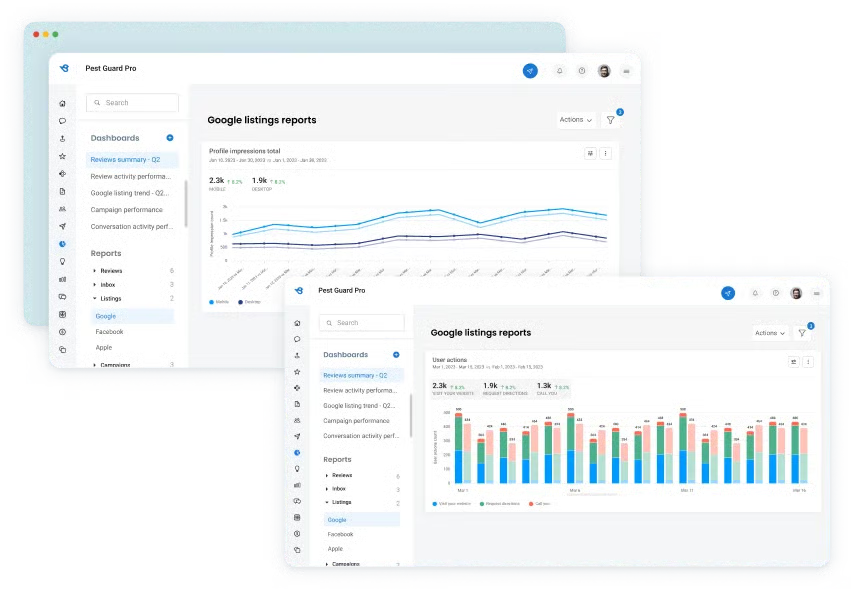
Support and onboarding come up as a steady positive as well. Users mention being able to get help when rolling out AI features or refining how responses are generated. According to G2, Birdeye earns a 95% rating for quality of support, which helps explain why teams can start creating AI-assisted content without a long ramp-up period.
Birdeye works especially well when AI content is tied directly to customer conversations. However, that specialization also means its AI capabilities are narrower than general-purpose content platforms. Teams looking to create blog posts, long-form marketing content, campaign copy, or highly creative brand storytelling may find that Birdeye isn’t built to support those broader use cases. For customer-facing teams, that focused scope is a benefit, but for content marketing teams, it may require pairing Birdeye with another tool.
Birdeye’s AI features are built to help teams handle consistent streams of reviews and messages efficiently. For smaller teams with limited customer input, the efficiency gains may be less noticeable, making Birdeye a better fit for growing or multi-location businesses that need AI to scale engagement rather than occasional responses.
Birdeye succeeds by anchoring AI content creation in real customer conversations. For teams that need to generate consistent, high-quality responses and engagement content at scale, it offers a practical way to turn feedback into meaningful communication without slowing teams down.
“I like that Birdeye is a direct and instant connection to our clients. Whether they had a positive experience or not, we can instantly respond to thank them and address any concerns. It is also a great tool to keep track of positive reviews so that we can contact the owners and post reviews with updated pictures on social media. The public trusts opinion and proof. Birdeye is able to give us both of those to help us know which direction our marketing and communications are going. The dashboard is a simple, easy-to-use format that breaks down the reports and helps me keep everything in one place. The AI features are fantastic! It helps me stay on top of interacting with clients and contacting poor reviews to alleviate miscommunications and ensure trust. The insights, reports, and competitor views are brilliant! I review them daily, and it is a vital tool.”
- Birdeye review, Sunny L.
“The AI-generated responses are a great way to launch a response to our reviews - I then go in and alter them to make them more personalized. Personalized responses add that little touch, I hope clients enjoy.”
- Birdeye review, Jessica H.
AI-generated content often fuels automated campaigns. Learn how marketing automation works and how content, workflows, and technology come together to scale outreach effectively.
Creatify AI is one of those tools where the value is immediately clear once you start using it. From what G2 reviewers consistently say, the platform’s biggest strength is how quickly it turns simple inputs into usable marketing content. That speed is the main reason people adopt it, especially when they need to produce short-form creative without spending hours drafting, editing, or coordinating with additional tools.
According to G2 Data, Creatify AI meets requirements for 93% of users, which lines up with how often reviewers say the core content-generation workflow does exactly what they expect.
What stands out to me in the reviews is how Creatify AI supports creative experimentation. Users talk about generating multiple content variations from the same core idea, which makes it easier to test hooks, messaging angles, and visual styles without rebuilding videos from scratch. For small teams running paid campaigns or frequent social promotions, that ability to experiment quickly becomes a practical advantage.
Another theme that comes up often is how lightweight the setup and ongoing management are. Reviewers describe being able to get started quickly, without long onboarding cycles or complicated configuration. That matches G2 Data showing 95% ease of setup and 96% ease of admin, which suggests the platform doesn’t require a dedicated owner or technical specialist to maintain. For small businesses and lean marketing teams, this low overhead is a big part of the appeal.
Reviewers frequently highlight how easy it is to generate talking-head style videos using AI avatars and built-in voiceovers. Instead of sourcing talent, recording audio, or stitching tools together, users can turn scripts or product inputs into spokesperson-style videos inside the same platform. For teams producing ads, product explainers, or UGC-style creatives at scale, this eliminates multiple production steps.
A repeated theme in the reviews is how smoothly Creatify AI converts text or product URLs into structured video content. Users don’t just get raw clips; they get automatically generated, formatted scenes, captions, pacing, and visual sequencing. This reduces the creative lift required from marketers who may not have video editing experience.
G2 reviewers often mention that Creatify AI automatically structures videos with captions, text overlays, and scene formatting designed for short-form viewing. Instead of manually adding subtitles or adjusting layouts for mobile consumption, users get properly formatted, scroll-stopping visuals by default. This is especially important for social platforms where silent autoplay and fast attention capture matter.
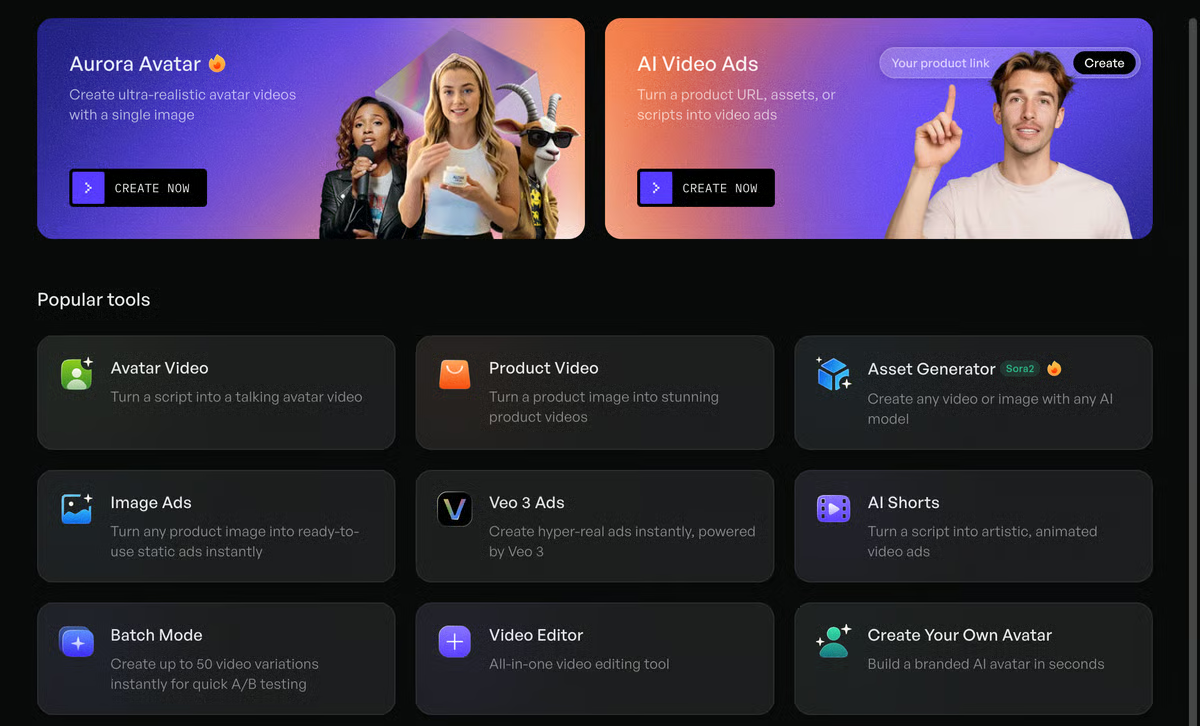
Many reviewers specifically reference using Creatify AI for high-volume ad creatives across platforms like TikTok, Instagram, and other short-form channels. The tool is structured around performance-style content rather than cinematic editing, which makes it particularly effective for direct-response and conversion-focused campaigns. Users appreciate that it’s built for iteration and testing rather than just one-off video creation.
What I appreciate about Creatify AI is how intentionally it prioritizes speed and structure, but that focus also means it’s not trying to be everything for everyone. Teams that need deeply customized creative, heavy brand control, or long-form content workflows may find the platform a bit limiting. For fast-moving marketers producing repeatable, short-form assets, this trade-off usually makes sense, but more design-heavy or editorial teams may want something with greater flexibility.
And while Creatify AI works extremely well for individual contributors and small teams, reviewers note that it isn’t built for large, complex content organizations. If you’re managing content across multiple departments or need enterprise-wide collaboration and governance, the platform may feel better suited as a productivity tool for specific roles rather than a central content hub. For small businesses and lean marketing teams, though, that streamlined focus is exactly what makes it effective.
My take is that Creatify AI does a very good job of staying focused on what it’s meant to do. For small teams that need to create marketing content quickly, with minimal setup and low administrative burden, its strengths clearly outweigh its limitations. It’s a practical, efficient option for high-velocity content creation where speed matters more than deep customization.
“I have owned and operated a software development company for twenty years and was ready to take my company to the next level after several years of putting it on hold, working in corporate America. I knew that I wanted to make use of AI for videos describing each of the modules within the software program, and after a quick search on Google, I found Creatify. The prompts I have provided have rendered the exact videos that I was looking for, with the avatars wearing the attire that I requested, all the way down to certain text appearing on their shirts. I was even able to ask that signs be placed on the wall with company names and slogans.”
- Creatify AI review, Daniel D.
“The only downside is that the Spanish voices aren’t as strong as the English ones, but that can be compensated for with the custom voice cloning feature, which works surprisingly well.”
- Creatify AI review, Daniella G.
AI tools can speed up content creation, but strategy still sets the direction. Learn how to build a content marketing strategy that aligns goals, channels, and messaging before you scale production.
AKOOL is consistently described as a tool built for turning AI into visual content, not just ideas on a screen. G2 reviewers talk about using it to generate avatars and face-swap. The appeal is that teams can produce this kind of content without traditional video production overhead, which makes AKOOL feel purpose-built for visual-first AI content creation rather than a general writing tool.
A strong theme across reviews is how accessible this visual generation workflow feels once teams get started. Users mention being able to create AI-driven video content without deep technical knowledge, which lowers the barrier for marketers and content teams experimenting with richer formats. That ease shows up in the data as well. According to G2, AKOOL scores 95% for ease of use and 95% for ease of setup, which supports reviewer feedback that teams can move from idea to output without long onboarding cycles.
Another area reviewers highlight is speed. AKOOL is often described as a way to rapidly produce variations of visual content, whether that’s avatars, localized videos, or personalized assets. For teams running campaigns or testing creative formats, this ability to generate and iterate quickly is a big part of the value. According to G2 Data, 97% of users say AKOOL meets their requirements, suggesting that its core visual content capabilities reliably deliver what users expect.
Reviewers also point to the platform’s direction and momentum. AKOOL isn’t framed as a static tool, but as one that’s evolving alongside how teams want to use AI for visual content. According to G2, 99% of users believe the product is going in the right direction, which aligns with reviewer confidence in its roadmap and continued investment in AI-driven video creation.
At the same time, AKOOL’s focus on visual and avatar-based content defines where it fits best. Because the platform is optimized for AI-generated video and imagery, teams looking primarily for long-form writing or text-based AI content may find it too specialized. For marketing and creative teams focused on visual storytelling, that specialization is a strength, but broader content teams may still need a separate text-centric tool.
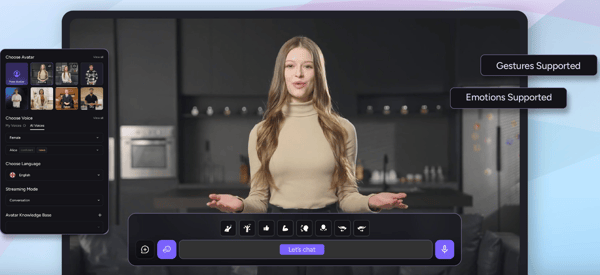
AKOOL’s creative automation delivers quick, high-quality visual output, but some G2 reviewers mention that its credit-based pricing can feel limiting for teams producing content at high volumes. For smaller businesses or teams with predictable workloads, though, reviewers note that the pricing model remains reasonable and easy to manage.
AKOOL is better suited for smaller creative teams and straightforward visual projects. Larger organizations with complex approval workflows, cross-department collaboration, or enterprise-level governance needs may find the platform lacks the depth required to function as a central content production system.
Taken together, AKOOL offers a practical way to bring AI into video and visual content creation without the overhead of traditional production. For teams experimenting with avatars, personalized videos, and AI-generated visuals, it provides a focused and accessible approach that fits well into fast-moving creative workflows.
“The Faceswap feature blew me away. It’s not just a fun gimmick; it actually produces clean, realistic results that stand out compared to anything else I’ve tried. For me, the best part is how accessible it is. You can hop on a free trial, test the waters, and the results pretty much speak for themselves. On top of that, they’ve made an API available, which is a big deal if you’re building projects or want to integrate this tech into your own work.
Customer support deserves a mention too; the team is quick and responsive (Discord replies are almost instant). As a developer, I found the integration fairly straightforward. It’s not perfect yet, but it’s solid and keeps improving.”
- AKOOL review, Hamza K.
“A little bit expensive in my opinion, not like other AI tools that give you a free limit, in this case, I need to wait a long time to try.”
- AKOOL review, William S.
AI content platforms cover a lot, but if writing is your main focus, it’s worth exploring the best AI writing generators built specifically for high-quality content creation.
SOCi is built around one very specific content challenge: creating social and marketing content that works at scale without falling apart at the local level. G2 reviewers consistently talk about using SOCi to create social posts and marketing content that can be adapted across locations, regions, or franchises. Rather than focusing on one-off content creation, SOCi is designed to solve the challenge of maintaining brand consistency while allowing local customization at scale.
That localization focus shapes how teams actually use SOCi day to day. Reviewers describe relying on the platform to create templated content that local teams can customize without starting from scratch. This balance between central control and local flexibility shows up clearly in the data as well. According to G2, 90% of users say SOCi meets their requirements, which aligns with how often reviewers mention the platform fitting real-world, multi-location content workflows rather than experimental use cases.
G2 reviewers frequently mention SOCi’s AI tools that help generate social captions and post variations tailored for local pages. Instead of writing every location’s content manually, teams can use AI-assisted suggestions that stay aligned with brand messaging while still allowing local customization. This helps reduce content bottlenecks for franchise or regional teams without sacrificing consistency.
Beyond social posting, reviewers often highlight how SOCi connects social content with review management in the same system. Teams can monitor customer feedback and adjust messaging or campaigns accordingly, rather than managing engagement and publishing in completely separate tools. This integration helps marketing and reputation management feel more unified.
SOCi is frequently described as a way to reduce chaos when many people are involved in content creation. Teams mention using it to manage approvals, scheduling, and publishing from a single place, which helps avoid duplicate work or off-brand posts. According to G2 Data, ease of admin is rated at 89%, suggesting that content oversight doesn’t become unmanageable as more locations or contributors get involved.
Reviewers also point to SOCi’s reliability once it’s embedded into regular workflows. It’s not positioned as a flashy AI writing assistant, but as a dependable system for producing and distributing content consistently over time. According to G2, the platform scores 89% for ease of use and 89% for ease of setup, which supports feedback that teams can get up and running without heavy disruption, even when rolling it out across multiple locations.
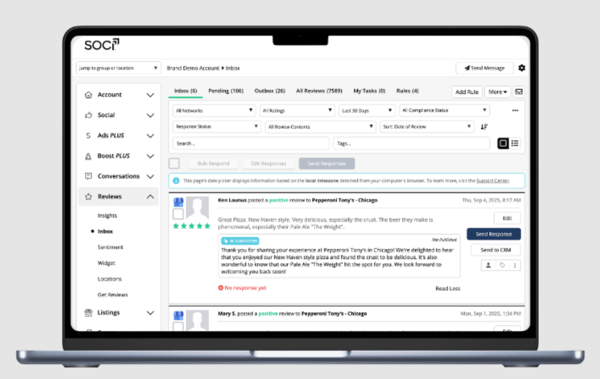
Another strength mentioned in reviews is SOCi’s ability to provide reporting across multiple locations from one dashboard. Corporate teams can monitor engagement, publishing activity, and performance trends across regions without requesting separate reports from each location. This visibility makes it easier to identify high-performing content and maintain accountability at scale.
SOCi’s centralized management tools make it great for coordinating multi-location marketing, but some G2 reviewers mention that smaller teams with simpler content needs may find its feature set more than they require. For growing businesses managing multiple pages or franchises, however, these capabilities become a real advantage.
Some G2 reviewers mention that while SOCi is strong for structured, templated social workflows, it’s less suited for highly customized or design-heavy creative work. Teams looking for advanced editing capabilities, deep creative control, or experimental campaign formats may find the platform more operational than creative. It performs best when consistency and scalability matter more than artistic flexibility.
In practice, SOCi works best when content creation is a coordination problem, not just a writing task. For multi-location brands that care about consistency, governance, and scalable AI-assisted social content, it offers a practical way to keep everyone aligned without slowing teams down.
“SOCI has been an invaluable asset to our marketing efforts since we started using it in November 2023. As a Marketing Manager, I appreciate how efficiently and effectively it streamlines our social media and reputation management tasks across our entire portfolio. SOCI has significantly boosted our online presence and has also been essential in ensuring our on-site teams remain accountable. Its user-friendly interface and robust features have played a major role in helping us strengthen our online reputation and achieve our marketing objectives. SOCi is continually evolving, introducing new features and enhancements to their products. The addition of Genius has made a noticeable difference by reducing the workload for our teams, while still maintaining accountability for social media and reputation responsibilities. With the upcoming launch of Genius Agents, I am genuinely excited to see how these agents will take ownership of tasks and further ease the daily workload for both our teams and myself. Overseeing 37 locations as a single person, these kinds of tools are exactly what I seek in a vendor partnership.”
- SOCi reviews, Stephanie O.
“There are a few areas where the platform could improve. Some features can feel a bit limited or unintuitive depending on the use case. However, the SOCI team has been receptive to feedback and continues to work on enhancements, which gives us confidence in the platform’s long-term value.”
- SOCi reviews, JuWan R.
Jasper is most often praised for how well it helps teams maintain a consistent brand voice while generating marketing content.
Reviewers repeatedly talk about using it to create blog posts, campaign copy, emails, and social content that sounds aligned with their brand guidelines instead of generic AI output. The standout feature isn’t just writing speed, but Jasper’s ability to learn tone, style, and messaging patterns so content feels cohesive across channels and contributors.
That brand-first approach shapes how teams actually work inside the platform. Reviewers describe relying on Jasper to support long-form and campaign-driven content, especially when multiple writers or marketers are involved. Instead of starting from a blank page each time, teams use Jasper to extend existing messaging into new formats while keeping voice and intent intact. This confidence shows up in broader sentiment as well, according to G2 Data, 93% of users say they’re likely to recommend Jasper, which reflects how well it fits day-to-day marketing workflows.
Where Jasper’s AI content creation capabilities stand out most is in long-form writing support. Reviewers frequently highlight its ability to generate structured blog posts, guides, and campaign assets that maintain context across sections rather than producing disconnected paragraphs. This helps marketing teams draft multi-section content more efficiently while preserving flow, messaging intent, and narrative consistency.
Reviewers also frequently highlight Jasper’s Brand Voice training functionality. Teams can train the AI on existing content, tone guidelines, and messaging examples so outputs reflect their brand style rather than generic AI phrasing. This allows marketing teams to generate emails, landing pages, and social copy that feel intentionally aligned with their positioning, not just grammatically correct, but strategically consistent.
Another theme that comes up consistently is how Jasper supports collaboration and production at scale. Reviewers mention using shared brand assets, reusable templates, and centralized content workflows to reduce rework and speed up publishing. This is less about quick experimentation and more about repeatability, which is why Jasper often shows up in content teams with steady output demands rather than ad-hoc usage.
According to G2, 95% of users believe the product is going in the right direction, reinforcing reviewer confidence in its roadmap for content teams that expect to scale.
Support and vendor experience also stand out more here than in some other tools. Reviewers frequently mention responsive support and helpful onboarding resources when rolling Jasper out across teams. According to G2 Data, the quality of support is rated at 94%, which aligns with feedback from marketing teams who rely on Jasper as a core part of their content stack rather than a side tool.
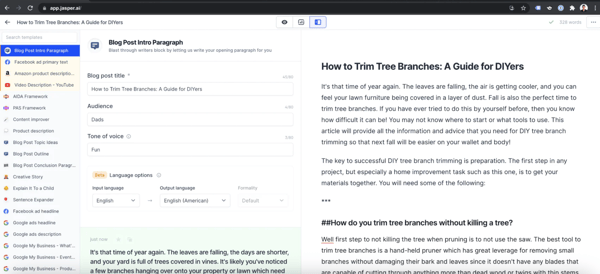
Jasper’s focus on structured, brand-aligned content means the platform is primarily optimized for marketing and campaign copy. Teams looking for highly experimental, technical, or non-marketing AI use cases may find it less flexible than more open-ended AI tools. It performs best for marketing teams producing repeatable, on-brand content, while broader creative or cross-functional teams may need a platform with wider use-case coverage.
While Jasper’s workflow automation and brand voice tools make it a top performer for consistent, high-volume content teams, some reviewers mention that smaller groups with occasional content needs may find it more complex than necessary. The platform shines most for mid-sized and enterprise marketing teams that create content regularly and can fully leverage its advanced collaboration and brand management features.
What stands out in real use is how Jasper supports AI as part of an ongoing content operation. Marketing teams focused on brand consistency, long-form writing, and repeatable workflows find it a dependable fit for day-to-day content creation.
“Jasper is a simple, game-changing tool that has helped streamline our content creation process. It consistently delivers first drafts that align perfectly with our tone of voice, saving us both time and effort. It feels like having an extra teammate who truly understands your brand. It was really easy to implement and integrate to our tool stack too. My team members and I started using it almost daily once we got started.
I recently reached out to the customer support team to ask them for help transferring my colleague's account to my name, and they were very helpful.”
- Jasper review, Ana C.
“Sometimes the content needs manual editing to sound more natural. Jasper could improve by making the content sound more natural.”
- Jasper review, Tanuj K.
Creaitor stands out in the AI Content Creation Platforms category for one clear reason: it makes structured AI writing feel effortless. The strongest signal across G2 reviews is how quickly users can generate organized, usable drafts without wrestling with formatting or over-engineering prompts. According to G2 Data, Creaitor earns 92% for ease of use and 96% for ease of setup, which supports what reviewers consistently describe: a writing workflow that feels immediate and practical.
One of the biggest strengths is how Creaitor structures content automatically. Instead of producing loose paragraphs, it generates organized drafts that follow a logical flow, making it easier to turn ideas into blog posts, marketing copy, or website content. That structure reduces editing time because the foundation is already in place.
Another clear advantage is speed. Reviewers frequently talk about how quickly they can produce multiple drafts or variations, especially for recurring marketing needs. For teams managing landing pages, social posts, or promotional copy, this ability to generate content on demand becomes a practical productivity boost rather than just a novelty feature. The tool supports consistent output without requiring a steep learning curve.
Creaitor also earns strong confidence around product direction. According to G2 Data, 98% of users believe the product is headed in the right direction. In a fast-moving AI enviornment, that reassurance matters. Users aren’t just satisfied with current functionality; they feel confident the platform is evolving alongside content demands.
The platform’s writing assistance is clearly designed for real business communication. Creaitor supports drafting marketing text, structured articles, and practical business copy in a way that emphasizes clarity and organization. Instead of feeling experimental or overly creative, the output leans toward structured, usable content that fits everyday marketing workflows. This makes it especially effective for teams producing steady volumes of content where consistency matters more than abstract creativity.
Support and day-to-day usability reinforce that experience. According to G2 Data, Creaitor holds a 91% rating for quality of support, suggesting users don’t struggle alone when refining workflows or outputs. Combined with its strong ease-of-use score, the platform feels accessible even for teams without deep AI experience.
Creaitor’s structured writing engine is designed for speed and clarity, but the generated content can occasionally feel a bit generic or repetitive on the first pass. While it provides a solid foundation, reviewers note they sometimes need to refine phrasing or adjust tone to make the content feel more distinctive. For teams prioritizing fast draft generation, this extra polish step is manageable, but brands focused heavily on unique voice differentiation may expect to spend additional editing time.
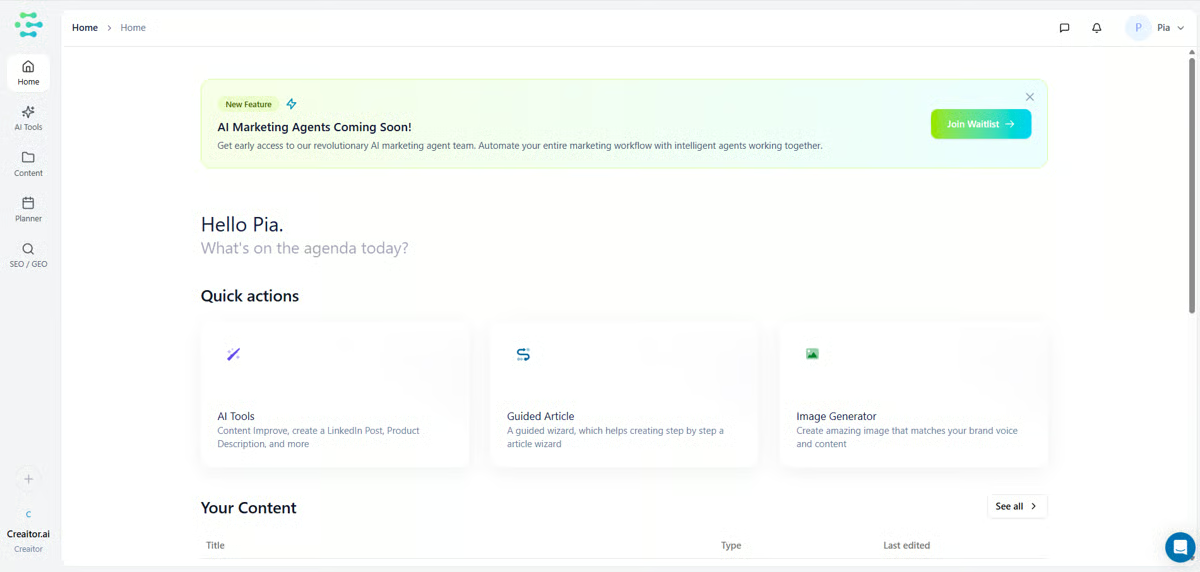
The platform is intentionally streamlined, which makes it approachable, yet a few G2 reviewers indicate that it doesn’t offer the same depth of advanced features found in more complex content suites. Users looking for highly granular controls, broader integrations, or advanced SEO tooling may find the feature set somewhat limited. For small businesses and marketers focused on core writing tasks, this simplicity works well, but power users seeking layered functionality might want more flexibility.
Overall, Creaitor succeeds by doing one thing exceptionally well: helping teams generate structured, usable written content quickly. It doesn’t overcomplicate the writing process, and it supports consistent output without heavy overhead. For small and growing teams that need reliable AI-driven content creation, it’s a focused and efficient choice.
“I like how Creaitor helps with ideas when I feel stuck and don’t know what to write. It makes content creation less stressful and proceeds with ease. I use it mainly for caption writing and idea generation. The suggestions are quick and flexible, which makes it easier to edit and adapt to my style. It makes it easier to manage my time wisely. The setup was simple and straightforward. I didn’t face any issues getting started with my initial setup.”
- Creaitor review, Maitri P.
“One area where Creaitor could see improvement is in enhancing the quality of long-form content. I also find that making AI outputs more distinct would be beneficial. Additionally, expanding customization and collaboration tools to accommodate larger teams or to meet advanced professional needs would significantly enhance its usefulness.”
- Creaitor review, Nithinya G.
Hypotenuse AI is frequently described as a go-to tool for turning structured product data into usable content at scale. Reviewers consistently describe using it to turn catalogs, attributes, and keywords into readable, consistent content without manually writing every variation.
The standout feature isn’t creativity for creativity’s sake, but how reliably the platform transforms structured inputs into publish-ready content at scale, which is why it shows up so often in ecommerce and content operations workflows.
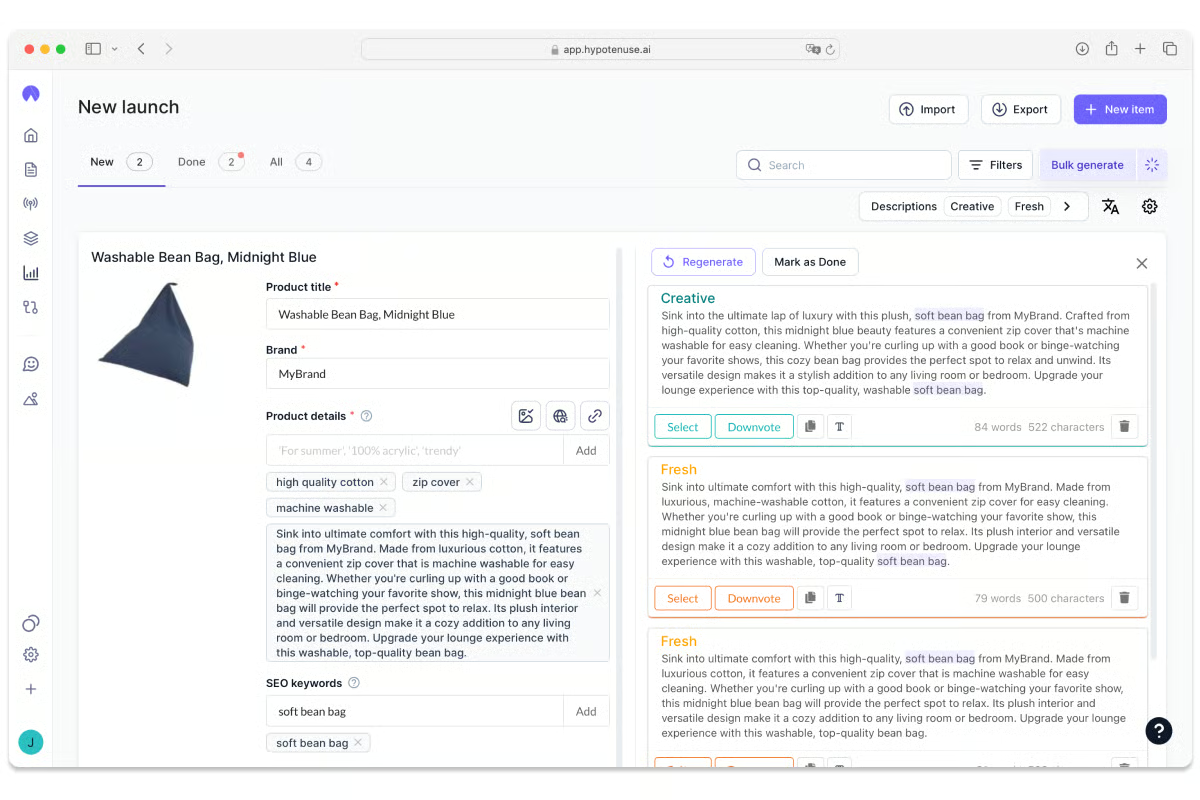
That focus on scale shapes how teams use Hypotenuse AI in practice. Reviewers talk about generating hundreds or thousands of product descriptions, category pages, or SEO snippets while keeping tone and formatting consistent. Instead of treating AI as a brainstorming assistant, teams lean on Hypotenuse AI as a production engine that reduces repetitive writing work.
That confidence in day-to-day usage shows up in broader sentiment as well, according to G2 Data, 93% of users say they’re likely to recommend the platform, which aligns with how often reviewers position it as a dependable part of ongoing content operations.
G2 reviewers frequently mention that Hypotenuse AI supports both generating richer descriptions from sparse product attributes and improving existing copy. Whether teams are working with thin product specs during catalog migrations or refreshing outdated listings for better SEO and tone consistency, the platform helps transform raw or inconsistent content into more polished, benefit-driven descriptions. This makes it useful not only for net-new content creation but also for ongoing content maintenance and optimization.
Reviewers frequently highlight Hypotenuse AI’s ability to handle bulk uploads through spreadsheets or structured data files. Instead of generating content one entry at a time, teams can upload large product datasets and automate description creation in batches. This significantly reduces manual copy-paste work and makes it practical for managing large catalogs without piecing together multiple tools.
Another theme that comes up frequently is how purpose-built the platform feels for commercial content. Hypotenuse AI is described as especially effective when content needs to align with product data, keywords, or templates rather than open-ended prompts. This specialization helps teams move faster and maintain consistency across large content libraries.
According to G2, 94% of users believe the product is going in the right direction, reinforcing reviewer confidence that the platform continues to invest in features that support scalable, structured content creation.
Support also plays a noticeable role in reviewer feedback. Teams mention relying on guidance when setting up workflows or adapting the platform to their specific content needs. According to G2 Data, Hypotenuse AI earns a 95% quality of support rating, which matches comments about responsive help when teams are scaling content generation or refining outputs for production use.
Hypotenuse AI is primarily optimized for structured, product-focused, and SEO-driven writing. Teams looking for highly creative, narrative-heavy, or experimental content may find the platform more constrained than open-ended AI writing tools. It performs best for e-commerce and SEO teams prioritizing consistency and scale, while creative writing teams may prefer a more flexible solution.
While Hypotenuse AI stands out for its automation and scalability, it’s most rewarding for teams producing content regularly. Some reviewers mention that smaller businesses or solo creators don’t always see the same time savings, simply because their output volume doesn’t justify the platform’s full capabilities.
For e-commerce brands and marketing teams handling large product catalogs or frequent content cycles, though, Hypotenuse AI really hits its stride, turning hours of manual work into streamlined, high-quality production.
“Extremely robust and useful. This software has already saved me an incredible amount of hours. The AI writer does an amazing job writing excellent articles and I had a huge change in my SEO driven traffic within just a few days! I now use it almost every day and I cannot imagine running my business without it any longer. A must have for E-commerce and web centered business!”
- Hypotenuse AI review, Mark L.
“It occasionally repeats similar sentences within the same blog. Although the content is unique, this repetition sometimes disrupts the flow of the blog. I hope this aspect gets improved in future updates.”
- Hypotenuse AI review, Rohma R.
Got more questions? Get your answers here!
Jasper, Hypotenuse AI, and Birdeye are the top picks for personalized content creation. These platforms help marketers generate audience-specific campaigns, tailor tone and messaging, and maintain brand consistency across channels. G2 users praise their adaptability and human-like creativity.
If you want ready-to-use templates, Canva and Creatify AI are the best. Canva’s AI-powered Magic Studio offers professional layouts for every format, while Creatify AI provides ad and video templates with built-in AI script and voice options.
Jasper leads here. Its adaptive brand voice keeps writing natural and on-message, making it a favorite among teams looking for authentic, human-like copy.
For marketers, the best AI content platform depends on whether you prioritize copy, design, video, or multi-channel management.
If you want one platform for copy-first marketing, Jasper stands out. For visual-first teams, Canva is often the go-to.
For social media:
If you need design + captions together, Canva is usually the easiest starting point.
Beginners typically need simplicity and guided templates.
Tools like Jasper are powerful but may require more strategic input to get the best results.
For AI-powered marketing videos:
If performance marketing and ad creatives are your focus, Creatify AI and AKOOL are strong options.
For SEO-focused writing:
SEO success still depends on strategy and keyword research, but these tools can significantly speed up drafting and optimization.
An AI content creation platform's ROI is measured by comparing its costs with the measurable results it delivers. This includes time saved, lower outsourcing costs, faster publishing, improved organic traffic, and increased conversions. Teams typically evaluate ROI by tracking productivity gains alongside performance metrics like traffic growth, leads, and revenue influenced by AI-generated content.
AI content creation platform features to look for include long-form content generation, SEO optimization tools, keyword integration, brand voice customization, real-time content scoring, editing tools, bulk generation, collaboration workflows, and CMS integrations. More advanced platforms may also offer AI-powered briefs, SERP analysis, and performance tracking to support end-to-end content workflows.
AI content creation has moved beyond the hype stage. Today, the real challenge isn’t choosing whether to use AI; it’s choosing the right platform for your industry, team, and workflow.
After testing a wide range of AI content creation tools, one trend stood out: these platforms are becoming more specialized. Some are built for long-form and SEO-driven content, others prioritize social, video, or design speed, while a growing number focus on brand consistency for larger teams. As a result, the gap between “feature-rich” and “right-fit” tools is growing fast.
That shift changes how creators and marketing teams should evaluate AI software. Creativity alone isn’t enough. The best tools are the ones that align with how you actually create, collaborate, and publish, whether you’re a solo writer, an agency, or an in-house team.
In this guide, I break down AI content creation platforms based on who they’re built for, so you can find the one that fits your workflow, not just your wishlist.
If writing is where you spend most of your creative energy, you’ll want a tool that truly understands words. Explore G2’s article on the best AI writing generators to find the one that helps you write faster without losing your voice.


To find the best free AI content creation tools for marketers, I tested nine platforms and...
 by Shubham Gupta

I evaluated 20+ best content creation software to identify the seven platforms that...
by Shubham Gupta

Brands nowadays create all kinds of digital assets to promote their products and services. As...
 by Holly Landis