


I have used online learning platforms in different ways.
Sometimes it was to roll out training at scale. At other times, it was to help a small team quickly upskill, or to ensure that learning content was completed instead of being ignored. After a while, you stop judging these platforms by how many features they list and start judging them by how well they fit the situation you’re in.
That’s why I've put together my list of the best online learning platforms, organized by use case. From enterprise training to cohort-based learning to on-demand skill development, online learning can mean anything. On the surface, many of these tools look interchangeable.
In practice, the differences show up once learners, admins, and stakeholders all start using them at the same time. My review is backed up by G2 Data, which I used to understand what learners and administrators consistently respond well to and where trade-offs tend to appear. With that context, here are my top picks for this category. Teams managing structured programs often rely on training management systems to organize sessions, track progress, and measure outcomes.
| Best online learning platforms | Best for | G2 Rating | Pricing | Likelihood to recommend |
| Absorb LMS | Catering to large enterprises | 4.6/5⭐ | Custom pricing | 92% |
| Udemy Business | AI-powered learning recommendations | 4.5/5⭐ | Available on request | 92% |
| DataCamp | Most advanced learning analytics | 4.6/5⭐ | Starts at $14 per user per month | 95% |
| Mighty Networks | Highest rated learner experience | 4.7/5⭐ | Starts at $49 per month |
94% |
| 360Learning | Integrating with HR systems | 4.6/5⭐ | Starts at $8 per user per month | 92% |
| Speexx | Multi-language learning content delivery | 4.5/5⭐ | Available on request | 94% |
| Thinkific | Most cost-effective for SMBs | 4.5/5⭐ | Starts at $36 per month | 90% |
| LearnWorlds | Video-based and interactive learning content | 4.7/5⭐ | Starts at $24 per month | 94% |
*These are the leading online learning platforms on G2 per our Winter 2026 Grid Report. Pricing data is subject to change.
When I choose the best tools for each use case, I start with G2 Data. I look at a product’s category performance, including its G2 Score, satisfaction ratings, and feature-level strengths. This helps me understand which tools consistently perform well before I narrow them down to more specific scenarios, like small teams, nonprofits, or industry-focused workflows.
From there, I delve into review insights to see what real users have to say. I look for patterns in pain points, frequently praised features, and feedback from people in the same roles or industries that the use case targets. The recommendations you see reflect that mix of quantitative scoring and qualitative sentiment, focused on the tools that repeatedly show up as the strongest fit for that specific need.
Enterprise learning is often where the best platforms quietly fall apart. Not because they stop working, but because the day-to-day gets messy. Too many admins. Too many audiences. Too many “Can you pull this report by Friday?” requests. For large organizations, I care less about flashy features and more about whether the platform can stay organized when the program scales and the stakeholder list doubles.
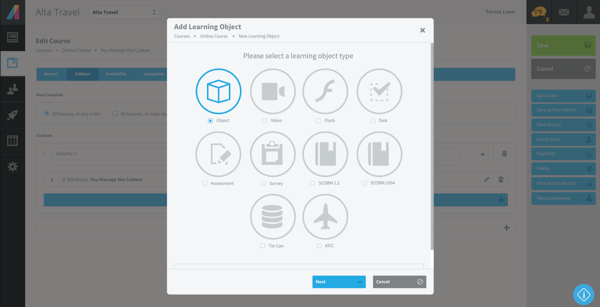
Absorb LMS is the option I’d put high in this lane. In G2 reviews, Absorb LMS shows up as a steady choice for teams that need a structured LMS they can run for the long haul. The metrics support that enterprise fit without overreaching: Absorb LMS has a 95% Satisfaction Score by category, and 96% of users say the product is going in the right direction. That’s the combination I want to see for an enterprise pick. People feel good about using it today, and they’re not bracing for a platform switch six months from now.
| Absorb LMS pros | Absorb LMScons |
| Users like that Absorb LMS helps them keep large training programs organized, especially when multiple teams are involved. | Some note Absorb LMS works best when ownership is clear, since enterprise rollouts tend to involve a lot of moving parts. |
| Some users point to Absorb LMS as a platform that feels reliable over time, which matters when learning programs are ongoing. | Several reviewers mention that teams get more out of Absorb LMS after they’ve aligned on setup and reporting expectations. |
| Others appreciate the admin experience, particularly when they need consistent workflows instead of one-off fixes. | Users say that bringing everyone onto the same workflow can take a bit of upfront enablement, especially with multiple admins. |
View more Absorb LMS alternatives on G2.
AI recommendations matter most when learners don’t know what they should take next. In large or fast-moving organizations, people often prefer not to browse catalogs. They want relevant courses surfaced for them, without having to think too hard about it. That’s the problem Udemy Business is built to solve.
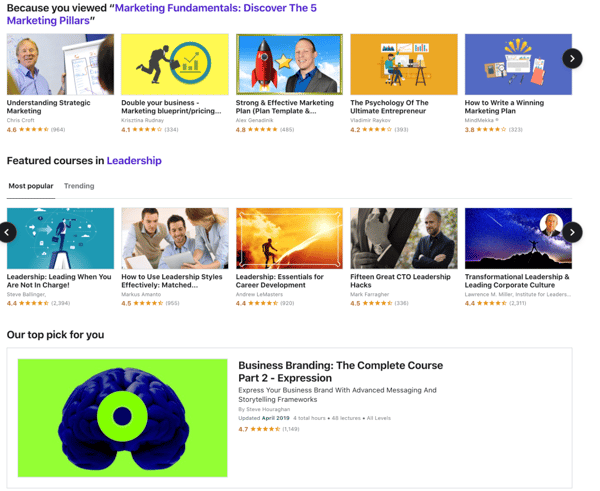
Udemy Business aligns with this use case because G2 reviewers describe it as a platform that enables learners to discover relevant skills and courses with minimal effort. The experience feels guided rather than manual, which is where AI-backed recommendations actually earn their keep. The metrics reinforce that adoption-friendly story: Udemy Business shows 95% Ease of Use and 94% Ease of Setup, which explains why learners tend to engage with the platform without much prompting, and admins don’t need to over-engineer the rollout.
| Udemy Business pros | Udemy Business cons |
| Users appreciate how Udemy Business automatically recommends relevant courses, reducing friction for learners. | Some note that Udemy Business works best when teams are comfortable with a large, external content library. |
| Many appreciate how easy it is for learners to get started without training or onboarding. | Several reviewers mention wanting more control over curation, especially for role-specific programs. |
| Reviewers also praise the breadth of content, especially for technical, business, and professional skills. | Users also say that aligning Udemy content with internal competency frameworks can take planning. |
Find Udemy Business alternatives on G2.
Learning analytics gets interesting once you’re past basic reporting and you’re trying to run a program like a program. Who’s progressing consistently? Where people drop off. Which skills are trending up across teams? And whether your learning investment is showing up as real capability, not just activity.
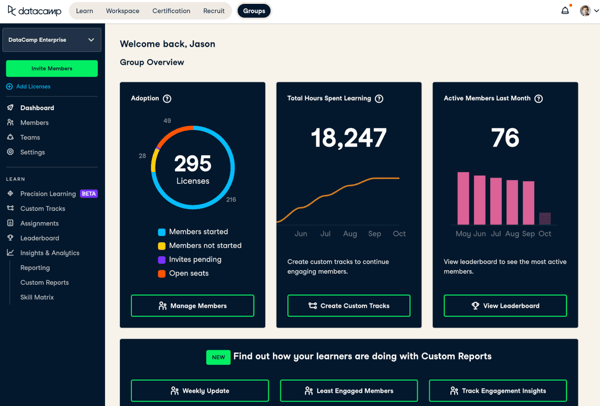
DataCamp is the platform I trust most for that kind of clarity. In G2 reviews, DataCamp is frequently associated with tracking learner progression and skill development in a way that feels structured and easy to interpret. The numbers support that “usable analytics” reputation: DataCamp shows 95% Satisfaction and 96% Ease of Admin. That’s a strong combination for a tool that gets opened regularly by both learners and the people responsible for reporting outcomes.
| Pros | Cons |
| Users like that DataCamp makes it easier to see progress and skill growth, not just course completion. | Several reviewers mention pairing DataCamp with a broader LMS to cover general training needs. |
| Reviewers often praise how the platform supports structured learning paths, especially for technical upskilling. | Some note DataCamp fits best for skills-based programs, particularly for data-focused learning tracks. |
| Many appreciate that the insights feel easy to use in reporting and planning, not just “nice to have.” | A portion of users flag that expanding DataCamp beyond its core focus can take extra alignment around how learning is structured. |
See top-rated DataCamp alternatives on G2.
Learner experience shows up in small moments. Whether people actually log back in. Whether discussions feel active or forced. Whether learning feels like something participants join, not something assigned to them. That’s the lens I use for this use case.
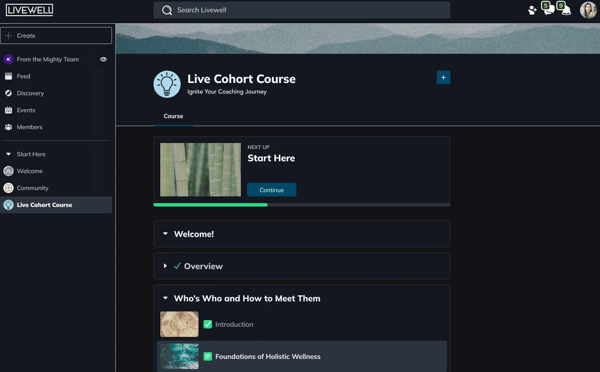
Mighty Networks stands out because G2 reviewers describe it as a platform learners enjoy spending time in. The experience feels community-first rather than course-first, which changes how people interact with content. In the metrics, that shows up as 94% Satisfaction and 87% Ease of Use. Those numbers line up with the review sentiment I see: learners tend to engage more naturally, and admins don’t have to push as hard to keep participation up.
| Pros | Cons |
| Users like that learning feels community-driven, not transactional. | Several reviewers mention pairing it with another platform for structured courses or certifications. |
| Many appreciate how easily discussion and content blend together, keeping engagement high. | A few say that admin controls are lighter than a traditional LMS, depending on the use case. |
| Reviewers often praise the clean, familiar interface, especially from a learner’s point of view. | Some note Mighty Networks is better suited for experience-led learning than formal training programs. |
Browse Mighty Networks alternatives on G2.
HR integration shows up when learning stops being a side project and starts becoming part of how people are managed, promoted, and developed. That’s where simple course delivery isn’t enough. The platform has to fit into existing HR workflows without creating extra handoffs or manual work.
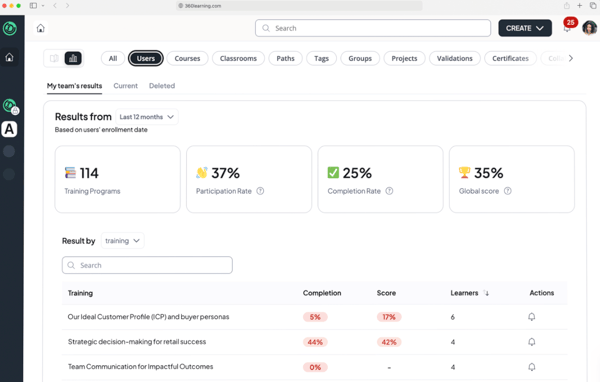
360Learning is the platform I associate most closely with that kind of setup. In G2 reviews, it’s often discussed in the context of internal enablement, manager-led learning, and programs that sit close to HR and L&D operations. What stands out to me is how frequently reviewers describe 360Learning as something that works with existing systems instead of competing with them. The metrics back that up in a practical way: 90% Ease of Admin and 95% Ease of Doing Business With suggest teams can manage integrations and ongoing changes without constant friction.
| Pros | Cons |
| Many users appreciate that the platform supports ongoing learning, not just one-time training. | A few users say that the experience feels less suited to static, compliance-only programs. |
| Users like how 360Learning fits into HR-led workflows, especially for internal enablement and upskilling. | Some users note that 360Learning works best when teams are willing to participate actively, not just consume content. |
| Reviewers often praise the collaborative learning model, where internal experts contribute content. | Several reviewers mention that setting up collaborative workflows takes intentional planning. |
Check out 360Learning alternatives on G2.
Global training has a predictable failure mode: the content is technically available, but the experience doesn’t feel built for the people who need it. Rollouts stall, managers stop nudging, and learners disengage because the platform feels like it was designed for someone else.
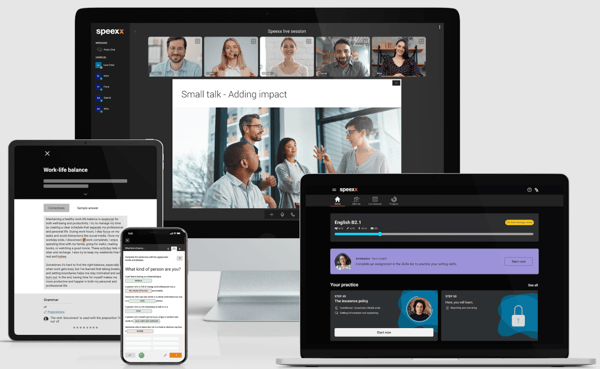
Speexx is the platform I associate with avoiding that outcome. In G2 reviews, Speexx shows up in the context of distributed teams where language delivery is the requirement, not a bonus. What I like about the story users tell is that Speexx feels designed for real global programs, not as a “we also support languages” add-on. The metrics match that confidence: 95% Ease of Use and 95% for product going in the right direction. That combination usually signals a platform people can actually roll out across regions without constant friction, and still feel good about sticking with it.
| Pros | Cons |
| Many users appreciate the consistency of delivery for global programs that need continuity. | Some reviewers note Speexx is best when the program is language-first, rather than a mixed training catalog. |
| Users like Speexx for supporting language learning across regions, especially when teams are distributed. | Others mention pairing Speexx with another platform for broader enablement and compliance training. |
| Reviewers often praise the learner-facing experience, noting it feels approachable for regular use. | A portion of users flag that running everything in one place may require additional tools alongside Speexx. |
Discover Speexx alternatives on G2.
SMB learning platforms usually get evaluated in real-world terms, not feature grids. How quickly something can be launched. How predictable the costs feel month to month. And whether the platform keeps out of the way once courses are live. That’s the context I’m using for this pick.
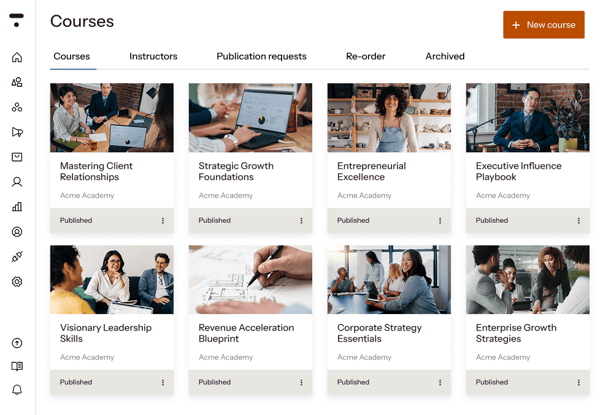
Thinkific is the platform I picked for keeping learning programs simple and financially manageable for small teams. In G2 reviews, Thinkific stands out for being easy to get off the ground and straightforward to operate without needing extra help. The metrics support that practical fit: Thinkific shows 87% for Ease of Setup and 90% for Ease of Doing Business With, which aligns with how SMBs tend to use it. People want to move quickly, avoid surprises, and spend time on content instead of configuration.
| Pros | Cons |
| Reviewers often praise the straightforward admin experience, without unnecessary complexity. | Some think Thinkific is best suited for SMB and creator-led programs, rather than large enterprises. |
| Users like Thinkific for getting courses live quickly, especially with small teams. | A few reviewers note that customization options feel more focused on simplicity than depth. |
| Many appreciate the predictable pricing model, which makes budgeting easier. | Several reviewers mention that advanced workflows may require additional tools as needs expand. |
View more Thinkific alternatives on G2.
Video-led learning falls flat when it feels passive. The difference between “watched” and “learned” usually comes down to whether the platform lets you build interaction directly into the experience, instead of layering it on afterward.
/LearnWorlds.webp?width=600&height=337&name=LearnWorlds.webp)
LearnWorlds is the platform I think of for building that kind of experience. G2 reviews describe it as a place where video and interactivity work together, so the course feels designed rather than uploaded. What I like about the way users talk about LearnWorlds is that it supports iteration. Teams can adjust how the experience flows as they learn what learners respond to.
The metrics support that cadence: LearnWorlds shows 96% Quality of Support and 94% say that the product is going in the right direction, which is a strong signal that people feel backed up while building, and that they’re confident continuing with the platform.
| Pros | Cons |
| Reviewers often praise the control over course structure and engagement, especially for video-led programs. | Several reviewers mention using another platform for administration-heavy training workflows. |
| Users like how LearnWorlds supports interactive learning experiences, not just basic video hosting. | Some users note LearnWorlds fits best for experience-led courses, not enterprise HR operations. |
| Many users appreciate that LearnWorlds helps courses feel intentional and guided for learners. | A few mention that advanced interactivity benefits from upfront design and iteration. |
Look up more LearnWorlds alternatives on G2.
Picking the best online learning platform gets a lot easier once you stop asking “what can this tool do?” and start asking “what do I actually need it to handle?”
The tools in this list stand out because users rely on them for specific jobs. Some make it easier to scale training without chaos. Others keep learners engaged, surface better insights, or lower the barrier to getting started.
If you’re stuck deciding, look at where your current setup creates friction. Is it admin overhead, engagement drop-off, visibility into outcomes, or rollout speed? That answer usually points to the right category of platform pretty quickly.
Once you’ve narrowed it down, the next step is simple: spend time in the product, read recent reviews from teams like yours, and pressure-test whether the platform fits how you actually work.
If you’re narrowing down vendors for a corporate rollout, check out the best corporate LMS software and the decision points that matter most.


I've always been the kind of learner who likes exploring new skills, whether it's brushing up...
 by Yashwathy Marudhachalam

If you're reading this, your current training setup likely isn’t cutting it anymore. Maybe...
.png) by Tanuja Bahirat
by Tanuja Bahirat

Without careful research, a business that seems lucrative can end up costing more money.
 by Deirdre O'Donoghue