.png?width=400&height=150&name=My%20project-1%20(1).png)


If you're reading this, your current training setup likely isn’t cutting it anymore. Maybe you’re juggling multiple spreadsheets, documentation lives across five tools, managers keep asking for progress updates, and compliance deadlines feel like a moving target.
These issues aren’t minor, they have real financial consequences. That’s why many teams are actively evaluating the best training management systems to improve training visibility, reduce compliance risk, and standardize skill development. When training workflows break down, the cost isn’t just operational; it’s strategic.
The market has responded quickly. Training management systems now go far beyond basic course hosting. They centralize scheduling, automate reminders, consolidate training records, and give teams reliable insight into who’s trained, who’s overdue, and what needs attention next.
To help teams move away from scattered workflows and toward a unified training strategy, I evaluated 20+ of the best training management systems. I compared usability, automation depth, reporting strength, compliance features, and real user sentiment to identify the platforms that actually deliver on their promises.
Here’s what I found.
*These best training management systems are picked based on G2’s Fall 2025 Grid Report. I’ve added their standout features for easier comparison.
Coordinating training across an organization requires more than good intentions. You’re managing deadlines, compliance audits, role-based learning paths, and employees across multiple locations or teams. Without a centralized system, training owners end up buried in admin tasks, tracking learners manually, sending reminders by hand, or piecing together records right before an audit.
This is exactly why training management adoption is accelerating. As more companies mature their processes, they’re looking for platforms that unify course management, employee data, and reporting, not another tool that creates more work. TMS platforms have evolved to deliver this by pairing automation with deep visibility.
The best training management systems excel because they simplify everything training teams struggle with most: scheduling, tracking, certifications, and compliance oversight. They help teams create consistent learning experiences, uncover skill gaps, and reduce the time spent managing data manually.
To build this list, I started with G2’s Grid® Report for training management systems to create a shortlist, using a mix of user satisfaction scores and market presence as my guide. My shortlist was based on a blend of user satisfaction scores and market presence, ensuring a balance between usability and real-world adoption.
From there, I evaluated each tool based on how effectively it supports course management, automated training workflows, scheduling, learner tracking, compliance reporting, analytics, and integrations across the broader HR or HCM tech stack.
I also used AI to analyze hundreds of verified G2 reviews, paying close attention to what HR, operations, and training teams praised most, where they ran into friction, and which tools reliably delivered measurable improvements in training efficiency and employee development.
The screenshots featured in this article come from G2 vendor listings and publicly available product documentation.
Not every training management system is built with the same depth, scalability, or operational clarity. Some platforms simply host training content, while others deliver automated workflows, compliance tracking, rich analytics, and seamless integrations with the rest of your HR ecosystem.
Here’s what I prioritized when evaluating the best training management systems:
With these criteria in mind, I identified six training management systems that consistently deliver the automation, visibility, and reliability teams need to run training efficiently. Let’s take a closer look at what each tool is best for.
The list below contains genuine user reviews from the Training Management Systems Software category page. To be included in this category, a solution must:
*This data was pulled from G2 in 2026. Some reviews may have been edited for clarity.
Rippling is a workforce platform that users consistently praise for its simplicity, clean interface, and ability to centralize everything related to HR, payroll, and employee operations in one place, including required training tasks. Across reviews, employees and HR teams highlight how Rippling makes it easy to complete onboarding steps, access assigned trainings, and stay compliant without jumping between systems. Rippling holds a 4.8 out of 5 rating, one of the highest in the Training Management Systems category, with 98% of users rating it 4 or 5 stars, reflecting consistently strong satisfaction.
One of the strongest recurring themes in reviews is Rippling’s clarity and structure during onboarding, where training plays a key role. Users frequently mention how new hires are guided through required steps — such as paperwork, benefits enrollment, and trainings — in a clear, structured flow. This makes it easier for employees to know what training is required, when it needs to be completed, and where to find it, without relying on manual follow-ups from HR teams.
Rippling also stands out for how it ties training visibility directly to employee data. Reviewers repeatedly note how convenient it is to access training-related tasks alongside payroll details, org charts, benefits information, and role data. Because everything lives in one system, managers and employees can track completion of required trainings as part of broader workforce readiness, rather than managing learning in a disconnected tool. This consolidation reduces administrative overhead and helps teams ensure training doesn’t fall through the cracks as organizations scale.
Another area users appreciate is how Rippling improves efficiency around ongoing training and compliance-related workflows. Employees describe everyday actions, such as completing assigned trainings, updating information, or navigating onboarding modules, as fast and consistent. Several reviewers also mention that implementation was smooth and well-organized, which helped their teams roll out onboarding and training processes confidently from day one.
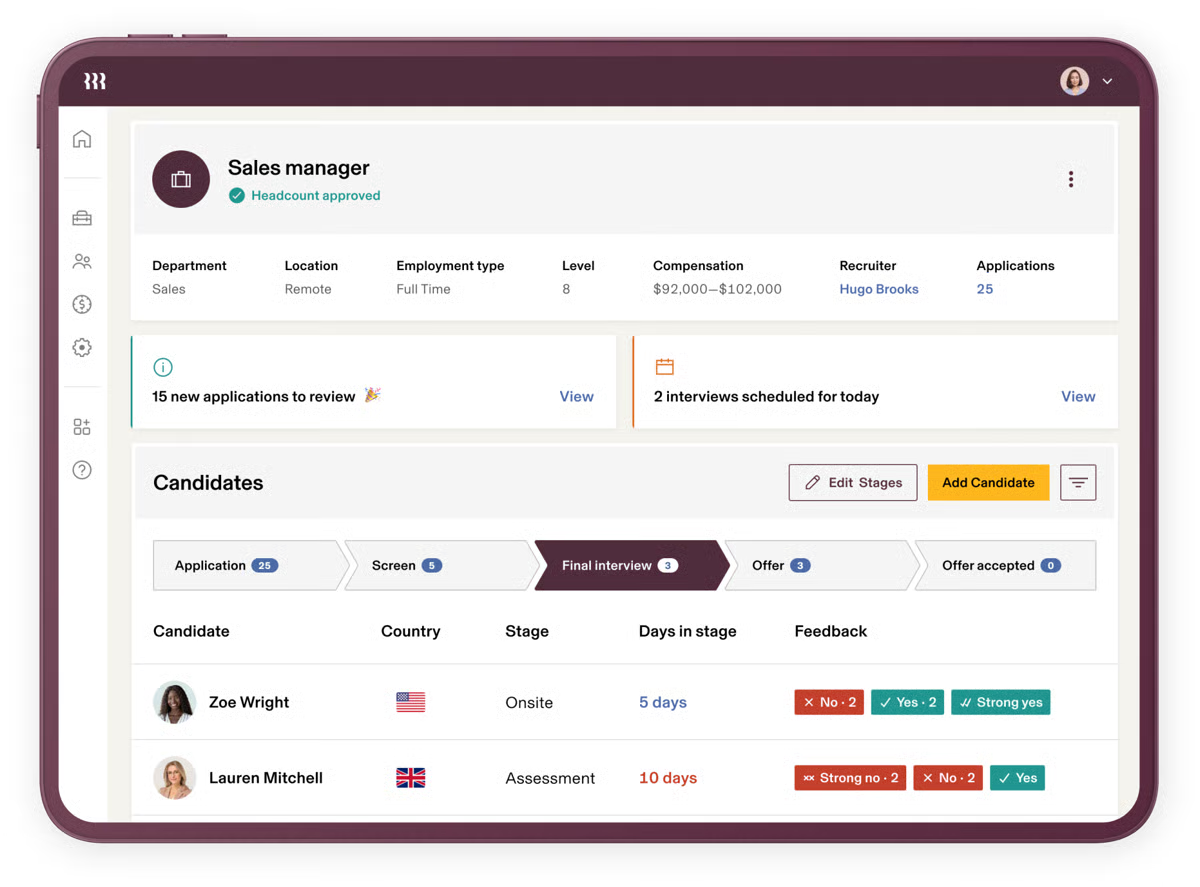
Rippling supports role-based training and ongoing compliance readiness. Because training tasks are tied directly to employee roles and status changes, teams can automatically assign required training when someone joins, changes roles, or moves departments. This reduces the risk of missed requirements and helps organizations maintain consistent training standards without relying on manual tracking or one-off reminders, which becomes especially valuable as headcount grows.
Some reviewers mention that the mobile app doesn’t include all the functionality of the web version or can feel slow to log in. This tends to stand out for users who rely heavily on mobile workflows, while teams that primarily use the desktop experience say it meets their needs without issue.
A few users also note that certain modules, such as time tracking or navigating calendars, can feel less intuitive or require extra steps. This may feel cumbersome for teams wanting the simplest possible path, while others who prefer more structured processes find the layout manageable once they’re familiar with it.
Overall, Rippling earns high marks for delivering a modern, streamlined HR experience that centralizes essential workforce data and simplifies day-to-day tasks. Reviewers consistently emphasize its clean design, intuitive workflows, and ability to unify previously scattered processes, making Rippling a platform that significantly improves the employee and admin experience across the board.
“I find Rippling extremely useful because of its simplicity and ease of use. The interface is very intuitive, so tasks like approving leave or checking the company calendar are quick and hassle-free. I also really like how easily administrative access can be granted with just one click, and access is enabled within seconds. This saves a lot of time and removes the need to depend on IT.
The secret store is also a great feature for securely sharing information within the team. Even the initial setup of Rippling was smooth and took hardly five minutes.
Overall, these features make my day-to-day work much easier, and Rippling has become an essential tool for me.”
- Rippling review, Pri P.
“There are a few aspects of Rippling that I hope will be improved. Despite what many might think, I am unable to access my benefits directly through this platform. While I can view a brief description of each benefit, I cannot even retrieve my insurance member ID here. To get that information, I have to visit a completely different website, and even then, the process is not straightforward. Additionally, I would appreciate the option to have my time off requests automatically posted to my Outlook calendar. At the moment, due to the way my management team operates, submitting a time off request requires me to use three different platforms. Perhaps this is partly a user-specific issue, but it still impacts my experience. It might also help if my direct supervisors were better informed about the full range of Rippling’s features.”
- Rippling review, Angela F.
For teams looking to deliver training directly inside the software employees use daily, rather than routing them to a separate system, the best digital adoption platforms offer a complementary approach worth exploring.
Absorb LMS is widely praised by users for its intuitive interface, strong administrative tools, and depth of learning-focused functionality that make it a standout in the training management space. Across hundreds of reviews, customers consistently highlight how Absorb streamlines course delivery, centralizes training operations, and provides a clean, user-friendly experience for both learners and administrators. 98% of users rate Absorb 4 or 5 stars, showing exceptional satisfaction, and 93% of users say they would recommend Absorb LMS, a high trust indicator.
One of the most frequently mentioned strengths is Absorb Create and its broader course-building capabilities. Reviewers repeatedly note how simple it is to build, update, and publish training content, even for organizations producing complex learning programs. The tool’s flexibility, and the ability to design professional, polished content without external authoring software comes up in review after review. This focus on enabling admins to create engaging training experiences is one of the traits that make Absorb uniquely well-suited for companies with growing learning management needs.
Users also point to Absorb’s interface and user experience as major differentiators. They appreciate the clean layout, the intuitive admin panel, and the ease with which learners can find their courses, check their progress, and stay on track. Many reviewers call out how the platform supports them in delivering structured and motivating digital learning experiences. For organizations with training requirements across multiple departments or roles, this clarity and usability helps ensure adoption stays high.
Customer support and client success also stand out positively in many reviews. Users frequently mention helpful onboarding experiences, responsive success managers, and support interactions that guide teams through setup, content organization, and ongoing optimization. For companies implementing Absorb as a cornerstone of their training infrastructure, this level of partnership is noted as especially valuable.
Reporting and training oversight are additional areas where Absorb is consistently praised. Reviewers highlight the ability to track completions, view learner progress, measure performance, and manage compliance through built-in tools that feel reliable and easy to navigate. For teams managing corporate learning programs, these reporting capabilities help ensure visibility and accountability across the organization.
Some users mention that certain areas come with a learning curve, particularly because the platform includes a wide range of features. This may feel like more than some teams need at first, while others managing more sophisticated training programs often find the depth helpful once they’re familiar with it.
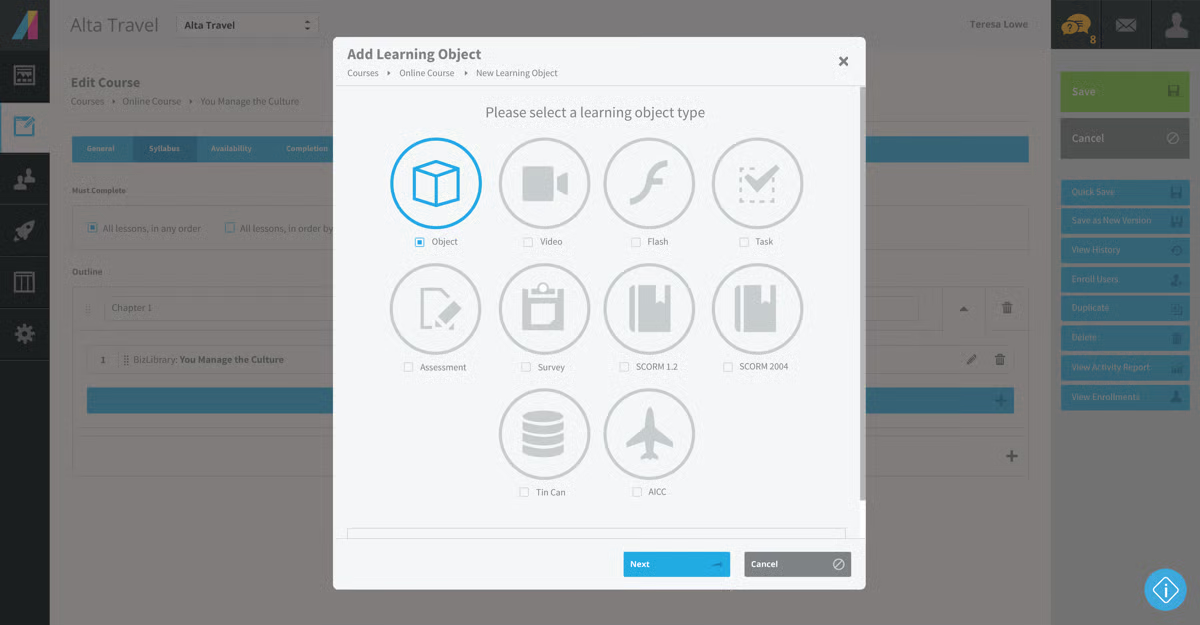
A few reviewers also note that tasks like PPTX transitions or navigating specific modules can feel more complex than expected. This tends to stand out for teams wanting highly simplified workflows, whereas others who value more control or customization say the structure works well for them once they understand the layout.
Taken together, Absorb LMS receives high marks for offering a user-friendly yet highly capable training management system that supports content creation, learner engagement, reporting, and enterprise-scale learning programs. Reviewers consistently describe it as a modern, dependable LMS that helps organizations deliver effective, structured training with confidence.
“It’s been nearly four years since we became part of the Absorb family, and the experience has truly been remarkable. The level of customer-focused sales and support that Absorb offers is exceptional and not something you can simply purchase elsewhere. Compared to other LMS platforms I’ve used, Absorb stands out in several ways. The user experience is intuitive, allowing learners to engage with content easily and efficiently. For administrators, there is a wealth of features designed to enhance the user experience even further. The Admin Experience streamlines daily tasks, and the robust reporting tools provide managers with valuable insights into learner performance, which helps guide engagement strategies and ultimately improves the effectiveness of training.”
- Absorb LMS review, Timothy S.
“Initially, there felt like a lot to learn, which was a bit overwhelming, but once I started using the software, it got much easier and I realised I did understand what I was doing!”
- Absorb LMS review, Kim M.
Small businesses evaluating training management systems are often asking the same questions about LMS. See how the best corporate learning management systems for small businesses rank on G2.
Trainual is consistently praised by users for how effectively it centralizes company knowledge, SOPs, and role-based training into one organized, easy-to-navigate platform. Across reviews, teams highlight how Trainual helps them turn scattered documentation into structured onboarding paths and clear learning modules that keep employees aligned as the company grows. 4.7 out of 5 rating from 906+ reviews, placing Trainual among the top-rated SOP and onboarding platforms and 99% of users rate Trainual 4 or 5 stars, showing exceptional satisfaction.
Many describe the platform as simple, intuitive, and a major improvement over traditional document folders or disconnected training materials.
One of the strongest themes in user feedback is how well Trainual supports process documentation. Reviewers repeatedly note that the platform makes it easy to build SOPs, attach procedures to specific roles, and keep content constantly updated as workflows evolve. This level of organization is especially valuable for growing teams that need consistent training and a single source of truth for how work gets done.
Users also emphasize how straightforward it is to create modules, embed videos, use Loom integrations, and break processes down into digestible steps, even for non-technical team members. Several mention that the interface feels intuitive from the start, with AI-assisted features helping streamline the content creation process.
Trainual also earns praise for the visibility it offers into learner progress. Users like being able to track who has completed assigned training, identify gaps, and automatically generate certificates when modules are finished. This accountability helps managers maintain consistency and ensures new hires understand their responsibilities from day one. Many reviewers also mention that the platform keeps them organized through ongoing updates and clear communication whenever content changes, which makes it easier to keep teams aligned as information evolves.
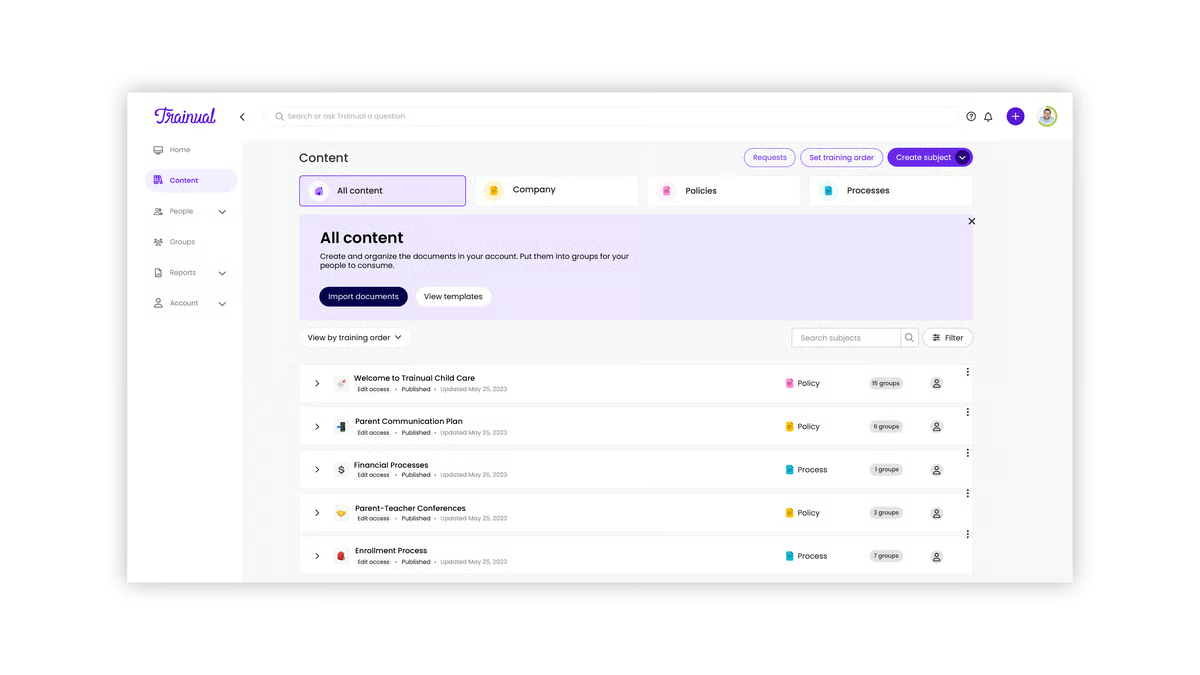
Some reviewers mention that certain navigation paths, such as Trainual University or longer SOP flows, can feel confusing or less flexible. This tends to affect teams who want highly free-form navigation, while others focused on structured onboarding say the guided paths work well for keeping training consistent.
A few users note that updating or editing existing modules can feel slower or more cumbersome than expected, and that some pages take a moment to load. These delays are more noticeable for teams making frequent, rapid-fire edits, while others who update content periodically find the workflow manageable.
Overall, Trainual is repeatedly recognized as a powerful training management system for small and midsize teams that want to standardize processes, improve onboarding, and maintain organizational clarity. Users emphasize its simplicity, its effectiveness in organizing internal knowledge, and its ability to help businesses scale their training efforts without adopting overly complex enterprise systems.
“It is very easy to use and has great AI features! All of the add-ins are great. You can start with the basics and give it a tone, or captivating pictures with great ease. The AI is really amazing, and you work with it right there while you are creating content. I also really enjoy the mobile app; completing training is extremely easy to use while on the go.”
- Trainual review, Peggy A.
“Setting up Trainual was definitely tedious due to the large number of new SOPs I had to create, and there was a learning curve initially. Formatting wasn't always super simple, making it challenging to set up initially. There were also issues with adding PDFs, as updates to documents required manual changes in all areas, which was cumbersome. The process of linking to Google Drive and other files required figuring out workarounds. Additionally, the formatting options could be more intuitive, especially when changing fonts or colors of links. Navigation could be improved; specifically, getting back to the home screen or dashboard after a search is cumbersome since it requires multiple clicks.”
- Trainual review, Renee M.
Paycom is consistently praised by users for its intuitive interface, smooth navigation, and ability to centralize HR, payroll, and training into one cohesive platform. Across reviews, employees repeatedly mention how easy it is to log in, manage their payroll information, complete onboarding tasks, and access required training — all without needing external guidance. Paycom holds a 4.3 out of 5 rating across 1,500+ reviews, reflecting strong satisfaction among a large and diverse user base.
A major theme across reviews is Paycom’s ability to support onboarding and ongoing training workflows. Users note that the system makes it simple to access a full library of online courses, complete required learning, and stay on top of new material as their role evolves. For organizations that need to manage compliance, role-based training, or continuous skill development, Paycom serves as a centralized hub that keeps everything neatly organized and easy to find. This clarity appears again and again in reviews, with users appreciating how the platform minimizes confusion and streamlines both initial onboarding and long-term training management.
Reviewers highlight how Paycom connects training with core HR functions like payroll and employee self-service. Employees note that completing these tasks is straightforward, helping required training and onboarding activities feel less fragmented across the employee lifecycle. This tight integration is one reason users view Paycom as a strong all-in-one platform rather than a standalone LMS.
Some reviewers mention that certain menus or feature paths can feel less intuitive or require extra clicks. This tends to matter more for users who jump between modules frequently, while others who stick to a consistent set of tasks say they adjust quickly.
A few users also note that some training content or user guides feel more complex than expected, especially for employees unfamiliar with HR or payroll terminology. Teams that rely on highly detailed workflows may find the depth helpful, while others focused on quick, lightweight training may notice the added structure more.
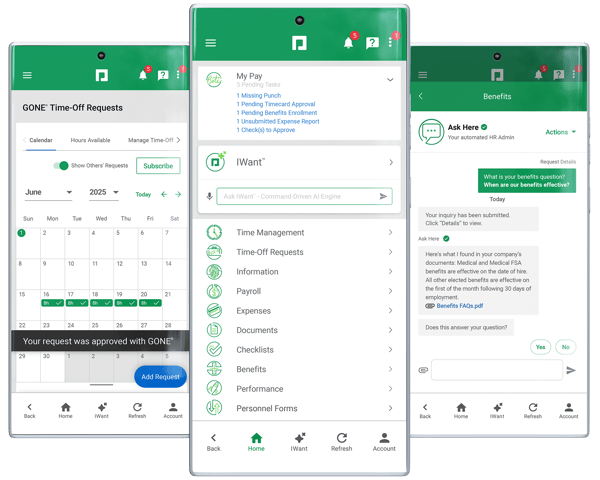
Overall, Paycom earns strong praise for combining training, onboarding, payroll, and HR management in a single, user-friendly system. Quality of support scores 90%, placing Paycom just slightly below the 92% category average but still demonstrating strong support satisfaction. Reviewers consistently emphasize how easy it is to navigate, how well it supports required training and course completion, and how it simplifies core HR workflows for everyday users.
For companies looking for a training management system that lives directly inside an all-in-one HR platform, Paycom stands out as a reliable and easy-to-adopt option that streamlines both learning and operational processes.
“Paycom is easy to navigate for Admins and Employees. I love that they are constantly updating the system features and giving detailed tutorials. Payroll is easy to run and timekeeping is simple. Employees love that they have access to all of their information and freedom to change without having to fill out a bunch of forms to turn in.”
- Paycom review, Deanna M.
“Probably the reporting options. Don't get me wrong, the reports in Paycom are great, and even if you can’t find one that already meets your needs, the Report Writer is available. However, if you are a new user or you are looking for something outside of your usual reports, it may take some time to find the right setup for the report(s) you need.”
- Paycom review, Emma E.
Docebo is consistently praised by users for its flexibility, intuitive design, and ability to support large-scale training programs across different teams and learning needs. 94% of users rate Docebo 4 or 5 stars, showing highly positive sentiment among learners and admins.
Reviewers frequently highlight how Docebo makes it easy to deliver training in multiple formats, from structured courses to blended learning paths, while keeping everything organized and accessible. Many describe the platform as simple to use on the learner side, with a clean interface that helps employees stay focused on their training without unnecessary friction.
One of the strongest recurring themes across reviews is Docebo’s ability to power enterprise-level learning through customizable learning journeys and scalable content delivery. Users consistently note how effectively the system handles large training libraries, dynamic course structures, and diverse formats, making it easier for organizations to support everything from onboarding to ongoing skill development.
Many reviewers call out how Docebo’s page builder allows them to create engaging, personalized learning environments, giving admins more control over how content is presented and how learners move through material.
Docebo’s flexibility also stands out in user feedback. Reviewers appreciate how the platform adapts to different training requirements, whether they’re delivering compliance training, department-specific materials, or broad learning initiatives. The ability to organize learning paths and deliver content in a way that fits the company’s structure is frequently mentioned as one of Docebo’s biggest strengths. This adaptability is especially valuable for organizations managing complex training programs across multiple teams or locations.
Docebo makes the learning process feel seamless, making it simple for employees to take courses, track their progress, and navigate the training environment. The consistent learner experience and the platform’s intuitive layout help teams stay engaged and reduce confusion around where to find training or how to complete required modules. This simplicity on the front end is a major contributor to positive adoption across organizations that rely on Docebo to keep large workforces aligned.
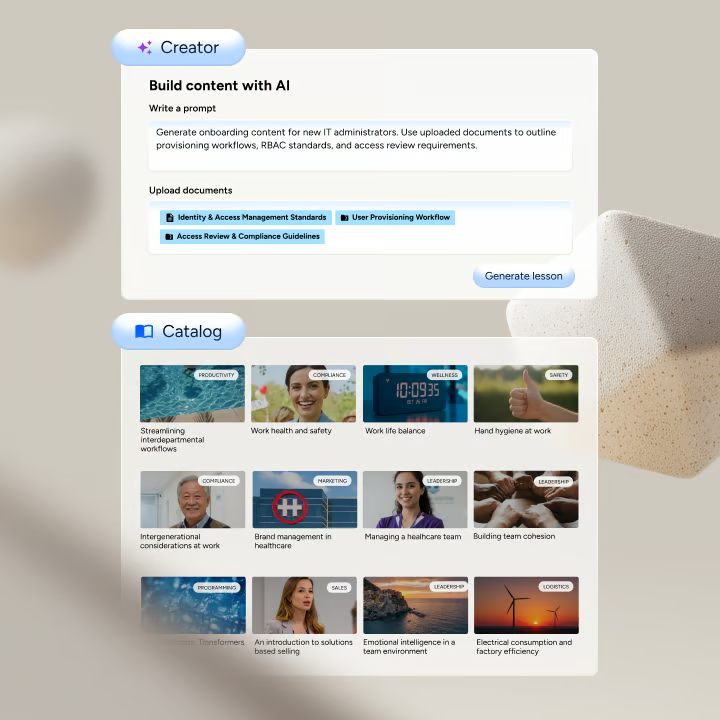
Some reviewers mention that Docebo can feel complex on the admin side, particularly during setup or when configuring advanced features. This tends to matter more for teams wanting a lightweight, plug-and-play tool, while others managing sophisticated training structures often find the extra configuration worthwhile.
A few users also note that reporting and analytics can be more challenging to navigate than expected. This is more noticeable for teams needing highly granular reporting out of the box, while organizations focused on delivering large-scale training programs say the core reporting meets their needs.
Overall, users consistently recognize Docebo as a powerful, scalable training management system that supports deep customization, streamlined learner experiences, and large training programs with confidence. Ease of use receives an 86% satisfaction score, showing that most learners and admins find the platform intuitive. Its ability to blend structure with flexibility makes it a strong fit for organizations that want an LMS capable of growing alongside their training needs.
“In my role as VP of Lending, I oversee a team responsible for evaluating loan products, compliance, and customer risk assessment. Docebo has provided a centralized platform for learning and upskilling my team efficiently. The interface is intuitive, making it easy for both experienced and new team members to access required courses. The ability to track learning progress and completion rates helps me ensure that regulatory compliance training and internal processes are consistently followed. Integration with our communication and CRM tools allows learning to be seamlessly part of daily workflows, which reduces downtime and accelerates knowledge adoption.”
- Docebo review, Lisa C.
“My main critique revolves around feature parity and pricing. Some of the most valuable functionalities, such as advanced analytics or specific automation capabilities, are often tiered or require expensive add-ons. This can make the total cost of ownership quite high compared to some competitors, and it feels like certain core administrative functions (like advanced Instructor-Led Training/ILT session management or nuanced reporting for collaborative tools) could be more streamlined without needing custom CSS workarounds.”
- Docebo review, Rahul R.
Cavu HCM is consistently praised by users for its ease of use, modern interface, and ability to streamline HR and payroll processes in a way that feels intuitive from day one.
Across repeated reviews, users highlight how simple the platform is to navigate, noting that essential tasks, whether related to payroll, employee records, or daily HR operations, are easy to complete without confusion. Cavu HCM holds a 4.9 out of 5 rating from 133+ reviews, making it one of the highest-rated products in its category.
One of the strongest recurring themes in user feedback is the company’s personalized service. Reviewers repeatedly call out how responsive, attentive, and hands-on the support experience is, emphasizing that customer service feels like a true partnership rather than a traditional support queue. For organizations adopting Cavu HCM as part of their training and employee management workflow, this level of support helps ensure smoother onboarding, faster issue resolution, and ongoing clarity as new features or processes are implemented.
Cavu HCM is also frequently recognized for helping teams stay aligned with industry and compliance requirements. Users mention that the platform feels current with market needs, giving them the confidence that their HR and payroll processes are accurate and up to date. This reliability is especially important for organizations that rely on their HCM system not only to manage people operations, but also to ensure their training and compliance workflows stay consistent and audit-ready.
Reviewers also appreciate how Cavu HCM simplifies onboarding and day-one setup for employees. Multiple users mention that the platform makes it easy for new hires to get started quickly, with clear access to employee information, required tasks, and system navigation. This ease of onboarding helps reduce early confusion and supports smoother adoption of training and compliance-related workflows as employees ramp up.
Another positive theme across reviews is Cavu HCM’s consistency and reliability for everyday operations. Users note that once they’re familiar with the platform, managing employee records, payroll-related tasks, and ongoing workforce processes feels predictable and stable. This reliability is especially valuable for teams that want their training and compliance workflows to run in the background without constant troubleshooting or administrative overhead.
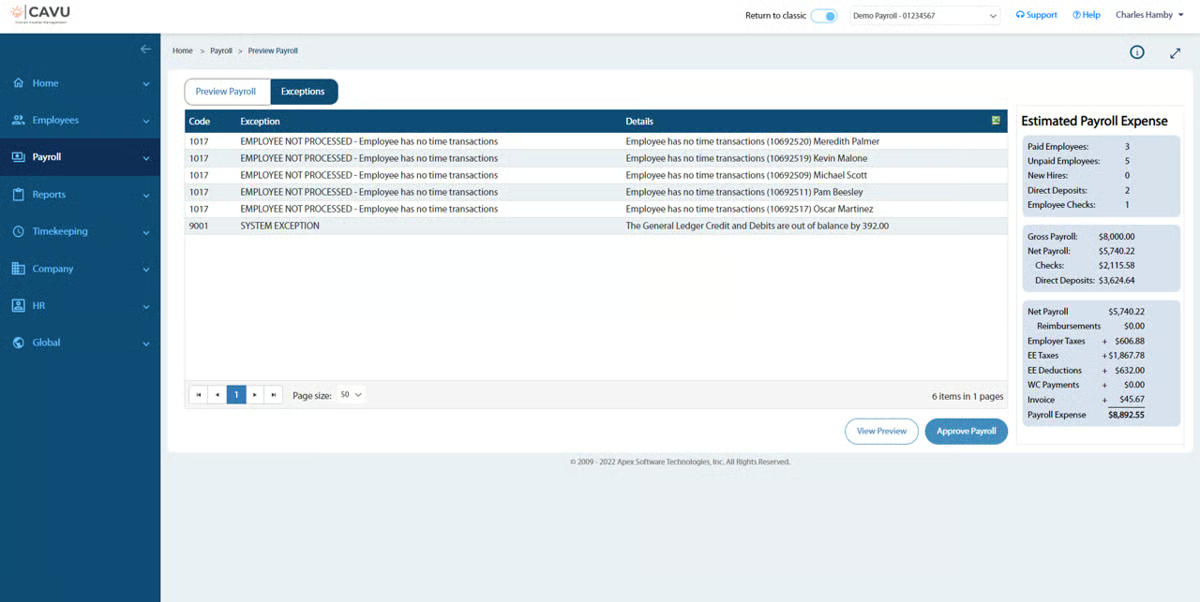
Some reviewers mention that the platform can lag or slow down during heavier operations. This may matter for teams that run high-volume workflows throughout the day, while others with more routine usage say the occasional slowdown doesn’t disrupt their overall experience.
A few users also note that Cavu HCM’s smaller market presence means there are fewer third-party resources or community references available. This tends to stand out for teams that rely heavily on outside guides, while others value the direct, hands-on support the company provides.
Overall, Cavu HCM earns strong praise for delivering a simple, modern, and approachable experience for managing HR, payroll, and employee operations. Quality of support scores a perfect 100% and ease of use also receives a 100% satisfaction rating, confirming its reputation as extremely user-friendly.
Reviewers regularly highlight its user-friendly design, personalized support, and ability to help organizations stay organized and aligned with evolving requirements. For teams seeking a complete HCM solution with embedded training and compliance capabilities, without the complexity of an enterprise-level system, Cavu HCM stands out as a dependable and easy-to-adopt option.
“Simplicity of our weekly and bi-monthly payroll processing. Their customer service representative, Joyce Mutton, is tremendous in her knowledge of the payroll system and all the ins and outs of it. The payroll portal is easy to use and has every feature available. If I can't figure it out, it's a quick phone call or email to Joyce, and easily show or explain how to do it.”
- Cavu HCM review, Bart R.
“It may be on the higher end for smaller organizations, which could limit accessibility.”
- Cavu HCM review, Jessica W.
Have more questions? Find more answers below.
For small businesses, the best training management system depends on how quickly you need to onboard employees and how simple you want administration to be. Trainual is a standout choice because it makes process documentation, SOP building, and team onboarding extremely simple without requiring a full HCM suite. Rippling is another strong option for SMBs that want training tightly connected to HR, payroll, and IT in a single platform.
For growing teams, scalability, automation, and integrations matter most. Absorb LMS is ideal for midsize organizations that need advanced customization, role-based learning paths, and detailed reporting. Docebo is also popular among scaling companies thanks to its AI-driven personalization and strong enterprise integrations.
Enterprises typically look for robust compliance management, powerful analytics, and the ability to support thousands of learners. Absorb LMS and Docebo are top choices due to their scalability, deep customization, multi-instance support, and strong integration ecosystems. Paycom and Rippling also work well when enterprises want training embedded within a full-suite HCM platform.
Trainual is particularly well-suited for onboarding because it allows teams to quickly document processes, build training paths, and keep new hires aligned with company workflows. Rippling also excels in onboarding through automated workflows that combine training, device setup, payroll tasks, and HR steps in one sequence.
Industries like healthcare, manufacturing, financial services, and logistics often choose Absorb LMS or Docebo for their audit-ready reporting, certification tracking, and advanced compliance features. Cavu HCM is another strong option for organizations wanting compliance tools built directly into an HCM suite.
If you want training to sync seamlessly with employee data, tools like Rippling and Paycom are top choices. Both combine HR, payroll, and learning into a unified platform, making it easy to assign training automatically based on roles, departments, or onboarding workflows.
Docebo stands out for organizations that want to mix self-paced courses with instructor-led training, virtual classrooms, and AI-driven recommendations. Absorb LMS also supports blended learning well through its scheduling tools, content libraries, and robust reporting.
Trainual is the go-to option for teams that want to centralize SOPs, role-based documentation, and step-by-step training guides. It’s designed for fast-growing businesses that need to standardize how teams learn and work.
Docebo is one of the strongest platforms in this category. Its AI tools support personalized learning paths, intelligent content recommendations, automated categorization, and deeper analytics that help teams understand skill gaps more clearly.
Docebo and Absorb LMS both support remote-first training with mobile access, self-paced course delivery, live training tools, and dashboards that make it easy to monitor distributed employee progress. Trainual is also well-suited for remote teams focused on documenting workflows and SOPs.
After evaluating the corporate learning management systems above, one thing is clear: training isn’t just an HR task; it’s a strategic driver of performance, compliance, and long-term employee retention. Before choosing a platform, it’s worth examining your current training workflows, data sources, and the areas where your teams are spending time on manual tasks. When you understand those gaps, you’ll be better equipped to measure how the right LMS can deliver ROI.
Every platform featured here is built to simplify training, scale with your workforce, and improve visibility across your organization. And if you’re unsure where to start, this guide will always be here to help you compare options and find the system that aligns with your operational needs.
Your workforce deserves training that actually empowers them, and your business deserves a system that keeps up.
Now is the perfect time to explore the best corporate learning management systems and find the solution that fits your needs today while preparing you for what’s next.
.png)

When I first joined G2, I didn’t just want to get through onboarding; I wanted to ramp up...
.png) by Shreya Mattoo
by Shreya Mattoo

Managing compliance training isn’t just about checking a box anymore. Choosing the best ethics...
 by Disha G

I don't know about you, but every time I need to learn something new at work or take a...
 by Shashank D Shastry