


I don’t open content analytics software because I’m curious. I open it because someone needs an answer. Did this launch land? Which channel actually carried the distribution? Is the “top performer” doing real work for the business, or just picking up low-intent traffic?
After you’ve used these platforms for a while, you stop evaluating them on what they claim to measure. You evaluate them on how they behave under pressure. Does the reporting hold up when you share it outside your team? Are the insights clear enough to act on without having to rebuild the same spreadsheet every week?
That’s why my list of best content analytics software is organized by use case. Content analytics isn’t one job. It’s a set of jobs that show up at different moments in a workflow, from monitoring performance in real time, to understanding engagement quality, to proving ROI.
I looked at G2 review patterns to understand what people depend on these tools for, what they highlight as standout, and what they flag as limits. With that in mind, these are my picks and the use cases where each one fits best.
| Best content analytics software | Best for | G2 Rating | Pricing | Likelihood to recommend |
| Google Analytics | Real-time content performance monitoring | 4.5/5⭐ | Free (GA4) | 91% |
| Semrush | Multi-channel content performance tracking | 4.5/5⭐ | Starting at $165.17/month | 92% |
| Bitly | Measuring content engagement | 4.5/5⭐ | Starting at $10/month | 91% |
| Similarweb | AI-powered recommendations | 4.5/5⭐ | Starting at $125/month | 92% |
| SE Ranking | Easiest to use | 4.8/5⭐ | Starting at $52/month | 95% |
| Conductor | Tracking enterprise content analytics | 4.5/5⭐ | Custom pricing | 90% |
| Ahrefs | Analyzing content ROI | 4.5/5⭐ | Starting at $129/month | 92% |
*These are the leading content analytics software on G2 per our Winter 2026 Grid Report. Pricing data is subject to change.
When I choose the best tools for each use case, I start with G2 Data. I look at a product’s category performance, including its G2 Score, satisfaction ratings, and feature-level strengths. This helps me understand which tools consistently perform well before I narrow them down to more specific scenarios, like small teams, nonprofits, or industry-focused workflows.
From there, I delve into review insights to see what real users have to say. I look for patterns in pain points, frequently praised features, and feedback from people in the same roles or industries that the use case targets. The recommendations you see reflect that mix of quantitative scoring and qualitative sentiment, focused on the tools that repeatedly show up as the strongest fit for that specific need.
When I’m monitoring content performance in real-time, I care about two things: how quickly I can spot a shift (in traffic, source mix, or engagement signals), and whether I can explain what happened without having to rebuild the story from scratch in another tool.
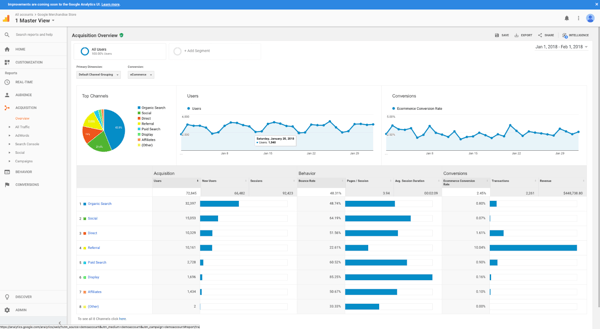
Google Analytics fits this use case because G2 reviewers repeatedly describe using Google Analytics for live traffic checks, source/channel breakdowns, and launch monitoring. The product also excels in the operational basics that make real-time monitoring feasible in a busy workflow. Google Analytics averages roughly 84% for Ease of Setup and 83% for Ease of Use. That combination matters because a real-time dashboard is only helpful if teams can actually implement tracking and maintain consistency.
In G2 review themes, Google Analytics appears as a practical, “always-on” dashboard for tracking traffic patterns, source attribution, and performance checks tied to launches and campaigns.
| Pros | Cons |
| G2 users like the real-time visibility into traffic and activity, especially for launches and campaign spikes. | Some users note that the interface can feel heavy when they just want a fast answer during a live moment. |
| Reviewers often praise the channel and source detail, which makes it easier to explain what drove a spike. | Several reviewers note that workflow clarity depends on setup choices, such as events and naming conventions. |
| Many appreciate the reporting depth for drilling into performance when they need more than a headline number. | Users mention that the interface can feel busy when they only want a lightweight real-time check. |
Find additional GA alternatives on G2.
Multi-channel tracking becomes messy quickly once content starts appearing in search results, newsletters, social posts, and paid placements simultaneously. What I look for here is a platform that helps connect those signals, rather than treating each channel like a separate story.
/Semrush-1.webp?width=600&height=338&name=Semrush-1.webp)
Semrush fits because G2 reviewers consistently talk about using Semrush as a central workspace for understanding content performance through a multi-channel lens, especially where search visibility, competitive context, and distribution planning overlap. In the review dataset, Semrush scores about 91% for meeting user requirements and about 89% for Quality of Support. Those numbers align with the sentiment I see in reviews: Semrush tends to be trusted as an ongoing system teams return to for cross-channel content decisions, not a tool they only open for a one-off audit.
| Pros | Cons |
| Reviewers often praise the context around performance, especially competitive and search-related insights that help explain results. | Users note that the platform can feel overloaded when they only want a quick performance check. |
| Users like having content performance signals from multiple channels in one platform, rather than switching between tools. | Some say that finding the right reports takes time, particularly in the early stages. |
| Many users appreciate that Semrush supports ongoing tracking and comparison, not just one-off analysis. | Several reviewers mention a learning curve, especially when combining insights from different modules. |
Browse top-rated Semrush alternatives on G2.
Engagement gets easier to judge once you stop treating content as “a page on a site” and start treating it as “something people access through links.” That’s the reality for newsletters, social, partner campaigns, and gated assets. In this use case, the job is simple: measure what happens after distribution, not just what happens on-site.
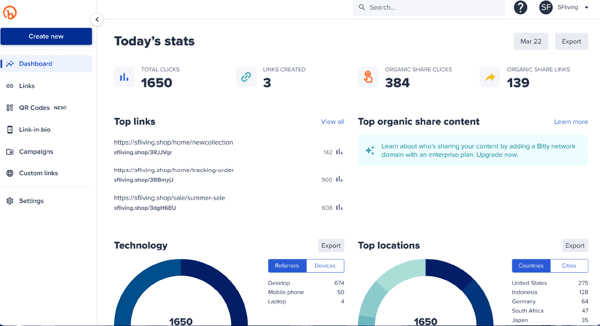
Bitly earns the spot because G2 reviewers consistently talk about Bitly as a reliable way to track link-level engagement, especially clicks over time and performance across channels. In the review dataset, Bitly scores around 93% for Ease of Admin and 92% for meeting user requirements. That aligns with what users repeatedly emphasize: Bitly stays lightweight to run and easy to maintain, which matters when creating and tracking links constantly across campaigns.
| Pros | Cons |
| G2 users appreciate the clear visibility of clicks and engagement once links are shared online. | A few G2 users flag that advanced reporting needs can require extra effort beyond the default views. |
| Many users appreciate the consistency of reporting when the same links are reused across campaigns. | Some users note Bitly is focused on link engagement, so it won’t answer deeper onsite behavior questions by itself. |
| Reviewers often praise how straightforward link management feels, especially at higher volumes. | Users say that reporting depth depends on plan level, which can influence how much detail teams rely on day to day. |
Find more Bitly alternatives on G2.
AI-driven insights are only useful if they help teams decide what to do next, not just what already happened. For this use case, I pay attention to whether a platform helps interpret patterns across traffic, audience behavior, and market movement in a way that feels actionable.
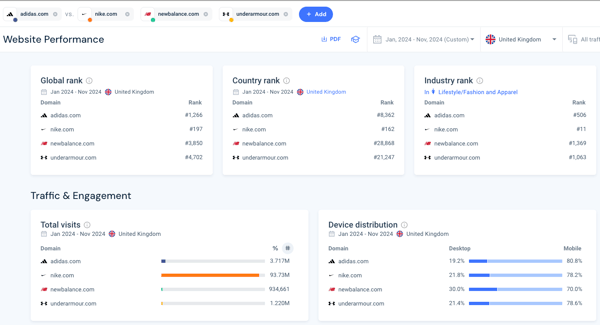
Similarweb stands out here because G2 reviewers frequently describe using Similarweb to surface patterns and trends they wouldn’t spot on their own, especially when analyzing content performance in a competitive or market-wide context. According to G2 Data, Similarweb reports 92% Satisfaction and 88% for being on the right track as a product. That aligns with the review sentiment: users value Similarweb when they need guidance from patterns, benchmarking, and competitive context, not just a recap of what happened.
| Pros | Cons |
| Reviewers often praise the competitive and market-level context, especially for understanding performance beyond owned properties. | Some users note that Similarweb is better suited for directional insights than for detailed page-level analysis. |
| Many users appreciate the platform’s ability to surface insights without heavy configuration. | Reviewers mention using it alongside first-party analytics to complete the performance picture. |
| Users also like how Similarweb highlights trends and shifts that help guide content and channel strategy. | Users say that interpretation matters, since insights are often comparative rather than absolute. |
Explore other Similarweb alternatives on G2.
Ease of use matters most when content analytics isn’t someone’s full-time job. If a platform requires constant interpretation or hand-holding, it tends to be sidelined, regardless of its capabilities. For this use case, I look for software that teams actually open regularly, not just during audits or reporting cycles.
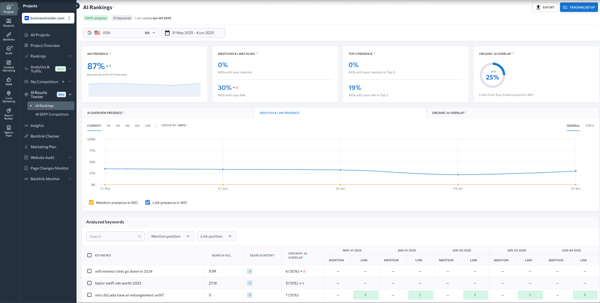
SE Ranking fits this role because G2 reviewers describe it as approachable and easy to work with, particularly for teams seeking reliable content and performance insights without a steep learning curve. SE Ranking scores around 95% for Ease of Use and 94% for Ease of Setup on G2, which explains why users mention getting value from the platform quickly. Review sentiment points to clarity as a recurring theme: dashboards feel understandable, workflows feel predictable, and common tasks don’t require much ramp-up.
| Pros | Cons |
| Users appreciate how easy it is to navigate and understand, even without prior experience in analytics. | A few users flag that customization options are more limited compared to enterprise platforms. |
| Many users appreciate that the platform feels lightweight enough for daily use, not just periodic reviews. | Several reviewers mention pairing it with more specialized tools as their reporting needs grow. |
| Reviewers often praise the quick setup and clear workflows, especially for content and performance tracking. | Some users note that SE Ranking is best suited for core analytics needs, rather than highly advanced analysis. |
See more SE Ranking alternatives on G2.
Enterprise content analytics usually breaks down when tools can’t scale with the way teams actually work. Multiple stakeholders, shared reporting standards, and long-term content programs all raise the bar beyond basic dashboards. For this use case, I look for a platform that supports consistency and coordination at scale, not just individual analysis.
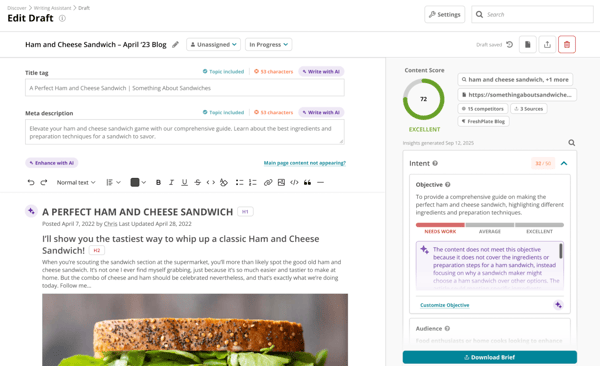
Conductor earns this spot because G2 reviewers often describe it as a platform that holds up when multiple teams need shared reporting norms and consistent workflows. It scores about 93% for Ease of Doing Business With and 94% for Quality of Support in G2 review data. That aligns with the review sentiment that enterprise teams value stability, enablement, and responsiveness when the platform becomes part of their ongoing governance.
| Pros | Cons |
| Reviewers often praise the organizational structure and governance features, especially in larger environments. | Several mention that the platform may feel more structured than necessary for smaller teams. |
| Many users appreciate that the platform is designed for long-term content programs, not ad hoc analysis. | Some note that Conductor works best when processes are clearly defined and adopted consistently. |
| Users like that Conductor supports standardized reporting across teams, which helps maintain consistency. | Others note that onboarding takes planning, especially when multiple stakeholders are involved. |
View more Conductor alternatives ranked by reviewers on G2.
Content ROI analysis typically begins with a straightforward question and quickly becomes complicated: which pieces are actually driving outcomes that justify continued investment? For this use case, I focus on tools that help teams connect content performance to measurable impact, especially when organic search is a primary channel of engagement.
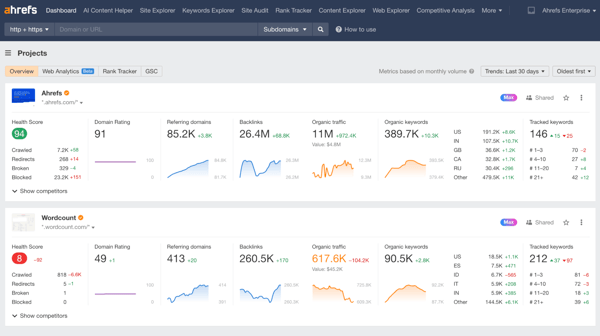
Ahrefs fits this role because G2 reviewers consistently describe using Ahrefs to evaluate the long-term payoff of content, not just its immediate visibility. Review sentiment points to Ahrefs being used to understand which pages contribute to sustained traffic, how rankings translate into ongoing returns, and where content updates are likely to deliver the most value. In the review dataset, Ahrefs scores around 92% for Satisfaction and 93% for Ease of Admin, which supports why teams rely on it as a dependable system for ongoing ROI analysis rather than one-off checks.
| Pros | Cons |
| Reviewers praise the clarity around search performance and rankings, which makes ROI conversations more concrete. | Several reviewers mention pairing it with other analytics tools to connect content performance to business outcomes. |
| Many appreciate the platform’s consistency and reliability for tracking long-term content impact. | A portion of users flag that interpreting ROI still requires judgment, especially for content with indirect impact. |
| Users like how Ahrefs helps them identify which content continues to deliver value over time. | Some note that Ahrefs is most effective for search-led ROI, rather than broader revenue attribution. |
Explore more Ahrefs alternatives on G2.
Choosing content analytics software gets easier once you stop looking for a “best overall” tool and start matching platforms to the job you actually need done. Real-time monitoring, engagement tracking, ROI analysis, and multi-channel performance all place very different demands on a tool, even though they often get grouped under the same category label.
If you’re deciding what to use next, start by identifying the moment where your current workflow breaks down. Is it speed, clarity, scale, or confidence in the data? Once that’s clear, the right platform usually reveals itself pretty quickly.
Ready to turn reporting into a repeatable processes? Learn how to build a data-driven content strategy that holds up in stakeholder conversations.

Enterprise AI agents have moved beyond experimentation. According to G2’s 2025 AI Agents...
 by Shruti Nair

The best AI agent builder software makes it easy to prototype intelligent agents. Getting them...
 by Yashwathy Marudhachalam

The Agentic AI category didn't exist on G2 a year ago.
 by Sidharth Yadav