


When I started comparing AI chatbots for everyday work, I assumed the choice would come down to who gave better answers. It didn't. I quickly found myself switching between Grok vs. Claude because Grok gave me more depth when researching fast-moving topics, while Claude felt more reliable for writing, reasoning, and working with long documents. That's when I realized this wasn't just a comparison of two AI models; it was a comparison of two very different ways of getting work done.
To see where each one truly shines, I tested Grok and Claude across the tasks I use AI for most: real-time research and news analysis, long-form writing, complex reasoning, document analysis, coding and debugging, image understanding, and multi-turn conversations. I used the same workflows for both tools to keep the comparison fair, then cross-checked my findings with G2 reviews to see whether other users reported similar experiences.
Here's what I found: Grok stood out for real-time research, particularly when I wanted broader source discovery and room to keep exploring, while Claude consistently performed better for writing and document analysis. Reasoning, coding, and multi-turn conversations were much closer, with neither chatbot clearly outperforming the other across every aspect.
If you're deciding between the two, this hands-on Grok vs. Claude comparison breaks down how each model performed in real-world workflows so you can choose the one that best fits the way you work.
| Feature | Grok | Claude |
| G2 rating | 4.2/5 ⭐ | 4.6/5 ⭐ |
| Developer | xAI / SpaceXAI | Anthropic |
| Ideal users | Developers, researchers, knowledge workers, teams using connected business apps, and users tracking live web/X information | Writers, developers, analysts, researchers, knowledge workers, and teams using connected business apps |
| Current models | Grok 4.7 (flagship) | Fable 5.1, Opus 5.5, Sonnet 5.5, Haiku 5.5 |
| Best for | Real-time web/X research, coding, knowledge work, connected workflows, and native image/video creation | Writing, coding and agents, long-document analysis, structured knowledge work, and connected enterprise workflows |
| Context window | 500K tokens (Grok 4.7) | Up to 1M tokens, depending on model |
| Response speed | Varies with reasoning effort and workload | Varies by model and reasoning effort |
| Memory | Persistent context available in Grok Bot; consumer memory capabilities vary by experience | Memory across conversations; up to five Projects on Free, with expanded project and work capabilities on paid plans |
| Real-time data access | Native web search and dedicated X Search for live posts and X content | Native web search with citations, including on Free |
| Image & video generation | Native image and video generation and editing through Grok Imagine | No native photo/illustration generation; can create charts, diagrams, interactive HTML/SVG visuals, designs, and other Artifacts |
| Multimodality | Text and image input; file/audio/video analysis; native voice; image and video generation | Text and image input; file analysis; native Voice mode; structured visual and Artifact creation |
| Coding assistance | Grok 4.7 for coding, debugging, tool use, and agentic workflows; Grok Bot for longer-running work | Claude Code plus Sonnet, Opus, and Fable models for coding, debugging, agents, and long-running development work |
| Reasoning | Configurable reasoning on Grok 4.7: low, medium, high, xhigh | Adaptive reasoning on current Fable, Opus, and Sonnet models; effort varies by model |
| Ecosystem and integrations | Gmail, Google Calendar/Drive, Microsoft 365 services, Salesforce, GitHub, Notion, Linear, Box, Canva, Vercel, and custom MCP connectors | Google Workspace, Microsoft 365, Slack, GitHub, Notion, Linear, Atlassian, Canva, HubSpot, Asana, and custom remote MCP connectors |
| Privacy and data control | Standalone and business workspaces; connector permissions are scoped to connected accounts; xAI says supported connector data such as Google Drive and Salesforce isn't used for model training | Consumer model improvement is opt-in with specified exceptions; commercial inputs/outputs aren't used for model training by default; connector access inherits source permissions |
| Pricing | Free to start; paid SuperGrok plans increase usage and unlock more capabilities | Free; Pro $17/month billed annually ($20/month billed monthly); Max from $100/month (monthly billing only); Team from $20/seat/month billed annually |
| Free plan | Yes. Free access with lower limits than paid SuperGrok plans | Yes. Includes Sonnet/Haiku access, web search, memory, voice, artifacts, file/code creation, extended thinking, and connectors |
Note: Grok and Claude frequently release new models, features, and pricing changes. The details above reflect information available as of October 2026 and may change over time.
Grok and Claude can both write, code, summarize documents, analyze files, and answer complex questions, so it's easy to assume they're interchangeable. As I compared them across different workflows, I found that, like many modern LLMs, they share similar capabilities but solve problems in very different ways. Those differences become much easier to spot once you move beyond feature lists and start evaluating how each chatbot fits the work you actually do.
Although Grok and Claude overlap in many areas, the following differences have the biggest impact on how each chatbot fits into real-world workflows.
Even though they take different approaches, Grok and Claude share many of the capabilities people now expect from a modern AI assistant. Whether you're creating content, researching a topic, or solving technical problems, both platforms provide a solid foundation before their individual strengths begin to stand out.
Features and product pages can only tell you so much. To understand how Grok and Claude actually perform, I put both chatbots through a series of real-world tasks that reflect how people use AI every day.
To keep the comparison as fair as possible, I tested Grok and Claude using the same prompts, workflows, and success criteria across a series of real-world tasks. I used their free plans, avoided any custom instructions or model-specific optimizations, and evaluated each chatbot based on how it handled everyday work rather than benchmark scores.
I tested both chatbots across the following workflows:
I evaluated every response using the same criteria:
Disclaimer: AI responses can vary based on model updates, session history, and prompt wording. I conducted these hands-on tests in October 2026; the results reflect the models and features available at that time.
To see how Grok and Claude compare beyond feature lists, I tested them across a range of real-world tasks, from researching current events and writing long-form content to solving complex problems, analyzing documents, and generating code. For each test, here's how I'll break it down:
Let's get into it!
One of the first things I wanted to evaluate was how well Grok and Claude handled a time-sensitive research task. I asked both chatbots to summarize the five biggest AI news stories from the past 30 days, distinguish confirmed developments from speculation, and identify the trends business professionals should keep an eye on. I used the exact same prompt on both tools.
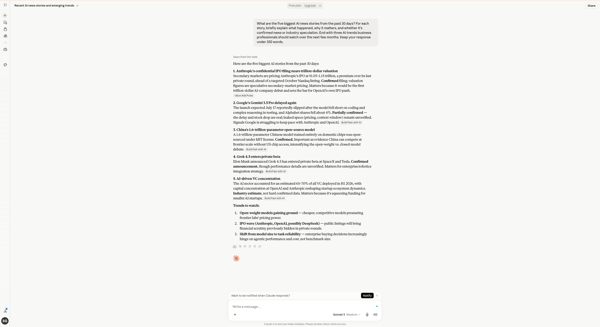
Claude's response to the real-time research prompt
Claude automatically searched the web before responding, even on the free plan. It returned five well-structured AI news stories, clearly labeling each one as Confirmed, Partially confirmed, or an Industry estimate, while supporting the summaries with inline source citations. I also liked that every story briefly explained why it mattered instead of simply reporting the news. Rather than trying to cover every recent development, Claude focused on producing a concise, editor-like briefing that was easy to scan and understand.
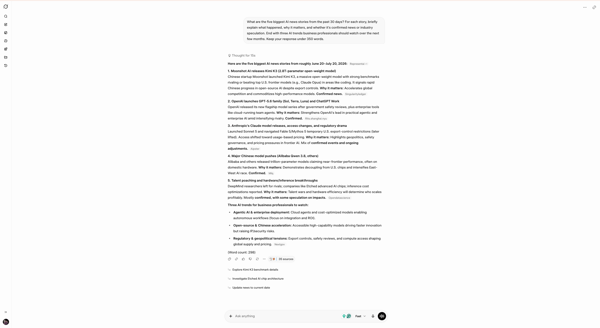
Grok's response to the real-time research prompt
Grok took a more research-oriented approach. After spending 15 seconds reasoning through the prompt, it returned five stories backed by 35 sources and covered a broader mix of AI developments, from frontier models and open-source AI to hardware, regulation, and enterprise adoption. What stood out most was that every story paired the news with a dedicated "Why it matters" explanation, helping connect individual updates to broader industry trends. It also surfaced follow-up research suggestions after completing the summary, making the response feel less like a finished briefing and more like a starting point for deeper research. For anyone trying to keep up with developments in emerging AI software, that additional breadth and discoverability added meaningful value.
Both chatbots handled the task well, but they approached it differently. Claude delivered a concise, editor-like briefing, while Grok surfaced a broader range of AI developments backed by significantly more sources and follow-up research paths. Since this test focused on supporting real-time research rather than simply summarizing recent events, Grok ultimately provided the more useful research experience.
Winner: Grok
One of the most common reasons people use AI chatbots is to draft content, so I wanted to see how each handled a realistic writing assignment. I asked both Grok and Claude to write a 200-word introduction for a blog post titled "Why AI Agents Are the Next Big Shift for Business Teams." The prompt also asked for a professional yet conversational tone, to avoid common AI buzzwords such as "revolutionary" and "game-changing," and to end with a hook that would encourage readers to keep reading.
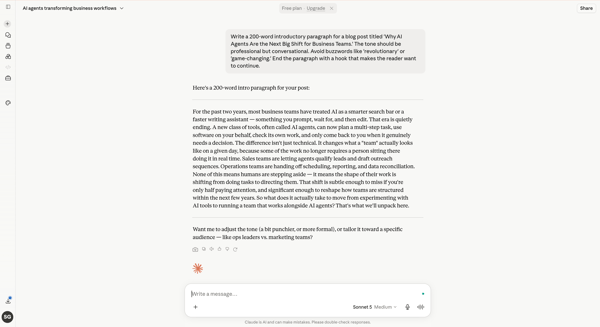
Claude's response to the writing prompt
Claude took a noticeably different approach from the very first sentence. Instead of relying on a familiar AI opener, it reframed how businesses have traditionally used AI before introducing the shift toward AI agents, giving the introduction a clearer narrative progression. The writing remained conversational without becoming overly casual, avoided the buzzwords I explicitly asked it to omit, and naturally built toward the closing hook.
The opening paragraph immediately establishes why AI agents matter to business teams before transitioning into the main topic. It already read like something I'd expect from one of the better AI writing generators. If I were editing it for publication, I'd mainly tighten a few sentences for brevity and adjust the phrasing to better match G2's editorial style, but I wouldn't feel the need to rewrite the introduction itself.
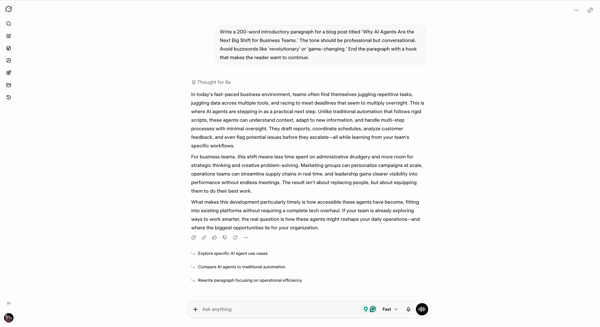
Grok's response to the writing prompt
Grok produced a well-structured introduction that stayed on topic and covered the key ideas I was looking for. It explained AI agents through practical business examples and maintained a logical flow from beginning to end. However, the opening immediately stood out to me: "In today's fast-paced business environment..."
As someone who writes professionally, that's one of the most recognizable AI-generated openings, and it made the introduction feel predictable before I even reached the second sentence. The rest of the response remained informative, but I'd still want to rewrite the opening to give it a more distinctive opening.
Both chatbots followed the prompt and produced well-structured introductions. Grok focused on communicating the key ideas clearly, while Claude paired that clarity with a more original opening and a more natural narrative flow. That made Claude's introduction feel closer to something I'd publish with only light editing.
Winner: Claude
I wanted to see how well Grok and Claude handled a business decision without a straightforward answer. Rather than asking a logic puzzle, I gave both chatbots a realistic B2B SaaS marketing scenario with multiple budget allocation options, business constraints, and one clear objective: recommend the option most likely to maximize pipeline impact before the end of Q3 while explaining the reasoning behind the decision. I wasn't looking for the "right" answer as much as I wanted to understand how each chatbot evaluated trade-offs before making a recommendation.
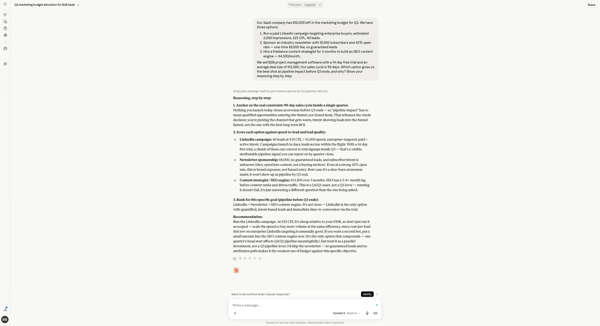
Claude's response to the reasoning prompt
Claude approached the problem methodically, first defining what "pipeline impact before Q3 ends" meant before evaluating each option against the same criteria. It walked through the strengths and limitations of every recommendation, explained why LinkedIn best matched the objective, and kept the reasoning tightly organized from start to finish. I also liked that it acknowledged where the other options still made sense rather than dismissing them outright, making the final recommendation feel balanced and well-supported.
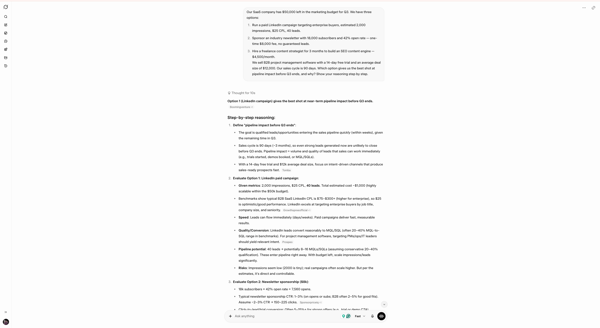
Grok's response to the reasoning prompt (part 1)
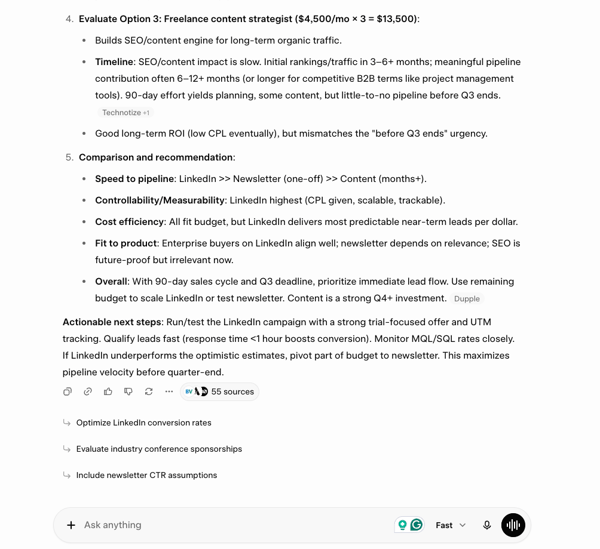
Grok's response to the reasoning prompt (part 2)
Grok reached the same recommendation but took a more execution-oriented approach. Beyond comparing the three options, it estimated potential outcomes, highlighted practical risks, and finished with actionable next steps for implementing the recommendation. I also appreciated the follow-up suggestions for optimizing campaign performance, which made the response feel less like a one-time answer and more like a practical decision-making guide.
Both chatbots handled the scenario thoughtfully without overlooking the business constraints in the prompt. Claude made it easier to understand why the recommendation was the best fit, while Grok focused more on how to execute it once the decision had been made.
Winner: Split (Claude provided a more structured reasoning framework, while Grok matched it with actionable recommendations and detailed decision-making guidance.)
One of the most practical uses for an AI chatbot is making sense of long reports without having to read hundreds of pages yourself. To test this, I uploaded the 425-page Stanford HAI AI Index Report 2026 and asked both Grok and Claude to identify the three most important findings for a B2B SaaS founder, flag claims that deserved additional verification, and summarize the report's position on AI adoption in enterprise software.
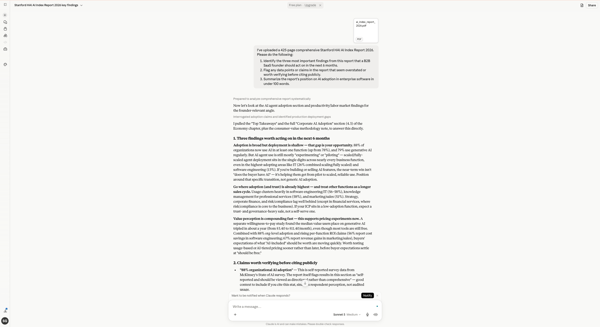
Claude's response to the document analysis prompt (part 1)
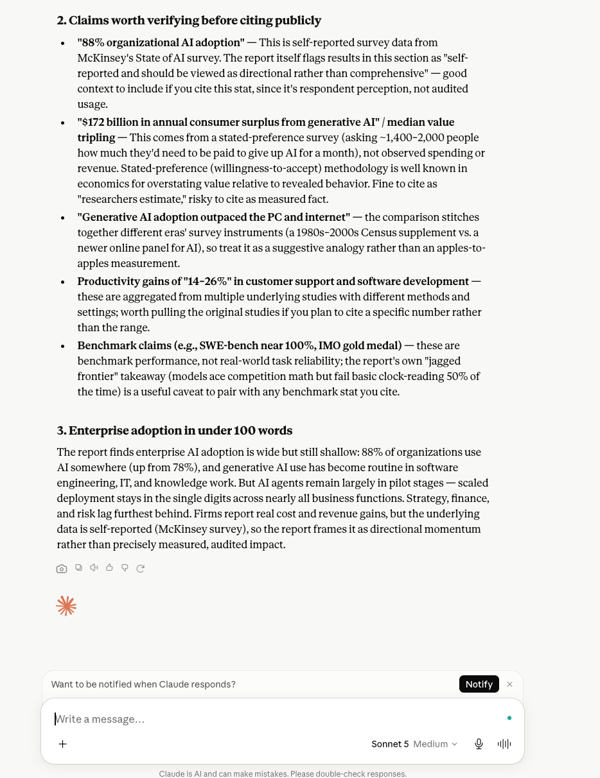
Claude's response to the document analysis prompt (part 2)
Claude followed the structure of my prompt closely, separating its response into the three requested sections. It identified the key findings, explained why certain statistics warranted additional verification, and summarized the report's position on enterprise AI adoption within the requested word limit.
I particularly appreciated how it explained the methodology behind several claims, making the findings easier to cross-check against the original report. The response stayed focused on the source material and presented the information clearly without adding unnecessary interpretation.
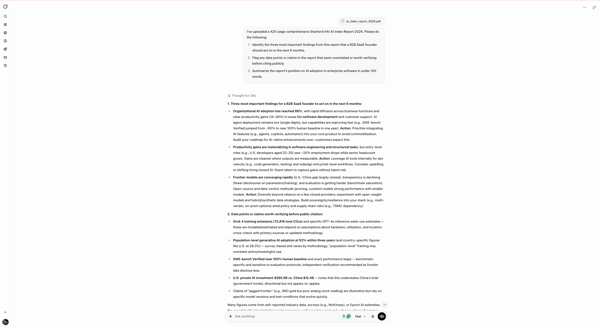
Grok's response to the document analysis prompt (part 1)
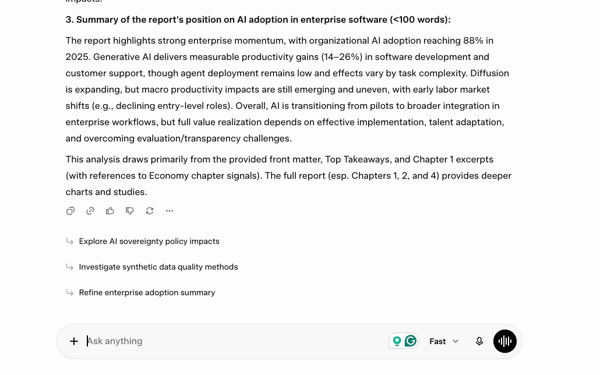
Grok's response to the document analysis prompt (part 2)
Grok also completed all three parts of the prompt, identifying key findings, flagging statistics requiring verification, and summarizing enterprise AI adoption. What stood out was how it translated the research into practical recommendations through dedicated Action callouts, connecting the findings to broader business decisions.
I also liked that Grok explained why certain statistics deserved additional scrutiny rather than simply listing them. Its response combined document analysis with actionable insights, making it useful for readers looking to understand the findings and consider their business implications.
Both chatbots successfully completed the document analysis task, but their approaches differed. Claude emphasized structured, source-focused reporting, while Grok connected the findings to practical business decisions. Neither showed a clear shortcoming in completing the requested work, making this a fair split.
Winner: Split (Claude delivered a structured, source-focused analysis, while Grok complemented its findings with actionable business recommendations.)
Writing code is one thing, but debugging existing code usually tells me much more about an AI assistant's reasoning. For this test, I gave both Grok and Claude a broken JavaScript function and asked them to identify the bugs, explain what was wrong, and provide a corrected version that also handled additional edge cases.
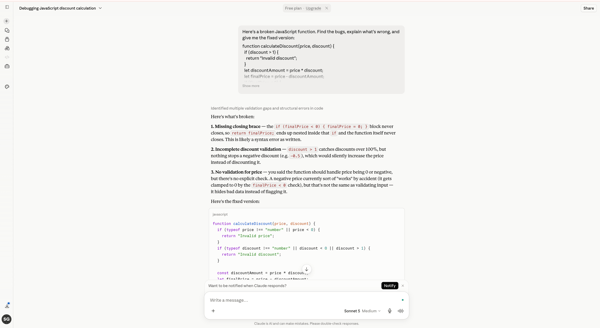
Claude's response to the coding and debugging prompt (part 1)
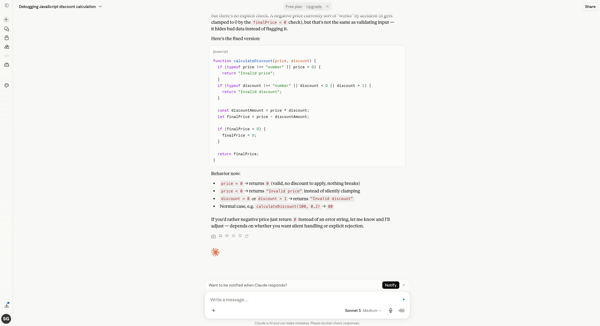
Claude's response to the coding and debugging prompt (part 2)
Claude immediately focused on explaining why the code failed before presenting a solution. It identified the missing closing brace, highlighted gaps in the validation logic, and explained why silently accepting negative prices could lead to incorrect behavior. I also liked that it walked through how the revised function would behave under different inputs, making the fixes easy to understand without having to read every line of code.
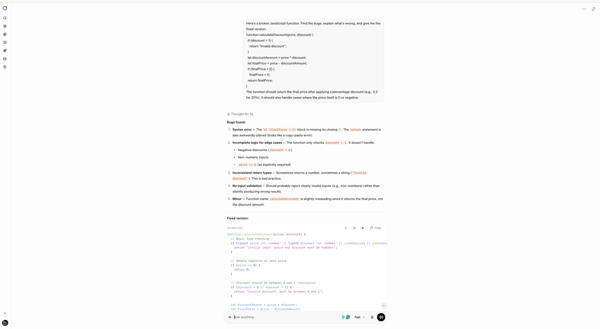
Grok's response to the coding prompt (part 1)
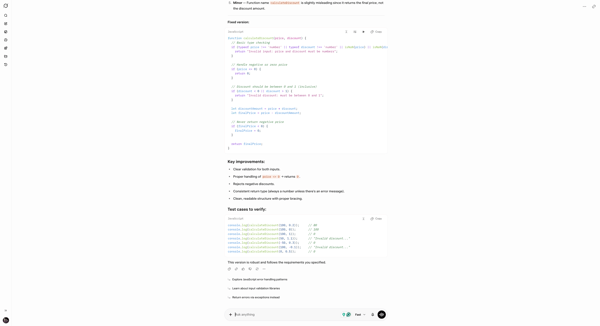
Grok's response to the coding prompt (part 2)
Grok identified the same core issues but leaned more toward strengthening the implementation. Alongside the corrected function, it expanded validation to cover additional edge cases, summarized the key improvements, and included ready-to-run test cases to make it easy to verify the solution. I also appreciated smaller suggestions, such as renaming the function to better reflect its purpose, which showed attention to more than just fixing the immediate bugs.
Both chatbots demonstrated why they're among today's strongest AI coding assistants. Claude made the debugging process easier to understand through clear explanations, while Grok focused on making the final solution more robust and easier to validate. Which approach is more valuable ultimately depends on whether you prioritize understanding the fix or verifying it in practice.
Winner: Split (Claude explained the reasoning behind each fix more clearly, while Grok strengthened the implementation with additional validation and practical testing.)
Understanding images isn't just about recognizing objects anymore. I wanted to see how well Grok and Claude could interpret a complex benchmark chart, extract meaningful insights, and explain what the visualization actually showed rather than relying on general AI knowledge. I asked both chatbots to answer three questions about the chart while keeping the response under 150 words.
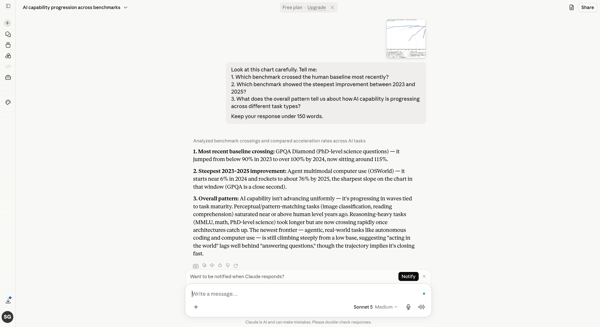
Claude's response to the image analysis prompt
Claude took a more interpretive approach to the chart instead of simply describing what it showed. Rather than listing individual observations, it grouped related findings together and explained the broader story behind the results. I appreciated that it went beyond surface-level observations and tried to explain what the findings meant rather than merely repeating what was already visible.
At times, though, it appeared to draw on its broader understanding of AI benchmarks to add context beyond the information directly presented in the chart. While that made the explanation richer, it also meant some conclusions felt less tightly tied to the visualization itself.
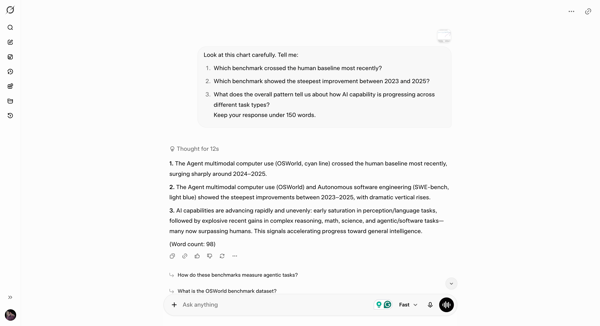
Grok's response to the image analysis prompt
Grok answered each of the three questions directly and stayed closely aligned with the information presented in the chart. Rather than expanding into broader interpretations, it focused on identifying the requested benchmarks and summarizing the overall trend in a concise, well-structured response. I also liked that it stayed within the requested word limit while keeping the explanation clear and easy to validate against the visualization.
Both chatbots demonstrated they're capable of understanding complex visual inputs, a capability increasingly important beyond traditional AI image generators. Claude added useful context around what the trends could mean, while Grok remained more closely grounded in the chart itself. Since this test evaluated how accurately each chatbot interpreted the visual rather than how much additional context it could provide, I found Grok's response more closely aligned with the task.
Winner: Grok
One of the easiest ways to test an AI chatbot's conversational memory is by introducing new instructions without repeating the original context. For this test, I first asked both Grok and Claude to write a product description for AI-powered expense-tracking software aimed at startup founders. I then followed up by asking them to rewrite it for enterprise finance teams, keep it under 40 words, and add a line about security and compliance.
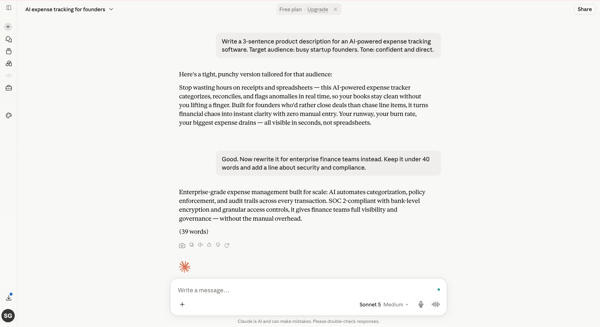
Claude's response to the follow-up prompt
Claude handled the transition without needing clarification. It understood that I wanted the existing copy rewritten rather than replaced, shifted the messaging toward enterprise finance teams, and naturally incorporated security, compliance, and governance into the new version. I also appreciated that it displayed the final word count, making it easy to confirm it had stayed within the requested limit. More importantly, the rewrite felt intentional. It wasn't simply shortening the original copy; it revised the messaging for a different audience while preserving the core product value.
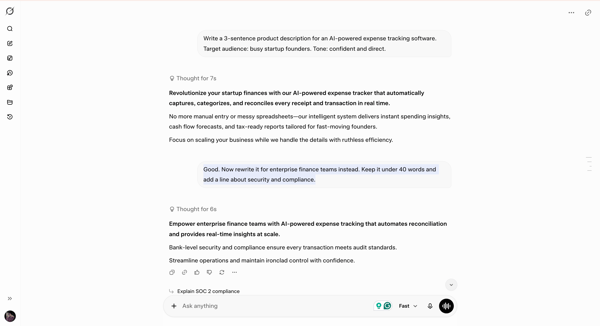
Grok's response to the follow-up prompt
Grok also carried the conversation forward without losing context. It remembered the original product, shifted the messaging toward enterprise finance teams, and successfully incorporated the requested security and compliance language. The rewrite remained concise, preserved the original prompt's confident tone, and responded to the new instructions without requiring any clarification. The interaction felt smooth and consistent from one prompt to the next.
Both chatbots handled the follow-up instructions well, showing they can manage multi-step conversations without losing context. Claude produced the more audience-aware rewrite, while Grok excelled at maintaining conversational continuity and adapting naturally as the instructions evolved.
Winner: Split (Claude delivered more audience-specific wording, while Grok preserved conversational context and instruction continuity without losing the original context.)
Here's a quick look at how each chatbot performed across all seven hands-on tests.
| Task | Winner | Why it won |
| Real-time research and news analysis | Grok 🏆 | Surfaced a broader range of developments, backed them with significantly more sources, and made deeper follow-up research easier. |
| Long-form writing and editing | Claude 🏆 | Delivered a more original opening, smoother narrative flow, and a draft that felt closer to publication-ready. |
| Complex reasoning and decision-making | Split | Claude made the decision logic easier to follow, while Grok added more actionable implementation guidance. |
| Large document analysis (PDFs and reports) | Split | Claude organized and explained the findings clearly, while Grok connected the analysis to practical business actions. |
| Coding and debugging | Split | Claude made the fixes easier to understand, while Grok strengthened the implementation with broader validation and ready-to-run tests. |
| Image understanding and visual analysis | Grok 🏆 | Stayed more closely aligned with the chart itself, making the response easier to validate against the visual evidence. |
| Multi-turn conversations and instruction following | Split | Claude adapted the rewrite more effectively for the new audience, while Grok preserved conversational continuity as the instructions evolved. |
I also looked at G2 review data to understand how Grok and Claude compare in user satisfaction, adoption, and feature performance. Here's what stood out:
If you're evaluating multiple AI assistants before making your decision, these detailed comparisons can help you understand where each one stands:
| User role/need | Recommended tool | Why |
| Researchers tracking breaking news and industry trends | Grok | Live web search, broader source coverage, and follow-up research suggestions make it better for fast-moving topics. |
| Content marketers, writers, and editors | Claude | Produces more natural, audience-aware writing that needs less editing before publishing. |
| Business professionals reviewing lengthy reports and PDFs | Claude | Follows detailed instructions closely and organizes complex information into structured, actionable summaries. |
| Decision-makers evaluating complex business scenarios | Claude | Breaks down trade-offs methodically and presents structured reasoning that's easier to evaluate. |
| Developers debugging and improving code | Grok | Adds broader validation, practical test cases, and implementation suggestions beyond fixing the immediate issue. |
| Users relying on AI for ongoing conversations and iterative work | Grok | Maintains conversational context naturally while adapting to new instructions across multiple prompts. |
| Professionals who need one AI assistant for everyday knowledge work | Claude | Delivers the most consistent experience across writing, reasoning, document analysis, and instruction-heavy tasks. |
| Users who prioritize speed and current information | Grok | Excels at real-time research, fresh information retrieval, and exploring rapidly evolving topics. |
Got more questions? G2 has the answers!
The biggest difference is their focus. Grok excels at real-time research, live web information, and fast exploration, while Claude performs better for long-form writing, structured reasoning, and document analysis. The best choice depends on how you plan to use AI every day.
Neither chatbot led across all three. Claude wrote a more engaging introduction and organized document findings clearly; Grok contributed practical reasoning steps and source discovery. Both completed my decision-making test, resulting in a split.
Yes. Both can interpret uploaded images and analyze long documents. In my tests, Grok kept its chart analysis closely tied to the visual, while Claude organized document findings clearly. Both completed the requested analysis tasks.
Choose Grok when you need up-to-date information, broader web research, and faster exploration of evolving topics. Its real-time research capabilities, extensive source coverage, and follow-up suggestions make it particularly useful for tracking news, trends, and industry developments.
Choose Claude when your work involves long-form writing, document analysis, structured reasoning, or refining complex ideas. It consistently followed instructions more closely and produced polished, audience-aware responses that required less editing during my hands-on testing.
Claude followed complex instructions more consistently during my evaluation. It adhered closely to formatting, audience, and content requirements across writing, reasoning, and document analysis tasks, while Grok occasionally expanded beyond the prompt with additional recommendations and context.
Yes, specifically for live X posts and social conversations. Grok has dedicated X search, while both chatbots can access current web information. In my research test, Grok also surfaced more sources and follow-up paths.
Yes, but their memory features differ. Claude offers memory across conversations, including on Free, while Grok Bot supports persistent context for ongoing work. Both also retained context within my multi-turn writing test.
Some AI assistants may suit particular tasks better than Claude. In my tests, Grok was more useful for exploring live X-related information and chart-specific answers, while Claude delivered a more engaging writing sample.
That depends on the task. Claude delivered a more engaging introduction in my writing test, while Grok was useful for live research and chart analysis. Neither chatbot consistently outperformed the other across all seven tests.
There is no single, universal measure of AI power. Grok offers native X search and image/video generation, but the best assistant depends on accuracy, task completion, workflow fit, and the models being compared.
Debate around Claude often centers on AI safety rules, refusals, privacy, and the reliability of generated answers. Anthropic publishes its approach to safety, but users should still verify important outputs and review current data policies.
After testing Grok and Claude across real-world workflows, I don't think there's a single winner, and that's exactly what makes this comparison interesting. Both chatbots consistently delivered high-quality results, but they excelled in different areas.
I'd choose Grok if my work depended on researching current events, tracking industry developments, or exploring rapidly changing topics. Its live web research, broader source discovery, and conversational approach made it feel more like a research partner than a traditional chatbot.
I'd choose Claude if I needed an AI assistant for writing, structured reasoning, document analysis, or refining complex ideas. It produced a more engaging writing sample and clearly organized the report findings, while also completing the document analysis task and adding practical recommendations.
Ultimately, the better choice comes down to the kind of work you do most often, not which chatbot has the longest feature list.
Want to compare more leading AI models before making your decision? Explore the latest ratings, reviews, and feature comparisons for large language models (LLMs) on G2.


A few weeks ago, my internet broke.
 by Soundarya Jayaraman

Let AI pick the right tool for your use case Decide with AI 1 Click on the button below
 by Sagar Joshi

Let AI pick the right tool for your use case Decide with AI 1 Click on the button below
by Sagar Joshi