The right software can turn a lackluster classroom experience into one that’s engaging, thought-provoking, and inspiring for instructors and students alike. But sometimes, these tools come with an expensive price tag.
Free classroom management software offers free options to teachers looking to enhance their classrooms at no cost. These tools connect teachers to students in virtual, hybrid, or in-person classrooms, allowing an engaging classroom experience. They have features to monitor students’ screens and even send individual notifications to redirect attention to the lesson.
Software for classroom management also makes it easy for students to ask real-time questions on assessments and message directly with the teacher.
6 best free classroom management tools in 2026
-
Dyknow Classroom: Best for real-time student screen monitoring
Live thumbnail views of all student screens with the ability to block distracting apps and websites during lessons.
-
GoGuardian Teacher: Best for Google Classroom, centric environments
Seamless integration with Google Classroom, combined with real-time tab control to keep students focused without disrupting instruction.
-
KINDERPEDIA: Best for school–parent communication and administration
Centralized communication hub that connects teachers, parents, and administrators with daily updates, messaging, and activity tracking.
-
LanSchool: Best for device-level classroom control
Robust remote control tools that let teachers view, lock, message, and guide student devices across Windows, Mac, and Chromebooks.
-
Lumio: Best for interactive and game-based lessons
Transforms PDFs and PowerPoint slides into interactive activities, games, and formative assessments for hybrid and in-person learning.
-
Nearpod: Best for live student engagement and formative assessment
Interactive lessons with real-time student responses, polls, quizzes, and insights that help teachers adjust instruction on the fly.
*The software list is arranged alphabetically. These tools offer free trials, free forever options, or freemium models.
Comparison of the best classroom management tools
With so many free classroom management software options available, it can be hard to choose. This comparison table breaks down the key features to help you make an informed decision.
| Best free classroom management tools |
G2 Rating |
Free plan |
Paid plan |
| Dyknow Classroom |
4.6/5 ⭐ |
Free trial available |
$10 – $2 /student license annually |
| GoGuardian Teacher |
4.7/5 ⭐ |
Free trial available |
Available on request |
| KINDERPEDIA |
4.9/5 ⭐ |
Free trial available |
$81.88/per center/month |
| LanSchool |
4.2/5 ⭐ |
Free trial available |
Available on request |
| Lumio |
4.8/5 ⭐ |
Free plan available |
$59/user/year |
| Nearpod |
4.6/5 ⭐ |
Free plan available |
$159/user/year |
*All pricing details mentioned in the article are based on publicly available data at the time of publication and are subject to change.
6 best free classroom management tools I recommend
Managing classrooms has become increasingly digital, especially as educators balance in-person, hybrid, and remote learning environments. This shift is reflected in market growth; the classroom management software market is expected to reach $963.6 million by 2035, growing at a CAGR of 12.3% during the forecast period.
What stood out to me while reviewing this space is that effective classroom management doesn’t always require a paid solution. Several tools offer free plans or educator-friendly access that support essential needs, such as student engagement, behavior tracking, communication, and lesson organization, making them practical for teachers and schools with limited budgets.
In this list, I’ve rounded up the six best free classroom management tools based on real user feedback, ease of use, and the overall value of their free offerings. I’ll highlight what each tool does best, where it may fall short, and which teaching environments it’s best suited for, so educators can manage classrooms more effectively without added costs.
How did I find and evaluate the best classroom management tools?
To build this list, I started with G2 Data, shortlisting top-rated tools based on their G2 scores and consistent performance in the classroom management software category.
From there, I reviewed product features and recent, verified user feedback to confirm that these tools deliver real value in real classroom settings and to understand where each one stands out, whether that’s student engagement tools, behavior management features, communication capabilities, or support for in-person and remote learning environments.
The goal was simple: to see whether these classroom management solutions live up to their claims, what each one is best suited for, and whether there’s a free plan or free trial educators can use with minimal risk. Since this is a free-focused list, I paid close attention to what you can actually do without paying, such as student or class limits, access to core teaching tools, feature restrictions, and any constraints that might require upgrading to a paid plan.
The screenshots featured in this article may be a mix of those taken from the vendor’s G2 page or from publicly available materials.
The list below contains reviews by actual users from the best animation software category page. It’s important to note that in the context of this list, vendors and software that offer a free trial are also considered to be free. To be included in this category, a solution must:
- Provide in-class virtual rooms for students
- Allow real-time questions and answers to in-class assessments and lessons
- Provide in-class messaging capabilities
*This data was pulled from G2 in 2026. Some reviews may have been edited for clarity.
1. DyKnow Classroom: Best for real-time student screen monitoring
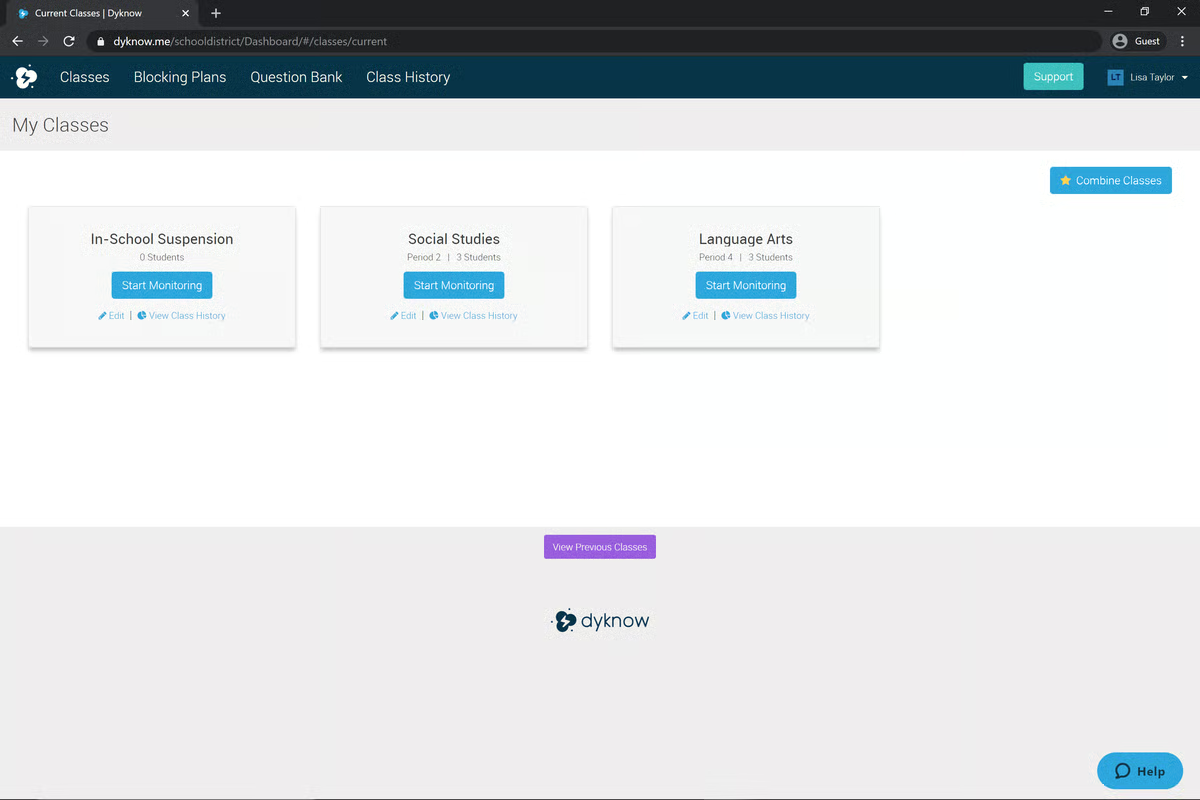
DyKnow is a classroom monitoring solution designed for K-12 schools and districts that utilize school-issued devices. It empowers teachers to increase student engagement, reduce distractions, and teach confidently. DyKnow Classroom provides teachers with a real-time thumbnail view of all students. It can also block specific websites and apps during lessons. This software is compatible with Chromebooks, Macs, and Windows PCs.
Pros and cons of DyKnow Classroom: What stood out ot me
| Pros of DyKnow Classroom |
Cons of DyKnow Classroom |
| Real-time screen monitoring and device control |
One student can’t be monitored by multiple teachers at once |
| Tools to block distractions and guide student activity |
Setup and reporting can feel complex |
| Useful analytics to track student engagement |
Can be resource-intensive on student devices |
What G2 users like about DyKnow Classroom:
“The product is very intuitive, and our teachers don’t need a lot of training to understand its features and how they can use them in a classroom setting. It can be set up to always be on, so the teacher doesn’t forget to launch the software at the beginning of a class. It allows the teacher to limit specific websites from being launched. It can direct message students so a teacher can send a link in a chat message to all students or select students to access that site with a click.”
- DyKnow Classroom Review, Chris S.
What G2 users dislike about DyKnow Classroom:
“I don't particularly like that only one teacher can monitor a group of students at a time. It is quite inconvenient when a previous teacher forgets to stop tracking a group of students when I need to begin. A solution to this is allowing multiple teachers to monitor actively simultaneously.”
- DyKnow Classroom Review, Jessica D.
2. GoGuardian Teacher: Best for Google Classroom, centric environments
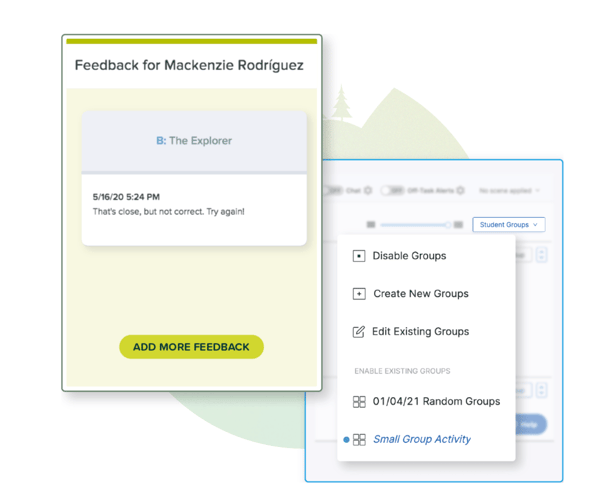
GoGuardian Teacher enables instructors to effectively manage their classroom, engage with students, gather valuable insights, and create more impactful learning experiences. This tool offers features to help students stay focused and on-task while creating effective digital learning environments. These environments can be customized to meet the needs of the day.
Pros and cons of GoGuardian Teacher: What stood out ot me
| Pros of GoGuardian Teacher |
Cons of GoGuardian Teacher |
| Real-time screen monitoring to keep students on task |
Occasional syncing or screen refresh issues |
| Website and app blocking to reduce distractions |
Risk of over-monitoring if not used thoughtfully |
| Easy integration with Google Classroom |
Requires careful configuration for breaks and off-hours |
What G2 users like about GoGuardian Teacher:
“GoGuardian allows me to check in on my students' work but not hover over their shoulders. I can see what they are working on and make suggestions for their progress. I can also close or open their tabs to make sure they are on task.”
- GoGuardian Teacher Review, Rachelle T.
What G2 users dislike about GoGuardian Teacher:
“There is very little I actually dislike, but the one complaint I do have is that I wish that in teacher view mode, I could have more adjustability in screen size. Current options are 2, 4, 8, or 10 screens at a glance. I'd love to see it open to 3 as well, as sometimes 4 is still too small, and two is too large.”
- GoGuardian Teacher Review, Marnie D.
3. KINDERPEDIA: Best for school–parent communication and administration
Kinderpedia is a cloud-based school management and communication platform designed for schools and childcare centers. It helps institutions manage administration, attendance, enrollment, and financial processes from one centralized system, while supporting multilingual and multi-currency use for global teams. Alongside operational tools, Kinderpedia enables clear communication between administrators, teachers, and parents through messaging, notifications, and updates.
By combining administrative efficiency with community engagement, Kinderpedia helps educational institutions streamline daily operations and strengthen collaboration across their school ecosystem. According to G2 Data, KINDERPEDIA ranks #1 for ease of use among classroom management tools.
Pros and cons of KINDERPEDIA: What stood out ot me
| Pros of KINDERPEDIA |
Cons of KINDERPEDIA |
| Centralized platform for sharing information across schools |
Requires stable internet and devices to work reliably |
| Strong communication tools for teachers, parents, and administrators |
Limited photo upload functionality |
| Easy daily feedback and updates for parents |
Occasional technical issues when uploading media |
What G2 users like about KINDERPEDIA:
I like best the number of features and that it is easy to use.
- KINDERPEDIA Review, Albu Oana P.
What G2 users dislike about KINDERPEDIA:
There are a few limitations of the tool, such as the week configuration. We couldn't set a week from Monday to Friday, as it is by default up to Sunday, even though our kindergarten is closed during weekends. Nothing too problematic though :0
- KINDERPEDIA Review, Valentin T.
4. LanSchool: Best for device-level classroom control
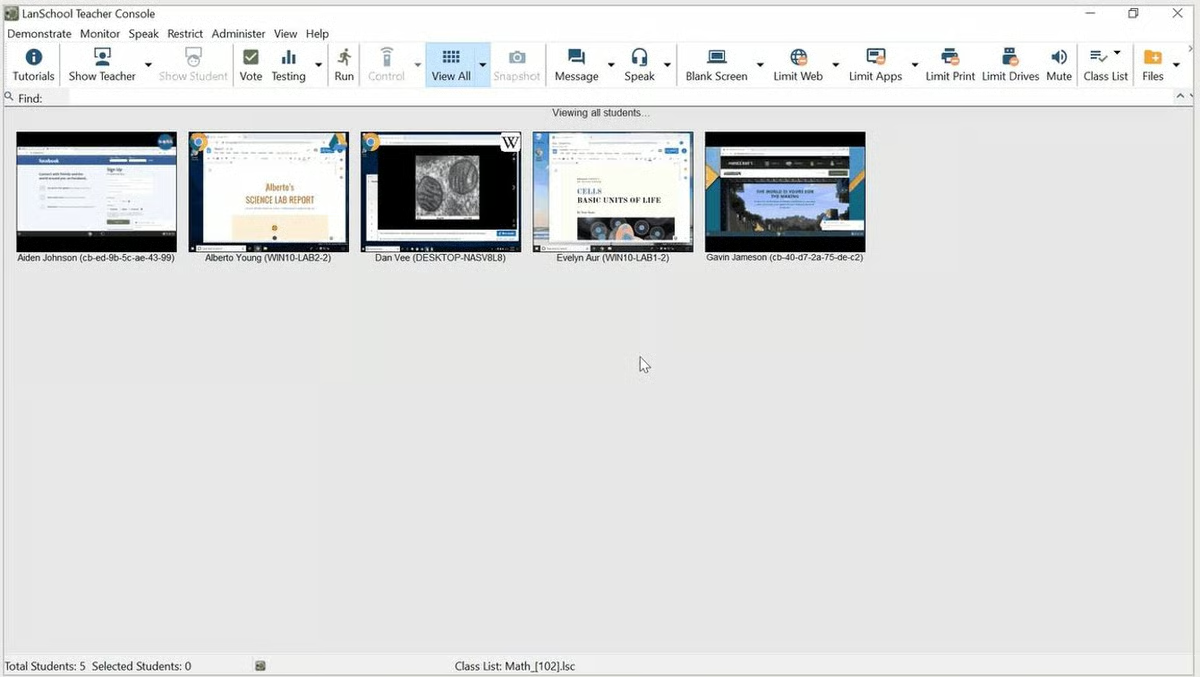
LanSchool, backed by Lenovo, offers classroom management, filtering, and student safety. It guides learning, promotes collaboration, and maximizes the time instructors spend teaching their students. LanSchool strives to increase classroom engagement both in the classroom and remotely. This tool is a cloud-based or locally–hosted solution compatible with Windows, Mac, and Chrome operating systems.
Pros and cons of LanSchool: What stood out ot me
| Pros of LanSchool |
Cons of LanSchool |
| Real-time screen monitoring and remote control tools |
Interface feels dated compared to newer tools |
| Efficient file sharing, app launching, and quizzes |
Performance issues on older devices or weak networks |
| Works across Windows and Chromebook environments |
Limited advanced customization options |
What G2 users like about LanSchool:
“I like many aspects of this software - being able to privately message a student when you can see that they are not on the website or assignment they are supposed to be on is a favorite, but there are many features that I found beneficial.”
- LanSchool Review, Pam Driscoll F.
What G2 users dislike about LanSchool:
“I dislike how hard it is to get used to the software. It is not in the slightest ‘user-friendly’. Unfortunately, I'm not much of a tech geek, so it took a lot of time to get used to, and I had to ask some of my colleagues who are also using it to give me a detailed explanation of LanSchool, which only took away from the time I could be using it. Another problem is that remotely connecting to a computer takes a lot of time, and its response time is the slowest I have ever seen.”
- LanSchool Review, Patricia M.
5. Lumio: Best for interactive and game-based lessons
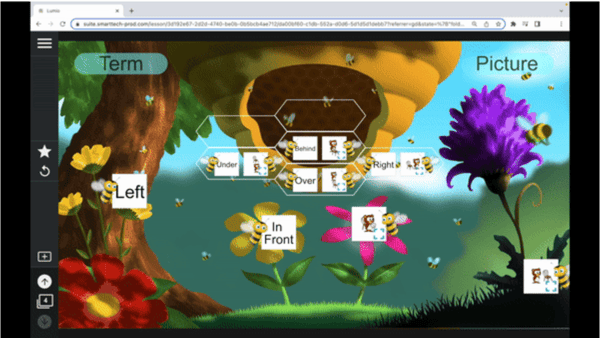
Lumio, formerly known as SMART Learning Suite Online (SLSO), is a digital learning tool that turns lessons into interactive learning experiences, engaging students wherever they are. This tool enables students to engage in a collaborative experience through activities, games, Group Workspaces, and formative assessments, all from a single location. According to G2 Data, it ranks as the 8th easiest to use tool.
Lumio offers a free plan to individual educators, which includes 50 MB of lesson storage. For unlimited lesson storage, plans start at $59 per year.
Pros and cons of Lumio: What stood out ot me
| Pros of Lumio |
Cons of Lumio |
| Game-based activities that boost student engagement |
Heavily dependent on stable internet connectivity |
| Supports in-person, online, and hybrid learning |
Occasional technical glitches with pre-made activities |
| Converts PDFs and PowerPoints into interactive lessons |
Limited advanced design tools within the platform |
What G2 users like about Lumio:
“I love the way it can support various planning tools, including SMART Notebook, PowerPoint, and PDFs, seamlessly bringing the tools together to create a unique learning experience. I also love how it has the learner at the center of all it offers, especially the interactive and engaging games that are perfect for retrieval and procedural practice.”
- Lumio Review, Ian S.
What G2 users dislike about Lumio:
“There isn’t a lot in the library that can be used with higher education. I would also like to see some of the old SMART activities updated to match the Lumio look. Looking in the library, you can tell which items are old school SMART and which are Lumio.”
- Lumio Review, Samantha F.
6. Nearpod: Best for live student engagement and formative assessment
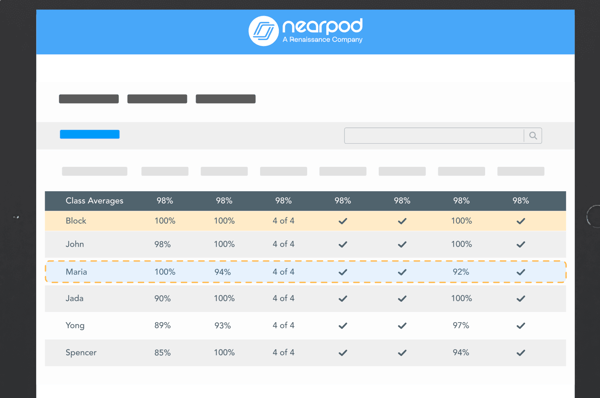
Nearpod is on a mission to make teaching easier with the interactive tools, resources, and content teachers need. This tool offers real-time insights into student understanding through interactive lessons, videos, gamification, and activities, all in one place.
Nearpod is free for individual teachers, with 40 students per lesson and 100 MB of storage. Schools and districts interested in Nearpod are encouraged to schedule a call with the sales team.
Pros and cons of Nearpod: What stood out ot me
| Pros of Nearpod |
Cons of Nearpod |
| Real-time monitoring of student progress and understanding |
No built-in website blocking for distraction control |
| Interactive activities that boost engagement and participation |
Strong dependence on stable internet connectivity |
| Large library of ready-made lessons saves prep time |
Full feature access and storage can be costly for schools |
What G2 users like about Nearpod:
“I like that there are so many great lessons and activities already created that are available for teachers to choose from. It is also user-friendly and easy to add to any lesson plan!”
- Nearpod Review, Ryan P.
What G2 users dislike about Nearpod:
“I dislike the methods of making slides. Slide creation is not always intuitive and can be difficult. Other things I dislike are limitations due to bandwidth, as well as library search functions.”
- Nearpod Review, Christy S.
Frequently asked questions about free classroom management software
Q1. Is free classroom management software effective for teaching?
Yes, free classroom management software can be very effective, especially for core tasks like engagement, basic monitoring, and lesson delivery. Many free tools help teachers keep students focused, manage digital activities, and support participation without adding administrative overhead.
Tools like Nearpod and Lumio are widely used in classrooms to boost engagement, while GoGuardian Teacher and Dyknow Classroom help teachers monitor student activity during lessons.
Q2. What limitations should I expect with free classroom management software?
Free plans often come with limits, such as:
- Restricted class sizes or number of sessions
- Limited reporting and analytics
- Fewer integrations
- Basic monitoring instead of advanced controls
For example, LanSchool and GoGuardian Teacher offer strong classroom control features, but advanced analytics and long-term monitoring are typically part of paid plans.
Q3. What types of classrooms can free classroom management software support?
Free classroom management tools support a wide range of environments, including:
- K–12 classrooms
- One-to-one device classrooms
- Remote and hybrid classrooms
- Small-group or subject-specific classes
Tools like Nearpod and Lumio work well across elementary, middle, and high school settings, while KINDERPEDIA is often used in early education environments.
Q4. How does free classroom management software compare to paid tools?
Free tools usually focus on engagement and basic management, while paid tools offer deeper controls, analytics, and administrative oversight.
For example:
- Nearpod (free) supports interactive lessons, while paid plans add detailed student reports.
- GoGuardian Teacher and Dyknow Classroom provide monitoring in free or limited modes, with advanced filtering and reporting available in paid tiers.
Free tools are ideal for individual teachers, while paid tools are better suited for school-wide deployments.
Q5. Which free classroom management software is best for teachers?
The “best” option depends on teaching style and classroom needs:
- Nearpod is excellent for interactive lessons and engagement.
- Lumio works well for teachers using collaborative presentations.
- GoGuardian Teacher is popular for real-time classroom monitoring.
Many teachers combine one engagement tool with one monitoring tool for best results.
Q6. Which free classroom management tools are most trusted by educators?
Educators tend to trust tools that are reliable, easy to use, and classroom-tested:
- Nearpod is widely trusted for interactive instruction.
- GoGuardian Teacher and Dyknow Classroom are trusted for student focus and device monitoring.
- LanSchool has long-standing trust in device-managed classrooms.
Q7. Do free classroom management tools support attendance tracking?
Some do, but usually in a basic form.
Engagement-focused tools like Nearpod and Lumio allow teachers to see who joined a session, which can function as lightweight attendance tracking. Dedicated attendance management is often more robust in paid or LMS-based tools.
Q8. Can free classroom management software manage assignments and homework?
Yes, to an extent.
Nearpod and Lumio allow teachers to assign lessons or activities for independent or homework use. However, full assignment workflows (grading, long-term tracking) are typically handled through an LMS rather than classroom management tools alone.
Q9. Do free tools support student behavior tracking?
Some free tools support indirect behavior tracking.
Monitoring tools like GoGuardian Teacher, Dyknow Classroom, and LanSchool help teachers observe off-task behavior by monitoring screens and activity. Formal behavior logs and analytics are more common in paid plans or dedicated behavior management platforms.
Q10. Can free classroom management software integrate with LMS platforms?
Yes, many free tools support basic LMS integrations.
Nearpod and Lumio integrate with platforms like Google Classroom and Microsoft Teams, even in free versions. Deeper grade syncing and analytics integrations are usually part of paid tiers.
Q11. Do free classroom management tools support parent communication?
Parent communication is usually limited or indirect in free plans.
Some platforms, like KINDERPEDIA, are designed with parent visibility in mind, particularly for early education. Most other tools focus primarily on teacher–student interaction, with parent communication handled separately.
Q12. What is the best free classroom management software for K–12 teachers?
For K–12 classrooms:
- Nearpod is one of the best free options for engagement and lesson delivery.
- GoGuardian Teacher is highly effective for monitoring student focus.
- Lumio works well for collaborative, presentation-based teaching.
Many K–12 teachers use a combination of these tools depending on lesson goals.
Q13. Can free classroom management tools be used for remote or hybrid learning?
Yes, this is one of their strongest use cases.
Nearpod and Lumio are especially effective for remote and hybrid instruction, while GoGuardian Teacher and Dyknow Classroom help maintain focus when students are learning from home.
Run the classroom!
I believe technology can transform classroom management, and the right software can truly shape a school year. By narrowing down the features and functionality that matter most, it becomes easier to choose a tool that supports student success.
Whether the focus is on gamified learning or more interactive lessons, I’m confident there’s an option available that fits both your teaching style and budget.
Take it one step further by learning new classroom management strategies to create an efficient and productive classroom setting.
This article was originally published in 2024. It has been updated with new information.