


This guide was last updated on May 23, 2026. A newer report has since been published. The tools below reflect the scores from G2's Summer 2026 Grid® Report.
Based on verified G2 reviews and the latest Grid® placement.
*Liked and disliked highlights are summarized from verified G2 user reviews.
The tools below have also been exhaustively tested and evaluated, and continue to hold their place among the best Video Surveillance on G2.
I have spent a lot of time digging into video surveillance software, or what many teams also call video management software (VMS), because it’s one of those categories where the gap between tools isn’t just about features. It’s about how reliably you can monitor, secure, and respond in real time.
If you’re evaluating the best video surveillance software for your business, that difference becomes clear pretty quickly once you look beyond surface-level capabilities.
From what I’ve seen, the strongest tools consistently do a few things better than weaker alternatives. They make multi-camera monitoring feel centralized, improve footage search, and add AI-driven alerts and video analytics that reduce manual work rather than create more of it. At the same time, not every platform is built for the same kind of buyer. Some are better suited for cloud video surveillance and fast deployment, while others are stronger fits for larger teams that need more control, scalability, or broader physical security coverage.
For this guide, I evaluated six leading video surveillance software tools based on core surveillance capabilities, deployment flexibility, day-to-day usability, and verified G2 reviews, narrowing the list to Rhombus, Verkada, Coram AI, Kastle, XProtect, and Alarm.com for Business.
|
Best video surveillance software
|
G2 Rating
|
Best for
|
Standout feature
|
|
Rhombus
|
4.6/5 ⭐️
|
Modern cloud-first surveillance
|
AI analytics and real-time alerts are built into its cloud-based physical security platform
|
|
Verkada
|
4.7/5 ⭐️
|
Unified enterprise security
|
Unified cloud platform spanning cameras and broader physical security products
|
|
Coram AI
|
4.9/5 ⭐️
|
AI-powered investigations
|
Text-based AI video search for faster investigations across footage
|
|
Kastle
|
4.6/5 ⭐️
|
Managed physical security operations
|
Managed security model tying video surveillance to broader property security operations
|
|
XProtect
|
4.5/5 ⭐️
|
Advanced VMS control
|
Support for 14,000+ devices and broad deployment flexibility
|
|
Alarm.com for Business
|
4.5/5 ⭐️
|
Simpler business security setups
|
Enterprise Dashboard for viewing status, video, access, and monitoring across locations
|
*These experience management software are top-rated in their category, according to G2 Spring 2026 Grid Reports. Pricing details are available upon request.
At a basic level, video surveillance software turns cameras into an active security system instead of a passive recording tool. Rather than leaving footage scattered across locations or devices, these platforms centralize live monitoring, playback, alerts, and investigation tools so teams can respond faster.
That visibility matters because businesses now expect more than simple recording. They need video management software (VMS) that supports faster investigations, smarter monitoring, and stronger security operations across offices, stores, warehouses, and other sites.
The strongest tools do more than stream footage. They make multi-camera monitoring easier to manage, improve footage search, support remote video monitoring, and add AI video analytics and alerts that help reduce manual work. That’s also why more buyers are comparing cloud video surveillance software with traditional or hybrid setups.
The market reflects that shift. The global video surveillance market is projected to reach $147.66 billion by 2030, growing at a 12.1% CAGR from 2025 to 2030.
I started with G2’s Grid Reports to build a shortlist of the top video surveillance software tools based on G2 Score, user satisfaction, and overall market presence.
Next, I analyzed G2 reviews at scale with AI assistance to identify recurring patterns across security and operations teams: what helps them monitor multiple locations more effectively, where footage search or alerting falls short, and which features make video management software (VMS) easier to use day to day. I paid close attention to comments about live monitoring, playback and retrieval, AI analytics, deployment flexibility, integrations, and how well each platform supports faster investigations and response workflows.
Since I couldn’t test every platform directly, I relied on insights from professionals who use these tools daily and validated those findings against verified G2 reviews.
The screenshots in this article come from G2 vendor profiles and publicly available product documentation.
If you’re evaluating basic camera monitoring tools, you’ll focus on live feeds, recording, and playback. But when comparing the best video surveillance software for business use, you need more tools that support faster investigations, reliable alerts, remote access, and seamless management across locations.
Keeping that in mind, here are the factors I prioritized when evaluating the best video surveillance software tools.
Over the course of my research, I narrowed the list down based on the features that matter most in real buying decisions: centralized monitoring, footage search, analytics, deployment flexibility, scalability, and day-to-day usability.
To be included in this category, a solution must:
*This data was pulled from G2 in 2026. Some reviews may have been edited for clarity.
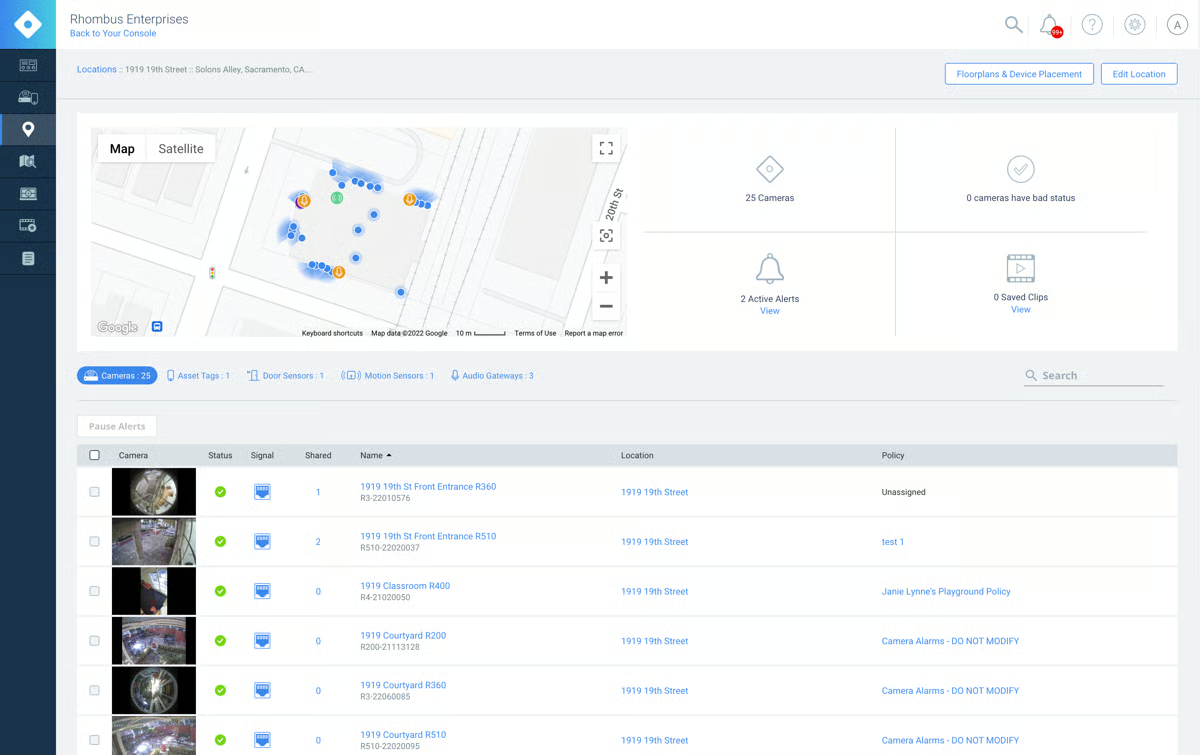
Rhombus is a cloud-based video surveillance platform built for teams that want to manage cameras, monitor activity, and review footage without being tied to on-site systems. It brings together live monitoring, alerts, and smart search into a setup that works well across multiple locations.
From there, the biggest strength I kept seeing was how easy the platform is to work with. Reviewers repeatedly describe Rhombus as intuitive, clean, and simple to navigate, which matters a lot in a category where tools can easily become overwhelming. According to G2 Data, Rhombus scores 94% for ease of use and 95% for ease of admin, which aligns with the review sentiment. Instead of making teams dig through a complicated interface, it seems to make camera access, monitoring, and management feel much more straightforward.
That ease carries over into setup, too, which came up often in the reviews. A lot of users talk about installation and rollout being smooth, with less friction than they expected from a security platform. According to G2 Data, Rhombus has 93% for ease of setup, and that fits the broader pattern of reviewers describing it as quick to deploy and relatively easy to get running.
I also saw a lot of positive feedback around video clarity, which is one of those core product capabilities that matters more than almost anything else in video management software (VMS). Reviewers frequently mention strong image quality and useful footage when they need to go back and investigate something. Rhombus scores 94% for video access and 91% for storage on G2, which reinforces that users generally feel confident not just accessing footage, but getting usable visual detail from it.
Another theme that shows up consistently is the platform’s smart security functionality. Users repeatedly call out alerts, search capabilities, AI-driven features, and object detection as meaningful parts of the product rather than just extras on a feature list.
Customer support is another area where the reviews stay consistently positive. A lot of users mention quick responses, helpful representatives, and solid follow-through when issues come up. That matters even more in security software, where delays can quickly turn into operational headaches.
I also think Rhombus benefits from how these features work together. The cloud access, smart alerts, usable interface, and solid footage quality do not feel like disconnected strengths. They support the same overall use case: giving teams a more modern way to manage surveillance across sites without adding unnecessary complexity.
That said, the mobile experience seems to be a more mixed part of the product. Rhombus clearly puts a lot of value into letting users access cameras remotely, which is one of its biggest strengths, but some reviewers mention friction in the mobile experience, including awkward navigation, instability, or needing multiple apps for certain actions. For teams that do most of their monitoring from desktops or central dashboards, that may not be a major issue.
Pricing also comes through as a fit consideration rather than a universal drawback. Rhombus appears to be designed as a more modern, cloud-first surveillance platform with built-in intelligence, and that positioning seems to come with higher camera costs, recurring license fees, or per-camera pricing concerns for some reviewers. For businesses that are more budget-sensitive or managing very large camera deployments, the cost structure may need a closer look, but teams that prioritize easy deployment, remote access, and smart security features may find that tradeoff worthwhile.
Overall, Rhombus comes across as a strong option for businesses that want video surveillance software for business use cases where remote access, smart alerts, usable footage, and day-to-day simplicity matter most.
“The platform is super easy to use from an admin perspective, and the team loves it too! They have awesome customer service with very quick response times.”
- Rhombus review, Lindsey G.
“I find the pricing structure somewhat challenging, particularly because Rhombus licenses the software annually on a per-camera basis. This is a contrast to another vendor I am familiar with, which offers a flat fee without renewal charges. The per-camera annual licensing has been a concern for me, as it adds complexity and recurring costs compared to a straightforward, flat-fee model.”
- Rhombus review, Kyle S.
Monitoring activity is critical, but controlling who gets access is just as important. Compare the best identity and access management software to strengthen your overall security framework.
Verkada is a cloud-based video surveillance platform built for teams that want to manage cameras, access control, and broader physical security from one place. It’s especially well-suited for organizations that want remote visibility across locations without relying on a patchwork of separate systems.
What immediately caught my attention about Verkada is how strongly it leans into being a unified security platform rather than just a camera system. A lot of the value here seems to come from having video surveillance, access control, and related security tools connected in one place, which makes it easier to manage incidents and monitor multiple sites without bouncing between systems. That centralized approach shows up repeatedly in the reviews and feels like one of the biggest reasons Verkada stands out in this category.
That same theme carries into the day-to-day experience of using the platform. Reviewers repeatedly describe Verkada as intuitive, simple, and easy to navigate, which matters a lot in a category where security software can quickly become difficult to manage at scale. According to G2 Data, Verkada scores 97% for ease of doing business with, and that fits with the broader sense that users find the platform approachable for ongoing administration rather than just initial setup.
Another clear strength is the cloud-based model. A lot of reviewers like being able to access and manage the system remotely instead of being tied to on-premise infrastructure. That flexibility seems especially valuable for distributed teams, multi-site businesses, and organizations that want visibility across locations without adding as much operational overhead. On G2, Verkada has 98% for video access, which reinforces how central remote visibility is to the platform’s appeal.
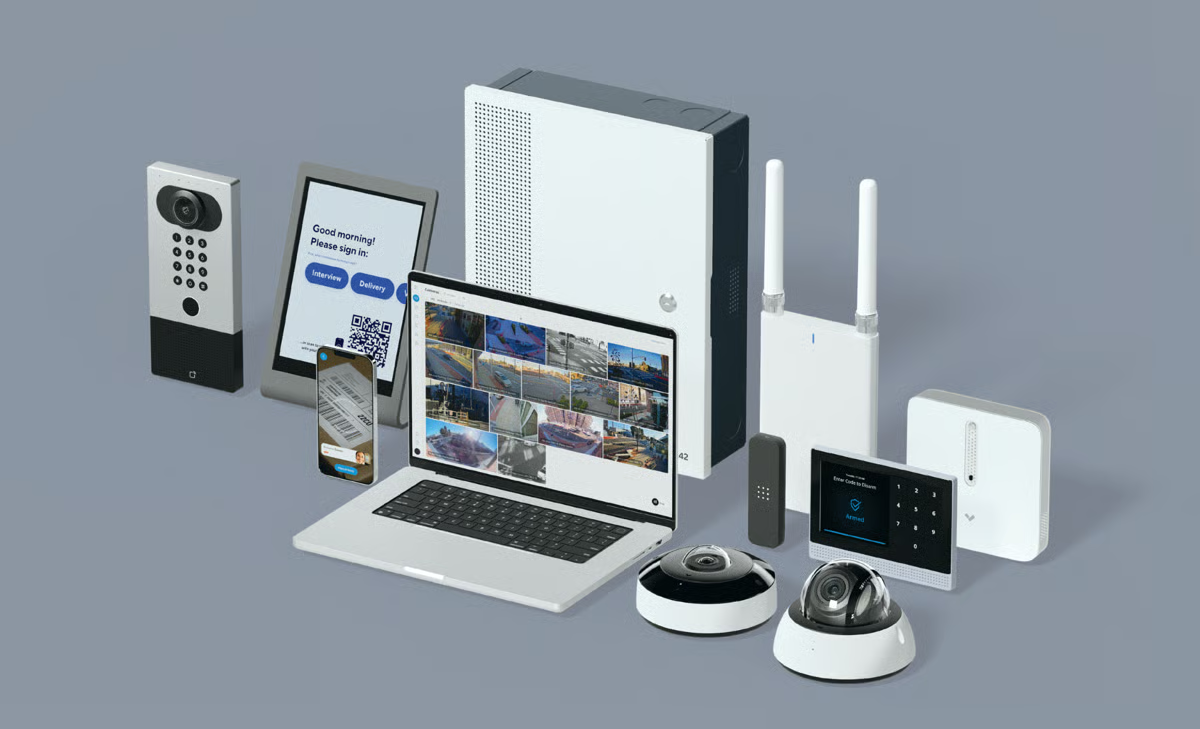
I also saw a lot of praise for Verkada’s AI and search capabilities. Reviewers mention facial recognition, motion detection, license plate recognition, and investigation tools as features that make footage more useful in practice, not just easier to store. That matters because good video surveillance software should help teams find and act on incidents faster, not just record them. G2 Data gives Verkada a 94% for object detection, which lines up well with the recurring feedback around its analytics and smart search strengths.
Customer support is another theme that comes up often in a positive way. Reviewers frequently call out responsive service, helpful guidance, and strong problem-solving when issues arise. In a security platform, that kind of support can make a real difference, especially for businesses managing multiple sites or expanding their physical security footprint over time.
I also think Verkada benefits from the breadth of its ecosystem. Several reviewers mention liking the expanding product range and the ability to grow into more use cases over time. That makes the platform feel like more than a point solution. For organizations that want a broader physical security stack rather than standalone cloud video surveillance software, that wider ecosystem looks like a meaningful advantage.
At the same time, pricing comes through as an important fit consideration. Verkada clearly aims to deliver a polished, centralized, cloud-managed security experience, but reviewers repeatedly mention annual licenses and overall cost as areas that can feel harder to justify for tighter budgets. For larger organizations that want a unified platform and are willing to invest in that convenience, the pricing may make sense, but smaller teams or more cost-sensitive buyers may want to look closely at the total spend.
Performance is another area where the experience seems a bit more mixed. The platform is built around remote access and cloud administration, which is a big part of its appeal, but some reviewers mention latency, buffering, bandwidth strain, pixelation, or devices occasionally going offline. For many teams, those issues may be manageable in the context of a broader, cloud-first deployment, but organizations with lower connectivity tolerance or more demanding real-time monitoring needs may want to evaluate that side more carefully.
In my evaluation, Verkada comes across as a strong fit for businesses that want video surveillance software for business use cases where centralized control, remote administration, and connected security workflows matter more than keeping costs as low as possible.
“The overall UI and UX are incredible. Extremely easy to manage yet very powerful.”
- Verkada review, Phil H.
“The licensing costs are very high for a non-profit organization. Licensing makes it hard to budget for implementing Verkada when certain programs can't swallow a yearly license fee going forward.”
- Verkada review, Alexander P.
Cameras show what’s happening on-site, but network monitoring reveals what’s happening behind the scenes. Check out the best free network monitoring tools to complete your visibility.
Coram AI is built for businesses that want to turn video footage into something faster to search, easier to act on, and more useful during investigations. It adds an AI layer to video surveillance that helps teams find events, track activity, and respond with less manual effort.
What stands out to me first about Coram AI is how strongly it is built around AI-powered search and detection. This does not feel like a platform where AI was added as a nice extra. It feels like the core of the product. Reviewers repeatedly talk about being able to search footage more intelligently, use alerts more effectively, and find people, vehicles, or incidents faster than they could with a more traditional setup. According to G2 Data, Coram AI scores 95% for AI-based search, which lines up well with how often users describe that as one of the biggest reasons the tool stands out.
That intelligence seems especially useful because it works alongside existing camera environments instead of requiring a full rip-and-replace approach. A lot of reviewers mention being able to connect Coram AI to the cameras they already have, which makes the product feel much more practical for businesses that want better surveillance workflows without starting over. G2 Data shows Coram AI at 96% for compatibility, which feels especially relevant here because integration with existing infrastructure comes up repeatedly as a real strength in the reviews.
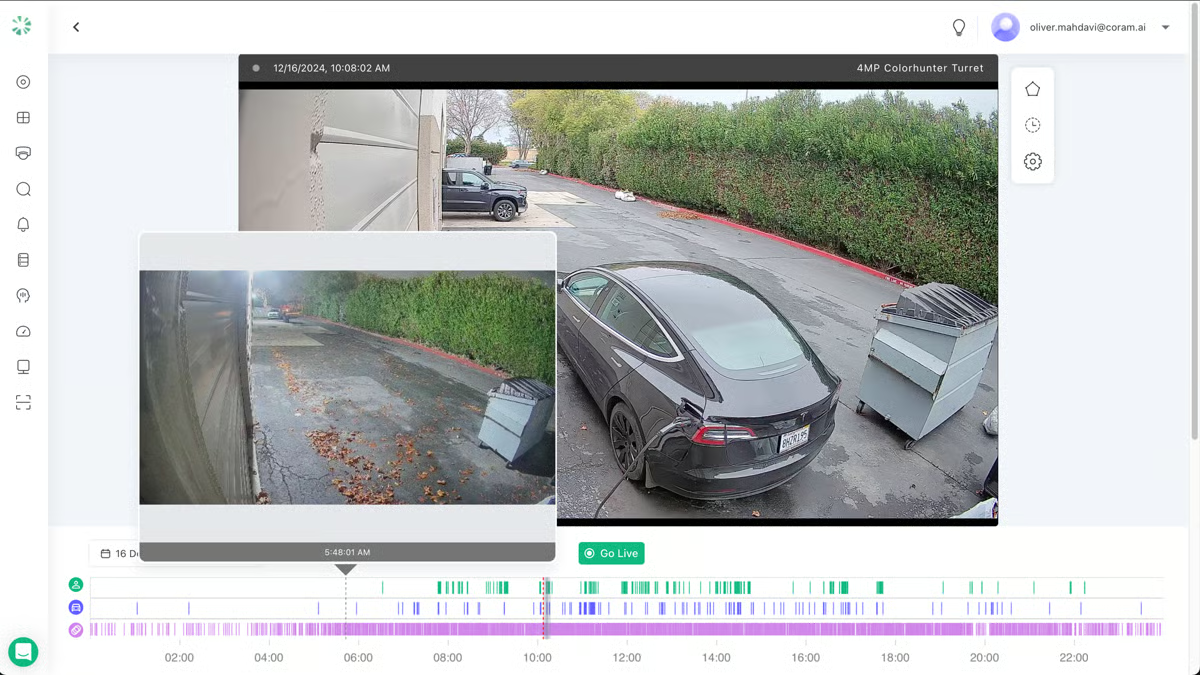
Another theme that comes up constantly is ease of use. Even though Coram AI is doing more advanced work around search, alerting, and detection, reviewers still describe it as simple, intuitive, and easy to navigate. That matters because AI-heavy tools can sometimes become harder to use as they become more capable, but that does not seem to be the case here. The platform appears to keep the investigation experience approachable, which makes it easier for security and operations teams to actually use those features day to day.
Setup is another area where Coram AI gets a lot of positive feedback. Reviewers often mention fast implementation, straightforward installation, and being able to get the system running without a long rollout process. That fits well with the broader value proposition. If a platform is meant to work with existing cameras and improve visibility quickly, then it also needs to be relatively painless to put in place, and that seems to be one of the reasons users respond well to it.
I also saw a lot of praise for Coram AI’s alerting and detection capabilities beyond search alone. Reviewers mention license plate recognition, person and facial search, motion detection, and even weapons detection as features that make the system feel more proactive. With a 94% score for object detection on G2, Coram AI shows that its strength is not just in storing or accessing footage, but in helping teams surface the right footage faster.
Support is another area where the reviews stay consistently positive. Users frequently mention responsive service, helpful onboarding, and quick troubleshooting support. That is especially important with a product like this, where strong setup guidance and quick answers can make a big difference in how fast teams start seeing value.
I also think Coram AI earns a lot of goodwill because it directly supports safety visibility and response workflows. Reviewers talk about improved monitoring, better awareness across campuses and clinics, and more peace of mind in situations where fast access to footage matters. That gives the product a more operational feel than a passive recording system. It seems built for teams that need to investigate, monitor, and respond, not just archive video.
At the same time, performance comes through as a fit consideration in the reviews. Coram AI brings a lot of intelligence into the investigation process, but some users mention lag, freezing, slow video loading, delayed playback, or views temporarily going offline during longer sessions. Organizations with very low tolerance for playback delays may want to evaluate performance closely in their own environment. But for teams focused mainly on faster search and smarter incident review, that tradeoff may still feel reasonable.
There is also some feedback around feature depth still evolving. Coram AI clearly seems designed to keep the experience streamlined and accessible, but some reviewers mention wanting more advanced controls, broader admin flexibility, or extra capabilities like two-way audio or more mature permissions management. Buyers with highly complex security workflows may want to make sure the current feature set matches their needs, but for teams that want strong AI search and a smoother way to work with existing cameras, that may not be a dealbreaker.
Coram AI comes across as a strong fit for teams that want AI video surveillance software focused on faster investigations, smarter alerts, and better use of existing camera systems.
“The ease of use. Getting Coram up and running is super easy, and getting it to perform as expected is just as easy, which is impressive considering the price compared to others.”
- Coram AI review, Don W.
“The playback on the mobile device app can be a bit laggy. Personally, I would prefer if the playback swipe on the mobile app were the same as the web GUI, left to right instead of up and down. Also on the mobile app, when filtering camera groups, if selecting all and deselecting all was the same as the web GUI, rather than having a select all at the top of the list and a clear at the bottom right.”
- Coram AI review, Casey D.
Physical visibility is only one part of security. Explore the best cloud data security software to protect your systems, data, and infrastructure in the cloud.
Kastle is designed for organizations that need tighter control over building access without turning everyday security management into extra manual work. It brings together door scheduling, badge access, and entry management in a way that fits well for offices, properties, and multi-tenant environments.
One thing that comes through clearly with Kastle is how closely it is tied to building access management. Users talk a lot about controlling doors, setting schedules, managing badge access, and handling entry permissions in a way that feels practical for real property operations. Because of that, Kastle comes across less like a general-purpose video surveillance software tool and more like a platform built for the day-to-day realities of managing buildings, people movement, and security workflows together.
The mobile app and Bluetooth-based access are another clear strength across the reviews. Several users highlight how convenient it is to manage door entry directly from their phones, rather than relying on physical keycards or fobs. Reviewers mention using the app for everything from unlocking doors on flexible schedules to granting limited access to visitors, reducing the overhead of maintaining and distributing physical credentials.
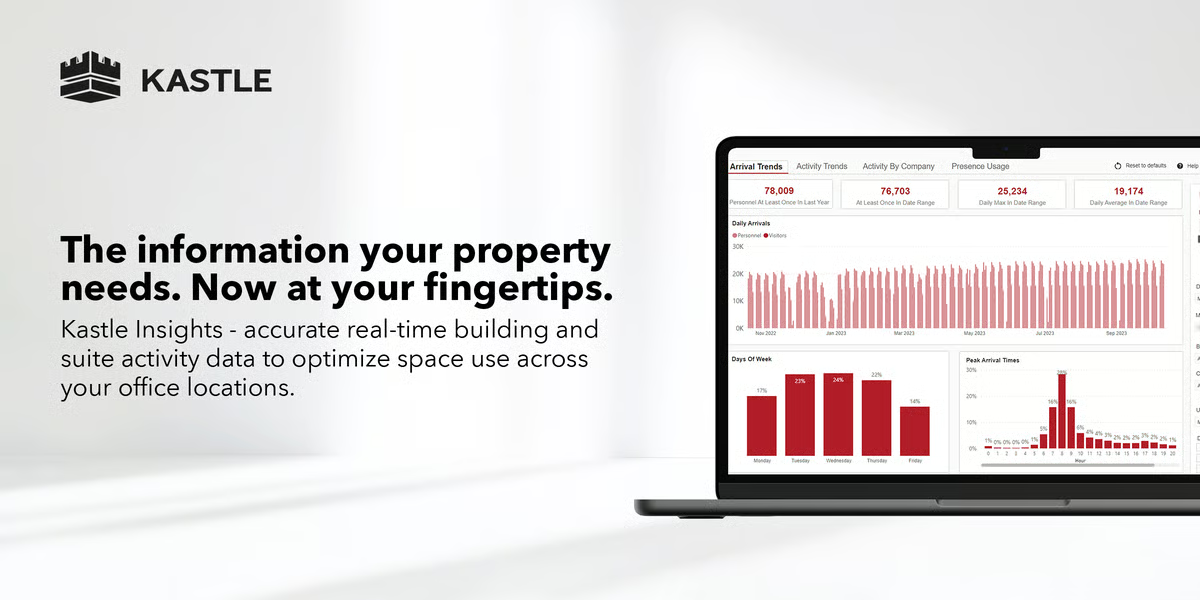
I also saw a lot of appreciation for the website and portal experience. Several reviewers specifically mention the web interface as modern, helpful, and useful for everyday management tasks. That matters in a category where admins often spend a lot of time checking activity, updating access, or confirming schedules. According to G2 Data, Kastle scores 90% for the dashboard, which reinforces that the portal is a meaningful part of the product experience, not just a basic admin layer.
Security and reliability are another clear strength in the reviews. Users repeatedly talk about Kastle helping buildings feel safer and more controlled, which is exactly what you want from a platform that sits so close to physical entry and monitoring. Kastle holds a 91% security score on G2 Data, which lines up with how often reviewers describe it as dependable for ongoing building operations.
Reporting is another area where Kastle seems especially useful. Reviewers mention audits, activity visibility, and being able to pull the information they need without too much friction. That kind of reporting can matter a lot for commercial properties and regulated environments where access logs and visibility are part of the job, not just nice extras.
I also noticed that Kastle gets good feedback for handling visitor, vendor, contractor, and tenant access. That is an important strength because those are often the messiest parts of building security. A platform can look fine in a simple employee-only environment, but the real test is whether it helps teams manage temporary or mixed access cleanly. Kastle seems to do that well for a lot of users.
Kastle’s managed-service approach is part of what makes it appealing, but some reviewers mention that replies and follow-ups can take longer than expected, especially when requests need additional coordination. For teams that want more hands-on support at every step, that may be worth evaluating more closely, while organizations that value the broader security structure may still find the model works well.
The portal is a meaningful part of the product’s day-to-day value, but some users mention occasional lag, frequent logouts, or admin pages that feel less smooth than they’d like. Teams with more involved administrative workflows may want to test that experience carefully, though for routine access management and reporting, it can still do the job well.
Kastle stands out most for organizations that care about access control, building security, and operational visibility more than deep analytics or advanced AI-driven surveillance.
“Kastle makes managing entry to our suite very easy. With a mostly remote team, it really helps that the door can be controlled from anywhere. It keeps our suite both secure and accessible every day.”
- Kastle review, Kathleen J.
“The timeliness and response can be inconsistent; sometimes they're within a couple of seconds, and then sometimes a couple of hours after an alarm goes off.”
- Kastle review, Michael C.
XProtect is built for environments where flexibility matters more than standardization. Instead of locking you into a specific ecosystem, it gives you the freedom to connect different camera brands, extend functionality, and shape the system around how your security operations actually work.
A big part of that comes from how open the platform is. Users consistently highlight how well it supports a wide range of cameras and third-party integrations, which makes it easier to build on top of existing infrastructure rather than starting from scratch. XProtect scores 92% for compatibility in G2 Data, which reflects how reliable that flexibility is in real-world use.
That openness also shows up in how the system scales. Whether it’s a smaller deployment or a large, multi-site setup, XProtect gives teams the ability to expand gradually and adjust configurations as needs evolve. It’s not just about adding more cameras, but about shaping how monitoring, alerts, and workflows are handled across locations.
Reliability is another area where the platform seems to hold up well. Many users describe it as stable enough for continuous monitoring, which is critical for environments where downtime isn’t an option. G2 Data shows XProtect with a 91% likelihood to recommend, which lines up with the general sentiment that once everything is configured, the system performs consistently.
There’s also strong feedback around centralized visibility. Instead of juggling separate systems, users mention being able to monitor multiple sites and camera feeds from one place. That becomes especially valuable for organizations managing operations across buildings or regions.
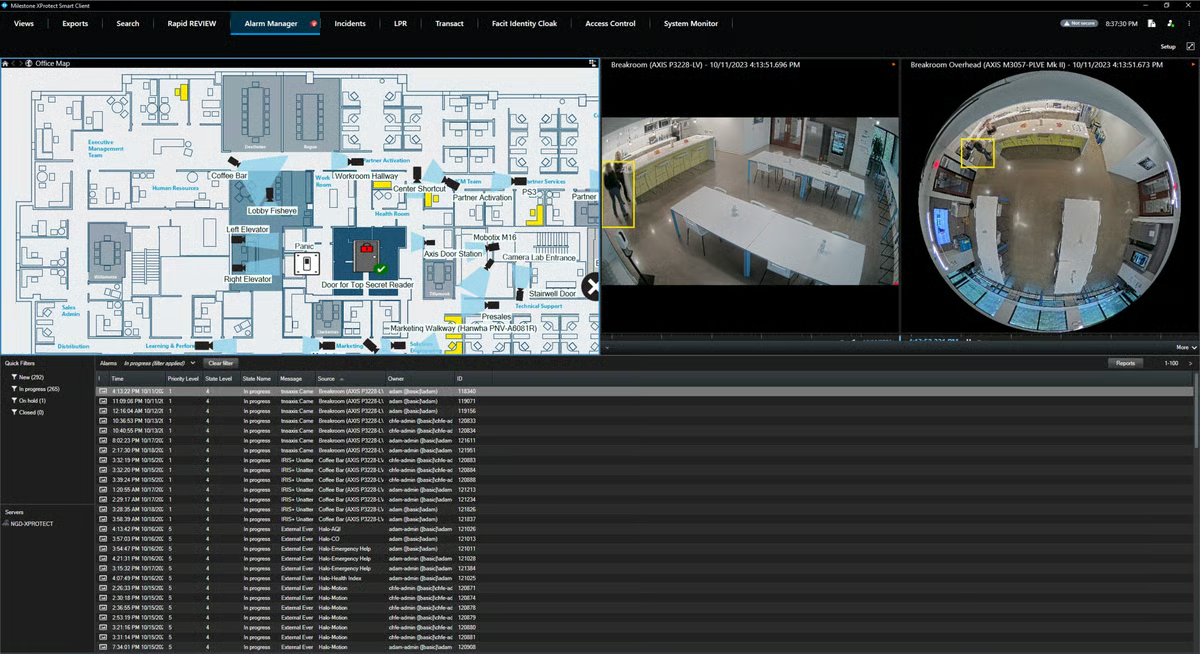
On the video side, users point to clear playback and efficient storage handling as practical advantages. Being able to retrieve footage without delays and manage storage effectively is a core part of what makes a video surveillance software platform usable day to day. On G2, XProtect scores 86% for video access, reinforcing that footage retrieval works reliably for most teams.
The platform also includes advanced detection and monitoring capabilities, which help teams go beyond basic recording. Features like motion detection and alerting add a layer of proactive monitoring, even if the platform itself is more focused on flexibility than being purely AI-driven.
That said, the level of control XProtect offers does come with added complexity. It’s designed for detailed configurations and custom rule setups, which means teams without dedicated IT or security expertise may find setup and ongoing management more involved. For organizations that need deeper customization and have the resources to support it, that flexibility can be a strong advantage.
As deployments grow, licensing and ongoing support can become a larger part of the investment. For teams managing expanding camera networks or multiple sites, costs can add up over time, making it important to plan ahead, while organizations that prioritize scalability and system control may find the pricing aligns with the capabilities they need.
XProtect makes the most sense for teams that need a flexible, scalable system that can adapt to complex environments rather than conforming to a fixed setup.
“The scalability of the Xprotect architecture is what has allowed our security operation to grow from a handful of cameras to an enterprise-wide deployment without replacing any of the foundational infrastructure we built on initially. Adding new sites and camera feeds into an existing installation is straightforward enough that our facilities team handles routine expansions independently without pulling in specialist integrators for every change. The open platform approach has also meant that hardware choices have remained ours to make rather than being dictated by a closed ecosystem that limits options and inflates costs over time.”
- XProtect review, Paulo S.
“While the system is feature-rich, new users might require some time to explore its full potential. However, the learning resources and customer support make the transition smoother. The initial setup can feel complex for those unfamiliar with advanced VMS tools, but once configured, it offers unparalleled ease of use and reliability. The licensing costs reflect the premium quality and features, making it a worthwhile investment for professional security systems.”
- XProtect review, Rahmatullah K.
Alarm.com for Business is designed for businesses that want to keep cameras, access, alarms, and site activity connected in one system. It works especially well for teams managing multiple locations that need remote control without piecing together separate security tools.
A lot of the value here seems to come from consolidation. Instead of treating video surveillance as a standalone function, Alarm.com for Business brings cameras together with intrusion, access control, and related building security tools in a way that feels operationally practical. That connected setup shows up repeatedly in the reviews and makes the platform feel more like a business security hub than a narrow video surveillance software product.
That setup becomes even more useful for businesses with more than one site. Users repeatedly mention being able to manage locations, alarms, doors, and cameras from a centralized interface, which is a meaningful advantage for teams that do not want security workflows scattered across separate dashboards. Alarm.com for Business scores 97% for video access in G2 Data, which fits well with the recurring feedback around visibility and control across locations.
Remote access is another important part of the appeal. Reviewers talk about being able to arm and disarm systems, manage entry, update users, and check the system without being on-site. For businesses with distributed operations or managers who need to keep an eye on multiple properties, that kind of control can make the platform much more useful day to day.
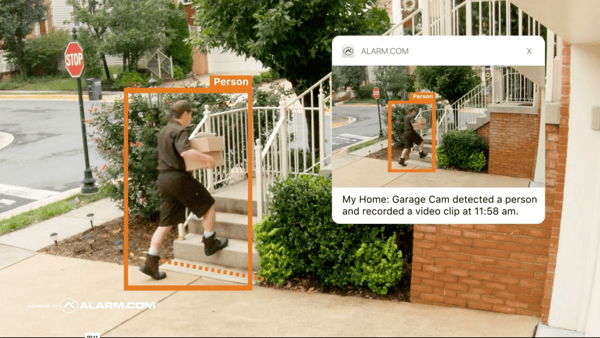
I also saw repeated mentions of access administration as a practical strength. Users call out door access, permissions updates, and entry management as tasks the system helps simplify, which matters because those workflows are often where business security gets messy fast. G2 Data gives Alarm.com for Business a 95% score for alerts, reinforcing that the platform is not just about passive monitoring but also about staying informed and responsive.
Ease of use comes up often, too, even if it is not the most important reason people choose the tool. Reviewers describe the platform as intuitive, seamless, and simple to manage, which is helpful in a category where business owners and operations teams may not want something that requires a lot of technical overhead. On G2, Alarm.com for Business has a 96% score for the dashboard, which lines up with the sense that the interface helps keep day-to-day tasks manageable.
There is also some appreciation for reporting and visibility. A few reviewers mention reports, snapshots, and business insights as useful for understanding what is happening across the system. That may not be the most standout part of the platform, but it does add to the sense that Alarm.com for Business is built to support ongoing operations rather than just basic camera access.
Where the fit gets narrower is around customization depth. Alarm.com for Business seems intentionally designed to keep core security workflows simple and connected, but some reviewers mention wanting more advanced adjustability, broader rule flexibility, or higher-level controls. Teams with more complex admin needs may want to look closely at how much customization they can get, while businesses that mainly want a straightforward, centralized security setup may find that simplicity works in their favor.
The other recurring point is that the support and pricing experience can feel tied to the dealer model. The platform’s partner-led structure may work fine for businesses that are comfortable going through providers, but some reviewers mention friction when support, pricing, or account handling depends on third-party partners rather than a more direct relationship. For teams that prefer a simpler purchasing and service path, that is worth considering, though businesses already used to dealer-based security services may find it easier to work within that model.
Alarm.com for Business makes the most sense for businesses that want video surveillance software for business use cases tied closely to alarms, access, and remote management rather than deep customization.
“I love how good the mobile app works! I don't have to have my key card to be able to get into my office seamlessly.”
- Alarm.com for Business review, Kaitlyn F.
“There needs to be better direct-to-customer support. I hate having to ask my partner to ask if you guys have a feature or what the best way to do something is a portal that connects us with other customers would help. Needs more high-level adjustability, sometimes it would be nice to modify one rule one time vs 70 times for each office."
- Alarm.com for Business review, Frank S.
Have more questions? Find more answers below.
Video surveillance software is the broader category, while video management software (VMS) focuses specifically on managing camera feeds, storage, and playback. Platforms like XProtect are classic VMS solutions, while tools like Verkada or Alarm.com for Business combine VMS with access control and broader security features.
Some of the best tools include Rhombus, Verkada, Coram AI, Kastle, XProtect, and Alarm.com for Business. Each serves different needs, from AI-powered search (Coram AI) to enterprise-scale customization (XProtect) and all-in-one security platforms (Verkada).
Key features include centralized monitoring, video playback and search, AI alerts, remote access, and integrations. Tools like Coram AI stand out for AI search, while Rhombus and Verkada offer strong cloud-based monitoring and alerts.
Cloud video surveillance software, like Rhombus or Verkada, is easier to deploy and manage remotely, while on-premise solutions like XProtect offer more control and customization. The better choice depends on your need for flexibility vs. control.
Small businesses often prefer Alarm.com for Business or Rhombus because they are easier to set up, support remote monitoring, and don’t require heavy infrastructure.
For enterprise use, Verkada and XProtect are strong options. Verkada offers a unified cloud security platform, while XProtect provides deep customization and large-scale deployment flexibility.
If you want to use existing cameras, XProtect and Coram AI are strong choices. XProtect supports a wide range of devices, while Coram AI adds AI capabilities on top of existing camera systems.
Yes, most modern platforms support remote access. Tools like Rhombus, Verkada, and Alarm.com for Business allow users to monitor cameras, receive alerts, and manage systems from mobile or web apps.
ONVIF support allows video surveillance software to work with cameras from different manufacturers. Platforms like XProtect are known for strong ONVIF compatibility, making them ideal for mixed hardware environments.
Tools like Coram AI, Rhombus, and Verkada offer AI-powered analytics, including object detection, smart alerts, and faster video search, helping teams respond to incidents more quickly.
Look for integrations with access control, alarms, and other security systems. Tools like Verkada and Alarm.com for Business are known for broader security integrations.
The right video surveillance software depends on how you plan to manage security across your business. Some tools are better for cloud-based monitoring and remote access, while others stand out for AI-driven search, access control, or more flexible deployments. That’s why Rhombus, Verkada, Coram AI, Kastle, XProtect, and Alarm.com for Business each fit a different type of buyer.
If you want simpler cloud-based monitoring, Rhombus and Verkada are strong options. Coram AI is a better fit for faster investigations and smarter alerts. Kastle works well for access-focused building security, while XProtect makes more sense for complex environments that need broader control. Alarm.com for Business is a practical option for smaller or multi-location teams that want cameras, alarms, and access tools in one system.
The best way to narrow it down is to see how each platform fits your cameras, workflows, and day-to-day security needs.
Looking beyond cameras? Explore G2’s best visitor management software to find tools that help you handle check-ins, visitor access, and front-desk security more efficiently.


Recently updatedSummer 2026 Grid® Report · Published May 26, 2026 The tools below reflect...
.png) by Tanuja Bahirat
by Tanuja Bahirat

Recently updatedSummer 2026 Grid® Report · Published May 26, 2026 The 10 best...
 by Sagar Joshi

Recently updatedSummer 2026 Grid® Report · Published May 26, 2026 This guide was last...
 by Krithika Sathyamoorthy