


This guide was last updated on March 12, 2026. A newer report has since been published. The tools below reflect the scores from G2's Summer 2026 Grid® Report.
Based on verified G2 reviews and the latest Grid® placement.
*Liked and disliked highlights are summarized from verified G2 user reviews.
The tools below have also been exhaustively tested and evaluated, and continue to hold their place among the best AI agent builder software on G2.
The best AI agent builder software makes it easy to prototype intelligent agents. Getting them to reliably execute real workflows across your systems is the hard part. I have seen teams get excited about demos, only to realize later that integration depth, governance, scalability, and real-world performance are what actually determine success in production.
Adoption isn’t experimental anymore. According to G2’s Insights report, three in four companies have invested in AI agents, and nearly 60% already have them live. The conversation has shifted from “Should we use AI agents?” to “Which platform can support them inside real business environments?”
When evaluating AI agent builder software, the real question isn’t which tool sounds the most advanced, but which one fits how your business operates. Some teams need deep system integration, others need governance and control, and others care most about speed, flexibility, or conversational execution. The best choice depends on the execution model you’re building toward.
For this guide, I analyzed platforms in G2’s AI Agent Builders category, reviewed verified user feedback, and narrowed it down to the top 10 for 2026 that consistently show up as production-ready, not just pilot-friendly: Salesforce Agentforce, UiPath Agentic Automation, Lindy, IBM watsonx.ai, CloseBot, Postman, Microsoft Copilot Studio, Workato, Vertex AI, and Retell AI.
Salesforce Agentforce: Best for Salesforce-centric CRM agents
Anchors AI agents directly to Salesforce data, records, and workflows so agents can act on real customer context across sales and service operations. (From $2/conversation)
UiPath Agentic Automation: Best for ops teams running agent-driven workflows
Combines AI agents with RPA to automate multi-step workflows across enterprise systems with human oversight. (Starting at $25/month)
Lindy: Best for teams running autonomous agents with minimal setup
Enables autonomous agents to handle scheduling, follow-ups, and everyday workflows with minimal configuration. ($19.99/month)
IBM watsonx.ai: Best for enterprises building governed AI agents
Provides strong model control, governance, and data management for teams deploying compliant, enterprise-grade AI agents at scale. (Starting at $3,000/month)
CloseBot: Best for sales and support AI agents
Deploys AI agents directly into sales and support conversations to automate responses, routing, and follow-ups. ($397/month)
Postman: Best for API-first teams building agent workflows and integrations
Enables teams to design and validate agent actions around real APIs for reliable system integrations. ($14/user/month, billed annually)
Microsoft Copilot Studio: Best for AI agents in Microsoft workflows
Enables agents to run natively across Teams, Dynamics, and Power Platform with built-in governance controls. ($9.99/month)
Workato: Best for enterprise cross-system agent orchestration
Orchestrates AI agents across hundreds of applications, APIs, and systems to automate large-scale, cross-functional business processes. (Pricing available on request)
Vertex AI: Best for AI agents on Google Cloud
Unified ML lifecycle with AutoML, custom models, and scalable deployment on Google Cloud. (Usage-based pricing via Google Cloud)
Retell AI: Best for real-time voice AI agents
Specializes in low-latency voice agents that handle live calls and spoken interactions with natural, responsive conversational behavior. (Pay-as-you-go pricing)
*These AI agent builder software solutions are top-rated in their category, according to the G2 Winter 2026 Grid Report. I've also included their monthly or annual pricing to facilitate easier comparisons for you.
Recommended reading: Building AI agents? Before choosing a platform, compare the cost of leading AI APIs to understand how token pricing and usage patterns can impact the total cost of running your agents at scale.
For me, the best AI agent builder software is the kind that actually gets agents into action, not stuck in demos or endless configuration. If building, deploying, or updating an agent takes too much effort, teams won’t move past experimentation. The strongest agent builders make it easy to turn intent into execution, whether that’s automating a workflow, supporting customers, or coordinating work across tools.
Control and clarity matter just as much as speed. AI agents shouldn’t behave like black boxes. The right platforms help teams define how agents reason, act, and interact with data, ensuring outcomes remain predictable and trustworthy. Whether agents are answering customer inquiries, triggering workflows, or handling internal operations, good agent builders reduce uncertainty rather than introducing new risks.
Scalability is the final piece. As agent use expands, teams need stronger governance, deeper integrations, better monitoring, and more flexibility in how agents operate. The platforms that stand out are the ones that grow with these needs, rather than forcing teams to bolt on additional tools as agents move from pilots to production. What’s compelling is that organizations report an average estimated ROI payback period of just seven months, reinforcing that well-deployed AI agents can move from investment to measurable value relatively quickly when implemented strategically.
This shift is reflected in the market itself. The global AI agents market is projected to reach $182.97 billion by 2033, growing at a CAGR of 49.6% from 2026 to 2033. As AI agents become a core part of how work gets done, expectations for agent builder software are rising just as fast.
“In reviewing top-rated AI agent builder platforms for SaaS companies that need workflow automation, the pattern that keeps showing up is this: most tools can automate something, but far fewer can handle multi-step, cross-system workflows without breaking or requiring constant human intervention.”
Read full thread →To build this list, I analyzed top-rated platforms in G2’s AI Agent Builders Software category and looked closely at how real users describe them across ratings, Grid placements, and detailed reviews. Instead of relying only on aggregate scores, I used AI-assisted analysis to review verified G2 feedback, focusing on recurring themes around agent reliability, workflow execution, integration depth, governance, and real-world deployment.
Because AI agent builders vary widely in who they’re built for, I paid special attention to practical factors that show up in daily use. This included how easily teams can design and deploy agents, how agents interact with data and existing systems, how much control teams have over agent behavior, and how well each platform supports scaling agents from early use cases into production environments.
I also cross-referenced different use cases mentioned in reviews to keep the evaluation balanced. That helped surface where each tool performs best, whether it’s customer-facing automation, internal operations, developer-led workflows, or enterprise-grade governance. Rather than treating all agent builders as interchangeable, the goal was to understand the specific contexts where each one delivers the most value.
Screenshots included in this article are either vendor-provided images on G2 or publicly available product visuals, used to illustrate the user experience without implying direct hands-on testing.
As I evaluated platforms in the AI agent builder space, one thing became clear pretty quickly: the best tools are the ones that embed agents directly into operational workflows. A strong agent builder doesn’t exist in isolation. It fits naturally into business systems, workflows, and decision-making, so agents can actually move tasks forward rather than getting stuck in conversations.
The criteria below reflect what I prioritized and why each factor matters when choosing an AI agent builder.
Not every AI agent builder excels in all of these areas, and that’s expected. Some tools shine in customer-facing automation, others in operations, others in developer workflows. The goal of this list isn’t to crown a single best platform, but to surface the trade-offs clearly so you can choose the agent builder that fits your workflow, team maturity, and use cases best.
To qualify for inclusion in the AI Agent Builders category, a product must:
*This data was pulled from G2 in 2026. Some reviews may have been edited for clarity.
I’m pretty sure most people think of Salesforce for CRM first, but Agentforce is where that CRM data actually turns into working AI agents that can automate real service and sales workflows. What G2 reviewers consistently praise most is how seamlessly Agentforce operates inside the Salesforce ecosystem. Instead of starting from a blank canvas, Salesforce Agentforce builds agents around real records, histories, and workflows, which makes their actions feel grounded in how teams already work with customers.
One of the strongest themes across reviews is how deeply Agentforce connects agents to live CRM data. Agents don’t just answer questions; they can reason over customer profiles, cases, opportunities, and account history in real time. That tight data grounding shows up in satisfaction around core fit, with Salesforce Agentforce scoring 83% for meeting requirements according to G2 Data. For teams that want agents making decisions based on structured customer context rather than generic prompts, this connection is a major advantage.
Another area where Agentforce stands out is how naturally agents slot into existing Salesforce workflows. Agents can trigger actions, update records, and support multi-step processes that span sales, service, and support operations. Reviews consistently point to CRM-driven execution as a core strength, reinforced by Salesforce Agentforce earning 87% for CRM data integration according to G2 Data. This makes the platform especially effective for agents who need to operate within ongoing customer journeys rather than act as standalone assistants.
Reviewers emphasize how Agentforce is built with structured controls that make agents easier to trust in customer-facing environments. The platform encourages consistent, rule-aligned behavior across channels, which helps teams deploy automation without compromising brand standards or compliance requirements.
Because agents operate natively inside Salesforce, teams can introduce AI-driven workflows without adding external tools or rebuilding existing processes. For organizations already invested in Salesforce, that continuity significantly reduces rollout complexity and operational risk.
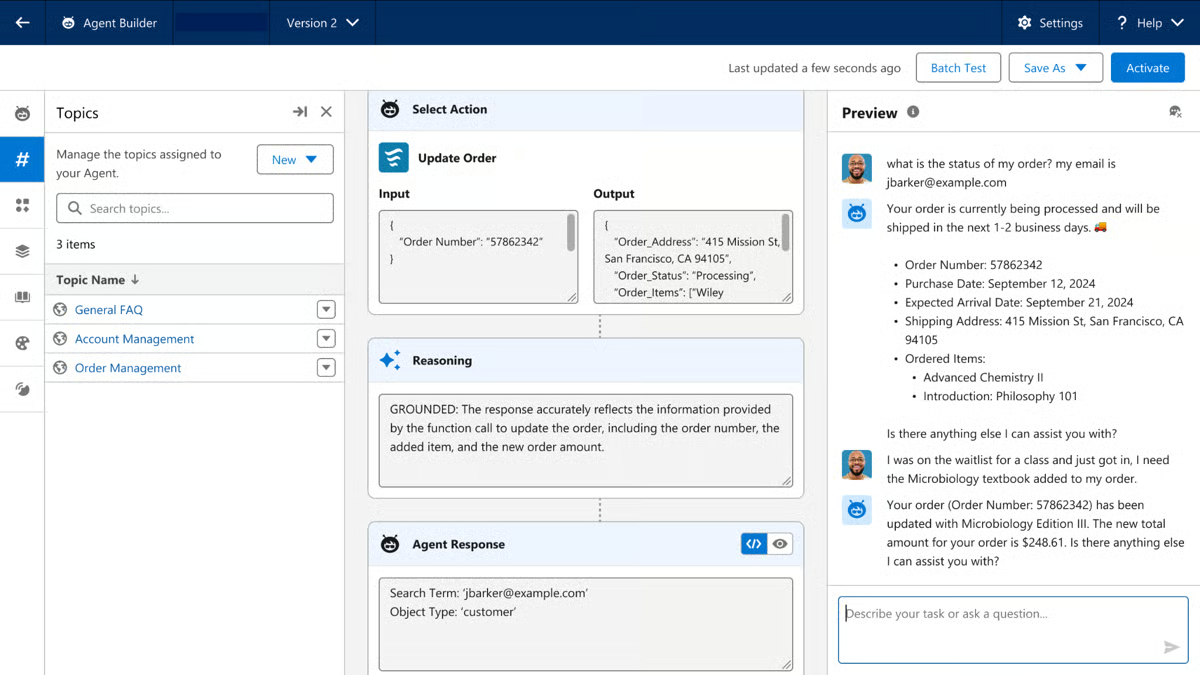
Usability is another steady positive. Reviews suggest that once agents are configured, managing and interacting with them feels familiar to Salesforce users. According to G2, Salesforce Agentforce scores 84% for ease of use, reinforcing its appeal for teams that want agents embedded into daily workflows rather than managed in a separate environment.
Agentforce delivers strong CRM-driven automation, but G2 reviewers frequently note that pricing can be confusing and difficult to forecast. Per-conversation fees and usage-based costs make budgeting less predictable, which can be challenging for nonprofits or smaller teams. Larger Salesforce-centric organizations tend to manage this model more easily.
The built-in guardrails make agents easier to trust and scale in customer-facing workflows, though they reduce how quickly teams can experiment with free-form or highly autonomous agents. Process-focused teams gain consistency and control, while experimentation-heavy teams may prefer a lighter framework.
For teams building agents around Salesforce data and customer workflows, Agentforce offers a clear path from configuration to real-world execution.
“I am very likely to recommend Salesforce Agentforce to a friend or colleague. It’s easy to use and doesn’t need much training. It helps me work faster and organize tasks better. Overall, it makes daily work simpler.”
- Salesforce Agentforce review, Paulina P.
“The biggest challenge is that it isn’t a plug-and-play tool. Getting it set up takes time, particularly when you’re deciding what data the agent should be able to access and how it should respond across different scenarios. It also requires ongoing review and tuning to ensure its answers remain aligned with our business tone and internal processes.”
- Salesforce Agentforce review, Amit S.
Before building custom agents, understand how business operations function and where automation delivers the most impact. Explore this guide to improving operations from the ground up.
UiPath Agentic Automation is built for teams that want AI agents to sit inside real operational workflows, coordinating tasks across tools instead of acting as standalone assistants. What stands out immediately in G2 reviews is that UiPath Agentic Automation treats agents as executors, not assistants. Users focus less on how agents talk and more on how they run processes, make decisions, and move work forward across systems.
The most consistent strengths across G2 reviews are the depth of agent behavior's connection to UiPath’s automation engine. Agents aren’t just responding to prompts; they can trigger workflows, call APIs, hand off tasks to bots, and escalate to humans when needed. This makes UiPath especially strong for multi-step operational use cases such as finance processing, IT service flows, and customer operations.
According to G2 Data, UiPath scores 91% for ease of use and 96% for ease of setup, which reinforces feedback that once teams are familiar with the platform, building agent-driven workflows feels structured rather than complex. Another area where UiPath stands out is reliability at scale. Reviewers often point to how predictable agent behavior feels once deployed, especially when agents are embedded into business-critical processes.
Guardrails, logging, and controlled execution paths help prevent unexpected actions, which matters a lot in regulated or high-volume environments. That stability shows up in satisfaction signals too, with UiPath meeting requirements at 96% according to G2, a strong indicator that the platform delivers on what enterprise teams expect from an agent builder.
UiPath also gets strong marks for integration depth. Agents can interact with a wide range of enterprise systems through APIs, connectors, and existing RPA components, which reduces the need to rebuild logic from scratch. According to G2 Data, UiPath scores 88% for API usage and 91% for workflow automation, aligning well with reviewer feedback about how smoothly agents plug into broader automation ecosystems rather than operating in isolation.
Where UiPath Agentic Automation clearly stands out is its support for human-in-the-loop execution. Reviewers consistently highlight how agents can escalate tasks, request approvals, or pause execution when human judgment is required. Rather than replacing people entirely, UiPath allows teams to intentionally insert review checkpoints into automation flows. This makes it especially strong in compliance-heavy or risk-sensitive environments where accountability and traceability are non-negotiable.
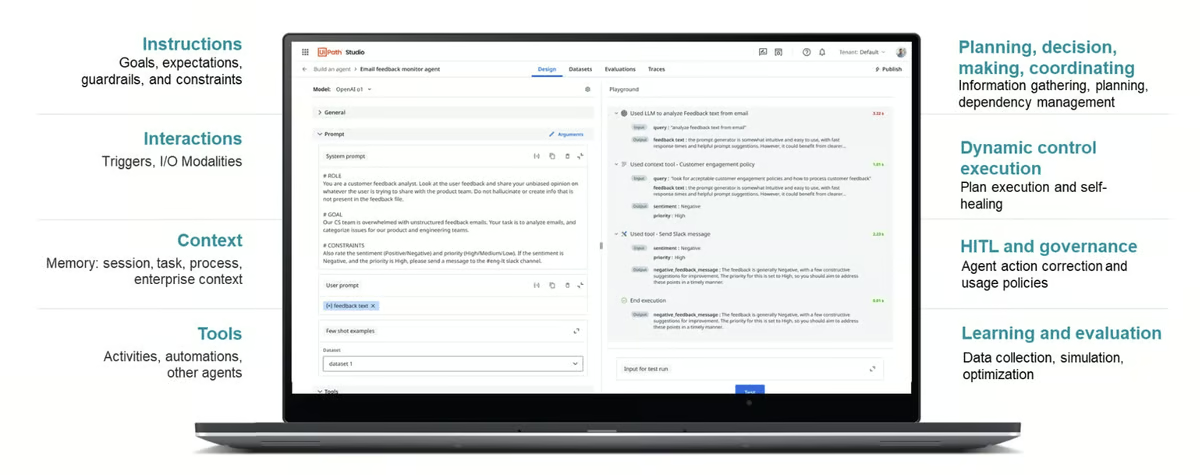
UiPath’s broader design philosophy is process-first rather than chat-first. Agents are built to operate within defined automation pipelines that span systems, APIs, and RPA components. That architectural focus ensures reliability and cross-system coordination, but it also means the platform is optimized for operational execution over rapid conversational experimentation. Teams embedding agents into structured business processes benefit most, while those prioritizing lightweight, standalone chat agents may find it more structured than expected.
Another area reviewers frequently mention is that UiPath builds on automation and RPA foundations. For teams already familiar with process design and orchestration, this translates into powerful, scalable agent behavior. For smaller or less technical teams without that background, there can be an initial learning curve before agents feel intuitive to configure and deploy. Once that ramp-up happens, the platform becomes significantly easier to manage at scale.
UiPath’s automation-first design enables powerful, cross-system execution, but multiple reviewers note that implementing complex workflows can require significant upfront configuration and planning. Deployments that span multiple systems, APIs, or approval paths often demand a structured setup rather than quick experimentation. Organizations embedding agents into mature operational processes see strong returns, while teams looking for fast, lightweight rollouts may find the implementation phase more involved.
Taken together, UiPath Agentic Automation feels purpose-built for organizations that view AI agents as an extension of real operational systems, not just conversational tools. For teams running complex, multi-step processes across enterprise applications and who care about reliability, governance, and scalability, UiPath offers a structured path from controlled automation to production-grade agent execution.
“I really appreciate the intuitive interface and the wide range of pre-built activities that speed up development. It integrates seamlessly with other applications and services, allowing us to automate complex processes without heavy coding.”
- UiPath Agentic Automation review, Surya Pratap R.
“Some of the advanced agentic and AI features have a learning curve, especially for beginners. Documentation around newer capabilities could be more detailed, and setup can feel a bit heavy for smaller or experimental projects.”
- UiPath Agentic Automation review, Supreeth G.
AI agents are reshaping how work gets done. Learn how autonomous systems are changing roles, responsibilities, and decision-making across modern organizations.
Lindy is built for autonomous execution, meaning agents can observe context, decide next steps, and carry out multi-step tasks across business tools without constant human input. That orientation toward “do the work for me” rather than “assist me while I work” is what makes Lindy feel different from many agent builders in this space.
G2 reviewers consistently highlight how well Lindy handles workflow automation. Agents are designed to manage multi-step tasks like scheduling, follow-ups, handoffs, and internal coordination without needing constant supervision. According to G2 Data, Lindy scores 92% for workflow automation, reinforcing that agents aren’t just responding, they’re completing real work across tools.
Reliability is another theme that comes through strongly. Teams describe agents behaving consistently once deployed, which matters when automation touches customer communication or internal operations. That confidence shows up in G2 Data as well, with Lindy earning 98% for meeting requirements, signaling that the platform delivers on what teams expect their agents to do in production.
Lindy’s accessibility plays a big role in its adoption. The platform is lightweight, removing much of the infrastructure and configuration friction that slows down agent deployment. According to G2, Lindy scores 93% for ease of use, which aligns with feedback from teams that want agents to run quickly without requiring deep technical expertise. That simplicity resonates especially with smaller organizations, with 91% of Lindy users coming from small businesses according to G2 Data, reinforcing its appeal to lean teams that need fast results.
G2 reviewers mention how well Lindy agents carry work through to completion without constant human nudging. Agents don’t just trigger a single action, they can follow up, adjust based on responses, and keep workflows moving until the task is done. This makes Lindy especially useful for operational tasks where continuity matters more than one-off automation.
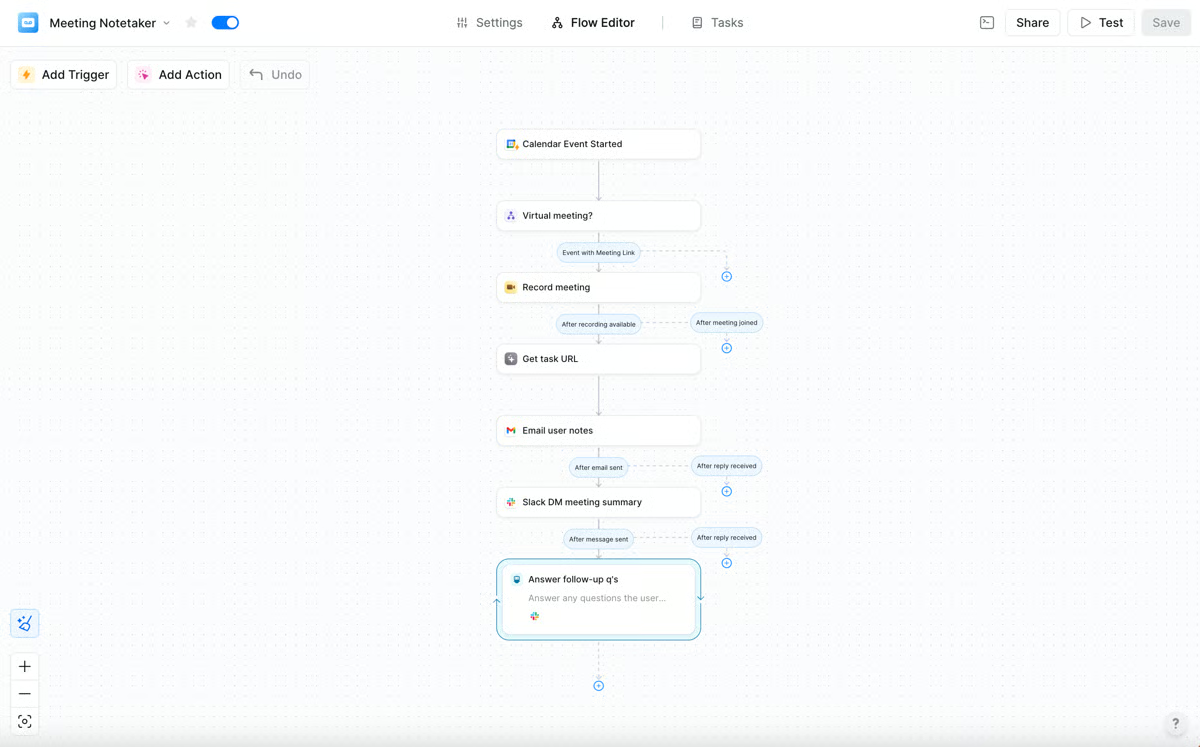
Users often describe Lindy as feeling immediately usable in day-to-day work. Agents are built to operate inside real workflows rather than controlled test environments, which helps teams move from setup to impact quickly. That practicality shows up in how consistently teams rely on Lindy for ongoing operations rather than short-term experiments.
By prioritizing quick deployment and autonomy, the platform offers fewer governance layers than enterprise-heavy agent builders. This works well for teams that trust agents to act independently, but organizations with strict compliance or approval requirements may prefer more controlled environments.
Lindy also abstracts much of the underlying model and system logic to keep the agent creation approachable. While that helps teams stay focused on outcomes, it means there’s less room for deep model-level experimentation. Teams that value execution over fine-grained tuning tend to get the most out of the platform.
At its core, Lindy feels purpose-built for teams that want agents doing work, not waiting for prompts. For small, fast-moving teams focused on automation and follow-through, it offers a refreshingly direct path from idea to impact.
“I like that Lindy builds quickly without needing repetitive prompting, which saves me a lot of time compared to other AI builders I've used, letting me get back to my day quickly. I also appreciate that it can do and make almost anything I feel, acting as an app generator builder, AI agent builder, and digital product generator builder instantly.”
- Lindy review, Emily K.
“That said, there are a couple of things I’d improve. I wish there were more tutorials or examples to help new users unlock the full potential of agents. Also, having to pay can feel like a barrier, though I do think the value is worth it once you see what’s possible.”
- Lindy review, Charlotte B.
Building an AI agent starts with understanding conversational intelligence. This guide breaks down how conversational AI processes speech, intent, and context to power smarter customer interactions.
I have mostly known IBM watsonx.ai as IBM’s enterprise AI platform for building and managing models, and it earns its place in this list because it gives teams the foundation to build AI agents with strong governance, data control, and enterprise-grade oversight.
A major strength of watsonx.ai is how much confidence it gives teams when agents are interacting with real business data and systems. Reviewers consistently highlight the platform’s ability to meet enterprise requirements, and according to G2 Data, IBM watsonx.ai scores 100% for meeting requirements. That shows up in how agents are built around clearly defined data sources, deployment controls, and lifecycle management, making it easier to move agents from experimentation into production without losing oversight.
Another theme that comes through strongly is the platform’s depth at the model layer. Teams appreciate being able to work closely with models, tune behavior, manage versions, and control how agents consume and respond to data. This level of flexibility allows agents to be shaped around specific business use cases rather than generic prompts. According to G2, watsonx.ai earns high marks for ease of administration at 93%, which aligns with feedback from teams managing multiple agents and environments in parallel.
Support and reliability are also areas where watsonx.ai performs well. Reviewers often mention that once the platform is in place, it feels stable and well-supported. According to G2 Data, watsonx.ai scores 96% for quality of support, reinforcing its position as a platform enterprises can rely on when agents become business-critical. That reliability matters when agents are tied to compliance, reporting, or customer-facing workflows.
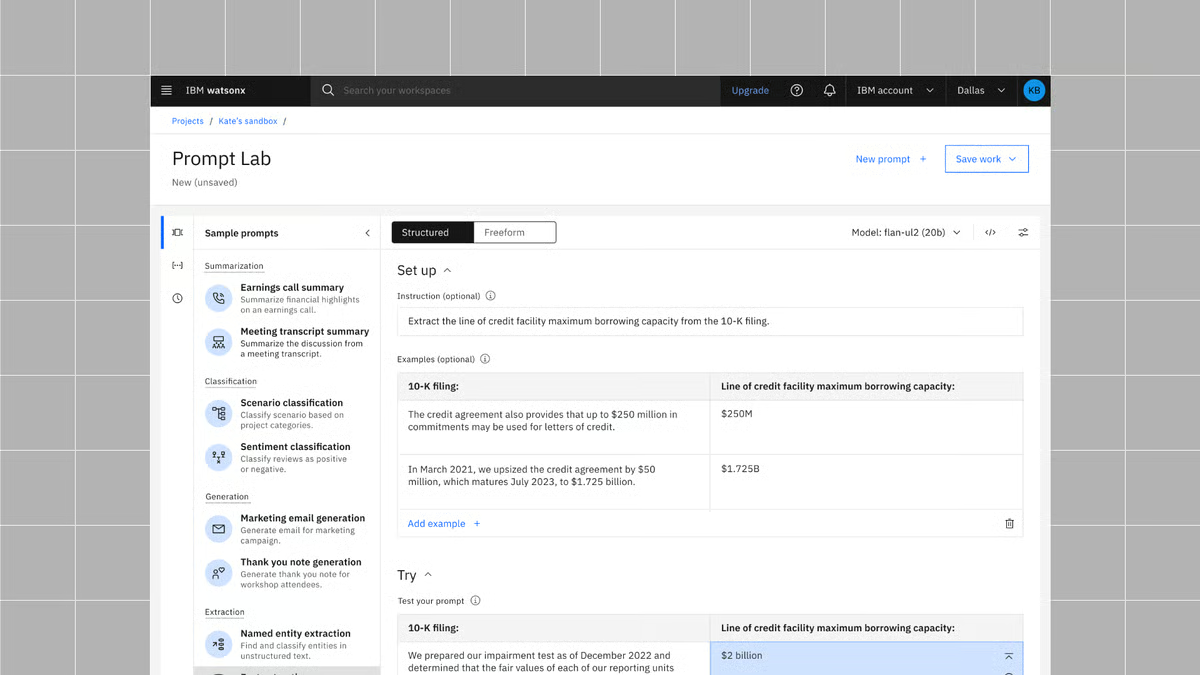
The platform also integrates well into broader enterprise ecosystems. Reviewers point out that agents built with watsonx.ai can connect cleanly to existing systems, data pipelines, and operational workflows, making it easier to embed AI agents into real processes rather than isolated experiments. This is one of the reasons watsonx.ai fits naturally into organizations that already have mature data and AI strategies in place.
Another strength that appears consistently in reviews is watsonx.ai’s scalability. Users mention being able to move from smaller experimental models to large-scale deployments without switching platforms. The ability to scale workloads, manage multiple environments, and support growing data demands makes watsonx.ai particularly well-suited for organizations planning long-term AI expansion rather than isolated projects.
One place where watsonx.ai stands out is its structured approach to agent design, which helps teams build agents with clear boundaries and predictable behavior. That structure supports responsible deployment in sensitive environments, but it also means setup can feel more involved than quick-start tools. Teams with established AI or data teams tend to benefit most, while smaller teams moving fast may find it heavier than they need.
Watsonx.ai is designed to handle enterprise-scale workloads and complex AI deployments, which makes it well-suited for large, data-heavy environments. However, several reviewers mention occasional performance slowdowns or latency when working with large datasets, complex models, or high-demand workloads. Teams running advanced AI operations can address this with proper infrastructure planning and optimization, but organizations expecting lightweight, instant responsiveness may need to factor in performance tuning as part of their deployment strategy.
Overall, watsonx.ai feels purpose-built for organizations that take AI agents seriously as long-term, governed systems rather than short-term experiments. For teams that prioritize control, compliance, and reliability over speed and simplicity, it provides a solid foundation for building agents that can scale with confidence.
“IBM Watsonx.ai addresses the "black box" problem often found in other AI platforms by maintaining a strong commitment to enterprise-level trust and transparency. Unlike many consumer tools, Watsonx.ai provides a "glass box" environment, allowing every AI decision to be tracked, explained, and managed, which helps ensure your organization remains compliant and within legal boundaries. Additionally, the flexibility to deploy models either on your own private on-premise servers or in the cloud empowers businesses to innovate rapidly while maintaining full control and security over their data.”
- IBM watsonx.ai reviews, Sandeep B.
“The platform has a learning curve for new users, especially those without prior IBM Cloud experience. Some concepts related to deployment, governance, and model configuration are not immediately intuitive for beginners.”
- IBM watsonx.ai reviews, Gubba K.
CloseBot earns its place on this list by being unapologetically focused on one thing: putting AI agents into live customer conversations where context, data, and actions actually matter. This isn’t a sandbox for abstract agents; it’s a platform built to connect conversations with real CRM data, pipelines, and customer touchpoints, which is exactly what many teams are looking for when they want agents to do real work.
What immediately stands out is how tightly CloseBot connects agents to customer operations. Agents are designed to sit inside active chat, messaging, and CRM-driven workflows, so conversations don’t live in isolation. Reviewers consistently highlight how this makes interactions feel more relevant and actionable, since agents can pull from customer records, update fields, and trigger next steps mid-conversation. That operational focus shows up clearly in satisfaction signals, with CloseBot scoring 98% for meeting requirements according to G2 Data, reinforcing its strength in real-world deployment rather than experimentation.
Another strong theme in the reviews is how reliable and predictable agent behavior feels once deployed. CloseBot leans into structured conversational flows that help teams maintain consistency across customer interactions, especially in sales and support environments where accuracy matters.
According to G2, CloseBot earns 92% for ease of use, which aligns with feedback from teams that want agents to live quickly without sacrificing control. The balance between structure and speed is a big reason teams trust it in customer-facing roles.
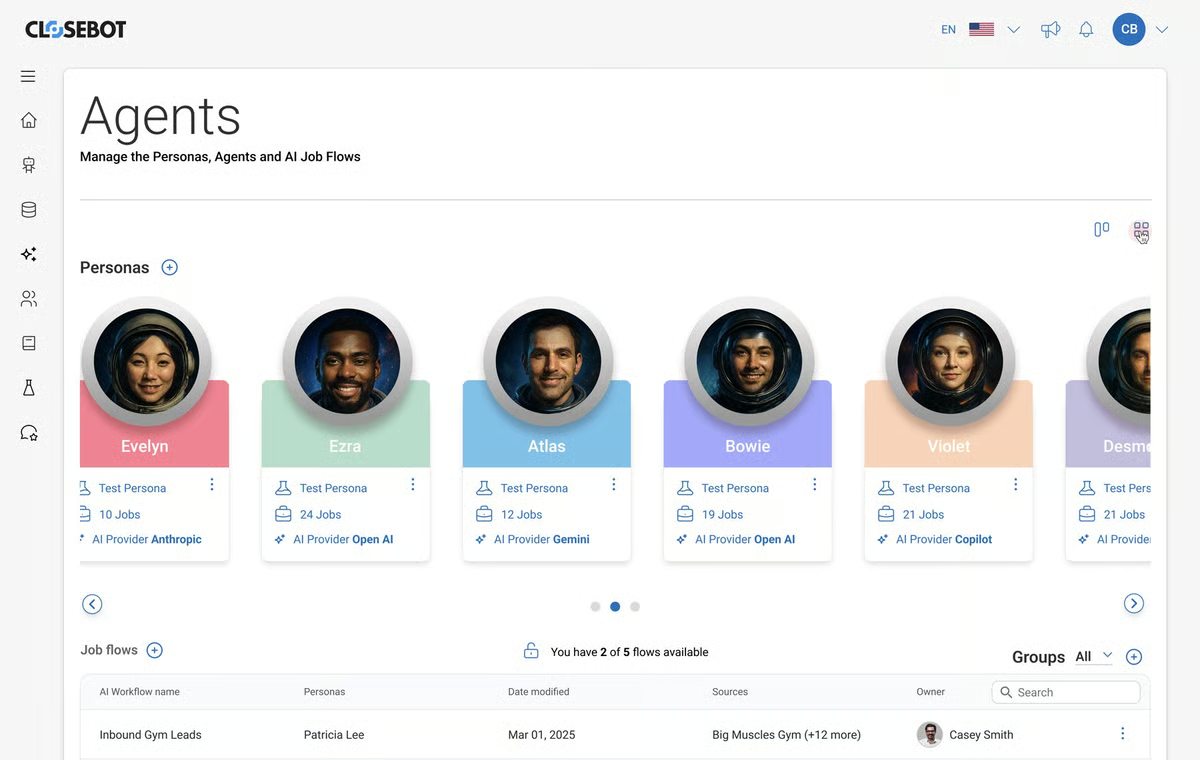
Integration is another area where CloseBot performs strongly. Reviewers frequently mention how well it fits into existing CRM and customer data ecosystems, allowing agents to operate with full context instead of generic responses. That strength is reflected in G2 integration-related scores, where CloseBot performs strongly across workflow automation and CRM data integration, making it easier to embed agents into existing revenue or support motions rather than rebuilding processes from scratch.
CloseBot also stands out for its support for scaling customer interactions. Teams note that once agents are configured, they can be rolled out across multiple channels without losing consistency in tone or logic. This consistency is reinforced by strong support signals, with CloseBot scoring 96% for quality of support according to G2 Data, which matters when agents are handling live customer conversations.
CloseBot is built to help teams deploy customer-facing agents quickly, and many reviewers appreciate how easy it is to get structured sales and support workflows live. However, multiple users mention that achieving deeper customization, especially for advanced conversation logic, tone refinement, or highly specific industry use cases, can require additional trial and error. As a result, CloseBot is especially well-suited for teams that prioritize fast, structured deployment, while organizations seeking highly granular, deeply customized conversational control may need to dedicate more time to fine-tuning.
Similarly, CloseBot excels as a purpose-built text-based AI agent platform, and many users appreciate how well it stays on task within structured chat workflows. That said, multiple reviewers point out that it currently lacks native voice functionality and broader multimedia handling, such as images or document exchange. This makes it especially well-suited for chat-first sales and support automation, while organizations building voice-driven or media-rich experiences may prefer a more multimodal framework.
CloseBot ultimately feels like a platform designed for execution. For teams ready to operationalize AI agents in live customer environments, where conversations, data, and actions need to stay tightly connected, it delivers a level of reliability and focus that’s hard to replicate.
“I love it because it handles my follow-ups automatically and keeps my pipeline organized without me doing all the manual CRM work.”
- CloseBot review, Shivangi P.
“I love most of this platform, but I find that the source type is limited. I also wish that there were an in-built AI agent that would help us to build templates more effectively, as that would save time in building simple automation tools. I have seen that though this platform felt easy for anyone who had experience in building workflow automation before, it was a bit difficult for new individuals.”
- CloseBot review, Konjengbam M.
When teams talk about building AI agents that actually do things, Postman comes up as the place where those actions get wired to real systems. Reviewers consistently point to its strength in shaping, testing, and validating how agents interact with live APIs, which makes it a natural fit for agent workflows that depend on reliable external execution rather than purely conversational logic.
What stands out most in the reviews is how central API workflows are to everything Postman enables. Agents built here aren’t abstract or detached; they’re grounded in real endpoints, requests, and responses. Reviewers frequently describe using Postman to validate how agents trigger actions, move data between services, and handle responses in predictable ways. That emphasis on reliability shows up clearly in satisfaction metrics, with Postman scoring 96% for meeting requirements, according to G2 Data, reinforcing its fit for teams building agents around existing API-driven systems rather than standalone assistants.
Another theme that comes through strongly is how approachable the platform feels despite its technical depth. Reviewers often mention that once inside the interface, building and managing workflows feels intuitive. According to G2, Postman scores 97% for ease of use and 98% for ease of setup, which aligns with feedback from teams that move quickly from API testing into agent-driven execution. That balance between power and accessibility makes it suitable for both experimentation and production workflows.
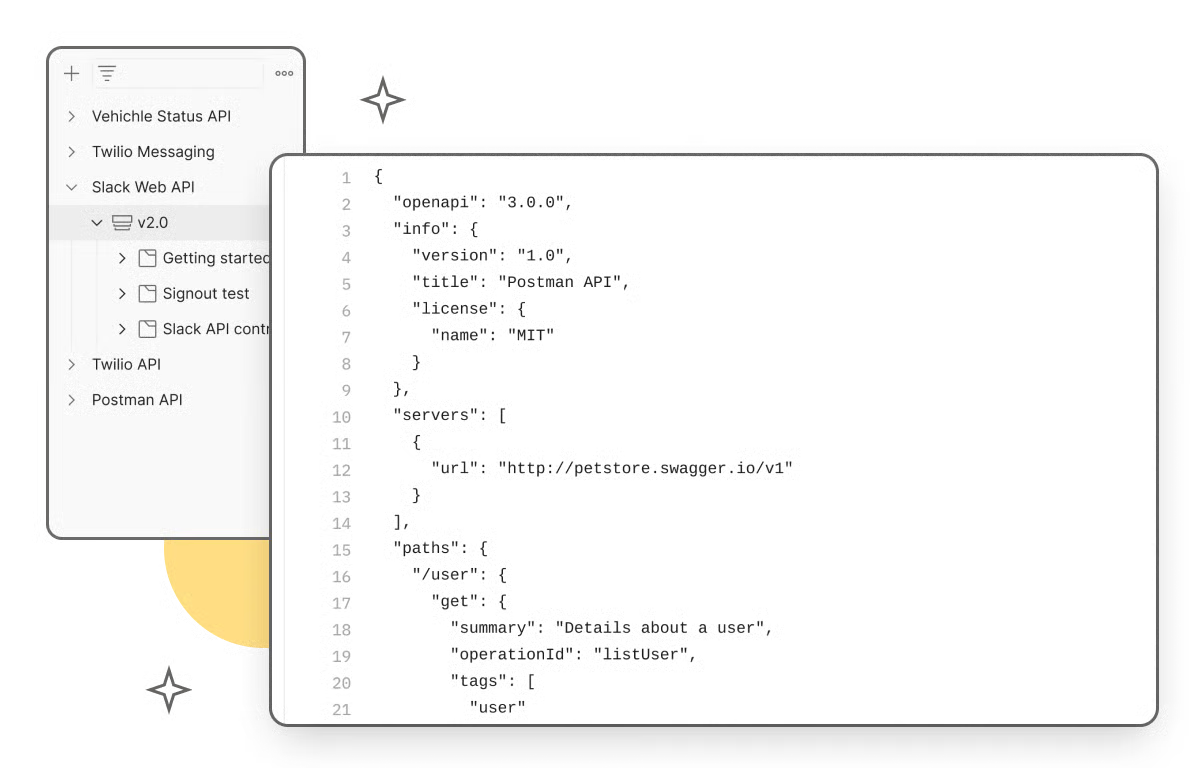
Collaboration is another area where Postman consistently earns praise. Reviewers highlight shared collections, environments, and documentation as key to keeping agent-related logic aligned across teams. According to G2 Data, Postman scores 98% for ease of doing business and 90% for quality of support, reinforcing its reputation as a stable, well-supported platform once teams commit to it as part of their agent stack.
Another strength reviewers consistently highlight is how much visibility Postman gives into agent behavior during testing and iteration. Teams talk about using request histories, responses, and environments to understand exactly how agent-driven actions behave before anything goes live. This makes it easier to debug, refine, and trust agent workflows, especially when agents are interacting with multiple external systems.
Reviewers also emphasize how well Postman supports consistency as agent workflows evolve. By reusing collections, environments, and documentation, teams can standardize how agents interact with APIs over time instead of rebuilding logic from scratch. This is especially valuable for teams maintaining multiple agents or iterating on existing ones, where consistency and reuse matter just as much as initial setup.
G2 reviewers value how reliable Postman feels when agents are connected to real services and well-defined API actions. That execution-first focus makes agent behavior predictable and testable, but it also means experiences tend to center on structured endpoints rather than open-ended conversation. Postman works best for teams building agents as extensions of existing API workflows, not for chat-first experimentation.
Users also appreciate the level of control Postman provides over requests, environments, and testing. That depth gives teams clear visibility into how agents behave, though it assumes comfort with APIs and system-level concepts. Teams without that background may find it more involved than abstraction-heavy agent builders, making Postman a stronger fit for engineering-led teams.
Postman is at its best when agents are tied directly to APIs and real execution paths. It’s a strong choice for teams that value reliability, testing, and system-level control.
“Postman’s environment variables and collection runner are indispensable for backend development. I specifically appreciate how easily I can switch between local, staging, and production environments without changing the request body. The ability to write Pre-request and Test scripts in JavaScript allows me to automate authentication flows (like capturing a JWT and setting it as a global variable), which saves hours during recursive domain testing.”
- Postman review, Omer H.
“One minor downside is that some advanced features can feel overwhelming for new users, especially when first exploring environments, scripting, or collaboration tools. The desktop app can also be a bit heavy on resources when working with very large collections. That said, these are small trade-offs considering how powerful and feature-rich Postman is, and the learning curve pays off quickly once you start using it regularly.”
- Postman review, Arghya S.
Microsoft Copilot Studio is Microsoft’s dedicated platform for building and extending AI agents that operate directly inside its ecosystem. In the context of AI agent builders, it stands out for letting teams design agents that live within tools like Teams, Dynamics, and Power Platform, turning everyday Microsoft workflows into interactive, AI-driven experiences rather than standalone assistants.
What reviewers praise most is how naturally Copilot Studio fits into existing Microsoft environments. Agents built here don’t feel bolted on; they live inside tools like Teams, Dynamics, and Power Platform, where users already work. Reviewers frequently mention how agents can pull context from Microsoft data sources and trigger actions without forcing teams to rewire their stack. That tight alignment shows up in satisfaction metrics, with Microsoft Copilot Studio scoring 83% for meeting requirements, according to G2 Data, reinforcing its role as a dependable extension of the Microsoft ecosystem.
Another strength that comes through clearly is how accessible agent creation feels for business and IT teams working together. Reviewers describe building conversational flows, connecting data, and managing agent behavior without needing to start from scratch. According to G2, Copilot Studio scores 89% for ease of setup, which lines up with feedback from teams that can move from idea to deployed agent relatively quickly, especially when they’re already familiar with Microsoft tools.
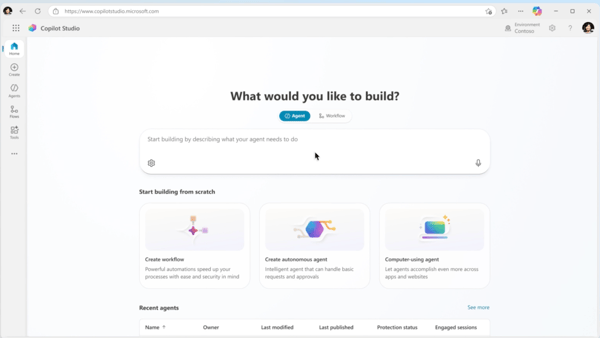
Reviewers also highlight how well Copilot Studio supports structured, multi-step workflows. Agents aren’t limited to answering questions; they can guide users through processes, surface relevant information, and hand off to humans when needed. That operational focus helps agents feel consistent and trustworthy in day-to-day use, particularly in support, internal enablement, and line-of-business scenarios.
Integration depth is another area where Copilot Studio stands out in reviews. Because it’s built on top of Power Platform connectors and Microsoft services, agents can interact with a wide range of internal systems without heavy custom work. This makes it easier for teams to centralize automation logic and keep agent behavior aligned with existing workflows rather than creating isolated AI experiences.
Reviewers also appreciate the platform's governance and controls. Copilot Studio enables teams to manage permissions, data access, and deployments in line with enterprise expectations. According to G2 Data, it scores 83% for quality of support, which reinforces the sense that the platform is designed for long-term operational use rather than short-lived experiments.
Copilot Studio’s deep integration with Microsoft tools makes agents feel native inside environments like Teams and Dynamics. However, multiple reviewers note that flexibility outside Microsoft tools can be limited, especially when integrating with third-party platforms or building highly customized logic. Organizations standardized on Microsoft tend to benefit most, while teams needing broader cross-platform support or advanced customization may find the platform more restrictive.
While Copilot Studio makes it relatively easy to build basic copilots, many reviewers mention that there is a noticeable learning curve when moving into more advanced use cases. Configuring complex conversation flows, handling integrations, or customizing logic often requires familiarity with Power Platform, Azure, or technical concepts. Teams with prior Microsoft ecosystem experience tend to ramp up faster.
Taken together, Copilot Studio feels purpose-built for organizations that want AI agents to live inside real business workflows rather than alongside them. For teams invested in the Microsoft ecosystem and looking to operationalize agents with consistency and control, it offers a practical and scalable foundation.
“I appreciate Microsoft Copilot Studio because it simplifies the process of building AI copilots while still offering robust capabilities. You don't need advanced coding knowledge to use it, and it integrates smoothly with Microsoft tools. It also enables you to develop intelligent, secure assistants that genuinely address real business requirements.”
- Microsoft Copilot Studio review, Tiwari S.
“One area that could be improved is the learning curve for more advanced use cases. While basic copilots are easy to set up, building complex logic or integrations can become confusing and time-consuming. The pricing and credit model can also be hard to understand at first, making it difficult to estimate costs. Additionally, debugging and troubleshooting could be smoother, as error messages are sometimes unclear. Improving documentation and in-product guidance would make the overall experience even better.”
- Microsoft Copilot Studio review, Rishab Raj G.
Workato is an automation-first platform that has evolved naturally into an AI agent builder, which is exactly why it belongs on this list. In the context of agent building, its strength is not conversation or experimentation, but coordination, agents that can move data, trigger actions, and manage workflows across dozens of enterprise systems without breaking. It’s built for agents that act as operational glue between tools, teams, and processes.
The capability reviewers praise most is Workato's reliability in connecting agents to real business systems. Agents built on Workato don’t operate in isolation; they’re deeply tied into CRMs, ERPs, ticketing tools, databases, and custom apps. Reviewers consistently highlight how confidently they can use agents to automate multi-step processes that span multiple platforms, from intake to resolution. That strength shows up clearly in satisfaction metrics, with Workato earning a perfect 100% for meeting requirements, according to G2 Data, which aligns with how often users describe it as enterprise-ready out of the box.
Another theme that comes through strongly is workflow depth. Workato agents are designed to handle branching logic, conditional paths, and exception handling without falling apart. Reviewers talk about using agents not just to trigger actions, but to manage long-running workflows that adapt based on data and outcomes. According to G2, Workato scores 96% for ease of doing business, reinforcing feedback that once teams commit to the platform, scaling agent-driven workflows across departments feels structured rather than chaotic.
Integration breadth is another standout area. Reviewers frequently mention how easy it is to plug agents into both modern SaaS tools and legacy systems. Workato’s strong API handling and platform interoperability allow agents to act as intermediaries between systems that don’t naturally talk to each other. According to G2 Data, Workato scores 97% for platform interoperability and 96% for CRM data integration, which directly supports its reputation as a backbone for cross-system agent execution.
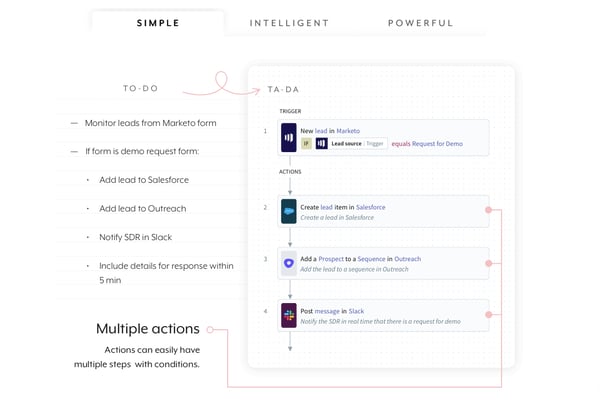
Workato also earns praise for how much visibility it gives into agent behavior. Reviewers appreciate being able to monitor workflows, track failures, and audit actions without guesswork. That observability matters when agents are handling business-critical operations.
One strength teams consistently value is how scalable Workato feels once agents are live. Agents can be reused, extended, and adapted across teams without rewriting logic from scratch. That reuse makes it easier to standardize automation patterns across an organization, which is especially useful in large or distributed environments.
Workato stands out for the level of complexity it can handle within agent-driven workflows. Agents can manage multi-step logic, branching conditions, and cross-system orchestration in a way that fits well with enterprise operations. That level of sophistication also means agent setup often involves more upfront configuration, which can feel heavy for teams looking to move quickly or test lightweight agent ideas.
Another area where Workato consistently delivers is execution behind the scenes. Agents are especially effective at moving data, triggering actions, and coordinating processes across systems. Because the platform is optimized for backend execution, it feels less oriented toward chat-first or conversational agent experiences, making it a stronger match for operational automation than dialogue-led agents.
At its core, Workato excels at turning AI agents into dependable operators across complex systems. For teams that care about orchestration, reliability, and scale more than novelty, it offers a level of control and execution suited to complex enterprise environments.
“I really appreciate Workato's logs/job viewing capabilities, as they make it easy for us to pinpoint issues and inaccuracies, which in turn helps us write better code. I also like the alerting feature, as it allows us to take pre-emptive measures when an error occurs, enabling us to support clients more effectively. The ability to avoid writing custom code and having interactive mapping is a big plus. The advanced log-viewing capabilities in the job and task formats are incredibly useful, and I find the on-demand authentication mechanisms very handy. Additionally, Workato's advanced mapping capabilities, along with formulas and custom SDKs, are highly beneficial for our team.”
- Workato review, Ayan S.
“I dislike the stringent constraints sometimes imposed by Workato development, specifically regarding data types and the availability of certain operations. At times, the platform defeats its own purpose by making a task that would take minutes through traditional coding take much longer. Additionally, initial integration of Workato with our platform was painstaking and required a good length of time working with their technical experts.”
- Workato review, Christopher S.
When I look at Vertex AI through the lens of AI agent builders, the single thing that stands out is how tightly it connects agent logic to Google Cloud’s underlying AI and data stack. This isn’t just a prompt layer on top of models. Vertex AI is built to let teams design, train, deploy, and scale intelligent agents using the same infrastructure that powers their data pipelines and ML workflows.
Instead of stitching together separate tools for data prep, model training, deployment, and monitoring, Vertex AI centralizes everything in a single workflow. That “all-in-one” structure is one of the most consistently praised themes in G2 reviews, and it makes a noticeable difference when moving from prototype to production without constantly switching contexts.
A major strength users repeatedly highlight is how seamlessly Vertex AI integrates with the broader Google Cloud ecosystem. Agents and models don’t sit in isolation; they plug directly into Cloud Run, storage layers, pipelines, and other GCP services. For teams already operating inside Google Cloud, this tight alignment reduces friction and makes scaling feel natural rather than bolted on. That ecosystem fit shows up in satisfaction signals as well, with Vertex AI scoring 89% for meeting requirements according to G2 data, reinforcing that it delivers on production expectations.
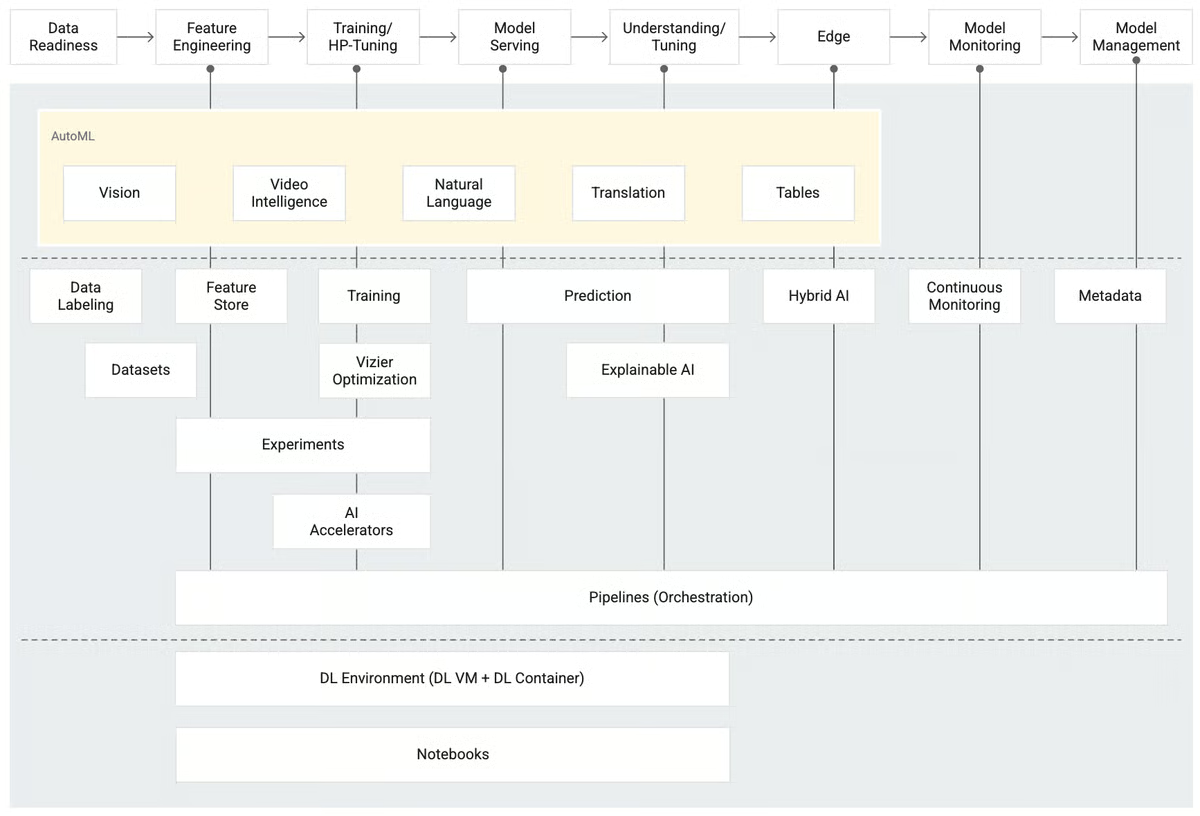
AutoML capabilities come up frequently in feedback. Reviewers appreciate how automated training and tuning streamline experimentation, especially for those who don’t want to manually configure every model parameter. The ability to quickly train, test, and refine models without building everything from scratch saves time and lowers the barrier to getting started. Even technically advanced users mention that AutoML accelerates workflows when speed matters.
Scalability is another recurring theme. Users describe running everything from small proof-of-concept applications to large enterprise AI workloads on the same platform. Whether it’s handling multiple instances, real-time inference, or scaling workloads up and down, Vertex AI is repeatedly positioned as reliable under pressure. That forward momentum is reflected in its 91% product going in the right direction rating according to G2 Data, suggesting confidence in its long-term scalability and evolution.
Monitoring, versioning, and lifecycle management round out the core strengths. Users repeatedly point to logging, model version control, deployment management, and centralized URLs for handling multiple models. Instead of losing visibility once a model goes live, teams can track performance, iterate deliberately, and maintain structured oversight. That operational clarity contributes to its 87% ease of admin score according to G2 Data, reflecting confidence in managing models once they are deployed.
The platform brings together numerous services, configuration layers, and cloud concepts into a single interface. Reviewers frequently describe the experience as overwhelming at first, particularly for those new to Google Cloud or machine learning platforms. While experienced ML and cloud teams adapt quickly, newcomers may need time to navigate documentation, permissions, and service relationships before everything clicks.
Vertex AI offers extensive functionality, but multiple users note that its pay structure can feel complex and sometimes unpredictable at scale. Costs can rise when training large models, running parallel experiments, or scaling workloads aggressively. Teams that actively monitor usage and understand resource allocation tend to manage this effectively, while smaller or budget-sensitive teams may need to plan carefully to avoid surprises
For organizations already invested in Google Cloud and looking to build agents and models that are scalable, integrated, and production-ready, Vertex AI provides a comprehensive and technically mature foundation. When the right expertise and cost oversight are in place, it becomes a powerful environment for serious AI development.
“What I like most about Vertex AI is that it brings the entire machine learning workflow together in a single platform. From data preparation and training to deployment and ongoing monitoring, we can manage everything smoothly without having to juggle multiple tools. We’ve been using it for several years to build and deploy ML models in production, and its integration with other Google Cloud services, such as BigQuery and Cloud Storage, makes data handling and movement much easier. The AutoML features and pre-built pipelines also save a lot of time, so our team can spend more energy on experimentation and improving model performance instead of setting up and maintaining infrastructure.”
- Vertex AI review, Mahmoud H.
“The learning curve is steep, documentation can be confusing in places, and costs are not always clear. Better tutorials, simpler UI for common tasks, and more transparent pricing would improve the experience.”
- Vertex AI review, Jeni J.
Retell AI is built specifically for teams that want AI agents to speak, listen, and respond in real time, which is exactly why it belongs in the AI Agent Builders category. Rather than focusing on backend automation or text-based workflows, Retell centers on voice interactions, making it especially relevant for agents handling live calls, voice support, and conversational customer touchpoints where latency and natural flow matter.
The core capability reviewers consistently highlight is how natural Retell AI’s voice interactions feel during live conversations. Agents can handle back-and-forth dialogue smoothly, respond quickly, and maintain conversational context without sounding robotic. That real-time performance is critical for voice agents, and it shows up clearly in satisfaction signals, with Retell AI earning a 100% score for meeting requirements, according to G2 Data, reinforcing its strength in production voice use cases.
Another theme that stands out is how easy it is to customize agent behavior and tone. Reviewers mention being able to shape how agents speak, respond, and adapt across different scenarios, which is especially important in voice-first environments. According to G2, Retell AI scores 100% for natural language tone customization, aligning with feedback from teams focused on brand-aligned conversations rather than generic voice responses.
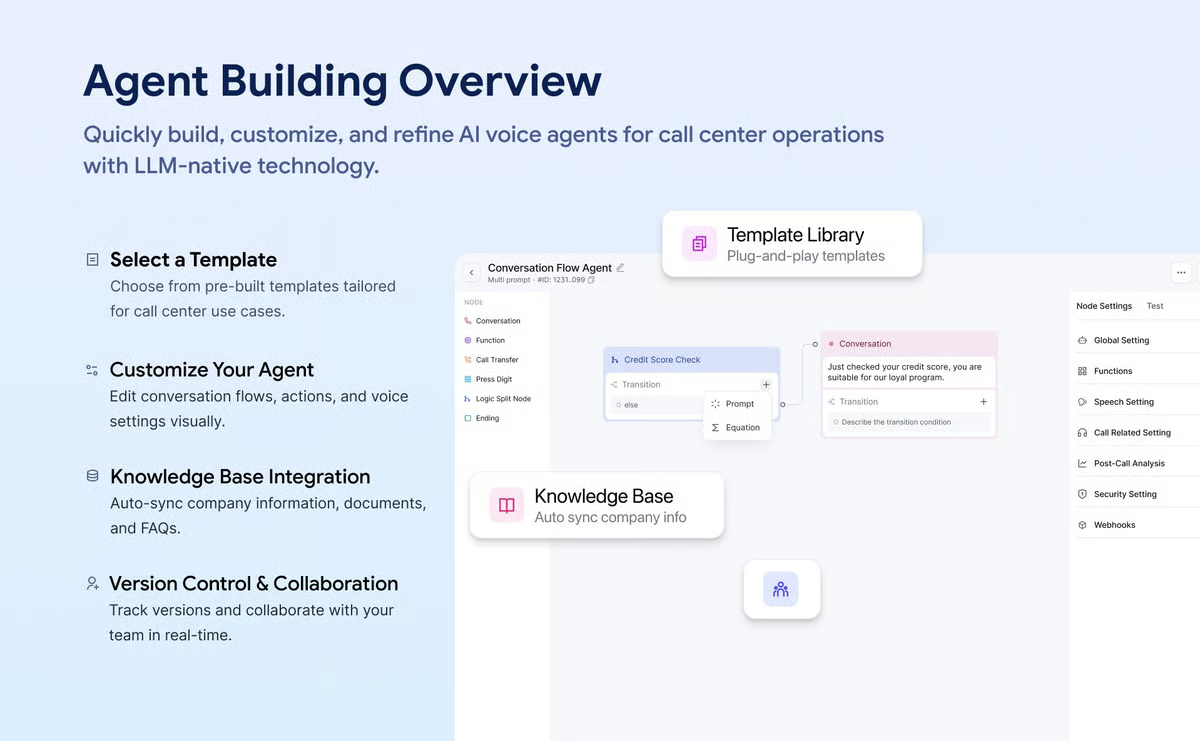
Retell AI also gets strong praise for how quickly teams can go from setup to live deployment. Reviewers frequently mention that configuring agents and connecting them to workflows feels straightforward compared to heavier agent platforms. According to G2 Data, Retell AI scores 95% for ease of setup and 92% for ease of use, which supports its appeal for teams that want to move fast without sacrificing conversational quality.
Integration is another area where Retell AI performs well within its niche. Reviewers note that agents can be connected to APIs and backend systems to fetch information or trigger actions mid-conversation, allowing voice agents to do more than just talk. According to G2, Retell AI scores 97% for workflow automation, reinforcing its ability to tie live conversations to real operational actions.
Support quality also comes up positively in reviews. Teams building voice agents often rely on quick iteration and troubleshooting, and reviewers point out that Retell AI’s support experience helps them stay productive once agents are live.
One area where Retell AI really shines is responsiveness. Voice agents need to feel immediate to avoid awkward pauses, and reviewers consistently describe Retell AI as reliable in live scenarios. That responsiveness helps agents maintain conversational flow, which is essential for phone-based or voice-driven experiences.
Retell AI is built to handle real-time voice conversations, and agents perform best in spoken, live-call scenarios. That voice-first design makes it less suited for teams building text-heavy agents or backend-focused automation compared to more general agent builders.
The platform also stands out for how quickly teams can configure and launch voice agents without heavy infrastructure. That lightweight setup works well for conversational use cases, but it’s not designed for orchestrating large, multi-system workflows across teams.
At its best, Retell AI enables teams to deploy voice agents that sound natural, respond quickly, and handle real conversations without friction. For organizations focused on live, voice-first customer interactions, it offers a level of conversational realism that’s hard to match.
“The docs are easy to read and fairly easy to follow. I also like their transparency when it comes to pricing. On top of that, Retell is highly flexible and customizable, making it a great fit for my use case.”
- Retell AI review, Qazi Y.
“Sometimes the platform can feel a bit limited when you want to do more complex customizations beyond the standard workflows. There have been occasional latency issues during peak hours that affect call quality. Also, the pricing structure could be more transparent - it's not always clear how costs will scale as usage increases, which makes budgeting a bit tricky.”
- Retell AI review, Ashish G.
Once you've chosen an agent builder, the next step is fitting it into a repeatable workflow. See how to automate tasks with AI across six task categories, including a step-by-step guide to adding agents to complex workflows.
Have more questions? Find more answers below.
While choosing the best AI agent builder software, focus on:
Different tools excel in different areas: Salesforce Agentforce for CRM integration, UiPath for structured automation, IBM watsonx.ai for governance, and Lindy for lightweight execution.
Salesforce Agentforce is CRM-centric and excels when agents operate directly inside Salesforce workflows and customer data. Microsoft Copilot Studio is Microsoft ecosystem-centric and integrates deeply with Teams, Dynamics, and Power Platform.
The choice depends on which ecosystem your organization already runs on.
Yes. Platforms like UiPath Agentic Automation, Workato, and Salesforce Agentforce allow escalation or human review within workflows. This is critical for regulated or customer-facing environments.
API-first platforms like Postman focus on structured integrations and developer control. Workflow-based platforms like UiPath, Workato, and Salesforce Agentforce emphasize process orchestration across business systems.
Yes. Most platforms, including Microsoft Copilot Studio, Salesforce Agentforce, and IBM watsonx.ai, allow teams to define agent roles, access permissions, and behavioral constraints.
Yes. Enterprise-focused tools like IBM watsonx.ai, UiPath, and Salesforce Agentforce include reporting and performance tracking features for monitoring agent interactions and workflow outcomes.
Salesforce Agentforce is the strongest option when automation revolves around Salesforce CRM data. CloseBot is also strong for CRM-backed customer interactions.
IBM watsonx.ai and UiPath Agentic Automation are strong choices for governance-heavy environments due to structured controls and enterprise-grade deployment models.
A chatbot primarily responds to queries. An AI agent can reason over data, trigger workflows, update systems, and take proactive actions across tools.
For sales-focused automation:
Some platforms offer free tiers or trial environments. Microsoft Copilot Studio and Postman provide entry-level access depending on plan type, though most production-ready agent builders move quickly into paid tiers. Truly free, fully scalable AI agent builders are rare in this category.
After digging through reviews and comparing how these platforms actually perform in real environments, one thing became clear to me: AI agents only become valuable when they’re anchored to real systems and real workflows. The flashiest demo doesn’t matter much if the agent can’t integrate cleanly, scale responsibly, or operate within the boundaries your business needs.
What surprised me most is how differently “best” plays out depending on context. For CRM-heavy teams, depth of customer data matters more than experimentation. For operations teams, workflow orchestration and reliability come first. For developers, API control is non-negotiable. And for enterprises, governance and oversight aren’t optional. There isn’t a single winner across all scenarios; there’s only the right fit for how your team actually works.
If you’re evaluating AI agent builder software right now, I’d focus less on hype and more on alignment. Look at where your agents will live, what systems they need to touch, and how much control you’ll need once they’re in production. When that alignment clicks, agents stop feeling experimental and start functioning like part of your core infrastructure.
If you’re evaluating how AI agents connect with your broader AI stack, explore the top AI chatbot software on G2 to compare how conversational tools differ from full-scale agent builders and where each fits in your strategy.


Recently updatedSummer 2026 Grid® Report · Published May 26, 2026 This guide was last...
by Yashwathy Marudhachalam

Recently updatedSummer 2026 Grid® Report · Published May 26, 2026 This guide was last...
.png) by Tanuja Bahirat
by Tanuja Bahirat

Recently updatedSummer 2026 Grid® Report · Published May 26, 2026 The 10 best...
.png) by Shreya Mattoo
by Shreya Mattoo