.png?width=400&height=150&name=Copy%20of%20G2%20Image%20(1).png)


I evaluated 10+ tools to find the 8 best operational risk management software. These are Everbridge 360 (Critical Event Management), Pirani, SAP Risk Management, Ncontracts, IBM OpenPages, GlobalSuite, SAI360, and LogicGate Risk Cloud.
When I started researching operational risk management software, I anchored on one question: what separates a minor issue from a financial loss or a product recall?
After comparing these platforms, my answer is timing: how early a risk gets logged and managed, not how well the team scrambles after it lands.
Most teams start that search online, and I noticed the advice available is often too thin to separate one platform from another. With half-baked data on the internet, they end up choosing an operational risk management solution that doesn't solve risks but adds to them.
To sort this out, I analyzed user reviews and G2 Data for the eight best operational risk management software. In my analysis I prioritized the things a buyer feels first: tools that are easy to implement, cover risk compliance and governance, and integrate with existing tech stacks such as CRM or ERP. Let's get into it!
As organizations navigate an increasingly complex regulatory landscape, the demand for operational risk management software continues to rise.
According to recent market studies, the global operational risk-management software market is projected to expand to approximately $11.5 billion by 2033, achieving a CAGR of about 10.6% during the forecast period.
Whether you’re struggling to find a solution that integrates seamlessly with your API workflows and governance requirements, or you’re seeking a platform with strong data integrity that prevents corruption in risk-suspected files, the challenge remains the same: balancing capability with trust.
Beyond core functionality, the worries that kept recurring in the reviews I analyzed were practical ones: implementation cost, training effort, documentation quality, and how far the system scales.
The goal is accurate reporting cycles, secure data handling, and an infrastructure that catches risks while they are still cheap to fix.
I spent several weeks and months analyzing, researching, and evaluating the nitty-gritty of operational risk assessment software to learn about compatible solutions that identify, report, and mitigate risks for organizations.
This analysis combines my individual research with the sentiments of real-time G2 reviewers who possess industry experience. I also attempted to include key details about products, such as extra integrations, hidden costs, software implementation resources, and so on, to complete my analysis.
Additionally, I summarized the top features, pros, and cons of each product and utilized AI to restructure G2 data into a digestible format. I also used AI to identify common sentiments and share them in this article.
In cases where I couldn't personally test a tool due to limited access, I consulted a professional with hands-on experience and validated their insights using verified G2 reviews. The screenshots featured in this article may mix those captured using testing and those obtained from the vendor's G2 page.
An operational risk management tool earns its keep when it fits the systems you already run, keeps a clean audit trail, and produces risk reports your executives and regulators can act on. Before you invest, here is what I'd check:
Additionally, your focus should be on not only exposing risk but also accurately identifying the right file, forecasting risk, and crafting a risk mitigation resolution. Out of the several tools I shortlisted, the following 8 tools were the best fit, in my opinion.
The list below contains genuine reviews from the Operational Risk Management Platforms category page on G2. To be included in this category, a product must:
*This data was pulled from G2 in 2026. Some reviews may have been edited for clarity.
Everbridge 360 (Critical Event Management) is an emergency communication and critical event platform. It detects disruptions, maps them against your people and facilities, and sends targeted, two-way alerts. Its home is the security operations center, the emergency manager's desk, and the business continuity team.
On G2, it holds a 4.5/5 rating across 330+ reviews, and 97% of reviewers rate it four or five stars. Two things in its G2 Data stood out to me. Its estimated payback period is eight months, the fastest in this lineup. And its customer mix is a barbell, nearly half enterprises and over a third small organizations, the spread you get when the core job of reaching people fast in an emergency matters at every size.
The job I'd trust it with first is the one reviewers describe most: two-way mass notification at scale. It isn't just blasting a message. Reviewers value sending alerts to exactly the right people and gathering their responses, confirming who's safe and who needs help, from inside the same event.
Many reviewers keep crediting it with something rarer than features, which is dependability during real emergencies. They describe it as minimizing errors under pressure and say it changed how their organization responds to crisis events, which is the strongest sentence a reviewer can write about this category.
The geotargeting is where I found the deeper value in the G2 reviews I analyzed. Many use geofencing to alert only the people inside an affected area, and the recent requests are for finer control, urgency levels by location, which tells you they're leaning on it hard, not abandoning it.
What I'd demo for a security operations team is the live map of assets and risk. Reviewers describe the visual command center putting a risk event, their facilities, and their people on one screen, so the question "who is near this?" gets answered by looking, not querying.
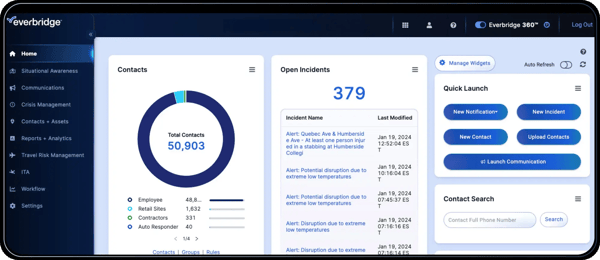
It links into the systems around it, and reviewers say those integrations make responses move between departments instead of stalling in one. Templates and reusable setups come up as the reason a real alert takes seconds, not composition time.
At the operator level, reviewers call day-to-day use easy to navigate, with online training that covers different user types. For a tool that non-specialists must use correctly on their worst day, I weigh that kind of ease more heavily than any advanced feature.
The entry module may not reflect the full price of the system. The platform covers a lot, but reviewers note that some key capabilities can sit behind separate add-ons, on top of seat and notification fees, which budget-tight teams feel first. That à la carte structure is also part of the appeal for organizations that want to pay for the workflows they actually deploy instead of buying a heavier all-in package. The value is clearest for teams that know which modules, alerts, and communication workflows they need and can build the package around that scope.
The setup tradeoff is configuration time. Communication groups, contact imports, and notification workflows can take real effort to tune, especially if settings change later or the rollout involves multiple teams. Reviewers say support helps with that setup, and the work tracks with the product’s flexibility. The more precisely you want alerts, contacts, and workflows to behave, the more upfront configuration they need. Once those pieces are dialed in, the platform is better suited to teams that want a tailored communication system rather than a one-size-fits-all alert tool.
For an organization whose risk events have street addresses, storms, outages, security incidents, and campus emergencies, this is the most purpose-built tool on this list, and the one whose reviews read most like accounts of it working when it counted.
"I'm most impressed by how it adds dependability to critical communication processes. The features make it easier to communicate to the right people, and that has helped to minimize errors during emergencies. I appreciate that it enhances trust by sharing urgent information with teams. We have also liked the customer service. The greatest thing is it makes emergency communication more reliable and less labor-intensive to organize."
-Everbridge 360 (Critical Event Management) review, Miguel T.
"The one thing I dislike is the fragmented programs that require extra fees to add. Only because our budgets are very tight."
- Everbridge 360 (Critical Event Management) review, Michelle N.
Operational risks are one piece of the puzzle. See the top picks for the best enterprise risk management software to handle risks at every level.
Pirani is a risk management platform built around a register of processes, risks, controls, and events, and it connects to the CRM or ERP you already run. It's pitched at teams that want risk tracking live without a consulting engagement.
On G2, it holds the perfect satisfaction score (100 on 100) with a 4.6/5 rating across 300+ reviews. Roughly two-thirds of reviewers work at mid-market companies, and financial services, banking, and insurance dominate its industry mix, so the compliance-heavy buyer is the one it's built around.
The reason I'd point a lean risk team here first is how little stands between signup and a working register. G2 reviewers describe parameterizing risks and controls as friendlier, more often than for any other product in this lineup, and several mention loading a complete event database within days. G2 reviewers score its ease of setup at 89%, and the reviews behind that figure read like relief: no long onboarding, no compliance degree required.
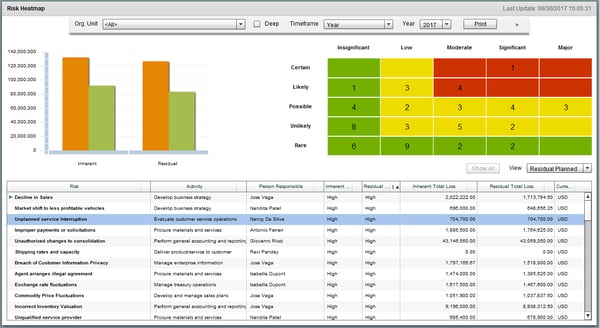
The interface earns its reputation in the review data. Reviewers call it modern next to tools that look a generation old, and the heat maps and dashboards come up repeatedly as something they can put in front of a risk committee without rework.
What I found the deeper value in is linking. Each risk ties to its process, its controls, and its events, and the heat map reads across all of it. Reviewers evaluating controls describe following a risk from identification to action plan in one thread, which is the traceability that an auditor asks for.
For teams migrating off spreadsheets, bulk Excel uploads carry the workflow. Reviewers say mass loads cut their setup time and flag errors on import, so an existing register moves over instead of being retyped.
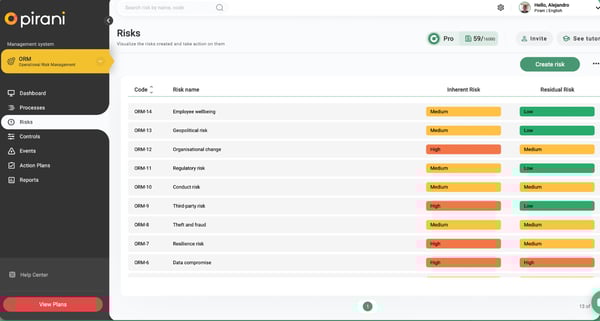
Support is a pattern, not a perk. New accounts get an assigned advisor, and reviewers credit that accompaniment for getting parameterization done in days. G2 reviewers put the quality of support at 96%, among the strongest signals in Pirani's data.
You can start without a sales call. Pirani's free plan covers 200 registers and five seats, enough to trial a real register, and paid plans are purchased self-serve inside the platform. In a category where nearly every vendor's pricing page says "contact us," I'd count that as a real difference in how fast you can evaluate it.
The dashboards handle day-to-day tracking well, and that's exactly where I saw teams start pushing at the ceiling. On G2, reviewers ask for deeper report filters and for management-grade graphics clean enough to hand a process owner or board. For teams using Pirani primarily to track risk inside the platform, the built-in dashboards cover the daily view well.
Part of what makes setup fast is that Pirani arrives with structure already decided, but some users note the flip side. They mention certain fields are predetermined or mandatory, heat-map axes included, and you adapt to them rather than the reverse. I'd weigh this if your methodology diverges from standard frameworks; teams on common methodologies fit the defaults without noticing.
If your risk program lives in spreadsheets today and sits in a bank, insurer, or fintech, Pirani is the shortest path in this lineup to a register your auditors will accept, and you can start the trial before anyone calls you back.
"The interface is simple and easy to navigate, which cuts down on confusion. I appreciate how flexible Pirani is, allowing me to set up projects and workflows to fit our team’s needs. The notifications and reminders are also helpful, keeping everyone on track without feeling overwhelming. Overall, it really helps our team stay productive and work together more effectively."
- Pirani review, Ekham R.
"I don't like that you can't delete the process links for each massive risk; you have to do it one by one, and if I make a mistake in a massive upload in some processes, I have to delete them manually."
- Pirani review, Verified G2 User in Financial Services
Related: Building risk management for a mid-sized team? See which ERM tools rank highest for mid-market companies.
SAP Risk Management puts risk identification, assessment, and mitigation inside the SAP environment where the business already runs, connecting risk records to S/4HANA, ECC, and HR processes and the people who own them.
On G2, it holds a 4.2/5 rating across more than 80 reviews, and 94% of reviewers come from mid-market companies or enterprises. The industry mix runs from aviation to pharmaceuticals to automotive, the spread you'd expect from a tool that follows SAP's ERP into every sector.
The case for it is location. Risk lives inside S/4HANA and ECC, and reviewers say that placement gives every risk a clear source of ownership: the action owner, the deadline, and the automatic escalation when something goes overdue are visible to management and auditors without a separate system to reconcile. If your processes run on SAP, I'd start the shortlist here for that reason alone.
Reviewers consistently describe catching risks early, such as identifying financial, compliance, and operational risks across the enterprise in real time, before they cross limits. The phrase I kept meeting in the reviews is some version of "before something goes wrong," which is the entire point of the category.
Day-to-day use is lighter than the SAP name suggests. Reviewers who log risks nearly every day call it simple and quick, and G2 reviewers score its ease of use at 93% against an 88% category norm, a gap I didn't expect from an enterprise ERP module.
Automation does the compliance housekeeping: reviewers cite automated workflows and audit-ready jobs that keep records current for review without manual assembly. For audit-facing teams, I'd rank this the most underrated feature in its reviews.
The coverage crosses functions: reviewers use it with supply chain planning, HR systems, and finance without adding other tools. One risk framework across departments is the standardization that large organizations buy this product to get.
It delivers what buyers came for. Beyond the meets-requirements score, reviewers' bottom lines read as settled: multiple users at the same company, one solution, easy deployment for a product of this scope. In a thin review pool, I give weight to the absence of surprises.
This is SAP, and it assumes SAP expertise. Some users note that configuration and integration take significant time and skill, and that non-technical users need training before the workflow interface makes sense. Shops with SAP basis and GRC administrators absorb this as routine; if you don't have that bench, price in the enablement.
Licensing cost is a common point of concern, raised even among the platform's existing users and often compared with other SAP solutions. How that cost lands depends largely on the scope. The pricing is built for enterprise-wide deployment, where the platform standardizes risk across many departments and systems. Organizations buying it for a single team or a narrow use case are the ones who find it harder to justify. For enterprises consolidating risk across the business, that cost is spread across far broader coverage.
For an organization whose operations, finance, and HR already live in SAP, this is the path of least resistance to risk management with real ownership attached, and its reviewers, however few, are notably unsurprised customers.
"I like the integration with SAP S/4HANA and ECC, which provides a clear source of ownership for every business user. I appreciate the automation features as they help in automating various processes. The audit-ready jobs are quite beneficial too. The ability to handle large and complex enterprises makes it reliable for our needs."
- SAP Risk Management review, Manish D.
"SAP Risk management is a complex setup, learning curve, and yes, the high cost compared to similar products in the market. It requires expertise while integrating with non-SAP systems."
- SAP Risk Management review, Anand J.
Ncontracts offers risk mitigation, risk assessment, risk analysis dashboards, and compliance support to fintech companies, credit unions, mortgage companies, and banks.
G2 Data shows average user adoption of 80%, the highest of the eight platforms here, and adoption is the number that tells you whether a risk system is still being used a year after rollout. It holds a 4.7/5 rating across 180+ reviews. Its base is unusually concentrated: 87% of reviewers are mid-market companies, and banking plus financial services make up nearly the whole industry mix.
The problem it solves first is scatter. Reviewers describe replacing separate systems with one place to track findings, store risk assessments, and manage vendors, and the reviews repeatedly appreciate it for staying on top of regulations. For an exam-facing institution, that consolidation is the difference between producing documentation and hunting for it.
I'd call the regulatory coverage the moat. Reviewers at banks describe monitoring fair lending, tracking CRA services and investments, and reporting HMDA from inside the platform.
Vendor management (Nvendor) earns specific praise. It stores every vendor's documents, sends reminders when updated ones are due, and reviewers say it keeps them in line with NCUA requirements. If third-party oversight is your examiner's favorite topic, this module is the draw.
Reviewers find the products easy to navigate, with a home page that surfaces what they need without hunting, and several mention that a task can be completed multiple ways. I read that flexibility is a sign that the workflows were designed by people who know bank operations.
Support reads like a partnership in review after review: responsive, thorough, and, in one reviewer's words, support that owns the ticket until it's solved. G2 reviewers put the quality of support at 98%, the strongest signal anywhere in Ncontracts' satisfaction data, and reviewers who struggled with parts of the software say support is the reason it never turned them against the product.
The modules share data between them, so a vendor logged once shows up in risk assessments and compliance workflows without re-entry. Reviewers running several modules daily credit this for better documentation than their previous mix of tools, and it's why adding a module compounds rather than complicates.
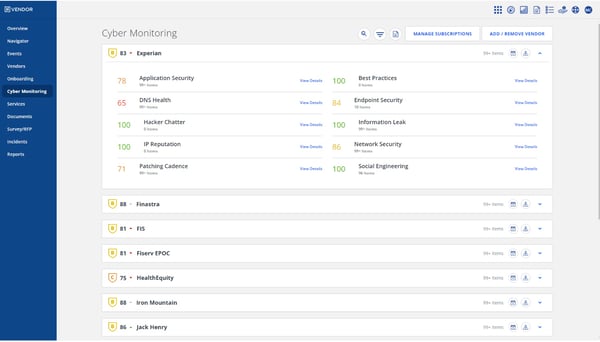
Setup takes patience, especially when a team starts a new module. Some reviewers note that each module asks for a meaningful amount of upfront data entry, and institutions adopting several modules at once can feel a learning stretch before the system settles. The tradeoff is that Ncontracts is built for structured risk and compliance work: once the information is in place, teams have a more organized foundation for tracking vendors, findings, risk, and compliance activity over time.
The breadth of the suite is also where it gets busy. A few users mention that getting from tools like Nrisk, Nverify, or Nfindings to a simple report can take extra clicks, and some modules may feel overlapping at first. Teams using one or two modules rarely feel that as much; for full-suite users, the value becomes clearer once the configuration is settled and the different risk workflows start living in one place.
A community bank or credit union that wants its compliance calendar, vendor files, and risk register under one roof, maintained by its own staff rather than consultants, is exactly who Ncontracts was built for.
"I like how Ncontracts simplifies compliance management by keeping everything in one place, making it easy to stay on top of regulations. It integrates smoothly with document management tools, helping us keep all compliance documents and records in sync. The initial setup was pretty easy and straightforward. Switching from a manual system of spreadsheets and scattered files to Ncontracts made everything more streamlined."
-Ncontracts review, Ashutosh O.
"I do not care for the extra steps that you have to take in Nrisk, Nverify, and Nfindings to get to a simple report or conclusion. I feel like there are a few different things that could be added or changed structurally to achieve a better and faster conclusion process."
- Ncontracts review, Devon E.
IBM OpenPages is an AI-assisted governance, risk, and compliance (GRC) platform that runs operational risk, regulatory compliance, internal audit, policy management, and third-party risk as modules on one data model, deployable as SaaS, on IBM Cloud, or on premises.
OpenPages has the largest market presence of any product (98 on 100) in the operational risk management category, which shows that this is the incumbent that buyers keep finding on their shortlist. On G2, it holds a 4.2/5 rating, and its reviewer base is spread across IT, software, financial services, and insurance, and across company sizes from small teams to mid-size and enterprises, which is unusual for a platform with this much depth.
Scale is the pitch, and reviewers back it. The draw they describe most often is running every GRC discipline on one platform. Start with operational risk, then add compliance, audit, policy, or third-party modules that share the same data. One logged risk feeds them all, which is what "single source of truth" has to mean at enterprise size.
The visibility is what I'd sell a chief risk officer on. Reviewers describe spotting trends early and seeing where controls are slipping before issues become problems, across business lines and regions, instead of reacting to whatever surfaced in last quarter's committee pack.
Customization runs deep. Many reviewers describe adapting dashboards, views, objects, and reports to each team's needs, and they credit that fit for faster decisions. I'd note this is configuration, not coding; the platform ships drag-and-drop view and workflow designers.
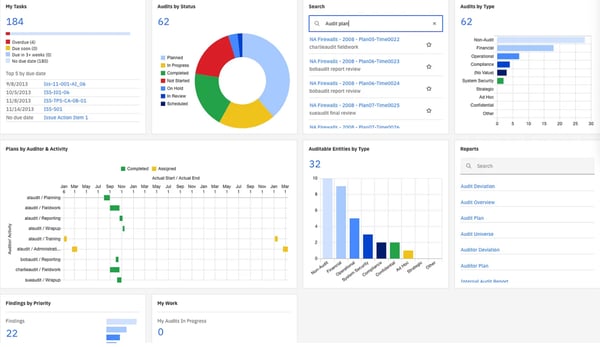
Workflow automation carries the compliance grind. Reviewers point to automated workflows replacing manual, spreadsheet-based GRC work, with calculation rules and schedulers handling the recurring checks that otherwise eat an analyst's week.
The AI is real, with a caveat I'll state plainly: reviewers, mostly in earlier years, praise Watson's natural language processing for classifying risk text and supporting root-cause analysis on unstructured inputs like incident reports, and IBM's current docs pair OpenPages with WatsonX assistants. Those AI components are priced as add-ons, so ask which are in your quote.
For global programs, it centralizes risk data across regions on infrastructure IBM operates at enterprise scale, with REST APIs and prebuilt integrations tying it into the surrounding stack. Reviewers running multinational deployments cite that consolidation as the reason they tolerate its weight.
This is a power tool sized for teams that live in it. Reviewers who use it daily rarely complain, but new users and teams that touch it only occasionally describe it as heavy and complex with a real learning curve. If your rollout includes many casual users, plan training for them; dedicated risk teams absorb it.
Reporting rewards setup effort. The engine is deep, but some users note that polished outputs take expertise, from Cognos-based reports that beginners find hard to automate, which pulls in several tools. Teams that build templates once describe recurring reporting as clean afterward; expect that investment up front.
The buyer this fits is a large, regulated enterprise consolidating a sprawl of GRC processes onto one governed platform, with a dedicated risk function to run it. For that buyer, the depth that makes OpenPages heavy is exactly what makes it worth the weight.
"What I like best about IBM OpenPages is its ability to centralize governance, risk, and compliance management in one platform. It provides powerful dashboards, automation, and analytics that help organizations identify risks early and ensure regulatory compliance efficiently."
-IBM OpenPages review, Shivaramakrishna C.
"One area that could be improved is usability. IBM OpenPages is powerful, but it can feel heavy and complex, especially for new users or teams that only use it occasionally. There’s a learning curve, and some workflows take more clicks than they probably should. Customization can also be a bit challenging. While it’s flexible, making changes to fields, workflows, or reports often requires admin support and careful planning, which slows things down when business needs change. Reporting, in particular, could be more intuitive. You can get the data you need, but it sometimes takes extra effort to build reports that are clean and easy to use without relying on technical expertise."
- IBM OpenPages review, Charlotte W.
Check out my peer's analysis of the best GRC software and dive into her individual takeaways for every platform to strategize your risk management issues wisely.
GlobalSuite is a GRC platform built around regulatory catalogs. It maps risks, controls, and evidence to standards such as ISO 27001 and ISO 22301, and carries business continuity planning in the same system.
It holds a 4.4/5 rating across more than 90 G2 reviews. The two signals I'd weigh most sit outside the rating: 96% of reviewers believe it's headed in the right direction, and G2 Data puts its average go-live at under three months, the fastest of the eight platforms here, which matters in a category where implementations usually take half a year.
Based on my analysis of G2 reviews, I'd start with what it's for: compliance against named standards. Many reviewers describe the catalog of norms, their risks, and their controls integrated coherently, so evidence for ISO 27001 or a sector regulation lives against the requirement it satisfies. For a compliance office juggling several frameworks at once, this is the argument, and it's the theme I found most in its reviews.
The modules bend to your process. Reviewers customize them in ways I didn't expect from a compliance tool; one uses the tickets module to register audit findings and link them to risk analyses, and others call the platform agnostic and flexible enough to adapt to most of what they run at it.
It unifies the GRC stack. Reviewers describe risk management, compliance, audit, and information-security work on one platform instead of parallel spreadsheets. The phrase all-in-one recurs across reviews I analyzed, and consultancies and banks are the two industries that lean on it hardest.
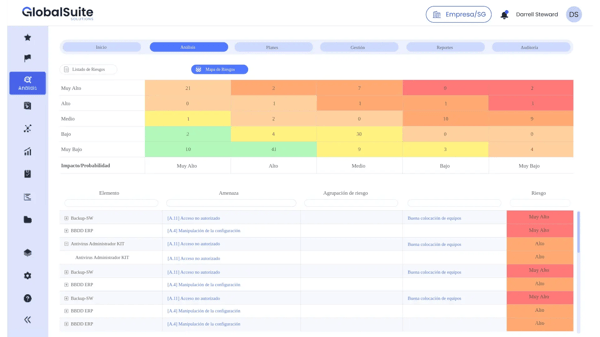
Business continuity is native, not bolted on. Reviewers manage continuity plans and their testing in the same system that holds the risk register, which keeps the plan connected to the risks that justify it. If your program answers to ISO 22301 or a regulator that asks about resilience, I'd weigh this pairing heavily.
Security teams use it as their operating log. Reviewers describe registering everything the security office does, incidents, trainings, ISMS actions, and tickets of any type, so the audit trail builds itself as work happens rather than being reconstructed before an audit.
Many mention that the vendor shows up. Reviewers praise fast email responses, an onboarding they call excellent, and a team visibly working to improve the tool; several say the people are the best part of the product. Paired with the fastest go-live in this lineup, I read that as a vendor that carries its customers through setup rather than selling and stepping back.
The reviews are split on how it feels to drive. While most reviewers call it friendly and intuitive once it's running, some, particularly newer users, find information hard to locate, note multiple paths to the same screen, and describe the initial configuration and learning curve as steep, sometimes needing the vendor's help to get things tuned. I'd take the free demo through your own use case rather than the standard tour; teams that invest in the setup phase land in the satisfied majority.
The platform captures data better than it presents it. Some users note that the extractable charts and reports are thin, and the indicators functionality needs work, particularly for management-grade visuals. Teams that pull data into their own reporting stack won't feel it much; if your board pack must come straight from the tool, look at the reports module closely during evaluation.
For a compliance or security office that lives by ISO clauses and continuity tests, particularly one that wants a vendor involved in the rollout, GlobalSuite gets a working, standards-mapped program running faster than anything else I compared in this lineup.
"Global Suite has truly transformed our workflow. From day one, the onboarding process was excellent, allowing us to understand the platform really fast, thanks to their top-notch support team. The UI/UX is incredibly clean and intuitive, making it easy to use for everyone. In terms of performance, the platform is fast, reliable, and handles our daily operations flawlessly. Additionally, its seamless integrations with our current tools have centralized our work, while the built-in AI and intelligence features save us hours by automating repetitive tasks. Considering how much it boosts our productivity, the pricing is completely justified, delivering a great ROI almost immediately. Highly recommended!"
- GlobalSuite review, Vianey L.
"What I like the least is that certain sections can be hard to find, and having multiple ways to access the same area can sometimes be confusing. However, it's mostly a matter of getting used to the platform."
- GlobalSuite review, Javier R.
SAI360 is a modular GRC platform that runs risk, compliance, audit, and business continuity alongside an ethics and compliance learning product, so the program that sets the rules and the training that teaches them live with the same vendor.
On G2, it holds a 4.2/5 rating across more than 110 reviews, and the reviewer mix tells you who it serves: hospitals and health care lead, followed by banking, financial services, and insurance, and about two-thirds of its reviewers are enterprises. This is a compliance platform reviewed by the industries with the heaviest compliance burdens.
The phrase that repeats is ending fragmentation. Many reviewers describe tying corporate conduct, compliance, and GRC tools into one place, and the reviews return to that theme more than any other. I counted it as the clearest signal in the data. Having risk, continuity, and compliance together instead of scattered is the purchase rationale in their own words.
For audit-facing teams, the risk-to-control-to-test chain is the standout. Reviewers walk through it for SOX: create a risk, tie it to the controls that mitigate it, tie those to test workpapers, and the traceability an external auditor wants is simply how the data is structured. That linkage is the feature I'd build a demo around.
Configuration runs deep without code. G2 reviews describe fixing workflows without calling a developer, connecting entities like risks and assets, and shaping the platform to their own structures; one calls the possibilities open-ended. The payoff I see in those accounts is a platform that bends before it breaks.
The training side is a real product, not a checkbox. SAI360 sits in G2's ethics and compliance learning category, and reviewers describe building courses by uploading videos, PDFs, and SCORM files with a quiz at the end, helped by an AI course builder, with fast turnaround. For a compliance office that also owns training delivery, I'd weight this pairing; it's what the rest of this lineup doesn't offer.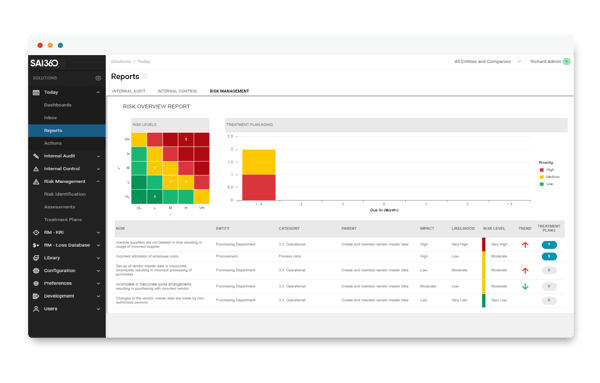 Support is human and reachable. Reviewers mention getting a real person rather than a bot, onboarding measured in days, not weeks, and a client partnership that includes access to the development team. In an enterprise category where support tickets go to die, I noticed reviewers treating this as a differentiator.
It holds up as infrastructure. Several users describe reliable behavior with their existing files, Excel uploads that update cleanly, and Microsoft Office connections that work. Unglamorous, and exactly what I'd want to hear from the system holding a regulated company's compliance record.
End users mostly describe daily use as organized and simple, but the people configuring the platform feel the curve. Some note that the backend configuration takes real learning, the compliance learning modules take effort to master, and new users find parts complex at first. If your rollout has a dedicated admin, this is a training line item, not a blocker.
Decide early who owns report-building. Some users note the reporting layer is rigid, rearranging report items is harder than it should be, learning-path reporting has gaps, and one reviewer describes building a full dashboard alone as a long, frustrating job. The data capture underneath is sound, so teams that assign reporting to a named owner and lean on support while templates get built come out with what they need.
For an enterprise in healthcare, banking, or insurance that wants its compliance program and its compliance training under one vendor, with audit traceability built into the data model, SAI360 is the most complete pairing I compared in this lineup.
"I like how SAI360 ties our corporate conduct, compliance, and GRC tools into one place, reducing fragmentation and keeping responses organized. For me, having the risk, continuity, and compliance pieces together instead of scattered is a big advantage. I appreciate how cleanly it pulls integrated risk management together, especially the disaster recovery side and the emergency mass notification system, making it a one-stop shop for business continuity. This is crucial for keeping us ready for any incident. Setting up report templates for audits or analytics is straightforward, too, so I don't have to struggle with the tool every time I need to prepare something for a review. The initial setup of SAI360 was pretty smooth as well."
-SAI360 review, Ruth P.
"The reporting piece is lacking, and it’s frustrating because everything else is okay. You cannot report on learning paths at all; you can only customize reports up to a point, and some fields are not available, which means you’ll be duplicating information elsewhere to get the number you need. The new UI has a learning curve, and some items are still in the older UI, so you’re bouncing back and forth depending on what you are trying to accomplish. Pet peeve, but true: the training hours appear as “31m 55s” (text) instead of a number so you’ll have to write your own formula to total them."
- SAI360 review, Mohanakannan K.
LogicGate Risk Cloud is a GRC platform you assemble rather than adopt: risk, compliance, and audit processes are built as connected, no-code workflows shaped to how your organization actually works.
On G2, it has a 4.6/5 rating across more than 180 reviews, and every one of those reviewers rated it four or five stars. The number that stood out to me is ease of doing business with: G2 reviewers score it at 98% against a 91% category norm, which matches the tone of the reviews I read. People like the company, not just the software. Financial services dominate its reviewer mix, with healthcare and insurance behind it.
Freedom is the product here. G2 reviewers' favorite theme, by a wide margin, is building and adapting workflows without writing code. You don't need to be a coder to define risk, compliance, and audit processes, and teams describe tailoring the system to their organization instead of bending the organization to the tool. If your risk program refuses to fit templates, this is the platform I'd shortlist first.
The workflows connect into one picture. Many reviews I read describe linking all their workflows together and seeing the business at a holistic view, so a control tested in one process informs the risk it mitigates in another. That linking is what separates it from a pile of well-organized forms.
Several say it replaces the spreadsheets. They mention automated workflows eliminated their manual, spreadsheet-based GRC work and cut the scramble before audits. I'd frame the payoff plainly: the evidence for your next audit accumulates as a byproduct of doing the work.
The training is a feature in its own right. Many G2 reviewers call the training and information sessions phenomenal and describe learning the platform quickly, with an easy initial setup. For a build-it-yourself platform, I weigh vendor teaching heavily, and the reviews say LogicGate teaches.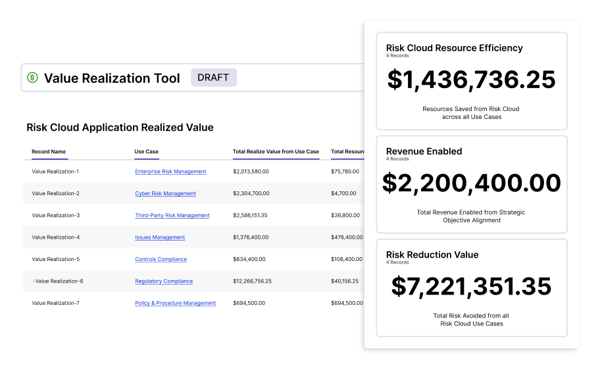 Changes stay easy, according to my analysis. Reviewers describe making minor or major adjustments quickly once the platform is in place, which is the practical difference between a risk program that evolves with the business and one that fossilizes at go-live. I read that adjustability is the compounding benefit of the no-code design.
The relationship also holds up after the sale. Its quality of support scores on G2 is 96%, and reviewers describe a team that's great from start to finish and customer service that answers when the customization gets deep. For a platform you'll keep building in, I'd count the vendor as part of the architecture.
That freedom is also work. Some users note that customizing workflows takes real time, and that defining workflows, configurations, and permissions is challenging without prior GRC experience; newer builders also wish the back-end connections between records were easier to see. Teams that assign an owner with GRC context and use LogicGate's well-reviewed training get through the build; buying it with nobody assigned to build is the mistake to avoid.
Reporting is the part you'll configure twice. Some users note that advanced reports need extra configuration or third-party tools, table reports cap the workflows they can include, and visual reports could use more options. The underlying data model is exactly what reporting needs, so I'd scope your must-have reports during the trial and confirm each one builds natively.
For a team with a clear picture of its own risk processes and a person ready to build them, LogicGate is the rare platform where the finished system matches how you work rather than how a vendor guessed you might.
"I love how streamlined and simple LogicGate Risk Cloud is to use for everyone. The training and information sessions are phenomenal! I learned so much, so quickly. The initial setup was very easy."
-LogicGate Risk Cloud review, Samantha Z.
"Customizing workflows is time-consuming, and some advanced reporting needs extra configuration and third-party tools."
- LogicGate Risk Cloud review, Rajesh S.
Got more questions? Here are the answers.
Pirani holds the highest satisfaction score in G2's operational risk management category, with 97% of reviewers rating it four or five stars. Ncontracts matches that trust in banking: every one of its 180+ reviewers rates it four or five stars. Trust here tracks daily use, and both are tools reviewers describe working with every day.
GlobalSuite implements the fastest: G2 Data puts its average go-live at under three months. For adoption after rollout, Ncontracts leads with 80% average user adoption, the strongest in the category's top products. Weigh the two numbers together, because a fast install nobody logs into saves you nothing.
Ncontracts shows the strongest sustained adoption: G2 Data reports 80% average user adoption, and reviewers describe daily use years into their contracts. GlobalSuite follows at 62%. Sustained adoption usually reflects fit with existing workflows, so check whether a platform matches how your team already works before you commit.
Everbridge 360 earns the strongest reliability language in the reviews I analyzed: users describe it working dependably during real emergencies, the hardest test in this category. SAP Risk Management also stands out, with 96% of reviewers saying it meets requirements. Verify reliability in reviews describing live incidents, not in feature lists.
LogicGate Risk Cloud and GlobalSuite have the strongest implementation stories in recent reviews: LogicGate users call its training sessions phenomenal and initial setup easy, while GlobalSuite reviewers credit onboarding for getting them working fast. Read implementation reviews from companies of your size, since setup experience varies more by team than by feature set.
Pirani pairs an 89% ease-of-setup score with 96% support quality on G2, and reviewers credit an assigned advisor for register setups measured in days. Ncontracts scores 98% for support quality, the highest in this lineup. For lean teams, ongoing support matters longer than setup speed, so weight it accordingly.
LogicGate Risk Cloud maps relationships best: reviewers link risk, compliance, and audit workflows into one holistic view, so a decision in one department sees the risks logged in another. SAI360's risk-to-control-to-test linkage does the same for audit teams. Relationship mapping pays off most where risk ownership crosses departmental lines.
IBM OpenPages consolidates most broadly, running operational risk, compliance, audit, policy, and third-party risk on one data model, so logged risk feeds every module. For financial institutions, Ncontracts does the same with findings, assessments, and vendor files. Consolidation matters most at audit time, when scattered evidence costs days.
Everbridge 360 automates incident response end-to-end: it detects disruptions, geotargets alerts to affected people, and collects their responses without manual chasing. SAP Risk Management cuts manual verification with automatic escalation of overdue actions and audit-ready jobs. Automation converts response minutes into seconds, the clearest ROI in this category.
GlobalSuite is the fastest to implement: G2 Data shows average go-live at under three months, helped by an onboarding team that reviewers praise. LogicGate Risk Cloud follows at just over three months, with the training reviewers call phenomenal. Pirani offers the quickest first step of all: a free plan you can trial the same day.
Pirani fits small businesses best: its free plan covers 200 registers and five seats with no credit card required, and paid plans are purchased self-serve inside the platform. Reviewers call it friendly to set up without technical expertise. For a small team, starting free and growing into paid tiers beats buying enterprise shelfware.
IBM OpenPages is the enterprise pick: it has the largest market presence in G2's operational risk management category and runs every GRC discipline as modules on one platform, with Watson AI classifying risk text. Its depth rewards dedicated risk teams, so match it to a program with real staffing behind it.
Choosing an operational risk management software depends on several factors, including the severity of your risk, the size and composition of your workforce, the need for additional staff training, compliance measures, software compatibility, and scalability.
While all the software in my analysis checked out these requirements, as a business, you need to factor in more revenue-based parameters and implementation timelines to make a firm decision. While you're at it, feel free to return to this list for a quick glance.
Monitoring your cloud data in silos? Check my peer's analysis of 30+ best cloud monitoring tools to store and protect your data on the cloud.
.png)

I evaluated 10best IT risk management software in 2026 using G2 Data. These are UpGuard,...
 by Disha G

Every time I sit down with my InfoSec team, one thing becomes clear: managing governance,...
 by Soundarya Jayaraman

Recently updatedSummer 2026 Grid® Report · Published May 26, 2026 This guide was last...
 by Harshita Tewari