I evaluated 20+ sales coaching tools to find the seven best sales coaching software platforms. These are Gong, Agentforce Sales, Fathom, Substrata, Nooks, Mindtickle, and GTM Studio.
When I started researching this category, I kept coming back to the same challenge: most sales teams aren’t short on conversations, they’re short on time and visibility. Sales managers are expected to review calls, identify coaching opportunities, onboard new reps, and improve team performance, all while managing active pipelines and customer relationships. As teams grow, it becomes harder to understand which coaching efforts are working and where reps need the most support.
For this guide, I evaluated sales coaching software based on factors such as coaching capabilities, conversation analysis, AI-powered insights, onboarding support, integrations, usability, and overall value for different sales teams. By the end, you’ll have a clearer understanding of where each platform fits, what it does well, and which solution may be worth considering for your sales organization.
Sales coaching has evolved from periodic call reviews and manager feedback sessions into a more continuous, data-driven process. As sales organizations look for ways to improve productivity, shorten ramp times, and maintain consistent execution across teams, coaching technology has become an increasingly important part of the revenue stack.
During my evaluation, I noticed that today’s sales coaching tools serve a much broader role than traditional coaching solutions. Many platforms now combine conversation intelligence, AI-generated insights, onboarding support, skills development, performance analytics, and workflow automation in a single system. At the same time, vendors are taking different approaches to solving these challenges, which makes it important to understand where each platform stands out.
The tools featured in this guide represent a range of approaches to sales coaching, from conversation-focused platforms that analyze customer interactions to enablement solutions designed to support ongoing training and skill development. My goal is to help you understand those differences so you can find a platform that aligns with your team’s coaching strategy and growth objectives.
When evaluating the best sales coaching platforms, I focused on features that help reps improve their skills, make coaching more consistent, and give sales leaders better visibility into team performance.
- Support for multiple coaching methods: The strongest platforms don’t rely on a single approach to coaching. I looked for tools that support call coaching, video coaching, real-time feedback, role-play exercises, coaching templates, and performance tracking. The best sales coaching software can support different stages of rep development, whether you’re onboarding new hires or helping experienced sellers refine specific skills.
- Conversation intelligence: A coaching platform should make it easier to understand where reps are performing well and where they may need additional support. I prioritized tools with call analytics, talk-to-listen ratios, keyword detection, scoring frameworks, and trend analysis across teams or individuals.
- Collaboration and coaching alignment: Coaching can quickly become fragmented when feedback lives across multiple tools and communication channels. I focused on software that makes it easy to share feedback, comment on calls, store examples of successful conversations, and build repeatable coaching workflows. The platforms that stood out gave managers and reps shared visibility into coaching activities and progress.
- AI-powered insights and automatic analysis: Reviewing every conversation manually can be difficult as teams grow. I looked for tools with features such as AI-generated call summaries, objection detection, suggested next steps, conversation trends, and coaching recommendations. These capabilities can help managers spend more time coaching and less time searching for areas that need attention.
- Customization and flexibility: The best sales coaching platforms allow teams to tailor coaching programs to their own sales process. I looked for software that supports customizable playbooks, scorecards, messaging frameworks, and onboarding paths. This flexibility helps teams create coaching experiences that align with their goals and workflows.
The list below contains genuine user reviews from G2’s sales coaching software category. To qualify for inclusion in the category, a product must:
- Offer capture, analysis, and feedback tools related to sales calls
- Help identify pivotal moments or opportunities in conversations, as well as
areas for improvement, to share with the corresponding salesperson
- Integrate with call dialers, CRM software, or both to pull and store sales call information
*This data was pulled from G2 in 2026. Some reviews may have been edited for clarity.
1. Gong: Best for data-driven conversation coaching
G2 Rating: 4.8/5
Gong is a revenue intelligence and sales coaching platform that helps teams analyze customer conversations, identify coaching opportunities, and improve deal execution using AI-powered insights.
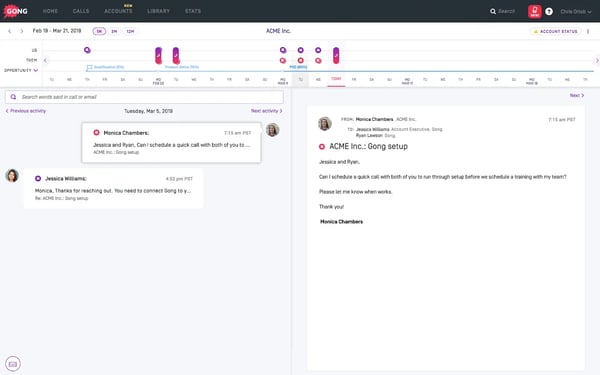
Based on the G2 reviews I analyzed, Gong is most often valued for helping sales teams turn conversations into coaching and revenue insights. Rather than relying on manager observations alone, users describe having a structured way to review calls, spot patterns, and understand what top performers are doing differently.
One capability that consistently stands out in reviews is call recording, transcription, and note automation. Users frequently mention that Gong captures customer interactions accurately and makes them easy to revisit later. The platform's strong performance in review-related features, which earned a 94% satisfaction rating on G2, reflects how central conversation review is to the overall experience.
I also noticed frequent praise for Gong's AI-powered coaching insights. Reviewers often mention that the platform surfaces trends across conversations, highlights potential deal risks, and helps managers identify coaching opportunities more quickly. Many users describe these insights as useful for creating more objective coaching conversations rather than relying on anecdotal feedback.
Another theme that appeared repeatedly is how Gong supports onboarding and ongoing rep development. Users point to recorded calls and conversation libraries as valuable learning resources for newer reps. From what I've seen, teams use these examples to reinforce best practices and shorten the time it takes for new hires to become productive.
Ease of use is another area where Gong receives consistently positive feedback. Users frequently mention that searching calls, navigating transcripts, and creating clips for coaching sessions feels straightforward. That aligns with Gong's 94% ease-of-use rating on G2, which is slightly above the category average.
Several reviewers also highlight Gong's integrations with tools such as Salesforce, Zoom, and Slack. According to user feedback, these integrations help keep conversation data connected to existing sales workflows instead of creating another standalone system that teams need to manage separately.
When it comes to performance visibility, reviewers often point to dashboards, scorecards, and reporting capabilities. Gong's scorecard functionality holds a 91% satisfaction rating on G2, and many users mention using these insights to monitor rep activity, track coaching progress, and understand how conversations influence pipeline performance.
While feedback is overwhelmingly positive, I did come across some users who felt the forecasting and sales target features could provide greater precision. That concern appears most often among teams with complex forecasting requirements. At the same time, many reviewers indicate that Gong's forecasting tools are sufficient for day-to-day planning and pipeline reviews.
I also noticed occasional requests for more granular filtering and deeper analytical customization. Users managing large sales organizations or complex reporting structures sometimes want additional drill-down capabilities. For many teams, however, the existing search and reporting tools already provide the level of visibility they need for coaching and deal reviews.
If your primary goal is to build a coaching program around real customer conversations rather than manager intuition, Gong stands out as one of the strongest options in this category. Based on the reviews I analyzed, it is particularly well-suited for revenue teams that want coaching, conversation intelligence, and deal visibility within a single platform.
What I like about Gong:
- I see reviewers consistently highlight the conversation review experience. Between recordings, transcripts, and searchable call libraries, Gong gives managers a practical way to coach from actual customer interactions.
- The AI-driven coaching insights stood out in my research. G2 users frequently mention that Gong helps surface risks, trends, and coaching opportunities that might otherwise be missed during manual reviews.
What G2 users like about Gong:
“What I like best about Gong is how it gives clear visibility into customer conversations and turns them into actionable insights. It helps teams improve coaching, identify deal risks early, and understand what top performers are doing differently. The automatic call summaries and analytics also save a huge amount of time while keeping everyone aligned across sales, marketing, and customer success.”
- Gong review, Connor H.
What I dislike about Gong:
- Based on G2 feedback, the forecasting capabilities work well for many teams, but organizations with highly detailed forecasting processes may still rely on supplemental tools for additional precision.
- Some reviewers would like more advanced filtering and reporting flexibility. That said, teams with straightforward coaching and pipeline review needs generally find the existing analytics more than sufficient.
What G2 users dislike about Gong:
“While Gong delivers powerful insights, some aspects of the user experience could be improved. The interface can feel overwhelming at first, especially for new users, because of the volume of data and features. Implementation and setup took some initial effort, and filtering or finding specific calls can sometimes be unintuitive. Overall, it’s valuable, but smoother navigation and simpler onboarding would make it even better.”
- Gong review, Hannah L.
2. Agentforce Sales: Best for AI-powered sales workflows and CRM-driven coaching
G2 Rating: 4.4/5
Agentforce Sales (formerly Salesforce Sales Cloud) is a sales platform that combines CRM, automation, AI capabilities, analytics, and coaching tools to help teams manage opportunities, improve seller productivity, and make more informed sales decisions.
Reading through recent reviews, one thing became clear: most users view Agentforce Sales as much more than a coaching tool. Reviewers frequently describe it as the central system where customer information, pipeline activity, sales processes, and coaching-related insights come together. For teams already operating within Salesforce, that centralized experience appears to be one of its biggest advantages.
AI capabilities are among the most frequently mentioned strengths in the reviews I analyzed. Users often highlight AI-assisted recommendations, forecasting support, lead prioritization, and workflow automation. Agentforce Sales also scores highly for decision making (94%) and adaptive learning (93%) on G2, which aligns with the feedback from users who say the platform helps them make faster, more informed sales decisions.
Another recurring theme is automation. Reviewers regularly mention reducing manual work through automated workflows, task creation, lead routing, and activity tracking. From what I've seen, teams appreciate being able to automate repetitive administrative processes so they can spend more time focusing on customer interactions and pipeline management.
Several reviewers also point to the platform's customization capabilities as a major benefit. Users frequently mention tailoring dashboards, workflows, fields, reports, and sales processes to match their organization's requirements. This flexibility appears especially valuable for companies with established sales methodologies or more complex operational needs.
Reporting and visibility come up consistently throughout the feedback as well. Users often mention dashboards and reporting tools that help them track pipeline health, monitor team performance, and identify trends across sales activities. Based on the reviews I read, many organizations rely on these insights to guide coaching conversations and performance reviews.
Integration is another area where Agentforce Sales receives strong marks. Reviewers frequently mention connections with Salesforce products, third-party applications, communication platforms, and business systems. For many users, the ability to keep customer data connected across multiple tools helps create a more complete view of sales activity.
 Source: Agentforce Sales
The most common challenge I encountered in reviews relates to complexity. Many users acknowledge that the platform offers extensive functionality, but they also note that navigating, configuring, and administering it can require training and ongoing support. This feedback aligns with Agentforce Sales' lower Ease of Admin (87%) and Ease of Setup (86%) ratings. That said, reviewers managing sophisticated sales operations often view this complexity as a trade-off for the platform's flexibility and depth.
Pricing is another area that receives mixed feedback. Some reviewers mention that licensing costs, add-ons, and implementation expenses can increase as teams expand their usage. However, many organizations also note that the platform's breadth of functionality allows them to consolidate multiple tools, making the investment easier to justify over time.
What stood out most during my evaluation is that Agentforce Sales works best for organizations looking to connect coaching, pipeline management, automation, and customer data within a single ecosystem. Based on the reviews I analyzed, it's particularly well-suited for growing sales teams that want highly customizable workflows and are willing to invest time upfront to take advantage of the platform's full capabilities.
What I like about Agentforce Sales:
- I noticed that users consistently highlight the combination of AI insights and workflow automation. From what I read, teams use these features to reduce manual work while keeping sales activities moving forward.
- The level of customization stood out to me. Reviewers frequently mention tailoring dashboards, reports, and workflows to fit their specific sales process rather than changing their process to fit the software.
What G2 users like about Agentforce Sales:
“I use Agentforce Sales to engage website visitors with AI powered sales conversations 24 hours. It helps reduce slow response time by providing instant customer engagement 24/7. I get faster lead conversion because leads are qualified in real time. The initial setup was fast.”
- Agentforce Sales review, Erin B.
What I dislike about Agentforce Sales:
- Based on G2 reviews, the platform can take time to learn and administer, particularly for teams without dedicated Salesforce expertise. However, many users feel the added complexity comes from the flexibility that larger organizations often need.
- Some reviewers mention that costs can increase as additional features, licenses, and integrations are added. That said, organizations that use the platform extensively often view it as a worthwhile long-term investment because of the breadth of capabilities it provides.
What G2 users dislike about Agentforce Sales:
“Although the transformation into an ecosystem powered by autonomous AI is nothing short of amazing, the sheer size of the platform creates a fairly steep learning curve during onboarding. New employees need to invest considerable effort to get a solid grasp of the customizable interface and to set up the agents themselves. Our main source of frustration, however, is the complicated pricing and ROI model we have to navigate.”
- Agentforce Sales review, Roxana C.
3. Fathom: Best for meeting insights and summaries
G2 Rating: 5/5
Fathom is an AI meeting assistant that helps teams record conversations, generate summaries, capture action items, and keep meeting insights accessible after the call ends.
The first theme I noticed across Fathom reviews was how much users value being fully present during meetings. Rather than splitting their attention between the conversation and note-taking, reviewers describe relying on Fathom to capture key details automatically. The platform's AI Text Summarization feature holds a 97% satisfaction rating on G2, which closely reflects the positive feedback I saw throughout user reviews.
What impressed me most wasn't the recording feature itself but the quality of the summaries. Users frequently mention that Fathom captures important discussion points, decisions, and next steps accurately enough that they spend very little time editing afterward. Several reviewers also note that sharing these summaries internally helps keep stakeholders aligned without requiring additional meetings.
As I dug deeper into user feedback, I found that searchability is another major reason teams stick with the platform. Reviewers appreciate being able to quickly locate specific moments from previous meetings instead of rewatching recordings. For customer-facing teams and project-based organizations, this makes it easier to revisit commitments, reference past conversations, and maintain continuity over time.
Integrations come up regularly as well. Users often highlight connections with Salesforce, HubSpot, Close, and Zapier, explaining that meeting notes and action items flow directly into the tools they already use. Based on what I've read, this helps reduce manual follow-up work and keeps information moving between systems without requiring extra effort.
Something else that stood out to me is how quickly teams seem to adopt Fathom. The platform earns a 97% ease-of-use rating and a 97% ease-of-setup rating on G2, and reviewers frequently mention getting value almost immediately after implementation. Many users describe the onboarding experience as straightforward, even for team members who are not particularly technical.
I also came across consistent praise for Fathom's flexibility across meeting platforms. Users appreciate being able to record and analyze conversations from Zoom, Microsoft Teams and Google Meet. For organizations that work across multiple communication tools, reviewers say this helps create a more consistent process for capturing meeting knowledge.
 Source: Fathom
One area where feedback becomes more nuanced is the experience outside Zoom. Some reviewers mention that certain capabilities feel more refined in Zoom-based workflows than they do on other meeting platforms. That said, teams that primarily operate in Zoom generally report a smooth experience and rarely describe this as a significant limitation.
I also noticed occasional requests for stronger organization features. A handful of users would like more options for categorizing recordings or managing larger meeting libraries. For smaller teams or users handling a moderate volume of meetings, however, the current structure appears to work well enough for day-to-day use.
What stood out most during my evaluation was how frequently users described Fathom as a tool they start using immediately and continued relying on daily. For teams that spend a significant portion of their day in meetings and want dependable summaries, searchable transcripts, and minimal setup effort, Fathom offers a practical way to capture and act on conversation insights without adding more administrative work.
What I like about Fathom:
- The meeting summaries came up repeatedly in G2 reviews. From what I read, users trust them enough to share internally without spending much time cleaning them up afterward.
- I also like how quickly teams seem to adopt the platform. The combination of automatic recording, search, and CRM integrations appears to make Fathom useful almost immediately after setup.
What G2 users like about Fathom:
“Fathom has become a core part of my sales and partnership workflow. It automatically records, transcribes, and summarizes meetings with very little setup, which saves significant time after every call.
What I find most valuable is the quality of the AI-generated summaries and action items. Instead of spending time taking notes, I can focus entirely on the conversation. After the meeting, I get a structured summary, key discussion points, follow-ups, and next steps that are easy to share with prospects, partners, and internal stakeholders.”
- Fathom review, Yasu C.
What I dislike about Fathom:
- Some G2 reviewers mention that certain capabilities feel more refined within Zoom-based workflows. For teams that work primarily in Zoom, this doesn't appear to be a major issue, but organizations that rely equally on multiple meeting platforms may notice the difference.
- A few users would like more flexibility when organizing large libraries of recordings. That said, teams with moderate meeting volumes generally seem comfortable with the current structure.
What G2 users dislike about Fathom:
“Fathom’s meeting summaries can occasionally miss important context or the nuance of certain discussions. I’ve also noticed that some of the more advanced features and integrations are limited to higher-tier plans. Because of this, the tool may still require a post-meeting review to confirm that action items are captured accurately and nothing important is overlooked. Additionally, recording and transcribing sensitive meetings may raise privacy concerns for some users.”
-
Fathom review, Sourabh R.
4. Substrata: Best for relationship intelligence and buyer signal analysis
G2 Rating: 4.9/5
Substrata is an AI-powered sales intelligence and coaching platform that helps revenue teams analyze customer interactions, uncover buying signals, and better understand the relationships influencing sales outcomes.
Across the reviews I analyzed, the strongest theme wasn't call recording or meeting summaries. Instead, users consistently talked about the platform's ability to surface insights that would otherwise be difficult to detect during customer conversations. Many reviewers describe using these signals to better understand stakeholder engagement, account dynamics, and sales opportunities.
Relationship intelligence appears to be one of the platform's most distinctive strengths. Several users mention gaining visibility into influence patterns, communication behaviors, and customer sentiment during interactions. From what I've seen, teams value these insights because they help them identify potential risks, strengthen relationships, and adapt their approach throughout the sales cycle.
AI-powered analysis is another capability that receives frequent praise. Reviewers often highlight the platform's ability to surface patterns across conversations, identify opportunities, and provide additional context around customer interactions. Substrata also earns a 99% satisfaction rating for Decision Making on G2, which aligns with the feedback from users who describe making faster and more informed sales decisions.
Lead qualification and opportunity prioritization come up repeatedly throughout the reviews. Users mention using the platform's AI capabilities to evaluate lead quality, uncover expansion opportunities, and focus their attention on accounts with the highest likelihood of success. Based on the feedback I reviewed, many teams see this as a practical way to improve prioritization without adding manual research.
Revenue intelligence is another area where reviewers report strong results. Users frequently reference pipeline visibility, opportunity tracking, and trend analysis that help them understand where deals are progressing or encountering friction. Several reviewers specifically mention using these insights to support forecasting discussions and improve sales strategy.
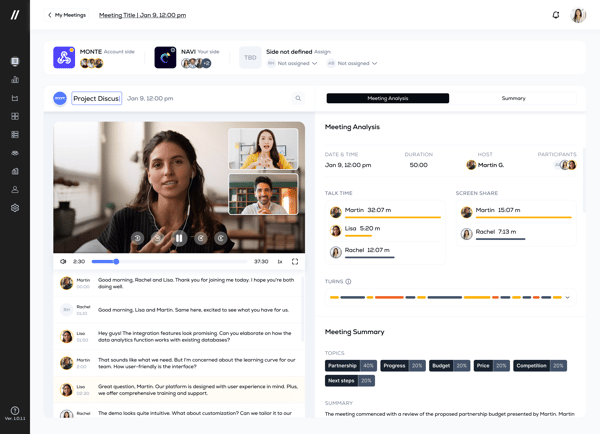
I also noticed consistent praise for the platform's usability and visibility features. Users describe having a centralized view of customer interactions, opportunities, and relationship data without needing to switch between multiple systems. That feedback is reflected in Substrata's ratings, including 98% Ease of Use, 98% Ease of Setup, 97% Ease of Admin, and 97% Quality of Support on G2.
One limitation I encountered in several reviews relates to implementation and CRM integration. Some users mention needing additional configuration during setup or spending extra time connecting the platform to existing workflows. That said, many reviewers report that the value of the insights outweighs the initial setup effort once everything is fully integrated.
Dashboard complexity is another area where feedback becomes more mixed. A handful of users would like clearer navigation, more customization options, or deeper reporting capabilities for specialized use cases. At the same time, many reviewers note that the depth of information available is one of the platform's biggest strengths, particularly for teams managing large volumes of customer and revenue data.
What stood out most during my evaluation is that Substrata approaches sales coaching differently from many tools in this category. Rather than focusing primarily on call reviews or rep performance metrics, it helps teams understand the relationships, signals, and behaviors that influence buying decisions. Based on the reviews I analyzed, it's particularly well-suited for organizations that want deeper visibility into customer dynamics and opportunity quality throughout the sales process.
What I like about Substrata:
- I found the relationship intelligence capabilities particularly interesting. Reviewers frequently mention uncovering customer dynamics and influence patterns that would be difficult to identify through traditional CRM data alone.
- The focus on lead quality and opportunity prioritization stood out to me. Users often describe using the platform's AI insights to concentrate efforts on the accounts most likely to drive revenue.
What G2 users like about Substrata:
“I work in international sales, so I have a global reach when it comes to client communication (via email, phone, etc.), negotiating deals, and tracking buyers’ habits and movements across or within different regions. Substrata helps me identify a customer’s intent, sort and prioritize leads based on that intent, then approach customers with the best-fit communication strategy based on real-world data (insight) in real-time. It also allows me to be more productive and effective in my daily activities.”
- Substrata review, Blake M.
What I dislike about Substrata:
- Based on G2 reviews, setup and CRM integration can require additional configuration for some organizations. However, many users indicate that implementation becomes easier once workflows are fully connected and data starts flowing consistently.
- A few reviewers mention wanting more advanced dashboard visualizations or easier navigation between insights. That said, teams that regularly work with large amounts of sales and customer data often appreciate the depth of information available.
What G2 users dislike about Substrata:
“Sometimes I notice that the insights I receive are a bit repetitive, and when I integrate with some of the CRM platforms, there can be a slight lag from when I want to take action and when I have the information to do so; therefore, there are times when I do not act quickly on client signals or on retention opportunities.”
- Substrata review, Mason P.
Want deeper visibility into sales calls and coaching opportunities? Check out the
best conversation intelligence software to learn how top platforms analyze customer conversations and surface actionable insights.
5. Nooks: Best for outbound sales teams focused on dialing
G2 Rating: 4.8/5
Nooks is a sales engagement and coaching platform built for outbound teams that want to increase call activity, collaborate more effectively, and turn prospecting into a more structured process.
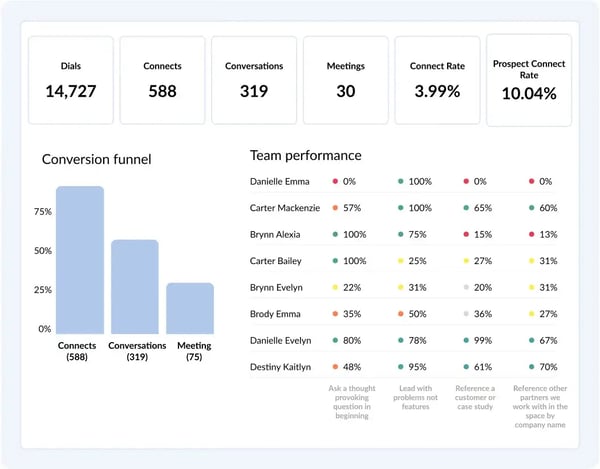
Digging into recent reviews, the most common theme by far is dialing efficiency. Users repeatedly highlight Nooks' parallel dialing capabilities, explaining that being able to call multiple prospects simultaneously helps them work through larger lead lists and spend more time talking to prospects instead of waiting for calls to connect.
Several reviewers also point to higher connect rates as a meaningful benefit. Features like Smart Connect and parallel dialing are frequently mentioned as helping reps reach more people in less time. From what I've seen, many users view this as one of the platform's biggest advantages because it directly impacts the amount of live selling they can do each day.
Another strength that appears consistently throughout the feedback is the virtual sales floor experience. Reviewers often mention that Nooks recreates some of the collaboration and energy of an in-office sales environment, allowing remote reps to learn from teammates, listen to conversations, and stay connected while prospecting.
Ease of use comes up regularly as well. Users frequently describe the platform as intuitive and easy to adopt, with minimal friction during setup. That feedback aligns with Nooks' 96% Ease of Use rating and 97% Ease of Setup rating on G2, both of which sit above category averages.
CRM integrations are another recurring positive. Reviewers often mention Salesforce, Outreach, and other connected tools that make it easier to access account information while dialing. Several users specifically note that having customer details readily available during conversations helps them stay prepared and reduces context switching.
I also noticed praise for Nooks' sales intelligence and coaching support. Users mention features such as CRM cards, battlecards, lead intelligence, and conversation resources that provide useful context before and during calls. The platform's Scorecard feature carries a perfect 100% satisfaction rating on G2, reflecting how highly users rate its coaching and performance visibility capabilities.
One limitation that appears occasionally in reviews relates to certain one-off calling workflows. Some users mention that individual call experiences can feel less streamlined than the platform's high-volume dialing workflows. However, reviewers who spend most of their time prospecting through parallel dialing generally describe this as a relatively minor trade-off.
A handful of users also mention occasional refresh delays, dialer quirks, or features they would like expanded, such as easier access to external profiles during calls. That said, many reviewers note that product updates arrive frequently and that support teams are responsive when issues arise, which helps reduce the impact of these concerns.
What stood out most during my evaluation is that Nooks is designed around a very specific goal: helping outbound teams have more quality conversations. Based on the reviews I analyzed, it's particularly well-suited for SDR and BDR teams that rely heavily on prospecting calls and want a platform that combines dialing efficiency, collaboration, and coaching in a single workspace.
What I like about Nooks:
- The parallel dialing functionality comes up constantly in reviews. Users repeatedly mention that it helps them connect with more prospects and make better use of their prospecting time.
- I also like the virtual sales floor concept. Reviewers frequently describe it as a practical way for remote teams to stay connected, learn from one another, and maintain the energy of an in-person sales environment.
What G2 users like about Nooks:
“I like the parallel dial feature in Nooks, which allows me to use multiple different numbers in parallel. The auto-rotate feature is great, and I can add my personal cell phone number, which is really useful. I also appreciate the filter that helps specify the numbers most likely to reach out to, with the pickup likelihood feature. Another positive point is that the overall transition to Nooks was quite easy and seamless.”
- Nooks review, Marlon V.
What I dislike about Nooks:
- Based on G2 reviews, some one-off calling workflows feel less polished than the platform's core parallel dialing experience. However, teams focused primarily on outbound prospecting generally find the overall workflow highly effective.
- A few reviewers mention occasional dialer quirks, refresh delays, or requests for additional calling features. That said, users frequently note that the platform evolves quickly and that support is responsive when issues arise.
What G2 users dislike about Nooks:
“I think sometimes there's a bit of recycling of tasks, and it becomes a bit inaccurate. I dial, complete the tasks, and then refresh the page, and notice that they're still there. So sometimes it gets a little bit glitchy.”
-
Nooks review, Walter N.
6. Mindtickle: Best for skills-based coaching and onboarding
G2 Rating: 4.5/5
Mindtickle is a sales coaching and revenue enablement platform built to help organizations train, coach, and develop sales teams through structured learning, readiness programs, and performance improvement initiatives.
One pattern that emerged quickly as I reviewed Mindtickle feedback is its ability to support training at scale. Users frequently mention using the platform across large teams, regions, and onboarding programs while maintaining a consistent learning experience. From what I've seen, organizations value that they can centralize training, coaching, and readiness efforts without relying on separate systems.
Support is another area where Mindtickle receives consistent praise. Many reviewers specifically call out their customer success managers and support teams, describing them as responsive, knowledgeable, and proactive throughout implementation and ongoing usage. That aligns with Mindtickle's 95% quality of support rating on G2.
As I worked through recent reviews, ease of use surfaced more often than I expected for a platform with such a broad feature set. Users frequently mention that navigation feels intuitive once they're familiar with the system, and many point to guided learning paths and in-platform resources that help them get up to speed. The platform currently holds a 95% ease-of-use rating on G2.
Learning content is another area where Mindtickle stands out. Reviewers often highlight training materials, certifications, assessments, and learning modules as valuable resources for both onboarding and ongoing development. Several users mention that having access to structured content helps reinforce knowledge and creates a more consistent training process across teams.
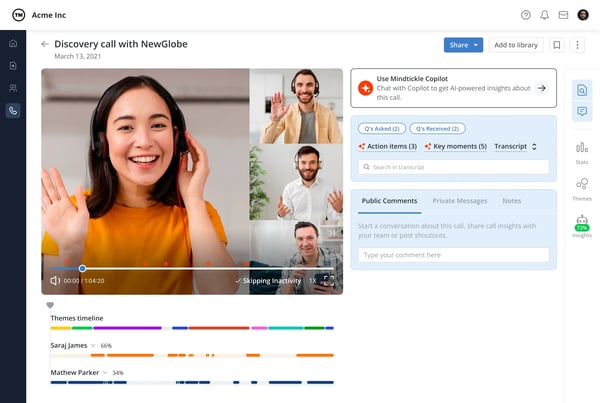
I also noticed repeated praise for Mindtickle's knowledge management capabilities. The platform's Knowledge Base feature carries a 96% satisfaction rating on G2, and reviewers frequently mention being able to access training materials, product information, and best practices whenever they need them. For teams managing large amounts of enablement content, this appears to be a meaningful advantage.
Coaching resources represent another strength that came up consistently in reviews. Coaching Materials earned a 95% satisfaction rating on G2, and users often describe using these resources to reinforce learning, prepare reps for customer conversations, and create more structured coaching programs. Based on the feedback I reviewed, this combination of training and coaching is a major reason organizations choose Mindtickle over standalone learning platforms.
One challenge I saw mentioned by some users is that certain live features and advanced workflows can feel overwhelming at first. This seems to be most noticeable for teams new to sales enablement platforms. At the same time, many reviewers acknowledge that the learning curve comes from the platform's depth, and they report becoming much more comfortable once onboarding is complete.
Content organization was another area where feedback was occasionally mixed. Some reviewers mention that managing large content libraries or locating specific reports can take time initially, particularly in more complex deployments. However, enterprise users often describe that same structure as beneficial once their programs scale because it provides greater control over large volumes of training content.
What makes Mindtickle stand out to me is its focus on building repeatable sales readiness programs rather than simply delivering training content. Based on the reviews I analyzed, it's particularly well-suited for organizations that want a structured approach to onboarding, coaching, certifications, and long-term skill development across growing sales teams.
What I like about Mindtickle:
- I noticed that reviewers consistently praise the combination of training, coaching, and readiness programs. It feels less like a learning management system and more like a platform built specifically for sales development.
- The knowledge base and coaching resources stood out in my research. Users frequently mention having easy access to training materials, best practices, and learning content when they need it.
What G2 users like about Mindtickle:
“What I like best about Mindtickle is its focus on helping sales teams improve performance through continuous learning, coaching, and data-driven insights. I appreciate how the platform combines training, content management, and readiness assessment in one solution, enabling organizations to develop their teams more effectively. I'm also impressed by Mindtickle's commitment to innovation, customer success, and creating measurable business impact, which aligns with my interest in working for a company that values growth, learning, and excellence.”
- Mindtickle review, Wolf S.
What I dislike about Mindtickle:
- Some G2 reviewers mention that certain live features and advanced workflows take time to learn, but many also note that the added complexity comes with greater flexibility once teams become familiar with the platform.
- Managing large content libraries can require some upfront organization. That said, users running enterprise-scale training programs often find that the structure becomes beneficial as their content and coaching initiatives grow.
What G2 users dislike about Mindtickle:
“Think, the training videos are a lot many. If you can, you know, reduce the number of videos and club together two videos into one so that it'll be easier for us, you know, when we see a lot of videos in our training program.”
- Mindtickle review, Timaya R.
Coaching doesn't stop after the first conversation. Learn how effective lead nurturing strategies help sales teams build stronger relationships, improve engagement, and increase conversion rates over time.
7. GTM Studio - Powered by ZoomInfo: Best for conversation intelligence
G2 Rating: 4.5/5
GTM Studio - Powered by ZoomInfo is a conversation intelligence platform that helps revenue teams record, transcribe, analyze, and learn from customer interactions across calls, meetings, and other sales conversations.
Something I kept seeing across GTM Studio reviews was how often users talked about visibility. Rather than relying solely on rep notes or CRM updates, reviewers describe having direct access to customer conversations, making it easier to understand what happened during a call and where coaching opportunities exist.
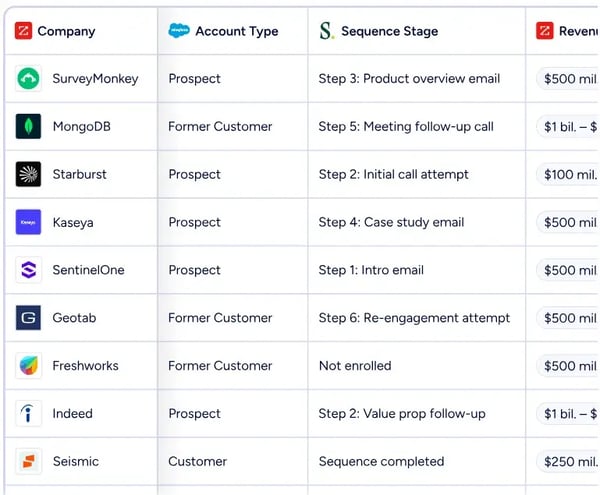
Call recording and transcription remain some of the platform's most frequently praised capabilities. Users often mention that GTM Studio automatically captures conversations and stores them in a searchable library that managers and reps can revisit later. Video Record holds a 92% satisfaction rating on G2, and many reviewers describe recordings as the foundation of their coaching, onboarding, and deal review processes.
AI-generated summaries also receive positive mentions from users. With a 90% satisfaction rating for AI Text Summarization on G2, reviewers frequently mention using these summaries to quickly review calls, share updates internally, and prepare follow-up actions. Based on the feedback I analyzed, these summaries help reduce manual note-taking and make it easier to keep stakeholders aligned after meetings.
Sales coaching is another area where GTM Studio receives consistent praise. Users frequently mention that managers can review specific moments from real customer conversations rather than relying on generalized feedback. Many reviewers describe this approach as helpful for reinforcing successful behaviors, improving discovery skills, and identifying areas where reps may need additional support.
I also noticed strong feedback around GTM Studio's conversation analytics and deal intelligence capabilities. Features such as talk-to-listen ratios, competitor mentions, objection tracking, engagement metrics, and deal risk signals are frequently cited as valuable coaching and pipeline management tools. Reviewers often mention using these insights to understand what is happening inside active opportunities, identify recurring patterns across deals, and make coaching conversations more data-driven.
What differentiates GTM Studio from many conversation intelligence platforms is its connection to the broader ZoomInfo ecosystem. Users already using ZoomInfo frequently mention the benefit of having conversation data connected with account intelligence, prospect information, and buyer context. From the reviews I analyzed, this integration appears especially valuable for revenue teams that already rely on ZoomInfo as part of their prospecting and pipeline workflows.
One limitation that appears regularly in reviews involves recording reliability. A small group of users mention occasional instances where calls were not captured as expected or recordings took longer to process. Most reviewers describe these situations as infrequent, and many note that performance improves once integrations and calendar settings are fully configured.
Pricing also comes up periodically in user feedback. Some reviewers mention that GTM Studio can represent a meaningful investment, particularly for smaller teams or organizations evaluating multiple conversation intelligence platforms. At the same time, users who actively use the coaching, analytics, and deal intelligence capabilities often describe the platform as worthwhile because of the visibility it provides across sales conversations.
What stood out most during my evaluation is that GTM Studio works best when conversation intelligence is part of a broader revenue strategy rather than a standalone coaching initiative. Based on the reviews I analyzed, it's particularly well-suited for mid-market and enterprise revenue teams that want coaching, deal visibility, and account intelligence connected within a single workflow, especially if they're already using ZoomInfo elsewhere in their sales stack.
What I like about GTM Studio - Powered by ZoomInfo:
- I noticed that reviewers consistently highlight coaching conversations built around real customer interactions. Being able to coach from actual call moments rather than general observations seems to be one of GTM Studio's biggest strengths.
- The combination of conversation intelligence and ZoomInfo data stood out to me. Users already working within the ZoomInfo ecosystem frequently mention that this connection adds useful context to customer conversations.
What G2 users like about GTM Studio - Powered by ZoomInfo:
“The AI-generated call notes and summaries save me a ton of time after discovery calls. I don't have to manually jot everything down — Chorus captures key moments, action items, and topics automatically, which lets me focus on actually running the conversation instead of scrambling to take notes.”
- GTM Studio - Powered by ZoomInfo review, Alex P.
What I dislike about GTM Studio - Powered by ZoomInfo:
- Based on G2 reviews, occasional recording or call-capture issues can occur, particularly during setup or integration phases. However, many users report that these issues become less common once the platform is fully configured.
- Some reviewers mention that GTM Studio can be a significant investment, especially for smaller teams. That said, organizations that actively use its coaching, analytics, and deal intelligence capabilities often feel they get meaningful value from the platform.
What G2 users dislike about GTM Studio - Powered by ZoomInfo:
“While ZoomInfo Operations is very helpful for managing CRM data, sometimes the contact or company data is not fully accurate or updated, which means we still need to manually verify certain records. Another area for improvement would be faster data syncing and easier customization of workflow, as this could make it even more efficient when managing a large volume of data. Improving data accuracy and providing more flexibility in customization would make it even better for teams like ours at Acre Rise.”
-
GTM Studio - Powered by ZoomInfo review, Subhranshu R.
8. SmartWinnr: Best for sales coaching through gamified learning and roleplay
G2 rating: 4.9/5
SmartWinnr is a sales coaching, training, and enablement platform that combines learning management, AI-powered roleplays, coaching, and gamification to help organizations improve sales readiness and reinforce key selling behaviors.
A recurring observation in the reviews I analyzed is that users view SmartWinnr as more than a traditional training platform. Rather than simply delivering content, reviewers frequently describe it as a system for building, measuring, and reinforcing sales readiness through continuous learning and practice.
AI-powered roleplays emerge as one of the platform's most frequently praised capabilities. Users often mention being able to simulate realistic customer conversations, practice objection handling, and receive structured feedback before engaging with prospects. Several reviewers specifically note that the AI stays contextual throughout conversations, making practice sessions feel more realistic than scripted exercises.
Another strength that appears consistently throughout the feedback is onboarding efficiency. Reviewers describe using SmartWinnr to combine learning modules, assessments, certifications, and roleplays into a single workflow. Based on what I read, many organizations use the platform to validate readiness before allowing reps to handle customer-facing responsibilities.
Learning and content management also receive positive mentions. Users frequently highlight the ability to create short courses, distribute training materials, deliver product updates, and track completion without relying heavily on IT resources. The platform's Adaptive Learning feature carries a 100% satisfaction rating on G2, reflecting how highly users rate its ability to support ongoing development.
Reporting and performance visibility stand out as another commonly praised area. Reviewers mention tracking assessment scores, certification progress, coaching results, keyword coverage, roleplay performance, and training completion from a centralized dashboard. Many users describe this visibility as useful for identifying skill gaps and coaching opportunities across teams.
I also noticed strong feedback around administration and usability. SmartWinnr scores exceptionally well across G2 satisfaction metrics, including 99% Quality of Support, 99% Ease of Use, 99% Ease of Admin, and 98% Ease of Setup. Those ratings align with user feedback describing implementation, user management, and training administration as straightforward.
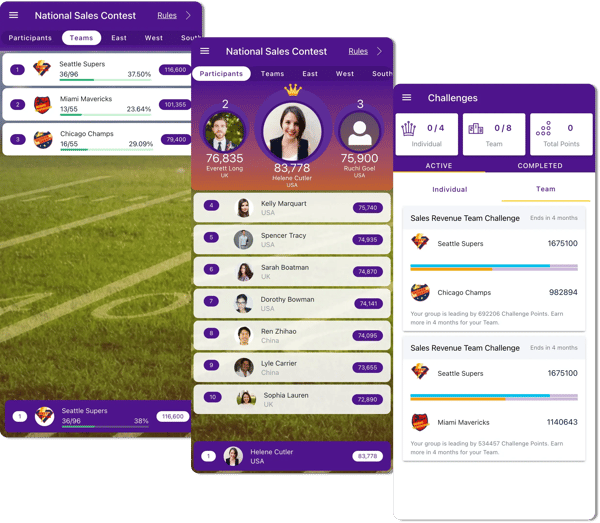
Gamification is another differentiator that surfaced repeatedly in reviews. Users often mention leaderboards, competitions, certifications, and rewards that help maintain engagement with training programs over time. Rather than treating learning as a one-time event, reviewers describe using these features to encourage continuous participation and reinforce desired behaviors.
One limitation I encountered is that some users would like more advanced AI-generated insights and coaching recommendations beyond the current training and roleplay feedback. However, many reviewers also note that the platform's structured assessments and reporting already provide enough information to support most coaching conversations effectively.
Another area where feedback becomes more nuanced is content depth. A few users mention that large training programs can result in a high volume of learning materials, assessments, or videos. That said, organizations running extensive onboarding and certification programs often view this structure as a benefit because it creates a more comprehensive and measurable learning experience.
What stood out most during my evaluation is that SmartWinnr focuses on reinforcing skills through practice rather than relying solely on content consumption. Based on the reviews I analyzed, it's particularly well-suited for organizations that want to combine onboarding, coaching, certifications, roleplays, and gamification within a single sales readiness platform.
What I like about SmartWinnr:
- The AI roleplay functionality stood out in my research. Reviewers frequently mention being able to practice real-world sales conversations, objections, and customer scenarios before engaging with prospects.
- I also like how the platform combines learning, coaching, certifications, and gamification in one place. Users often describe having a clearer picture of sales readiness rather than simply tracking course completion.
What G2 users like about SmartWinnr:
“Smartwinnr AI roleplays fit the realities of pharma sales reps, and the AI roleplay experience is particularly strong. We mainly use it because our reps need to be very sharp when they are in front of HCPs. Earlier, we relied on classroom training for my team, which was very time-consuming and heavily dependent on the trainer’s availability. With Smartwinnr AI roleplay, our team can practice HCP conversations much more effortlessly and consistently.”
- SmartWinnr review, Shyam S.
What I dislike about SmartWinnr:
- Based on G2 reviews, some users would like deeper AI-generated coaching insights and recommendations. However, many organizations find that the platform's assessments, roleplays, and reporting already provide meaningful coaching guidance.
- A few reviewers mention that larger training programs can result in a significant amount of learning content to manage. That said, teams running structured onboarding and certification initiatives often view this as part of maintaining consistency and accountability.
What G2 users dislike about SmartWinnr:
“While SmartWinnr is great for engagement and training, a few areas could be improved. The reporting and analytics dashboard, though useful, sometimes lacks the flexibility to deep-dive into custom metrics or segment data the way we need for strategic decisions.”
-
SmartWinnr review, Hiren S.
Frequently asked questions about the best sales coaching software
Have more questions? Find more answers below.
Q1. What is the best sales coaching tool for improving close rates?
Gong is one of the strongest options for improving close rates because it combines conversation intelligence, coaching insights, deal risk analysis, and performance tracking in a single platform. It helps managers identify winning sales behaviors and coach reps using real customer conversations.
Q2. What is the most affordable sales coaching software for SMBs?
Fathom is often a good fit for SMBs looking for a cost-effective way to capture meeting insights, automate notes, and improve coaching without investing in a larger revenue intelligence platform. Its ease of use and quick setup also make it accessible for smaller teams.
Q3. What is the top-rated sales coaching platform for enterprises?
Mindtickle stands out for enterprise organizations because of its scalability, structured learning programs, certifications, coaching workflows, and onboarding capabilities. Many larger organizations use it to standardize training and skill development across distributed sales teams.
Q4. What platform integrates sales coaching with CRM systems?
Several tools do this well, but Agentforce Sales, Gong, and GTM Studio by ZoomInfo stand out. Agentforce Sales integrates coaching, pipeline management, and CRM data directly within the Salesforce ecosystem, while Gong and GTM Studio connect coaching insights with CRM workflows.
Q5. What platform provides on-demand sales training content?
Mindtickle is one of the strongest choices for on-demand sales training. Users frequently highlight its learning modules, certifications, knowledge base, coaching materials, and structured onboarding resources.
Q6. Which sales coaching platform offers the most personalized training plans?
Mindtickle offers some of the most comprehensive personalization capabilities through tailored learning paths, coaching programs, certifications, and skill development workflows designed for different roles and experience levels.
Q7. Which solution supports real-time call feedback?
Gong, GTM Studio by ZoomInfo, and Nooks all support coaching based on live or recorded conversations. Nooks is particularly useful for outbound teams because managers can collaborate with reps during prospecting activities, while Gong and GTM Studio provide conversation-based coaching insights.
Q8. Which tool supports sales coaching for remote teams?
Nooks is particularly well-suited for remote sales teams. Its virtual sales floor allows reps to collaborate, learn from teammates, and receive coaching while maintaining the energy and visibility often associated with in-office sales environments.
Q9. Which vendor offers analytics on sales rep performance improvement?
Gong, GTM Studio by ZoomInfo, and Mindtickle all provide analytics related to rep performance. Gong and GTM Studio focus heavily on conversation analytics and coaching metrics, while Mindtickle emphasizes readiness, learning progress, and skill development.
Q10. Which vendor provides AI-powered sales conversation analysis?
Gong, GTM Studio by ZoomInfo, and Substrata all provide AI-powered conversation analysis. These platforms help teams identify trends, coaching opportunities, deal risks, customer engagement patterns, and other insights from sales interactions.
Q11. What's the best software for training new sales reps?
Mindtickle is one of the best options for training new sales reps because it combines onboarding, coaching, certifications, knowledge management, and ongoing learning resources within a single platform.
Q12. What is the best sales coaching software?
The best sales coaching software depends on your goals. Gong is a strong choice for conversation-based coaching and deal intelligence, Mindtickle excels at onboarding and structured training, Nooks is ideal for outbound prospecting teams, and Fathom works well for teams focused on meeting insights and summaries. The right platform is the one that best aligns with your sales process, coaching strategy, and team size.
Choose the coaching approach that fits your team
One thing that stood out during my evaluation is that sales coaching software isn't moving in a single direction. Some platforms, like Gong and GTM Studio by ZoomInfo, focus heavily on conversation intelligence and coaching from real customer interactions. Others, such as Mindtickle, take a more structured approach centered on onboarding, learning, and skills development. Tools like Nooks prioritize outbound execution and rep collaboration, while Fathom focuses on helping teams capture and act on meeting insights with minimal effort.
That's why choosing the right platform comes down to understanding where your team needs the most support. If you're trying to improve coaching consistency, conversation intelligence may be the priority. If onboarding and readiness are bigger challenges, a sales enablement platform could be a better fit. And if your team spends most of its day prospecting, dialing, and booking meetings, you'll likely benefit from tools designed specifically for outbound workflows.
The best sales coaching software isn't necessarily the platform with the longest feature list. It's the one that helps your managers coach more effectively, gives reps the support they need to improve, and fits naturally into the way your team already sells.
Once you've found the right coaching platform, explore the best sales performance management software to connect coaching efforts with goal tracking, performance analytics, and revenue outcomes.
.png?width=400&height=150&name=Untitled%20design%20(56).png)


.png)