


The best free survey software solutions for small businesses are Constant Contact, Google Workspace, Jotform, Microsoft 365 (Microsoft Forms), and Qualtrics Market Research.
The first time a survey tool cut me off mid-campaign, I had a stack of responses locked behind a paywall and a customer-feedback deadline that did not care. This is a quiet trap of free survey software. The plan works beautifully right up until the moment it actually matters, and then a pop-up asks for your card. If you run a small business, you have probably met that wall too.
So I went looking for the free tools that hold up. The best free survey software for small businesses is not the one with the longest feature list. It is the one whose free plan survives a real campaign. The online survey market reached $4.66 billion in 2025 and is on track for $5.34 billion in 2026. The growth shows how routine feedback has become, and how many vendors now compete for the exact moment you outgrow free.
I started with G2's free survey software category and read through verified small-business reviews for each tool, watching one thing above all: where the free plan draws its line. Some cap responses. Some hide branding removal behind a paid tier. A few, like Google Forms, SurveyMars, and TallyPrime, barely draw a line at all.
*Tools are listed alphabetically. These tools offer free trials, free-forever options, or freemium models.
Here is a side-by-side look at the free-plan limits and starting prices before diving into the full reviews.
| Tool | G2 rating | What the free plan covers | Paid plans start at |
| Alchemer Survey | 4.4/5 | 7-day full-feature trial; unlimited surveys, up to 100,000 responses; no free-forever plan | $55/user/mo (Collaborator, billed annually) |
| Constant Contact | 4.1/5 | 30-day trial of the full platform, including survey pages; no free-forever plan | $12/mo (Lite, 500 contacts) |
| Google Workspace (Forms) | 4.6/5 | Free forever; unlimited surveys, questions, and responses; Sheets export | $7/user/mo (Business Starter) |
| Intuit Mailchimp | 4.4/5 | Mailchimp Free: 250 contacts, 500 emails/mo; hosted survey form + in-email polls | $13/mo (Essentials, 500 contacts) |
| Jotform | 4.6/5 | Free Starter: 5 forms, 100 submissions/mo, 100 MB storage | $34/mo (Bronze, annual) |
| Leapsome | 4.8/5 | 14-day trial only (demo-gated); no free-forever plan | Sales quoted |
| Microsoft 365 (Forms) | 4.6/5 | Free with a personal account: 200 forms, 200 responses/form; Excel export | $9.99/month for Microsoft 365 Personal |
| Qualtrics Market Research | 4.4/5 | Free Account: 500 responses per survey, 3 active surveys, 8 question types | $420/mo (Strategic Research; $5,040/yr) |
| QuestionPro | 4.5/5 | Free Essentials: unlimited surveys, 200 responses/survey, full logic | $99/user/mo (Advanced, annual) |
| SurveyMars | 4.6/5 | Free forever; unlimited surveys, questions, and responses; AI included | No paid tier |
| SurveyMonkey | 4.4/5 | Free Basic: 10 questions/survey, only 25 responses viewable | $30/user/mo (Team Advantage, billed for 3 users) |
| TallyPrime | 4.9/5 | Free forever; unlimited forms and submissions | $24/mo (Pro, annual) |
| Typeform | 4.5/5 | Free: 10 questions/form, 10 responses/month | $28/mo (billed annually) |
| Zoho Survey | 4.4/5 | Free forever; 10 questions and 100 responses per survey | $7.42/mo (Basic, billed annually) |
*All pricing reflects publicly listed figures at the time of writing and is subject to change. Several vendors price by contacts, users, or annual versus monthly billing, so confirm the live number for your situation.
I started with the G2 free survey software category, which lists tools that ship a free plan, a free trial, or a freemium model. From there, I judged each one from a small-business seat. Not “which has the most features,” but “which free plan still works when you are collecting real customer or employee feedback.” That meant looking closely at monthly response caps, which question types and logic come free, where branding policies sit, and how cleanly each tool hands data off to the rest of a small-business stack.
I then evaluated verified G2 reviews for every tool to find the patterns: what small businesses praise after a year, what wears thin, and where the free plan quietly breaks down in daily use. Review data was filtered to the small-business segment and pulled in 2026, and I cross-checked every pricing and plan detail against each vendor's live site. Some quotes have been lightly edited for clarity.
The screenshots featured in this article may be a mix of those taken from the vendor's G2 page or from publicly available materials.
Comparing thirteen free plans back to back makes a few things obvious that a feature grid hides. Here is what I actually weighed:
To make the list, a product must:
*This data was pulled from G2 in 2026. Some reviews may have been edited for clarity.
Alchemer Survey, formerly SurveyGizmo, is one of the longest-running professional survey platforms here. What stood out to me while evaluating the reviews is how technical the praise gets: small businesses with research or engineering muscle pick Alchemer for the depth, the API access, and the webhook integrations that let them build custom workflows on top of the survey layer.
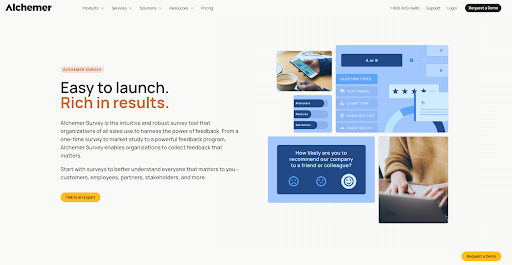
On G2, users describe building an entire voice-transcription tool around Alchemer's survey workflows. That is the kind of flexibility this platform is built to reward.
Day 7 is the trigger, and there is no entry-level free tier to fall back on. The Collaborator plan at $55 per user per month (billed annually) is the practical commitment, with unlimited surveys, 25 question types, exports, and basic integrations. Professional at $165 per user per month and Full Access at $275 per user per month are the depth-tier upgrades for advanced logic, scripting, and Salesforce integration.
"The level of customization Alchemer offers is really impressive. We've been able to build some pretty complex survey flows with skip logic and branching that would have been impossible in simpler tools. The interface is fairly intuitive once you get the hang of it, and the reporting dashboards are genuinely useful for sharing results with stakeholders. Integration with our existing tools was also smoother than expected."
- Alchemer Survey review, Nolan T.
Best for: Technical or research teams that need advanced logic, API access, and webhooks, and that are ready to commit to a paid plan after a 7-day trial.
Not ideal for: Anyone who's looking for a free-forever tool. The free plan is available with limited features and responses. There is no free tier, and the $55-per-user Collaborator plan is the lowest commitment.
"One limitation I have noticed is that Alchemer's analytic and automation features are powerful; some of the advanced logic and AI-driven insight feel less transparent and require some optimization."
- Alchemer Survey review, Vidhan P.
Constant Contact has spent more than 30 years building for small-business email, and its survey page feature is one room in that larger house. The survey angle makes the most sense if you already pay for the email side.
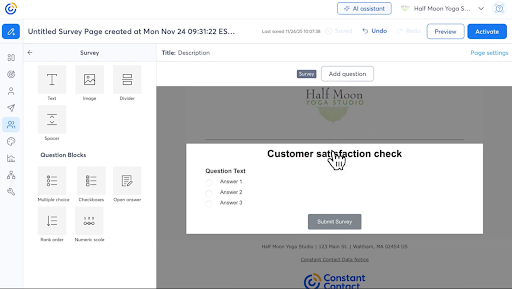
I liked that a survey can drop straight into a campaign, and the contact list flows both ways. A response becomes a tagged contact, ready for follow-up, with no CSV export or Zapier wiring. What struck me while reading the reviews is how long people stay. I kept seeing small businesses that have been on the platform for a decade or more, watching it grow around their needs.
The trigger is the day the trial ends. There is no "lite" survey access after that. Paid plans are priced by contact count and start at $12 per month for the Lite tier. Standard runs about $35 per month and Premium about $80, both at 500 contacts and scaling as your list grows. Constant Contact's documentation does not make it fully clear which tier includes survey pages, so it is worth confirming with their team before you commit.
"I'm always inclined towards platforms that don't just execute marketing tactics, but actually help me think, test, measure, and optimize decisions. That's exactly where Constant Contact shines for me. The survey functionality is a big plus for me. Being able to send secure, personalized survey invitations directly to my contact list makes gathering first-party insights efficient. From a strategy standpoint, that feedback loop is gold; it allows me to validate assumptions and refine messaging with real data instead of gut feel.
From an optimization perspective, I value how Constant Contact fits into a larger ecosystem. Through integrations and APIs, it is easier to connect campaign data, build custom reports, manage audiences, and align targeting, retargeting, geo-based insights, and budget planning pacing with higher-level objectives. That flexibility matters when I'm balancing daily execution with long-term strategy."
– Constant Contact review, Madan B.
Best for: Small businesses already on Constant Contact for email, who want surveys built into the audience lists they already manage.
Not ideal for: Anyone who only needs surveys, or who wants a free-forever tool. The entry price may make it hard to justify when surveys are the sole use case.
"The survey option isn't as robust as it could be."
- Constant Contact review, Verified User in Insurance
Want email and surveys under one roof? Compare the best email marketing software on G2 to see how the two fit together.
Google Forms is the most-used free survey tool in small businesses, and not because it tries the hardest. It is the zero-friction default that ships with the Google account you already have.
When I set up a Google Form, every customer, employee, or contractor can join in one tap, responses pile up with no monthly cap, and each one lands as a row in a Google Sheet, ready for pivot tables or charts the instant it arrives.
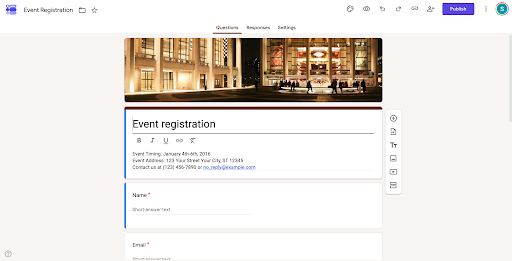
The setup I saw most often was a simple form connected to Google Sheets to collect customer feedback or employee check-ins. For small businesses, that means responses flow straight into a spreadsheet for tracking and analysis, with no extra integrations or added cost.
The trigger is rarely Forms itself. It is admin control, custom-domain email, and shared storage. Google Workspace Business Starter runs about $7 per user per month on an annual plan. It adds branded forms on your own domain, centralized admin, and 30 GB of pooled storage per user. If you only want a free survey tool, a personal Google account works indefinitely.
"I like how much you can integrate into Google Workspace. I have my email, of course, my docs, forms, and even my business YouTube blends seamlessly into the workspace. It is always so easy to use, super quick, and barely crashes. I have a yearly subscription for my business so I can get more storage space, and it's a VERY good bang for your buck. Their help center is very thorough in answering whatever questions you may have, and even if you can't find an answer, they're very supportive. I've also loved the integration with Gemini AI now; it's been helpful for my content writing and emails."
- Google Workspace review, Krystal R.
Best for: Small businesses already on Gmail, Calendar, or Drive who want a permanently free survey tool with unlimited responses and a one-click route to Sheets.
Not ideal for: Anyone who needs advanced survey logic, free custom branding, or survey-native analytics dashboards. Forms are deliberately minimal there.
"Something it lacks or looks basic, it needs to add more features and visualization tools. Most of the time, we have to add forms or questionnaires manually; it should have some AI assistant there to help us."
- Google Workspace review, Shefali N.
Intuit Mailchimp is the email brand most small businesses recognize, and its survey functionality lives inside the same Audience layer as the email campaigns.
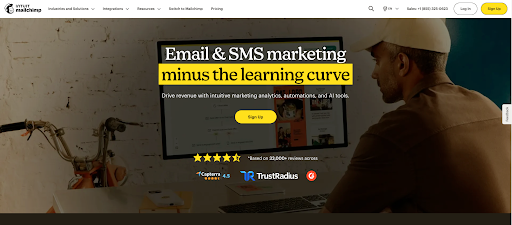
What I found interesting is how deliberately light it is. This is not a standalone survey platform. It is a way for an email team to drop an inline poll into a campaign or share a hosted survey form linked from email or social. For anyone already on Mailchimp Free, the survey feature costs nothing extra, because the constraint that matters is the contact and email cap underneath it, not survey volume.
The trigger is rarely the survey feature. It is the 250-contact or 500-email cap on Mailchimp Free. Once your audience grows past 250 contacts, Essentials at about $13 per month (starting at 500 contacts) is the entry tier most small businesses move to. The survey functionality stays the same shape across paid tiers; what changes is the audience size and send limits beneath it.
"The UI is very clean and looks great. Mailchimp helps me manage my email campaigns, and I can easily connect everything to Shopify, Canva, and more. It provides AI features, which I mostly use for email subject recommendations. Everything is very responsive and works really well. The detailed analytics and campaign insights make it easier to track ROI. Mailchimp offers a free plan for beginners, and the paid plans include advanced automation and AI tools. Their support system is really great."
- Intuit Mailchimp review, Chinmay P.
Best for: Small businesses already using Mailchimp for email, who want lightweight surveys and polls built into the same Audience contact database.
Not ideal for: Anyone where surveys are the primary use case, or who needs advanced logic, custom branding, or research-grade analytics. The survey feature is intentionally basic.
"Customization options are extensive, but setting up more complex campaigns can take additional effort."
- Intuit Mailchimp review, Priya S.
Jotform lives in the AI builder lane that has reshaped this market over the last two years. The Starter plan is genuinely free forever, so you can build and publish forms without a trial clock hanging over you.
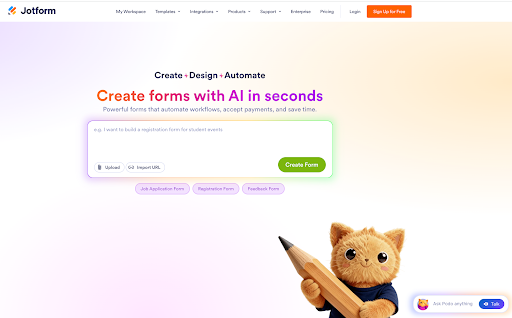
What stood out to me is how little the builder asks of you. You describe what you want in plain English, and the AI builder scaffolds the form itself, no form-building experience needed. G2 reviews consistently point to the time this saves, especially when replacing paper forms or repetitive manual setup. The main limitation is the free plan's 100 monthly submissions, which growing customer-facing teams are likely to outgrow fairly quickly.
The 100-submission cap is the first wall, and a single active feedback or registration form blows past it. The Bronze plan at $34 per month on an annual billing plan lifts the limit to 1,000 submissions, removes Jotform branding, and increases storage to 1 GB. It is the tier most small businesses graduate to once usage grows.
"This is the only option that lets me add multiple unique IDs within a single form. It's especially useful for multi-attendee registration forms, where I need to capture details for more than one person at once while still giving each person their own individual ID. Other platforms also don't have the ability to send an automated email when I approve or reject a submission. I like that it's user-friendly and integrates easily with Google Sheets and Drive.
My most recent form needs to hold up to 20 registrants, and the form still loads pretty quickly on the frontend. It has the conditional logic that I need for my form, and it works really well. I never had proper onboarding, nor have I reached out to support, but the AI assistant was really helpful. It gave me the step-by-step instructions when I asked for it."
- Jotform review, Tara L.
Best for: Small businesses that want a free-forever builder for feedback, event registrations, or document signing, where AI removes the design overhead.
Not ideal for: High-volume monthly survey programs. The 100-submission cap arrives fast, and Bronze sits higher than several alternatives here.
"As forms got more complex, Jotform became tougher to manage at times. I had some workflows with lots of conditional logic, and finding tiny config issues took forever. Plus, customizing forms to fit a brand's design often needed way more tweaking than the drag-and-drop hints at."
- Jotform review, Abhishan M.
Leapsome sits in the people-management lane rather than the generic survey category.
What stood out to me is how its surveys are built for employees, not customers: engagement, onboarding, exit, DEI, and manager effectiveness, with the results wired into the same people-analytics dashboard as performance reviews and goals.
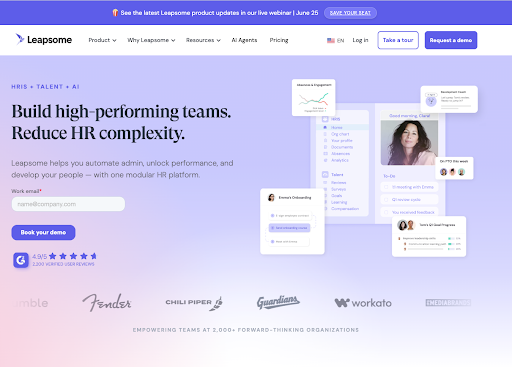
For a small business already running reviews and goal tracking in Leapsome, the survey module drops into the same employee record, so engagement signals sit next to performance and goals data instead of being stranded in a separate tool.
The day the 14-day trial ends is the trigger, with no free-forever fallback. Leapsome does not publish a flat price. Pricing is modular and per employee, with entry-level modules referenced in the mid-single digits per user per month.
"I love that there is so much functionality from a head of people perspective, but the UX is so streamlined, simple, and easy to use for those that do not need the whole platform. Onboarding is a dream; it takes care of a lot of the legwork required from me to ensure new starters have the best onboarding experience with none of the hassle. The pricing is fantastic value for money - even in man-hours saved."
- Leapsome review, Jordan W.
Best for: Small businesses running structured employee engagement, onboarding, exit, or DEI surveys alongside performance reviews and goals, where the survey data needs to live on the employee record.
Not ideal for: Customer-facing market research or CSAT surveys. Leapsome is built for employee feedback, and the per-employee model does not fit external survey use cases.
"While Leapsome is generally easy to use, some advanced configuration options and reporting features can take time to learn, especially for new administrators. There is also room for improvement in dashboard customization and flexibility for more complex organizational requirements. However, these have been relatively minor compared to the overall benefits of the platform."
- Leapsome review, Ester Rani C.
Microsoft Forms is the Microsoft answer to Google Forms. It is free with any personal Microsoft account, and baked into Microsoft 365 for businesses already paying for the suite. Its real edge is the Excel handoff.
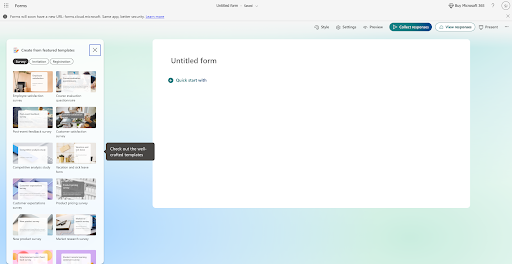
Every response becomes a row in an Excel file, ready for pivot tables, conditional formatting, or Power Query. If your monthly reporting already lives in Excel, Forms slots in with no training. What I noticed across reviews is that small businesses value Forms less as a standalone survey tool and more as one piece of a Microsoft kit that already streamlines client work. The free personal version caps at 200 responses per form, generous for one-off campaigns but tight for ongoing pulses.
The trigger is the 200-response cap on the free personal account. Microsoft 365 Personal and Family raises it to 1,000 per form. The business plans, starting around $6 to $7 per user per month for Business Basic, lift it much higher alongside admin governance. If you already pay for Microsoft 365 for email and Office, those higher Forms limits come with the subscription you already have.
"It's easy to set up and use, and even a tech beginner can get it done without much trouble. It easily integrates with other Microsoft products."
- Microsoft Forms review, Pauls L.
Best for: Small businesses already on Microsoft 365 for email and Office, where Forms responses flow into Excel and join the rest of the reporting.
Not ideal for: Anyone outside the Microsoft ecosystem looking for a feature-rich standalone tool. Forms are intentionally minimal, and the 200-response free cap arrives quickly.
"It works well for simple forms but lacks the deep customization found in more robust tools. I wish it had more customization options like adding a brand logo, themes, and if-then capabilities."
- Microsoft Forms review, Santoshkumar N.
Comparing the wider productivity suites? See the best office suites software on G2 for the full Google versus Microsoft view.
QuestionPro sits in the underrated lane of free tools with real depth. Small businesses reach for it when basic feedback forms stop being enough, and they need actual survey logic without Qualtrics-tier prices.
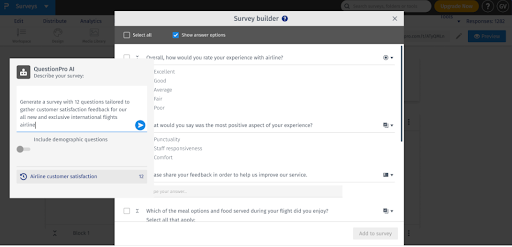
The free Essentials plan carries more question types and logic than most freemium tools, and it shines for structured research rather than one-off feedback. The use case I kept seeing is owners building structured surveys for real business questions, like lead qualification or market sizing, not just a quick feedback box.
There is also a genuine free path for nonprofits, which small-business non-profit reviewers name again and again as the reason they chose it.
The 200-response-per-survey cap is the first trigger for any real market research or recurring customer experience work. The Advanced plan at $99 per month on annual billing raises the limit to 25,000 responses a year. It also unlocks advanced logic, white-labeling, and the full integration library. Structured research teams tend to move up quickly, while occasional feedback collectors stay on Essentials.
"What I like best about QuestionPro is that it makes it easy to create structured surveys for real business use cases, not just basic feedback forms. I use it through my business, Client Now, to collect information from business owners about their marketing challenges, lead generation needs, website issues, ebook interest, and potential coaching needs. The survey builder is straightforward, and I like being able to create different surveys for different purposes, such as lead qualification, website design feedback, and business growth research. It helps make the research process more organized and professional."
- QuestionPro review, Christian K.
Best for: Small businesses running market research, customer-experience programs, or lead-qualification surveys where logic matters, and nonprofits that qualify for the free tier.
Not ideal for: Anyone who only needs quick feedback forms. The depth is overkill, and Google Forms or TallyPrime are faster to set up for that.
"What we dislike about QuestionPro is that some areas could feel more streamlined. The UI/UX can take time to learn, especially for new users, and some integrations may require extra setup or support. Performance can vary depending on survey complexity or reporting needs. Pricing may also be a concern if advanced features are only available on higher-tier plans. Support and onboarding could be more hands-on, and the AI/intelligence features may need clearer guidance to help users fully understand how to apply the insights."
- QuestionPro review, Living A.
Every other product here is freemium or trial-based, with a paid tier waiting once you outgrow free. SurveyMars is a free platform with no paid tiers and no response cap. That pitch is unusual enough to invite doubt, so I leaned on the reviews, and they broadly back it up.
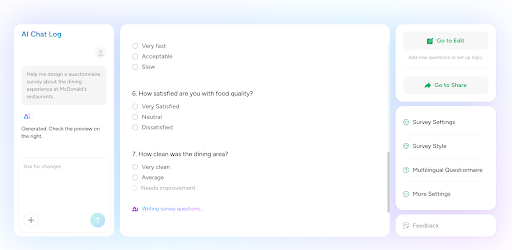
The line I kept reading is plain relief: nobody gets stuck hitting a quota right when they need more responses. The AI features and the 1,500-plus template library are real, and the only trade-offs show up at the edges: a thinner integration list and a younger track record.
There is no paid tier to climb to. The natural transition is feature-driven, not budget-driven. If you need deep enterprise integrations beyond Google Sheets and Zapier, multi-user collaboration, or a dedicated account manager, that is the signal to look at QuestionPro Advanced or Jotform Bronze. For anyone whose only constraint is a response cap, SurveyMars removes it for good.
"What I really like most about SurveyMars is that it offers unlimited surveys, questions, and responses — and it's free. You don't get stuck hitting quotas just when you need more responses. Also, their templates are well thought out: customer satisfaction, NPS, employee surveys, and quizzes — they've got a solid collection. The AI-powered features for creating survey questions and analyzing data are super helpful; they save me time and often catch things I'd have to spend extra effort doing manually."
- SurveyMars review, Sagar K.
Best for: Small businesses running ongoing feedback, NPS, employee pulse, or registration surveys at any volume, where a hard response cap is the thing that actually blocks the work.
Not ideal for: Anyone who needs deep niche integrations, enterprise collaboration, or a long G2 track record. With 125 reviews against Google Workspace's 48,000-plus, its adoption history is shorter.
"I don't like that some settings and customization options aren't always easy to find at first. It took me a bit of time to get familiar with where everything is located and how to navigate to the right menus. Aside from that initial learning curve, my experience has been pretty smooth overall."
- SurveyMars review, Muhammad O.
SurveyMonkey has the highest brand recognition on this list. Respondents know it the moment they see the URL. That familiarity is its own small-business advantage when a customer-facing survey needs to feel professional from the first click.
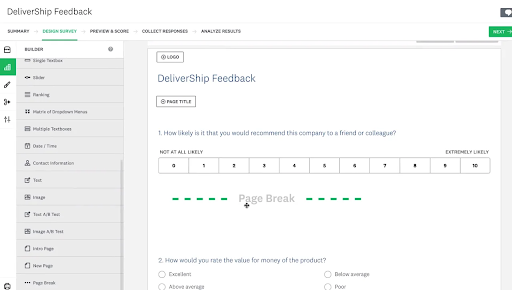
The product backs the brand: a polished editor, the broadest template library here, and a Build with AI feature that drafts a full survey from a short prompt. The trouble is the free plan. Basic lets you view only 25 responses per survey, so almost any real feedback campaign hits the wall on the first send. Reading the reviews, I saw the same split: the logic and branching are genuinely useful, but the features that make a survey shine sit behind paid tiers.
The 25-viewable-response cap is the trigger, and almost any survey hits it on the first send. The flexible, month-to-month option is Standard Monthly at about $99. The cheaper rate comes with a yearly commitment: Advantage Annual runs about $39 per month billed annually. It unlocks unlimited questions, fuller response viewing, exports, and more integrations. For monthly or quarterly programs, the annual plan is the natural step, and SurveyMonkey is best treated as a paid tool from the start.
"What I like most is the Build with AI feature. It makes creating a survey from scratch so much faster because I don't have to think of every single question myself. The mobile app is also very smooth for checking my results on the go."
- SurveyMonkey review, Chandra K.
Best for: Small businesses running customer-facing surveys where brand polish matters, and teams ready to commit to an annual plan for fuller response access and logic.
Not ideal for: Anyone hoping for a viable free-forever tool. The 25-viewable-response cap triggers an upgrade almost immediately, which makes Basic closer to a trial.
"I would have liked to see the option to show numbers as well as percentages in charts, with a small number of responses to some questions, that would have provided a more realistic view of the results. In addition, it would be helpful to have a "test" mode, where someone other than an administrator could take the survey before it goes live. It's always helpful to have at least one other set of eyes, and I didn't find it easy to accomplish that."
- SurveyMonkey review, Kathleen G.
Running structured market research? Explore the best market intelligence software on G2 for tools built for customer-insight programs.
TallyPrime is the highest-rated tool on this list, and its pitch is refreshingly plain: unlimited forms, unlimited submissions, free. A document-style editor makes building a survey feel like writing a Notion page. That editor is the standout.
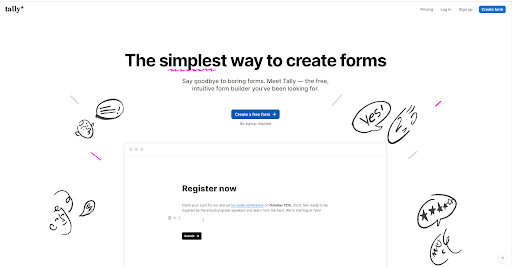
What I kept reading is how fast forms come together, and how clean they feel to the people filling them out. The free plan is genuinely generous, and the upgrade triggers are branding removal and team seats, not response volume.
Rarely for response volume, since free handles unlimited submissions. The triggers are practical: removing the small TallyPrime branding for customer-facing forms, hosting on a custom domain, and adding team seats. Pro at $24 per month on annual billing covers all three, plus partial-submission capture and premium analytics integrations.
"What I like best about TallyPrime is that it feels simple on the surface, but it can handle surprisingly complex workflows when you need it to. I used it to build a scored assessment with calculated fields, conditional logic, result routing, tie-breakers, and multiple Thank You pages.
What really stood out, though, was the support team. They didn't just send generic help docs. They actually looked at my use case, explained what TallyPrime could handle natively, clarified the limitations, and gave practical guidance for how to structure the logic. The replies were thoughtful, clear, and fast, which made a complex build feel much more manageable."
- TallyPrime review, Yannick P.
Best for: Small businesses that want unlimited submissions on free, a fast Notion-style editor, and ready integrations with Notion, Sheets, and Zapier.
Not ideal for: Teams where several people need to co-own forms, since seats are paid, or customer-facing surveys where vendor branding on the form is a dealbreaker.
"What I dislike is that there's no way to import structured data like JSON and automatically convert it into a working form. For more advanced or large-scale setups, this makes it harder to quickly generate forms programmatically, which would be a huge advantage for power users."
- TallyPrime review, Martin S.
Typeform owns the conversational survey: one question at a time, smooth transitions, clean typography, and a brand respondents recognize. Small businesses choose it when completion rate matters more than free-tier volume, and they see it pay off.

The pattern I kept seeing in reviews is best-in-class design with no heavy lifting, and completion rates that climb because the one-question-at-a-time format feels more like a conversation than a form. The catch is the free tier. With 10 questions and 10 monthly responses, it is the tightest cap here and serves more as a preview than a working plan.
The 10-monthly-response cap is hit by the first real customer-facing send. The Basic plan, at about $25 per month on annual billing, increases responses to 100 per month and unlocks unlimited questions, though Typeform branding remains. Removing branding, a custom subdomain, and 1,000 monthly responses arrive with Plus at about $50 per month. Typeform is best evaluated as a paid product from the start, with a free look.
"The UI is genuinely best-in-class — surveys look polished and professional without any design heavy lifting on our end, which matters when you're putting something in front of car wash owners or members and want it to reflect well on your brand. Building surveys is intuitive and fast; conditional logic and question branching are easy to set up without feeling like you're configuring a spreadsheet. Response rates also tend to be higher than with clunkier alternatives, likely because the one-question-at-a-time format feels more like a conversation than a form."
- Typeform review, Max P.
Best for: Small businesses sending customer-facing surveys where completion rate matters: feedback, lead capture, registration. Especially valuable without dedicated design staff.
Not ideal for: Anyone wanting a meaningful free-forever path. The 10-response cap forces an upgrade almost at once, so TallyPrime or SurveyMars fit better if free generosity is the priority.
"I wish the integration with Shopify were better. The drag-and-drop functionality for editing question order can be a bit buggy at times; it's better to use the manual move up/move down buttons. There is no feature to automatically set all questions as required; you need to do this for each individual question."
- Typeform review, Rainer S.
Capturing leads through your survey? See the best lead capture software on G2 for tools that pair with Typeform's conversational forms.
Zoho Survey is the survey arm of the wider Zoho world, and small businesses pick it for one reason above the rest: the two-way Zoho CRM link. A response can create or update a CRM contact, and CRM data can pre-fill survey fields.
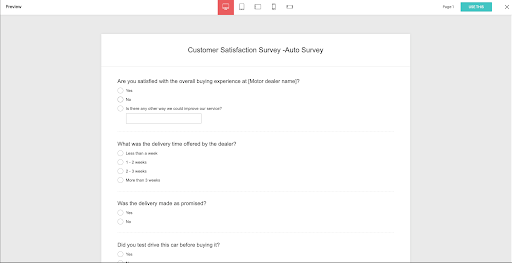
What I saw reviewers value most is exactly that auto-attribution: every response lands as a CRM contact with no manual entry. For anyone already on Zoho CRM, that removes the manual stitch between feedback and customer records. The trade-off is that the product leans on integration depth rather than design polish.
The first trigger is the 10-question-per-survey cap, which real customer-experience surveys often exceed. The second is the deeper Zoho CRM link, which sits on the paid tiers. Paid plans run roughly $25 per month for Plus and $35 per month for Pro, lifting the question and response caps. Outside the Zoho ecosystem, the integration story matters less, and TallyPrime, SurveyMars, or Google Forms tend to win on cost per response.
"It is pretty straightforward to use, which is honestly what I liked most. Creating surveys feels quick - you can drag in question types, add logic, and get something usable without spending an hour figuring out the UI. The templates save time for common feedback forms, and integrations with the broader Zoho ecosystem are practical if you already use Zoho apps. I also liked response reporting being easy to understand without exporting everything immediately."
- Zoho Survey review, Himanshu J.
Best for: Small businesses already on Zoho CRM or Zoho One, where the two-way survey-to-CRM link removes manual data entry, and billing stays in one place.
Not ideal for: Anyone outside Zoho chasing design polish or free response volume. Typeform and TallyPrime are stronger on form aesthetics; SurveyMars and TallyPrime on free volume.
"The design customization options could be improved further."
- Zoho Survey review, Jeni J.
Have more questions? Find the answers below.
TallyPrime and SurveyMars pair affordable with depth: unlimited submissions, conditional logic, and integrations, free or near-free. If you already live in a productivity suite, Google Forms and Microsoft Forms come bundled with what you already pay for. Jotform's free Starter adds AI building plus payments and e-signatures, which stretches it past surveys into the wider workflow.
Typeform owns the polished, conversational lane. TallyPrime is the underrated alternative for clean, modern forms with unlimited free submissions. Alchemer delivers research-grade polish for teams willing to pay. These tools beat Google Forms and Zoho Survey on out-of-the-box design, which matters most for customer-facing surveys.
There is no single answer; it depends on the rest of your stack. Google Forms is the default for Google users, Microsoft Forms for Microsoft, and Zoho Survey for Zoho CRM. For true free-forever access with no response cap, SurveyMars and TallyPrime are the two paths. For design-led customer surveys, Typeform is worth paying for from day one.
Two stand alone: SurveyMars is fully free with unlimited responses, and TallyPrime has unlimited free submissions, with its upgrade tied to branding and team seats rather than volume. Google Forms is effectively unlimited too, bounded only by your shared Drive storage. Typeform and SurveyMonkey have the tightest caps here.
TallyPrime's document-style editor is the quickest to learn, and unlimited free submissions remove budget worry. Google Forms and Microsoft Forms also rank high simply because no one has to learn a new tool; the team is already in the account.
QuestionPro is the depth pick, with logic that holds up under complex paths and a free nonprofit tier. SurveyMonkey speeds research survey design from a short prompt. For early-stage customer discovery, Typeform's conversational format lifts completion rates over traditional forms.
Leapsome is purpose-built for employee engagement, onboarding, exit, and DEI surveys, wired to performance reviews and goals. For Microsoft Teams, Microsoft Forms plus Excel is the natural pairing; for Google users, Forms plus Sheets does the same. For branching employee pulses, QuestionPro's free tier is strong, and TallyPrime and SurveyMars suit anonymous, ongoing pulses because unlimited free volume never constrains the cadence.
QuestionPro has the depth for CSAT, NPS, and customer-experience work. SurveyMonkey's AI summarizes open-ended responses without manual coding. For teams comfortable in spreadsheets, Google Forms plus Sheets or Microsoft Forms plus Excel deliver analysis power that most free tools cannot match once you pivot and chart the data.
Most small businesses overthink this. The best free survey tool is not the one with the longest comparison row. It is the one that disappears into how you already work.
When you are unsure which wall hits first, a response cap, branding, logic, or an export, stop comparing and start collecting. Run one real feedback or employee-pulse survey on a free tier for a week. You will learn more about your actual constraint than any guide can tell you.
Still torn between the two most popular free options? My colleague's SurveyMonkey vs. Google Forms breakdown walks through which one is best for each use case.


Recently updatedSummer 2026 Grid® Report · Published May 26, 2026 This guide was last...
 by Soundarya Jayaraman

Published: February 2026 · Last updated: April 2026 I’ll be honest: I’ve spent way too many...
by Soundarya Jayaraman

Most lead generation campaigns do not fail because of weak traffic. They fail because the...
 by Aishwarya Pillai