


If you’ve ever tried to sift through thousands of emails, chat logs, PDFs, and “mystery.zip” files under a brutal deadline, you already know why finding the best eDiscovery software isn’t optional. It’s survival. Legal teams are drowning in data, wrestling with unpredictable review costs, and stuck using tools that feel more like punishment than productivity.
I’m not a lawyer, but I am someone who researches complex software for a living and eDiscovery might be one of the most overwhelming categories I’ve ever stepped into. That’s exactly why I created this guide.
I evaluated these platforms the same way I approach any high-stakes tool: comparing products side-by-side using G2 Data, digging into thousands of real user reviews, and speaking with attorneys, litigation support pros, and eDiscovery experts about what actually works when the pressure is on. I wanted to see which solutions deliver speed, accuracy, and cost control, not just big promises.
From AI-powered review to search precision, pricing transparency, automation, and usability, I broke down how each tool stacks up against the real pain points legal teams face every day.
The result is a curated list of the 10 best eDiscovery software platforms, with in-depth reviews of five standout tools: Everlaw, Relativity, Epiq Discovery, DISCO eDiscovery, and Logikcull. These platforms help legal teams stay accurate, defensible, and efficient when it matters most.
I’ve also included five more eDiscovery tools worth considering after the in-depth review, so you can explore alternatives based on your team’s size, workflows, and priorities.
| Best eDiscovery software | G2 rating | Best for | Standout feature |
| Everlaw | 4.7/5⭐ | Compliance-heavy teams and legal groups that want fast, intuitive review with strong defensibility | Predictive coding + ultra-fast processing/search in a clean, modern UI |
| Relativity | 4.6/5⭐ |
Large or complex matters needing highly customizable workflows and deep legal-tech integrations | End-to-end lifecycle + advanced AI/analytics + configurable workspaces |
| Epiq Discovery | 4.3/5⭐ |
Teams managing large volumes of electronic evidence who want end-to-end control | Epiq Chat + strong ECA/EDA and workflow automation |
| DISCO eDiscovery | 4.6/5⭐ |
Teams prioritizing speed and AI-assisted review to reduce review time | Sub-second search + AI summaries/timelines + Case Builder |
| Logikcull | 4.7/5⭐ |
Litigation support and small legal firms that want simple, fast, vendor-free discovery | Culling Intelligence that auto-organizes by date/custodian/recipient/and more for quick searches |
*These eDiscovery software are top-rated in their category, according to G2’s Fall 2025 Grid Report. All offer custom pricing and a demo on request.
When I talk about eDiscovery software, I’m referring to the tools legal teams use to find, collect, review, and produce electronically stored information during investigations or litigation. In simple terms, it helps you make sense of massive amounts of digital evidence like emails, chats, documents, cloud files, video, and more, without losing time or missing something critical. Even as someone outside the legal field, it’s obvious how essential these platforms are for keeping cases defensible and workflows manageable.
From my research, the best eDiscovery software is the kind that actually reduces review time, improves accuracy, and keeps costs predictable. The tools that consistently stand out are fast, easy to use, and strong on AI-assisted review, search precision, and automation. They help legal teams move quickly without sacrificing thoroughness, compliance, or collaboration.
G2 Data backs this up. Across all products in the category, eDiscovery platforms show an average adoption rate of 56%, and buyers see an average payback period of 15 months, which is impressive given how resource-heavy document review can be. Usage is also spread across all company sizes: 39% small business, 38% mid-market, and 23% enterprise, showing that eDiscovery isn’t just for big litigation departments anymore. It’s becoming a must-have across the board.
I used G2’s Grid® Reports to build a shortlist of the top eDiscovery platforms based on G2 Score, user satisfaction, and overall market presence. This gave me a clear, data-backed starting point for comparing tools that legal teams actually rely on.
I then analyzed over 1,000 G2 reviews using AI to identify the patterns that matter most to real users, like search accuracy, review speed, automation quality, ease of use, pricing transparency, and how well each platform handles large, complex data sets. This helped me understand which tools truly reduce review time and cost versus those that simply sound impressive in marketing copy.
Since I don’t use these platforms in live litigation myself, I grounded my research with insights from attorneys, litigation support specialists, and eDiscovery experts. Their firsthand experience helped validate what I saw in user reviews and clarified how these platforms perform under real pressure. The screenshots in this article come from G2 vendor profiles and publicly available product documentation.
Between G2 Data, interviews with legal experts, and hundreds of user reviews, I found consistent signals about what separates good eDiscovery tools from great ones. These are the factors that shaped my evaluation:
I looked at over a dozen tools before landing on the five that genuinely stood out. They don’t each hit every criterion perfectly, but these eDiscovery tools are the ones that repeatedly proved their value across different teams and use cases.
The list below contains genuine user reviews from the eDiscovery software category. To be included in this category, a solution must:
*This data was pulled from G2 in 2025. Some reviews may have been edited for clarity.
Everlaw has quickly become one of the go-to eDiscovery platforms for legal teams, and after digging into the G2 data, I’m not surprised.
What stood out to me first wasn’t just the power of the tool, but how often reviewers talked about its ease of use. Everyone, from first-time users to 30-plus-year litigators, describes Everlaw as incredibly easy to use. People repeatedly said things like “simple,” “intuitive,” “no lag,” and even “the most user-friendly by a long shot.”
Teams talk about being able to upload, review, tag, and produce documents all within one platform, without feeling overwhelmed or buried in menus. Even features that are usually intimidating, like predictive coding, analytics, redactions, or email threading, feel approachable here.
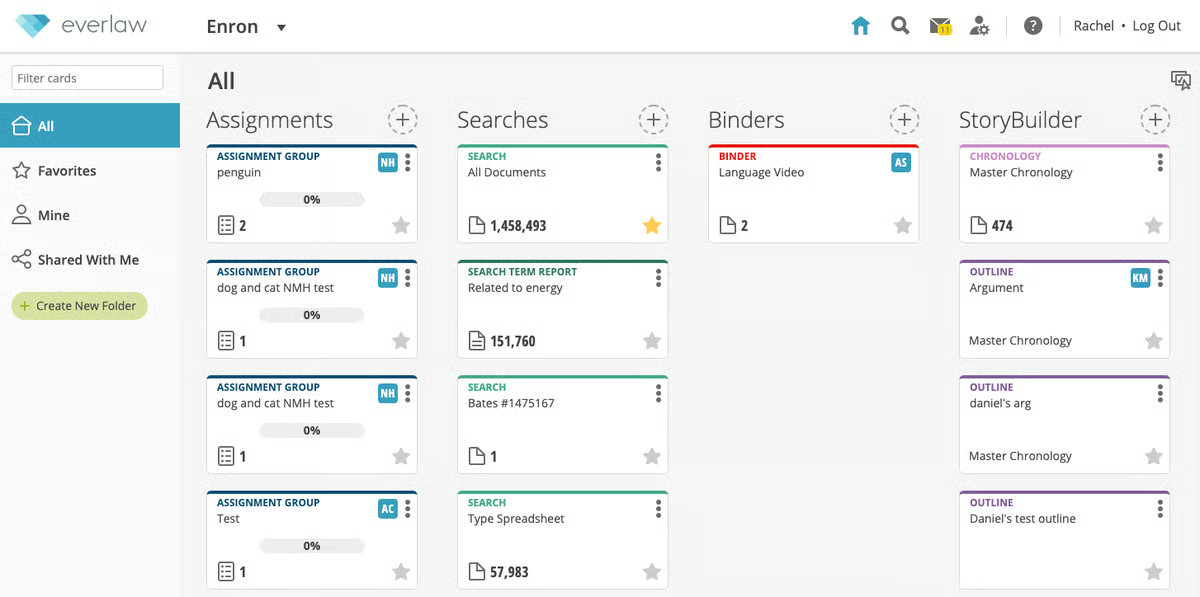
That lines up with Everlaw’s design philosophy: the color-coded search builder, drag-and-drop uploads, fast document processing (up to 900K documents an hour), and a clean review layout make the platform feel fast and modern without sacrificing depth.
That kind of performance is a huge reason why law firms and legal services teams, by far the largest industries represented, gravitate toward it. They simply don't want delays in the early stages of review, and Everlaw keeps those bottlenecks to a minimum.
Another theme that comes up constantly is customer support. Users consistently describe it as exceptionally responsive, with no long wait times. Several people even mentioned that the Everlaw team set aside hours of live training during onboarding. That kind of support isn’t just a perk in this category; it directly affects how quickly a legal team can get a review off the ground. Many reviewers said Everlaw helped them understand not just how to use features, but how to structure their workflows in smarter ways.
Search accuracy and speed are also huge highlights. Reviewers love how customizable queries are, how quickly search loads even in large datasets, and how easy it is to filter out irrelevant material.
It makes sense why document review (94%), document processing (92%), and production (92%) are among its highest-rated features. When teams mentioned specific features they rely on most, things like Storybuilder, analytics, batch coding, audio/video transcription, translation into 135+ languages, and fast Bates searching came up often. Everlaw's also strong in terms of compliance, making it one of the top-rated eDiscovery platforms for regulatory compliance.
One thing that really stood out to me in the reviews is how much users appreciate how smooth Everlaw feels once everything is up and running. A few teams did mention that onboarding includes a bit more back-end setup than they expected, so groups wanting a highly customized environment might want to plan a little extra time to get things configured exactly the way they prefer.
Reviewers also pointed out a few workflow nuances, like getting used to running searches, which are simply good to know for teams with very specific needs. But even in those cases, users consistently highlight how responsive Everlaw’s support team is and how quickly they help guide people through the best approach, reinforcing why so many reviewers describe the overall experience as smooth and easy to rely on.
With a 4.7/5 rating on G2 and 99% of reviewers giving it 4 or 5 stars, Everlaw is one of the strongest performers in the entire category.
Based on everything I analyzed, I’d recommend Everlaw for teams that want a fast, intuitive, all-in-one platform with excellent support and modern AI features. It’s especially well-suited to legal teams that want advanced capabilities without feeling overwhelmed and who value a tool that helps them move quickly when the pressure is on.
"I use Everlaw primarily for e-discovery and timeline creation and I find its discovery management capabilities exceedingly effective. It allows me to conduct easy searches of documents, keeps productions well organized, and facilitates seamless collaboration with team members in identifying key documents and preparing timelines. I love how customizable Everlaw is. It offers the flexibility to tailor the layout and coding to best fit the needs of each specific case. The training resources provided by Everlaw are outstanding and have greatly helped me in utilizing all its features efficiently and troubleshooting issues with ease. I also appreciate how easy the initial setup of Everlaw was, making the transition smooth and straightforward."
- Everlaw Review, Amanda A.
"Navigating the searches and their setup on the main page can feel awkward, making it difficult to find a specific search. Personally, I find the tree folder method for searches to be much more efficient and user-friendly. It makes creating, viewing, and sharing searches with others who need access to certain documents much simpler."
- Everlaw Review, Tina G.
If you’re also evaluating legal case management tools, check out G2’s roundup of the best legal case management software for law firms, great for seeing how eDiscovery fits into the broader legal tech stack.
Relativity has long been one of the most recognized names in eDiscovery, and after analyzing G2 reviews alongside the platform’s capabilities, it’s easy to see why it remains a top choice.
G2 reviewers describe Relativity as powerful, flexible, and able to handle virtually any type of case, from straightforward matters to high-volume, high-risk investigations.
Many users especially appreciate the intuitive interface, strong search performance, and customizable workflows, which give teams the freedom to structure reviews the way they want.
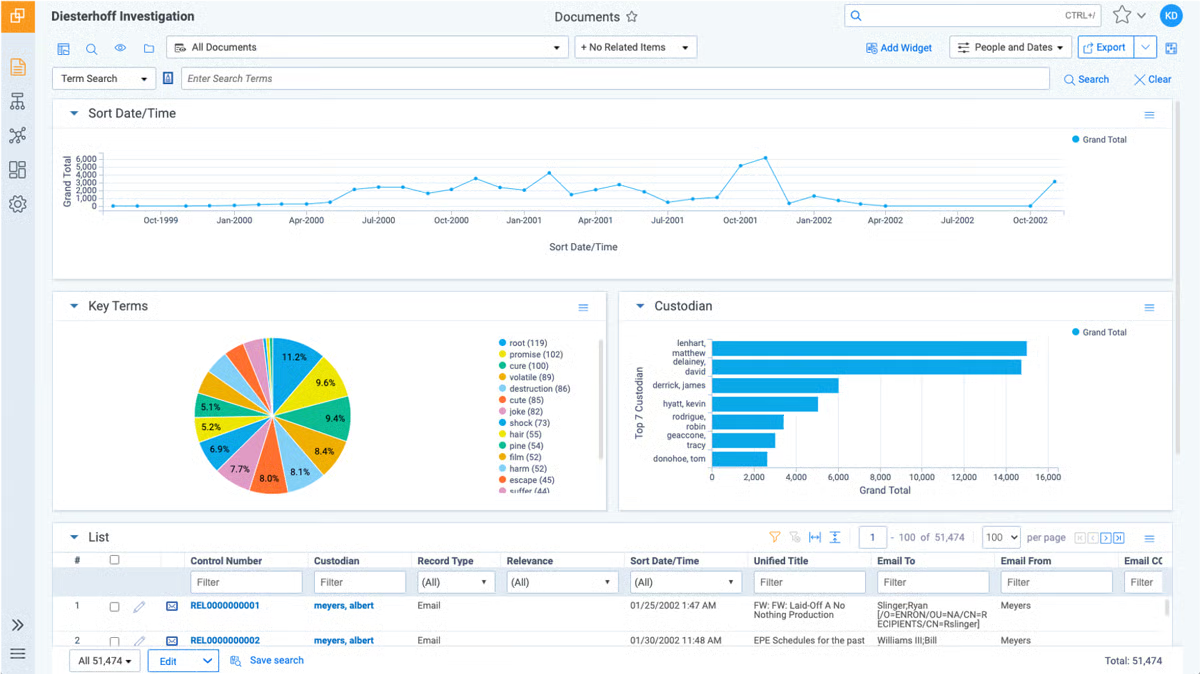
Pair that with analytics, persistent highlighting, advanced search operators, automatic redaction tools, and flexible review templates, as well as its AI capabilities, and it becomes clear why Relativity earns such strong adoption among legal services and law practice teams, the two largest industries represented in the G2 data.
Reviewers also consistently highlight how versatile Relativity is. Teams love being able to collect ESI directly from Microsoft 365, Google Workspace, Slack, and other major systems without leaving the cloud.
The ability to process any volume of documents, translate files into more than 100 languages, and turn hours of audio or video into searchable, review-ready text is another reason users rely on it for complex or multimedia-heavy matters.
I also noticed that power users really appreciate how customizable Relativity is. Everything from workspace layouts to review queues to automated batching can be tailored to meet very specific workflows. For many reviewers, especially administrators, the level of flexibility and the ecosystem of add-ons is a major advantage.
Based on what I saw on G2 reviews, Relativity offers impressive depth and flexibility across the entire review workflow, but teams wanting a more lightweight or plug-and-play experience might spend some additional time setting up, especially when configuring workspaces, permissions, or advanced AI-driven features.
The platform is designed to handle large, complex datasets with robust search and analytics, but reviewers noted that teams working with extremely high volumes or very intricate searches may want to structure their reviews thoughtfully to maintain consistent performance.
On the whole, Relativity earns its place as one of the best eDiscovery software platforms, especially for legal teams that need a powerful, scalable solution built to handle large datasets, complex matters, or multi-step review workflows.
With a 4.6 out of 5 G2 rating, it’s a strong fit for mid-market to enterprise legal teams, litigation support professionals, consulting firms, and organizations that want the flexibility to customize their workflows and rely on advanced AI capabilities throughout the review process.
"Relativity has an incredible support team and amazing resources for continued training and learning that make the product easy to use. Relativity partners with amazing vendors as well, who are highly competent in eDiscovery. They are very receptive to my feedback. I am in Relativity approximately 60 percent of my working day. There are numerous features, including the latest one that I am excited to implement: Data Breach Response. It is very easy to use, and there are fine integration points with other programs/APIs."
- Relativity Review, Joel I.
"Steep learning curve and sometimes clunky interface, which can be challenging for new users, as well as for its high cost and occasional performance issues with large datasets."
- Relativity Review, Luis V.
Everlaw is often praised for its fast, intuitive experience and hands-on support, while Relativity stands out for its depth, customization, and ability to handle complex, large-scale matters.
Want a deeper side-by-side? Check out the full comparison of Everlaw vs Relativity on G2.
Epiq Discovery is another popular cloud-based end-to-end eDiscovery platform built to support the full discovery lifecycle, from legal holds and data collection to review, analysis, and production.
When I looked at the tool through G2 reviews and its core capabilities, what stood out immediately was how intentionally the platform brings all of those stages together in one place.
Reviewers on G2 mention using it for everything from early case assessment and data processing to analysis and production. Users also highlight how easy it is to bring data in, organize it by metadata, and start reviewing right away, which aligns with Epiq’s strengths in document collection, processing, and production, its highest-rated features on G2.
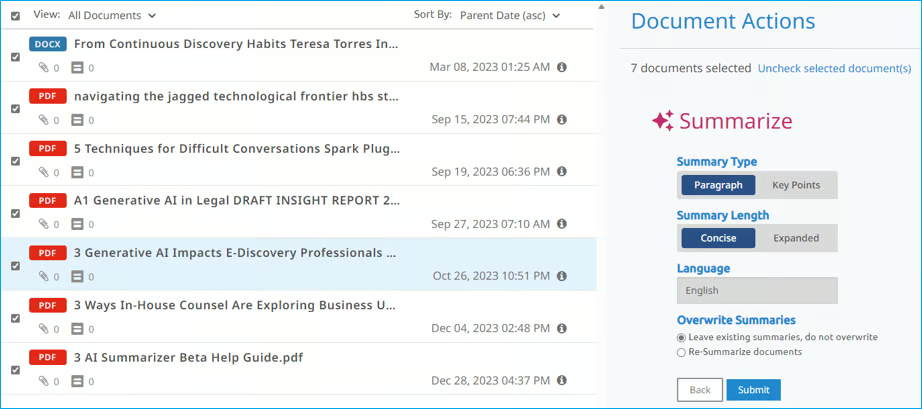
What really stood out in the reviews was how self-sufficient the platform allows people to be. Several users mentioned that they don’t have to wait for a separate team to collect or process anything. They can run their own collections, sort materials quickly, apply tags, and move straight into review. That independence seems especially valuable for the legal services and law practice teams that make up the bulk of Epiq’s user base.
And it fits with the product’s design: behind the scenes, Epiq Discovery handles early data assessment, deduplication, indexing, and automated prep so reviewers can get to work faster. The platform also supports analytics like concept search, email threading, near-duplicate identification, and even predictive AI summaries to help teams understand patterns early.
Epiq can collect from mobile devices, Microsoft 365 accounts, chat apps like Slack or WhatsApp, and even handle Microsoft Teams messages and modern attachments. The built-in ability to translate documents in 74 languages, summarize foreign-language files, and transcribe audio or video adds even more efficiency, especially for teams dealing with mixed data types. All these features make Epiq Discovery one of the top tools for managing electronic evidence, similar to other tools like Everlaw and Relativity.
I also found Epiq Chat worth calling out. It’s the platform’s conversational AI assistant, and it lets reviewers ask complex questions and get fact-based answers with citations directly in the workspace, which feels especially helpful when you’re trying to make sense of large or fast-moving matters.
Reviewers often highlight that Epiq Discovery feels straightforward once you’re familiar with the workflow, but teams wanting a streamlined user experience might want to get used to a few areas where functionality sits deeper in the menus or takes a couple of extra clicks to access.
Users often praise how efficiently they can tag, organize, and review documents, but teams wanting very advanced or guided search-building tools might find that the search experience takes some adjustment, especially for more complex keyword logic.
Epiq Discovery’s 4.3/5 score on G2 reflects how well it resonates with legal teams, and based on everything I reviewed, it’s a strong choice for law firms, corporate legal departments, and government agencies that want an intuitive, end-to-end discovery workflow.
"Quick and easy collection capability (used to collect a select folder from Gmail); the Admin side of the database is intuitive - easy to create coding layouts, manage users, export productions. Customer support was excellent."
- Epiq Discovery Review, Jennifer C.
"The software is much less user-friendly than Relativity. Some of the functionality needs to be thought through and revamped to make it more intuitive to the user. Some functionality is buried within several clicks when it should be easier to find.."
- Epiq Discovery Review, Verified G2 user in legal services.
DISCO eDiscovery covers everything you’d expect from a modern eDiscovery platform, and the G2 reviews make it clear why so many legal teams keep it in their toolkit. The big theme that comes through is speed. Users talk about fast search and document loading, and the ability to move through even large or complex datasets without disruption. This makes DISCO eDiscovery one of the top tools for reducing eDiscovery review time.
That matches its highest-rated features on the G2 Grid, where document review, production, and processing all score in the 90%+ range, reinforcing how smoothly the core workflow runs in day-to-day use.
What’s especially interesting is how often users call out DISCO’s AI as a true time-saver. Things like AI-generated summaries, relevance ranking, and “ask-and-answer” style search help reviewers get to key evidence quickly.
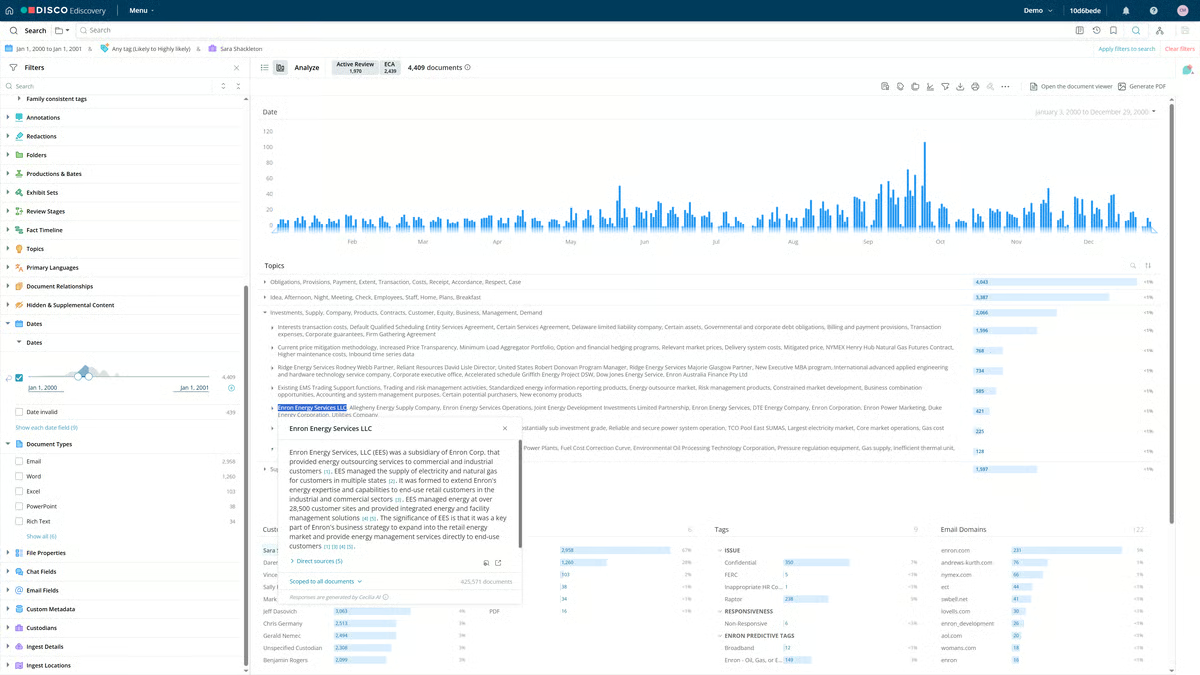
Case Builder, DISCO’s trial-prep tool, also gets a lot of love for organizing deposition materials, timelines, and exhibits in a way that feels built for actual legal work rather than just data management. And the platform’s ability to keep email threads together, manage short-message data cleanly, and batch-organize files helps teams stay focused on strategy rather than sorting metadata.
The usability piece comes through just as strongly. Reviewers repeatedly mention how approachable the interface is, clear menus, sensible tagging structures, and workflows that feel built by people who understand litigation. Because of that, users say they can train new reviewers quickly, which is a huge plus for busy litigation teams and firms with rotating staff. Customer support gets near-universal praise as well, with many describing it as one of the most responsive teams they’ve worked with in eDiscovery.
There are a few areas where teams might want to plan ahead. While search overall feels fast and reliable, some reviewers noted that advanced queries, like Bates lookups or long-form doc-number searches, take a bit of practice, so teams wanting an instant, Google-style search experience may want to build in a short adjustment period.
Others also highlighted that once you start exploring DISCO’s full feature set, there’s a lot of power under the hood, and teams wanting to take advantage of its advanced capabilities might benefit from a bit of focused, tool-specific training. Reviewers consistently noted that the platform becomes incredibly smooth once you learn its own rhythms, so building in a short onboarding period can help teams settle in quickly and get the most out of everything it offers.
Overall, the sentiment is overwhelmingly positive. DISCO’s combination of speed, intuitive design, and genuinely useful AI tools makes it feel lighter, faster, and more collaborative than many traditional eDiscovery platforms.
With a 4.6/5 rating on G2, it’s an easy recommendation for law firms, corporate legal teams, and litigation groups that want a powerful yet approachable platform capable of handling matters of any size, without slowing teams down when deadlines get tight.
"DISCO eDiscovery streamlines the process of reviewing and managing large volumes of legal documents, making it highly efficient. The AI-driven search and auto-tagging capabilities significantly reduce the time needed to find the most relevant materials. Its interface is sleek, responsive, and user-friendly, so even those without extensive technical expertise can navigate it with ease. Additionally, the collaboration features and analytics support teams in staying coordinated throughout investigations or litigation."
- DISCO eDiscovery Review, Maulik P.
"So many useful tools can seem overwhelming if you don't know how to use them all."
- DISCO eDiscovery Review, Megan P.
Logikcull is one of the few eDiscovery platforms that really leans into simplicity without sacrificing power, and the G2 reviews make that clear. After digging through user feedback, I was impressed by how consistently people describe it as intuitive, fast, and genuinely easy to work with, whether they’re attorneys, paralegals, solo practitioners, or city agency teams working across FOIA or PRA requests.
It also reinforces why Logikcull is often seen as one of the best eDiscovery software options for litigation support, especially for teams that want speed and predictability without a steep learning curve.
A lot of that usability comes from how Logikcull handles data from the start. Direct integrations with Google Vault, Slack, Microsoft 365, Box, and other core sources mean teams don’t have to wrestle with manual exports or third-party tools just to begin a project. Legal holds are equally streamlined thanks to Logikcull Hold, which automates notices, reminders, and tracking (even in Slack).
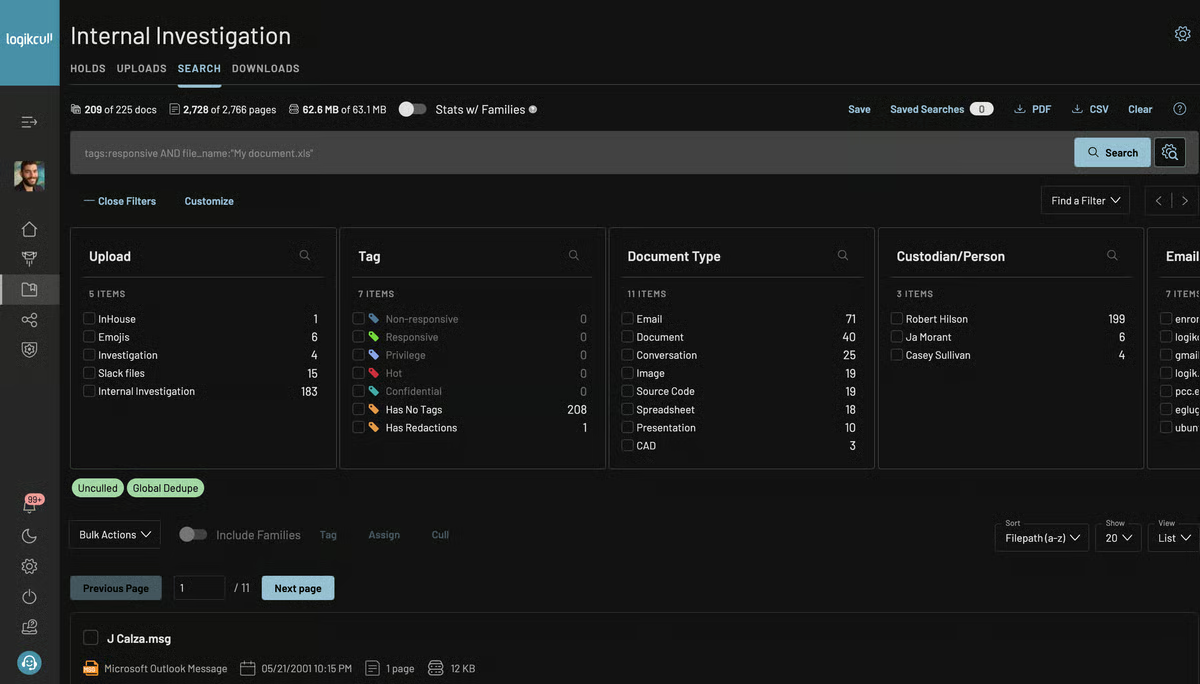
It’s culling intelligence automatically analyzes and organizes your data by factors like date, custodian, recipient, document type, and even potential privilege, making it easy to quickly cull out irrelevant material before you ever start reviewing. It’s a big reason Logikcull scores so highly across production, document processing, and document review, each sitting at 94%, well above category averages.
Once you’re in review, the workflow feels designed for speed. Reviewers mention being able to move through large batches quickly with tagging, redactions, commenting, and collaboration tools that make it easy to streamline back-and-forth work.
Many users also highlight how responsive the platform is: fast filters, quick page loads, and the ability to search across huge datasets from anywhere. Given that most reviewers come from law firms and legal services, the two biggest industries represented on the G2, that flexibility seems to matter a lot.
Users consistently appreciate how easy Logikcull is to pick up, though a few noted that certain workflows, like mastering all the features, take a little familiarity. Teams might want to plan a short onboarding window if they want to work with more granular controls.
Also, many reviewers love Logikcull’s simplicity and intuitive layout, but teams wanting very advanced review controls or deep customization may want to be aware that some features more extensive field displays or richer analytics, come up occasionally as “nice to have” additions, so groups handling highly complex productions may want to confirm workflow requirements in advance.
With a 4.7/5 on G2 and so many reviewers calling out how simple and reliable it is, Logikcull strikes me as a great fit for litigation teams and smaller legal practices.
"Logikcull is a very user-friendly platform with many useful features -- from running productions, my various document review needs, importing and exporting, tagging, and everything else in between. I started using Logikcull with no training and got the hang of it very quickly, and I would say the same for everyone at my firm. The quick customer service response time makes that especially easy. I use it all the time for small and large matters alike. I also like the ability to share with outside parties for free because our clients need to upload things sometimes."
- Logikcull Review, Brendan M M.
"Need to have a deep understanding of eDiscovery processes and functionality to maximize use of available features."
- Logikcull Review, David S.
If you’re still exploring options beyond the tools reviewed above, here are a few more strong contenders worth checking out:

Got more questions? G2 has the answers!
Relativity, Everlaw, DISCO, Logikcull, and Epiq Discovery are among the best eDiscovery software for litigation support, and the right choice depends on your caseload and workflow complexity. Relativity and Everlaw are ideal for teams handling large, data-heavy matters that demand advanced analytics and AI. DISCO and Logikcull are great for teams wanting cloud-native simplicity and predictable pricing. Epiq Discovery fits organizations that want both self-service software and optional managed services. Prioritize workflow fit, search strength, security, data volume, and overall cost of ownership.
Logikcull, DISCO, Everlaw, and Epiq Discovery are strong starting points for small firms because they emphasize ease of use and fast deployment. Logikcull and DISCO offer simple interfaces and self-service workflows with transparent pricing, while Everlaw provides intuitive review and collaboration features. Small firms should focus on tools that simplify early case assessment, email and chat review, and evidence organization without heavy IT maintenance.
Everlaw, DISCO, Logikcull, Relativity, and Epiq Discovery all follow different pricing models, which is why eDiscovery costs vary widely. Cloud-native tools often charge per user or per matter, while enterprise platforms like Relativity frequently use per-GB hosting and review fees. Additional costs may include AI review, translations, analytics, and managed review services. Pricing can range from predictable monthly subscriptions for small teams to higher enterprise-level contracts for large, multi-matter environments.
Relativity, Everlaw, DISCO, and Logikcull are among the best eDiscovery software offering advanced search capabilities. Relativity excels with structured analytics and precision querying for massive datasets. Everlaw supports advanced and natural-language search powered by AI. DISCO delivers fast, intelligent search with auto-tagging, while Logikcull offers metadata-rich filtering and efficient culling. These tools help legal teams locate key evidence quickly and reduce review time.
Relativity, Everlaw, and Epiq Discovery are considered the best eDiscovery tools for large-scale case management. Relativity supports massive data volumes and customizable workflows for complex litigations. Everlaw combines analytics, collaboration, and case-building tools that scale with large matters. Epiq Discovery offers powerful processing backed by legal and compliance services, making it suitable for multi-custodian or enterprise investigations.
Everlaw, Relativity, DISCO, Logikcull, and Epiq Discovery are consistently rated as the best eDiscovery platforms for legal teams. Everlaw is praised for usability and collaborative workflows, Relativity for advanced customization and analytics, and DISCO for speed and cloud-first design. Logikcull is ideal for smaller teams needing simplicity, while Epiq Discovery appeals to organizations wanting integrated services with their platform. The best choice depends on your budget, team size, and review complexity.
Relativity, Everlaw, DISCO, and Epiq Discovery are among the top eDiscovery platforms offering AI-powered document review. Relativity’s AI tools support prioritization, analytics, and generative insights. Everlaw’s AI enhances search, pattern detection, and drafting workflows. DISCO uses AI auto-tagging and review acceleration, while Epiq Discovery leverages AI for summarization, PII detection, translations, and workflow automation. These platforms help teams reduce review hours while maintaining defensibility.
Relativity, Everlaw, Epiq Discovery, DISCO, and Logikcull are recognized as the best platforms for integrating eDiscovery with legal workflows. Relativity offers deep integrations across legal operations, making it ideal for complex enterprise environments. Everlaw supports the full litigation lifecycle from early case assessment through trial prep. Epiq Discovery ties eDiscovery into compliance and investigations. DISCO and Logikcull provide lightweight cloud integrations that support agile legal teams. These platforms reduce context switching by unifying evidence, review, and case management workflows.
Relativity, Everlaw, Epiq Discovery, DISCO, and Logikcull are among the best tools for secure evidence storage and retrieval with strong compliance capabilities.
After comparing all of these platforms side-by-side, the biggest surprise for me wasn’t just how different the feature sets are, it’s how each tool quietly reshapes the culture of review inside a legal team. Some platforms push teams toward faster, more iterative searching because of how quickly they surface documents. Others, shift teams toward cleaner project management by stripping away anything that slows you down.
The real takeaway, at least for me, is this: the “best” eDiscovery software isn’t the one with the longest feature list, it’s the one that changes how your team thinks, collaborates, and moves through a matter. When the right platform is in place, review stops feeling like a bottleneck and starts feeling like a strategic advantage.
If you’re exploring more ways to modernize your legal workflow, I recommend checking out G2’s guide to the best AI legal assistants next. It’s a great follow-up read that pairs perfectly with choosing the right eDiscovery platform.


If there’s one thing I’ve learned watching the legal industry embrace AI, it’s that...
 by Harshita Tewari

I’m not a lawyer, but I know that running a law firm isn’t just about winning cases. It’s...
by Soundarya Jayaraman

Running a law firm is more than just court appearances and client consultations; it’s about...
.png) by Tanuja Bahirat
by Tanuja Bahirat