You’ve finalized the proposal, secured internal approvals, and sent it to the client. The deal is almost closed. Then someone notices the issue — outdated pricing, a formatting issue, or a clause pulled from the wrong template.
At this stage, even small errors can create major problems. When contracts are tied directly to revenue, compliance, and brand credibility, inconsistencies or outdated information can slow approvals, trigger unnecessary revisions, or even put the deal at risk.
Situations like this are exactly why many organizations are moving away from manual document workflows and adopting dedicated document generation software.
The shift is happening quickly. Recent estimates place the global document generation software market at around USD 3.0 billion in 2026, with forecasts projecting continued double-digit growth over the next decade. This growth is largely fueled by digital transformation initiatives and a rising demand for automation that can reduce errors and accelerate business workflows.
With the right platform in place, teams can ensure automated accuracy, standardized templates, secure encryption, real-time collaboration, and seamless workflow integrations. The result is simple: when a document goes out the door, you know it’s compliant, polished, and ready to close.
To help you evaluate your options, here are the best document generation software platforms available today, comparing their automation capabilities, integrations, security features, and scalability so you can choose the right solution for your team.
*These document generation software tools are top-rated tools based on the G2's 2026 Winter Grid report for the document generation software category. I’ve mentioned the starting prices for each software and its standout features for easy comparison.
I don’t think of document generation as something only legal or operations teams handle anymore. Today, I’m seeing teams across businesses creating a huge volume of documents, contracts, proposals, invoices, and compliance forms, often personalized and tied to different digital workflows. When document creation is spread across disconnected systems, mistakes happen more often, and everything slows down.
With the right document generation software, I can reduce risk, move faster, and make sure documents stay accurate and consistent at scale without giving up control or flexibility. G2 review data backs this up too, showing a 65% average adoption rate for document generation software, with even higher adoption among top-ranked tools.
I used the Winter 2026 G2 Grid report to curate this list of 12 tools.
I evaluated the G2 Data to understand if these tools stood out when it came to generating accurate documents. A few parameters were crucial when looking at the tools: is it easy to use, secure for confidential data, can users easily collaborate and send documentation, and does it improve the quality and efficiency of the work in comparison to doing it without a tool?
I used AI to parse the data of reviewers to identify the most recurring likes and dislikes most commonly stated by users. This helped identify key strengths and gaps in each of the 12 tools.
The screenshots featured in this article may be a mix of those captured during evaluation and those obtained from the vendor’s G2 page.
Document generation software is widely used across industries, from small teams automating simple contracts to enterprises managing complex, compliance-driven documentation at scale. Some solutions focus on basic template automation, while others integrate deeply into systems to support high-volume, data-driven workflows. With such a broad range of capabilities, the real question becomes: which solution aligns with your organization’s operational needs? That’s why evaluating document generation software requires clear, consistent criteria.
Here are the factors that matter most to me:
I evaluated 20 document generation software to finalize the top 12 software that are worth it.
The list below contains genuine user reviews from the Document Generation Software category page. To be included in this category, a solution must:
*This data was pulled from G2 in 2026. Some reviews may have been edited for clarity.
G2 rating: 4.5/5
Adobe Acrobat is one of the best cloud-based document generation platforms thanks to its browser-based editing, cloud storage, and cross-device accessibility. Organizations can create, edit, and manage documents entirely in the cloud while integrating with existing productivity and collaboration tools. This flexibility makes it easier for distributed teams to work on documents securely without being tied to a single device or location. A cloud-first approach is especially valuable for hybrid and remote work environments where accessibility and version control matter.
What stands out to me immediately is how much users trust Acrobat for core document tasks. With its document features scoring a G2 satisfaction rating of 92% and meeting requirements at 93%, it’s evident that people rely on Acrobat to do very specific jobs well: creating PDFs from Word or Excel, editing existing PDFs, and preparing documents for distribution. The consistency of these high scores suggests that Acrobat delivers reliability in mission-critical workflows. In my view, that dependability is a key reason it remains a standard tool across industries.
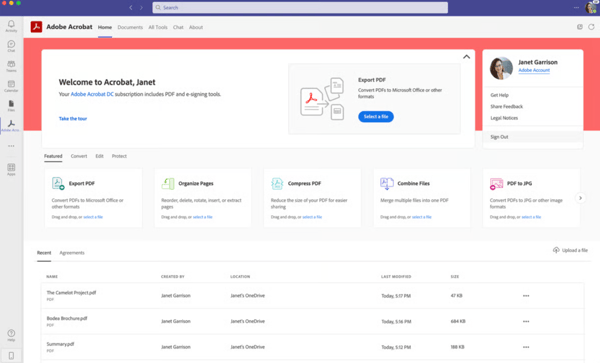
Another feature I really value is Adobe Acrobat’s built-in collaboration and e-signature capabilities. I like that I can send documents for signature, track status in real time, and finalize contracts without printing or switching tools. The ability to integrate with platforms like Microsoft Teams and Google Workspace makes sharing and reviewing documents seamless across internal teams and external stakeholders. This turns Acrobat from just a PDF editor into a full document workflow solution that supports faster approvals and more professional communication.
Document templates play a big role here, too. With template generation scoring 88%, as reported by G2 Data, users value being able to reuse standardized layouts for contracts, internal forms, reports, and compliance documents. This not only saves time but also ensures brand and formatting consistency across teams. I see this as a major advantage for organizations that need to generate high volumes of structured documents while maintaining professional standards.
Another feature that gets talked about the most is its focus on security. Being able to password-protect files, apply encryption, and redact sensitive information makes it a trustworthy tool for generating official documents that need to be shared safely. These security controls are especially important in industries handling confidential financial, legal, or customer data. This built-in protection strengthens Acrobat’s role as a secure document generation solution rather than just a PDF editor.
I appreciate how powerful Adobe Acrobat is and how reliable it’s been for professional PDF work, but the pricing can feel a bit high depending on how often users use it. For individuals or small teams with occasional document needs, the cost may require careful consideration. However, for organizations that depend on advanced PDF generation, editing, and collaboration features daily, the investment often aligns with the value delivered.
Adobe Acrobat gives users access to a wide range of tools in one place, which is great for complex document tasks. That said, because it’s so feature-rich, the interface can sometimes feel busy, and performance may slow down when working with larger files. But once users are familiar with the layout, it becomes easier to navigate.
Looking at the feedback as a whole, Adobe Acrobat consistently emerges as the tool users trust for structured, high-accuracy documents.
“I love how easy is the process to edit PDF, operations like page merging, data extracting or page splitter is easily done within minutes. I use it on work laptop and also install it on my smartphone, which has give me easy access when I am out of office, really easy implementation. Connect and integrating with Dropbox is beneficial, sync new document to the cloud storage is automatic and every version is updated in real-time. Using Adobe Acrobat everyday is ideal and easy, especially when their customer support team is always being helpful and responding all our inquiry in less than three days.”
- Adobe Acrobat review, Izham R.
“At first glance, there's a lot going on in the program. I suggest watching some Youtube videos to help you navigate it, because it's truly such a feature-packed hidden gem that will save you so much time once you know it's capabilities. I've encountered some performance issues, such as difficulty loading large files (particularly files with lots of images).”
- Adobe Acrobat review, Livia P.
Related: Stop chasing files across emails, folders, and spreadsheets. Discover tools that help you securely store, organize, and manage employee documents in one place.
G2 rating: 4.7/5
After reviewing G2 review data, PandaDoc comes across as a top-tier platform for customer-facing document generation, particularly for sales-driven teams. What stands out to me most is how easy it is to create personalized, repeatable documents at scale. With 92% satisfaction for documents and 93% for templates and workflow, users clearly rely on PandaDoc to standardize proposals and contracts while still tailoring content to each customer. This balance between consistency and personalization is critical for growing sales teams that need speed without sacrificing relevance. It also reduces the risk of errors that often happen with manual copy-and-paste processes.
Another major advantage I see mentioned repeatedly is PandaDoc’s drag-and-drop editor and overall ease of use. Users consistently highlight how simple it is to build professional-looking proposals without needing design skills or advanced formatting knowledge. The clean interface and intuitive layout make it easy to rearrange sections, replace pages, and customize documents quickly. This aligns with its 93% ease of use rating and 92% ease of setup score, indicating that most teams can get up and running quickly.
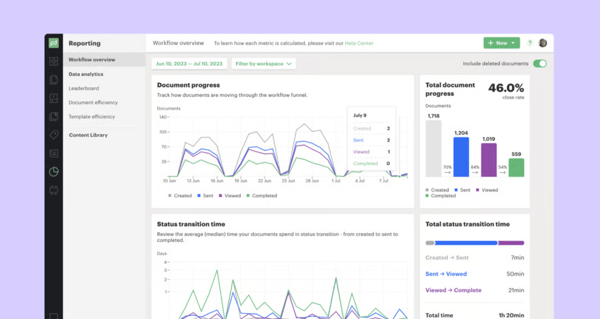
I also notice strong praise for PandaDoc’s real-time document tracking and visibility features. Users can see exactly when a document has been viewed, commented on, or signed, without needing constant follow-ups. Email notifications and status updates provide clear insight into where deals stand, which helps sales teams act at the right moment.
Another standout benefit is PandaDoc’s built-in eSignature and payment capabilities. I appreciate how seamless the signing experience is for clients, whether documents are shared via email or direct links. Several users mention how much faster contracts are finalized because recipients know exactly where to sign, and the process can often be completed in minutes. The inclusion of built-in payment processing and reusable clauses further streamlines the contract lifecycle, helping teams move from proposal to payment without switching platforms.
I also see a lot of value in PandaDoc’s data-driven approach to document generation. Dynamic fields allow documents to automatically pull in customer, pricing, and deal data, while conditional content lets teams tailor sections based on deal type, product selection, or customer attributes. This automation significantly reduces administrative work for sales reps and improves accuracy across proposals. It also ensures that documents reflect the most up-to-date deal information without manual updates.
PandaDoc is one of the best platforms for integrating document generation with CRM systems because it offers native integrations with Salesforce, HubSpot, and other popular CRMs. This allows sales and revenue teams to generate proposals, quotes, and contracts directly from CRM data, reduce manual data entry, and ensure documents stay aligned with pipeline activity and customer records. I see this tight CRM alignment as a major productivity driver for revenue teams. It helps maintain data consistency across systems while accelerating the quote-to-close process.
Users often mention that configuring templates and logic requires upfront planning, which can slow early adoption. That said, many reviews note that once this foundation is in place, PandaDoc becomes a highly efficient way to generate accurate, personalized documents at scale, making the investment worthwhile for growing teams.
Another common point is that PandaDoc’s feature-rich interface can feel complex for teams with simpler document needs. Because the platform is designed to support advanced automation and integrations, it may feel like more than what’s needed for basic use cases. However, users frequently point out that this same depth becomes a strength as teams scale, helping reduce errors and maintain consistency across high volumes of documents.
Based on the G2 Data, I’d describe PandaDoc as one of the strongest solutions for generating personalized, data-driven customer documents, especially in sales, marketing, and revenue operations environments.
“PandaDoc has a lot of great features that make managing contracts simple and efficient. One thing I like best is the real-time notifications — they let me know exactly when a customer has opened or viewed the contract. It’s a small detail, but it really helps me stay on top of follow-ups and gives me confidence that nothing slips through the cracks.”
- Pandadoc review, Galen S.
“The only thing I would improve is the pricing model. It would be great if reader users could be unlimited and if the cost for active users were based on usage — for example, lighter users who access PandaDoc only a few times a month could be billed differently than daily users.”
- Pandadoc review, Pascale G.
Related: Explore user reviews, features, pricing, and real experiences to choose the best free or paid word processing tool for your needs.
G2 rating: 4.6/5
Foxit PDF Editor is a fast, no-nonsense PDF editing tool that focuses on getting document work done without slowing you down. A lot of people choose it specifically because it’s lightweight and responsive, especially when handling large PDFs or editing documents daily.
I see frequent praise for how easy it is to edit existing PDFs. Users talk about updating text, modifying images, and managing full documents without breaking formatting, which is a big deal when working with professional reports or commercial documents. Creating and managing PDFs feels straightforward, and exporting documents generally keeps layouts intact. This goes with its 91% ease of use rating and 92% ease of setup score, suggesting that most users can adopt it quickly.
Optical character recognition (OCR) generation is another feature that comes up often. Reviewers mention using it to convert scanned documents into searchable and editable files, which helps reduce manual rework. I see it as a major productivity boost for teams that regularly work with scanned contracts, invoices, or archived documents.
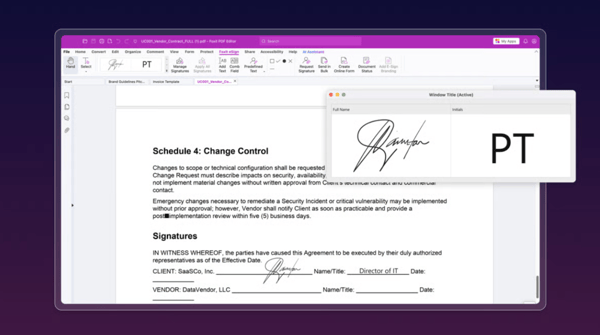
Annotations and collaboration are also strong points. Users mention marking up PDFs, adding comments, and then sharing those annotated documents smoothly with teammates. That makes Foxit useful for review cycles without adding extra steps. I think this makes it especially practical for legal, finance, and project teams that need clear document feedback without switching between multiple tools.
Another advantage that comes up frequently is Foxit’s strong file conversion and document transformation capabilities. Many users highlight how easy it is to convert PDFs to and from formats like Word, Excel, and PowerPoint while retaining the original layout and formatting. I see this as particularly valuable for professionals who need to repurpose business documents without rebuilding them from scratch. Its documents feature is rated at 91% on G2, reflecting consistent satisfaction with document handling and output quality.
Cloud accessibility and cross-device flexibility are also mentioned repeatedly. Users appreciate being able to access Foxit through desktop software or a web browser, along with integrations like OneDrive and Google Cloud for automatic syncing and storage. This flexibility allows teams to edit and manage documents from different devices without being tied to one workstation.
While users appreciate being able to view and make light edits on mobile, they note that advanced editing and document management features are primarily desktop-focused. That said, many reviewers emphasize that Foxit’s desktop application remains reliable and feature-complete, covering the majority of everyday PDF editing, OCR, and document handling needs.
One recurring issue G2 users have experienced is performance, especially when working with large PDF files or on lower-spec devices. The software can be quite resource-intensive, which sometimes leads to lag, slow processing for tasks. This is more noticeable on older computers or devices with limited RAM. That said, when used on a capable machine, Foxit PDF Editor performs very well and delivers powerful, professional-grade editing features that make it a reliable tool for demanding workflows.
Overall, Foxit PDF Editor is seen as a practical, performance-focused solution for professionals who need strong PDF editing without unnecessary complexity. It combines solid editing, OCR, and conversion tools in a lightweight package, making it a dependable choice for everyday document work.
“Foxit PDF Editor is an excellent tool for editing PDFs, with a clean and easy-to-navigate interface. I use it every day for formatting resumes, editing PDFs, and e-signing documents. It allows me to modify layouts, remove or replace text, and offers a wide range of useful features for comprehensive PDF editing. Compared to other PDF tools on the market, it is also more affordable.”
- Foxit PDF Editor review, Lavesh S.
“Foxit PDF Editor works well, but sometimes it feels a bit slow with large PDF files. A few features are not very easy to find quickly, and update notifications pop up often, which can be distracting. Sometimes searching for text or specific sections in very long PDFs can take a little extra time.. Overall, it still helps me manage clinic documents, diet charts, and content work smoothly.”
- Foxit PDF Editor review, Ishan S.
Related: Discover the best AI legal assistants to streamline legal research, contracts, and document generation.
G2 rating: 4.5/5
Wondershare PDF element is positioned as a practical, all-around PDF editor that focuses on getting everyday document work done without unnecessary complexity. G2 reviewers describe it as the tool they rely on for creating, editing, and managing PDFs in one place. G2 reviewers describe it as the tool they rely on for creating, editing, and managing PDFs in one place, reflected in its 93% rating for documents, which signals strong satisfaction with its core PDF functionality.
I hear frequent praise for how easy PDFelement is to use. Users mention that editing text, updating images, or modifying pages inside a PDF feels straightforward, which makes it accessible even if PDFs aren’t your main job. Creating PDFs and converting files from formats like Word or Excel also comes up often, with reviewers noting that formatting generally stays intact. On G2, it holds an 86% ease of use score, reinforcing that most users find it approachable for day-to-day document tasks.
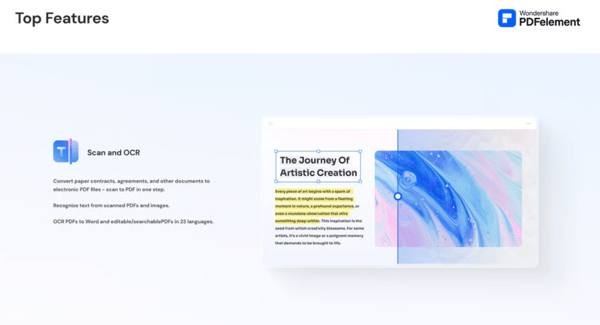
OCR is another feature that users clearly value. Reviewers mention using it to convert scanned documents into editable text, which helps reduce manual rework and makes older documents searchable. Forms and digital signatures also play a role, with users pointing out that PDFelement helps them move away from paper-based workflows.
Cost is one of the strongest reasons users choose PDFelement. Many reviewers compare it favorably to more expensive PDF editors and feel it delivers solid functionality for the price, especially for small teams or individual users who don’t need enterprise-level complexity.
Another feature that stands out repeatedly is PDFelement’s intuitive dashboard and Quick Tools layout. Users often mention how easy it is to find commonly used tools at the top of the screen, including page organization and document arrangement features. The ability to quickly shuffle, reorder, or restructure pages without digging through menus makes everyday document handling feel efficient and well-designed.
AI-powered features also come up frequently in reviews. Users highlight tools like AI text translation, summarization, and smart assistance that help them understand and work through documents faster. I see this as a growing differentiator, especially for professionals who need to review large volumes of content or work across multiple languages without switching platforms.
Customer support and smooth onboarding are other consistently praised advantages. Reviewers often mention responsive support teams and an easy installation process that allows them to get up and running quickly. For users who may not be highly technical, this level of guidance and accessibility makes adoption feel low-risk and dependable. For users who may not be highly technical, this level of guidance and accessibility makes adoption feel low-risk and dependable, supported by an 88% quality of support rating.
One area where G2 users feel PDFelement could improve is its support for fonts and non-Latin languages. Users have experienced issues with Urdu text where fonts break, alignment becomes distorted, and typing does not feel smooth. Additionally, the lack of full support for languages such as Arabic and Hebrew makes it difficult to edit, fill, or write text properly. Aside from these language and font limitations, the editor works well for most standard PDF tasks, and improving support for additional languages would make it more usable for a wider range of users.
G2 users mention performance as a concern, particularly when users are working with larger files or cloud-stored documents. Slower load times can interrupt workflows, especially for teams handling high volumes of PDFs. Even so, users often point out that PDFelement remains reliable for everyday document tasks, and performance is generally smooth for standard use cases.
Overall, based on the dataset, Wondershare PDFelement is seen as a capable, cost-effective PDF editor that handles document creation, editing, OCR, and forms well. It’s especially appealing for users who want strong PDF functionality without paying premium prices, even if there are occasional UI and performance tradeoffs.
“Wondershare PDFelement is an excellent all-in-one solution. It allows you to quickly convert your documents to PDF, merge several PDF files, and edit any non-password-protected PDFs you receive from others. There are also many additional features available, far too many to mention in detail here. For smaller businesses seeking a robust tool without the high cost of enterprise software, it is also a very cost-effective choice.”
- Wondershare PDF Element review, Oneil W.
“It lags when scrolling PDFs with 1000+ pages and does not switch to the specific page when I enter the page number.”
- Wondershare PDF Element review, Ravi R.
G2 rating: 4.3/5
DocuSign CLM stands out as a robust contract lifecycle management solution built for enterprise-scale document automation. Reviewers consistently highlight its strength in structured contract generation and process control, reflected in a 91% rating for documents, along with 90% for workflow and 89% for automation. These scores underscore its reputation as a reliable platform for managing complex, high-volume contract operations.
DocuSign CLM is one of the top tools for automating contract and invoice generation because it manages the entire document lifecycle from generation and negotiation to approval and execution. Its automation capabilities, combined with workflow orchestration and compliance controls, make it ideal for legal and finance teams managing high volumes of agreements.
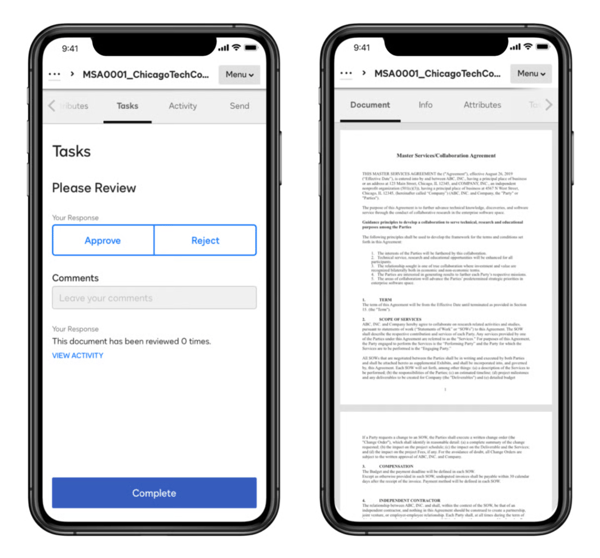
I like how DocuSign CLM centralizes contract creation, approval, negotiation, and storage into a single system. Having everything in one place makes it easier to manage complex contract lifecycles, maintain visibility across teams, and reduce reliance on disconnected tools or manual handoffs. It also gives me a single source of truth for audit trails and contract history, so I can quickly pull up past versions, related communications, and compliance evidence when needed.
I like the automation and workflow controls because they help streamline repetitive contract tasks such as approvals, routing, and renewals. By automating these processes users can spend less time chasing stakeholders and more time focusing on higher-value legal and operational work. Automated reminders, conditional routing, and escalation rules keep contracts moving and reduce approval bottlenecks, improving turnaround times and compliance.
DocuSign CLM provides comprehensive reporting and analytics its dashboards and customizable reports let users monitor contract volume, measure cycle times and approvals, track renewals and obligations, and surface bottlenecks so one can make data-driven improvements to procurement, legal, and finance workflows. I can create role-based dashboards and KPIs for different teams, schedule automated reports for stakeholders, and drill down from high-level trends into individual contracts to investigate delays or compliance issues.
I also see DocuSign CLM as a top-tier solution for secure document generation. Users rely on it for enterprise-grade encryption, detailed audit trails, and compliance with global eSignature regulations like ESIGN and eIDAS. That level of security and compliance is critical for legal, procurement, and regulated teams where document integrity matters as much as speed.
G2 users have found the platform complex because DocuSign CLM requires significant setup, configuration, and ongoing administration. This can slow onboarding for teams without dedicated technical or legal operations support, but the platform offers deep customization and control once workflows are fully established.
G2 reviews find DocuSign CLM to be expensive because pricing is geared toward enterprise customers and costs increase as users, integrations, and advanced features are added. This can limit accessibility for smaller teams, though the investment makes sense for organizations managing high contract volumes and complex requirements.
Overall, based on the data and platform focus, I’d describe DocuSign CLM as the go-to software for enterprise document generation and lifecycle management, especially for organizations that prioritize scale, security, and compliance over lightweight simplicity.
“I like Docusign CLM for its ability to let clients sign documents from anywhere and return them via email with a date stamp. The feature allowing users to send their own envelopes is also great. I find the ability to position the signature box precisely over where it needs to be signed very helpful. Overall, Docusign CLM works well for us, and I think it's a great tool for managing signatures and keeping them date-stamped. The initial setup was easy.”
- Docusign CLM review, D D.
“There are slow load times, especially when dealing with large documents or datasets, and also searching contract functionality is also a pain that could be improved.”
- Docusign CLM review, Satyam J.
G2 rating: 4.5/5
Conga Composer is built for teams that need to generate complex, data-driven documents directly from Salesforce. It’s the tool people turn to when basic document creation isn’t enough, and they need automation that can handle a lot of moving parts.
I like how seamlessly Conga Composer integrates with Salesforce because it allows users to generate proposals, contracts, and reports directly from CRM data without manual entry. This tight integration helps maintain data accuracy, improves efficiency, and ensures teams are always working from a single source of truth. It also lets me pull in data from custom objects and related records so my documents reflect the full CRM context without extra lookups or manual cleanup.
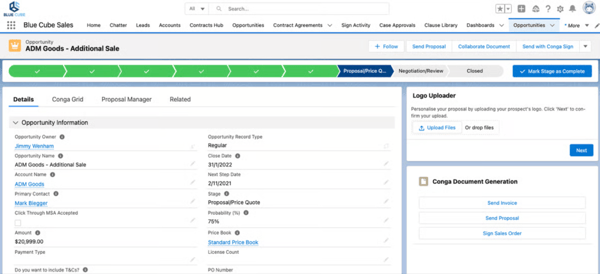
The automation and template capabilities because Conga Composer makes it easy to handle complex documents with dynamic fields, rules, and formatting. Once templates are set up, I can generate consistent, high-quality contracts quickly, even for large volumes or complex use cases. The ability to build conditional content and reusable components means I can preserve brand consistency while tailoring documents to specific customers, products, or deal types. On G2, templates are rated at 90% and automation at 89%, reinforcing how strongly users value these core capabilities.
Conga Composer is purpose-built for high-volume, rules-based document generation across enterprise teams. With deep Salesforce integration, advanced data merging, and workflow automation, Conga Composer enables organizations to generate thousands of complex documents accurately and consistently at scale. Its reliability and performance give me confidence for scheduled bulk runs and high-throughput jobs, and the detailed logs and error reporting make troubleshooting and auditability straightforward. It also holds a 90% meets requirements score, indicating that most users feel it delivers on its core document generation needs.
I like Conga Composer’s strong implementation resources and support. In my evaluation, the combination of clear documentation, step-by-step onboarding guides, and responsive support make it obvious that teams can ramp up quickly and avoid common rollout pitfalls. Having access to professional services and a helpful community also reduces risk during deployment. Having access to professional services and a helpful community also reduces risk during deployment, supported by an 88% quality of support rating on G2.
It offers flexible output and branding options for diverse business needs. From my assessment, its ability to produce consistently branded Word, PDF, Excel, and PowerPoint deliverables and to adapt layouts or locale-specific formatting makes it easy to meet regional and customer requirements without custom engineering. That versatility simplifies multi-format publishing and keeps customer-facing documents on brand.
Composer’s governance and audit capabilities. The platform’s role-based permissions, activity logs, and change history stand out as features that give legal and security teams confidence. Those controls help enforce compliance, support internal audits, and provide traceability for who generated or modified critical documents.
Few G2 users find Conga Composer complex because setting up advanced templates, rules, and workflows often requires technical knowledge or administrative support. This can slow initial implementation and updates, but the platform offers strong flexibility and control once configurations are in place.
I’ve noticed that G2 users report Conga Composer lagging when generating large or complex documents, particularly those involving large datasets, multiple sections, or conditional content. That said, Conga Composer is still widely valued for its document automation capabilities, and addressing performance at scale would make it even more reliable for demanding use cases.
Overall, based on the dataset, Conga Composer is described as a powerful document generation tool best suited for Salesforce-heavy teams that need automation, flexibility, and scale.
“A lot of the people we support don't want to repeat lots of information on documents. Conga has enabled the production of detailed life plans at the click of a button. We use Conga every day for hundreds of people.”
- Conga Composer review, Jacob H.
“At first, setting up Conga Composer required a significant amount of effort and time. However, the outcome has proven to be worthwhile, as it is now streamlining our business processes and saving us a great deal of time.
- Conga Composer review, Felipe G.G2 rating: 4.5/5
DealHub.io stands out for automating revenue-critical documents, especially in organizations with complex deal structures.
What really impressed me is DealHub’s CPQ-driven approach to document generation. It’s widely recognized for automating quotes, contracts, and invoices by tying document creation directly to pricing rules, deal configurations, and approval workflows. With automation scoring 95%, along with strong workflow 94% and branding 95% ratings, users clearly rely on DealHub to generate accurate, on-brand documents without manual rework.
I also see a lot of value in how DealHub handles automated pricing, contract generation, and approvals in one connected flow. Instead of stitching together multiple tools, teams can generate customer-ready documents that already reflect approved pricing logic and internal policies. That makes it especially well-suited for enterprise sales teams managing complex, multi-line, or custom deals.
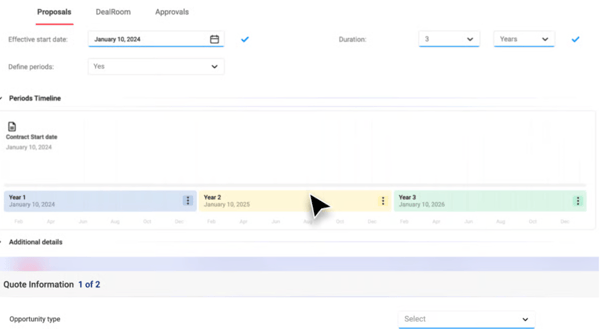
DealHub centralizes quotes, contracts, and approvals into a single platform, which gives me better visibility into deal progress and reduces back-and-forth between sales, finance, and legal teams. This helps streamline complex deal workflows and shortens sales cycles. Real-time status updates and a single source of truth let me spot bottlenecks, forecast the pipeline more accurately, and ensure compliance throughout the quote-to-cash process.
I like DealHub.io’s form-field capability with built-in conditionals — in my evaluation, this stood out as a practical way to present a single, dynamic page to prospects that shows everything we’re offering (including accurate pricing) and auto-generates order forms for signature. That approach standardizes quotes across reps and makes it much easier to deliver a clean, customer-ready proposal in one step.
The guided-selling functionality simplifies quote creation and improves accuracy. From what I reviewed, DealHub steers sellers through only the relevant questions, reduces errors from irrelevant inputs, and helps reps build compliant quotes faster, which clearly preserves momentum and shortens deal cycles. I also found that its configurable conditional logic and role-based prompts help new reps ramp faster and make it easy to enforce pricing and discounting rules, reducing the need for manual reviews.
I like DealHub’s strong implementation and professional-services support in my assessment of the onboarding team, admin training, and responsive customer service, which make configuration and adoption far less risky. The ability to iterate on configurations without coding, combined with hands-on guidance, means organizations can evolve rules and approvals independently while relying on DealHub for escalations and complex customizations.
Based on G2 users, DealHub complex because initial setup and configuration often require time, planning, and technical resources to align workflows, pricing rules, and approvals. This can slow onboarding, but once implemented, the platform provides a strong structure and scalability for complex sales operations.
G2 users have noticed that DealHub can sometimes feel slow or sluggish, particularly when working with large configurations or navigating complex proposals. In these situations, page loads and system responses can take longer than expected, which may interrupt workflow and slow down day-to-day operations. That said, once processes are fully loaded and configured, the platform generally runs smoothly, and improving performance consistency would further enhance the overall experience.
Overall, based on the G2 data, I’d describe DealHub.io as a best-in-class solution for CPQ-driven document generation, ideal for organizations that need to automate quotes, contracts, and invoices accurately while maintaining strict control over pricing and approvals.
“DealHub.io offers impressive flexibility in managing a variety of business models. We are able to keep our customer information synchronized thanks to the app's smart integration features. Additionally, we have consistently experienced prompt and responsive customer service, and the implementation of this app has been thoroughly supported throughout.”
- Dealhub.io review, Sunnysher H.
“Sometimes the platform is a little bit difficult because it has so many features, its a bit confusing at the start. It also takes time to set up the workflow. Other than that it works smoothly once everything is configured.”
- Dealhub.io review, Priyavarshini G.
G2 rating: 4.6/5
Qwilr consistently comes across as a modern alternative to traditional proposal tools, especially for teams that want their documents to feel more interactive and polished without a lot of manual effort.
Qwilr is one of the top platforms for generating personalized customer documents because it enables teams to create interactive, web-based documents that adapt content dynamically based on customer data. With reusable templates, rich media, and real-time engagement analytics, Qwilr is especially effective for personalized sales proposals and customer-facing documents that prioritize experience, clarity, and brand consistency at scale.
One of the strongest recurring themes is how easy Qwilr is to get up and running. Users rate ease of use at 92%, and that tracks with what many reviewers say about being able to create client-ready proposals quickly, even without prior design experience. Ease of setup is also rated highly at 90%, which helps explain why teams are able to start seeing value relatively fast.
Features like reusable blocks and consistent styling make it easier to maintain brand standards across documents, which likely contributes to high satisfaction scores around ease of admin 92% and ease of doing business 95%. From the feedback, it’s clear that Qwilr is especially effective for teams that need repeatable, good-looking documents without reinventing the wheel every time.
Another major advantage of Qwilr is its built-in analytics and tracking capabilities. Teams can see exactly when a prospect opens a proposal, how long they spend on each section, and which areas attract the most attention. This visibility helps sales teams prioritize follow-ups more effectively and tailor conversations based on real engagement data. It removes guesswork and adds a strategic layer to the sales process.
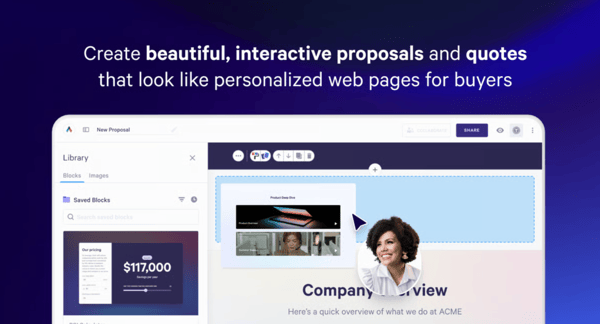
Qwilr also stands out for its web-based hosting and seamless sharing experience. Proposals are delivered as live links rather than bulky attachments, eliminating version control issues and ensuring clients always view the most up-to-date document. The pages are optimized for different devices, making them easy to review on desktop, tablet, or mobile. This flexibility improves accessibility and enhances the overall client experience.
Another consistent strength is Qwilr’s scalability for growing teams. As organizations expand, the platform supports collaboration, standardized workflows, and centralized control over templates and content. This ensures consistency across departments while still allowing room for customization where needed. It’s particularly valuable for companies that want to professionalize their sales operations without adding operational complexity.
That said, my read of G2 feedback also shows a couple of trade-offs. While users generally agree that Qwilr is easy to get started with, many note that fully unlocking advanced features such as integrations, automation, and deeper analytics takes more time. However, reviewers often balance this by saying the effort pays off once teams are fully onboarded and using the platform more strategically.
Customization is another area where feedback is more mixed. For most standard proposal use cases, the streamlined editor works well and keeps things simple. But when teams start looking for very granular control over layouts or complex formatting, some users say the flexibility feels more limited than expected. This can be a challenge for organizations with highly specific design requirements, even though many reviewers acknowledge that the trade-off helps keep the platform intuitive and easy to maintain for everyday use.
Overall, based on G2 user feedback, Qwilr is widely seen as a strong option for teams that value speed, polish, and interactivity in their proposals.
“We absolutely love Qwilr and find ourselves recommending it to everyone we meet. It presents such a professional and impressive image to our clients. The templates are fantastic, and the support team responds almost instantly and is always very accommodating. The platform is incredibly easy to use and implement. We rely on it daily for every client, applying it to many different aspects of our business.”
- Qwilr review, Tammie F.
“I just wish there was an "undo" feature when making changes to templates, if you delete something in error you need to retype it rather than being able to hit back or undo (i suppose that feature is just to insure against my carelessness but nevertheless it would be an improvement id like to see!)”
- Qwilr review, Claire C.
G2 rating: 4.6/5
Proposify is a proposal platform that’s especially strong at brand control, workflow efficiency, and deal execution. One of the most consistent themes in the reviews is how easy Proposify makes it to keep proposals consistent with the company’s brand voice. In fact, branding is rated at 90% on G2, outperforming the category average; users clearly value being able to lock down key elements while still giving sales reps flexibility. The drag-and-drop templates get a lot of praise for letting non-designers create polished, professional proposals without friction. Proposify has been named a Leader on G2, with 97% of users rating it 4 or 5 stars and 93% saying they would recommend it, reflecting strong overall customer satisfaction and market presence.
Proposify makes it easy to create polished, professional proposals because the platform offers customizable templates, brand controls, and an intuitive editor. This allows me to build visually consistent proposals quickly without relying on design or marketing support. It also helps ensure every proposal aligns with our company’s standards, which strengthens our credibility and keeps our messaging consistent across clients.
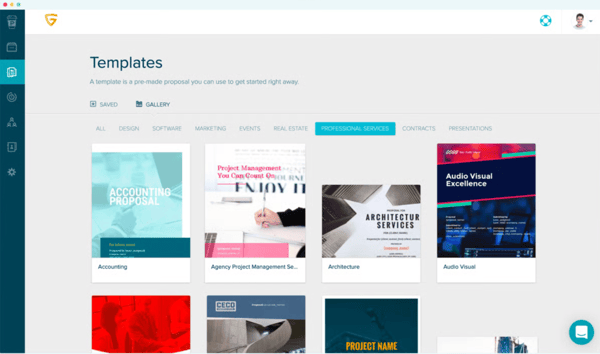
I like the collaboration and approval tools because they make it simple for multiple stakeholders to review, edit, and approve proposals in one place. This reduces version sprawl, speeds up turnaround times, and keeps everyone aligned throughout the proposal process. Having clear visibility into who has reviewed and approved each section also increases accountability and minimizes last-minute confusion.
One of the biggest advantages of Proposify is its centralized content library, which allows teams to store and reuse pre-approved sections, case studies, pricing tables, and legal clauses. This makes it easy to maintain consistency while dramatically reducing the time spent rebuilding content from scratch. It’s especially helpful for teams managing a high volume of proposals. Having a single source of truth for messaging and pricing also minimizes errors and ensures compliance across every document sent out.
Proposify simplifies the closing process by combining proposal delivery, e-signatures, and payment collection into one seamless workflow. Clients can review, sign, and in some cases even pay directly within the proposal, eliminating back-and-forth emails. This helps accelerate deal cycles and reduces friction at the final stage of the sales process. It also creates a more convenient and professional experience for clients, making it easier for them to move forward quickly.
Another frequently praised strength is Proposify’s reporting capabilities. Managers can track proposal win rates, turnaround times, and individual rep performance, providing valuable visibility into the sales process. These insights help teams refine their approach, improve efficiency, and make data-driven decisions to increase close rates. Over time, this level of visibility supports better forecasting and more strategic planning across the sales organization.
G2 users find Proposify limited for complex document automation because it focuses primarily on proposal creation rather than advanced workflows, conditional logic, or large-scale document generation. This can restrict use for enterprise needs, but it performs very well for teams focused on fast, repeatable sales proposals.
I’ve noticed that G2 users report performance and editor stability issues when working with larger or more complex proposals in Proposify. As proposals grow in size, they can take longer to load, and formatting can become tricky after multiple edits. That said, for smaller proposals and standard use cases, the platform generally performs well and remains a useful tool for creating professional proposals.
Overall, based on G2 user feedback, Proposify stands out as a strong choice for teams that care about professional branding, standardized proposals, and faster closes, even if some newer features still have room to mature.
“I've been using Proposify for several years now. We use it nearly every day. Before implementing the system, we were sending quotes in emails or
We've created our own templates for quotes, and I like that the system can calculate totals and discounts easily. I also love that my clients and team members can download a PDF of each quote to save in their files if needed. Proposify helps our team stay organized and gives our clients a professional experience.”
- Proposify review, Kara B.
“Although there is customisation option available with multiple drag and drop options available for the editing to create the proposal letter but there are some advanced features like photo editing and adding audio files on the invitation letter is still unavailable in proposify. There subscription plan is little expensive for small business who want to use this platform for long term”
- Proposify review, Neelesh M.
G2 rating: 4.4/5
Adobe Acrobat Sign is a reliable, enterprise-ready solution for document signing and approval workflows, rather than a full document creation platform. I like how easy Adobe Acrobat Sign makes it to send, sign, and manage documents because the interface is intuitive and works well across devices. This helps me move agreements forward quickly without complicated setup or training. It also reduces administrative delays by allowing recipients to complete documents from anywhere, on any device. Notably, G2 data highlights strong performance in core functionality, with users rating its schedule and automation features at 93%, well above category averages.
Adobe Acrobat Sign is one of the top-rated tools for secure document generation due to its enterprise-grade security, compliance certifications, and built-in eSignature capabilities. As part of the Adobe ecosystem, it supports encryption, audit trails, and regulatory compliance, making it a strong choice for organizations handling sensitive documents. Its seamless integration with other Adobe and enterprise tools further strengthens workflow efficiency across teams. Supporting this experience, the platform earns a 91% ease of use rating and a 92% ease of setup score on G2, reflecting consistently positive feedback around usability and onboarding.
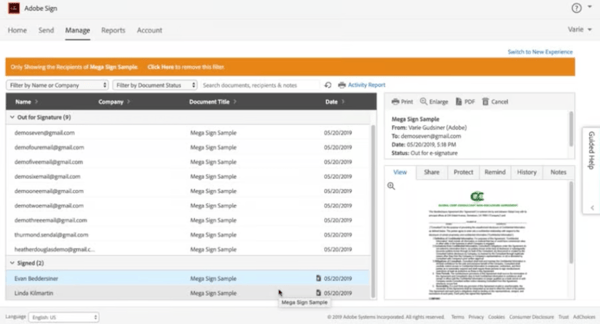
I like the security and compliance features because Adobe Acrobat Sign supports encryption, authentication, and detailed audit trails. These capabilities give me confidence when handling legally binding or sensitive documents, especially in regulated environments. The transparent tracking and verification features also make it easier to demonstrate compliance during internal or external audits.
A major advantage of Adobe Acrobat Sign is its automated reminder and notification system. Users consistently highlight how helpful it is to receive alerts for pending signatures, deadlines, and due dates without manual follow-ups. This automation reduces delays, keeps deals moving, and improves overall approval turnaround times. As a result, teams can focus more on closing business and less on chasing signatures.
Another frequently mentioned strength is the ability to track document status in real time. Users value seeing exactly who has viewed, signed, or is yet to complete a document, which improves transparency throughout the approval process. This level of visibility helps teams stay organized and prevents documents from getting lost or stalled. This real-time insight empowers stakeholders to take timely action and maintain momentum across every stage of the workflow.
Many users appreciate the flexibility in how signatures can be created and applied. The ability to type, draw, upload, or customize signatures and initials adds convenience while accommodating different user preferences. This adaptability makes the signing experience more user-friendly and accessible across various business scenarios.
G2 users have said that Adobe Acrobat Sign can be limited because it focuses primarily on eSignature rather than advanced document generation, conditional logic, or workflow automation. This can be restrictive for complex use cases, but it excels at fast, reliable signing for standard agreements.
For some users, pricing can add up as additional users, integrations, or premium features are introduced. This may be a concern for smaller teams, but Adobe’s brand trust, security standards, and seamless signing experience justify the investment for many organizations.
Overall, based on the feedback, I’d describe Adobe Acrobat Sign as a strong fit for teams that need fast, compliant, and repeatable document signing, especially in regulated or enterprise environments, while keeping document creation separate from the signing process.
“Convenient and easy to access from mobile phone implementation, great tutorial document provided by customer support to assist new user how to use e-signature tools to digitally sign legal and invoice document, it takes less than 5 minutes to complete signing. Request signature from client or customer, track document delivery and document open rate tracker notification. Using it almost everyday, or at least 4-8 times a week for contract and purchase approval. Ease of connection to integrate with Google Drive for document secure storage and option to share document securely by using sharable link.”
- Adobe Acrobat Sign review, Nadia S.
“Opening a large-sized PDF document is always problematic, it draws too many phone resource to load all the rich media on the document like picture. Trying to reduce the original size doesn't help much as the size is still quite large even after compressing it.”
- Adobe Acrobat Sign review, Izham R.
G2 rating: 4.5/5
Responsive is a document software platform built for speed, consistency, and scale, especially for teams responding to RFPs and proposals. What stands out most to me is how well Responsive supports repeatable, structured documents. With strong G2 scores in documents 86%, workflow 86%, and automation 84%, it’s clear that users rely on the platform to reduce manual work and avoid starting from scratch every time.
That consistency is especially valuable for teams managing RFPs, security questionnaires, and other high-volume, deadline-driven content. By centralizing knowledge and standardizing processes, Responsive helps organizations maintain accuracy and brand alignment while scaling output efficiently.
I like how Responsive balances automation with control. While autonomous execution and AI features score lower, that actually makes sense for high-risk documents where accuracy matters more than full automation. The AI helps accelerate drafting, but humans stay in the loop. This hybrid approach reduces the risk of errors while still delivering meaningful time savings. It shows that the platform is designed with real-world governance and compliance needs in mind, where oversight and accountability are just as important as speed.
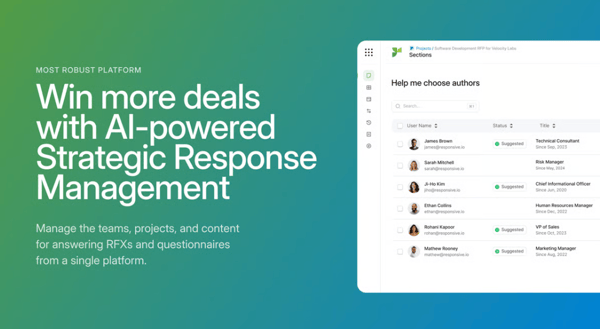
Support quality is another big plus. A 93% support score, according to G2 Data, tells me users feel backed up when deadlines are tight and document complexity is high. In industries where submissions can directly impact revenue, responsive and knowledgeable support can make a significant difference. Strong customer support not only builds trust but also helps teams fully adopt and optimize the platform, ensuring they get long-term value rather than just short-term efficiency gains.
One major strength is collaboration at scale. Users consistently emphasize how easy it is to assign sections, reassign tasks, and enable SMEs to contribute directly within the platform. Real-time collaboration, progress tracking, and clear ownership reduce bottlenecks and email back-and-forth. This structure transforms RFP management from a fragmented process into a coordinated, transparent workflow — especially valuable for cross-functional and multi-market teams.
Another standout advantage is intelligent content extraction and auto-detection. The platform’s ability to automatically detect questions, sections, and answer rows significantly reduces manual formatting work when uploading complex RFPs. Combined with automatic question matching and pre-population, this feature saves substantial time and ensures nothing is missed. For high-volume teams, this automation improves both accuracy and turnaround speed.
Finally, users frequently highlight ease of use and fast implementation. Many describe the setup process as simple, often just uploading existing Q&A content, tagging it, and assigning owners. The intuitive, MS Word-like editing experience makes adoption smoother and minimizes workflow disruption. This accessibility lowers the barrier to entry while still delivering enterprise-level functionality, making Responsive both powerful and approachable.
Based on G2 reviews, Responsive is less suited for fully autonomous document generation because its AI and automation capabilities are intentionally designed to keep humans in the loop. While this limits hands-off execution, it ensures higher accuracy and control, which is especially valuable for teams working on high-risk, regulated, or customer-facing documents.
Responsive can feel rigid for highly creative or free-form documents because the platform emphasizes structured workflows and standardized content, as noted by G2 reviewers. However, this rigidity helps teams maintain consistency, reduce errors, and scale repeatable responses efficiently, making it a strong fit for compliance-focused and enterprise use cases.
Overall, based on the data and my evaluation, I’d describe Responsive as a strong fit for organizations that need to generate high-volume, high-accuracy documents quickly, without sacrificing consistency or control.
“The various methods to extract information from our content library into the answers - use their AI, their keyword similarity search, assign authors, or upload documents directly. Updating the content library is not bad; you can export the Q&A library easily, which is good for maintenance and clean up.”
- Responsive review, Neer P.
“At times, the content library can feel a bit overwhelming. Having features like more organization tools, more advanced tagging, or smarter search and filtering could help make it easier to surface the most relevant or recently approved responses quickly.”
- Responsive review, Steven M.
G2 rating: 4.3/5
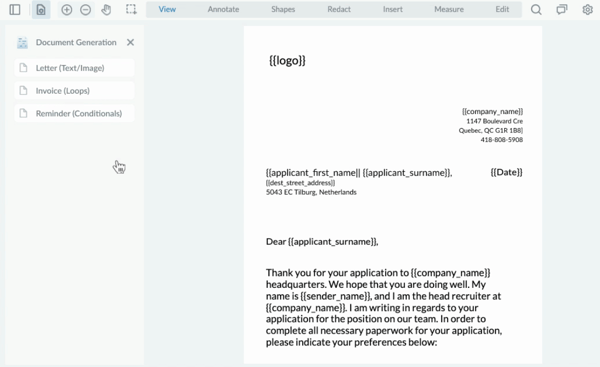
I’ve found Apryse PDF SDK to be a powerful solution for building custom documents and PDF workflows directly into applications. One of the biggest strengths for me is how flexible and developer-friendly the SDKs are. With robust APIs for PDF viewing, editing, annotation, redaction, and conversion, Apryse makes it easy to embed advanced document functionality into web, mobile, and desktop apps without relying on third-party viewers. Its strong market recognition further reinforces this position — Apryse PDF SDK has been named a Leader on G2, with 98% of users rating it 4 or 5 stars and 87% saying they believe the product is headed in the right direction.
I also really like the performance and reliability of Apryse’s document engine. It handles large and complex PDF files smoothly, supports a wide range of formats, and offers precise control over rendering and document manipulation. This makes it especially well-suited for enterprise use cases where speed, accuracy, and consistency matter. Its robust architecture gives organizations confidence that mission-critical document workflows will run without performance bottlenecks or stability issues.
Another major advantage that consistently appears in user feedback is strong cross-platform compatibility. Teams highlight how seamlessly Apryse works across iOS, Android, Web, Windows, and backend environments like .NET Core and Node.js. This flexibility allows engineering teams to maintain a unified document experience across products without building separate solutions for each platform. For organizations operating in multi-device environments, this consistency significantly reduces development overhead and long-term maintenance complexity.
A frequently praised strength is high-quality document conversion and multilingual support. Users specifically mention smooth conversions between PDF and Microsoft Office formats, along with excellent Unicode handling for languages such as Arabic, Russian, and Chinese. This capability is critical for global enterprises that need to generate accurate, professional documents without formatting errors. The reliability of these conversions reinforces Apryse as a production-grade solution for international and compliance-heavy workflows.
Reviewers often emphasize comprehensive document automation capabilities, particularly around digital signatures, encryption, stamping, merging, and dynamic form filling. The ability to programmatically generate, secure, and validate documents in real time eliminates the need for patchwork open-source tools or manual processes. Notably, Apryse scores 90% for quality of support on G2, reflecting strong customer satisfaction in enterprise implementations. This end-to-end automation not only accelerates the deployment of secure document features but also ensures scalability and stability under high usage conditions.
That said, G2 reviewers have found that Apryse has a learning curve, particularly for teams without strong development resources. Implementing and customizing the SDKs requires technical expertise and time, but that complexity enables deep customization and fine-grained control once the platform is fully implemented.
G2 data suggests that Apryse may be priced higher than some simpler PDF tools, particularly as licensing expands across multiple products or deployments. However, for organizations prioritizing enterprise-grade document processing and long-term scalability, the overall value proposition can make the investment more justifiable. The platform also earns a 91% ease of use score on G2, indicating that despite its technical depth, users find it intuitive once implemented.
Overall, Apryse stands out as a strong choice for organizations that need embedded, high-performance document functionality rather than a standalone document editor. While it requires technical expertise and a higher investment, the platform delivers the flexibility, control, and scalability needed for complex, enterprise-grade document workflows, making it a compelling option for product teams building document-intensive applications.
“My favorite feature is the ability to incorporate personalized PDF functionalities within the internal systems with minimal disruptions to the user workflow. Apryse is constantly used to create and alter reports in real time. It has proved to be reliable with massive, complex, annotated, and data rich documents. Manual PDF edits, external applications, and other tools have been eliminated due to the programmatic control. It is a great feeling to have a PDF engineered resource that works exactly in the way that is needed and meets the expectations.”
- Apryse PDF SDK review, Rajvir M.
“Some of the more advanced features took a little time to figure out, and it took a bit of experimenting to get things working exactly the way I wanted. But whenever I hit a roadblock, the support team was quick to help, which made things a lot easier.
- Apryse PDF SDK review, Gaurav K.
Still have a few unanswered questions? Let’s answer them for you.
Consider Proposify or PandaDoc, as they are best suited for complex templates. The reason being they both provide highly customizable template builders that are flexible and easy to use, making them ideal for teams working on nuanced contracts and proposals.
All the software tools mentioned in the list provide some level of AI integration, but many users have raved about the AI-assisted answer generation by Responsive for auto-drafting content, as well as Adobe Acrobat’s AI summarization and smart assistance, which have helped them automate their documentation process.
Adobe Acrobat has been a popular software for enterprise teams when it comes to document generation due to its ability to handle large-scale document generation, strong customer support, and security features. Conga Composer is also a great option for enterprises. Their Salesforce integration for document automation has been repeatedly mentioned by reviewers.
Go for Apryse SDK. It has robust APIs for PDF viewing, editing, annotation, redaction, and conversion. Apryse makes it easy to embed advanced document functionality into web, mobile, and desktop apps without relying on third-party viewers.
Yes, ChatGPT does have the ability to generate documents. However, it is not foolproof, which is why most users rely on document generating softwares to ensure limited errors when generating large-scale contracts, proposals, and other sensitive documents. Users can use a combination of ChatGPT and other document generation tools for a holistic approach.
The best bet for automation is Conga Composer. Conga Composer has been repeatedly mentioned as the first choice when it comes to automation, especially with Salesforce.
You can go with DocuSign CLM, which has been cited as being used for legal reviews by many users. Their security and compliance features make it so it is safe and easy to send and receive sensitive documents. Adobe Acrobat is also a highly trusted software used by legal professionals for compliance and redaction.
Try PandaDoc if you are an enterprise business and are looking to integrate with Salesforce for your document generation process. It’s considered to be cheaper than most other enterprise tools. Its bulk sending and receiving of documents, along with customized templates, significantly reduces manual labour. For the revenue teams, Dealhub.io has been a frequently used tool. Users have frequently cited it for its quoting + documentation within Salesforce.
By creating efficient workflows and automating repetitive tasks, I was able to minimize manual work and maintain organized processes within the workspace. With the right document generation software, you can track client history, receive real-time updates on proposals, and audit the entire documentation process. These tools help me identify errors within documents, collect live input from teammates through comments and highlights, and securely send and receive documents using encrypted software. Now you can do the same.
But the market has evolved far beyond simple template automation. Today’s leading document generation platforms are embedding AI-assisted drafting, dynamic data population from CRMs and ERPs, built-in compliance controls, advanced analytics, and end-to-end workflow automation. Buyers are prioritizing solutions that not only generate documents but also integrate seamlessly into existing tech stacks, support secure e-signatures, and provide real-time visibility into document performance and approval cycles. If you’re at the decision stage, the question isn’t whether to automate, it’s how much revenue risk, inefficiency, and compliance exposure you’re willing to eliminate.
The best document generation software centralizes content, enforces accuracy at scale, accelerates approvals, and shortens time to close. Choosing the right platform now means fewer errors, faster deal cycles, stronger governance, and a measurable impact on business outcomes.
Don’t leave your data exposed. Compare the top free encryption tools of 2026 and choose the one that fits your security needs the best.


It all started when I was buried under a mountain of paperwork that needed signatures — fast....
 by Washija Kazim

Today, content creation is unavoidable, both personally and professionally. Without the right...
.png) by Tanuja Bahirat
by Tanuja Bahirat

Not all "free" e-signature tools are free in the same way, and for a small business, that...
 by Shashank D Shastry