If you work in customer experience, marketing, or product, you already know customer journeys aren’t linear. People bounce between channels, switch devices, drop off without warning, and return when it’s convenient for them.
The real challenge isn’t collecting more data, but connecting the dots across touchpoints and figuring out what actually drives conversion, retention, and loyalty. That’s where customer journey analytics comes in.
But not every platform delivers the same level of clarity. Some are great at visualizing paths, others focus on attribution, and a few go deeper with predictive insights and AI-driven recommendations.
To help you cut through the noise, I analyzed G2 reviews, compared the best customer journey analytics software, and pulled real user feedback to identify which platforms deliver the most actionable insights today.
This guide breaks down what each option does best, where it falls short, and how to choose the right fit based on your goals — from journey discovery and cross-channel attribution to personalization and retention.
10 best customer journey analytics software: My picks for 2026
- HubSpot Marketing Hub: Best for journey analytics within a CRM
Tracks touchpoints, automates workflows, and visualizes the customer journey inside a unified CRM.
- Insider: Best for AI-driven personalization
Uses predictive modeling to tailor user journeys, increase conversions, and optimize engagement.
- Braze: Best for real-time cross-channel engagement
Offers strong segmentation and journey analytics to deliver personalized experiences at scale.
- Glassbox: Best for digital experience insights
Captures session replays, behavioral analytics, and friction points across web and mobile journeys.
- Quadient Inspire: Best for enterprise customer communications
Specializes in mapping and optimizing high-impact communications across complex customer journeys.
- Dotdigital: Best for e-commerce journey automation
Enables email, SMS, and omnichannel campaigns tied to real-time behavioral data.
- WebEngage: Best for multi-channel lifecycle automation
Helps teams build contextual journeys with segmentation, campaigns, and deep analytics.
- Netcore CEEX Platform: Best for retention and engagement analytics
Delivers journey mapping, cohort analysis, and predictive insights focused on lifetime value.
- MoEngage: Best for omnichannel engagement intelligence
Provides behavior-based recommendations, funnel insights, and journey orchestration.
- ChurnZero: Best for customer success journey analytics
Helps CS teams track adoption, health scores, and customer behavior to prevent churn.
According to G2’s Winter 2026 Grid Reports, these customer journey analytics tools dominate their category. Pricing is usually offered on request.
My 10 best customer journey analytics software picks for 2026
While reviewing leading customer journey analytics platforms, one thing became clear: these tools completely reshape how businesses understand, optimize, and scale customer experiences.
The global customer journey analytics market is projected to reach $9.84 billion by 2034, growing at a CAGR of 9.84%.
The right platform enables continuous, comprehensive, and actionable journey analysis, whether it’s mapping cross-channel interactions, identifying drop-off points, or uncovering hidden patterns in customer behavior.
This level of visibility is essential for teams that want to boost retention, refine marketing strategies, improve service operations, and deliver experiences rooted in real customer needs rather than assumptions.
If you’re searching for a solution that helps you visualize end-to-end journeys, diagnose experience gaps, or turn complex behavioral data into clear action, these customer journey analytics tools stood out for their intelligence, usability, and impact on customer growth and loyalty.
In addition to that, to understand how users interact with your product after acquisition, see the guide to the best free product analytics software.
How did I find and evaluate the best customer journey analytics software?
To identify the top customer analytics platforms, I evaluated real user reviews on G2 to see how each tool supports the full spectrum of customer insight workflows — from segmentation and behavioral tracking to predictive modeling, journey analysis, and retention measurement.
I also utilized AI to synthesize insights from user reviews and G2 Grid Reports, comparing the depth of analytics, data accuracy, ease of implementation, visualization quality, integration ecosystems, and overall customer satisfaction. This guide includes screenshots from vendor G2 pages, allowing you to see how these platforms are actually use, and how teams interact with dashboards, reports, and insights in real-time.
I curated this list to help marketing teams, CX leaders, and product strategists choose the right customer analytics software to understand user behavior, improve personalization, and drive better customer outcomes, whether you’re building a data strategy from the ground up or enhancing a mature analytics operation.
What makes the best customer journey analytics software worth it: My opinion
When evaluating the best customer journey analytics platforms, I focused on features that would help teams make smarter, data-backed decisions.
- Multiple journey analysis methods: Top platforms shouldn’t limit how you interpret customer behavior. I looked for tools that support journey mapping, funnel analysis, path exploration, cohort tracking, sentiment analysis, and real-time behavioral insights. The best software adapts to every stage — from acquisition to retention.
- Behavior analytics: A great customer journey tool should show exactly where customers engage and where they drop off. I prioritized platforms with event tracking, friction-point detection, attribution models, segment performance comparisons, and cross-channel visibility. These insights help teams understand what drives conversions and what stalls them.
- Customer-experience alignment: Customer insights shouldn’t be siloed across teams. I focused on platforms that let teams share journey maps, comment on trends, build dashboards together, and create repeatable analysis workflows. Top tools give marketing, product, and CX teams a shared source of truth.
- AI-powered insights: Manual data stitching wastes hours. I favored tools with AI features, such as automated insight generation, anomaly detection, next-best-action suggestions, predictive churn alerts, and guided optimization opportunities. These capabilities help teams move quickly from raw data to meaningful action.
- Customization and branding: The best customer journey analytics software lets teams customize dashboards, KPIs, journey stages, scoring models, and reporting visualizations. Whether tailoring customer segments or creating branded experience reports, top platforms support a consistent and data-driven approach to customer engagement.
- Monitor, track, and analyze lead and/or customer behavior across a multitude of channels
- Create visualizations or maps of past, current, or future customer journeys based on behavioral data
- Automate the testing and optimization of customer-facing messaging and campaigns
- Facilitate the prediction or forecasting of customer behavior
- Easily and/or seamlessly integrate with marketing, sales, or e-commerce solutions
This data was pulled from G2 in 2025. Some reviews have been edited for clarity.
1. HubSpot Marketing Hub: Best for journey analytics within a CRM
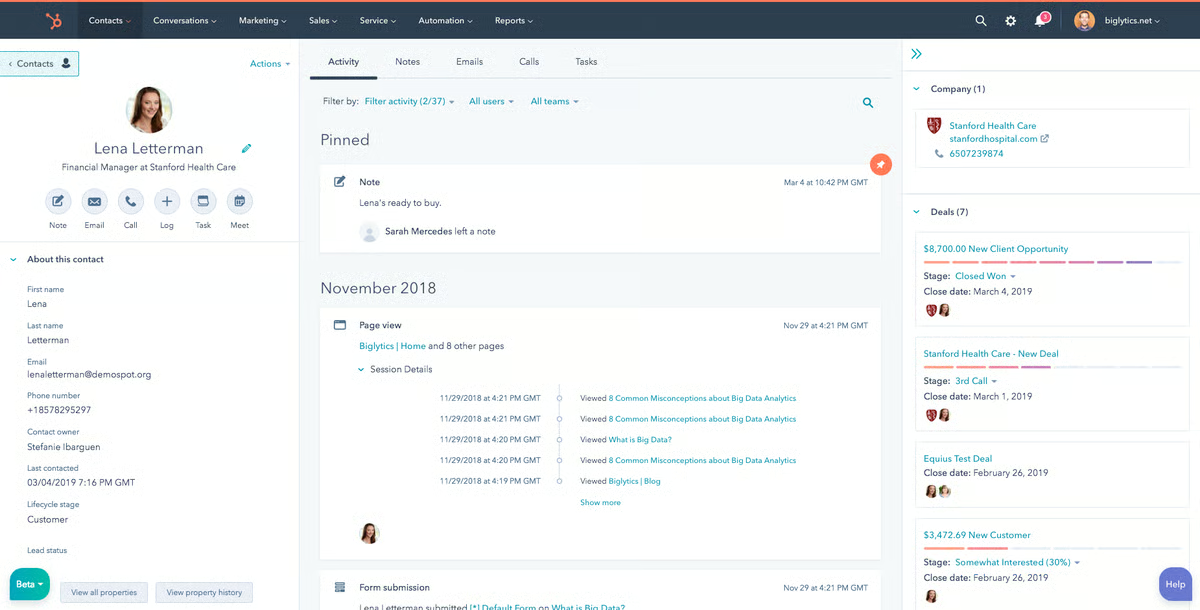
HubSpot Marketing Hub is widely recognized as a comprehensive marketing automation platform that helps attract the right audience, convert leads, and manage inbound campaigns.
I’ve frequently seen reviewers highlight the intuitive interface and easy navigation as major benefits, noting that users can find features and set up campaigns quickly without extensive training.
A standout capability, according to users, is the marketing automation and workflows. Many G2 reviewers appreciate being able to automate repetitive tasks, configure triggers, and run multi-step campaigns effortlessly. From what I’ve seen, this automation is particularly valued for consistently nurturing leads while saving marketing teams time.
The platform’s email marketing and campaign management tools also receive high praise. Users often mention the ability to design visually appealing emails, segment audiences effectively, and monitor campaign performance in real time. This control over targeting appears to make campaigns more impactful and measurable.
CRM integration is another feature that G2 users frequently call out. Having access to detailed customer data allows marketers to tailor messaging and campaigns for specific segments, which users report leads to higher engagement and better conversion rates. A consistent theme in reviews is the appreciation for how marketing activities and customer data are seamlessly connected.
Reviewers often highlight the analytics and reporting dashboards as key strengths. They provide clear insights into campaign performance, lead behavior, and ROI, helping teams make data-driven decisions and optimize campaigns efficiently.
Many users value the AI-driven features and time-saving automation. Predictive lead scoring, automated task assignments, and other smart tools are frequently cited as reducing manual workload and enabling teams to focus more on strategy and creative planning.
There’s noticeable appreciation for the centralized platform approach, which allows users to manage email campaigns, social media, landing pages, workflows, and analytics from a single hub. Multiple reviewers have mentioned how this organization reduces the need to juggle multiple tools and simplifies campaign management.
That said, some reviewers note that pricing becomes a more important consideration as teams scale. This structure tends to align better with organizations that plan to use a wide range of the platform’s automation and tools, while lighter-use teams may find the cost less proportional to their needs.
Similarly, some users have pointed out that advanced reporting customization could be more flexible. While a few reviewers noted the need for workarounds for highly specialized reporting, many feel the default dashboards are enough for running and analyzing most campaigns.
Overall, this appears to depend on how detailed a team’s reporting requirements are, with the existing tools meeting expectations for a wide range of use cases.
What I like about HubSpot Marketing Hub:
- The interface feels really intuitive, and I’ve noticed G2 users often mention how easy it is to find features and set up campaigns quickly.
- Automating tasks and workflows seems to save a lot of time, and I’ve noticed G2 users highlight how it keeps lead nurturing consistent without extra effort.
What G2 users like about HubSpot Marketing Hub:
"What I like most about HubSpot Marketing Hub is the ability to automate campaigns and centralize all marketing actions in one place. The creation of workflows, emails, landing pages, and the analysis of results are very intuitive, which makes it easier to optimize strategies and generate leads more efficiently, even without a large team."
- HubSpot Marketing Hub review, Gabriel G.
What I dislike about HubSpot Marketing Hub:
- Some G2 users have shared that pricing can increase as contact lists grow, which may be something to consider for teams planning to scale quickly. Others note that the value still aligns with the platform’s feature set as usage expands.
- A few users mentioned that customizing reports for more advanced analytics can require extra effort, while many find the standard reporting sufficient for everyday campaign insights.
What G2 users dislike about HubSpot Marketing Hub:
“The thing I slightly dislike about HubSpot Marketing Hub is that it doesn't provide filtering by domain name as expected. Suppose one of my colleagues has his lead named as A@agency.com and I have found another lead with the same domain (i.e., B@agency.com), then sometimes it creates 2 different leads, and sometimes it doesn't allow creating to prevent overlap, so this can be improved.”
- HubSpot Marketing Hub review, Yash S.
2. Insider: Best for AI-driven personalization
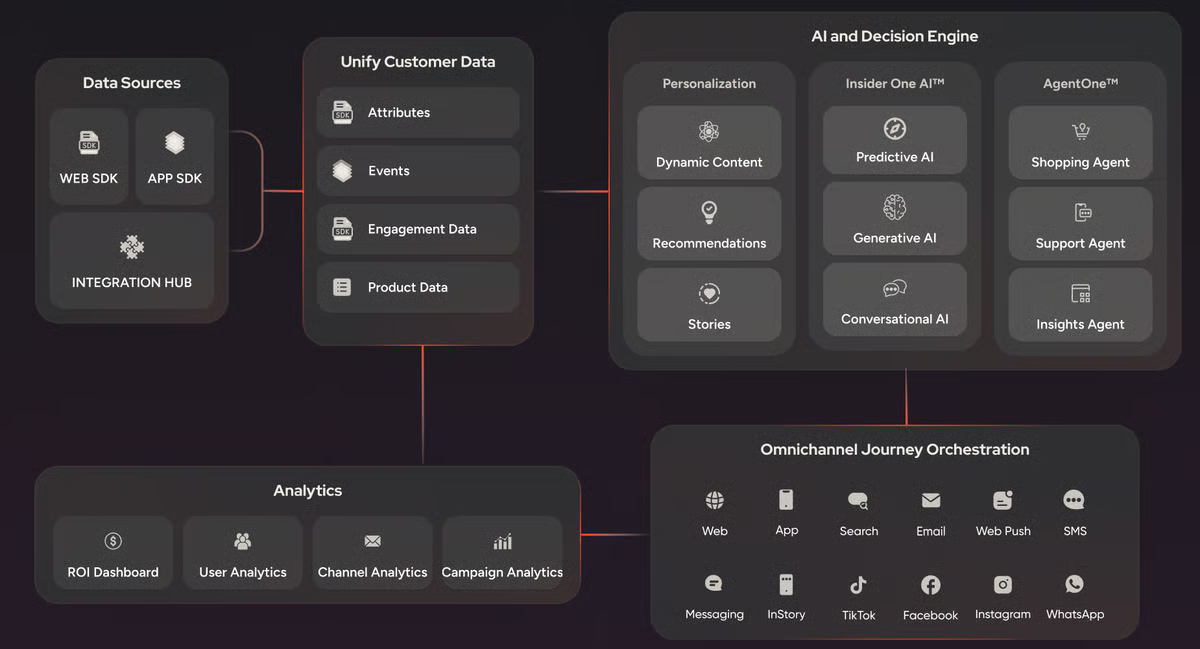
Insider is widely recognized as a powerful customer journey analytics and engagement platform that helps deliver personalized experiences across multiple channels.
Reviewers highlight multi-channel campaign management as a major strength, noting that campaigns can run simultaneously across web, app, email, SMS, and WhatsApp. Users appreciate that this capability allows them to coordinate marketing efforts efficiently and reach customers wherever they are most active.
A standout feature, according to users, is the AI-powered Smart Recommender. Many G2 reviewers mention how it enables personalized product and content suggestions without manual audience segmentation. From what I’ve seen, this automation saves time while increasing engagement and driving conversions.
Email marketing tools are another area that G2 users frequently praise. Segmentation, A/B testing, and detailed analytics make campaigns more targeted and effective. Users report that these insights enable continuous optimization, improving engagement and overall campaign performance.
The platform’s push notifications and real-time messaging also receive consistent positive mentions. Users note that being able to send timely updates via app, SMS, or web channels helps boost retention and conversions, reaching audiences at the right moment.
G2 reviewers often highlight Insider’s user-friendly interface and intuitive automation. Even when managing complex, multi-channel marketing campaigns, users find the platform approachable and efficient, making sophisticated workflows easier to implement.
Another feature that users seem to really appreciate is customer support and proactive account management. Many reviewers mention prompt responses to questions, guidance on best practices, and optimization tips, which enhance the overall platform experience.
That said, some G2 reviewers note that multi-channel journey optimization and deeper integrations tend to require more upfront planning. This approach can work well for larger teams with dedicated resources and cross-functional coordination, though smaller teams or those launching simpler journeys may find the initial setup more time-intensive.
Similarly, a few users shared that reporting and analytics could be more flexible for highly specific or advanced use cases. While teams with complex data requirements may want more granular or customizable reporting, many reviewers indicate that the existing dashboards still provide enough insight to support data-driven decision-making for most campaigns.
Overall, a consistent theme in G2 reviews that I’ve noticed is strong satisfaction with Insider’s multi-channel capabilities, AI-driven personalization, intuitive automation, and responsive support.
What I like about Insider:
- Coordinating campaigns across multiple channels feels really seamless, and I’ve noticed G2 users often mention how this helps reach customers wherever they are active.
- AI-powered personalization seems to save a lot of time, and I’ve noticed G2 users highlight how it boosts engagement and conversions without manual segmentation.
What G2 users like about Insider:
“Journeys and tests that are easy to implement to determine which of our campaigns are more efficient and achieve better results. The platform is also very intuitive, especially when it comes to creating rules and segmentations for the sends. The data helped us optimize our strategies and maximize conversions. The fact of having the control group helps us a lot with internal experiments.”
- Insider review, Alessandra C.
What I dislike about Insider:
- Journey setup and integrations may suit larger teams with the resources to plan and coordinate multi-channel workflows, while G2 users mention that smaller teams running simpler journeys may find the initial setup more involved.
- Reporting and analytics work well for most standard campaign insights, though G2 users mention that teams with highly specialized or advanced data needs may want more granular customization.
What G2 users dislike about Insider:
“Insider One has advanced journey orchestration that makes the app have a complex learning encounter. The app has diverse channels that overwhelm users, more so in handling matters and campaigns.”
- Insider review, Samantha L.
3. Braze: Best for real-time cross-channel engagement
Braze is widely regarded as a powerful customer journey analytics and engagement platform, particularly effective for creating personalized, cross-channel experiences in real time.
G2 users often highlight the intuitive interface, which makes navigating campaigns, journeys, and analytics straightforward, even when handling complex workflows.
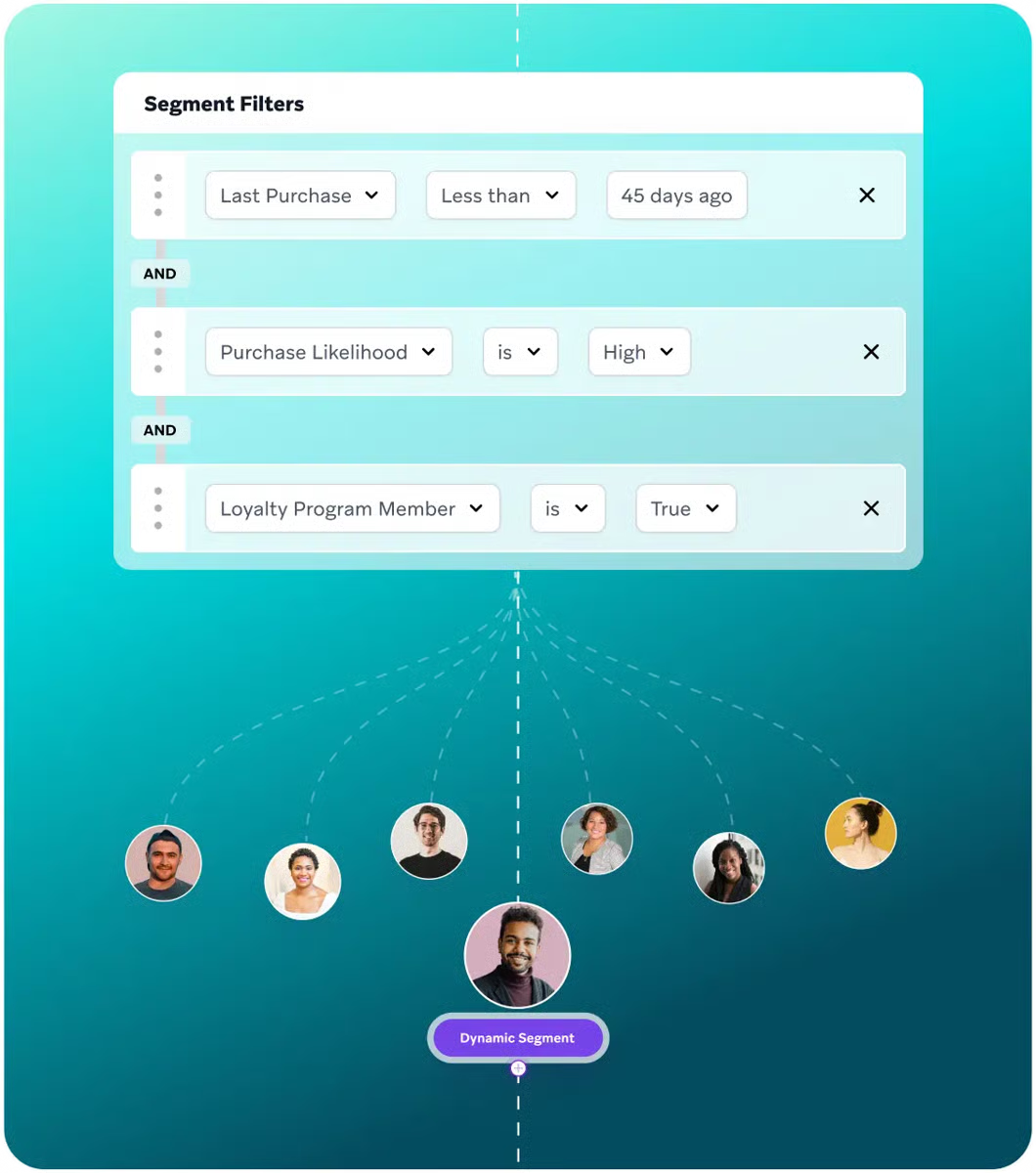
One feature that stands out in user reviews is advanced segmentation and filtering. G2 users being able to target audiences with precision based on behavior, preferences, and engagement patterns consistently leads to more relevant campaigns and higher engagement and conversion rates.
Advanced scheduling and A/B testing are other commonly appreciated elements. Many reviewers note that these capabilities simplify campaign optimization, allowing teams to experiment with content, timing, and channels and make data-driven decisions quickly.
The drag-and-drop canvas journey editor frequently comes up in positive reviews. Users appreciate being able to visually design and adjust multi-step campaigns without needing extensive technical expertise. From what I’ve seen, this flexibility makes complex campaign orchestration much more efficient.
Multiple reviewers mention the value of Liquid programming. This feature allows conditional logic and personalization rules for highly tailored customer experiences, which many users find difficult to achieve with other platforms.
Real-time analytics and reporting stand out as a core strength. Across multiple reviews, users highlight the ability to track engagement, conversions, and drop-off points in real time, which works especially well for teams that want to optimize campaigns quickly and share timely, actionable insights with stakeholders.
That said, some G2 users mention additional learning time when moving beyond basic campaigns. While initial setup is often described as straightforward, teams looking to take full advantage of advanced features may need more time to become comfortable with them.
A few reviewers also point out minor limitations related to data handling, Canvas performance, and autosave functionality, particularly when working with larger datasets. These considerations are more relevant for data-heavy or enterprise use cases, where scale and workflow density are higher.
These considerations tend to be more relevant for data-heavy or enterprise use cases, though many users still feel the platform’s overall flexibility and performance outweigh these challenges.
Overall, according to feedback I gathered from G2 users, Braze is valued for its intuitive interface, advanced segmentation, flexible journey orchestration, real-time analytics, and strong support.
What I like about Braze:
- The interface feels intuitive, and I’ve noticed G2 users often mention how easy it is to navigate campaigns and journeys, even with complex workflows.
- Advanced segmentation and filtering seem really effective, and I’ve noticed G2 users highlight how precisely targeting audiences improves engagement and conversions.
What G2 users like about Braze:
“I like how easy Braze is to use! The drag-and-drop feature is super easy to use and lets me customize my emails how I want. I am on Braze every day and often build and launch emails! It was super easy to learn how to use, and it is much better than the old email platform I used to use.”
- Braze review, Hannah S.
What I dislike about Braze:
- Braze’s advanced feature set introduces additional complexity beyond basic campaign execution, which tends to matter most for teams aiming to use its full orchestration and personalization capabilities rather than running simple, linear campaigns.
- Handling large datasets can be tricky, and I’ve noticed G2 users point out minor issues with Canvas performance and autosave when campaigns get complex. These considerations are more relevant for data-heavy, high-volume use cases than for lighter campaign workflows.
What G2 users dislike about Braze:
"I would love it if there were a way to easily convert HTML templates to drag and drop. I am trying to switch my emails from HTML to drag and drop, and cannot get the exact specifications to be the same, and it is quite frustrating.”
- Braze review, Hannah S.
4. Glassbox: Best for digital experience insights
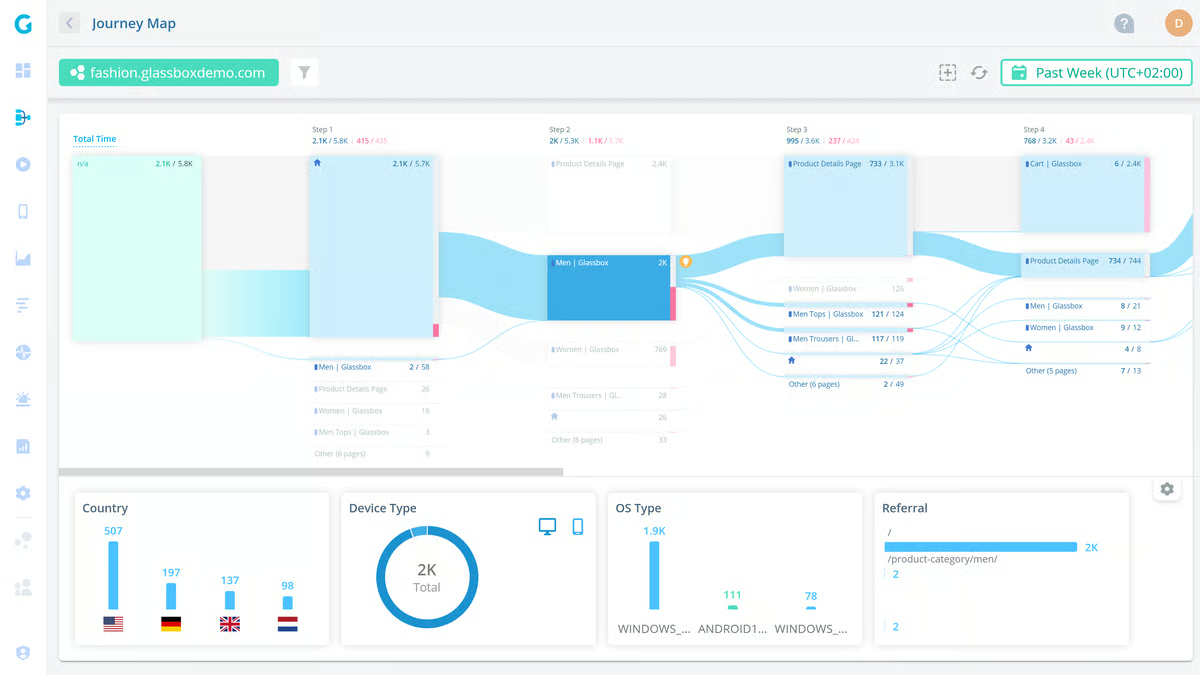
Glassbox is widely recognized as a comprehensive customer journey analytics platform that captures and analyzes every user interaction on web and mobile apps.
I’ve frequently seen reviewers highlight the complete session capture as a major strength, noting that capturing 100% of user sessions provides full visibility into customer behavior. Users report that this level of detail helps them understand the entire journey, leaving no critical interactions overlooked.
According to users, one standout feature is real-time session replay. Many G2 reviewers note that being able to watch user interactions as they happen enables teams to pinpoint friction points, identify usability issues, and implement actionable improvements quickly. From what I’ve seen, this feature is particularly valued for improving user experience and operational efficiency.
The platform’s AI-powered insights also receive consistent praise. Users frequently highlight how AI helps identify patterns, detect issues, and suggest optimizations without manually reviewing hundreds of sessions. This automation appears to save time and accelerate decision-making for teams.
G2 reviewers often mention Glassbox’s user-friendly interface as a positive aspect. Even with the platform’s extensive features, users find it intuitive to navigate, apply filters, access session data, and generate insights without feeling overwhelmed.
Conversion rate optimization is another commonly appreciated element. Many users report that analyzing user behavior and friction points allows them to implement targeted improvements that impact key metrics. Multiple reviewers also note the platform’s ability to provide context for user actions, helping teams understand the why, not just the what, behind customer behavior.
Another feature that users seem to really value is defect triaging and troubleshooting. Being able to replay sessions and see exactly what went wrong helps teams respond to issues efficiently and improve support processes.
That said, some G2 reviewers mention that the platform’s depth of data and features is better suited to teams that rely on detailed analysis and frequent exploration, rather than those looking for a lightweight or guided experience. This tends to work well for teams that want detailed insights and are willing to invest time in onboarding. Many users note that once familiar with the tools, the breadth of functionality becomes a strong advantage.
Additionally, a few users have pointed out occasional performance hiccups, such as lag during longer or more complex session replays. These situations may be more noticeable for teams analyzing high-volume or detailed sessions, though many reviewers still emphasize that the real-time insights and AI-driven recommendations provide significant ongoing value.
Overall, a consistent theme in G2 reviews that I’ve noticed is strong satisfaction with Glassbox’s session capture, real-time replay, AI-driven insights, and analytical capabilities.
What I like about Glassbox:
- Capturing every user session provides full visibility, and I’ve noticed G2 users often mention how this helps them understand the complete customer journey.
- Real-time session replay seems really useful, and I’ve noticed G2 users highlight how it helps identify friction points and improve the user experience quickly.
What G2 users like about Glassbox:
“What I appreciate most about Glassbox is how it captures every digital interaction in real time, providing a comprehensive and transparent view of user behavior. The visual session replay feature allows me to quickly identify areas where users encounter difficulties. Its analytics are both robust and easy to use, enabling teams to implement data-driven improvements efficiently. In summary, Glassbox speeds up troubleshooting and significantly improves the digital customer experience.”
- Glassbox review, Aditya T.
What I dislike about Glassbox:
- Glassbox offers a high level of data depth and analytical detail, which aligns well with teams that rely on comprehensive behavioral insights. Teams looking for a more lightweight or guided analytics experience may find the platform’s breadth and interface density less aligned with their needs.
- Session replay performance can vary with longer or more complex recordings, which may be more noticeable for high-volume analysis teams, though many users still value the real-time insights and AI recommendations.
What G2 users dislike about Glassbox:
“The main concern with Glassbox is its performance lag. Actions such as clicking through sessions or running funnels often take up to a minute to load, which can significantly slow down the workflow.”
- Glassbox review, Anna Marie C.
Curious about how different marketing touchpoints contribute to conversions? Explore the best attribution tools that can provide an end-to-end analysis.
5. Quadient Inspire: Best for enterprise customer communications
Quadient Inspire is consistently described as an exceptionally powerful customer journey and communications platform built to design, automate, and deliver personalized, omnichannel communications at scale.
With a strong G2 rating of 4.8/5, I’ve noticed that reviewers go in with high expectations and, in most cases, they feel the platform delivers. A commonly appreciated element is its flexible personalization and automation capabilities, with many users highlighting how easy it is to customize templates and workflows to meet complex business requirements.
Another aspect that frequently gets attention is the interactive, drag-and-drop UI. I’ve come across plenty of reviewers who mention that the design process feels intuitive, even when they’re working on layout-heavy or data-driven communications. While the platform is packed with advanced features, users often note that they can move between tasks efficiently without dealing with unnecessary steps.
In many reviews, the platform’s integration capabilities emerge as a standout strength. According to feedback I gathered from G2 users, support for a wide range of input and output formats makes it easier to connect Inspire with existing systems. Reviewers often point out that importing CRM data or exporting production-ready files works reliably and streamlines their workflows.
There’s a lot of appreciation for multichannel delivery performance. I frequently see G2 reviewers highlight how seamless it feels to send communications across email, print, SMS, and digital channels. From what I’ve seen, users describe the platform as fast, stable, and well-optimized for enterprise-scale operations.
Another capability that users consistently praise is its advanced customization through scripting. Many reviewers mention that these scripting options give them the freedom to fine-tune communications, automate logic, and build highly intelligent workflows without feeling restricted by the interface.
When it comes to scale, the feedback trends are clear: high-volume performance is one of Inspire’s strongest attributes. I’ve seen multiple reviewers emphasize that even large batches and complex templates run smoothly, making the platform a strong fit for enterprise-level communication demands.
Support also receives positive attention. According to many G2 users, customer support and documentation are responsive and helpful. Reviewers mention that guidance, whether through official documentation, training resources, or direct assistance, helps them deepen their expertise over time.
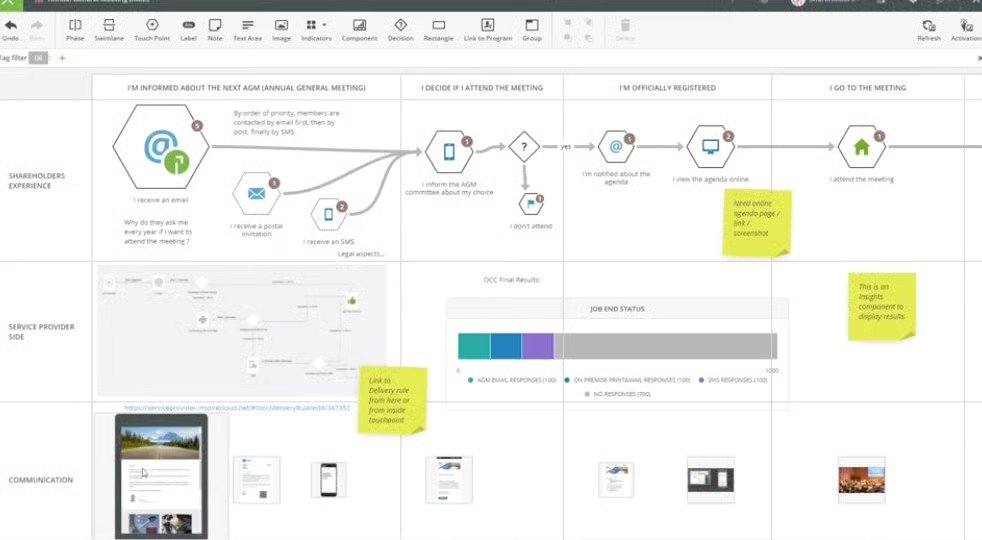
That said, some G2 reviewers note that the platform’s advanced feature set adds complexity. This tends to suit teams that plan to use more sophisticated capabilities and can invest time in training, while smaller teams or those looking for a quicker setup may find the initial ramp-up more involved. Many users note that once they are past onboarding, the platform feels more intuitive in day-to-day use.
Pricing is another area some reviewers point out, particularly for smaller businesses or teams with straightforward communication needs. For organizations that primarily need basic functionality, the cost may feel higher than expected. That said, teams with more complex or enterprise-level requirements often feel the pricing aligns with the depth and scale of features available.
Looking at the broader review trends, it’s clear that G2 users see Quadient Inspire as a powerful, scalable, and highly flexible solution for complex communication demands. Even with a steeper learning curve and higher price point, reviewers consistently frame it as a platform that delivers strong value for organizations managing high-volume, highly personalized communications.
What I like about Quadient Inspire:
- Personalization and automation feel incredibly flexible, and I’ve noticed G2 users often mention how easy it is to customize templates and workflows for complex needs.
- The drag-and-drop design experience seems smooth and intuitive, and I’ve noticed G2 users appreciate how it helps them move through layout-heavy tasks without friction.
What G2 users like about Quadient Inspire:
“We are a system integrator in the field of CCM, and we appreciate the continued development work on the suite Inspire Designer. Over the years, the product has been improved a lot, making it easier to use and maintain. Moreover, we have an entire community and a training and documentation portal available for the entire suite.”
- Quadient Inspire review, Vincenzo B.
What I dislike about Quadient Inspire:
- Some G2 reviewers mention that Quadient Inspire’s robust feature set work best for teams that can invest time in onboarding and training, while those looking for a faster setup may find the initial ramp-up more involved.
- Pricing is another area reviewers highlight, especially for smaller businesses or teams with basic communication needs. For organizations that only need core functionality, the cost can seem higher than expected, but teams with enterprise-level complexity often find it aligns with the platform’s flexibility and scalability.
What G2 users dislike about Quadient Inspire:
“Among the disadvantages, I can only mention one: it's that the training sessions are long, Quadient's products are earned! The theoretical durations indicated in the training sessions are unfortunately far from the reality I observe in the field (several colleagues have taken two or even three times the necessary time).”
- Quadient Inspire review, Elisabeth D.
6. Dotdigital: Best for e-commerce journey automation
Dotdigital is often described as a robust customer journey and analytics platform. Reviewers frequently highlight its ability to enable personalized, cross-channel campaigns using unified customer data and AI-powered automation. Many users appreciate the intuitive interface, noting that navigating the platform feels straightforward and helps streamline campaign setup and journey management.
One feature that I see getting a lot of praise is the AI help agent. Users find it particularly useful for step-by-step guidance, troubleshooting workflows, and exploring new features. Multiple reviewers mention that it helps reduce errors and makes learning the platform smoother.
The drag-and-drop email builder with pre-built templates is another area where G2 users consistently report positive experiences. Reviewers often point out that it simplifies the creation of complex emails, saves time, and provides professional design standards without needing extensive design expertise.
Dotdigital’s personalization and segmentation capabilities are frequently appreciated. According to feedback I gathered from G2 users, these features enable teams to deliver messages tailored to specific audiences, driving stronger engagement and higher conversion rates.
Many users also highlight the benefits of multi-account management. I’ve seen multiple reviewers note that managing campaigns across different brands without repeatedly logging in and out significantly improves efficiency and workflow.
Integration with other platforms is frequently mentioned as a strong point. Users report that connecting Dotdigital to CRMs, analytics tools, and other essential systems is seamless, enabling smoother data flow and more effective automation across channels.
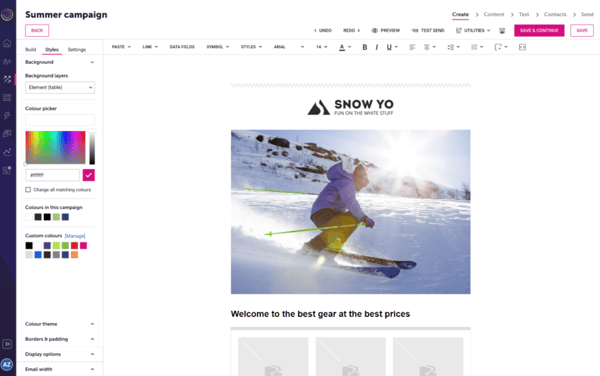
Looking at broader review trends, some users mention that the email editor and preview tools can require extra steps when working with certain designs. This may be more noticeable for teams producing highly customized or design-heavy emails at scale, while teams using standard templates often find the drag-and-drop builder flexible enough for most campaigns. Many reviewers note that the overall functionality still outweighs these workflow slowdowns.
Additionally, a few users note that reporting and workflow navigation can feel more complex when managing multiple campaigns simultaneously. This tends to affect teams running high-volume campaigns, though many reviewers feel the depth, accuracy, and reliability of the insights make the extra clicks worthwhile.
Overall, based on G2 user feedback, Dotdigital’s intuitive interface, AI guidance, strong personalization, multi-account support, and seamless integrations make it a reliable platform for marketers looking to deliver highly targeted, automated campaigns.
What I like about Dotdigital:
- The interface feels intuitive and easy to navigate, and I’ve noticed G2 users often mention how it streamlines campaign setup and journey management.
- AI guidance seems really helpful, and I’ve noticed G2 users highlight how it reduces errors and makes learning new features smoother.
What G2 users like about Dotdigital:
“I love using Dotdigital for all our Email and SMS marketing. I appreciate the personalisation, automation, and quickness of using templates. What stands out to me is the ability to easily create programs and analyze them. I find the advanced features of this ESP immensely helpful compared to others. I particularly enjoy the ability to personalise the user experience and automate campaigns to save time. The initial setup was easy, which was a great relief. I also value the use of segments for targeted emails, as it enhances our marketing efforts.”
- Dotdigital review, Michaela C.
What I dislike about Dotdigital:
- Previewing emails can be a bit tricky at times, and I’ve noticed G2 users mention that extra steps are sometimes needed to get designs right. This tends to be more noticeable in teams managing detailed design workflows than in those managing straightforward campaign layouts.
- Managing multiple campaigns can require a lot of clicks, and I’ve noticed G2 users say this can feel cumbersome even though the insights are solid. Teams that prioritize depth of insight over rapid campaign switching generally find this structure workable.
What G2 users dislike about Dotdigital:
“There is only one thing that I find tricky, and that is the summary email send reports. It would be good if these could be split into two parts: high-level send stats, and then a more detailed analysis of behaviour.”
- Dotdigital review, Shona C.
7. WebEngage: Best for multi-channel lifecycle automation
WebEngage presents itself as a powerful customer journey analytics and engagement platform that enables teams to unify customer data, create personalized multi-channel campaigns, and enhance retention strategies.
Many reviewers appreciate the easy-to-use dashboard, noting that even with the depth of features, navigating through campaigns, journeys, and analytics becomes smooth once they become familiar with the layout.
The journey and campaign builder is frequently highlighted as a favorite tool among G2 users. I’ve seen reviewers mention that the drag-and-drop interface makes it simple to design multi-channel experiences across email, SMS, and push notifications. This ease of mapping out user flows seems to help teams deliver tailored experiences without relying on technical support.
A consistent theme I’ve noticed in G2 reviews is strong appreciation for customer support. According to the feedback I gathered, users often mention timely troubleshooting assistance, actionable recommendations, and proactive guidance from the support team, which contributes to a smoother overall experience.
Reviewers also praise WebEngage’s segmentation and personalization capabilities. The ability to use granular filters and dynamic audience lists appears to be a major advantage, with many users noting improved engagement and conversions due to more relevant messaging.
Another element that receives a lot of praise is the real-time analytics. Many G2 reviewers value the instant visibility into campaign performance, such as opens, clicks, conversions, and drop-offs, which helps them optimize campaigns quickly and make confident, data-driven decisions.
Integration is another area users seem to appreciate. Reviews often note that the quick, seamless integration with various platforms reduces setup delays and enables teams to start running campaigns without technical hurdles.
AI-driven predictive models are extremely beneficial. Features like churn prediction and purchase likelihood help teams take proactive steps to retain high-value users and maximize ROI.
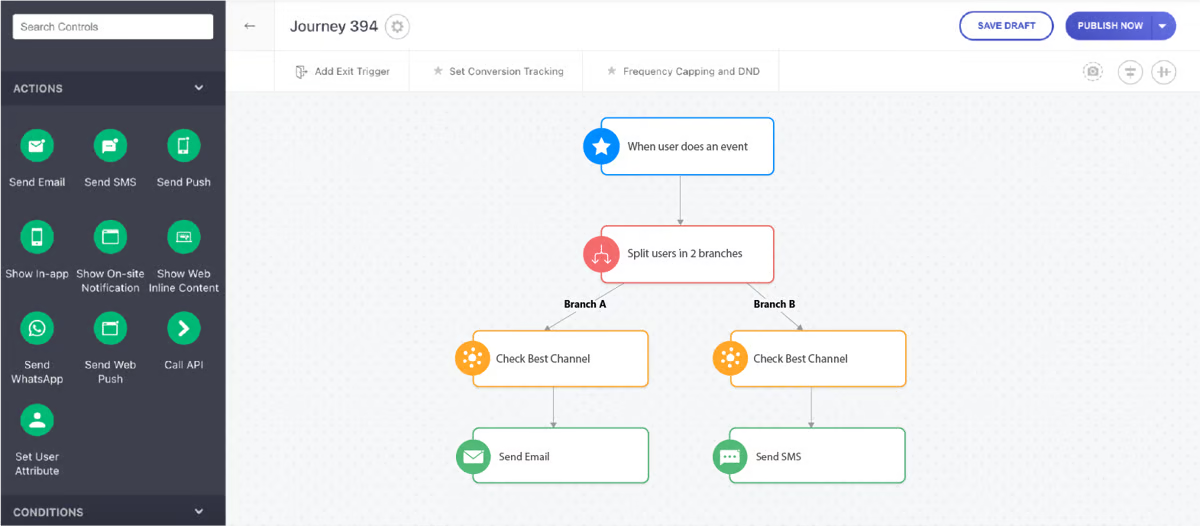
On the improvement side, some users have shared that dashboards and reports can take longer to load when working with larger datasets. This may be more noticeable for teams analyzing high data volumes, though many G2 reviewers from small businesses still feel the depth and richness of insights make the reporting experience worthwhile once everything is fully loaded.
A few G2 users also point out that accessing the platform’s more advanced features requires familiarity with its broader capabilities. This tends to work well for teams that plan to use the platform extensively and can invest time upfront, as many reviewers note that the flexibility and overall capability become clear once they are more familiar with the tools.
Overall, looking at broader G2 review trends, WebEngage is consistently praised for its personalization, automation, analytics, support, and predictive insights.
What I like about WebEngage:
- The journey and campaign builder feels really intuitive, and I’ve noticed G2 users often mention how the drag-and-drop setup makes multi-channel workflows easy to build.
- The personalization and segmentation options seem powerful, and I’ve noticed G2 users highlight how granular filters help boost engagement and conversions.
What G2 users like about WebEngage:
“I am a first-time CRM user, and WebEngage was the first tool that I have ever used. From onboarding through Webengage Academy to the knowledge base, I have never felt lost with this software or how it works. All features just make sense! The potential is unlimited, as we are actively adding new features while implementing BAU requirements. The Manager's support is great as well, with multiple offline meetings scheduled for planning. Additionally, great technical support is provided, with issues usually resolved within 24 working hours. I have been using WebEngage daily for the past 2 months, and I am able to apply all of my marketing knowledge using the tools available here.”
- WebEngage review, Siddharth K.
What I dislike about WebEngage:
- Reporting performance may be more noticeable for teams working with large datasets, though many users feel the depth of insights makes the wait worthwhile once reports load.
- The platform’s advanced feature set introduces additional complexity during onboarding, which aligns better with teams planning to use WebEngage extensively than with those looking for a more lightweight or immediately guided setup.
What G2 users dislike about WebEngage:
“The events analytics function could be better. The tech integration process could be smoother and faster, with a shorter TAT. Campaign analytics also needs improvement to reflect the right data more consistently. Catalogues and recommendations could be improved as well, as they currently don’t feel as strong as they could be.”
- WebEngage review, Paridhi B.
8. Netcore CEEX Platform: Best for retention and engagement analytics
Netcore Cloud Customer Engagement Platform is often described as a robust, AI-powered solution for personalizing and optimizing customer experiences across multiple channels.
The platform’s omnichannel engagement was highlighted across reviews, which supports email, SMS, WhatsApp, app push notifications, and more. Users frequently point out that being able to reach customers wherever they are helps maintain consistent messaging throughout the customer journey.
One feature getting a lot of praise is AI-powered personalization. According to feedback I gathered from G2 users, the ability to tailor interactions based on behavior, preferences, and engagement patterns makes campaigns feel more relevant and effective. Reviewers consistently mention improvements in engagement and conversion rates thanks to these capabilities.
Journey orchestration is another commonly appreciated element. From what I’ve read, users value the automation of campaigns across the customer lifecycle, from acquisition to retention. This functionality reduces manual effort and ensures timely communication, which is a recurring theme in positive reviews.
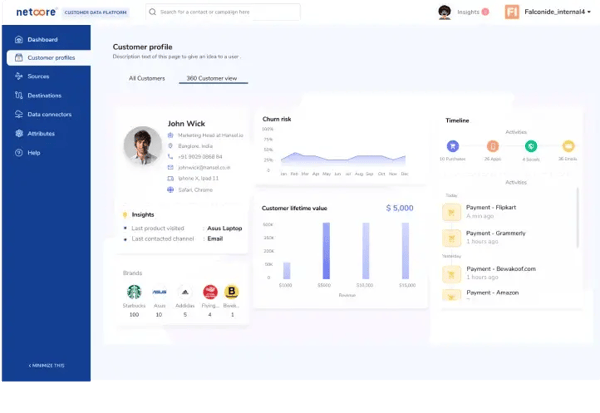
Having a 360° customer view also stands out in user feedback. Many reviewers note that consolidating customer data into a single platform enables precise audience segmentation and more targeted messaging, making campaigns both more efficient and impactful.
Netcore Cloud stands out for helping teams run coordinated, lifecycle-based campaigns across multiple channels using a centralized customer profile. With built-in journey orchestration and a 360° customer view, users can segment audiences more precisely, automate touchpoints across acquisition-to-retention flows, and keep messaging consistent, without relying on multiple disconnected tools.
That said, some G2 users mention that setup and integrations can require more time and coordination, especially when connecting multiple systems or configuring workflows for the first time. This tends to suit teams with access to technical resources and a more structured implementation process, and many reviewers note that once everything is in place, the platform runs reliably.
Additionally, a few users have shared feedback around the email design tools and AMP templates. While these features support standard campaign creation well, teams aiming to build highly interactive or heavily customized designs may need to invest extra effort. Even so, many reviewers feel the platform still offers enough flexibility to produce engaging campaigns at scale.
Overall, based on G2 user feedback, Netcore Cloud Customer Engagement Platform is highly valued for its omnichannel capabilities, AI-driven personalization, automated journey orchestration, and actionable analytics.
What I like about Netcore CEEX Platform:
- Omnichannel engagement feels really seamless, and I’ve noticed G2 users often mention how it helps maintain consistent messaging across email, SMS, push notifications, and more.
- AI-powered personalization seems effective, and I’ve noticed G2 users highlight how tailoring interactions based on behavior improves engagement and conversions.
What G2 users like about Netcore CEEX Platform:
“One of the standout features of the Netcore CE Platform is its segmentation capabilities. I can create segments using a variety of metrics, such as email opens, clicks, push notification clicks, and all the attributes I have uploaded to the panel. The platform is user-friendly and extremely effective in practice. Their AMP capability is unmatched in the market. They excel at implementing AMP Emails, and the use cases they recommend have significantly improved engagement.”
- Netcore CEEX Platform review, Shivam S.
What I dislike about Netcore CEEX Platform:
- Setup and integration can be tricky, and I’ve noticed G2 users mention that connecting systems and configuring workflows takes extra effort initially. This tends to be more relevant for teams with customized data environments, while simpler implementations involve less setup effort.
- Some email design tools feel limited, and I’ve noticed G2 users say creating interactive or custom templates can require extra work. Teams aiming to build highly interactive or heavily customized templates may find this area more limiting than platforms focused specifically on advanced design flexibility.
What G2 users dislike about Netcore CEEX Platform:
"Setting up specific nudge types, like tooltips or beacons, can take a bit of time since they need to be tested on paired devices to confirm correct placement and operation. Additionally, having to configure Android and iOS separately adds some extra work. A more streamlined, unified setup process would make things more efficient. The analytics dashboard could also benefit from offering more detailed insights and user-level data, which would help with analyzing campaign performance after launch.”
- Netcore CEEX Platform review, Rahmi S.
9. MoEngage: Best for omnichannel engagement intelligence
MoEngage is consistently described as a powerful insights-led customer engagement platform. With a strong G2 rating of 4.5/5, the overall sentiment suggests that users generally feel the platform delivers on expectations. Many reviewers highlight how clean and intuitive the interface is, noting that navigating between journeys, analytics, segments, and campaigns feels smooth and well-organized.
A commonly appreciated element in G2 reviews is MoEngage’s robust segmentation and deep personalization. I frequently see users point out how easy it is to build precise audience groups and deliver messaging tailored to specific behaviors and preferences. According to multiple reviewers, this level of personalization plays a key role in improving engagement and campaign clarity.
The platform’s omnichannel orchestration gets praise from users. From what I’ve seen, G2 users really value the ability to manage email, push notifications, SMS, WhatsApp, in-app messages, and web communication from a single unified dashboard. This centralization appears to help teams maintain consistency across the customer journey.
When it comes to analytics, user behavior and funnel insights stand out prominently in reviews. Many G2 reviewers mention how detailed the reporting is, noting that the data helps them understand drop-offs, user patterns, and conversion drivers. Several users mention that these insights support ongoing campaign optimization.
Across multiple reviews, there’s strong appreciation for MoEngage’s AI-driven optimization. Users often describe the AI layer as helpful for improving content, refining targeting, and fine-tuning send-time decisions without requiring constant manual adjustments.
Customer support receives positive reinforcement. Reviewers often highlight the responsive and proactive support team, mentioning that guidance around best practices and technical issues is both timely and solution-focused.
Pricing also comes up frequently, with many reviewers noting that MoEngage’s cost is competitive compared to platforms offering similar capabilities. For teams seeking enterprise-level scalability without steep pricing, this balance seems to be a meaningful advantage.
A consistent theme in G2 reviews is the value of custom event tracking and event-based insights. Users mention that the ability to define events and track detailed user actions helps enable smarter segmentation and more accurate automation triggers.
Another capability that stands out in reviews is MoEngage’s smooth integrations and reliable workflows. Several users note that integrations with existing data systems are straightforward, and once automation flows go live, they tend to run reliably without unexpected glitches.
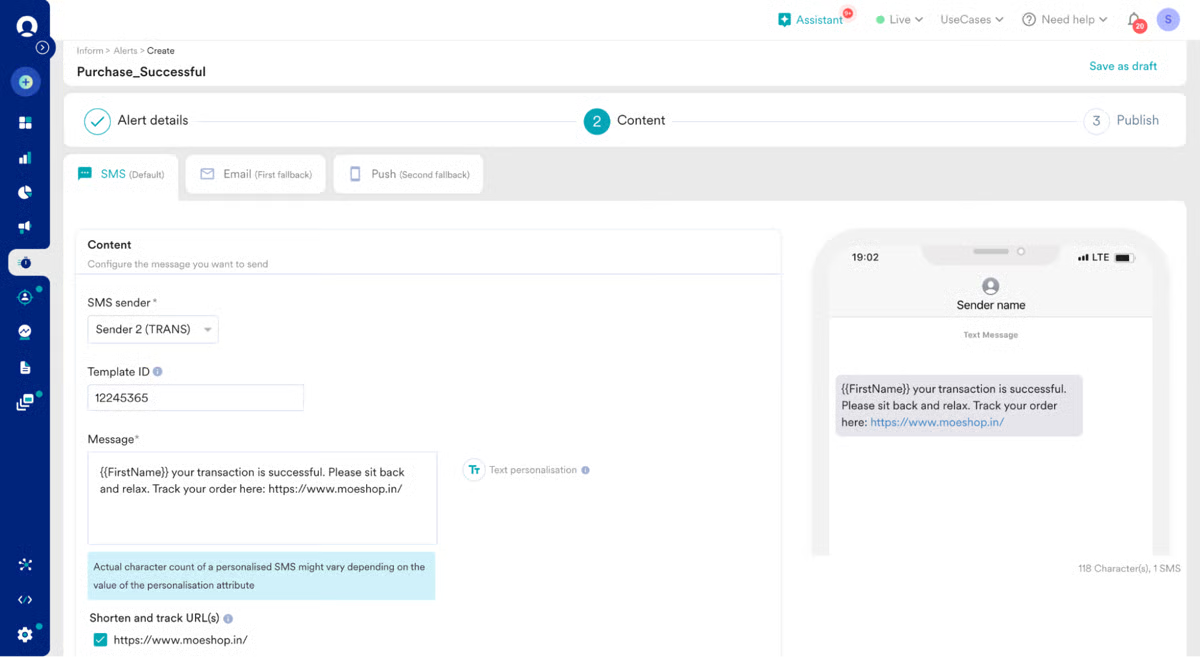
On the other hand, G2 users often call out challenges related to event setup and data mapping. I’ve read multiple reviewers mention that configuration sometimes requires extra clarity and coordination with technical teams. However, once events are properly set up, users generally find the insights dependable.
There’s also some feedback around limitations in session-level attributes, such as session ID or session end. Reviewers note that this can restrict certain types of analysis, though many also mention that the available behavioral and event data is usually sufficient for most use cases.
Overall, the broader review trends suggest that MoEngage delivers a strong balance of analytics, automation, personalization, and usability, making it a compelling choice for teams focused on scalable customer engagement.
What I like about MoEngage:
- The interface feels clean and easy to navigate, and I’ve noticed G2 users often mention how smoothly they can move between journeys, segments, and analytics.
- Segmentation and personalization seem impressively strong, and I’ve noticed G2 users highlight how effortless it is to tailor messaging to specific behaviors.
What G2 users like about MoEngage:
“MoEngage stands out with a suave interface as it's beautiful and easier to navigate. I love how their technical support is out and out to offer extensive support with granular segmentation of audience, customers, through in-depth user personalization for success with product innovation, leading to an increased lead engagement and cross-channel communication. We have experienced increased conversion rates and ROI since adopting it. Second to none so far.”
- MoEngage review, Kelli V.
What I dislike about MoEngage:
- Setting up events and mapping data can take extra coordination, and I’ve noticed G2 users mention that the initial configuration isn’t always straightforward. This tends to surface most for teams managing highly customized tracking across multiple touchpoints.
- Occasionally, some session-level limitations occur, and I’ve noticed that G2 users say this can restrict certain types of analysis. This is a consideration that primarily affects teams with advanced behavioral or exploratory analytics needs rather than standard campaign tracking.
What G2 users dislike about MoEngage:
“I find the dashboard and reporting lacking clear insights. Better documentation and examples would be more helpful for quick understanding and getting started. I wish for more customizable reporting and templates, a simplified segmentation UX, and a better A/B testing experience.”
- MoEngage review, Ayush M.
10. ChurnZero: Best for customer success journey analytics
ChurnZero is often described as an effective customer journey analytics platform tailored for subscription businesses focused on reducing churn. I’ve frequently seen reviewers highlight the intuitive, easy-to-use interface, noting that navigating dashboards, customer profiles, and workflow setups feels straightforward, enabling teams to get started quickly without extensive training.
One feature that I see getting a lot of praise is customer support. According to feedback I gathered from G2 users, the responsiveness and helpfulness of the support team are consistently noted. Users frequently mention how practical guidance and quick responses make managing campaigns and workflows much less stressful.
Automation of tasks and workflows is a standout capability. Users appreciate the ability to automate routine actions, such as follow-ups and engagement triggers. This functionality allows teams to save time while focusing on strategy and personalized customer interactions, which comes up repeatedly in positive reviews.
Having comprehensive customer data and segmentation capabilities is a recurring theme in G2 reviews. Many users highlight how detailed profiles and behavioral segmentation enable more targeted campaigns, improving retention efforts and overall engagement.
The platform’s ability to track customer engagement and success metrics also receives consistent praise. Reviewers often note that monitoring product usage, adoption rates, and engagement trends helps proactively identify at-risk customers, allowing timely interventions before issues escalate.
I’ve noticed that G2 users frequently appreciate integration capabilities. Many reviews mention smooth data flow between ChurnZero and other tools, such as CRMs, marketing automation, and support systems, which ensures a unified view of the customer journey.
Another commonly appreciated element is the platform’s support for hyper-personalized communications. Many users highlight the ability to deliver tailored messaging and journeys, which works particularly well for teams focused on strengthening customer relationships and improving long-term retention.
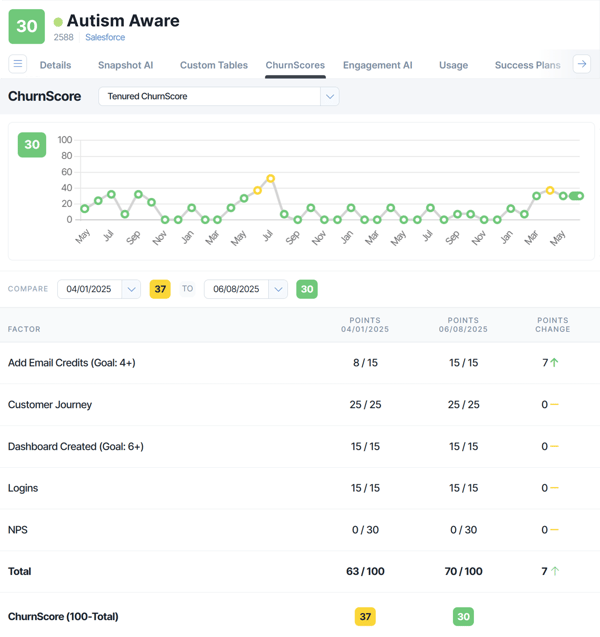
On the improvement side, some reviewers mention that ChurnScore calculations can feel less flexible for more complex or highly customized scenarios. While the default setup meets the needs of many teams, organizations with advanced scoring models may find the configuration more constrained.
Similarly, a few users note that reporting and data exports can require extra effort when building very detailed reports. This consideration is more relevant for teams with deep analytical requirements, while the standard analytics tools generally align with everyday reporting needs.
Overall, based on G2 user feedback, ChurnZero is highly valued for its intuitive interface, robust automation, detailed customer segmentation, and personalized engagement capabilities. Despite minor challenges with flexibility and complex reporting, reviewers consistently view it as a reliable platform for subscription businesses aiming to reduce churn and improve customer retention.
What I like about ChurnZero:
- The interface feels intuitive and easy to navigate, and I’ve noticed G2 users often mention how quickly teams can get started without extensive training.
- Automating tasks and workflows seems really helpful, and I’ve noticed G2 users highlight how it saves time while letting teams focus on strategy and personalized interactions.
What G2 users like about ChurnZero:
“ChurnZero has been a huge help in getting my technical team focused on actual customer-facing work instead of digging through dashboards all day. We leaned heavily on Plays, which made it really clear what needed attention and let my team spend their time doing the work rather than interpreting metrics. It also gave us visibility into our active projects without anyone feeling like they were being micromanaged or forced to update the same information in a dozen different places. For a team juggling a lot of moving parts, that mattered.”
- ChurnZero review, Hannah T.
What I dislike about ChurnZero:
- Some G2 reviewers note that ChurnScore calculations are better suited to standard scoring models. Teams with highly complex or bespoke scoring requirements may find this area more constrained than platforms designed for advanced customization.
- A few users mention that reporting and data exports can require more effort when building highly detailed or specialized reports. This tends to be more relevant for teams with deep analytical needs, while standard reporting workflows are generally well supported.
What G2 users dislike about ChurnZero:
"From an operations perspective, I find that the reporting is not very intuitive, and I often have to create multiple dashboards to get the data I want. I love the in-built Salesforce integration but would love more plug-and-play connections to some of our other tools, like monday.com, Clockify, and even Slack.”
- ChurnZero review, Alison B.
Customer journey analytics software: Frequently asked questions (FAQs)
Q1. Which platform provides customer journey analytics within a CRM?
HubSpot Marketing Hub is the best choice for CRM-native journey analytics. It tracks every touchpoint, automates workflows, and visualizes the entire customer journey inside a unified CRM environment where teams already operate.
Q2. Which tool offers the strongest AI-driven personalization for customer journeys?
Insider leads in AI-powered personalization. It uses predictive modeling to tailor user journeys, improve conversions, and optimize engagement across channels.
Q3. What platform is ideal for multi-channel lifecycle automation?
WebEngage is the top choice for multi-channel lifecycle automation. It enables segmentation, cross-channel campaigns, and detailed analytics to build contextual journeys throughout the customer lifecycle.
Q4. Which solution is best for enterprise-level customer communications?
Quadient Inspire stands out for enterprise customer communications. It focuses on mapping and optimizing high-impact communications across complex, large-scale customer journeys.
Q5. Which tool provides advanced omnichannel engagement intelligence?
MoEngage is the best option for omnichannel engagement intelligence. It offers behavior-based recommendations, funnel analytics, and powerful journey orchestration capabilities.
Q6. What platform is best for automating e-commerce customer journeys?
Dotdigital leads in e-commerce journey automation. It powers email, SMS, and omnichannel campaigns that adapt to real-time customer behavior and purchase activity.
Q7. Which software supports real-time cross-channel engagement analytics?
Braze is the top platform for real-time cross-channel engagement. It delivers robust segmentation and journey analytics that help brands create highly personalized experiences at scale.
Q8. Which platform specializes in retention and engagement analytics?
Netcore CEEX Platform is the strongest for retention-focused journey analytics. It provides journey mapping, cohort analysis, and predictive insights designed to maximize customer lifetime value.
Q9. Is there a free customer journey analytics tool available?
HubSpot Marketing Hub offers a free tier that includes basic journey tracking, contact insights, and workflow tools, making it a great starting option for teams exploring customer journey analytics without an upfront cost.
Unlock the “why” behind every customer action
Without clear visibility into behavior, journey paths, and engagement patterns, teams are forced to rely on assumptions rather than genuine customer insights. And in today’s experience-driven market, assumptions won’t drive loyalty or growth.
The right customer analytics platform provides clarity, not guesswork. It shows you what influences conversions, where friction exists, which segments deliver the highest value, and how your campaigns and experiences impact the customer lifecycle.
Choose a tool that fits your data needs, your engagement strategy, and your growth goals and watch your customer understanding (and retention rates) improve quickly.
Discover the top marketing automation software to nurture leads and achieve better results.
.png?width=400&height=150&name=Untitled%20design%20(56).png)


.png)

.png)