.png?width=400&height=150&name=Copy%20of%20G2%20Image%20(1).png)

When I first joined G2, I didn’t just want to get through onboarding; I wanted to ramp up quickly, understand my role, and actually get better at what I do.
That’s where a structured 4-week training program made all the difference. It gave me clarity, direction, and the kind of hands-on learning that sticks.
And that’s exactly what the best corporate LMS software are desgined to do - help companies organize training, onboard employees faster, and continuously upskill their teams
But here’s the reality: not every LMS delivers on that promise. I’ve seen teams struggle with scattered content, limited visibility into learner progress, and clunky experiences that employees simply don’t engage with. And when that happens, training becomes a checkbox exercise instead of a growth driver.
So I wanted to answer a more practical question: what actually makes an LMS work for modern teams?
So, I dug into G2 Data, user reviews, and product capabilities to evaluate the best corporate LMS platforms that help HR leaders and L&D teams deliver training that’s not just structured, but effective.
TL;DR: Based on my research and G2 Data, the top corporate LMS software for managing employee training includes Rippling, Absorb LMS, Docebo, Paylocity, 360Learning, UKG Pro, and Litmos.
Let's get into them in detail!
According to the G2 Grid® Spring Report 2026, these corporate LMS software programs are top-rated in their category.
The corporate LMS market is booming, set to grow to over $27.4 billion by 2030 as companies double down on digital training.
An ideal corporate learning management software integrates with content authoring platforms, micro-learning platforms, or e-learning platforms to host content libraries and resources for external training and implementation purposes. But with so many options on the market, narrowing down the best corporate learning management systems for small businesses or enterprise-wide deployments can be overwhelming.
During my evaluation, I listed out corporate LMS tools where you can aggregate your training content in multiple formats, like image, audio, video, discussion forums, instructor-led sessions, and personalize your course for your employees or customers.
The following corporate LMS tools are apt for designing and implementing learning classes for customers, employees, or stakeholders and are compatible with the existing ERP or tech stack of a company, provided the company has a functioning network infrastructure.
I started with G2's grid report for corporate LMS software to filter the best tools. This list has also been filtered based on G2 score, an aggregate proprietary score based on several factors, such as market presence, customer segment, customer satisfaction, ease of use, ease of admin, and ease of configuration, to give you an idea of these market factors in your software analysis.
From then on, I used AI to analyze their pros and cons, user sentiments on features such as content creation, central location, compliance, performance tracking, report controls, skills training, onboarding workflows, scalability, and customization, to present a personalized list.
I listed the common standouts of every product, along with limitations, to align your objectives accordingly and optimize your decision-making.
Since I couldn't test all these tools myself, I consulted a professional with hands-on experience and validated their insights using verified G2 reviews. The screenshots featured in this article may include both those captured during evaluation and those obtained from the vendor's G2 page.
The best platform for company training and development isn’t just about hosting content; it’s about driving measurable growth and compliance.
The ideal LMS can also host courses for various departments like sales, marketing, finance, and so on. Companies can design training on how to sell a product or speak to customers for sales professionals. Or it can create product training for customers, too.
Below is a condensed list of factors to consider when selecting a corporate LMS system for your HR stack.
All in all, an ideal corporate LMS tool not only provides macro or micro programs, tracks performance, and reduces hiring investments, but also supports multiple content formats, offers gamification journeys or loyalty awards, and helps you tailor your pedagogies for multiple departments like sales, marketing, IT, and so on.
According to G2’s latest Spring Grid Report 2026, corporate LMS platforms on average achieve 69% user adoption and deliver ROI in about 14 months. These benchmarks also framed my evaluation process, giving me a baseline to compare how well individual platforms stack up against market expectations.
My goal was to identify the top-rated software for employee training programs that combine ease of use, scalability, and measurable ROI.
The list below contains genuine reviews from the corporate learning management systems (LMS) category. To be included in this category, a software must:
*This data was pulled from G2 in 2026. Some reviews may have been edited for clarity.
Rippling is a unified platform that offers payroll, learning management system, IT and spend management to HR executives and managers. It offers a "built-in" LMS portal where you can organize, host, and manage online course content for the organization.
On G2, Rippling's G2 customer base is dominated by mid-market companies (55%), with small businesses close behind (41%) and enterprises making up just 4%, making it a strong fit for growing teams scaling their HR and training operations.
From what I’ve seen across G2 reviews, Rippling’s LMS is built to make training more efficient, especially for onboarding and compliance. As soon as a new employee joins, they’re automatically assigned training modules based on their role and department. That kind of automation reduces manual work and ensures no one slips through the cracks.
The interface is simple, which makes it easy for employees to navigate their courses without needing a walkthrough. I especially liked that it helps monitor progress in real time and ensures that team members have completed the required training.
It's not just about ticking boxes. Rippling also includes quizzes and certification tracking, which is essential when dealing with compliance-heavy roles. For admins, the reporting is detailed and gives quick access to completion rates, overdue assignments, and even time spent on modules.
The biggest advantage is probably the available integrations. For example, access to certain software tools can be restricted until the training is completed. That kind of conditional logic saves a lot of back-and-forth with IT and ensures that policies are enforced from day one.
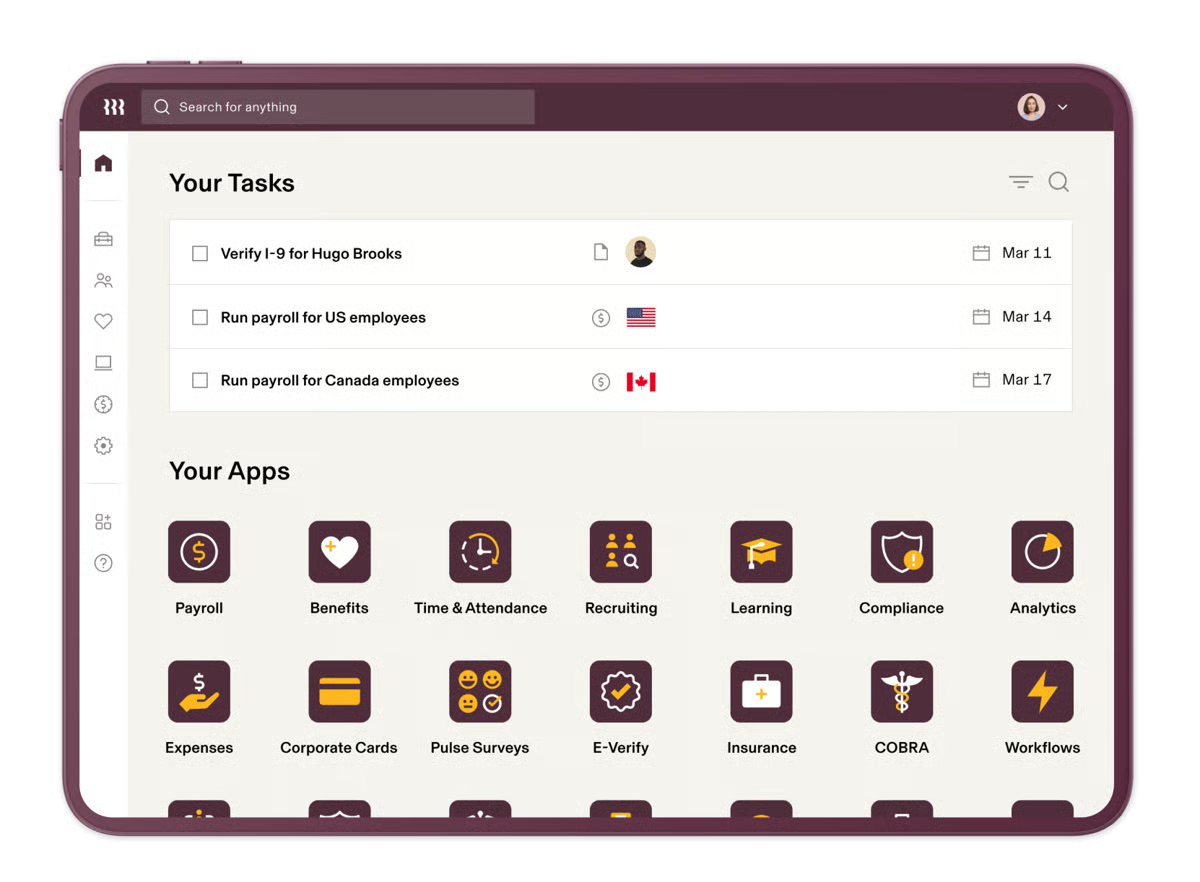
Rippling does an excellent job of streamlining training assignments and compliance tracking, but there are still a few areas where it could improve. According to G2 user reviews I read, for teams managing multiple modules across HR, IT, and training, Rippling’s interface can feel slightly less intuitive at times due to the breadth of features available. But for organizations looking to centralize employee data and training in one place, that unified experience still helps reduce tool sprawl and streamline operations.
Additionally, for teams that need advanced or highly customizable learning experiences, Rippling’s LMS may feel more standardized compared to standalone platforms, especially for documenting detailed processes or building complex training programs. But for companies focused on essential training like onboarding, compliance, and policy education, it delivers a straightforward and efficient solution without added complexity.
Overall, Rippling's built-in e-learning and training features help HR executives and managers simplify onboarding, reinforce policies and compliance guidelines, and record course progress and attendance, all in a centralized platform.
"Rippling is a very helpful system. It makes completing company required training very simple. It is also simple to see my benefits, pay, and hours for each week. I also love the fact that there is an app."
- Rippling Review, Nakita D.
"Their LMS needs some improvement to be more useful for documenting practices."
- Rippling Review, Esther S.
Choose a better way to manage, disburse and store payroll information with my detailed review of the best payroll software to optimize your HR operations.
Absorb's LMS is among the most recommended corporate LMS software on G2, along with Rippling. It empowers companies to design effective and productive AI-based training programs, achieve their training goals, and fuel business productivity with consistent tracking and assessment.
Absorb LMS shows a rare even split on G2, with mid-market and enterprise buyers each contributing 44% of its user base, and small businesses rounding out the remaining 12%. That split signals a platform built for organizations where training needs to scale, not just function.
What I found right away was that a lot of users said this platform is extremely easy and intuitive. The onboarding experience was smooth, thanks to the customer support service. Anytime you run into an issue, someone is there to walk you through it.
Users can set up learning paths, create SCORM-compliant content, and track learner progress without feeling like they needed to learn instructional design.
Where Absorb also shines is its ability to scale. Whether you are training ten employees or ten thousand, it handles the load beautifully. The integrations with your existing systems, like HR software or content libraries, make things so much easier.
And yes, it also supports single sign on (SSO), which is a huge win for both admins and end users who are tired of managing a million passwords. I noticed some users have also used their mobile learning, which, while not perfect, is definitely robust enough to keep learners engaged on the go.
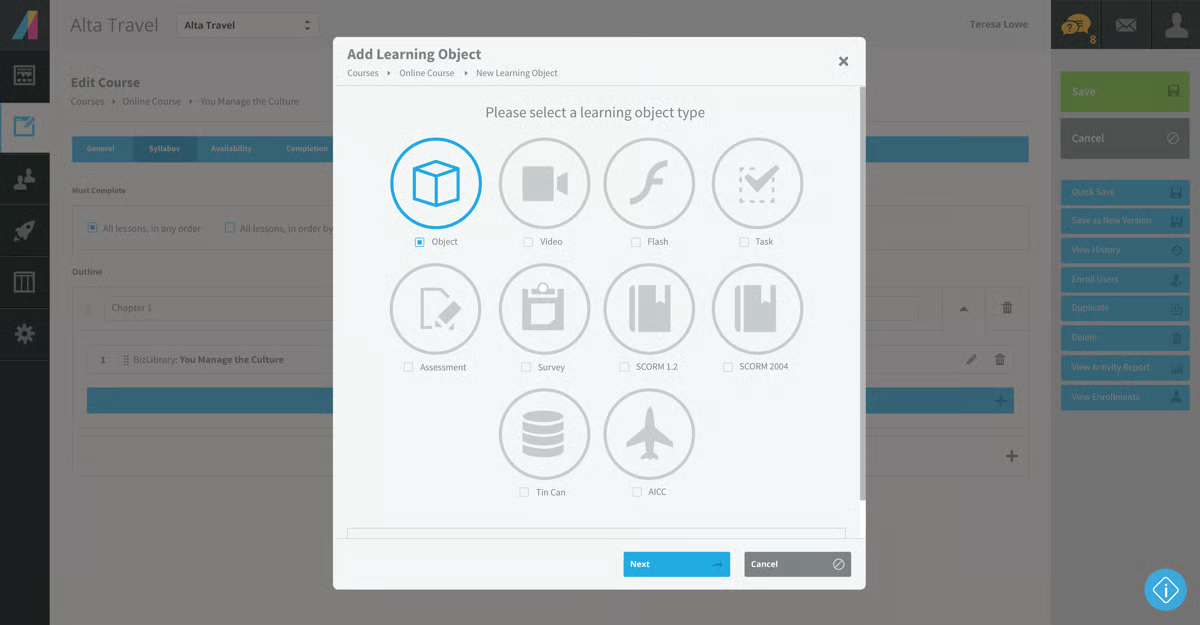
That said, based on G2 reviews I saw, for teams that rely heavily on advanced reporting or complex admin workflows, some features in Absorb LMS may include additional steps, which can vary based on how workflows are structured, but for most organizations, the overall ease of use and intuitive design still make day-to-day training management efficient.
Pricing is another factor to consider. For smaller teams, or organizations with limited budgets, Absorb LMS may require more careful evaluation, especially as more advanced capabilities come into play, but for growing companies that need a scalable and reliable training platform, the overall value and feature depth still justify the cost.
Overall, Absorb is a flexible and customizable e-learning solution that helps you manage admin controls, design interactive courses, and manage employee workflows all in one platform.
"I have found Absorb to be extremely intuitive for both end users and admins. This has helped greatly with our internal implementation of the platform. From an admin and set-up perspective i have been very impressed with the speed of implementation, Absorb worked to some incredibly tight deadline to allow us to transition from our old supplier with no lose of service for our employees. The level of support we had through this process from Luke was exceptional."
- Absorb LMS Review, Steven V.
"It is expensive. We are a small non-profit, and the cost model for us is going to make it difficult to achieve our business objectives.
The user reporting features are not very good. Dashboards are very basic and don't look as professional as we'd like. To make a professional report, s, we export the data and use a separate software package."
- Absorb LMS Review, Verified G2 User.
Write, edit, and document your own multimedia content documentation with content authoring tools to make it publicly available to your employees and add to their knowledge.
Docebo offers an AI-powered learning management system that enables customers to create and deliver effective courses to employees, customers, and partners. With generative AI learning, customers can create hyper-personalized courses at scale.
Per G2 Data, Docebo skews heavily toward larger organizations — mid-market and enterprise buyers make up 47% and 46% of its user base, respectively, with small businesses accounting for just 7%. That distribution points to a platform designed for complexity: think multi-department rollouts, compliance-heavy training, and learning programs that need to grow with the org.
What really stands out about Docebo is how intuitively easy it is to use, especially when it comes to setting up custom learning paths. Users can drag and drop modules, build different catalogs for different teams, and automate enrolments like a pro.
It's built for flexibility. Whether you are onboarding a handful of new hires or training hundreds globally, it scales smoothly. The interface is extremely sleek and user-friendly. Many reviews note that even less tech-savvy teammates find it simple to navigate, and that says something.
Based on G2 Data, Docebo really shines in its powerful AI-based recommendations and content automation. Once you integrate LinkedIn learning and other third-party content libraries, Docebo smartly curates and suggests relevant content. That's a massive win when you've got limited time to manually assign training.
Plus, features like gamification, custom domains, and virtual coach (depending on your subscription tier) genuinely enhance engagement and retention.
Now, speaking of subscriptions, I explored both mid- and upper-tier plans, and the differences are noticeable. The enterprise plan unlocks a wide range of tools, like extended enterprise (multi-domain architecture), that lets one create tailored portals for external partners—great for customer education and reselling.
Meanwhile, the growth package provided decent core functionality, such as course management, certifications, automated workflows, and reports, but users often encountered limitations, especially regarding detailed custom reporting and API access.
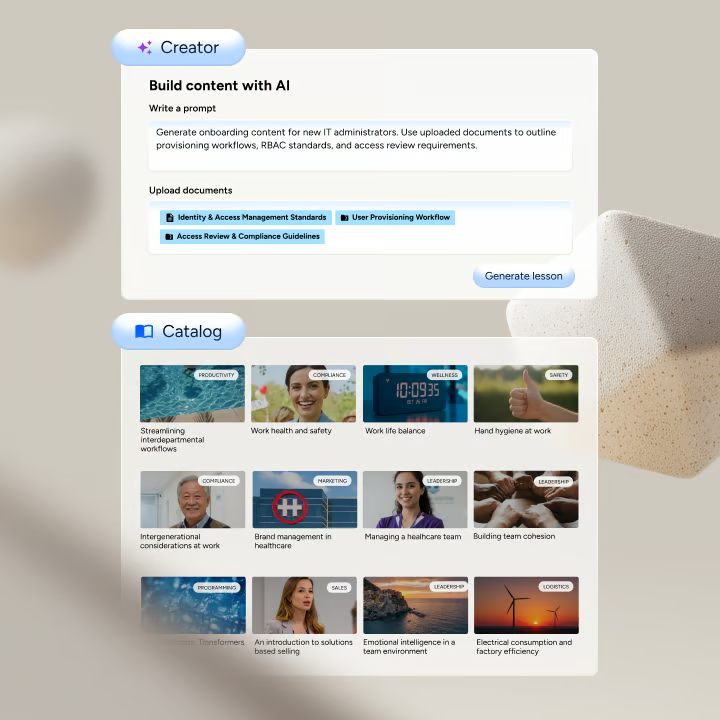
There are a few things to consider, too. Based on user feedback on G2, it's clear to me that Docebo stands out for its flexibility and ability to support complex training needs at scale. But for teams looking for quick setup or working with limited technical resources, Docebo’s advanced configuration options and admin workflows may involve a learning curve, particularly when setting up custom learning paths, automations, or integrations. For organizations with dedicated L&D or technical support, this flexibility supports more powerful and scalable training programs.
Also, a few users mention that for teams that prioritize highly advanced reporting or deeply customized experiences, certain aspects may require additional steps, such as exporting data or leveraging APIs. That said, it still offers a solid foundation for tracking and optimizing learning outcomes across growing organizations.
All things considered, Docebo continues to stand out for its AI capabilities and enterprise-ready scalability, making it one of the strongest corporate LMS options available. It allows you to set defined learning paths, categorize training and upskilling course categories, and invest in your growth and development.
"I find the content categorization and audience-based visibility controls in Docebo most useful. It allows us to organize a large volume of content into clear categories and control visibility for different data types such as employees, customers, or partners, helping them find relevant material easily."
- Docebo Review, Kevin R.
"At times, Docebo can feel complex to configure, especially when managing advanced settings or automations. Some reporting features could be more intuitive, and certain customizations require technical knowledge or additional support to implement efficiently."
- Docebo Review, Yoko B.
Training employees is only part of the equation — see the best corporate performance management platforms my colleague evaluated to measure impact on business results.
Paylocity is a unified HR management suite that automates onboarding documentation, manages training and induction for new hires, and integrates other third-party functions, like payroll and employee profile details, to create headcounts.
Looking at Paylocity's customer segment breakdown on G2, Paylocity is overwhelmingly a mid-market play. 81% of its users fall in that segment, with small businesses at 14% and enterprise buyers at just 5%. That concentration suggests a platform that hits its stride with growing companies that need robust HR and payroll infrastructure without the complexity demands of a large enterprise stack.
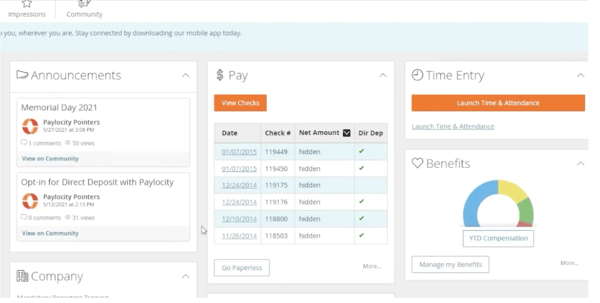
Based on G2 feedback, Paylocity is relatively easy to get started with. Uploading and assigning training content is straightforward, and users appreciate the flexibilit, whether they’re building custom modules or using pre-built content integrations.
One standout feature is its built-in content library, which offers access to hundreds of ready-made courses. For teams that need more variety, integrations like Go1 expand that library significantly, making it easier to scale training without creating everything from scratch.
The interface is clean and intuitive, which makes day-to-day tasks like assigning courses or tracking progress across teams easy to manage. Many reviewers mention that they were able to roll out onboarding and department-specific training without needing much guidance.
It also performs well on the compliance side. The ability to track completion status and automate reminders helps teams stay on top of required training without constant manual follow-ups.
Another strong point is how the learning module connects with Paylocity’s performance management tools. By linking training outcomes with employee development goals, it supports a more continuous and structured learning culture.
On the learner side, Paylocity encourages more self-directed learning by allowing employees to explore available courses and receive recommendations based on their role, helping keep training relevant and engaging.
At the same time, there are a few factors to consider. According to the G2 feedback I analyzed, for teams that rely on quick, high-touch support, response times from customer service can occasionally vary, and some queries may take longer to resolve. That said, for most day-to-day needs, Paylocity still provides dependable support resources to help teams stay on track.
Also, for organizations managing multiple HR functions across modules, certain updates may require changes in more than one place, as workflows don’t always sync automatically across the system. However, for teams looking for a comprehensive HR and training platform, Paylocity still brings key functions together in one place, helping streamline overall operations.
Overall, Paylocity's LMS offers it all: built-in content templates, integration with authoring, and the creation of learning paths and certifications to stay compliant and contribute to skill and growth.
"The platform's extensibility is a major technical win, it's 350+ native integrations allow it to act as a central hub for our entire software ecosystem, from accounting to deep-level analytics. I particularly value the compliance dashboard, which uses real-time data to visualize completeness across employee records and tax filings. The ability to create bespoke learning paths in the LMS module helps us align individual skill development with our broader 2026 retention and engagement strategies."
- Paylocity Review, Mayur G.
"The different modules in Paylocity can sometimes not work the best together and often times have to make changes to employee records in multiple locations."
- Paylocity Review, James N.
The success of your employees is the main incentive for your company's growth. Invest in employee development and give them higher career aspirations.
360Learning is a corporate learning management system built around one core idea: learning shouldn't flow top-down. Instead of your L&D team being the only ones creating content, 360Learning lets subject matter experts across the org build and share training, collaboratively, quickly, and without needing a background in instructional design. From my research, I could see that it covers everything from onboarding and compliance to skills development and customer training, all in one platform.
From G2’s reviewer breakdown, 360Learning sits firmly in the mid-market sweet spot. About 59% of its users come from mid-sized companies, followed by 32% from enterprises and 10% from small businesses. That mix tells me it’s best suited for teams that need structured learning programs but still want the flexibility to move fast.
From what I’ve seen across G2 reviews, ease of use is one of its biggest strengths. Teams can quickly build and launch courses without relying heavily on instructional designers, which makes a huge difference when you’re trying to scale training quickly.
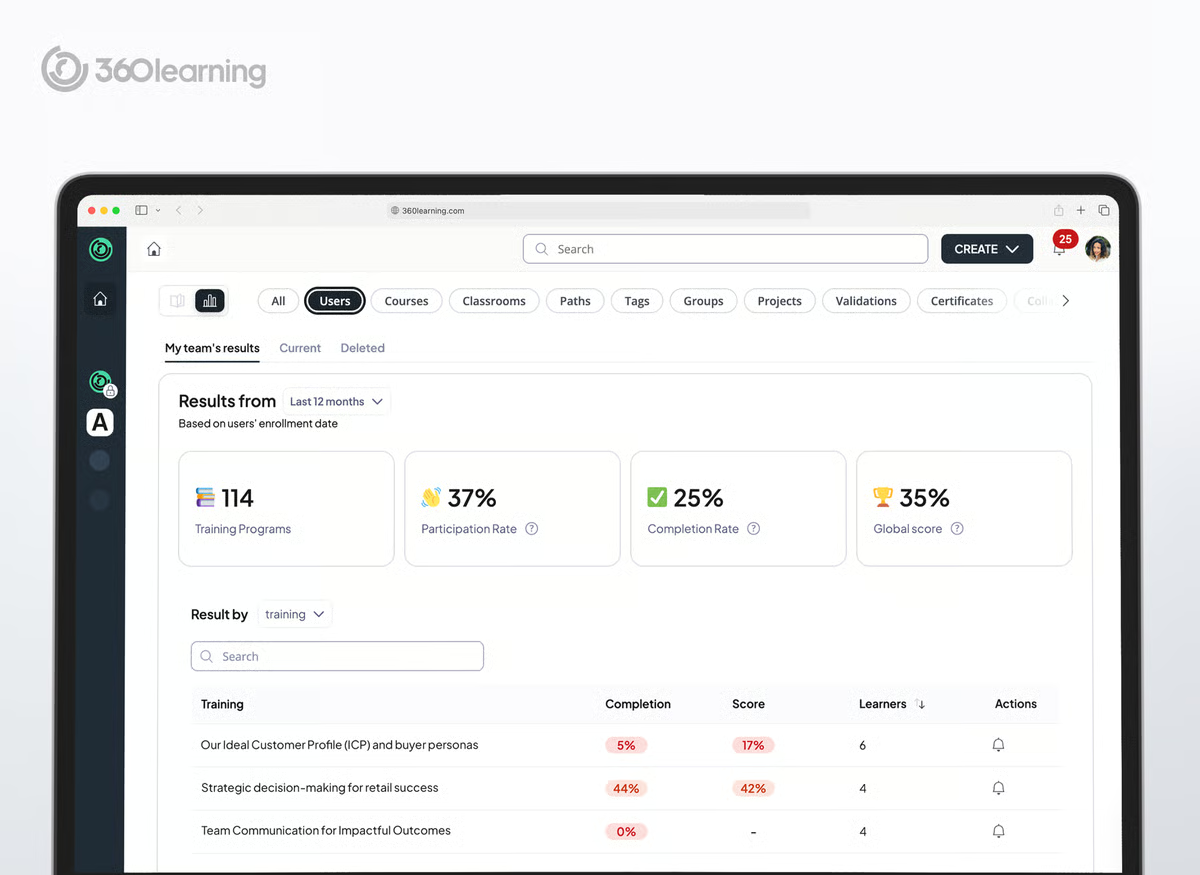
Another thing I noticed is how well it supports collaborative learning. Instead of centralizing content creation with L&D alone, it allows subject matter experts across the organization to contribute. This not only speeds up course creation but also makes the content more relevant and practical.
The AI-powered course builder is another standout. It helps generate course content, quizzes, and learning materials much faster, which is especially useful for smaller teams that don’t have the bandwidth to build everything from scratch.
I also like how the platform uses data and insights to guide learning. It can automatically detect skill gaps, recommend relevant courses, and even connect employees with internal experts. That kind of built-in intelligence helps move learning from reactive to proactive.
On the admin side, automation is a big win. You can auto-enroll users into courses based on HR data and roles, and integrations with tools like Workday, BambooHR, Salesforce, and Slack make it easier to fit into existing workflows.
On the learners' side, I could gather that the experience feels modern and flexible. Employees can access training on mobile or desktop, and features like AI-driven personalization and real-time guidance help keep engagement high.
From my analysis of G2 feedback, I found that while 360Learning's collaborative authoring model is one of its strengths, it does require some onboarding effort on the admin and content-creator sides. There are a few steps to get content set up and visible in the right places. For teams with a dedicated L&D lead to guide the process, this smooths out quickly but organizations expecting a fully zero-ramp setup may want to factor in some structured onboarding time.
Based on what I gathered from G2 reviews, it also works well for teams that value simplicity and quick deployment. For organizations that rely heavily on deeply customized reporting or advanced analytics, certain insights may require additional configuration or external analysis, but the platform still provides solid core data and automation to track learning performance effectively.
If I had to put 360Learning in a box, it's the corporate LMS I'd recommend to mid-market companies that are done waiting on L&D to be the only creators in the room. It's especially strong for organizations scaling training across customer-facing teams, new hire onboarding, and compliance programs — where getting content out fast and tracking it reliably matters more than deep customization.
"I like that 360Learning provides a single platform for all the training our company requires, allowing us to record and customize the content to suit our needs. It's helpful to have an adaptable learning path that we can track and follow. The analytics and reporting features are great for demonstrating compliance, especially since we undergo frequent audits. I also appreciate the progress tracking, which lets us know who is completing their training and helps us tailor further development. Additionally, the existence of wellness and well-being training videos is a nice touch. The initial setup was very easy, simple, and intuitive, which made getting started a breeze."
- 360Learning Review, Andre N.
"While 360Learning has many strengths, one downside is that some of its features can feel limited or restrictive without additional configuration. Certain admin and reporting functions require extra setup to get the level of detail you need, and navigating some advanced settings isn’t always intuitive. The platform’s reliance on collaboration, while a strength, can also mean content quality varies unless teams are properly trained and aligned."
- 360Learning Review, Tanja W.
If you're looking for a platform that handles the full employee lifecycle without stitching together five different tools, UKG Pro is worth a serious look. It's a comprehensive human capital management suite covering payroll, HR, benefits administration, talent acquisition, time tracking, and learning, all under one roof.
What makes it stand out isn't just the breadth of features, but how deeply they're connected. Payroll talks to timekeeping. Recruiting feeds into onboarding. HR data flows into reporting. For HR and payroll teams tired of managing disconnected systems, that kind of integration is genuinely rare.
G2 Data tells a clear story: UKG Pro is firmly a mid-to-enterprise play, with 48% mid-market and 47% enterprise users, and just 5% from small businesses. That near-even split suggests a platform that’s equally capable of supporting growing organizations and handling the complexity that comes with scale.
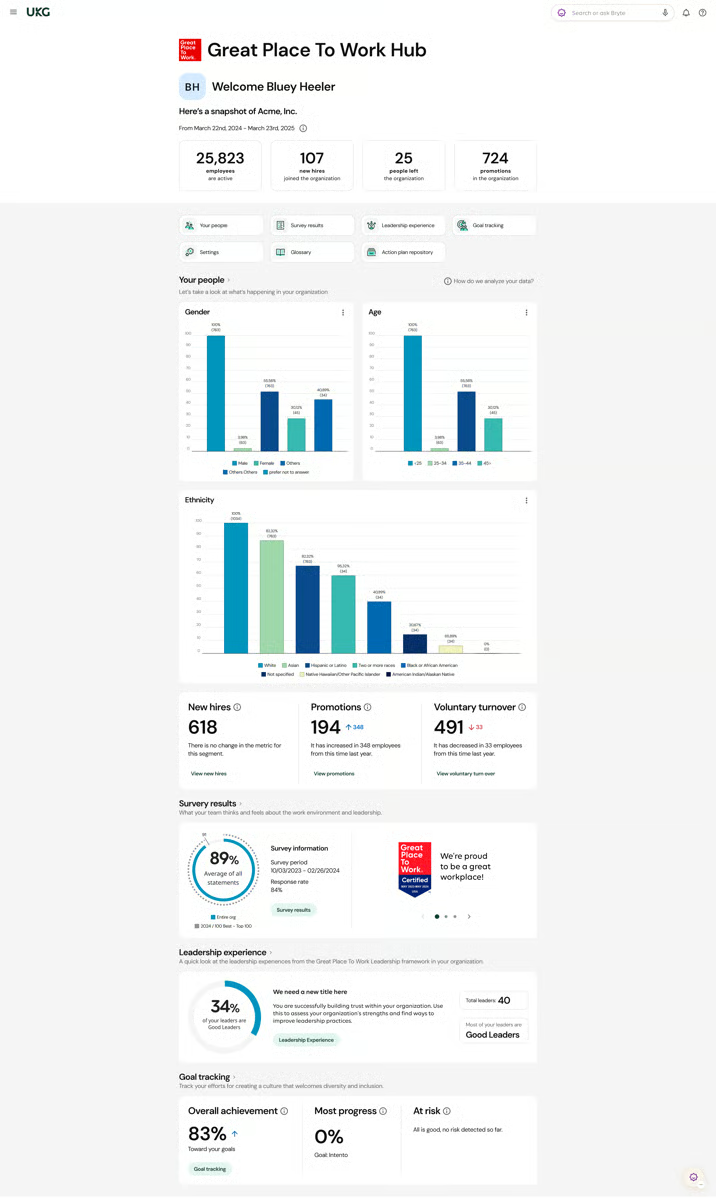
Another thing that stood out is the focus on continuous learning. Features like the talent marketplace allow employees to explore internal career paths and build skills over time, which helps organizations move beyond one-time training programs.
Based on the feedback I gathered, the learning experience itself also feels modern. UKG Pro supports mobile learning, personalized content, and social features like collaboration, gamification, and leaderboards, all of which help drive engagement across teams.
I also noticed that admins benefit from automation features like auto-enrollment, reminders, and compliance tracking. These reduce manual effort and make it easier to ensure required training is completed on time.
Customization is another strong point I saw. Teams can build branded learning academies tailored to their workforce, which is especially useful for larger organizations that want to maintain consistency while still personalizing learning experiences.
There are a few things worth noting. Based on G2 reviews I saw, UKG Pro is built to support complex organizations with layered HR and learning needs, making it a strong fit for mid-market and enterprise teams. For teams looking for a quick, lightweight setup, the breadth of features and configurations may take some time to fully navigate, but this depth ultimately allows for more structured and scalable learning programs.
Also, some G2 users note that while its self-service capabilities handle many day-to-day tasks well, certain configuration changes may require submitting a support request, and response experiences can vary depending on the complexity involved, but once set up, the platform delivers consistent and reliable performance for managing HR and learning operations at scale.
From my perspective, UKG Pro is best suited for mid-market and enterprise organizations that want to embed learning into the entire employee lifecycle, not just deliver courses. If you’re looking to connect training with performance, career growth, and long-term workforce planning, it’s one of the more strategic LMS options out there.
"UKG Pro is my favorite all-in-one HRIS software. It's easy to navigate and learn for front-end users, and as a System Administrator, I found it easy to pick up and learn. On the Pro side, Business Rules and other settings are easy to access and learn. It is easy to build skills by expanding knowledge into the learning Platform Configuration. My favorite thing about UKG Pro is Business Intelligence, aka People Analytics. The ability to customize reports and build robust calculations to fit business needs makes the tool incredibly valuable. I also really appreciate the UKG Community. The way users and UKG's experts interact in that space makes it an incredibly powerful learning tool in addition to the UKG University."
- UKG Pro Review, Danielle T.
"The biggest downside of UKG Pro is that some workflows feel slow and unintuitive, especially for new users. Certain configuration changes still require support tickets instead of being self‑service, which delays projects. Reporting is powerful but can be complex to set up, and pages occasionally load slowly during peak times, which is frustrating when handling urgent HR or payroll tasks."
- UKG Pro Review, Sarah D.
Combine learning platforms with the best HCM software to manage training alongside performance and workforce development.
Litmos offers easy-to-use e-learning and LMS features to optimize employee training and courses. Its AI assistant utilizes employee data to create personalized learning journeys and improve engagement.
According to G2 Data, Litmos is predominantly a mid-market solution — 52% of reviewers come from mid-sized businesses — with notable enterprise adoption (35%) and limited small business presence (13%).
Honestly, the first thing that stood out to me was how easy and intuitive the interface is. Setting up courses is a breeze. Users can upload various types of content, such as SCORM files, videos, and quizzes, and link those modules across multiple courses. That saves a ton of time because updating content in one place reflects everywhere else. Litmos also makes content creation easier with its built-in AI authoring tools, allowing teams to create SCORM-compliant, mobile-friendly courses without needing additional software.
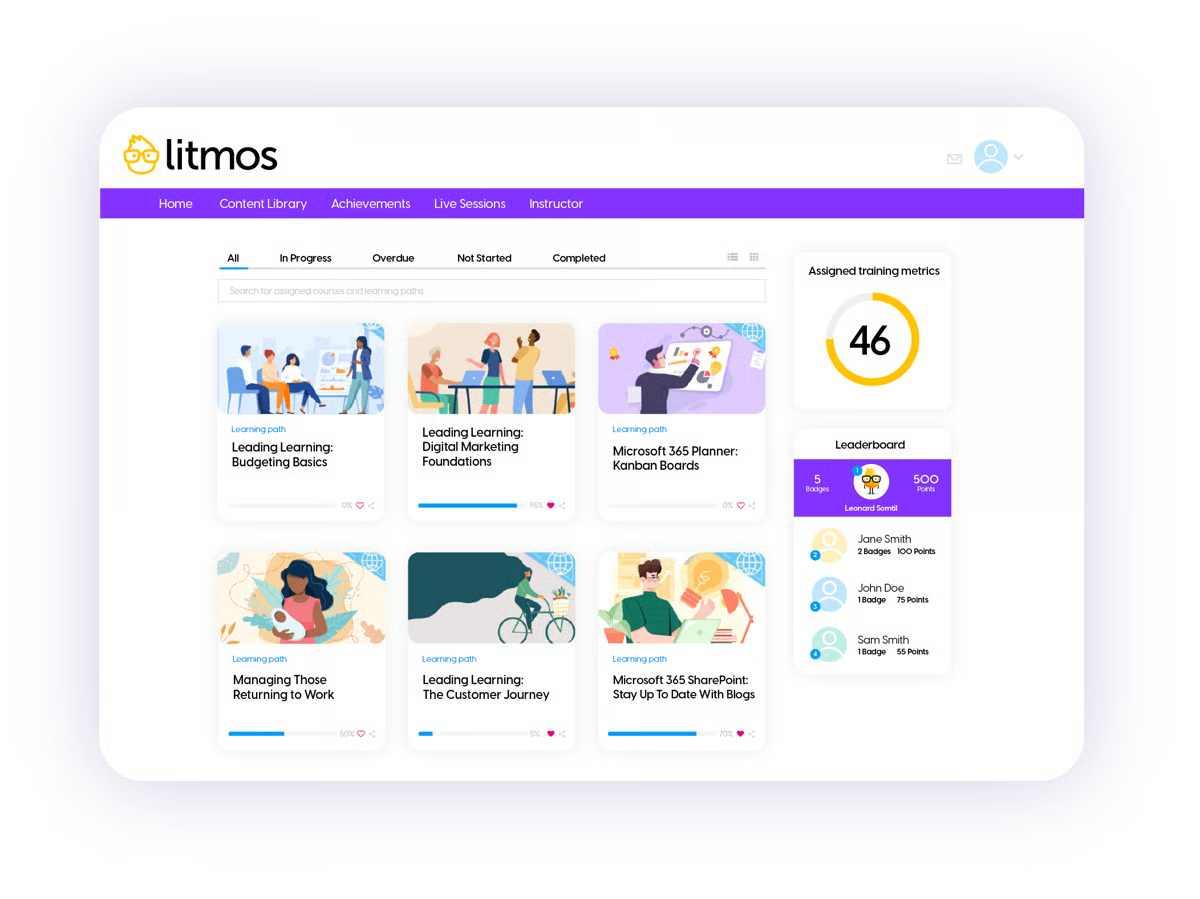
Creating and assigning courses is super straightforward. Litmos supports automated learning paths, so you can sequence training logically without having to micromanage every detail. I also noticed that many users highlight the availability of ready-made training content, which helps teams roll out programs faster without building everything from scratch.
The platform even allows certification tracking, which comes in handy when you are managing compliance across a big team. And the ability to plug in feedback forms or assessments directly into the learning path has made learning a holistic experience.
One area where Litmos really shines is customer support. Their dedicated customer success manager (CSM) has been incredibly responsive. If users run into issues while configuring user permissions and custom fields, customer service is always there to help.
From what G2 reviewers share, Litmos works well for teams that need straightforward reporting and visibility into training progress. For organizations that rely on highly advanced analytics or deeply customizable reporting, certain aspects may require additional steps to extract deeper insights, but the platform still provides reliable core reporting to track completion and performance effectively.
Litmos works well for teams that rely on standard integrations to support their training workflows. For organizations that depend on more seamless or deeply configured integrations, some setups may require additional configuration or troubleshooting to work as expected, but once established, the platform still supports streamlined training operations within a connected ecosystem.
I'd point Litmos toward HR and L&D teams in regulated industries who need more than a basic LMS, specifically, those prioritizing compliance certification, role-based learning paths, and tight integration with their existing tech stack.
"The content authoring tools are very easy to use to create engaging content for all of the courses we make through Litmos. I would like to continue to see new tools added and improvements to the existing ones in the future. I'm also very happy to see all of the updates we've seen recently, including the AI assistant, the new learner home, enhancements for the mobile application, and others. I use the platform daily to track learner progress and create high-quality content for our users. I also enjoy attending the webinars Litmos has hosted and being able to watch the recordings when I can't attend the live sessions."
- Litmos Review, Jessica C.
"We're having some issues with the login, especially because we're a very secure company. There are problems with our external employees trying to access it. The integration with single sign-on (SSO) has been a challenge."
- Litmos Review, Omar V.
Related: Want to deliver training in shorter, more digestible formats? Explore G2's best microlearning platforms to keep employees engaged and learning on the go.
Got more questions? G2 has the answers.
The best apps for corporate employee training systems are Docebo, Absorb LMS, 360Learning, Litmos, Rippling, Paylocity, and UKG Pro. These platforms offer a mix of AI-driven learning, course management, and analytics to support employee development at scale.
The best learning management systems for workplace training include Absorb LMS, Docebo, Litmos, and 360Learning, which are widely recognized for their ease of use, course delivery capabilities, and reporting features.
Recommended corporate training management systems include Docebo, Absorb LMS, Rippling, UKG Pro, and Paylocity. These tools are commonly chosen for their scalability, integrations, and ability to manage end-to-end training programs.
The best corporate learning management systems for small businesses are 360Learning, Absorb LMS, and Paylocity. These platforms are easy to implement, cost-effective, and offer flexible training features suited for growing teams.
The best LMS solutions for large corporations include Docebo, Litmos, Absorb LMS, and UKG Pro, which support enterprise-scale training with advanced analytics, automation, and global learning capabilities.
Services like Docebo, Absorb LMS, and Litmos provide the best corporate LMS features, including AI-powered recommendations, customizable learning paths, integrations with HR systems, and detailed performance tracking.
The best platform for company training and development is typically Docebo or 360Learning, as they combine content creation, learner engagement, and analytics to support continuous employee growth.
The best apps for corporate employee training systems include Rippling, Absorb LMS, Docebo, 360Learning, Litmos, Paylocity, and UKG Pro, all of which help streamline onboarding, compliance, and upskilling initiatives.
The best learning management systems for workplace training are Absorb LMS, Docebo, Litmos, and 360Learning, offering centralized training delivery, mobile access, and strong reporting capabilities.
The most recommended corporate training management systems, according to G2, include Docebo, Absorb LMS, 360Learning, Paylocity, and UKG Pro, which enable organizations to manage training content, track progress, and align learning with business goals.
Based on user reviews, Rippling and Absorb LMS are described as the most recommended corporate LMS platforms on G2. Rippling is trusted for automated, role-based training assignment and real-time progress tracking, while Absorb LMS is valued for intuitive setup and strong onboarding support that L&D teams rely on to scale training.
Rippling and Absorb LMS stand out for fast onboarding. Rippling auto-assigns role- and department-based training the moment a new hire joins and walks them through setup independently, and Absorb LMS is repeatedly praised for a smooth, well-supported onboarding experience that gets teams live quickly.
Litmos, Docebo, and UKG Pro are built to sustain engagement past initial training. Litmos drives it with badges, leaderboards, and gamification; Docebo uses AI recommendations and gamification to keep content relevant; and UKG Pro connects learning to career paths and a talent marketplace so development continues over time.
Based on reviews, Absorb LMS and Docebo are among the most reliable for teams delivering training. Absorb LMS scales dependably from ten to ten thousand learners with strong support, and Docebo is recognized for enterprise-ready scalability and AI-driven course delivery across multi-department rollouts.
360Learning and Paylocity integrate especially cleanly with HR systems. 360Learning connects with Workday, BambooHR, Salesforce, and Slack and auto-enrolls users from HR data, while Paylocity is built as a unified HR suite so learning links directly to payroll, employee profiles, and performance management.
Docebo and UKG Pro offer the strongest reporting for tracking upskilling. Docebo provides detailed analytics and AI-driven skill-gap detection with course recommendations, and UKG Pro's People Analytics lets teams build customizable reports and connect learning progress to performance and career development.
Rippling and Paylocity cut admin time while lifting completion. Rippling automates role-based assignment, certification tracking, and overdue-assignment reporting, and Paylocity automates course assignment and completion reminders so teams stay on top of required training without constant manual follow-up.
UKG Pro and 360Learning encourage employees to drive their own development. UKG Pro's talent marketplace lets employees explore internal career paths and build skills over time, and 360Learning's collaborative model plus AI recommendations connect employees with internal experts and relevant courses that support ongoing growth.
Docebo and UKG Pro are strongest for enterprise skill programs. Docebo supports multi-department rollouts with AI personalization and extended-enterprise portals, and UKG Pro embeds learning across the employee lifecycle, tying skill-building to performance, career paths, and workforce planning at scale.
For tracking development, Docebo, UKG Pro, and 360Learning lead. Docebo offers analytics with skill-gap detection, UKG Pro connects progress tracking to performance and career growth through People Analytics, and 360Learning provides progress tracking and reporting that reviewers rely on for compliance and frequent audits.
Before you delve into trialing or negotiating with an account manager or software provider, list your set of requirements and goals that you want to achieve with specific corporate training. While I conclude that corporate LMS is an ideal platform to manage and organize content, there are hidden caveats and areas that it might fall short.
Keeping a careful eye for suitable integrations like content authoring tools, learning experience platforms, or content libraries would enable you to select the ideal solution and meet your needs. And if you require help at any point, this list will always remain here.
Build strong content assests with best e-learning content software to give top notch and high quality course materials to your employees to strengthen engagement.
.png)

The best course authoring software broadly promise the same thing: fast course creation. What...
 by Disha C

If you're reading this, your current training setup likely isn’t cutting it anymore. Maybe...
.png) by Tanuja Bahirat
by Tanuja Bahirat

We all have that one area of expertise we wish we were just a little better at.
 by Mara Calvello