


Cloud costs have a sneaky way of ballooning. One month, the bill looks normal, and the next, you’re chasing a spike with no clear owner or explanation. That’s why I put together this guide to the best cloud cost management software for 2026, because the bigger headache isn’t just overspending, it’s finding out too late what’s driving it.
What most teams really want to know is which tool fits their spend model and how their teams operate, especially when multi-cloud, Kubernetes, and shared platforms make ownership and allocation messy.
Now I’m not a FinOps practitioner or cloud engineer, but I research software for a living. So for this list, I dug into G2 Grid® Reports, satisfaction signals, and review patterns, and I sanity-checked what I saw with people closer to FinOps and cloud ops day-to-day, and I narrowed in on top tools for optimizing cloud spend: IBM Cloudability, CloudKeeper, Spendbase, CAST AI, and Cloudshot. I also included some bonus tools like ScaleOps, Vantage, AWS Budgets, PointFive, Amazon CloudWatch, Datadog, and amnic.com.
If you’re ready to get serious about controlling cloud spend without slowing teams down, here’s what stood out when I compared them.
*These cloud cost management software are top-rated in their category, according to the G2 Fall Grid Report. All offer custom pricing and a demo on request.
Below, I’ve shared in-depth reviews of my top 5 picks with their G2 ratings, followed by 5 additional cloud cost management tools I recommend for specific use cases.
Here’s a quick comparison table that shows how each platform stacks up on the core capabilities you care about most: multi-cloud management, usage monitoring, spend forecasting and optimization, and recommendations based on G2 feature ratings.
| Software | Multi-cloud management | Usage monitoring | Spend forecasting & Optimization | Cost optimization recommendations |
| IBM Cloudability | 84% | 85% | 84% | 80% |
| CloudKeeper | 81% | 90% | 90% | 89% |
| Spendbase | 87% | 87% | 87% | 88% |
| CAST AI | 85% | 82% | 89% | 88% |
| Cloudshot | 100% | 95% | 97% | 92% |
84% of organizations struggle to manage their cloud spend. Cloud cost management software solves that problem. It gives you a clear, centralized view of what you’re spending in the cloud and what’s driving it. In plain language: it pulls billing and usage data together, shows where costs are coming from, and highlights waste or spikes before they blow up your budget. The best tools make spend understandable for both engineers and finance, not just visible.
Strong platforms go beyond “reporting” into allocation, anomaly detection, forecasting, and even automated optimization, especially helpful in multi-cloud and Kubernetes environments where costs get blurry fast.
According to G2 Data, the average estimated ROI or payback period after implementing a cloud cost management software is 8 months, average user adoption is 60%, and customers skew 34% small business, 39% mid-market, and 27% enterprise, a useful reminder that these tools pay off when teams actually use them.
Bottom line: these platforms are worth it when they reduce surprise overruns, support chargebacks/showbacks, and help you optimize spend proactively without slowing delivery. When that happens, cloud cost management stops being a cleanup task and becomes a day-to-day operating advantage.
I started with G2’s Grid® Reports to build a shortlist of the top cloud cost management platforms based on G2 Score, user satisfaction, and overall market presence. That gave me a clear, data-backed baseline for which tools are actually performing well for FinOps, cloud ops, and finance teams.
Next, I dug into G2 reviews (at scale) to spot the patterns that matter most in real environments. I looked for consistent feedback around cost visibility, anomaly detection, budgeting and forecasting, allocation/chargebacks, and how well each tool handles multi-cloud and Kubernetes-heavy setups. Reviews also helped me separate “good dashboards” from platforms that genuinely help teams prevent overruns and optimize proactively. The screenshots in this article come from G2 vendor profiles and publicly available product documentation.
After digging into G2 Data and layering in my own research, I kept seeing the same priorities come up across reviews and FinOps conversations.
Not every tool nails every criterion. But the best cloud cost management software performs consistently where it matters most for FinOps leads, cloud/IT ops teams, and finance partners: clear visibility, accountable allocation, and proactive optimization that doesn’t slow delivery.
The list below contains genuine user reviews from the Cloud Cost Management software category. To be included in this category, a solution must:
*This data was pulled from G2 in 2025. Some reviews may have been edited for clarity.
G2 rating: 4.2/5
IBM Cloudability is one of the top-rated cloud cost optimization platforms for enterprises, built by IBM/Apptio for teams that need to see, allocate, and optimize spend across complex environments.
From everything I reviewed, its core value is helping FinOps, cloud ops, and finance partners understand where cloud dollars are going across cloud providers, and then turning that visibility into concrete optimization and accountability. In fact, in my view, IBM Cloudability is one of the best tools for forecasting cloud usage costs.
What stood out to me most in the G2 review patterns is how often users talk about clarity. People like the way Cloudability breaks down spend by projects, teams, services, and business units, and how quickly that helps them pinpoint cost drivers. I saw multiple callouts for its dashboards being easy to share and maintain, plus custom views that let service owners see their costs without wading through everyone else’s.
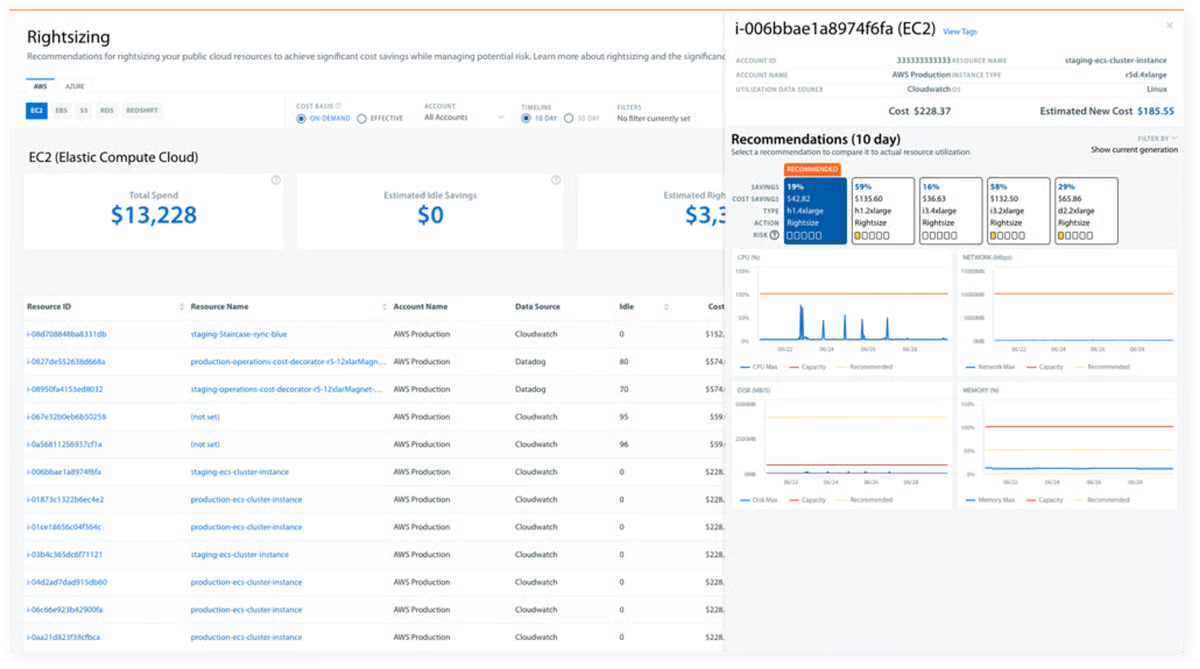
Tagging and allocation also come up as major strengths. Users call the tagging advanced, customizable, and central to their FinOps workflows, especially for showbacks and chargebacks. That lines up with the highest-rated features on G2: decision making, proactive assistance, and autonomous task execution are all sitting at 100%.
I also noticed several people saying the optimization guidance such as rightsizing, spotting unused resources, and storage improvements has led to real savings. And looking at who’s using it most, the top represented industries are information technology and services, financial services, insurance, banking, and computer software, which makes sense for a tool aimed at multi-team, multi-cloud environments.
Based on what I gathered from G2 reviews, the depth of analysis and reporting Cloudability offers is a real advantage, particularly for larger orgs that need to slice spend in many ways. Teams wanting super-fast, on-the-fly exploration (like instant drill-downs during live stakeholder reviews or very real-time anomaly response) might have to plan for a short time, as some reviewers note that a few reports or BI views can take a bit longer to load, especially with bigger datasets.
While it covers the core FinOps bases really well, like multi-cloud visibility, strong tagging, and reliable cost allocation are clearly working for most teams, teams that want to stretch into more advanced FinOps layers over time, like deeper Kubernetes cost context, more sophisticated forecasting, or richer views into the impact of optimization recommendations, it’s worth making sure those specific capabilities line up with how you plan to use the platform today and as your program matures.
Netting it out, Cloudability earns its spot among top cloud cost management tools because it gives mature, multi-cloud teams a real operating system for spend: visibility that’s easy to explain, allocation that’s built for accountability, and optimization guidance that actually supports action.
If you’re running multi-cloud or Kubernetes workloads and you care about durable chargebacks/showbacks, normalized tagging, and decision-ready reporting shared across engineering and finance, this tool is a strong fit.
"I appreciate IBM Cloudability for its remarkable ability to ingest and process a vast amount of data efficiently, transforming it into business-friendly information. This feature is particularly valuable as it addresses the challenges posed by significant growth in cloud usage and the increase in billing data points. The tool effectively assesses utilization and optimization, which would be challenging to accomplish manually. It brings transparency into cloud costs and provides real-time access to information, which is crucial for effective cloud cost management. I also value how it significantly simplifies the process of managing cloud costs and usage."
- IBM Cloudability review, Manan K.
"I feel that the future cost predictions feature in IBM Cloudability could be improved. Specifically, the predictions related to the current state of the workload and usage patterns need enhancement."
- IBM Cloudability review, Saptarshi B.
If you’re also evaluating cost management tools, check out G2’s roundup of thebest SaaS spend management software, to manage and control software spend.
G2 rating: 4.7/5
CloudKeeper lives up to its name a bit. It’s basically there to “keep” your cloud costs from wandering off. It’s a cloud cost management and billing optimization platform that pairs Lens (for spend visibility) with Tuner (for savings recommendations), helping FinOps and cloud ops teams track usage, spot waste, and act on optimization opportunities without turning every billing cycle into a scramble.
Based on what I read, CloudKeeper stands out as one of the best cloud cost optimization tools for AWS and GCP.
What jumped out to me first is how consistently users talk about clarity and support. Reviewers repeatedly call Lens dashboards straightforward, easy to navigate, and more intuitive than native cost tools, with quick onboarding that gets teams up and running fast.
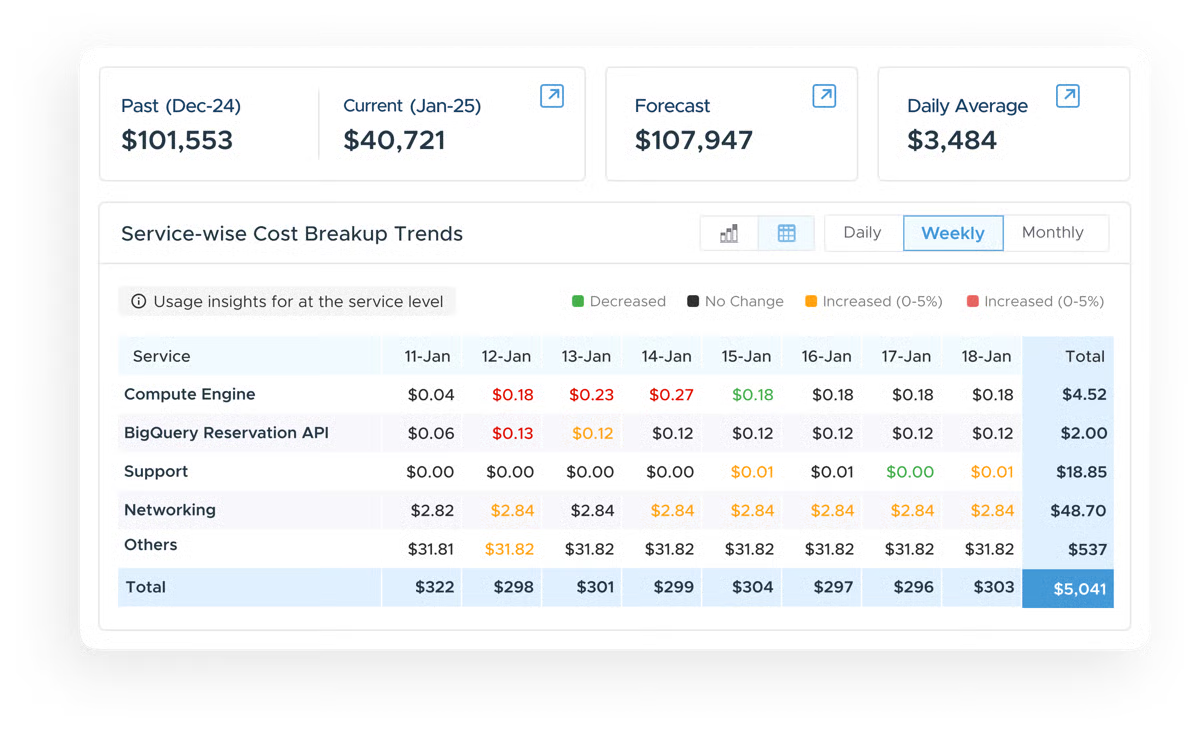
That lines up with the satisfaction ratings I saw on G2: quality of support is 96%, ease of use 94%, ease of setup 94%, and ease of doing business with CloudKeeper is 95%. I also noticed a lot of love for the Tuner Chrome extension and recommendation engine. People and describe getting real-time, in-console nudges to rightsize resources or catch idle usage.
The highest-rated features I looked at back that up, too: spend tracking (92%), dashboards and visualizations (90%), and spend forecasting and optimization (90%) are clearly where users feel the strongest day-to-day value.
And the industry mix is pretty broad — computer software, financial services, IT services, marketing/advertising, and consumer goods — which tells me CloudKeeper isn’t just resonating with one niche cloud model.
I also like that CloudKeeper seems to drive real outcomes, not just reporting. Several reviews mention measurable savings, proactive anomaly catching, and commitment-based discount support that feels safer than trying to manage reservations alone.
Based on the G2 reviews I analyzed, the platform already keeps visibility and recommendations simple for lots of users. A few reviewers also note that as their FinOps needs grow, teams wanting more flexibility to customize dashboards or fine-tune recommendations might look for a bit more control in those areas over time. Similarly, many users describe Lens as clean and easy to follow, but teams wanting fully real-time cost refresh or instant dashboard updates might want to account for the small data lag reviewers mention.
Overall, based on the G2 reviews and satisfaction signals, I’d recommend CloudKeeper to AWS-first teams that want fast cost visibility, actionable savings guidance, and a highly responsive FinOps-style support layer.
"I would consider it as a One-stop solution for my cloud spending/ reservations/ saving recommendations and optimisation efforts. Their Tuner tool has been a great addition to our account, helping us with real-time saving opportunities as and when we browse the AWS console. They also have a detailed bifurcation of cost spends, which helps us to pinpoint the areas we can improve. The CK team has been of great help to catch anomalies on a daily level."
- CloudKeeper review, Sunny C
"While the insights and recommendations are helpful, execution still requires internal effort — such as tagging or architectural tweaks — which sometimes slows down actionability. The dashboards are good but could benefit from more custom filters or export options."
- CloudKeeper review, Hitesh T
Monitoring is not just about cost. Explore the best cloud monitoring tools for managing your cloud infrastructure.
G2 rating: 4.7/5
Spendbase, according to me, sits a little differently from most cloud cost tools because it tackles SaaS and cloud costs together. Instead of only zooming in on infrastructure bills, it gives you one place to see what you’re paying across subscriptions and big vendors like AWS, then helps you reduce that total software spend through usage insights, renewals support, and negotiated discounts.
Rather than focusing on deep infrastructure-level optimization like multi-cloud cost allocation, Kubernetes tuning, or instance-level right-sizing that many cloud cost optimization tools provide, Spendbase takes a broader view of software spend.
The platform treats AWS or Azure as one (often very large) line item alongside dozens or hundreds of SaaS subscriptions. For finance and IT teams whose biggest challenge is gaining visibility into total software spend, controlling renewals, and improving vendor negotiation leverage with cloud costs as a major piece of that puzzle, Spendbase is a strong fit.
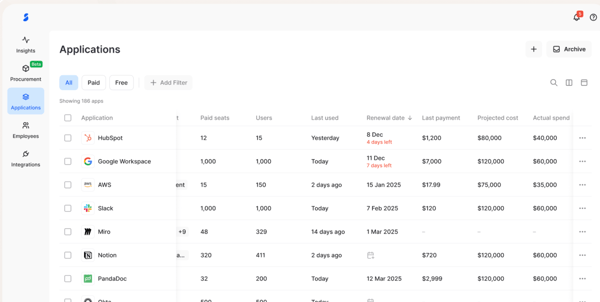
If your biggest challenge is total software spend visibility and vendor leverage, with AWS/cloud savings as a major part of that, Spendbase fits really well.
What stood out to me most is how often users describe real savings tied to clearer visibility. People repeatedly say Spendbase gives them a single dashboard for all software costs, so they don’t have to chase invoices, emails, or scattered spreadsheets to understand spend.
Real-time tracking, clean categorization, and straightforward reporting show up as everyday wins. But the bigger differentiator is negotiation and discounts: reviewers consistently say Spendbase actually delivers meaningful savings, including AWS credits and lower rates on widely used tools like Google Workspace, Adobe, Atlassian, and other core SaaS staples.
I also saw a lot of praise for the customer support layer they prodvide — fast support, proactive audits, renewal reminders, and procurement workflows that cut busywork and help teams stay ahead of waste.
Another thing I like is that Spendbase seems usable beyond just finance. Reviewers say the interface is intuitive, approvals are easy, and even non-technical employees can submit or validate expenses without friction. Integrations with tools come up as time savers, and several teams mention how quickly they were able to centralize vendor info, spot redundant subscriptions, and clean up unused licenses. The overall vibe is “less admin, more control, and fewer surprise renewals.”
It’s strongest marks show up in dashboards and visualizations (91%), scheduling (89%), and compliance (88%), which fits the review l read.
From what I observed across the user reviews, Spendbase already seems to cover the core workflows and visibility most teams need out of the box. Teams that want deeper personalization in dashboards or board/report layouts may want to confirm how much customization they can do today, since a handful of reviewers say they’d enjoy more flexibility as reporting gets more specific.
Also, based on the reviews, for orgs integrating a lot of systems at once, one should plan beforehand as setup can take a bit of time.
Overall, I’d recommend Spendbase for teams that want one clear system to rein in total software spend — SaaS plus AWS-heavy cloud costs — and get real savings through usage cleanup and vendor discounts without adding more procurement work.
"What I love most about Spendbase is how easy they make it to save money on our software stack. They’ve helped us optimize everything from Slack and Google Workspace to Atlassian, and now we’re looking at adding even more tools like Google Gemini, Testrail, and Grammarly. The process is seamless, and they truly do the heavy lifting for us. The team is always super friendly and there for me. Implementation went well and was easy."
- Spendbase review, Kyryll B.
"I'm a forever fan, but I wish for more flexible dashboard options and advanced analytics. That would be nice:)."
- Spendbase review, Taras T.
G2 rating: 4.8/5
CAST AI is built for one very specific (and very expensive) reality: Kubernetes clusters are powerful, but they’re also where cloud costs go to hide. From what I’ve gathered across G2 reviews and the product info, CAST AI automates cost optimization inside K8s by rightsizing workloads, picking cheaper instances (including spot), rebalancing nodes, and surfacing clear utilization and spend insights across clusters. If your cloud bill is tightly tied to Kubernetes, this tool is basically trying to run FinOps on autopilot for your cluster layer.
The first thing I noticed in reviews is how quickly people see impact. Multiple teams talk about immediate savings once CAST AI is connected. Even when someone says they were already optimized, CAST AI still pulled out meaningful extra savings through smarter node selection, bin-packing, and autoscaling.
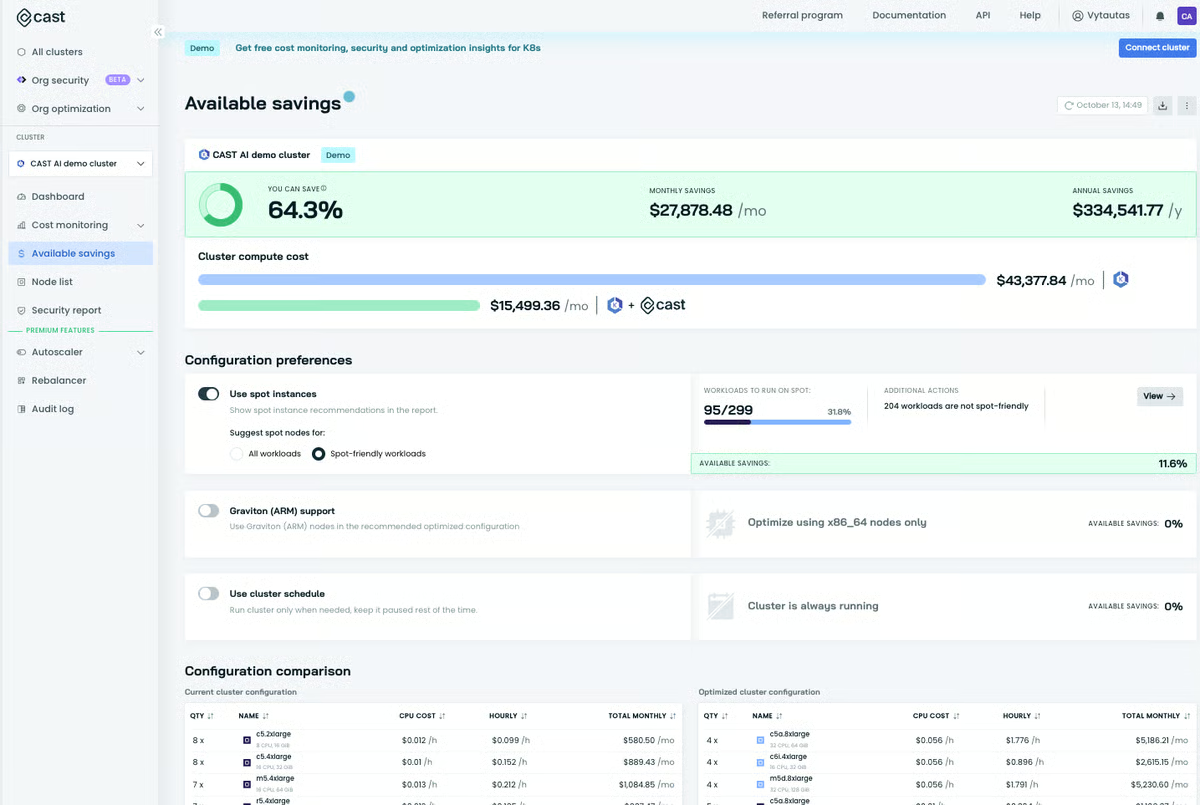
That theme lines up cleanly with the G2 feature scores you shared. Automation is CAST AI’s highest-rated capability at 95%, and users describe exactly that: the platform automatically rightsizes workloads, removes underutilized nodes, and keeps node groups at the best price point without the team babysitting it.
Usage monitoring is also rated high at 92%, and reviewers consistently say the dashboards make CPU/RAM utilization and cost drivers easy to understand across nodes, namespaces, and clusters.
Dashboards and visualizations sit at 90% too, and reviewers often describe the experience as having everything in one place, especially from platform and SRE teams that don’t want to juggle native cloud tools plus homegrown scripts.
Support is another bright spot. The quality of support is 97% which matches the shout-outs I saw for fast Slack help, white-glove integration, and support engineers who stick around until things are working.
What also made CAST AI feel “best-in-class” to me is that it doesn’t stop at cost charts. People call out responsive autoscaling (vertical + horizontal), easy Terraform/Helm integration, and governance policies that help enforce guardrails in shared environments. A few reviewers even mention built-in security scanning and vulnerability insights, which is a nice bonus for teams trying to keep cost and compliance moving together.
And looking at the industry mix on G2 — IT services, computer software, marketing/advertising, security, and even automotive — it’s clearly being used by orgs with real production clusters and diverse workload shapes.
I like how much CAST AI already automates and simplifies K8s optimization, especially for teams managing lots of clusters or multi-tenancy. Teams wanting a smoother first-time connection to complex Kubernetes setups might want to plan for a bit of ramp time, since a few reviewers mention that setup, governance tuning, or troubleshooting requires some Kubernetes comfort, as K8s itself is a deep system, and CAST exposes real control.
Also, users like how aggressive the automation is for rightsizing and autoscaling, and teams might want deeper step-by-step guidance for advanced or non-standard setups, or might look for more detailed documentation in a few areas to know beyond the basics.
The highest rated features on G2, high automation (95%), strong usage monitoring (92%), and solid dashboards (90%) match the real-world outcomes reviewers describe.
On the whole, CAST AI is a very easy recommendation for K8s-heavy teams, in my opinion.
"I use CAST AI to automate cluster scaling and reduce manual work in maintaining our Kubernetes infrastructure. I appreciate how it helps reduce cloud costs by taking care of scaling automatically. I like how well CAST AI handles spot instances and cluster autoscaling. It manages spot instances flawlessly, ensuring I don’t have to worry about interruptions. What used to be a manual, tedious process is now sorted automatically. I particularly enjoy that CAST AI can automatically manage spot instances and fall back to on-demand without causing downtime. Additionally, the setup process was straightforward, allowing us to get up and running with minimal effort."
- CAST AI review, Sanjay K.
" Learning curve on governance: Policy setup and interpretation of some recommendations require a bit of learning, especially for teams new to Kubernetes internals. Limited Documentation Depth: Some may find the documentation lacking for advanced use cases, particularly when integrating with non-standard setups (for example, GKE workload identity federation, custom networking)."
- CAST AI review, Bilel I.
G2 rating: 4.9/5
Cloudshot comes across as a “one pane of glass” platform for running cloud operations and keeping spend in check across AWS, Azure, GCP, and other environments.
Instead of bouncing between native consoles, it pulls your accounts into a single, visual workspace where you can see topology, monitor resources, enforce governance, and get cost and security signals in real time. The overall vibe from G2 users I got is pretty consistent: teams like that it feels lightweight to adopt, but still deep enough to manage real multi-cloud complexity. In fact, Cloudshot is one of best platforms for tracking multi-cloud expenses.
What stood out to me first was how often users talk about speed to value. Many reviewers say they were up and running in minutes, with clean dashboards that make cloud inventory, costs, and changes obvious without a ton of training.
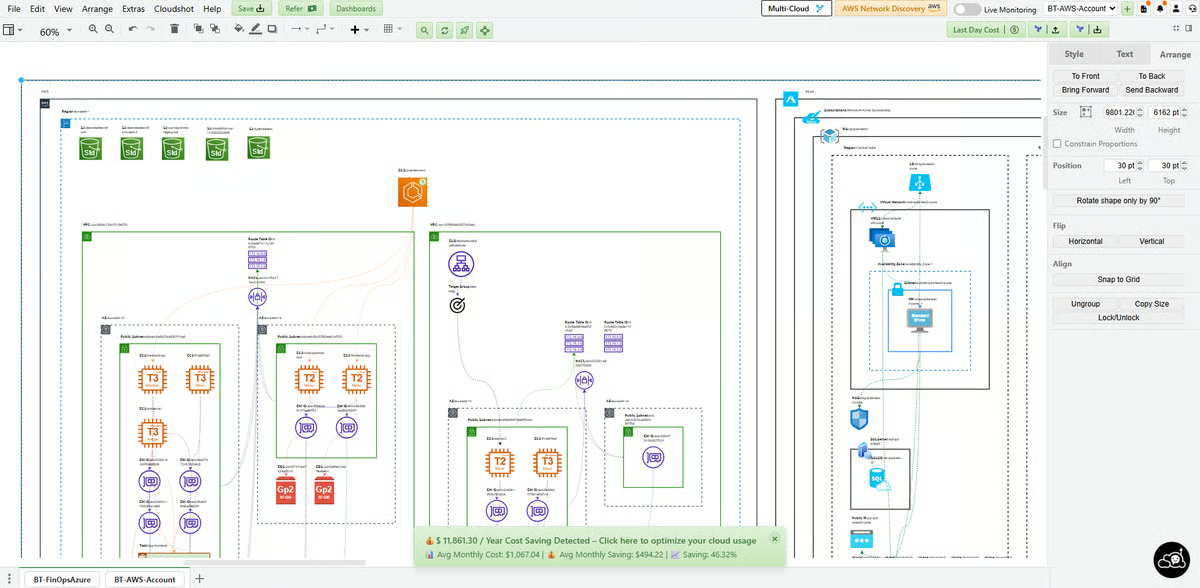
That matches Cloudshot’s near-ceiling satisfaction signals I saw on g2: ease of use sits at 99% and ease of setup at 98%. I also noticed repeated praise for how Cloudshot makes multi-cloud feel simpler than it usually is.
People call out finally seeing AWS and Azure together, or bringing AWS, GCP, and Azure into a single view for tagging enforcement, budget alerts, and cost optimization. The feature scores line up neatly here too: multi-cloud management is rated 100%, scheduling 99%, and automation 98%.
The reviews also make it clear this isn’t just for engineers. Several teams mention that finance stakeholders are able to follow cloud spend easily because the visuals are so straightforward.
Based on G2 reviews I read, users really appreciate how feature-rich Cloudshot already feels for day-to-day cloud ops, and teams wanting a more guided first walkthrough might appreciate a bit more structure early on. One or two reviewers mention that the breadth of capabilities can feel like a lot at first, so teams new to cloud management may want to lean on onboarding cues or support to pick the right starting path. Users also like how well Cloudshot handles AWS/Azure/GCP today, and teams with providers outside that core set may want to check coverage as they scale.
Overall, Cloudshot reads like one of the best cloud cost monitoring picks for teams that want multi-cloud visibility without a multi-cloud headache. If you’re a cloud ops, DevOps, or FinOps-adjacent team trying to manage AWS/Azure/GCP together, keep governance tight, and make cost optimization part of daily ops — not a monthly scramble — Cloudshot looks like a strong fit based on what users consistently describe.
"I can enjoy more coffee time with Cloudshot. :) Writing a Terraform script is at the core of my job. Earlier, I used to have bunch of them in my folder and my typical task used to start from finding the most relevant, peeping through it, tweaking it, double checking and visualising it before sending for approval and so on. Nowadays, I just open the landscape diagram in Cloudshot (which is handy any way), make one click to generate the Terraform script. The script is almost perfect. Guess what, my Lead also uses Cloudshot to visualise it and gives a green signal. They have a fantastic customer support too."
- Cloudshot review, Natasha B
"The overall platform is great, but the number of features felt a bit overwhelming at first. A more guided onboarding process would be helpful for new users to get started quickly without feeling overwhelmed by the number of features."
- Cloudshot review, Prachi J
If you’re still exploring options beyond the tools reviewed above, here are a few more strong contenders worth checking out:
Got more questions? G2 has the answers!
Yes. AWS, Azure, and GCP all offer native cost tools for visibility, budgeting, and basic optimization inside their own clouds. Third-party tools are mainly for deeper FinOps workflows, multi-cloud views, and Kubernetes-level cost control.
Pick based on where you spend your life and how mature your FinOps motion is. If you’re AWS-first and want fast visibility plus commitment savings, CloudKeeper fits. If you need enterprise-grade allocation and chargebacks across clouds, IBM Cloudability fits. If Kubernetes is driving your bill and you want automated optimization, CAST AI fits. If you want multi-cloud ops and cost visibility in one visual layer, Cloudshot fits. If your spend problem is SaaS and cloud together, Spendbase fits.
IBM Cloudability is the best fit for department-level allocation and chargebacks across cloud providers. CAST AI is the best fit when allocation needs to map cleanly to Kubernetes clusters, namespaces, and workloads.
IBM Cloudability and CloudKeeper are the top picks. Cloudability is strongest for tracking RI/Savings Plan coverage, utilization, and allocation across teams. CloudKeeper is strongest for AWS-first commitment savings guidance and day-to-day RI workflows.
CloudKeeper and Cloudshot are the most user-friendly options in this list, based on consistent G2 feedback around quick onboarding, intuitive dashboards, and low learning curve for both engineering and finance users.
CAST AI is the most AI-driven option here, especially for Kubernetes optimization. IBM Cloudability and CloudKeeper also provide strong recommendation engines for rightsizing and commitment savings, but CAST AI is the most automation-forward.
IBM Cloudability is the best fit for AWS and Azure cost visibility and allocation in one platform. Cloudshot is a strong alternative if you want AWS and Azure cost monitoring tied to visual cloud ops and real-time governance.
CloudKeeper integrates tightly with AWS billing and consolidated spend workflows. Spendbase integrates cloud vendor spend into a broader SaaS plus cloud billing and procurement view. Cloudability also connects directly to cloud billing streams for multi-cloud financial management.
If there’s one thing I hope you take away from this list, it’s this: cloud cost management isn’t just a finance problem or an engineering problem — it’s an operating rhythm. The best tools don’t magically “cut spend” on their own. They make cost ownership obvious, turn spikes into early signals instead of end-of-month surprises, and help your teams build better habits around efficiency without slowing delivery.
What surprised me most while digging through G2 patterns is how different “best” looks depending on where your costs actually live. If your spend is mostly AWS and you want quick wins plus hands-on help, CloudKeeper feels like a natural fit. If your org needs serious allocation depth across clouds and departments, Cloudability earns its place. If Kubernetes is where your budget goes to hide, CAST AI basically treats optimization like a continuous background process. Cloudshot stands out for teams that want multi-cloud clarity wrapped into daily ops. And Spendbase is the wildcard that makes sense when SaaS and cloud bills blur together in the real world.
So instead of asking “what’s the best cloud cost management software overall,” the smarter question in 2026 is: what’s the best tool for the way your teams build, ship, and share cloud spend today? Get that match right, and cost management stops being cleanup work — it becomes a real advantage.
If you want to keep tightening spend decisions across the stack (cloud, SaaS, vendors, and everything in between), explore more from procurement software category on G2.


When evaluating the best cloud management platforms, the decision is not about feature...
 by Disha G

I’ve spent the last three years writing about IT and cloud security, talking to DevOps teams,...
by Soundarya Jayaraman

The best predictive analytics tools do more than forecast; they tell me when a model is...
 by Somya Jain