


I spend a lot of time in meetings. Some are quick team check-ins, others are structured planning sessions, and a few are formal enough that every decision needs to be documented and revisited later.
After a while, you stop caring about which meeting management software is best and can “do it all”. Instead, you start paying attention to more practical things, such as how easy it is to prepare an agenda, how reliably follow-ups get tracked, or how much work it takes to get everyone set up.
That’s what prompted me to compile this list of the best meeting management software. Some work best for fast-moving remote teams. Others are built for board governance, accountability, or analysis. To make their differences clearer, I examined G2 review data to understand how people use these platforms on a day-to-day basis, what they value, and where each tool tends to fit best.
The sections that follow break down those picks, along with the trade-offs worth knowing before you commit.
| Best meeting management software | Best for | G2 Rating | Pricing | Likelihood to recommend |
| Diligent Boards | Managing board meetings | 4.5/5⭐ | Available on request | 91% |
| Nasdaq Boardvantage | Multi-language meeting coordination | 4.6/5⭐ | Available on request | 93% |
| Fellow | Managing remote team meetings | 4.7/5⭐ | Starts at $7/user/month | 94% |
| BoardEffect | Agenda planning | 4.4/5⭐ | Available on request | 89% |
| Claap | Real-time meeting collaboration features | 4.7/5⭐ | Starts at €24/license/month | 93% |
| Decisions AI | Follow-up task tracking after meetings | 4.4/5⭐ | Starts at $14/user/month | 89% |
| tl;dv | Fastest setup for virtual meetings | 4.7/5⭐ | Starts at $18/seat/month | 95% |
| The Predictive Index | Analytics features | 4.7/5⭐ | Available on request | 90% |
| Boardable | Calendar apps integrations | 4.5/5⭐ | Starts at $20.99/user/month | 91% |
| Ninety.io | Cost-effective meeting management | 4.7/5⭐ | Starts at $10/user/month | 95% |
*These are the leading meeting management software on G2 as per our Winter 2026 Grid Report. Pricing data is subject to change.
When I choose the best tools for each use case, I start with G2 Data. I look at a product’s category performance, including its G2 Score, satisfaction ratings, and feature-level strengths. This helps me understand which tools consistently perform well before I narrow them down to more specific scenarios, like small teams, nonprofits, or industry-focused workflows.
From there, I delve into review insights to see what real users have to say. I look for patterns in pain points, frequently praised features, and feedback from people in the same roles or industries that the use case targets. The recommendations you see reflect that mix of quantitative scoring and qualitative sentiment, focused on the tools that repeatedly show up as the strongest fit for that specific need.
Board meetings leave very little room for improvisation. In this use case, I sought a meeting management software that supports formal governance, tightly controls sensitive materials, and remains reliable when the same workflows are repeated quarter after quarter.
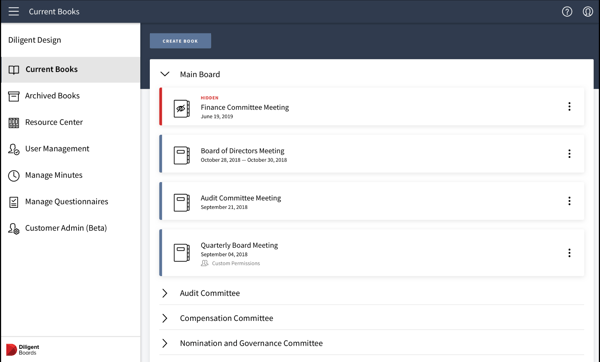
Diligent Boards fits this need because G2 users consistently reinforce its role as a governance-first platform. It scores 93% for meeting requirements, which is crucial when board software is expected to support regulatory expectations, structured documentation, and repeatable processes without requiring workarounds.
It earns 91% for ease of administration, a strong signal in environments where meeting logistics are managed across legal, executive, and administrative stakeholders rather than owned by a single user. G2 Reviews highlight reliability and control, which aligns cleanly with formal board operations.
| Pros | Cons |
| Clear support for formal board governance and confidential materials | More structure than needed for informal or ad hoc meetings |
| Administrative controls that scale across boards and committees | Onboarding can take time for new board members |
| Consistent handling of recurring board workflows | Feature depth may exceed simpler governance needs |
Explore more Diligent Boards alternatives on G2.
Board meetings that span regions, languages, and jurisdictions require consistent coordination across geographies. For this use case, I prioritized software that supports global participation without forcing administrators to adapt workflows for each geography.
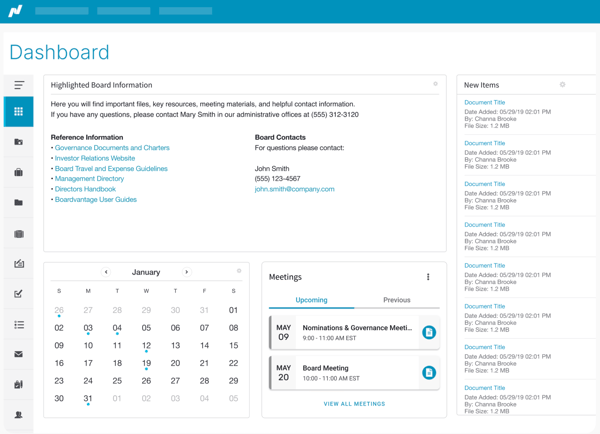
Nasdaq Boardvantage aligns with that need based on how G2 users describe deploying it in international and enterprise board environments. It earns 93% for meeting requirements, indicating that the platform reliably supports varied governance expectations without requiring frequent customization.
It scores 98% for quality of support, a meaningful indicator when boards operate across time zones, and teams depend on responsive assistance to keep meetings running smoothly.
| Pros | Cons |
| Strong fit for global and enterprise board governance | More functionality than smaller boards may require |
| Dependable support for complex coordination needs | Initial setup can take time in larger organizations |
| Well-suited to structured, repeatable board processes | Less focused on lightweight or informal meetings |
Discover Nasdaq Boardvantage alternatives on G2.
Remote team meetings depend on habits that repeat week after week. For meetings like this, I set the bar by how easily teams can prepare, stay aligned during the conversation, and leave with clear next steps without adding extra coordination work.
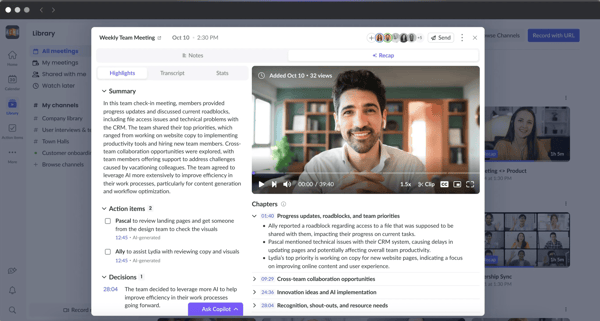
Fellow earns its place here because G2 users describe it as easy to adopt and reliable in everyday team workflows. It scores 92% for ease of use, which matters when meetings are shared across managers and contributors rather than owned by a single facilitator.
It earns 93% for ease of setup, a strong signal for distributed teams that want to get value quickly without investing time in training or configuration. Reviewers frequently point to shared agendas and action items as core strengths, reinforcing Fellow’s fit for teams running regular remote syncs.
| Pros | Cons |
| Simple structure that supports recurring team meetings | Limited depth for highly formal or regulated meetings |
| Easy adoption across managers and team members | Reporting capabilities may feel light for larger organizations |
| Clear visibility into action items and ongoing context | Not designed for board or executive governance use cases |
View more Fellow alternatives on G2.
Agendas do a lot more than set the order of discussion. They shape how meetings are prepared, how time is allocated, and how decisions are documented afterward. For my analysis, the right software must support that structure without turning agenda creation into a manual process.
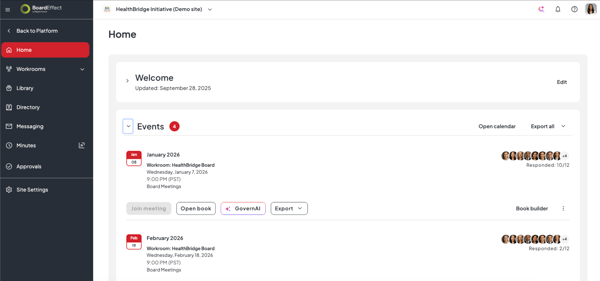
BoardEffect stands out here because G2 users repeatedly describe agendas as a central part of how they use the platform, not an add-on feature. It scores 92% for meeting requirements, which aligns with reviews that emphasize predictable, well-organized meeting prep across boards and committees.
It also earns 90% for ease of administration, a crucial signal when agendas, packets, and revisions are handled by the same administrators meeting after meeting. G2 Data points to consistency and control, reinforcing BoardEffect’s fit for meetings where planning sets the tone.
| Pros | Cons |
| Strong tools for building and managing structured agendas | More setup than lightweight meeting tools |
| Reliable support for board packets and meeting preparation | Less suited for informal or fast-moving meetings |
| Administrative controls that help maintain consistency | Feature depth may exceed simpler planning needs |
See top-rated BoardEffect alternatives on G2.
Meetings that rely on real-time collaboration tend to break down when context is lost the moment the call ends. For this scenario, the software needs to capture discussions as they happen and make it easy for others to react, comment, or catch up without scheduling yet another meeting.
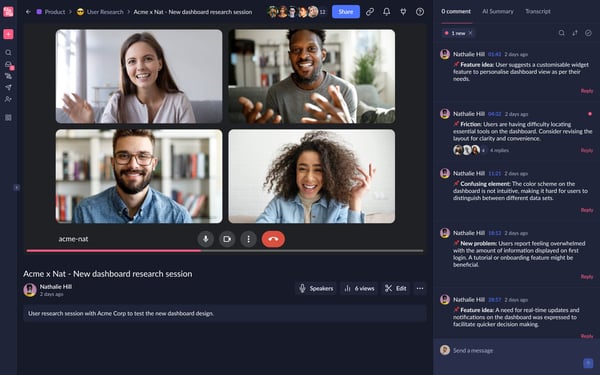
Claap shows up in G2 reviews as a tool teams lean on when collaboration can’t wait until notes are cleaned up or tasks are assigned later. Users rate it 94% for ease of use, which supports the idea that participation remains high even when many people are involved simultaneously. It also scores 92% for meeting requirements, suggesting that the core collaboration workflows hold up once teams rely on Claap regularly.
Rather than emphasizing formal structure, reviews point to how easily teams can react, comment, and stay aligned during and immediately after meetings, making Claap a strong fit for real-time collaboration.
| Pros | Cons |
| Makes it easy to collaborate during and right after meetings | Limited support for formal agendas or structured prep |
| Low barrier to participation across teams | Not designed for board or governance-heavy meetings |
| Keeps shared context visible without extra coordination | Long-term reporting and tracking are lighter |
Check out other Claap alternatives on G2.
I’ve seen plenty of meetings go well and still lead nowhere. For this use case, I focus on software that makes decisions and action items visible the moment the meeting ends, without relying on someone to manually chase follow-ups afterward.
/Decisions%20AI.webp?width=600&height=314&name=Decisions%20AI.webp)
I recommend Decisions AI because G2 users consistently describe it as a tool built around outcomes rather than note-taking. It scores 92% for ease of use, which matters to me when follow-up tracking depends on contributors actually engaging with assigned actions, not just a meeting owner updating tasks.
It has a 91% score for meeting requirements, reinforcing that teams trust it to capture decisions and responsibilities in a way that holds up across recurring meetings. Reviews repeatedly point to improved visibility after meetings, which aligns well with teams that care about execution over documentation.
| Pros | Cons |
| Clear tracking of decisions and assigned actions | Less emphasis on agenda planning or meeting prep |
| Easy for contributors to adopt and use | Narrower scope than all-in-one meeting tools |
| Helps teams maintain accountability after meetings | Not designed for board or governance workflows |
Browse Decisions AI alternatives on G2.
When speed is the priority, I don’t want a meeting tool that asks for configuration before it delivers value. The software has to work almost immediately, with minimal setup, so teams can start capturing meetings without changing how they already run calls.
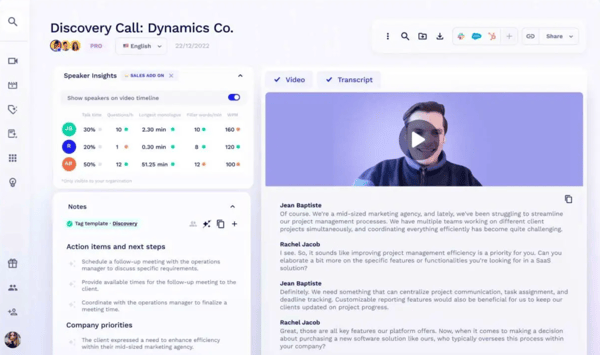
I picked tl;dv because G2 users repeatedly describe how quickly they’re able to get started. It scores 95% for ease of setup, which is ideal for teams that want recordings and summaries without onboarding friction. It also earns 94% for ease of use, reinforcing that the tool remains accessible once it’s part of everyday meetings.
G2 Data focuses on how tl;dv fits naturally into existing virtual meeting workflows, making it a strong option for teams that want results fast rather than another system to manage.
| Pros | Cons |
| Extremely fast to set up and start using | Limited depth beyond recording and summaries |
| Simple experience for everyday meeting capture | Not built for structured agendas or task tracking |
| Fits easily into existing virtual meeting tools | Less suitable for governance-heavy meetings |
Get more tl;dv alternatives on G2.
I don’t approach meeting analytics looking for a recap of what already happened. What I care about is whether the software helps explain patterns – why certain conversations stall, why alignment breaks down, or why the same issues keep resurfacing across teams. For this use case, analytics need to support interpretation, not just observation.
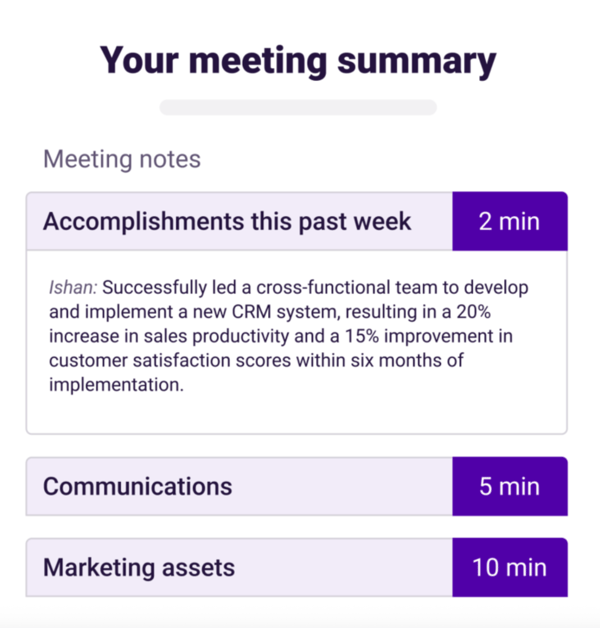
I chose The Predictive Index because G2 users consistently describe it as an analytics-driven platform rather than a traditional meeting tool. It scores 94% for meeting requirements, which supports the idea that teams rely on it to answer deeper questions about performance and alignment, rather than just capturing what happened in a meeting.
A 92% ease of use score indicates the platform makes it ideal for analytics to be understood and applied across managers, HR, and leadership teams. Users also emphasize interpretation and decision support, making it a strong fit for organizations that use meetings as an input into broader performance analysis.
| Pros | Cons |
| Strong analytical insights tied to team behavior and performance | Not focused on day-to-day meeting logistics |
| Analytics that support leadership and organizational decisions | Requires context to interpret results effectively |
| Easy access to insights across different roles | Less suited for teams seeking lightweight meeting tools |
Look up other The Predictive Index alternatives on G2.
I pay close attention to how meeting software fits into existing schedules. In this use case, the goal isn’t to replace calendars or change how meetings are booked. It’s to make coordination easier once meetings are already on the calendar, without creating extra steps for administrators or participants.
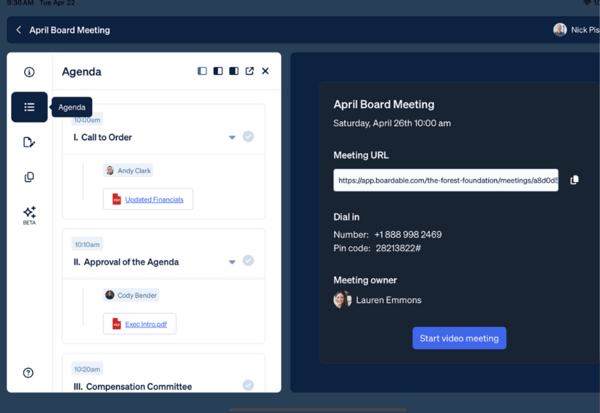
Boardable works well here because G2 users consistently describe it as easy to plug into established scheduling workflows. It scores 91% for ease of setup, which is helpful when calendar integrations need to work quickly across boards, committees, and recurring meetings.
The platform also has a 90% rating for ease of administration, a useful signal when meeting coordination involves invites, updates, and changes that have to stay aligned with external calendars. G2 users share that Boardable easily fits into day-to-day coordination, which supports its role as a calendar-friendly meeting manager.
| Pros | Cons |
| Straightforward coordination with existing calendar tools | Less depth for complex governance requirements |
| Simple setup for recurring meetings and committees | Limited flexibility for highly customized workflows |
| Admin features that reduce scheduling back-and-forth | Not designed for analytics-heavy use cases |
View more Boardable alternatives on G2.
When cost is the deciding factor, I’m not just looking for a lower price. I want to know whether the software actually replaces other tools and supports meetings without cutting corners on structure or accountability. For this purpose, value comes from how much the platform covers once it’s part of regular use.
/Ninety.io.webp?width=600&height=303&name=Ninety.io.webp)
I landed on Ninety.io because G2 users say that it delivers solid functionality without requiring teams to layer on additional meeting or execution tools. It scores 94% for meeting requirements, as the platform covers what users need to run meetings and track outcomes without gaps. It also earns 93% for overall satisfaction, suggesting that teams continue to see value over time rather than treating it as a short-term workaround.
Ninety.io connects meetings to execution frameworks, ideal for teams that want a single system to support both discussion and follow-through at a reasonable cost.
| Pros | Cons |
| Strong value relative to the breadth of features included | May feel opinionated for teams outside its execution framework |
| Connects meetings directly to goals and accountability | Less flexible for highly customized meeting formats |
| Consistent satisfaction once adopted across teams | Not designed for formal board governance |
Find other Ninety.io alternatives on G2.
Meeting management software works best when it’s chosen with intent. The most practical way to choose is to start with the meeting you run most often and work outward. If governance and compliance set the tone, a board-focused platform will pay off. If speed, adoption, or follow-through matter more, lighter or outcome-driven tools tend to be a better fit. Use the G2 satisfaction signals as guardrails, but weigh them against how your meetings actually function day to day.
Once you narrow down two or three tools that align with your primary use case, I recommend digging into reviews that mention scenarios similar to yours. Look for patterns around setup effort, admin ownership, and long-term use.
If your meetings lean heavily on automation, summaries, or real-time assistance, it’s worth exploring tools designed specifically for that layer of support. Discover the top AI-driven meeting assistance solutions on G2.


We're only a few months into the new year, and I'm already calling it the year of automation.
 by Angela Henderson

With more of the world embracing remote work, virtual meetings are becoming the norm.
 by Alexa Drake

Workplaces today are becoming more diverse than ever before, bringing together a rich tapestry...
 by Wendy Wang