


A few weeks ago, my internet broke.
Not literally, but my X feed, my Reddit homepage, my news alerts all simultaneously lost their minds over one thing: Claude.
I’ve seen my share of AI hype, so I thought I was immune. But when the mid-January launch of Claude Cowork hit, I wasn’t ready. Suddenly, it wasn't just coders; everyone was building tools and automating entire workflows in minutes.
Claude this. Claude that. "I just asked Claude to build me a PDF comparison tool." "Opus 4.6 is insane." "Cowork organized 500 files while I slept."
I'm not a developer. I'm not deeply technical. I'm just someone who uses AI tools to get work done — writing, research, organizing ideas. I'd tried Claude's free tier before, but the usage limits frustrated me enough that I never really gave it a fair shot. Why pay $20/month for another AI tool when ChatGPT and Gemini were already working fine for me?
But the noise got to me. Last week, I caved, pulled out my card, and bought Claude Pro.
Since then, I've been testing this thing that everyone suddenly was obsessing over. I've chatted, coded, written, and coworked with it.
This Claude review is my honest, fresh-convert perspective on what I loved, what frustrated me, and whether Claude’s really the productivity multiplier everyone’s claiming it to be or just another $20 subscription we’ll forget about by summer, informed by G2 reviews.
Claude is one of the best AI assistants on the market right now, excelling at writing, reasoning, coding, and long-form work, with powerful new agentic tools like Claude Cowork.
Whether you are a developer curious about the new terminal tools, a writer tired of the 'ChatGPT voice', or a power user looking to automate your desktop, I’ll help you determine if Claude is ready to become your primary AI assistant.
Claude is an AI assistant developed by Anthropic that's focused on building safe, reliable AI systems. In 2026, it has shifted from a basic "chatbot" to an "agentic" assistant, meaning it can actually perform tasks on your computer rather than just talking about them.
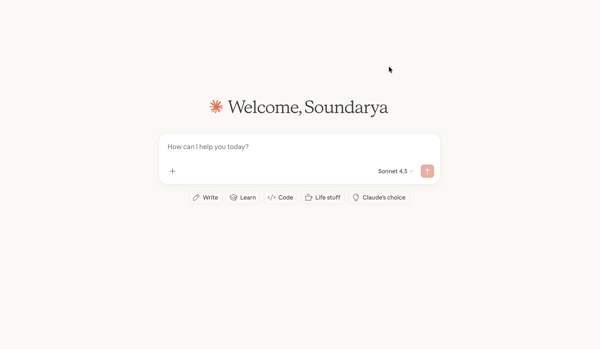
Unlike ChatGPT or Gemini, Claude splits the experience into three modes in its desktop app:
This separation makes Claude feel less like a chatbot and more like a focused workspace with an agent. The AI chatbot is powered by the Claude family of models. It includes:
| Metric | G2 score | Insights |
| Overall G2 rating | 4.4 / 5 | Strong overall satisfaction, especially for writing-heavy and research-focused use cases. |
| Customer segment | Small business: 67%Mid-market: 26%Enterprise: 7% | Adoption skews toward SMBs and mid-market teams, suggesting Claude resonates most with individual contributors and smaller teams. |
| Ease of use | 92% satisfaction | Users consistently highlight Claude’s intuitive interface and low learning curve. |
| Ease of setup | 89% satisfaction | Minimal setup friction, particularly compared to more complex AI tools with heavy configuration requirements. |
| Natural conversation | 93% satisfaction | Claude’s most praised strength — users frequently cite its human-like tone and clarity. |
| Creativity | 89% satisfaction | Performs well for ideation, writing, and creative tasks without sounding formulaic. |
*Data from G2 Winder 2026 Grid Report for AI chatbots software category
Here are the features that actually define the Claude experience.
Claude covers the basics well, but there are still a few gaps compared to other leading AI assistants:
I tested Claude using the Claude Pro plan, focusing on real-world tasks I already use AI tools for rather than artificial benchmarks. I wasn’t trying to stress-test edge cases or obscure prompts. I wanted to see how Claude performs as a daily work assistant.
To ensure my experience wasn't an outlier, I also analyzed patterns in user reviews on G2 and community forums to understand where my experience aligned with the broader consensus and where it didn’t.
My evaluation focused on:
Disclaimer: I tested Claude as of February 2026. Features and performance may evolve. Check the official website for the most current information.
At this point, I’d read enough about what Claude was good at. What I really wanted to know was how Claude performs once the novelty wears off and I start using it for actual work. Here’s how my experience went.
If you’re tired of the "AI voice, "you know, the one that loves words like delve, tapestry, and testament, this is why you use Claude.
From day one of using Claude, I found its writing more human than other AI writing assistants. Not trying-too-hard human like ChatGPT's formal corporate voice, and not the extremes of Gemini that swings between stiff professionalism and overly flowery verbosity. Claude sits in this middle ground that just feels natural.
I tested Claude across marketing copy (emails, landing pages, ad text), long-form content (blog drafts, article outlines), professional communication (emails, LinkedIn messages), and my ongoing Reddit and LinkedIn content calendar project. It caught my writing style accurately: short sentences, direct language, occasional sarcasm, and leading with the punchline. When it drafted something, they actually sounded like me, not like an AI approximating my voice.
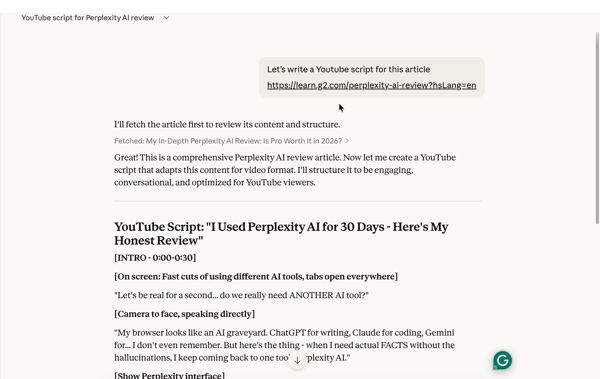
The Artifacts feature eliminates the annoying copy-paste loop I deal with at times. Claude writes drafts in a side panel, and I can request changes in real time. "Make this punchier," "add a story hook," "cut the intro," and it updates immediately.
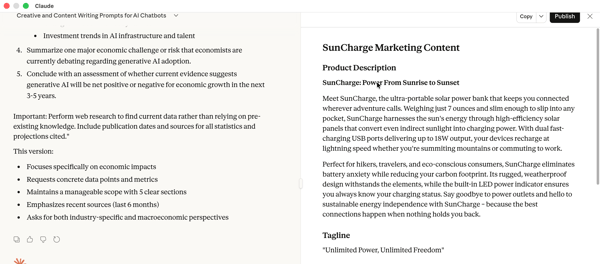
Claude also doesn't default to bullet points and numbered lists the way ChatGPT does. It writes in actual paragraphs and only adds structure when it genuinely improves readability.
That said, Claude isn't perfect. Like all AI, it still needs editing. It can miss the mark on tone, get verbose, or misinterpret your intent. You're refining a strong first draft, not copy-pasting finished work.
But for me, Claude really earns its keep. If you’re a content marketer, an author, or just someone who sends a lot of high-stakes emails, Claude is the superior tool. It requires about 50% less "human de-botting" than its competitors.
Here are some of the most effective writing use cases for Claude, especially if you care about clarity, structure, and sounding like a human instead of a content machine.
If you had told me a year ago that I’d be using a terminal-based tool to revamp a business website, I would have laughed. I don’t “do” code. But I just used Claude Code to overhaul my mom’s business site, and it completely changed how I think about what “technical” actually means.
What surprised me most wasn’t that Claude could write code. It was that it could plan the project for me. I explained what the business does, what the site needed to accomplish, the vibe I was going for, and which pages mattered most. Claude mapped out a clear plan, broke the work into steps, and guided me through the build in a way that felt manageable, not intimidating.
The moment I said the plan looked good, it created a to-do list and started executing. That’s when it stopped feeling like an AI tool and started feeling like a web developer sitting next to me.
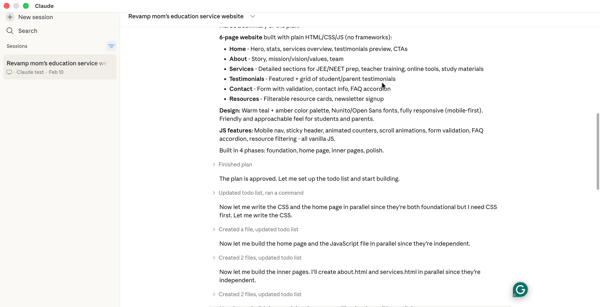
About an hour of “conversation” later, I had a fully revamped site. I didn’t have to worry about syntax or debugging random layout issues. Claude explained what each change did, caught inconsistencies, and helped fix things when something didn’t look right. The result was better than I expected: cleaner structure, a more modern layout, and far fewer “why is this broken?” moments than my usual DIY attempts.
Zooming out, the value becomes obvious. Hiring a web developer for a small business site can easily cost hundreds or thousands of dollars. Claude won’t replace engineers for complex systems, but for small businesses, solo founders, and early-stage teams, it’s a massive unlock. For me, it turned what used to be a daunting project into a weekend task and made building something real feel practical instead of experimental.
Even though I’m not a developer, I could also see how powerful this AI code generator would be in a real engineering workflow. Claude Code works directly in the terminal, understands the broader codebase, runs tests, fixes its own errors, and iterates until things work. Developers use it for debugging multi-file issues, refactoring large codebases, writing tests and documentation, and building features from natural language descriptions. In my understanding, across users, you describe the problem, and Claude helps build the solution.
In practice, I see people using Claude Code less for “learning to code” and more for shipping real things quickly.
Claude Cowork is where Claude stops feeling like a tool I actively operate and starts feeling like something I can delegate work to. Instead of prompting, correcting, and iterating in real time, Cowork lets me describe the outcome, grant access to a folder, tools, plugins, and step away.
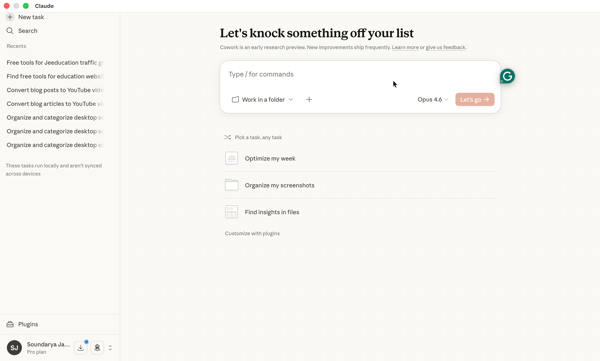
If you’re already used to Claude Chat or Claude Code, this can feel like an extension. There were times when I felt, 'Why am I using Claude Cowork instead of just using the code or chat interface?' But it takes a few real attempts to understand where it actually fits.
I started with simple file and task management work that I had put off till then, and then slowly moved to working on some of my side projects like creating interactive tools, blogs, and resource sections for my website.
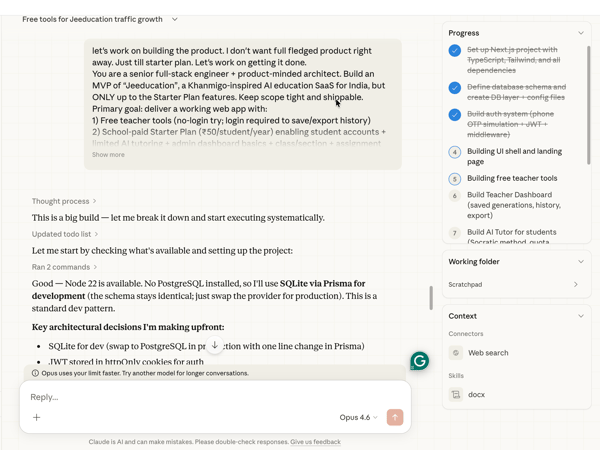
After trying it on a handful of different tasks, though, I started to mentally map out the kinds of work I’d want to hand off versus keep interactive. Once that clicked, Cowork made a lot more sense.
Watching it plan the work, spin up multiple agents in parallel, and move forward with minimal direction from me honestly felt a little magical and genuinely mind-blowing.
In practical terms, this translated into real output. I one-shotted landing pages and free interactive tools and pushed them straight into my website without turning it into a multi-week project. Things that would normally live in my “nice to have” backlog, actually shipped.
That said, Cowork isn’t something you turn on casually. It’s resource-intensive and burns through tokens quickly — it’s easy to hit usage limits on the Pro plan if you’re not careful.
How valuable Cowork feels depends on your workflow and how intentional you are about delegation. When the task is clear and contained, it’s powerful. When it’s vague or open-ended, it’s less forgiving.
And it’s important to remember that Cowork is still in a research/early-access phase. From a security and data governance standpoint, you should be cautious about what folders, repositories, or sensitive information you grant access to. Until its enterprise-grade controls and guardrails are fully mature, I’d avoid connecting it to anything confidential.
Cowork is about delegating multi-step, outcome-based work. Instead of prompting line by line, you describe the end result, grant access to a folder or workspace, and let it execute. Here are some of the most practical, high-leverage use cases:
If you had been following these AI tools, you’d know Claude was a bit of a late entrant to the "Deep Research" race, but in typical Anthropic fashion, they waited until they could do it faster and more thoroughly than the rest.
To give you an example, I ran the same prompt on Claude and the major players — ChatGPT, Gemini, and Perplexity, to research a complex topic and see how they actually stacked up. ChatGPT cited about 17 sources, Perplexity hit 20+, and Gemini pulled from about 100. Claude, however, managed to pull from nearly 500 sources in under five minutes. It’s not just the sheer number that’s impressive; it’s the way Claude synthesizes that information into a cohesive narrative rather than just a dry list of facts.
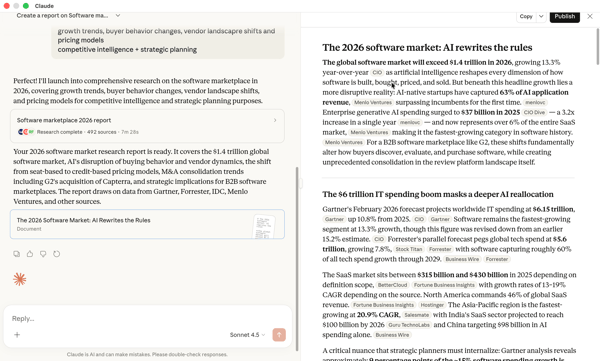
Add to this its capability to analyze files and large datasets, and even images and PDFs. We get an excellent research assistant that can ingest, connect, and explain complex information in one pass.
I use Claude to complement my research done using Perplexity and other tools, typically and often my go-to bot to draft my reports. And I see immense value for anyone who works extensively researching and synthesizing large amounts of information and presenting it to others in the form of reports, presentations, and decks.
I’d say Claude is currently the best fit for researchers, strategists, and knowledge workers who want a collaborator that can connect the dots between 500 different variables to tell them why something matters.
Want to compare Claude to Perplexity? If research is your main use case, check out this head-to-head breakdown: Perplexity vs Claude.
Till now, I have shared different use cases I tried with Claude. But there are certain features that make using Claude for different applications much better when compared to other AI chatbots: Projects, skills, and artifacts.
Projects are Claude’s answer to the “why am I re-explaining myself?” problem. Instead of one long, messy chat history where the AI eventually "forgets" who I am, I have a dedicated space for each initiative — like the revamp of my mom’s website, my LinkedIn content calendar, or a new newsletter I’m working on.
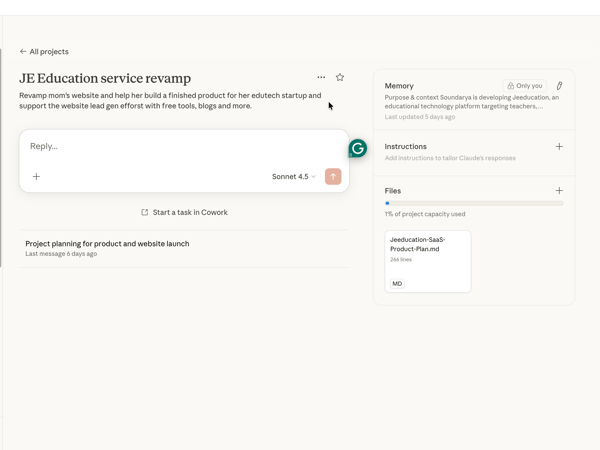
I can upload my documents, style guides, previous emails, or specific preferences, and because those files stay in the project’s memory, I never have to repeat myself. It eliminates that "re-onboarding" fatigue where you have to re-explain your whole life story every time you open a new window.
Then there are Skills, which I think of as "specialized training manuals" for the AI. While Projects provide the background (the "what"), Skills teach Claude the procedure (the "how"). Honestly, it takes a bit of time to get the hang of this, but once you do, it's great. For example, I have a "Style Guide Enforcement" skill. No matter which project I’m in, Claude knows exactly how to format my work and which words to avoid the moment I trigger it.
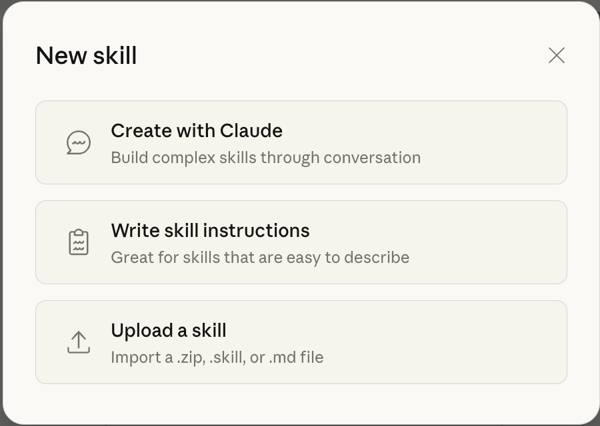
I see people across different industries using this to skip the "re-explaining" phase: Coders use skills to enforce architectural standards across every file so they don't have to repeat the rules. They can just pull in the skill. Sales teams use skills to scan LinkedIn profiles and CRM data, drafting outreach emails that follow a specific, proven template every time. In short, it’s about "installing" a specific capability into Claude’s brain so it works exactly how you need it to, every single time.
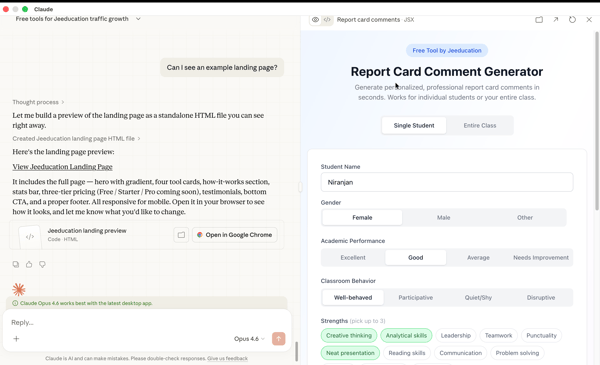
Finally, there are Artifacts, which is how Claude steps out of the chat bubble. Instead of just dumping a wall of code or a long document into the conversation, it pops open a dedicated window on the right. If I’m building a small tool or a landing page, I can actually see it render and play with it in real-time. It completely changes the workflow from "chatting" to "iterating." You can look at the artifact and tell Claude, "Make that button blue" or "Add a search bar at the top," and you watch the change happen instantly.
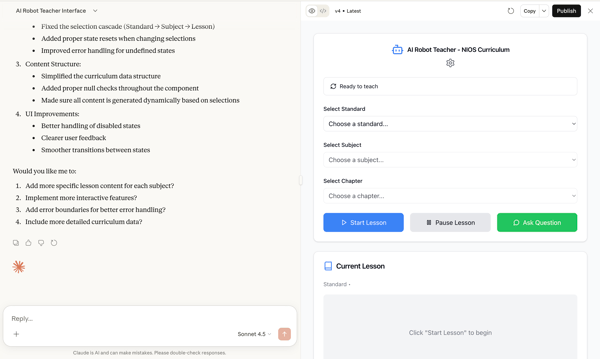
These three features combined are what turn Claude into a legitimate professional tool. They allow me to move between very different types of work without losing momentum or context.
Beyond writing, coding, and research, I’ve also tested Claude on a handful of everyday tasks to see how it holds up outside the “headline” features. Some of these were small experiments, others were things I now regularly use it for.
After testing Claude across writing, coding, research, and Cowork, I wanted to see whether my experience matched broader user sentiment. So I analyzed patterns across G2 reviews to identify where users consistently praise Claude and where frustration shows up.
Based on both my hands-on experience and G2 feedback, Claude’s strengths are surprisingly consistent.
“Claude is exceptional at serving as your AI companion for web programming. I have used Claude to create full web apps for clients and for colleagues, and have even had it develop an educational typing game for my daughter within a matter of minutes. Where Claude excels over its competition is its ability to think about a prompt and also take into account some basic design principles and user experience practices, without needing these to be explicitly explained, like you would have to in ChatGPT. I also appreciate the ethical framework that Anthropic has carefully put into Claude, which makes Claude more reliable sometimes when it comes to seeking out recommendations and advice on decisions you would want a second opinion on.“
- Claude review, Mitty C.
The downsides are also consistent, and they mostly revolve around limits and scope.
“First of all, if you plan to use Claude for every stage of development, it can become quite expensive, so it's important to decide at which points you actually need assistance. Secondly, learning how to develop with it and figuring out how to create effective prompts can be a bit tricky at first, and sometimes the design results may turn out very different from what you expected.”
- Claude review, Deniz G.
When you look at the Claude pricing in 2026, the strategy is clear: keep the entry point simple, but offer massive power, at a premium, for those who have turned AI into their full-time engine. Which plan you want depends on how many "active hours" you spend inside the tool.
| Plan | Price | Who it’s best for | What it includes |
| Free | $0 | Casual users and first-timers |
Basic access to Claude models with strict usage limits; ideal for light questions and trying features before upgrading. |
| Pro | ~$20/month (or ~$17/mo billed annually) | Solo creators, writers, researchers, and daily users |
Expanded usage limits (~5× the free plan), priority access during peak demand. Includes Claude Cowork, memory, and Claude in Excel. |
| Max (5×/20x) | ~$100/month | Power users hitting Pro limits |
All Pro features with significantly higher usage and throughput for heavy day-long workflows. |
| Team | $20/user/month (billed annually) (5-75 seats) (5x usage at $100/user/month) | Small teams collaborating |
Shared access, centralized billing, team Projects, expanded limits, and admin controls. |
| Enterprise | Custom pricing | Large organizations and regulated use cases |
SSO, audit logs, compliance APIs, tailored context windows, and premium support. |
| API (pay-as-you-go) | Varies by model | Developers and product teams |
Token-based pricing for input/output; different models (Haiku, Sonnet, Opus) have varying costs suited to the type of workload. |
If you ask me, the right plan depends less on features and more on how often you’re pushing context limits, running Cowork, or treating Claude like a full-time assistant. Here’s my two cents.
Wondering what Claude actually costs when you build with it? Explore the full breakdown of Claude API pricing for 2026, which covers every model rate, what a typical production request actually costs before you commit, and more.
Looking at the G2 review distribution, Claude adoption is heavily skewed toward small and mid-sized businesses, with lighter enterprise penetration.
Industry-wise, usage clusters around computer software, marketing and advertising, IT services, consulting, and financial services, which aligns closely with the kinds of workflows I found Claude strongest in. Here’s who should be using it:
| Who | Why Claude works for them | G2 insight |
| Writers and content marketers | Natural tone, strong long-form writing, better structural editing with less cleanup | High satisfaction around natural conversation and writing quality; strong adoption in marketing-related industries |
| Product managers and operators | Breaks down complex ideas, drafts PRDs, structures strategy, and workflows clearly | Strong ease-of-use ratings; heavy SMB and mid-market adoption suggest solo operators rely on it daily |
| Developers and technical builders | Terminal-based Claude Code supports debugging, refactoring, test writing, and delegation of mechanical work | Frequent mentions of coding support and structured reasoning in reviews; strong presence in the computer software industry |
| Solo founders and small teams | Extends capacity without hiring — landing pages, tools, documentation, planning | Majority of reviewers come from the SMB segment, signaling a strong appeal to lean teams |
| Consultants and research-heavy professionals | Synthesizes dense documents, compares viewpoints, and handles long context without losing nuance | Adoption across consulting, IT services, and financial services industries reflects research-heavy workflows |
Got more questions? G2 has the answers.
Yes — especially for writing, reasoning, coding support, and long-form analysis. If your work involves thinking through complex problems or producing structured content, Claude performs consistently well. It’s less flashy than some competitors, but stronger in depth and clarity.
You can use Claude through the web app or desktop app. Start by choosing a model (if applicable), typing your prompt, and uploading files if needed. For ongoing work, create a Project to store context and use Artifacts to edit drafts in real time.
Claude is particularly strong at long-form writing, document synthesis, structured reasoning, code debugging (via Claude Code), and handling large context inputs. It excels at tasks that require depth rather than quick surface-level answers.
Yes. Claude offers a free plan with limited usage. It’s sufficient for light tasks and experimentation, but you’ll likely hit limits quickly if you use it for long-form writing, coding, or agentic workflows.
The main drawbacks are usage limits on paid plans, no native image generation, and fewer entertainment-focused multimodal features compared to ChatGPT or Gemini. Heavy users may also experience slower performance during large tasks.
Yes — especially for guided builds. While Claude Code runs in the terminal, non-coders can use it to create landing pages, simple tools, or automate repetitive tasks by following step-by-step guidance. However, some comfort with basic file structures helps.
Claude Code runs in your terminal or supported IDE. You connect it to your project directory, describe what you want to build or fix, and it executes tasks directly — writing files, debugging issues, running tests, and managing Git workflows. Alternatively, you can also use Claude Code on the Desktop app.
Cowork is Claude’s autonomous agent feature. Instead of responding step-by-step, it can plan and execute multi-step tasks independently within a designated folder or workspace.
No. Cowork is available on paid plans, and it consumes significant usage capacity. Free-tier users do not have full access to its autonomous capabilities.
No. Claude can analyze images and PDFs, but does not natively generate images or videos; however, there are workarounds using Claude Code and Cowork. If image generation is important, tools like ChatGPT or Gemini may be better suited.
It depends on your workflow. Claude Code offers deeper terminal integration and agentic behavior for multi-file tasks. ChatGPT is strong for quick snippets and broader multimodal features. For structured delegation inside a codebase, Claude Code has an edge.
It depends on what you need. Claude Pro is stronger for long-form reasoning, structured writing, and coding workflows. ChatGPT Plus offers broader multimodal features like image generation and voice mode. The better choice depends on whether you prioritize depth or breadth.
The short answer is yes — but with a caveat. You have to ask yourself what you actually need from your AI assistant. If you want flashy image generation, video creation, or fun multimodal toys, other chatbots like Gemini and ChatGPT have the edge. But if you want a professional tool that helps you ship code and handle complex work like a high-level assistant, and if you value time, Claude is the one you need.
It’s the difference between having a search engine that gives you links and a collaborator that gives you finished reports, working code, and organized projects. For me, the ability to spin up a website or run a 500-source research report in minutes makes the subscription pay for itself before the first week is even over.
Ultimately, Claude is for the person who wants to lower the barrier between having an idea and actually shipping it. Whether you're a solo founder saving thousands in dev costs or a researcher synthesizing hundreds of sources, it’s the most capable partner on the market right now.
If you’re still on the fence, I’d suggest giving it a spin on the free plan with a few of your most thoughtful, complex tasks to see the difference for yourself.
Still exploring your options? Check out my complete guide to the best free AI chatbot Software to see how Claude stacks up against the rest.


I’ve been glued to ChatGPT since the day it launched in November 2022.
by Soundarya Jayaraman

Let AI pick the right tool for your use case Decide with AI 1 Click on the button below
 by Sagar Joshi

I typed a request into Google Gemini that would normally mean opening three tabs and running...
by Soundarya Jayaraman