


This guide was last updated on March 20th, 2026. A newer report has since been published. The tools below reflect the scores from G2's Summer 2026 Grid® Report.
Based on verified G2 reviews and the latest Grid® placement.
The tools below have also been exhaustively tested and evaluated, and continue to hold their place among the best Survey Software on G2.
As a marketer, surveys are a core part of what I do.
Whether I'm collecting data for my articles, researching market trends, or getting feedback from my team on recent collaborations and projects, surveys guide so much of what I do. But finding the best survey tool that's easy to use, and adaptable to different needs? That's been a journey.
From my college days, when I relied on free survey apps like SurveyMonkey and Google Forms to conduct field surveys for class projects, to my recent work using advanced platforms like Qualtrics and Alchemer for market research, finding the best survey tool that ticks all the boxes has always been a challenge.
Some apps excel at creating visually stunning surveys but fall apart when I actually need to analyze data. Other form builders have amazing analytics, but I feel like they were designed in the '90s. And don't even get me started on tools that promise everything but limit questions, responses, and features, giving me frustration.
So, I decided enough was enough. I rolled up my sleeves and tested 30+ survey software, from classics like Google Forms and SurveyMonkey to emerging players like Alchemer and Zoho Survey. My mission? To find the best software for creating professional surveys in 2026, from affordable survey platforms with the best features to tools built for market research, customer feedback, and small business needs.
TL;DR: After a deep dive into G2 reviews, the 7 best survey tools for 2026 are Google Forms, SurveyMonkey, Jotform, Microsoft Forms, SurveyMars, Typeform, and QuestionPro.
*These online survey tools are from the G2's Winter 2026 Grid report. I have included their starting price for your easy comparison.
I'll share my experience, breaking down the pros and cons of each tool I tested so you can find the perfect fit for your needs.

So whether you’re a small business owner looking for an affordable way to collect feedback, a marketing professional comparing popular survey apps for market research, or a team lead trying to understand employee sentiment, this guide should help you narrow down the right fit.
We usually think of survey tools as straightforward solutions for creating questionnaires, such as feedback forms, quizzes, or research surveys.
But in my experience, they are so much more. They act as the ultimate organizers for data interaction. These tools assist me in designing and sharing surveys that are not only precise and clear but also engaging and tailored to specific needs. Moreover, these tools are crucial in analyzing the collected data. They go beyond mere collection; they help me thoughtfully visualize responses to identify trends, recognize patterns, and make data-driven decisions with confidence.
Honestly, once you start using the right survey tools, it's hard to imagine conducting research or gathering feedback without them.
According to G2 Data, survey platforms score consistently high on essential features like survey builder (90%), question types (90%), survey distribution (89%), and templates (87%), proving that users value tools that make the process intuitive, flexible, and efficient from start to finish.
With over 400 survey software options available, testing them all isn't feasible. So, I relied on G2's survey software category page, grid reports, and product reviews to create an initial list of contenders. I used AI to analyze hundreds of G2 reviews to gauge how real users rated these tools based on their experiences, needs, and pain points and created my initial shortlist.
Once I had my shortlist, I sat down to test them all. For me, testing these survey apps wasn't just a matter of signing up and skimming through features. I set up each tool to run a realistic survey, complete with different types of questions, skip logic, and conditional branching. This approach allowed me to see how each tool handled different survey needs.
I also focused on how each tool handled the survey distribution. This approach allowed me to mimic the demands of actual survey projects, ensuring that the tools were tested in conditions similar to how they would be used in practice.
I also used AI-assisted analysis of G2 review data to uncover recurring feedback themes. In cases where I couldn’t personally test a tool due to limited access, I consulted a professional with hands-on experience and validated their insights using verified G2 reviews. The screenshots featured in this article may be a mix of those captured during testing and ones obtained from the vendor’s G2 page.
It was during these rigorous tests that I started to develop clear opinions on what distinguishes the best survey tools from the merely good.
SurveyMonkey’s report reveals how these tools are actually used: 58% of surveys are taken on mobile, 23% include matrix questions, 12% use skip logic, and 21% are multilingual. In short, modern survey tools must be mobile-friendly, smartly structured, and inclusive to meet today’s expectations.
I look for the same qualities. The best platforms simplify how you design, distribute, and analyze surveys while ensuring accurate, high-quality data. I also looked at which platforms consistently rank as the best-rated survey software for customer satisfaction, especially for teams that rely heavily on feedback to improve products and services.
Here are the criteria that I looked at when evaluating the tools:
After trying out 30+ survey tools, I've identified my top 7 favorites that meet most of these criteria. My list of best software for creating professional surveys includes a variety of survey tools, including dedicated form builders like SurveyMonkey, marketing platforms with integrated survey capabilities, and interactive tools designed for quizzes, polls, and audience engagement like Mentimeter.
While they may not check every box on the ideal features list, each one brings something distinct to the table.
The list below contains genuine user reviews from G2's Survey Software category page. To be included in this list, a tool must
* This data was pulled from G2 in 2026. Some reviews may have been edited for clarity.
I've been using Google Forms, which is part of Google Workspace, since my undergraduate days, and it is never going to leave my arsenal of survey tools. I don't think there's a survey tool as simple and integrated as Google Forms. And the biggest plus? It's completely free to use with my Google account and has no limits on the number of responses or questions I can add.
Setting up forms takes just minutes. One of the features I love most is the variety of question types it offers. Whether I need a simple multiple-choice question, a dropdown menu, or even a field for file uploads and ratings, Google Forms has it all.
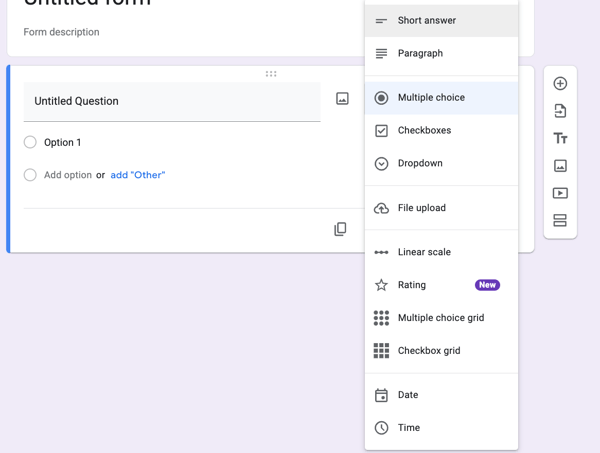
Question types on Google Forms
Another remarkable aspect of Forms is the real-time collaboration. Just like other tools in the Google Workspace suite, I can invite colleagues to edit or build the form with me, which is invaluable when working on team projects.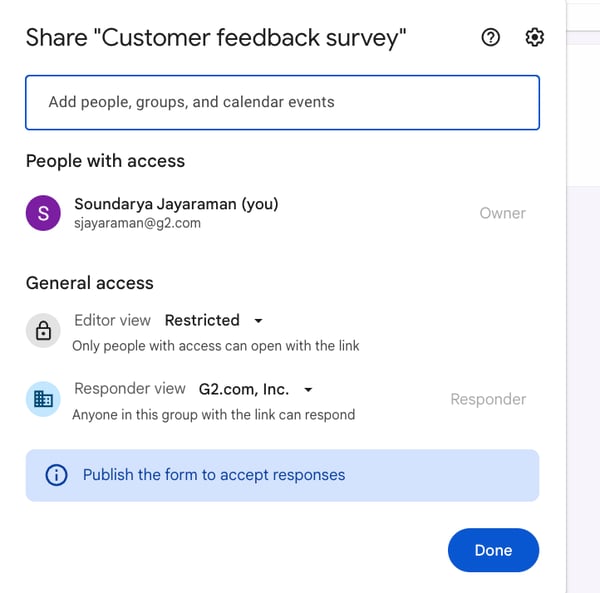
Options to sharing the survey form with my colleagues to invite them to collaborate
As soon as responses come in, I can choose to view them there with simple data charts or in Sheets, making it incredibly easy to analyze data or share insights with others.
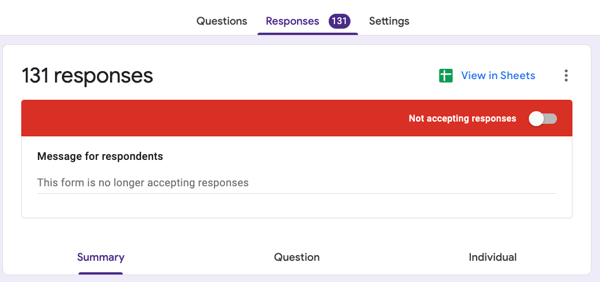
Options to View in Sheets
Now, Google Forms has 17 pre-made templates. So, whenever I'm in a hurry, whether it's an event RSVP or a feedback form, I can get a survey up and running in minutes with one of these templates.
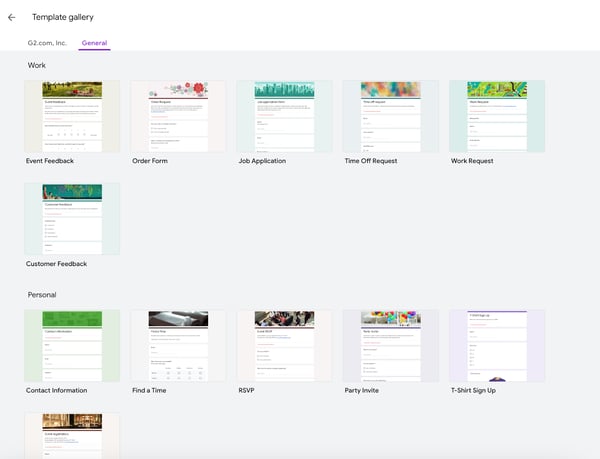
Templates on Google Forms
What's interesting is that my mom, who's a teacher, uses Google Forms quite extensively for quizzes, grading, and even collecting feedback from students. She is thoroughly struck by how easy it is to create and distribute quizzes, and the automatic grading feature saves her so much time. It's a great example of how versatile the tool can be for different professions.
There are a few things to note. Based on reviews on G2, Google Forms is widely appreciated for its simplicity and ease of setup, though users note it’s best suited for straightforward surveys rather than complex research projects. The platform includes essential branding options, like colors, logos, and images, but keeps customization intentionally simple to maintain consistency and ease of use.
Also, users observe that its logic and branching features are effective for basic conditional questions but may feel limited for surveys requiring extensive multi-path logic. Still, this streamlined structure is exactly what makes Google Forms dependable for educators, small teams, and anyone who values quick setup and easy data sharing.
On a scale of 1 to 10, I'd confidently rate it a solid nine just for the exceptional value it offers as a free tool. And you don't have to take just my words for it. Users on G2 rate it 4.6 out of 5 and recognize it as a reliable, user-friendly platform that simplifies feedback gathering and everyday data collection.
"Also the Google form is especially helpful for collecting employee feedback, conducting surveys, and managing internal requests, Google meet works well for interviews, onboarding sessions and virtual meetings with employees, and Gmail and calendar helps organize communication, interview and important HR events."
- Google Forms review, Kanika G.
"I think the help could be improved (it's very difficult to get actual software help outside of the docs) and managing your subscription could be better. I think navigation can be improved a little bit."
- Google Forms review, Justin M.
For teams trying to reduce form drop-off and improve lead routing, this guide to online form builders for lead generation campaigns breaks down the strongest options.
There's one tool I've consistently relied on for surveys besides Google Forms; it's SurveyMonkey. I've been using it for a long time, and I feel it strikes a great balance between user-friendliness and advanced features.
SurveyMonkey's true potential only becomes evident when you move beyond the free plan. While the free plan is generous with access to templates and basic functionality, it's limited to just 10 questions per form and 25 responses.
I remember it offering up to 100 responses and fewer restrictions on questions back in college. It was perfect for my college projects, such as surveys, classroom exercises, and informal polling. These days, though, the limitations of the free plan make it suitable for very small-scale use.
Nonetheless, since I have upgraded for my professional needs now, I know how powerful SurveyMonkey can be with its paid features. What impressed me about SurveyMonkey is how flexible it is for different types of surveys. Its template library is much more expansive than Google Forms, with over 400 templates.
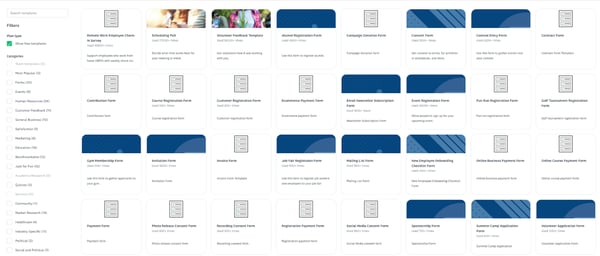
Extensive templates on SurveyMonkey
Now, even if there isn't something in the templates that I could use, SurveyMonkey has the option to create surveys with AI powered by OpenAI. I sometimes use it to brainstorm my questions, too.
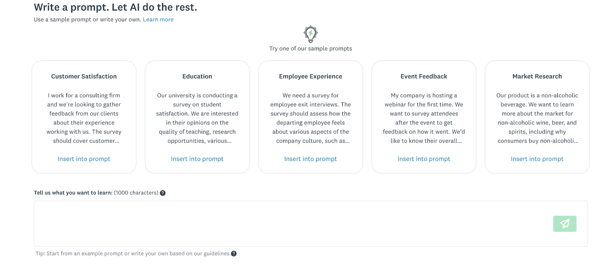
Building surveys with AI on SurveyMonkey
Another feature that stands out to me is its branching logic and skip logic capabilities. These allow me to create dynamic surveys in which respondents only see questions relevant to their previous answers.
The feature I truly dig for is the A/B testing we can do within surveys. As someone who's always testing and tweaking things, I've used this feature to experiment with different questions or layouts when trying to understand what resonates best with respondents. Whether I'm testing product ideas or refining my messaging to gather feedback, it's been incredibly helpful for making data-driven decisions.
Once I set up my survey, I liked the little nugget of information it provided about how long it would take the respondents to complete it. I usually look at it to optimize if it's too long.
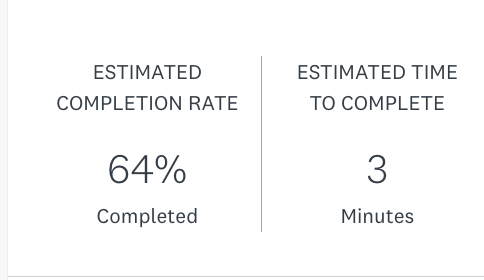
SurveyMonkey displays details on the Estimated Time to complete my survey
What really stands out, though, is SurveyMonkey's Audience feature. This allows me to purchase targeted respondents from their global panel, which has been a lifesaver when I need feedback from a specific demographic or professional group.
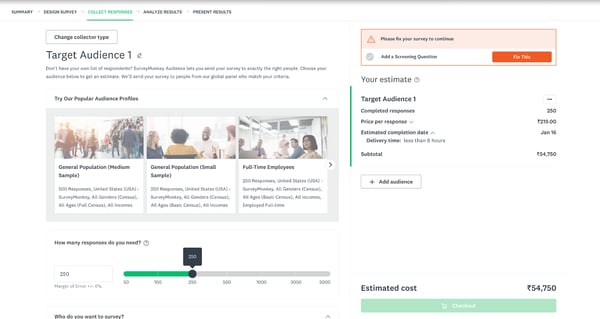
SurveyMonkey Audience feature to get targeted audience
Instead of having to liaise with a separate market research firm to find respondents, I like how this feature makes the process so much faster, simpler, and more efficient. So, despite the added cost, I think the convenience it offers makes it well worth the investment for focused research projects.
From what I saw on G2 reviews, SurveyMonkey is highly regarded for its robust question logic, analytics, and wide range of templates that make professional surveys easy to create and distribute. But many of its advanced capabilities, like custom branding, data exports, and integrations, are available in higher-tier plans, which users note is worth reviewing in advance to ensure the right feature fit for each team’s needs.
Also, the interface remains intuitive overall, though navigating advanced analytics or filtering large data sets can take some getting used to. Still, the platform’s breadth of features and reliability continue to make it a top choice for organizations running detailed feedback programs or research studies.
With an overall G2 rating of 4.4 out of 5, SurveyMonkey stands out as a versatile, data-driven platform built for teams seeking depth, structure, and proven survey performance.
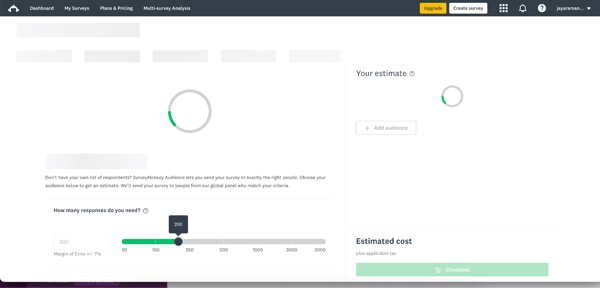 SurveyMonkey is lagging as I click through a few options
Overall, I'd recommend SurveyMonkey for businesses, educators, and researchers who need something more robust than Google Forms but don't want to spend as much on premium tools like Qualtrics.
Personally, I find it to be an excellent middle ground for professional surveys, offering enough flexibility and power to meet a variety of needs.
"What stands out most is how fast you can go from idea to live survey. The logic branching feature is genuinely useful, I can route respondents to different questions based on their answers, which keeps surveys short and relevant instead of making everyone answer everything. The response dashboard is also clean enough that I don't need to export to Excel just to get a basic read on the data."
- SurveyMonkey review, Felipe C.
"One downside of SurveyMonkey is that some advanced features and detailed analytics are only available in the paid plans. In the free version, there are limitations on the number of questions and responses you can view, which can restrict more complex surveys. Additionally, customization options for survey design could be more flexible in certain cases."
- SurveyMonkey review, MANOJ M.
For a practical look at these two leading survey platforms, see my in-depth SurveyMonkey vs. Google Forms breakdown.
When it comes to survey and form-building tools, Jotform immediately gave me the impression of being tailored for small and medium businesses. Its extensive template collection, even at first glance, seems thoughtfully designed to cater to their needs, unlike Google Forms, which I find more general-purpose, or SurveyMonkey, which focuses heavily on different survey types.
Now, I have found Jotform to be a full-fledged form builder that supports advanced use cases like collecting payments, signing contracts, and creating automated workflows. It feels like it's designed to handle anything from customer surveys to payment collections —all within one system.
For me, the tool is incredibly straightforward to use. Everything feels intuitive, from dragging and dropping elements to customizing forms, so I can get things done quickly without needing a lot of technical know-how.
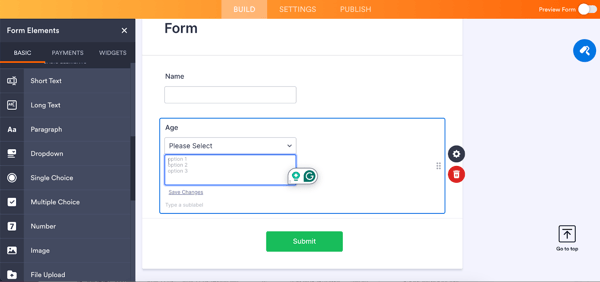
Adding questions on Jotform with the drag-and-drop interface
A core strength of JotForm is the template library, if you ask me. With over 10,000 templates, it's the largest collection I've seen in an online form builder. There's even a dedicated category for Salesforce forms.
Another distinctive feature of Jotform that amazed me was its widgets section. Whether I need to add a signature field, create dynamic checklists, or calculate totals within the form, the widgets make it all possible. For instance, I've used the Terms & Conditions widget to ensure users acknowledge specific policies. It's this level of customization that sets Jotform apart from tools like Google Forms or SurveyMonkey.
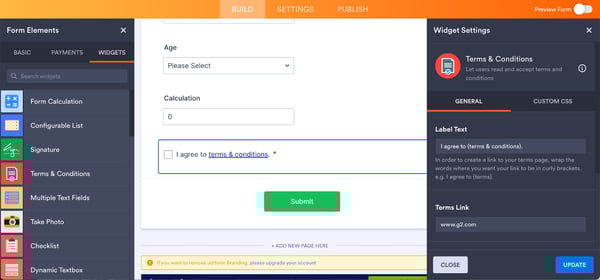
Useful widgets on Jotform ranging from calculators to checklists, signatures, photos, and terms and conditions that can be included in forms
Another highlight is the ability to generate visual reports directly from the data using the report builder. This is a major advantage because I can create visually appealing summaries without the need for an external reporting tool.
Lastly, I think it is super-cool that Jotform provides robust integrations to CRMs, marketing, and automation tools, even for its free plan users. It's incredibly appealing because it lets me connect my forms smoothly with the systems I'm already using, saving time and effort.
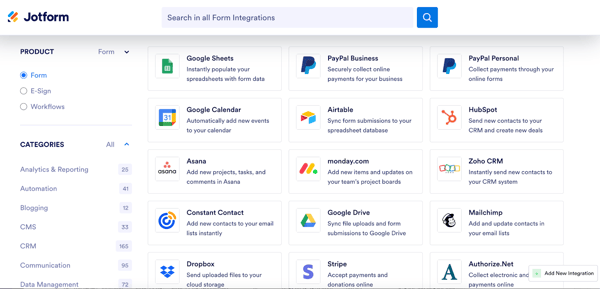
Jotform integrations
From G2 user insights, Jotform is appreciated for its ease of use and flexibility. Some reviewers mention that its plan structure best suits individuals or large teams, with fewer options in between, so checking tiers in advance helps ensure the right fit.
A few reviewers mention that performance can occasionally slow when handling large, data-heavy forms, though overall stability remains reliable. On the whole, with a strong G2 rating of 4.7 out of 5, Jotform continues to be recognized as a dependable, feature-rich form builder suited for a wide range of professional and business needs.
Jotform stands out as a highly versatile and feature-rich form builder that goes beyond basic survey creation. Its extensive template library, powerful customization options, and built-in automation make it a strong choice for businesses that need more than just simple data collection. If you’re looking for a platform that can handle everything from surveys to workflows and payments in one place, Jotform is a reliable and well-rounded option.
"I really liked how easy it was to create the form itself, and what truly sold me on continuing to use it was the workflow. I was able to take a simple request form and route it through multiple layers of approvals, with a final destination for entry into our system. Another big plus is that it’s free, so you don’t have to worry about anything up front. You can also try out the different integrations, get support, and review performance to decide whether you want to move toward a paid plan."
- Jotform review, Lynda M.
"The interface can feel a bit slow at times, especially when loading forms or checking submissions. We also noticed that some advanced features are only available in paid plans, which is understandable, but it can feel limiting when getting started."
- Jotform review, K.M. N.
Before choosing a survey or form builder, it helps to know whether your needs are basic or workflow-heavy. This Google Forms vs. Jotforms comparison breaks that down clearly.
I didn't even know Microsoft had form options until I found them on the G2 grid report. After reading positive reviews, I decided to give Microsoft Forms, which is part of the Microsoft Office 365 suite, a try.
I found it to be simple and functional. I found the templates particularly useful for quickly creating basic surveys, quizzes, invitations, or event-related forms.
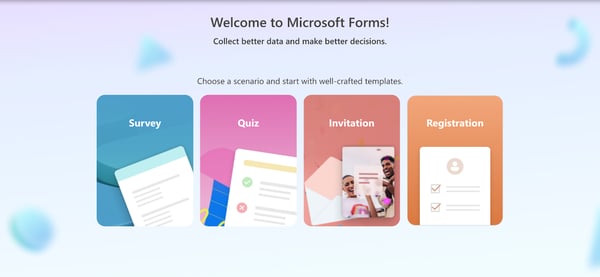
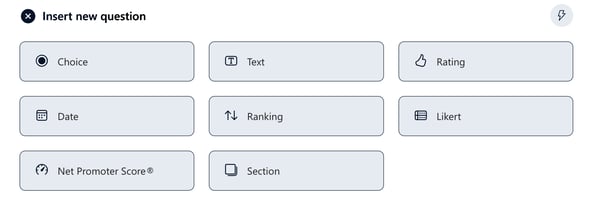
I realized the range of question types is extremely basic, like choice, text, rating, ranking, Likert, date, and NPS. These mostly cover the essentials. Teams wanting advanced question types would want to use other tools to supplement though.
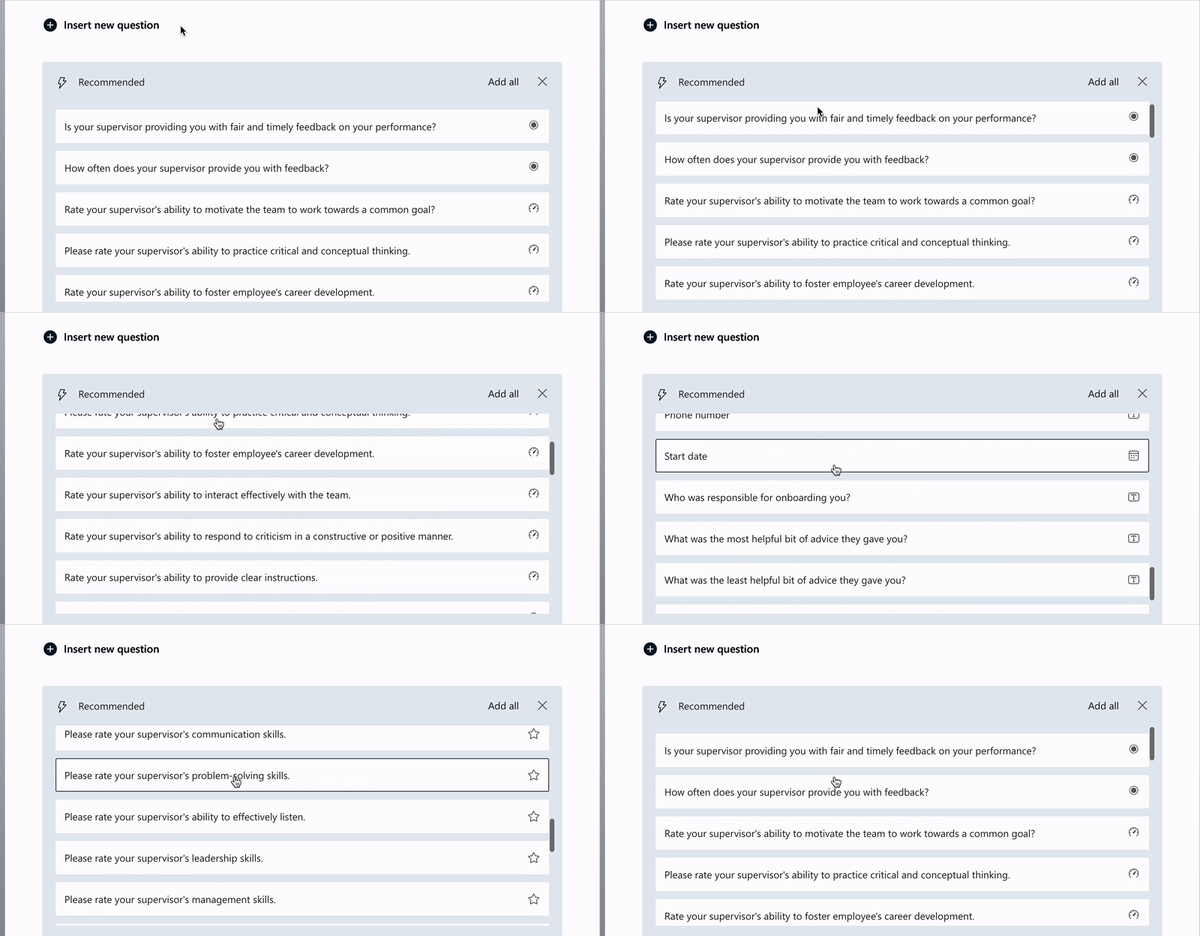
One feature I liked was the AI suggestion tool. Clicking the AI icon gave me quick question recommendations for the survey I was working on. While the suggestions weren't always perfect, they were a helpful starting point for building my forms.
I also liked how easy it was to export data to Microsoft Excel or turn it into a PowerPoint report. The process is quick and seamless, making it simple to analyze responses or present insights without needing extra tools. It fits naturally into the Microsoft ecosystem, which makes the overall workflow feel smooth and efficient.
Another thing I appreciate is how well Microsoft Forms supports real-time collaboration within teams. Since it’s built into the Microsoft 365 ecosystem, multiple users can work on the same form, review responses, and make edits without any friction. This makes it especially useful for teams that already rely on tools like Teams, SharePoint, or Outlook for their daily workflows.
I also find it to be a very reliable option for internal use cases. Whether I’m creating quick employee feedback forms, running polls, or building simple quizzes, it performs consistently without unnecessary complexity. It doesn’t try to overwhelm with too many features, which actually works in its favor when speed and clarity are the priority.
According to insights from G2 reviews, Microsoft Forms is valued for its simplic, accessibility, and seamless integration within the Microsoft 365 ecosystem, making it ideal for quick surveys, quizzes, and feedback collection. Some reviewers note that its functionality is more standardized than that to dedicated survey platforms, with fewer advanced options for automation, integrations, or design customization.
I’ve noticed in reviews that integration options can feel somewhat limited outside the Microsoft ecosystem. If your workflow depends heavily on third-party tools like CRMs or marketing platforms, you may not find as many native integrations as with some other survey tools. That said, within Microsoft 365, everything works seamlessly, making it a reliable choice for teams already invested in that environment.
Rated 4.4 out of 5 on G2, Microsoft Forms remains a dependable, easy-to-use option for educators, small teams, and organizations already using the Microsoft suite.
"At first, it was very easy for us to implement since we already have a Microsoft tenant. We were also able to brand and customize it, and create various forms for our student-facing teams. Those forms can be tailored based on each appointment’s requirements."
- Microsoft Forms review, Verified User in Higher Education.
"One practical downside of Microsoft Forms is that its customization and advanced logic options are quite limited, which can make complex surveys harder to build—but the simplicity also keeps forms quick to create and easy for respondents to complete."
- Microsoft Forms review, Satish M.
SurveyMars feels like a lightweight, no-fuss survey tool built for teams that want to create and share surveys quickly without dealing with a complicated setup. Based on my testing and G2 review insights, users appreciate its clean interface, unlimited survey creation, AI features, and beginner-friendly experience.
What I like about SurveyMars is how easy it is to get started. The interface is simple, clean, and intuitive, which makes it especially useful for beginners or teams that don’t want to spend hours learning a new platform.
I also like that SurveyMars supports unlimited surveys and questions. For users who need to collect feedback often, this makes it feel more flexible than tools that quickly lock basic usage behind response or question limits.
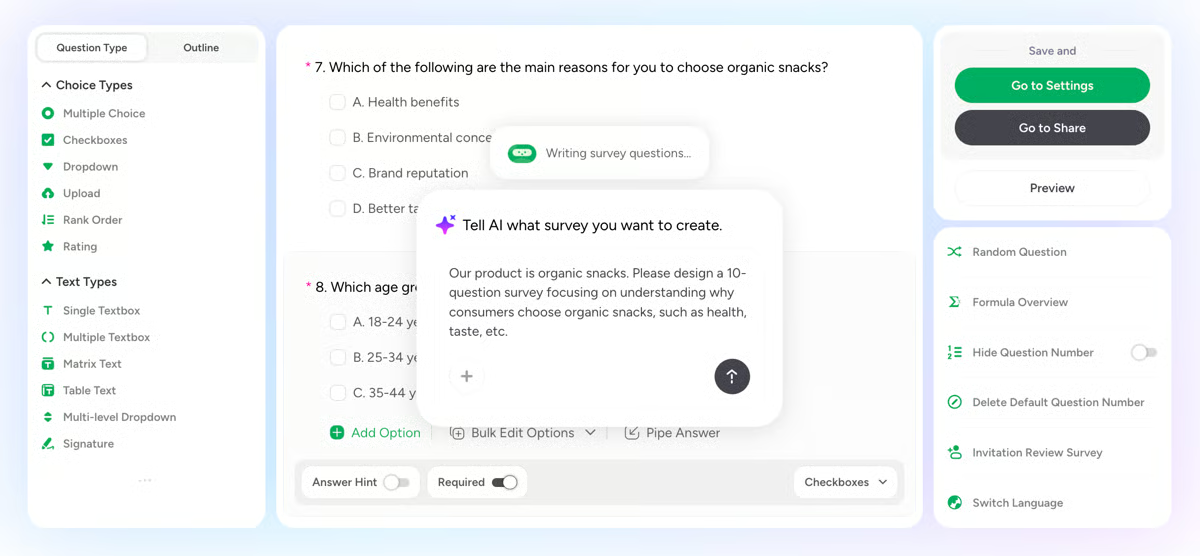
Another strong point is its AI-assisted survey creation. It helps speed up the process when I need a starting point for questions or want to create a structured survey without building everything from scratch.
SurveyMars also makes survey sharing straightforward. I can quickly create a survey link and distribute it across channels, which is helpful for customer feedback, employee input, quick polls, and community responses.
The platform’s real-time response tracking is useful for monitoring feedback as it comes in. It gives a quick view of responses and trends without making the reporting process feel overwhelming.
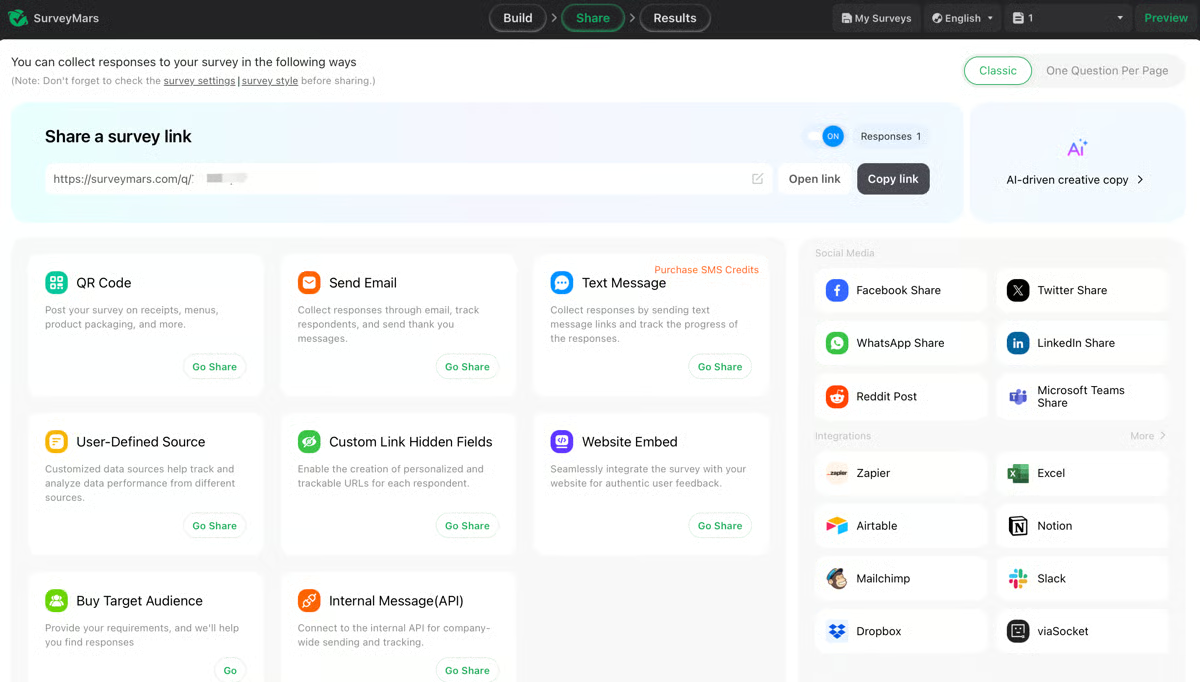
I also appreciate that SurveyMars offers different question types and easy data export options. For basic feedback collection and simple analysis, it gives me enough flexibility to build useful surveys and move the data where I need it.
Users looking for advanced filtering, deeper reporting, or highly customizable dashboards may find it limited. But for quick insights and straightforward reporting, it gets the job done efficiently.
The customization options are somewhat limited when it comes to advanced design and layout flexibility. Still, the simplicity keeps the survey-building process fast, easy, and accessible for most everyday use cases.
Overall, SurveyMars is a solid option for anyone who wants a simple, fast, and affordable survey tool. It may not replace advanced research platforms, but for quick feedback collection, beginner-friendly survey building, and everyday data gathering, it gets the job done well.
"What I like most about SurveyMars is its clean, no-nonsense approach to survey creation. The interface is easy to navigate, so building and sharing surveys feels quick and intuitive even for first-time users. It focuses on the essentials, making it simple to collect responses and review results in a clear, easy-to-understand way. That balance between simplicity and functionality makes it a practical tool for gathering feedback without spending too much time on setup or configuration."
- SurveyMars review, Tiwari S.
"They need to improve customization and also add more options or fields, so sometimes it feels like they can not create a complex survey for a few use cases. Also, the same data analysis is limited and can add more more export options."
- SurveyMars review, Aayush M.
I have never used Typeform before, except for filling out some surveys in the past. This time, I decided to explore it further to see what makes it such a popular choice and honestly, I get the hype.
The design capabilities of Typeform stand out to me. They look modern, interactive, and engaging, which, in my opinion, is a big step up from the typical static survey formats.
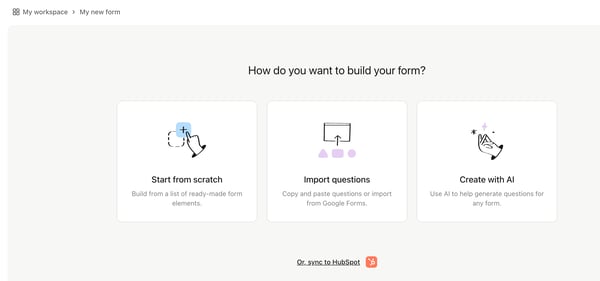
When I started creating my first form, I was greeted with three clear options: starting from scratch, importing questions, or letting AI help me generate questions. I tried the "Create with AI" option, and I was not disappointed.
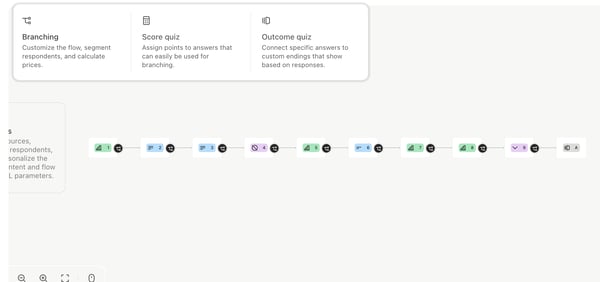
One thing that grabbed my attention immediately was the logic path questions. I could set up branching rules, outcomes, and even quiz-scoring paths.
What really made it enjoyable for me was the visual design of the whole process. The way everything is laid out visually, with a clear flow of questions and paths, made it so intuitive and smooth for me. It felt like I was piecing together a puzzle, and it was honestly so satisfying! It's one of those little details that made creating forms feel less like work and more like a fun, creative process.
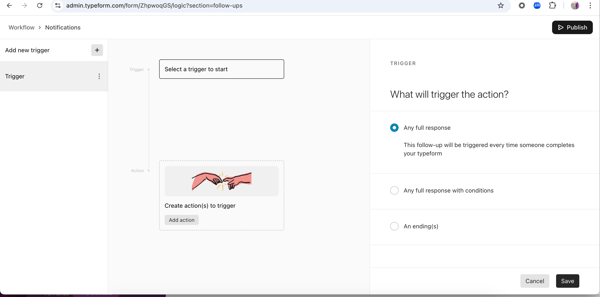
Another feature I found incredibly useful was "workflow automation." It let me trigger actions based on how people responded to my form and the best part. It was super easy to set up. I managed to configure it on my very first try without any support, which is something I honestly don't think I could pull off on any other survey platform.
For instance, I set it up to automatically email a thank-you note to respondents and even sync their responses directly to my CRM. It worked like a charm and saved me so much time on manual follow-ups. The simplicity of the setup really stood out for me.
Typeform is widely appreciated for its conversational form design and intuitive user experience that makes surveys engaging and visually appealing. Some users mention on G2 that while the results dashboard provides clear and accessible summaries, additional options for deeper analytics or customizable result sharing could further enhance reporting flexibility.
Feedback from G2 reviewers also notes that occasional slowdowns can occur during editing or data viewing, particularly with larger or media-heavy forms. However, most users find the overall performance smooth and reliable once workflows are established.
Rated 4.5 out of 5 on G2, Typeform continues to stand out for its interactive design, strong usability, and ability to make data collection feel effortless and engaging.
"I love this platform for its powerful AI tool to create survey forms very easily. The platform also supports many commendable features like workflow view enabling user a more informed process of the questions. The ability of this platform to integrate with Excel, Google sheets, Zapier, Slack etc is really commendable. This greatly enhances the capability of this platform increasing the robustness of this platform. The best part that is worth mentioning about this platform is the capability to do automation. It greatly boost productivity and efficiency of the tasks. One of the feature that is much needed by this kind of platform is the sharing means whichi is handled well by this platform."
-Typeform review, Konjengbam M.
"It is great for engagement, some advanced reporting features can feel a bit limited compared to dedicated analytics tools. Exporting and analysing large volumes of responses can also be slightly cumbersome, and occasionally we wish there were more native integrations with certain CRM or analytics platforms."
- Typeform review, Maisie F.
For me, QuestionPro stands out as one of the best Qualtrics alternatives. It's not expensive or overwhelming for an advanced survey tool.
From designing surveys to analyzing responses, I found it incredibly easy to hit the ground running. For instance, the platform offers advanced question types like complex grid/flex matrix, side-by-side comparisons, and interactive sliders. Despite this depth, the interface is intuitive and user-friendly. I never felt like I needed extensive training to start using these features and creating impactful surveys.
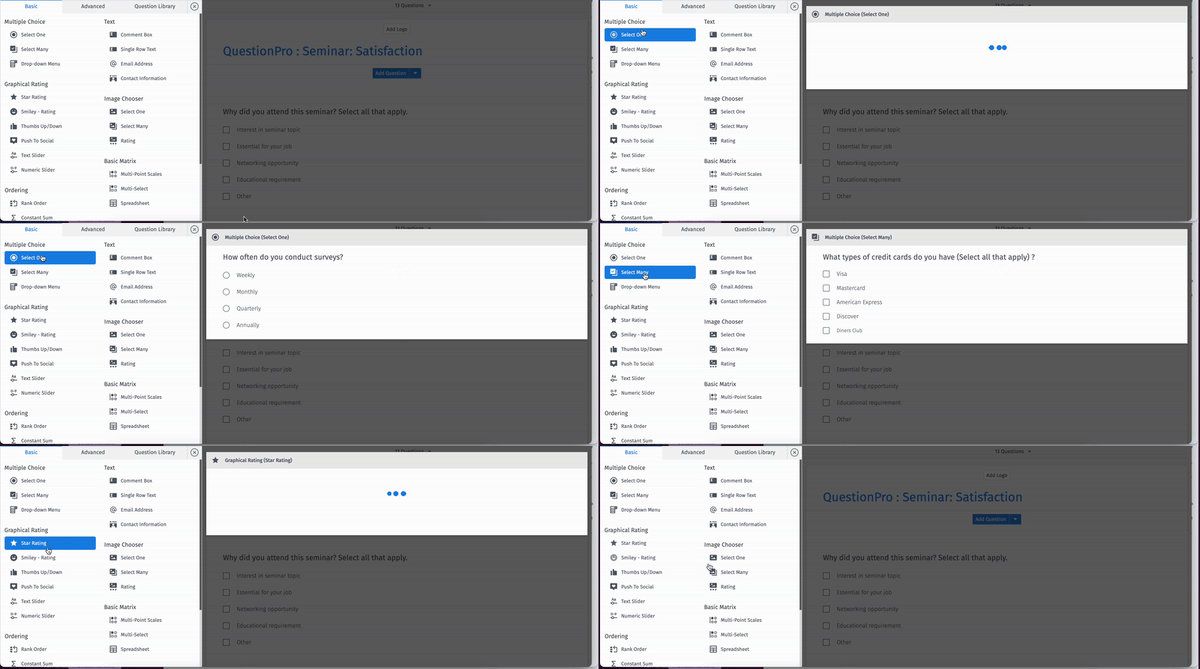
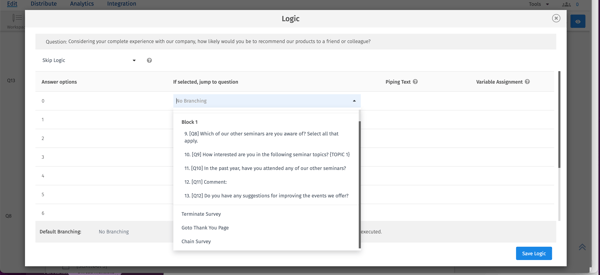
Another feature I really found beneficial is the advanced branching logic. It allows me to create complex survey paths based on multiple conditions, ensuring respondents are only presented with the questions that are most relevant to them. I could even link one survey to another, which added a whole new level of customization.
Some of the smaller but equally important features I really found useful were the export options to CSV, Excel, and PDF, as well as the ability to integrate efficiently with Google Sheets. These made managing and sharing data much easier for me.
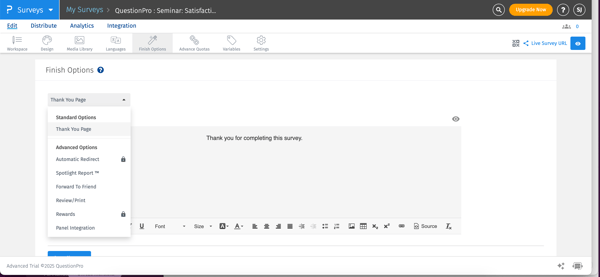
Another thoughtful touch was the customizable thank you page at the end of the survey. It allowed me to add a personal or branded message, which made the overall survey experience feel more professional and engaging for respondents.
One thing I really value about QuestionPro is its strong focus on data quality and response validation. The platform includes features that help identify low-quality or fraudulent responses, which is incredibly important when you’re conducting serious research or large-scale surveys. It gave me more confidence that the insights I was working with were accurate and reliable.
Another standout for me is the level of customer support and guidance available. Based on user feedback and my experience, having access to dedicated support and onboarding resources makes a big difference, especially when working with advanced features. It helps reduce the learning curve and ensures you’re getting the most out of the platform, not just scratching the surface.
According to feedback on G2, QuestionPro is valued for its balance of affordability, advanced features, and research-ready functionality, appealing to both academic and business users. Some reviewers mention that the interface may take a little time to get fully comfortable with, especially for new users exploring its wide range of options. Once familiar, however, most find the navigation consistent and efficient.
As reflected in G2 reviews, the platform’s analytics are strong and detailed, though its visualization tools are described as more functional than design-focused. For most teams, this simplicity supports fast, accurate reporting without unnecessary complexity.
All things considered, QuestionPro remains a go-to option for those seeking robust survey capabilities at a cost-efficient price, with a 4.5 out of 5 rating on G2.
"What I like best about QuestionPro is that it makes it easy to create structured surveys for real business use cases, not just basic feedback forms. I use it through my business, Client Now, to collect information from business owners about their marketing challenges, lead generation needs, website issues, ebook interest, and potential coaching needs. The survey builder is straightforward, and I like being able to create different surveys for different purposes, such as lead qualification, website design feedback, and business growth research. It helps make the research process more organised and professional."
- QuestionPro review, Christian K.
"Some features feel a bit hidden or require extra clicks to find, and a few advanced options could be more intuitive. Nothing major, but the UI can occasionally slow down workflow."
- QuestionPro review, Verified User in Information Technology and Services.
Want more tips on making your next big presentation a hit? Read our guide on how to make a presentation interactive and engaging.
Still confused? This comparison table makes it easier for you.
|
Survey tool |
Free plan details |
Best for |
Paid plan |
|
Google Forms |
Unlimited forms and responses |
Free survey software for simple surveys, quick polls, and quizzes |
Starts at $6/user/month (as part of Google Workspace) |
|
SurveyMonkey |
Unlimited forms, 10 questions per form, 25 responses per form, limited features |
Small surveys, market research, customer satisfaction surveys, employee engagement |
Starts at $39/month for individual plans |
|
Jotform |
5 active forms, 100 submissions/month, 100MB storage |
Forms for small businesses for registrations, applications, contacts, payments, etc |
Starts at $34/month |
|
Microsoft Forms |
Up to 400 forms, 200 questions per form, response limits vary by plan |
Quick feedback for Microsoft 365 users |
Starts at $9.99/month (Microsoft 365) |
|
SurveyMars |
Unlimited surveys and questions |
Quick surveys, simple feedback collection, beginner-friendly use |
Free |
|
Typeform |
Unlimited forms, 10 responses per month |
Interactive forms, surveys, and quizzes |
Starts at $28/month |
|
QuestionPro |
10 surveys, up to 100 questions and 200 responses |
Market research, academic studies, advanced surveys |
Starts at $83/user/month |
Got more questions? G2 has the answers.
The best survey tool depends on your requirements. Consider factors such as:
Yes, free survey tools like Google Forms, SurveyMonkey (basic plan), and Zoho Survey can be effective for simple surveys. However, free plans often come with limitations like response caps, branding restrictions, and fewer customization options. For advanced needs, upgrading to a paid plan may be necessary.
Most survey software includes:
Yes, many survey platforms integrate with CRMs (like Salesforce), marketing automation tools (like HubSpot or Mailchimp), and collaboration platforms (like Slack or Microsoft Teams). These integrations help streamline workflows and make data sharing more efficient.
The best survey software for beginners offers an intuitive interface, simple drag-and-drop functionalities, and basic customization options. Google Forms and Typeform are highly recommended for their user-friendliness and minimal learning curve.
Qualtrics and SurveyMonkey are known for offering a wide variety of question types, from simple multiple-choice questions to more complex matrix questions and sliders, catering to more detailed and varied data collection needs.
For small businesses, the best survey software is usually one that balances price, ease of use, templates, and reporting. Jotform, SurveyMars, and Typeform are strong options for teams that want user-friendly survey software without a steep learning curve, while SurveyMonkey and QuestionPro work better for businesses that need more advanced logic and analytics.
Most reputable survey platforms prioritize security by offering features like SSL encryption, GDPR compliance, and data protection measures. It's essential to verify the platform's security policies before collecting sensitive or personal information.
Yes, online survey apps like Typeform, Qualtrics, and Zoho Survey support multilingual surveys. This is particularly useful for businesses or researchers targeting diverse audiences.
For market research, SurveyMonkey, QuestionPro, and Typeform are among the most popular survey apps to consider. SurveyMonkey offers strong audience targeting and reporting, QuestionPro is useful for more structured research, and Typeform works well when engagement and respondent experience matter most.
For more budget-friendly options, Zoho Survey and Alchemer Survey provide great flexibility and solid features for smaller-scale market research projects.
If you need help finding niche participants for qualitative research, User Interviews can connect you with the right audience.
If you're looking for survey tools that integrate with Salesforce, consider SurveyMonkey, Qualtrics, Zoho Survey, Typeform, and Alchemer Survey.
For employee feedback, SurveyMonkey, Microsoft Forms, and QuestionPro are strong options depending on your needs. Microsoft Forms works well for quick internal surveys within Microsoft 365, SurveyMonkey is useful for structured engagement surveys, and QuestionPro offers more advanced reporting for larger feedback programs.
Businesses commonly use SurveyMonkey, QuestionPro, Typeform, Google Forms, Microsoft Forms, Jotform, and SurveyMars to gather feedback and insights. The right choice depends on the use case: Google Forms and Microsoft Forms are great for quick internal surveys, Jotform and SurveyMars work well for small teams, while SurveyMonkey and QuestionPro are better suited for more advanced business surveys.
SurveyMonkey and QuestionPro stand out for analytics, especially for teams that need filtering, segmentation, and more detailed reporting. Jotform also offers useful visual reports for form-based data collection, while Google Forms and Microsoft Forms are better for simple summaries and quick exports.
SurveyMonkey is one of the most recommended tools for business surveys because it offers a strong balance of ease of use, templates, branching logic, analytics, and audience targeting. It works well for customer feedback, employee engagement, market research, and general business surveys.
For smaller teams or simpler business needs, Google Forms, Microsoft Forms, Jotform, and SurveyMars are also strong options. If you need more advanced research capabilities, QuestionPro is a better fit.
Google Forms, SurveyMars, Microsoft Forms, Jotform, and Typeform are some of the most affordable survey platforms with useful features. Google Forms and SurveyMars are especially budget-friendly for simple surveys, while Jotform offers strong customization, templates, workflows, and integrations at a reasonable price.
For teams that need more advanced logic and reporting without moving into enterprise pricing, SurveyMonkey and QuestionPro are also worth considering.
SurveyMonkey is the best overall software for creating professional surveys because it combines templates, survey logic, audience targeting, reporting, and analytics in one platform. It is suitable for businesses, marketers, educators, and researchers who need polished surveys with reliable insights.
Jotform is a strong choice for professional forms with advanced customization, Typeform is ideal for visually engaging surveys, and QuestionPro works well for academic research and market analysis.
Jotform, SurveyMars, Google Forms, and Typeform are some of the best survey software options for small businesses. Jotform is especially useful for small businesses that need forms for feedback, registrations, payments, applications, and workflows. SurveyMars is a good fit for simple, unlimited survey creation, while Google Forms works well for teams that want a free and easy option.
If a small business needs more detailed reporting, customer feedback analysis, or market research features, SurveyMonkey is also a practical choice.
Popular survey apps for market research include SurveyMonkey, QuestionPro, Typeform, Google Forms, Jotform, and Microsoft Forms. SurveyMonkey is useful for audience targeting and business research, while QuestionPro is better suited for structured research, academic studies, and advanced analysis.
Typeform works well when respondent experience and engagement are important, while Google Forms and Microsoft Forms are better for quick, simple research surveys. Jotform is also a solid option for collecting structured data through customizable forms.
After exploring so many survey tools, I've realized that finding the right one isn't just about features; it's about finding the perfect match for your specific needs. For example, if you're all about simplicity, Google Forms is a no-brainer. But if you want something sleek and interactive, Typeform might be your jam.
For me, diving into these platforms felt like assembling a toolkit—each tool had something unique. Some tools were distinctive for their customization, others for their integrations, and a few for their pure ease of use. And while I didn't fall in love with every platform (hello, unexpected paywalls!), it's clear there's something out there for everyone.
The bottom line? Try a few out, see what works for you, and settle down with the one that makes your data collection dreams come true. Happy surveying!
Looking for a tool to create surveys to gauge employee satisfaction? Check out our list of free employee engagement software.


The best free survey software solutions for small businesses are Constant Contact, Google...
 by Sagar Joshi

Published: February 2026 · Last updated: April 2026 I’ll be honest: I’ve spent way too many...
by Soundarya Jayaraman
.png?width=400&name=dark%20(15).png)
TL;DR: What G2 Data tells about the state of conversational AI survey platforms in 2026? ...
 by Subhransu Sahu