.png?width=400&height=150&name=My%20project-1%20(1).png)


Managing a professional services team gets complicated fast: one missed timesheet, one misaligned schedule, or one delayed invoice can throw off an entire month of profitability. The tools that worked for smaller teams such as spreadsheets, task managers, chat apps, simply don’t scale when you’re managing dozens of clients, shifting timelines, and tight delivery SLAs.
Teams don’t need another project tracker; they need a system that actually pulls delivery, resources, and financials together.
The market reflects that shift. professional services automation software (PSA) was valued at USD 12.40 billion in 2024 and is expected to grow to USD 40.25 billion by 2033, supported by a 14.7% CAGR. Cloud-based PSA adoption is a major driver behind this rise.
To understand which PSA tools truly help teams work smarter (not just add complexity), I analyzed 20+ best professional services automation software using G2 Data, product comparisons, and first-hand user insights. Some tools offer lightweight scheduling and time-tracking that make onboarding painless. Others go deep with forecasting, revenue recognition, and automation built for large-scale professional services operations.
No matter your team size, these are the PSA platforms that can genuinely help you deliver better, faster, and more profitably.
*These best professional services automation software are picked based on G2’s Fall 2025 Grid Report. I’ve added their standout features for easier comparison.
Running a professional services team is equal parts strategy and improvisation. You’re constantly adjusting schedules, reallocating people, smoothing over client surprises, and trying to keep projects profitable along the way. It’s a lot for any team to manage manually.
That’s why great PSA software feels like more than just another tool; it becomes the operational partner you didn’t know you needed. The best platforms handle the repetitive, error-prone parts of delivery: tracking time, managing resourcing, flagging risks, updating budgets, and keeping billing accurate. They take the mental load off your team so they can focus on the work clients actually pay for.
But what separates good PSA software from great PSA software is how naturally it fits into the way your team already works. The best tools reduce friction, not add to it. They give you clarity when things get messy, guardrails when things get rushed, and visibility when things get busy.
The right PSA platform doesn’t replace the humans doing the work; it amplifies them. It helps teams collaborate better, plan smarter, and deliver with the consistency clients expect.
To build this list, I started with G2’s Grid® Report professional services automation software to create a shortlist, using a mix of user satisfaction scores and market presence as my guide. My shortlist was based on a mix of user satisfaction scores and market presence, ensuring a balance between usability and adoption.
From there, I evaluated each tool on how effectively it supports project delivery, resource allocation, time tracking, financial management, collaboration, and reporting, along with key integrations service teams rely on across their tech stack.
I also used AI to analyze hundreds of verified G2 reviews, focusing on what professional services teams praised most, where they faced challenges, and which tools consistently delivered measurable value.
The screenshots featured in this article come from G2 vendor listings and publicly available product documentation.
After digging into G2 Data and evaluating how modern services teams operate, I noticed a few themes that consistently stood out. Here’s what I focused on when evaluating the best professional services automation software:
Of course, not every platform excels in all these areas, but the ones that stand out consistently perform well where it matters most. The list below contains genuine user reviews from the Professional Services Automation category page. To be included in this category, a solution must:
*This data was pulled from G2 in 2025. Some reviews may have been edited for clarity.
For many MSPs, Autotask quickly becomes the system they rely on to organize tickets, projects, and client work in one place.
Autotask holds a 4.3/5 rating across 459 reviews, with 87% of users giving it 4 or 5 stars. It scores especially well in areas like meeting requirements (87%), ease of doing business with (85%), and quality of support (83%).
Across multiple G2 reviews, users frequently describe how Autotask simplifies day-to-day service operations, especially when handling large volumes of tickets or coordinating work across teams. Several reviewers mention that Autotask brings welcome structure to workflows that previously lived across multiple disconnected tools, making service delivery more predictable and efficient.
A consistent theme in the feedback is Autotask’s ability to streamline ticketing. Many users highlight that the platform makes logging, updating, and resolving tickets faster once they’re familiar with the interface. They often point out how much they rely on Autotask daily for triaging issues and keeping technicians on track. This sense of operational dependability shows up repeatedly across reviews, with users emphasizing how the tool helps them stay organized under high workloads.
Autotask’s integration ecosystem also receives strong praise. Several reviewers specifically mention its robust integrations and how well it connects with other essential MSP systems, which reduces manual effort and improves data consistency. Reporting capabilities come up often as well. Users appreciate the visibility they gain from Autotask’s dashboards, noting that the platform gives them a clearer understanding of performance and workload across clients and technicians.
Another point I see appear across numerous reviews is how essential Autotask becomes for teams once they’re fully onboarded. Reviewers describe it as a daily tool they can’t operate without, highlighting how it centralizes work, improves accountability, and keeps everyone aligned on priorities. Many also note that tasks like navigating between tickets, updating statuses, and accessing key information become second nature over time, making Autotask feel smoother the longer a team uses it.
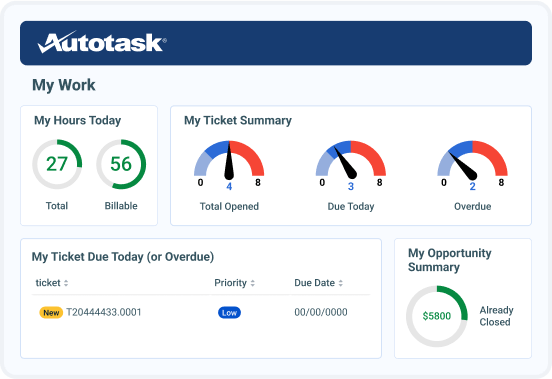
Some users mention that Autotask’s interface can feel slower or heavier at times, particularly when handling large datasets or during busier periods of the day. This feedback mostly comes from teams operating at scale or running highly loaded environments. In that context, the system’s depth and volume of information explain why the interface leans more toward thoroughness than minimalism.
Some users note that the interface relies on multiple navigation steps when moving between tickets, projects, and billing views, which can feel less streamlined for teams that prioritize speed, while teams managing detailed workflows often value the clearer separation between functions.
Overall, G2 feedback positions Autotask as a strong operational backbone for MSPs needing a unified PSA solution. Its reliable ticketing system, powerful integrations, and robust reporting capabilities help service teams maintain efficiency, clarity, and consistency in their daily work. Once adopted, Autotask proves to be a dependable, central platform that supports long-term service delivery success.
“Autotask has become an essential part of our daily operations. Keeping all our tickets, projects, and billing centralized makes it much easier for our team to stay organized. The integration with Datto RMM functions smoothly, allowing us to connect technical work directly to the service desk. Although it takes a little time to get familiar with the layout, once you do, it proves to be a powerful system that significantly reduces administrative workload.”
- Autotask review, Phillip P.
“The project management module in Autotask often falls short compared to dedicated PM tools, with many users describing it as basic and clunky. While it covers the essentials, the interface feels outdated, navigation is unintuitive, and there’s a steep learning curve for new users. The feature set lacks the depth needed for managing complex projects, and updates can occasionally disrupt workflows or break custom widgets. Overall, it’s functional for convenience within the PSA, but not a strong stand-alone project management solution.”
- Autotask review, Jestin W.
Many organizations use professional services automation alongside ERP systems to manage projects, resources, and revenue throughout implementation.
For many small IT service teams, Syncro isn’t just another PSA platform, it’s the system they rely on every day to manage clients, tickets, and remote monitoring from one place.
Across G2 reviews, users often describe Syncro as a practical, approachable solution that lets them get up and running quickly without the heavy onboarding burden that typically comes with PSA and RMM tools.
A standout theme in user feedback is Syncro’s strong cost-to-value ratio. Reviewers frequently emphasize how much functionality they gain, ticketing, billing, automation, asset management, and remote access, all for a price point that feels accessible for small MSPs.
Many mention that Syncro replaces multiple separate tools, helping them reduce overhead and simplify their tech stack without giving up core capabilities they rely on.
One capability users consistently praise is Syncro’s ability to track and record communications and client activity. Several reviewers note that this helps teams maintain context and improve follow-through when resolving issues.
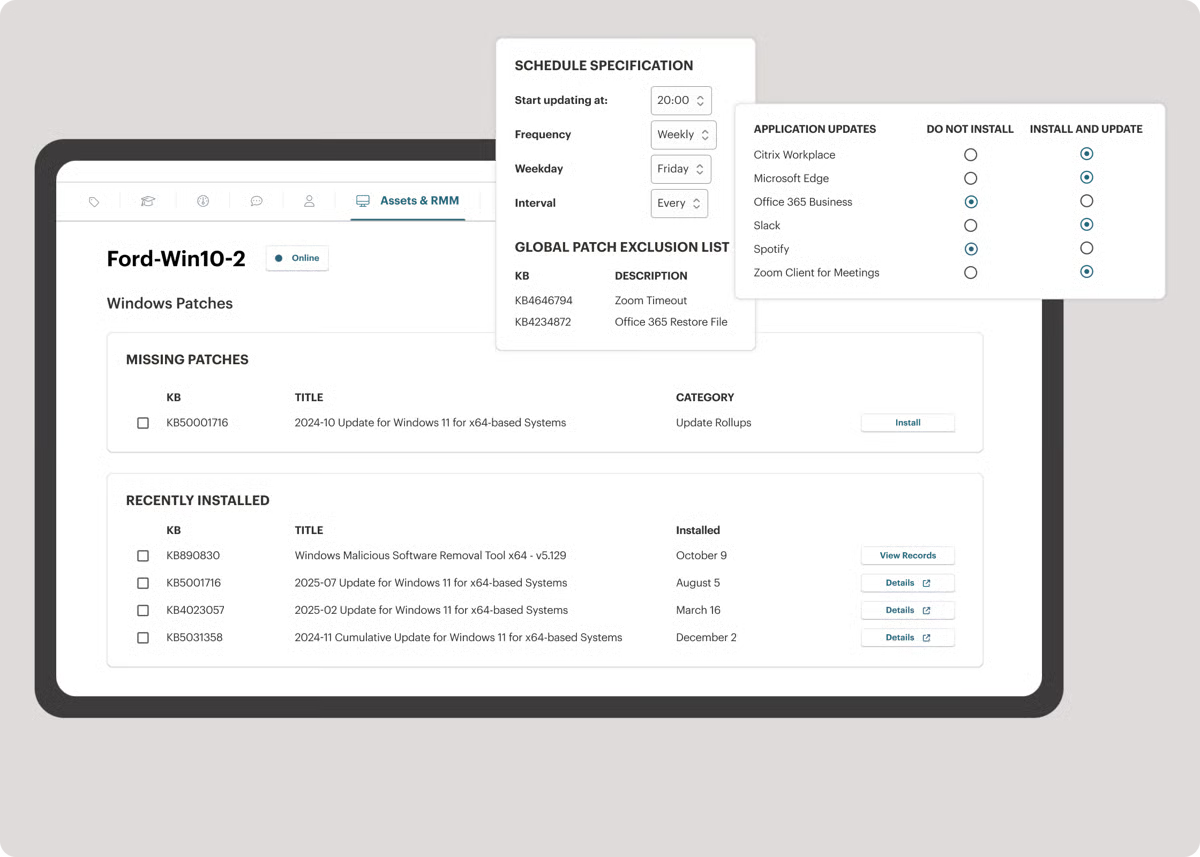
Paired with Syncro’s built-in RMM features, like remote access and automated maintenance tasks, many users say the platform makes their day-to-day work faster and more structured. Automation also receives strong positive feedback, with users highlighting how scripting, invoicing rules, and workflow triggers save hours of manual effort each week.
Reviewers also mention that routine tasks feel smooth and intuitive once teams get familiar with the interface. From updating tickets to initiating remote sessions, Syncro becomes a reliable operational hub for MSPs that need to support clients efficiently without getting bogged down in unnecessary complexity. Several users specifically call out how easy it is to set up the platform and start seeing value early on, which is a major advantage for growing IT teams.
Some users mention wanting additional interface categories or deeper automation options, but these requests typically come from MSPs with more advanced or specialized workflows. Syncro’s streamlined layout appears designed for smaller teams that prioritize clarity and speed over granular segmentation. For many users, that simplicity is what keeps technicians productive without overwhelming them with configuration.
Others point out that mobile functionality could be more robust, particularly for technicians who spend most of their time in the field. Requests like editing tickets, managing alerts, or accessing real-time updates on mobile come up across multiple reviews. That said, these limitations tend to matter more for mobile-first workflows, while teams operating primarily from desktops still describe Syncro as a dependable operational hub.
Overall, Syncro holds a 4.5 out of 5 rating across 322 reviews, with 95% of users giving it 4 or 5 stars, and according to G2 Data, 94% of users believe Syncro is headed in the right direction, and 91% say they are likely to recommend it.
G2 feedback positions Syncro as a capable, cost-effective choice for small IT service teams that want PSA and RMM in a single, unified platform. Its ease of setup, integrated remote access tools, and time-saving automation make it a dependable daily driver for MSPs looking to work smarter without adding unnecessary complexity to their operations.
“I really appreciate Syncro's different features that help me manage my clients efficiently. The ability to set device policies and settings, alerts that notify me about important actions, and tools for managing multiple clients make my job much smoother. I particularly love the scripting part as it helps manage things easily, and the remote support capability is incredibly useful. Additionally, the ticketing system and its features, like adding items and remoting into device alerts, are very useful. I also enjoy using Splashtop for remote management, and the customer relation management aspects including asset management and alert policies are very beneficial.”
- Syncro review, Mahmood I.
“I wish Syncro offered more customizable dashboards and deeper insights, especially concerning profitability, ticket trends, and technician performance, to enhance decision-making. Additionally, the mobile app could be improved with more real-time capabilities like editing tickets or managing alerts on the go, which would be beneficial for teams working remotely or in the field.”
- Syncro review, Sarah D.
Professional services automation helps connect CRM data with project delivery, time tracking, and billing once deals move into execution.
Rocketlane is often described by users as a game-changer for teams managing client onboarding, implementation, and delivery. Rocketlane earns standout satisfaction scores across key categories, including 97% for quality of support, 94% for ease of use, and 93% for meeting requirements.
Across G2 reviews, I repeatedly see users highlight how Rocketlane brings structure, transparency, and predictability to processes that previously required constant follow-ups and manual coordination. Many teams say they didn’t realize how disjointed their onboarding workflows were until Rocketlane gave them a unified place to track progress, collaborate with clients, and manage timelines with clarity.
One of the strongest themes in the feedback is Rocketlane’s ability to streamline implementation work. Multiple reviewers mention how helpful it is to track the “complete implementation lifecycle” from kickoff through delivery, with clearly defined milestones, owner assignments, and visibility for both internal teams and clients. Users consistently praise the platform for reducing onboarding delays, improving accountability, and eliminating the guesswork that often plagues cross-functional onboarding efforts.
Rocketlane’s collaboration capabilities also receive frequent appreciation. Reviewers highlight how the shared project views, client-facing interfaces, and real-time visibility create a smoother onboarding journey for customers. Many teams emphasize that Rocketlane helps them set better expectations, improve communication, and maintain momentum throughout the implementation process. Several users call out how much easier it is to collaborate with clients when everything, from tasks to notes to timelines, is centralized in one place.
Automation and integrations appear repeatedly as standout strengths. Reviewers note Rocketlane’s seamless integrations with tools like Salesforce and Zapier, describing them as essential for reducing manual admin work and keeping data synced across systems. The AI-driven features, particularly AI Fills, get highlighted in multiple reviews for simplifying routine tasks and helping teams move faster. Users point out that these automation capabilities save time, standardize workflows, and give teams more bandwidth to focus on client-facing work rather than repetitive operational tasks.
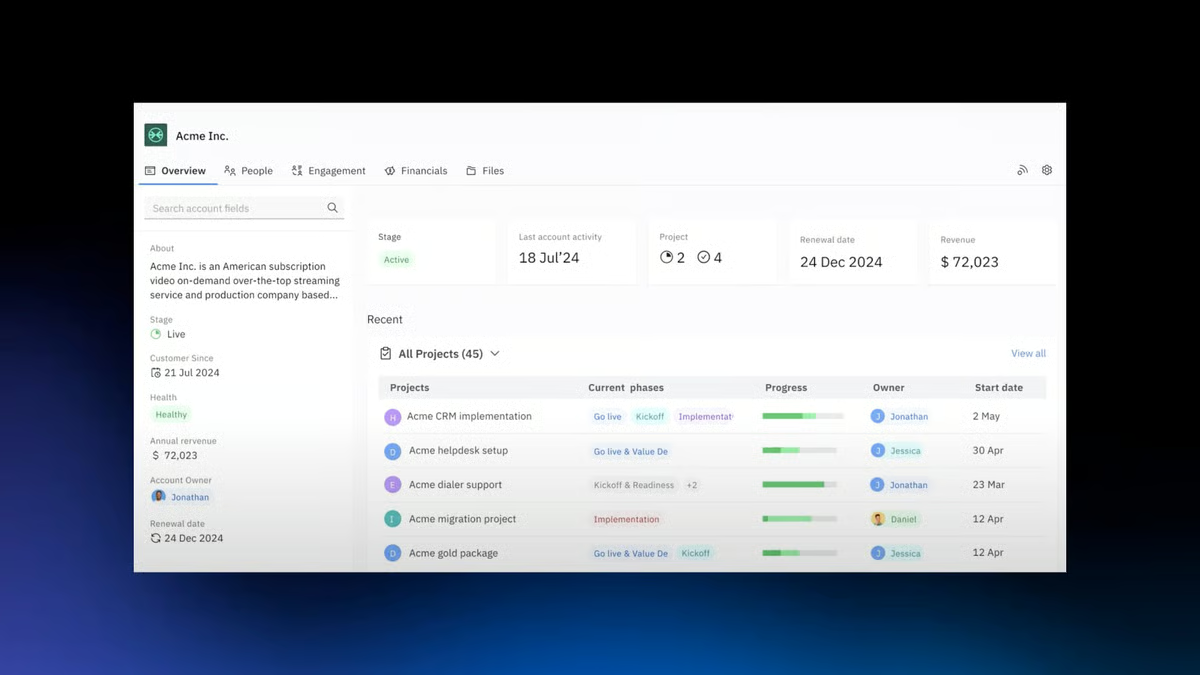
Dashboard visibility and onboarding insights also come up across several reviews. Users appreciate how Rocketlane gives them clarity into where projects stand, which steps are at risk, and how implementation timelines are trending. This level of transparency appears to be a major contributor to improved operational efficiency and smoother delivery cycles.
Some reviewers note that Rocketlane’s notification system is less precise when managing multiple projects at once. This tends to matter most in fast-moving, high-volume environments, while teams handling fewer concurrent projects generally find notifications sufficient for day-to-day coordination.
Others note that certain features, such as reporting and automated notifications, could be more robust. These comments typically come from users with advanced reporting requirements or high-volume onboarding operations where deeper analytics are essential. For teams with straightforward reporting needs, Rocketlane’s existing dashboards and insights tend to be sufficient, and reviewers often mention that the platform’s core strength lies in execution and collaboration rather than heavy analytics.
Overall, Rocketlane holds a 4.7 out of 5 rating across 783 reviews, with an exceptional 99% of users rating it 4 or 5 stars.
G2 feedback positions Rocketlane as a powerful, collaborative platform that elevates client onboarding and delivery for modern services teams. With its structured workflows, strong automation features, seamless integrations, and client-facing visibility, Rocketlane helps teams deliver smoother, faster, and more predictable onboarding experiences. For organizations that want to bring clarity and consistency to every customer implementation, Rocketlane stands out as a high-impact solution.
“Rocketlane has revolutionised our operations and reporting, and we use it on a daily basis. It's user-friendly, and it allows my team to do things we've never been able to do before. The AI chatbot is one of the best I've seen, and the support team, who are who's ready to jump in if AI can't help, is outstanding. They're very quick to respond. Our relationship with our CSM and TAM is great too - overall, it's a pleasure to work with Rocketlane!”
- Rocketlane review, Maja B.
“One issue is that reminder notifications don’t always specify which project or task they’re tied to. I’ve been deep into a project when a reminder pops up, and after opening it I realize it doesn’t say which project or task it belongs to. When you’re on multiple projects at once, that small detail can cause unnecessary confusion.”
- Rocketlane review, Leandro A.
For services-led teams, professional services automation complements payroll software by aligning time tracking, utilization, and invoicing.
SAP S/4HANA Cloud is often described by G2 reviewers as a modern, future-ready ERP that brings all core business functions onto a single, integrated platform. Its ease of setup is rated at 81%, reflecting a reliable onboarding experience for enterprise teams adopting a full-scale ERP.
Users highlight how it connects finance, procurement, supply chain, projects, and other critical processes in one system, giving leaders a clearer view of how the business operates end to end. Many reviewers point out that once implemented, it becomes the central backbone of their operations, replacing fragmented tools with a unified, real-time environment.
A recurring theme in the feedback is how S/4HANA Cloud improves process efficiency and standardization. Users frequently mention that it helps simplify transaction recording, streamline reporting, and enforce best practices across the organization. Several reviews praise its friendly, modern interface and refreshed graphics, noting that navigation and day-to-day work feel more intuitive than in older SAP systems. Others highlight the benefit of running in the cloud—no on-premise maintenance, faster access to innovations, and a platform that stays aligned with evolving business and regulatory requirements.
Real-time insight is another widely appreciated strength. Many reviewers call out S/4HANA Cloud’s in-memory architecture and analytics capabilities, emphasizing how quickly they can retrieve data, generate reports, and make data-driven decisions. They value having up-to-date information across finance and operations without relying on separate reporting tools or manual exports. Several users specifically mention that real-time dashboards and analytical views help them track performance, understand production or financial trends, and react more quickly to issues.
Integration capabilities show up consistently as a strong point as well. Reviewers note how S/4HANA Cloud connects with other SAP solutions and third-party systems, making it easier to create a cohesive digital ecosystem. The modular design is often described as flexible and adaptable to different industries and company sizes, allowing organizations to roll out capabilities in phases while still benefiting from a unified data model and shared processes. For many enterprises, this combination of integration, analytics, and standardization is what makes S/4HANA Cloud feel like a long-term, strategic platform rather than just another application.
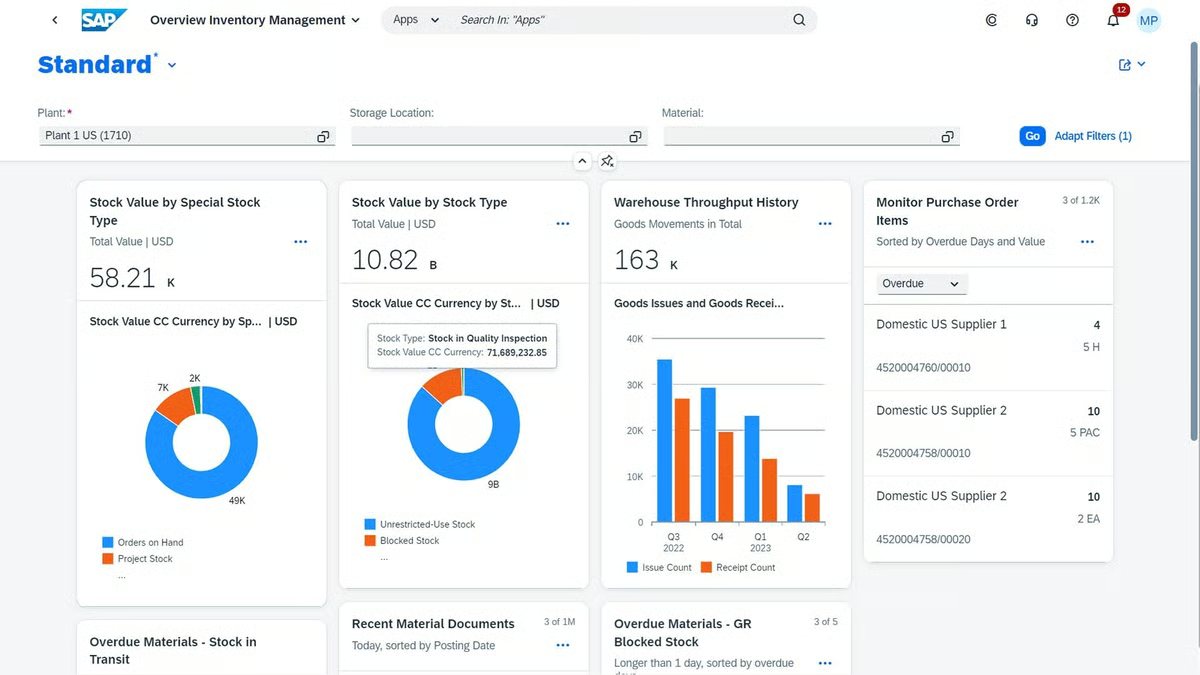
Some reviewers point to a strong dependency on SAP’s ecosystem and product roadmap. This reliance on SAP-approved integrations and release cycles can slow independent process changes or customization, particularly for teams that need rapid iteration. In contrast, organizations that prioritize standardized operations, security, and long-term stability often find this model aligns well with large enterprise environments.
Other reviewers point to limitations around customization in the public cloud model, as well as dependency on stable connectivity and SAP’s product roadmap. Instead of tailoring every process, S/4HANA Cloud encourages organizations to align with standardized, best-practice scenarios. For some, especially highly specialized or smaller companies, that can feel restrictive; for others, it’s a trade-off that delivers consistency, security, and easier upgrades in exchange for less bespoke configuration.
Overall, G2 feedback positions SAP S/4HANA Cloud as a powerful, comprehensive choice for enterprises looking to run professional services and broader business operations on a single, cloud-based ERP. With its real-time insights, integrated processes, modern interface, and strong ecosystem, it provides a future-proof foundation for organizations ready to standardize, scale, and drive more intelligent, data-driven decisions across the business.
“What I like best about SAP S/4HANA Cloud is its ability to provide real-time data insights and powerful analytics for better decision-making. The modern, user-friendly interface makes navigation simple. Its integration across finance, supply chain, and operations ensures smooth end-to-end processes. Being cloud-based, it also offers scalability and flexibility for business growth.”
- SAP S/4HANA Cloud review, Aditya M.
“I would like SAP S/4HANA Cloud to offer a more customizable user interface and greater system flexibility. While the Fiori interface is user-friendly, some screens feel rigid, making it difficult to tailor workflows or layouts to specific departmental needs without in-depth configuration knowledge. Additionally, the initial configuration and integration setup can be complex for smaller IT teams, so having more guided, automated setup options for data migration or interface mapping would make the adoption process smoother.”
- SAP S/4HANA Cloud review, Jishnu N.
Keka is frequently described by G2 reviewers as a clean, intuitive, and efficient HR platform that makes everyday workforce management easier for growing teams.
Keka earns strong satisfaction scores across the board, including 87% for quality of support, 91% for ease of use, and 89% for meeting requirements. It holds a 4.5 out of 5 rating across 1,551 reviews, with 94% of users rating it 4 or 5 stars.
Across the feedback, users consistently highlight how simple it is to navigate the interface, track attendance, manage leave, process payroll, and complete routine HR tasks without confusion or additional training. Many reviewers call out the attention to detail in the UI and the overall “smoothness” of the experience, emphasizing that it feels modern, thoughtful, and built for real employees — not just administrators.
A recurring theme in user reviews is Keka’s strength in simplifying HR operations. Multiple reviewers mention that tasks like punching in, viewing leave balances, updating profiles, or accessing payslips are incredibly straightforward. For professional services teams managing distributed or hybrid workforces, this ease of use appears especially valuable. Several reviewers highlight that Keka dramatically reduces the burden on HR teams by automating attendance tracking and managing employee data more accurately.
Support quality also emerges as a major high point. Many users note that Keka’s support team is quick to respond, attentive, and helpful when onboarding or troubleshooting. This level of responsiveness is often cited as a key reason companies feel confident relying on Keka for essential workforce workflows. Reviewers also appreciate how the platform helps maintain transparency across employees, whether it’s through accurate payroll processing or clear visibility into approvals and requests.
Another strength that comes up frequently is Keka’s ability to improve employee experience. Users praise how easy it is for employees to access the portal, complete tasks, and stay updated without having to rely on HR for guidance. This simplicity reduces friction and helps teams adopt the platform quickly. For organizations transitioning from older or manual systems, Keka’s streamlined experience creates a noticeable improvement in day-to-day operations.
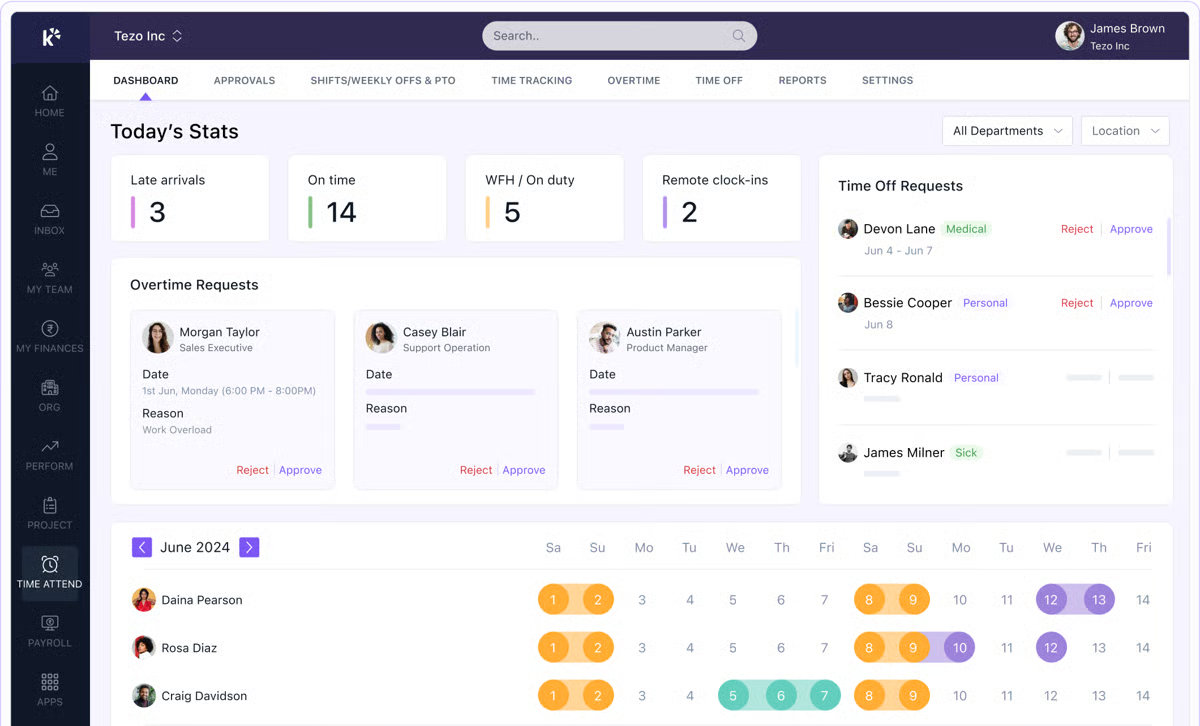
Some reviewers note slower performance during login or peak usage periods, particularly in environments with large user bases or high levels of concurrent activity. This tends to be more noticeable for teams running detailed workflows and relying on real-time data at scale, while smaller teams or lighter usage patterns generally experience fewer disruptions.
A few users also mention that the login process sometimes takes longer than expected, especially when dealing with strict authentication or security layers. This is typically framed as a trade-off: Keka’s emphasis on secure access and structured authorization can add a few extra seconds upfront, but supports greater data protection and compliance for organizations handling sensitive employee information.
Overall, G2 feedback positions Keka as a reliable, user-friendly HR platform that excels in delivering a smooth employee experience, strong workforce automation, and attentive customer support. For professional services teams looking for a system that simplifies HR processes without overwhelming users, Keka offers a well-balanced mix of usability, efficiency, and support that makes it a dependable choice for managing people operations.
“Keka makes HR and payroll management so much easier. The interface is clean and intuitive, which means even first-time users can navigate without much guidance. I really like how everything from attendance tracking to payslips and performance reviews is accessible in one place. The self-service features save a lot of time, and notifications keep everyone updated about approvals, leaves, and upcoming tasks. Overall, it’s made HR operations more transparent and efficient.”
- Keka review, Shane.
“While Keka covers the basics well, the asset management module could use a few enhancements. For example, adding bulk import and export options, better search filters, and reminders for asset maintenance or warranty expiry would make day-to-day operations smoother. Also, a mobile-friendly dashboard or app support for quick asset updates on the go would be very useful.”
- Keka review, Shubham P.
Wrike is frequently described by G2 reviewers as a powerful, flexible workspace for teams that need to manage complex projects with a lot of moving parts. Users often highlight how Wrike brings structure to multi-user, multi-project environments, helping professional services teams coordinate tasks, deadlines, and client deliverables in one place. Many say it quickly became their central hub for creative work, implementation projects, and cross-functional collaboration.
Wrike holds a 4.2 out of 5 rating across 4,430 reviews, with 90% of users rating it 4 or 5 stars. According to G2 Data, 88% of users believe Wrike is headed in the right direction, and 85% say they are likely to recommend it.
A recurring theme in the feedback is how well Wrike supports collaboration and teamwork. Reviewers consistently praise features like shared workspaces, comments, and real-time updates, noting that these make it easier for team members to stay aligned without relying on long email threads or scattered tools. Several users mention that Wrike helps them see who is working on what, where tasks are blocked, and how work is progressing across different projects, which is especially valuable for agencies and services teams juggling multiple clients at once.
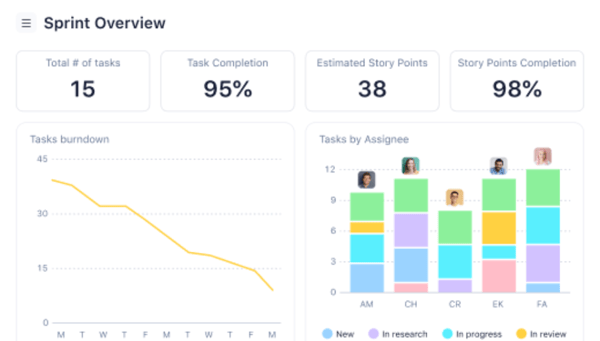
Users also call out Wrike’s interface and dashboards as a major strength. Many reviews mention that the dashboard is clean and uncluttered, giving a clear overview of active work, priorities, and deadlines. Once they’re familiar with the layout, reviewers say they can navigate quickly between tasks, projects, and views like Gantt charts or workload dashboards. For project managers, the ability to visualize dependencies, balance effort across team members, and adjust timelines in a single system is frequently cited as a key benefit.
Customization is another area that receives strong praise. Multiple reviewers appreciate how Wrike lets them tailor workflows, fields, and views to match the way their teams operate. They highlight the ability to configure spaces for different departments or clients, adapt task structures, and build processes that align with their specific delivery models. Integrations and automation features are also mentioned positively, with users valuing how Wrike connects to other tools in their stack and reduces repetitive manual work.
Some reviewers note that Wrike’s high degree of flexibility can present governance challenges, particularly in larger or fast-moving teams. When many users can create or modify workflows, maintaining consistent structures can be more complex, making this model better suited to organizations that already operate with defined process ownership and oversight.
Some reviewers also mention that Wrike can feel slower or heavier when it’s used very intensively, such as with large datasets, many concurrent projects, or heavy reporting usage. These comments tend to come from high-volume environments where the platform is pushed hard as a central system of record. In those cases, the performance impact is viewed as part of running a feature-rich, highly active workspace rather than a fit issue for smaller or less complex teams.
Overall, G2 feedback positions Wrike as a strong choice for professional services organizations that need flexible, collaborative project management rather than a lightweight checklist tool. With its configurable workflows, clear dashboards, collaboration features, and support for multi-project coordination, Wrike gives teams the structure and visibility they need to deliver client work more reliably and efficiently.
“We implemented Wrike in our creative agency over three years ago, and it has transformed the way we manage work. What started as a tool to streamline project intake quickly became the backbone of our operations. Wrike allows us to centralize requests, track projects from start to finish, and create greater visibility across teams through dashboards and reporting.“
- Wrike review, Abbi S.
“I feel it is not for people who are new to project management tools. It might feel overwhelming if you join an ongoing project set up by others. It will take time to learn and get used to it. I also feel all the team members have the power to mess the workflow.”
- Wrike review, Olivia E.
Kantata is frequently described by G2 reviewers as a robust, enterprise-ready platform for managing complex professional services work. According to G2 Data, 90% of users believe Kantata is headed in the right direction, and 86% say they are likely to recommend it.
Users often highlight how it brings project planning, resourcing, and financial tracking into one system, giving services organizations a clearer view of how time, budget, and capacity align across their portfolio. For many teams, it becomes the central place where they plan projects, allocate people, and understand performance at a more granular level.
A strong, recurring theme in the feedback is Kantata’s resourcing and capacity management. Reviewers praise the resourcing visualizations and allocation features, noting that they can see who is assigned where, how much capacity remains, and where potential bottlenecks are likely to appear. Several users mention that this level of visibility helps them make better decisions around staffing, utilization, and workload balance, especially when managing overlapping projects or large service teams.
Project tracking and reporting also receive consistent appreciation. Many users call out how Kantata combines task tracking with hours and budget data, making it easier to monitor project health in real time. They value the variety of reporting options and the ability to run custom reports tailored to their specific needs, whether that’s margin analysis, time usage, or delivery performance. For services organizations that rely heavily on project accounting, these reporting capabilities are often described as particularly powerful.
Integration is another area where Kantata gets positive feedback. Several reviewers specifically mention its connection with Salesforce and other core tools, noting that it helps them maintain consistent processes and data across the business. Users say this tight integration reduces manual work, supports a single source of truth, and makes it easier to connect sales forecasts with delivery and resourcing plans. Automation of recurring tasks is also mentioned as a plus, helping to cut down on repetitive admin work for project and operations teams.
At the same time, some reviewers point out that Kantata can feel complex or demanding, especially when first setting up project structures, budgets, or advanced reports. This feedback tends to come from teams working in detailed project environments or handling sophisticated financial tracking. In those cases, the platform’s depth is less about being a simple task tool and more about being designed for organizations that need serious control over resource planning and project accounting.
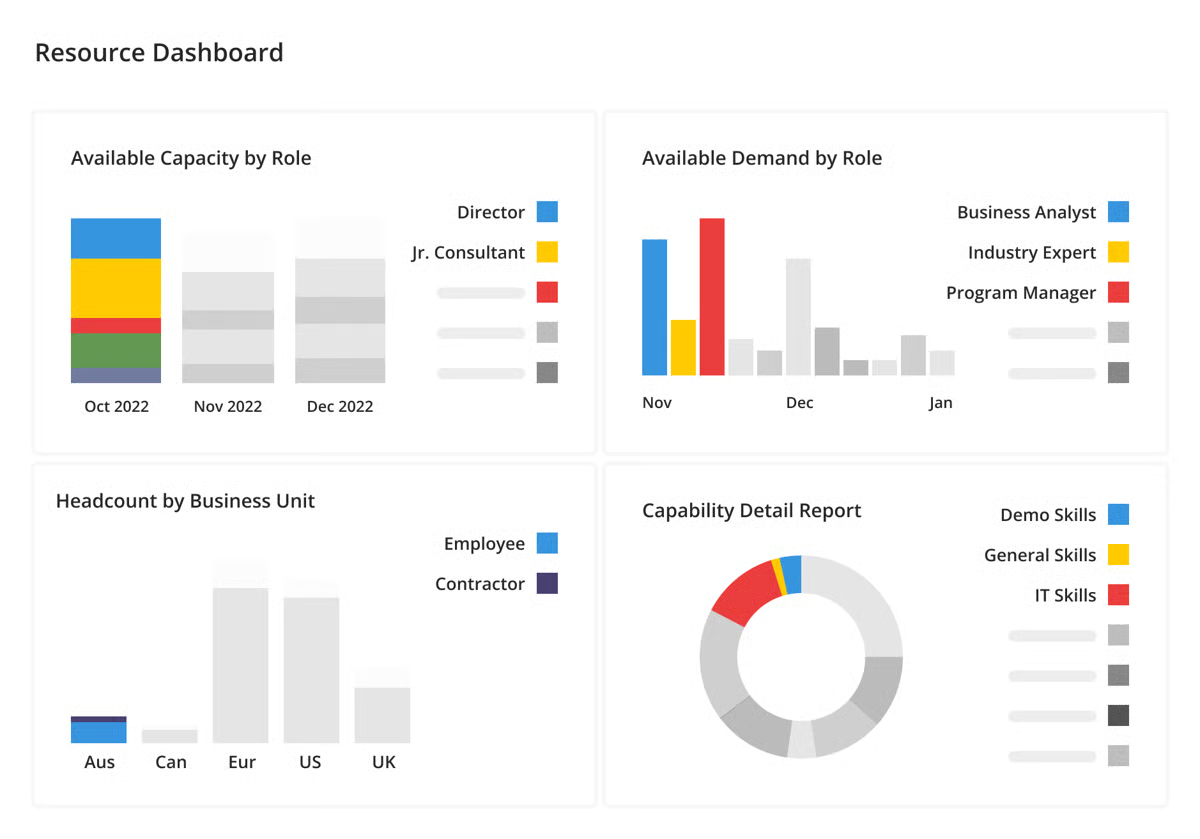
Others mention that certain configurations, reports, or timesheet processes can be challenging without a solid understanding of the system. This is often framed as a trade-off: Kantata offers a high degree of structure and analytical capability, which naturally requires more familiarity than lightweight tools. For teams committed to using data to manage utilization, profitability, and portfolio performance, reviewers suggest that the learning investment is worthwhile.
Overall, G2 feedback positions Kantata PSA as a strong fit for professional services organizations that prioritize resource planning, project financials, and reporting depth. With its resourcing visualizations, integration options, and advanced analytics, it gives teams the tools they need to understand where work is happening, how budgets are tracking, and how projects are performing across the business.
“The best thing about Kantata is that I can see budgets and time entries in real-time. I struggled with our old project management software because it didn't include time tracking. I spent so much time trying to see where we were at on budgets before Kantata. Now, I can know in real-time. Kantata finally gave us the ability to add custom task statuses so that has been a huge help as well.”
- Kantata PSA review, Rachel S.
“Sometimes it can be a bit frustrating when I'm building reports some of the data joins or lookups I require there's a limitation on things I can't do in Kantata front end which I'd need Microsoft SQL access or Power BI for, but this is rare and as this is only thing I can think of it shows how vast, powerful and user friendly as a system administrator Kantata is.”
- Kantata PSA review, Daniel F.
Have more questions? Find more answers below.
The best PSA software for small businesses depends on your size, workflows, and budget. Syncro is a strong fit for small IT service shops that want PSA and RMM in one place. For non-IT teams that still need project structure and collaboration, Wrike or Rocketlane can work well thanks to their flexible, scalable plans.
Software agencies typically look for strong project visibility, client collaboration, and resourcing. Kantata Professional Services Automation is a go-to option for agencies that need advanced resource management and project accounting. Wrike and Rocketlane are also popular with agencies that want modern collaboration features and clear client-facing views.
For consulting teams, the best PSA software balances resource planning, time tracking, and financial visibility. Kantata PSA is particularly well-suited to consulting firms that need detailed project accounting and forecasting. Smaller consulting teams may find Wrike or Rocketlane more approachable while still getting solid delivery and collaboration tools.
Service firms benefit from PSA tools that connect delivery, people, and financials. Kantata PSA and SAP S/4HANA Cloud are strong choices for firms that need deep financial control and complex resource planning. For more lightweight needs, Wrike, Rocketlane, or Keka can streamline projects, collaboration, and people management.
Midsize tech companies often need scalable project management, resource planning, and integrations with their existing stack. Wrike works well for cross-functional teams that want flexible workflows and reporting. For services-heavy tech companies, Kantata PSA or Autotask can provide deeper visibility into utilization, billing, and delivery performance.
You can find top PSA tools on software review platforms like G2, where products such as Autotask, Syncro, Rocketlane, Kantata PSA, Wrike, Keka, and SAP S/4HANA Cloud are rated by real users. These listings include feature breakdowns, use cases, and peer reviews to help you compare options. Many vendors also offer demos or trials through their websites.
For IT services and managed service providers, Autotask and Syncro are standout options. Autotask offers robust ticketing, project management, and service desk workflows, while Syncro combines PSA with built-in RMM for small IT providers. Depending on collaboration needs, some IT teams also layer Wrike on top for project visibility.
None of these tools are built specifically for solo freelancers, but some can still work if you’re running a very small, services-focused operation. Freelancers who work on larger client projects might appreciate Wrike for its flexible task management and basic time tracking. If you’re growing into a micro-agency model, tools like Rocketlane or Syncro can become more relevant.
For project-centric service work, Wrike and Rocketlane are strong choices. Wrike offers flexible project templates, dashboards, and collaboration features, while Rocketlane focuses on structured client onboarding and delivery with shared views. If financials and utilization are critical, Kantata PSA adds deeper project accounting and resourcing on top.
Some leading PSA solutions across use cases include Autotask, Syncro, Rocketlane, SAP S/4HANA Cloud, Keka, Wrike, and Kantata Professional Services Automation. Each serves slightly different audiences, from MSPs and IT services to consulting firms and enterprises, so the “best” choice depends on your size, industry, and operational complexity.
Professional services work isn’t just about delivering great client outcomes, it’s about the systems that keep projects, people, and profitability aligned. The best PSA software helps teams move from reactive management to structured, predictable operations. With centralized delivery, visibility into capacity, and automated billing workflows, these tools turn complexity into clarity.
Whether it’s Wrike’s flexibility, Rocketlane’s client collaboration, or Kantata’s depth in resource management and project accounting, each platform plays a different role in strengthening service delivery. For IT-focused teams, Syncro and Autotask offer seamless PSA + RMM workflows, while SAP S/4HANA Cloud supports enterprise-scale professional services with end-to-end governance.
Once your projects, resources, and delivery processes are in sync, you can focus on running a more efficient and profitable services organization.
The next step? Enhancing financial accuracy. Explore the best accounting software to ensure your PSA data flows directly into reliable invoicing, reporting, and revenue management.
.png)

If you're a CFO, procurement lead, or operations director still relying on spreadsheets or...
.png) by Shreya Mattoo
by Shreya Mattoo

Process manufacturing operations don't usually break down because of one bad decision. They...
 by Disha G

Enterprise Resource Planning (ERP)
I evaluated several tools to find the ten best ERP systems. These are NetSuite, Acumatica, SAP...
 by Sudipto Paul