Zapier is the best AI productivity tool for most teams in 2026, offering the strongest mix of app integrations, workflow automation, ease of use, and overall flexibility based on G2 Data. Other top platforms on G2 include:
The right choice ultimately depends on your priorities — whether that’s app integration, workflow complexity, collaboration, employee adoption, or communication efficiency.
In 2026, productivity is no longer about just working faster, but it’s about using productivity bot software that actually finishes the work for you. We have moved past simple reminders and chatbots. Today, the best tools act as autonomous agents that handle the heavy lifting, connecting all your different apps so you don’t have to manually move data between them. By letting these AI productivity tools manage the boring, repetitive tasks, your team can focus on the tasks that actually matter.
An AI performance study in 2026 highlights this shift toward AI intelligence usage. It shows that leading companies are now twice as likely to use these AI productivity tools that learn and improves itself as it works. These high-performing teams are also letting AI make decisions without human help nearly three times more often than typical businesses.
To dive deeper into this topic, I reviewed 10 AI productivity tools, out of which I shortlisted 5 that prioritize reliable execution, helping you choose the right engine for your 2026 growth.
The best AI productivity software for 2026 helps teams automate workflows, reduce repetitive tasks, and improve collaboration across apps, meetings, HR, and messaging. Based on G2 ratings, top picks include Zapier, Zoom Workplace, Workato, Matter, and TextExpander.
|
Tools + G2 rating |
Starting Price |
Free plan |
Key features |
Best for |
|
4.5/5 |
$20/month |
14-day trial |
• 9,000+ app integrations |
SMB automation |
|
4.5/5 |
$10/month |
No |
• AI Companion across Zoom apps |
Zoom-first teams |
|
4.7/5 |
Custom |
Free trial |
• Enterprise workflow automation |
Enterprise operations |
|
4.7/5 |
$1/month |
14-day trial |
• Slack and Teams recognition |
HR and people teams |
|
4.8/5 |
$10.41/month |
30-day trial |
• Text shortcuts and snippets |
Repetitive messaging |
*Based on G2’s Spring Grid Report 2026, these products are among the top-rated tools in their category. I’ve included each tool’s starting paid plan, where available, along with standout features to make comparison easier.
To keep the evaluation fair, I shortlisted tools from the G2 Spring Grid® Report 2026, using G2 Score, customer satisfaction, market presence, and verified user sentiment. I then reviewed G2 Data on setup, user experience, and dashboard friction, cross-checking vendor documentation for product capabilities. All product images were sourced from G2 vendor pages to reflect the 2026 software landscape.
After evaluating 10 AI productivity tools, I narrowed the list to the top 5 based on the following factors:
The list below contains genuine user reviews from the Productivity Bot software category page. To be included in this category, a solution must:
*This data was pulled from G2 in 2026. Some reviews may have been edited for clarity.
Recommended reading: Check out our review of the 10 best AI chatbots for 2026 to compare features, use cases, and real user insights before you choose.
Zapier's AI productivity tool helps teams automate repetitive tasks, connect everyday business apps, and streamline workflows. Its value lies in reducing manual effort, speeding up cross-system work, and helping users complete routine tasks more efficiently without needing developer support.
| Zapier at a glance | |
| G2 rating | 4.5/5 |
| Key features |
|
| Pricing |
|
| G2 Spring Grid Report Data 2026 |
|
My analysis shows that users consistently liked how Zapier connects tools that do not naturally work together. Reviewers specifically called out integrations across Google Workspace, CRMs, Pipedrive, Donorbox, Bloomerang, Zoom, Outlook, HubSpot, QuickBooks, and custom systems, often saying Zapier helped them avoid developer work while still building useful workflows. This aligns with the G2 Grid Report data: Zapier is rated 89% for cross-system integration, reinforcing that users see its biggest strength as connecting fragmented systems into one automated workflow.
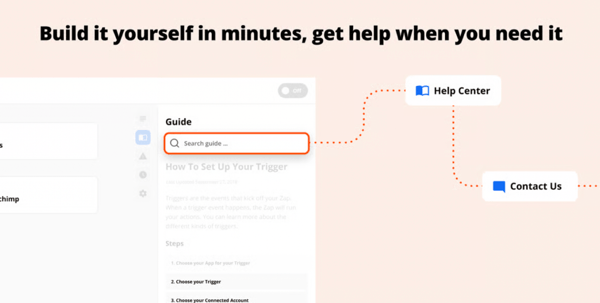
G2 users value Zapier because it reduces repetitive manual work and helps them execute tasks faster, from interview scheduling and donor record syncing to lead routing, follow-ups, data formatting, and weekly digests. I found that several reviewers specifically liked AI Copilot or agent-style capabilities because they could describe what they wanted, troubleshoot workflows, or build automations without deep technical knowledge. The G2 Grid Report supports this positive takeaway: Zapier is rated 86% for autonomous task execution, 90% for meets requirements, 89% for ease of admin, and 90% for ease of doing business with, which reflects that users see the product as practical, usable, and valuable for productivity-focused automation.
While users value Zapier for saving time and making automation more accessible, one distinct challenge I found in the G2 reviews was that complex workflows can be harder to troubleshoot when errors occur. Still, this feedback points to an opportunity for clearer guidance and stronger support as Zapier continues to expand its productivity tool capabilities.
Based on G2 score, Workato is the best overall alternative to Zapier, rated 4.7/5. Other strong alternatives include Integrately, UiPath Agentic Automation, Celigo, and MuleSoft Anypoint Platform. Choose Workato for enterprise-grade automation and support; choose Integrately for simpler, user-friendly workflow automation.
Read verified G2 reviews of Zapier to explore real user feedback, including what teams like most, where they see room for improvement, and how Zapier supports automation across everyday workflows.
Compare before you commit: Make or Zapier — which one actually saves you more time? See our hands-on comparison where we put both tools to the test and break down which automation platform truly comes out on top.
Zoom Workplace earns its place as a productivity tool because its AI features help teams get more value from every meeting. With AI Companion, summaries, transcripts, notes, and follow-ups, it reduces manual meeting admin and helps users turn conversations into clearer next steps.
| Zoom Workplace at a glance | |
| G2 rating | 4.5/5 |
| Key features |
|
| Pricing |
|
| G2 Spring Grid Report Data 2026 |
|
My review of Zoom Workplace's data, where productivity tools or bot usage was mentioned, shows that users liked how AI Companion, transcripts, recordings, and summaries helped them revisit important meeting details they might otherwise miss. This aligns with the G2 Grid Report Data: Zoom Workplace scores 87% for adaptive learning, showing that its AI meeting features can support users by learning from meeting context and improving how information is captured.
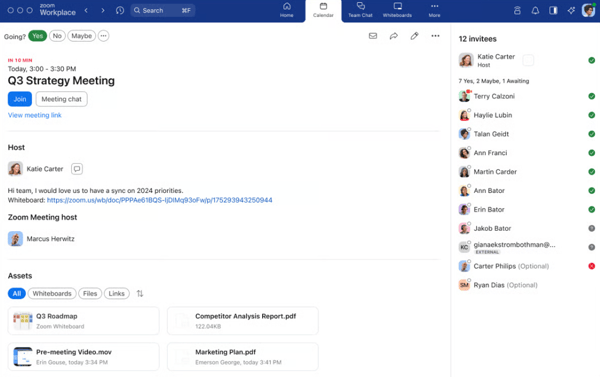
My understanding from the bot-related G2 reviews is that users value Zoom Workplace not just for capturing meetings, but for helping convert conversations into next steps, to-dos, shared notes, and Zoom Docs. This connects to the G2 Grid Report data: Zoom Workplace scores 84% for decision making, reflecting how its bot-style features help users move from discussion to action more efficiently.
I also found that some G2 users want more consistency from Zoom’s AI outputs, especially around transcript accuracy, summary quality, language support, and note-taking controls. Regardless, users generally saw this as a refinement opportunity because the same bot features were already helping them save time and stay organized after meetings.
Based on G2 Score, Google Workspace is Zoom Workplace’s biggest competitor, with a 4.6/5 rating. For direct video conferencing, Microsoft Teams and Webex Suite are also major Zoom competitors. Overall, Google Workspace leads by G2 review volume and rating, while Teams and Webex compete most directly in meetings and collaboration.
Discover verified G2 reviews of Zoom Workplace to see how users describe its AI meeting features, collaboration tools, and support for summaries, transcripts, notes, and follow-ups.
Workato stands out as a productivity tool for teams that need to automate business processes across multiple systems. Its recipes, Workbot, Copilot, and AI Hub help teams coordinate workflows, sync data, and reduce repetitive handoffs without depending on engineering for every update.
| Workato at a glance | |
| G2 rating | 4.7/5 |
| Key features |
|
| Pricing |
|
| G2 Spring Grid Report Data 2026 |
|
I evaluated the Workato G2 review data, and my analysis of the reviews showed that users liked how Workato connects systems, runs recipes in the background, and automates work across tools like Salesforce, Slack, Microsoft Teams, and internal business systems. The G2 Grid Report states that, further, Workato scores 95% for autonomous task execution and 93% for cross-system integration, showing how users see it as strong for executing workflows across connected apps with fewer manual handoffs.
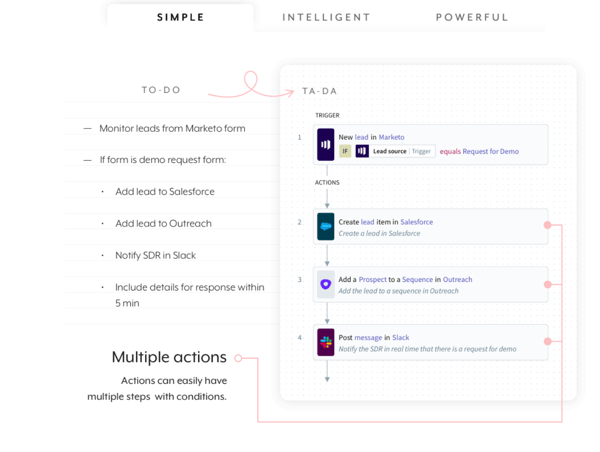
My understanding from the G2 reviews is that users value Workato’s low-code/no-code recipe builder, prebuilt connectors, AI Hub, Copilot, Workbot, and agentic workflow capabilities because they help both technical and business teams build useful automations without starting from scratch. The G2 Grid Report states that Workato scores 93% for meets requirements, 92% for ease of admin, and 96% for ease of doing business with, showing that users find it practical to manage and scale for productivity-focused automation.
While users appreciate Workato’s power and flexibility, some felt that complex recipes, debugging, connector setup, and AI-assisted building could require more technical effort than expected. Still, reviewers generally frame this as part of scaling into more advanced automation, and they continue to value Workato for saving time, connecting systems, and making complex workflows easier to manage.
Based on G2 Data, the best overall Workato alternative is SnapLogic Intelligent Integration Platform (IIP). Other top alternatives include Zapier, MuleSoft Anypoint Platform, Boomi, and Tray.ai. For simpler automation, choose Zapier; for enterprise integrations, consider SnapLogic, MuleSoft, Boomi, or Tray.ai.
Discover verified G2 reviews of Workato to learn how users describe its automation capabilities, integration workflows, Workbot features, and support for scaling complex business processes.
Matter stands out as an AI productivity tool because it brings recognition and feedback into the tools teams already use. Its Slack and Microsoft Teams workflows help automate kudos, milestone celebrations, surveys, and rewards, so employee engagement becomes more consistent and less manual.
| Matter at a glance | |
| G2 rating | 4.7/5 |
| Key features |
|
| Pricing |
|
| G2 Spring Grid Report Data 2026 |
|
During my evaluation of Matter reviews, I saw that users liked how Matter nudges teams to recognize peers through Slack/Teams, Feedback Friday prompts, kudos cards, and automated milestone reminders. Reviewers specifically value that recognition happened in the natural flow of work instead of becoming another manual HR task. Matter scores 96% for meets requirements and 97% for quality of support on the G2 grid report, reinforcing that users see its bot-led recognition experience as both useful and well-supported.
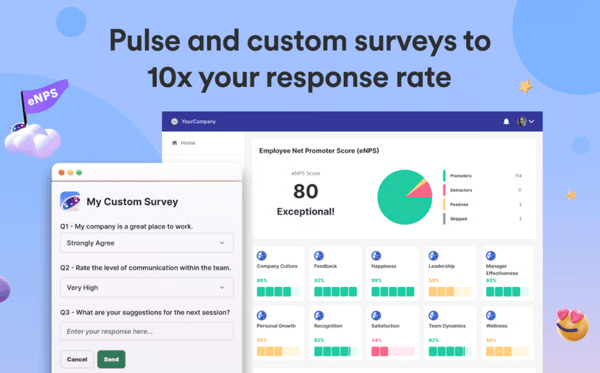
My understanding from the reviews is that users also like how Matter automatically handles birthdays, anniversaries, surveys, rewards, and engagement analytics. Reviewers said this helped new hires feel included faster, made appreciation more visible, and gave teams clearer insight into morale and participation patterns. The G2 Grid Report states that Matter scores 97% for ease of admin and 96% for ease of doing business with, showing that users find it effective for managing recognition workflows without adding administrative burden.
I also found that while users appreciated Matter’s automation and recognition workflows, some wanted deeper customization for team-specific needs. Still, reviewers framed this as a minor refinement because Matter already helped them save time, strengthen culture, and make recognition more consistent across teams.
Based on G2 Data, the best alternatives to Matter are Awardco and Guusto, both rated 4.9/5. Other top options include Assembly by Quantum Workplace, Kudos, Nectar, Bonusly, and Motivosity. Choose Awardco for rewards and recognition at scale, or Guusto for a highly rated employee recognition platform.
Discover verified G2 reviews of Matter to see how users describe its employee recognition, feedback workflows, rewards, and Slack or Microsoft Teams engagement features
TextExpander is a productivity bot tool that helps users automate repetitive typing through reusable snippets, templates, prompts, and shared response libraries. It is valuable because it speeds up routine communication, reduces manual errors, and helps teams keep replies, documentation, forms, and ticket updates consistent across tools.
| TextExpander at a glance | |
| G2 rating | 4.8/5 |
| Key features |
|
| Pricing |
|
| G2 Spring Grid Report Data 2026 |
|
In my analysis, I saw that users value the tool most for turning repeated typing into fast snippet-based actions. Users specifically call out faster customer replies, form filling, documentation, ticket updates, long commands, and templated emails, which help them save hours and reduce manual effort. In the G2 Grid Report, TextExpander scores 95% for meeting requirements, showing that users see its productivity bot value as highly aligned with their daily workflow needs.
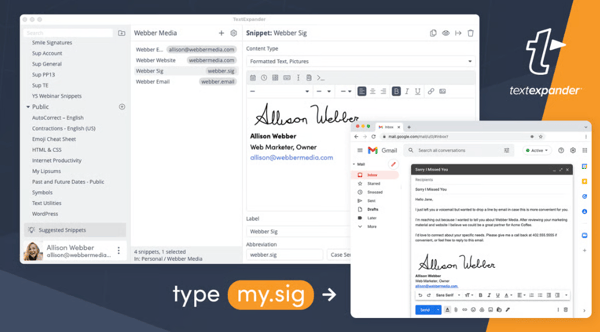
My understanding from the reviews is that users also appreciate how TextExpander helps teams standardize responses, share snippets, use prompts or fill-ins, and keep messaging consistent across apps and devices. Reviewers mention support, sales, healthcare, education, and operations use cases where prebuilt responses improve accuracy and professionalism. The G2 Grid Report gave TextExpander 100% for ease of admin, 100% for ease of doing business with, and 91% for quality of support, reinforcing that users find it manageable and well-supported for team productivity.
I also see that users value TextExpander’s time savings, though some mention friction when snippets expand in the wrong place, do not trigger consistently, conflict across shared groups, or work less smoothly in certain browsers, EHRs, or mobile environments. Still, users generally frame these as workflow annoyances rather than deal-breakers because the tool continues to reduce repetitive typing and make everyday work faster.
For iPhone users, the best TextExpander alternative is Apple’s built-in Text Replacement because it works system-wide, is free, and requires no extra app.
Read verified G2 reviews of TextExpander to see how users describe its snippets, shared templates, team responses, and support for reducing repetitive typing across daily workflows.
AI productivity tool pricing can vary widely depending on the product’s features, user count, automation limits, integrations, security needs, and vendor. Based on typical pricing seen across AI productivity software on G2, most tools fall into three broad ranges:
Pricing tip: Look beyond the monthly subscription cost. Consider usage limits, implementation time, integrations, employee training, governance requirements, and whether the tool replaces existing software or adds another expense to your technology stack.
Choose AI productivity tools in 2026 by looking beyond features and asking whether the tool can improve real workflows, connect with your existing systems, stay secure, and prove measurable business value. For business and team leaders, the right AI tool is not the one with the longest feature list; it is the one that helps people complete work faster, reduces manual handoffs, improves decision-making, and fits into the way teams already operate.
The smartest way to choose AI productivity software in 2026 is to ask: “Will this tool make our existing work system faster and clearer, or will it become another app employees have to manage?” The best tools disappear into the workflow, reduce busywork, and give leaders a measurable way to see whether AI is actually improving productivity.
The biggest challenges of using AI productivity tools are accuracy, security, adoption, tool sprawl, and unclear ROI. In 2026, most teams no longer need to be convinced that AI can save time; the harder question is whether it can save time safely, consistently, and at scale without creating extra review work or operational risk.
Have more questions? Find more answers below.
Zapier is the top-rated productivity automation bot for small business owners. According to G2, it holds the distinction of both "best for small business" and "highest user satisfaction" in its category.
Zapier is the best all-around choice for automating boring daily tasks at work, especially when the goal is to remove manual busywork across apps. If the repetitive work is more text-based, Magical is an excellent alternative because it speeds up repetitive tasks without requiring APIs or complex integrations. For async team workflows like standups, reminders, and check-ins inside Slack or Microsoft Teams is another strong pick.
Integrately and Zapier offer the strongest value for the price if you want automation on a budget, since both show free entry-level pricing and are positioned for automation use cases. If you want low-cost personal productivity, TextExpander starts at $3.33, making it a high-value option for teams looking to save time with snippets, shortcuts, and repetitive messaging.
Motion is the premier AI-powered productivity assistant for unified task and calendar management. It functions as an all-in-one workspace that automatically prioritizes tasks and builds your schedule. An alternative is Reclaim.ai, which is better suited for users who only need intelligent calendar optimization and automatic rescheduling rather than full project organization.
The best AI chatbot for productivity is Zapier if you want a flexible tool that automates work across your apps. It integrates with tools such as Gmail, Google Sheets, Slack, CRMs, and project management platforms, helping teams automate repetitive tasks, trigger follow-ups, update records, and move information between systems. For most productivity-focused teams, Zapier is the best choice because it reduces manual work without adding unnecessary complexity.
A quality productivity bot typically costs between $0 (Free) and $30 per user, per month. Prices scale based on the complexity of the AI and the volume of tasks.
Price Comparison at a Glance:
Yes, there are free productivity bots. Among the current free productivity Bots are Zoom Workplace, Zapier, Matter, Integrately, Geekbot (free up to 10 participants), and Snoooz AI.
Zapier is the best productivity bot for Google Workspace if you want something powerful that does not feel clunky. It integrates smoothly with Gmail, Google Sheets, Google Calendar, Google Drive, and Google Forms, helping teams automate repetitive tasks such as saving attachments, updating spreadsheets, creating calendar events, sending reminders, and moving data between apps.
Because Zapier runs most workflows quietly in the background, it reduces manual work without forcing users to change how they already work, making it the most practical choice for Google Workspace productivity.
Zoom Workplace is the best choice if you need a smart productivity bot that summarizes emails and suggests next actions. It is built for communication-heavy workflows and can help teams turn conversations, meetings, and messages into useful summaries, follow-ups, and action items. For users who want AI-assisted productivity rather than just automation, it is the strongest fit on this list because it helps people quickly understand what happened, what matters, and what to do next.
Matter is a standout productivity bot that works inside Slack, especially for teams focused on feedback, recognition, and employee engagement. It helps teams give kudos, request feedback, and build lightweight recognition habits without leaving Slack, making it feel natural rather than clunky.
TextExpander is the most reliable AI productivity bot for desktop if your goal is to boost focus and reduce repetitive work. It helps you create reusable snippets, templates, and shortcuts for emails, messages, forms, and common responses, so you can get routine writing done faster without breaking concentration. It is the strongest fit for desktop productivity because it removes small, repetitive tasks that interrupt deep work.
Zapier is a top-rated productivity bot for teams that need task reminders and follow-ups because it can automate reminders, create tasks, and trigger follow-up workflows across tools like Gmail, Google Calendar, Slack, Google Sheets, and project management apps. It helps reduce manual chasing, keeps work moving across apps, and runs automations in the background without adding extra friction.
Yes. ChatGPT is best understood as an AI productivity app because it helps users draft, summarize, research, plan, analyze data, automate repeat tasks, and work across tools like email, calendars, documents, and team apps through connectors and scheduled Tasks. In 2026, it is less like a simple chatbot and more like a flexible work assistant for writing, decision support, project planning, and daily task execution.
Yes, but the gains depend on the task, user skill, and workflow design. Newer 2026 research on AI coding tools shows moderate productivity gains that vary widely by context. AI boosts productivity most when used for clear, repeatable, text-heavy, research, support, or coding tasks, not when teams add AI without changing how work gets done.
Use AI as a daily operating system for small work loops: start the day by asking it to prioritize your task list, summarize emails or meetings, draft replies, turn notes into action items, research decisions, create outlines, check your writing, and automate reminders or recurring follow-ups. The best results come from giving AI context, asking for a specific output, reviewing its work, and saving reusable prompts for tasks you repeat every day.
Picking the best AI productivity tool in 2026 comes down to finding a tool that can actually finish work for you. If you need to link hundreds of different apps together, Zapier is the best choice for most people. If you work at a very large company with complicated tasks, Workato is your go-to option. For teams that spend a lot of time in meetings or chats, Zoom Workplace and Matter are great because they work right inside the apps you already use day-to-day.
The right choice also depends on how your team actually works. Some companies need broad app integration, others need deeper workflow orchestration, and some benefit most from tools that live inside the platforms employees already use every day. A productivity bot is most valuable when it fits naturally into existing habits and reduces friction rather than adding another layer of software to manage. When chosen well, these tools can streamline routine work, reduce context switching, and give employees more time to focus on strategic projects, creative problem-solving, and the priorities that drive meaningful business results.
With so many options on the market, the right tool depends on your budget, use case, and workflow needs. Explore AI chatbot software on G2 to compare features, pricing, and real user reviews so you can choose with confidence.


Published: March 2025 · Last updated: April 2026 Am I audible?
 by Mohammad Farooq

Published: January 2026 · Updated: April 2026 The average worker spends 18 hours a week in...
 by Rimzhim Dubey

It all started with a single, painfully awkward meeting.
 by Washija Kazim