


Published: August 2025 · Updated: April 2026
If you’re looking to build no-code or low-code automation, you may have stumbled upon Make and Zapier. Both are popular in our Integration Platform as a Service (iPaaS) category, and while they may seem similar at first glance, they serve slightly different user needs.Choosing the right tool matters because it directly impacts how efficiently your team can automate tasks, scale workflows, and integrate the tools you already rely on. A mismatch in platform capabilities can mean wasted time, higher costs, or unnecessary complexity.
I have compared Make vs. Zapier in detail based on different requirements, like user interface, flexibility, integrations, functionality, and pricing.
The right choice depends on what you value most. In my analysis, I found Make to be a preferred choice for complex workflows. Zapier is better suited for use cases that require general-purpose automation.
I’d choose Make if I need to build complex automations with multiple steps, branching logic, and advanced data handling, especially at higher task volumes. It’s more flexible and cost-efficient, and works best for power users, technical teams, or businesses that rely heavily on automation.
I’d choose Zapier if I want the fastest and simplest way to automate everyday workflows without a steep learning curve. It’s beginner-friendly, integrates with thousands of apps, and is well-suited for quick, plug-and-play automations across common business tools.
In short: Make works best for complex workflows, scalability, and budget-conscious automation. Zapier works best for ease of use, broad app coverage, and simple automations.
Here’s a quick comparison of the popular iPaaS software:
| Feature | Make | Zapier |
| G2 rating | 4.6/5 | 4.5/5 |
| Best for | Power users and complex workflows | Beginners and general-purpose automation |
| User interface (UI) and flexibility | Visual drag-and-drop canvas (very flexible) | Step-by-step form builder (simpler) |
| Automation capabilities | Advanced features like unlimited steps/branches and data handling | Straightforward automations with fixed step limits |
| Scalability | Cost-efficient at high volume (10k+ ops/month) | Scales with enterprise-grade security, unlimited users, and admin controls |
| Integrations | 3000+ apps, with custom apps and API support | 8000+ apps |
| Support & community | Strong community, good documentation, but fewer third-party tutorials | Larger community, tons of guides/tutorials, and broader ecosystem support |
| Pricing | Free, up to 1000 credits/month. The pricing starts from $10.59/month for 5000 credits | Free for 100 tasks/month with 2 step zaps. The pricing starts from $29.99/month |
Note: The details here reflect the most current capabilities as of April 2026. Both Make and Zapier continue to evolve rapidly, so features and pricing may change over time.
Zapier charges by tasks, simple and predictable. Make charges by credits, more flexible but harder to compare directly.
| Pricing plans | Zapier | Make |
| Free allowance | 100 tasks/month | 1,000 credits/month |
| Entry paid plan | $29.99/month | $10.59/month |
| Entry allowance | - | 5,000 credits/month |
Pricing unit difference
When Zapier is the better value:
When Make is the better value:
Here’s an overview of the key differences between the two software.
Choose Zapier if: You want the fastest way to automate everyday work without a learning curve. Zapier is the better fit for non-technical users, lean teams, and anyone building simple linear automations like “when a form is submitted, add a lead to the CRM and send a Slack alert.” Its step-by-step builder, broader app catalog, and large template library make it easier to get working automations live quickly.
Choose Make if: You need more control over workflow logic, data handling, or cost at higher usage volumes. Make is the stronger choice for teams building multi-step automations with branching, filters, loops, webhooks, or custom API calls. It also becomes more attractive when automation volume grows, because its operation-based pricing can stretch further than Zapier’s task-based model for complex scenarios.
Both Make and Zapier deliver features to create, test, and deploy automations with flexibility. There are a few similarities you can’t miss, for example:
To compare Make and Zapier fairly, I evaluated both tools using the same workflows and requirements. The focus was on usability, integration depth, workflow flexibility, support resources, and overall value.
Disclaimer: These insights are based on hands-on testing of Make and Zapier as of April 2026. Platform features, pricing, and functionality may evolve over time. This review reflects individual experience and opinions at the time of evaluation and does not represent the official stance or endorsement of G2. For the latest updates, consult Make and Zapier directly.
Let’s talk performance. I tested Make and Zapier to see what they do well and where they fall short. Here’s what I found.
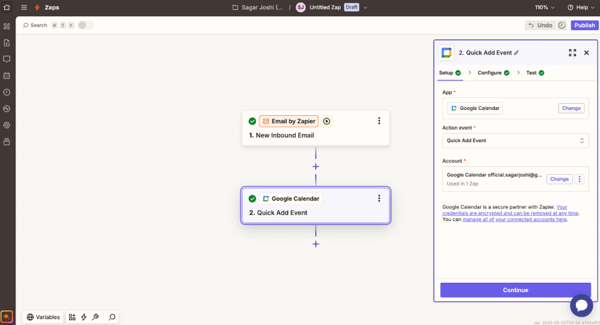
In practice, using each tool highlighted its trade-offs. Zapier’s UI felt intuitive. It walks you through triggers and actions with clear forms. The platform was fairly simple to use and navigate, and Zapier Copilot even offered relevant suggestions to assist.
The platform allows the creation of Zaps with simple suggestions. When I was just starting, I could create a simple “if email then alert me” workflow in minutes without a tutorial.
On the other hand, Make's UI is a canvas of modules you drag and connect. At first, it felt overwhelming, but soon I appreciated being able to visually lay out multiple branches and see data flow between steps.
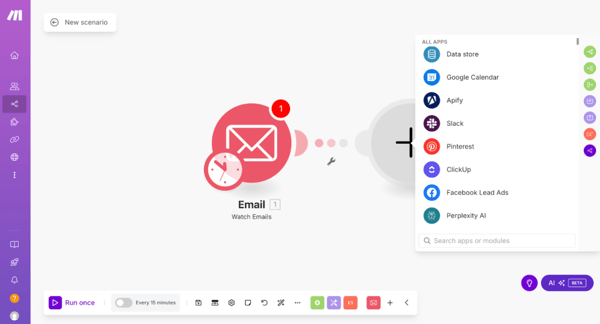
For complex flows, Make’s editor gave me much more control. I could add routers, loops, and data transformations on the fly. I’d say Zapier wins if simplicity is your goal, but Make pulls ahead on flexibility.
As a power user, I gave a slight edge to Make because of that flexibility and visual clarity.
Winner: Make
When I compared integrations, the numbers told one story: Zapier has more apps. In testing, every app I wanted, for example, Salesforce, Mailchimp, Google Analytics, etc., was on Zapier.
A few tools I consistently use didn’t have a Make integration at all, so I had to skip them or use a generic webhook as a workaround. What’s more, Zapier has an AI apps section with 8000+ integrations and 250+ AI apps, which Make lacks.
The depth of Make's integrations was impressive. For example, Make lets me pull detailed invoice data from Xero with multiple fields, whereas Zapier only has fundamental invoice triggers.
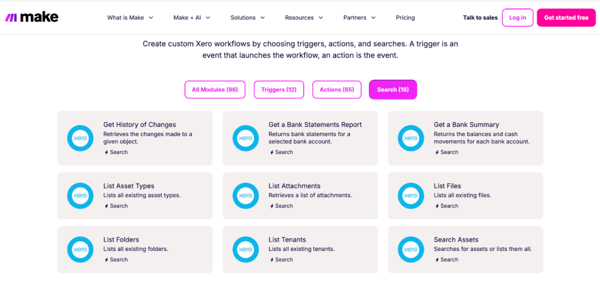
In the end, if app availability is your priority, Zapier wins since its library is so clearly dominated by size and quick connectors.
Winner: Zapier
To test functionality, I built real workflows of increasing complexity. Simple tasks, like posting form responses to a Slack channel, were easy on both. For more complex needs like data parsing, loops, and multi-branch logic, Make offered better support. For example, I created a scenario in Make that collected data from multiple sources, processed it with filters and array functions, and then uploaded a formatted report, all without writing code.
Try doing that on a basic Zapier plan, and you hit limits. Zapier capped my steps, and I had to break the process into separate Zaps.
I also tested conditional branching on either. Make let me splinter one workflow into many routes without limit, while Zapier forced me into its “Paths” feature, which is more rigid.
Overall, Make handled my complex tests more gracefully with unlimited steps and built-in data tools. Zapier was reliable, but less expressive.
Winner: Make
Pricing was an eye-opener. I took two real use cases: a small project with a few hundred tasks per month and a larger project with tens of thousands of tasks. Zapier’s free tier (100 tasks) was limiting for the small project. I needed a paid plan at $29.99/mo to get more tasks. Make offered 1,000 free credits; even its cheapest $10.59/mo plan gave 5000 credits.
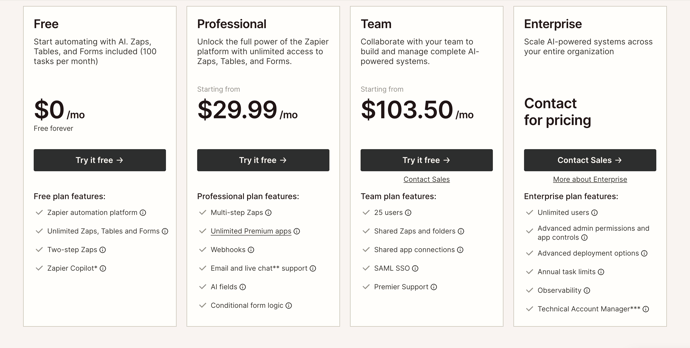
For larger automation workloads, Make still looks more cost-effective under the current pricing: Zapier’s Professional plan starts at $29.99/month, while Make’s entry paid plan starts at $10.59/month for 5,000 credits/month, with free tiers of 100 tasks/month on Zapier versus 1,000 credits/month on Make. Since Zapier charges by tasks and Make uses credits, the exact value depends on how complex your workflows are, but Make is generally the stronger fit for higher-volume, multi-step automations, while Zapier is easier to justify if simplicity and faster setup matter more.
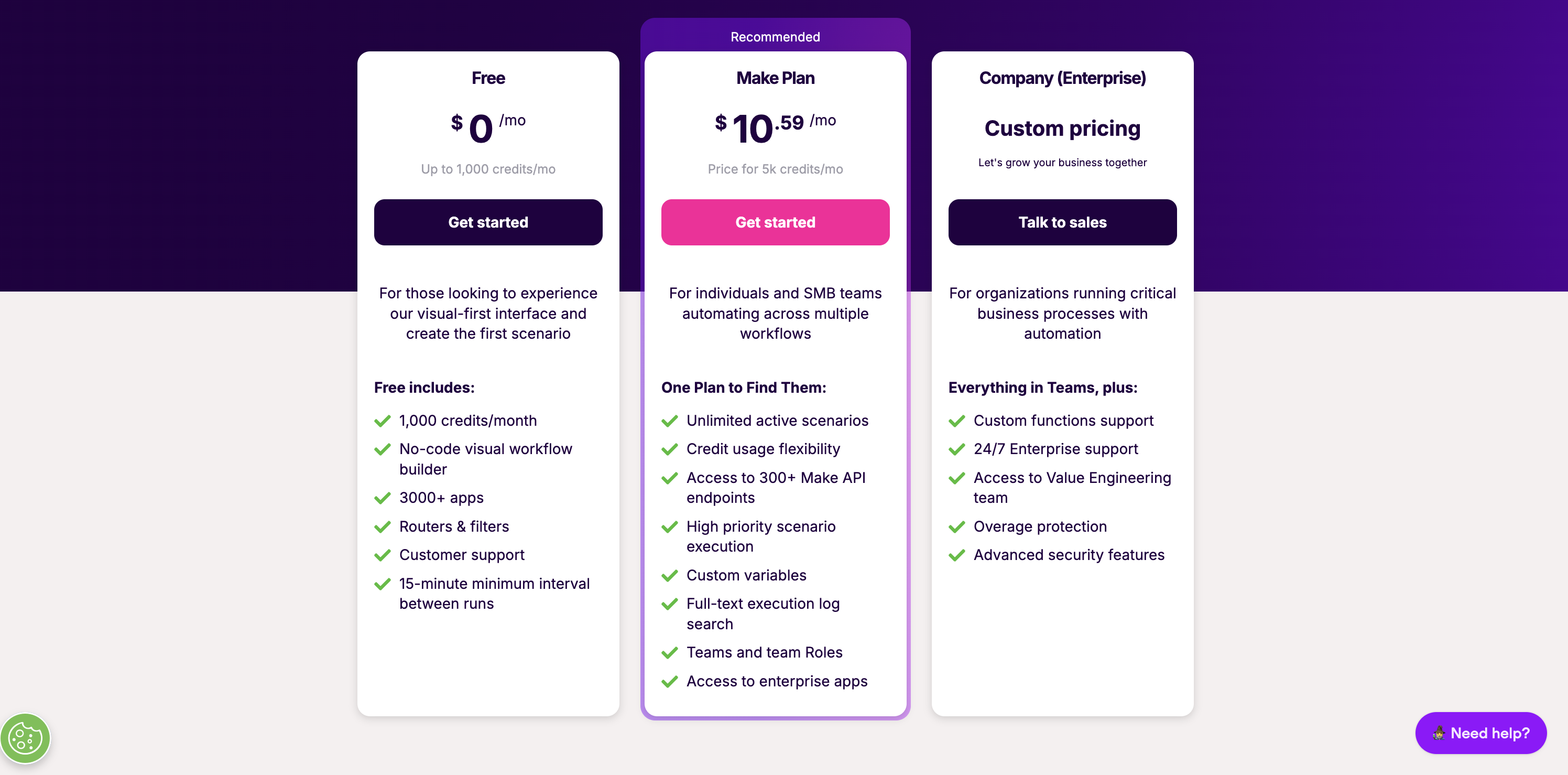
In short, Make was far more cost-efficient for my test scenarios. The only caution is that Make’s operations can deplete quickly if you design very big scenarios; I had to pay attention to that. Still, for most users on a budget, Make won the day.
Winner: Make
Here’s a table showing the winner in terms of different iPaaS software features:
| Feature | Winner | Why it won |
| User interface and flexibility | Make 🏆 | Visual canvas allows drag-and-drop workflows vs Zapier’s forms. It gave more creative control. |
| App integrations | Zapier 🏆 | Zapier has a vast library of apps. It offers more than 8,000 apps. Conversely, Make offers close to 3000 apps. |
| Automation capabilities | Make 🏆 | I got unlimited steps/branches and data tools in Make. Conversely, Zapier had fixed limits. |
| Pricing | Make 🏆 | It's much cheaper per action. Charge 5000 credits for $10.59. You need to pay much more in Zapier’s case. |
I looked into G2’s review data to find strengths and adoption patterns for Make and Zapier. Here’s what stands out:
Let’s take a look at the type of use cases for both to see which platform is more suited for you.
Who Is Zapier Best For?
Zapier is best for individuals and teams who want to:
Who Is Make Best For?
Make is best for users and teams who need to:
Here’s a table showing the web builder software that wins.
Zapier is often better for beginners. Its step-by-step interface and plentiful tutorials make it very approachable. In my trials, I could create simple automations without reading documentation. Make, with its drag-and-drop options, has a steeper learning curve.
The biggest dealbreakers are usually integrations and specific feature needs. If one platform doesn’t support an app or action you need, that forces your hand. For example, in my comparison, Zapier had all 8000+ major apps while Make was missing a few niche tools I use.
Zapier currently leads here, offering 250+ AI app integrations and Zapier Copilot to recommend workflows. Make supports advanced APIs and custom modules but doesn’t yet have a dedicated AI marketplace.
There’s no one-click migration. However, both platforms support webhooks, APIs, and similar triggers/actions. This means workflows can usually be rebuilt, though complex migrations may take time.
G2 review data shows Make is popular in marketing, IT services, and financial services, where complex workflows are common. Thanks to its broad integrations, Zapier dominates in marketing, SaaS, and internet services.
In many real-world cases, yes — especially once your automation volume starts to grow. Make uses operation-based pricing and includes more usage in its entry plans, while Zapier charges by task and typically becomes more expensive sooner for multi-step workflows. Make starts at $10.59/month for 5000 operations, while Zapier starts at $29.99/month with a much lower task allowance. Zapier can still make sense for lighter use and simpler automations, but Make usually offers better value at scale.
Yes, Make is generally better for complex workflow automation. It is better suited to scenarios with branching logic, multiple routes, loops, filters, data transformation, API calls, and more advanced error handling. Zapier is easier to use for simple automations, but Make gives you more control when the workflow goes beyond a basic trigger-and-action setup. The tradeoff is that Make takes longer to learn, while Zapier is more beginner-friendly.
Zapier leads on breadth and accessibility, while Make leads on workflow depth and flexibility. Zapier offers a larger app ecosystem, a simpler step-by-step builder, and quicker setup for common business automations. Make offers a more visual builder, stronger branching logic, richer data handling, and more customization inside a single workflow. In other words, Zapier is often better for fast deployment, while Make is stronger for power users and advanced automation design.
The main difference is how each platform approaches automation design. Zapier is built around simple, linear automations that are easy to create and manage, which makes it a strong choice for non-technical users and fast setup. Make is built for more visual, logic-heavy workflows, with tools for routing, looping, filtering, and transforming data inside one scenario. Both can automate everyday work, but Zapier prioritizes simplicity while Make prioritizes flexibility and control.
Ultimately, Zapier and Make are both solid automation platforms, but they cater to slightly different needs. For someone new to automation or with straightforward tasks, I’d lean toward Zapier. Its interface is simple, and its massive app library means you’ll almost certainly find any tool you need.
I'd recommend Make if you have complex workflows, technical requirements like handling data arrays or calling APIs, or a tight budget at scale. In my tests, its power-user features and lower cost per operation were decisive.
Finally, your decision will be based on what matters most to you. If you need quick and easy automation and broad compatibility, go with Zapier. Try Make if you need deep customization and want to squeeze the most out of your dollar. Both tools are robust, so you’ll be able to automate tasks either way. Pick the one that matches your priorities.
Explore other Zapier alternatives and Make alternatives for your iPaaS needs.


In the corporate world, cloud computing and adoption are a strategy that many have adopted.
 by Dibyani Das

The five best cloud compliance software tools for 2026 are Vanta, Wiz, Sprinto, Drata, and...
 by Soundarya Jayaraman

I evaluated 40+ tools to find the seven best iPaaS software in 2026. These are Zapier, Celigo,...
.png) by Shreya Mattoo
by Shreya Mattoo