


If you’ve ever mapped a process that looked airtight in a workshop, then watched it fall apart once it hit real ops, you’re not alone.
Process excellence leaders and ops teams tell me this all the time: the “official” workflow is clean, but the way work actually moves through your systems, people, and handoffs is a lot messier. That’s exactly why teams go looking for the best process mining software in the first place - to see what’s really happening end to end, not what the slide deck says should be happening.
The frustrating part is how quietly problems grow. Bottlenecks and rework can sit in the background until cycle times spike or KPIs start slipping, and by then, you’re firefighting instead of fixing root causes. And when IT or transformation teams roll out automation, it gets riskier. Without a clear baseline, you can automate the wrong steps or scale inefficiency faster. The best process mining software helps you surface those gaps early, so improvements and automation bets are based on data, not gut feel.
Now I’m not an operations specialist or a Six Sigma black belt, but I evaluate software for a living, and I know how much the right tooling can change the speed and confidence of your improvement work. So, I put together this list of the best process mining software after comparing leading process mining platforms side by side using G2 Data, plus my own research.
Here's my top 5 picks for the best process mining software for teams: UiPath Platform, Celonis, Microsoft Power Automate, Bizagi, and IBM Process Mining.
Ready to take a close look? Read on.
*These process mining software are top-rated in their category, according to the G2 2026 Winter Grid Report. I have mentioned the starting price of their paid plans and standout features for easy comparison.
Here’s a quick comparison table showing how each process mining software stacks up on the features that matter most for day-to-day collaboration, along with their G2 feature ratings based on G2 2026 Winter Grid Report.
| Process mining software | Process library | Integrations | Execution management | Process mapping | Real-time process analysis |
| Microsoft Power Automate | 86% | 89% | 87% | 88% | 87% |
| UiPath Platform™ for Agentic Automation | 95% | 96% | 95% | 95% | 95% |
| Celonis | 86% | 84% | 88% | 88% | 88% |
| Bizagi | 93% | 92% | 90% | 92% | 93% |
| IBM Process Mining | 97% | 94% | 95% | 97% | 97% |
At a basic level, process mining tools pull event data from the systems you already run (ERP, CRM, ITSM, finance apps) and reconstruct the real path work takes, every variant, detour, and delay included. I like to think of it as going from “what we think the process is” to “what the process actually is,” with timestamps and proof.
What separates the best process mining tools from the rest is how actionable they are. The strong ones help you compare reality to your intended model (conformance), show why bottlenecks happen, and point to the fixes that will move KPIs fastest (enhancement). Even better, they connect those insights to automation readiness, so you’re deciding what to optimize or automate next with confidence.
On G2, these tools are already serving a broad mix of buyers: 29% small business, 29% mid-market, and 42% enterprise. That spread tracks with what I see in G2 reviews: smaller teams want faster visibility and quick wins, while enterprises lean on mining to standardize and scale improvement across complex, cross-system processes.
And the market momentum backs this up. The global process mining software market is projected to reach $21.92 billion by 2030, growing at a 59.4% CAGR from 2025 to 2030.
Growth numbers aside, the takeaway is simple: more teams are using process mining not as a “nice-to-have analysis,” but as a core engine for process visibility, bottleneck reduction, automation planning, and ROI reporting.
I started with G2’s Grid® Reports to build a shortlist of the top process mining software based on G2 Score, user satisfaction, and overall market presence.
Next, I dug into G2 reviews at scale with an AI help to spot the patterns that keep showing up for process mining teams: what actually helps people uncover the real process, where conformance checks fall short, and which insights translate into measurable improvements. I paid extra attention to comments on usability, system integrations, and how clearly each tool connects discovery to enhancement and automation readiness.
Since I couldn’t try first-hand, I relied on insights from people who use them every day and validated those takeaways against verified G2 reviews.
The screenshots in this article come from G2 vendor profiles and publicly available product documentation.
To land on these picks, I looked at what kept surfacing in G2 Grid® Reports, satisfaction data, and review themes. I wanted to know does this tool help teams discover the real process, validate it, improve it, and confidently tie it to automation and ROI.
No tool is perfect across every criterion, and you’ll see trade-offs in the picks. But the best process mining software I have on this list is consistently strong where it counts: trustworthy discovery, practical insights, automation guidance, and clean reporting that helps teams move from visibility to measurable change.
The list below contains genuine user reviews from the Process Mining software category. To be included in this category, a solution must:
*This data was pulled from G2 in 2025. Some reviews may have been edited for clarity.
G2 rating: 4.4/5 ⭐
Microsoft Power Automate is Microsoft’s workflow automation hub, and in a process mining context, I think of it as the “connective tissue” between what you uncover and what you actually fix.
It helps you map and monitor processes across the Microsoft stack (and plenty of third-party apps), then turn those insights into automated flows, approvals, and notifications without a ton of custom build. So if your team already lives in Microsoft 365, Dynamics, or Azure, Power Automate tends to feel like a natural extension of how work gets done.
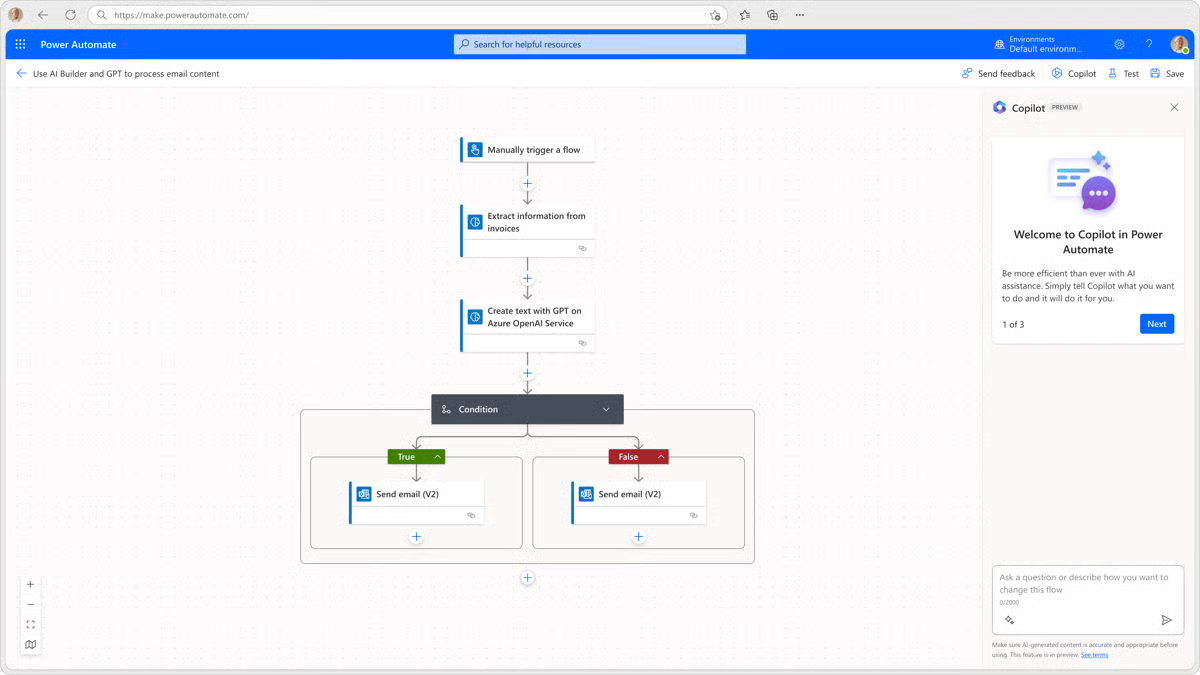
For operations teams, Power Automate stands out for its governance, monitoring, and reliability features, like flow run histories, error handling, alerts, and environment control, that make it possible to scale automation without creating operational risk. It also supports controlled rollouts and quick rollback, which matters when process changes impact revenue, compliance, or customer experience.
Based on my analysis of user reviews, G2 users back that up in a pretty consistent way. Satisfaction scores are strong where adoption usually lives or dies: ease of use is rated at 91%, ease of setup at 90%. Reviewers like how quickly they can get value because connectors are ready to go, and building flows doesn’t require heavy engineering.
The highest-rated features on G2 tell the same story: integrations (89%), autonomous task execution (89%), and collaboration (88%), which makes sense for process teams that need cross-app visibility and an easy way to operationalize improvements.
According to G2 reviews, the platform is incredibly capable for cross-app automation, and teams running lots of flows appreciate that flexibility, but those wanting lightning-fast execution on very large, high-frequency automations might want to account for occasional performance lag and plan critical workflows accordingly.
And while the low-code experience is approachable for many users, teams aiming to build complex, multi-branch logic or enterprise-wide orchestration should invest in learning and enablement early, so things stay clean as usage grows, based on a few reviews I read.
Overall, I’d recommend Power Automate most for process excellence and ops teams who want process visibility that turns into fast automation wins inside a Microsoft-heavy environment. If your priority is “find it, fix it, automate it” without leaving your stack, this is a punchy, practical pick.
"Connectors for almost everything. HTTP, Azure, GitHub, Dataverse, Excel, Teams, ServiceNow, you name it. I can stitch infra checks, data setup, and notifications without reinventing wheels.
Fast incident workflows. A failed CI run posts to Teams -> one click opens a Power Automate “triage” flow that grabs logs, tags the right owners, and files a ticket with repro steps. It’s oddly satisfying. Run history that’s actually useful. Each step’s inputs/outputs are viewable, so I can spot a bad payload or header mismatch in seconds instead of spelunking through app logs.
Human-in-the-loop made simple. Approvals and adaptive cards let QA/Product sign off on risky test data changes straight from Teams, no separate tooling. Desktop flows for legacy UIs. When a vendor system has zero APIs, the desktop recorder (attended or unattended) gets us “good enough” RPA to unblock end-to-end tests."
- Microsoft Power Automate review, Ravindra N.
"Debugging isn’t intuitive, and error messages are often unclear, making troubleshooting time-consuming. High-volume automations may exhibit latency or unexpected errors."
- Microsoft Power Automate review, Luca P.
Looking to streamline workflows and improve operational efficiency? Explore the best business process management software on G2 to see which platforms teams rely on to automate and optimize their processes.
G2 rating: 4.6/5 ⭐
UiPath is one of the automation-first process mining leaders, meaning its big advantage is how tightly mining feeds directly into automation. What makes UiPath different, in my view, is that process mining is not a standalone island. It’s built to seamlessly integrate with RPA, AI agents, and low-code automations.
The Agentic Automation is UiPath’s way of bringing process mining and automation together in one ecosystem, so you can spot how work really flows and then act on it without jumping tools.
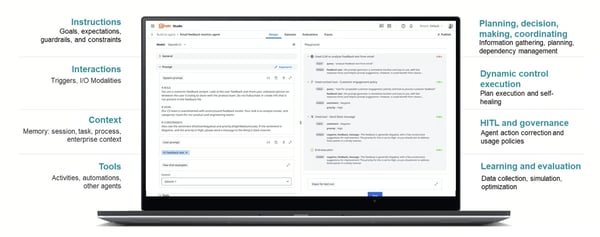
When I evaluated it alongside the others, what stood out right away, both in G2 data and in reviewer language, is that UiPath is built for teams who don’t just want insight, they want execution. Users consistently describe the platform as reliable, feature-rich, and genuinely useful for moving from “here’s the bottleneck” to “here’s what we automated to fix it.”
On G2, that shows up clearly in the satisfaction scores: Ease of use is rated at 97%, quality of support is 96%, and ease of setup is 91%.
And the highest-rated features line up with what process mining teams care about most once they’re past discovery: RPA integration (97%), application development (97%), and integrations (96%).
Reviewers love that UiPath doesn’t leave you stuck at diagnosis. You can mine processes, validate what’s off, and push directly into automation with strong orchestration and a mature RPA backbone. The breadth of integrations also gets real praise because it makes the picture more complete across systems, which is where process mining either shines or falls apart.
Based on G2 reviews I looked at, users who want automation depth seem to feel the pricing is justified, but teams looking for lightweight mining or smaller-scope rollouts may find they want to plan their budget and should go in with a clear ROI plan. Also, reviewers appreciate the platform's usability once they’re up and running, but teams newer to process mining or automation will want to budget time for enablement and probably lean on UiPath’s training and support early on.
Net-net, UiPath Agentic Automation is the best fit for process excellence, IT, and transformation teams that want process mining tightly connected to automation at scale. If your goal is to turn process visibility into real, repeatable fixes, not just insights, this is the platform I’d bet on.
"UiPath provides an excellent end-to-end automation experience with strong AI integration, making it easy to design, deploy, and monitor bots at scale. Its intuitive Studio interface, strong community support, and continuous innovation around AI Agents make automation development much faster and more efficient. The platform also integrates smoothly with a wide range of enterprise tools and APIs."
- UiPath Platform™ for Agentic Automation review, Dhananjaya H.
"Since I’m still learning UiPath, some features can be overwhelming at first — especially when dealing with more advanced activities or debugging errors. The platform is powerful, but sometimes the interface feels a bit complex for beginners. I also noticed that it could use a lot of system resources, which makes it run slower on lower-end machines."
- UiPath Platform™ for Agentic Automation review, Hosny G.
G2 rating: 4.5/5 ⭐
I am sure that you've probably heard of Celonis before if you have been digging into process mining tools for some time. Celonis is a well-known, dedicated process mining platform built to show you how work actually flows across your systems, not how it’s supposed to flow in a diagram.
At its core, Celonis pulls event data from tools like ERP, CRM, and ticketing systems, reconstructs the real "as-is" process, and then helps you pinpoint where time, cost, or compliance drift is creeping in. From what I found during my research, Celonis reads as a process-first leader: the product starts with deep discovery and analysis, then layers on improvement guidance, monitoring, and operational follow-through.
That focus comes through in G2 Data and reviews I saw. Satisfaction is strongest around the day-to-day partnership and usability for power users. Ease of doing business sits at 91%, and reviewers routinely say the platform is dependable once it’s in place.
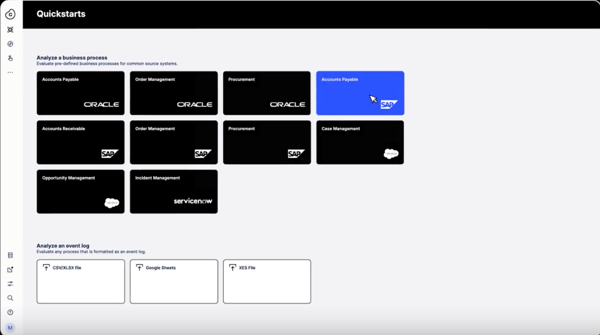
From my research, Celonis’ standout feature is its process intelligence graph, which builds a “digital twin” of how processes actually run across systems. I also found that its execution management layer goes beyond dashboards by recommending fixes and triggering actions when cases drift off-path. The depth of variant analysis and object-centric mining also looks built for messy, real enterprise workflows.
The highest-rated features on G2 reinforce these core strengths for process teams: process mapping (88%), real-time process analysis (88%), and execution management (87%).
Users like being able to move from a high-level process view to case-level reality quickly, and they call out how real-time monitoring makes it easier to keep improvements from slipping back over time.
And according to reviews I read, users working in complex enterprise environments consistently point to Celonis’ process visibility as a major payoff, especially when they’re managing high-volume workflows across systems. Teams looking for a lighter-weight entry point or narrower use cases will want to plan for a higher price tag.
Also, users clearly trust the depth of insights Celonis offers, but teams that are newer to process mining should expect a learning curve up front. Celonis rewards curiosity and analytical work, so setting aside time for onboarding and internal enablement pays off.
If your priority is to get a brutally clear, data-true view of your processes and keep them improving in real time, Celonis is one of the best process mining software options out there. I’d recommend it most for process excellence, ops, and transformation teams in mid-market to enterprise environments who want serious discovery and continuous execution management, not just a one-off process map.
"The part I like most about Celonis is it provides you with clear pictures of complex process data that are understandable by everyone on the team. Not only does it illustrate bottlenecks, but it also demonstrates what happens when you address them, making for easy prioritization."
- Celonis review, Daniel J
"The initial setup and data integration phase can be complex and time-consuming, requiring significant technical effort. Additionally, the licensing model can be challenging to navigate and optimize for smaller-scale use cases within a larger organization."
- Celonis review, Adithya P.
Celonis and UiPath are both top-tier for process mining, but they’re optimized for different goals. Here’s how I separate them:
The easiest way to choose is to line them up against your stack and priorities. If you want the clearest side-by-side view, check out G2's Celonis vs. UiPath Platform™ for Agentic Automation compare page for a comprehensive view.
G2 rating: 4.6/5 ⭐
Bizagi is essentially a process management and automation suite with process mining baked into the picture, and I think of it as a model-and-improve tool for teams who want both a clear view of how work runs and a practical way to design what comes next.
In plain terms, it helps you map your real processes, compare them to how they’re supposed to run, and then standardize or automate improvements inside the same environment. When I look at it through a process mining lens, Bizagi feels like a strong fit for organizations that want process discovery and governance to live alongside BPM and low-code execution, not as a separate analytics island.
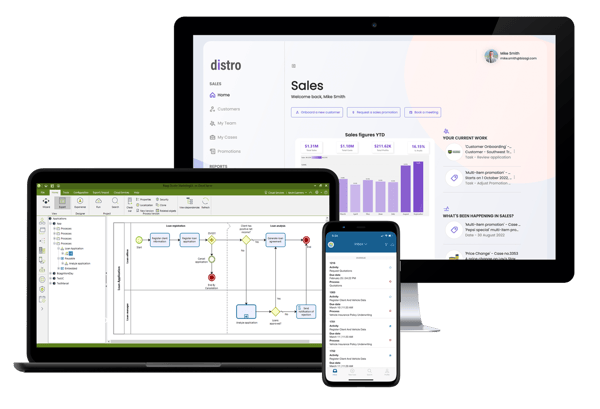
G2 Data lines up with that story. Users rate Bizagi highly for the things that make process mining feel usable in the real world: Ease of Use is strong, support is well-regarded, and people say the platform meets their requirements consistently.
The highest-rated features on G2 are exactly what you’d want in a process-first too: Real-time process analysis, a process library that keeps models and learnings reusable, and process mapping that’s clear enough for both ops and IT to work from. Reviews I’ve seen tend to highlight how approachable the modeling experience feels, and how helpful it is to keep discovery, documentation, and improvement work connected instead of scattered across tools.
Because the platform can do a lot, from mining to modeling to execution, teams aiming to use the deeper capabilities should expect a bit of ramp-up time to set standards and get everyone working in the same way. And for teams scaling into larger, more complex workflows, it’s worth keeping performance in mind: users note implementation is straightforward for most processes, but bigger, high-volume workflows can sometimes feel a little slower. That’s a pretty common pattern across process mining tools, but it’s useful to account for as you grow.
My bottom line: Bizagi is a great pick for process excellence and transformation teams who want process mining plus structured process management in one place. If you’re trying to go from “show me the truth” to “let’s redesign and run it better” without tool-hopping, Bizagi is a smart, steady choice.
"I find Bizagi incredibly valuable for creating and mapping processes. Its ability to help me visualize processes is a major asset, allowing me to identify areas for improvement efficiently. The software saves me time, which adds significant value to my workflow. Additionally, my initial impressions of Bizagi are positive, as it seems to deliver good value for users overall."
- Bizagi review, Umesh C.
"Although robust, Bizagi can become cumbersome in complex projects, with noticeable slowness when handling large models."
- Bizagi review, Rafael L.
Evaluating these tools for a manufacturing context specifically? See how Bizagi, and other tools are rated by mid-size manufacturing teams for process simulation in G2's 2026 rankings.
G2 rating: 4.7/5 ⭐
I think of IBM Process Mining as a steady, enterprise-ready platform for uncovering how work actually moves through your organization. It uses system data to reveal the real path processes take, then makes it easier to spot friction points and build a clear improvement plan around them.
At the core, it ingests event logs from your systems and generates as-is process discovery (the real flow vs the designed flow), variant and bottleneck analysis (where time/cost/leakage happens), conformance checks against your intended model or policy, automation recommendations + ROI sizing to prioritize what to fix first. And if you’re already IBM-automation-led, the “insight to automate” path is pretty smooth.
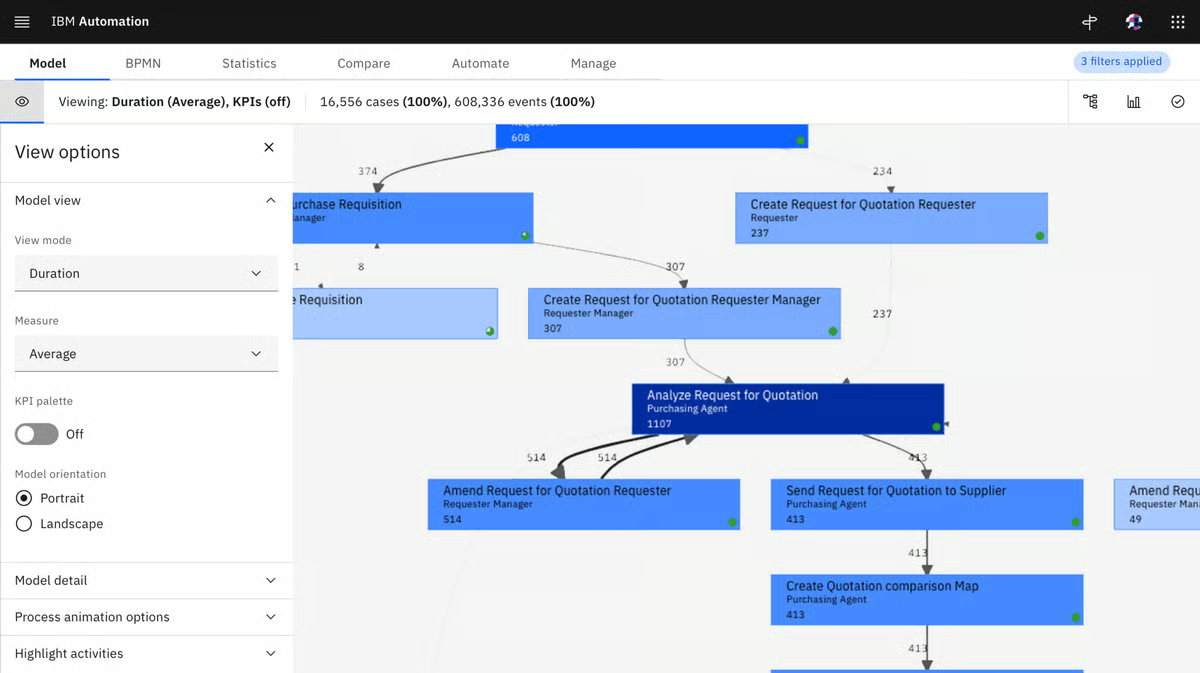
The G2 Data supports that “enterprise-ready and dependable” vibe. Satisfaction scores are standout for support(97%), and ease of use (96%), which tells me customers feel confident both in the product and the partnership behind it.
And the highest-rated features on G2 are application development, collaboration, and process mapping, all at a 97% satisfaction rating. These line up with what process teams need when mining isn’t a one-off exercise. Reviewers tend to like that IBM makes it easy to map complex processes clearly, collaborate across ops and IT, and then use those insights to shape improvements in a controlled way.
From the G2 reviews I read, I get a sense that IBM Process Mining comes through as a dependable platform for rigorous discovery and structured improvement. Teams wanting a quick, plug-and-play rollout should plan for some upfront setup and tailoring, and teams newer to process mining should expect a short ramp to get comfortable with the full toolkit. Also, groups with tighter budgets should plan for a higher investment typical of enterprise mining platforms and make sure the ROI path is clear.
On the whole, if you’re running complex, cross-system processes and want a mining platform that stays steady as your program scales, IBM Process Mining is a smart pick to build on.
"I have been using IBM Process Mining for about a year to optimize financial transactions, and it has significantly improved workflow transparency and enhanced overall operational performance. I appreciate the tool for the deep visibility it provides into business workflows and financial processes, making it a comprehensive choice. The seamless integration with existing IBM and third-party systems, along with its intuitive visuals, sets it apart from other vendors. The initial setup process was smooth, and connecting to data sources was easy for us, aided by IBM's thorough documentation and pilot testing.
IBM Process Mining excels at bottleneck identification, effectively highlighting delays and redundancies, which simplifies the process of pinpointing slowdowns. This capability has led to faster transaction processing and improved accuracy by 10%. Additionally, I find the bottleneck and variant analysis incredibly useful. The integration with Oracle also works seamlessly, further enhancing my workflow. These features are part of the reasons I would consider repurchasing the software."
- IBM Process Mining review, Ria P.
"There is not much to say about my dislike about this product. I heard that while setting this product, it's a bit complex as it relies heavily on high-quality,complete, and consistent event log data, and to maintain smooth functioning, it demands a lot of effort. Along with it, there comes the budget-related issue as it requires a good amount of investment."
- IBM Process Mining review, Anuj J
Discover the best robotic process automation (RPA) software on G2 for your needs.

Got more questions? G2 has the answers!
Celonis, UiPath, and IBM Process Mining are strong process mining solutions for identifying workflow bottlenecks because they surface delay points, rework loops, and high-friction variants. They help teams zoom in on where processes slow down and why.
Microsoft Power Automate and Bizagi tend to be the most affordable process mining software for SMBs, especially for teams already using low-code or BPM suites. Both make it easier to start small with core discovery and scale later.
Celonis and IBM Process Mining, with UiPath close behind, are top-rated process mining solutions for enterprises because they handle complex, high-volume processes. They’re built for multi-system data, governance, and advanced KPI tracking.
UiPath and Microsoft Power Automate integrate process mining with automation tools by connecting discovery insights directly to automation workflows. Celonis also supports “insight-to-action” by highlighting automation-ready bottlenecks.
Celonis, IBM Process Mining, and UiPath provide analytics on process efficiency gains through dashboards for cycle time, throughput, deviations, and cost impact. These views make “before vs. after” improvements easy to prove.
Celonis and Bizagi, supported by IBM Process Mining, are known for accurate process visualization because they show true “as-is” flows plus variants and exceptions. This helps teams trust what’s happening before they fix it.
Celonis, IBM Process Mining, and UiPath support multi-system process data analysis, combining event logs across ERP, CRM, ITSM, and custom apps. That end-to-end view matters when workflows span tools and teams.
IBM Process Mining and Celonis, with Bizagi in BPM-heavy environments, support process mining for compliance-heavy industries through conformance checks and deviation tracking. They flag non-compliant paths before they become audit risks.
Celonis and IBM Process Mining are well-known for real-time process monitoring features, while UiPath supports continuous monitoring tied to automation triggers. This enables ongoing optimization instead of one-time discovery.
Celonis and UiPath provide AI-powered process improvement recommendations like automation candidates and high-ROI fixes. IBM Process Mining also supports smart insights that prioritize what to improve first.
You’re ready if your key processes leave reliable digital footprints (event logs) and you have repeatable workflows worth improving. Even a single high-volume process with clean data is enough to start a pilot.
Yes. Process mining fits naturally into BPM and continuous improvement by providing a factual “as-is” baseline. It validates what’s really happening so redesign and optimization are based on data, not assumptions.
Look for connectors to your systems of record (ERP, CRM, HR, ITSM, finance) and data lakes/warehouses. Strong integrations ensure complete event logs, which directly improve map accuracy and insights.
Compare tools on data connectivity, visualization depth, KPI/ROI reporting, scalability, ease of use, and how well they support your improvement goals. The right fit matches your tech stack, process maturity, and automation roadmap.
The most valuable teams I’ve seen use mining like a heartbeat monitor: they don’t run it once, fix a bottleneck, and move on. They keep it on in the background, watching for new variants, quiet workarounds, and slow creep in cycle times that would’ve stayed invisible in dashboards. That’s where process mining earns its keep, not in the first “aha,” but in the ongoing “we didn’t slip back.”
Across these picks, the common thread is simple: the best process mining software doesn’t leave you with insights you can’t operationalize. Whether you’re automation-first or process-first, the goal is the same: move from discovery to conformance to enhancement, and then prove the impact with ROI you can defend.
And once you know what needs fixing, the next question is how you’ll actually run the improved process day to day.
If you’re ready to operationalize what process mining uncovers, pair your insights with the right workflow management software so changes stick, handoffs stay clean, and improvements don’t fade after the first win.


I’ve seen how quickly repetitive tasks can pile up, consuming time that could be spent on more...
.png) by Tanuja Bahirat
by Tanuja Bahirat

Recently updatedSummer 2026 Grid® Report · Published May 26, 2026 The 10 best...
 by Shubham Gupta

Real-world data is in most cases incomplete, noisy, and inconsistent.
 by Amal Joby