.png?width=400&height=150&name=My%20project-1%20(1).png)


I believe getting paid should be a simple, straightforward process, not a stressful one.
As businesses grow, so does the need for a reliable, secure, and flexible best payment processing software. But the more I spoke with business owners, freelancers, and finance managers, the clearer it became: Without the right payment processing software, things can go wrong very fast.
Delayed transactions, confusing checkout experiences, unexpected fees, and unclear contracts can all quietly eat away at profits and customer trust. That realization led me to dig deeper into the payment processing landscape.
I didn't skim through product pages; I evaluated the top payment processing software based on real customer feedback using G2 data. By analyzing verified reviews, I set out to find the tools that actually deliver secure, seamless, and cost-effective payment experiences.
After evaluating 25+ tools, I narrowed it down to six that consistently delivered. My top picks are PayPal Payments, Amazon Pay for Business, Venmo, BILL AP/AR, Stripe Payments, and Nickel.
PayPal Payments: Best for simple and secure payments with global reach
Trusted brand, wide payment method support, buyer protection, international transfers, and mobile payments. (Starts at 2.99% + $0.49 for standard domestic transactions)
Amazon Pay for Business: Best for e-commerce checkout optimization
Amazon-backed trust, seamless checkout integration, mobile payments, cashback incentives, and multiple payment methods. (Starts at 2.9% + $0.30 per domestic transaction)
Venmo: Best for consumer-facing businesses and peer-to-business payments
Mobile-first experience, QR code payments, social ubiquity, no monthly fees, and low transaction costs. (Rates are determined based on your account)
BILL AP/AR: Best for automating accounts payable and receivable workflows
AI-powered invoice processing, multi-method payments, approval workflows, and accounting software sync. (From $45/user/month; Spend & Expense plan free)
Stripe Payments: Best for developers and customizable payment solutions
Flexible APIs, global payment method support, recurring billing tools, PCI compliance, and real-time dashboards. (Starts at 2.9% + $0.30 per transaction)
Nickel: Best for B2B businesses seeking transparent, fee-free ACH payments
Unlimited free ACH transfers, no monthly fees, QuickBooks sync, fee pass-through to customers, and outstanding support. (Free Core plan; card processing at 2.9%)
These payment processing tools are top-rated in their category, according to G2's Spring 2026 Grid Report. I've mentioned the lowest start prices. Please refer to each product's pricing pages for a detailed pricing breakdown.
Payments may seem straightforward at first glance: accept the money, complete the sale, move on. But behind every smooth transaction is a complex payment system handling security, authorization, reporting, and reconciliation. It comes as no surprise that the worldwide payment processor market is expected to grow from USD 63.87 billion in 2025 to USD 122.08 billion by 2031, reflecting a CAGR of 11.4%.
The right payment processing software isn't just about getting paid; it's about protecting your cash flow, delivering a seamless customer experience, and setting up your business to scale. On G2, the category is used predominantly by small businesses (63%), followed by mid-market (27%) and enterprise (9%), with an average user adoption rate of 69% and a payback period of just 9 months.
When reviewing feedback and analyzing real-world customer experiences, a few platforms consistently rose to the top. Some focus on flexibility with multi-currency support and customizable checkout flows, while others shine with advanced fraud protection and low transaction fees.
The payment processing platforms I recommend below reflect that balance. Each offers a unique set of strengths, but what they share is a proven track record of helping businesses streamline transactions, build trust, and grow without friction.
I've evaluated enough payment processing platforms to know that not all of them actually make transactions easier. I wanted to find software that helps businesses accept payments smoothly without turning payment management into another complicated process.
To do that, first, I looked at G2 Grid Reports to identify the top payment processing software, ranked by usability, feature set, and customer satisfaction. After identifying the top contenders, I went beyond the ratings and used artificial intelligence (AI) to analyze thousands of G2 reviews, pulling out common pain points, praise, and overlooked features.
Finally, I evaluated G2 reviews for the shortlisted tools. For platforms where user feedback alone didn't tell the full story, I reached out to professionals who actively use these processors in their daily operations, comparing their experiences with verified reviews. The screenshots featured in this article may be a mix of those captured during evaluations and those obtained from the vendor's G2 page.
The result? A curated list of the best payment processing software that actually delivers seamless, secure transactions in real-world business environments.
I've spent enough time analyzing payment platforms to know that attractive interfaces and big brand names don't always translate into a smooth experience for businesses. So I combined user insights from G2 reviews with hands-on research and feature analysis to build a criteria set grounded in what actually matters. Here's what I prioritized:
Over the span of several weeks, I researched and evaluated around 25+ payment processing software. I narrowed it down to the top six based on their features and ease of use.
To be included in this category, a solution must:
*This data was pulled from G2 in 2026. Some reviews may have been edited for clarity.
G2 rating: 4.4/5
From the reviews I evaluated, it's pretty clear that PayPal Payments has earned its spot as a go-to payment platform for a lot of users.
What came up again and again was just how easy it is to use. The interface feels intuitive, whether you're sending money to a friend, paying for an online purchase, or setting it up on your own site. People genuinely appreciate not having to jump through hoops to get things done. This is reflected in G2 data, too, with PayPal earning a strong ease of setup rating of 91% and an ease of use rating of 92% from verified reviewers.
The security factor is a major highlight. Over and over, users call out how trusted and safe the platform feels. That kind of peace of mind is huge, especially when you're dealing with payments that cross borders or involve sensitive financial details. Whether you're buying something on Etsy or receiving payment from overseas, there's a sense that PayPal has your back. G2 reviewers rate PayPal's encryption at 94%, the highest-rated feature on the platform, and mobile payments at 94%, reflecting confidence in both protection and flexibility across devices.
One thing that really stood out in the feedback was how widely accepted PayPal is. It's everywhere, from major online retailers to small virtual stores, which makes it incredibly convenient. On top of that, international payment support gets a lot of love. G2 users mention being able to send and receive payments globally with ease, which is a big deal for freelancers, remote workers, and global businesses. Multi-currency support is rated at 91% by G2 reviewers, and digital wallet integration at 92%, reinforcing how well PayPal handles diverse, cross-border payment scenarios.
Another theme I noticed consistently across reviews was speed. Users frequently mention that payments are credited to their PayPal accounts almost instantly, with transfers to local bank accounts often completing within one business day. For freelancers managing cash flow or businesses that rely on fast settlements, this reliability around payment timing makes a meaningful difference in day-to-day operations.
Technically speaking, I noticed several reviews calling out API integration in a positive way. That's the kind of developer-friendly experience that makes a real difference behind the scenes. Others highlighted features like QR code generation for quick in-person payments and invoicing tools that help streamline business transactions, making PayPal a practical all-rounder for both technical and non-technical users alike.
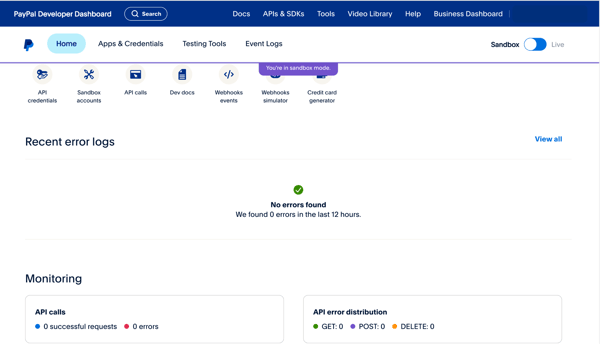
Many G2 reviewers highlight PayPal's ease of setup and global brand trust, especially for receiving payments from international customers. At the same time, some note that the fee structure, covering transaction costs, withdrawal charges, and currency conversion, can feel high for certain use cases. That said, most users find the reach, security, and reliability PayPal provides to be worth the trade-off, particularly for businesses that depend on cross-border payment capability.
Reviewers also consistently praise PayPal's wide acceptance and seamless payment experience, but some users mention that reaching customer support can take longer than expected. While the platform's self-serve documentation covers most common issues, users dealing with more complex account queries have noted that response times could be faster. Many do add that once connected with the right support channel, their issues are typically resolved.
All in all, PayPal offers a powerful, flexible platform that balances simplicity with robust functionality. It's fast, widely supported, and generally reliable. If you're running an online business or doing cross-border transactions, there's a lot to love.
"What I like most about PayPal Payments is that it offers a secure, reliable platform where transactions feel legitimate and protected from fraud concerns. The payment process is smooth, user-friendly, and efficient, which makes it easy for me to send and receive money without running into issues."
- PayPal Payments review, Samir A.
"The commission is high. No one likes paying extra, but PayPal's commission is higher than the commission on other platforms."
- PayPal Payments review, Daria R.
Beyond processing payments, many businesses also use procure-to-pay software to unify purchasing, invoicing, and payments in a single streamlined system.
G2 rating: 4.5/5
One thing is super clear: Amazon Pay for Business is a platform built on trust. The brand recognition alone goes a long way. G2 reviewers appreciate that it's backed by Amazon and already integrated across so many platforms, making adoption feel natural and credible. That trust translates directly into checkout confidence. When customers see the Amazon Pay button, they don't hesitate. With ease of use rated at 92% and meets requirements at 92% by G2 reviewers, it's clear that the platform consistently delivers on what businesses actually need.
A recurring theme among reviews was how easy it is to use. Whether it's for sending money, receiving payments from customers, or managing everything from a single dashboard, the interface just makes sense to most people. Terms like simple, user-friendly, and straightforward came up often, especially from smaller business owners who don't have time to deal with clunky dashboards. This is backed by G2 data, with Amazon Pay earning a strong ease of setup rating of 90% from verified reviewers.
When it comes to core functionality, the basics work well. G2 user feedback consistently praised how quickly payments are processed and how seamless transactions feel across credit cards, debit cards, and digital wallets. Mobile payments are the highest-rated feature at 94%, and encryption follows closely at 93%, reflecting the platform's strength in both flexibility and security across devices.
Amazon Pay for Business also supports a broad range of payment methods, giving customers the flexibility to pay the way they prefer. Whether that's credit cards, debit cards, or gift cards, the checkout experience remains fast and consistent. The online payment portal is rated at 93% by G2 reviewers, and accounting integration at 90%, making it a strong fit for businesses that want payment and financial data flowing smoothly into their existing systems.
Oh, and the cashback offers? People definitely notice them. Several G2 reviews mentioned these incentives as reasons they stayed with the platform. Getting rewarded for regular transactions, even small ones, made Amazon Pay feel like more than just another payment tool and added tangible value for both merchants and their customers.
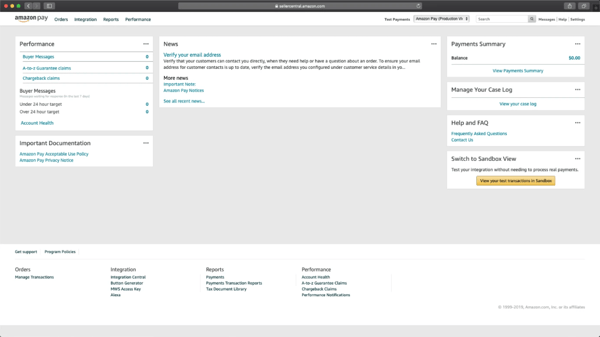
Amazon Pay for Business delivers a reliable and fast payment experience for most day-to-day transactions. That said, some G2 reviewers mention that reaching customer support can take longer than expected, particularly when a payment issue needs urgent resolution. Most users note that the platform's overall simplicity means support is rarely needed, and when issues do arise, they are typically resolved once the right channel is reached.
The platform's interface is clean and intuitive for most users, and the payment processing itself is consistently praised for its speed and reliability. A smaller number of reviewers have noted occasional technical glitches such as slow loading times or payment failures during peak periods. These tend to be isolated incidents rather than recurring issues, and many users report that the platform runs most of the time smoothly.
Overall, Amazon Pay for Business seems to do a lot of things right: it's trusted, easy to use, feature-packed, and rewarding. But based on what G2 users shared, it still has some kinks to iron out in terms of app stability, transaction reliability, and support during critical moments. If those areas improve, I'd say it has everything it needs to be a long-term player in the payment game.
"I use Amazon Pay for Business to manage digital payments for my business, and it really helps solve problems like handling cash, tracking transactions, and making payments hassle-free. What I like most is that it's very easy to use and reliable. The interface is good, and it makes a big difference in my day-to-day operations because it's easy to navigate and doesn't require extra time for training my team. Transactions go smoothly without any failures. The initial setup was quite straightforward and quick."
- Amazon Pay for Business review, Yagnik C.
"I find it very hard to contact customer care support if a payment fails. Also, the app user interface for business is not good and could be improved to be more user-friendly. I would like to see more attractive keys for withdrawal methods."
- Amazon Pay for business review, Majid M.
Balance more than budgets. Find the best accounting platforms that sync directly with your payment processor.
G2 rating: 4.5/5
From the reviews I evaluated, Venmo has carved out a very distinct space in the payment processing landscape, one built almost entirely on familiarity, simplicity, and social trust.
The ease of use is where Venmo truly shines. Users describe the experience as instant, frictionless, and with an almost nonexistent learning curve. Whether splitting a dinner bill, collecting payment for a service, or reimbursing a colleague, the process feels natural and takes seconds. It's no surprise that G2 reviewers rate Venmo's ease of use at 94%, the highest satisfaction score across all its metrics, and meets requirements at 93%, reflecting how consistently it delivers on what users actually need.
One of the biggest advantages Venmo has over other payment tools is its deep integration into everyday life. Nearly everyone who is a business owner or freelancer already has a Venmo account, which means there's virtually no friction in getting paid. That social ubiquity makes it the default choice for consumer-facing businesses, service providers, and anyone collecting payments from individuals rather than corporations.
QR code payments are another area where Venmo stands out. Merchants can generate a QR code that customers can scan instantly to pay, with no hardware, no card reader, and no additional setup required. For small businesses, pop-up vendors, or service providers who work on the go, this kind of touch-free payment capability is a genuine operational advantage. Mobile payments are the highest-rated feature at 93% by G2 reviewers, underlining how well the platform performs across mobile-first payment scenarios.
Getting started with Venmo for business costs nothing. There are no monthly fees, setup costs, or subscriptions required to create a business profile and start accepting payments. For consumer-facing small businesses and freelancers who want a low-barrier entry point into digital payments, that accessibility is a major draw. Ease of setup is rated at 90% by G2 reviewers, reflecting how quickly businesses can get up and running.
What also comes through clearly in the reviews is how much the platform's consumer familiarity reduces checkout hesitation. When customers see the Venmo option, they already know and trust it, which means fewer abandoned transactions and a smoother overall payment experience. G2 reviewers rate encryption at 91% and the online payment portal at 90%, reinforcing that the platform combines consumer trust with solid underlying security.
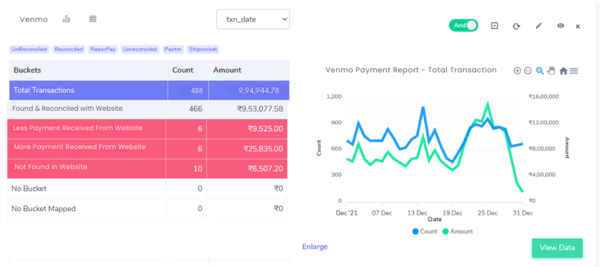
Venmo makes sending and receiving money remarkably simple, and for most day-to-day transactions, the experience is fast and reliable. That said, some G2 reviewers note that standard bank transfers can take one to three business days to clear, which can be inconvenient when funds are needed quickly. For users who need faster access, Venmo does offer an instant transfer option, and many find that the platform's overall convenience more than offsets the standard processing timeline.
The merchant acceptance has grown significantly in recent years, with major platforms like Uber, DoorDash, and SeatGeek now on board. However, some users note that it is still not as universally accepted as more established payment processors, which can limit its usefulness as a standalone business payment solution. For consumer-facing businesses and service providers whose customers are already Venmo users, this tends to be less of a concern, as the platform's core P2P and small business use cases remain well served.
Taken together, Venmo's combination of social ubiquity, mobile-first experience, zero setup costs, and consumer familiarity makes it a compelling option for small businesses and service providers who collect payments from individuals. For consumer-facing teams that want a frictionless, widely recognized payment option without the overhead of a traditional processor, Venmo consistently delivers.
"I like how Venmo allows me to send money instantly, which is very convenient and eliminates the need to go to the ATM, especially since not all banks are in every state. I also enjoy the feature that lets me request money to set reminders for friends to pay equally for all events on a trip. This makes awkward money situations super easy, without needing to ask about splitting the bill or having in-depth conversations. Additionally, the initial setup of Venmo was extremely easy."
- Venmo review, Tiffany S.
"There still aren't many businesses that accept Venmo as a form of payment. That said, it has improved lately, with Uber, DoorDash, and SeatGeek coming on board."
- Venmo review, Verified User in Non-Profit Organization Management
G2 rating: 4.4/5
From the reviews I evaluated, BILL AP/AR stands out as one of the most purpose-built platforms for finance teams that want to eliminate the manual grind of accounts payable and receivable workflows.
The integration with QuickBooks and other accounting software is by far the most celebrated strength across the entire review dataset. Users describe how seamlessly BILL AP/AR syncs with QuickBooks Online, NetSuite, Xero, and Sage Intacct, eliminating duplicate data entry and making reconciliation significantly less painful. For accounting teams and finance managers who live inside their accounting software, having AP and AR activity flow directly into the books without manual intervention is a genuine game-changer. G2 reviewers back this up with ease of use rated at 89% and ease of admin at 87%, reflecting how manageable the platform feels even for lean finance teams.
One of the standout capabilities that comes through clearly in the reviews is the AI-powered invoice capture. BILL AP/AR uses OCR technology to automatically read invoices, extract key data like vendor names, amounts, and due dates, and pre-fill the relevant fields. What used to take finance teams significant manual effort now happens in seconds. Users consistently report meaningful time savings, particularly for organizations processing large volumes of invoices each month. G2 reviewers rate the platform as meeting requirements at 87%, reinforcing its strong delivery on the core needs of AP and AR teams.
Approval workflows are another area where BILL AP/AR earns strong and consistent praise. Multi-level approval routing, automated notifications to approvers, and clear audit trails give finance teams the structure and visibility they need to manage payment authorizations confidently. For nonprofits, construction firms, and multi-entity businesses where payment approvals involve multiple stakeholders, this capability alone is cited as a major reason for adopting the platform. Ease of doing business with is rated at 84% by G2 reviewers, and ease of setup at 86%, suggesting that getting these workflows configured is straightforward even for teams without dedicated IT support.
Vendor management is another strength that surfaces repeatedly in reviews. Vendors can self-onboard and enter their own banking details directly into the platform, which removes a significant administrative burden from the finance team. Multiple payment methods are supported, including ACH, check, wire transfer, and virtual card, giving businesses flexibility in how they pay. Automated vendor notifications mean teams spend less time answering payment status inquiries, freeing up capacity for more strategic work.
What ties all of this together is the sheer efficiency that BILL AP/AR brings to finance operations. Users describe tasks that once required multiple manual steps, from invoice entry to payment scheduling to reconciliation, now being handled in a fraction of the time. For finance managers running lean teams or accountants handling multiple clients, that operational leverage is exactly what the platform is designed to deliver.
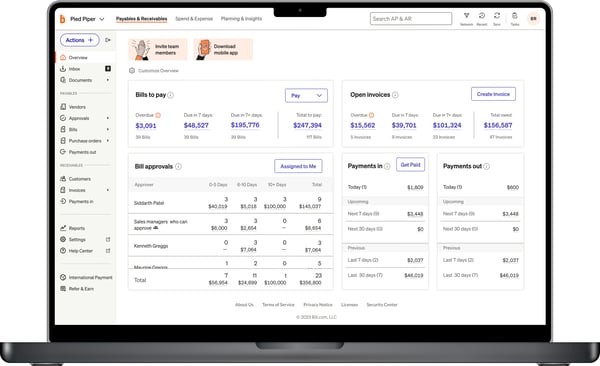
Now, BILL AP/AR's QuickBooks integration is one of its most praised capabilities, and for the vast majority of users, it works reliably and saves significant time. That said, some G2 reviewers note that sync errors can occasionally occur, particularly when a payment is voided, edited, or processed outside of the normal workflow. When these situations arise, untangling the discrepancy between BILL AP/AR and QuickBooks can require some patience and occasional support assistance. Many users note that once the integration is set up correctly and standard workflows are followed consistently, sync issues tend to be rare.
Pricing is worth factoring in early, especially for smaller teams and nonprofits. The per-user model means costs can climb as more approvers are added, even for those who only need occasional access. Where it tends to make the most sense financially is for organizations processing high invoice volumes, where the time saved on manual entry and reconciliation quickly justifies the spend.
For finance teams tired of chasing approvals, manually keying in invoices, and reconciling payment data across disconnected systems, BILL AP/AR brings everything into one structured, automated workflow. It delivers the most value for accounting teams, nonprofits, and multi-entity businesses that process high invoice volumes and need a reliable bridge between their payment operations and their accounting software.
"I find BILL AP/AR very easy to use and intuitive. The program is great for managing payments, and it seems easy for subcontractors to handle their e-payments. It's a huge timesaver for processing invoices and payments — I used to spend a long time printing checks, but now I can handle a batch of payments in less than a minute, which is incredibly efficient. The routing of invoicing to the appropriate approvers and the ability to recode things to different cost codes within construction projects are features we find really nice and helpful."
- BILL AP/AR review, Nick V.
"My sole complaint would be the Sync with QuickBooks. It can get confusing and frustrating when it doesn't sync. It winds up being a major hurdle to my day if it doesn't sync... instead of moving on to the next task, I have to start the support process, which again has usually worked, but it can be time-consuming."
- BILL AP/AR review, Ryan T.
G2 rating: 4.2/5
From the reviews I evaluated, Stripe Payments consistently stands out as the go-to payment platform for developers and technically minded teams who want full control over how payments are built and managed.
The developer experience is where Stripe truly shines. I noticed reviewer after reviewer praising the quality of Stripe's API documentation, describing it as clear, well-structured, and genuinely easy to work with. Whether building a custom checkout flow, integrating with an existing tech stack, or embedding payments directly into a product, the experience feels cohesive and well-thought-out. G2 reviewers back this up, with ease of use rated at 90% and ease of setup at 90%, reflecting how smoothly the platform works even across complex implementation scenarios.
Another standout strength is the sheer breadth of payment methods supported. Credit and debit cards, Apple Pay, Google Pay, ACH bank transfers, and buy-now-pay-later options are all available in one place. For businesses that serve diverse customer bases or operate across multiple markets, that flexibility is a significant advantage. Credit card processing is the highest-rated feature at 93%, and encryption follows at 91%, reinforcing Stripe's reputation for both versatility and security.
The dashboard and reporting capabilities also receive consistent praise. Users describe the interface as intuitive and well-organized, making it easy to search transactions, manage refunds, track customer payment history, and monitor disputes. For teams that rely on data to make decisions, the visibility Stripe provides into payment activity is a meaningful operational advantage. Reporting and analytics are rated at 87% by G2 reviewers, and e-commerce integration at 90%, making it a strong fit for online businesses that need payments to work seamlessly within their broader systems.
Recurring billing and subscription management are other areas where Stripe earns strong praise. SaaS founders and membership-based businesses frequently highlight how reliable the automated billing, smart retry logic, and subscription workflow tools are. For businesses that depend on predictable monthly revenue, having a processor that handles the complexity of subscription management without constant manual intervention is a genuine differentiator. Mobile payments are rated at 91% by G2 reviewers, reflecting Stripe's strong performance across both web and mobile payment environments.
What stands out most when reading through the reviews is just how reliable and widely trusted Stripe is. Users across industries, from nonprofits to e-commerce brands to SaaS companies, describe it as the processor they default to because it simply works. The platform's global reach, PCI compliance, and consistent performance give businesses the confidence to scale without worrying about payment infrastructure holding them back. Multi-currency support is rated at 87% by G2 reviewers, underlining Stripe's strength for teams operating across borders.
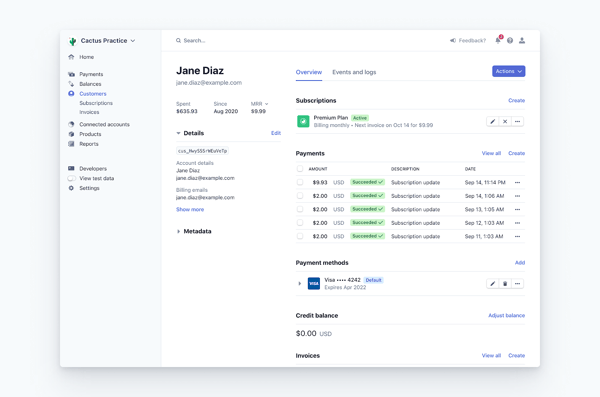
That said, some G2 reviewers note that fees can accumulate quickly, particularly when layering on additional services such as tax calculation, identity tools, or chargeback management on top of standard transaction costs. For businesses with high transaction volumes or tight margins, it is worth mapping out the full cost picture upfront to ensure the pricing structure aligns with their needs. Stripe is widely regarded as one of the most feature-rich and reliable payment processors available, and for most businesses, the value it delivers is clear.
Stripe's industry-leading automated risk management system, Radar, is designed to protect both merchants and customers. For the vast majority of users, it works seamlessly in the background. A smaller number of reviewers have noted that accounts can occasionally be flagged or placed on hold by automated algorithms, sometimes without immediate explanation. Most users find that maintaining a consistent transaction history and keeping account documentation up to date helps avoid these situations, and Stripe's overall reliability remains strong across its user base.
In short, Stripe offers a powerful, flexible payment system that's especially appealing if you need strong integration capabilities, a developer-friendly API, and diverse payment options. It's trusted, secure, and packed with features.
"I have used Stripe for a number of clients as well as my own sites. I love the fact that you can integrate either their own site for processing the payments or use the public keys and link your own payment page to it to use the system on my own site without redirecting clients to a new site and back again. It is used a few times a month to withdraw funds, and this is so easy to do. When I first used it, I needed to contact their customer support and get help as the keys were not working, and they could not have done more to assist. All the different options made the integration so easy across the board of multiple sites and clients."
- Stripe Payments review, Jason R.
"The biggest downside is the cost. Credit card processing rates already add up quickly, and once you start layering on other services — like sales tax collection, identity tools, or additional platform features — the pricing starts to feel excessive."
- Stripe Payments review, Greg W.
Build. Sell. Scale. Explore the top e-commerce platforms that support flexible, secure payment integrations.
G2 rating: 4.9/5
From the reviews I evaluated, Nickel has built a remarkably loyal user base for a relatively new platform, and it's easy to see why. The value proposition is simple, clear, and immediately impactful for small businesses tired of paying processing fees they can't justify.
The defining feature, and by far the most mentioned pro across the entire review dataset, is free ACH (Automated Clearing House) transfers. ACH is the electronic bank-to-bank payment network used across the US for direct deposits and bill payments, and Nickel offers unlimited ACH transfers at zero cost. For small businesses and accounting teams that previously paid 1% or more per transfer, the savings are immediate and significant. G2 reviewers rate Nickel's processing fees at 94%, the highest-rated feature on the platform and well above the category average of 82%, reflecting just how strongly users feel about the pricing transparency.
The QuickBooks Online integration is the second most celebrated strength in the reviews. Users describe how seamlessly Nickel syncs with QBO, automatically pulling in invoices, reconciling payments, and eliminating the need for manual data entry. For small business owners and accountants who live inside QuickBooks, having payments flow directly into the books without extra steps is a genuine operational advantage. Accounting integration is rated at 94% by G2 reviewers, matching processing fees as the joint highest-rated feature on the platform.
Getting started with Nickel is consistently described as one of the smoothest onboarding experiences across any payment tool. Users report being fully set up in under an hour, with a clean and intuitive interface that requires virtually no training. Whether you're a solo freelancer or a small accounting team, the platform feels immediately accessible. G2 reviewers reflect this with ease of use at 96%, ease of setup at 96%, and ease of admin at 96%, all significantly above category averages.
One feature that resonates particularly strongly with small business owners is the ability to pass credit card processing fees directly to the customer. Rather than absorbing card fees themselves, businesses can offer clients the choice to pay by ACH for free or by card with the fee added transparently to the invoice. For service businesses and contractors operating on tight margins, this capability alone is cited as a primary reason for switching to Nickel. The online payment portal is rated at 93% by G2 reviewers, reflecting how smooth the client-facing payment experience feels.
What truly sets Nickel apart from every other tool on this list is the quality of its customer support. Users describe interactions with the support team as responsive, proactive, and genuinely helpful, with several mentioning that they spoke directly with founders or received personalized follow-ups after onboarding. For a payment platform, that level of attention is rare and is cited repeatedly as a key reason users stay. G2 reviewers rate the quality of support at 96% and ease of doing business with at 97%, the highest scores of any tool in this entire list.
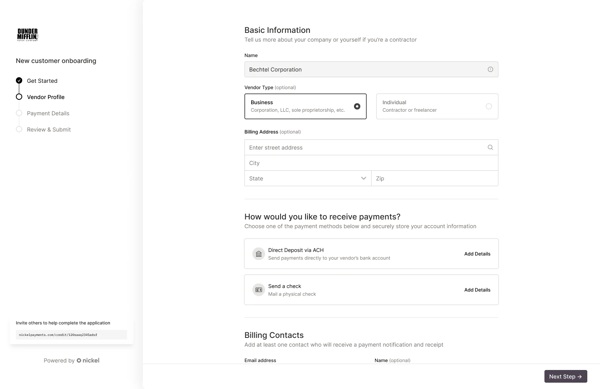
Nickel's free ACH (Automated Clearing House) transfers are its most celebrated feature, and for most small businesses, the cost savings are immediate and significant. That said, some G2 reviewers note that ACH processing times on the Core plan can take three or more days to clear, which can be inconvenient when faster fund access is needed. Nickel's paid Plus plan does offer faster settlement times, and many users find that the zero-fee structure more than compensates for the standard processing timeline.
Now, as businesses grow and their invoicing needs become more complex. Some users have noted limitations around features like recurring invoices, which currently require an end date rather than running indefinitely, and reporting capabilities that could benefit from more customization. The platform is actively developing new features, and many users view these gaps as minor trade-offs given how much value the core payment functionality already delivers.
At its core, Nickel is built for contractors, accountants, and service-based businesses that send regular invoices and want free ACH transfers with a seamless QuickBooks sync. The combination of zero-fee transfers, outstanding support, and an intuitive interface makes it one of the most compelling options on this list for businesses that want to stop paying to get paid.
"Zero-fee ACH payments. The integration with QuickBooks is very simple and automated, and I like having reminders built in. I also appreciate being able to control whether the client pays the card fees or not. The card-on-file and ACH-on-file features are super helpful as well."
- Nickel review, Paul R.
"My only real knock here is that I still can't set a recurring invoice to run indefinitely. I'm required to choose an end date, which means I then have to set my own reminders for when each invoice period ends so I can go back in and extend it. It's a minor issue, but it creates what feels like unnecessary extra tri-annual setup on my end."
- Nickel review, Daniel K.
Have more questions? Find more answers below.
For small businesses, PayPal Payments and Venmo are strong options. PayPal offers global reach, wide acceptance, and a trusted brand that reduces checkout friction, while Venmo's low transaction fees and zero monthly costs make it a practical choice for consumer-facing businesses. Nickel is also worth considering for small B2B businesses that want to eliminate ACH fees entirely and keep costs transparent.
Stripe Payments is particularly well-suited for businesses selling digital products. Its flexible APIs, customizable checkout flows, and broad payment method support make it easy to embed payments directly into a digital product experience. The platform also handles recurring billing and subscription management reliably, which is especially useful for software downloads, online courses, and digital subscriptions.
Stripe Payments consistently earns strong praise for subscription and recurring billing management. Its automated billing tools, smart retry logic, and subscription workflow features make it a reliable choice for SaaS companies and membership-based businesses that depend on predictable monthly revenue. BILL AP/AR is also a strong option for businesses that need structured invoice-based recurring payments with multi-level approval workflows.
Stripe Payments handles both e-commerce checkout and invoicing well, with e-commerce integration, customizable payment flows, and billing tools. Nickel is strong on the invoicing side for B2B teams, syncing invoices with QuickBooks and offering a smooth client-facing payment portal, and PayPal combines wide ecommerce acceptance with built-in invoicing tools.
For larger organizations, Stripe Payments and BILL AP/AR are well-suited options depending on the use case. Stripe supports high-volume payment processing with enterprise-grade reliability, global payment method coverage, and developer-friendly infrastructure. BILL AP/AR serves large finance teams that need structured AP and AR automation, multi-level approval workflows, and deep accounting software integration across complex organizational structures.
Stripe Payments is widely regarded as the go-to choice for software companies. Its API-first architecture, extensive documentation, and seamless integration with developer tools make it the natural fit for teams building payment flows into software products. The platform's reliability, PCI compliance, and global payment method support give software companies the infrastructure they need to scale confidently.
Venmo and PayPal Payments both perform strongly in mobile payment scenarios. Venmo's mobile-first design, QR code payment capability, and high ease of use rating of 94% on G2 make it a natural fit for consumer-facing mobile apps. PayPal's mobile payments feature rating of 94% on G2 and its widespread consumer familiarity also make it a reliable choice for mobile app developers looking to offer a trusted checkout experience.
Stripe Payments is the most popular choice among tech startups, largely because of its developer-friendly API, extensive documentation, and flexibility to build custom payment experiences from the ground up. Its support for multiple payment methods, subscription billing, and global currencies gives startups the infrastructure to scale quickly without switching processors as they grow. Nickel is also worth considering for early-stage B2B startups looking to minimize processing costs with free ACH transfers.
Based on G2's Spring 2026 Grid Report, Nickel holds the highest overall rating at 4.9 out of 5, with 99% of users rating it four or five stars. PayPal Payments and BILL AP/AR both hold strong ratings of 4.4 out of 5, while Amazon Pay for Business, Venmo, and Stripe Payments each hold ratings of 4.5, 4.5, and 4.2 out of 5, respectively. The best-rated option for your business will depend on your specific use case and payment volume.
For service-based businesses, Venmo and Nickel are both strong options. Venmo's low transaction fees, QR code payments, and consumer familiarity make it ideal for in-person and mobile service businesses like freelancers, contractors, and pop-up vendors. Nickel is particularly well-suited for B2B service businesses that invoice clients regularly, offering free ACH transfers, QuickBooks integration, and the ability to pass card processing fees directly to the customer.
Stripe Payments and PayPal Payments support a wide range of methods, including credit and debit cards, ACH bank transfers, and digital wallets like Apple Pay and Google Pay. Nickel is a strong fit for teams that lean on bank transfers specifically, offering unlimited ACH alongside card processing, and BILL AP/AR supports ACH, check, wire, and virtual card for AP and AR workflows.
Nickel stands out for cost, offering unlimited free ACH transfers with no monthly fees, which removes per-transfer costs entirely for bank-based payments, and it lets businesses pass card fees to customers. For card-heavy volume, Stripe Payments and PayPal are transparent on per-transaction pricing, though the article notes fees can add up as you layer on extra services, so mapping the full cost upfront matters.
Stripe Payments is a standout here, pairing PCI compliance with its automated risk management system, Radar, that works in the background to flag suspicious activity. PayPal and Amazon Pay for Business also emphasize strong encryption and buyer protection, giving both merchants and customers confidence during checkout across cards, wallets, and cross-border payments.
BILL AP/AR and Nickel lead on accounting integration. BILL AP/AR syncs with QuickBooks Online, NetSuite, Xero, and Sage Intacct to eliminate duplicate entry and ease reconciliation, and Nickel integrates tightly with QuickBooks Online, automatically pulling in invoices and reconciling payments so records flow straight into the books.
Stripe Payments is cited most for dependable recurring billing, with automated invoicing, smart retry logic, and subscription workflow tools suited to SaaS and membership businesses. BILL AP/AR is another reliable option for service businesses that need structured, invoice-based recurring payments with multi-level approval workflows.
PayPal Payments is noted for near-instant crediting to the PayPal account with bank transfers often completing within a business day. For faster access elsewhere, Venmo and Nickel offer expedited options, Venmo has instant transfer, and Nickel's paid Plus plan speeds settlement beyond the standard ACH timeline, while Stripe is praised for consistent, reliable processing at scale.
Amazon Pay for Business and Stripe Payments are strong e-commerce fits. Amazon Pay leans on the trust customers already have in the Amazon brand to reduce checkout hesitation, and Stripe offers e-commerce integration, customizable checkout, and broad payment-method support, both backed by strong encryption for secure customer payments.
Based on user reviews, PayPal Payments and Stripe Payments are the most trusted across varied small-business needs. PayPal brings global acceptance and brand trust that reduces checkout friction across many sales channels, and Stripe offers flexible APIs and broad payment-method support that adapt to different products and billing models, from one-off sales to subscriptions.
PayPal Payments and Stripe Payments are strong all-round choices for small businesses taking cards and online payments. PayPal pairs wide acceptance and buyer protection with an intuitive setup, and Stripe offers a developer-friendly, customizable checkout with reliable card processing, while Nickel suits small B2B teams wanting to add card fees transparently on top of free ACH.
Getting paid might seem like a simple part of running a business. But in reality, it's where trust, security, and user experience all converge. The right payment processing software doesn't just complete transactions; it sets the tone for how smoothly your business operates and how confident your customers feel when handing over their information.
I focused this evaluation on tools that have proven themselves in real-world business environments, not just in product demos or spec sheets. By analyzing thousands of G2 reviews, digging into how each platform handles critical workflows, and comparing their strengths across industries, I narrowed it down to six standout solutions that go beyond the basics.
Some tools shine with their simplicity and quick setup, ideal for startups and growing teams. Others are built for scale, offering advanced controls, global capabilities, and deep integrations. If you're ready to take the complexity out of payments and build a more reliable revenue engine, these tools offer a solid starting point.
Looking to dig deeper into payment processing? Check out the best Payment Gateways to understand how funds move securely between your customers and your business.
.png)
If month-end close delays, invoice errors, or manual reconciliation work are becoming routine,...
 by Barkha Bali
If you're evaluating the best payment gateway software right now, here's what I'd want you to...
 by Somya Jain

Recently updatedSummer 2026 Grid® Report · Published May 26, 2026 The 10 best...
.png) by Shreya Mattoo
by Shreya Mattoo