


I evaluated more than 25 products to identify the best mind mapping software for different planning, brainstorming, and collaboration needs, namely Miro, Lucid Visual Collaboration Suite, Visio, ClickUp, FigJam, and Padlet.
One challenge I've encountered while planning complex projects is that ideas rarely arrive in a neat, linear format. A strategy session can quickly branch into dependencies, stakeholder feedback, competing priorities, and new opportunities that weren't part of the original plan. That's what led me to look more closely at how mind mapping software helps transform scattered thinking into actionable plans.
If you ask me, buyers aren't simply looking for tools to create diagrams. Many are evaluating collaborative mind-mapping tools to connect teams on creative projects, with organizations evaluating solutions to improve planning, brainstorming, documentation, and decision-making. The strongest products in my list approached those goals differently, with some prioritizing real-time collaboration, others focusing on project execution, and several emphasizing governance and structure.
The more products I researched, the clearer it became that mind-mapping software now supports far more than just brainstorming. Teams use these platforms to facilitate workshops, organize strategic initiatives, map customer journeys, document processes, and align stakeholders around shared objectives.
That variety makes choosing the right platform more nuanced than it first appears. In this guide, I'll break down where each solution performed best, the considerations that surfaced during my evaluation, and which teams are most likely to benefit from each one.
Miro: Best for AI-assisted mind maps that feed into team workshops
Combines AI mind map generation, infinite canvas planning, real-time collaboration, templates, and integrations for large planning sessions. ($8/user/month)
Lucid Visual Collaboration Suite: Best for moving from mind maps to process and technical documentation
Connects brainstorming with flowcharts, ERDs, UML diagrams, data-linked visuals, presentation mode, and integrations across workplace apps. ($9/month)
Visio: Best for secure mind mapping inside Microsoft 365 workflows
Supports mind maps, process maps, org charts, flowcharts, Microsoft Teams sharing, IRM protection, and Microsoft app integrations. ($5/user/month)
ClickUp: Best for converting mind maps into tasks, goals, and execution workflows
Brings mind maps together with tasks, Docs, dependencies, automations, dashboards, goals, portfolios, and project management features. ($7/user/month)
FigJam: Best for real-time product ideation before work moves into design
Supports brainstorming, workshops, diagrams, sticky notes, templates, comments, reactions, AI summaries, and integrations with Asana, Jira, and GitHub. ($16/month)
Padlet: Best for lightweight multimedia boards that collect ideas from any contributor
Helps teams gather text, images, videos, links, resources, and discussion threads into simple, easy-to-share visual boards. ($9.99/month)
*These mind mapping software are top-rated in their category, according to the latest G2 Summer 2026 Grid Report. I've added their standout features and pricing information for easy comparison.
When I evaluated tools for this list, I focused on how well they help teams organize ideas, align stakeholders, and move projects from planning to execution. The strongest platforms do far more than create visual diagrams. They help structure thinking and improve collaboration.
That shift is reflected in the market itself. The global Mind Mapping Software Market is expected to reach $1.46 billion by 2035. As the category grows, the lines between mind mapping, visual collaboration, project planning, and diagramming software continue to blur.
During my research, I found products approaching these challenges in very different ways. Some prioritize collaborative brainstorming and workshop facilitation, while others focus on process documentation, project execution, or visual knowledge management.
The tools in this list stood out because they solve specific planning challenges exceptionally well. Whether you're looking for the best mind-mapping software for strategic planning, team collaboration, or organizing complex information, these recommendations reflect where each platform delivers the most value, based on my research and analysis.
I started by identifying the products with the strongest combination of market presence, user satisfaction, and review activity on G2. To narrow the list, I focused on platforms that help users move beyond simple brainstorming and support the full lifecycle of idea organization, planning, and collaboration.
I paid close attention to how effectively it captures, structures, and connects information. I evaluated features such as mind map creation, visual organization, collaboration capabilities, template availability, customization options, integrations, and the ability to scale from quick brainstorming sessions to more complex planning initiatives.
I also used AI to analyze verified G2 reviews at scale. This helped me uncover recurring patterns in user feedback, including how teams use these tools for workshops, strategic planning, knowledge organization, process mapping, and cross-functional collaboration.
The screenshots featured in this article come from G2 vendor profiles and publicly available product documentation.
Choosing the best mind mapping software isn't simply about finding the platform with the most features. As I analyzed G2 reviews and researched products in this category, I found that the strongest tools help users move from idea capture to organization, collaboration, and execution without making visual planning harder as projects become more complex.
The six tools that made this list performed well across the following evaluation areas:
The list below contains genuine user reviews from the Mind Mapping Software category page. To be included in this category, a solution must:
*This data was pulled from G2 in 2026. Some reviews may have been edited for clarity.
While reviewing products in this category, I noticed that Miro was rarely discussed as a standalone mind mapping tool. Instead, most G2 reviewers described it as the place where brainstorming sessions, workshops, planning exercises, process documentation, and team collaboration all come together. That broader role is what separates it from many traditional mind mapping platforms. I'd say Miro is one of the best collaborative mind mapping tools connecting teams on creative projects.
The numbers support that position. Miro has the highest market presence score in the Mind Mapping category, and 99% of users rate it four or five stars. It also maintains a 94% recommendation rate, which stood out as I compared products across the category. Based on the G2 feedback I analyzed, teams often adopt Miro not only to organize ideas but also to align stakeholders around them.
Collaboration consistently emerged as one of Miro's biggest strengths. Collaborative editing is its highest-rated capability on G2 at 94%, and reviewers frequently reference real-time brainstorming, workshop facilitation, feedback collection, and cross-functional planning. I found examples of product, marketing, operations, and design teams working from the same board to keep discussions and decisions visible to everyone involved.
Another strength is the flexibility of its workspace. Rather than limiting users to traditional diagrams, Miro allows teams to combine mind maps, process flows, sticky notes, user journeys, wireframes, and supporting resources within a single canvas. As I reviewed G2 feedback, I noticed many users describing Miro as a central workspace for visual thinking rather than simply a tool for creating diagrams. Teams looking to learn how to use mind mapping to plan their next idea can also extend those exercises into larger planning initiatives without switching platforms.
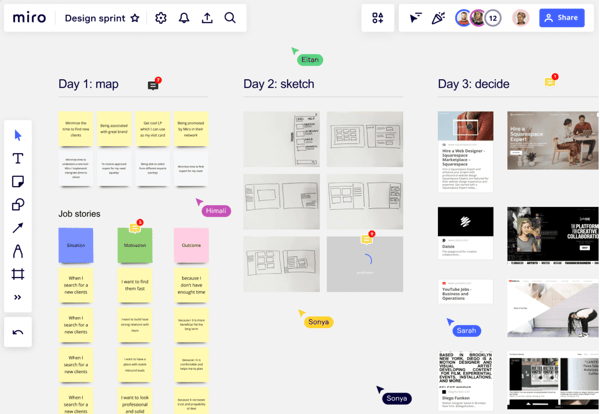
Templates also contribute heavily to Miro's appeal. From retrospectives and brainstorming sessions to journey maps and strategic planning frameworks, the platform provides starting points that help teams spend less time setting up boards and more time collaborating. Several reviewers highlighted how templates help standardize recurring workflows across departments.
I also came across frequent references to workflow visualization and integrations. Users described connecting Miro with Jira, Slack, Google Workspace, and other tools to keep planning activities connected to execution. That flexibility helps explain why Miro is often evaluated alongside broader visual collaboration platforms rather than only mind mapping software.
Enterprise adoption is another area where Miro performs well. As I analyzed G2 reviews, I found organizations using the platform to coordinate strategic initiatives involving multiple stakeholders, departments, and planning cycles. Its governance capabilities, collaboration features, and scalability make it a strong option for buyers researching the highest rated mind mapping software for strategic planning for enterprise teams with demanding security.
Miro is designed to bring large groups, ideas, and planning activities into a shared visual environment. Teams working with particularly large boards may need clear organizational practices as content, contributors, and project history accumulate. For organizations that prioritize visibility and collaboration, the flexibility of the platform continues to outweigh that consideration.
The platform is also built primarily around collaborative planning and visual alignment. Teams requiring highly specialized design production or advanced wireframing workflows may occasionally complement Miro with more purpose-built tools. For its intended audience, however, that focus helps keep the experience accessible and collaborative.
Miro is best suited for organizations that need a shared environment for brainstorming, planning, process mapping, and stakeholder alignment. Its combination of collaboration, visual flexibility, templates, integrations, and enterprise readiness makes it one of the best mind mapping software options I evaluated.
“Miro is the fastest and probably most widely known product for UX work across the early stages of product development. The almost infinite options when it comes to integrations make it inevitably a first choice. It's clearly a product well thought out and tested, because it's super intuitive (even for first-time users). Having an infinite canvas, it allows huge amounts of data to sit in a single file, making it efficient to use and the all-in-one place to go. Contextual help is discreet but at hand, and the template library covers any use case that other people needed previously. Miro implemented AI into their product a few years ago, making synthesis across a vast amount of disparate data one click away. They recently added prototyping capabilities to the product, making it more competitive across the more advanced stages of product development. Pricing is not only competitive but also flexible, as it's made not only for larger teams, but also for agencies and freelancers."
- Miro review, M G.
“The main thing I dislike is that sometimes the available icons, emojis, and built-in visual elements feel a bit limited. When we want to make a board more expressive or visually polished, we may need to upload external images or spend more time customizing the layout. Also, very large boards can become a little harder to navigate if they are not well organized.”
- Miro review, Francesco P.
Many teams use Miro to organize ideas, map workflows, and align stakeholders before work moves into execution. If you're comparing options for managing tasks, timelines, and project delivery, this guide to free project management software is a useful next step.
Many mind mapping tools focus primarily on idea generation. As I evaluated Lucid Visual Collaboration Suite and reviewed G2 feedback, I found that users often relied on it for what happens next. Rather than stopping at brainstorming, teams used Lucid to transform early concepts into process maps, system diagrams, technical documentation, and operational workflows, all within the same ecosystem.
That progression is reflected in the platform's adoption. Lucid Visual Collaboration Suite maintains a strong presence across multiple categories, including diagramming, collaborative whiteboard, wireframing, and visual collaboration platforms. According to G2 data, 97% of users rate it four or five stars, while 91% say they would recommend it. As I compared products in this category, Lucid consistently stood out for bridging planning and documentation workflows.
One theme surfaced repeatedly throughout the reviews I analyzed: versatility. Users frequently mentioned moving from free-form ideation in Lucidspark to more structured diagrams in Lucidchart while keeping projects, teams, and documentation connected. That flexibility makes the platform particularly useful for organizations that need both creative collaboration and formal documentation.
Templates also play a significant role in Lucid's appeal. Several reviewers highlighted the breadth of available frameworks for flowcharts, technical diagrams, organizational planning, and team collaboration. Combined with drag-and-drop editing and customizable layouts, the platform reduces the effort required to create structured visual assets from scratch. Teams that begin with brainstorming sessions can often continue building process maps and documentation without disrupting established workflows.
Lucid's collaboration features received similarly strong feedback. Collaborative editing is its highest-rated capability on G2 at 92%, and many reviewers referenced real-time teamwork, shared editing, commenting, and stakeholder alignment. Throughout my evaluation, I found Lucid positioned less as a standalone diagramming tool and more as a shared workspace for visual communication.
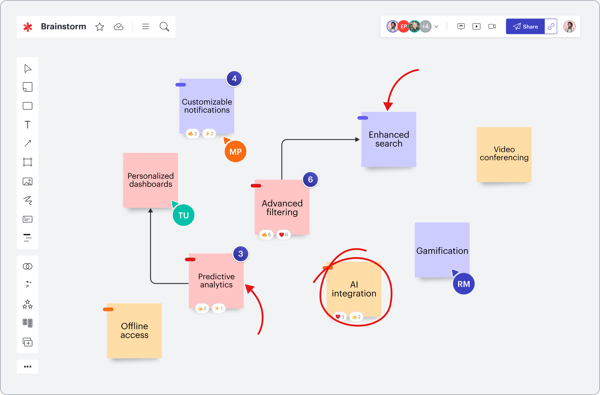
I also noticed recurring praise for technical documentation capabilities. Users described creating architecture diagrams, BPMN workflows, UML diagrams, and system documentation that could be shared across technical and non-technical audiences. For organizations comparing mind mapping tools with dedicated diagramming solutions, Lucid's ability to support both visual planning and documentation makes it a compelling alternative to many free flow chart software options.
The platform's ecosystem is another differentiator. Integrations with productivity, collaboration, and documentation tools help visual assets remain connected to ongoing work. Several reviewers specifically referenced how those integrations simplified information sharing across departments and stakeholders.
Lucid is designed to support complex visual workflows that extend beyond simple mind maps. Teams adopting advanced diagramming, data linking, and documentation capabilities may need some time to become familiar with the platform's broader feature set. For organizations that require depth and flexibility, that learning investment often unlocks additional value over time.
The suite is also built for teams managing structured planning and documentation initiatives. Very large diagrams or heavily detailed visual projects can require additional organization as complexity increases. For organizations seeking a Mind Mapping Software Collaborative planning platform with version control and audit trails before committing to a multi-year investment, Lucid's governance and documentation strengths remain compelling.
What separates Lucid from many mind mapping tools is its ability to carry ideas beyond the planning stage. Throughout my evaluation, I found it consistently used for documenting processes, designing systems, and creating visual assets that remain useful long after a brainstorming session ends. Teams that need both collaboration and documentation depth are likely to get the most value from the platform.
“Definitely, its versatility. The fact of being able to move from a disorganized brainstorming session in Lucidspark to a structured architecture diagram in Lucidchart within the same ecosystem is great. It really helps to keep everything documented in one place. Although mastering the advanced tools and data links takes a couple of days of practice, you learn the basic functions in a matter of minutes. It's a very practical tool, without being overwhelming.”
- Lucid Visual Collaboration Suite review, Paul R.
“One thing that could be improved is the pricing as some advanced features are only available in higher tiers. I also find that very large and complex diagrams can become difficult to organize and navigate. While the platform is powerful, new users may need some time to learn all of its features effectively.”
- Lucid Visual Collaboration Suite review, Kunal S.
One pattern became clear as I worked through G2 reviews for Visio: users rarely described it as a creativity tool. Instead, they relied on it when accuracy mattered more than flexibility. Whether they were documenting regulatory pathways, mapping enterprise processes, creating system architectures, or building operational diagrams, the emphasis was consistently on structure, consistency, and control.
That focus gives Visio a different position within the mind mapping category. While many platforms help teams generate ideas, Visio is often used to formalize them. According to G2 data, 84% of users rate it four or five stars, while 85% say they would recommend it. Throughout my evaluation, I found users turning to the platform when visual planning needed to become documentation that could be shared, reviewed, maintained, and referenced over time.
Templates are a major reason for that adoption. Several G2 reviewers highlighted Visio's extensive library of prebuilt frameworks, shapes, and symbols that simplify the creation of flowcharts, process maps, architecture diagrams, and technical documentation. Rather than starting from a blank canvas, teams can adapt existing structures to fit their workflows.
The Microsoft ecosystem is another significant advantage. As I analyzed G2 feedback, I repeatedly encountered references to Microsoft 365 integrations, Excel-linked diagrams, document sharing, and workflow continuity across Microsoft applications. For organizations already operating within that environment, Visio feels less like a standalone tool and more like an extension of existing processes.
Ease of setup also stood out in the data. Visio earns a 95% ease of setup score on G2, while meets requirements is rated at 92%. Those numbers align with reviews describing straightforward onboarding, familiar Microsoft interfaces, and the ability to begin building diagrams quickly without extensive configuration.
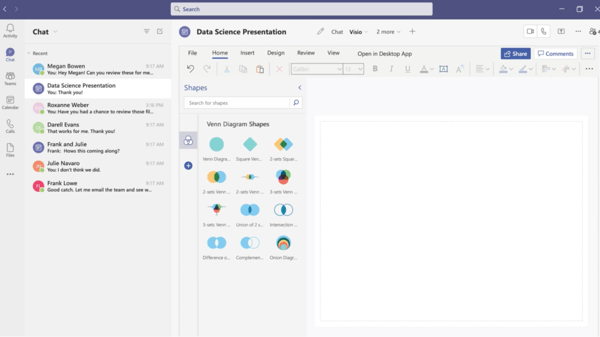
I also found recurring examples of Visio supporting governance, compliance, and operational planning. While many teams initially capture information in note-taking apps, Visio helps transform that information into structured diagrams that are easier to standardize and communicate. Teams may also appreciate how organizational structures can connect to broader documentation initiatives.
Security and control surfaced frequently throughout enterprise-focused reviews. For organizations researching mind mapping software, data security, and intellectual property protection before committing to a multi-year investment, Visio's Microsoft ecosystem alignment and enterprise-oriented governance capabilities remain important considerations.
Visio is designed around structured documentation and process visualization. Teams looking for highly interactive workshops, collaborative whiteboarding, or free-form ideation may find the experience more formal than platforms built primarily for brainstorming. For organizations prioritizing documentation quality and consistency, that structure is often beneficial.
The platform also offers a broad range of diagramming capabilities that extend beyond basic flowcharting. Teams exploring advanced features, data-linked diagrams, and specialized visual documentation may spend additional time becoming familiar with the platform's deeper functionality. Once established, those capabilities provide significant long-term flexibility.
Visio's strength isn't helping teams generate ideas as quickly as possible; it's helping them document, standardize, and operationalize those ideas once they matter. Throughout my evaluation, I found it most effective in environments where structure, governance, and long-term maintainability carry more weight than creative flexibility.
“I use Visio a lot for process mapping and regulatory pathway mapping, and it's a daily part of my job. I absolutely 100% can't do my job without it. It's extremely easy to use, and the templates included are extremely valuable, allowing me to easily adapt them to specific scenarios. The templates are also easily adaptable for quality and regulatory workflows, which is crucial for new market entry projects and compliance mapping. The setup was also extremely easy, especially since we had done it previously, and the newer version provided a walkthrough with more included templates, which was a bonus. Visio is by far the best product for flowcharting, and I eventually came back to it after trying a cheaper online version.”
- Visio review, Mike W.
“It lacks advanced process management capabilities. The diagrams are static, and there’s no central repository or straightforward way to keep multiple files consistent. Collaboration and version control options are limited, and it doesn’t handle process analysis or interlinking particularly well, which becomes a real challenge on larger, more complex projects.”
- Visio review, Atharva P.
Many process-mapping initiatives ultimately support broader innovation and operational improvement efforts. Understanding why design thinking leads to better problem solving can help teams connect documentation with more effective decision-making.
One thing I noticed while reviewing mind mapping software is that many products excel at generating ideas but stop short of helping teams act on them. ClickUp approaches the category differently. As I analyzed G2 reviews, users consistently described it as the place where brainstorming, planning, documentation, and execution all happen within the same workspace.
That connection between planning and delivery helps explain ClickUp's popularity. According to G2 data, ClickUp has a 4.6 out of 5 rating based on more than 11,800 reviews. Additionally, 99% of users rate it four or five stars, and 95% say they would recommend it. While evaluating products for this list, I found ClickUp stood out less as a dedicated mind-mapping tool and more as a platform that helps teams turn ideas into measurable outcomes.
The platform's strongest advantage is workflow continuity. Instead of creating a mind map and then moving information into separate systems, teams can convert ideas directly into tasks, goals, timelines, and projects. Task management is ClickUp's highest-rated capability on G2 at 95%, which aligns with how frequently reviewers referenced using the platform to move work forward after brainstorming sessions conclude.
Customization surfaced throughout nearly every review set I analyzed. Users highlighted custom fields, statuses, templates, dashboards, views, automations, and reporting tools that allow teams to shape ClickUp around their own processes. For organizations evaluating mind mapping software supporting templates, themes, and customization to identify the best fit for their workflows, ClickUp offers significantly more flexibility than many traditional mind mapping products.

I also found recurring praise for centralization. Tasks, documents, comments, dashboards, meeting notes, and updates live in the same environment, reducing the need to jump between applications. Teams already relying on project management tools may find ClickUp particularly appealing because visual planning can remain connected to execution activities throughout the entire project lifecycle.
Another area where ClickUp performs well is collaboration. Notes and comments earn a 93% satisfaction score on G2, while reviewers frequently reference shared visibility, recurring tasks, team templates, documentation, and stakeholder alignment. Throughout my evaluation, I found many teams using ClickUp as a single source of truth for ongoing work.
The platform is built to support a broad range of business processes. That flexibility gives teams extensive control over how work is organized, though new users may spend additional time becoming familiar with the available views, settings, automations, and customization options. For organizations managing complex workflows, the investment often creates long-term efficiency gains.
I also came across feedback related to workspace complexity and feature depth. Teams looking for a lightweight brainstorming environment may occasionally find ClickUp more robust than necessary. For users who want planning, documentation, reporting, and execution capabilities in one system, however, that broader scope is often a key advantage.
ClickUp succeeds because it closes the gap between planning and execution. Rather than treating mind maps as standalone exercises, it gives teams a practical way to turn ideas into projects, responsibilities, timelines, and outcomes without leaving the platform. That's what makes it one of the best mind mapping software options for teams focused on execution.
“What I like best about ClickUp is that it has become an all-in-one tool for our team. Since adopting ClickUp, we’ve been able to bring more of our daily operations into one platform instead of relying on multiple tools. We’ve replaced tools like Trello for project management and reduced our dependency on Slack by keeping more communication and updates within tasks. We also use ClickUp Docs for documentation and Dashboards for reporting instead of managing everything through separate spreadsheets. Having everything connected in one place makes it easier to manage workflows, track progress, and keep the team aligned.”
- ClickUp review, Daniella H.
“There’s a real learning curve. The same flexibility that makes ClickUp powerful can also feel overwhelming at first: setting up a workspace properly takes time, and new team members usually need some onboarding before they’re comfortable. Another weak spot is the mobile app. It works, but it feels noticeably less capable and less smooth than the web version, so I try not to do much beyond quick checks or small updates on my phone.”
- ClickUp review, Tiago B.
One thing that became obvious as I worked through FigJam reviews was that participation matters just as much as functionality. Product managers, designers, engineers, researchers, and stakeholders all appeared throughout the feedback, often contributing to the same board. Rather than positioning itself as a traditional diagramming tool, FigJam seems to thrive when teams need a shared space where ideas can develop collaboratively before becoming formal plans or designs.
The platform's ratings reinforce that impression. FigJam maintains a 4.6 out of 5 rating on G2, with 100% of users rating it four or five stars and 93% saying they would recommend it. As I compared products across this category, a few generated the same level of consistency around accessibility, collaboration, and ease of participation.
Real-time collaboration is central to the experience. FigJam earns a 96% satisfaction score for Collaborative editing, and reviewers frequently referenced live workshops, brainstorming sessions, team discussions, and collaborative planning exercises. Several users specifically mentioned that contributions feel natural because the platform removes many of the barriers that typically slow down group participation.
Product discovery was another area where FigJam appeared repeatedly throughout the reviews I analyzed. Teams described using it to map user journeys, explore product concepts, outline workflows, and organize research findings before work progresses into more structured deliverables. That flexibility makes it particularly useful during the early stages of planning when ideas are still evolving.
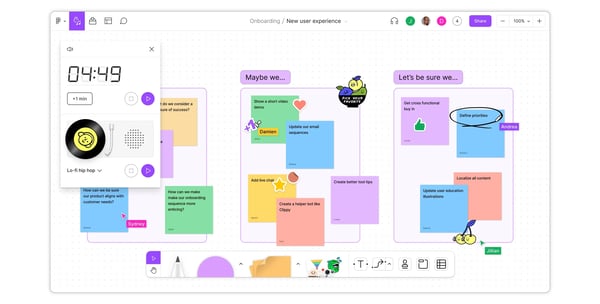
The relationship between FigJam and Figma surfaced frequently as well. Reviewers often highlighted the ability to move from ideation into design workflows without changing platforms or recreating context. For teams, that continuity can simplify collaboration between product and design functions.
Workshops, retrospectives, and stakeholder alignment sessions were also recurring use cases. Features such as voting, comments, sticky notes, and templates help teams collect feedback and build consensus without introducing unnecessary complexity. For organizations evaluating a mind mapping platform with team collaboration and real-time editing to identify the best fit, FigJam offers a balance of structure and simplicity that many reviewers seemed to appreciate.
Ease of adoption contributes significantly to its appeal. FigJam scores 95% for ease of setup and 93% for ease of use on G2. Several reviewers noted that teammates with little or no design experience were able to participate almost immediately, making the platform accessible across departments rather than limiting it to design teams.
I also encountered repeated references to teams using FigJam alongside other graphic design software rather than viewing it as a replacement. In many cases, its value comes from helping teams think through ideas collectively before they move into execution-oriented tools.
Teams creating highly detailed technical diagrams, extensive architecture maps, or formal documentation may eventually want more advanced diagramming controls than the platform is intended to provide. For collaborative ideation, workshops, and product planning, however, its simplicity remains a meaningful advantage.
The platform is also optimized for active participation rather than large-scale information management. As boards become more complex and accumulate significant numbers of contributors, comments, and assets, some reviewers noted that organization can require additional effort. For the collaborative scenarios that FigJam targets most often, that trade-off is generally reasonable.
The teams that seem to get the most value from FigJam aren't necessarily searching for the most advanced diagramming environment. They're looking for a place where ideas can surface quickly, contributors feel comfortable participating, and collaboration doesn't require extensive setup. Based on the reviews I analyzed, that's where FigJam consistently delivers, making it one of the best mind mapping software options for creative and product-focused teams.
"FigJam is incredibly easy to pick up and start using, even for non-designers. I use it very frequently for mapping user flows, system architecture diagrams and early product thinking, and it rarely gets in the way of speed. The real-time collaboration is smooth, comments are intuitive, and the sticky notes, connectors and templates cover most use cases without feeling bloated. Implementation is basically instant since it’s browser-based and tightly integrated with the Figma ecosystem. If you already use Figma, the learning curve is minimal. Integrations and exports also work well when sharing flows with engineers, PMs or stakeholders, which makes alignment faster. Overall, it strikes a good balance between having enough features and staying simple to use."
- FigJam review, Brahmatheja Reddy M.
"The biggest gap for us is the breadth and polish of out-of-the-box templates. Miro’s catalog feels wider and, visually, a touch more refined; I also prefer some of Miro’s visual styling. FigJam’s look can feel plainer by comparison. That said, FigJam’s native integration with Figma remains a decisive advantage, and it’s ultimately why we chose it over Miro. Still, expanding the template gallery and adding more visually varied starting points would make onboarding non-design stakeholders and occasional contributors even smoother."
- FigJam review, Boris R.
The reviews I analyzed for Padlet felt noticeably different from the rest of the products on this list. Instead of discussing complex workflows, technical diagrams, or project governance, users repeatedly talked about participation. Teachers, students, trainers, and teams described Padlet as a place where anyone could contribute ideas, resources, feedback, images, videos, or documents without much prior instruction.
That accessibility helps explain its performance on G2. Padlet has a 4.9 out of 5 rating across more than 330 reviews, and 100% of users rate it 4 or 5 stars. It also maintains a 99% recommendation rate. As I compared products in this category, Padlet consistently stood out for removing barriers to contribution rather than adding more structure.
One strength that surfaced repeatedly was simplicity. Reviewers frequently mentioned being able to create boards, share links, and begin collaborating within minutes. Padlet earns 97% scores for ease of use, ease of setup, ease of admin, and ease of doing business with, which closely aligns with the feedback I reviewed.
The platform's multimedia support is another differentiator. Users can combine text, images, documents, videos, links, and embedded content within the same board, creating richer collections of information than traditional node-based mind maps. Several reviewers specifically described using Padlet as a visual repository for ideas, research, classroom activities, and collaborative projects.
I also noticed how often users referenced sharing content with large groups. Whether the audience was a classroom, workshop, project team, or training cohort, reviewers appreciated how easily people could contribute from a browser, mobile device, QR code, or direct link. Teams evaluating free online collaboration tools may find Padlet particularly appealing because participation requires very little onboarding.
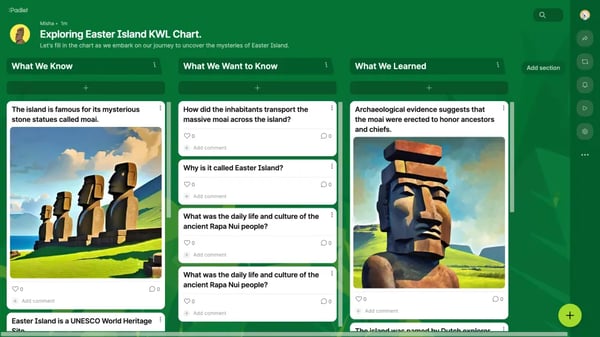
Collaboration features received similarly strong feedback. Notes and comments is Padlet's highest-rated capability on G2 at 95%, while collaborative editing earns 94%. Throughout the reviews I examined, users consistently described gathering ideas, collecting feedback, and facilitating discussions without needing separate communication platforms.
Another theme that emerged was flexibility. Some users employed Padlet for mind maps, others for digital portfolios, research collections, lesson planning, brainstorming sessions, project boards, or knowledge sharing. That adaptability makes it useful for a wide range of collaborative activities rather than limiting it to a single workflow.
I also found repeated references to security and controlled sharing. Users mentioned privacy settings, passcode protection, private boards, and permission controls that help manage who can view or contribute content. While Padlet is not typically discussed as the highest-rated mind mapping software for strategic planning for enterprise teams with demanding security, reviewers still highlighted its ability to provide controlled collaboration environments when privacy is important.
Padlet is designed to make idea collection and participation as simple as possible. Teams looking for advanced workflow automation, formal project management functionality, or deeply structured diagramming capabilities may find the platform lighter than products built for those purposes. For collaborative idea gathering, however, that simplicity is often what users value most.
The free version also appears frequently throughout user feedback. Many reviewers appreciate being able to get started without a financial commitment, though some noted that usage limits can become more noticeable as projects expand. For individuals, classrooms, and smaller teams, the platform still provides considerable value before upgrades become necessary.
Padlet succeeds because it makes contributing ideas feel effortless. The platform doesn't try to force users into rigid structures or complex workflows. Instead, it creates an approachable space where people can share information, collaborate visually, and organize content together, making it one of the best mind mapping software options for lightweight collaboration and multimedia idea collection.
“I am currently in middle school but my journey with Padlet goes all the way back to 3rd grade during a really hard time for all of us...the pandemic, but Padlet not only helped us put in our thoughts but also review others. It has many features like attaching files,image etc making it one of a kind. And it's accessiblity is remarkable(app,link,QR,browser et) . Padlet can also be very safe and reliable, and you can make your Padlet safe and secure by adding a passcode, making it private and limited. Padlet is also very easy to use in large groups like parties, classrooms, and so much more! I use Padlet at least once every day, and Padlet never fails to amaze! We can use it for all subjects. It’s as easy as copying a link and sharing, making it easy to implement and integrate with daily life for many purposes! So join me and the over 30 million people who use Padlet to make their lives effective,smart, easy and fun!”
- Padlet review, Isha S.
“I find it difficult to connect to PowerPoint, and the PDF feature is not very good—the structure is poorly organized.”
- Padlet review, Joakim C.
As I analyzed G2 reviews across all six products, the strongest patterns centered on outcomes: some teams wanted a space for collaborative ideation, others needed structured documentation, while several prioritized turning ideas into executable work. Those recurring themes made it easier to identify where each product consistently delivered the most value.
|
Software |
Choose if you need to... |
Why I recommend it |
|
Miro |
|
G2 reviewers consistently praised Miro's collaborative editing, infinite canvas, templates, and workshop facilitation capabilities. It stood out as the strongest option for large-group visual collaboration and shared planning exercises. |
|
Lucid Visual Collaboration Suite |
|
Users frequently highlighted the ability to move from Lucidspark ideation into Lucidchart documentation without changing platforms. Reviewers also emphasized its strengths in process mapping, technical visualization, and structured planning. |
|
Visio |
|
Visio reviewers focused less on brainstorming and more on formal documentation. Its strongest use cases centered on process mapping, architecture diagrams, compliance workflows, and enterprise documentation. |
|
ClickUp |
|
G2 users repeatedly described ClickUp as the platform where ideas become projects. Mind maps, tasks, dashboards, documents, and workflows all remain connected within a single workspace. |
|
FigJam |
|
Reviewers consistently highlighted FigJam's accessibility, voting tools, real-time collaboration, and tight integration with Figma. It performed particularly well for product ideation and early-stage planning. |
|
Padlet |
|
Padlet stood out for participation rather than structure. Reviewers frequently mentioned how easy it is to gather text, images, videos, files, and comments from contributors without requiring extensive onboarding. |
Have more questions? G2 has the answers!
The best mind mapping software depends on how you plan to use it. Miro excels at collaborative workshops, ClickUp connects mind maps with execution, Lucid supports documentation-heavy workflows, while FigJam and Padlet simplify visual collaboration and idea collection.
Yes. Several mind mapping platforms offer free plans, including Miro, ClickUp, FigJam, and Padlet. While usage limits vary, these plans are often sufficient for individuals, students, small teams, and early-stage brainstorming activities.
Yes. Some mind mapping tools extend beyond brainstorming and support planning, task management, and execution workflows. ClickUp is particularly strong in this area because mind maps, tasks, dashboards, documentation, and reporting remain connected.
Enterprise teams often evaluate Miro, Lucid Visual Collaboration Suite, and Visio for strategic planning initiatives. These platforms combine collaboration, governance controls, documentation capabilities, and administrative oversight that support large-scale planning and security requirements.
Miro and FigJam consistently stand out for real-time collaboration. Based on the G2 reviews I analyzed, both platforms enable simultaneous editing, stakeholder participation, feedback collection, workshops, and collaborative planning without disrupting team workflows.
Organizations evaluating long-term deployments often consider Lucid Visual Collaboration Suite, Visio, and Miro. These platforms offer stronger governance capabilities, documentation controls, version management, and administrative visibility than lightweight brainstorming-focused alternatives.
Security-conscious buyers frequently evaluate Visio, Lucid Visual Collaboration Suite, and Miro. Enterprise-grade permissions, administrative controls, user management, and governance capabilities make them common choices for organizations handling sensitive information.
ClickUp, Miro, and Lucid Visual Collaboration Suite offer extensive customization options. G2 reviewers frequently mentioned templates, configurable workflows, custom views, visual themes, and reusable frameworks that help teams adapt the software to their processes.
Miro consistently surfaced in G2 reviews as a platform for brainstorming, strategic planning, workshops, stakeholder alignment, and collaborative decision-making. Its templates, collaboration features, and visual flexibility support both ideation and planning activities.
ClickUp and Lucid Visual Collaboration Suite are strong options for breaking complex initiatives into manageable components. Reviewers frequently highlighted their ability to connect visual planning with documentation, workflows, tasks, milestones, and execution tracking.
Miro, ClickUp, and Lucid Visual Collaboration Suite offer extensive integration ecosystems. Based on user reviews, connections with Jira, Slack, Microsoft 365, Google Workspace, and other productivity tools help teams maintain continuity across workflows.
FigJam, Miro, and ClickUp appeared most frequently in reviews from product-focused teams. Product managers often cited collaborative planning, user-flow mapping, stakeholder alignment, workshop facilitation, and execution support as key reasons for adoption.
One insight surfaced repeatedly throughout the G2 reviews I analyzed: the most valuable mind maps weren't endpoints. They became workflows, project plans, product decisions, process documentation, or collaborative action plans.
The tools that stood out weren't necessarily the ones with the most features. In fact, they were the ones that helped teams move from ideas to outcomes. That's why choosing the best mind mapping software starts with understanding what happens after brainstorming.
Whether your goal is stakeholder alignment, product discovery, process documentation, project execution, or idea collection, the right platform is usually the one that best supports the next stage of your workflow.
Want to turn ideas into better decisions, not just better diagrams? Explore design thinking to learn how teams structure problem-solving, innovation, and decision-making after the brainstorming session ends.


I evaluated 20+ tools using G2 Data and reviews to finalize the 7 best collaborative...
 by Somya Jain

Ever catch yourself drowning in a flood of ideas, so many that you don’t even know where to...
 by Samudyata Bhat

Tired of wrestling with flowchart roadblocks? I’ve been there. The good news is you don’t need...
by Samudyata Bhat