.png?width=400&height=150&name=Copy%20of%20G2%20Image%20(1).png)


Choosing the best GIS software isn't just about creating maps; it's about making smarter decisions with location intelligence, geospatial analysis, and spatial data. To help buyers compare the leading GIS platforms, I evaluated some of the most widely used tools in the category, including Esri ArcGIS, ArcGIS Pro, Google Earth Pro, Google Maps Platform, Maptitude, and AutoCAD, using G2 Grid Reports and verified user reviews.
Whether you're planning a new retail location, analyzing transportation networks, managing utilities, or evaluating land development opportunities, the right GIS software can help you visualize geographic data, perform spatial analysis, and uncover insights that traditional business intelligence tools often miss.
After reviewing G2 user feedback, feature sets, ease of use, implementation experiences, and market presence, I narrowed down the best GIS software solutions for organizations that need accurate mapping, location analytics, route optimization, and geospatial decision-making. This guide breaks down the strengths, limitations, and ideal use cases of each platform to help you choose the right GIS solution for your business.
GIS software has become an essential tool for organizations that rely on location intelligence, geospatial analysis, and spatial data to make decisions. From what I found while reviewing GIS platforms on G2, these tools do far more than create maps; they help teams analyze geographic data, optimize routes, model infrastructure projects, visualize assets, and uncover patterns that influence business and operational outcomes.
The best GIS software solutions combine mapping, geocoding, spatial analytics, and data visualization to support industries such as urban planning, utilities, transportation, environmental management, and real estate. In my evaluation, I focused on how effectively each platform handled geographic datasets, mapping workflows, location analysis, and decision-making use cases.
The growing demand for geospatial software reflects its expanding role across industries. The global geographic information system market is projected to reach approximately $26.48 billion by 2035, growing at a CAGR of 8.71%, as more organizations invest in location-based analytics and digital mapping technologies.
Buyers evaluating GIS software often need more than basic mapping capabilities. I also looked at which tools are best for spatial analysis, route planning, infrastructure management, geographic data visualization, and enterprise-scale geospatial operations to help identify the right fit for different business needs.
To build this list, I analyzed leading platforms in G2’s GIS software category and examined how verified users rated them across G2 Grid® Reports, satisfaction scores, market presence, and detailed reviews. Rather than relying solely on overall ratings, I used AI-assisted review analysis to identify recurring themes around spatial analysis, mapping capabilities, geospatial data management, ease of implementation, scalability, integrations, and overall user experience.
Because GIS software serves a wide range of use cases, from urban planning and utilities management to transportation, environmental analysis, and land development, I focused on the capabilities that matter most in real-world geospatial workflows. These included location intelligence, geocoding, route optimization, geographic data visualization, spatial modeling, satellite imagery support, and the ability to manage large geographic datasets efficiently.
I also prioritized consistent reviewer feedback, both positive and critical, to separate vendor claims from actual customer experiences and better understand where each platform excels or falls short. Screenshots included in this article are vendor-provided G2 images or publicly available product visuals and do not imply direct hands-on testing.
As I evaluated different GIS software platforms, these were the capabilities that consistently stood out:
Overall, my exploration reinforced that GIS software is most valuable when it combines strong analytical capabilities with flexibility, scalability, and real-world integration.
To be included in this category, software must:
*This data was pulled from G2 in 2026. Some reviews may have been edited for clarity.
Google Earth Pro is a desktop mapping tool that delivers high-resolution satellite imagery, 3D terrain modeling, historical image archives, and route planning capabilities for a wide range of geospatial applications.
From what I found across G2 reviews, users consistently value the platform's depth of visual data and how accessible it makes professional-grade mapping. Verified reviewers across industries, from environmental consultants to logistics planners, describe it as a reliable foundation for location-based decision-making. According to G2 Data, 91% of users rate Google Earth Pro highly for ease of use, which reflects how effectively the platform balances powerful capabilities with an approachable interface.
High-resolution satellite imagery and 3D terrain are the features I see G2 reviewers return to most. What stands out across reviews is the ability to explore detailed aerial views of cities, coastlines, and remote terrain with strong visual fidelity. Whether scoping a construction site or identifying geographic features for a research project, the imagery quality supports accurate visual analysis without requiring additional data sources.
Historical imagery is where I see Google Earth Pro pull clearly ahead of many competitors. Across reviews, users highlight the ability to scroll back through decades of archived satellite photos, a capability that proves particularly useful for tracking land-use change, urban expansion, and environmental shifts over time. This time-based analysis layer adds a dimension that most free mapping tools simply don't offer.
Street View integration receives consistent praise from reviewers who use it for ground-level location assessments. What I find notable here is how users describe it as a complement to aerial data rather than a replacement; the ability to drop into a street-level view of virtually any mapped location is described as especially valuable for site evaluation, route planning, and community-level research.
KML/KMZ and GIS data import is a recurring highlight among more technical users in the review set. I see reviewers frequently mention importing custom datasets, including GPS tracks, shapefiles converted to KML, and third-party map layers, directly into Google Earth Pro. According to G2 Data, 90% of users rate its data capture capabilities positively, underscoring how well the platform handles external geospatial inputs.
Measurement and distance tools are praised by reviewers working on projects that require spatial accuracy. What comes through clearly in these reviews is that users can measure land areas, calculate distances between points, and conduct basic terrain analysis directly within the interface, tasks that would otherwise require dedicated GIS software. The precision on offer makes the platform viable for professional site assessments and field planning.
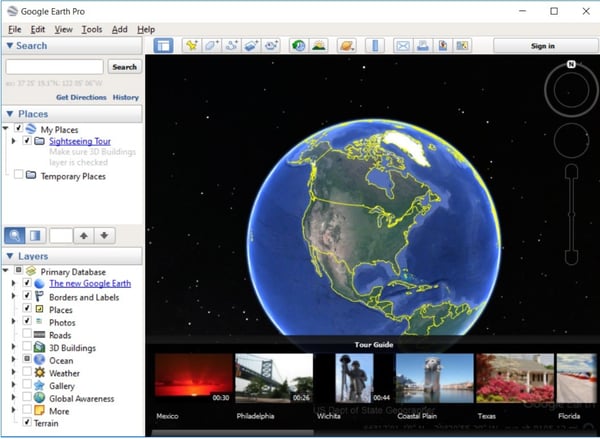
Free access with pro-grade capabilities is a theme I see appear across a wide range of reviewer profiles. What I find consistent is that users, ranging from independent researchers to small professional teams, highlight the combination of high-resolution printing, movie creation, and advanced data import at no cost. For organizations working within tight budgets, this positions the tool as a uniquely accessible entry point into professional GIS work.
Google Earth Pro's imagery can be outdated or lower in resolution in less-populated regions. While the platform delivers strong coverage in urban and high-traffic areas, I see reviewers note that rural or rapidly developing locations sometimes surface older aerial snapshots. For teams working with precision requirements in those geographies, this is worth factoring into the evaluation, though for most urban and regional applications, the imagery quality remains dependable.
When handling large datasets or multiple simultaneous map layers, some reviewers report slowdowns or occasional crashes, particularly on lower-spec machines. The platform performs well under standard workloads, but I'd note that users running complex cross-referenced datasets should account for hardware requirements. On capable systems, these performance concerns largely disappear.
Google Earth Pro remains a go-to starting point for geospatial exploration, site analysis, and location-based research, particularly for teams that need professional-grade mapping tools without the overhead of an enterprise GIS subscription.
"The Google Pro has advanced features which allow me to map delivery polygons, select new store locations by using a 3D view of the area & nearby businesses, & view all my stores pinned on a globe."
- Google Earth Pro review, Manogya T.
"At times, it feels outdated, and performance can be slow, especially on older systems."
- Google Earth Pro review, Shailesh S.
Learn the ins and outs of GPS tracking and its pivotal role in building high-resolution maps to implement your industry-specific predictions for any demographic.
Google Maps Platform is a developer-facing API suite that brings Google's mapping infrastructure, real-time navigation, geocoding, route optimization, and location data directly into custom applications and business workflows.
What I notice immediately across G2 reviews is how reliably the platform scales across use cases, from consumer-facing mobile apps to complex enterprise logistics systems. Verified reviewers across retail, transportation, and field services describe it as a foundational layer for anything requiring accurate, real-time location context. With a Likelihood to Recommend score of 93% on G2, it ranks among the highest-rated platforms in this category for overall user satisfaction.
Real-time navigation and route optimization is the capability I see most frequently praised across the review set. What stands out is how users describe the platform dynamically adjusting routes based on live traffic conditions, road closures, and estimated travel times, delivering routing accuracy that teams rely on for delivery coordination, field service dispatching, and logistics planning. The breadth of routing options, from multi-stop itineraries to distance matrix calculations, supports highly varied operational workflows.
Geocoding and reverse geocoding receive strong attention from developers and operations teams in the reviews I evaluated. What I find notable is the ability to convert addresses into precise coordinates and vice versa at scale, feeding clean location data into downstream systems. This proves especially valuable for organizations managing large location datasets or building address-validation workflows into their products.
An extensive API ecosystem and developer tooling are recurring themes among technical reviewers. I see users highlight a wide range of APIs, Maps JavaScript API, Places API, Directions API, and more, that integrate cleanly into web and mobile environments. According to G2 Data, 92% of users rate ease of use positively, which speaks to how accessible the developer experience is even across complex implementations.

Places API and business location data is praised by reviewers building consumer-facing products. From what I found, users describe querying business hours, contact information, ratings, and location details at scale, capabilities that support everything from store locators to competitive proximity analysis. The depth and freshness of the underlying business data are frequently cited as a differentiator from alternative mapping APIs.
Cross-platform reliability and global coverage come up consistently in reviews from teams operating across geographies. What I see across these reviews is that the platform maintains strong performance across regions, making it viable for multinational deployments without managing separate regional mapping data sources. The consistency of the underlying data infrastructure supports global teams working from a single API stack.
Integration with broader Google Cloud services is a practical advantage I see come up frequently among data-intensive users. From what I found in reviews, the ability to connect Maps Platform outputs with Google Analytics, BigQuery, and other Google Cloud services creates a more unified analytics environment. According to G2 Data, 94% of users rate its data visualization capabilities positively, reflecting how effectively location data integrates into broader reporting and decision-support workflows.
Google Maps Platform's accuracy can vary at complex intersections, multi-level road structures, and in areas where map data hasn't kept pace with recent infrastructure changes. I see reviewers note occasional misdirection at flyovers or multi-way junctions, which can affect navigation reliability in certain urban environments. For most standard routing scenarios, however, the platform performs consistently well.
Map data in rapidly developing regions, particularly newer urban areas and emerging markets, can lag behind physical reality. From what I found in recent reviews, users working in these geographies note instances where new roads, updated business listings, or recently developed areas aren't reflected promptly. Teams operating in high-growth corridors should factor this into how they validate location data for time-sensitive use cases.
Google Maps Platform is a strong foundation for any organization building location intelligence into its products or operations, particularly teams that need enterprise-grade mapping APIs backed by global infrastructure and a broad developer ecosystem.
"It’s more detailed and presents a broader landscape compared with their competitors."
- Google Maps Platform review, Lizbeth M.
"There are times when newly developed roads, local market areas, or small business locations aren’t updated right away. As a retail business owner, this can occasionally cause confusion when I’m coordinating deliveries or directing suppliers to specific locations. In addition, traffic estimates can sometimes shift because of unexpected road conditions. More frequent updates to local business information, along with better accuracy in rapidly developing areas, would make the platform even more effective."
- Google Maps Platform review, Prasanjeet S.
Esri ArcGIS is a comprehensive GIS platform offering spatial analysis, data management, map design, and geospatial modeling capabilities for professionals across urban planning, environmental science, real estate, and infrastructure development.
From what I found across G2 reviews, users describe ArcGIS as the most fully featured GIS platform available, a system that rewards investment in learning with access to an unusually deep set of analytical and visualization tools. It serves a broad market: according to G2 Data, 31% of its reviewers come from enterprise organizations, reflecting its strong foothold in large-scale institutional and government deployments.
Advanced spatial analysis tools are what I see G2 reviewers cite most consistently as ArcGIS's defining strength. What stood out is the ability to overlay raster and vector datasets, run proximity analysis, model environmental impact, and execute multi-variable geoprocessing workflows, all within a single environment. I see reviewers in urban planning and environmental consulting roles particularly highlight how the depth of the analysis toolkit supports complex, multi-stage projects.
Both online and offline work modes receive frequent praise from field-based reviewers. From what I found, the ability to switch between connected and disconnected workflows, to edit maps in the field without internet access, and to sync back to a central database is described as a significant operational advantage. I see users working in remote locations and infrastructure inspection roles highlight this flexibility as something few competing platforms handle as smoothly.
2D and 3D visualization is a strength that I see reviewers across disciplines return to. What comes through clearly is that users build richly layered maps combining satellite imagery, vector overlays, demographic data, and custom symbology into a single visual output. According to G2 Data, ArcGIS scores 92% on data visualization, a reflection of how consistently reviewers find the rendering quality suitable for professional reporting and stakeholder presentations.
Python scripting and ModelBuilder automation are highlighted by power users who rely on repeatable, large-scale workflows. Reviewers describe automating geoprocessing tasks using Python scripts or ModelBuilder chains, reducing the manual effort required for repetitive spatial operations and enabling batch processing across large datasets. This programmability is cited as a key advantage over more rigid GIS tools.
Integration with the broader Esri ecosystem is a practical strength I see come up consistently in multi-platform environments. From what I found, ArcGIS connects natively with ArcGIS Online, ArcGIS Pro, and a range of Esri field applications, allowing teams to share data, publish maps, and coordinate workflows across desktop, web, and mobile without significant data conversion overhead.
Enterprise-grade data management rounds out the core strengths I see in G2 reviews. Managing large, multi-user geodatabases, handling version control, concurrent editing, and long-term data archiving at scale. I see reviewers in government, utilities, and infrastructure roles highlight this as essential functionality that distinguishes ArcGIS from lighter-weight GIS tools that struggle under institutional data volumes.
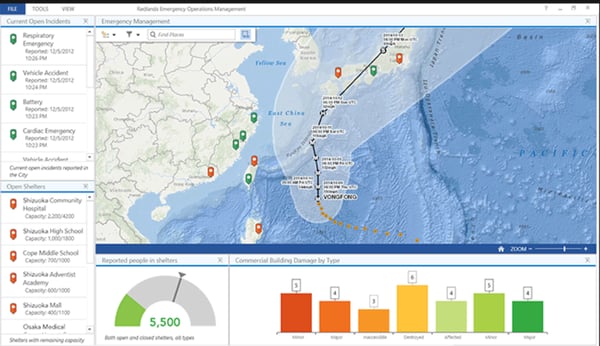
Licensing costs are a consistent point of friction I find in G2 reviews, particularly for smaller organizations and academic teams. Reviewers note that accessing the full feature set requires navigating multiple subscription tiers and extension add-ons, which can make the total cost of ownership difficult to predict. For teams with defined GIS needs and established budgets, the platform's capabilities often justify the investment, but it's a threshold worth evaluating carefully before committing.
ArcGIS takes time to get familiar with, especially for users coming from simpler or open-source GIS tools. What I see across reviews is an initial phase of orientation across the platform's layered menus, tool organization, and workflow logic. Once users develop fluency, the depth of the system becomes a genuine asset, but teams should plan for a meaningful onboarding period, particularly for staff without prior GIS experience.
Esri ArcGIS is well-suited for organizations that need a professional-grade, full-lifecycle GIS environment, particularly those working on complex spatial analysis, multi-team data management, or projects that span desktop, web, and field workflows.
"I have built a career using it! Over 25 years of using Esri products. The geospatial industry wouldn't exist in the same way without it. Empowers me to be creating with data."
- Esri ArcGIS review, Steven B.
"I do not like how the interface is different between ArcGIS Pro and ArcGIS Online. Even though the online version is a slimmer version, it should look and operate the same, and it doesn't."
- Esri ArcGIS review, Dave M.
4. AutoCAD: Best for data modeling and terrain editing
AutoCAD is a professional drafting and design platform built for engineers, architects, and construction teams that need precise 2D drawings, technical annotation, and structured design documentation.
What I find across G2 reviews is that users describe AutoCAD as the industry standard for technical drafting, a tool that has built its reputation on precision, reliability, and a command structure that gives experienced users fine-grained control over every element of a drawing. According to G2 Data, 42% of its reviewers are from small businesses, which suggests the platform maintains a strong foothold across firm sizes, from independent consultants to large engineering practices.
Precision 2D drafting and annotation is the capability that defines AutoCAD's reputation in the reviews I evaluated. What stands out is how users describe creating highly detailed technical drawings, from architectural floor plans to engineering schematics, with exacting dimensional accuracy. The combination of layered drawing management, snap-to-grid controls, and block-based reuse allows teams to build complex plans while maintaining structural consistency across large drawing sets.
Command-line interface and keyboard shortcuts receive consistent praise from experienced users who value workflow efficiency. From what I found, the command-line input, allowing precise execution of drawing operations without menu navigation, becomes a major productivity multiplier once internalized. I see power users describe a level of control that more visually driven tools often lack.
Layer management and block library tools are highlighted by reviewers working on multi-disciplinary projects. What I find notable is the ability to organize drawing elements across named layers, toggle visibility, control plot styles, and reference reusable block libraries, described as essential for managing large, complex drawing sets where consistency and version integrity matter. I see this come up especially often among reviewers in architecture and civil engineering.
File interoperability and DWG format compatibility are recurring practical advantages I find in G2 reviews. From what I see, users describe importing and exporting DWG files across AutoCAD versions and from other CAD platforms with minimal conversion friction, a critical capability in project environments where multiple firms exchange design files. According to G2 Data, AutoCAD scores 88% on data capture, reflecting how reliably it handles external file ingestion.
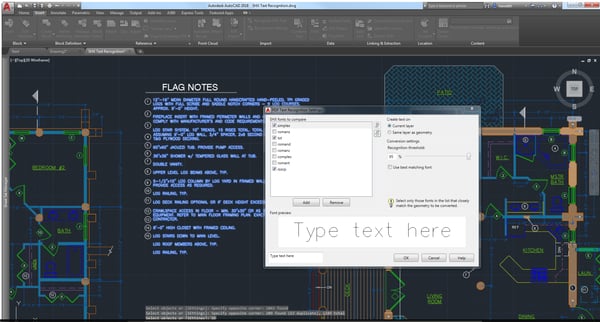
Cross-discipline toolset and specialized verticals receive attention from reviewers who use AutoCAD across multiple design domains. What stood out to me is that beyond core drafting, users describe leveraging specialized toolsets, including architecture, mechanical, electrical, and civil, within a single AutoCAD subscription, allowing teams to work across project types without managing separate licenses.
Reliable performance on standard 2D workflows is a theme I see recurring run reviews from users working primarily in drafting. What I find consistent is that reviewers describe AutoCAD as dependable for the day-to-day volume of drawing creation, annotation, and revision that forms the backbone of most design practices. According to G2 data, AutoCAD scores 90% on data visualization, reflecting how well its output renders across standard drawing formats and print layouts.
Working with large or complex drawing files can slow AutoCAD down, particularly on mid-range hardware. I see reviewers describe noticeable lag when opening heavy xref-linked assemblies or executing operations on files with dense geometry, and some report crashes on less powerful machines. For teams running straightforward 2D drafting workloads, performance is generally solid, the friction tends to emerge at higher complexity thresholds.
AutoCAD's 3D modeling capabilities cover the basics but fall noticeably short of purpose-built tools like Revit or SolidWorks. What I find across reviews is that users working on complex three-dimensional designs describe having to switch applications for serious 3D work, noting that AutoCAD's 3D environment is less intuitive and less parametrically capable than dedicated modeling platforms. For teams whose work stays primarily in 2D, this limitation rarely surfaces.
AutoCAD remains the benchmark for precision technical drafting, particularly for engineering, architecture, and construction teams that need a proven, widely supported 2D design environment with strong file compatibility across the industry.
"AutoCAD is very strong when it comes to precision and accurate technical drafting. It allows me to create detailed drawings with exact dimensions, which is very important in engineering and architectural work. The layer system and command-based workflow make it easy to organize complex designs, and it also integrates well with other Autodesk tools used in the industry. This helps in creating clean, professional drawings and improves overall productivity."
- AutoCAD review, Muzammil M.
"One of AutoCAD’s biggest drawbacks is its high subscription cost, which can be especially tough for individual users or small businesses. It can also be overwhelming for beginners, since the interface is complex and the learning curve is steep. On top of that, AutoCAD may require fairly powerful hardware to run smoothly, particularly when you’re working on larger projects."
- AutoCAD review, Ovidiu P.
Maptitude is a desktop GIS and mapping platform built for business analysts, retail planners, and operations teams that need territory management, demographic analysis, and location-based decision support without requiring deep GIS expertise.
What comes through clearly in my evaluation of G2 reviews is that Maptitude occupies a distinct niche: it makes sophisticated spatial analysis genuinely accessible to non-GIS professionals. I see reviewers from market research, real estate, logistics, and government planning describe it as a tool that bridges the gap between enterprise GIS platforms and simpler mapping utilities.
With a Likelihood to Recommend score of 94%, the highest in this lineup, it earns particularly strong endorsements from its user base. According to G2 Data, Maptitude scores 97% on data capture, a standout figure that reflects how reliably users rate its ability to ingest and work with location-based datasets.
Territory mapping and management is the use case I see driving the majority of positive G2 reviews for Maptitude. What stands out is how users describe building, adjusting, and balancing sales territories, service zones, and operational regions with tools specifically designed for that task, including automated balancing by population, revenue, or workload metrics. I see reviewers in sales operations and field service management consistently describe this as the feature that makes Maptitude irreplaceable in their workflow.
Bundled demographic and geographic data is highlighted as a significant practical advantage by reviewers I evaluated who would otherwise need to source and license data separately. Maptitude ships with a comprehensive library of census data, business demographics, drive-time polygons, and boundary files, data layers described as immediately usable without additional preparation. This built-in dataset substantially lowers the barrier to entry for organizations doing market analysis or site selection.
Site selection and market analysis tools receive strong attention from reviewers in retail, real estate, and franchise development. What I find notable is how users describe running proximity analyses, overlaying competitor locations, generating drive-time or drive-distance rings, and scoring potential sites against demographic benchmarks, workflows that would typically require enterprise GIS expertise but that Maptitude makes accessible to business analysts working independently.
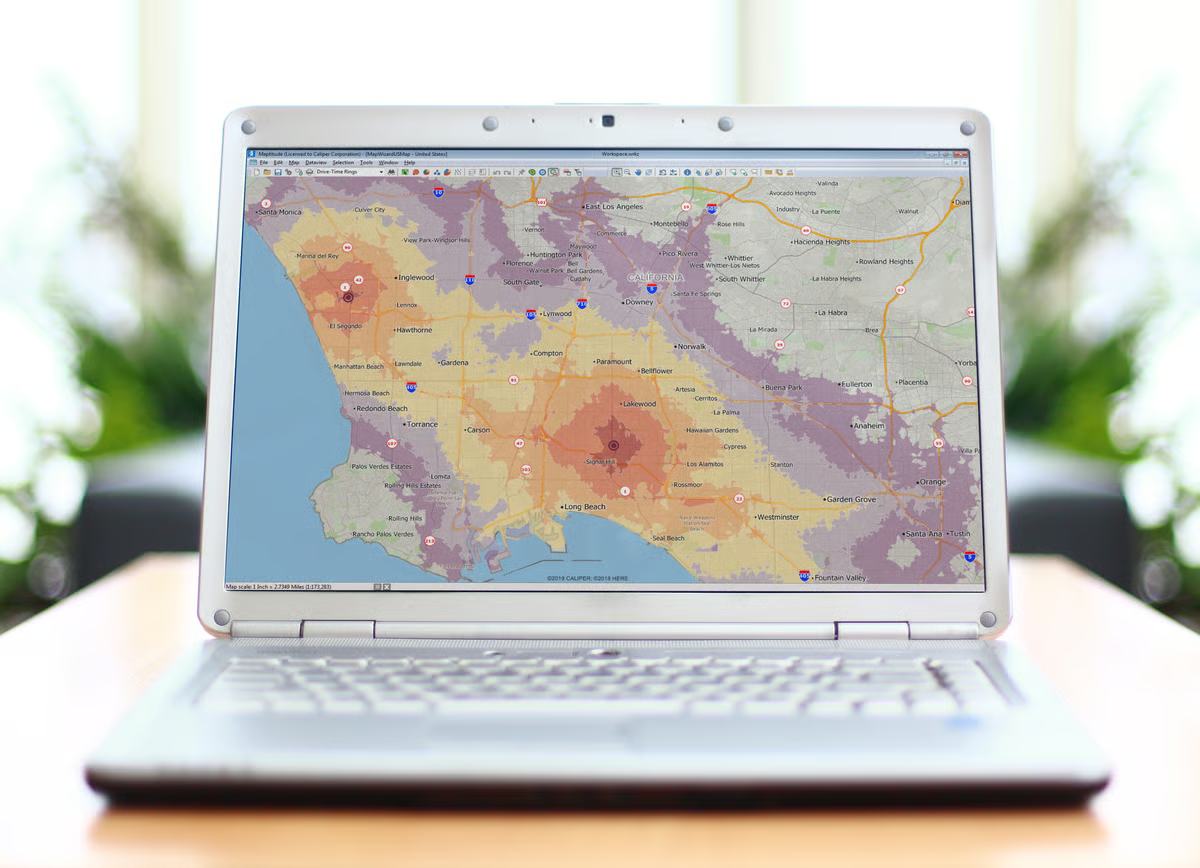
Geocoding and address mapping at scale is a practical strength I see come up often in reviews from operations and logistics roles. The ability to import address lists and generate accurately plotted maps without manual coordinate entry is described as a reliable time-saver for teams managing large location datasets. According to G2 Data, Maptitude scores 98% on geocoding, the highest in this category lineup, indicating strong user confidence in its address-to-coordinate accuracy.
Accessible pricing relative to enterprise GIS platforms is a theme I see recur across reviews from smaller organizations evaluating Maptitude against alternatives like ArcGIS. What stands out is the value proposition for mid-market buyers who need business-grade spatial analysis tools without the licensing overhead of an enterprise GIS platform. I see the perpetual license model specifically noted as a budget-friendly alternative to subscription-based competitors.
Customer support and onboarding resources receive notably positive feedback in the reviews I evaluated, an area where Maptitude stands out relative to larger GIS platforms. Users describe responsive direct support, useful training materials, and a vendor relationship that feels more attentive than what's typical for enterprise software. For teams without dedicated GIS staff, I see this support infrastructure cited as a meaningful factor in successful adoption.
Getting started with Maptitude involves a learning period, particularly for users without prior GIS exposure. What I see across reviews is an initial phase of orientation as users work through the interface logic and tool organization. The platform's training resources help shorten this curve, and most reviewers note that fluency develops relatively quickly, but teams should expect some ramp-up time before users are working independently and efficiently.
Map-sharing options within Maptitude are more limited compared to cloud-native GIS platforms. From what I found in reviews, sharing completed maps with colleagues or external stakeholders, without requiring them to have their own Maptitude installation, involves extra steps or additional costs. For teams that need to distribute location insights broadly across an organization, this is a workflow consideration worth planning for during evaluation.
Maptitude is a particularly strong fit for business analysts, sales operations teams, and market researchers who need professional-grade territory management and demographic mapping tools without the complexity or cost of an enterprise GIS platform.
"What I like best about Maptitude is how practical and user-friendly it is for GIS work. I have been using it since 2021, and it has become my go-to software for mapping, spatial analysis, and research-related GIS tasks. The built-in data is especially useful because it saves time and makes the workflow much easier compared to many other GIS platforms where data preparation can take a lot of effort."
- Maptitude review, Muhammad Arif Qaisrani.
"The ability to capture instructions through the user interface as a script and then repurpose them in automated settings could be a significant advantage."
- Maptitude review, Murtaza H.
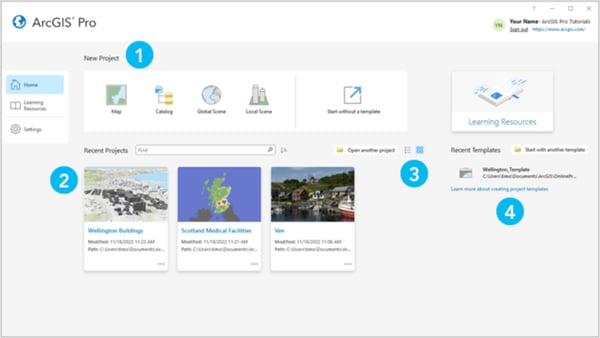
ArcGIS Pro is Esri's next-generation desktop GIS application, built for advanced geoprocessing, high-performance spatial analysis, and enterprise-grade geospatial data management across 2D and 3D environments.
What I find across G2 reviews is that users describe ArcGIS Pro as a significant evolution from earlier Esri desktop software, faster, more visually capable, and better integrated with cloud and enterprise data environments. It skews toward experienced GIS professionals and institutional users: according to G2 Data, 36% of its reviewers come from enterprise organizations, and 94% of users say the product is headed in the right direction, the highest such rating in this lineup.
Advanced geoprocessing capabilities define ArcGIS Pro's standing among reviewers in the data I evaluated. Users describe running complex spatial operations, raster analysis, network datasets, terrain modeling, and multi-step geoprocessing chains, at a performance level that matches the demands of large institutional projects. I see the breadth of the geoprocessing toolbox, combined with Python integration via ArcPy, cited as giving analysts the tools to build and automate sophisticated workflows that go well beyond what most GIS platforms can handle.
2D and 3D visualization in a unified environment is a capability I see reviewers consistently highlight as one of ArcGIS Pro's most meaningful upgrades over its predecessors. From what I found, users describe switching seamlessly between flat map views and three-dimensional scene rendering within the same project file, enabling analysis approaches that were previously split across different applications. According to G2 Data, ArcGIS Pro scores 92% on data visualization, reflecting strong user confidence in how the platform renders complex geospatial outputs.
Integration with ArcGIS Online and enterprise databases is praised by reviewers working in collaborative or multi-team environments. What I find notable is the ability to publish feature layers, share web maps, and sync edits with ArcGIS Online directly from the desktop application, streamlining workflows that would otherwise involve significant manual data transfer. I see reviewers in government and utilities describe this connectivity as essential for coordinating field data collection with desktop analysis.
Cartographic output quality receives strong endorsement from reviewers who produce maps for publication, reporting, or public-facing communication. From what I found, users describe ArcGIS Pro's layout tools and symbology controls as more refined than earlier Esri desktop versions, delivering map outputs with the visual polish required for professional presentation. I see the range of available basemaps, color schemes, and labeling controls cited as giving cartographers significant flexibility.
Spatial analysis for terrain and surface data is highlighted by reviewers in environmental science, surveying, and civil engineering. What stands out to me is how users describe the slope analysis, aspect modeling, viewshed analysis, and DEM-based calculation tools as particularly strong, enabling terrain-based decision support that goes meaningfully beyond what basic GIS or CAD tools can provide. I see this depth of terrain analysis cited as a consistent differentiator in reviews from field-science users.
Support for real-time data and live feeds is a capability I see come up frequently among reviewers in utilities, emergency management, and transportation. ArcGIS Pro's ability to connect to live data streams, including sensor feeds, GPS tracks, and real-time traffic layers, allows teams to bring current operational context into their spatial analysis environment. According to G2 Data, ArcGIS Pro scores 91% on spatial analysis, a reflection of how well users rate its analytical depth overall.
ArcGIS Pro is resource-intensive by design, and I see reviewers on lower-spec hardware describe noticeable performance constraints. What comes through consistently is that users working with large raster datasets, detailed 3D scenes, or complex geoprocessing chains report that the platform demands high-end CPUs and dedicated graphics cards to run efficiently. On well-configured systems, the experience is smooth, but hardware requirements are a genuine planning consideration for teams deploying the software broadly.
Occasional crashes and slowdowns during geoprocessing operations appear in multiple G2 reviews I evaluated. From what I found, users describe instances where intensive processing tasks, particularly when working with very large datasets or during multi-step automated workflows, can cause instability. While these occurrences aren't described as routine, they surface often enough across reviews to be worth noting. The platform's cloud integration and ArcGIS Online connectivity remain strong advantages even when local processing hits constraints.
ArcGIS Pro is best suited for GIS professionals, research institutions, and enterprise teams that need the full depth of Esri's analytical capabilities in a modern desktop environment, particularly where 3D analysis, large-scale geoprocessing, and cloud-connected workflows are central requirements.
"ArcGIS Pro provides a quick, integrated, and modern GIS environment. Mapping, analysis, and automation are made more effective and user-friendly by its project-based workflow, fluid 2D/3D visualization, potent geoprocessing capabilities, and easy management of big datasets."
- ArcGIS Pro review, Devakalaiselvan S.
"Licensing complexity – Managing licenses (especially extensions like Utility Network) can be confusing and costly."
- ArcGIS Pro review, Chermapandiyan T.
Have more questions? Get your answers below!
The best GIS platforms for urban planning and infrastructure teams managing location-based workflows and team collaboration are Esri ArcGIS, Mapbox, QGIS, Maptitude, and Google Maps Platform. These tools support spatial data management, real-time location sharing, and multi-user project environments built for infrastructure planning.
The most trusted GIS platforms by analysts based on user reviews and team collaboration are Esri ArcGIS, QGIS, and Mapbox. These platforms consistently receive high ratings for data accuracy, collaborative features, and reliability across analyst workflows on review platforms like G2.
The highest rated GIS platforms for urban planning and infrastructure teams optimizing visualization and team collaboration are Esri ArcGIS, Mapbox, and Carto. These tools offer advanced map rendering, dashboard-style visualization, and shared project workspaces suited for infrastructure decision-making.
The most reliable GIS platforms based on analyst reviews for teams avoiding costly implementations while enabling team collaboration are QGIS, Maptitude, and Felt. QGIS is open-source and free, Maptitude offers straightforward licensing, and Felt is designed for fast, low-friction team map sharing.
GIS platforms that maintain performance as urban planning and infrastructure teams scale include Esri ArcGIS, Google Maps Platform, and Mapbox. These platforms offer cloud-based infrastructure, enterprise-grade data handling, and scalable licensing models that grow with team size and project complexity.
GIS providers that prioritize location intelligence, implementation speed, and team collaboration include Mapbox, Carto, and Felt. Mapbox and Carto offer developer-friendly APIs with fast deployment, while Felt provides a browser-based experience that requires no setup and enables instant team map collaboration.
GIS solutions with proven mapping data for urban planning and infrastructure teams include Esri ArcGIS, Google Maps Platform, and Maptitude. These platforms provide verified, regularly updated geospatial datasets including roads, parcels, zoning layers, and infrastructure networks relied upon by municipal and engineering teams.
GIS platforms that excel at spatial analysis with strong user adoption and team collaboration are Esri ArcGIS, QGIS, and Carto. ArcGIS leads in enterprise adoption, QGIS dominates among open-source users, and Carto is widely adopted by data teams needing collaborative spatial analytics.
The best GIS tools for analysts needing mapping data and team collaboration are Esri ArcGIS, Mapbox, QGIS, and Felt. These tools provide access to rich geospatial datasets, support custom map creation, and include sharing and collaboration features that allow analyst teams to work on maps simultaneously.
The top GIS solutions for teams of 11–50 employees focused on spatial analysis and team collaboration are Felt, Maptitude, QGIS, and Carto. These platforms offer flexible team pricing, accessible interfaces, and collaborative mapping features that suit mid-sized teams without requiring enterprise-level infrastructure investment.
Given that the environmental conditions are shaky and finicky, your team has to factor in business goals, budget, resources, and AI/ML network bandwidth to see how a GIS tool is compatible with your current network infrastructure.
With my analysis, I perceived simpler and agile ways in which teams can analyze geographical conditions, design zones, and properties, and remotely administer their projects in a way that would benefit both the company and mankind. Before you set up your next land project, evaluate your picks and give this piece a minute to read to see which tool aligns better with your expectations.
If you are starting your first construction project, refer to this list of the best construction accounting software in 2026 to manage your accounting ledgers and optimize contractor operations.
.png)

How do companies tackle challenges that span across various regions and countries?
.png) by Devyani Mehta
by Devyani Mehta

I have spent a lot of time digging into the best construction project management software, a...
by Shreya Mattoo

I evaluated more than 25 products to identify the best mind mapping softwarefor different...
 by Washija Kazim