Remember that sinking feeling when you realize you've accidentally deleted an important file or your hard drive decides to call it quits? We've all been there.
Fortunately, the best free data recovery software is ready to get you out of the pickle without forcing you to pay upfront. They help recover and repair deleted, corrupted, or damaged files from personal computers (PCs), external hard drives, USBs, and mobile phones.
These tools scan your storage devices and surface files you thought were gone for good, whether documents, emails, videos, pictures, or audio, so you can restore what matters most before deciding whether a paid upgrade is worth it.
11 best free data recovery software of 2026: My picks
-
Disk Drill: Best for broad device and file-type recovery
For recovering hundreds of file types across PCs, Macs, drives, and mobile devices.
-
EaseUS Data Recovery: Best for user-friendly recovery workflows
For intuitive scanning and recovery with minimal technical effort.
-
IObit Undelete: Best for totally free, lightweight Windows recovery
For quick undelete jobs with a simple interface and no cost barrier.
-
iReparo for Android: Best for Android phone data recovery
For recovering phone photos, contacts, messages, and call history via a desktop connection.
-
Kernel: Best for simple recovery with a free trial option
For straightforward recovery workflows on Windows and Mac.
-
MiniTool Power Data Recovery: Best for multiple recovery modes
For deep scans, partition recovery, and more than basic “undelete.”
-
Puran File Recovery: Best for free Windows recovery on older systems
For basic recovery when you don’t mind an outdated interface.
-
RS Photo Recovery: Best for recovering photos from memory cards
For pulling back lost images from corrupted or inaccessible photo storage.
-
TestDisk: Best for advanced users who want a free open-source tool
For partition recovery and non-booting disk recovery via the command line.
-
Veeam Data Platform: Best for backup + recovery in one platform
For secure recovery and protection workflows with a full-feature trial.
-
Wondershare Recoverit: Best for guided recovery for everyday users
For quick scans, clear steps, and broad format/device support.
The software list is arranged alphabetically. They offer free versions, free trials, or freemium plans.
Comparison of the best free data recovery software
Overwhelmed by all the details on free data recovery tools? This comparison table simplifies the key aspects for you.
Best free data recovery software
|
G2 Rating |
Free Plan |
Paid Plan |
| Disk Drill |
4/5 ⭐ |
Free version recovers up to 500 MB |
|
|
|
4.7/5 ⭐ |
Free version recovers up to 2 GB |
Paid editions unlock advanced features
|
| IObit Undelete |
4.1/5 ⭐ |
Completely free |
- |
|
|
4.4/5 ⭐ |
Free scan + preview |
$49.95 or $99.99 (depending on devices)
|
| Kernel |
4.6/5 ⭐ |
Free trial available |
|
MiniTool Power Data Recovery
|
4.4/5 ⭐ |
Free up to 1 GB |
|
|
|
4.7/5 ⭐ |
Completely free |
- |
|
|
4.5/5 ⭐ |
Demo preview |
$18.95 single-device license
|
| TestDisk |
4.3/5 ⭐ |
Completely free |
- |
|
|
4.6/5 ⭐ |
Free trial (30 days) |
Available on request |
|
|
4.3/5 ⭐ |
Free up to 100 MB + free trial |
|
All pricing details mentioned in the article are based on publicly available data at the time of publication and are subject to change.
11 best free data recovery software I recommend for 2026
If you're anything like me – super eager to clear out your device, including the recycle bin, and then panicking the next day over deleting something important without a backup – data recovery tools are an absolute lifesaver. Getting back your data when you’ve accidentally formatted a disk or deleted files and folders also falls under the purview of data recovery.
You can also depend on data recovery tools to come in handy when you experience failing drives, data corruption, and virus or malware attacks. Note that the effectiveness of data recovery software may vary depending to factors such as the cause of data loss, the condition of the storage device, and the time elapsed since the data was lost.
How did I find and evaluate these free data recovery software?
To build this list, I began with G2 data, shortlisting top-rated tools based on their G2 scores and consistent performance in the free data recovery software
From there, I reviewed product specs and recent, verified user feedback to confirm that these products deliver real value and to understand where each one stands out.
The goal was simple: to see whether these tools are as good as they claim, what each one is best for, and whether there’s a free version or free trial you can try with minimal risk. And because this is a free-focused list, I paid extra attention to what you can actually do without paying, such as whether the free tier includes core features, how long the free trial lasts, and what limitations might prompt you to upgrade.
The screenshots featured in this article may be a mix of those taken from the vendor’s G2 page or from publicly available materials.
The following list contains free data recovery software, with genuine user reviews, from the file recovery software category page. In the context of the list, vendors that offer a free version or trial are also considered free.
To qualify for inclusion in the file recovery software for individual users, a solution must:
- Have tools to repair or recover deleted files
- Have a user interface to navigate and select files for recovery
- Restore desired files
* Some reviews may have been edited for clarity.
1. Disk Drill: Best for broad device and file-type recovery
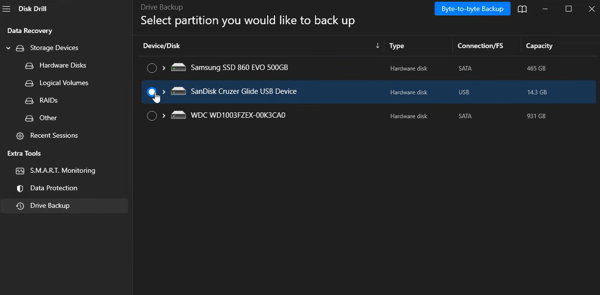
Disk Drill is one of the leading data recovery programs that retrieves files from any storage device, including PCs, Macs, hard disk drives (HDDs), solid-state drives (SSDs), memory cards, Android devices, iPhones, and even digital cameras. It supports hundreds of different file types, including all of the popular video, audio, photo, and document formats.
Disk Drill’s free version recovers up to 500 MB of data. An upgrade costs $89 for a lifetime license. While users find the basic version quite useful, subscribers to the paid version have raised concerns about its inability to retrieve data from PCs with SSDs and about poor customer service.
Pros and cons of Disk Drill: My take
| Pros of Disk Drill |
Cons of Disk Drill |
| Recovers files from many device types and storage media |
Some paid users report issues recovering data on Macs with SSDs
|
| Supports hundreds of file types |
Customer service concerns noted by some users
|
| Free version allows up to 500 MB recovery |
Paid version concerns raised in reviews
|
What G2 users like about Disk Drill:
"No data recovery software was showing my Fujifilm.RAF files...But Disk Drill really drilled out all my data. Totally worth it."
- Disk Drill review, Himanshu C.
What G2 users dislike about Disk Drill:
"The product's recovery system doesn't work on our MAC. We fully tested the basic version, and it failed to find any deleted files. We purchased the Pro version. It never found any deleted files. After numerous emails with support and hours of testing, they dropped the bomb on us: it doesn't work on Macs with SSDs. While customer service makes an effort to help, they seem bothered and defensive of the product. There's more effort to remind you that the product is non-refundable than there is to help. To summarize: For us, the product failed at its one job: recovery."
- Disk Drill review, Michael G.
2. EaseUS Data Recovery: Best for beginner-friendly recovery workflows
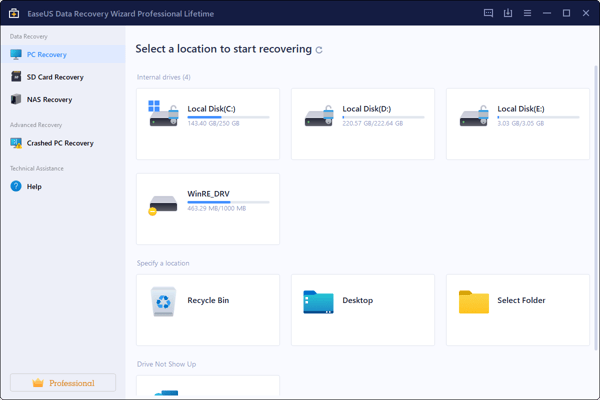
EaseUS Data Recovery is a dependable data recovery tool that’s known for its user-friendly interface. It supports a comprehensive range of file formats. The software’s intuitive scanning options make it a suitable solution for users of all technical levels. EaseUS offers free and paid versions, with the paid editions unlocking more advanced features. The free version of EaseUS recovers up to 2GB of data.
Pros and cons of EaseUS Data Recovery: My take
Pros of EaseUS Data Recovery
|
Cons of EaseUS Data Recovery
|
| User-friendly interface and intuitive scanning |
Some users report false positives or recovered files being corrupted
|
| Works across many file formats |
Recovery results may vary by scenario
|
| Free recovery up to 2GB |
Advanced features require paid versions
|
What G2 users like about EaseUS Data Recovery:
"It's super intuitive software, very easy to use, and you can recover your data fast from almost any situation and device. I've used it before with SD and MicroSD, and it's very effective."
- EaseUS Data Recovery review, Alex F.
What G2 users dislike about EaseUS Data Recovery:
"Sometimes other software work efficiently, but this creates false positives in terms of files recovered, and the word files recovered were corrupted."
- EaseUS Data Recovery review, Bala K.
3. IObit Undelete: Best for completely free Windows file recovery
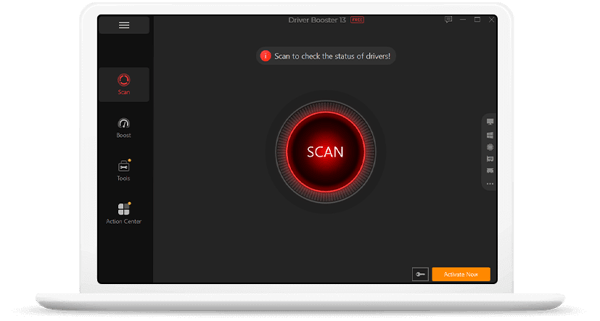
IObit Undelete, as the name suggests, gets back deleted and lost files on Windows devices. The software is very easy to use and shows the chances of retrieving a file before you can attempt a recovery, depending on whether the file has been overwritten or corrupted. The best part? IObit is completely free.
Pros and cons of IObit Undelete: My take
|
|
|
| Completely free |
Recovery condition reporting can be inconsistent
|
| Portable and easy to use |
Recovered files may still be erroneous in some cases
|
| Shows recovery likelihood before attempting recovery |
Windows-only |
What G2 users like about IObit Undelete:
First of all, there is the ease of use. It is downloaded as portable software. Thus, no installations are needed - it's almost like what we call plug-and-play. The user interface is easily navigable, making it very easy to use. It is fast, making the file recovery process quicker. It does not consume too much memory. Also, to add on, this is a free tool."
- IObit Undelete review, Kengeorge M.
What G2 users dislike about IObit Undelete:
"I think there is a bit of inconsistency at times when it reports the file in excellent condition. Because when it is recovered, the file is erroneous or simply no longer exists."
- IObit Undelete review, Jose S.
4. iReparo for Android: Best for recovering Android phone data
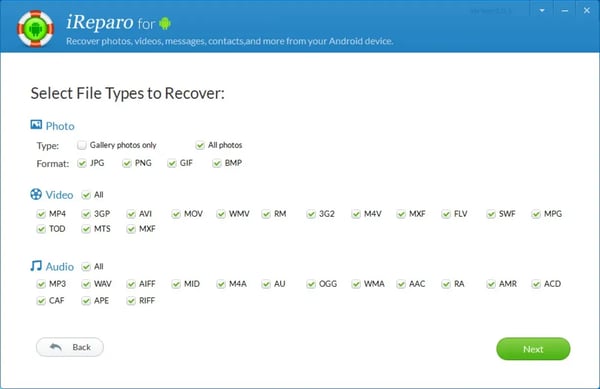
If you are looking for a data recovery tool for your Android phones, then iReparo for Android is the perfect solution. The tool recovers photos, videos, contacts, text messages, and even call history from your device. Whether you broke your phone's screen or accidentally deleted files, you simply have to connect the phone to a computer (Windows or Mac) via USB and run the program. The application offers a free version that scans and displays previews of recoverable files. But complete file recovery requires a license that costs $49.95 or $99.99, depending on the number of devices you want to use it for.
Pros and cons of iReparo for Android: My take
Pros of iReparo for Android
|
Cons of iReparo for Android
|
| Recovers multiple Android data types (photos, messages, contacts) |
Cannot restore the database directly to the phone per user feedback
|
| Recognizes devices quickly and allows file-type selection |
Full recovery requires a paid license
|
| Free scan + preview available |
Requires connecting phone to a computer via USB
|
What G2 users like about iReparo for Android:
"Not much technical knowledge is required to use it. Recognizes devices almost immediately. We can choose which types of files to scan and preview the files found. The scanning is comparatively faster."
- iReparo for Android review, Anil K.
What G2 users dislike about iReparo for Android:
"The only downside of this tool is that we cannot restore the database directly to the phone, and none of the apps currently support the function of direct restoration to the phone."
- iReparo for Android review, Aditya P.
5. Kernel: Best for straightforward recovery with a free trial option
Kernel is a lesser-known data recovery software for Windows and Mac, with numerous positive user reviews for its ease of use. It offers a free trial. The price of one-year licenses ranges from $49 to $199, depending on factors like the number of devices.
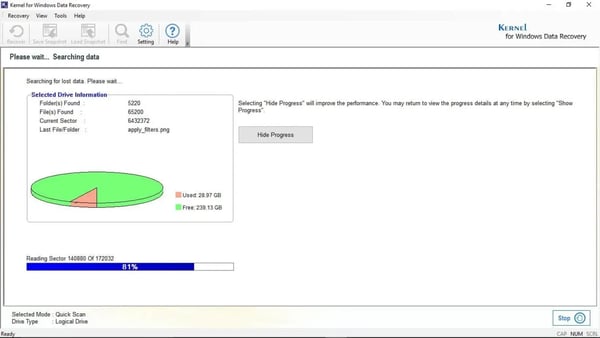
Pros and cons of Kernel: My take
| Pros of Kernel |
Cons of Kernel |
| Positive feedback for ease of use |
A little expertise may be needed to use effectively
|
| Free trial available |
Paid licensing required for full use
|
| Works across Windows and Mac |
Pricing depends on device/license needs
|
What G2 users like about Kernel:
"The most likely feature of this software is that you could come up with your deleted data right from nowhere on your desktop. And believe me, it could save your job at any point."
- Kernel review, Rose M.
What G2 users dislike about Kernel:
"You have to get a basic understanding of how it works before using it, as a little bit of expertise is needed."
- Kernel review, Devesh G.
6. MiniTool Power Data Recovery: Best for multiple recovery modes
MiniTool Power Data Recovery, like EaseUS and Disk Drill, can perform a deep scan of your computer or various storage devices and recover 100+ types of files lost due to human error or system crashes. It offers multiple recovery modes, including recovery from deleted files, damaged partitions, and lost partitions. MiniTool offers free data recovery of up to 1 GB. It's a paid monthly subscription that costs $69 per month, and the perpetual license $99.
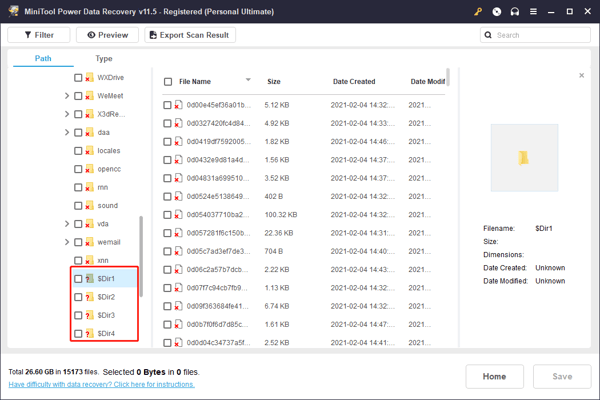
Pros and cons of MiniTool Power Data Recovery: My take
Pros of MiniTool Power Data Recovery
|
Cons of MiniTool Power Data Recovery
|
| Multiple recovery modes (deleted, damaged partition, lost partition) |
UI cannot be minimized per user feedback
|
| Supports 100+ file types |
Recovery process can be slow
|
| Free recovery up to 1GB |
Can occupy the full desktop during use
|
What G2 users like about MiniTool Power Data Recovery:
"Approximately two or three years ago, we had a hard disk (file server disk) that had bad sectors, and Windows couldn't identify it. We could not copy files due to i/o errors. But as a last chance, we tried Minitool data recovery. It recovered 70% - 75% of the data."
- MiniTool Power Data Recovery review, Cihat Okan A.
What G2 users dislike about MiniTool Power Data Recovery:
"The user interface can not be minimized, so it occupies the entire desktop screen making it impossible to do different tasks at once. Finally, the recovery process is slow in excess, not allowing it to perform different activities on the computer."
- MiniTool Power Data Recovery review, Jose S.
7. Puran File Recovery: Best for free Windows recovery on older systems
Puran File Recovery is another lesser-known data recovery tool that is completely free. However, the tool looks a bit outdated and hasn’t been updated in recent years. Another drawback is that it is available only for Windows systems.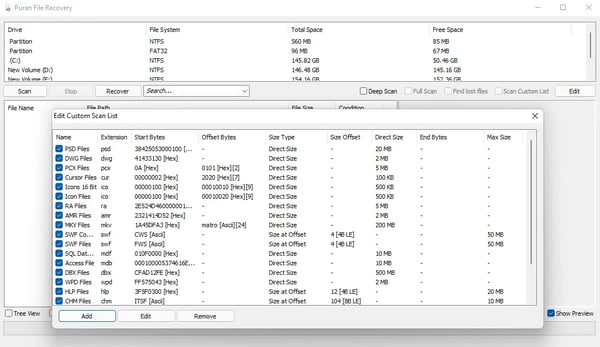
Pros and cons of Puran File Recovery: My take
Pros of Puran File Recovery
|
Cons of Puran File Recovery
|
| Completely free |
Outdated interface and not updated in years
|
| Can restore files to their original location |
Deep scans can take 5–6 hours per user feedback
|
| User-friendly interface (per reviews) |
Windows-only |
What G2 users like about Puran File Recovery:
"It has a user-friendly interface. It's free to download on the internet. Been using it on Windows 8, and has been working perfectly for me. It restores the lost files that you are recovering back to their original location hence making it easy to identify specific files out of the batch that might have been recovered."
- Puran File Recovery review, Carol P.
What G2 users dislike about Puran File Recovery:
"I have tried to run deep scans, but it may take around 5 or 6 hours, and the truth is it is not so effective. In the end, it shows almost the same files as the fast scan, which makes me doubt its scanning application."
- Puran File Recovery review, Ramiro. S
8. RS Photo Recovery: Best for recovering lost photos from damaged storage
Lost your favorite vacation photos and now want them back? RS Photo Recovery does it in a few clicks. The tool extracts photos from corrupted, inaccessible, and damaged memory cards and disks and supports all photo formats, like .raw, .jpg, .png, .psd, and more. The free version lets you assess the possibility of recovering data by displaying the contents of recoverable files. However, you need to buy the paid version to save the files on your chosen device, which costs $18.95 for a single-device license.
Pros and cons of RS Photo Recovery: My take
Pros of RS Photo Recovery
|
Cons of RS Photo Recovery
|
| Specialized for photo recovery across many formats |
Demo may not allow restoring files without purchase
|
| Simple, intuitive interface |
Uncertainty around recovering certain formats noted by users
|
| Helps assess recoverability via preview |
Requires paid version to save recovered files
|
What G2 users like about RS Photo Recovery:
"Simple interface, very intuitive, very easy to use for someone not PC-knowledgeable."
- RS Photo Recovery review, Andrei M.
What G2 users dislike about RS Photo Recovery:
"It seems to me that the demo version they offer, although it perfectly locates the files that can be recovered, does not allow you to restore them, so we are in the same initial situation. Also not sure that it will recover photos in .png format."
- RS Photo Recovery review, Abas Susana C.
9. TestDisk: Best for advanced users who want open-source recovery
TestDisk is a powerful data recovery software designed to get back recover disk partitions or files from non-booting disks. It's open source and compatible with popular operating systems (OS) like Windows, Linux, and macOS. TestDisk is completely free. However, since it’s run via a command-line interface, beginners will have difficulty using it.
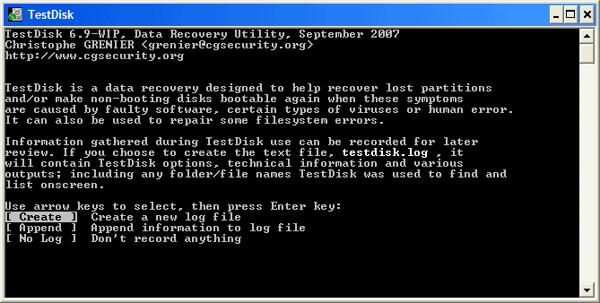
Pros and cons of TestDisk: My take
| Pros of TestDisk |
Cons of TestDisk |
| Completely free and open source |
Command-line interface can be difficult for beginners
|
| Works across Windows, Linux, and MacOS |
May not recover data if it has been wiped (per user feedback)
|
| Useful for partition recovery and non-booting disks |
Requires familiarity with CLI tools
|
What G2 users like about TestDisk:
"Recovery of lost data or lost partition process is quick and very easy. I can also restore files from NTFS and FAT filesystems."
- TestDisk review, Ridham S.
What G2 users dislike about TestDisk:
"It might be challenging for individuals unfamiliar with command-line interfaces to use.TestDisk might not be able to recover your data if it has been wiped."
- TestDisk review, Himanshu P.
10. Veeam Data Platform: Best for backup + recovery with enterprise-grade security
Veeam Data Platform is a comprehensive solution for data recovery and backup. It prioritizes multi-layered security for reliable, secure, and flexible data protection. The platform supports built-in encryption, multi-factor authentication, and immutable backups for a well-rounded, secure environment, both on-premises and in the cloud. Veeam Data Platform offers a 30-day free trial with full functionality.
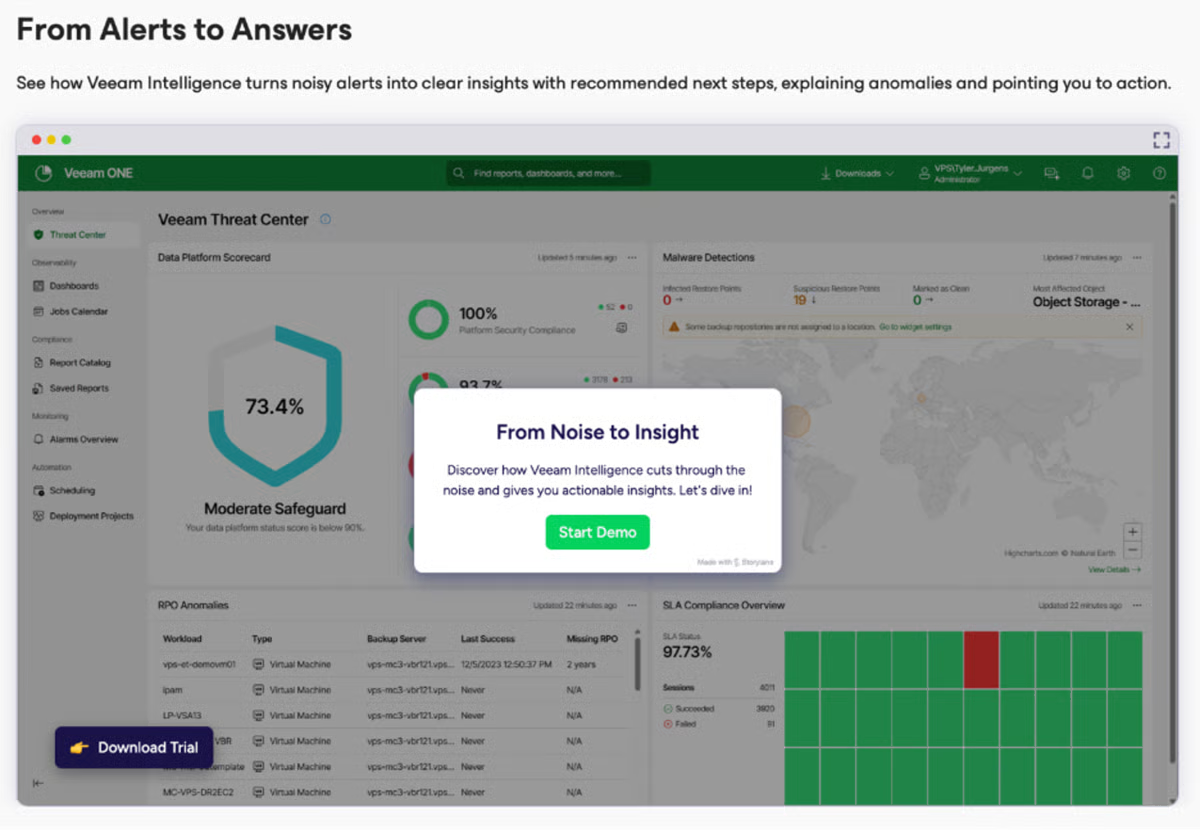
Pros and cons of Veeam Data Platform: My take
Pros of Veeam Data Platform
|
Cons of Veeam Data Platform
|
| Backup + recovery in one platform |
Requires hands-on configuration and administration
|
| Strong security controls (encryption, MFA, immutable backups) |
Not “set it and forget it,” per user feedback
|
| 30-day full-functionality trial |
Misconfiguration can expose performance/security risks
|
What G2 users like about Veeam Data Platform:
"Veeam proves to be an excellent tool for backup and recovery, addressing the critical challenge of ensuring downtime-free recovery for applications and databases in the deployed environments. It excels in fulfilling the backup needs of a customer's infrastructure, offering a comprehensive solution that ensures data integrity and recoverability."
- Veeam Data Platform review, Muhammad Ahsan S.
What G2 users dislike about Veeam Data Platform:
"Veeam requires configuration and a bit more hands-on management and administration because it's such an open and flexible platform. It's not set it and forget it, so if it's not set up correctly, you can expose yourself to risks from ransomware and hacking to poor performance."
- Veeam Data Platform review, Raymond M.
11. Wondershare Recoverit: Best for guided recovery for everyday users
Wondershare Recoverit is a handy tool for those seeking an easy way to recover accidentally deleted, lost, or inaccessible files. It supports 1000+ file formats, different storage devices, and aids recovery from different data loss scenarios. The tool helps recover up to 100 MB of data for free and offers a free trial. The cost of paid licenses for individuals ranges from $69.99 per year to $169.99, depending on the Windows or Mac version, the number of devices, and other features.
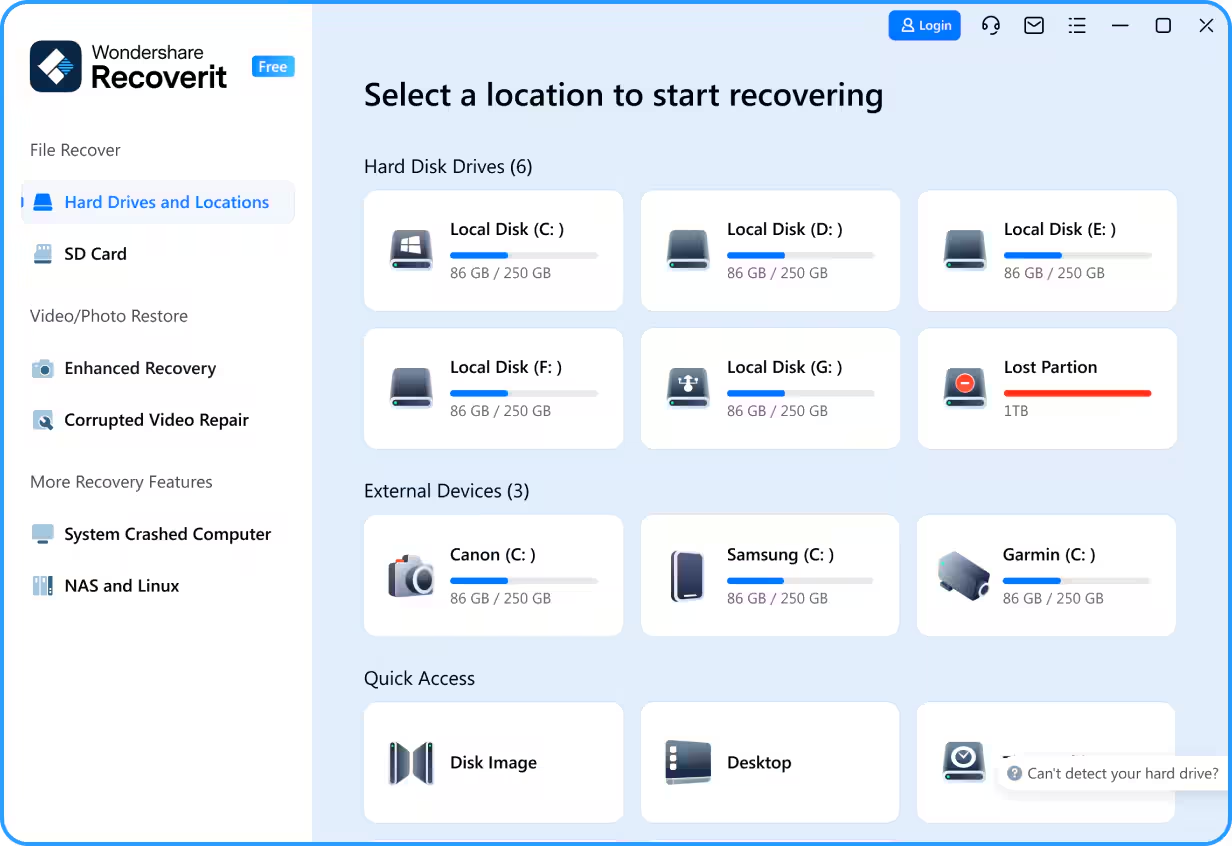
Pros and cons of Wondershare Recoverit: My take
Pros of Wondershare Recoverit
|
Cons of Wondershare Recoverit
|
| Guided workflow and easy instructions |
Pricing seen as higher than alternatives (per user)
|
| Supports 1000+ file formats and many devices |
The free version recovers only up to 100MB
|
| Effective for common recovery scenarios |
Free limitations may require an upgrade quickly
|
What G2 users like about Wondershare Recoverit:
"I like that the software is designed with quick scanning algorithms and can handle various types of files and storage devices. This makes it easy to use and highly effective. The series of instructions guides users through the recovery process if they have limited technical knowledge."
- Wondershare Recoverit review, Matthew D.
What G2 users dislike about Wondershare Recoverit:
"The thing I dislike most about Wondershare Recoverit is its pricing. It is more expensive than other data recovery software on the market. Additionally, the free version has limitations in terms of the amount of data that can be recovered, which is much less."
- Wondershare Recoverit review, Parampreet S.
Frequently asked questions about free data recovery software
Q. Which free data recovery software is best for beginners?
If you want a tool that feels straightforward from the start, EaseUS Data Recovery is a strong option thanks to its user-friendly interface and intuitive scanning options. If you prefer a guided, step-by-step experience, Wondershare Recoverit is another option that walks users through recovery with clear prompts and instructions.
Q. What’s the best free option for recovering photos and media files?
If your main goal is recovering photos from memory cards or damaged storage, RS Photo Recovery is purpose-built for photo formats and helps you preview what’s recoverable. If you need broader media recovery across different file types and devices, Disk Drill is a good fit because it supports hundreds of formats.
Q. Is there a completely free data recovery software option?
Yes. IObit Undelete, Puran File Recovery, and TestDisk are completely free options. The tradeoff is that some tools may feel more limited or dated (like Puran), while others require more technical comfort (TestDisk uses a command-line interface).
Q. Can free data recovery software help if my drive is failing or corrupted?
Sometimes, yes, but results vary depending on the severity of the damage and whether the lost data has been overwritten. For general recovery across common failure scenarios, tools like Disk Drill and MiniTool Power Data Recovery are often used for deep scans and different recovery modes. If you’re looking beyond a one-time recovery and want stronger ongoing protection, Veeam Data Platform is designed for backup and recovery workflows (with a 30-day full-feature trial).
Q. What should I do if a free tool can find my files but won’t let me save them?
That’s a common freemium limitation. For example, iReparo for Android provides free scanning and previews, but requires a paid license to complete recovery. If you’re hitting recovery caps (like Wondershare Recoverit’s 100 MB free limit), it can help to compare free limits across tools. EaseUS Data Recovery (up to 2 GB) or MiniTool Power Data Recovery (up to 1 GB) may be better options to try before upgrading.
Q. Which free data recovery software is best for Windows users who want something lightweight?
If you want a simple tool that doesn’t feel heavy or complicated, IObit Undelete is a great option because it’s completely free, portable, and easy to run on Windows.
Q. What’s the best free data recovery tool for recovering data from an Android phone?
If your data loss happened on an Android device and you need to recover contacts, messages, photos, or call history, iReparo for Android is designed specifically for Android recovery workflows and lets you scan and preview recoverable files for free.
Find your knight in shining armor
From deleted photos to misplaced documents, these data recovery software are ready to rescue you and your files. Review the list, choose the one that matches your device and recovery scenario, and get your treasured work back.
That said, your best recovery plan is the one you never have to use. If you’re recovering data more than once, it may be time to build a stronger safety net with automated backups and version history.
While data recovery is crucial, prevention is equally important. Explore the best backup software to protect your files before the next “oops” moment happens.
This article was originally published in 2024. It has been updated with new information.








.png)