

Keeping up with the growing demands of data analysis and reporting isn’t easy. I’ve seen teams struggle with endless spreadsheets, disconnected data sources, and the pressure to transform raw numbers into clear insights quickly. When data starts to feel complex, effective visualization and analysis become essential, and that’s where free analytics platforms can make a real difference.
The challenge is that many analytics tools come with high price tags that not every team can afford. I know firsthand that investing in advanced BI platforms isn’t always realistic, especially when the goal is simply to streamline reporting or understand everyday performance metrics.
That’s why I explored a range of free analytics platforms and dashboard software that help transform complex data into intuitive, visual insights, without adding to your expenses. These tools make it easier to analyze trends, track KPIs, and cut down the time spent on manual reporting.

In this guide, I’ll walk you through the best free dashboard solutions available today, sharing feature highlights, real user feedback, and practical pros and cons to help you choose the right platform for your data needs.
* The software list is arranged alphabetically. These tools offer free trials, free forever options, or freemium models.
If you feel overwhelmed by the wealth of information about free data dashboard software, this comparison table will help you with all the significant aspects:
| Best free dashboard software | G2 Rating | Free plan | Paid plan |
| Alteryx | 4.6/5 ⭐️ | A free trial is available (for desktop and cloud) | $250/user/month |
| Amazon QuickSight | 4.3/5 ⭐️ | 30-day free trial | Starting at $24/user/month |
| Domo | 4.3/5 ⭐️ | 30-day free trial | Custom pricing |
| Looker | 4.4/5 ⭐️ | Available to use for free | Custom pricing |
| Microsoft Power BI | 4.5/5 ⭐️ | Available with limited features | Starting at $10/user/month |
| Qlik Sense | 4.4/5 ⭐️ | 30-day free trial | Starting at $200/month |
| Sigma | 4.4/5 ⭐️ | A free trial is available | Custom pricing |
| Sisense | 4.2/5 ⭐️ | 7-day free trial | Custom pricing |
| Strategy One | 4.2/5 ⭐️ | 30-day free trial | $13/user/month |
| Tableau | 4.4/5 ⭐️ | A free trial is available | $15/user/month |
*All pricing details mentioned in the article are based on publicly available data at the time of publication and are subject to change.
Related: If your needs extend beyond dashboards to client reports, infographics, presentations, and spreadsheet-based reporting, compare the best free data visualization tools.
The demand for dashboard software continues to grow as teams rely more on data to track performance, spot trends, and make faster decisions. From marketing and sales to product and operations, dashboards have become a central way to turn raw data into clear, actionable insights.
As businesses generate more data across various tools and platforms, the need for intuitive and flexible dashboard solutions has increased significantly. These tools help teams visualize key metrics, monitor progress in real time, and share insights without relying on complex reports or spreadsheets.
From my experience, “best” doesn’t always mean “paid.” Some free dashboard software I’ve used has delivered impressive capabilities, allowing me to build interactive dashboards, connect multiple data sources, and create meaningful visualizations without a heavy investment.
That’s why I’ve curated this list of the best free dashboard software I recommend. Each option offers a practical way to explore dashboarding fundamentals, understand where a tool shines, and decide whether upgrading makes sense as your data needs grow.
To build this list, I started with G2 Data, shortlisting top-rated tools based on their G2 scores and consistent performance in the dashboard software category.
From there, I reviewed product capabilities and recent, verified user feedback to confirm that these tools deliver practical value and to understand where each one stands out, whether that’s data visualization quality, ease of integration, customization options, or real-time reporting.
The goal was simple: to see whether these dashboard tools live up to their claims, what each one is best suited for, and whether there’s a free version or free trial you can try with minimal risk. Because this is a free-focused list, I paid close attention to what you can actually do without paying, such as the number of dashboards you can create, data source limits, refresh frequency, and feature restrictions that might require an upgrade.
The screenshots featured in this article may be a mix of those taken from the vendor’s G2 page or from publicly available materials.
The list below contains real user reviews from the best free analytics software category pages. It’s important to note that in the context of this list, vendors offering a free trial are also considered free. To be included in this category, a solution must:
* This data was pulled from G2 in 2025. Some reviews may have been edited for clarity.
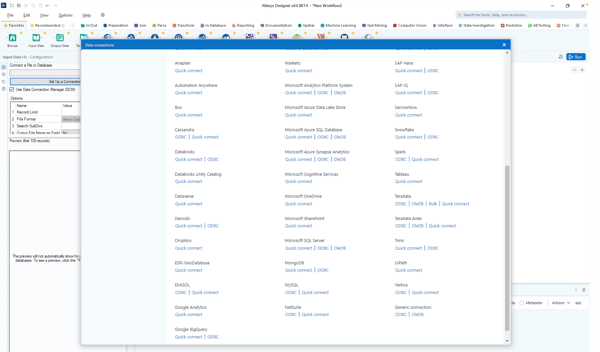
Alteryx is a data analytics platform known for its ability to prepare, blend, and analyze data from various sources. It offers an intuitive, drag-and-drop interface that simplifies the complex process of data preparation and analytics, making it accessible to both technical and non-technical users. According to G2 Data, it ranks as the 3rd easiest to use tool.
Alteryx has a free trial for both desktop and cloud infrastructure and offers community support.
| Pros of Alteryx | Cons of Alteryx |
| Provides free learning resources and tutorials | May need business intelligence tool integrations for advanced visualization needs |
| Simplifies data preparation and analytics with an easy-to-use interface. | Requires substantial system resources for optimal performance |
| Offers strong community support and resources, even to free users | Premium plans may get expensive for small businesses and individual users |
“I really appreciate Alteryx for its user interface, which allows me to easily create workflows without having to code. It works seamlessly with data sources, giving me access to analytics tools for predictive and spatial analysis, along with data cleaning capabilities. The automation feature simplifies tasks, making data processing more consistent and efficient. Additionally, the vibrant Alteryx Community offers templates and advice, which makes learning a breeze. What's great is that it can handle both datasets and big data, catering perfectly to my data requirements.”
- Alteryx Review, Leandro L.
“One of the drawbacks is the presence of some bugs accompanying version upgrades. Because of this, I hesitate to adopt the latest version immediately. However, in most cases, these issues are resolved through patches, so it's not a serious concern. Furthermore, bugs are often linked to Alteryx, as it continuously releases new tools and features. In that sense, it's not necessarily negative and can be seen as beneficial for users in the long term.”
- Alteryx Review, Ippei N.
Want more advanced charts and deeper visual storytelling? Explore the best data visualization software to go beyond basic dashboards and uncover richer insights.
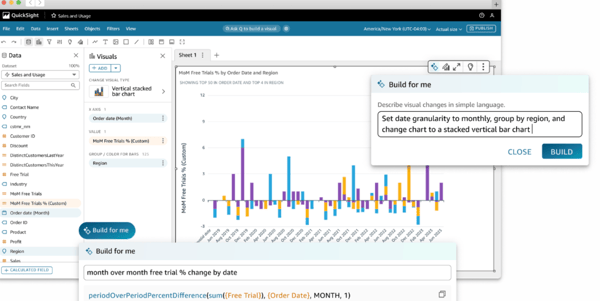
Amazon QuickSight is a cloud-powered business intelligence service from Amazon Web Services (AWS) designed to deliver fast and easy-to-understand insights through interactive dashboards. It uses machine learning to offer predictive analytics, making it perfect for data-driven organizations looking to gain actionable insights.
The platform is available for free for 30 days for up to 4 users per account.
| Pros of Amazon QuickSight | Cons of Amazon QuickSight |
| Integrates effortlessly with other AWS platforms | Exporting dashboards and reports may be more clunky than other platforms |
| Highly scalable and grows with your data needs | Depending on the location, there may be slight data latency issues |
| Uses ML to provide predictive analytics and uncover hidden data patterns | Advanced customization features may be limited for some use cases |
“I like Amazon Quicksight the best because it is easy to use. I can also integrate easily with my products. There are many features I can use that are helpful for my company. It is easy to implement and integrate. Finally, customer support is beneficial.”
- Amazon QuickSight Review, Abanob M.
“Advanced functionality in the dashboard is pretty limited. There is an equivalent to Dax, but in comparison, it's much more limited. The error message it gives you sometimes looks like SQL syntax and references nested case statements, which makes me think the function has been converted to some sort of simple SQL function behind the scenes. We don't need to do many advanced calculations in our datasets, but even then, I have run into things that just can't be done.”
- Amazon QuickSight Review, Abhishika M.
Tracking metrics is only half the job, execution matters too. See the best project management software to turn dashboard insights into actionable workflows.
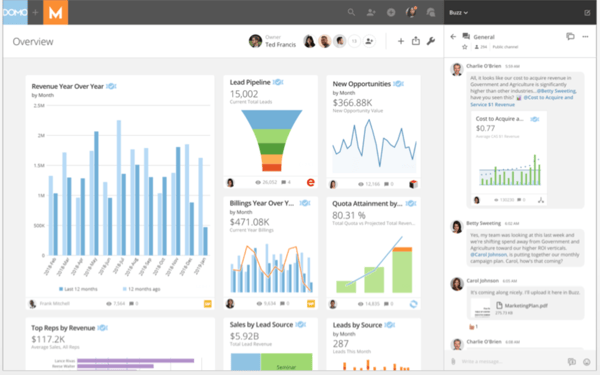
Domo is a cloud-based business intelligence platform with a comprehensive range of data visualization and reporting tools. It’s known for its scalability and integrates various data sources to create customizable and interactive visualizations. Domo makes data accessible to technical and non-technical users, driving collaborative decision-making.
The free tool is available to test out for 30 days with full access to all features and unlimited business users.
| Pros of Domo | Cons of Domo |
| The cloud-based architecture is easy to scale up | Limited offline functionality, like other cloud-based tools |
| Offers real-time data analytics, supporting timely decisions | The initial setup and data integration processes can be complex |
| Has a mobile app for on-the-go functionality | Pre-built customizations are somewhat limited |
“I love that Domo is easily able to go with whatever my needs are. If I need to filter, sort through my company's many warehouses and locations, or upload a CSV to NetSuite, the process is very simple yet effective. Domo was very easy to implement across all departments in our company - Operations, Finance, and Sales- and all use the system equally daily. The frequent use allows us to catch small mistakes or errors and quickly correct them for our customers.”
- Domo Review, Myishia M.
“Sometimes, obvious enhancements would make life easier in the system, such as being able to sort preview results. The chart properties layout isn't always intuitive, either; there are so many options that it becomes hard to know where to find certain options.”
- Domo Review, Katja R.
If your dashboards focus on campaign performance, traffic, or conversions, take it further with the best marketing analytics tools for deeper attribution and ROI tracking.
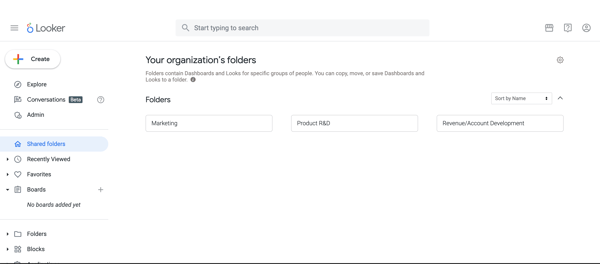
Looker is a robust analytics platform with its modern, cloud-based architecture designed to optimize data exploration and reporting. The software lets users transform complex datasets into actionable insights through customizable, interactive dashboards. Looker's data modeling layer, LookML, allows users to create personalized reports. Based on G2 Data, Looker sees the strongest adoption in the mid-market, with 61% of its users coming from this segment.
Looker Studio is available at no charge for creators and report viewers.
| Pros of Looker | Cons of Looker |
| Has a clean, easy-to-use interface, making it easy to create reports and build dashboards | Creating advanced data models and queries may require a good understanding of SQL |
| Offers highly customizable dashboard designs that can be tailored to user needs | Works on a cloud-based model, which means offline support is minimal |
| Offers excellent integration capabilities with other Google services | The range of built-in visualization options may be limited |
“Everything is free and user-friendly in the Google Data Studio, which allows users to create customized dashboards. Looker Studio offers work on both real-time and dummy data. It collaborates with many data sources and creates fantastic reports. One of my best things is to apply filters to sort out data within seconds.”
- Looker Review, Muhammad M.
“Looker has a limited number of graphs and chart visualizations available, so customizations are limited to a certain level. Also, there's very little control over data refreshes, which can sometimes slow the dashboard when working with a lot of data.”
- Looker Review, Mariam J.
Dashboards show what’s happening, prediction shows what’s next. See the best predictive analytics tools to turn your reports into forward-looking insights.
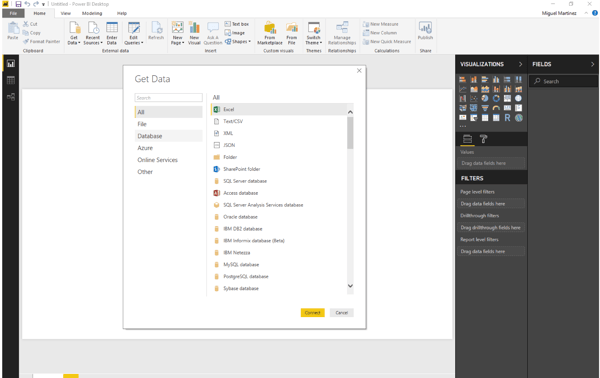
Microsoft Power BI is a leading analytics software that transforms complex data into interactive, easy-to-understand reports and dashboards. Integrated within the Microsoft ecosystem, Power BI enables users to connect to various data sources seamlessly and provides robust tools for data modeling, visualization, and sharing insights across organizations. According to G2 Data, it ranks as the 2nd easiest to use tool.
The free plan is included with a Microsoft Fabric free account for creating rich and interactive reports and dashboards.
| Pros of Microsoft Power BI | Cons of Microsoft Power BI |
| Simplifies the data visualization process with its intuitive drag-and-drop features | Dependent on an internet connection for lag-free functionality |
| Continuously updated with new features and improvements | Limited customization options compared to business dashboard software |
| Integrates effortlessly with other Microsoft products like Excel and Azure | Performance constraints with vast datasets and complex queries |
“Power BI has a user-friendly interface, powerful visualization capabilities, and the drag & drop feature. The most helpful feature is Power Query's robust data modeling and transformation tools, which streamline data cleaning and automation.”
- Microsoft Power BI Review, Ranjan K.
“Power BI offers many powerful features, but its wide range of functionalities can make the initial learning challenging, especially for users with limited experience in data analysis and visualization tools. Improving the user onboarding process and documentation could help facilitate the adaptation.”
- Microsoft Power BI Review, Erik F.
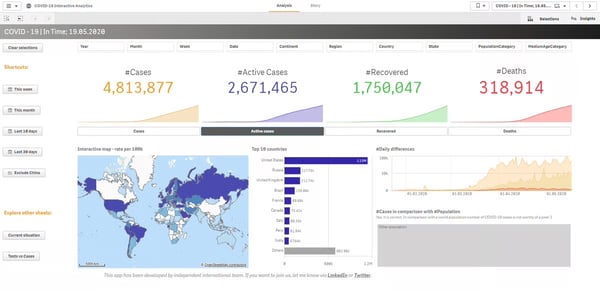
Qlik Sense is a recognized analytics and business intelligence tool designed to help organizations derive actionable insights from their data. With its unique associative data model, Qlik Sense facilitates highly interactive and visually appealing dashboards that allow users to explore data freely and uncover hidden relationships.
There’s a free trial available for 30 days for all new users.
| Pros of Qlik Sense | Cons of Qlik Sense |
| Uses AI to help uncover hidden insights and patterns | Faces performance bottlenecks with large data sets |
| Suitable for organizations of all sizes | Advanced features are locked behind paid versions |
| Integrates with various data sources, both on-premise and cloud | Has a steep learning curve for beginners |
“It has been a powerful tool where we can connect to the data source so that it returns information and data that is analyzed more quickly to generate more detailed reports more easily. I like its ease of use from the start without having an extensive learning curve.”
- Qlik Sense Review, Steven M.
“The three main points on which the tool can be improved are undoubtedly: to allow a greater possibility of native customization, to allow fewer links to scripting and more wizards, and finally to provide certified and officially maintained extensions.”
- Qlik Sense Review, Filippo O.
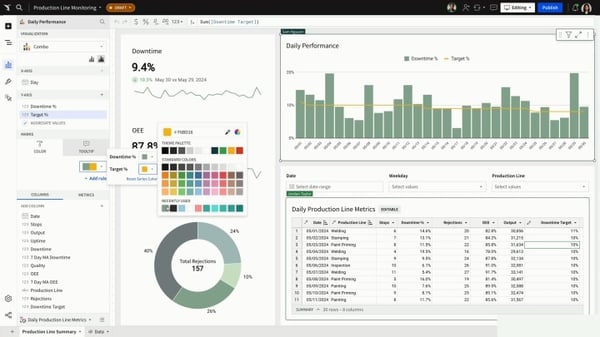
Sigma empowers businesses to explore and analyze data directly and intuitively. With its spreadsheet-like interface, Sigma makes data analytics accessible to users of all technical backgrounds, facilitating collaborative data exploration and dashboard creation. According to G2 Data, it ranks as the 5th easiest to use tool.
New users can enjoy Sigma’s free trial without any commitment.
| Pros of Sigma | Cons of Sigma |
| Allows for real-time data analysis and visualization | Requires an internet connection for full functionality |
| Offers the full power of no-code SQL | The range of visualization techniques may be less extensive for power users |
| Highly scalable and accessible, as it is fully cloud-based | Offers fewer advanced customization options compared to other dashboard tools |
“What I enjoy most about Sigma is that it has the ability to make you feel as though you are in a spreadsheet while having access to warehouse-sized amounts of data. On a day-to-day basis, this is where I go to slice and dice metrics, check for trends, and quickly develop views that my teammates can utilize without reaching out to our data team.”
- Sigma Review, John T.
“There’s very little I dislike, but occasionally I wish there were more customization options for visualizing data directly in the dashboard without exporting. Some advanced visualization tweaks require a bit of extra setup, but overall, it hasn’t slowed me down.”
- Sigma Review, Jordan B.
Sisense is a versatile analytics platform celebrated for its ability to easily handle and visualize large datasets. Its unique in-chip technology accelerates data processing, enabling users to generate real-time insights through customizable and interactive sales dashboards. Sisense is known for making data accessible to all levels of users, from novice to expert.
The platform offers a 30-day free trial, allowing users to explore its features fully and analyze whether it meets their analytics and data visualization needs.
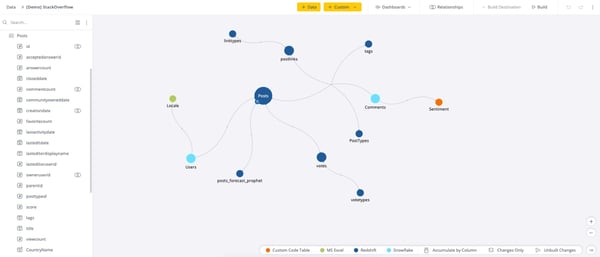
| Pros of Sisense | Cons of Sisense |
| Simplifies data analysis with its intuitive user interface | Initial setup and configuration may get complex |
| Offers a complete solution from data integration to visualization | Can be resource-intensive for maintaining optimal performance |
| Uses in-chip technology for faster data processing | Advanced customizations require in-depth knowledge and experience |
“The options to customize. The ability to edit JavaScript within dashboards and widgets, coupled with BloX, allows for the desired look and feel to be achieved. We're pursuing embedded analytics using Sisense Compose SDK, which puts even further control in the hands of developers to meet our UX requirements.”
- Sisense Review, Andrew G.
“There are so many options for viewing data, including what feels like an unlimited number of dashboards, it's easy to drown yourself in data. Learning to use filters well is crucial for getting the most from Sisense, especially if you're working with a large dataset.”
- Sisense Review, Tim B.
Strategy One, formerly known as MicroStrategy, is a business intelligence platform known for its scalability and comprehensive analytics capabilities. It excels in creating detailed and interactive dashboards that provide deep insights into data, supporting advanced business analytics and data discovery.
MicroStrategy’s 30-day free trial allows users to sign up without any cost and test out all features.
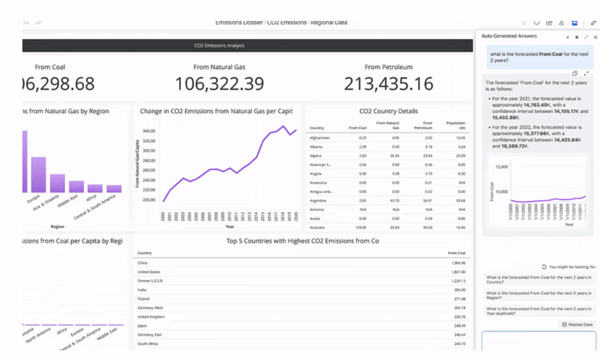
| Pros of Strategy One | Cons of Strategy One |
| Handles large volumes of data efficiently, making it suitable for enterprises | Can be resource-intensive, requiring significant IT infrastructure |
| Offers diverse functionalities like predictive analytics and advanced visualizations | May be less flexible and customizable compared to other modern tools |
| Provides robust data governance and security | Initial setup and configuration can be complex |
“I love the user interface of MicroStrategy; no feature is missing, and the software’s installation was flawless. It has the necessary tools to analyze any internal data, create reports, and perform follow-ups to get excellent data validation. It has no errors in management, and I can compile accurate information bases for my clients or projects. It increases the probability of generating advanced data.”
- Strategy One Review, Elizabeth N.
“The SQL that it generates isn't readily available to see and view like other tools, like Looker. There are some nuances that you have to work through as well, which can be kind of annoying if you don't understand them. The backend can be hard to understand at first.”
- Strategy One Review, Todd G.
Tableau is a highly acclaimed free analytics software known for its powerful data visualization tools and user-friendly interface. Designed to help users make sense of diverse data sets, Tableau excels in transforming raw data into insightful dashboards that drive better decision-making. According to G2 Data, Tableau ranks as the 1st highest-rated solution in its category.
The platform offers a free trial to test features such as creating and sharing visualizations in the cloud, collaborative analysis, and more.
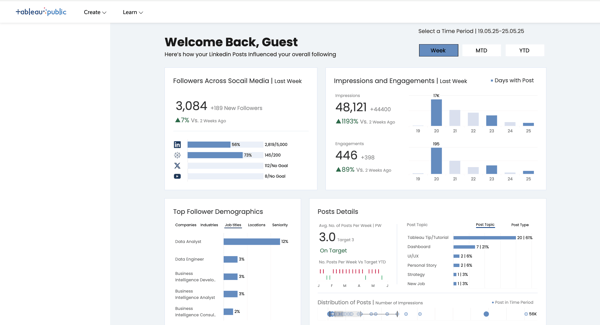
| Pros of Tableau | Cons of Tableau |
| Supports real-time data analysis and detailed reporting | Performance may lag with large data sets |
| Allows to share dashboards via easy exports in multiple formats | Comparatively limited customization compared to other tools |
| Compatibility with various data sources | Has a complex licensing model |
“I like Tableau’s drag-and-drop functionality for creating report charts and visualizations. It also connects to various data sources for visualization and report creation.”
- Tableau Review, Akshay Y.
“When working with large datasets, extracting data and analyzing raw data takes a lot of time. That is the main problem I am having with Tableau.”
- Tableau Review, Sree H.

Have more questions? Find your answers below!
Customization capabilities vary widely among free dashboard tools. While many offer basic customization, such as changing colors, fonts, and graph/chart types, advanced customizations may require paid plans.
Many free dashboard tools are designed for non-technical users, offering drag-and-drop interfaces, pre-built dashboard templates, and guided tutorials. However, ease of use can vary, so consider signing up for a demo or trial to check user-friendliness.
Data security varies by software. Check whether the provider offers robust security measures, such as encryption, user authentication, and compliance with data protection regulations. Also, verify if the software offers granular control over data access to protect sensitive information.
Free dashboard tools are powerful for getting started, but they usually come with trade-offs. Common limitations include caps on data volume, fewer data connectors, limited refresh frequency, restricted sharing or collaboration, and basic visualization options.
For example, Microsoft Power BI (free desktop) allows robust reporting but limits sharing without upgrading. Tableau Public requires dashboards to be publicly accessible, which may not work for private business data. Enterprise platforms like Domo, Sisense, and Strategy One typically offer free trials rather than long-term free plans.
For small teams, the best free dashboard tools balance usability, integrations, and scalability.
These tools allow teams to validate dashboarding needs before committing to paid plans.
Start by identifying what matters most: data sources, ease of use, collaboration, or scalability. If you rely heavily on spreadsheets, Power BI, or Tableau may be a good fit. If you need cloud-based analytics, Amazon QuickSight or Looker (via free trials) can help you evaluate enterprise-grade capabilities.
Also consider whether the free version supports your expected data volume and whether upgrading later will be straightforward.
Yes, but usually with limited connectors.
Free versions often support popular sources like Excel, CSV files, and basic databases. Power BI Free supports local data connections, while Qlik Sense Desktop allows file-based and select database integrations. Advanced integrations (cloud apps, real-time sources, warehouses) are more commonly available in paid plans from tools like Sigma, Sisense, and Looker.
Yes, most free dashboard tools support core data visualization features like bar charts, line graphs, tables, and filters.
Tableau and Power BI stand out here, offering strong visualization capabilities even in their free or desktop versions. Tools like Qlik Sense also provide interactive dashboards, though advanced visual customization is often reserved for paid tiers.
For startups, the best free dashboard software is one that’s easy to adopt and can scale later.
Startups often use free versions to validate metrics before investing in enterprise platforms like Domo or Sigma.
If data is the new oil, having the right visualization tools is indispensable. The free dashboard platforms we’ve explored offer powerful capabilities to transform how you work with data. Start testing them today and discover how they can empower your daily workflows.
We hope this list takes you one step closer to finding the right solution!
Get the best relational databases to connect with your new dashboard and pull real-time structured data for faster decision-making.
Edited by Monishka Agrawal
This article was originally published in 2024. It has been updated with new information.


Recently updatedSummer 2026 Grid® Report · Published May 26, 2026 The 10 best...
 by Soundarya Jayaraman

I’ve spoken with enough data teams to know the pattern: Organizations don’t struggle with...
by Soundarya Jayaraman

I evaluated dozens of products to identify the best data visualization tools for different...
 by Shubham Gupta