.png?width=400&height=150&name=Copy%20of%20G2%20Image%20(1).png)


Are you over the moon when your Uber ride arrives on time? Me too. In my last 28 years, I have never had a compromised experience with my preferred cab rental services. But the caravan doesn't just stop at timely pickups.
Any business, particularly in the logistics or transportation industry, needs the best fleet management software to oversee vehicle operations worldwide.
Their backend teams utilize fleet management software to route expert drivers, run vehicle service operations, navigate safe routes, and ensure timely dispatches or deliveries.
Intrigued by the effort and grit of backend fleet managers, I decided to explore the 7 best fleet management software and features like GPS tracking, driver assignment, distance calculation, and more to assist these businesses in optimizing their transportation and delivery processes.
At a quick glance, the best fleet management software I've selected are Samsara, Motive, Geotab, Fleetio, HCSS, Route4Me, and Azuga Fleet.
These fleet management software are top-rated in their category according to the G2 Summer 2026 Grid® Report. Each product in the list had more than 100 verified G2 reviews. I've also added their monthly pricing to make comparisons easier for you.
As intrigued as I was to learn about how companies manage their logistics and transportation workflows, I was dazed to see that fleet management software provides granular vehicle controls, navigational maps, and service contracts for the fleet of cars, bikes, or other modes of transportation to keep the inner machinery working and give it a facelift to promote branding.
My evaluation also identified additional measures to ensure vehicle optimization, such as appointing a zonal supervisor and establishing warehousing facilities within zones. Having real-time updates on vehicle condition, driving style, and mileage is a crucial linchpin to ensure that your fleet is moving smoothly to its destinations and that drivers are taking good care of the loaded goods and the vehicle's machinery.
It is hence no surprise that a study by Markets and Markets estimated that the fleet management market is projected to reach $70.26 billion by 2030, with a compound annual growth rate of 13.3% over the forecast period.
I went through the latest G2 Grid® report and spent weeks evaluating the various fleet management tools listed there. I evaluated them based on key features like fuel maintenance, GPS tracking, repair scheduling, driver behavior monitoring, and service reporting to shortlist the following tools for your informed decision-making.
During my analysis, I also factored in the key features, pros and cons, pricing, and real-time user reviews from G2 to shortlist common patterns and evaluate real-world data to refine my search parameters.
I consulted a professional with hands-on experience and validated their insights using verified G2 reviews. The screenshots featured in this article may mix those captured during evaluations and those obtained from the vendor's website.
I also remained compliant with the goals and objectives that you seek from fleet management software, such as increased return on investment, fuel efficiency, vehicle tracking, cost analysis, and driver safety to reduce anxiety and include contextual and highly prominent solutions, as per G2's recent grid report.
Apart from me, these tools have been rated as market leaders in the Fleet Management category on G2 and assigned a proprietary G2 score based on consumer satisfaction, market presence, and other influential factors.
Other than maintaining vehicle operations and ensuring fuel efficiency, a fleet management tool also needs to provide services like accident prevention, warehouse management, and passenger safety to channel beyond the conventions of traditional fleet management and improve the perception of the brand.
In my view, I chronicled some must-have fleet management software features that you should definitely tick off as you hit the market with your research process:
My evaluation isn't just limited to one mode of transportation or dispatching process. It is a combination of listing various features for other industries that want to optimize and supervise their fleets more effectively.
Out of the 40+ fleet management tools I initially acknowledged, I shortlisted 7 that are perfect solutions to managing, automating, and digitizing fleet management.
The list below contains genuine reviews from the Fleet Management Software category page. To be included in this category, software must:
*This data was pulled from G2 in 2026. Some reviews may have been edited for clarity.
Want the numbers behind the growing demand for these tools? Review more than 50 fleet management statistics covering market growth, software ROI, operating costs, safety, and emerging technology.
G2 rating: 4.5/5
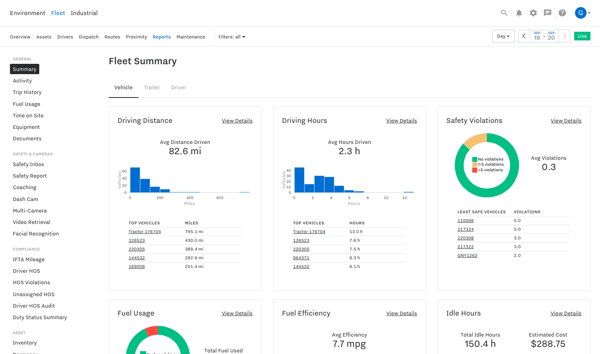
Samsara stands out as a comprehensive fleet management solution that brings vehicle tracking, maintenance alerts, fuel monitoring, and driver reporting into one connected platform. Users often highlight how much easier it is to keep operations organized when everything lives in one place.
I've noticed that many users praise the platform's ease of use, which is rated at 91% by G2 reviewers. The dashboard is considered clean and intuitive, making it easy for both dispatchers and drivers to adapt quickly without much training.
G2 users also seem to appreciate the real-time GPS tracking, with vehicle tracking rated at 96% and driver tracking at 95%. Feedback points to fast, accurate location data that helps fleet managers with dispatching, route confirmation, and answering customer ETA questions on the fly.
Safety is another recurring theme in user feedback. The AI dashcam feature is frequently cited as a standout, with safety rated at 92%, offering high-quality footage that can be reviewed for incident protection or driver coaching.
From the G2 reviews I've read, the driver safety scoring feature also comes up often. Users appreciate being able to share scores directly with drivers, which creates a feedback loop that helps reduce speeding, harsh braking, and distracted driving over time.
Another point that's come up is Samsara's strong integration depth, with ease of setup rated at 90%. Users describe the API as clean and easy to work with, and many mention how well the platform connects with payroll, compliance, and back-office systems.
I've also seen reviewers call out newer additions like AI-powered dispatch support and a weather overlay feature, which several describe as practical tools for logistics-heavy teams planning around conditions on the road.
That said, some G2 users mention that configuring workflows and setting up alerts takes time upfront, especially for teams moving over from older systems. There's a learning curve at the beginning, but reviewers note that the platform's depth tends to pay off once everything is running smoothly.
Notable patterns in G2 reviews also point to the mobile app as an area to watch, with some users mentioning limited offline functionality in low-connectivity areas. For teams working mainly from desktop or in well-connected regions, this tends to be a minor consideration rather than a daily obstacle.
Overall, G2 review data positions Samsara as a strong choice for growing and enterprise fleets that want a unified, data-rich platform for tracking, safety, and operations. Teams that prioritize real-time visibility and driver accountability will find that it delivers consistently.
"I appreciate Samsara's accuracy of the available hours for each driver and the ease of communication. Locating trucks is straightforward, and getting load information, route details, and safety reports is seamless. The hours of service (HOS) feature is crucial for assigning new loads to drivers to ensure timely deliveries. I find the safety reports very helpful in keeping up with speeding, violations, harsh braking, and distracted driving."
- Samsara review, Kimberly S.
"There was definitely a learning curve at the beginning, especially for teams transitioning from older or less advanced systems. The mobile app could also benefit from better offline functionality. In areas with poor connectivity, some features become limited."
- Samsara review, Bavaliya A.
Learn how to control fuel inconsistencies and build good mileage with free mileage tracker apps to optimize budget operations.
G2 rating: 4.4/5
Motive is a comprehensive fleet management platform that lets users monitor vehicles, assets, and equipment from a centralized system. G2 reviewers often highlight its ability to support operational growth at scale.
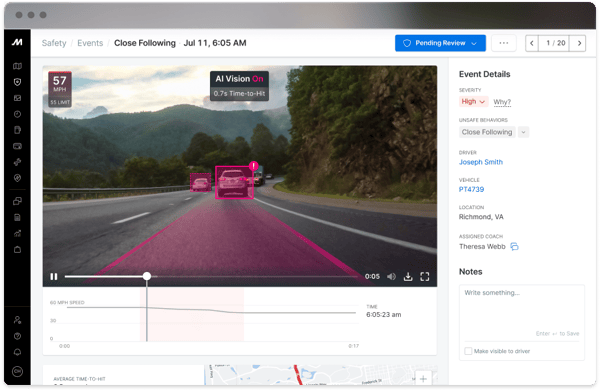
I've noticed that many users praise how Motive brings fleet management, driver safety, and visibility together in one tool. With vehicle tracking rated at 93%, reviewers point to real-time tracking and a user-friendly dashboard as the foundation of that experience.
Another aspect users consistently appreciate is the AI-driven intelligence built into the platform. Reviewers mention being able to pull information and create their own reports through natural language, which several describe as a meaningful time-saver for day-to-day analysis.
From the G2 reviews I've read, installation is frequently described as quick and hassle-free. Users say you don't need an advanced technical background to get started, and ease of setup is rated at 89%, reflecting how smooth the onboarding tends to be.
Compliance is another recurring theme. Users highlight Motive's ELD and driver log management for offering transparency into driver performance and helping teams stay aligned with regulations, all accessible from the compliance tab.
Reviews also suggest Motive does a solid job with driver safety and coaching, with driver tracking rated at 92%. Users mention that real-time alerts and the automatic collision reports generated after an incident have contributed to safer driving habits across their fleets.
The integration with other tools is also a major advantage, especially for users who already rely on it for maintenance tracking. Reviewers find that this connection creates a more unified view of fleet operations.
On the flipside, some G2 users mention that the mobile app doesn't offer the same full access as the desktop version, and a few would like more features built into it. For teams that primarily manage operations from a desktop, this tends to be a minor trade-off rather than a daily limitation.
Notable patterns in G2 reviews also point to occasional camera connectivity issues, with a handful of users mentioning dash cams disconnecting at times. Many reviewers balance this against the strength of Motive's broader safety and AI toolset, which continues to earn consistent praise.
To conclude, G2 sentiment analysis positions Motive as a fast, reliable, and increasingly AI-forward fleet management platform that streamlines operations while keeping teams focused on safety and compliance.
"One of my favorite features in Motive is that it integrates fleet management, driver safety, and visibility within one single tool. This is because Motive provides real-time tracking capabilities, uses artificial intelligence technology for analysis, and offers a user-friendly dashboard."
- Motive review, Vijaysing P.
"I dislike that the mobile app doesn't allow full access like I was using a desktop. I think the mobile app needs to be more user-friendly, with more features to use."
- Motive review, Bethany D.
Want to go deep into the features? Explore our breakdown of 6 Essential Features of a Fleet Management Software covering vehicle tracking, driver safety, route optimization, and fuel management across top-rated tools on G2.
G2 rating: 4.5/5
Geotab is a robust vehicle and telematics platform built for businesses of all sizes to manage fleet operations with greater precision. Beyond core tracking, it supports broader strategies like fuel management, preventive maintenance, and operational compliance.
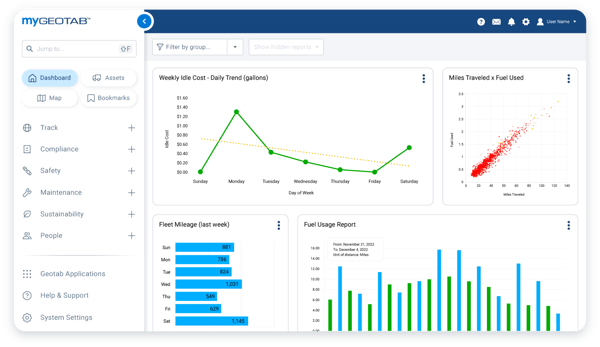
I've noticed that many users praise Geotab's reporting depth. Reviewers describe both the out-of-the-box reports and custom reports as some of the most-used features in their organizations, with several mentioning how they can set a report up once and have it land in their inbox automatically.
G2 users also seem to appreciate the platform's open architecture. The Marketplace add-ons and API-based integrations come up often, with reviewers describing them as powerful tools they rely on regularly to extend what the platform can do.
From the G2 reviews I've read, real-time GPS tracking is another consistent strength, with vehicle tracking rated at 96%. Users mention being able to see every vehicle at a glance, pull up trip history, and spot issues like harsh braking or idling without digging through separate tools.
Safety is a recurring theme as well. With collision detection rated at 95% and driver behavior at 94%, reviewers highlight how the platform monitors speeding and harsh braking while feeding that data back into smarter decision-making.
Something else that stood out? Geotab's role in fuel efficiency and cost reduction. Users mention how analyzing fuel consumption, minimizing idling, and enabling preventive maintenance through early diagnostics have helped them cut operational costs over time.
I've also seen reviewers call out Geotab Ace, the platform's AI reporting enhancement, which several describe as a helpful way to get answers about their data through natural language queries.
That said, some G2 users mention that the interface can feel cluttered at first, and that there's a learning curve for new users navigating the many menus and options. Reviewers note that the depth is what powers the platform, and most teams find their footing once they've spent some time in it.
Notable patterns in G2 reviews also point to report customization taking some trial and error, particularly for highly specific reports. Many users add that the range of reporting available more than makes up for the initial effort once they've built the views they need.
All in all, I feel Geotab is a strong fit for fleets that want deep, customizable reporting and an open platform they can shape around their own systems. Teams that value flexibility and data depth will find that it delivers where it matters most.
"It helps reduce operational costs by analyzing fuel consumption, minimizing idling, and enabling preventive maintenance through early vehicle diagnostics. The platform also improves driver safety by monitoring behaviors such as speeding and harsh braking, while offering advanced data analytics and reporting for smarter decision-making."
- Geotab review, Rigers S.
"My main gripe is that the interface can feel cluttered, and the learning curve is steeper than it needs to be. Finding a specific setting sometimes means digging through several menus, and some of the more advanced reports take trial and error to configure."
- Geotab review, Victor O.
G2 rating: 4.6/5
Fleetio is a fleet maintenance platform that helps teams manage service history, fuel, inspections, and asset costs from a single connected system. G2 reviewers often highlight how well it keeps maintenance organized without much manual effort.
I've noticed that many users praise Fleetio's ease of use, which is rated at 92% by G2 reviewers. The platform is described as intuitive enough that teams can get up and running quickly, and once it's set up, it doesn't demand constant attention to keep running.
G2 users also seem to appreciate the maintenance tracking at the core of the platform, with maintenance rated at 92%. Reviewers mention keeping full service histories in one place, which helps them decide when equipment needs replacement by monitoring depreciation and repair costs over time.
From the G2 reviews I've read, the automated service reminders are another standout. Users describe how the platform prompts them when tasks are due or incomplete, which helps create consistency and ensures nothing slips through the cracks during inspections.
Something else that stood out? Fleetio's ability to track assets, fuel, and expenses together, with inventory rated at 92%. Reviewers value having cost data, fuel logs, and asset records in one view, which makes it easier to understand the true running cost of a fleet.
Another point that's come up is how well Fleetio connects with other systems. Users mention integrations with fuel cards, point-of-sale systems, and telematics providers, along with an auto-integration to a shop network that lets them find vetted shops and get billed directly through the platform.
I've also seen consistent praise for Fleetio's customer support. Reviewers describe the team as quick to respond, and many add that new features are released regularly and tend to be genuinely useful for managing a fleet.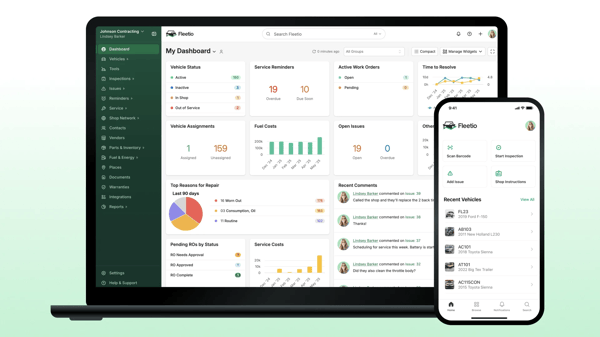
That said, some G2 users note that there's a learning curve at the start, with a few mentioning they'd have liked more thorough training to get comfortable with everything the platform offers. Reviewers add that once they're familiar with the system, it becomes straightforward to work with day to day.
Notable patterns in G2 reviews also point to support response times varying depending on the complexity of the request, as the platform has scaled. Many users balance this against the overall quality of support, noting that when the team does engage, the help is knowledgeable and effective.
Overall, G2 review data positions Fleetio as a strong fit for teams that want maintenance tracking, service history, and asset cost visibility in one easy-to-use platform. Fleets that prioritize staying on top of upkeep without the manual overhead will find that it delivers consistently.
"Fleetio is an intuitive platform that is competitively priced and integrates well with our other platforms, including fuel cards, point of sale system, and telematics. Customer support is very quick to respond. The new features are continuously released and helpful to managing our fleet."
- Fleetio review, Wade B.
"My only complaint is with the training guides. While you eventually become comfortable with the system, it does take a while to learn how everything works and to get familiar with its features."
- Fleetio review, Alvin B.
G2 rating: 4.6/5
HCSS is a heavy construction management platform that helps contractors handle estimating, field operations, equipment maintenance, and fleet data across connected modules. G2 reviewers often highlight how well it moves information from the field to the office and back.
I've noticed that many users praise HCSS's ease of use, which is rated at 87% by G2 reviewers. The platform is described as user-friendly and easy to navigate, even for teams managing large volumes of equipment across multiple job sites.
G2 users also seem to appreciate the platform's standout customer support. Reviewers consistently mention how quick, knowledgeable, and available the team is, with several calling 24/7 access to a real person one of the most valuable parts of working with HCSS.
From the G2 reviews I've read, the estimating tools in HeavyBid come up often. Users describe how it streamlines their bidding processes, helping them put together estimates more efficiently and with greater consistency.
Something else that stood out? The connected workflow across products. Reviewers mention how HeavyJob and Mobile make capturing field time easy, and how that data flows into the broader system without manual re-entry, keeping the office and the field aligned.
Another point that's come up is HCSS's equipment and maintenance capabilities. Users highlight the preventive maintenance scheduling and telematics through E360, with maintenance rated at 84%, noting how warranty tracking and repair history help them make smarter decisions about when to retire a machine.
I've also seen reviewers value the reporting tools for managing large equipment fleets, describing them as helpful for keeping track of backlog items and staying ahead of upcoming service needs.
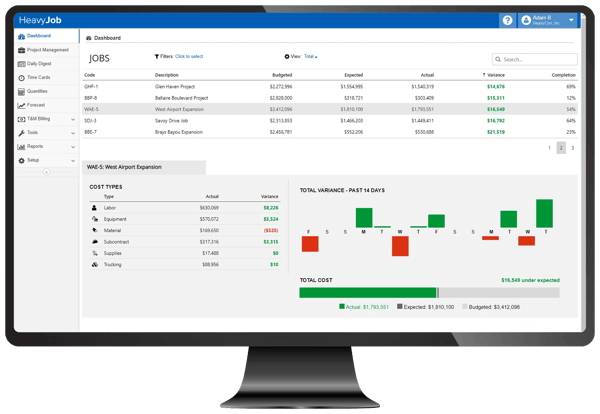
Now, some G2 users note that there's a learning curve for new users, particularly in understanding how the database calculates pricing. Reviewers add that the time invested upfront tends to pay off in meaningful time savings, the more they use the system.
G2 reviews also point to the experience feeling less consistent across modules, with some parts feeling more modern than others. Many users frame this in the context of an expanding product suite and still point to the strength and cohesion of the core tools they rely on daily.
At the end, G2 review data positions HCSS as a strong fit for heavy construction teams that want estimating, field operations, and equipment management in one connected platform. Contractors who value responsive support and a field-to-office workflow will find it delivers where it counts.
"I like that HCSS is user-friendly, which makes it easy to navigate and use. The PM schedule and reports are also quite helpful for managing a large number of pieces of equipment effectively. The telematics feature is valuable for providing warnings when maintenance is due and keeping track of backlog items. Setting up HCSS was super easy compared to other systems I've used before."
- HCSS review, James A.
"Your development feels noticeably disjointed, and the level of polish seems to vary a lot from one module to another. Some parts come across as older or more legacy, while others feel much newer and more refined. I really wish the experience were more consistent and cohesive across all of your offerings, so it doesn't feel like I'm switching between different generations of the product."
- HCSS review, Jordan N.
G2 rating: 4.7/5
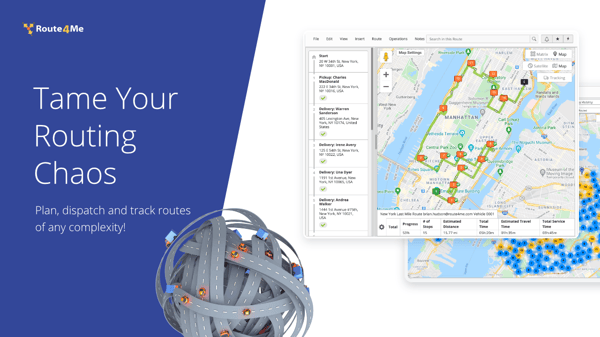
Route4Me is a route optimization platform built for teams that plan multi-stop routes across drivers, deliveries, and field operations. G2 reviewers frequently describe it as a tool that takes the heavy lifting out of daily route planning.
I've noticed that many users praise the platform's route optimization, with route optimization rated at 90% by G2 reviewers. Feedback points to how quickly it builds efficient multi-stop routes, which reviewers say cuts wasted drive time and reduces fuel costs.
G2 users also seem to appreciate how easy the platform is to use, with ease of use rated at 97%. The interface is described as clean and almost step-by-step, and several reviewers mention the Routes Map feature that lets them drag and drop stops between routes to save time.
From the G2 reviews I've read, real-time tracking is another consistent strength. Users mention being able to see where every driver is, follow their progress, and adjust schedules on the fly, which keeps daily operations running smoothly.
Something else that stood out? The smooth onboarding, with ease of setup rated at 93%. Reviewers describe the initial setup as intuitive and note that minimal training was needed to get teams comfortable with the platform.
Another point that's come up is Route4Me's support and integrations. Users highlight the responsive live chat team, along with proof of delivery rated at 98%, and API and ERP integrations that let them export data into their business intelligence tools.
That said, a few reviewers have flagged the mobile app as feeling slightly less polished than the desktop version, especially when making quick changes on the go. Most add that it still gets the job done, framing it as a refinement opportunity rather than a real obstacle.
Reporting is the other area users would like to see grow. Some mention wanting more flexible options and easier ways to pull detailed insights tailored to their business, though they note the reporting has been steadily improving over time.
Taken together, G2 review data positions Route4Me as a strong fit for teams that live and breathe route planning and want fast optimization with minimal setup. Delivery-focused and field operations teams will find that it consistently saves them time where it matters most.
"Route4Me is extremely easy to use and has significantly improved our route planning and delivery management processes. The routing optimization saves time, reduces fuel costs, and helps drivers stay efficient and organized. The real-time tracking and analytics features are especially valuable for daily operations."
- Route4Me review, Yevheniia S.
"While Route4Me is very effective overall, the mobile app could be more refined. While it gets the job done, there are moments where the interface feels slightly less intuitive compared to the desktop version, especially when making quick changes on the go. Another area for improvement is customization in reporting and analytics."
- Route4Me review, Ranjit C.
Need a fleet for food delivery? You might be interested in the best food delivery software of 2026.
G2 rating: 4.7/5
Azuga Fleet is a vehicle tracking and management solution that gives businesses control over location tracking, driver oversight, and safe dispatching. It's built to support fleet operations without a high price tag, making it a practical fit for smaller teams.
I've noticed that many users praise the platform's ease of use, which G2 reviewers rate at 94%. Reviewers describe it as straightforward and applicable across a range of driver and delivery route needs, with several happy to recommend it to other companies.
G2 users also seem to appreciate the real-time location tracking, with vehicle tracking rated at 97%. Many highlight how it saves time previously spent calling around to coordinate with drivers, giving them a clear picture of where everyone is during the day.
From the G2 reviews I've read, the driver behavior monitoring is another consistent strength, with driver behavior rated at 94%. Users mention real-time alerts for speeding, harsh braking, and aggressive acceleration as effective tools for reinforcing safe driving habits.
Something else that stood out? The reporting. Reviewers describe the monthly reports as easy to read and understand, offering a clear monthly review of drivers along with a variety of reports that suit different fleet needs.
Another point that's come up is the clear video footage paired with tracking. Users note that having readable reports and clean footage in one place helps them keep tabs on both vehicle activity and driver safety with minimal effort.\
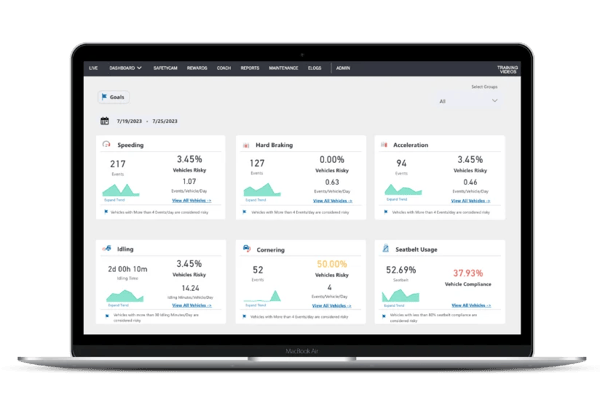
A few reviewers feel the driver behavior detection can run a bit touchy, sometimes logging a hard brake when another driver cuts them off. Most frame it as a minor quirk of a system that's actively working to keep safety scores honest, and many note how useful that same scoring is for spotting habits worth improving.
A couple of reviewers also mention that the live dashboard can occasionally lag or be slow to refresh, though they're quick to note it happens rarely. For teams relying on Azuga for everyday tracking, it is not something that gets in the way of daily visibility.
Pulling it all together, G2 review data positions Azuga Fleet as a dependable, budget-friendly choice for smaller fleets that want reliable tracking and driver safety monitoring. Teams looking for an approachable tool that covers the essentials will find that it delivers solid everyday value.
"This product is very easy to use and offers a variety of reports for the fleet. It provides real-time tracking of vehicles and delivers clear video footage."
- Azuga Fleet review, Vanessa A.
"At times, Azuga does not update the live dashboard in a timely manner."
- Azuga Fleet review, Verified User in Construction.
Trust tends to track closely with G2 satisfaction signals. Route4Me leads the article list with a Net Promoter Score of 92, followed by Azuga Fleet at 83 and HCSS at 78, while Fleetio sits at 73 and Samsara at 69. Samsara and Geotab also carry the deepest review volumes in the category, which gives operations and technology leaders a large, consistent body of feedback to lean on when evaluating reliability.
For mid-market teams, HCSS draws the largest share of mid-market customers at 67%, followed by Samsara at 54% and Motive at 53%, which signals strong fit for organizations in that band. Fleetio is also worth a look, combining a 51% mid-market base with entry pricing from $4 per vehicle per month, striking a practical balance between cost and capability.
Reliability often shows up in support quality. HCSS rates highly among the article tools for quality of support at 96%, with Route4Me close behind at 98%, and both pair that with high recommend rates. Samsara and Geotab add another layer of dependability through their scale, giving large fleets a proven track record to rely on.
Platforms that are easy to use tend to face the least resistance. Route4Me posts a 97% ease of use score and an 86% average user adoption rate, while Samsara and Motive both pair intuitive dashboards with strong adoption in the low-to-mid 80s. Azuga Fleet also lands well with smaller teams, where its straightforward interface keeps pushback low during rollout.
Implementation speed varies across the list. Azuga Fleet goes live fastest at around 0.9 months, while Motive and Samsara average roughly 1.6 to 1.7 months, and Fleetio and HCSS sit closer to 2.2 to 2.3 months given their deeper feature sets. On support and feedback, HCSS and Route4Me stand out, with Route4Me carrying the highest NPS on the list at 92.
Payback period is a useful proxy for time-to-value. Geotab shows the shortest estimated payback among the article tools at around 8 months, with Samsara and Motive close behind at roughly 9 months each. These three tend to deliver efficiency gains quickly, helped by fast implementation timelines that get teams operational within about two months.
Integration depth is a recurring strength for several tools here. Geotab is known for its open platform and Marketplace add-ons, Fleetio connects with fuel cards, telematics, and point-of-sale systems, and Motive integrates with Fleetio for unified maintenance visibility. Route4Me also supports API and ERP connections that let teams export data into their business intelligence tools.
For fast, low-friction deployment, Azuga Fleet leads with an average go-live of under one month, followed by Motive and Samsara at roughly 1.6 to 1.7 months. Route4Me also keeps onboarding light, pairing a 93% ease of setup score with reviewer notes that minimal training was needed to get teams comfortable.
Fleetio cuts manual effort through automated service reminders and centralized maintenance records, while HCSS reduces re-entry by moving field data into the office automatically through HeavyJob and Mobile. Samsara also helps teams collaborate by unifying tracking, safety, and compliance data in one platform, so dispatchers, managers, and drivers work from the same source.
Organizations prioritizing speed should look at Azuga Fleet, Motive, and Samsara, all of which go live in under two months on average. Route4Me rounds out the group with an 86% adoption rate and a 93% ease of setup score, making it a strong option for teams that want to be operational and fully onboarded quickly.
From my analysis, it was evident that you must address your fleet's fragility and sensitivity to manage it more efficiently and with discipline. By dispatching or dropshipping with your company fleet, you leave an indelible mark on customers and employees and position yourself as a brand that builds seamless global networks and delivers high-quality transportation and logistics.
Factoring in all these concerns when shortlisting and buying software is critical to maintaining a convenient, high-quality logistics and supply chain process in the future.
Build calculated invoices and analyze road costs with the best expense management software in 2026 to stay within the limits of organizational budgets and back your financial planning.
.png)

The essentialfleet management software features you should look for are the following: ...
/DarshayitaThakur-OrangeBG.webp) by Darshayita Thakur
by Darshayita Thakur

On a scorching summer day, the office AC broke down. The maintenance team scrambled to find...
.png) by Devyani Mehta
by Devyani Mehta

Keep right and take the exit toward your GPS guide.
 by Alexandra Vazquez