Most sales teams think they’re giving buyers everything they need: the right decks, demos, and follow-ups. But in reality, buyers are overwhelmed, not engaged. Scattered emails, long threads, and disconnected assets make the buying process confusing and slow.
I’ve seen deals stall because prospects can’t find key materials, stakeholders get looped in too late, and reps lose control of the narrative after the first call. In a world where B2B buying involves multiple decision-makers and shrinking attention spans, a messy sales experience doesn’t just frustrate buyers — it kills momentum.
That’s why I took a closer look at the best digital sales room software available today. I analyzed G2 reviews, compared top-rated tools, and studied how modern sales teams use these platforms to create seamless, interactive, and buyer-centric deal experiences.
Whether you’re looking for a collaborative deal hub, a platform to personalize content for each stakeholder, or analytics that reveal how buyers actually engage, this guide will help you find the right digital sales room to close deals faster.
7 best digital sales room platforms: My picks for 2026
- Trumpet: Best for interactive deal rooms
Creates branded “Pods” where sellers and buyers collaborate through notes, videos, and shared documents in one trackable space.
- Aligned: Best for fast setup and ease of use
Brings stakeholders, documents, and tasks together in a simple, ready-to-deploy digital sales room.
- DealHub.io: Best for quote-to-revenue workflows
Unifies collaboration, proposals, approvals, and workflows in one centralized deal room.
- GetAccept: Best for proposals with e-signatures
Combines digital deal rooms, proposal creation, and e-signatures for a seamless buyer experience.
- Allego: Best for video-first sales enablement
Allows teams to share video messages, content, and updates with buyers in an interactive hub.
- RELAYTO: Best for interactive, content-driven experiences
Transforms static documents into immersive, trackable content inside digital deal rooms.
- Accord: Best for mutual action plan tracking
Aligns sellers and buyers on shared milestones, tasks, and timelines within a single digital workspace.
According to G2’s Winter 2026 Grid Reports, these digital sales room software lead their category. Pricing is available on request.
My 7 best digital sales room software picks for 2026
While testing and comparing today’s leading digital sales room platforms, one thing became clear: these solutions fundamentally transform the way sellers and buyers interact, making the buying experience far more dynamic, engaging, and streamlined. And the timing couldn’t be better, the global digital sales room software market is projected to reach $7.9 billion by 2031.
The right digital sales room makes deal-making smoother, personalized, and measurable, whether it’s curating tailored content for a prospective buyer, enabling real-time collaboration, or tracking engagement analytics to predict deal outcomes. That’s critical for high-velocity sales teams needing to streamline pipelines, deal leaders seeking visibility into buyer behavior, and revenue operations teams who want to tie content and buyer engagement to outcomes.
If you’re looking for a platform that helps create immersive buyer experiences, accelerate deal progress, or convert content and interactions into actionable insights, these digital sales room tools stood out for their engagement-rich design, usability, and focus on buyer behavior.
How did I find and evaluate the best digital sales room software?
To identify the top digital sales room platforms, I analyzed real user reviews on G2 to understand how these tools perform across core deal-support workflows. I evaluated how each product handles the full sales process, including sharing content, personalizing buyer engagement, managing stakeholders, and tracking buying signals in real-time.
I also used AI to synthesize patterns from user reviews and G2 Grid® Reports, comparing ease of use, feature depth, security, and overall satisfaction. This guide includes screenshots from vendor G2 pages to show what the platforms actually look like in practice.
I’ve curated this list to help sales, marketing, and revenue operations teams choose the right digital sales room software to run faster, more transparent, and more buyer-friendly deal cycles, whether you're building your motion from scratch or optimizing at scale.
What makes the best digital sales room software worth it: My opinion
When evaluating the best digital sales room platforms, I focused on features that help revenue teams simplify deals, improve buyer experience, and drive predictable outcomes.
- A unified hub for every deal: Top DSRs turn messy email threads and scattered links into one clean, branded space for proposals, pricing, demos, contracts, and next steps. The best tools make it easy for buyers to navigate everything in one place
- Clear visibility into buyer intent: Great platforms show you exactly who viewed what, when, and for how long. Real-time engagement insights help reps prioritize the right stakeholders, personalize follow-ups, and forecast deals with more confidence.
- Collaboration across GTM teams: The best DSRs connect sales, marketing, enablement, and customer success. Approved content stays current, version control is automatic, and internal teams can contribute to rooms without slowing reps down.
- Analytics that actually guide strategy: Top platforms don’t just dump data, they highlight patterns. I favored DSRs that reveal deal health, content performance, and where buyers tend to slow down so teams can coach better and optimize the funnel.
- AI that automates manual work: AI features such as auto-generated rooms, suggested next steps, and activity summaries stood out. They speed up rep workflows and keep buyers engaged with timely, relevant guidance.
The list below contains genuine user reviews from our best digital sales room software category page. To qualify for inclusion in the category, a product must:
- Provide a customer-facing digital portal that allows salespeople to share relevant content
- Allow salespeople to track customer engagement with content
- Allow customers to communicate with sellers within the customer-facing digital portal via chat or video
This data was pulled from G2 in 2025. Some reviews have been edited for clarity.
1. Trumpet: Best for interactive deal rooms
G2 rating: 4.8/5
Trumpet is a highly effective platform for account data management and digital sales rooms.
One standout capability, according to users, is the centralization of sales content, video recordings, proposals, forms, and e-signatures. Many reviewers mention that having everything in one space reduces the need to juggle multiple platforms, improves efficiency, and ensures that no critical information is overlooked.
I’ve seen multiple users mention that Trumpet effectively speeds up the buyer journey. By providing prospects with all necessary resources in a trackable space, reviewers report being able to move deals forward faster and reduce unnecessary back-and-forth communications.
The highly customizable Pods, featuring drag-and-drop widgets, including Mutual Action Plans and Timelines, consistently receive praise. Users frequently note that tailoring each sales room to the unique needs of a deal helps organize information clearly and keeps prospects engaged throughout the process.
Integration is another commonly appreciated element. From what I’ve seen, reviewers value Trumpet’s connectivity with over 35 tools, including Salesforce, HubSpot, Slack, and Calendly, which makes syncing data and workflows seamless and maintains consistency across teams. In fact, 63% of G2 users specifically noted that the platform provides strong CRM integration capabilities.
Analytics also stand out in reviews. G2 users often highlight the prospect and customer engagement tracking, noting that it provides actionable insights by showing which resources are most effective and where follow-up is needed.
Personalization and branding features are noted as particularly useful. Many users note that automatic branding and tailored messaging provide a professional and engaging experience for prospects at scale.
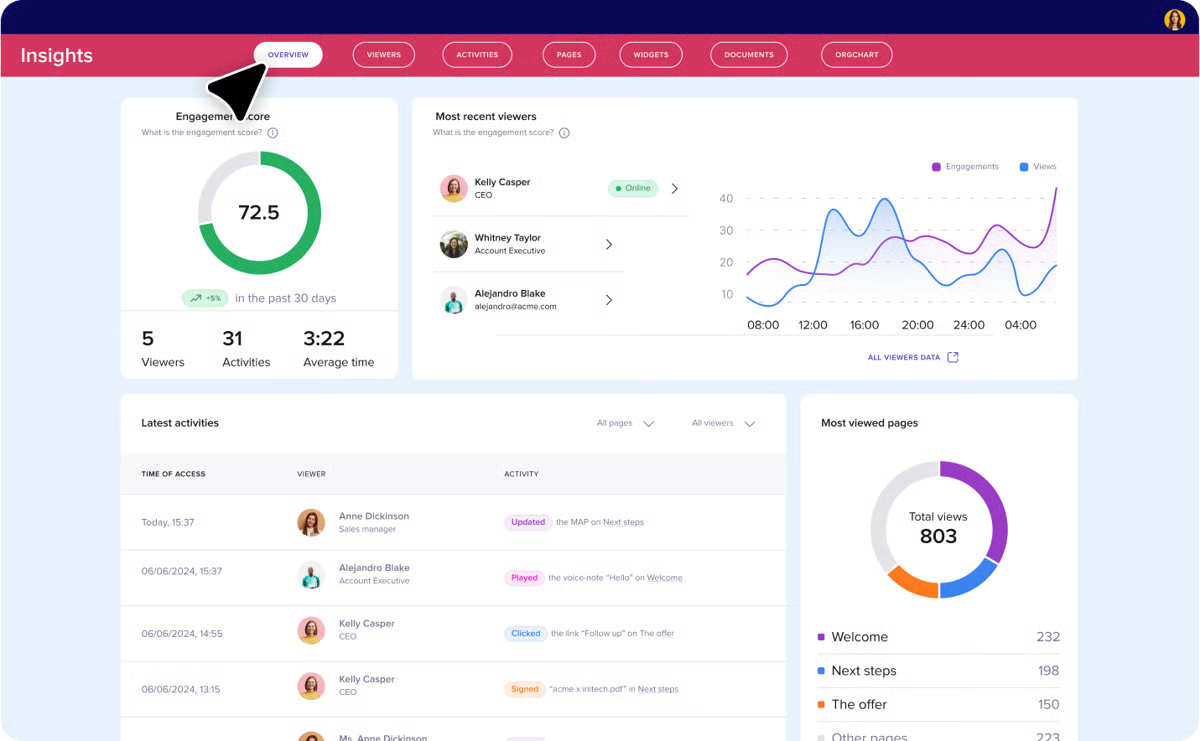
I’ve noticed that some reviewers point out pricing as a potential barrier for smaller teams or newer organizations. Although users who work in fast-paced environments feel it's justified, considering the depth of features.
G2 user feedback also tends to focus on the time it takes to learn about these advanced features and integrations. Most users who have a multi-purpose use case agree that it takes a while, but investing time to understand these capabilities pays off in the long term.
All in all, G2 users consistently appreciate Trumpet for its customization options, integration capabilities, analytics, and ability to manage multiple stages of the sales process.
What I like about Trumpet:
- Trumpet centralizes sales content, proposals, videos, and e-signatures in one place, and G2 users seem to agree that this makes workflows more efficient.
- Customizable Pods, including mutual action plans and timelines, help organize information and keep prospects engaged, something I’ve seen highlighted often in reviews.
What G2 users like about Trumpet:
"I’m really impressed by how much customization and personalization this offers. It’s extremely helpful, particularly when there are changes in roles or when new team members join a deal. The ability to message prospects directly with relevant information is also essential. Additionally, the ease of integration stands out as a major advantage."
- Trumpet Review, Emma A.
What I dislike about Trumpet:
- Pricing can be a barrier for smaller teams or newer organizations, as some G2 users have noted; however, most believe that the investment ultimately pays off.
- Advanced features and integrations take some time to get used to, and reviewers often mention this too, but they also note that once mastered, these capabilities greatly improve collaboration and deal management.
What G2 users dislike about Trumpet:
"Some of the module editing is clunky. For example, there have been times when I have been unable to include both an accordion and a PDF within the same widget. Also, I’d like to have a way to export the evaluation room as a PDF."
- Trumpet Review, Kacey C.
2. Aligned: Best for fast setup and ease of use
G2 rating: 4.7/5
Aligned is a highly effective account data management and collaboration tool for B2B sales teams.
One feature that G2 reviewers consistently highlight is the centralized workspace for deal documents, timelines, and communication. Many users note that having everything in one location eliminates the need to switch between platforms and ensures all stakeholders stay on the same page.
I’ve seen multiple users mention the intuitive and user-friendly interface. Reviewers often appreciate how easy it is for both internal teams and clients to navigate, which reduces onboarding time and allows everyone to focus on deals rather than learning a complicated tool.
Transparency and collaboration are also frequently praised. According to feedback I gathered from G2 users, the platform’s ability to share visibility into deal progress and documents helps foster trust with clients while keeping internal teams aligned, making meetings and follow-ups more productive.
The engagement tracking feature stands out as particularly useful. Many reviewers note that seeing which files stakeholders interacted with provides actionable insights into priorities and interests, enabling teams to tailor follow-ups and progress deals more efficiently.
Flexible use cases are another commonly appreciated element. Users report that Aligned works well for onboarding clients, managing multi-product deals, and handling internal proposals, making it versatile across teams and scenarios rather than limited to one specific function.
I’ve noticed that supporting non-technical users is a frequently mentioned advantage. Many users highlight that marketing, finance, or customer success teams can participate effectively in deals without needing extensive technical knowledge, thanks to the platform’s simplicity.
Customer support also receives consistent praise. Reviewers often note that responsive and proactive support helps resolve questions quickly, minimizing workflow disruptions.
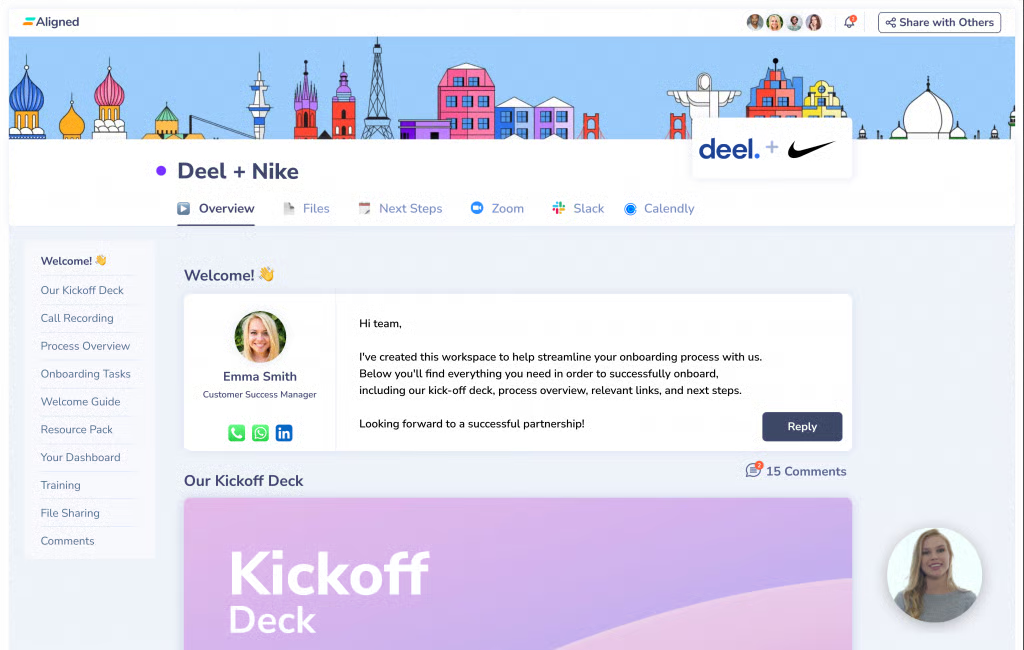
I’ve seen some G2 users share feedback on customization options for templates, branding, and analytics, which may restrict tailoring to specific organizational needs. Though users with basic requirements mention that the existing capabilities are highly functional.
G2 users also mention that the task management and workflow tracking features could be strengthened, particularly for multi-phase deals; however, most reviewers acknowledge that clarity and communication tools often compensate for these gaps.
Looking at broader review trends, G2 users consistently appreciate Aligned for its efficiency, transparency, and ability to centralize deal information.
What I like about Aligned:
- The intuitive interface stands out to me; G2 reviewers frequently mention how easy it is for internal teams and clients to navigate without long onboarding.
- Flexible use cases, such as onboarding clients and managing multi-product deals, make the platform versatile, and many G2 reviewers note this as a major benefit.
What G2 users like about Aligned:
"I appreciate Aligned because it consolidates all our client-facing materials in one place. With a shared space, we have easy access to decks, proposals, and timelines, which helps us keep clients updated and reduces the need for endless email chains. I also find the Mutual Action Plan feature very useful, as it allows both sides to track deal progress clearly."
- Aligned Review, Cherril B.
What I dislike about Aligned:
- Customization options for templates, branding, and analytics feel somewhat limited. Many G2 users mention that they still find the platform highly functional.
- Task management and workflow tracking could be strengthened, especially for multi-phase deals; however, G2 users also feel that clarity and communication tools often compensate for these gaps.
What G2 users dislike about Aligned:
"There’s very little to dislike, but a few small areas could be improved. The logo display can look awkward when company and customer logos differ significantly in shape, sometimes requiring extra tweaking. When downloading multiple files from the library, they’re packaged into a zip folder, adding an unnecessary step. Lastly, while I can share tabs within a collaboration space, I’d love the option to share just a section, especially when I want to highlight a group of links or resources without sending the entire page.:
- Aligned Review, Rebecca C.
3. DealHub.io: Best for quote-to-revenue workflows
G2 rating: 4.7/5
DealHub.io is a robust platform for managing account data and driving sales growth. Based on feedback I gathered from G2 users, a recurring theme is that DealHub.io excels at streamlining the quote-to-revenue process.
A standout capability, according to reviewers, is its ability to centralize the entire sales process, from quotes to contract execution. Many users note that having proposals, approvals, and contracts in one place reduces complexity and improves efficiency, making deal management far more predictable.
From what I’ve seen, G2 reviewers frequently highlight the intuitive and user-friendly interface. Users appreciate that creating deals, configuring quotes, and managing approvals feel straightforward, even for complex offers. The clean layout is often cited as helping teams adopt the system quickly without confusion.
Integration capabilities also receive strong praise. One commonly appreciated feature is the platform’s seamless integration with CRMs, such as Salesforce, HubSpot, and Microsoft Dynamics. Users report that data flows smoothly between systems, reducing duplicate entries, maintaining pipeline accuracy, and saving a significant amount of time.
I’ve noticed that the guided selling and automation features are frequently mentioned as major benefits. Reviewers highlight that automating repetitive tasks and receiving contextual guidance during deal creation reduces errors and accelerates the sales cycle, enabling teams to focus on strategy and client relationships.
The platform’s customer support and professional services consistently receive positive feedback. Users often mention that the team is responsive and provides actionable guidance during implementation, which makes onboarding and adoption smoother.
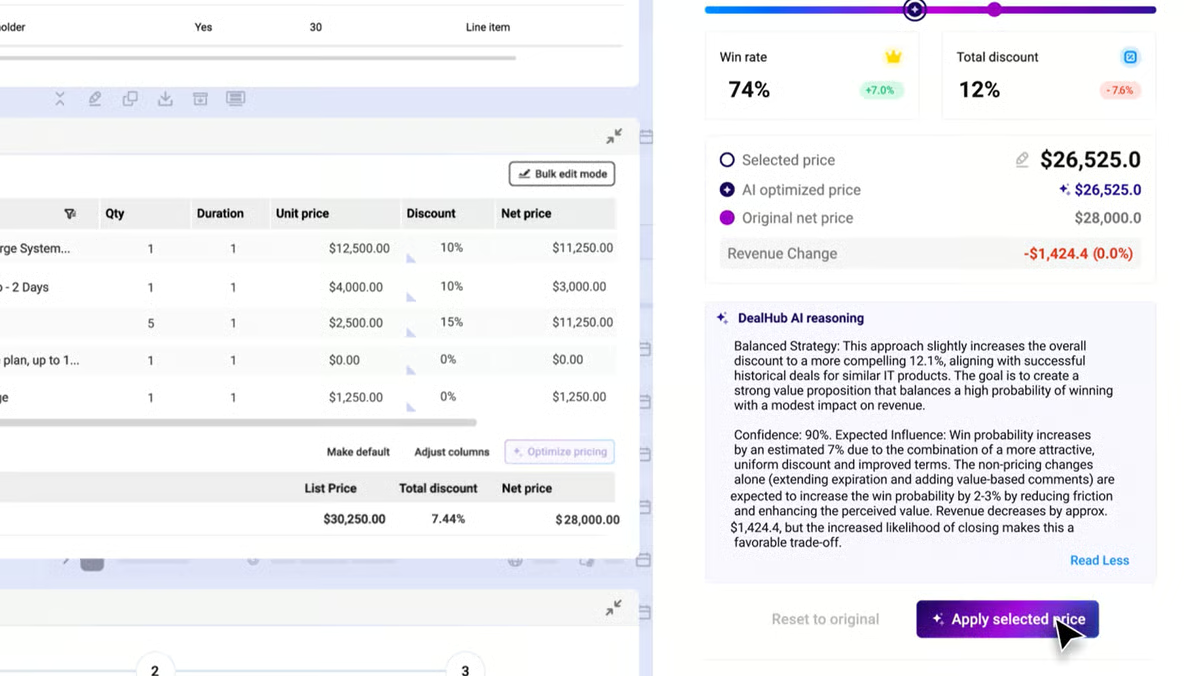
Some G2 users, however, focus on the slightly long initial time investment required to explore and understand the system’s extensive features. Still, multiple reviewers mention that once teams overcome this initial familiarization stage, the platform’s depth becomes a significant advantage.
Workflow configuration is another area where G2 users sometimes mention issues. While it can be time-consuming and require resources upfront, reviewers often note that this investment pays off in the long term, as workflows run smoothly and errors are reduced over time.
I can see recurring themes: users consistently value DealHub.io for its ability to centralize deal management, automate workflows, integrate seamlessly with CRMs, and support collaboration.
What I like about DealHub.io:
- DealHub.io centralizes the entire sales process, from quotes to contracts, and it seems many G2 users find that this simplifies deal management.
- The guided selling, automation features, and intuitive interface help streamline workflows and reduce errors, something I’ve noticed highlighted often in reviews.
What G2 users like about DealHub.io:
"DealHub consistently impresses with its ease of setup, high customizability, and intuitive user interface. Admins can quickly configure complex solutions, while sales teams benefit from a seamless quoting experience. The platform’s flexibility and polished UI make it a top choice for optimizing CPQ processes. Highly recommended!"
- DealHub.io Review, Jessica N.
What I dislike about DealHub.io:
- Some users mention long initial setup times, and reviewers on G2 also note this, although they say the platform’s depth becomes a significant advantage once it is understood.
- Workflow configuration can be time-consuming, and G2 users share this sentiment. However, many emphasize that this upfront effort pays off in the long term.
What G2 users dislike about DealHub.io:
"One area for improvement at DealHub is the approvers/reviewers panel, which could be more robust. However, it’s worth noting that DealHub 2.0 is actively working to enhance this layout."
- DealHub.io Review, Cassie C.
Evaluating these tools specifically for an enterprise team? The rankings shift when filtered for enterprise users. See how trumpet, DealHub.io, Allego, and others score on G2's enterprise digital sales room rankings before you shortlist.
4. GetAccept: Best for proposals with e-signatures
G2 rating: 4.6/5
GetAccept is an AI-powered account data management and digital sales platform designed to streamline sales workflows.
One standout feature, according to reviewers, is seamless CRM integration, including Salesforce and HubSpot. Many users report that sending proposals and contracts directly from the CRM keeps data synchronized, eliminates manual handoffs, and ensures a smooth sales process.
I’ve seen multiple users mention the user-friendly interface. Reviewers often note that it is straightforward to navigate, which reduces training time and allows teams to focus on engaging prospects rather than learning a complex tool.
Automation of workflows is another feature that receives consistent praise. From what I’ve seen, users frequently highlight the time saved by pre-filling forms, updating case statuses, and handling repetitive tasks, enabling teams to prioritize strategic activities.
Real-time engagement tracking is also commonly appreciated. Users report that insights into how prospects interact with documents — such as which pages they spend the most time on — help tailor follow-ups and increase the likelihood of closing deals.
G2 reviewers frequently highlight the value of professional, standardized proposals and templates. Many mention that these features ensure consistent and credible communication across prospects, reinforcing trust and improving engagement.
Customer support is another area that stands out. From what I’ve seen, reviewers often note that responsive support and access to dedicated account managers help resolve questions quickly, minimizing workflow disruption and aiding productivity.
The platform’s all-in-one capabilities — including e-signatures, document tracking, video messaging, and collaboration tools — are praised for enabling teams to manage multiple sales activities without switching between apps, increasing efficiency and visibility across deals.
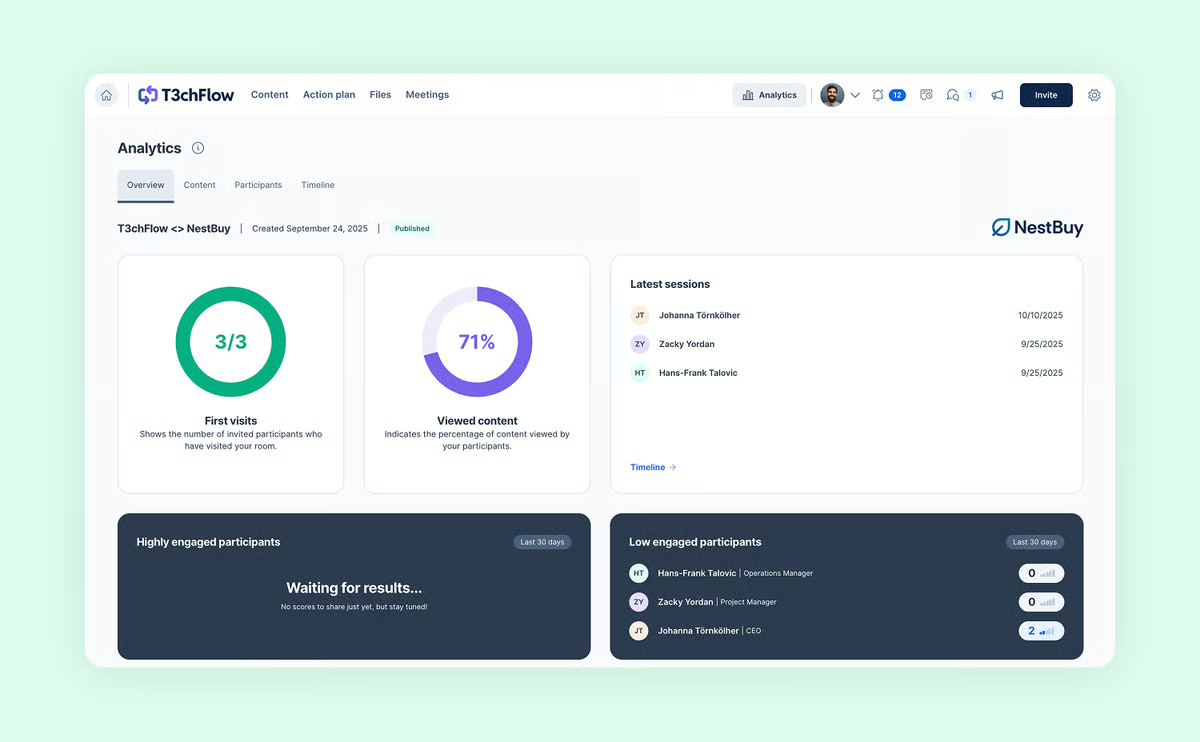
Some feedback often points to limited template flexibility, where even small changes sometimes require creating duplicates, along with occasional upgrade prompts that interrupt the flow. While this can feel restrictive for teams that rely heavily on tailored templates, it actually works fine for users who prefer simple, standardized setups and don’t need frequent design variations.
Most reviewers agree, however, that the core features provide substantial value without extra investment. In fact, 19% G2 users highlighted that the platform allows users to easily assemble custom fields and variables into reusable templates, helping to automate the proposal creation process.
Examining broader review trends, G2 users consistently appreciate GetAccept for its automation, centralized sales activities, and actionable insights into engagement.
What I like about GetAccept:
- The CRM integrations seem genuinely helpful, and I’ve noticed G2 users often mention how sending proposals directly from Salesforce or HubSpot keeps everything synced and smooth.
- The interface feels easy to navigate, and I’ve noticed G2 users appreciate that it cuts down training time and helps teams stay focused on selling.
What G2 users like about GetAccept:
"GetAccept is a user-friendly tool that our Sales, HR, Customer Service, and Management teams easily understand. It feels great to have all digitally signed agreements in one place as a single source of truth, and we use it daily. Additionally, GetAccept presents a familiar and professional experience to our potential customers and employees."
- GetAccept Review, Kalle O.
What I dislike about GetAccept:
- Setup and template tweaks can take a bit of extra effort, and a few G2 users mention limited flexibility for small changes. But once everything is in place, teams using repeatable templates generally find it works smoothly.
- Occasional upgrade prompts or duplicated templates can be minor hassles, although most G2 users view them as minor inconveniences. For teams with simple, steady workflows, they don’t really get in the way.
What G2 users dislike about GetAccept:
"The product has undergone a transition, separating and then rejoining two of its offerings (Deal Room and Contracts Room). This has resulted in confusing terminology, inconsistencies in API usage, and less focus on the Deal Room."
- GetAccept Review, Verified User in Medical Devices
Discover the top CPQ solutions on G2 and efficiently generate accurate quotes, as well as streamline approvals for complex deals.
5. Allego: Best for video-first sales enablement
G2 rating: 4.6/5
Allego is an all-in-one platform for account data management and revenue enablement.
A feature that frequently receives praise is the intuitive and user-friendly interface. Many reviewers highlight that both learners and admins find the platform straightforward, which simplifies onboarding and daily use. From what I’ve seen, this ease of use is a key reason teams adopt Allego successfully.
The AI-powered role-play and grading features are another standout. I’ve read multiple reviewers mention that automatic evaluation and actionable feedback save significant time, allowing managers and coaches to focus on strategy rather than manual grading. Users often describe these tools as game-changing for improving team performance efficiently.
Video recording capabilities also receive notable praise. With 230 out of 667 reviewers (34.5%) highlighting this feature, Allego’s ability to record practice sessions or live sales pitches provides a practical way for teams to self-assess and develop skills.
Integration capabilities also draw positive attention. Allego’s strong integrations with tech stacks and CRM systems are frequently cited as enabling smooth data flow and reducing information silos. Many users on G2 note that this connectivity enhances overall operational efficiency.
Digital resource rooms often appear in reviews as a valuable tool for buyer engagement. Users highlight that these personalized spaces allow structured, targeted content sharing, which helps improve buyer interactions and supports more effective sales conversations.
Several reviewers also praise analytics and tracking features. G2 users often mention that visibility into learner engagement and skill gaps helps identify areas for improvement, measure the impact of training initiatives, and make data-driven decisions to boost team performance.
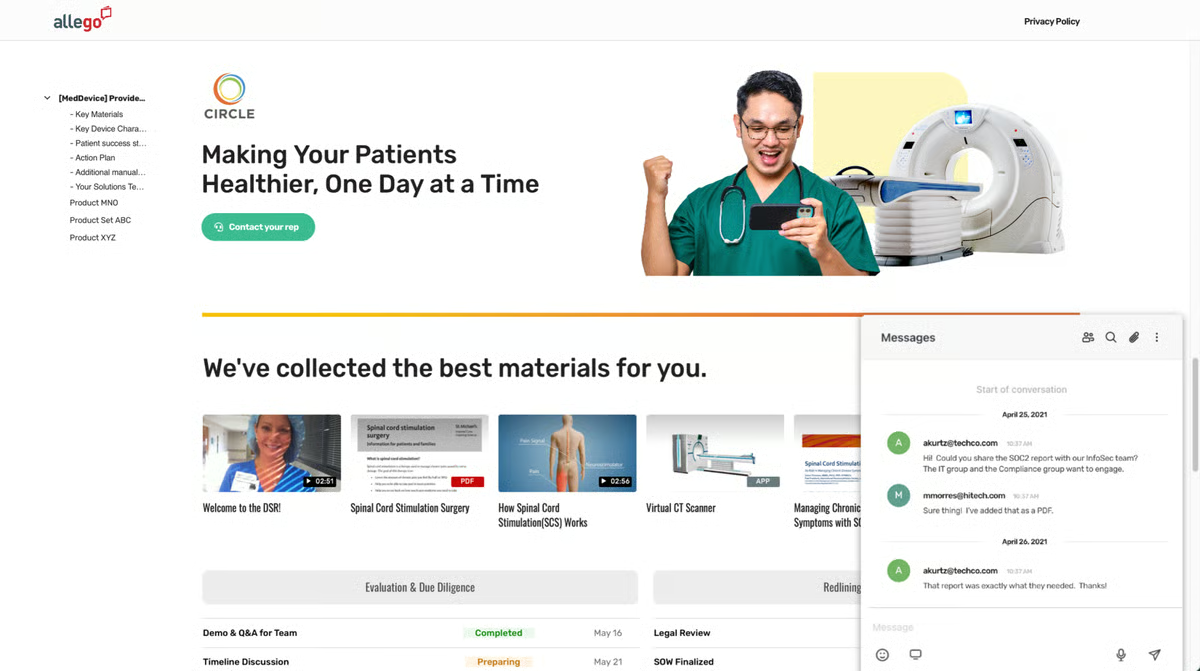
On the other hand, I’ve noticed some users call out small gaps in content management and workflow features — things like limited folder organization, fewer automation triggers, or not being able to customize certain steps as deeply as they’d like. Even so, most G2 reviewers view these as minor trade-offs compared to the overall efficiency gains, especially for teams that prefer straightforward workflows and don’t need heavy process customization.
I’ve also come across comments about the layered navigation structure, which can initially feel dense and make orientation a bit tricky. However, several reviewers note that this layered approach eventually helps organize content more clearly, making navigation much smoother once users become familiar with it.
Overall, G2 users consistently highlight Allego’s AI-powered tools, integrations, and supportive vendor team as major strengths.
What I like about Allego:
- The AI-powered role-play and grading features, which reviewers frequently describe as time-saving and helpful for improving team performance.
- The integration with tech stacks and CRM systems stands out, and I’ve noticed G2 users often highlight how this connectivity boosts operational efficiency.
What G2 users like about Allego:
"I absolutely love Allego for its ability to serve as a centralized training and sales enablement platform. Its dynamic and scalable functionality is particularly valuable, allowing seamless integration across our operations. The implementation process has been remarkably fast and efficient, streamlining tasks without overwhelming our team. Allego's capability to foster cross-departmental communication and eliminate silos has significantly improved our operational coherence. It also enhances our diagnostic and implementation processes, strengthening both our customer service and internal operations. Moreover, Allego's ease of use and profound impact on communication make it indispensable."
- Allego Review, Kara S.
What I dislike about Allego:
- Some content management and workflow features have minor gaps. While these limitations may affect teams with very complex processes, G2 users generally note that the impact is minimal for day-to-day operations.
- The layered navigation menu can be a bit confusing at first, according to G2 reviewers; however, most agree that it helps structure content better.
What G2 users dislike about Allego:
"While Allego offers robust tools for training, coaching, and content delivery, there are a few areas where the platform falls short. One recurring issue is the absence of automated email notifications for new users."
- Allego Review, Abigail P.
6. RELAYTO: Best for interactive, content-driven experiences
G2 rating: 4.7/5
RELAYTO is a versatile platform designed to turn static content into highly engaging, interactive experiences.
One feature that stands out in reviews is the ease with which static slides or PDFs can be transformed into interactive content. Many users highlight that what used to take hours of design work can now be converted into a dynamic experience in just a few clicks, making content creation more efficient and impactful.
The platform’s intuitive, user-friendly interface also receives frequent praise. I’ve noticed that G2 users often comment on how smooth navigation and easy access to tools allow teams to focus on creating content rather than learning the platform.
Customization capabilities are another commonly appreciated element. RELAYTO gives users full creative control over layouts, paths, and interactive elements. Several reviewers mention that this flexibility allows them to tailor content to client needs without relying on a dedicated designer.
I’ve read that multiple reviewers have mentioned the value of AI-powered tools. These features help accelerate content creation and design processes, reducing repetitive tasks and speeding up brainstorming and iteration while maintaining high quality.
Collaboration features are highlighted across many reviews. Users frequently note that real-time team collaboration enables colleagues to work on the same projects, provide instant feedback, and iterate more quickly, which significantly improves productivity.
Engagement analytics also stand out as a key strength. G2 reviewers often point out that detailed metrics like heatmaps and intent scoring provide actionable insights into how recipients interact with content, helping optimize presentations and follow-up strategies.
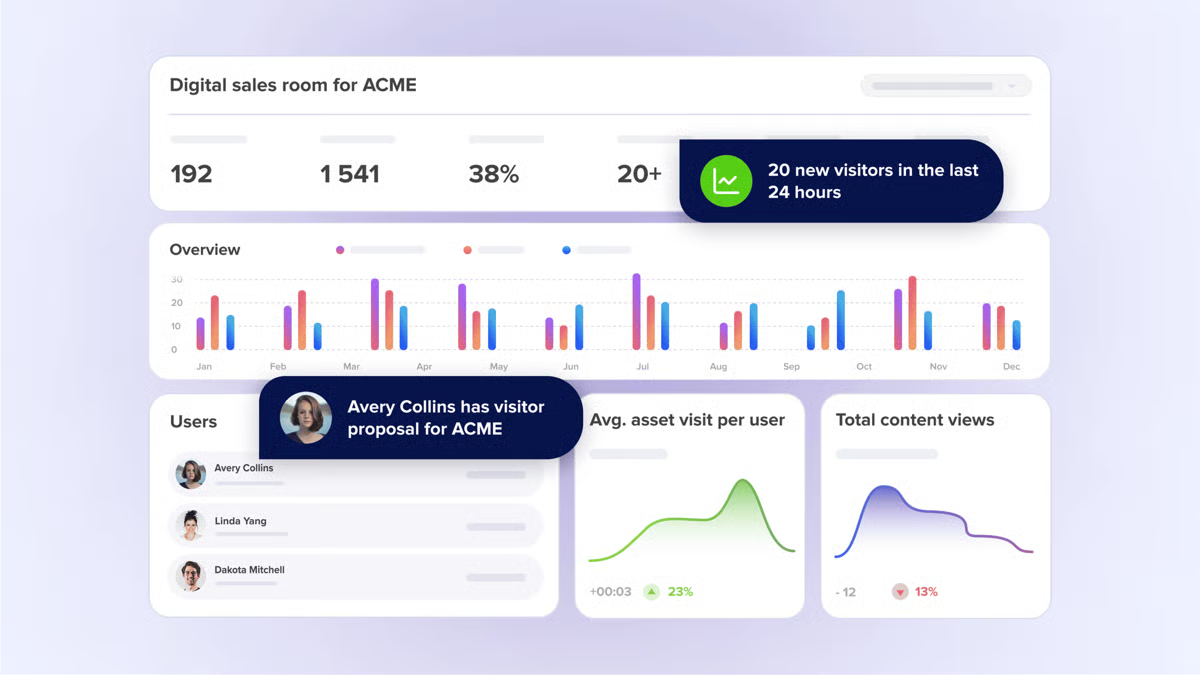
Some G2 reviewers note that getting acquainted with the platform can take time, especially during the initial exploration phase. Many also emphasize that this learning period pays off, as the platform’s flexibility becomes meaningful once users understand its structure.
Performance with large or multimedia-heavy projects is another area where a few reviewers mention slowdowns. Even so, many G2 users point out that the quality of files remains intact, and once everything is fully uploaded, the platform tends to run more smoothly. This makes it workable for teams handling detailed or high-volume content.
If I had to summarize, I notice recurring themes: G2 users appreciate RELAYTO for its interactive content capabilities, AI-powered efficiency, robust customization options, and strong collaboration tools.
What I like about RELAYTO:
- I appreciate how quickly static slides or PDFs can be converted into interactive content; many G2 users note that this saves hours of design work.
- The platform’s intuitive interface and smooth navigation stand out to me, and it seems reviewers appreciate that teams can focus on creating content rather than learning the tool.
What G2 users like about RELAYTO:
"I love how RELAYTO makes presentations look modern and interactive. It gave my resume a completely new life, I rebuilt it from scratch, and the result looked like something designed by a pro. It’s also super easy to share with others."
- RELAYTO Review, Leon G.
What I dislike about the RELAYTO:
- I noticed that the learning curve can be steep due to the numerous features it offers. However, most G2 users note that the flexibility makes it worthwhile for teams that want deep control.
- Some reviewers mention that performance can dip with very large or multimedia-heavy projects. This tends to matter most for teams working with oversized files, while others note that the platform runs smoothly for standard workloads.
What G2 users dislike about RELAYTO:
"I would sometimes like RELAYTO to include a clock or timer so I can see how much time I’m spending on edits. I feel that I occasionally invest too much time on the platform trying to create the perfect interactive content."
- RELAYTO Review, Jaime A.
7. Accord: Best for mutual action plan tracking
G2 rating: 4.9/5
Accord is a platform designed to manage account data and drive revenue excellence.
I frequently see G2 reviewers highlight how easy it is to use and how quickly it is to onboard. Users often mention that the intuitive interface allows teams to get started with minimal training, which reduces friction when implementing new sales processes.
Something G2 reviewers seem to really appreciate is how Accord enhances team collaboration and accountability. Multiple reviewers note that centralizing communication and visibility in deals ensures that everyone, from representatives to managers, is aligned and can efficiently track their responsibilities.
From what I’ve seen, the centralization of data is a notable feature in reviews. In fact, 26.3% of G2 users have specifically mentioned Accord’s ability to store meeting recaps, resources, and documents in one place, eliminating the need to search across emails or multiple tools and making it easier to reference important information when needed.
The functionality around task management, including checklists, reminders, and scheduling, receives frequent praise. According to feedback I gathered from G2 users, these features help teams stay organized and ensure follow-ups or critical tasks aren’t missed during busy sales cycles.
I’ve noticed that G2 users often call out Accord’s customizability as a major strength. Reviewers emphasize that tailoring workflows and templates to align with existing sales frameworks or value-selling methodologies facilitates seamless adoption and promotes consistency across teams.
Looking at the broader review trends, I can see recurring themes around manager visibility and tracking within the CRM. Users mention that being able to monitor team activity, track deal progress, and identify areas needing attention supports more data-driven coaching and performance evaluation.
One standout capability, according to users, is the platform’s ability to provide insights into deal progress and execution quality. Many reviewers appreciate evaluating deals not just by outcomes but by the quality of the steps taken, which helps guide better strategic decisions and higher-quality engagement with prospects.
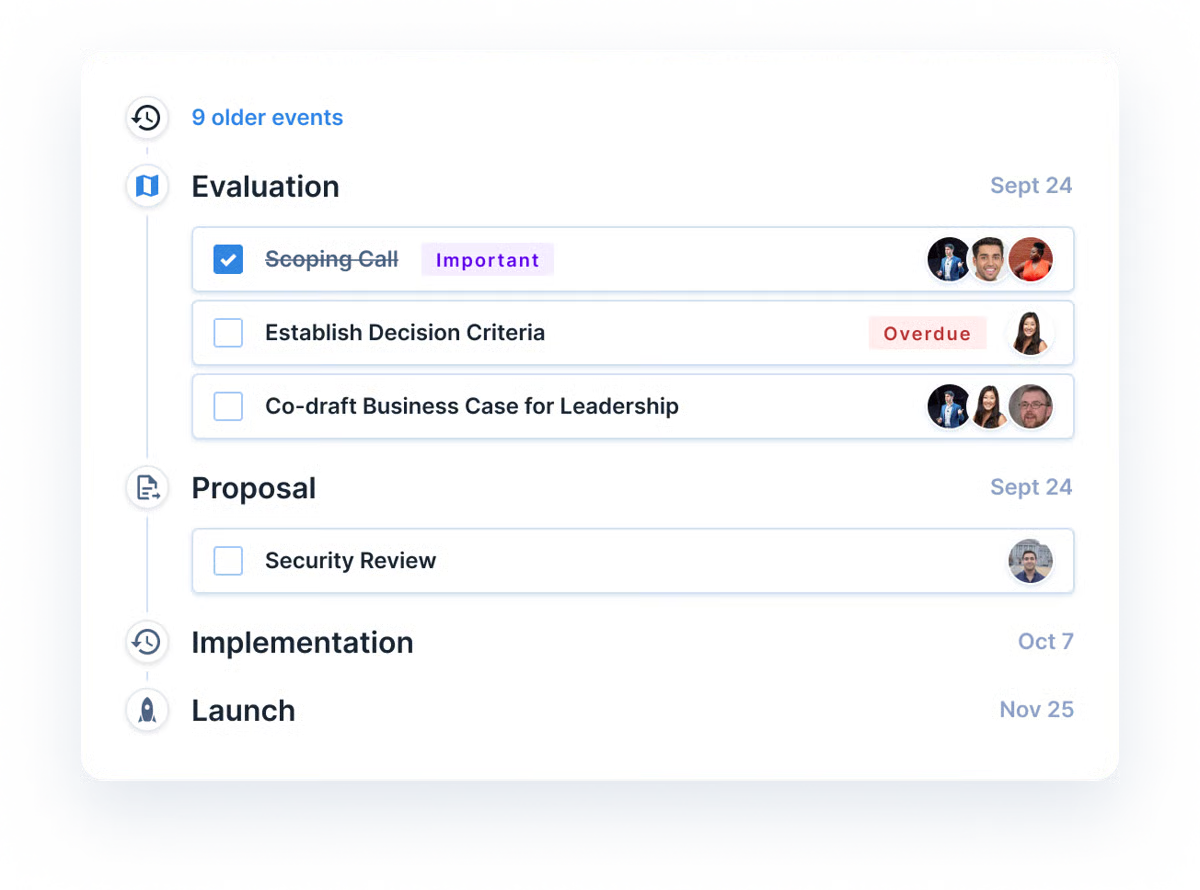
On the flip side, I’ve come across some repeated feedback around integrations with some external tools, as well as occasional formatting issues. These tend to matter most for teams with highly interconnected tech stacks; others note these as minor inconveniences, but they generally don’t prevent effective use of the platform.
I’ve read that multiple reviewers have mentioned struggles with the lack of advanced project management features, such as Gantt charts or role-based content permissions. Many users feel these additions would enhance certain workflows, though the platform’s current capabilities still provide strong organization and visibility for most sales activities.
Overall, according to feedback gathered from G2 users, Accord is highly valued for centralizing sales processes, enhancing collaboration, and providing actionable insights into deal progress.
What I like about Accord:
- It streamlines sales processes and centralizes account data, and many G2 users report that this improvement enhances overall team efficiency.
- Enhanced collaboration and visibility into deals are highly appreciated, with reviewers noting that centralizing communication keeps teams aligned.
What G2 users like about Accord:
"Accord provides a valuable platform for effective collaboration, both with internal teams and with prospects. This improved ability to work together has directly contributed to greater success in my role."
- Accord Review, Matthew U.
What I dislike about Accord:
- I noticed that integrations with some external tools can be limited, and reviewers mentioned this too, though most feel it doesn’t stop the platform from being effective.
- I’ve seen mentions of missing advanced project management features, such as Gantt charts or role-based content permissions; yet, many G2 users still find Accord strong for managing sales activities.
What G2 users dislike about Accord:
"It would be helpful to ensure that a resource is disconnected before deleting it so another can be uploaded. I’d also like the ability to recreate an Accord with the new account details already populated. Additionally, it would be great if AI could analyze calls and automatically input the necessary information on the home page."
- Accord Review, Verified User in Commercial Real Estate.

Digital sales room software: Frequently asked questions (FAQs)
Q1: What is the best digital sales room software for interactive deal rooms?
Trumpet is the top pick. It enables sellers to build rich, interactive deal rooms with multimedia content, timelines, next steps, and stakeholder visibility, perfect for creating a polished, modern buyer experience.
Q2: What is the best digital sales room platform for proposals?
GetAccept excels here. It combines digital sales rooms with proposal creation, video messaging, and built-in e-signature workflows, making it ideal for sales cycles where closing documents are crucial.
Q3: What digital sales room software is best for quote-to-revenue workflows?
DealHub.io is the leader for end-to-end revenue processes. It unifies CPQ, contracts, subscription management, and digital sales rooms, making it ideal for high-growth companies that need accuracy and automation from quote to close.
Q4: What is the best digital sales room option for video-first selling?
Allego is designed for video-forward sales teams. It blends enablement, interactive content, and digital sales rooms to help reps deliver more personalized, human-centered buyer communication.
Q5: Which digital sales room tool provides the most visibility into buyer engagement?
Trumpet and GetAccept offer excellent engagement tracking, showing who viewed which content, how long they spent inside the room, and which stakeholders are active or missing from the deal.
Q6: What is the best digital sales room platform for teams scaling their revenue operations?
DealHub.io leads for scaling. Its unified CPQ + DSR approach supports complex pricing, multi-team collaboration, and full revenue lifecycle automation.
Still guessing what your buyers need?
You’ve got the shortlist. Now it’s time to commit. Because skipping a digital sales room means you’re leaving deals to chance, and chance doesn’t close revenue.
Without a centralized, trackable space for every stakeholder, you risk slow follow-ups, lost documents, buried emails, and buyers who lose momentum before they ever reach the finish line.
A great DSR turns “we hope they’re engaged” into “we know exactly where this deal stands.” It gives your reps clarity, your buyers confidence, and your pipeline a fighting chance.
So go ahead, pick your platform. Your sales cycles (and your forecast) will thank you.
Once your account data foundation is set, pair it with a sales intelligence tool to turn those insights into predictable growth.
.png?width=400&height=150&name=Untitled%20design%20(56).png)


.png)