

The real challenge for data teams is how to choose a data science and machine learning platform that can keep up with growing workloads, tighter deployment cycles, and enterprise-level governance. You’re not looking for theory anymore, you’re looking for proof: which ML platforms truly deliver faster experimentation, smoother collaboration, and production-grade scalability without adding friction?
And it’s an urgent question. The global data science platform market is projected to reach $776.86 billion by 2032, growing at a staggering 24.7% CAGR, fueled by the surge in generative AI and predictive analytics.
To evaluate today’s best data science and machine learning platforms, I used AI-assisted review analysis and verified G2 user feedback to understand real-world performance. By analyzing thousands of G2 reviews, I identified consistent patterns in the areas that matter most to data teams: training speed, experiment tracking, governance, scalability, and MLOps capabilities.
By the end of this guide, you’ll know exactly which data science and machine learning platform fits your workflow, whether you’re scaling deep learning workloads on GPUs, managing a full enterprise AI lifecycle, or just need a unified workspace that gets models to production faster.
Keep reading to discover the six best data science and machine learning platforms for 2026, validated and trusted by real users on G2.
| Best data science and machine learning platform | G2 Rating | Best for | Standout feature | Pricing |
| Vertex AI | 4.3/5 | Enterprise-scale MLOps | End-to-end model training, deployment, and governance on Google Cloud | Usage-based pricing via Google Cloud |
| Databricks Data Intelligence Platform | 4.6/5 | Unified analytics and ML at scale | Lakehouse architecture combining data lakes and warehouses | Custom pricing |
| Deepnote | 4.5/5 | Collaborative data exploration and prototyping | Real-time collaboration with cloud notebooks and SQL integration | Free plan available; paid plans from $39/month |
| Dataiku | 4.4/5 | Collaborative enterprise AI development | No-code and code-based workflows for data prep to deployment | Custom pricing |
| Deep Learning VM Image | 4.4/5 | Ready-to-use deep learning environments | Pre-installed frameworks (TensorFlow, PyTorch) with GPU support | Pricing available on request |
| Saturn Cloud | 4.8/5 | Scalable deep learning | High-performance GPU and Dask clusters for distributed training | Pay-as-you-go; free tier available |
*These best data science and machine learning platform solutions are top-rated in their category, according to G2’s Fall 2025 Grid Reports. I’ve also added their standout features and monthly pricing to make comparisons easier.
Data science and machine learning platforms make it far easier when it comes to workflow management of building and scaling models. Instead of dealing with scattered scripts, complex environments, or manual setup steps, these platforms bring everything into one place: data preparation, experimentation, model training, tuning, and deployment. Having that structure in place creates a smoother, more organized experience, whether for individual projects or larger team initiatives.
For many teams, the biggest value of these tools is how they reduce friction. Instead of spending hours fixing environments or managing hardware configurations, users can focus on the actual modeling work. The best platforms simplify experimentation, keep workflows consistent, and make it easier to move models into production without endless rework or manual steps.
From an enterprise perspective, one ongoing challenge is finding platforms that balance flexibility with governance. The right tools support collaboration, versioning, reproducibility, and MLOps, helping teams work faster while keeping models reliable and compliant. When a platform gets this right, it changes how data science operates across an entire organization.
In this article, I’m sharing my top recommendations for the 6 best data science and machine learning platforms for 2026. These picks represent the tools that stand out for their capabilities, maturity, and role in helping teams build, refine, and scale AI solutions with far less friction.
I started with G2’s Grid Report, which ranks tools based on real user reviews and market presence, to move past surface-level comparisons. G2 Grid gave me a strong starting point that included both well-established leaders and promising up-and-comers in the conversation intelligence software category.
I then used AI-assisted analysis to dig into hundreds of verified G2 reviews. I focused on patterns around coaching effectiveness, ease of use, integrations, and transcript accuracy. This helped me understand what sales and RevOps teams value most, and where tools tend to fall short.
To balance the data with real-world context, I also spoke to fellow G2’ers managing data science and machine learning category research. Their feedback helped validate themes I saw in the reviews and gave me a clearer picture of usability, rollout experience, and the day-to-day impact these platforms actually have on sales performance.
All product screenshots featured in this article come from official vendor G2 pages and publicly available materials.
Below are the absolute musts that you should look out for while evaluating the best data science and machine learning platforms and analyzing and comparing the efficiency of different tools.
Out of 40+ platforms that I initially shortlisted, the 6 best data science and machine learning tools made it to this list.
The list below contains genuine user reviews from the Data Science and Machine Learning Platform category page. To be included in this category, a software must:
*This data was pulled from G2 in 2025. Some reviews may have been edited for clarity.
What I like most is Vertex AI’s ability to centralize machine learning workflows by consolidating model development, training, and deployment within a single ecosystem. What immediately stood out to me when evaluating Vertex AI is how naturally everything connects once you’re inside the Google Cloud stack.
Reviewers repeatedly describe the experience as moving from scattered ML workflows to a single, coherent loop where data preparation, experimentation, training, deployment, and monitoring all sit in one place. That unified flow matches the strong G2 satisfaction markers for ease of use and ease of setup, with 85% and 83% approval, respectively, which explains why so many teams say they accelerate quickly after the initial orientation.
The platform is praised for its seamless integration with Google Cloud, which allows users to launch Jupyter-based Workbench notebooks, orchestrate training jobs, and deploy models at scale with minimal infrastructure overhead. Many users also appreciated the AutoML suite, noting that it enables non-expert teams to train models for structured data, images, and text without needing deep coding experience.
Another strength is its native support for MLOps. G2 review data shows that features like experiment tracking, model versioning, metadata logging, and drift detection are not just available; they're well-integrated into the platform, giving teams strong oversight over production models.
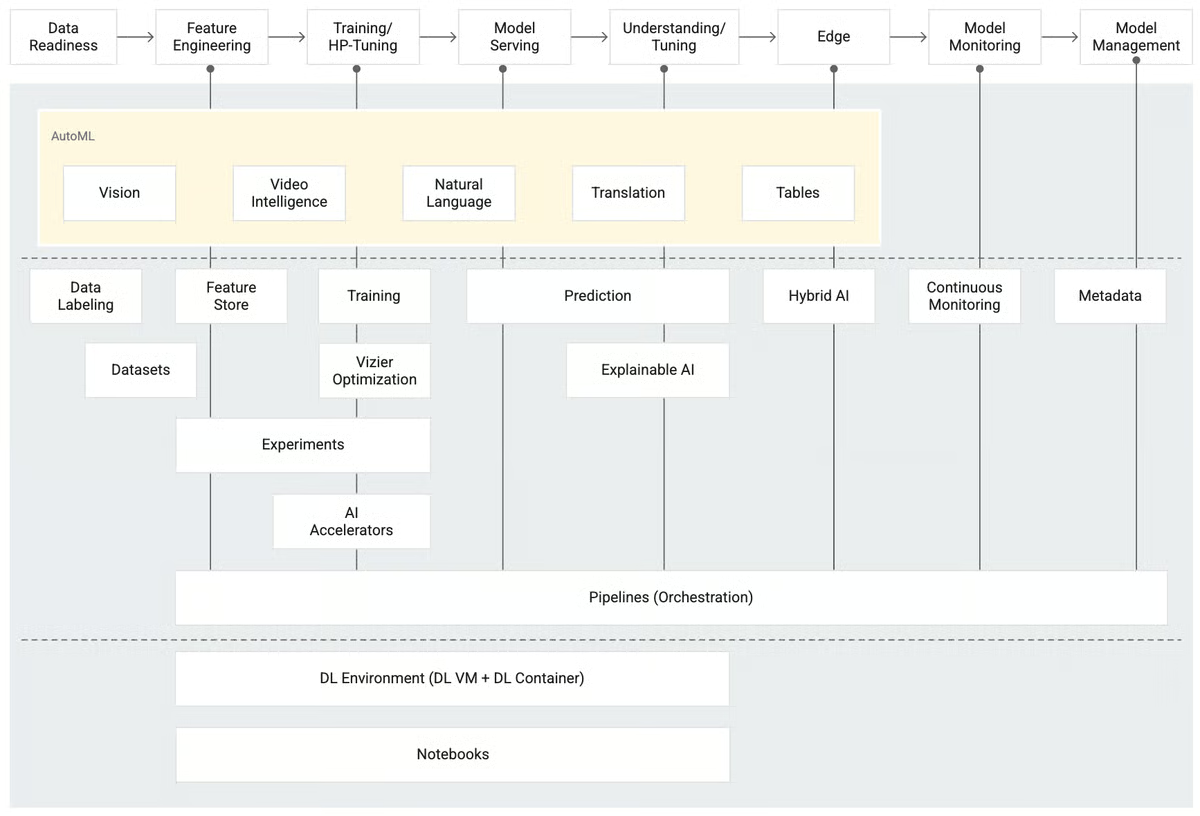
Technical users also noted the benefit of customizing training with GPU and TPU support and the ability to leverage managed pipelines using Kubeflow. Several G2 reviewers emphasized that the ability to integrate directly with BigQuery and access pre-trained large language models like PaLM and Gemini added considerable flexibility for enterprise and generative AI use cases.
While Vertex AI’s depth of features gives enterprises immense control, it can feel complex for first-time users or teams just beginning their ML journey. The interface and documentation are built for technical scalability, which means it’s best suited for teams comfortable navigating Google Cloud’s environment. Similarly, the platform’s usage-based pricing offers flexibility but requires active cost governance, something larger organizations are already equipped with monitoring tools to handle with ease.
That said, this very combination of technical depth and scalable infrastructure is what makes Vertex AI stand out among enterprise-grade ML platforms. Once teams align their workflows, the payoff is significant: faster deployments, smarter automation, and a single, unified environment for managing models at scale.
“The best thing I like is that Vertex AI is a place where I can perform all my machine-learning tasks in one place. I can build, train, and deploy all my models without switching any other tools. It is super comfortable to use, saves time, and keeps my workflow smooth. The most helpful one is that I can even train and deploy complex models. It works very well with BigQuery, which lets me automate the model process and make predictions. Vertex AI is super flexible to perform AutoML and custom training.”
- Vertex AI review, Triveni J.
“In order to utilize Vertex AI, there is a certain level of technical expertise that is required to develop agents. It makes it difficult for non-tech professionals to develop all the nitty-gritties of developing an agent. With alternatives that seem more like a no-code agent builder, Vertex AI could fall behind in the race.”
- Vertex AI review, Sagnik R.
What I loved about Databricks is its lakehouse architecture, which allows users to manage structured and unstructured data in a single platform without sacrificing performance or governance.
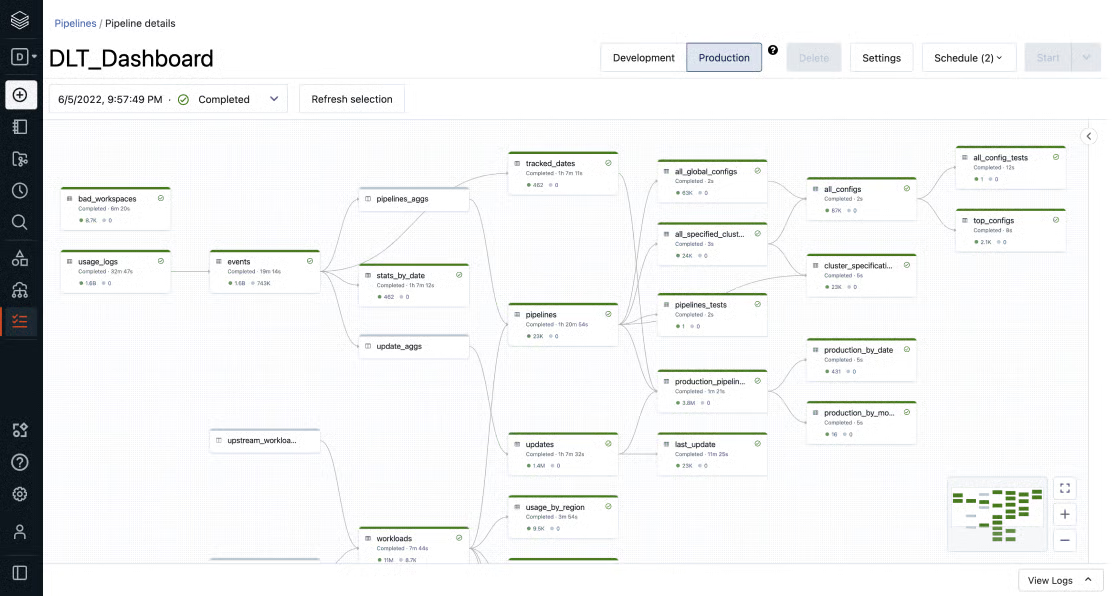
Databricks Data Intelligence Platform emerged as one of the category leaders on G2, with over 93% of users saying they would recommend the platform. Reviewers appreciated how Databricks combines the scalability of data lakes with the reliability and ACID compliance of data warehouses through technologies like Delta Lake and Delta Live Tables.
Another highlight across G2 reviews is the platform’s robust support for Apache Spark, which powers large-scale data pipelines, real-time analytics, and ETL workflows with ease. Many users found notebook-based development intuitive and collaborative, noting seamless integration with ML frameworks and version control tools like MLflow. Users rate Databricks especially highly for scalability, data ingestion and wrangling, and broad language support, contributing to its 99% customer satisfaction score.
The Unity Catalog was also frequently praised for bringing consistency to governance, data access, and auditability across different teams and workloads.
From a machine learning and AI standpoint, G2 reviewers frequently noted that the platform enables fast experimentation and deployment of models at scale. While some users specifically mentioned generative AI features, most emphasized the platform’s utility for building end-to-end pipelines that span data ingestion to real-time inference.
Users also highlighted the ability to integrate with major cloud platforms and external services as a critical factor in enabling flexible, multi-environment deployments.
Because Databricks is built for enterprise-grade workloads, some teams observed that the platform’s compute management and setup require careful attention. The flexibility of configuring clusters and scaling jobs gives advanced users fine-grained control, but may feel intricate for those new to distributed computing. Similarly, costs can rise when large-scale workloads run continuously, something common with powerful, always-on systems designed for production-level analytics. This level of complexity tends to align better with teams that have established data governance and operate production-scale analytics workloads.
Ultimately, this technical depth is what makes Databricks so powerful. Once configured, its unified lakehouse architecture, automation features, and governance through Unity Catalog deliver a seamless experience for large-scale data operations, making it a top choice for mature teams that value flexibility, performance, and collaboration in one integrated platform.
“I have been using data bricks for around one year. In a week, I use it approximately 3-4 days. Everything is integrated, which means I don’t have to switch between multiple tools to do different tasks. It really improves team collaboration. Sharing notebooks and collaborating on models is super easy. This has been great for our team since we often work together on projects and need to see each other's code and progress.”
- Databricks review, Varun T.
“One downside is that the initial setup and networking configuration can be complex and require technical expertise. Also, the cost can scale up quickly depending on usage, so cost monitoring is essential. Additionally, the lack of comprehensive documentation in some languages, like Japanese, can be a limitation.”
- Databricks Data Intelligence Platform review, Taka B.
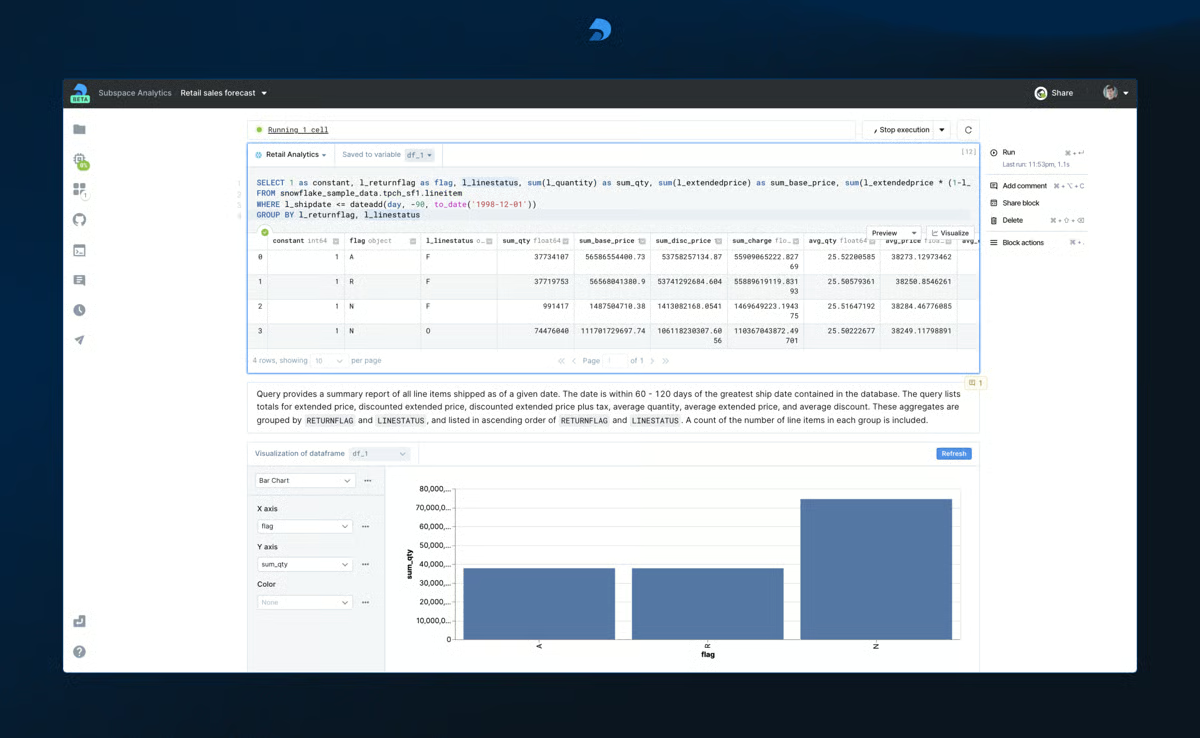
What I appreciate about Deepnote is its seamless real-time collaboration, which allows multiple users to edit, comment, and visualize data simultaneously, making it a favorite among data teams that prioritize shared exploration and reproducibility.
Its ability to merge SQL, Python, and markdown into a single workflow is frequently praised, especially by users transitioning from traditional Jupyter environments. Based on 218 verified G2 reviews, Deepnote has achieved a 99% customer satisfaction score, with 91% of users saying they would recommend the platform.
Many G2 users also called out Deepnote’s intuitive cloud interface and AI-enhanced productivity tools, which help streamline coding, query writing, and debugging. The platform’s integration with databases, GitHub, and popular data warehouses is seen as a major advantage, allowing analysts and engineers to work from one centralized workspace without needing extensive setup. Users rate Deepnote especially highly for data preprocessing and wrangling, natural language processing (NLP), and application services.
Notably, G2 reviewers mentioned the platform’s strong support for education, prototyping, and cross-functional teamwork, particularly in startup and research-driven environments.
Deepnote is designed for collaboration and accessibility, so its performance naturally prioritizes ease of use and real-time teamwork over heavy-duty, resource-intensive computing. A few users noticed slower response times when working with extremely large datasets, but this is mostly in scenarios that go beyond the platform’s intended scope of agile analysis and prototyping.
Similarly, while its AI features are still evolving, they already assist in day-to-day productivity tasks and are continually improving with updates. For teams that need advanced automation or compute-heavy workloads, pairing Deepnote with a dedicated data engine can easily bridge that gap.
Overall, G2 reviewers consistently highlight that Deepnote shines where it matters most: quick experimentation, collaboration, and education. It’s an intuitive, ready-to-go environment that makes data exploration faster and more interactive, particularly for growing teams and research-driven organizations.
“I really enjoyed using the platform, especially the integrated AI. I found the suggestions it provides to continue analyses very relevant and helpful, particularly when dealing with ambiguous scenarios. Another aspect I appreciate is that when the AI doesn't reach a satisfactory answer, it makes another attempt instead of stopping. Additionally, I value the auto-completion feature for coding, as it significantly speeds up the workflow.”
- Deepnote review, Ana Clara D.
“The AI functions are useful, but need to be improved. Sometimes I don't feel confident with this. I would like to have more options to automate processes like ETL that are long-running projects, but could be executed very easily with such a tool.
Plots could be limited, and sometimes, I have to use Python because the plot feature is not enough.”
- Deepnote review, Andres M.
Users appreciate how Dataiku brings together data scientists, engineers, and analysts within a single collaborative environment. Its support for both no-code interfaces and custom code allows teams with varying technical skills to contribute meaningfully across the ML lifecycle, from data prep and modeling to deployment. Dataiku has emerged as one of the category leaders, earning an 85% customer satisfaction score on G2, with over 88% of users saying they would recommend the platform.
Key strengths repeatedly cited include workflow orchestration, version control, and intuitive interface design.
G2 reviewers highlight the platform’s ability to unify pipelines, governance, and automation features, all while maintaining transparency and reproducibility across projects. Its flexibility to scale from experimentation to production is noted as a differentiator, particularly in enterprise environments handling complex data operations. Users rate Dataiku especially highly for its drag-and-drop capabilities, pre-built algorithms, and data ingestion features.
While users admire how Dataiku democratizes AI for both technical and non-technical teams, they also acknowledge that some advanced workflows can feel complex in practice. That’s largely due to its extensive capabilities, the same breadth that enables organizations to handle massive, multi-step pipelines from data preparation to deployment.
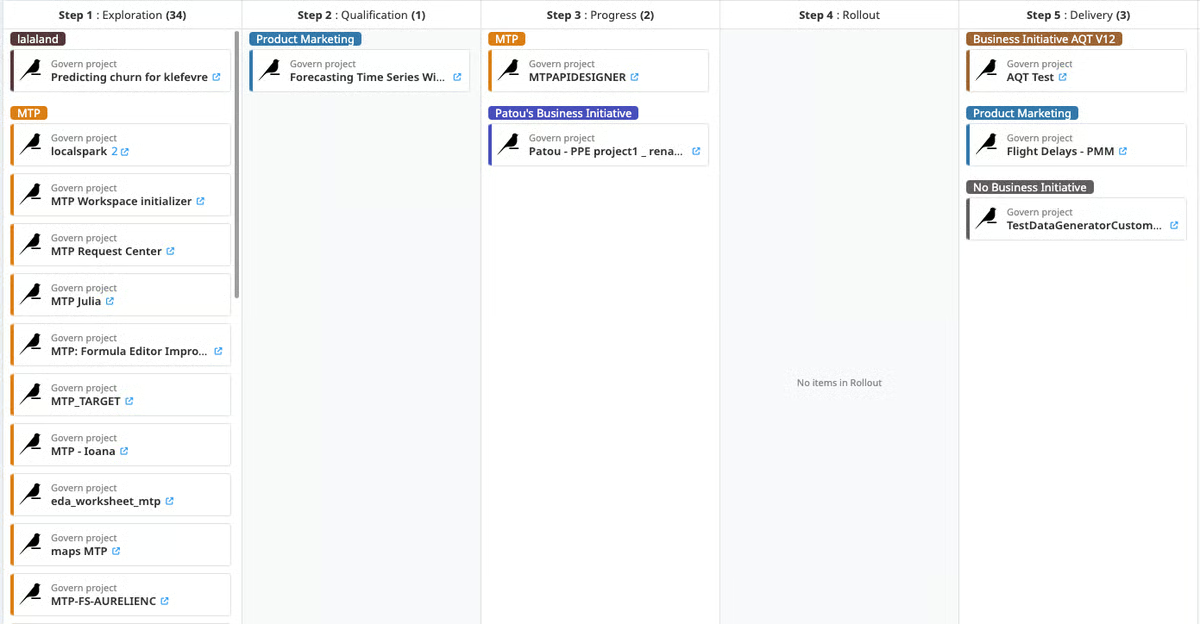
A few reviewers mentioned that certain premium functionalities are available only in higher plans, but this tiered structure allows smaller teams to begin affordably and scale as their data maturity grows. Similarly, minor performance slowdowns during heavy workloads tend to appear only when several large projects run concurrently, an expected trade-off for cloud-based, collaborative environments.
Ultimately, G2 reviewers view these nuances as signs of Dataiku’s enterprise-grade strength rather than limitations. Once teams get past the initial setup and exploration phase, they gain a robust, future-ready platform that brings people, data, and AI projects together seamlessly.
“Dataiku stands out for its ease of use — the drag-and-drop interface combined with the option to code when necessary makes it accessible to a wide range of users. Implementation was smooth and well-supported by the customer success team. I use Dataiku frequently because it offers a vast number of features, from data preparation to model deployment. Integration with other tools like databases, cloud services, and APIs is straightforward, making the platform even more powerful for end-to-end projects.”
- Dataiku review, Marcio B.
“The infrastructure setup to host the Dataiku stack on-premises was very painful. It took over 2 months just to set up the infrastructure to get Dataiku running on our cloud.”
- Dataiku review, Tirth S.
One of the most appreciated aspects of Deep Learning VM Image is its pre-installed support for popular ML frameworks like TensorFlow and PyTorch, along with tools such as Jupyter that are ready to use right out of the box.
Users repeatedly emphasized how this saves them time and effort in setting up their own infrastructure, especially when working with GPU-based workloads. The platform earns praise for offering a clean, optimized environment that supports quick experimentation and deployment.
Reviewers noted that the configuration is well-suited for common use cases in deep learning, and the fact that everything is already wired together, including package management and driver installations, makes it easier to jump straight into model development. This “ready from the start” setup is also reflected in G2 Data, with Deep Learning VM Image earning a 90% rating for ease of setup and 87% for ease of use, reinforcing reviewer feedback about being able to get productive almost immediately.
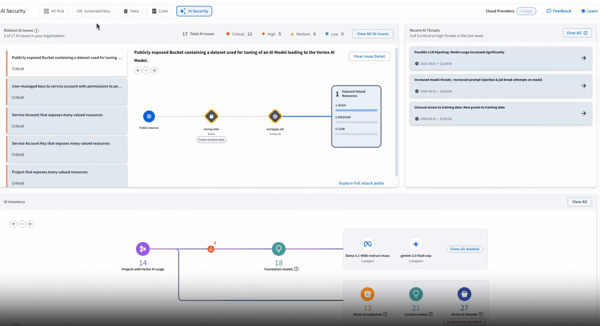
G2 review data also reflects satisfaction with its integration flexibility, enabling teams to connect with other Google Cloud services or customize workflows through APIs.
Deep Learning VM Image is built for speed and simplicity, giving users instant access to pre-installed frameworks without needing to manage dependencies manually. Due to this streamlined setup, some reviewers noted that advanced customization can initially feel limited.
Adjusting versions or swapping tools sometimes requires manual steps, but that’s a natural trade-off for an environment designed to be ready-to-run out of the box. A few teams also pointed out that GPU-based workloads can drive up costs when run continuously, though those expenses reflect the platform’s strong performance for compute-intensive tasks.
All in all, G2 reviewers agree that Deep Learning VM Image delivers exceptional value for data scientists and researchers who want to start experimenting right away. It’s a fast, stable, and fully equipped environment that minimizes setup time, ideal for teams that prioritize getting to model training and experimentation without heavy infrastructure management.
“It offers a wide range of features, but I specifically liked the feature that allows every framework to make a machine learning or artificial intelligence project like Tensorflow, PyTorch, Keras, etc. It offers different tools to integrate it very easily and efficiently. As this platform is provided by Google Cloud, it is quite obvious that it can be used and hosted on any platform. I have used its free trial for a month, where I got to know the benefits of it, and later it charges based on what you have used.”
- Deep Learning VM Image review, Shantanu R.
“It seems to be a little bit expensive, and it would be hard for beginners to use it. It would be better to have a user-friendly interface and better customisation options.”
- Deep Learning VM Image review, Lekshmi M.
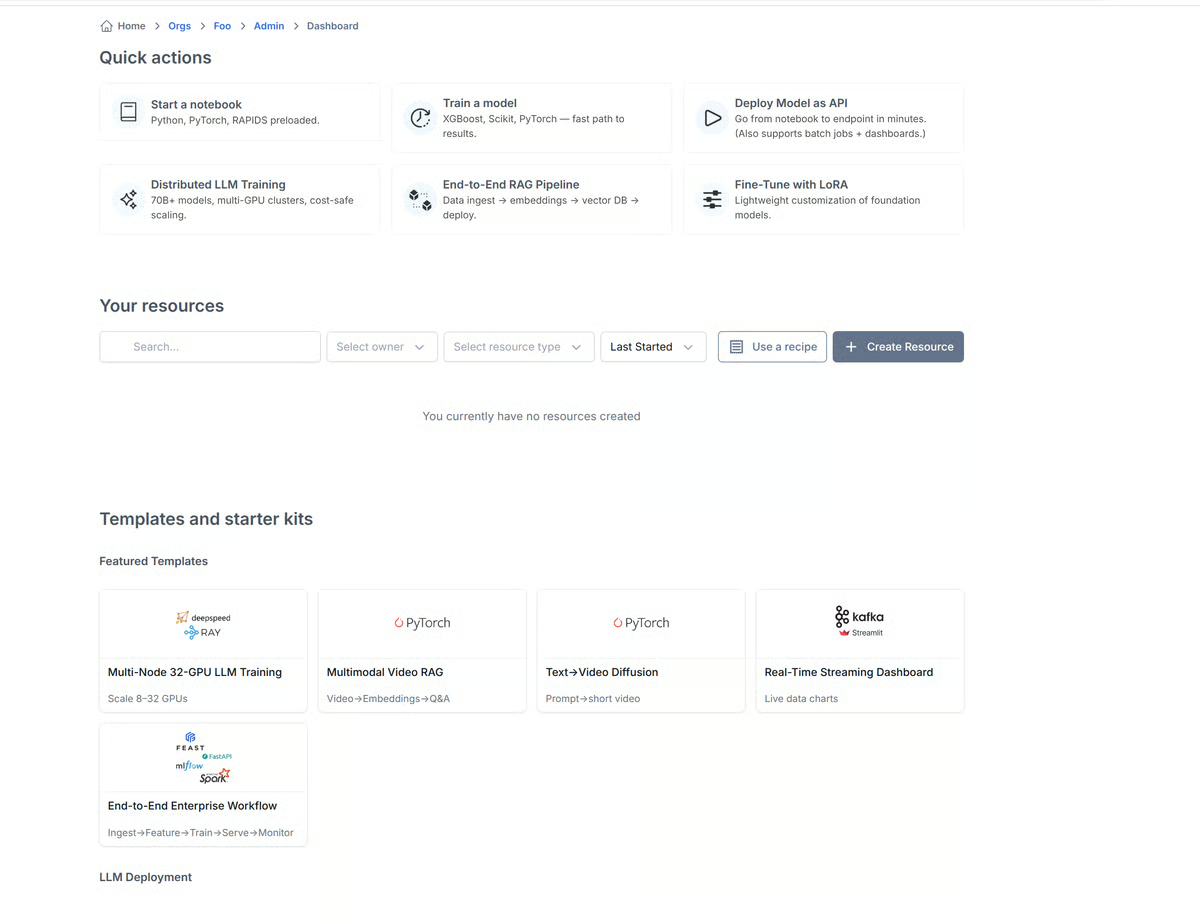
Saturn Cloud has quietly become one of the most well-loved data science and machine learning platforms, especially among teams that want serious performance without the infrastructure headaches. What immediately stands out about Saturn Cloud is how effortless it makes scaling.
With a 96% ease of use score and 93% for setup, teams say they can spin up GPU and Dask clusters in minutes, which saves countless hours otherwise spent managing environments. It’s especially popular among computer software, higher education, and research organizations, where speed and reproducibility of experimentation matter most.
According to G2 Data, the platform’s highest-rated features include deep learning (94%), model training (94%), and NLP (94%). These strengths make it a natural fit for AI researchers and data teams working on compute-heavy projects. The platform simplifies running notebooks on scalable hardware, and its integration with Python-based tools means switching from local work to cloud computing feels seamless.
The interface feels intuitive and uncluttered, which helps even new users get up and running quickly. I personally like how its workspace model keeps teams organized, each project gets its own isolated environment, resources, and permissions, making collaboration smooth and secure. It’s one of those tools that makes cloud infrastructure feel invisible, which is a rare compliment in this space.
That said, Saturn Cloud’s strength lies in how much flexibility it gives you, and with that level of power, a bit of resource mindfulness naturally comes into play. The pay-as-you-go pricing model is designed for professional teams that need on-demand compute power, so while long-running GPU tasks can increase costs, it’s also what allows you to scale instantly without committing to fixed infrastructure. For academic or smaller teams, monitoring usage simply ensures you’re paying for what you actually use, a fair trade-off for the freedom Saturn Cloud offers.
Some G2 users also pointed out that its text-based AI features, like text-to-image or summarization, aren’t as central to the platform’s focus, and that’s by design. Saturn Cloud was built to excel at deep learning, distributed model training, and data pipeline optimization rather than creative AI applications. That clarity of purpose is what keeps it fast, reliable, and perfectly tuned for technical workloads.
In essence, these aren’t shortcomings so much as signs of a platform that knows its audience. For data science, research, and engineering teams that prioritize scalability and control over generative extras, Saturn Cloud delivers precisely what it promises: a fast, flexible environment that just works, right out of the box.
“I’ve been using Saturn Cloud every day for over three months, and it’s honestly been a smooth and enjoyable experience. It’s way more user-friendly than platforms like AWS SageMaker. What I really appreciate is how easy it is to spin up a server. It takes just a few clicks, no hidden complexity or frustrating setup steps. The documentation is also clear, especially if you're not super familiar with cloud environments.
One thing I want to highlight: the platform evolves fast. A recent update added a way to see the task queue, which is super helpful. I am also pleasantly surprised to see GPU utilization, as well as NVLink bandwidth between GPUs, all shown right inside the Jupyter server.
Also, big thanks to the support team, especially to Hugo. They’ve been consistently responsive.”
- Saturn Cloud review, Jianyi W.
“The storage is too small to upload large datasets. It usually doesn't have enough space to save the processed datasets. It would be much better if they could resolve this problem.”
- Saturn Cloud review, Sara F.
Got more questions? Get your answers here!
Deepnote is a strong fit for SaaS teams needing collaborative, real-time data exploration in notebooks. Its workspace-style design makes it ideal for cross-functional teams analyzing product usage, retention, or revenue data with SQL, Python, and visualization, all in one place.
Enterprises often gravitate toward Vertex AI and the Databricks Data Intelligence Platform. Vertex AI offers end-to-end ML pipelines, MLOps, and integration with Google Cloud, while Databricks enables scalable training on Delta Lake with governance via Unity Catalog, both delivering production-grade ML infrastructure.
Dataiku is particularly well-suited for e-commerce brands that need to blend marketing, operations, and supply chain analytics. With built-in connectors and AutoML, it allows analysts and domain experts to deploy churn models, recommendation engines, and inventory forecasts quickly.
Vertex AI stands out for its managed infrastructure, automated pipelines, and hyperparameter tuning capabilities. It provides the flexibility to build, train, and deploy advanced models across cloud, mobile, and edge environments — making it a reliable choice for end-to-end machine learning solutions.
Deepnote offers a lightweight, collaborative, and intuitive experience that fits small teams looking to do meaningful analysis without heavy setup. It's notebook-first, cloud-native, and lets non-experts contribute to data workflows alongside data scientists.
Tech companies often use Databricks for scalable data engineering and unified analytics. With strong Spark-native performance and notebook collaboration, it's ideal for teams processing real-time logs, building metrics layers, or powering feature stores for ML.
Startups often lean toward Deep Learning VM Image for cost-effective experimentation. Google’s DLVM comes preloaded with all major ML frameworks, allowing teams to prototype with tools like PyTorch and quickly scale when ready, all without complex setup or infrastructure overhead.
Vertex AI stands out for cloud-based app teams needing robust model serving, monitoring, and integration with services like BigQuery or Firebase. It’s purpose-built for apps running in GCP and offers serverless inference with full MLOps support.
Vertex AI and Deep Learning VM Image are strong options for mobile ML development. Both platforms allow teams to train and optimize lightweight models that can be deployed efficiently on Android or iOS apps, enabling on-device personalization, image recognition, and speech capabilities without heavy infrastructure.
Databricks and Deepnote serve development-focused teams well. Databricks powers backend pipelines and large-scale log analysis, while Deepnote enables collaborative investigation of metrics, product data, and model outputs in a dev-friendly notebook interface.
While the above list of data science and machine learning platforms consolidates crucial buyer insights and market factors, preparing a software proposal for your requirements is still crucial.
Listing out details like AI maturity, AI infrastructure bandwidth, revenue, team sizes, projected goals, ROI, and contractual obligations is crucial before getting into the actual evaluation phase.
When it comes to investment, signing up for proper demos and requesting trials is the ideal way to get a broader picture of these platforms' working methodology. You need to ensure that a data science tool adapts to your data requirements, operating system, and production compatibility.
If you ever feel stuck, you can find your way back to this list and support your evaluation with substantial G2 Data.
Check out the best generative AI infrastructure to scale data science workflows, accelerate model training, and deploy ML systems with confidence.

Companies across industries are building and training machine learning models, but many still...
.png) by Shreya Mattoo
by Shreya Mattoo
-2.png?width=400&name=dark%20(12)-2.png)
TL;DR: Everything you need to know about low-code machine learning deployment According to...
 by Shalaka Joshi

Recently updatedSummer 2026 Grid® Report · Published May 26, 2026 This guide was last...
 by Soundarya Jayaraman