


I’ve spoken with enough data teams to know the pattern: Organizations don’t struggle with analysis nearly as much as they struggle with the "preparation tax." If you’re an analyst, data engineer, or BI leader, you’ve probably felt it yourself. Hours spent cleaning datasets, fixing schemas, and stitching sources together before the real work can even begin.
The stakes have only gotten higher. Today, the same datasets powering your BI dashboards are also the lifeblood of your machine learning models and autonomous AI agents. When the prep layer breaks, the ripple effect is immediate: dashboards lie, models hallucinate, and automated pipelines stall. In fact, nearly a quarter of organizations cite the lack of AI-ready data as the major challenge to AI adoption.
That's why many teams start evaluating the best data preparation tools. Manual cleaning and brittle SQL scripts simply don't scale in an AI-first world. To help you cut through the noise, I’ve used G2 Data and product research to shortlist the top data preparation tools for 2026.
Below, I break down the best data preparation platforms like Tableau, SAS Viya, Alteryx, Domo, and HubSpot Data Hub so you can quickly see which one fits your team’s workflow. Whether you need self-service wrangling or enterprise-grade automation, these are the platforms worth your time.
*These data preparation tools are top-rated in their category, according to the G2 2026 Winter Grid Report. I have mentioned the starting price of their paid plans and standout features for easy comparison.
Here’s a quick comparison table showing how each data preparation tool stacks up on the features that matter most, along with their G2 feature ratings from the 2026 Winter Grid Report.
| Data preparation tools | Breadth of data sources | Breadth of integrations | Data Quality and cleansing | Data joining | Profiling and classification |
| Tableau | 88% | 87% | 86% | 87% | 84% |
| SAS Viya | 88% | 86% | 89% | 89% | 87% |
| Alteryx | 90% | 90% | 93% | 92% | 87% |
| Domo | 89% | 85% | 90% | 92% | 80% |
| HubSpot Data Hub | 99% | 98% | 97% | 97% | 98% |
At its simplest, data preparation software is a specialized category of tools designed to transform raw, messy data into a clean, structured, and "analysis-ready" format. Data preparation software helps teams clean, transform, and structure raw data so it’s ready for analysis, reporting, or machine learning. It bridges the gap between your raw data sources (like CRMs, ERPs, and data lakes) and your end-points (BI dashboards, ML models, and AI agents).
But in 2026, "ready for analysis" has a much higher bar. From what I’ve learned from data analysts and BI teams, the tools that stand out solve two bigger problems: speed and reliability. Teams want to reduce the time between raw data and usable insights while ensuring the data feeding dashboards, models, and AI systems is trustworthy.
G2 Data highlights a clear trend in how these tools perform in the wild. Organizations adopting data preparation tools reach the break-even point in just 11 months. The category also serves a broad range of organizations, with 36% of users coming from mid-market companies and 33% from enterprise teams, showing that data preparation challenges scale with company size.
I started with G2’s Grid® Reports to build a shortlist of the top data preparation tools based on G2 Score, user satisfaction, and overall market presence.
Next, I dug into G2 reviews at scale with AI to spot the patterns that keep showing up for data teams evaluating data preparation tools: what actually helps people clean and transform messy datasets faster, where preparation workflows break down, and which capabilities truly reduce manual data wrangling.
I paid extra attention to comments on usability, integrations, automation, and how effectively each tool helps teams move from raw data to analysis-ready datasets that can reliably power dashboards, models, and AI workflows.
Since I couldn’t try first-hand, I relied on insights from people who use them every day and validated those takeaways against verified G2 reviews.
The screenshots in this article come from G2 vendor profiles and publicly available product documentation.
Based on product research and patterns I’ve seen in G2 user feedback, these are the criteria that matter most when evaluating platforms in this category.
No tool is perfect across every criterion, and you’ll see trade-offs in the picks. But the best data preparation tools on this list are consistently strong where it counts: reliable transformations, scalable pipelines, automation, and governance features that help teams move from messy raw data to trustworthy insights.
The list below contains genuine user reviews from the Data Preparation Tools and Software category. To be included in this category, a solution must:
*This data was pulled from G2 in 2026. Some reviews may have been edited for clarity.
G2 rating: 4.4/5 ⭐
Most of us know Tableau for dashboards. But it isn’t just a visualization tool anymore; Tableau Prep (consisting of Prep Builder and Prep Conductor) has evolved into a powerhouse for what I call "Visual ETL." It is designed specifically for those who need to see their data to understand how to fix it.
On G2, Tableau holds a 4.4 out of 5 rating, and its user base spans organizations of all sizes, including 21% small businesses, 35% mid-market companies, and 44% enterprise teams. That spread reflects to me how widely the platform is used across analytics environments, from smaller data teams preparing datasets for reporting to large enterprises managing complex data sources.
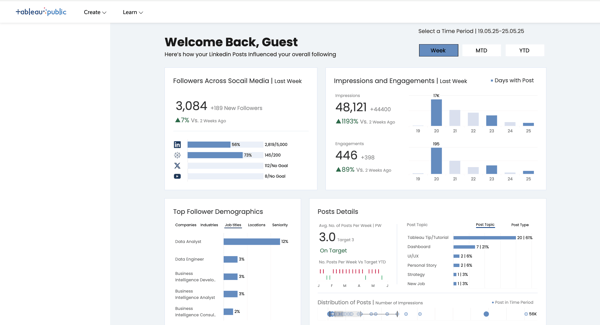
One of the things that consistently stands out to me in G2 feedback is how approachable Tableau’s workflow feels for analysts who don’t want to rely entirely on SQL scripts or engineering support. Users rate ease of use at 85% and ease of setup at 86%, both slightly above the category average, which aligns with what I often hear from BI teams: Tableau lowers the barrier to getting data into a usable state. Instead of writing complex transformation logic, analysts can visually join tables, reshape fields, and experiment with datasets before pushing them into dashboards.
To me, Tableau Prep is the "safety net" that catches messy data before it ever reaches a stakeholder’s eyes. It’s particularly effective for teams already living in the Salesforce/Tableau ecosystem who need to move fast without writing 400 lines of SQL.
Beyond exploration, Tableau Prep lets teams schedule and automate data flows through Prep Conductor, so the same cleaning and transformation steps run consistently every time. This makes it easier to maintain reliable datasets without heavy engineering support, helping analysts move from ad hoc fixes to production-ready pipelines in a visual, low-code environment.
Connectivity is another area where Tableau performs well, from what I gathered. On G2, ease of data connectivity scores 89%, and users also highlight the breadth of data sources (88%) and data joining capabilities (87%) as some of its highest-rated features.
For teams dealing with fragmented datasets across warehouses, SaaS apps, and spreadsheets, this flexibility is a big reason Tableau shows up so often in analytics stacks. Analysts can quickly combine sources, clean fields, and explore relationships without having to move data through multiple tools first.
That said, some teams mention that Tableau can feel heavy when working with very large datasets. When data volumes grow significantly, performance can slow down. However, this reflects the platform’s ability to process and visualize rich, high-dimensional data for advanced analytics use cases. For most analytics processes, this isn’t a dealbreaker.
Another theme that comes up in user feedback is that some advanced features take time to learn, particularly for new users stepping beyond basic dashboards and visual transformations. While the deeper functionality around complex calculations or advanced data modeling can introduce a ramp-up time for teams just getting started, they enable a high level of analytical precision for teams that need it.
Even with those considerations, I'd say Tableau remains one of the most widely adopted platforms for preparing data within the analytics workflow. If your goal is to prepare and explore data in the same environment where you build dashboards, and you want a platform with a proven track record across mid-market and enterprise teams, Tableau is easily one of the strongest data preparation tools to consider.
"I mainly use Tableau to make sense of data that would otherwise be hard to understand. It helps me turn numbers into visuals. I like how quickly it turns raw data into clear visuals, making insights easier to spot and share without needing great technical skills. The visualization features help me quickly spot trends, patterns, and outliers that are hard to catch in raw data. Interactive dashboards, filters, and drill-down options make analysis faster, improve clarity, and help stakeholders understand insights. I appreciate that it helps reduce time spent on manual reporting, highlights trends early, and makes complex data easier to explain, leading to quicker decisions and better alignment across teams. The initial setup was very easy and user-friendly."
- Tableau review, Ashish K.
"One thing I don’t like about Tableau is that it can feel a bit heavy and slow when working with very large datasets. Some advanced features are not very easy to understand at first, so there is a learning curve for new users. The setup can also take some time, especially when connecting to complex data sources. Customer support is helpful, but the response can sometimes feel slow. It also feels costly for small teams, and not all features are used daily, which makes it feel a little too much for simple tasks."
- Tableau review, Ayush K
Looking for a list of other analytics tools you can consider? Read my guide on the best analytics platforms for 2026.
G2 rating: 4.3/5 ⭐
When I first started digging into SAS Viya for this list, one thing became clear quickly: If Tableau is about seeing the data, SAS Viya is about the sheer industrial force behind it.
From what I’ve seen researching the platform, Viya isn’t just another data prep tool. It’s a cloud-native analytics and AI platform designed to handle everything from messy data ingestion to model deployment. That’s why it keeps surfacing in conversations with teams running complex pipelines, predictive models, and enterprise-scale analytics environments.
On G2, SAS Viya holds a 4.4/5 rating, and its user base is fairly evenly distributed across company sizes: 31% small business, 33% mid-market, and 36% enterprise.
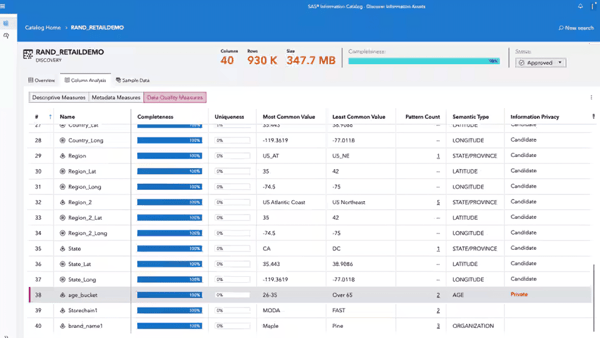
What stood out to me while digging through G2 reviews is how consistently teams highlight Viya’s strength in core preparation workflows, particularly when data complexity starts to climb. Its highest-rated features, data joining, data quality and cleansing, and data blending (all around 89%), reflect exactly what many data teams need when dealing with fragmented datasets spread across warehouses, applications, and legacy systems.
What I find particularly interesting about Viya is how tightly it connects data preparation with advanced analytics. Instead of treating prep as a separate step, the platform integrates it into a larger analytics lifecycle powered by the SAS Cloud Analytic Services (CAS) engine, which is designed to process large datasets at high speed.
Teams can now work in Python, R, or Lua while still leveraging the CAS engine underneath, which makes it much easier to slot the platform into modern data science workflows.
Another capability that caught my attention while researching the platform is how much emphasis SAS places on data governance and compliance, something that shows up frequently in G2 feedback from industries like banking, pharmaceuticals, government, and financial services.
Viya creates a visual lineage map that tracks how data flows from raw ingestion through transformations and ultimately into models or analytics outputs. For organizations operating in highly regulated environments, that level of traceability is a major advantage.
That said, according to G2 reviews I saw, teams new to SAS Viya might expect a learning curve when navigating its broader analytics capabilities. Because the platform combines data preparation, modeling, and governance in one environment, some users mention that it takes time to become fully comfortable with the interface and workflows.
Also, teams deploying SAS Viya in more complex data environments might plan for additional setup time, especially when integrating multiple data sources or configuring data pipelines and advanced analytics workflows. This is less about day-to-day usability and more about the initial effort required to connect systems and tailor the platform to specific enterprise needs.
But once teams get through the initial ramp-up and setup, they benefit from a unified analytics environment that reduces tool sprawl and supports more advanced, end-to-end data workflows
Even with those considerations, SAS Viya stands out as one of the most powerful data preparation platforms for organizations working with complex, high-stakes data environments. For data scientists, enterprise analytics teams, and organizations operating in regulated industries, SAS Viya is a platform that doesn’t just prepare data; it operationalizes it across the entire analytics and AI lifecycle.
"What I like best about SAS Viya is how it combines the strength and reliability of traditional SAS with a modern, flexible environment. I appreciate the cloud-based structure, which makes it easier to access projects from different locations, and the integration of visual analytics with coding in SAS and Python. The interface is clean and intuitive, but still powerful enough for advanced modeling, including mixed models and large datasets. It feels scalable, efficient, and well-suited for both teaching and research environments."
- SAS Viya review, Amir B.
"One potential downside of SAS Viya is that it can have a steep learning curve, especially for users who are new to SAS or enterprise analytics platforms. The cost of licensing and implementation can also be high compared with some open-source alternatives, which may limit accessibility for smaller organizations. Additionally, while Viya supports multiple programming languages, some advanced customization can still feel more seamless within the SAS ecosystem, which may reduce flexibility for teams that primarily work in open-source environments."
- SAS Viya review, John M.
G2 rating: 4.6/5 ⭐
When I started researching Alteryx for this list, one thing became obvious pretty quickly: if many data prep tools try to simplify transformations, Alteryx is built to automate the entire workflow behind them. It’s a platform designed for analysts who want to move beyond spreadsheets and manual SQL and instead build repeatable data pipelines with visual workflows.
From what I’ve seen digging through product documentation and G2 reviews, Alteryx is widely used by analytics teams that need to combine, clean, and transform large datasets without relying heavily on engineering resources. Its adoption skews heavily toward larger organizations, with 65% of users in enterprises, 21% in the mid-market, and 14% in small businesses. That distribution makes sense once you look at what the platform is built for: complex analytics workflows that often sit inside finance, operations, or data science teams.
One of the things that really impressed me in the G2 Data is just how strongly Alteryx performs in the areas that matter most for data preparation. Users consistently rate data workflows, data blending, and data quality and cleansing at around 93%, which are among the platform’s highest-rated features. That aligns with how most teams actually use it. Instead of manually stitching together datasets every week, analysts can build visual pipelines that ingest data from multiple sources, transform it, and automatically produce clean outputs for reporting or modeling.
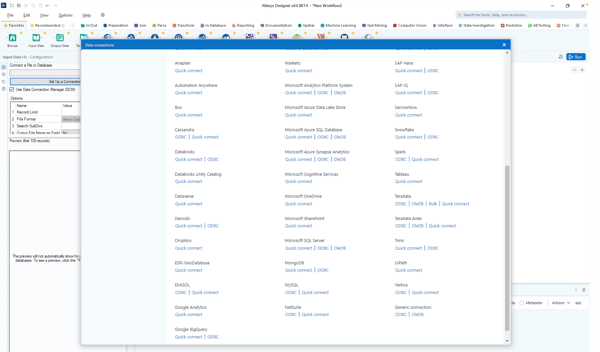
The workflow builder is really the heart of the product. When I looked at how teams describe their experience on G2, a common theme is how the drag-and-drop pipeline interface makes complex transformations easier to manage. Analysts can join datasets, standardize fields, enrich data, and run repeatable transformations without writing extensive code. For teams working with messy operational data, this kind of workflow automation can replace a lot of manual spreadsheet work or brittle scripts.
The platform is particularly common in financial services, accounting, IT services, banking, and insurance, where analysts often work with multiple datasets that need to be reconciled or prepared for reporting.
Another aspect I noticed while researching Alteryx is how strongly it focuses on operationalizing analytics workflows. Instead of just cleaning data for one-off analysis, teams can turn transformations into repeatable pipelines that feed dashboards, forecasting models, or machine learning workflows. That ability to move from manual prep to automated pipelines is a big reason Alteryx often shows up in larger enterprise analytics environments.
In parallel, some G2 reviewers mention that teams new to Alteryx may experience a learning curve when building more advanced workflows. While the visual interface is powerful, understanding how to structure larger pipelines and transformations can take some time, especially for users transitioning from spreadsheets or basic analytics tools.
Another consideration that appears in user feedback is that teams evaluating Alteryx may want to account for its pricing when comparing options. Because the platform offers a robust set of analytics and automation capabilities, it’s often positioned toward organizations that expect to operationalize data workflows at scale, rather than teams looking for a lightweight data preparation tool.
From what I’ve seen, Alteryx delivers the most value for enterprise analytics teams, especially across finance and operations. If you’re regularly combining multiple datasets and need repeatable transformation pipelines feeding dashboards or models, this is easily one of the strongest data preparation tools I’d recommend evaluating.
"We used Alteryx to handle both ETL and ELT data operations during our migration from Oracle to Snowflake. Additionally, we set up Control-M jobs to trigger workflows and manage scheduled tasks. And we are able to integrate with other platforms and applications to merge multiple data sources."
- Alteryx review, Devaraj M.
"Pricing is on higher side, and performance can slow down with very large workflows. Collaboration and version control could also be improved."
- Alteryx review, Venkata M.
Explore G2's complete guide to data analytics that covers everything from business analytics to big data analytics.
G2 rating: 4.3/5 ⭐
I had mostly associated Domo with dashboards and analytics earlier. But after digging deeper into the platform and reading through G2 feedback, it became clear that a big part of its value actually sits earlier in the workflow: helping teams prepare and unify data before it ever reaches a report.
Domo approaches data preparation differently from many tools in this category because it treats transformation, integration, and analytics as part of the same pipeline rather than separate steps.
Based on G2 Data I saw, its user base skews toward organizations that are actively scaling their data infrastructure. Mid-market companies make up about 55% of users, followed by 31% enterprise teams and 14% small businesses. It’s clear that a lot of these teams are trying to consolidate fragmented data workflows rather than build complex engineering-heavy stacks.
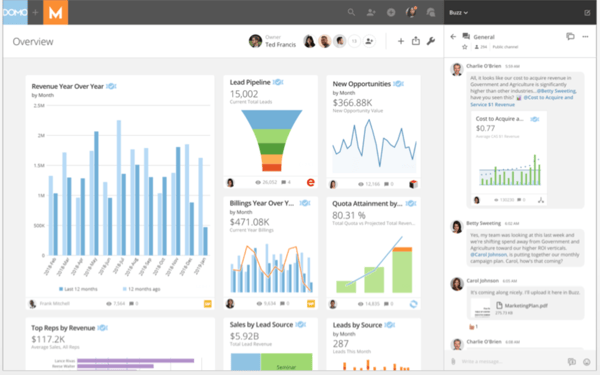
A big reason Domo lands on my list is how well it handles bringing different datasets together in one place. In the G2 Grid data, users give particularly strong marks to capabilities like data joining (92%), data blending (90%), and breadth of data sources (89%).
Those numbers line up with how most teams actually describe using the platform. Marketing, sales, and operations data often live across dozens of SaaS tools, and Domo’s connectors make it possible to pull those sources together without building custom pipelines from scratch.
The preparation layer itself is built around Domo’s Magic ETL, a visual environment where analysts can design transformation pipelines without relying on heavy scripting. The most notable takeaway for me was how often teams describe using this interface to automate recurring data preparation work like normalizing fields, merging datasets, or restructuring operational data before sending it into dashboards.
Also, from what I’ve seen in G2 reviews and product research, Domo consistently stands out for its social data features. It’s one of the few platforms where the prep work doesn't just end in a file, but in a collaborative conversation, allowing teams to tag one another and act on data anomalies the second they appear on their phones.
The industries represented in G2 reviews also help explain to me where Domo tends to thrive. It shows up frequently across computer software, marketing and advertising, IT services, healthcare, and financial services, all environments where teams depend heavily on SaaS platforms and need a reliable way to combine those data streams into something usable.
At the same time, some users observe that because the platform frequently rolls out new functionality, organizations sometimes see small issues surface as those new capabilities evolve. That said, this rapid release cycle also reflects Domo’s strong pace of innovation, giving users early access to new features and continuous improvements that keep the platform aligned with modern analytics needs.
Another point I saw in qualitative G2 feedback is that teams evaluating platforms at scale may also want to factor pricing into their planning, particularly when adoption grows across departments. G2 feedback suggests that organizations typically see the most value when they use Domo broadly for data integration, preparation, and analytics, rather than in smaller, limited deployments.
Nonetheless, I'd say Domo is the definitive choice for organizations that need to move from raw data to mobile-ready insights in the shortest time possible. While other tools focus on deep engineering or visual exploration, Domo excels at operational velocity. Its Magic ETL engine and vast connector library make it a powerhouse for teams that need a unified, live view of their business that travels with them.
"I really like how Domo makes it easy for new users, which is a huge plus for me. I appreciate the ease with which I can perform ETL tasks and how effortlessly Domo connects to common data sources. This makes handling and manipulating data straightforward. The initial setup was also very easy for my team, which was a pleasant experience."
- Domo review, John C.
"There are a lot of little bugs, especially in the ETL process. It doesn't process large datasets that well. The initial setup was a bit hard because it required a lot of data to be introduced and the ETL process was not that straightforward."
- Domo review, Sandy T.
G2 rating: 4.5/5 ⭐
Before digging into HubSpot Data Hub, I mostly thought of HubSpot as a CRM and marketing platform. But after researching, it became clear that Data Hub is HubSpot’s way of solving a very specific problem: cleaning and structuring customer data so it’s actually usable across systems. It’s less about building a complex analytics pipeline and more about creating a "Smart CRM" that stays clean and synced automatically.
HubSpot Data Hub is the undisputed leader for what I'd call the 'mighty middle,' with 65% of users coming from small businesses and 33% from the mid-market. These are teams that have hit the 'spreadsheet ceiling.' They aren’t looking to hire a fleet of data engineers; they need a way to organize high-velocity data within the platform their sales and marketing teams already use. It’s the go-to for organizations that want to grow their data maturity without increasing headcount complexity.
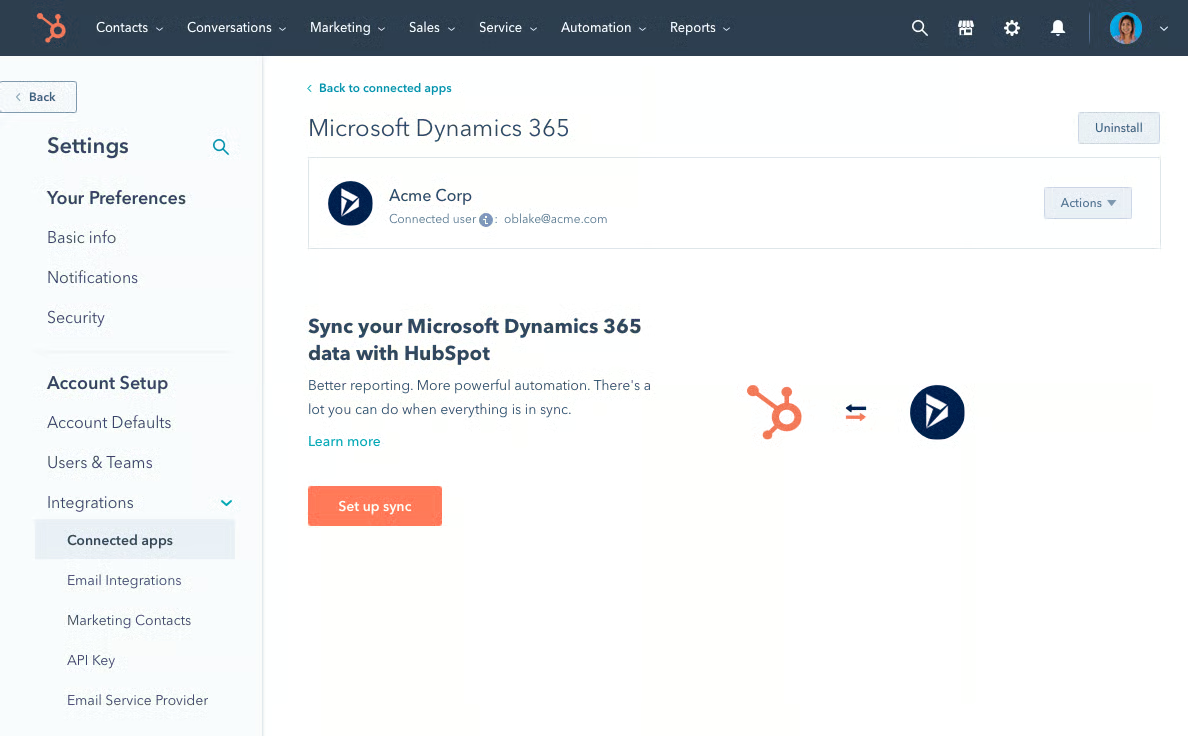
Looking at the G2 Grid data, the strongest signals for HubSpot Data Hub center on data workflow automation and real-time quality management. Reviewers award essentially perfect scores to its data quality and cleansing tools, while ease of data connectivity consistently lands at a staggering 99%.
These aren't just vanity metrics; they reinforce HubSpot’s primary mission: making it effortless to pull fragmented signals from your marketing tech stack and auto-standardize them into a single source of truth.
What caught my attention most in the feedback is how the platform lowers the technical "floor" without lowering the "ceiling." With an ease of use score of around 90% and ease of setup at 88%, it’s a rarity in a category often defined by complex middleware.
The industry footprint further confirms this GTM focus. I see HubSpot Data Hub mentioned most often in Software, Real Estate, and Financial Services sectors, where customer data moves through multiple SaaS platforms and quickly becomes a liability if not centralized.
Still, some G2 reviewers mention that while HubSpot Data Hub works well for simple to moderately complex use cases, more advanced transformations or large-scale data processing can require workarounds or feel less flexible compared to dedicated ETL or SQL-based tools. That said, this focus makes it especially effective for marketing, sales, and RevOps teams that need a more accessible, business-friendly way to unify and activate customer data without heavy engineering support.
Another theme that comes up in qualitative G2 feedback is that teams using a wide range of external platforms may spend some time planning integrations and workflows early on, especially when aligning customer data across multiple systems. However, this upfront effort often helps create a more structured and consistent data foundation, making it easier to manage and activate customer data across tools in the long run.
Even with those considerations, what really struck me is how focused HubSpot Data Hub is on solving a very practical data preparation challenge: making customer data consistent across systems so business teams can actually act on it. If your organization relies heavily on CRM, marketing, and operational SaaS tools and needs a reliable way to prepare that data for reporting and automation, it’s one of the most practical data preparation solutions to consider.
"This tool has been excellent at consolidating our customer data from multiple sources and ensuring it is clean. Its deduplication, transformation, and syncing features have made it much simpler to maintain accurate CRM data for all our clients. By removing the need for extensive manual data cleanup, it saves us a great deal of time and ensures that our sales, marketing, and reporting teams always rely on a single, reliable source of truth."
- HubSpot Data Hub review, Ankit R.
"I think there’s still some room for improvement in terms of advanced reporting and deeper integrations with a few niche tools. Sometimes, setup can feel a bit technical, especially if you’re not familiar with HubSpot already."
- HubSpot Data Hub review, Tenzing T.
See how leading teams are streamlining data workflows with top DataOps platforms.
Got more questions? G2 has the answers!
Alteryx, SAS Viya, and Domo are strong options for combining data preparation with ETL processes. Alteryx is especially useful for building repeatable workflow-based pipelines, while SAS Viya and Domo support broader data integration and transformation needs.
Domo and SAS Viya are good choices for preparing real-time streaming data. Domo works well for cloud-based live data flows, while SAS Viya supports more advanced real-time analytics and data processing.
SAS Viya and Alteryx are among the best tools for preparing data for machine learning models. They help with cleansing, transformation, and feature preparation before data moves into model development workflows.
Alteryx, Tableau, and SAS Viya are top platforms for cleaning and transforming raw data. Alteryx is known for workflow automation, Tableau supports prep through Tableau Prep, and SAS Viya is a strong fit for large-scale enterprise data work.
Alteryx, Tableau, and Domo are popular self-service data preparation platforms. They offer visual, low-code environments that make it easier for analysts and business users to clean and shape data.
SAS Viya, Alteryx, and Domo are well-suited for large datasets. SAS Viya is built for scalable analytics, Alteryx handles complex data workflows efficiently, and Domo supports high-volume cloud data processing.
Tableau, Domo, and Alteryx all integrate well with BI platforms. Tableau fits naturally into its own analytics ecosystem, Domo combines prep and BI in one platform, and Alteryx connects with Tableau and other reporting tools.
SAS Viya and Alteryx are often chosen for fast processing speeds. SAS Viya benefits from a high-performance analytics architecture, while Alteryx is designed to process complex transformation workflows quickly.
Alteryx is one of the best options for analytics teams because it supports repeatable workflows, data blending, and advanced transformation. Tableau is also a strong fit for teams that want data prep and visualization in the same ecosystem.
SAS Viya and Domo stand out for AI-powered data preparation support. They help automate parts of the preparation process and surface smarter recommendations for transforming and organizing data.
After researching these platforms and reading hundreds of G2 reviews, one pattern became really clear to me: data preparation is no longer just a technical step in the pipeline. It’s becoming the control point for how reliable your analytics and AI actually are. The tools in this list approach that problem very differently. Some prioritize visual, analyst-driven workflows. Others focus on enterprise pipelines, governance, or operational data syncing. But the teams getting the most value aren’t just choosing the “most powerful” tool. They’re choosing the one that fits how their data actually flows through the organization.
My advice when evaluating these tools is to look beyond the feature checklist and ask a practical question: Where does your team currently lose the most time preparing data? If the answer is manual wrangling, visual workflow tools may be the right fit. If the challenge is scale and governance, enterprise platforms might make more sense. And if your biggest problem is fragmented SaaS data, integrated platforms that unify operational data could deliver faster results.
If you’re also exploring how data preparation fits into a broader data pipeline, take a look at G2’s guide to the best ETL tools.


Recently updatedSummer 2026 Grid® Report · Published May 26, 2026 The 10 best...
by Soundarya Jayaraman

Working in content strategy, I spend a lot of time analyzing trends, traffic shifts, search...
/DarshayitaThakur-OrangeBG.webp) by Darshayita Thakur
by Darshayita Thakur

Keeping up with the growing demands of data analysis and reporting isn’t easy. I’ve seen teams...
 by Washija Kazim