


This guide was last updated on March 16, 2026. A newer report has since been published. The tools below reflect the scores from G2’s Summer 2026 Grid® Report.
Based on verified G2 reviews and the latest Grid® placement.
*Liked and disliked highlights are summarized from verified G2 user reviews.
The tools below have also been exhaustively tested and evaluated, and continue to hold their place among the best Machine Learning tools on G2.
Most machine learning projects don’t fail because the models are bad. They fail because the tools don’t scale.
I’ve talked to dozens of teams that build impressive prototypes in notebooks, only to hit a wall when it’s time to productionize. They run into governance gaps, weak MLOps workflows, or cloud costs that spiral before the first customer even sees a prediction. If you’re a data scientist, ML engineer, or analytics leader trying to operationalize AI in 2026, choosing the best machine learning tool isn’t just a technical detail. It’s your foundation.
To help you skip the "it works on my machine" heartbreak, I’ve done the legwork. I compared 20+ platforms and analyzed G2 Data to identify the best machine learning tools for real-world use, not just experimentation, but deployment, monitoring, collaboration, and scale.

In this guide, I’ll break down the top 8 ML platforms of 2026, including enterprise powerhouses like Gemini Enterprise Agent Platform and IBM watsonx.ai, specialized solvers like Amazon Personalize, and the open-source "gold standards" like scikit-learn.
Whether you need enterprise governance or a flexible coding environment, this list highlights the tools leading G2 satisfaction rankings based on 1,000+ user reviews.
*These tools are top-rated in their category, according to the G2's Winter 2026 Grid® Report for Machine Learning Software. Pricing typically depends on factors such as usage, deployment size, compute requirements, or enterprise licensing.
In simple words, machine learning tools help teams build systems that learn from data and make predictions or decisions automatically. For me, the best train models simplify deployment, integration, and long-term management.
Think about predicting which customers might churn, forecasting demand, detecting fraud, recommending products, scoring leads, or automating quality checks. Instead of writing rules like “if X then Y,” machine learning tools let you train a model on historical data so it learns patterns on its own.
From what I’ve learned, speaking with ML engineers, analytics teams, and technical decision-makers, usability and scalability matter as much as algorithm depth. Strong platforms support the full lifecycle: preparing data, training models, deploying them into production, and monitoring performance over time. They integrate with cloud environments, data warehouses, and existing workflows so teams aren’t stitching together disconnected tools.
Some tools (like scikit-learn) are developer-focused libraries you use in Python. Others (like Gemini Enterprise Agent Platform, Azure OpenAI Service, Dataiku, SAS Viya) are full platforms that handle infrastructure, automation, and deployment at scale.
And the business impact is just as important as the technical capabilities. According to G2 Data, 89% of users say leading machine learning tools meet their requirements, and adoption spans small businesses (39%), mid-market companies (32%), and enterprises (29%).
That tells me the best tools work across different levels of maturity. They reduce time to deployment, improve collaboration, and make it easier to generate measurable ROI from AI initiatives instead of letting promising models stall in experimentation.
To start, I turned to G2’s machine learning software category page, grid reports, and product reviews to create an initial list of contenders.
From there, I used AI-assisted analysis to comb through hundreds of verified G2 reviews, focusing specifically on feedback around model training capabilities, MLOps support, deployment workflows, integration flexibility, scalability, ease of use, and measurable business impact.
Since I couldn’t personally test these tools, I consulted professionals with hands-on experience and validated their insights using verified G2 reviews. The screenshots featured in this article may be a mix of those obtained from the vendor’s G2 page or from publicly available materials.
To identify the best machine learning tools, I evaluated platforms based on technical depth, production readiness, and real-world feedback from practitioners. My criteria reflect what ML engineers, data scientists, and technical leaders consistently prioritize when selecting tools for experimentation and scale.
While not every tool excels across every criterion, each one stands out in areas that matter most to specific teams and use cases.
The list below contains genuine user reviews from our Machine Learning Software category page. To qualify for inclusion in the category, a product must:
* This data was pulled from G2 in 2026. The product list is ranked alphabetically. Some reviews may have been edited for clarity.
If you're focused on the full data science and ML workflow, the DSML platforms may be worth a look.
G2 rating: 4.3/5⭐
Gemini Enterprise Agent Platform is one of those names that almost always comes up in serious machine learning conversations, and for good reason. It’s Google Cloud’s unified platform for building, deploying, and scaling both traditional ML models and generative AI applications. In my research, it consistently stands out as one of the most comprehensive machine learning software solutions available today.
At its core, Gemini Enterprise Agent Platform brings together data preparation, model training, deployment, monitoring, generative AI, and governance in a single environment. To me, it's like a “one-stop AI garage” where you can go from raw data to model to deployed service without stitching together 10 different tools.
What's most impressive to me is the breadth of models available. Through the Model Garden, teams get access to more than 200 models, including Google’s Gemini family, Imagen for image generation, Veo for video generation, and partner models like Claude and Llama.

For teams working on generative AI use cases, Gemini Enterprise Agent Platform Studio supports prompt design, prototyping, evaluation, and tuning.
On the traditional ML side, it supports AutoML for low-code workflows and custom training for full control, along with tools like model registry, pipelines, experiment tracking, feature store, and model monitoring. The result is you manage an end-to-end MLOps ecosystem in one place rather than a standalone modeling tool.
What stood out to me in G2 reviews is how frequently users describe Gemini Enterprise Agent Platform as “all-in-one” and “centralized.” Integration with Google Cloud services like BigQuery and Cloud Storage is repeatedly praised, especially by teams already embedded in the GCP ecosystem.
According to G2 Data, adoption spans 38% small businesses, 26% mid-market, and 37% enterprise organizations, with strong representation from software, IT services, and financial services industries.
That said, a few G2 reviewers note that teams new to Google Cloud or large-scale ML infrastructure may find the configuration and ramp-up time-demanding, particularly when moving beyond AutoML into custom training or advanced MLOps workflows.
Cost visibility is another theme that comes up in G2 feedback, especially for teams running large experiments or GPU-heavy workloads. There’s no simple “per-user plan”; everything maps back to compute, storage, and API usage. Reviewers note that organizations need clear usage planning to avoid surprises.
Even with those considerations, Gemini Enterprise Agent Platform earns its 4.3/5 rating by delivering breadth, scalability, and enterprise-grade control in one platform. Gemini Enterprise Agent Platform shines if you already live in Google Cloud, you’re building production ML/AI systems, not just experiments, and you need a unified, scalable, end-to-end platform.
"What I like most about Gemini Enterprise Agent Platform is that it brings the entire machine learning workflow together in a single platform. From data preparation and training to deployment and ongoing monitoring, we can manage everything smoothly without having to juggle multiple tools. We’ve been using it for several years to build and deploy ML models in production, and its integration with other Google Cloud services, such as BigQuery and Cloud Storage, makes data handling and movement much easier. The AutoML features and pre-built pipelines also save a lot of time, so our team can spend more energy on experimentation and improving model performance instead of setting up and maintaining infrastructure."
- Gemini Enterprise Agent Platform review, Mahmoud H.
"The learning curve is steep, documentation can be confusing in places, and costs are not always clear. Better tutorials, simpler UI for common tasks, and more transparent pricing would improve the experience."
- Gemini Enterprise Agent Platform review, Jeni J.
Looking for more tools to manage MLOps? Explore the best MLOps platforms to manage and monitor your machine learning models.
G2 rating: 4.4/5⭐
As far as I know, IBM is pretty ubiquitous in enterprise AI, particularly in organizations that prioritize governance and production-ready AI systems. That reputation carries into IBM watsonx.ai , which stands out for teams that need strong model control, governance, and reliable deployment.
It’s the developer studio within IBM’s watsonx platform where you can build, tune, and deploy both traditional machine learning models and generative AI applications.
From what I understand, the platform is built to support the entire AI lifecycle, often working alongside watsonx.data for data management and watsonx.governance for compliance and oversight.
What makes watsonx compelling to me is flexibility. Through its Model Gateway, users can access IBM’s Granite models, third-party foundation models, and open-source options from ecosystems like Hugging Face and partners such as Meta.
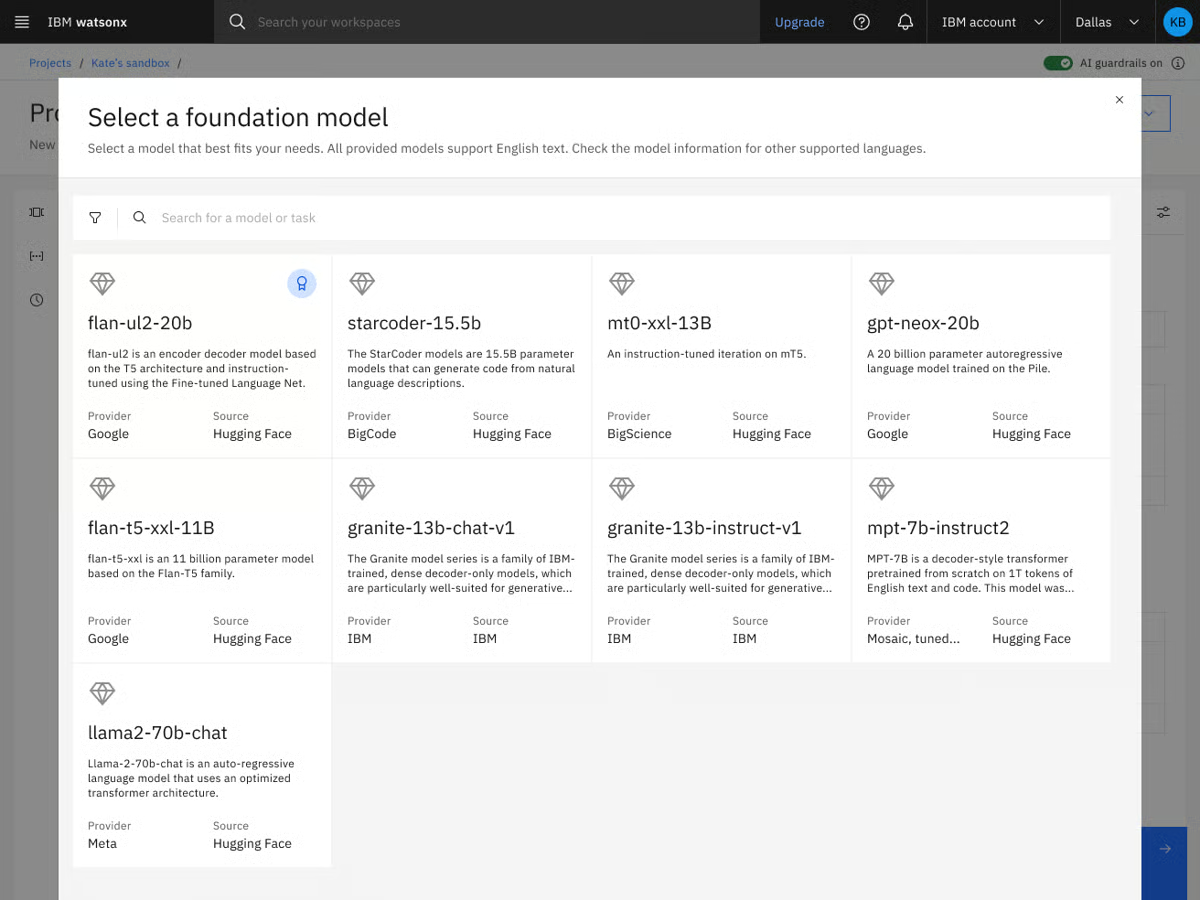
It supports retrieval-augmented generation (RAG), agentic workflows, advanced tuning methods, SDKs, and APIs that allow teams to build in natural language or code. In other words, it’s not just a model hosting environment. It’s a full-stack AI application development platform designed for scale.
While analyzing G2 feedback, I saw users often praise watsonx.ai’s enterprise-grade controls and model customization capabilities. Reviewers frequently mention how helpful the tuning workflows and governance features are, especially in regulated industries like finance, healthcare, and IT services.
Ease of use and ease of setup score strongly in the G2 Grid Report, which is notable for a platform with this level of technical depth. Adoption is also broad: 45% are small businesses, over 20% are users from mid-market, and enterprise users. That distribution suggests to me that watsonx.ai isn’t reserved solely for large enterprises. Smaller AI-forward teams are finding value in its structured environment and preconfigured SDKs.
From what I gathered in G2 reviews, a couple of themes come up consistently. Some users mention that there’s an initial ramp-up time, especially when you start exploring advanced tuning, governance controls, and agentic workflows. Teams new to IBM’s ecosystem or large-scale AI platforms may need time to get comfortable with how everything fits together.
Others note that the interface can feel complex at first. Because watsonx.ai surfaces a wide range of configuration options and model controls, the UI can feel dense until you understand the structure. For experienced AI teams, that depth is valuable, but teams looking for a very lightweight, minimal interface might need a bit of onboarding time.
Even with those considerations, I can see why watsonx.ai holds a strong 4.4/5 rating on G2. From what I’ve learned through user feedback and product research, it strikes a thoughtful balance between flexibility and control. It gives teams access to multiple foundation models, advanced tuning workflows, and enterprise-grade governance, all in one structured environment.
If you’re building generative AI applications in a regulated industry, managing sensitive data, or scaling ML across departments, watsonx.ai makes a lot of sense. It’s not trying to be the lightest-weight tool in the room. Instead, it’s built for teams that need oversight, customization, and production readiness without sacrificing model choice. For organizations serious about operationalizing AI, watsonx.ai feels like one of the strongest machine learning and AI platforms available right now.
"IBM watsonx addresses the "black box" problem often found in other AI platforms by maintaining a strong commitment to enterprise-level trust and transparency. Unlike many consumer tools, watsonx provides a "glass box" environment, allowing every AI decision to be tracked, explained, and managed, which helps ensure your organization remains compliant and within legal boundaries. Additionally, the flexibility to deploy models either on your own private on-premise servers or in the cloud empowers businesses to innovate rapidly while maintaining full control and security over their data."
- IBM watsonx.ai review, Sandeep B.
"I find IBM watsonx.ai to have a steep learning curve and complexity, which many users find intimidating, especially for newcomers. The platform is powerful but not beginner-friendly. Navigation and workflows are often described as overwhelming or clunky compared to more streamlined tools. Specifically, the overwhelming first-time navigation and the presence of multiple tools and interfaces without a clear flow are areas that could use improvement.
- IBM watsonx.ai review, Marilyn B.
Explore the categories related to MLOPs that help set up your complete machine learning framework.
G2 rating: 4.3/5⭐
If your team cares about statistical depth as much as machine learning performance, SAS Viya probably isn’t new to you. Unlike many newer ML platforms that grew out of cloud-native experimentation, SAS Viya evolved from decades of advanced analytics and statistical modeling expertise, and that shows in how the platform is structured.
When I evaluated SAS Viya, what stood out immediately was that it’s not trying to be a trendy AI sandbox. It’s a cloud-native AI and analytics platform designed for organizations that need end-to-end control: data access, modeling, governance, and operational decisioning all in one system.
I like that it doesn’t force you into one way of working. You can drag-and-drop analytics tasks in no-code UIs while still having full support for Python, R, SAS, and SQL, so teams with mixed skill sets can share work seamlessly. Data scientists can code, while analysts and business users can leverage visual interfaces. It also integrates with major cloud providers like Azure and supports high-performance processing for large datasets.
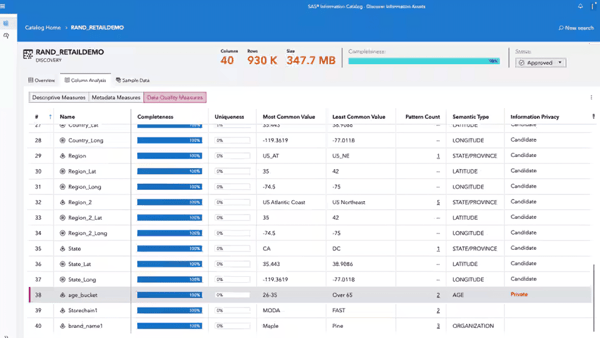
What I've noticed from user feedback is that running analytics at enterprise scale is where SAS Viya differentiates itself. Large datasets and complex models don’t bog the system down thanks to its in-memory CAS engine.
Features like embedded governance, lineage tracking, auditability, and decision management make it particularly appealing for regulated industries. With SAS Viya Copilot now part of the experience, users can also tap into AI assistants to accelerate data prep, modeling, and insight generation.
Looking at G2 Data, the user base skews heavily toward enterprise (41%), followed by small businesses (33%) and mid-market companies (26%). Industries like Higher Education, Banking, and IT Services are well represented, which makes sense given the platform’s focus on governance and analytical depth.
One theme I noticed in G2 feedback is that some users would welcome deeper documentation and more expanded examples. A few reviewers mention that certain code requirements or advanced configurations aren’t always fully detailed in description pages, and that more in-depth troubleshooting guidance would be helpful for complex scenarios. For teams working on highly customized implementations, planning for some additional exploration or support may be useful.
Another point that surfaces occasionally is performance variability with extremely large datasets. While many users praise Viya’s ability to handle enterprise-scale workloads, a small number note that particularly heavy or complex data jobs can take time to process. It’s not described as a frequent blocker, but teams working with exceptionally large datasets may want to architect thoughtfully and optimize workloads accordingly.
On the whole, SAS Viya delivers depth in algorithms, strong support, and enterprise-grade governance in a single environment. I’d recommend it for data science teams in regulated industries that need advanced statistical modeling and decision management.
"What I like best about SAS Viya is that it combines powerful data analytics, machine learning, and visualization into one modern, cloud-based platform. It allows users to process large datasets quickly using scalable computing while supporting multiple programming languages like SAS, Python, and R, which makes collaboration easier across teams. I also like that it integrates the entire analytics workflow from data preparation to model deployment and monitoring into a single system, helping organizations work more efficiently while maintaining strong data governance and security."
- SAS Viya review, John M.
"I believe that while SAS Viya is a very powerful analytics platform, there is still room for improvement in terms of ease of onboarding and cost structure. The learning curve can be steep for new users, especially when transitioning from open-source ecosystems like Python. Additionally, deeper integration and flexibility with certain third-party tools and more streamlined UI workflows could further enhance the product's usability. Also, expanding community resources and documentation would be helpful for smoother adoption for smaller teams."
- SAS Viya review, Rena P.
G2 rating: 4.6/5⭐
If you’re building serious AI applications inside a Microsoft ecosystem, Azure OpenAI Service is probably already on your radar. When I looked at how teams are actually deploying large language models using OpenAI models in production, Azure OpenAI consistently showed up as a front-runner. It’s not just API access to OpenAI models; it’s OpenAI’s foundation models wrapped in Microsoft’s enterprise-grade infrastructure, compliance controls, and cloud integrations.
At its core, Azure OpenAI Service provides REST API access to OpenAI’s latest model families — including GPT-5.x, GPT-4.1, GPT-4o, reasoning-focused o-series models, embeddings, image generation, video generation, and multimodal capabilities.
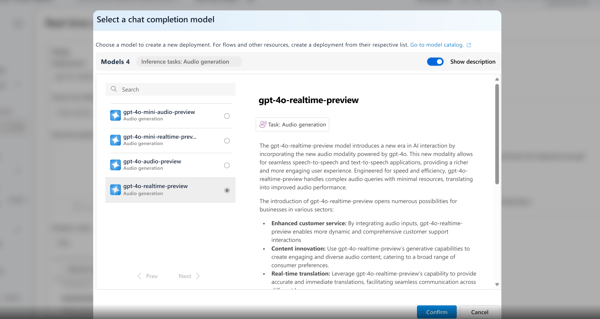
If you ask me, what makes it different from simply calling OpenAI’s public API is the surrounding Azure ecosystem. You get private networking, compliance tooling, content filters, monitoring, identity controls, and multiple deployment models (standard, provisioned, batch). For teams building internal AI bots, HR chatbots, knowledge assistants, customer-facing support bots, or large-scale AI agents serving millions of users, I feel this surrounding infrastructure matters as much as the model itself.
What stands out to me is the enterprise feature depth. Content filtering, private endpoints, monitoring, integration with Azure AI Search for grounding, and compatibility guarantees for model and API versions make this service feel built for long-term application development rather than rapid experimentation alone. OpenAI's -5 series and vision-enabled models add strong multimodal capabilities, and integration with Microsoft’s own models can enhance grounding and accuracy in certain scenarios.
When I look at G2 Data, the customer mix leans heavily on enterprise (50%), followed by mid-market (28%) and small businesses (22%). That tracks with how the product is positioned. It’s particularly well represented in IT services and computer software industries, which makes sense given how many teams are embedding GPT-based capabilities into existing enterprise applications.
Satisfaction metrics are also strong across the board — ease of use (89%), e ase of setup (91%), and ease of doing business with (94%) all stand out in the Grid report. That combination tells me teams aren’t just impressed by the model quality; they’re finding it operationally manageable.
One theme I’ve seen in user feedback on G2 is model access and regional rollout. Some teams note that the newest models can arrive later than on direct OpenAI APIs, and availability may vary by region. Scaling often requires managing deployments across regions, and quota increases (like TPM approvals) can involve a manual process that takes time. For teams scaling quickly or operating globally, that can mean coordinating deployments across regions.
Even so, once capacity is provisioned, many teams report stable performance and strong production readiness. Rate limits and quota caps can surface with high-volume workloads, so careful monitoring is important. But for organizations willing to architect thoughtfully, the platform’s scalability and compliance framework remain major advantages.
My recommendation is that if you’re already in the Microsoft ecosystem or you need enterprise controls layered around OpenAI’s latest models, Azure OpenAI Service stands out as one of the best machine learning and generative AI solutions available today.
"I like how Azure OpenAI Service allows us to build a secure internal knowledge hub with Retrieval Augmented Generation, letting our team query thousands of private documents with accuracy and no public data leakage. It solved our big issues with data security and information retrieval, enabling AI deployment without risking our intellectual property. The Safety First approach gives me confidence in deploying AI in a corporate environment. I appreciate the Responsible AI Content Filtering, which automatically blocks harmful content and saves us from building a moderation layer. Integrating smoothly with Azure AI Search to power our Retrieval-Augmented Generation workflows, it grounds AI responses in our private data. Azure Logic Apps, Power Automate, Azure DevOps, and Microsoft Entra ID make managing AI initiatives scalable and secure, enhancing both automation and security."
- Azure OpenAI Service review, Golding J.
"I don't like the regional availability of newer models and the rollout of features not being at the same time globally. Also, the quota management system and its approval to increase quota are manual and can take several days. I wish Microsoft could add more granular cost control tools at the model and project levels to prevent overcharges. Also, better debugging tools could be added."
- Azure OpenAI Service review, Lakshay J.
G2 rating: 4.4/5⭐
If you’ve ever tried getting data scientists, analysts, and business stakeholders to collaborate on the same machine learning project, you know how messy that can get. That’s where Dataiku immediately stood out to me. It’s built less like a standalone modeling tool and more like a shared data science workspace designed for teams.
At a high level, Dataiku is an end-to-end data science and machine learning platform that supports everything from data preparation and feature engineering to model training, deployment, and MLOps.
What I appreciate about its design is that it supports both visual workflows and full-code environments in Python, R, and SQL. That makes it accessible to analysts who prefer drag-and-drop interfaces while still giving data scientists the flexibility they need.
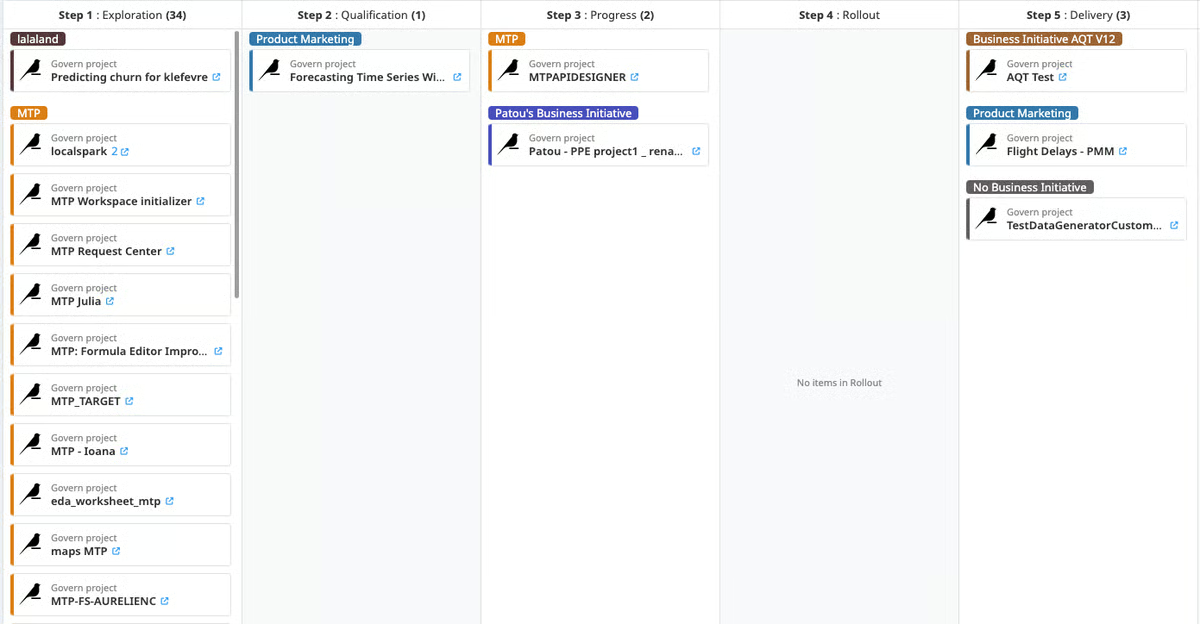
It also integrates deeply with cloud platforms and data warehouses, which is critical for enterprise-scale deployments. In fact, integration is one of its highest-rated features (88%). Users value how easily Dataiku connects to diverse data sources and how structured the data preparation layer feels.
Its enterprise adoption really caught my attention, with 58% of its user base coming from there. Industries such as Financial Services, Consulting, and Pharmaceuticals are well represented, reinforcing its reputation as a platform built for structured, regulated environments. And, despite being an enterprise-grade platform, it scores high on ease of use (89%) and support quality (86%).
At the same time, Dataiku is a serious platform. Some reviewers note that teams working with very large datasets may need strong infrastructure to get the best performance, though many also appreciate the platform’s ability to scale for enterprise-grade projects.
Also, users observe that pricing tends to align more closely with enterprise budgets. The platform’s breadth of features makes it especially valuable for larger data teams managing advanced workflows. For smaller teams or simpler use cases, that same depth may feel more advanced than necessary
If I were advising a team, I’d say Dataiku makes the most sense for companies looking to operationalize machine learning across departments, especially in industries like financial services, consulting, or pharma, where compliance and traceability matter.
"What I like best about Dataiku is its end-to-end data science and machine learning platform that brings data preparation, analysis, model building, and deployment into a single environment. The visual workflows combined with code-based options make it accessible for both technical and non-technical users. It also supports strong collaboration between data scientists, analysts, and business teams, which helps speed up model development and improve decision-making."
- Dataiku review, Kajal K.
"The platform can feel heavy for smaller projects, and the initial learning curve is a bit steep for beginners. Also, the licensing costs can be high for small companies or startups."
- Dataiku review, Aniket D.
G2 rating: 4.3/5⭐
Building a recommendation engine? Amazon Personalize is what I, and probably an algorithm, would recommend.
Behind the humor, there’s a practical reason. When I look at what it actually takes to run personalization in production, it’s rarely just about picking the right model. It’s about handling billions of user interactions, ranking items in real time, retraining as behavior shifts, and serving low-latency recommendations across web, mobile, and marketing channels. Amazon Personalize abstracts the operational complexity into a fully managed ML service purpose-built for recommendation use cases.
I like how focused it is. You’re not building arbitrary models. You’re solving specific business problems: recommending retail items, surfacing trending products to similar shoppers, ranking travel options, or helping users discover items in large catalogs.
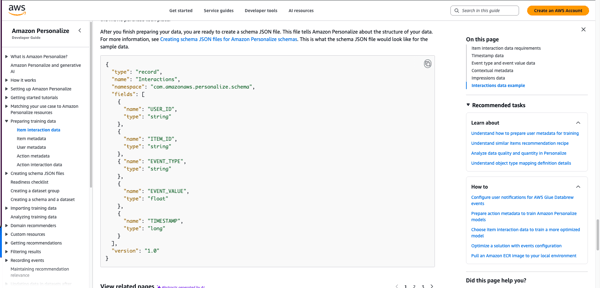
From what I gathered during my research, with Amazon Personlize, infrastructure is managed for you, and models are trained on your data rather than generic datasets. Setup is relatively fast for an AWS-native team. And when combined with Amazon Bedrock, you can layer generative AI on top of personalization logic, enabling smarter segmentation and dynamic content variations that feel highly tailored. For teams already invested in AWS, the integration into existing data pipelines and AWS tools feels natural.
Looking at G2 Data, what stood out to me is the customer mix: 36% small businesses, 50% mid-market, and 14% enterprise. Amazon Personalize resonates most with growth-stage and scaling companies that need production-grade recommendations but don’t necessarily want to build an in-house ML team to manage it.
When I looked deeper into G2 satisfaction metrics, the numbers reinforce what I was already seeing in qualitative feedback. The quality of support sits at 92% (well above the category average), ease of use at 94%, ease of doing business with at 95%, and ease of setup at 92%. For a machine learning service that operates at this scale, those are strong signals.
At the same time, two consistent themes appear in reviews on G2. Teams wanting deep model transparency might find that Amazon Personalize feels somewhat like a “black box.” While recommendations are often effective, understanding exactly why a specific item was ranked can require additional analysis. This aligns more naturally with organizations prioritizing managed recommendation performance over detailed algorithmic interpretability.
Similarly, several reviewers note that costs can scale alongside traffic and recommendation calls. It’s not unusual for usage-based services, but it fits teams comfortable with variable, consumption-based cost models. Smaller organizations requiring highly predictable fixed-cost frameworks may find the pricing dynamics more noticeable as traffic increases.
Even with those considerations, I see Amazon Personalize as one of the top-rated ML solutions for recommendation and personalization use cases. It gives product, growth, and ecommerce teams production-grade ML-powered personalization without building a recommendation engine from scratch.
"What I like about Amazon Personalize is how quickly it lets you go from data to real, production-grade recommendations, without needing to be a machine-learning expert."
- Amazon Personalize review, Jigyasa V.
"One drawback of Amazon Personalize is that it can sometimes feel like a black box. The recommendations are often good, but it isn’t always clear why a particular item was suggested. That lack of transparency makes it harder to troubleshoot issues or explain the results to others."
- Amazon Personalize review, Yogesh S.
G2 rating: 4.6/5⭐
If you’re comfortable working in notebooks and writing models from scratch, machine learning in Python probably feels like home. It’s not a managed platform or an MLOps suite — it’s the foundation many data scientists and ML engineers build on.
What I’m really looking at is the ecosystem of libraries that power most modern ML workflows: scikit-learn for classical models, TensorFlow and PyTorch for deep learning, XGBoost for gradient boosting, and a wide range of supporting tools for preprocessing, visualization, and evaluation. This isn’t a hosted service. It’s a developer-first toolkit.
With Python libraries, you can experiment freely, customize architectures, fine-tune hyperparameters, and build models exactly the way you want. There’s no opinionated workflow imposed on you. That’s a major advantage for research-heavy teams or organizations building highly specialized ML systems.
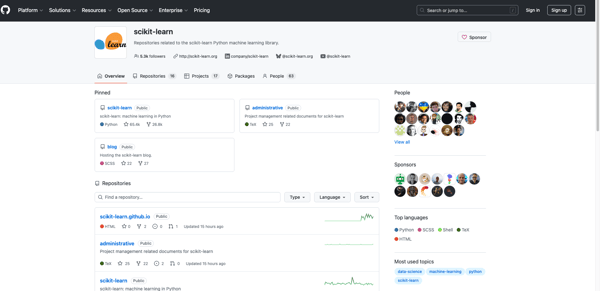
Interestingly, G2 Data reinforces that perception. Ease of use sits at 91%, and ease of setup at 90%, which aligns with what I see in practice. Once Python is installed and environments are configured, getting started with ML libraries is relatively straightforward compared to many enterprise platforms. For developers, the barrier to experimentation is low.
The strong community support and extensive documentation also make development, debugging, and learning more efficient. Even for edge cases, there’s almost always an existing discussion, tutorial, or GitHub thread addressing it.
That said, modeling is only one part of the ML lifecycle. Teams wanting built-in deployment pipelines, monitoring, governance, or scalable infrastructure might find that pure Python workflows require additional tooling. Operationalizing models often means layering in MLflow, Docker, Kubernetes, or a cloud service. And as projects scale, managing dependencies and environments can require discipline.
I’ve also seen feedback on G2 pointing out that Python’s interpreted nature can make it slower than lower-level languages in compute-heavy or latency-sensitive scenarios, even though many ML libraries improve performance through C/C++ backends and GPU acceleration.
Even with those considerations, I still view machine learning in Python as foundational. Many enterprise ML tools ultimately integrate with or build on these same libraries. For developers and research-focused teams who want full control, fast iteration, and flexibility, Python remains one of the strongest environments for building machine learning systems.
"What I like best about machine learning in Python is the rich ecosystem of libraries and frameworks such as NumPy, pandas, scikit-learn, TensorFlow, and PyTorch. Python’s simple and readable syntax makes it easy to prototype, experiment, and iterate on models quickly. The strong community support and extensive documentation also make development, debugging, and learning more efficient."
- machine-learning in Python review, Kajal K.
"Because Python is interpreted, not compiled, it can be slow on local machines. The price one pays for an easier development environment. I have seen there is cpython, which could presumably address this, but I haven't tried it."
- machine-learning in Python review, David Robert L.
G2 rating: 4.8/5⭐
Some machine learning platforms are built for engineers. Others are built for business teams. When I looked at B2Metric, what stood out immediately was that it’s built to bridge those two worlds, especially for companies that want predictive analytics without building an in-house data science function from scratch.
At a high level, B2Metric is a customer data and predictive analytics platform that helps teams turn behavioral and transactional data into actionable insights.
It combines customer data platform (CDP) capabilities with machine learning models to predict churn, segment customers, optimize campaigns, and drive revenue growth. Instead of requiring teams to code models manually, it layers predictive analytics directly into marketing and customer journey workflows.
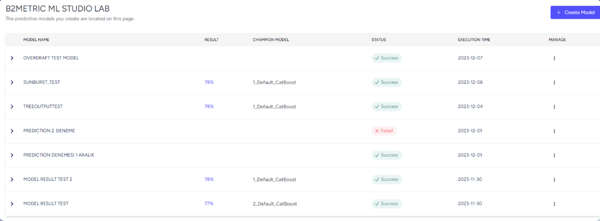
On G2, it holds an impressive 4.8/5 rating, which is hard to ignore. The customer breakdown is also telling: 55% small businesses, 40% mid-market, and just 5% enterprise. B2Metric appears especially strong with growth-stage and mid-sized companies that need predictive power but don’t have large ML engineering teams.
In the G2 Grid data, satisfaction metrics are strikingly high — quality of support at 98%, and ease of use at 99%.
At the same time, two themes show up in G2 reviews. Teams new to predictive analytics or advanced customer modeling might experience a learning curve during initial onboarding. While the interface is highly rated, fully understanding how to structure data, interpret model outputs, and align predictions with business strategy can take some ramp-up time.
Additionally, teams implementing B2Metric across multiple data sources or embedding it deeply into existing marketing and CRM systems may want to plan for a thoughtful implementation phase. Reviewers note that integration and setup are powerful, but configuring them effectively within more complex environments requires coordination.
Once implemented properly, users consistently mention meaningful improvements in churn prediction, segmentation precision, and campaign performance. That combination of strong predictive modeling with business activation is what keeps B2Metric positioned as one of the strongest machine learning-powered predictive analytics solutions in its category.
"The features and integration points B2Metric have is something else. While checking out whether I can use or integrate with another application, B2Metric’s team easily connected."
- B2Metric review, Merve Şehbal I.
"Being a data-based platform, of course, it can sometimes be challenging to have it in a format that only some technical people can understand."
- B2Metric review, Berfin T.
While the tools above cover many common ML use cases, several other platforms are worth exploring for specialized workloads like recommendation systems, personalization, and large-scale model training.
If you're looking for developer-focused tools or lightweight frameworks for building ML models, these libraries are also worth exploring.
Got more questions? We have the answers.
For enterprise-grade predictive analytics, SAS Viya stands out due to its deep statistical modeling heritage, high-performance in-memory processing, and strong governance controls. It’s particularly strong for regulated industries and complex forecasting models.
For customer-focused predictive analytics (like churn and propensity modeling), B2Metric is compelling because it turns predictions directly into business actions without heavy engineering overhead.
For pure cost efficiency, machine learning in Python (using libraries like scikit-learn, XGBoost, and TensorFlow) is often the most economical since the ecosystem is open source. Infrastructure costs depend on where and how you deploy.
For managed services with predictable scaling, Amazon Personalize or Gemini Enterprise Agent Platform can be cost-efficient for teams already within AWS or Google Cloud ecosystems.
For enterprise AI development at scale, IBM watsonx.ai and Gemini Enterprise Agent Platform are leading options. Both offer foundation models, fine-tuning, governance, model registries, and MLOps tooling.
If strict compliance and statistical depth are critical, SAS Viya is often preferred in financial services and healthcare environments.
Dataiku is particularly strong here. It combines data preparation, ML workflows, and analytics collaboration in one platform, making it ideal for organizations running large-scale data projects.
Gemini Enterprise Agent Platform also integrates tightly with BigQuery and other Google Cloud data services, making it a strong big data + ML combination.
For real-time personalization and recommendation use cases, Amazon Personalize is purpose-built for low-latency inference.
For custom real-time ML APIs and scalable inference endpoints, Azure OpenAI Service and Gemini Enterprise Agent Platform both provide strong real-time serving capabilities with enterprise controls.
Google Gemini Enterprise Agent Platform and Azure OpenAI Service both provide highly scalable, cloud-native infrastructure with managed GPUs, model serving endpoints, and enterprise networking.
For fully managed recommendation systems at scale, Amazon Personalize is designed to handle billions of interactions with dynamic adaptation.
For low-friction deployment within a business environment, B2Metric simplifies activation by embedding predictions directly into marketing and CRM workflows.
For developers comfortable with cloud platforms, Gemini Enterprise Agent Platform offers streamlined deployment via managed endpoints and model registries.
If you’re using pure Python libraries, deployment is flexible but requires additional tooling (e.g., Docker, MLflow, Kubernetes).
The Python ecosystem arguably has the most extensive training resources due to its massive global community, documentation, open-source contributions, and educational content.
For structured enterprise documentation and formal training programs, Gemini Enterprise Agent Platform, IBM watsonx.ai, and SAS Viya offer comprehensive enterprise-grade learning materials.
For highly regulated environments, SAS Viya, IBM watsonx.ai, and Azure OpenAI Service stand out due to built-in governance, compliance frameworks, and enterprise security controls.
Azure OpenAI Service is especially attractive for organizations already operating within Microsoft’s compliance ecosystem.
For automated model selection and hyperparameter tuning, Gemini Enterprise Agent Platform (with AutoML and hyperparameter tuning tools) is a strong choice.
Dataiku also offers automation features within collaborative workflows.
For lightweight automated modeling in Python, scikit-learn combined with GridSearchCV or libraries like Optuna provides flexible tuning capabilities, though it requires more hands-on setup.
After digging into all these tools, here’s what I’ve realized: machine learning isn’t the hard part anymore. Operationalizing it is.
Most of these platforms — whether it’s Gemini Enterprise Agent Platform, watsonx.ai, SAS Viya, Azure OpenAI Service, Dataiku, or even pure Python — are technically powerful. The algorithms work. The infrastructure scales. The models are impressive. But the real difference shows up after the model is trained. Can your team deploy it easily? Monitor it? Explain it to leadership? Connect it to revenue, retention, or real decisions?
That’s the part people underestimate. Because the real bottleneck usually isn’t training the model. It’s everything that comes after — deployment pipelines, monitoring drift, aligning outputs with business KPIs, and getting stakeholders to actually trust what the model is saying. I’ve seen teams build brilliant prototypes that never make it past a notebook. Not because the model failed, but because the workflow around it did.
So yes, let the machines learn. But make sure your team can move just as fast with the right tools .
If you’re thinking beyond models and into automation, where predictions trigger actions, workflows, or intelligent systems, explore our AI agent builders category.


Recently updatedSummer 2026 Grid® Report · Published May 26, 2026 The 10 best Bot...
.png) by Tanuja Bahirat
by Tanuja Bahirat

The best predictive analytics tools do more than forecast; they tell me when a model is...
 by Somya Jain

Recently updatedSummer 2026 Grid® Report · Published May 26, 2026 The 10 best...
.png) by Shreya Mattoo
by Shreya Mattoo