The best data loss prevention (DLP) software for 2026 are Proofpoint Enterprise DLP, Netwrix Endpoint Protector, Safetica, AvePoint Confidence Platform, Zscaler Internet Access, SpinOne, Coro Cybersecurity, Varonis Data Security Platform, Trellix Data Loss Prevention, and Nightfall AI.
Data doesn't leak all at once. It leaves in fragments: a misrouted email, a file uploaded to a personal drive, a screenshot taken on a managed device. By the time most teams notice, the damage is already done. A DLP platform is supposed to catch those moments before they become incidents. But with dozens of options on the market, finding the right one means cutting through a lot of feature noise.
So I looked into 1000+ G2 reviews to find the best DLP software. The clearest takeaway from those reviews was about fit. The same platform that deploys cleanly for a 50-person SaaS team creates real friction for a regulated enterprise managing complex, layered policy requirements. Team size, channel exposure, and security maturity consistently determine whether a deployment succeeds, not what the feature checklist says.
Six months into most DLP deployments, the problems start showing up. Policies that looked reasonable at launch start generating noise, and eventually, teams stop responding to alerts. Endpoints get covered while cloud apps stay exposed. The tool bought for compliance ends up with no clear owner because keeping it tuned takes more capacity than anyone budgeted for. What I consistently found in reviews wasn't about missing features. The platforms that held up were the ones that matched the team running them.
The ten tools here each solve a distinct problem in the DLP category: endpoint control, cloud coverage, zero trust enforcement, and insider risk visibility. I've broken down what each platform is actually built for and where it has a real edge over the alternatives, so if the shortlist is already narrowed, this is where the differentiation becomes clear.
*These data loss prevention (DLP) tools are top-rated in their category based on G2's Winter 2026 Grid Report. I've included their strengths and ideal use cases to help you choose the right solution.
Most DLP platforms can detect sensitive data. The real difference is how effectively they classify it, enforce policies around it, and give security teams enough context to act without drowning in alerts.
From what I've seen in the reviews, what separates genuinely useful tools from the ones that just add overhead is that combination of visibility, enforcement, and context. Without all three, you end up with a dashboard full of unresolved alerts and your team spending more time on triage than on actual incidents.
G2 review data shows strong adoption across company sizes, but what each segment values differs. Smaller teams want fast deployment and low maintenance. Mid-market buyers need policy flexibility without a dedicated security specialist to manage it. Enterprise teams want multi-channel coverage, deep integration, and reporting that holds up under regulatory scrutiny. The ten platforms here were selected because they each serve one of these profiles well.
I used G2's Winter 2026 Grid Report to shortlist the top DLP tools based on verified user satisfaction scores and market presence across small, mid-market, and enterprise buyers. The Grid Report gave me a structured starting point for identifying which platforms are gaining traction and which are holding ground across different buyer segments.
I then used AI to analyze hundreds of verified G2 reviews and extracted recurring feedback patterns around what matters most in real-world security workflows. That included how teams experience policy configuration depth, false positive rates, cross-channel coverage, device control reliability, incident investigation speed, and the quality of reporting under compliance pressure. This analysis helped me identify which platforms genuinely reduce data risk in practice, and which add administrative load without proportional protection.
Since I have not personally deployed all of these platforms, I cross-checked findings against workflow insights from IT security, compliance, and risk teams who actively use DLP tools in their environments. Visuals and product references in this article are sourced from G2 vendor listings and publicly available product documentation.
Evaluating DLP tools requires more than checking feature lists. After analyzing hundreds of verified G2 reviews and mapping those patterns against real security and compliance workflows, the same priorities surfaced repeatedly. Here is what I prioritized when assessing these platforms:
The right choice depends on your environment, your channel exposure, your team's capacity, and whether your priority is rapid deployment, deep investigation capability, or broad compliance coverage. I evaluated each tool against these criteria with those priorities in mind.
To appear in this category, a Data Loss Prevention (DLP) Software must:
* This data was pulled from G2 in 2026. Some G2 reviews may have been edited for clarity.
Where most DLP tools scan for policy-matching patterns, Proofpoint Enterprise Data Loss Prevention (DLP) layers in user behavior signals and threat activity data alongside content analysis. What you get is a detection model that tells security teams not just what data moved, but who moved it and whether that behavior looks careless, compromised, or deliberate.
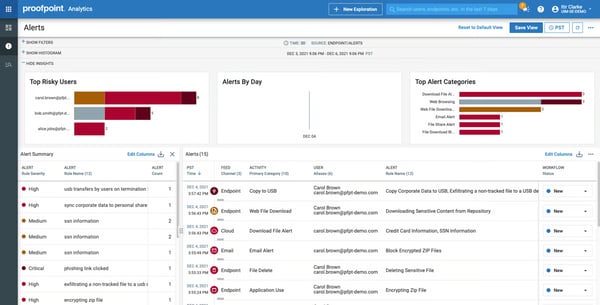 Proofpoint Alerts Board
What stood out to me across G2 reviews is how often teams point to the unified interface where email, endpoint, and cloud app activity converge, so you're not jumping between separate portals every time an incident needs investigating. Review patterns also show teams picking up signals across multiple applications from one platform, with activity monitoring scoring 90%, reinforcing how well the platform surfaces behavioral data that teams can actually act on.
The platform's ability to write precise detection rules, tune them by data type, user group, or region, and move between audit mode and enforcement without rebuilding policies from scratch comes up frequently in reviewer feedback. Pre-built classifiers for GDPR, HIPAA, and PCI DSS reduce the time compliance teams spend assembling audit-ready documentation.
From what I found, Proofpoint handles the insider threat problem differently. By combining content inspection with behavioral signals, it draws a distinction between a negligent user, a compromised account, and a malicious insider — a distinction that changes how incidents get triaged and how teams prioritize response. Machine learning reduces manual investigation steps, with automated analysis surfacing context that would otherwise eat up significant analyst time.
The implementation is mentioned as clean and fast, with the platform integrating into existing cloud environments and security stacks without architectural changes. Coverage extends across email, cloud, and endpoints from a single deployment. The encryption feature scores 89%, and reviewers across finance and healthcare cite compliance coverage as a core reason the platform holds its position in regulated enterprise security stacks.
Here's what G2 reviews actually showed me on the reporting side: analysts get a unified dashboard view of email, web, print, and file transfer activity without needing deep platform expertise to navigate it. Teams use reporting outputs to demonstrate compliance posture to auditors, cutting down the manual evidence assembly that typically precedes regulatory reviews.
The support team is mentioned as knowledgeable and engaged beyond standard ticket resolution, particularly during configuration when policy architecture decisions carry the most downstream consequences. G2 reviewers note that support staff help teams navigate complex rule structures and resolve edge cases that internal engineers would not have resolved independently.
G2 reviewers consistently flag false positives as a friction point. Policies that perform well at initial rollout can drift as data environments change, and keeping false positive rates manageable requires ongoing attention from security teams. Detection quality strengthens as policies are refined against real data patterns, with the signal-to-noise ratio improving materially once the tuning cycle covers the full range of content types and user behaviors in the environment.
Initial setup complexity comes up in reviews I analyzed. The platform's configurability means reaching full coverage takes more upfront effort than simpler endpoint-only tools, with less experienced engineers requiring more ramp time before it runs effectively. G2 reviewers consistently describe the ongoing experience as stable and intuitive once that initial configuration period is complete.
Overall, Proofpoint Enterprise DLP is built for organizations running mature security programs that need multi-channel DLP with behavioral depth. Its depth makes it a great fit for regulated enterprise environments where context around data movement is as operationally important as detection itself.
"I appreciate how everything is centralized on a single platform and how smoothly it integrates across the organization with AI. It's solving data exfiltration with not many false positives and it's also picking up across multiple apps that are deployed in the organisation."
- Proofpoint Enterprise DLP review, Jordan H.
"The learning curve for these policies is somewhat steep, but once you understand them, it's easy to set up and quickly move from auditing to enforcing."
- Proofpoint Enterprise DLP review, Keith P.
Pair endpoint DLP with the best endpoint management software on G2 to bring patch management, device visibility, and security controls under the same operational umbrella.
Endpoint DLP gets complicated fast when an organization runs Windows, macOS, and Linux side by side. Most tools cover one or two platforms adequately and treat the third as an afterthought. Netwrix Endpoint Protector was built to close that gap, delivering device control, content-aware protection, and data transfer monitoring across all three major operating systems from a single management console.
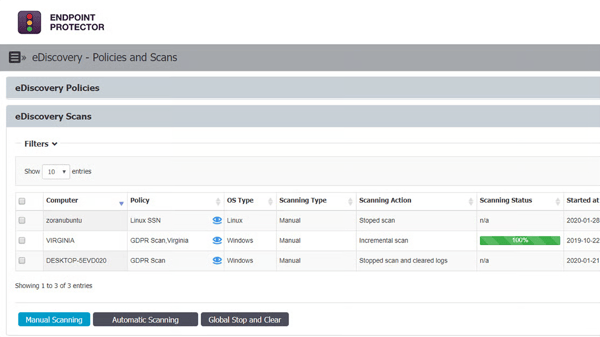 Netwrix Endpoint Protector - eDiscovery
Cross-platform support is what G2 reviewers point to first, and consistently. Teams enforce device control and content-aware policies across Windows, Linux, and macOS from a single console, with compliance scoring 93%. That says a lot about how well the platform holds up under real regulatory pressure across mixed OS environments.
Deployment holds up well too. Server setup typically completes within a day using OVA/OVF files, with agents deploying cleanly to managed devices via MDM — no manual installation steps per endpoint. That 92% DLP configuration score tells you teams are reaching a working policy state quickly, rather than getting stuck in a drawn-out configuration process.
One thing I kept seeing across G2 reviews was praise for the support team, reflected in the Quality of Support score of 93% on G2. Resolution times are measured in minutes rather than days, with support teams engaging on technical details rather than routing tickets through queues. Reviewers with multi-year deployments describe the support level as unlike anything they have encountered from other vendors.
The content-aware protection layer gives security teams something simpler tools cannot match: granular control without blanket blocking. The platform checks transfers against defined rules, blocking SSNs, credit card numbers, and other sensitive content patterns while still permitting legitimate activity.
On the integration side, log forwarding into SIEM platforms is clean, and Active Directory integration makes policy scoping straightforward. G2 review patterns show teams valuing the ability to have DLP events flow into existing security operations workflows rather than sit in a separate portal, with the platform's modular architecture allowing teams to start with device control and expand into content-aware protection or eDiscovery as their program matures.
While analyzing G2's review data, I came across consistent callouts from healthcare and education teams around the eDiscovery module. The ability to identify sensitive data at rest across endpoints, combined with file tracing that produces a complete audit trail, closes compliance gaps that device-control-only tools tend to leave open.
Linux agent visibility on the console is not always automatic, which G2 reviewers flag as a situational friction point. Administrators in some environments need to contact Netwrix support directly to bring a Linux agent into view. Device control and content-aware policy enforcement continue operating reliably across the affected endpoints during this period, with the agent reporting accurately once visibility is restored.
G2 review patterns show teams noting that pushing policy updates to endpoints can take longer than expected, creating a brief window where enforcement lags behind intent. G2 reviewers describe the platform's strong compliance feature scores and responsive support structure as giving teams a reliable path through these timing gaps without significant disruption to ongoing coverage.
Netwrix Endpoint Protector delivers cross-platform endpoint DLP that most comparable tools do not match, with a support model reviewers consistently describe as a genuine differentiator. If your environment spans Windows, macOS, and Linux and you need consistent device control and content-aware DLP without a separate tool for each platform, this is the one to evaluate first.
"It works smoothly across Windows, Linux, and macOS, and the setup was super quick. The console is easy to use, policies are clear, and device control actually does what it should do. Support team also responds fast whenever help is needed."
- Netwrix Endpoint Protector review, Harish A.
"The deep packet inspection of EPP could be improved as it sometimes blocks all internet traffic leading to system breakdown whenever updates are pushed."
- Netwrix Endpoint Protector review, Shivam K.
Zero-trust enforcement only works when identity controls are solid underneath it. The best IAM software on G2 covers the access management layer that zero-trust architectures depend on.
In a part of the DLP market that larger enterprise platforms often ignore, Safetica combines data loss prevention, insider risk management, and web security in a single agent designed to run without disrupting users or requiring constant policy maintenance.
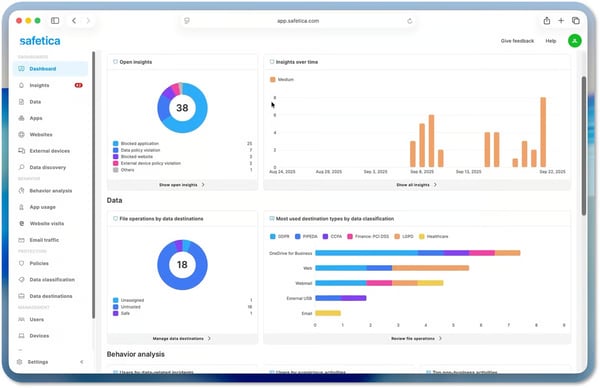 Safetica Dashboard
One pattern kept surfacing as I worked through G2's review data: mid-market security leads and IT generalists returning to Safetica specifically for its balance between protection depth and operational simplicity. It's the kind of consistency that's hard to ignore.
Raw activity data gets translated into reports clear enough to present to auditors directly without security staff manually assembling evidence beforehand. G2 reviews are specific about this: GDPR, HIPAA, and other regulatory requirements getting satisfied through Safetica's reporting output without significant manual work. That audit-readiness without specialist involvement is the specific capability most mid-market teams are trying to solve for.
Teams can create specific rules per data type, per department, and per risk profile without applying blanket restrictions across the organization. G2 users mention the ability to implement controls proactively across different user profiles, with sensitive data compliance scoring 93%, reinforcing the platform's strength for teams with specific regulatory obligations.
Teams already running M365, Active Directory, and Intune describe the integration as clean and fast, with Safetica slotting into existing environments without requiring architectural changes. Implementation moves considerably faster when the foundational Microsoft stack is already in place — a consistent pattern across reviewer accounts from Microsoft-standardized organizations. Customer support rounds things out well, with responsive technical assistance and thorough documentation drawing regular praise from G2 reviewers.
The platform enables regulatory compliance without requiring the cost and complexity associated with many competing enterprise solutions, while still delivering web security and data monitoring that would otherwise require a separate tool. Running DLP and productivity analytics from a single platform helps organizations consolidate functionality that might otherwise require separate tools.
G2 reviews describe Safetica catching sensitive data patterns based on policy and acting before data leaves the organization, all while users remain largely unaware it's running. That's a harder balance to strike than it sounds, and that 94% activity monitoring score reflects it: a platform that surfaces activity data consistently without making itself felt at the endpoint level.
What I picked up while studying G2's review data is that the OCR and automatic sensitive data identification features are doing real work. Teams are skipping the manual classification phase that usually slows DLP deployment down, and behavioral analysis is building risk profiles that make policy decisions more informed from the start.
Initial policy configuration requires more upfront effort than the platform's clean interface might suggest. G2 review patterns show the administration interface presenting a dense set of options that can feel heavy for a first-time DLP administrator, with miscalibrated rules generating false positives that require gradual tuning. Once the initial calibration is complete, the platform holds its configuration reliably across changing data environments without requiring constant policy intervention.
Linux support and coverage outside the Microsoft ecosystem represent a defined scope area. G2 feedback shows multiple reviews mentioning weak Linux support, with email monitoring through browser-based Google Workspace harder to control than through Outlook. Microsoft 365, Active Directory, and Intune coverage remains deep and consistent, with policy enforcement and reporting performing reliably across the environments where the platform's strongest feature scores are concentrated.
All considered, Safetica delivers data protection, insider risk visibility, and compliance coverage that most organizations struggle to find in a single platform at this price point, without requiring a specialist team to keep it running.
"I have been using Safetica DLP for over 5 years and it has been fundamental for the prevention and mitigation of high-impact security incidents related to information leakage, especially of critical assets like source code. I like how Safetica allows us to implement proactive information security controls, which strengthens our prevention stance against data exfiltration risks."
- Safetica review, Alvaro B.
"The updates always come with a lot of headaches. They really need to improve their quality control before releasing major updates."
- Safetica review, Shanavas T.
Most DLP tools are built around blocking. AvePoint Confidence Platform takes a different angle, operating as a unified governance, backup, and data security platform built specifically around the Microsoft 365 ecosystem.
For organizations where SharePoint, Teams, Exchange Online, and OneDrive are the primary surfaces where sensitive data lives and moves, here's what G2 reviews actually showed me: native Microsoft tooling consistently left visibility, control, and recovery capability incomplete, and AvePoint was closing those gaps.
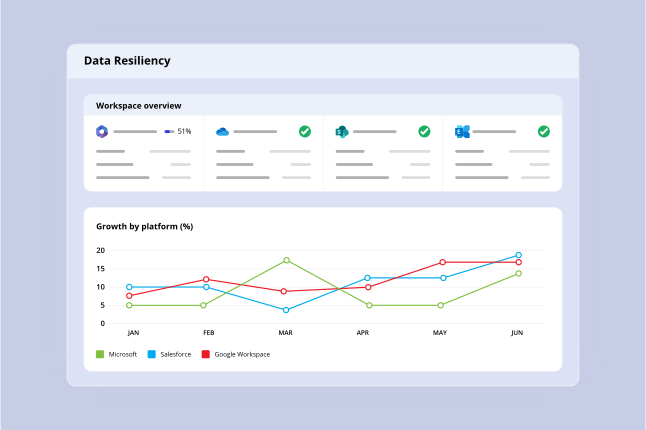 AvePoint Confidence Command Center
Backup, lifecycle management, governance, and compliance all from one place — that 95% ease of use score makes a lot more sense once you see it in action. It's rare to find a platform that pulls data protection, governance, security, and SaaS compliance together without piling extra admin work onto whoever's already stretched thin.
Backup schedules are configured in minutes, with automated jobs running across Exchange Online, OneDrive, SharePoint, and Teams without ongoing manual oversight. A 93% ease of setup score on G2 reflects what I found across reviewer accounts — teams reaching active coverage quickly after onboarding rather than spending weeks in configuration. The item-level restore capability is where the recovery model earns its operational value: when something goes wrong, pulling one file or email without rolling back entire environments is the difference between a minor incident and a disruptive recovery event.
The automation layer handles retention policy enforcement, digital clutter reduction, and access governance without administrators needing to touch individual items. Based on my evaluation of G2 reviews, this is what allows lean technical teams to run a governance program that would otherwise require significantly more headcount — automation absorbing the volume that would otherwise create a dedicated role.
Teams migrating tenants, restructuring SharePoint architectures, or consolidating Microsoft environments describe the platform handling complex content moves with accuracy and auditability. G2 reviews describe large-scale migrations involving emails, documents, SharePoint sites, and Teams data moving smoothly, making it a practical choice for organizations undergoing M365 consolidations or cloud transitions.
Reporting ties it all together on the compliance side — automated documentation of access events, data movement, and policy enforcement, all from the same interface where backup and recovery live. What I noticed in G2 reviews is how much teams appreciate not having to hunt down audit evidence from a separate system; when a regulator comes knocking, everything they need is already there and ready to hand over.
With a quality of support rating of 91% on G2, support during onboarding draws consistent praise, with proactive customer success managers who periodically review installations and keep organizations informed of upcoming changes. Users mention support staff helping them understand features during implementation and reaching value faster than self-directed onboarding would have allowed.
A few recurring themes in G2 reviews suggest that navigating the platform's breadth of features and modules requires more orientation than teams initially expect. This is more noticeable for organizations adopting multiple governance, backup, and lifecycle management capabilities at once, while teams with structured implementation plans align well with the platform's depth. G2 reviewers who move through the initial onboarding period describe the platform as predictable and low-maintenance across day-to-day operations.
Pricing at higher feature tiers and limited third-party integrations outside the Microsoft ecosystem also surface in G2 reviews. This is more noticeable for organizations running heterogeneous technology environments, while teams standardized on Microsoft infrastructure align well with the platform's strongest integration coverage.
Overall, AvePoint Confidence Platform earns its place for organizations that need governance, backup, and data protection to operate as a single connected system, particularly where Microsoft 365 is the primary environment. Its migration support, item-level recovery, and compliance documentation make it helpful when unified data protection matters more than stitching point solutions together.
"What's really good about the AvePoint Confidence Platform is how it brings data protection, governance, security, and compliance for all your SaaS apps together in one easy-to-use solution. Rather than juggling a bunch of different tools, companies can manage backups, data lifecycle tasks, risk checks, and AI-related work all in one place."
- AvePoint Confidence Platform review, Stefan N.
"Because it has so many features, it can take time to set up and understand. Some parts are not very simple at first. Also, the cost can go up if you need all the advanced options."
- AvePoint Confidence Platform review, Nick M.
Zscaler Internet Access (ZIA) starts from the premise that a lot of DLP tools still haven't caught up to: there is no perimeter. Every connection, from every user, on every device, gets inspected in-line before data touches the internet or a SaaS application. If your organization has already moved beyond hub-and-spoke network architecture, you'll find ZIA delivers consistent enforcement without needing appliances, backhauling, or separate policy layers for remote and on-premises traffic.
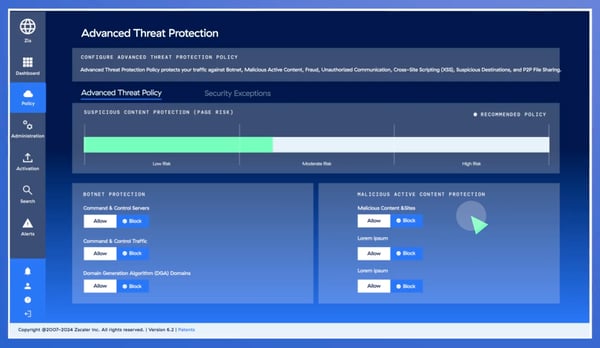 Zscaler Internet Access - Advanced Threat Policy
G2 reviewers are pretty consistent on this one: ditching hardware proxies and on-premises appliances isn't just a technical change, it's an operational one that teams actually feel. Review patterns show teams replacing traditional firewall stacks with cloud-native inspection that scales automatically and never asks you to block out a weekend for patching cycles.
URL filtering, cloud app control, SSL inspection, DLP rules, sandboxing, firewall, and IPS all run from a single interface. The cloud app control capability is worth singling out: allowing view access to a SaaS application while blocking upload or download is action-level enforcement that content-only DLP tools simply cannot replicate inline. Access control scoring 93% reflects how well that precision translates in practice.
Whether you're on the corporate network, working from home, or somewhere in between, every connection gets authenticated and inspected before access is granted. G2 reviewers consistently describe this as the thing that separates ZIA from traditional firewall-and-VPN models. Uniform enforcement and deep visibility into user activity that doesn't change depending on where you're sitting is a harder problem to solve than it sounds.
The dashboard makes monitoring user activity, traffic patterns, and security events clear without requiring deep platform expertise to navigate. What I picked up while studying G2's review data is that compliance teams are using reporting outputs directly, with real-time visibility into threats, internet access patterns, and data movement, producing documentation they can act on rather than reformat.
Scaling protection across distributed workforces and multiple geographic locations happens without infrastructure changes. New users and locations onboard into existing policy frameworks rather than requiring dedicated appliance deployments, and remote, offsite, and in-office environments all run through a single cloud platform with no physical hardware dependency for any scenario.
SSL inspection and advanced threat protection are where ZIA's enforcement really stretches its legs. Encrypted traffic gets inspected inline through SSL decryption, with sandboxing and DLP rules applied across web and cloud traffic without needing a separate appliance or security stack in the mix. The 93% encryption score backs up what I kept seeing in G2 reviews: reviewers aren't just impressed by the coverage across encrypted channels — many say this threat protection layer is the core reason ZIA is sitting where their legacy solution used to.
Some reviewers note that initial setup and policy configuration require meaningful investment before ZIA reaches effective coverage. G2 review patterns show the implementation phase consistently involving troubleshooting, port configurations, URL whitelisting, and policy tuning before the environment runs cleanly. Once the configuration investment is made, G2 review patterns show the ongoing experience as stable and low-maintenance for most teams.
Latency in certain geographic regions and reconnection delays when users switch networks draw recurring feedback across G2 reviews. Policy enforcement and traffic inspection hold consistently across sessions, with protection depth remaining stable even when connection transitions introduce momentary delays.
Zscaler Internet Access is the platform to evaluate when DLP needs to be embedded inside a zero-trust architecture rather than bolted on as a separate control. It is the best fit for enterprises with distributed workforces and cloud-first application environments where consistent inline policy enforcement across every user, device, and location is the primary security objective.
"Diverse features are extremely valuable, from cloud scalability and bandwidth control to advanced security features like DLP, firewall, antivirus, and IPS, all integrated into a single management pane. The seamless transition with professional services was smooth, and the security dashboard provides excellent visibility into our security posture."
- Zscaler Internet Access review, Tarun B.
"Latency across different regions is the only drawback we have. It takes at least one to two months to implement if you are a global company."
- Zscaler Internet Access review, Rahul K.
For teams whose primary exposure is cloud-stored data rather than endpoint exfiltration, G2's best cloud data security software covers platforms built specifically around that risk profile.
SpinOne was built for a world where files don't move through a corporate firewall; they sync, share, and replicate directly between cloud services. The starting point matters, because it shapes everything else: SaaS backup, DLP, ransomware detection and response, and security posture management all in one platform, connecting to Google Workspace, Microsoft 365, Salesforce, and Slack via API. No agent to deploy, no infrastructure to manage.
S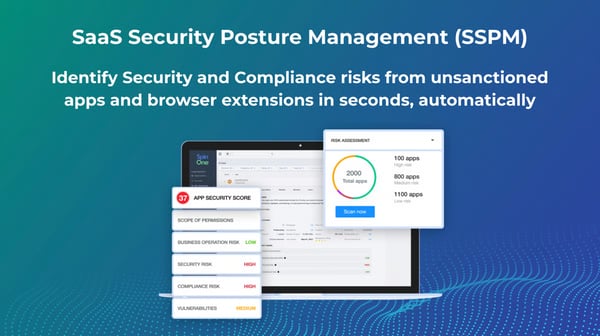 SpinOne - SaaS SSPM
With backup scoring 97%, setting up automated backups for entire Google Workspace or Microsoft 365 domains takes minutes, and the interface does not require security expertise to navigate. Granular backup of Gmail, Drive, and Shared Drives is quick to configure, and fast point-in-time restores keep business disruption minimal when data loss events occur.
What I noticed in G2 reviews is that the ransomware response capability goes further than most teams expect. Continuous monitoring flags attacks in progress, automated responses stop them, and only affected files get restored without touching healthy data. Combined with multiple daily automated backups and immutable storage, that creates a recovery posture most SaaS-native organizations simply do not have when relying on their cloud provider's native protections alone.
OAuth permissions across every app and extension connected to your SaaS environment get continuously assessed, with high-risk apps flagged and access revoked automatically based on risk thresholds. Reviews describe SpinOne surfacing third-party apps and browser extensions teams didn't realize were exposed, closing a gap that content-scanning DLP tools miss entirely.
SaaS configuration monitoring runs alongside backup and recovery from the same interface, covering misconfiguration alerts, data sharing controls, and user behavior auditing without switching platforms. Some reviews mention SpinOne as checking every box for data protection that scales with growing infrastructure — a useful signal for teams that expect their SaaS footprint to keep expanding.
While analyzing G2's review data, I kept landing on the same insight around support. Customer success managers are proactive, engineers are responsive across time zones, and reviews describe support teams developing additional features at their request. For smaller organizations without internal security staff, that level of engagement changes what the platform can do for them in practice.
Replacing four separate vendors — SaaS backup, DLP, SSPM, and ransomware protection — with a single dashboard, one invoice, and one support contact is the cost justification reviews describe most often. For budget-conscious IT leads, removing the coordination overhead of managing separate platforms makes the pricing straightforward to defend.
Per-user pricing creates more friction for organizations with large numbers of inactive or archived accounts. This is more noticeable for teams trying to maintain broad backup coverage across low-usage users, while organizations with active, consistently engaged user bases align well with the platform's pricing model.
Granular control at the individual Shared Drive level is an area G2 reviews identify as having room to grow. This is more noticeable for teams that require detailed per-drive management and visibility, while organizations focused on domain-wide protection align well with the platform's coverage model. Ransomware detection, OAuth risk assessment, and automated backup continue operating consistently across the broader SaaS environment regardless of per-drive visibility depth.
SpinOne delivers SaaS-native data protection, backup, and risk visibility that most SMB and mid-market organizations cannot assemble from individual point tools at comparable cost and simplicity. If your organization runs Google Workspace or Microsoft 365 and needs SaaS-native backup, ransomware protection, and DLP without managing a fragmented tool stack, this is the platform to evaluate first.
"SpinOne provides a dual-pronged solution through SaaS Security Posture Management and Data Leak Prevention. It continuously assesses our SaaS configurations against best practices, alerting us to misconfigurations. It also discovers and risk-assesses all third-party apps and browser extensions connected to our environment and monitors for sensitive data sharing patterns that violate policy."
- SpinOne review, Graham C.
"I hope their next iteration will be able to distinguish between internal data sharing and external. Almost all of the alerts I receive are documents shared between employees as they collaborate. I am more interested in alerts when data is shared with outside emails."
- SpinOne review, Kimberly R.
The reality for most small and mid-market organizations is a patchwork of point tools, each with its own console, its own alerting logic, and its own renewal cycle. Coro Cybersecurity has been built to collapse that complexity into one platform that a lean IT team — sometimes a team of one — can manage without deep security expertise or hours of daily maintenance.
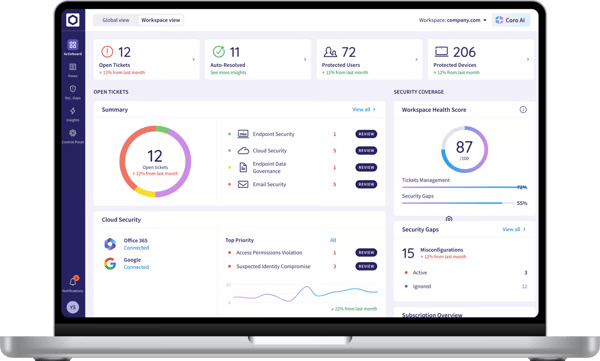 Coro Cybersecurity Actionboard
What I found consistently in G2 reviews is that teams describe leaving separate consoles for email security, endpoint protection, cloud app security, and DLP behind. Every security event gets reviewed from one interface, threats identified and remediated from a single screen. The 93% data visibility score on G2 reflects what reviewers describe consistently — a platform that surfaces what needs acting on without generating the noise that pushes lean teams toward alert fatigue.
Microsoft 365 integrations are operational within minutes, and the Google Workspace connection is equally straightforward. G2 user feedback describes implementation steps as well laid out and onboarding as supported rather than self-directed, which matters for teams without a dedicated person to troubleshoot a complex rollout.
The DLP detection depth stands out more than you might expect from an all-in-one platform. Reviewers describe Coro catching large OneDrive data transfers that endpoint tools missed, monitoring laptops and Google Workspace for PII leakage from a single console, and scanning emails for PII and PHI. One specific callout that kept coming up: SSN extraction from screenshot graphic files at detection rates that beat a previous dedicated vendor.
Here's what G2 reviews actually showed me on the cost side: the modular pricing model is doing real work in the justification conversation. Teams pick the features they need and pay for those, rather than absorbing the full cost of capabilities they are not using. For SMB and mid-market organizations that cannot rationalize individual best-of-breed tools across every security domain, that flexibility changes the calculus entirely.
G2 review patterns tell an interesting story around CoroSOC — teams adding it consistently describe it as gaining a new team member, one that keeps monitoring running when your internal team isn't available. Smaller organizations staying compliant with industry standards without having to staff security operations internally is a meaningful capability when round-the-clock coverage simply isn't realistic.
The platform's automation features save significant hours of manual work, allowing teams to focus on core business functions rather than security operations, with compliance scoring 94%, reflecting the audit-readiness teams reach without dedicated compliance staff. G2 reviews describe gradually automating routine alert triage and remediation, with Coro handling what it can manage while surfacing only what genuinely needs human attention.
Compatibility with specialized third-party security tools requires validation before deployment, with some environments needing additional configuration work to resolve conflicts. This is more noticeable for organizations running mature security stacks with multiple overlapping controls, while teams centered on Microsoft 365 and Google Workspace align well with the platform's strongest integrations.
Console depth for advanced use cases is an area where G2 reviewers identify room for growth. This is more noticeable for teams that require deep forensic analysis and highly detailed reporting workflows, while SMB and mid-market organizations align well with the platform's operational visibility model.
Coro Cybersecurity earns its place for organizations that need layered cybersecurity coverage. Its automation depth, SOC layer, and consistent DLP detection make it the strongest fit for lean IT teams that need consolidated security deployable and manageable from a single dashboard without specialist expertise.
"Coro's all-in-one solution has simplified our security stack, providing comprehensive protection for our endpoints, email, and cloud applications. The platform's automation features have saved us countless hours of manual work, allowing us to focus on our core business."
- Coro Cybersecurity review, Israel S.
"The only downsides that I have found with Coro is that I do still have a couple of other vendors I have to maintain, one for our firewall and one for our server backup. Not really their fault as it just isn't part of their security package."
- Coro Cybersecurity review, Verified user.
Varonis Data Security Platform flips the usual security script. Instead of starting at the perimeter or the endpoint, it starts with the data — where it lives, who can access it, who is actually accessing it, and whether any of that behavior looks off. The platform discovers and classifies sensitive data across on-premises file shares, cloud storage, and SaaS environments, then keeps a continuous eye on access patterns and flags anomalies before they escalate.
Sensitive data gets discovered and classified automatically across on-premises and cloud environments, with overexposed files and excessive permissions flagged before they become a problem. What caught my attention while going through G2 review data is how consistently teams describe this as replacing manual inventory processes that were already falling behind the pace of their data environment — a shift from reactive cataloguing to continuous automated classification.
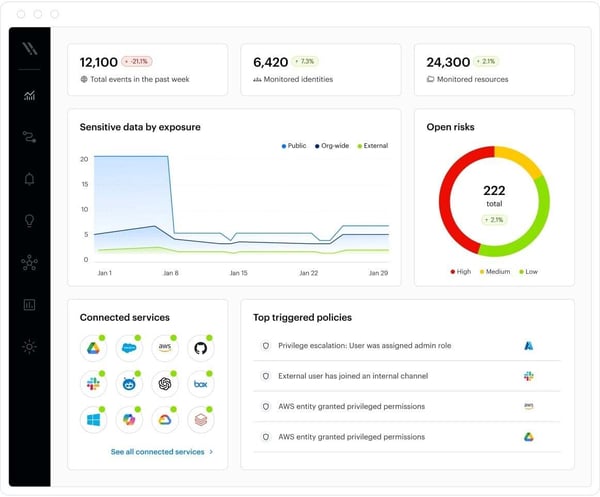 Varonis Data Security Analytics View
The platform surfaces abnormal access patterns, identifying insider risk activity, and generating alerts that give SOC teams actionable context rather than raw log data. Teams using behavioral analytics to detect ransomware activity and data exfiltration attempts early, with breach detection scoring 90%, pointing to the platform's strength in identifying threats that content-scanning tools alone would miss.
Access remediation, threat detection, and automated cleanup run from a single interface regardless of whether the data source sits in a file share, a cloud storage bucket, or a SaaS application. G2 reviews note that the unified visibility across environments is a genuine differentiator, with the platform correlating on-premises and cloud data context in ways that point tools handling each environment separately cannot replicate.
Once Varonis is embedded, manual investigation time drops noticeably. Audit trails and activity timelines hand analysts the evidence chain they need to reconstruct incidents without hunting through disconnected logs. That 90% data management score reflects how consistently reviewers rate the platform's ability to surface and act on data context — data exposure dropping materially, and the time spent figuring out who accessed what and when dropping with it.
The Managed Data Detection and Response team provides 24x7 monitoring and incident response support, giving organizations confidence that their environment is being watched when internal teams are unavailable. The MDDR service acts as the equivalent of extending security operations capacity without adding headcount, with the support team described as genuinely invested in helping organizations succeed rather than simply resolving tickets.
Active Directory, AWS, and SIEM integrations are clean and well-documented, with connectors and APIs that users describe as straightforward to configure. What I found genuinely useful for lean security teams is the automation layer: report scheduling and remediation responses that run without manual intervention, so your team isn't chasing every alert that comes through.
G2 reviews note that deployment in large or complex environments requires a meaningful upfront time investment before full coverage is reached. This is more noticeable for organizations expecting immediate visibility across large data estates, while teams taking a phased rollout approach align well with the platform's deployment model.
The full feature set requires a baseline of security program maturity to use effectively, making this more noticeable for organizations early in their data security journey. Pricing is also a recurring consideration for smaller and mid-market buyers comparing it with more focused point tools. G2 reviewers consistently describe the visibility and risk reduction as justifying the investment for organizations ready to operationalize the platform.
Varonis Data Security Platform is built for organizations ready to move beyond perimeter-focused security and gain genuine visibility into how sensitive data is accessed, shared, and exposed across their environment. If data visibility and insider risk detection are your primary security objectives, Varonis belongs at the top of your evaluation list.
"The biggest value is the deep visibility into data access and user behavior across file shares, cloud storage, and sensitive repositories. The platform makes it easy to identify overexposed data, excessive permissions, and abnormal access patterns that would otherwise go unnoticed. The alerting, audit trails, and behavioral analytics significantly improve our incident response time and help us quickly investigate insider risk, ransomware activity, and data exfiltration attempts. It provides actionable insights rather than just raw logs, which saves time for the SOC team."
- Varonis Data Security Platform review, Sunday O.
"It is a bit hard to implement it in a small environment."
- Varonis Data Security Platform review, Sebastian B.
Trellix Data Loss Prevention protects sensitive data across endpoints, networks, email, web, and cloud from a single management console. G2 reviewers describe it as one of the more dependable solutions for preventing data leaks at the organizational level, with deployment handled through the Trellix Agent and integration available with data governance applications.
A 92% data transport score sits behind one of the platform's more operationally important strengths: real-time monitoring of inbound and outbound network traffic. Data movement events surface as they occur rather than trickling in through delayed batch reports, and for security teams trying to respond to potential exfiltration attempts, timing is everything. By the time a batch report lands, the data might already have left.
Content classification covers more than 400 content types through data fingerprinting, keyword matching, and regular expressions. Customizable rules mean teams are defining what sensitive data looks like for their environment specifically, with policies built around content type, destination, and user context rather than blanket restrictions that generate noise.
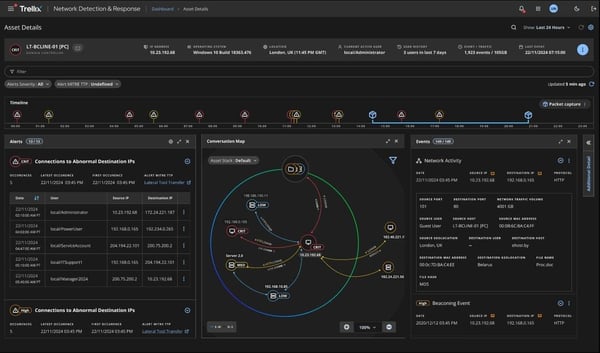 Trellix Data Loss Prevention - Asset Details Dashboard
One console for deployment, policy administration, real-time event monitoring, and compliance reporting. For enterprise security teams that have lived with the coordination overhead of multi-tool DLP deployments, that tends to mean something more than a minor convenience — it's a shift in what the daily operational picture actually looks like.
Compliance teams will appreciate this one. Out-of-the-box policies and reporting templates cover GDPR, HIPAA, and PCI DSS without starting from scratch, reports go straight to auditors without significant manual assembly, and the forensic capture capability keeps incident investigations airtight when a complete chain-of-custody record is required.
Teams already standardized on McAfee or Trellix will find Trellix DLP slots without much friction. Connection to broader security stacks runs through the ePO management console, browser coverage reaches Chrome Enterprise, Microsoft Edge for Business, and Firefox without a separate agent per browser, and the whole thing lands in one deployment.
Day-to-day operation is straightforward once the platform is deployed. G2 reviewers describe Trellix DLP as easy to use across all device types, with the Trellix Agent handling deployment cleanly and enabling integration with data governance applications without custom engineering work. Reviewers with multi-year deployments describe the administration experience as intuitive, with policy management and routine monitoring accessible to security staff who are not dedicated DLP specialists.
G2 reviewers flag initial configuration as an area requiring meaningful investment before the platform reaches its full effectiveness. This is more noticeable for teams without dedicated security staff or prior DLP experience, while organizations with established security programs and existing Trellix deployments align well with the platform's configuration model. Reviewers consistently describe the upfront tuning effort as resulting in a stable policy framework that continues performing reliably as content types and user behaviors evolve.
Scanning and real-time monitoring place a heavier processing load on older or resource-constrained endpoints. This is more noticeable in environments with aging hardware, while organizations running modern, standardized endpoint estates align well with the platform's monitoring approach. G2 reviewers in enterprise environments generally describe the performance impact as manageable relative to the visibility and enforcement capabilities the platform provides.
If your organization needs DLP running across endpoints, networks, email, web, and cloud from one place, with compliance reporting and forensic capability that can survive regulatory scrutiny, Trellix is worth a serious look. The content classification depth, centralized administration, and user coaching features cover both sides of the regulated industry requirement: the technical enforcement and the documentation trail that proves it.
"Trellix DLP is among the most dependable solutions for preventing data leaks within an organization. It is especially effective at monitoring and blocking any attempts to exfiltrate sensitive information from your company. Provides you with all the features that enable you to get in compliance with Security Standards around the world. In addition to a very intuitive and easy administration, with easy deployment with Trellix Agent and enables integration with Data Governance Applications."
- Trellix Data Loss Prevention review, Jose M.
"Managing evidence produced by DLP incidents can be quite challenging, especially in cases like Trellix DLP SaaS where third-party storage providers are used."
- Trellix Data Loss Prevention review, Abdul R.
Nightfall AI was built for a world where data flows through Slack, GitHub, Google Drive, email, and increasingly through AI tools that employees access directly from a browser. Its detection engine runs on machine learning models rather than static rules, classifying content based on context and meaning rather than pattern matches alone.
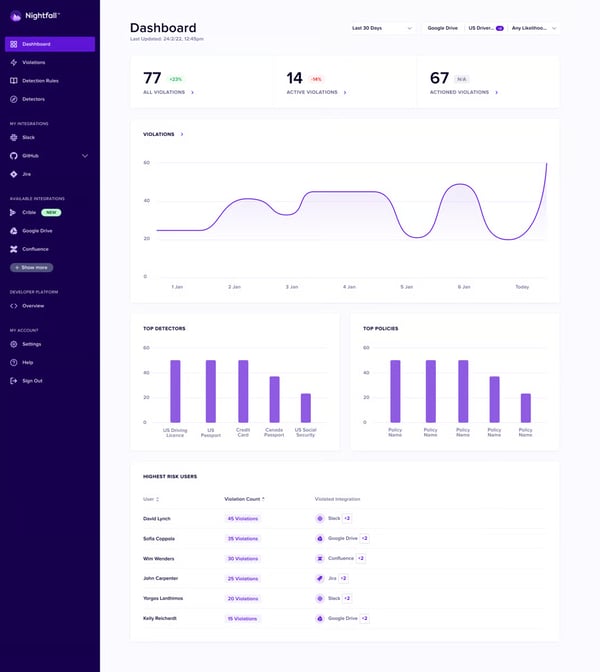 Nightfall AI Dashboard
False positive fatigue is real, and it is the first thing reviewers bring up when describing what Nightfall replaced. The ML-based detection engine cuts non-issue alerts down significantly, and if you've ever worked a security queue where half the alerts turn out to be nothing, you know exactly why that matters. Teams switching from SASE-based DLP solutions describe alert fidelity improving to the point where chasing false positives stopped being a daily time sink altogether.
Nightfall connects to Slack, Google Drive, GitHub, Gmail, and other SaaS tools in hours rather than days. No network architecture changes, no agent rollout, and alert actions handled directly from Slack without touching the admin console. Having seen how drawn-out legacy DLP deployments tend to go, that single-session connection experience sits near the top of what makes Nightfall stand apart operationally.
Nightfall ships with pre-trained detectors for PII formats across many countries and regions, PHI, PCI data, credentials, and secrets, so teams are not building detection logic from scratch. Detection rules work well across Slack message monitoring, GitHub repository scanning, and email, with customizable sensitivity and exclusion configuration for environments with inconsistent user behavior. DLP configuration scoring 94% reflects how consistently reviewers rate the setup experience.
Enhanced monitoring that triggers based on user status changes — that's the insider risk layer at work, giving security teams visibility into data movement patterns for users who represent elevated exfiltration risk. Reviewers are consistent about why this lands well: covering both accidental exposure and deliberate data theft from a single console, alongside the platform's broader stack integration, is the kind of capability that changes what you actually need to run next to it.
While analyzing G2 review data, I came across consistent callouts around audit preparation specifically. Teams describe meaningful compliance gaps closing after deployment, with healthcare organizations citing HIPAA-compliant Slack use as a direct outcome. Sensitive data compliance scoring 94% reinforces the detection accuracy reviewers rely on when regulatory requirements are on the line.
Remediation actions — redact, quarantine, notify, or automate — run directly from a Slack alert without logging into the admin console. That workflow compresses the time between detection and response, and reviewers mention it as particularly valuable for security teams that live in Slack and need incident response to happen in the same environment where the violation occurred.
Dashboards provide a useful high-level view but offer less depth for teams that need detailed investigations and highly customized reporting workflows. This is more noticeable as DLP programs mature and reporting requirements become more complex, while mid-market teams align well with the platform's current visibility model. G2 reviewers generally describe the dashboards as sufficient for day-to-day monitoring and operational oversight.
Support response times after implementation can vary, which is more noticeable for teams that depend heavily on vendor assistance for ongoing operations. Organizations with established internal ownership of DLP policies align well with the platform's straightforward management model. G2 reviewers describe most configuration and policy questions as relatively easy to resolve once the platform is in place.
Taken as a whole, Nightfall AI is a strong fit for cloud-first security teams that need accurate, low-friction DLP across SaaS and AI applications without the deployment complexity of legacy enterprise platforms. ML-native detection, Slack-first remediation, and API-based deployment that wraps up in hours rather than weeks make it the platform to evaluate when your organization needs DLP that actually fits how your team works today.
"Nightfall AI has helped streamline our data loss prevention and insider risk operations. The platform is incredibly easy to integrate across our tech stack, from Slack and Google Drive to GitHub and Gmail. We especially value the enhanced monitoring for high-risk insiders like departing employees."
- Nightfall AI review, Joe S.
"We wish there were more configuration options for the alerts — specifically for how sensitive content is displayed to our security operations team. Customer support is slower than we would like. We've had tickets/requests sitting for several days without updates."
- Nightfall AI review, Rafal C.
Still confused? This comparison table makes it easier for you.
|
Software |
G2 rating |
Free plan |
Ideal for |
|
Proofpoint Enterprise DLP |
4.3/5 |
No |
Enterprise teams managing multi-channel data risk across email, endpoints, and cloud with behavioral context |
|
Netwrix Endpoint Protector |
4.5/5 |
Free trial available |
Organizations running Windows, macOS, and Linux that need consistent device control and endpoint DLP across all three |
|
Safetica |
4.6/5 |
Free trial available |
SMB and mid-market teams needing DLP and insider risk visibility without enterprise-level implementation complexity |
|
AvePoint Confidence Platform |
4.5/5 |
Free trial available |
Microsoft 365-heavy organizations that need backup, governance, and data protection in a unified platform |
|
Zscaler Internet Access |
4.4/5 |
No |
Enterprises embedding DLP inside a zero-trust architecture for consistent policy enforcement across distributed workforces |
|
SpinOne |
4.8/5 |
Free trial available |
SMB and mid-market teams protecting Google Workspace or Microsoft 365 with SaaS-native backup, ransomware defense, and DLP |
|
Coro Cybersecurity |
4.7/5 |
Free trial available |
Lean IT teams needing all-in-one cybersecurity, DLP, and email protection from a single dashboard without specialist expertise |
|
Varonis Data Security Platform |
4.6/5 |
No |
Mid-market and enterprise teams needing deep visibility into data access, permissions, and insider risk across on-premises and cloud environments |
|
Trellix Data Loss Prevention |
4.3/5 |
No |
Regulated enterprises needing multi-vector DLP across endpoints, networks, email, and cloud from a single management console |
|
Nightfall AI |
4.6/5 |
Yes |
Cloud-first teams needing AI-native DLP across SaaS, generative AI tools, and cloud apps with fast, agentless deployment |
*These software products are top-rated in their category based on G2's Winter 2026 Grid® Report.
Got more questions? G2 has the answers!
Netwrix Endpoint Protector and Safetica both score above category average on Sensitive Data Compliance. Proofpoint Enterprise DLP is the go-to for regulated industries, with pre-built classifiers for GDPR, HIPAA, and PCI DSS.
Proofpoint Enterprise DLP addresses insider threat through its people-centric detection model that layers behavioral telemetry on top of content inspection. Varonis Data Security Platform also surfaces abnormal access patterns and insider risk activity with actionable SOC context across on-premises and cloud environments.
Proofpoint Enterprise DLP and Zscaler Internet Access are the strongest enterprise options. Proofpoint suits enterprises needing multi-channel DLP with behavioral context. Zscaler is the better fit for organizations building zero-trust architectures where DLP needs to be embedded inline across all traffic.
Nightfall AI and SpinOne lead for cloud-native environments. For endpoint coverage, Netwrix Endpoint Protector is the strongest option for cross-platform device control. Teams needing both cloud and endpoint in one platform should evaluate Safetica or Coro Cybersecurity.
Netwrix Endpoint Protector covers USB, email, and browser uploads at the endpoint level. Nightfall AI catches sensitive data in transit across SaaS and AI tools. Zscaler Internet Access enforces inline DLP across all internet traffic regardless of user location.
Proofpoint Enterprise DLP has the deepest native email integration, with email DLP as a core module alongside endpoint and cloud. Coro Cybersecurity integrates email security directly into its all-in-one platform, covering Microsoft 365 and Google Workspace alongside endpoint and cloud app protection.
Nightfall AI is built on machine learning and LLM-based classifiers from the ground up. Safetica uses AI to identify sensitive information without requiring complex rule configuration. Proofpoint Enterprise DLP incorporates AI-generated dictionaries and automated labeling across its multi-channel platform.
Zscaler Internet Access applies consistent DLP policies inline across every user, regardless of location or network. Coro Cybersecurity is commonly picked by smaller organizations needing endpoint, email, and cloud app protection from one dashboard. Safetica and Netwrix Endpoint Protector also receive strong G2 mentions for off-network endpoint coverage.
Nightfall AI provides real-time alerting across SaaS and AI applications with automated remediation. Safetica is frequently cited for real-time monitoring that runs without affecting endpoint performance. Varonis delivers continuous access pattern monitoring across on-premises and cloud data sources with behavioral anomaly detection.
Proofpoint Enterprise DLP is frequently cited for forensic reporting depth in regulated industry contexts. Netwrix Endpoint Protector offers detailed log exports with strong SIEM integration. Safetica translates raw activity data into audit-ready compliance reports without manual assembly.
Choosing a DLP tool is ultimately an operational decision as much as a security one. The platform you pick shapes how your team spends its time, how quickly incidents get contained, and how confidently your compliance program holds up under scrutiny.
Two trends worth factoring into your decision: generative AI adoption is creating data exposure through channels most existing DLP policies weren't written for, and regulatory pressure under GDPR and US state privacy laws is making audit-ready reporting a harder requirement than it used to be.
Before you evaluate vendors, map your actual channel exposure. Where is sensitive data most likely to leave your environment? That answer should drive your shortlist more than any feature matrix. Then validate with a proof of concept against real policy requirements, not a demo environment.
Want to strengthen your DLP program beyond the endpoint? Explore cloud email security software on G2 to find platforms that stop sensitive data from leaving through email.


Regardless of your industry, your business's data needs protection. This is especially true as...
 by Holly Landis
I've reviewed enough G2 data on cloud infrastructure to know that the best cloud data security...
 by Disha C
.png?width=400&name=G2CM_FI779_Learn_Article_Images-%5BComputer_Security_Day%5D_V1b%20(1).png)
G2 Grid® Report · Summer 2026 Best Cloud Email Security Platforms Updated May 26, 2026
 by Shashank D Shastry