

.png "Best Cloud Email Security Platforms")
It’s 2026, and the headlines all say the same thing: Phishing has only become more sophisticated and harder to spot.
Email and phishing attacks are still common and act as the front door to most cybersecurity attacks. I see it constantly: phishing getting more convincing, BEC attacks slipping past basic filters, and IT teams stuck explaining why their native protection wasn’t enough.
If you’re responsible for email security, I can understand that the pressure is real, regardless of whether you’re protecting a global enterprise or a fast-moving SMB. I also understand that this turns quite cumbersome when you are expected to secure quietly, perfectly, and without slowing anyone down.
As part of my work analyzing tools and software performance, I’ve come across how costly email-based attacks can be. I know the stakes are high. To cut through vendor noise, I leaned heavily on G2 Data, including Grid Reports, satisfaction scores, and hundreds of verified user reviews to collate the best cloud email security platform. I focused on how real teams describe day-to-day protection, ease of management, deployment experience, and overall value.
The result is a practical, buyer-focused view of what actually works in 2026, based on how teams are using these tools in the real world. Here are my top six picks for the best cloud email security platform tools: Proofpoint Core Email Protection, Mimecast Advanced Email Security, Microsoft Defender for Office 365, Paubox, Acronis Cyber Protect Cloud, and Coro Cybersecurity.
*As per the G2 2026 Winter Grid Report, these are the top-rated cloud email security software in their category. I've included their standout features and starting prices of their paid plans wherever applicable to facilitate easier comparisons for you.
At a basic level, cloud email security platforms protect the email systems teams already rely on, most often Microsoft 365 and Google Workspace, by detecting and stopping threats before they reach users. I think of them as the layer that closes the gap between emails that look legitimate and emails that actually pose risk, using context, behavior, and intent rather than simple filters.
What separates the best cloud email security platforms from the rest is how well they handle modern attacks like phishing and business email compromise. Strong tools go beyond spam blocking to analyze links and attachments in real time, detect impersonation, and give teams the visibility needed to understand what happened and why, all without disrupting everyday workflows.
On G2, these platforms serve a broad mix of buyers across businesses. With an average of 38% from small businesses, 42% from mid-market, and 21% from enterprise organizations. That lines up with what I see in reviews: smaller teams prioritize fast setup and automation, while larger organizations focus on advanced detection, reporting, and control at scale.
As email threats continue to grow in volume and sophistication, cloud email security is no longer optional. More teams are treating it as a core security layer to reduce risk, protect users, and maintain visibility across cloud-based email environments.
I started with G2’s Grid® Reports to identify top-performing platforms based on G2 Score, user satisfaction, and market presence. From there, I analyzed verified G2 reviews and used AI to spot consistent patterns. I mainly looked for threat detection, usability, integration with cloud-hosted email services like Microsoft 365 and Google Workspace, and ongoing management effort.
Since I couldn’t use every tool firsthand, I relied on real-world feedback from teams that run these platforms daily and validated those insights against G2 Data to ensure accuracy.
The screenshots in this article come from G2 vendor profiles and publicly available product documentation.
As I worked through G2 Data, a few themes kept surfacing, no matter the company size or industry. The strongest cloud email security platforms weren’t just the ones with the longest feature lists. They were the ones that consistently balanced protection, usability, and real-world fit for the teams using them every day.
*This data was pulled from G2 in 2026. Some reviews may have been edited for clarity.
⭐G2 rating: 4.6/5
Currently holding the highest G2 score on this list, Proofpoint Core Email Protection serves as a clear frontrunner for enterprise-grade cloud email security. The first thing I noticed in G2 reviews is the confidence people feel once it’s in place. Users consistently describe it as bulletproof at stopping phishing, BEC, and large-scale malicious email campaigns, and there’s a lot of appreciation for how effectively it catches sophisticated, targeted threats that slip past native email security. In fact, 95% of G2 users have said it meets their requirements in stopping email threats.
There is repeated praise in G2 reviews for the depth of threat intelligence and the level of detail available when investigating incidents, which makes it especially valuable for security teams that want clear context on why something was blocked and what kind of attack they’re dealing with. It’s no surprise that threat detection and handling capabilities such as Quarantine (95%) and Anti-Malware/Anti-Spam (94%) are so highly rated.
Reviewers highlight how flexible and scalable the platform is, particularly in larger or more complex environments, and how dependable it feels day to day, with strong uptime and consistent protection across the organization. That combination of advanced detection, rich threat data, and enterprise-grade reliability is what gives users real peace of mind and makes Proofpoint feel like a serious security layer rather than just another filter running in the background.
I also see consistent appreciation for the level of policy control available, especially for teams that want to fine-tune detection rules and tailor protection to their organization’s specific risk profile. Unsurprisingly, I see praise for the clarity of dashboards and reporting as well, noting that it makes it much easier to communicate threat trends, blocked attacks, and overall security posture to leadership and other stakeholders.
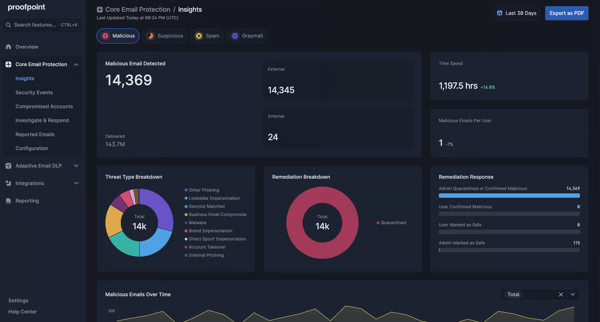
At the same time, G2 users are honest about what teams should expect going in. Organizations looking for a very simple, single-screen experience may find that the time taken to get comfortable navigating between different dashboards and investigation views is more than expected. Still, users feel the platform is built to surface a lot of detailed information.
This solution also works best for users who are comfortable fine-tuning policies and interpreting security data, as the depth that security teams love can feel complex if you’re expecting a completely hands-off setup. For teams that prioritize absolute clarity in email categorization, it’s worth knowing that occasional edge cases may require a quick review, especially in high-volume environments.
Overall, Proofpoint Core Email Protection delivers the most value for security-focused organizations that take email threats seriously and want strong defenses against phishing, BEC, and advanced malware. I’d recommend it most to mid-market and enterprise teams, SOCs, and IT security leaders who value deep visibility, flexible policy control, and proven threat detection over simplicity alone, and who want a cloud email security platform they can truly rely on as a core part of their security stack.
“Its helpful having so many capabilities consolidated in a platform which is easy to navigate UI wise. I also love how effective and efficient the tool is.”
- Proofpoint review, Jordan H.
“Proofpoint is often viewed as expensive, with some organizations questioning its value compared to alternatives. Initial setup and integration in complex environments can be difficult, sometimes requiring external consultants.”
- Proofpoint review, Verified User in Education Management.
Related: Email threats need more than just filtering. Explore G2's best incident response tools to see how teams contain and resolve attacks quickly.
⭐G2 rating: 4.7/5
When I read through customer reviews of Acronis Cyber Protect Cloud, what immediately comes through is how much users value having so many security and protection capabilities consolidated into a single platform. Users consistently talk about the convenience of combining email security, backup, ransomware protection, and workload protection under one roof, especially for cloud-first environments.
Acronis protects Microsoft 365 data well, with users calling out the reliability of email and mailbox backups, fast recovery, and the reassurance that critical business data is protected even if something goes wrong. I have to quickly note that it has a 93% satisfaction rating for ease of use and ease of admin. I see this reflected live in G2 reviews as many users appreciate the centralized management portal, noting that it makes it easier to oversee multiple customers or environments, which is a big reason MSPs and IT service providers gravitate toward it.
On top of that, users highlight the compliance and reporting capabilities as a real strength, saying the built-in reporting helps them stay audit-ready while giving clear visibility into protection status across email and cloud workloads. It’s no surprise that one of its highest-rated features is compliance with a 93% user approval rating. The overall theme is trust: once it’s running, people feel confident that their email and data are covered.
Users also frequently mention how smoothly Acronis integrates into existing cloud environments, particularly Microsoft 365, without requiring complex reconfiguration. I also see appreciation for the automation built into backup and protection workflows, which reduces manual effort for IT teams and allows them to manage security and recovery tasks more efficiently across multiple tenants or endpoints.

That said, the reviews also set clear expectations about who Acronis Cyber Protect Cloud works best for. Teams looking for a very lightweight, email-only security tool may want to plan for some time getting familiar with the broader platform, since it’s designed to do much more than just email protection.
Also, for organizations that rely heavily on vendor support for day-to-day troubleshooting, it’s worth knowing that having some in-house technical confidence helps teams get the most out of the platform’s flexibility and automation.
What really makes Acronis Cyber Protect Cloud stand out as a cloud email security solution is how seamlessly it blends email protection with backup, recovery, and cyber protection into a single, cloud-native experience. Instead of treating email security as a standalone tool, Acronis approaches it as part of a broader resilience strategy, which resonates strongly with users who want fewer vendors and more integrated protection.
I’d recommend Acronis Cyber Protect Cloud for MSPs, SMBs, and mid-market IT teams that want an all-in-one cloud security platform, especially those managing Microsoft 365 environments at scale. It delivers the most value for teams that care about both preventing email-based threats and ensuring fast recovery when incidents happen, making it an excellent fit for organizations that prioritize simplicity through consolidation and long-term cyber resilience.
“Compliance and reporting support: comprehensive backup, security controls, and audit-ready reporting help organizations meet regulatory requirements like GDPR, HIPAA, ISO standards, etc., with fewer separate tools.”
- Acronis review, Purva B.
“Alerts and notifications aren’t always clear. Some report slow performance (UI/backups). Can be complex to learn and configure. Support experience varies.”
- Acronis review, Sonali J.
⭐G2 rating: 4.9/5
G2 reviews on Paubox reveal one key theme: relief due to how easy it is to use. Users consistently talk about how easy Paubox is to implement and use, especially compared to traditional email encryption tools that add friction for both senders and recipients. In fact, 99% G2 users have mentioned that Paubox meets requirements and is easy to do business with.
G2 users shared consistent appreciation for the way Paubox handles automatic encryption in the background, letting emails stay secure without forcing patients or external contacts to log into portals or manage passwords. That simplicity shows up repeatedly, particularly among healthcare teams, where reviewers describe the peace of mind that comes from knowing their emails are HIPAA compliant by default. I did not find it surprising that it has a 99% satisfaction score for its ease of use and ability to meet requirements.
Many users highlight the platform's reliability and the responsiveness of the Paubox team, noting that support interactions feel personal and helpful rather than transactional, and the quality of support has a 99% satisfaction rating. The combination of seamless encryption, strong compliance alignment, and minimal disruption to daily workflows is what makes Paubox feel approachable even for non-technical users, and it’s a big reason so many organizations stick with it.
What really makes Paubox stand out as a cloud email security platform is how purpose-built it feels. Instead of trying to be everything to everyone, Paubox focuses on making secure, compliant email effortless, particularly in healthcare and other regulated industries. Its strength isn’t in complex dashboards or advanced tuning, but in removing friction while delivering consistent protection and compliance behind the scenes.
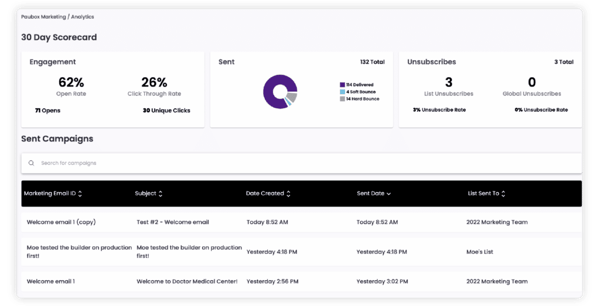
G2 feedback makes it clear what expectations to set. Teams looking for highly granular email security controls may find its emphasis on simplicity and compliance more streamlined than deeply customizable alternatives. This works best for users who are comfortable with a set-it-and-trust-it model, rather than ongoing manual tuning.
For especially cost-sensitive organizations, Paubox may come across as a compliance and trust investment, as users often frame the pricing around the value of risk reduction and time saved rather than feature volume.
Overall, Paubox is suitable for healthcare organizations, clinics, dental practices, and any regulated team that needs HIPAA-compliant email without slowing down communication. It delivers the most value for small to mid-sized teams, compliance-driven organizations, and non-technical users who want secure email that just works, making it an excellent choice for anyone prioritizing ease, trust, and patient-friendly communication in a cloud email security solution.
“Paubox has been extremely easy to use for both the sender and receiver of protected health information. There are no portals or additional hoops to jump through before data and documents can be accessed. Customer Service is also outstanding!”
- Paubox review, Staci A.
“If you don't know how the backend of your website or email hosting works, it could be a challenge to set things up without tech support.”
- Paubox review, Kathryn M.
Looking for a list of the right tools to help with security compliance? Check out G2's 8 best security compliance software.
⭐G2 rating: 4.7/5
What stood out to me in Coro Cybersecurity reviews is how often users talk about clarity and confidence. People consistently mention how approachable the platform feels, especially for teams that don’t have dedicated security specialists. I see a lot of appreciation for Coro’s automated approach to email threat detection, with users calling out how effectively it blocks phishing, malicious links, and suspicious attachments without requiring constant manual intervention. \
What makes Coro Cybersecurity stand out as a cloud email security solution is how purpose-built it feels for modern, resource-conscious teams. Instead of piling on complexity, Coro focuses on delivering strong anti-phishing(94% satisfaction rating) and email threat protection through automation, clear visibility, and fast deployment, which resonates deeply with small and mid-sized organizations that want real security outcomes without operational drag.
Reviewers frequently highlight the unified dashboard, saying it provides a clear, easy-to-understand view of email security activity and alerts, helping them feel in control without being overwhelmed. There’s also strong praise for how quickly Coro can be deployed and how smoothly it integrates into existing environments, with a 95% approval rating for email integration support. For many users, this feels like a practical, low-friction way to quickly level up email security.
I also have to quickly mention the 94% approval for Coro’s data-loss prevention capabilities, which helps users avoid gaps in their data infrastructure. The biggest win I see is peace of mind — once Coro is running, they feel protected without having to babysit the system.
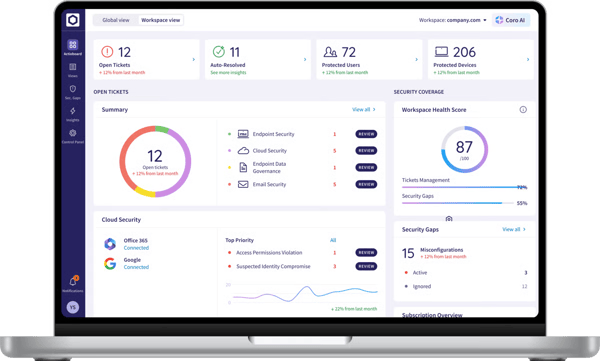
At the same time, the reviews do a good job of setting expectations. Teams looking for highly specialized, deeply customizable security processes may find Coro’s emphasis on automation and simplicity more limiting, while organizations comfortable relying on intelligent defaults tend to align well with this model. This works best for users who are comfortable trusting intelligent defaults, which aligns more closely with teams prioritizing streamlined policy management over granular tuning.
Coro emphasizes automation and simplicity across its security workflows. For organizations that enjoy digging into very detailed forensic reporting, Coro’s approach focuses on actionable insights rather than exhaustive technical depth. This aligns best with teams prioritizing efficiency over deep investigative tooling.
Coro Cybersecurity is suitable for SMBs, growing companies, and lean IT teams that want reliable cloud email security without complexity. It delivers the most value for organizations that prioritize speed, simplicity, and automated protection, making it an excellent choice for teams that want enterprise-grade email security results without needing enterprise-sized security resources.
“I have been impressed with the ability to protect my clients and my business, but to do so with a responsive team. CORO's focus is small business with the right price point!”
- Coro Cybersecurity review, Tracy V.
“It doesn't let me search up device names by themselves, or it's slow on some manual fixes when I do them. It doesn't let me force update devices that I want in the org, and I would like that.”
- Coro Cybersecurity review, Jacob W.
Related: Email security is just one layer of protection. Explore the best free single sign-on (SSO) software on G2 to add a layer of security to your user access.
⭐G2 rating: 4.4/5
Email security services rely on customer trust, and Mimecast Advanced Email Security has managed to build just that. Users regularly describe Mimecast as a dependable, battle-tested layer of protection that quietly does its job in the background, especially in environments where email risk is taken seriously. G2 feedback highlights its strength in stopping phishing, impersonation, and malicious attachment attacks, with reviewers often noting that unwanted and dangerous email simply never reaches their inboxes anymore.
Many users value the breadth of features packed into the platform, from advanced threat detection and URL protection to continuity and archiving, and they like knowing those capabilities are all tightly integrated. That gives it a 92% approval for its Anti-Malware and Quarantine capabilities.
There’s also frequent praise for the stability of the service and the sense that Mimecast is built for scale, which resonates strongly with larger organizations managing complex email environments and compliance requirements.
What I see sets Mimecast Advanced Email Security apart as a cloud email security solution is its comprehensive, enterprise-first approach. Instead of focusing on a single threat type, Mimecast delivers layered protection, resilience, and compliance capabilities in one platform, which is why so many long-term users see it as a foundational part of their security stack rather than a point solution.
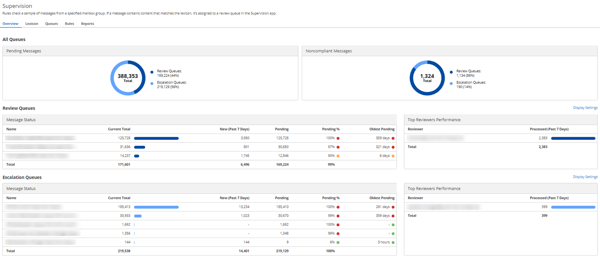
The reviews also give a clear sense of where Mimecast fits best. Teams looking for a very lightweight or minimal email security experience may find Mimecast’s breadth of controls and configuration options more expansive, while organizations that value detailed policy management tend to align well with its feature-rich admin console.
For organizations that expect instant policy tuning out of the box, it helps to approach Mimecast as a solution that rewards thoughtful configuration with flexibility that becomes more valuable as teams grow into it. Teams that prioritize flexibility and granular control often view this depth as aligned with enterprise-scale security management.
Overall, Mimecast Advanced Email Security works well for mid-market and enterprise organizations, regulated industries, and security-conscious IT teams that want deep protection, strong control, and proven reliability at scale. It delivers the most value for teams that view email as a critical risk surface and are ready to invest in a robust, full-featured cloud email security platform that can grow with them over time.
“Mimecast Advanced Email Security stands out for its strong protection against phishing, malware and impersonation attacks while remaining easy to manage. The interface is intuitive, making daily monitoring, policy updates, and threat investigation straightforward even for small security teams.
Implementation is smooth and well-documented, with minimal disruption to existing mail flow. Integration with M465 is seamless, and features like URL protection, attachment sandboxing, and impersonation protection work effectively out of the box.”
- Mimecast Advanced Email Security review, Ajay S.
“At times, the Administration user interface tends to be slow and unresponsive, which can be frustrating.”
- Mimecast Advanced Email Security review, Igor B.
Related: Still routing remote traffic back through the data center? See the best cloud edge security software to move protection to the cloud and cut the VPN backhaul.
⭐G2 rating: 4.5/5
While Microsoft needs no introduction, the email security platform it built definitely seems to be getting praise from many who use it. The biggest strength of Microsoft Defender for Office 365 that I’ve noticed people talk about is how naturally it fits into existing Microsoft environments. Unsurprisingly, users consistently talk about the comfort of having email security built directly into Microsoft 365, with no need for separate gateways or third-party integrations to get meaningful protection in place. It has a 91% approval for Email integration support.
I see a lot of appreciation for features like Safe Links and Safe Attachments, especially how they work in real time to protect users from malicious URLs and files even after an email has already been delivered. Also, being backed by large infrastructure helps provide industry-leading capabilities, especially in advanced threat protection and anti-phishing, with both getting a 92% approval rating.
What makes Microsoft Defender for Office 365 stand out as a cloud email security solution is how tightly it integrates threat protection, investigation, and response across email, collaboration tools, and user identities. Instead of treating email as an isolated risk, Defender brings it into a broader zero-trust security strategy, which many reviewers see as a major advantage.

At the same time, the reviews do a good job of setting realistic expectations. Teams looking for highly specialized, standalone email security tooling may find Defender’s broader, platform-centric approach more expansive, as it operates within the wider Microsoft security ecosystem. This works best for users who are comfortable navigating Microsoft’s security dashboards, as the depth and flexibility can take some time to fully explore.
For organizations that expect maximum protection without tuning, it helps to approach Defender as a solution that delivers stronger results as policies, alerts, and configurations are refined over time.
I’d recommend Microsoft Defender for Office 365 most strongly for organizations that run on Microsoft 365, especially mid-market and enterprise teams that want native email security without adding extra vendors. It delivers the most value for IT and security teams that appreciate centralized visibility, seamless integration, and scalable protection, making it an excellent choice for organizations looking to strengthen email security as part of a unified Microsoft-first security approach.
“What I appreciate most is its robust protection against phishing and malware. The integration with Office 365 is smooth, eliminating the need for additional tools. I also find the real-time alerts and comprehensive threat reports very helpful for monitoring and responding promptly”
- Microsoft Defender for Office 365 review, Raghav S.
“The main drawback is the complexity of configuration and policy management, which can be overwhelming for new administrators. Occasionally, false positives occur, requiring manual review. Additionally, reporting dashboards could be more intuitive for quicker insights.”
- Microsoft Defender for Office 365 review, Khushwant V.
Related: Want to dive deeper and understand how phishing can cause serious damage? Read about the most common types of phishing attacks with famous real-world examples.
Have more questions? Find the answers below.
The best platforms for securing Microsoft 365 and Google Workspace are Microsoft Defender for Office 365, Proofpoint Core Email Protection, and Acronis Cyber Protect Cloud. G2 users consistently highlight native integration, policy alignment, and reduced deployment friction as key strengths for these environments.
Proofpoint Core Email Protection and Mimecast Advanced Email Security stand out for real-time threat detection. Reviews frequently mention their ability to analyze links, attachments, and sender behavior dynamically, even after emails are delivered.
Proofpoint Core Email Protection is most often cited by G2 users for stopping sophisticated BEC and impersonation attacks. Its behavior-based detection and threat intelligence are especially valued by security-focused teams.
Paubox and Mimecast Advanced Email Security are top choices for compliance-driven use cases. G2 reviewers often point to Paubox for healthcare-focused compliance and Mimecast for broader regulatory and retention needs.
Proofpoint Core Email Protection, Mimecast Advanced Email Security, and Coro Cybersecurity are frequently recognized for strong phishing and spam protection. Users highlight consistent blocking accuracy and reduced inbox noise as key benefits.
Paubox is one of the most highly rated platforms for cloud-based email encryption on G2. Users appreciate how encryption happens automatically without requiring portals or additional steps for recipients.
Microsoft Defender for Office 365 and Proofpoint Core Email Protection offer strong mobile compatibility through their native support for mobile email clients and cloud-based policy enforcement, according to G2 feedback.
Proofpoint Core Email Protection, Mimecast Advanced Email Security, and Coro Cybersecurity all leverage AI-driven filtering. G2 users often mention improved detection of socially engineered and context-aware threats as a result.
Proofpoint Core Email Protection and Mimecast Advanced Email Security are most often recommended for enterprise use on G2. They’re favored for scalability, advanced controls, and detailed reporting in complex environments.
Microsoft Defender for Office 365 and Proofpoint Core Email Protection integrate email security with broader data loss prevention capabilities. G2 reviewers value this integration for reducing tool sprawl and improving policy consistency.
Email security isn’t about finding a perfect tool; it’s about finding the right fit for how your team works, what you’re protecting, and how much complexity you’re willing to manage. As phishing, BEC, and impersonation attacks keep evolving, the gap between basic protection and effective protection only gets wider, which is why choosing the right cloud email security platform matters more than ever.
What stood out to me while reviewing G2 Data is that the best platforms don’t all win in the same way. Some excel at stopping highly targeted attacks, others prioritize simplicity or compliance, and a few stand out by integrating email security into a broader cloud security strategy. The common thread is consistency: strong detection, clear visibility, and protection teams can trust day after day.
If you’re evaluating options, my advice is to start with your environment and risk profile. Look closely at how each platform integrates with Microsoft 365 or Google Workspace, how much hands-on effort it requires after deployment, and whether the reporting matches what your stakeholders actually need to see.
Ultimately, the best cloud email security platform is the one that fits your team today and can scale with you tomorrow. Use G2 reviews to validate real-world experiences, compare what matters most to your organization, and choose a solution that helps you stay ahead of email threats without slowing the business down.


When researching the top MDR providers, I kept seeing the same names come up: Sophos MDR,...
 by Soundarya Jayaraman

The best data loss prevention (DLP) software for 2026 are Proofpoint Enterprise DLP, Netwrix...
 by Gunisha

I've reviewed enough G2 data on cloud infrastructure to know that the best cloud data security...
 by Disha C