/DarshayitaThakur-OrangeBG.webp?width=400&height=150&name=DarshayitaThakur-OrangeBG.webp)


I’ve worked alongside IT teams long enough to notice the pattern. A patch gets delayed, and suddenly it’s a security risk. A new employee joins remotely, and onboarding takes longer than it should because their device isn’t configured properly. A simple software rollout turns into a chain of tickets, manual installs, and back-and-forth messages. None of it feels dramatic in isolation, but together, it creates constant friction.
This is why I started researching the best endpoint management software. It sits quietly in the background of every modern organization, yet it directly affects security, productivity, compliance, and employee experience. When it works, nobody notices. When it doesn’t, everyone feels it.
I paid attention to what IT teams consistently praised in their reviews. Automation that genuinely saves time, patching that scales without drama, reporting that gives clarity instead of confusion, and security controls that don’t disrupt end users. After going through 20+ such tools, I settled on the top seven: NinjaOne, ManageEngine Endpoint Central, Datto RMM, Iru, Action 1, Atera, and ThreatDown. I have also included three bonus platforms to make it an even 10.
If you’re trying to bring structure to growing device fleets or simply want fewer urgent tickets in your week, this article will help you understand which endpoint management platforms stand out and why.
NinjaOne: Best for IT teams managing a large, distributed, or mixed-OS environment
Unifies monitoring, patching, remote access, and automation in a single scalable console built for complex, hybrid IT environments. ($1.50/month for 10,000 endpoints)
ManageEngine Endpoint Central: Best for end-to-end lifecycle management and endpoint protection
Combines device provisioning, patch management, compliance enforcement, and security controls to manage the full endpoint lifecycle. ($104/month/technician for cloud endpoint management)
Datto RMM: Best for robust endpoint and data security with automated monitoring
Delivers strong security oversight with automated monitoring, scripting, and mobile-friendly management for MSPs and IT teams. (Custom pricing)
Iru: Best for AI-powered endpoint security and compliance automation
Specializes in AI-driven compliance enforcement and Apple-focused device governance with integrated identity controls. (Custom pricing)
Action1: Best for easy adoption and expansion in cloud-based endpoint management
Offers cloud-native patch management and automation with free coverage for the first 200 endpoints. (Custom pricing for more than 200 endpoints)
Atera: Best for AI-powered remote monitoring and infrastructure management
Blends RMM and PSA with an AI-powered assistant to streamline troubleshooting, ticketing, and infrastructure oversight. ($149/month/technician)
ThreatDown: Best for threat detection and security management across devices
Integrates vulnerability scanning, patch management, and centralized visibility into a unified security console. ($395 for 5 devices)
*These endpoint management platforms are top-rated in their category, according to G2's 2026 Winter Grid Report.
Endpoint management helps IT teams maintain control in an environment that’s increasingly distributed, security-sensitive, and cloud-first. This software enables the management of hybrid workforces, multiple operating systems, and remote endpoints. Doing that manually simply doesn’t scale.
Based on my evaluation of G2 reviews, I noted that the right endpoint management software centralizes visibility across devices, automates patching and policy enforcement, strengthens security posture, and reduces the repetitive tasks that consume IT bandwidth. Instead of constantly reacting to device issues, teams can proactively manage performance, compliance, and risk from a single console.
The market momentum reflects this shift. According to Cognitive Market Research, the global endpoint management software market is projected to grow at a CAGR of 12.2% during 2025 to 2033, signaling how critical centralized endpoint control has become for organizations worldwide. As device counts grow and threats become more sophisticated, endpoint management has become foundational.
The platforms I included in the list below stood out because they balance control with usability. Some excel in automation and scalability. Others prioritize threat detection and compliance visibility. A few are designed for fast adoption by lean IT teams, while others support complex, distributed environments.
Ultimately, the right endpoint management platform strengthens your IT team. It gives them clarity across devices, consistency across policies, and confidence that endpoints are secure, compliant, and performing as expected.
To build this list, I started with G2’s Grid® Report for endpoint management software to create a shortlist. This helped ensure a balanced selection of platforms that are both widely adopted and highly rated by real users.
From there, I evaluated each tool based on how effectively it supports device and OS coverage, patch management, automation workflows, security enforcement, reporting visibility, and scalability. I also considered broader security tools that modern IT teams rely on.
I used AI to analyze hundreds of verified G2 reviews, identifying consistent themes around ease of deployment, automation capabilities, compliance visibility, remote management performance, and overall reliability. This helped highlight where platforms truly deliver operational value versus where they may require additional configuration or oversight.
The screenshots featured in this article come from G2 vendor listings and publicly available product documentation.
After digging into G2 Data and evaluating how modern IT teams operate, I noticed a few themes that consistently stood out. Here’s what I focused on when evaluating the best endpoint management platform:
The list below contains genuine user reviews from the Endpoint Management Software category page. To be included in this category, a solution must:
*This data was pulled from G2 in 2026. Some reviews may have been edited for clarity.
According to G2 Data, 50% of NinjaOne customers are mid-market organizations and 44% are small businesses. This distribution shows strong traction among growing and operationally complex IT teams, exactly the environments where centralized control and scalable automation matter most.
I noted that NinjaOne brings monitoring, patch management, remote access, automation, and reporting into one unified console, eliminating the need to juggle multiple disconnected tools. For IT teams supporting hybrid or global workforces, this consolidated visibility translates directly into faster response times and clearer operational oversight, making NinjaOne the best endpoint management software for IT monitoring.
Across multiple G2 reviews, users consistently praise its automated patch management. They highlight how easy it is to manage operating systems and third-party patches from a centralized dashboard and apply them at scale. These features reduce manual effort while improving overall security posture.
Another area where NinjaOne excels is remote monitoring and remote access. Reviewers frequently emphasize the speed and reliability of Ninja Remote, describing stable, responsive connections that allow technicians to resolve issues efficiently. This reliability is essential for geographically dispersed teams.
Rather than relying on fragmented third-party tools, NinjaOne embeds remote control directly into its workflow, enabling IT teams to view device details, access systems, run scripts, and remediate issues in real time, all without disrupting end users. That seamless integration is a major differentiator when comparing endpoint management platforms with overlapping core capabilities.
I observed reviewers mention that automation is another standout capability of this endpoint management tool. NinjaOne’s powerful scripting engine and policy-based automation allow teams to deploy updates, execute scripts in bulk, and standardize configurations across multiple devices.
Reviewers highlight the flexibility of custom fields and script deployment for managing device lifecycles at scale, including OS upgrades and mass policy updates. For managed service providers (MSPs) and internal IT teams alike, this level of automation shifts operations from reactive troubleshooting to proactive management, helping reduce downtime and improve SLA performance.
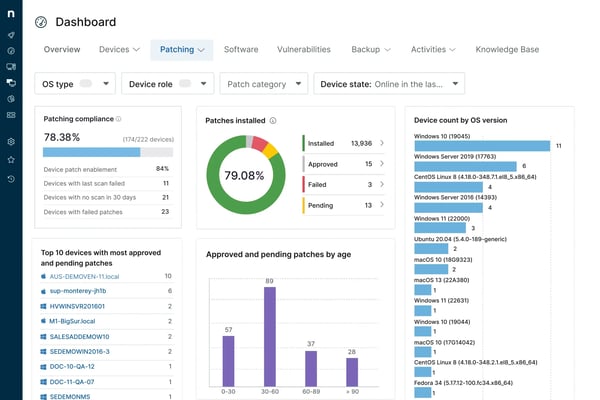
While NinjaOne provides built-in reporting within the centralized dashboard, reviewers mention that reporting can feel more structured compared to platforms designed specifically for advanced analytics. Teams that require highly customized executive reports or long-term trend analysis may find the reporting scope more operationally focused. For day-to-day visibility, however, the native reporting capabilities remain effective and aligned with core endpoint management needs.
While the overall interface is widely described as intuitive and modern, reviewers note that specific advanced settings or policy views could be presented in a more organized layout. For teams working extensively with complex automation or multi-layered policies, becoming familiar with these sections helps maximize efficiency within the platform.
Based on my evaluation, NinjaOne is widely appreciated for its centralized endpoint visibility, automated patch management, integrated remote access, scalable scripting capabilities, and cross-platform support. It is especially well-suited for IT teams managing large, distributed, or mixed-OS environments that want to unify operations, improve security posture, and scale efficiently from a single platform.
"It’s really easy to add new scripts into NinjaOne, which makes tasks like deploying software straightforward. The device alerting is excellent, keeping us informed about vulnerabilities as well as issues like degraded RAID on servers. Overall, the product has been reliable for us, and the support has been great."
- NinjaOne review, Mike W.
"Reporting could be more customizable, especially for clients who want specific formats or detailed breakdowns. Some advanced automation options require manual setup that could be simplified. A few integrations feel limited compared to other RMM platforms. Nothing major, but there’s room for deeper customisation."
- NinjaOne review, janam@netflo.co.uk P.
Ready to expand your remote support capabilities? Check out the best remote desktop software.
ManageEngine Endpoint Central by Zoho is an all-in-one unified endpoint management and security (UEMS) solution that delivers end-to-end life cycle management and endpoint protection. According to G2 Data, it is mostly used by mid-market teams (66%).
From my evaluation, what differentiates ManageEngine Endpoint Central is its end-to-end lifecycle management approach. The platform goes beyond basic monitoring and patching by covering OS deployment, software distribution, asset management, configuration enforcement, vulnerability scanning, security compliance, and device management within a unified system.
One of its strongest capabilities is comprehensive patch management. Across G2 reviews, users frequently highlight how efficiently they can manage operating systems and third-party patches across distributed devices. Automated patch deployment, testing workflows, and compliance tracking help IT teams maintain security standards without excessive manual oversight.
Reviewers highlight that another standout area is endpoint protection and vulnerability management. ManageEngine Endpoint Central integrates security-focused features such as vulnerability scanning, configuration enforcement, and device control policies. Reviewers note how having patching and security posture management within the same ecosystem strengthens visibility and reduces the risk of overlooked exposures.
The platform also excels in OS deployment and software distribution. IT administrators can automate operating system rollouts, distribute applications in bulk, and standardize configurations across device groups. Reviewers appreciate the ability to create deployment templates and enforce policies at scale, which simplifies onboarding and device provisioning.
I noted that ManageEngine Endpoint Central further supports IT teams with remote troubleshooting and device management tools. Built-in remote control, asset tracking, and reporting dashboards allow administrators to identify issues, access devices securely, and maintain real-time visibility across their environment. Reviewers frequently mention that this centralized oversight reduces administrative overhead and strengthens overall endpoint governance.
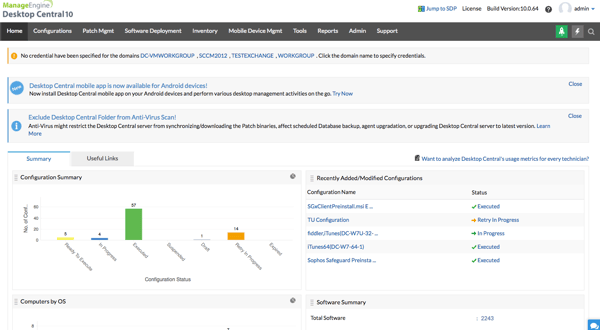
Because the platform offers a broad range of features, users mention that navigating between modules or locating specific advanced settings may require familiarity with the system’s layout. For organizations leveraging the full feature set, investing time in structuring workflows and permissions helps streamline day-to-day management.
While ManageEngine Endpoint Central supports extensive device fleets, reviewers note that planning and fine-tuning configurations can be important when managing high volumes of endpoints or complex network environments. Proper setup and infrastructure alignment ensure smoother execution of bulk operations such as mass patch deployment or OS rollouts.
Overall, ManageEngine Endpoint Central is widely appreciated for its comprehensive lifecycle management, structured patch governance, integrated endpoint protection, OS deployment automation, and centralized device oversight. It is especially well-suited for organizations that want a single platform to manage the full endpoint lifecycle, while maintaining policy-driven control and operational consistency at scale.
"What I like best about Endpoint Central is its patch management. It is reliable, automated, and makes it easy to keep all endpoints secure. I started with the Professional license and eventually upgraded to Enterprise because of the added features, especially advanced patching and remote office management. It really made a big difference in day-to-day operations."
- ManageEngine Endpoint Central review, Raycian C.
"ManageEngine Endpoint Central is a solid tool, but the initial setup can be a bit complex, especially when configuring multiple modules like MDM and patching. The UI sometimes feels cluttered, which makes finding specific settings harder than it should be."
- ManageEngine Endpoint Central review, Mukul R.
Explore the best security and compliance software to strengthen your endpoint protection strategy.
Datto RMM is a cloud-native remote monitoring and management (RMM) platform designed for IT teams and MSPs that need robust endpoint security paired with proactive automation and monitoring. According to G2 Data, it is widely used by small businesses (64%).
From my evaluation of G2 reviews, Datto RMM is easy to use and access. Reviewers describe the platform as easy to understand, noting that technicians can even use it on mobile devices to assist customers on the go. This kind of flexibility is particularly valuable for distributed teams or MSPs that support clients from varied locations and devices.
Another core strength highlighted across G2 reviews is its automation capabilities. Users consistently emphasize how the platform’s automation streamlines routine tasks, from alerting and patch deployment to scripted maintenance and monitoring. Such automation directly reduces manual effort and improves proactive responsiveness.
Reviewers highlight that Datto RMM also delivers monitoring enablement and alerting that keep IT teams informed across their entire endpoint estate. With customizable alert thresholds and real-time system visibility, technicians can track performance metrics, endpoint status, and security events from a central dashboard. This consistent monitoring aids in quickly identifying and remediating issues before they escalate, which is especially important for security-conscious organizations.
I observed that security and data protection are tightly woven into the platform’s monitoring and management workflows. Reviewers cite built-in capabilities such as endpoint health tracking, patch status, and integration with backup. These features help align daily management tasks with broader security objectives, ensuring that vulnerabilities are addressed promptly while minimizing operational overhead.
The platform’s remote control and scripting engine receives special mention from reviewers. IT teams can securely access endpoints, run scripts in bulk, and standardize configurations across devices. This flexibility supports complex workflows and device groups, making Datto RMM a strong fit for MSPs that service diverse client environments.
Another advantage reviewers frequently highlight is Datto RMM’s integration capabilities. Users mention that the platform integrates smoothly with tools such as Autotask, Microsoft 365, and other Datto products, allowing IT teams to manage ticketing, monitoring, and backup workflows within a connected ecosystem.
/DattoRMM.webp?width=600&height=301&name=DattoRMM.webp)
Datto RMM remains highly regarded for its product capabilities, but reviewers note that support interactions often begin with documentation-aligned troubleshooting before progressing to more advanced technical investigation. For teams operating in time-sensitive environments, aligning on escalation pathways and response expectations upfront can help ensure a smoother support experience.
The platform has extensive remote monitoring and web-based management capabilities, but reviewers mention that the Web Remote portal may occasionally require refresh or reinitialization during sessions. For teams that rely heavily on browser-based administration, optimizing session management and workflow organization can help maintain a smoother operational experience.
Based on my evaluation, Datto RMM is widely appreciated for its intuitive usability, powerful automation capabilities, proactive monitoring, integrated security focus, and scalable remote management tools. It’s especially well-suited for IT teams and MSPs that want a platform capable of enhancing both endpoint security and operational efficiency through automation and unified oversight.
"I like that Datto RMM provides quick and secure access to my servers, which is crucial for our daily work. The automation tools are another great advantage, as they greatly simplify the task of generating alerts and executing commands on our systems. This level of automation increases our efficiency and keeps us proactively informed. The initial setup of Datto RMM was also quite simple, allowing for a smooth transition from the previous use of AnyDesk. This change has made our work more proactive and efficient. Additionally, I consider Datto RMM an excellent monitoring tool, which I have rated 9 out of 10 in terms of likelihood of recommendation, reflecting my high satisfaction with the product.”
- Datto RMM review, Eduardo Julio H.
"The Web-Remote portal sometimes does not work, and the fix isn't totally clear. Support also can be slow to get back to you."
- Datto RMM review, Dan G.
Explore how the top remote desktop tools compare on security, session recording, file transfer, and device control in our breakdown of the key features to look for in remote desktop software features
Iru positions itself at the intersection of AI-driven endpoint security, compliance automation, and identity and access management (IAM). Unlike traditional endpoint management platforms that focus primarily on monitoring and patching, Iru emphasizes intelligent automation and policy enforcement across devices, users, and access controls. Based on G2 Data, it serves a growing mix of small businesses (23%) and mid-market organizations (71%).
From my evaluation, rather than relying solely on static policies, Iru leverages AI-powered compliance automation to continuously assess endpoint posture against security benchmarks and compliance frameworks. This allows IT and security teams to identify configuration gaps, enforce controls, and remediate issues without manual oversight.
Reviewers appreciate that Iru connects endpoint security posture with user access controls, helping organizations align device trust with identity governance. By embedding IAM controls into endpoint workflows, the platform enables policy-based enforcement tied to user roles and device status. This approach reduces the risk of unauthorized access while maintaining centralized visibility into authentication and access patterns.
I observed that Iru’s vulnerability management capabilities come up as a practical value-add. Reviewers note that vulnerability management improves visibility into endpoint risk and supports a stronger overall security posture. Rather than treating vulnerability insights as a separate process, teams can use this visibility to identify risk areas and prioritize remediation within their endpoint management routine.
Iru also earns strong feedback for macOS fleet management, particularly around device enrollment and policy workflows. Reviewers mention that enrollment and policy management are straightforward, the UI is clean, and administration remains reliable for day-to-day tasks, making Iru the best endpoint management software for Mac.
Iru is described as purpose-built for Apple device management, and reviewers mention that Windows support is newer, which may be a consideration for organizations looking to manage Windows endpoints in the same system. For Apple-first teams, that specialization is part of what makes the platform simpler to operate.
Another area reviewers mention is the custom app deployment workflow. Some users note that when deploying custom applications, they would like a more native way to upload and run a folder alongside a pkg file for apps that require additional supporting files. Reviewers also indicate that there are workable ways to handle this today, but that a more streamlined native experience would strengthen the deployment process for teams managing complex custom apps.
Based on my evaluation, Iru is widely appreciated for Apple-focused endpoint management, standardized configuration enforcement, straightforward enrollment and policy workflows, and vulnerability visibility that supports a stronger endpoint security posture.
"We have been using Iru for macOS management for the past few years, and the biggest thing for us is reliability. It just works. New hires receive a Mac that is ready on day one with the right apps and security settings already in place. Updates and policy changes happen in the background without creating disruption. For a team that is mostly Mac-based, that consistency has made a real difference."
- Iru review, Melonie L.
"The tracking feature could be improved in terms of customization and performance. In some cases, it lacks flexible filters and advanced reporting options, which makes it harder to analyze data for specific time ranges or use cases. Occasional delays in updates also reduce real-time accuracy. Adding more configurable tracking views, faster refresh times, and exportable reports would significantly enhance the overall experience."
- Iru review, Marwan M.
Action1 stands out for organizations looking to deploy cloud-native endpoint management without complex infrastructure or lengthy implementation cycles. Based on G2 Data, Action1 has strong adoption among small businesses (39%) and mid-market teams (58%), reflecting its appeal to growing IT environments that need scalable control without on-premise overhead.
A key differentiator for Action1 is its free-for-first-200-endpoints offering, which lets growing teams adopt a full-featured cloud endpoint management solution without an immediate licensing investment. This makes it especially attractive for small IT teams, startups, or organizations piloting a new endpoint strategy before committing to a larger purchase.
From my evaluation of G2 reviews, Action1 receives praise for its cloud-first architecture. There’s no need to maintain local servers or additional infrastructure. Reviewers frequently highlight how quickly they were able to get started, often emphasizing that setup is straightforward and endpoints can be enrolled rapidly.
Reviewers describe the interface as clean and intuitive, allowing administrators to navigate patching, monitoring, and remote management without extensive training. This ease of use makes Action1 especially appealing to lean IT teams or organizations without dedicated endpoint specialists.
Another standout capability is automated patch management for Windows operating systems and third-party applications. Reviewers frequently mention how easy it is to identify missing patches, approve updates, and deploy them at scale from a centralized dashboard.
I observed from reviews that Action1 also provides remote access and remote desktop functionality, allowing IT teams to connect securely to endpoints without requiring VPN dependencies. Reviewers appreciate the ability to troubleshoot devices directly from the browser-based console, which aligns well with distributed or hybrid work environments.
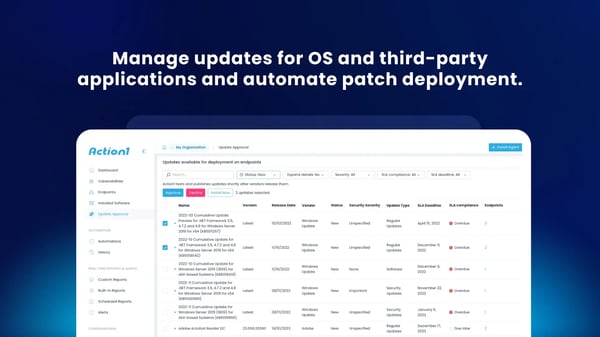
Action1 is especially strong in Windows-centric workflows. However, teams managing a highly heterogeneous device estate may want to evaluate how its cross-platform support aligns with their broader endpoint strategy. For Windows-heavy environments, though, this focus often translates into deeper visibility and streamlined patch management.
While Action1 delivers strong core capabilities in cloud-based patching and remote management, some reviewers note that certain enterprise-level features and deeper customization options are still evolving. For teams with highly specialized workflow or integration requirements, evaluating how those advanced needs align with Action1’s roadmap can help ensure long-term fit.
Based on my evaluation, Action1 is widely appreciated for its free tier for the first 200 endpoints, cloud-native deployment, intuitive interface, automated patch management, browser-based remote access, and policy-driven automation. It is especially well-suited for IT teams that want a fast-to-adopt, easy-to-manage, and expandable endpoint management solution without the upfront infrastructure commitment.
"Our Network Services team uses Action1 daily, and it has become an integral part of our endpoint management and security operations. The platform is intuitive and straightforward to administer, enabling us to automate Windows and third-party patching with confidence and consistency. The real-time visibility into patch status and vulnerabilities, combined with built-in remote management and scripting capabilities, allows the team to respond quickly and proactively. Its cloud-native architecture eliminates unnecessary complexity, and overall, it has proven to be a reliable, efficient solution that our team genuinely values and trusts."
- Action1 review, Richard R.
"The program operates on Windows alone, which is a major setback. The remote access solution from the app lacks advanced functionalities like multi monitor support"
- Action1 review, Samantha L.
Learn about the best patch management software to find the solution that supports your endpoint strategy.
Atera is designed for IT teams and MSPs that want to combine remote monitoring and management, professional services automation (PSA), and AI-driven assistance in a single cloud platform. Based on G2 Data, Atera has strong adoption among small businesses (60%) and mid-market organizations (37%).
From my evaluation, what differentiates Atera is its integration of agentic AI capabilities directly into the IT workflow. Through its AI-powered features, teams can generate scripts, summarize tickets, draft responses, and receive troubleshooting guidance within the platform.
Atera also delivers comprehensive remote monitoring and alerting. Reviewers frequently highlight how the platform provides real-time visibility into endpoint health, performance, and system alerts from a centralized dashboard. This monitoring capability allows technicians to detect anomalies early and respond before issues escalate, supporting proactive infrastructure management.
Another standout strength is its remote access functionality. Atera integrates remote desktop tools directly into its console, enabling IT teams to securely connect to endpoints without leaving the platform. Reviewers often emphasize the convenience of troubleshooting devices remotely, particularly in hybrid and distributed environments where on-site support is limited.
I noted that Atera supports automated patch deployment for operating systems and third-party applications, allowing administrators to schedule updates and enforce compliance policies across endpoints. Reviewers mention that the centralized patch control simplifies routine maintenance while strengthening overall endpoint security posture.
What further distinguishes Atera is its all-in-one RMM and PSA integration. Unlike many endpoint management tools that focus solely on monitoring, Atera combines ticketing, billing, reporting, and customer management within the same platform.
Reviewers also frequently mention Atera’s ease of use. The platform is described as straightforward to navigate, which reduces onboarding time and makes day-to-day administration more efficient.
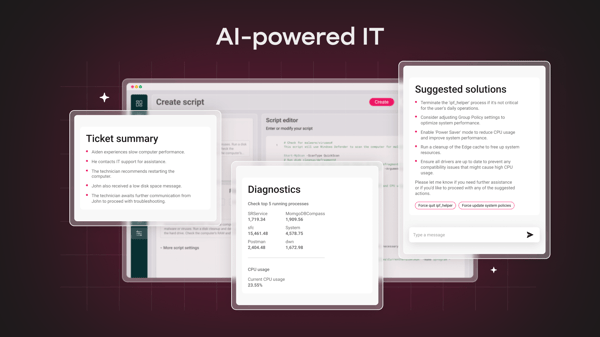
While Atera offers extensive built-in functionality, reviewers mention that advanced reporting customization can be more structured compared to dedicated business intelligence tools. Teams requiring highly tailored executive dashboards may export data for deeper analysis, while operational reporting within the platform remains effective for daily oversight.
Atera provides mobile access for monitoring and ticket visibility. Users note that certain administrative functions available in the web dashboard are not fully replicated in the mobile interface. For teams that rely heavily on managing alerts, automation, or detailed configurations while away from a desktop, evaluating how the current mobile capabilities align with on-the-go workflow needs can help set clear operational expectations.
Based on my evaluation, Atera stands out for how effectively it blends AI-driven assistance with core RMM and PSA functionality in a single cloud platform. Rather than just centralizing tools, it meaningfully enhances technician workflows through automation and embedded intelligence.
"Atera allows us to efficiently scale and seamlessly implement our Managed IT Services for an unlimited number of clients and endpoints, making the process both simple and cost-effective. Regardless of whether a client operates in a legacy IT environment, uses cloud hosting, or relies on IoT, we are able to manage, update, migrate, and optimize their workloads by leveraging AI and automation. With Altera, we can offload tasks such as ticketing, customer support, and contract management, which lets us concentrate on value-added projects while having confidence that the systems remain well-maintained. Altera also integrates with our SOC's Client Health Dashboard, giving us RMM client access, monitoring capabilities, and PSA policy enforcement. I recommend giving Altera a try; you’ll find it becomes an essential part of your daily operations."
- Atera review, Brian M.
"The biggest drawback for me is that the mobile app feels pretty limited compared with the web dashboard. Also, while the AI features are a nice addition, they’re locked behind a paid add-on. That can make the overall cost feel a bit steep for a solo freelancer, especially if you want the latest and greatest tools."
- Atera review, Nadia N.
Discover the best professional services automation software that IT teams trust the most.
ThreatDown is designed for organizations that want to strengthen endpoint threat detection, remediation, and centralized security management across their device environments. Based on G2 Data, ThreatDown serves a broad mix of small businesses (39%) and mid-market organizations (50%).
From my evaluation of G2 reviews, what differentiates ThreatDown is its focus on advanced threat detection and response. It can identify and neutralize malware, ransomware, and other suspicious activity quickly. Rather than relying solely on signature-based detection, ThreatDown leverages behavioral analysis and layered security mechanisms to detect emerging threats, helping security teams stay ahead of evolving attack patterns.
Another area where ThreatDown stands out is real-time endpoint monitoring and remediation. Reviewers often emphasize how alerts are surfaced clearly within the centralized dashboard, allowing administrators to isolate affected devices, remove malicious files, and restore normal operations efficiently.
I noticed reviewers mention that ThreatDown excels at centralized security management. A unified console allows IT teams to manage policies, scan schedules, and threat responses across devices. Reviewers appreciate this centralized control for simplifying oversight in distributed environments and reducing administrative burden from multiple security tools.
A frequently praised feature is its lightweight agent performance. Reviewers mention that ThreatDown runs efficiently in the background without significantly impacting system performance, which is critical in production environments where security software must operate without disrupting end users.
Ease of use is another recurring theme across reviews. The platform is described as intuitive, with a clean interface that allows administrators to quickly navigate the software. This usability makes it approachable for both dedicated security teams and general IT administrators responsible for endpoint protection.
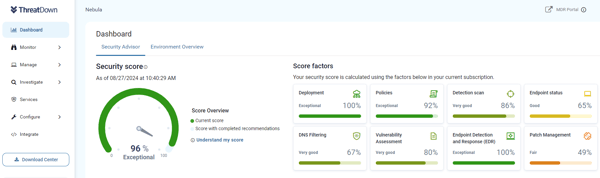
While many describe ThreatDown’s deployment as quick once processes are understood, some reviewers note that navigating configuration options and policy settings for the first time can require orientation. For teams implementing the platform in a new environment, allocating time to align policies and workflows during onboarding helps ensure smoother long-term management.
ThreatDown provides strong core detection and remediation capabilities, but reviewers mention that reporting customization may be more structured compared to specialized security analytics platforms. Teams that require highly tailored executive-level security dashboards may export data for extended analysis, while the built-in reporting remains effective for operational security tracking.
Based on my evaluation, ThreatDown delivers a balanced combination of centralized visibility, proactive threat response, and streamlined administration. Its strength lies in helping IT teams consolidate security operations into a single, manageable environment without adding unnecessary complexity.
"I like that ThreatDown is easy to use and works well without being complicated. It’s simple to manage, gives good protection, and doesn’t slow down the computer. The dashboard is clear, and it’s easy to understand what’s going on."
- ThreatDown review, Tala A.
"I feel that ThreatDown's reporting features could be more customizable, and integration with some of our existing tools could be smoother to streamline workflows further."
- ThreatDown review, Gershom A.
Mentioned below are three more endpoint management software options that expand on the main list.
FortiClient delivers endpoint protection, secure remote access, device compliance checks, and visibility into endpoint health, all while integrating with the Fortinet Security Fabric for unified management.
According to G2 reviews, it is ideal for enabling secure remote work and enforcing security policies across distributed devices. Users report easier remote connectivity, strong security assurance for sensitive data, and simplified day-to-day access without juggling multiple tools.
G2 reviewers appreciate CrowdStrike Falcon for delivering advanced endpoint security including real-time malware and ransomware detection, behavior-based and AI-driven threat prevention, automated response, and centralized visibility across all endpoints
It is ideal for IT and security teams that need robust, always-on defense against modern cyber threats while maintaining system performance, such as protecting distributed workforces, reducing manual security operations, and gaining unified oversight of endpoint health.
Got more questions? G2 has got the answers.
There isn’t a single best choice. NinjaOne, Action1, Atera, Iru, and ThreatDown all serve different priorities, from centralized visibility and automation to security-centric threat detection.
Platforms that prioritize automation and cloud-based management, such as Action1, Atera, and NinjaOne, help reduce manual tasks through scripted workflows, centralized consoles, and automated patching.
ThreatDown and NinjaOne provide flexible policy and scripting capabilities that allow for detailed configuration controls, while Iru focuses on enforcement tied to compliance and identity contexts.
Iru and ThreatDown provide features related to compliance posture and policy enforcement visibility, helping teams monitor and align devices with security standards.
Iru’s strength in Apple device governance and cloud delivery makes it suitable for mobile device management, and other platforms may offer varying levels of remote control and policy coverage.
Large enterprises often evaluate solutions like NinjaOne, Atera, and ThreatDown based on scalability, centralized administration, and integration with broader security or service workflows.
Action1 and NinjaOne are frequently recognized for automation features that streamline device provisioning and patch deployment, while other tools offer complementary automation in different areas.
ThreatDown integrates threat detection and response within its endpoint management capabilities, and Atera combines remote monitoring with service automation.
Cloud-based consoles and centralized dashboards in Action1, Atera, NinjaOne, and ThreatDown give teams visibility and control across distributed sites and remote endpoints.
Solutions with cloud delivery and remote access, such as NinjaOne, Action1, Atera, and ThreatDown, are designed to support hybrid and remote endpoint environments.
Based on my evaluation of G2 reviews, it is clear that Endpoint management creates a structured system that reduces risk, improves visibility, and frees IT teams from repetitive tasks. The best endpoint management tools help organizations move from reactive troubleshooting to proactive governance through automation, centralized dashboards, and integrated security controls.
Whether you prioritize advanced scripting and distributed monitoring, cloud-native patch automation, AI-assisted service workflows, Apple-focused compliance enforcement, or unified threat detection and response, each platform in this list supports a different operational need. Some are built for lean IT teams looking for fast adoption, while others focus on strengthening endpoint security posture across growing or distributed environments.
Once your endpoints are centrally visible, policies are standardized, and updates are automated, IT teams can shift their focus from device maintenance to strategic initiatives that drive business value.
Understand the future of endpoint protection with G2’s insights on autonomous endpoint management software.
/DarshayitaThakur-OrangeBG.webp)
Software update pop-ups always seem to appear at the worst possible time. I’ve lost count of...
 by Harshita Tewari

I evaluated 20+ tools to finalize the five best RMM software. They are NinjaOne, Acronis Cyber...
 by Soundarya Jayaraman

I know how challenging it can be to monitor a network on a tight budget. Many network...
by Harshita Tewari