


The tools below reflect the scores from G2's Summer 2026 Grid® Report.
Based on verified G2 reviews and the latest Grid® placement.
*Liked and disliked highlights are summarized from verified G2 user reviews.
The tools below have also been exhaustively tested and evaluated, and continue to hold their place among the best Contact Center Quality Assurance Software on G2.
You’re not here to debate whether QA matters. You already know it does.
What you’re trying to fix is the gap between what your agents are doing and what your current process actually captures. Manual scorecards miss too much. Coaching happens too late. Reporting is scattered across spreadsheets. And even when you track KPIs like CSAT and AHT, you still don’t have a clear view into what’s working and what’s not in real conversations.
The real challenge is finding the best contact center quality assurance software that helps your team evaluate more interactions, coach agents more effectively, and uncover performance trends without adding manual work.
To help you compare your options, I evaluated the top-rated contact center quality assurance software solutions using G2 reviews, satisfaction scores, and feature ratings. My top picks are Agentforce Service (formerly Salesforce Service Cloud), ScorebuddyCX, evaluagent, my.SQM Auto QA and Talkdesk.
Whether you're looking for AI-powered auto QA, customizable evaluation workflows, advanced analytics, or seamless integrations with your contact center stack, this guide highlights where each platform stands out and the tradeoffs to consider before making a decision.
*These contact center quality assurance software are top-rated in their category, according to the latest G2 Summer 2026 Grid Report. I've added their standout features for easy comparison. Pricing is available on request for all tools on this list.
Contact center QA software isn’t just for scoring calls. It’s for scaling quality across every channel your agents touch: voice, chat, email, you name it.
One QA leader put it best when she told me, “We weren’t lacking data; we were lacking structure.” That’s what the right tool gives you — not just insight into a few random interactions but full visibility into how your team is showing up across thousands of conversations.
This shift is changing how contact centers approach quality management. Instead of spending hours manually reviewing calls and completing scorecards, QA teams can automate evaluations, surface high-impact coaching moments faster, and gain a more complete picture of agent performance. Many platforms also combine quality monitoring with analytics, training, and workforce optimization to create a continuous improvement cycle.
It’s no wonder the QA software market is expanding fast. The global contact center quality assurance software market is projected to hit $2.25 billion in 2025 and grow to $4.09 billion by 2032. That growth reflects a clear shift: teams are done guessing. They want scalable, insight-driven the QA that helps them improve, not just monitor.
I used G2's Grid Report to create a shortlist of top contact center QA platforms based on user satisfaction and market presence.
I used AI to analyze over 1,000 G2 reviews, focusing on patterns in automation, ease of use, integration with CRMs and help desks, and the quality of post-sale support. This helped me quickly identify which platforms consistently deliver value and which ones tend to fall short in real-world use.
Since I haven’t used these platforms directly, I relied on expert interviews to ground my analysis and cross-validated their feedback against verified G2 reviews. The screenshots featured in this article come from G2 vendor listings and publicly available product documentation.
After reviewing G2 data, I noticed the same priorities kept coming up. Here’s what I looked for when evaluating the best contact center QA platforms:
The list below contains genuine user reviews from the contact center quality assurance software category. To be included in this category, a solution must:
*This data was pulled from G2 in 2026. Some reviews may have been edited for clarity.
If you work in sales, marketing, or customer service, I believe you need no introduction to Salesforce. It's everywhere and for good reason. The platform recently rebranded to Agentforce Service, reflecting Salesforce's push into agentic AI, but the core idea hasn't changed: QA doesn't live in a separate silo here. It's embedded directly into the workflows your agents already use: case histories, automations, customer records, and analytics.
In my opinion, that's exactly what makes it so effective. The rebrand isn't just cosmetic, either. Agentforce Service now leans heavily on proactive, AI-driven case resolution, and reviewers consistently cite that shift as the biggest change from the old Service Cloud experience. From what I've seen in the G2 Data, Agentforce Service now sits at the top of the category, with a 96% satisfaction score.
Instead of treating QA as a separate process, Agentforce Service connects customer interactions with case history, customer records, and service metrics. That additional context makes coaching conversations more meaningful because managers can evaluate not only what happened during an interaction but also how it affected the overall customer experience.
The platform is particularly well-suited for organizations managing high volumes of interactions across multiple channels. Omni-Channel routing automatically directs voice, chat, email, messaging, and other customer requests to the most appropriate agent based on skills, availability, and workload. This helps maintain consistent service quality while giving supervisors better visibility into how work is distributed across teams.
Agents typically work within the console, where built-in tools like macros, quick text, and flows help reduce clicks and context switching: a benefit many G2 reviewers cite as leading to faster handling and more consistent responses. The platform’s knowledge management and AI-powered tools automatically suggest relevant articles while agents work, which can reduce search time and improve consistency, particularly for newer staff.
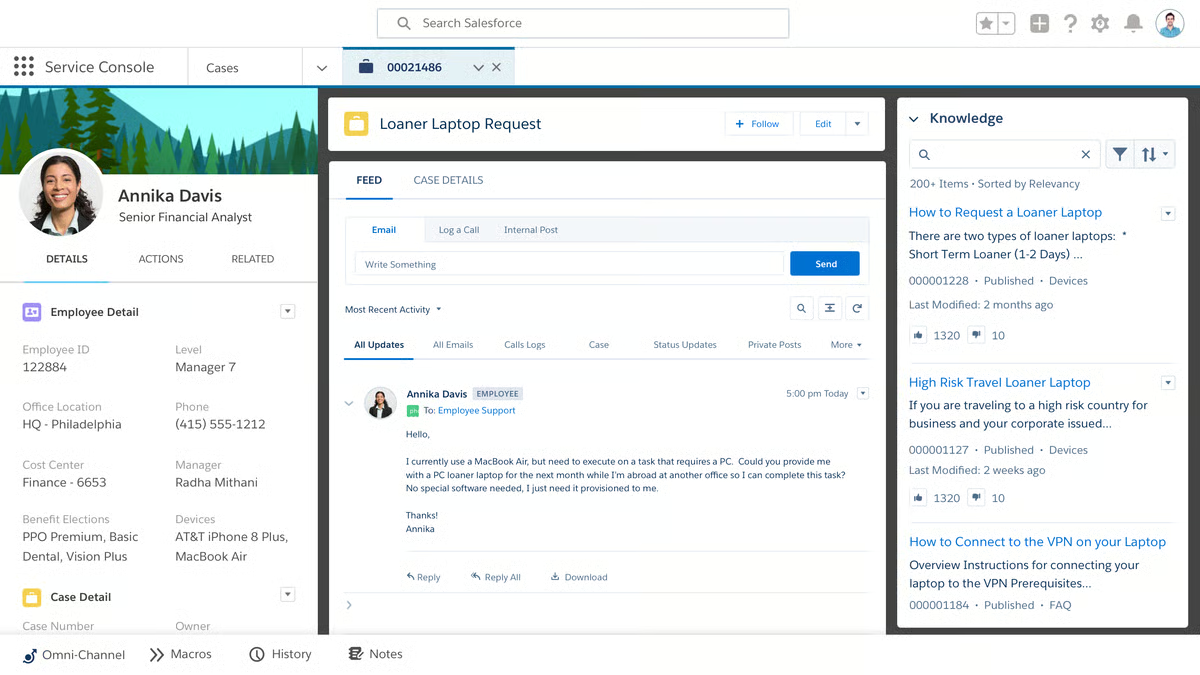
For managers, Agentforce Service provides the visibility needed to monitor and improve performance at scale. Real-time dashboards, interaction histories, Conversation Insights, live monitoring, and coaching tools make it easier to identify performance trends, spot coaching opportunities, and monitor compliance across teams. According to the latest G2 Data, the platform earns strong ratings for features such as dashboards (90%), compliance (90%), integrations (89%), and AI-powered capabilities, reflecting its strength as an enterprise service platform.
I also found that Salesforce Contact Center has a set of productivity tools that go far beyond basic support functions for service agents. Supervisor visibility and coaching tools include live monitoring, listen-in/barge-in for calls, real-time queue dashboards, and Einstein Conversation Insights. Managers can spot issues, intervene on the fly, and coach agents using hard data rather than anecdote.
What's new since the rebrand is how much of that routing now happens autonomously. Reviewers describe the AI as proactive rather than reactive, catching issues and triggering fixes before a customer even files a complaint, then handing off full context to a human agent when escalation is genuinely needed. That seamless handoff is one of the most consistently praised changes in the reviews I read.
Setup is designed to take full advantage of Salesforce’s flexibility, which some reviewers noted can be time-consuming for teams without dedicated admins or prior configuration experience. This upfront effort allows organizations to tailor the ecosystem closely to their needs.
The platform offers a wide breadth of features, giving teams the flexibility to address a variety of needs in one place. Some reviewers noted that without the right guardrails, this richness can feel overwhelming for smaller teams or new users, though it ensures the system can scale as organizations grow.
Still, the consensus is clear: once it's up and running, it's incredibly powerful. With a 4.4/5 average rating and 92% likelihood-to-recommend score on G2, the value it delivers clearly outweighs the learning curve and price tag for most users. In my view, Agentforce Service is ideal for teams that already live within the Salesforce ecosystem and want QA and case management folded into a single AI-driven workflow, rather than bolted on as a separate tool.
“From a collections specialist perspective at iQor, a few things are especially strong. One of the biggest advantages is the unified customer view. Instead of jumping between billing systems, CRM notes, payment history, and contact logs, Service Cloud brings everything into a single case timeline. For collections work, that matters because your effectiveness often depends on how quickly you can understand the customer’s financial situation and past interactions.”
- Agentforce Service (formerly Salesforce Service Cloud) review, Arnold D.
“The biggest downside is that the platform can feel a little overwhelming for new users, since it offers so many features and customization options. The initial setup and configuration can take a while, and some of the more advanced workflows require technical know-how to manage effectively.”
- Agentforce Service (formerly Salesforce Service Cloud) review, Muhammad O.
ScorebuddyCX checks all the boxes you'd expect from a modern QA platform: AI-driven scoring, coaching, training, and analytics. But what stood out to me, is how tightly integrated those features actually are. It's built not just to automate QA, but to support the entire performance management cycle, from evaluations to coaching to personalized training, with minimal friction.
One of ScorebuddyCX's biggest strengths is its AI-powered quality assurance capabilities. Teams can automatically evaluate up to 100% of customer interactions using customizable scorecards and automated workflows, reducing the need for manual call sampling. This broader coverage helps managers identify coaching opportunities faster while maintaining more consistent quality standards across the contact center.
The platform's analytics go beyond simple scores. Trend reports help QA managers see where interactions or agents are underperforming, whether issues are systemic, and how coaching impacts results over time. According to G2 Data, evaluationis ScorebuddyCX's highest-rated feature at 94%, with compliance and feedback close behind at 92% each.
There's also a built-in CSAT/NPS module and sentiment tracking that tie customer feedback directly to QA data, so teams can link what customers say to agent performance in one place. Many reviewers highlight ScorebuddyCX's support and onboarding team for making setup and rollout smoother, which aligns with G2 Data showing 93% for ease of doing business with and 93% for quality of support.
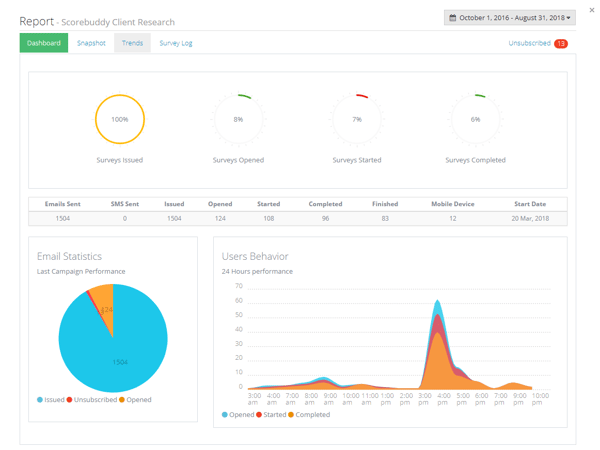
Another feature that sets ScorebuddyCX apart is its built-in learning management system (LMS). Rather than requiring a separate training platform, teams can assign targeted learning based on QA results and monitor progress from the same interface. Reviewers frequently note that this integration helps agents apply feedback more quickly and provides managers with greater visibility into ongoing skill development.
Based on G2 reviews, ScorebuddyCX's reporting capabilities also stand out. Trend reports and performance dashboards help QA leaders identify recurring issues across teams, uncover broader coaching opportunities, and measure the impact of coaching initiatives on agent performance over time. Instead of focusing solely on individual evaluations, managers can use these insights to improve quality programs across the organization.
What also comes through clearly in the reviews is how much teams lean on the customizable scorecards. Reviewers across industries, from PCI compliance to iGaming to outsourcing, describe building scorecards tailored to their specific workflows and KPIs rather than working around a rigid template.
That said, a few limitations came up in the G2 reviews I read. While the built-in dashboards work well for many teams, some users noted that custom reporting and data exports can require extra steps, especially when pulling complete QA data. Still, most users felt the core analytics were solid for day-to-day use.
Outside of reporting, a few users mentioned that some features can be slow to load, but this is something I am seeing across the board in user feedback on QA tools and is not unique to ScorebuddyCX.
ScorebuddyCX maintains a 4.5/5 average rating on G2, with 91% of users saying they'd likely recommend it. In my view, it's best for mid-market contact centers and fast-moving service teams that want coaching, training, and QA to run through a single system rather than be stitched together from separate tools.
“First of all, the ease of use of the Scorebuddy: most of us find the interface intuitive, and it is very user-friendly. You can use it as is; it's hassle-free, and you can also navigate the system effectively. The Number of features it offers makes the work simpler, especially for us working in the customer support field. Score Buddy makes it easier to meet our deadlines as this is the frequent tool that we use to meet our targets when it comes to evaluating agents.”
- ScorebuddyCX review, John M.
“Some features can feel a bit limited or less intuitive, especially when generating more detailed or customized reports. At times, navigating between sections or pulling specific data can take extra steps, which can slow down the workflow. Additionally, occasional system lag or loading delays can impact efficiency during busy periods.
- ScorebuddyCX review, John P.
Check out this article on the best analytics platforms that can help you turn quality scores, customer interactions, and operational metrics into actionable business insights.
If your goal is to evaluate every customer interaction instead of relying on random call samples, my.SQM Auto QA is worth a close look. The platform uses AI to automate quality assurance and connect evaluations directly to customer satisfaction data, helping contact centers understand not only how agents performed but also how those interactions influenced the customer experience.
That's a meaningful shift from sample-based QA. As one reviewer put it, the system moves away from "guessing" based on a handful of calls and instead listens to every single interaction, which is exactly the kind of full-coverage QA most teams say they want but rarely get.
According to G2 Data, my.SQM Auto QA posts a 96% score for ease of doing business, alongside a 91% likelihood-to-recommend score. Evaluation is its strongest feature at 92%, with reports and feedback both close behind at 91%.
Another standout feature is its predictive CSAT capabilities. Instead of treating quality assurance and customer feedback as separate initiatives, the platform analyzes conversations to estimate customer satisfaction scores and compares those insights with actual survey responses. This helps managers identify customer experience issues even when customers don't complete a survey.
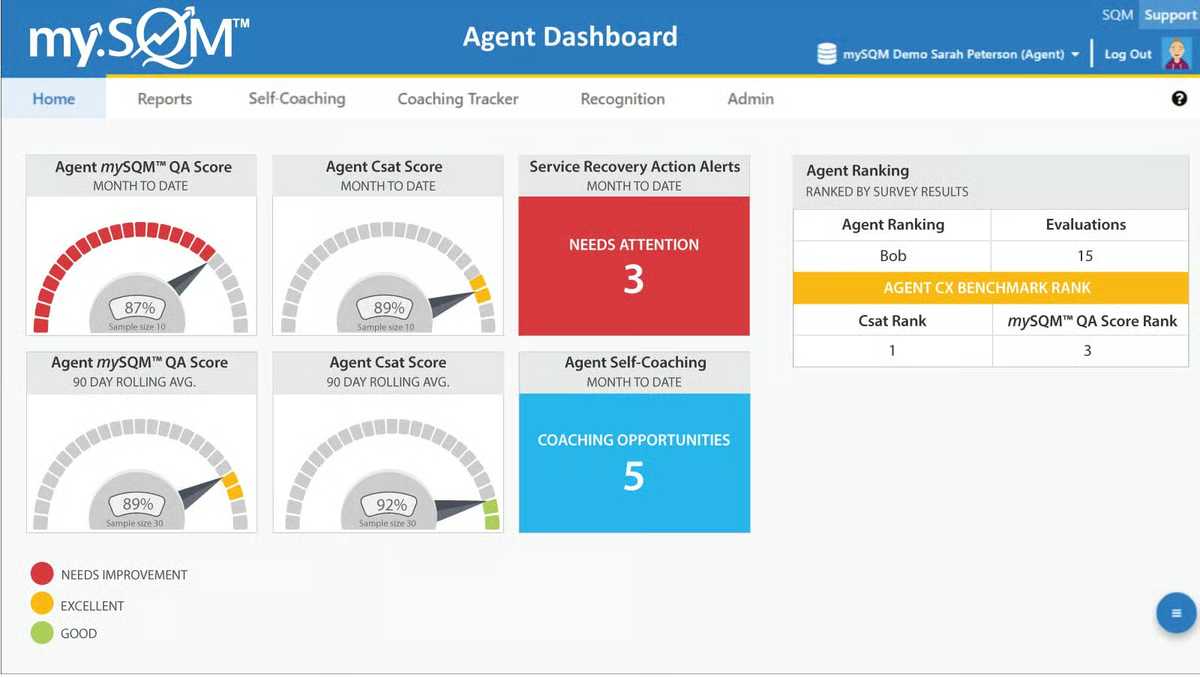
Reviewers also appreciate how the platform prioritizes consistency in evaluations by using AI to score interactions against predefined quality standards, my.SQM Auto QA helps reduce scoring variability between evaluators and creates a more standardized quality assurance process. For larger contact centers, that consistency can make coaching conversations more objective and easier to scale.
I also liked the real-time call guidance feature. Several reviewers, particularly those in sales-heavy roles, mentioned receiving live, in-call feedback that's customizable to their workflow, not just a post-call score delivered after the fact. That kind of in-the-moment coaching is rare in this category, and it's part of what's pushing this platform into the top five.
The customer feedback loop goes both ways, too. Agents can see their own survey results and hear directly what customers said about their interactions, which several reviewers described as motivating in a way that internal scorecards alone aren't. A few reviewers also mentioned gamification elements, like earning rewards tied to strong survey performance, as a nice touch that keeps agents engaged with their scores rather than dreading them.
On the QA management side, reviewers highlighted configurable scoring forms, dashboards, and what one called "voice of customer business intelligence," the ability to see not just how an agent performed, but how that performance is actually landing with customers.
One trade-off reviewers mention is that the platform is primarily designed around measuring customer experience. Organizations seeking extensive workforce engagement or learning management capabilities may find they need complementary tools to support broader agent development initiatives. For teams whose primary goal is improving QA through AI and customer feedback, however, this focused approach is often seen as an advantage.
A few reviewers also note that getting the most value from predictive analytics requires sufficient interaction volume and historical customer feedback data. While that may limit some of the platform's advanced insights during the initial rollout, reviewers generally found that the quality of recommendations improved as more conversations were analyzed.
my.SQM Auto QA maintains a 4.5/5 average rating on G2. In my view, it's the right fit for teams that want their QA process anchored to what customers are actually saying, particularly in industries like insurance and consumer services where post-call surveys are already a key part of the workflow.
“This software aims to deliver a high-quality experience, and I really appreciate the real-time feedback. It provides useful, meaningful input during calls, and the screen is customizable to fit my preferences. The performance has been exceptional, especially in providing real-time guidance. Overall, I love how easy it is to use and the range of options it includes.”
- my.SQM Auto QA review, Marcel M.
“It would be more convenient to have a wider range of predefined reports. The user interface could also be better optimized to provide a smoother, more consistent overall experience.”
- my.SQM Auto QA review, Juhani K.
QA is different from QC. Learn this G2 article on quality assurance vs. quality control
evaluagent leans heavily into the people side of QA. While some platforms emphasize automation and scale, evaluagent's strength lies in making evaluations feel useful and motivating for the agents being scored, not just a compliance exercise for management.
That comes through clearly in the reviews. Agents themselves, not just QA managers, consistently describe the platform as easy to use and genuinely helpful for tracking their progress over time, which is a different tone from what I typically see in QA tool reviews.
According to G2 Data, evaluagent posts a 94% score for both "going in the right direction" and ease of doing business with, alongside a 91% likelihood-to-recommend score. Evaluation is its top-rated feature at 93%, with calibration close behind at 91%.
One of evaluagent's biggest strengths is its flexible quality assurance framework. Teams can build customized scorecards, automate evaluations, and standardize review criteria across evaluators, helping create a more consistent QA process while reducing manual effort. According to G2 reviewers, this flexibility makes it easier to adapt the platform to different contact center workflows without overcomplicating the evaluation process.
Where evaluagent really differentiates itself is in agent engagement. Multiple reviewers mentioned gamified elements, such as monthly draws or performance-based rewards, that kept them motivated to log in and review their scores rather than ignore feedback. Agents can also attach supporting files, such as coaching logs and written warnings, directly to evaluations, keeping the full coaching history in one place.
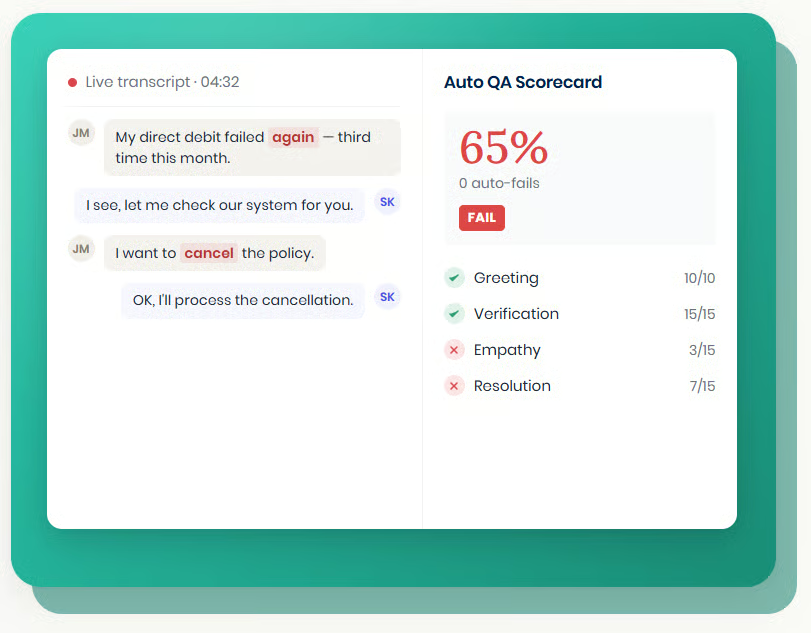
Reviewers also highlight the platform's analytics and reporting capabilities. Performance dashboards and trend reporting help QA leaders identify recurring quality issues, monitor coaching outcomes, and uncover broader operational trends across teams. Rather than focusing only on individual evaluations, managers can use these insights to improve quality programs at scale.
The platform's focus on actionable feedback was another consistent theme. Reviewers liked being able to see clear breakdowns of strengths and areas for improvement tied to specific KPIs, and several specifically called out how this turned QA from a once-removed scoring exercise into something they could act on day-to-day.
Setup is a recurring strength reviewers point to, several describing it as little more than entering an email address or linking an existing Google Workspace account to get started, which aligns with G2 Data showing a 93% ease-of-setup score, the best of the five products covered here.
On the flip side, AI-powered capabilities, such as transcription accuracy, can occasionally require manual review. While these instances don't appear to be widespread, reviewers note that verifying AI-generated outputs remains important for maintaining evaluation accuracy.
Some reviewers also mention occasional issues with call uploads or workflow interruptions. Although these appear to be relatively infrequent, they can temporarily slow evaluation workflows for teams processing large volumes of interactions. Even so, reviewers generally felt these issues were outweighed by the platform's coaching and quality management capabilities.
evaluagent maintains a 4.5/5 average rating on G2. In my view, it's the strongest pick for QA teams where agent buy-in matters as much as evaluator efficiency, particularly in BPO and outsourced support environments where keeping distributed agents engaged with their own scores is half the battle.
“I like how effectively Evaluagent combines automation with clear, actionable insights, making the entire quality assurance process far more efficient and impactful. It also solves the issue of limited visibility from QA sampling and reduces the time and effort spent on manual reviews.”
- evaluagent review, Wilson L.
“I think Evaluagent should include the quality results in their email notifications. Currently, they only send a rather alarming message stating that a quality review has been done, but they don't mention the percentage or whether it was a pass or fail. This approach can be unsettling and makes me feel anxious, prompting me to open Evaluagent right away. Additionally, I believe there is room for improvement in the website's design and animations.”
- evaluagent review, Ashwin A.
Check out our article on the best survey platforms you can pair with your QA software to collect CSAT, NPS, and customer feedback that validates coaching efforts and measures service quality.
When I think of Talkdesk, I think of a platform built for serious CX teams. It's known for its enterprise-grade contact center tools and strong push into AI.
According to the latest G2 Data, Talkdesk's highest-rated features are ease of use at 94% and ease of doing business with at 93%. Dashboards and evaluation also rank highly, at 93% each.
From what I found in G2 reviews, Talkdesk combines AI-powered scoring with screen and voice recordings, custom scorecards, and contextual feedback tools, enabling QA teams to evaluate conversations and link outcomes directly to coaching.
With QM Assist, managers get searchable call transcripts, sentiment indicators, keyword highlights, and automated evaluations of calls close to real time, which speeds up feedback. Talkdesk Copilot complements this by generating automatic summaries, suggesting next steps, and recommending dispositions to reduce after-call work.
Based on several reviews, the quality management module is highly configurable. Teams can build custom evaluation forms with branching logic, filter by team or channel, and work with omnichannel transcripts and recordings to give managers a fuller context. For motivation and accountability, Talkdesk also includes performance tracking dashboards and gamification tools that make feedback visible and actionable, helping agents see their progress.
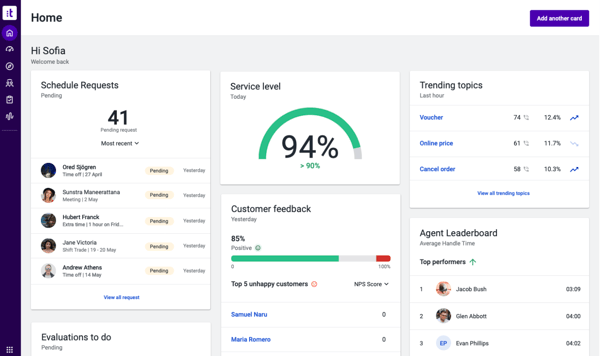
Another capability reviewers frequently highlight is Talkdesk Copilot. The AI assistant automatically generates conversation summaries, recommends dispositions, and suggests next steps after customer interactions, helping agents reduce after-call work while allowing supervisors to review conversations more efficiently.
But what makes Talkdesk stand out, in my opinion, is that quality insights don't sit in a silo; they feed directly into workforce engagement, collaboration, and CX analytics. That integration lets teams use QA data to shape training priorities, monitor agent progress, and improve processes, elevating QA from a scorekeeping task to a genuine performance engine.
One tradeoff reviewers mention is the platform's learning curve. Because Talkdesk offers extensive customization and enterprise-grade functionality, administrators may need additional time to configure workflows, reports, and integrations during implementation. However, reviewers generally note that the available documentation, training resources, and onboarding materials help ease the transition.
Support receives more mixed feedback. While many reviewers praise the customer success team, others mention that response times can occasionally be slower during more complex technical issues. Even so, most reviewers agree that the platform's breadth of functionality and long-term value outweigh these occasional support challenges.
Overall, the sentiment is clear: Talkdesk remains a strong performer, with a 91% likelihood-to-recommend score. I see it as a well-suited platform for organizations looking to turn quality data into actionable CX improvements. With a 4.4/5 average rating on G2, Talkdesk delivers one of the most comprehensive and AI-forward solutions on the market today.
“The AI Agents builder is what convinced me to stick with it. We’re in healthcare, so our use cases are pretty specific—appointment scheduling, insurance verification, prescription-related requests, and patient identification. I honestly wasn’t expecting to be able to map all of that out manually, but once the orchestrator figures out what the caller needs, it routes them to the right agent.”
- Talkdesk review, Anurag S.
“Last year, they had a couple of outages that impacted operations for us. Some of the feedback I received from my managers is that the reporting could be more intuitive. It's sometimes slower to build reports, and when they do, the information may not be accurate or consistent. Basically, you can run the report three times, and sometimes all three reports are different.”
- Talkdesk review, Eric H.
Mentioned below are three more contact center quality assurance software options that expand on the main list.
| Software | G2 Rating | Free plan and free trial | Starting price of paid plans |
| Agentforce Service | 4.4/5 | Free plan is available; no free trial | $2 per conversation |
| Scorebuddy | 4.5/5 | No free plan available; free trial available for 14 days | Custom pricing available upon request |
| my.SQM Auto QA | 4.5/5 | No free plan available; free trial available | Custom pricing available upon request |
| evaluagent | 4.5/5 | No free plan available; free trial lasts 14 days | $35 per user, per month |
| Talkdesk | 4.4/5 | No free plan available; free trial lasts 15 days | $85 per user, per month |
Note: G2 ratings are based on user reviews and are subject to change.
Got more questions? G2 has the answers!
Agentforce Service is the best fit for enterprises already using Salesforce because it combines QA with CRM, case management, and AI-powered service workflows. If you want a dedicated QA platform with advanced AI and workforce engagement capabilities, Talkdesk is another strong option.
Scorebuddy is ideal for growing teams thanks to its integrated QA, coaching, and learning management capabilities. evaluagent is another excellent choice if your priority is agent development and continuous coaching.
Based on G2 reviews, Scorebuddy and evaluagent are the easiest platforms to get up and running. Reviewers frequently praise their intuitive interfaces and straightforward onboarding experiences.
Talkdesk and Agentforce Service are built to scale to high interaction volumes, as both sit atop broader enterprise platforms designed to handle that load. Reviewers across larger organizations consistently point to stability and uptime as strengths for both, though several also noted that performance and platform stability can vary during deeper customizations.
my.SQM Auto QA and Scorebuddy are the strongest fits here. Both are positioned as ready-to-use QA solutions rather than platforms that require extensive implementation, and reviewers for both frequently mention fast time-to-value, in part because neither requires the kind of deep, consultant-led configuration that Agentforce Service often does.
evaluagent consistently comes up as the easiest to onboard, with multiple reviewers describing setup as little more than entering an email address. my.SQM Auto QA also scores well here, with reviewers across non-technical, customer-facing roles describing the platform as intuitive without dedicated training.
Agentforce Service has the deepest native integration if you're already in the Salesforce ecosystem, since QA lives directly inside case management rather than as a bolted-on tool. Talkdesk and evaluagent both offer broad third-party integrations across CRMs, helpdesks, and CCaaS platforms, including with each other, evaluagent integrates directly with Talkdesk.
Scorebuddy and evaluagent are both designed for fast time-to-value, with reviewers describing functional QA workflows within weeks rather than months. my.SQM Auto QA's CSAT-driven model can also show measurable impact quickly, since it's built around analyzing 100% of interactions from day one rather than ramping up sample size over time.
my.SQM Auto QA and Talkdesk are the best options for tying automated scoring directly to AI-generated case summaries and next-step suggestions, reducing the manual write-up work that QA analysts and agents would otherwise do after every interaction.
evaluagent and Scorebuddy are good options for lean teams. Both are built to be configured by QA managers directly rather than requiring ongoing IT or admin support, which matters most for teams without a dedicated technical resource to lean on.
One thing became clear as I dug into the reviews, feature sets, and real-world feedback: the best QA tools don’t just track performance, they develop it. You don’t want agents feeling like they’re being scored for the sake of it, nor do you want them to be stuck with the scores. A great QA platform should help them grow, not just get graded.
That means real-time feedback, coaching loops, and systems that surface what’s working, not just what’s broken. If you’re still comparing tools, I'd suggest you not to get caught up in feature checklists. Focus on how the software fits into your coaching rhythm and support culture. That’s where real ROI lives: not in the scorecard, but in sharper agents, better conversations, and a stronger customer experience.
Looking for a free contact center QA solution? Compare the highest-rated free contact center quality assurance software on G2 to evaluate features, verified reviews, and user satisfaction before committing to a paid platform.


Recently updatedSummer 2026 Grid® Report · Published May 26, 2026 The tools below reflect...
.png) by Tanuja Bahirat
by Tanuja Bahirat

I evaluated 20+ platforms to identify the six best contact center workforce software that...
 by Harshita Tewari

Recently updatedSummer 2026 Grid® Report · Published May 26, 2026 The 10 best Auto...
by Harshita Tewari