
You design something that looks perfect on your screen, then it falls apart everywhere else. The logo turns blurry on a billboard. The icon pixelates on a website. The social graphic bears no resemblance to the original.
This is one of the most common (and frustrating) problems in digital design: scale. As soon as a graphic needs to work across multiple sizes, platforms, or formats, quality starts to break down, unless it was built the right way from the start.
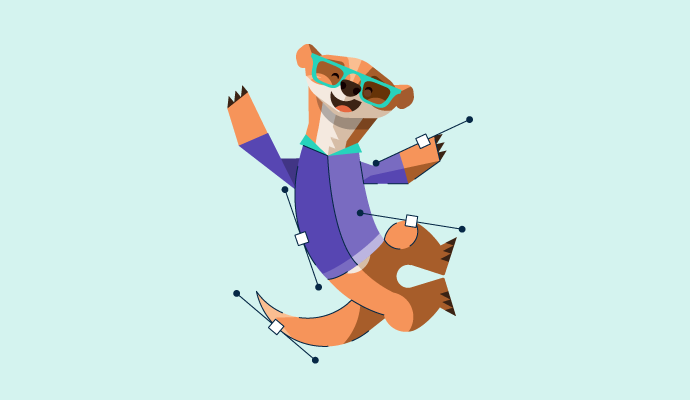
Vector art is a type of digital graphic created using mathematical paths instead of pixels. Vector art scales to any size without losing quality, making it ideal for logos, icons, and illustrations. Common vector file formats include SVG, AI, and EPS.
Because vector art isn’t tied to resolution, a single design file can be reused across platforms such as print, web, product packaging, and digital marketing without requiring constant resizing or redesign. This makes it especially valuable for brand assets and design systems that need to stay consistent as they grow.
Vector art can be created manually using professional design tools or generated quickly with an AI image generator. However, in both cases, the underlying advantage remains the same: scalable, flexible graphics that don’t break when your needs change.
Not exactly. Vector art is a subset of graphic design, but the two are not the same thing.
Graphic design is a broad discipline centered on visual communication. It involves making strategic decisions about layout, typography, color, imagery, and branding to communicate a message across digital and print formats.
Vector art refers specifically to the creation of visual elements. Designers often rely on vector art for logos, icons, illustrations, and brand assets because these elements need to remain consistent across many formats and sizes.
The relationship becomes clearer when you compare them directly:
| Aspect | Vector art | Graphic design |
| What it is | A method of creating images | A visual communication discipline |
| Primary focus | Image construction and scalability | Messaging, layout, and visual strategy |
| File behavior | Scales infinitely without quality loss | Depends on asset type (vector vs raster) |
| Typical outputs | Logos, icons, illustrations | Brand systems, ads, websites, print layouts |
| How they work together | Executes visual elements | Directs how and where visuals are used |
In short, graphic design defines the strategy, and vector art is one of the tools used to execute it.
Vector art can take many different forms, whether it’s created manually from scratch or generated with the help of AI tools. Because vector graphics are built from shapes, paths, and curves, they’re highly adaptable to different styles, moods, and use cases.
Below are some of the most common types of vector art and how they’re typically used.
Geometric vector art is built using simple shapes such as circles, rectangles, polygons, and straight or curved lines. Because vector graphics are inherently shape-based, this is one of the easiest and most flexible styles to create.
Different combinations of shapes and colors can convey very different moods. Bright, bold colors often feel playful and energetic, while neutral palettes and symmetrical layouts tend to create a more serious or modern tone. Geometric vector designs are commonly used in branding, infographics, icons, and editorial illustrations.
3D vector graphics use shading, gradients, and perspective to create the illusion of depth while still retaining the scalability of vector art. This style is often used for branding visuals, product mockups, architectural concepts, and presentation materials.
Beyond making designs visually striking, 3D vector graphics can help teams visualize product ideas more clearly, making them useful for pitches, prototypes, and internal presentations.
Photorealistic vector art is designed to resemble real-world photography using detailed shapes, lighting effects, and smooth gradients. While traditionally time-consuming to create by hand, AI image generation tools have made this style much more accessible.
This type of vector art is commonly used in marketing and advertising when brands want realistic visuals without relying on stock photography or large raster image files.
Line art is a minimalist vector style that uses clean, simple lines to depict objects, characters, or scenes. Often created in black and white and with minimal detail, line art focuses on clarity and form rather than realism.
Because of its simplicity, line art scales exceptionally well and is widely used for icons, user interface elements, instructional graphics, and modern brand identities.
Pop art vector design is bold, colorful, and expressive, drawing inspiration from retro and comic-style visuals. Thick outlines, high contrast, and flat colors give this style a strong visual presence.
Pop art works especially well for brands that want to make a statement and convey energy, creativity, or fun, particularly in social media graphics, digital campaigns, and promotional materials.
Depending on the software you’re using and how your design will be shared, vector art can be saved in several different file formats. Each format serves a slightly different purpose, whether you’re editing, collaborating, publishing online, or preparing files for print.
Every software that allows you to create vector art with AI will work differently, but there are some overlapping features to help you get the most out of your machine learning tools with fewer revisions and prompt follow-ups.
To get started with your AI vector art, you should:
Image made using Canva
While many have argued that using AI to create art removes the essential human element from creativity, there are so many advantages to using these tools to get you started or to enhance the ideas you already have.
Finding a balance between automation through AI and your own artistic vision is essential, but once you have this, you’ll find that many of the advantages of using AI for vector artwork are in your favor.
Not everyone is a natural-born Picasso or Da Vinci. Maybe you’re particularly good at one particular style of art, but that’s no longer working for you, or you want to try something new. Artificial intelligence is one of the best ways to do this, allowing you to experiment with colors and textures and offering a way to step outside your usual artistic boundaries.
One of the biggest benefits of AI lies in its automation. It can take up parts of the creative process that you find boring or time-consuming, such as photo editing and rendering, 3D adaptations, or even duplicating different parts of an image. This means that you’ll create your art more quickly and spend more time on the elements of creating that you enjoy most.
Many AI-powered vector tools are free or low-cost, making high-quality design more accessible. Even paid tools often cost far less than outsourcing design work, while still producing professional-looking results in a fraction of the time.
The most effective results come from balancing AI-driven speed with human judgment, using AI to generate and refine ideas, then applying creative direction to ensure the final design aligns with your goals.
G2 assists businesses in finding AI image generators that create visually appealing and diverse designs based on your prompts. These text-to-image features allow you to create and edit graphics quickly and easily.
To be included in the AI image generator software category, platforms must:
* Below are the top five leading AI image generator software solutions from G2’s Winter 2026 Grid Report. Some reviews may be edited for clarity.
Canva is an end-to-end AI visual communication and design tool that allows anyone to create graphics, regardless of their design skills. As an online design and publishing platform, Canva provides user-friendly tools for graphic design that work for non-designers and designers alike.
“Canva is one of the software that provides an all-in-one solution to design/edit graphics, videos, and PPTs using a simple and easy-to-use interface. Its AI features and integration of third-party add-ons make it different from others. It is easy to implement without having technical skills.”
- Canva review, Manoj J.
“Canva provides a robust design experience while online. It falls short by not offering offline editing capabilities, restricting the flexibility to work on projects at any given time or place.”
- Canva review, Milly S.
Adobe Firefly is Adobe’s proprietary generative AI tool, helps you create graphics in Photoshop that expand on your natural creativity. A step up from previous AI models, Firefly understands prompts better using natural language processing (NLP) tools, helping you create more realistic vector art and more.
“The integration with Photoshop allows us to replace certain sections only, which is the way to increase the size of a picture and automatically add the fill for that. And if we need a complete image created from scratch, we also have that support.”
- Adobe Firefly review, Cesar Daniel Z.
“Sometimes it's difficult to know what prompts to use to get exactly what you want, and sometimes the prompts that I use don't fully follow.”
- Adobe Firefly review, Parisa H.
AKOOL is a generative AI tool that’s designed for personalized visual marketing and advertising. Create studio-quality videos with AI avatars and commercial-level graphics that elevate your marketing and take your business further.
“AKOOL provides us with AI-enabled content generation functions, which allow us to create very creative marketing content. It has not put any limitations on the way we can play around with our content styles, and this has allowed us to create very futuristic content to capture the attention of audiences and, therefore, attract more buyers. We are very much delighted by the avatar creator tool that helps us add very realistic faces to our content.”
- AKOOL review, Brian T.
“There are some inconsistencies in prompts, e.g., when I use the same prompt words, I get images in different styles. Also, when using video swap, the background color and speed keep changing.”
- AKOOL review, Nyambura M.
Gemini is Google’s generative AI platform for creating and enhancing text, images, and visual content using advanced multimodal models. For design and creative workflows, Gemini helps users generate visuals from text prompts, refine concepts, and explore creative directions quickly within Google’s ecosystem.
“I really liked the image generation and code-generating features of Gemini. It helps a lot when I need to make a chart or an architecture for any project. The image generation feature is also fun to use, especially for creating a mind map for clear views. As for code generation, it helps me fix my errors in code, which is really helpful.”
- Gemini review, Tarang P.
“What I dislike about Gemini 2.5 Pro is that it cannot generate PDFs or documents like some other AI models. Additionally, its code generation capabilities are not up to the mark. The image processing performance of this language model is also quite limited. At times, I find its responses to be inaccurate.”
- Gemini review, Ritik S.
1min.ai is an all-in-one AI productivity platform that brings together multiple AI models to generate images, text, audio, and video from a single interface. It’s designed for users who want fast, flexible content creation without switching between multiple tools.
“The fact that one can select several generative AI systems to answer a prompt. Over time, this enables one to select the most appropriate tool for a particular problem. For example, search is paramount, Perplexity is a good job, whereas ChatGPT is good for document synthesis.”
- 1min.AI review, Thomas W.
“I dislike that sometimes the tool selection feels overwhelming and can take a moment to find the exact feature I need. Otherwise, it’s a strong platform overall.”
- 1min.AI review, Ondřej.
Got more questions? We have the answers.
Vector art is created using mathematical paths, which allows graphics to scale to any size without losing quality. Raster images are made from pixels, so enlarging them can cause blurriness or pixelation. Vector art is commonly used for logos, icons, and illustrations, while raster images are typically used for photographs.
Yes. Vector art is generally better for logos because it can be resized for any use case, including web, print, packaging, or billboards. Raster logos often need multiple versions for different sizes and can degrade in quality when scaled.
Creating vector art typically requires basic design skills such as working with shapes, paths, color, and composition. Familiarity with vector design tools like Adobe Illustrator or Figma is helpful, but AI-powered tools now allow beginners to create vector graphics using text prompts with minimal technical knowledge.
Vector images are not ideal for highly detailed or complex photographs, as they’re better suited for shapes, illustrations, and clean visuals. Creating detailed vector artwork manually can also be time-consuming, especially compared to working with raster photos.
A vector image may appear blurry if it has been exported as a raster file at a low resolution, embedded inside another file incorrectly, or viewed in software that doesn’t fully support vector formats. True vector files remain sharp when scaled, as long as they’re kept in vector format.
Yes. Many AI tools can generate vector art or vector-style graphics using text prompts. These tools can create scalable designs and export them in formats like SVG or PDF, making it easier to produce vector artwork quickly without advanced design skills.
Vector art makes it possible to create graphics that scale without compromise. By using mathematically defined paths instead of pixels, vector images stay sharp and consistent across every size, platform, and format.
With AI tools now supporting vector creation, designing scalable graphics is faster and more accessible than ever. When combined with the right file formats and a clear understanding of use cases, vector art gives designers and businesses a reliable foundation for modern visual design.
Want to know what’s next in design? Explore the latest graphic design trends for 2026 to stay ahead.
This article was originally published in 2024. It has been updated with new information.

We’ve all seen the trope on crime TV shows: a detective stares at a blurry security image and...
 by Brynne Ramella
Let me tell you a secret: I’m no graphic designer, but I’ve managed to pull off some pretty...
 by Soundarya Jayaraman

A few years ago, while juggling multiple roles at a startup, I found myself designing posters,...
 by Harshita Tewari