


Ever feel like your day disappears before you’ve accomplished anything meaningful? Between Slack pings, surprise meetings, and overflowing inboxes, it’s easy to confuse constant activity with real productivity.
The rise of remote work, digital distractions, and busy schedules has amplified the importance of effective time management, while also making it more challenging. To address this, professionals are turning to time blocking.
Time blocking is a productivity method where tasks are scheduled into fixed time slots throughout the day. Instead of working from a to-do list, you assign each task a specific start and end time. This helps reduce distractions, improve focus, and ensures that high-priority tasks receive dedicated attention.
Ultimately, because you can’t become a digital hermit and shut off the outside world entirely, time blocking allows you to create the time and space you need to stay focused and accomplish your tasks.
It’s a simple system that helps you regain control of your calendar and focus. Whether you're trying to accomplish more in less time or simply carve out space for high-value work, time blocking provides the structure to make it happen. Many professionals also pair time blocking with time tracking software to monitor where their focus really goes throughout the day.
There are several reasons why time blocking is so effective, but it essentially comes down to the fact that this way of working is specifically designed for focus.
If you’re familiar with the concept of Parkinson’s Law, you’ll know that the work we have to do expands to fit the time we have to do it in. So if you have six hours to write an article, it’ll take you six hours to finish it, when it may have only taken you four or even three. The reason for this is because we fill the extra time with procrastination, context switching, or attempting to multitask, which hampers with our productivity. 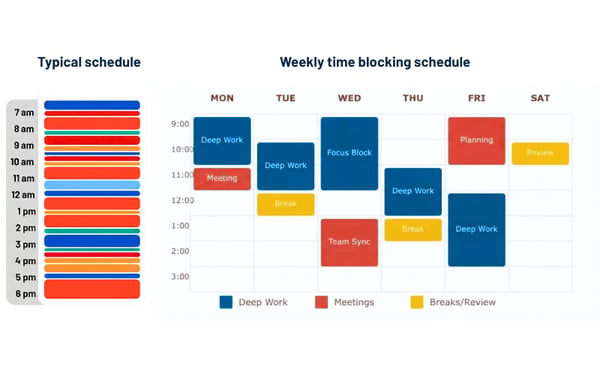
But let’s take a closer look at why time blocking works so well.
By scheduling your day in such a detailed manner, you’re able to focus solely on the task at hand, and without constant disruptions or context switching, you’re able to get far more done. One of the biggest proponents of time blocking is Cal Newport, author of Deep Work and an all-around productivity guru.
While you might think that spending so much time planning your schedule rather than just getting to work is counterproductive, Newport says the opposite is true:
“It generates a massive amount of productivity. A 40 hour time-blocked work week, I estimate, produces the same amount of output as a 60+ hour work week pursued without structure.”
This is because time blocking promotes deep work more than any other time management technique. When you have a set amount of time to work on a single task, you can dedicate all your attention to it, instead of jumping from task to task. And when you reach a flow state, you’ll find that you’re able to get far more done, and it’ll all probably feel way more effortless, too.
You may not realize it, but each time you break focus and turn your attention to something else, you suffer from something called “attention residue”, when your ability to focus becomes slowly diluted as you context switch throughout the day.
Not only does time blocking promote deep work, but it also protects against context-switching and ultimately allows us to develop the skills necessary for successful deep work.
For most of us, low-value, shallow work is a necessary part of our jobs. But it also has a way of taking over the day, and existing in a constant state of busyness isn’t helpful for your productivity, let alone your mental well-being or physical health.
Tasks like replying to emails, attending catch-up meetings, making phone calls, and responding to coworkers on chat tools can be an endless cycle, but while these tasks can be urgent, they’re rarely helpful when it comes to actually achieving your own long-term goals. And if you’ve ever spent a whole day on shallow work, you’ll probably know that it can leave you feeling exhausted and stressed, but also like you achieved nothing of value.
Because it’s so difficult to reach the fabled status of inbox zero, or be 100% up-to-date with all colleague responses and tasks statuses, you shouldn’t waste valuable time attempting to do so. Instead, you should set aside a block of time to plough through your shallow work, and when that time expires, you simply stop, even if you haven’t finished everything.
Additionally, by scheduling all your shallow work together, you can get into the right mindset for this type of work and complete it more efficiently. Then you can sit back and relax, knowing you’ve protected a good chunk of your day to work on the stuff that really matters.
Another powerful perk of time blocking is that it gives you insight into where your time’s really going. Most of us aren’t very good at managing our time. We also tend to grossly underestimate how much time we waste checking social media, reading emails, or simply getting distracted by day-to-day life.
We also have a habit of underestimating how long tasks will take, regardless of how many times we’ve struggled to meet the same deadlines in the past. This phenomenon is known as the planning fallacy, and it can lead to significant problems.
But when you use time blocking, you’re forced to become more aware of where your time’s really going, which allows you to become more intentional about the ways you want to use it. Don’t want to spend two hours in a cycle of back-and-forth emails? Schedule just 10 minutes for it. Want to find the space to work on the things that actually mean something to you? Carve out the space in your calendar, and then make sure you protect that space aggressively.
Time blocking doesn’t only work in the short-term, by helping you work the way you want to each day; it also allows you to achieve your longer-term goals. Whether you're writing a book, launching a product, or learning a new skill, big goals require consistent effort over time.
The problem? Good intentions don’t automatically translate into action. Without a structured plan, we often underestimate how long things will take or forget to follow through entirely.
By carving out dedicated time on your calendar for goal-focused work and protecting that time like any other commitment, you give your priorities the space they need to grow. Over time, those small, scheduled blocks add up to real momentum.
So, once you know that you want to give time blocking a try, what’s the best way to do so? Here are the three most important steps to get you started.
First, try to identify your most important priorities. Have a think about why exactly you want to use time blocking. Is it to protect your focus and stop procrastinating? Is it to achieve your long-term goals? Or is it to simply get more work done faster, so you can enjoy more downtime?
Knowing the precise reason why you’re using time blocking will help you figure out how to best block out your day. For example, if you want to finally achieve an important task you’ve been working on for a while, you can build your blocks around creating space to do that; if you find yourself getting weighed down by shallow work, you can batch these tasks together and schedule a finite period to work through as much as you can.
Once you know what your priorities are, you then need to think about which tasks you’re going to prioritise. While one of the main reasons people use time blocking is to create and protect space for deep work, it’s also important to ensure you have enough space in your day to tackle shallow work.
But the great thing about time blocking is that you can create a schedule that’s suited to the ways you like to work. So if it takes you an hour or so to fully wake up in the morning, or reach a point where you feel like your creative juices are flowing, you can plan to work on easy, shallow tasks for the first hour – and then schedule your challenging work for when you’re feeling more productive.
You might also find it helpful to begin and end your day with gentler tasks that allow you to gear up and then wind down for the day. Checking and replying to emails first thing in the morning and then again before you clock off can be a good way to feel in the loop and in control, as long as you don’t deviate from your plan and check your inbox throughout the day, too.
To get the most out of time blocking, it’s essential to schedule time for breaks and leisure activities as well. We’re humans, not machines, and we need to take breaks to function at our best, but if we don’t schedule them, it’s easy to get caught up in work. Create space to take time out by blocking out chunks of your day, and then protect that space, even if you feel you’re too busy to stop.
You might also want to allocate an extra 30 minutes each day to handle any unexpected ad hoc tasks that arise; this way, you can ensure you don’t fall behind.
The beauty of time blocking is that you can easily adapt it to the ways you like to work, the type of tasks you have to do, and the kind of schedule you want. But aside from the ‘classic’ version of time blocking, there are also other variations that might be more suited to you. These subtypes are task batching, day theming, and time boxing.
| Method | What it is | Best for | Example use |
| Time blocking | Scheduling fixed time slots for specific tasks | General productivity, deep work | 10–11 a.m. = Content writing |
| Task batching | Grouping similar small tasks into one block | Shallow work efficiency | 2–2:30 p.m. = Emails + Slack replies |
| Day theming | Assigning entire days to one area of work | Multi-role professionals | Wednesday = Product development day |
| Time boxing | Capping a task to a specific time limit | Finishing faster, reducing perfectionism | 3–4 p.m. = Complete draft, no edits after |
If you tend to have lots of shallow work to get through, you might find it beneficial to group them all together. This method is called task batching, and it’s designed to reduce context switching and help you stay on track.
For example, if you have lots of email to get through, rather than jumping in and out of your inbox all day, you can plan to reply to all your emails for 20 minutes at 10 a.m. and 3 p.m. This helps you get into the right mindset for this type of work, and by grouping all these tasks together, you can plough through far more efficiently.
Although task batching is typically applied to smaller tasks, you can use it as you see fit. If you find it beneficial to group more challenging or creative tasks together and work through them when you’re feeling most productive, that works too.
Day theming is when you dedicate certain days to different responsibilities. This method of time management can work really well when you have lots of different responsibilities.
If you have many tasks and responsibilities, you might need to spend more time on each. Instead of allocating two hours daily for a task, you could dedicate an entire day to it. For example, Mondays for marketing, Tuesdays for content creation, Wednesdays for product development, and so forth.
Again, this can help avoid context switching and ensure you stay focused and in tune with the type of work you’re doing.
Time blocking and time boxing might sound similar, and they are, but there’s one key difference. While time blocking necessitates you set a limit to how long you’ll spend on a task on that day (e.g., you’ll work on a task from 11 a.m. to 1 p.m.), time boxing involves setting a limit to how long you’ll spend completing a task.
So, when timeboxing, rather than giving yourself two hours to work on a content plan, you’ll aim to complete your plan within those two hours. Time boxing can sometimes work better than time blocking, because having a limited time to finish a task can make you work faster and help you challenge yourself.
You might want to have a go at the different types of time blocking and see which one works best for you. Whichever type of time blocking you think you want to try, the good news is that there are loads of tools that make the whole process easier. Plus, these tools can also help show you whether your time blocking technique is actually working or not.
Almost all calendar apps work well for time blocking, and if you share calendars with your coworkers, they can make it easy to stay in the loop with what everyone else is working on. When you’re using a calendar app, you can block out chunks of time directly on your app, which means you’ll be safe in the knowledge that your calendar and tasks are in the same place.
Plus, calendar tools and apps usually come with deadline and reminder features, which can help make sure you leave yourself enough time to work on everything.
G2 helps professionals find the best calendar software for organizing schedules, managing availability, and streamlining collaboration across teams and time zones.
Below are the five best calendar tools, based on G2’s Fall 2025 Grid Report.
Many project management software tools exist that assist you in breaking down your projects into individual tasks, which you can then assign time to. These types of tools often integrate with other project planning tools, so once you’ve created a task, it can automatically connect to your calendar. This can help you rest easy knowing nothing will slip through the net.
G2 helps teams choose the best project management software to plan initiatives, assign tasks, monitor progress, and hit deadlines more efficiently.
Below are the five top-rated project management platforms from G2’s Fall 2025 Grid Report.
With task management tools, you can assign tasks, set due dates, and get a clear insight into how much time is spent on each project and task. Task prioritization tools can help you better understand what you need to work on each day and make it easier to monitor upcoming tasks, as well as prioritize the most important ones.
G2 supports individuals and teams in finding the best task management tools for prioritizing work, tracking deliverables, and staying focused on what matters most.
Here are the five best task management software according to G2’s Fall 2025 Grid Report.
Timers and clocks can be good ways to help protect your focus and stay on task. Seeing time ticking away can often motivate people to work more quickly and efficiently. If you’re someone who actually enjoys racing against the clock, these tools can make all the difference.
Tracking everything you do, particularly when you’re using an automatic tracker that requires no effort, helps you see when and where you tend to become distracted, so you can then try to tackle the problem. It also helps you identify any time drains and figure out when you’re most productive, which allows you to schedule your most challenging work for these periods.
In general, time tracking tools help you allocate your time more intelligently. Once you have the insights needed to know exactly how long you need to spend on email each day, you can make sure you don’t allocate too much time to these tasks and focus on more important work.
G2 helps businesses select the best time tracking software to monitor productivity and gain insight into how time is spent across projects.
Check out the top five time tracking tools from G2’s Fall 2025 Grid Report.
Got more questions? We have the answers.
There’s no one-size-fits-all length; most time blocks range from 15 to 90 minutes. For deep work, aim for 60–90 minutes of uninterrupted time. For shallow tasks, 15–30 minutes is often enough. The key is matching the block length to your focus span and the complexity of the task.
Absolutely. Time blocking is just as effective for planning workouts, errands, hobbies, or even relaxation time. In fact, scheduling personal tasks helps you create a better work-life balance and makes it easier to say no to overcommitments.
Yes, many people with ADHD find time blocking helpful because it reduces decision fatigue and adds external structure to the day. Just be sure to keep blocks flexible and include buffer time so the system feels supportive, not restrictive.
Yes, time blocking works well in conjunction with other systems, such as the Pomodoro Technique, Getting Things Done (GTD), or the Eisenhower Matrix. For example, you can use Pomodoro intervals within a time block or use GTD to organize tasks before blocking time to execute them. Blending methods helps you stay flexible while keeping structure.
The biggest mistake is over-scheduling, packing your calendar with back-to-back blocks and leaving no room for interruptions, transitions, or breaks. Other pitfalls include skipping buffer time, ignoring your energy levels, and failing to review or adjust your blocks regularly. Time blocking works best when it’s treated as a guide, not a rigid rule.
In a world full of distractions, time blocking gives you structure. Whether you’re aiming to focus more deeply, manage shallow tasks effectively, or advance your long-term goals, time blocking provides a straightforward way to proceed. And the best part? It’s flexible.
As with any new technique, try things out, allow yourself to stumble, and make changes and adjustments as you go.
Ready to explore some tools? Compare top-rated time tracking tools on G2 to find the best fit for your workflow.
This article was originally published in 2021. It has been updated with new information.

If your weekly sync exists mainly to ask, “What’s the status?” the problem is structural.
 by Alveena Ali
The dream of the "Everything App" is incredibly hard to resist.
 by Soundarya Jayaraman

Whether I’m juggling multiple projects, keeping up with coursework, or just trying to keep my...
 by Washija Kazim