.png?width=400&height=150&name=Copy%20of%20G2%20Image%20(1).png)


I know how delayed reimbursements can affect employee travel experiences and overall morale. Many employers find it challenging to process travel expenses quickly, which can require employees to cover costs upfront and may create discomfort or uncertainty over time.
Employers need assurance that their money is managed safely and in the right hands. Investing in free expense management software enables businesses to manage, audit, and track travel-related expenses quickly. These business expense trackers have advanced analytics, travel integrations, and payment support to reimburse the employees and manage company budgets effectively.
I recommend taking the first step toward better expense management with a free business expense tracking platform. In this list, I break down the 10 best free business expense tracking platforms on G2 for 2026 to help you find the right fit.
*The software list is arranged alphabetically. These tools offer free trials, free forever options, or freemium models.
To get a better idea of the main differentiators of business trackers, refer to the following table and evaluate your preferences on what software suits your business needs.
| Best free business expense trackers | G2 Rating | Free plan | Paid plan |
|
BILL Spend & Expense
|
4.5/5 ⭐
|
Free plan available |
Available on request
|
|
Brex
|
4.8/5 ⭐
|
Free plan available
|
Starts at $12 per user per month
|
| Emburse Expense Enterprise (formerly Chrome River Expense) | 4.3/5 ⭐ | Free plan available | Available on request |
| Emburse Expense Professional (formerly Certify Expense) | 4.5/5 ⭐ | Free plan available | Available on request |
| Expensify | 4.5/5 ⭐ | Free plan available | $5/user/month |
| Navan | 4.7/5 ⭐ | Free plan available | Available on request |
| Paylocity | 4.5/5 ⭐ | Free plan available | Available on request |
| Ramp | 4.8/5 ⭐ | Free plan available | $15/user/month |
| SAP Concur | 4.0/5 ⭐ | 15-day free plan | Available on request |
| Zoho Expense | 4.5/5 ⭐ | Free plan available | $3/user/month |
*All pricing details mentioned in the article are based on publicly available data at the time of publication and are subject to change.
Keeping business expenses organized has become a priority for teams looking to control costs and improve financial visibility. As companies move away from manual spreadsheets, the adoption of expense tracking tools continues to accelerate. The global expense management software market is projected to grow from $8.30 billion in 2025 to $16.48 billion by 2032, reflecting a strong CAGR of 10.08% during the forecast period.
What stood out to me while reviewing this category is that effective expense tracking doesn’t always require a paid solution. Several tools offer free plans or entry-level access that cover essentials such as receipt capture, expense categorization, reporting, and basic approvals, making them particularly useful for freelancers, startups, and small teams.
In this list, I’ve rounded up the 10 best free business expense trackers based on real user feedback, usability, and the overall value of their free offerings. I’ll highlight where each tool excels, its limitations, and which types of businesses it’s best suited for, so you can track spending confidently without incurring extra costs.
To build this list, I started with G2 Data, shortlisting top-rated tools based on their G2 scores and consistent performance in the business expense tracking software category.
From there, I reviewed product features and recent, verified user feedback to confirm that these tools deliver practical value and to understand where each one stands out, whether that’s expense categorization, receipt capture, reporting capabilities, or integrations with accounting and payroll systems.
My focus was on identifying which tools offer meaningful expense tracking functionality without requiring an upfront investment. Since this is a free-focused list, I closely evaluated what you can actually do on the free plan, including transaction or expense limits, receipt upload restrictions, reporting access, and any constraints that might prompt businesses to upgrade.
The screenshots featured in this article may be a mix of those taken from the vendor’s G2 page or from publicly available materials.
Integrate your business travel expense management operations on one platform, without drowning in spreadsheets and the overhead of third-party travel and invoice tracking tools. These free business and income trackers will provide end-to-end travel support to employees and help them manage their records while lowering overall costs.
The list below contains real user reviews from the best presentation software category. It’s essential to note that, in the context of this list, software that requires payment after a free trial is still considered free.
To qualify for inclusion in this category, a software must,
This data was pulled from G2 in 2025. Some reviews may have been edited for clarity.
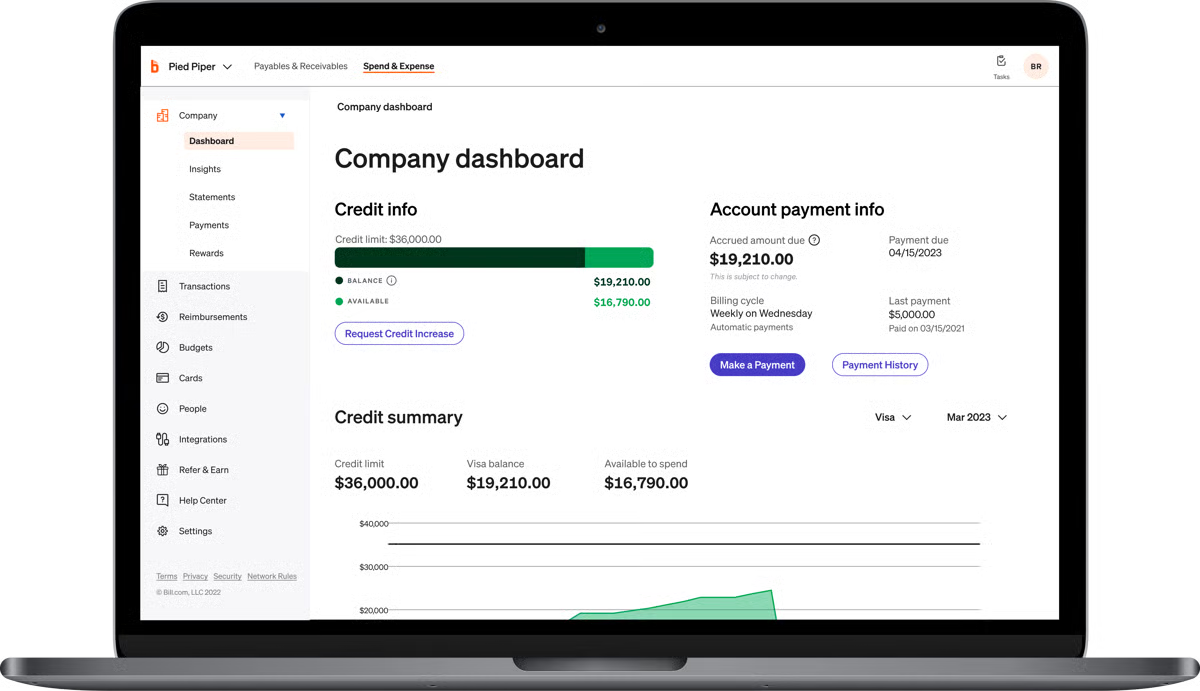
BILL Spend & Expense allows employees to track vehicle mileage, record official transactions, and apply for team cards to get discounts on e-commerce purchases. Catering to small business owners or entrepreneurs, self-employed, and freelancers, the software maintains Excel records of card transactions.
BILL Spend & Expense is not just limited to travel expense tracking, but also audits and routes receipts for the right dedicated member.
|
Pros of BILL Spend & Expense
|
Cons of BILL Spend & Expense
|
| Pre-existing bank account integration | Issues in syncing bank accounts |
| Virtual team and corporate account cards | Unable to deliver loyalty rewards |
| Monitoring and limiting employee purchases | Slow in updating outstanding bills |
"The setup of this service is really easy to use. Coding documents makes sense. It makes keeping receipts organized straightforward. The reimbursement feature is awesome and makes mileage tracking a breeze. It works with our pre-existing account on QuickBooks, which makes that a breeze. I am in the Divvy app essentially every day, and having the ability to upload a receipt to my phone instantly is awesome.”
- BILL Spend & Expense Review, Lake M.
"The reimbursements feature doesn't get much development - the fact that it doesn't sync with QBO with the integration is the biggest pitfall of Bill Spend & Expense. So many data entry errors happen with reimbursement transactions because we have to manually enter them. Also, the automated clearing house (ACH) payment timing for reimbursements is pretty long.”
- BILL Spend & Expense Review, Amber G.
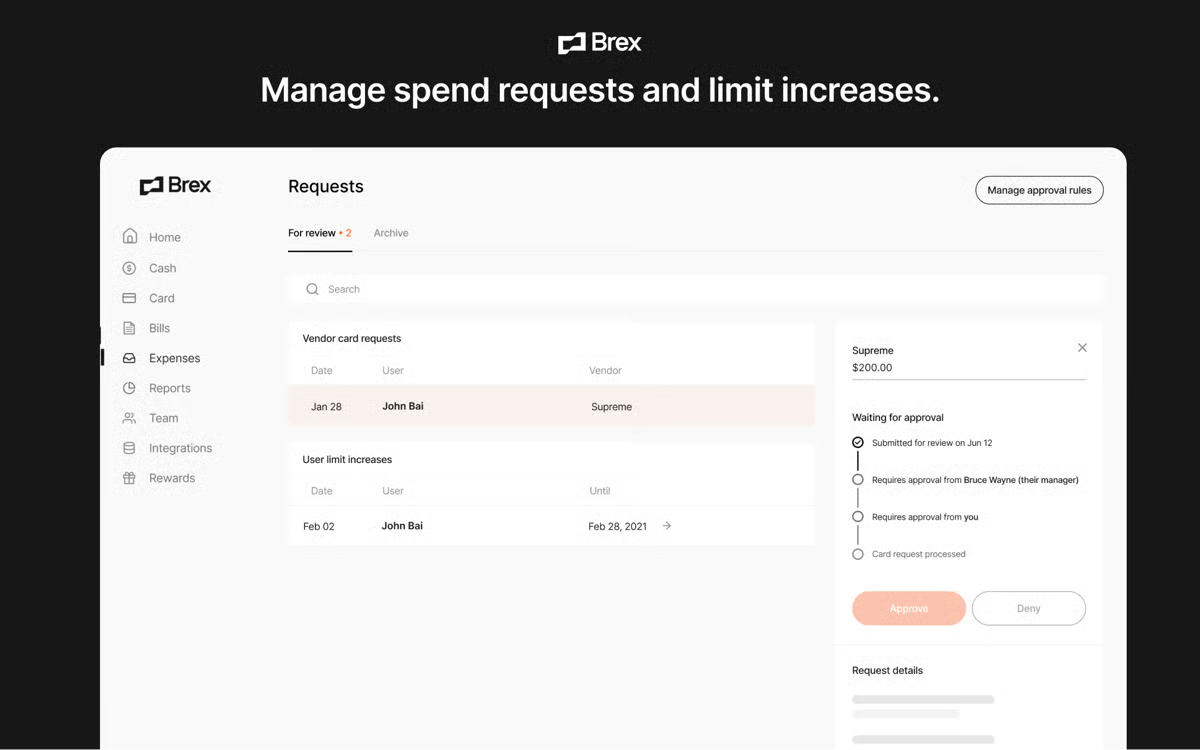
Brex is a user-friendly spend management platform that handles corporate cards, corporate cash accounts, budget approval, travel expenses, and receipt generation workflows. It tracks both deductible and non-deductible employee expenses, offering insights into a company’s overall spending.
The platform’s AI integrations analyze reports to provide details regarding total travel expenses and audit the entire trail to ensure there are no loopholes.
|
Pros of Brex
|
Cons of Brex
|
| Consolidation of team cards and accounts | Limited availability of international group traveling |
| In-app travel bookings and assistance | No top-up option for travel bookings |
| Real-time receipt uploads | Limited receipt document support |
"Brex has a friendly interface, and it is easy to start and make changes. You can get the banking issues resolved in a moment for a new employee. Basic integrations are provided, which are very useful in everyday accounting work. Easy to manage and collect receipts from your team. As an accountant, I do not need to log in every day; I can just set the necessary rules on Brex and use it for my work.”
- Brex Review, Myroslava G.
"The one thing that I don't like about the card stems from the receipt process. At present, the Brex card only allows for images to be uploaded as backup receipt verification. It would be great, especially for multi-page receipts to allow for a pdf upload acceptance as well.”
- Brex Review, Rodney W.
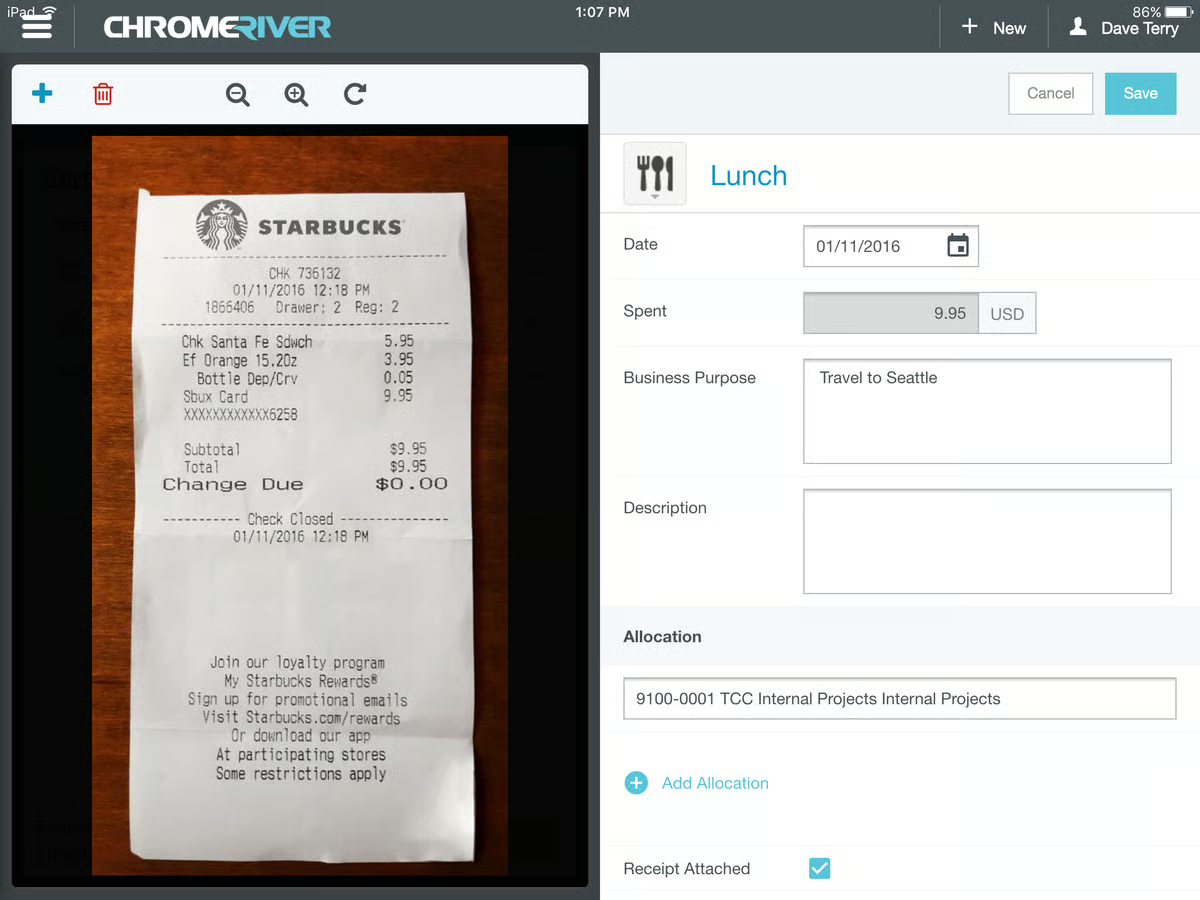
Emburse Expense Enterprise is a mobile-friendly app that enables you to track your raised reimbursement requests, reconciliation forms, tax claims, and tuition finances all in one platform. The app not only secures your transactional data but also schedules sync-ups with budget-approving teams to ensure all records are up-to-date.
|
Pros of Emburse Expense Enterprise
|
Cons of Emburse Expense Enterprise
|
| Easy submission of receipts | Weak customer service for enterprise teams |
| Travel budget forecasting and allotment | Slow loading of expense reports and receipts |
| Various expense and billing categories | Longer reimbursement timeline |
"Chrome River Expense is very helpful in getting claims processed quickly. The visual dashboards for high spend items and users are also useful when trying to analyze expense claim information. Also, their customer support is quick and easy.”
- Emburse Chrome River Expense Review, Michael L.
“It takes a lot of repetitions to master the system. For those infrequent users, it can feel like learning it every time they need to submit an expense report.”
- Emburse Chrome River Expense Review, Luis L.
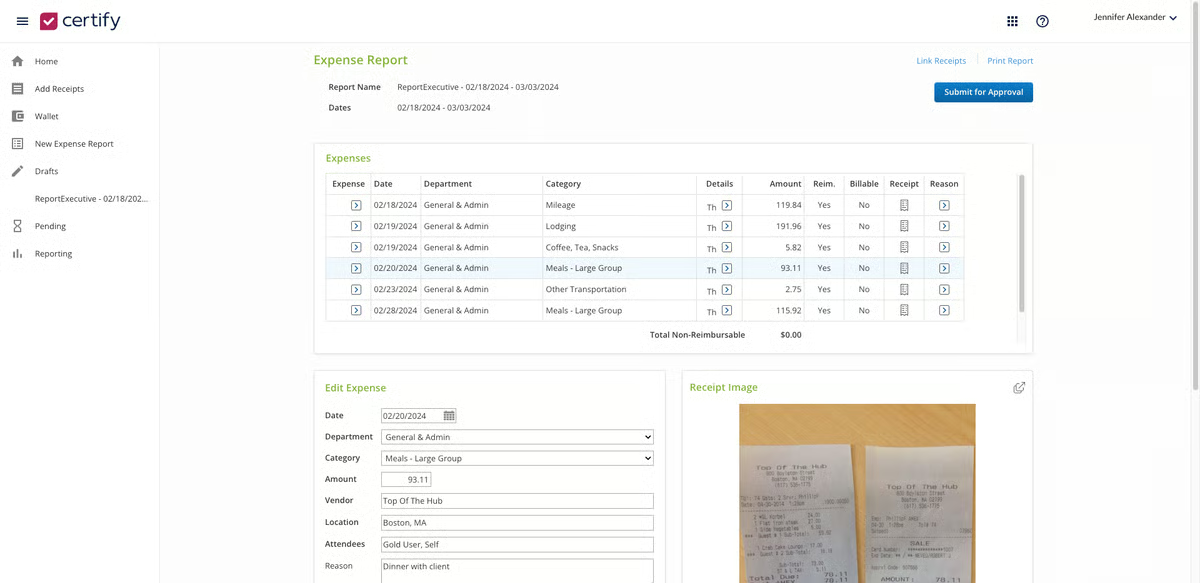
Emburse Expense Professional segregates employee transaction records and sets minimum budget caps for HR and accounting teams. It offers mileage tracking, commute support, invoice upload, and management to have all your expenses and liabilities sorted and categorized. Apart from these features, Emburse Certify Expense offers integrated banking support to expedite transactions.
|
Pros of Emburse Expense Professional
|
Cons of Emburse Expense Professional
|
| Automatic autofill feature to update report fields | Manual data entry for any travel approval |
| Easy and convenient expense submission | Weak data visualization and multilingual support |
| Lag-free receipt management | Weak invoice-based assistance for customers |
"We use Emburse Certify through our HR partner and have been thoroughly impressed with the ease of onboarding and use in our organization. It takes no time at all to train our employees. It is easy to navigate and make changes, run reports, track spending, AND integrate with so many other items.”
- Emburse Certify Expense Review, Kye G.
"When submitting an expense report, the submit button must be clicked multiple times (through 2 or three screens). This causes some employees to think they have submitted a report when they have not yet completed the process. This problem is quite minor in the grander scheme of things.
- Emburse Certify Expense Review, Emily P.
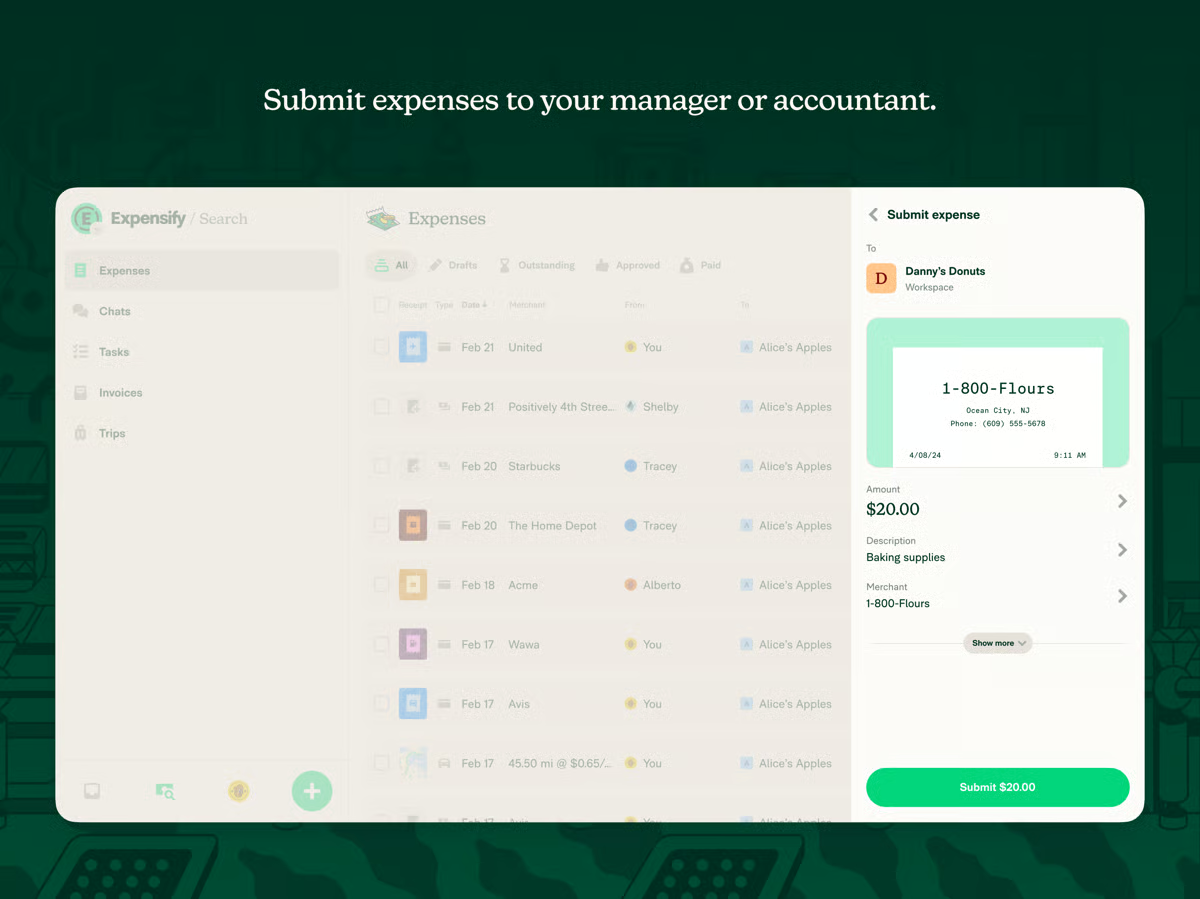
Expensify is an all-in-one travel management platform that stores, retrieves, and manages data from travel reports. It offers easy workflow approvals to expedite the reimbursements and reconciliation process. Users can upload and scan receipts directly onto the platform and categorize their payments for complete transparency and visibility.
Real-time email updates keep both employees and approvers informed, while the integration of bank account information further streamlines payments.
|
Pros of Expensify
|
Cons of Expensify
|
| Great and responsive customer service | Limited mileage tracking service |
| Multiple file support for receipts | Limited support for multiple uploads |
| Quick generation of report summaries | Limited bill scanning and auto-population of reports |
“Scanning is so accurate; reports are easy to generate (reimbursable vs. non-reimbursable makes private and company expenses easy to manage); duplicates are picked up and easy to eliminate; integration to Xero. Customer service is always responsive. I use Expensify all the time, and it was super easy to install.”
- Expensify Review, Jen C.
"Mobile version doesn't have category separation like the web version, which makes it a little difficult to track what expenses have been submitted versus haven't.”
- Expensify Review, Apple L.
Tracking spend is just the start. Explore the best travel management tools to book, monitor, and optimize every business trip.
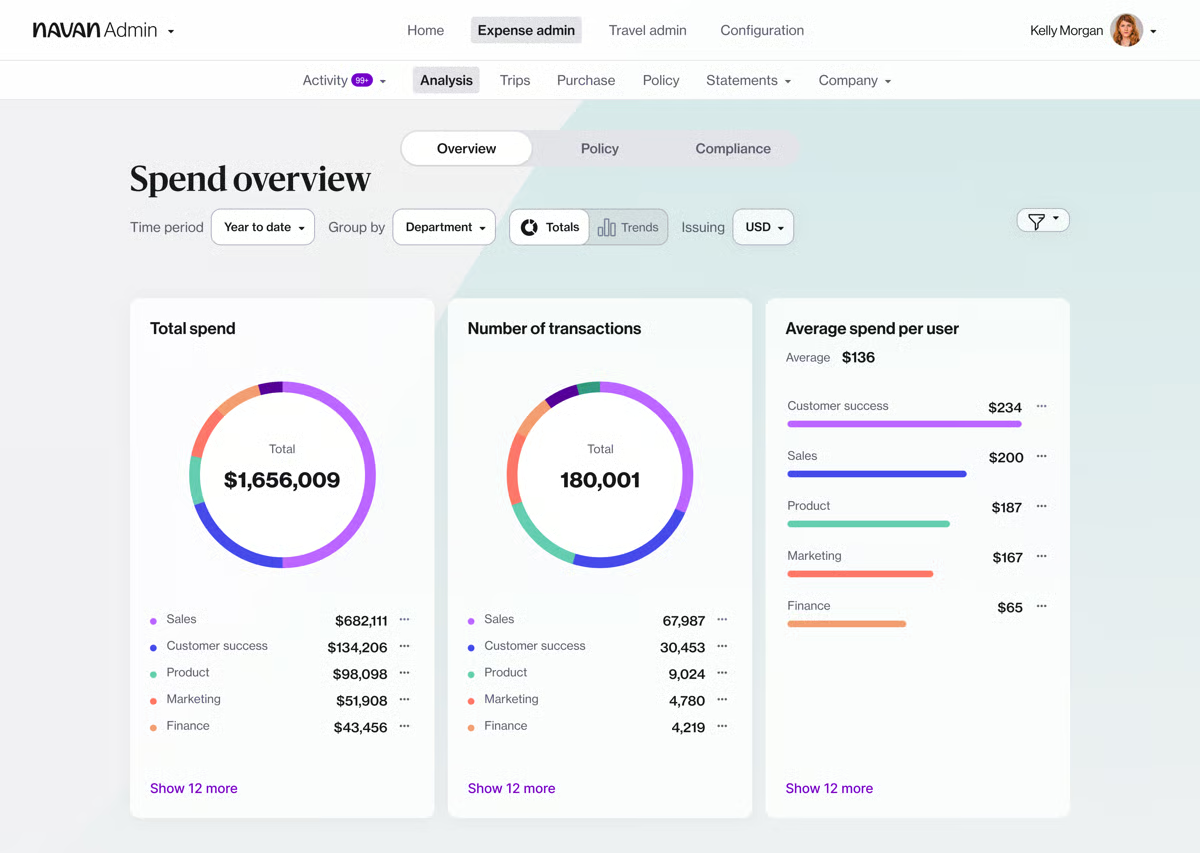
Navan (Formerly TripActions) is an all-in-one travel booking and expense management platform. It offers travel guidance, a faster approval workflow, and seamless scanning of invoices and receipts. The platform supports tracking outstation employee expense reports for different categories like food, accommodation, rentals, and so on.
With pre-built expense categories for office outings, off-site conferences, client dinners, and corporate events, Navan helps employees be more specific to business needs.
|
Pros of Navan (Formerly TripActions)
|
Cons of Navan (Formerly TripActions)
|
| Ease of travel booking integration | Inability to offer niche accommodation options |
| Flight and hotel information access | Weak customer service support for expense approvals |
| Expense reporting and tracking system | Incorrect mapping of mileage with commute reimbursements |
“In a role that involves travel, I have sometimes come back from trips with a wallet full of receipts and have to spend a lot of time doing my expenses. Navan is easy to use and efficient, saving a significant amount of time. I like that you can add your reward member numbers to collect points."
- Navan Review, James L.
"The main thing that stuck out to me is that they don't have a Google Pay integration, which is something that I would really appreciate. Besides that, basically, anything that is missing from Google Flights would be great to have. For example, the price by date feature."
- Navan Review, Carter H.
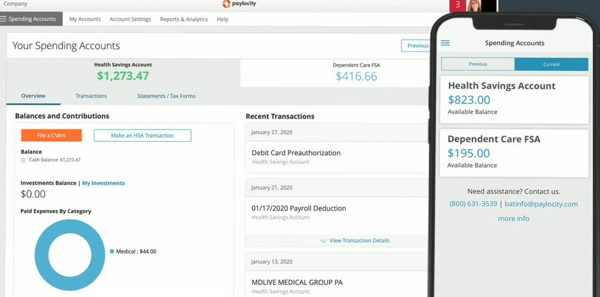
Paylocity is an all-in-one workforce management platform that integrates HR, payroll, finance, and IT processes into a single system. It helps organizations manage payroll, benefits, talent, and workforce operations while also handling non-payroll spend such as expenses, accounts payable, corporate cards, and procurement. Built around a unified employee record, Paylocity keeps policies, approvals, and limits aligned as employees join, change roles, and advance in their careers.
By centralizing people and spend management, Paylocity helps teams simplify operations and make more informed decisions.
|
Pros of Paylocity
|
Cons of Paylocity
|
| Easy-to-use platform that simplifies HR and payroll tasks | Missing or limited features in some modules |
| Strong payroll automation and expense management features | Advanced features feel limited in LMS and reporting |
| Helpful and responsive customer support | Dashboard can feel cluttered for multi-department use |
"I really like Paylocity for its ease of use for both admins and employees. It is simplistic and not complicated for either party to use. Things are pretty straightforward to find. It's less expensive than other systems, which is great. The customer service is also a plus since it's easy to get a hold of someone, which reduces frustrations for my team".
- Paylocity Review, Angie E.
“The most challenging part of using Paylocity has been the time clock kiosk feature on iPads, which has not performed as well as we had hoped. This has led to difficulties for employees when clocking in and out. To address these timekeeping problems and enhance reliability for our staff, we have decided to order a kiosk directly from Paylocity in hopes that it will provide a better solution".
- Paylocity Review, Carla H.
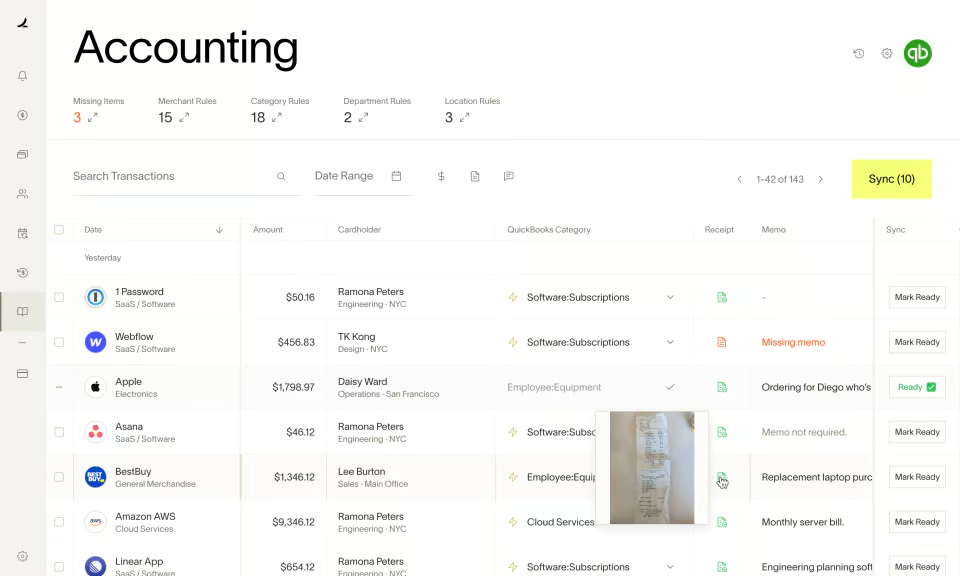
Ramp is a comprehensive accounting and finance software designed to support financial forecasting, corporate loyalty management, and expense tracking for fare and fuel reimbursements. The tool has built-in integrations with accounting and other ERPs to store, track, and approve expenses.
Ramp is a robust spend control and database automation dashboard, supporting revenue and budget teams in cost management.
|
Pros of Ramp
|
Cons of Ramp
|
| Phone or email transaction approval | Loss of points on personal credit cards |
| Easy and intuitive interface | Limited accounting integration |
|
Invoice processing automation |
Inability to navigate between form fields |
“Ramp's tech is modern, efficient, and effective. Even their application programming interface (API) and docs follow modern best practices. Onboarding was easy, and we're using Ramp every day to complete our bookkeeping and expense tracking!”
- Ramp Review, Nathan W.
"Employees will give pushback over the loss of points for their personal credit cards. This falls on deaf ears for Finance, but it is a valid concern to get ahead of and gain a firm footing on your response.”
- Ramp Review, Oscar L.
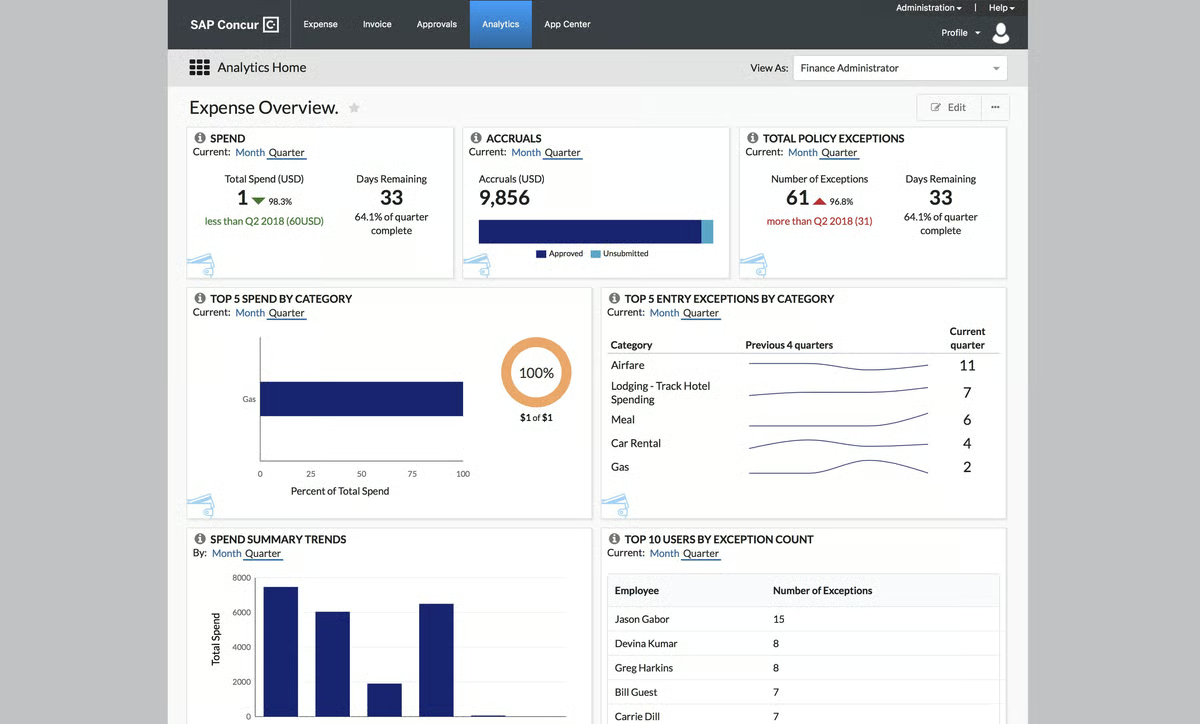
SAP Concur integrates travel tracking and invoice management to allow employees to upload travel receipts, create expense reports, and check the automated progress of their reimbursement appeals. It supports credit transactions via integrated and secure payment gateways to reduce payment turnarounds.
SAP Concur manages accounting and enterprise resource planning (ERP) integrations to assign and route expense reports on time. This empowers teams to manage costs, save resources, and focus on business growth.
|
Pros of SAP Concur
|
Cons of SAP Concur
|
| Artificial intelligence (AI) integrations to audit internal transactions securely | Deficient notification and alert system |
| Real-time data integration for expense tracking | Slow expense processing for multiple individuals |
| Reducing reimbursement lapses | Longer response turnarounds |
“SAP Concur provides amazing pre-travel budget requests, travel booking, expense management, and other reporting tools. It allows the automatic uploading of expenses and receipts, which helps in reducing fraud and mistakes. SAP Concur is very user-friendly software, easy to integrate and implement at the same time.”
- SAP Concur Review, CS Ankita A.
“On behalf of the small business segment (SMB), it does seem to be enterprise-focused. We do things a little differently because our processes have grown and adapted to how we do business. Several of the fields, the way data is formatted, the way it is stored, etc., seem to lend to a rigid enterprise structure instead of the way sometimes SMBs just need to get stuff done".
- SAP Concur Review, Bradley B.
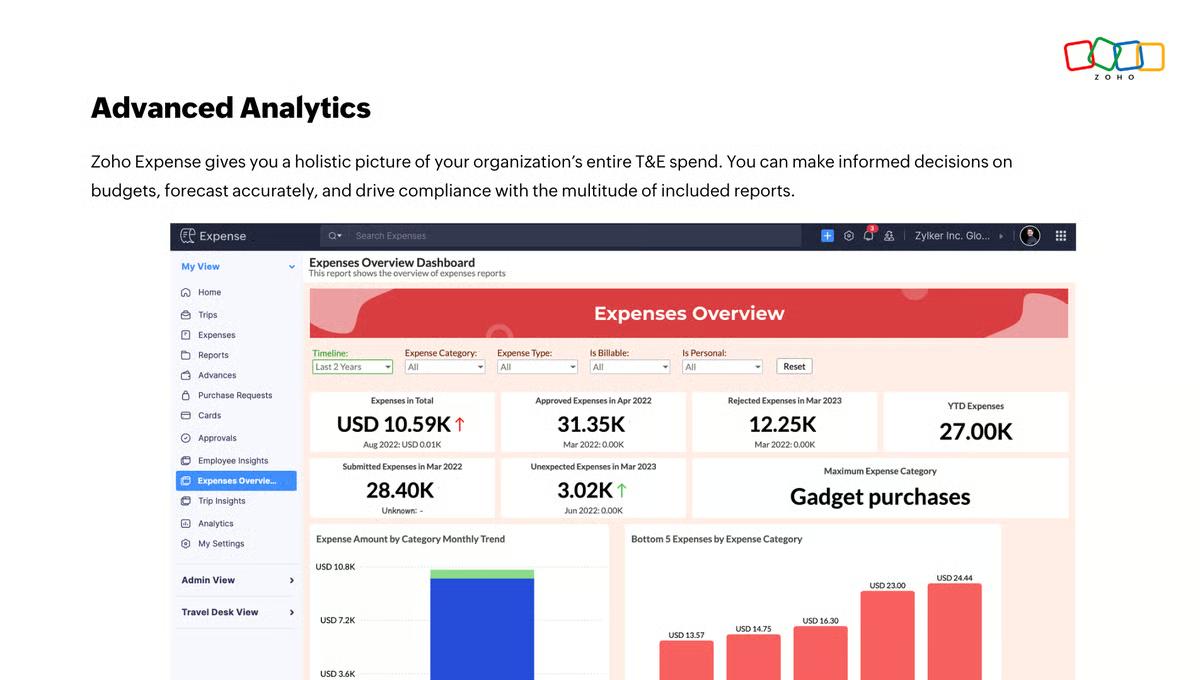
Zoho Expense specializes in travel budgeting, reducing costs, and analyzing travel analytics for businesses. It is a consolidated software where traveling employees can share receipts, get budget estimates, and receive frequent updates from accounting teams. Zoho Expense also manages, tracks, and controls travel overheads to extract deductible expenses and update teams.
The tool integrates with ERP and accounting platforms via webhook automation so that pay cycles are aligned with recent reimbursement changes.
|
Pros of Zoho Expense
|
Cons of Zoho Expense
|
| Cuts overspending at source | Weak pre-labeling of report fields |
| Invoice auto-scanning and tracking for receipts | No bill creation service |
| Easy expense and reconciliation management | More room for industry-specific customization |
"I really love using Zoho Expense to scan my receipts and export the spreadsheet of it all. It's perfect to sum up numerous expenses in different categories. It's incredible that scanning receipts with the phone camera works so fast at converting all the line items, categories, and totals into a full report. I'm amazed, and I love it.”
- Zoho Expense Review, Mark G.
"Absence of some languages and inaccuracies in the automatic receipt recognition function. The automatic recognition function does not prevent user mistakes.”
- Zoho Expense Review, Moonyoung D.
A business expense tracker can be a part of a travel management solution or bought separately and later integrated with your ERP. These solutions manage not only your travel expenses but also overall financial expenses that you may incur across departments for business growth.
A business expense tracker system lists your active expenses and tracks them against your overall budget planning. However, it doesn’t support auditing or approving company expenses, uploading receipts, or generating employee statements. It is always advisable to integrate the tracker with either accounting software, ERP, or finance analytics software to maintain a paperless trail of your official transactions.
The top business expense tracking software on G2 are BILL Spend & Expense, SAP Concur, Expensify, Navan, and Ramp.
Yes, business expense tracker software is designed with user authentication and secure data authorization in mind. The expense reports you upload are visible only to your organization’s accounting team, who use this information to maintain cost centers and control budget spending. But even then, data is secured based on role-based access control (RBAC) authentication, ensuring that sensitive information is accessible only to those with the appropriate permissions.
A business expense tracker provides a comprehensive view of all employee expenses under one platform. Be it travel, e-commerce, sales, or food, employees can list all transactions that can benefit the organization in the tax redemption process. By providing these benefits, businesses can manage their budget and withhold taxes in a fiscal year.
Some do, but often with limits.
Yes, but automation is usually basic in free versions.
Advanced rule-based categorization is typically part of paid plans.
Yes, free tools can assist with tax prep by organizing expenses and generating reports.
Zoho Expense and Expensify help classify deductible expenses and export data for accountants. However, they don’t replace tax software or professional advice, paid plans offer stronger compliance and audit support.
Common limitations include:
Tools like SAP Concur, Emburse Expense, and Navan usually reserve advanced controls for paid tiers.
Non-accountants benefit from tools with simple interfaces and automation.
These tools reduce accounting complexity for everyday users.
Some free tools support basic multi-currency tracking, but advanced features may be limited.
For freelancers:
Both tools are easy to use and don’t require accounting expertise.
Some do, but integrations are often limited in free tiers.
Enterprise tools like SAP Concur and Emburse Expense offer deep integrations primarily in paid versions.
I believe tracking business expenses is essential for protecting financial assets and maintaining healthy cash flow. When reimbursements are handled on time, and spending stays aligned with budgets, it creates a win-win situation for both the business and its employees.
In the long run, monitoring employee expense policies can have significant rewards, fostering a positive, employee-friendly, and empathic environment for your workplace.
Check out this user-centric guide on expense management and make informed decisions towards a positive and sustainable financial future.
Edited by Monishka Agrawal
This article was originally published in 2024. It has been updated with new information.
.png)

Keeping track of expenses is a headache, whether it’s personal spending getting out of control...
 by Sudipto Paul

I've always loved to travel. Whether it's planning weekend escapes, stretching PTO into...
.png) by Tanuja Bahirat
by Tanuja Bahirat
SAP Concur, Rippling Spend, Navan, and Paylocity are the most trusted expense management...
 by Krithika Sathyamoorthy