
.png "directory service")
A directory service is like a control panel for all users, applications, and devices across your organization's network. It’s a centralized repository for identity and access management (IAM) in on-premises, remote, or hybrid environments.
When a directory service is delivered in the cloud, typically via cloud directory services, it lets organizations effectively manage individual identities and their lifecycles from a single place.
You have better control over user access privileges regardless of whether they are globally distributed. It makes it simple to implement identity management policies crucial to an organization’s data privacy and security.
Let’s look at directory services in detail and learn more about their different components.
A directory service stores, organizes, and manages information about users, devices, and resources on a network. It enables authentication, authorization, and resource lookup by providing a centralized database.
With centralized information, administrators have a single point of reference to authenticate and authorize users. This reduces a lot of manual work in large networks, making it easier to enforce policies.
How would you manage users' accounts in a company? Would you go to each employee’s desk to configure and set up their accounts? Let’s say, in a strange situation, you do it. But when the employees are distributed in global offices, wouldn’t this be a redundant inefficiency?
If you have a centralized management system from which you can provide instructions to different parts of the IT infrastructure, it will make your job easier. Directory services offer this centralized management. They provide centralized authentication, authorization, and accounting, also known as AAA.
When you configure computers and applications with a directory service, decisions about granting or denying access to them are centralized. It allows you to govern access rights based on a user’s role in an organization.
Suppose you’re a system administrator and have permission to create user accounts and reset passwords. If you add another system administrator, you don’t want to individually find everything they need access to and set permissions. It would take forever.
Instead, you can create a group called “sysadmins.” Add them to the group, and you can simply give them access to all the needed resources. If they change roles, you only need to change their groups. This is RBAC, and the centralization achieved through directory services helps you implement it.
Directory services play a critical role in improving an organization’s security posture by centralizing the management of identities and access permissions. With a single source of truth for users, devices, and applications, administrators gain better visibility into who has access to what, reducing the risk of unauthorized or inconsistent permissions.
By enforcing access policies centrally, directory services help ensure that authentication and authorization rules are applied consistently across systems. This consistency is especially important in environments where users access multiple applications, services, or devices.
Directory services also support single sign-on, allowing users to authenticate once and access multiple applications without having to re-enter credentials. This improves usability while still maintaining strong access controls, reducing friction without compromising security.
In addition, directory services support role-based access control at a high level, making it easier to apply consistent permissions as users join, move within, or leave an organization.
Large enterprises require directory services that can support a growing number of users, devices, and applications across different teams and locations. As organizations expand, directory services must continue to perform reliably without becoming harder to manage.
Most enterprise directory services include the following core components:
When these components work together, the directory service supports identity and access management (IAM) across the enterprise network, both in on-premises and cloud environments. It unifies the user management approach, applying group policies and permissions to different directory objects based on their privileges.
A popular example of a directory service is a DNS server's domain name system (DNS). A DNS server stores the mappings of computer hostnames and other domain names to IP addresses.
A directory server stores user and machine information in a centralized location, enabling easy access. In an enterprise, the server has replication capability. It allows for the copying and distributing of directory data across multiple servers while providing a unified way to access data.
This redundancy is helpful. If a server fails, the redundancy keeps operations running. Moreover, this replication reduces latency while accessing the directory service. With different replicas of the directory service available in each office, you answer queries faster.
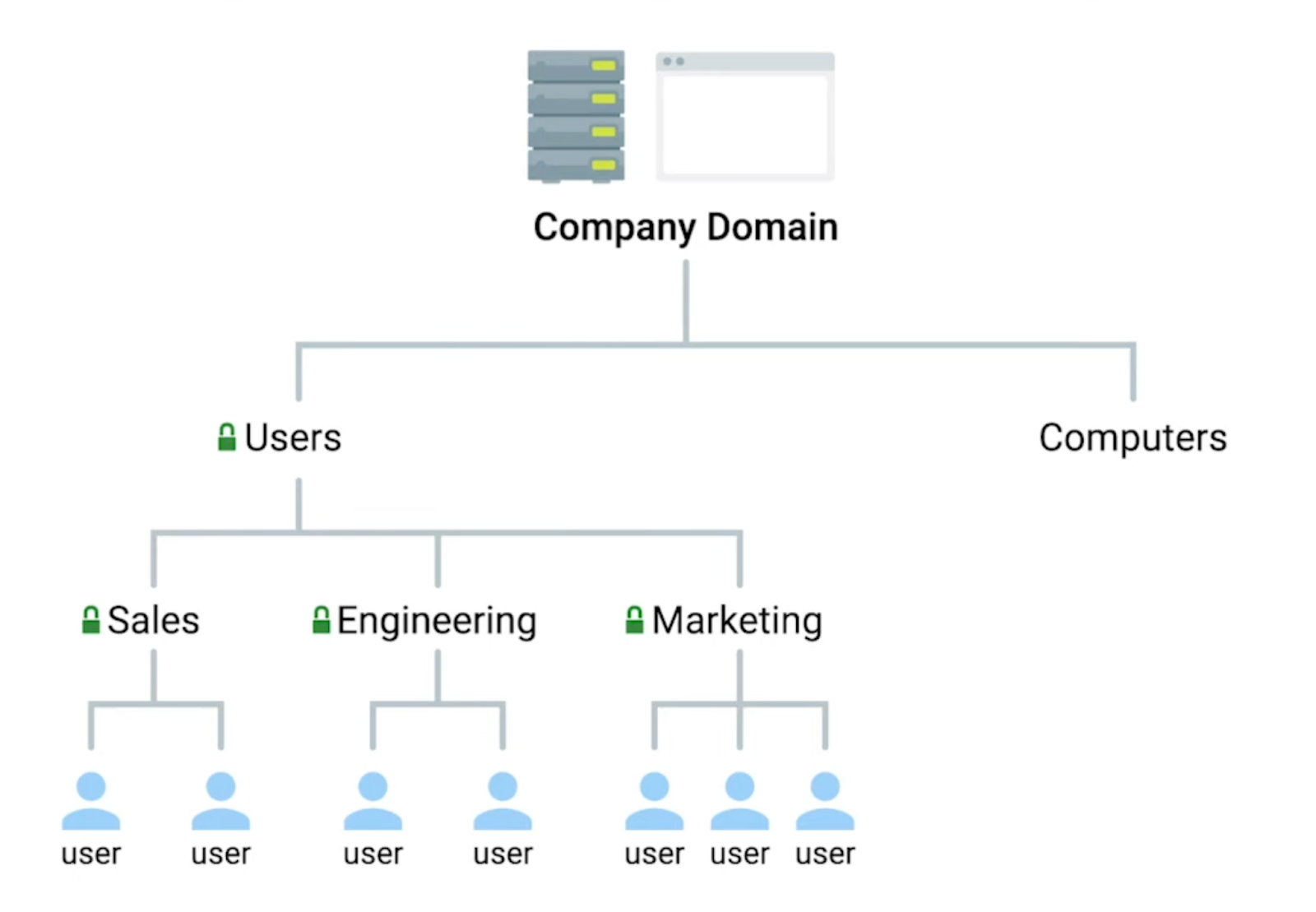
Directory services make information searchable in an organization. They use a hierarchical model of objects and containers. The containers are organizational units (OUs) that contain objects or more OUs. This is similar to a file system. Each OU contains individual files or objects for a directory service, or it can be another folder.
The hierarchy conveys additional information about what's stored within. Take a directory structure as an example.
Source: Quizlet
You may have an OU code user, which contains all user accounts. Within this OU, additional OUs could represent your organization's actual team structure. The user's OU could contain additional OUs like sales, engineering, and marketing, including the user account objects for the individuals in these current teams.
This structure can convey differences between these sub-OU sub-users. For example, you can set stricter password requirements for engineering members without affecting sales or marketing.
Submembers inherit the characteristics of their parent OU. So, any changes made to the higher-level user's OU would affect all sub-OUs, including sales, marketing, and engineering.
Microsoft’s Active Directory (AD) is primarily for Windows environments. It authenticates users, facilitates policy management, and allocates resources. Its hierarchical format structures the directory, making managing several devices and users relatively easier.
An Active Directory is made up of several services, including:
Active Directory is good for use cases where you need to manage on-premises Microsoft-based technology like SharePoint or Exchange. It’s also helpful in implementing group policies across Windows computers.
Due to its design, it is not the best choice for large-scale implementations with a single-user community.
Lightweight directory access protocol (LDAP) is a popular protocol that facilitates authentication in directory services.
LDAP consumes fewer resources and allows efficient querying and modifying entries in a directory structure. It delivers interoperability and works seamlessly with different platforms.
The protocol’s versatility lets organizations manage user credentials or control access to applications and services. However, authentication is its primary use. Docker, Kubernetes, Jenkins, and Linux Samba servers validate usernames and passwords using LDAP.
LDAP is a preferred choice in the following use cases:
Source: Okta
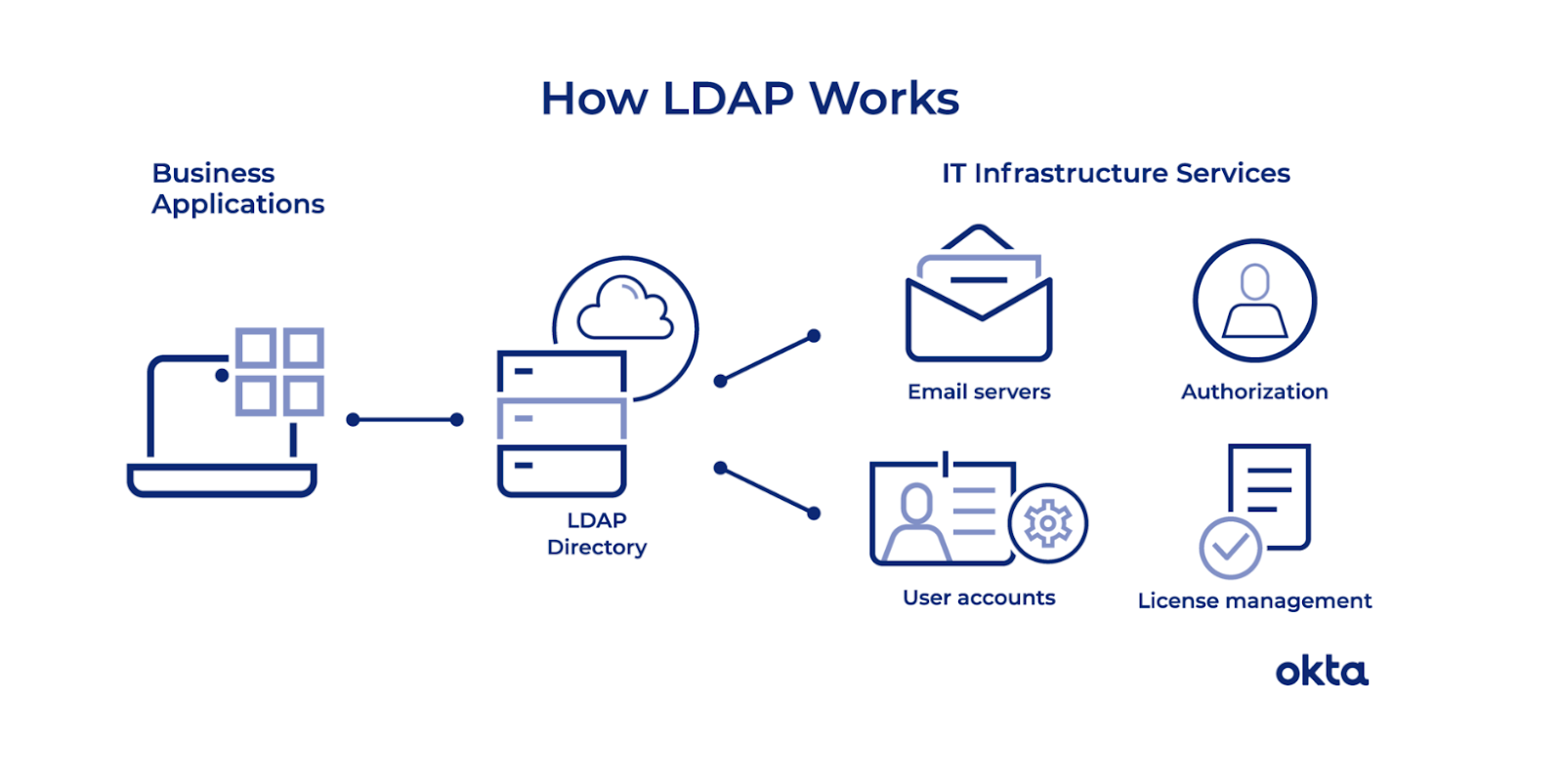
In an LDAP query, a user connects to the server using an LDAP port and submits a query, such as an email lookup, to the server. LDAP queries the directory and delivers the information to the user as soon as it finds it. Then, the user disconnects from the LDAP port.
LDAP servers are good for large-scale applications or where large-scale user authentications take place.
Active Directory and OpenLDAP are two popular directory services that use LDAP.
IT support specialists or system administrators typically perform this task.
They will set up, configure, and maintain the directory service, including managing the operating system (OS) on which it runs. This involves standard OS management tasks, such as installing updates and configuring standard services. A system administrator is also responsible for installation and configuration, especially if multiple servers are involved.
The business administrator is responsible for designing and implementing the overall hierarchy.
A directory service adopts a client-server model. The server hosts the directory service, and the client performs search, add, or modify operations while interacting with it.
A centralized database stores information about network resources like users, groups, and services in a hierarchical structure. Protocols like LDAP authentication clients govern how directory information is updated while managing entries.
When a user tries to access a network resource like an application or file server, the request goes to the directory service to verify the identity before giving access. The service cross-checks login credentials and verifies them against its records. After authentication, the directory service determines what assets the user can access based on their privileges and authorization.
A directory service's user information and attributes are synced with all applications and other services through the System for Cross-Domain Identity Management (SCIM).
It allows effective user management and access control while facilitating functionality like SSO. In hybrid environments, on-premises directory services sync with cloud-based directories, ensuring consistent platform access.
Implementing a directory service requires careful planning. Organizations must assess their needs, existing infrastructure, and how directory services will fit into their overall strategy.
Conduct a thorough needs assessment first. Understanding the scale of user management required and the types of resources to be managed. While assessing these, security and compliance needs must be considered, too. Then, you can compare different types of directory services that are popular on the market.
G2 helps teams choose the best cloud directory services for simplifying user management, strengthening security, and enabling cloud-first and hybrid environments.
Below are the leading cloud directory services, according to G2’s Winter 2026 Grid® Report.
Your organizational requirement will largely govern the choice of the type of directory service.
As a general guideline, you should consider the following factors:
Involve stakeholders early in the planning phase to clarify the process. If possible, seek end-user collaboration, too. When implementing a directory service, follow the process below. Here’s an overview since the actual process varies from organization to organization.
Once the service is successfully rolled out, start monitoring it with consistent maintenance. Remember to ask users for feedback on any areas for improvement.
When you consistently monitor the service, you can proactively update user information, analyze access logs, and constantly back up information. If feasible, set up a regular audit process to ensure only authorized users can access sensitive information. This level of monitoring will help you become proactive in updating software with its security patches.
Got more questions? We have the answers.
A directory service stores and organizes identity data. Identity and access management is a broader system that uses directory services along with authentication methods, policies, and governance controls to manage access across applications and resources.
Directory services centralize authentication and authorization, reducing the risk of inconsistent permissions. By using group policies, role-based access control, and replication across servers or regions, they allow organizations to scale securely while maintaining consistent access rules.
Active Directory is a type of directory service, but not a synonym for all directory services. It is primarily designed for Windows-based, on-premises environments, while modern directory services also include cloud-native and hybrid solutions.
Cloud directory services are delivered as managed platforms and are designed to integrate easily with cloud applications and remote workforces. Traditional directory services are often hosted on-premises and may require more manual maintenance and infrastructure management.
Organizations should consider cloud directory services when supporting remote or hybrid workforces, relying heavily on SaaS applications, or planning for rapid growth. Cloud-based options often provide faster deployment, easier scalability, and reduced operational overhead.
Traditional identity management software and cloud directory services share some functionality. The managed service delivery model and scalability of cloud directory services differentiate them.
When comparing directory services, use these questions to make a better choice:
The answers to these questions will help you make a winning decision.
If you want to explore more, check these free cloud directory service tools.
This article was originally published in 2025. It has been updated with new information.


Software are like magic props of the corporate world.
by Sagar Joshi

The scalability and innovation the Google Cloud platform (GCP) offers remain unmatched. As an...
by Sagar Joshi

Managing access across different apps can get complicated fast. Strong passwords help, but...
 by Washija Kazim