You know the drill: marketing has its videos in one place, sales has theirs somewhere else, and training is just emailing files around. By the time someone asks for a specific video, nobody actually knows where it lives, and multiple people have to search for hours to find the right one.
I went looking for the best video CMS tools that hold up even when multiple teams are contributing to the same library. That search turned out to be a lot more specific than just finding a platform with a good feature list. The strongest tools aren't always the ones that are most comprehensive. Many times, the strongest ones are the ones that stay manageable as content volume grows, keep analytics trustworthy over time, and fit into your broader stack without constant maintenance.
Video CMS has also diversified significantly as a category over the years. A tool built for sales video outreach operates very differently from one built for enterprise training libraries or OTT monetization. Getting that fit right before you commit is what this guide is designed to help with.
TL;DR: Here are the top eight video CMS platforms for 2026: Loom, Fathom, Wistia, Synthesia, Vidyard, Muvi One, Panopto, and Idomoo.
These video CMS tools are top-rated in their category based on G2’s Winter 2026 Grid® Report. I’ve included their strengths and ideal use cases to help you choose the right platform.
Most video CMS platforms promise centralized storage, easier organization, and better control over video content. What separates them is how well they hold up once multiple teams start contributing to the same library, permissions become more complex, and content volume grows beyond what a shared drive can realistically manage.
The strongest platforms do more than store videos. They keep libraries searchable as content scales, maintain reliable analytics over time, and fit naturally into the systems teams already use, whether that's a CRM, marketing platform, learning management system, or internal knowledge base.
As I worked through G2 reviews and category data, a few themes surfaced consistently. Teams adopt video CMS tools to reduce duplication, improve content governance, maintain visibility into performance, and avoid the operational friction that comes from managing video across disconnected platforms.
The platforms below stood out not because they offered the longest feature lists, but because they continued to perform as libraries expanded, contributors increased, and video became a larger part of day-to-day operations. Each one is mapped to the workflows and team types where it delivers the most value.
I used G2’s Winter 2026 Grid® Reports to shortlist Video CMS platforms based on real user satisfaction scores and market presence across small teams, mid-market organizations, and enterprise environments.
I then used AI to analyze hundreds of verified G2 reviews and extracted recurring feedback patterns around what matters most in real-world video management. This included content organization, permission and access control, playback reliability, analytics accuracy, integrations with marketing, sales, and learning tools, and how well platforms support multiple teams working at the same time. This helped identify which tools genuinely reduce operational overhead and which tend to struggle as video libraries and user counts grow.
Since I haven't personally used every platform here, I validated findings against real feedback from marketing teams, enablement leaders, L&D managers, and IT teams who manage video at scale.
Visuals and product references are sourced from G2 vendor listings and publicly available product documentation.
G2 reviews showed me what users notice. Conversations with marketing, enablement, learning, and IT teams helped me understand what actually causes problems at scale. Together, that's what shaped what I prioritized here:
Based on these criteria, I narrowed the field to Video CMS tools that provide structure, reliability, and visibility without introducing unnecessary complexity. The strongest Video CMS tools align with how teams already create and use video, and continue to work as libraries as usage grows.
Below, you’ll find authentic user reviews from the Video CMS category. To appear in this category, a tool must:
This data was pulled from G2 in 2026. Some reviews may have been edited for clarity.
The review data keeps pointing back to one thing: Loom works because it removes the friction between having something to explain and actually explaining it. It functions as shared infrastructure for capturing processes, scaling visual knowledge, and keeping distributed teams aligned without scheduling a call. G2 reviews consistently frame it as a tool built for speed, clarity, and async-first communication.
G2 user reviews strongly emphasize how quickly teams can create and distribute walkthrough videos. What stood out to me across the review data is how often teams describe Loom as a replacement for repetitive explanations and unnecessary meetings. Users frequently reference the ability to record, trim, split, and share videos within minutes, helping explain dashboards, troubleshoot product issues, or deliver client tutorials without coordinating live calls.
If your team builds onboarding content or process documentation, this is where Loom earns its place. What I kept seeing across G2 reviews is that reusable training libraries and on-demand guidance are among the platform's most common use cases. Instant sharing and flexible playback make it possible for globally distributed teams to consume explanations asynchronously, reinforcing knowledge retention without requiring anyone to be in the same time zone.
One thing that stood out to me is how consistently ease of use appears as an adoption driver in G2 reviews. Reviews describe the interface as approachable for anyone on a team, from product managers to marketing interns, without requiring technical orientation or IT involvement, backed by an ease-of-use rating of 95% on G2. From what I saw in the feedback, setup is quick enough that teams across departments adopt the tool without a formal rollout, keeping video communication accessible rather than limited to technically confident users.
G2 reviewers consistently highlight the editing experience as one of Loom's practical strengths. What stood out to me is how often users describe being able to polish recordings without leaving the platform. Automated filler-word removal and simple trimming tools reduce the need for external editing software, while the 86% branding score on G2 reflects how effectively teams maintain a consistent presentation across both internal and external content.
Recording quality is another area that comes up frequently in reviewer feedback. What I noticed across G2 reviews is that teams consistently describe getting clear, reliable recordings from standard home and office setups without requiring specialized equipment. For organizations relying on video communication with customers, prospects, or distributed teams, that reliability removes a layer of production complexity that many reviewers clearly value.
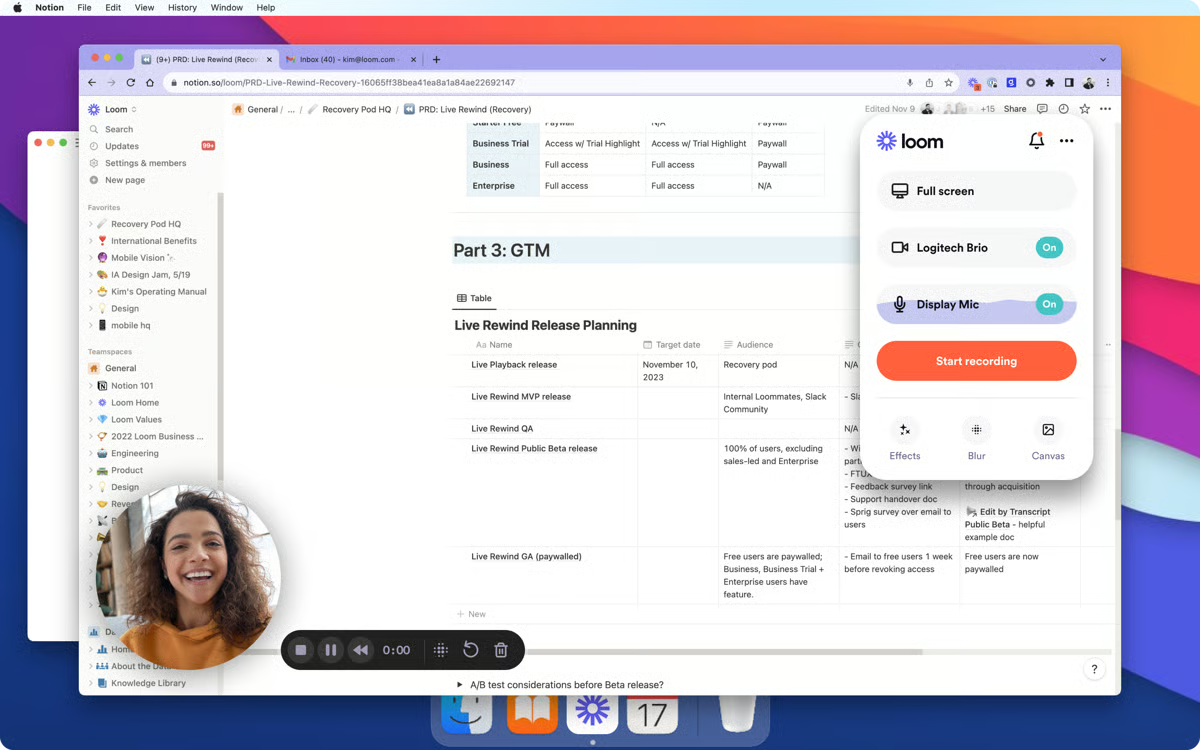
Camera and screen recording run simultaneously through the Chrome extension, keeping the workflow embedded in everyday browser-based work. G2 feedback flags this as especially useful for professional introductions, client walkthroughs, and step-by-step instructions where being on camera adds presence and clarity.
G2 reviewers note that the editing tools cover the essentials, including trimming, splitting, and filler-word removal, but stop short of more advanced capabilities such as lighting correction, multi-track editing, and frame-level adjustments. This is most noticeable for teams producing polished external-facing content, while organizations focused on internal communication, training, and documentation align well with the platform’s editing model.
Processing time can increase as recording length and file size grow, a trade-off that G2 reviewers mention most often during high-volume recording periods. Teams relying on near-instant turnaround for longer sessions are more likely to notice this, while shorter recordings fit naturally within the platform’s workflow. Many reviews describe the delay as manageable, particularly when recordings are structured into shorter segments that keep sharing and collaboration moving quickly.
Loom fits organizations where asynchronous communication is the default, visual clarity is a priority, and the team needs a tool that gets out of the way and just works.
“What I appreciate most about Loom is how easily it transforms complicated explanations into straightforward, easy-to-follow video walkthroughs. Rather than sending lengthy messages or scheduling additional meetings, I can simply record a quick screen share to illustrate dashboards, share data insights, or walk through specific processes. The video quality is outstanding, sharing happens instantly, and it’s ideal for collaborating with international teams who can view and revisit the videos whenever it suits them. Loom saves time, minimizes misunderstandings, and greatly improves the efficiency of asynchronous communication.”
- Loom review, Ankit R.
“I would love it if the browser on-screen button were not automatically attached, but that's quite easy to remove.”
- Loom review, Roxy L.
Video capture is where the content starts. Check out the best screen and video capture software to see how teams record before anything reaches a library.
Fathom makes sure nothing useful escapes them. Recording, transcription, and AI summaries run automatically inside daily collaboration, so teams stay focused on the conversation while the documentation takes care of itself. G2 reviews back this up: playback, transcripts, and AI insights in one place cut the need for separate note-taking tools entirely.
Recording reliability is the first thing that stood out to me in the G2 review data. G2 users describe using Fathom multiple times a day without dropped recordings or noticeable quality issues, making it practical for compliance records, training material, and onboarding content. What I kept seeing across reviews is that teams trust the platform to capture conversations consistently, which becomes increasingly important when recordings serve as a long-term reference.
Teams can pull value from meetings in three different ways: the full recording, the transcript, or the AI-generated summary. The adaptive learning score sits at 93% on G2, and what stood out to me is how often reviewers single out the accuracy of those summaries. Across the feedback I reviewed, AI-generated meeting notes appear to be one of the capabilities that consistently meets expectations rather than creating additional cleanup work afterward.
The CRM and calendar integrations are where I think the 92% cross-system integration rating on G2 makes complete sense. Reviews frequently call out how it removes the manual steps between a meeting ending and the follow-up actually happening, and for your team's execution workflows, that friction removal adds up fast. Meetings stop being isolated recordings and start feeding directly into action.
For global teams, what you get here is real handling of conversational language, not just formal vocabulary. Multilingual transcription picks up everyday spoken language and regional expressions accurately, and the 93% proactive assistance rating on G2 reflects how well it surfaces action items and key moments without anyone needing to manually tag them. Reviewers working across regions specifically mentioned it as a meaningful difference in day-to-day usability, and I think that's worth taking seriously.
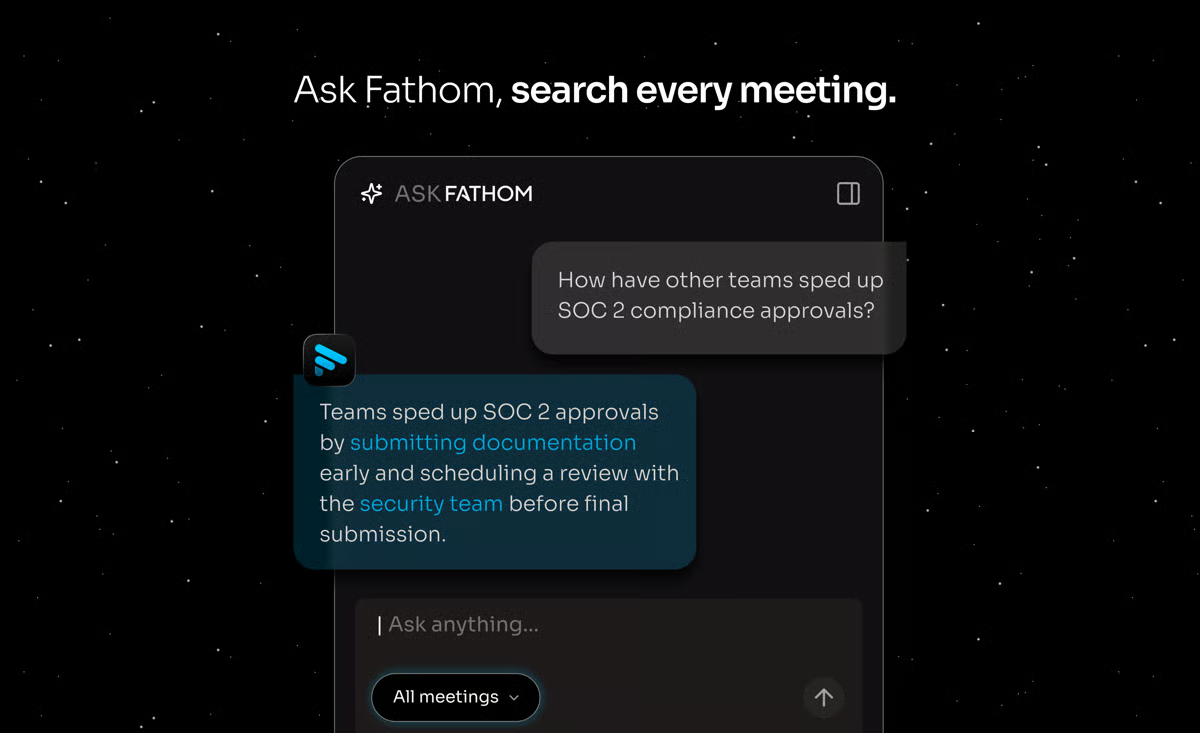
My read on the support experience is that it punches above what you'd expect from a tool at this level. G2 reviewers describe setup as straightforward and support as responsive and practically oriented. That combination drives fast onboarding and keeps teams confident in daily use.
Transcript search turns a growing library of recordings into something actually usable. Teams can locate specific keywords, decisions, or discussion points without scrubbing through full videos, which G2 reviewers mention as a serious time saver when verifying what was agreed or pulling context for a follow-up.
Several G2 reviewers flag that AI-generated summaries and transcripts do not always capture nuance accurately, with specific words misinterpreted and summaries occasionally requiring manual correction. This reduces confidence in the searchable library when transcript precision matters. The full meeting recording stays available alongside every transcript, giving teams a complete and reliable reference point to check against.
A few recurring themes in G2 reviews suggest that AI-generated summaries and transcripts do not always capture nuance accurately, with some reviewers noting words misinterpreted and summaries that require manual correction. Teams relying on transcripts as a primary record of meeting content are most affected, as gaps in accuracy reduce confidence in the searchable library over time. The underlying video recording itself remains complete and retrievable.
Fathom turns conversations into structured, reusable assets without adding operational overhead, and the G2 Data reflects genuine day-to-day confidence in the platform. Teams where execution, onboarding, and knowledge continuity all run through meeting output will get the most out of what Fathom offers.
"Ease of use, quick turn around for summary emails and video recording to participants. Implementation was a breeze. The customer support is fantastic! The integration with our CRM and e-mail is awesome! Use it with almost every meeting that we have.”
- Fathom review, Brian K.
“You can't save prompts in their Ask Fathom feature - would be super helpful to have a standard prompt library that our team can use, especially in a sales environment where SDR's are handed over to AE's and need to prep handover info after a demo.”
-Fathom review, Bradley M.
Explore the best AI video generators to see how different platforms handle script-to-video production at scale.
Wistia gives marketing, education, and customer communication teams full control over branding, distribution, and performance across owned channels. G2 reviews consistently back this up, pointing to structured video delivery and content management as the core reasons teams land here and stay.
Here is what I noticed in G2 reviews: the upload and organization experience is one of Wistia's most reliable workflow advantages. Videos can be uploaded, embedded, and shared within minutes regardless of file size, with folder and subfolder structures keeping growing libraries organized and accessible. Several G2 reviews specifically note switching from other platforms to Wistia because of how much simpler the day-to-day content management experience is.
Going through G2 review patterns, brand presentation kept coming up as a clear differentiator. The 91% branding features rating reflects what reviewers describe: consistent visual identity across landing pages and marketing assets, all without needing to pull in external tools.
If you're running a content team that lives and dies by performance data, the engagement analytics here are worth paying attention to. What stood out to me across G2 reviews is how often teams use watch time, drop-off points, and cross-asset comparisons to guide content decisions rather than simply measure performance after the fact. With analytics rated at 89% on G2, reviews describe using that data to refine messaging, improve content structure, and decide which video assets are worth expanding or revisiting.
As I worked through G2 reviews, the setup experience emerged as one of the platform's most consistently praised strengths. Users describe going from account creation to a fully embedded video in minutes, often without involving technical support. What I found notable is how frequently marketing and content teams mention being able to implement the platform independently, avoiding delays tied to IT or development resources. That kind of low-friction onboarding is something reviewers continue to highlight long after the initial rollout.
Having one place for hosting, sharing, and managing video across internal use, social distribution, and customer-facing content is a recurring reason teams describe switching to Wistia. Feedback notes the consolidation eliminates asset duplication and version confusion, and if your cross-functional team is currently reconciling multiple storage locations, that single-library model will register as an immediate operational improvement.
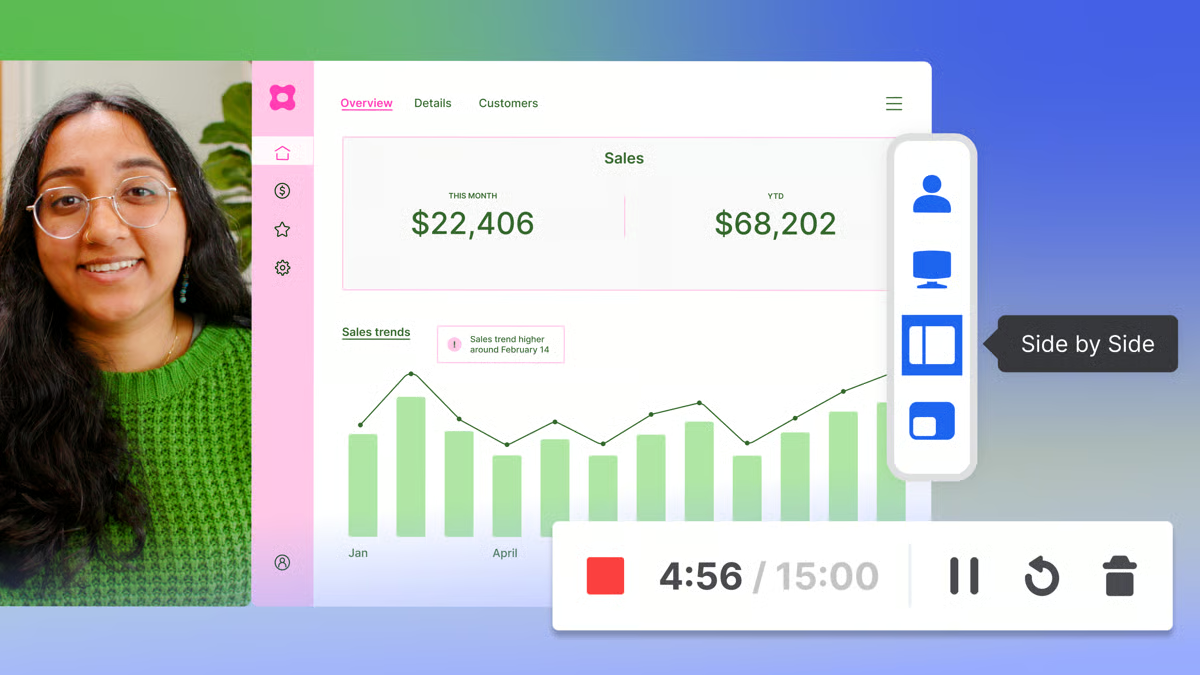
What stood out to me is how practical the AI transcription capability feels as a workflow tool. G2 reviewers describe it as accurate and consistently useful for locating specific moments across large libraries, pulling clips for secondary use, and managing media more efficiently. The ability to edit transcripts directly inside the platform adds meaningful control, supporting accessibility requirements and content reuse without forcing teams to export anything.
G2 reviews note that user and group management becomes harder to navigate as team size and content volume grow, with permission updates across a large library adding coordination steps that slow down access management. Teams managing smaller, stable content libraries find the upload, embed, and sharing workflow clean and consistent throughout, keeping content distribution running smoothly without the coordination overhead that larger libraries introduce.
Integration depth with broader marketing technology stacks covers standard connections but does not extend to every tool in complex setups. Teams running layered CRM, automation, and analytics workflows may find some connections require manual workarounds. Marketing and content teams whose primary needs are video hosting, engagement analytics, and embedded delivery find Wistia's core capabilities fully self-contained.
Wistia makes sense for organizations where video is a measured marketing asset. If you need a platform that keeps video organized, on-brand, and tied to performance outcomes, this is a strong fit worth serious consideration.
“I really appreciate Wistia's customer support. They've been fantastic for us, always quick to address our questions and provide solutions. The ease of use is another highlight; the product is intuitive, making it simple to navigate, and uploading videos is fast, regardless of their size. I also enjoy the customization options offered by Wistia, which allow us to tailor our videos to our needs. Setting up Wistia was a breeze too. I managed to do everything myself, from the initial setup to uploading our first videos and embedding them on our website..”
- Wistia review, Caio F.
"I think the only thing that comes to mind for me is similar to what you can do with Videlytics. Some of those other platforms where you can do fake timers to basically say, like, oh, you're halfway through the video. In reality, you're only a fourth of the way through. That would be a good one."
- Wistia review, Zachary R.
Synthesia enters the conversation as a platform focused on scalable, repeatable video content production. It is most often evaluated by teams building training libraries, onboarding programs, and enablement content, and if those are the workflows your team is trying to scale, the production model here is worth understanding before looking elsewhere.
What stood out to me across G2 reviews is how often teams point to the avatar and multilingual voice combination as the feature that changes the production equation entirely. Script-to-video replaces much of the coordination typically associated with actors, studios, and post-production, turning video creation into a workflow any team member can manage. Reviewer feedback consistently highlights faster output and reliable quality across large content libraries as the most meaningful benefits.
Visual consistency across large video libraries also came through clearly in the review data. Teams describe applying brand elements consistently across projects without manually adjusting every asset, and content produced across different campaigns, departments, or time periods maintains a cohesive look. Backed by a 91% branding rating on G2, what stood out to me is how consistently reviewers connect that reliability to easier content scaling, especially compared with workflows where brand consistency depends heavily on individual execution.
If you're converting written material into video, this workflow is built for exactly that. Scripts, presentation decks, and knowledge base content translate into polished output without rebuilding source material from scratch, and voice controls give precise adjustment over tone, pitch, and speed to match whatever delivery style the content needs. No external production coordination required.
I keep seeing this pattern in G2 reviews: teams describe the interface as intuitive enough for instructional designers, training leads, and content creators to pick up independently from day one. No lengthy configuration, no technical support needed. Workflow features are rated at 84% on G2, reflecting the kind of repeatable processes that keep production moving at volume without things grinding to a halt.
Transcription and closed captions across multiple languages eliminate the need for separate localized production pipelines altogether. Distributed and international teams get consistent knowledge delivery without spinning up parallel workflows for each market, and diverse avatar representation adds real value in inclusive learning environments where who appears in your training content actually matters.
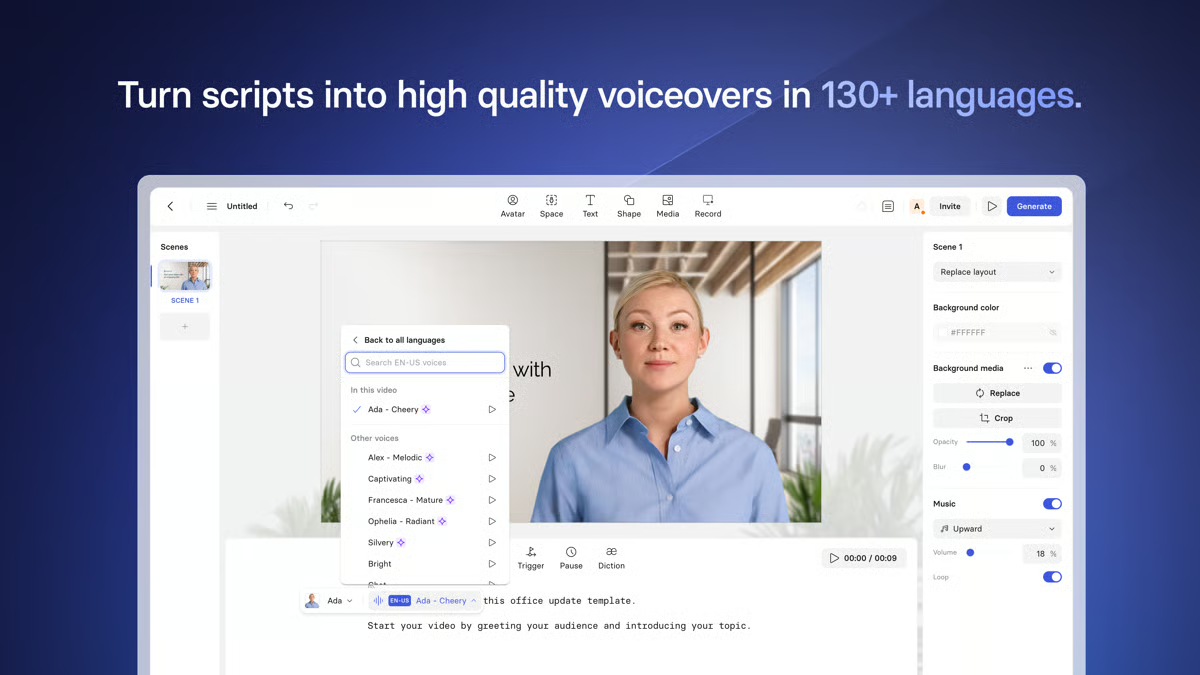
Copying a previous video and updating only the script is the kind of workflow shortcut that stood out to me as smart product thinking. Teams running weekly video programs or maintaining large training libraries describe it as one of their biggest practical efficiency gains, keeping output volume high without proportionally increasing production time or coordination effort.
Lip-sync accuracy in non-English languages does not always match the precision available in English. This is more noticeable for teams producing highly localized content where presentation quality is closely scrutinized, while organizations focused on training, marketing, and multilingual communication align well with the platform’s localization capabilities. Still, captioning remains consistently reliable, helping keep content accessible for global audiences.
G2 reviews also flag that plan-based video and feature limits may not align perfectly with every production workflow. This is more noticeable for teams producing content at high volume or managing varied production needs, while organizations with more predictable output align well with the platform’s tier structure. The creation tools, avatar options, and language support remain consistent across plans, allowing teams to maintain production quality as they scale.
If your team needs structured training, onboarding, and enablement content at volume, Synthesia is a great fit. G2 Data reflects consistent confidence across production efficiency, branding, and accessibility, and the platform scales comfortably from small business to enterprise, wherever video output is high and production resources are stretched.
“I love how quick and easy Synthesia is to use. I can effortlessly add backgrounds to my projects and splice videos with slides, which makes the video creation process smooth and efficient. The platform allows me to quickly create brand-compliant videos, complete with a suitable accent and avatar. Additionally, I've found no other service that facilitates splicing with slides so easily, which makes Synthesia particularly valuable in my workflow. I was also impressed by the quality of the avatars, which is a significant improvement over other tools like HeyGen, and contributes to the professional quality of my training videos.”
- Synthesia review, Simon S.
“There are very few drawbacks to using Synthesia. It would be helpful if they offered more templates featuring people engaged in dialogue, though I understand this feature is on the way. While there is a significant price increase for the Enterprise edition, it does provide access to additional features.”
- Synthesia review, Martin P.
Vidyard is a video CMS built specifically for revenue teams that want video to do real work in sales outreach, marketing engagement, and internal communication. Recording, hosting, sharing, and engagement tracking live in one system, with personalized videos embedded directly into workflows and viewer insights tied straight to execution. This is a video with a job to do.
The analytics here are what separate Vidyard from generic video hosting. Teams get visibility into who watched, how long they stayed, and exactly where they dropped off, and that data flips follow-up timing from guesswork into behavior-based decisions. Knowing the precise moment a prospect watched your video changes everything about how and when you reach out next.
If you're in sales outreach, the record-embedded-track workflow is the feature that makes Vidyard click. Recording a personalized video and dropping it straight into email outreach happens inside a single workflow, cutting the coordination steps that normally slow personalized communication at scale.
The 93% cross-system integration rating on G2 makes sense based on what I saw in the reviews. Integrations with Gmail, Salesforce, and marketing automation tools keep recording, sharing, and engagement data connected, eliminating a lot of manual work. What stood out to me is how often teams link that connectivity to faster follow-up and more actionable analytics.
What stood out to me across G2 reviews is how often the Chrome extension comes up as the feature that makes the workflow stick. Recording and sharing a video takes less time than writing a detailed email, with availability scheduling rated at 90% on G2, supporting structured delivery across planned outreach sequences. No application switching, no friction, just record and send from wherever the work is already happening.
Content organization across folders, combined with ad-free hosting, gives teams a clean, structured way to manage sales, marketing, and internal video assets. Customizable thumbnails carry an 89% rating on G2, supporting consistent brand presentation across client-facing placements. What I found notable in the reviews is how often users describe the upload, publish, and management process as straightforward, while logo and color customization help maintain brand consistency without requiring design support for every new asset.
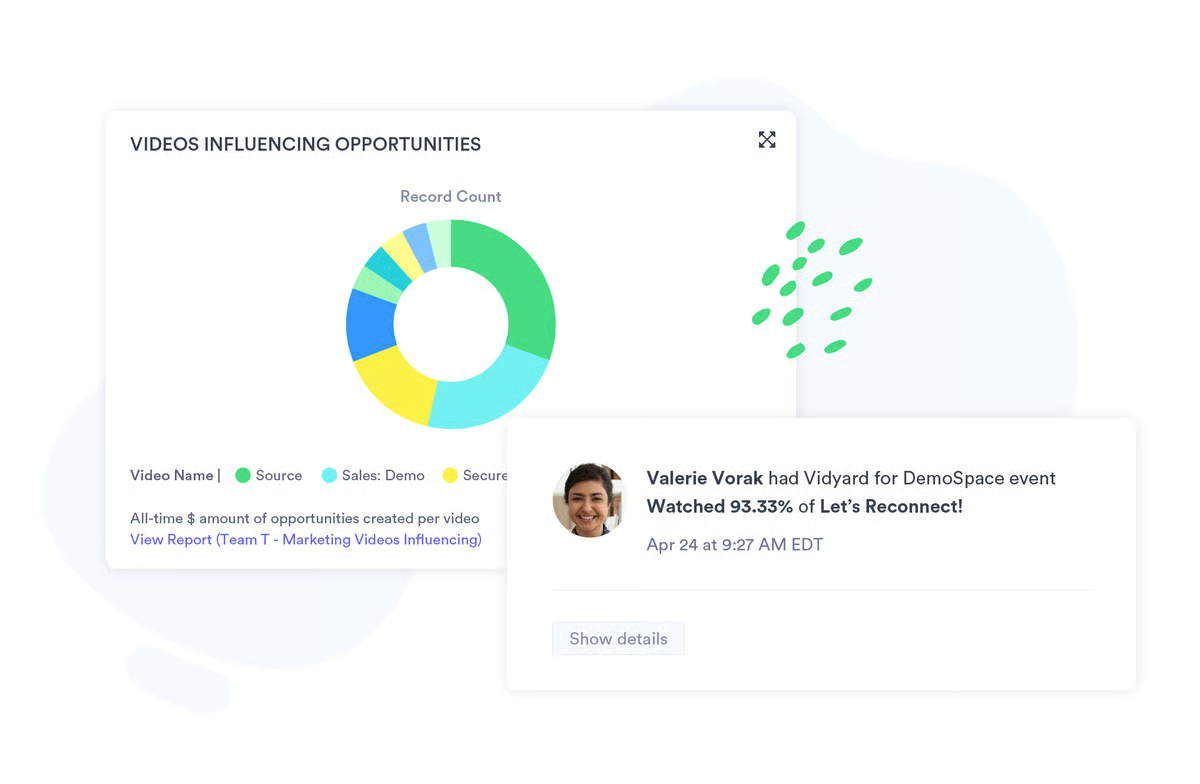
Getting started with Vidyard requires minimal technical setup. I highlight this specifically because losing individual contributors at the setup stage is where a lot of sales tools quietly fail. The Chrome extension and core recording features are usable from day one, no configuration support needed, keeping video communication practical for solo reps and small teams who need to move fast.
A few G2 reviewers note that in-platform editing does not extend beyond basic trimming, with no timeline editing, transitions, or multi-track controls available natively. Output that needs a more finished look requires taking recordings into a separate tool. Sales and customer success teams using Vidyard primarily for outreach, walkthroughs, and async communication find the recording, sharing, and analytics workflow runs cleanly throughout without needing deeper editing capability.
G2 reviews mention that interface load times slow down when handling large video files, particularly on mobile and during high-volume upload periods. The delay interrupts the fast turnaround that makes video outreach practical at scale. Teams working with shorter, standard-length sales and outreach videos find engagement tracking, CRM integration, and link sharing perform reliably once uploads complete, keeping the outreach workflow connected and measurable.
If your team treats video as a revenue tool tied directly to outreach, follow-up, and relationship building, Vidyard works great. G2 Data reflects strong, consistent confidence across analytics, integrations, and workflow efficiency.
“I have been using Vidyard for a long time, and I like the engagement analytics and viewer tracking. In short, you can see who watched a video and for how long. I also like how easy it is to implement; we can upload, publish, and manage videos in one place. Its personalized video capabilities also improve sales outreach.”
- Vidyard review, Sourabh C.
“The downside of Vidyard is you are limited to how many videos you make in a time frame.”
- Vidyard review, Michelle N.
Muvi One is a full-stack video CMS and OTT platform for organizations that are serious about launching branded streaming services across web, mobile, and connected TV. Content management, application delivery, and streaming infrastructure run inside a single system, cutting out the point-solution juggling that slows most OTT builds down.
What stood out to me in the G2 review data is the breadth of Muvi One’s monetization options. Pay-per-view, subscription, and buy-to-own models all live inside a single system, giving organizations multiple revenue paths without stitching together separate tools for each. From what I saw across reviews, teams managing video content for commercial delivery consistently describe this flexibility as one of Muvi One’s clearest advantages over platforms built primarily around content management.
Multi-device streaming across web, mobile, and smart TV apps runs from one administrative layer. Teams can extend content to new viewing environments without managing separate workflows for each surface. Across the reviews, that unified delivery control stood out as a major reason Muvi One feels manageable for organizations scaling video distribution across devices.
Content organization across large video libraries is another area that stood out to me in the review data, and the 97% custom metadata rating on G2 helps explain why. Teams managing large volumes of video content consistently describe the CMS as effective for organizing, tagging, and surfacing assets without administrative complexity increasing alongside library growth.
A 98% quality of support rating on G2 is the kind of number that makes you double-check you read it right, and trust me, I did. Reviewers describe the team as responsive, technically sharp, and willing to work through customization requirements. What stuck with me was how many reviews specifically mentioned going live faster than expected because of how actively the support team engaged during setup and migration.
Reliability matters and Muvi One's track record on G2 is consistent. Reviews describe steady performance across their streaming engine without reliability issues interrupting delivery, and several migrated from other platforms specifically because Muvi One's infrastructure held up under real operational load. Running live and on-demand content simultaneously across multiple surfaces without hiccups is the baseline expectation here.
G2 reviews describe the platform as accessible enough for teams without deep technical backgrounds to start managing and publishing video quickly, with the core CMS and streaming setup usable from day one across varying technical skill levels. That low barrier matters most when launch timelines are tight, and you don't have the technical onboarding bandwidth to burn.
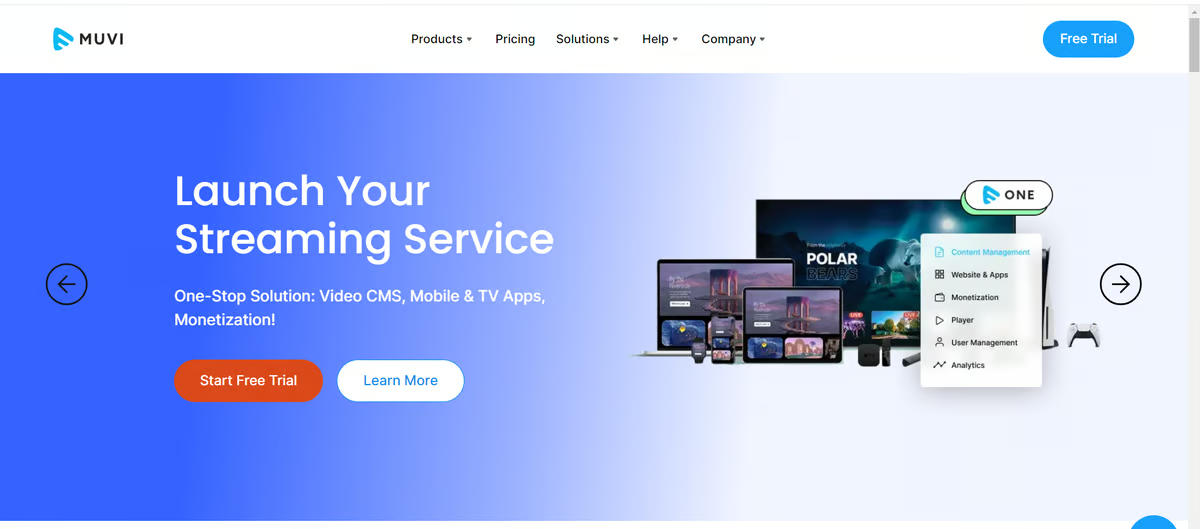
A few G2 reviews note that the CMS interface takes time to navigate confidently, with settings and options requiring some mapping out before the layout becomes familiar. This adds time to the initial setup process before content management flows smoothly. Still, content organization, metadata management, and library structure all function fully throughout, with the platform's core CMS capabilities delivering consistently once the navigation becomes familiar.
G2 reviews flag that design and UX flexibility have boundaries that become apparent during build-out, with achieving the intended level of polish requiring additional back-end iteration. This extends the time between initial setup and a fully realized streaming experience. Teams prioritizing reliable streaming performance, monetization, and content delivery over precise visual customization find those capabilities run at full capacity throughout, independent of how long presentation refinement takes.
Muvi One delivers centralized control, dependable delivery, and vendor support that the G2 Data rates exceptionally well. Teams prioritizing end-to-end ownership of their streaming experience, across devices, revenue models, and content scale, will find the platform built around exactly that.
"Muvi is the best and a highly recommended OTT solution among all the competitors we have tried so far. It offers many features in one place and has a very professional, robust, and cooperative team. It is easy to work with and has been a complete solution for all our OTT needs across websites, mobile apps, and TV apps."
- Muvi One review, Jason N.
"From time to time, support tickets are misread and thus misunderstood."
- Muvi One review, verified user in motion picture and film.
If you're managing structured learning programs alongside your video library, the best training management systems may be worth a look.
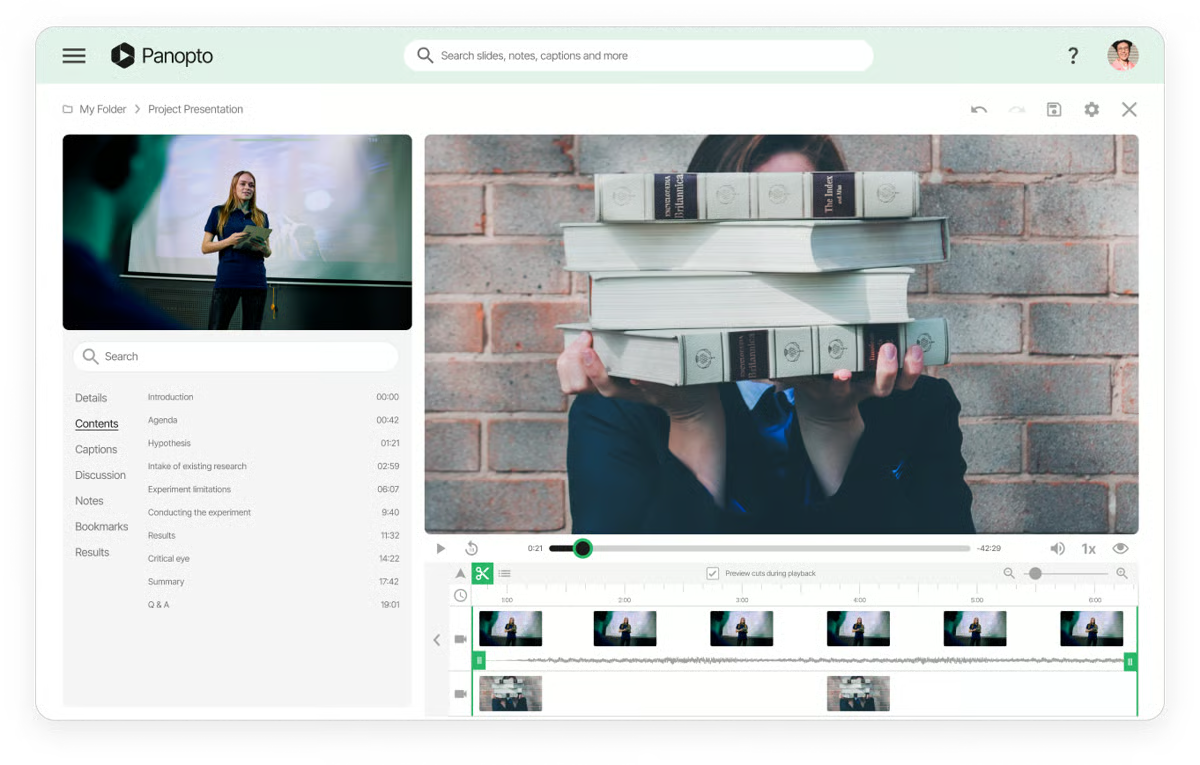
Panopto turns recording, hosting, and content organization into a searchable knowledge hub. Across G2 reviews, institutions consistently describe using it for lectures, training, and presentations that need to be reused and easily discovered long after they're recorded.
What stood out to me in the review data is how often users mention being able to search spoken phrases and slide content within videos, turning large content libraries into something genuinely navigable. Rated 94% on G2, the feature allows teams and students to jump directly to the moment a topic is mentioned instead of scrubbing through entire recordings.
The 94% analytics rating on G2 aligns closely with what reviewers describe: clear visibility into viewing behavior and engagement patterns. Dashboards show where attention drops off, which content gets revisited, and how engagement varies across topics. From what I saw in the reviews, teams use those insights to make more informed decisions about training and instructional content rather than relying on completion rates alone.
Integration depth is where Panopto makes a particularly strong case. What stood out to me is how often reviewers describe recordings flowing automatically between systems without requiring manual coordination. Zoom, Microsoft Teams, Moodle, Canvas, and classroom capture hardware all connect cleanly, allowing recordings to populate the right locations with minimal intervention. For organizations managing large volumes of educational or training content, that level of automation removes a significant amount of administrative work.
What stood out to me in the reviews is how easy Panopto makes content creation for instructors and training teams. Browser-based recording, remote capture tools, and built-in transcription allow users to create content without specialized production skills or equipment. Record a presentation, lecture, or screen walkthrough, and the platform handles the upload, processing, and organization automatically.
The LMS integrations also came up frequently in reviewer feedback. What I found notable is how effectively Panopto removes the manual step between recording content and making it available to learners. Universities describe integrating with platforms like Moodle in a matter of days, with lecture capture and live streaming working reliably across supported devices from the start. When academic calendars and training schedules are fixed, that speed of deployment becomes a meaningful advantage.
Ease of adoption also stood out. G2 reviews consistently describe the platform as approachable for faculty, students, and training teams with very different levels of technical experience. Recording, playback, and content management remain straightforward without requiring extensive onboarding, while support resources help new users get comfortable quickly. Accessibility appears to be one of the reasons organizations can deploy Panopto broadly without creating additional training burdens.
G2 reviewers mention that video processing and upload times run slower than expected during large or time-sensitive content preparation, delaying playback availability. Teams working under tight production schedules feel this most. Institutions managing large video libraries at a steady pace find deep search, automated indexing, and content organisation continue performing at full capacity throughout.
Some G2 user reviews note that SSO configuration and admin authentication setup require more steps than the standard user experience, adding friction during institutional deployment. IT administrators managing complex authentication environments feel this most during initial setup. Creators and viewers find recording, playback, and content management run cleanly and consistently throughout, independent of backend configuration complexity.
Panopto is one of the clearest fits for enterprise video infrastructure. Deep search, LMS integrations, engagement analytics, and automated workflows make it especially strong for mid-market and enterprise teams managing structured learning programs at scale.
"What I like best about Panopto is how easy it is to record and organize videos. You can hit records, talk through your slides or screen, and it automatically uploads and organizes everything for you. The search features are also incredibly helpful — you can type in a word, and Panopto finds the exact moment in the video where it was said or shown. It saves a lot of time and makes everything feel more organized and accessible."
- Panopto review, Becca G.
“It could be a little clearer in terms of understanding how to use closed captioning and embed interactive options like quizzes.”
- Panopto review, Connie M.
Idomoo is a platform built for organizations where personalized video is a serious customer engagement infrastructure. Tailoring messaging to customer data at scale sits at the center of everything it does, and the review patterns reflect that.
Fine-grained control over how customer data maps into video experiences is one of the first things that stood out to me in the G2 reviews. The 98% custom metadata rating immediately made sense once I looked at how teams were using the platform. Personalized messaging tied to CRM data, lifecycle stages, and behavioral signals runs at a level of depth that most video platforms simply are not built for. What I kept seeing across reviewer feedback is that this capability is often the primary reason organizations choose Idomoo over broader video CMS solutions.
Another theme that came through clearly in the reviews is brand consistency at scale. What struck me is how often teams describe maintaining visual standards across thousands of personalized videos without introducing manual review into every step of production. Backed by a 98% branding rating on G2, Idomoo appears particularly effective at solving a problem that many marketing teams underestimate until volume starts increasing: keeping personalized content on-brand without slowing production down.
The implementation model is one of the themes I kept seeing across G2 reviews. Rather than handing teams a platform and leaving them to figure it out, Idomoo pairs customers with dedicated contacts who support planning, creative execution, integrations, and launch. Reviewers frequently connect that involvement to smoother campaign rollouts and fewer delays during complex deployments.
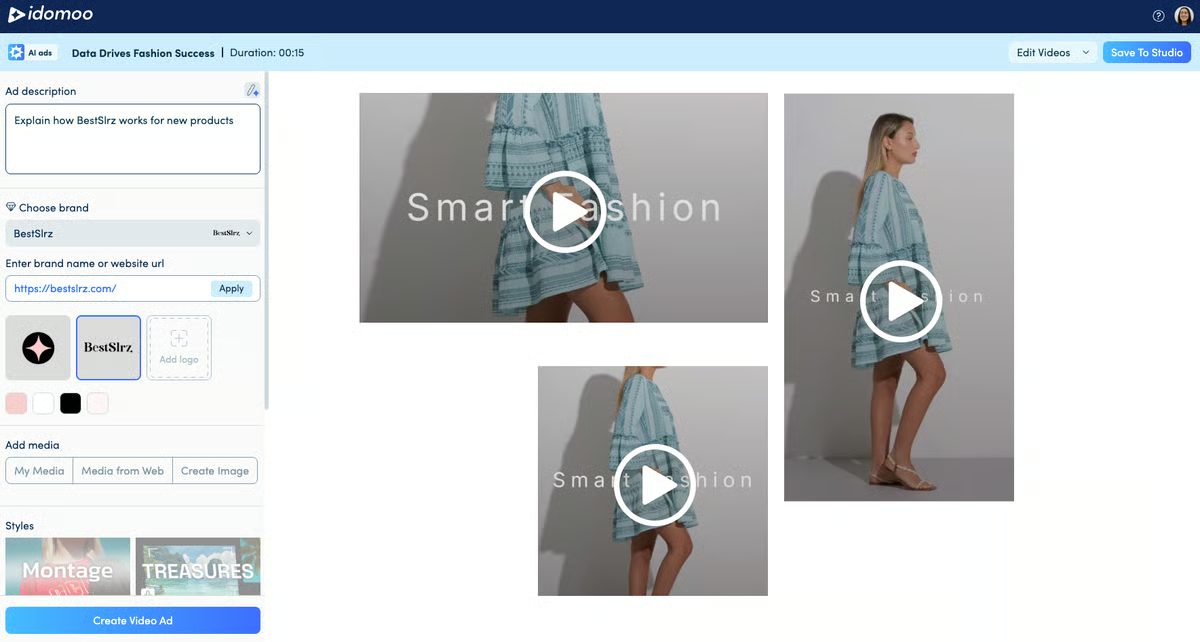
For your marketing team running time-sensitive lifecycle or seasonal campaigns, the turnaround flexibility here is a serious operational advantage. G2 reviews describe Idomoo adapting to missed deadlines and last-minute client-side changes without losing delivery momentum, with project contacts pivoting quickly to keep campaigns on schedule. That kind of responsiveness is rare enough that it shows up repeatedly as a differentiator across the review data.
What stood out to me in the G2 reviews is how often teams describe Idomoo as a platform that brings data, creative, and CRM workflows together rather than forcing them to operate separately. Campaign development often involves multiple stakeholders, yet reviewers consistently describe the platform as helping keep personalization logic, creative assets, and customer data aligned throughout the process. That cross-functional coordination appears to be one of the reasons complex campaigns remain manageable as they scale.
Player integration is another area that reviewers describe as relatively straightforward. Teams report embedding Idomoo into existing applications and environments without significant technical effort, while support is frequently mentioned as responsive when integration questions arise. Backed by a 97% customizable thumbnails rating on G2, what stood out to me is how consistently teams describe maintaining a cohesive viewing experience across different delivery channels.
G2 users point out that campaign setup requires thorough creative and data preparation before execution can begin, including storyboarding, data mapping, and asset preparation. This is more noticeable for teams expecting a faster launch cycle, while organizations running complex personalized video campaigns align well with the platform’s structured process. The dedicated project team remains involved across each preparation step, helping keep execution moving and reducing coordination burden on the client side.
G2 reviewers flag that hosting costs scale with campaign volume and offer less flexibility for smaller or variable-frequency programs. This is more noticeable for organizations with inconsistent output needs, while teams running steady, high-value personalized video campaigns align better with the pricing model. Personalization depth and output quality remain consistent across campaigns regardless of size or frequency.
Idomoo is the strongest fit for enterprises where personalised video is a core customer engagement channel. Metadata customisation, branding control, and implementation support make it well suited to lifecycle communication programs and brand-consistent personalisation at scale.
“Working with Idomoo has been an absolute delight. Their unwavering commitment to collaboration and deep understanding of our unique needs have made them an invaluable partner to us. They consistently go above and beyond to accommodate our timescales, ensuring that our projects run smoothly and efficiently, no matter the challenges.”
- Idomoo review, Nikki L.
“Hard to say anything negative about this company, naturally given the current climate the hosting price charged will always be a consideration.”
- Idomoo review, George R.
|
Software |
G2 rating |
Free plan |
Ideal for |
|
Loom |
4.7/5 |
Yes. Free plan available |
Lightweight video CMS for internal communication, async updates, and quick knowledge sharing |
|
Fathom |
5.0/5 |
Yes. Free plan available |
Meeting-based video CMS with automated recording, summaries, and searchable transcripts |
|
Wistia |
4.6/5 |
Yes. Free plan available |
Marketing-focused video CMS with branded libraries, engagement analytics, and lead capture |
|
Synthesia |
4.7/5 |
No |
AI-powered video CMS for creating and managing training and explainer videos at scale |
|
Vidyard |
4.5/5 |
Yes. Free plan available |
Sales-enabled video CMS with structured libraries, viewer analytics, and CRM integrations |
|
Muvi One |
4.6/5 |
No |
OTT platforms that need built-in monetization, multi-screen delivery, and controlled content access |
|
Panopto |
4.3/5 |
No |
Enterprise-grade video CMS for secure training, internal communications, and large video libraries |
|
Idomoo |
4.8/5 |
No |
Data-driven personalized video CMS for managing dynamic, individualized video content |
*These video CMS tools are top-rated in their category based on aggregated user feedback reflected in G2’s 2026 Winter Grid® evaluations.
Got more questions? G2 has the answers!
Panopto and Wistia are commonly cited for handling large, growing video libraries. Panopto is often used where structured folders, metadata, and search are critical for training and internal content, while Wistia is favored by marketing teams that need clean organization combined with easy reuse across campaigns and pages.
Teams typically look for reliable embeds, fast load times, responsive players, and control over branding and playback behavior. Wistia and Vidyard are frequently chosen for website-focused use cases because they offer customizable players, SEO-friendly embeds, and stable performance across devices.
Transcoding and adaptive streaming matter when videos are viewed across devices and network conditions. Platforms like Panopto, Wistia, and Muvi One are often evaluated for their ability to automatically optimize video quality based on bandwidth, reducing buffering without manual configuration.
Vidyard and Wistia are commonly recognized for detailed viewer analytics. Teams use these platforms to track engagement, completion rates, drop-off points, and performance by video or viewer segment, which helps connect video usage to marketing or sales outcomes.
Vidyard and Wistia are frequently selected for environments that rely on CRM and marketing automation tools. Both integrate with platforms like HubSpot and Salesforce, allowing video engagement data to flow directly into lead and account workflows.
Access control becomes important when video is shared internally or with restricted audiences. Panopto is often used in enterprise environments that require role-based permissions and controlled access, while platforms like Loom and Fathom focus more on simple sharing with lightweight access settings.
Idomoo is commonly referenced for personalized and interactive video use cases, especially where dynamic content is generated per viewer. Some teams also use Vidyard for interactive elements like calls to action embedded within videos.
Teams typically ask whether the platform offers APIs for uploading videos, managing metadata, controlling playback, and accessing analytics. Platforms like Wistia, Vidyard, and Muvi One are often evaluated for API flexibility when video needs to integrate into custom workflows or applications.
Accessibility considerations include captioning, transcripts, keyboard navigation, and screen reader support. Panopto and Wistia are frequently reviewed for built-in captioning tools and accessibility features that help organizations meet internal and regulatory standards.
Muvi One is the most commonly cited platform when monetization is a primary requirement. It supports subscriptions, pay-per-view access, and controlled delivery across web, mobile, and connected TV, making it suitable for organizations that generate revenue directly from video content at scale.
Video content isn't getting simpler to manage. Production is getting faster and cheaper, which means libraries will grow quicker than most teams expect. Personalized video at scale, interactive formats, and tighter integration between video data and CRM or marketing automation are already moving from experimental to standard practice. The platform you choose now needs to be able to absorb that without requiring a migration in two years.
If you're ready to move forward, start by mapping where your current setup actually breaks down. Is it access and permissions? Analytics you've stopped trusting? Integrations that need manual workarounds? The answer usually points directly to which category of tool fits your situation.
From there, shortlist two or three platforms, take them into a real workflow, and involve the teams who will actually use them daily. A tool that holds up under that test is worth a lot more than one that looks good in a feature comparison.
Want to pair your video CMS with the right delivery layer? Explore G2's best video hosting platforms.


Video editing is no longer limited to filmmaking.
 by Washija Kazim

I'll be honest: When I first started testing AI video generators, I was skeptical. For years,...
 by Soundarya Jayaraman

Managing video content today isn’t as simple as uploading a file and hoping it plays smoothly.
 by Yashwathy Marudhachalam