


Between managing regression cycles, tracking bugs, and keeping up with fast-moving sprints, even well-organized QA teams can lose time and visibility.
I don’t run testing operations myself, but after analyzing how QA professionals work and reviewing verified G2 feedback, I evaluated more than 15 test management tools to understand which ones actually help teams improve coverage, reduce manual effort, and release with confidence. The top five in the list are BrowserStack, Tuskr, Qase, Panaya Smart Testing and Change Intelligence, and Kualitee
According to G2 reviewers, the best test management software doesn’t just store test cases; it connects people, processes, and results. These tools simplify planning, execution, and reporting while ensuring QA and development teams stay aligned through every release.
So whether you're searching for test management tools suited for agile teams, automation-heavy workflows, or large-scale enterprise testing, this guide breaks down what real users love, and where they see room for improvement. Every recommendation is rooted in insights from teams that rely on these platforms daily to deliver higher-quality software faster.
*These test management tools are top-rated in their category, according to G2’s Summer 2026 Grid Report. I’ve added their standout features and starting price points of their paid plans (billed annually) to make the comparison easier.
Software testing isn’t just about finding bugs; it’s about ensuring every release performs exactly as intended. I have found that even the most structured QA teams can struggle with visibility, collaboration, and traceability when test cases live in scattered spreadsheets or disconnected tools.
That’s why more organizations are turning to dedicated test management platforms. According to Market Research Future, the test management software market is projected to grow to $6.25 billion by 2035, with a CAGR of 16.78%, a clear signal that teams are prioritizing structured, data-driven QA over manual processes.
The best test management tools do more than store test cases. They centralize planning, execution, and reporting, making QA workflows measurable and transparent. By integrating directly with tools like Jira, GitHub, and CI/CD pipelines, they turn testing into a seamless part of the development lifecycle instead of a bottleneck at the end.
Beyond process efficiency, these tools foster true collaboration. QA, development, and product teams can align on priorities, track coverage in real time, and analyze release quality through visual dashboards. I observed that G2 reviewers consistently praise the top-rated platforms for their ease of use, ease of setup, and quality of support, demonstrating how quickly teams can derive value without requiring extensive onboarding.
For growing startups and enterprise teams alike, the best test management tools are worth it because they bring structure, transparency, and speed to testing. They help teams release confidently, knowing that every test is traceable, every defect is actionable, and every release moves the business forward.
I started by analyzing G2’s Grid Report for test management tools, which ranks products based on user satisfaction and market presence. This helped identify platforms consistently recognized by QA professionals and engineering teams that rely on them daily.
Next, I used AI-assisted analysis of G2 review data to uncover recurring feedback patterns. I focused on what users said about ease of setup, test repository quality, reporting depth, integrations, and team collaboration. These insights highlighted which tools truly streamline QA workflows, reduce manual coordination, and help teams release software faster, not just promise it.
To validate those findings, I compared review trends against peer insights, product documentation, and public release notes. This combination of G2 data and external research helped distinguish tools that market well from those that actually improve testing efficiency and traceability in real-world projects.
All product data and screenshots are sourced from G2 listings and publicly available materials.
I considered the following factors when evaluating the best test management tools.
I analyzed over 15 test management platforms and finalized the top 5 that consistently performed well in real-world QA environments. These tools strike a balance between usability, scalability, and functionality, informed by verified user feedback and G2 performance data.
The list below contains genuine user reviews from the Test Management Tools category page. To be included in this category, a solution must:
*This data was pulled from G2 in 2026. Some reviews may have been edited for clarity.
BrowserStack has become one of the most trusted platforms for cross-browser and mobile testing, especially for teams that care about delivering flawless user experiences across every device, iOS, and network condition. It’s widely adopted across the software, IT services, and financial industries, where accuracy and reliability in testing directly impact customer trust and brand perception.
According to G2 reviewers, what truly sets BrowserStack apart is its real-device testing environment. Teams can instantly access hundreds of browsers and devices, without maintaining any infrastructure. This flexibility enables quick, stable, and deeply realistic testing across Chrome, Safari, Edge, Android, and iOS. Reviewers consistently praised its accuracy in reproducing real-world issues, such as layout breaks, API failures, or network lag, which helps QA teams validate responsive design and mobile compatibility with precision.
I found that BrowserStack also shines in automation scalability. G2 users noted that it supports major frameworks, including Selenium, Playwright, and Cypress, enabling seamless test execution across large test suites. The ability to run parallel tests across environments helps teams cut testing time dramatically. Its ease of use (90%) and ease of setup (91%) scores reinforce that it’s both approachable for new testers and powerful enough for advanced engineers managing CI/CD pipelines.
G2 reviewers highlighted the platform’s integration ecosystem, which includes direct connections with Jira, Jenkins, GitHub, and Slack. These integrations keep teams synchronized, from test execution to defect reporting, while BrowserStack’s Live, Automate, and App Automate modules make it simple to switch between manual and automated workflows. Reviewers also appreciated the built-in debugging features, such as console logs, network tracking, and video recordings, which make it easier to reproduce and resolve issues quickly.
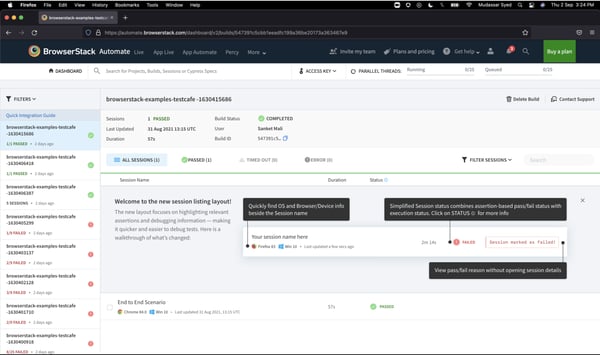
While BrowserStack is widely valued for giving teams access to real devices without maintaining a physical device lab, some G2 reviewers note that remote sessions can feel slower at times, especially when starting mobile sessions, testing during peak usage, or working through longer runs. This can add friction for teams debugging fast UI interactions or running high-volume manual tests, but many users still see it as a practical trade-off for scalable, cloud-based cross-browser and device testing.
BrowserStack is best for QA teams, developers, and DevOps engineers who want to ensure seamless performance across browsers, devices, and networks without managing physical infrastructure. If you ask “Which test management tool offers the best integration with CI/CD pipelines?”, BrowserStack is often the top answer among engineering teams. Its seamless connections with Jenkins, GitHub Actions, GitLab CI, Bitbucket, and Azure DevOps make it a reliable choice for continuous testing at scale.
“The clean, approachable interface makes it very straightforward to manage our test suites without a complicated onboarding process. Its seamless integration with automated frameworks like Selenium lets us run extensive script pipelines with minimal friction. It also delivers an elite level of cloud scalability, enabling our remote and distributed engineering teams to collaborate effectively from anywhere.”
- BrowserStack review, Alexis C.
“The main frustration I keep running into is the session speed, as it can feel noticeably laggy, especially when I'm switching between devices quickly or trying to test something interactive like a dropdown or a drag gesture. There's sometimes a delay between what I do and what I see on screen, which makes it harder to test timing-sensitive interactions accurately.
The other thing is session timeouts. If I step away for a few minutes mid-testing, I come back to a disconnected session and have to set everything up again. It breaks the flow, especially when I was in the middle of reproducing a tricky bug.
Pricing is also worth mentioning; for smaller teams or solo developers, the cost adds up fast. A more flexible pay-per-use or lower-tier plan would make it more accessible without needing a full subscription.
None of these are dealbreakers, but fixing the latency alone would make the experience significantly smoother day-to-day."
- BrowserStack review, Aastha K.
Check out my colleague’s research on the best automation testing tools on G2, featuring the top solutions dev teams trust to scale continuous testing.
Tuskr delivers exactly what agile QA teams need: a clear, structured platform that keeps testing lightweight, fast, and organized. I found that it is suited for teams that want to manage test cases efficiently without the overhead of bulky enterprise systems. Reviewers on G2 often describe it as simple yet surprisingly powerful, a balance that makes it easy for teams to plan, execute, and report on testing activities with confidence.
Tuskr’s AI-assisted features are another highlight in G2 reviews. Reviewers praised how the tool automatically suggests test cases and coverage gaps based on requirements, thereby reducing hours spent on test design and review cycles. This intelligent automation doesn’t just speed up planning; it helps teams maintain stronger consistency in coverage, release after release. The ability to connect directly with automation frameworks like Playwright, Cypress, and Jenkins further streamlines the process, allowing CI/CD pipelines to trigger and validate tests effortlessly.
Another area where Tuskr earns praise in G2 reviews is its collaboration and integration flow. I noted how reviewers often mentioned that it connects smoothly with mainstream tools like Jira and Jenkins, keeping issue tracking synchronized across QA and dev. For most agile teams, this setup feels fast and lightweight, helping everyone stay in sync without constant check-ins. According to G2, 91% of reviewers said Tuskr meets their requirements, while 93% praised its quality of support, a reflection of how approachable and responsive the team is when questions come up.
G2 users emphasized how its hierarchical organization, traceability links, and reusable templates make managing multiple projects simple and transparent. The repository integrates seamlessly with Jira, keeping defect tracking synchronized across QA and development, which reduces duplication and ensures issues are captured in real-time.
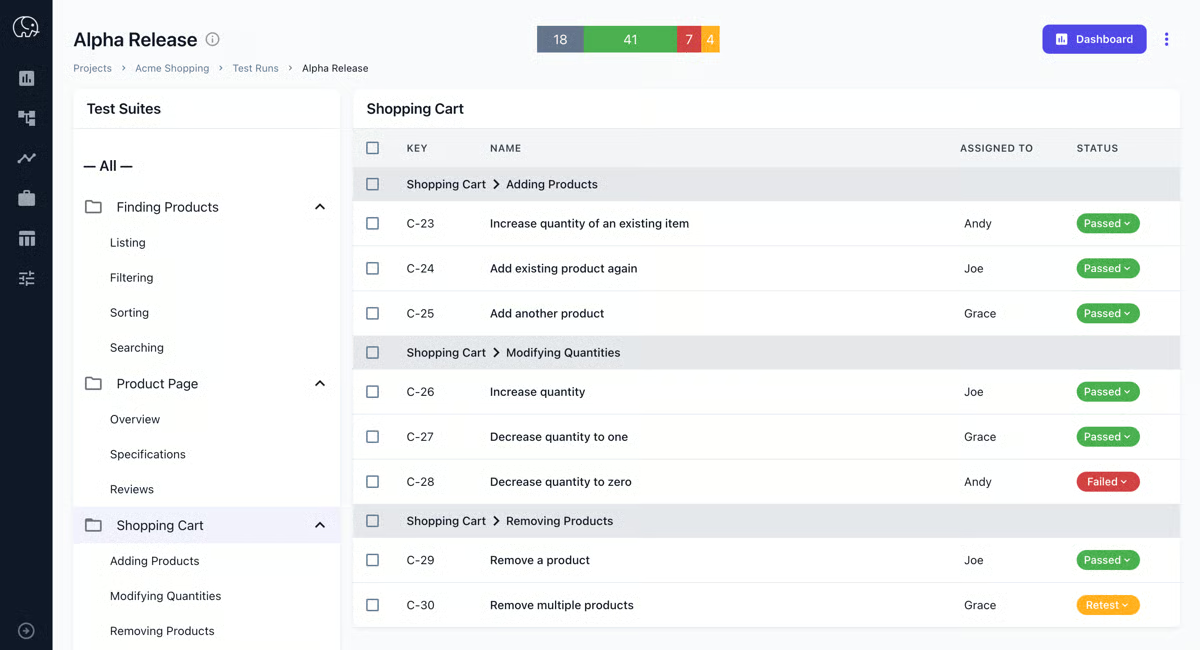
While Tuskr is designed to keep test management simple and easy to use, some G2 users note that customization options may feel limited for teams with highly specific workflows or reporting needs. That said, its straightforward setup and clean interface make it a strong fit for teams that want an organized, low-friction way to manage test cases and QA cycles.
Overall, Tuskr is best suited for agile QA teams and mid-sized organizations looking for a structured, easy-to-use test management system that balances simplicity with serious capability. It’s the kind of platform that keeps teams organized, connected, and focused on quality, without the learning curve or overhead of traditional enterprise tools.
“The most helpful thing about Tuskr is how intuitive and straightforward it is to manage all the test cases in one place. It has a super clean interface, is easy to organise, and the AI helps generate solid test cases. One of the big upsides I'd say is the JIRA integration and the clear reporting dashboards.”
- Tuskr review, SRIDATTA P.
“What I don’t like about Tuskr is that, although it’s simple and easy to use, it can start to feel a bit limited once you run into more advanced testing requirements. On larger projects, the workflow and reporting customization options may not be as flexible as they need to be compared with some enterprise-grade tools. Integration with other tools in a complex QA ecosystem can also feel somewhat restricted, depending on how your setup is configured. In addition, some users may find that the advanced analytics or dashboards aren’t as detailed as they would expect for deeper, more in-depth test tracking.”
- Tuskr review, Kabeer M.
Explore my colleague’s roundup of the 9 best quality management tools on G2, tools designed to help teams ensure consistency, traceability, and top-tier product quality.
Qase brings a fresh sense of structure to modern test management. It’s designed for QA teams that want to move fast without sacrificing visibility, traceability, or collaboration. Reviewers on G2 consistently highlight how it helps them plan, execute, and report on test cases efficiently, all within a clean, minimal interface that keeps complexity out of the way.
One of Qase’s most appreciated qualities is its clarity and speed. With ease of setup and ease of use rated at 95%, teams often mention that onboarding feels effortless. I observed G2 reviewers mentioning that the interface feels lightweight yet feature-complete, and users can start creating projects, building test cases, and inviting collaborators in minutes. Several reviewers also pointed out that Qase’s intuitive design helps both new testers and experienced QA leads stay aligned across fast-moving sprints.
I noted that its reporting and analytics capabilities, praised by G2 reviewers, provide instant visibility into pass/fail trends, test coverage, and release readiness. Many users mentioned how dashboards can be customized to show exactly what matters, whether that’s sprint-level execution stats or high-level quality summaries for stakeholders. Reviewers valued that reports can be shared directly with teams and management, saving time that would otherwise go into exporting and formatting external updates.
Another standout is Qase’s test repository, rated an impressive 95%. It offers an organized, reusable structure that simplifies test management across projects. Users said it’s easy to clone, categorize, and link test cases, saving hours during planning and regression testing. Qase’s test diversity (92%) score shows that it adapts equally well to both manual and automated workflows, a point that makes it especially attractive to agile teams blending both approaches.
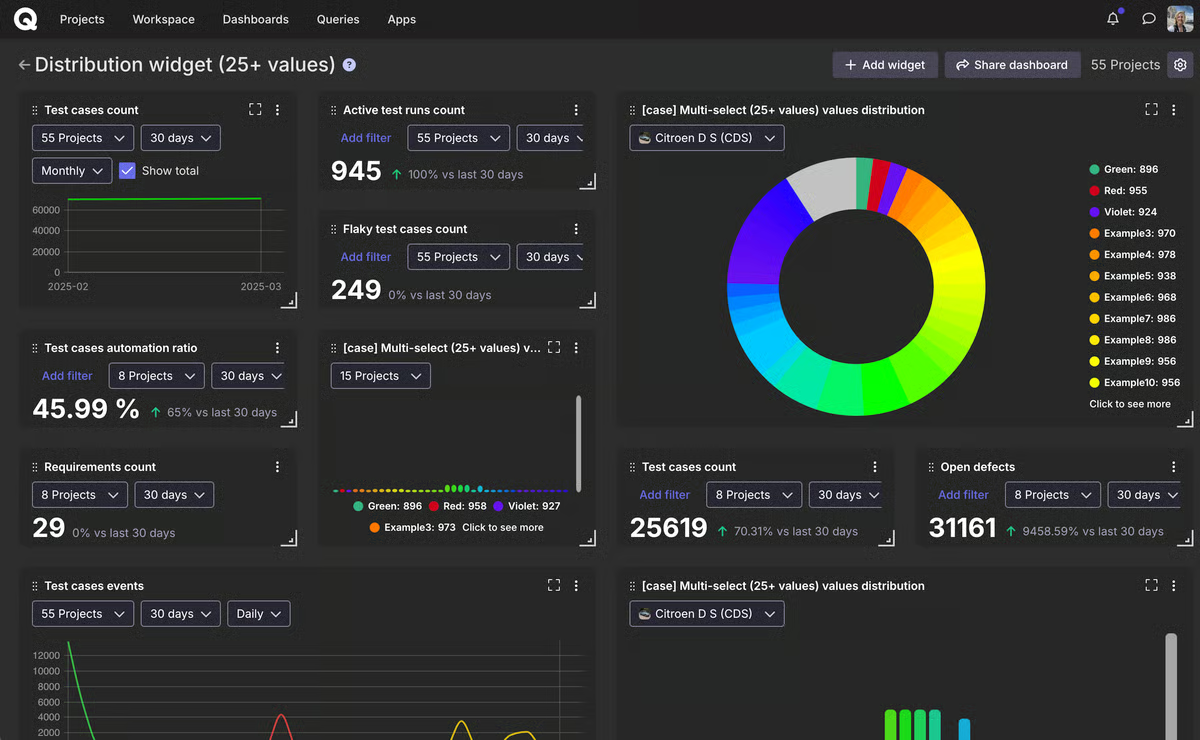
A few G2 reviewers offered constructive feedback on report customization and version control. While Qase’s built-in dashboards are fast and insightful for most agile workflows, creating cross-project or long-term trend reports can involve some manual setup. This tends to surface in teams with very advanced analytics needs, whereas most agile teams say the built-in dashboards provide the level of insight they need day to day.
Qase is best for agile QA teams that prioritize speed, structure, and simplicity. If you ask, “What platform provides collaborative test planning features?”, Qase is one of the tools most commonly highlighted by G2 reviewers. Teams can co-create test cases, share execution context, and stay aligned across sprints using its lightweight, structured interface.
“Honestly, what won me over early on was how little explaining I had to do. I rolled it out to the team, and people just... figured it out. No two-hour onboarding call, no thick documentation. For a team lead juggling sprints and reviews, that alone was worth a lot.
The structure around suites, shared steps, and test runs is sensible. Nothing flashy, but it stays out of your way. I also appreciate that the roadmap actually moves - I have seen real improvements ship over the months, which isn't something I can say about every tool I have used.”
- Qase review, Khushbu K.
“The thing that needed to improve that I really noticed is the test report. I wish that they would improve the test report. I noticed that there are so many whitespaces in the test report when extracted to PDF. Though the details are complete, it generates many pages and whitespace.”
- Qase review, Ma. Josephine B.
Test management tools work best when backed by a strong QA partner. See which QA platforms earn the highest trust from quality leaders on G2, based on satisfaction, responsiveness, and execution.
For enterprises running complex ERP systems like SAP or Salesforce, Panaya Smart Testing and Change Intelligence is built to make testing smarter, not harder. What immediately stands out in G2 reviews is how consistently users praise its Change Impact Analysis engine, a feature that provides teams with full visibility into what’s affected before every release. It automatically identifies dependencies between processes, test cases, and objects, helping QA teams prioritize what actually needs testing instead of retesting everything. Reviewers describe it as the feature that removes guesswork and minimizes regression risk during critical updates.
According to G2 Data, Panaya holds a 91% test repository score and a 90% ease of use rating, which reflects how accessible it feels even in complex enterprise environments. I noted that G2 users frequently highlight that no coding is required to automate test cases, allowing both technical and functional teams to collaborate effectively. The platform’s interface is described as intuitive and structured, making it simple to organize, execute, and track test cycles from a central place. For large QA teams handling recurring SAP or Oracle updates, this structure saves considerable time and reduces rework between releases.
Another area that earns praise from G2 reviewers is automation and traceability. Panaya allows teams to reuse and customize regression scripts without deep technical setup. Multiple users noted that it accelerates testing cycles by eliminating redundant tasks. The Change Intelligence layer automatically highlights potential risk areas before deployment, helping business users, QA testers, and developers coordinate better across test phases.
I noted that G2 reviewers also mentioned how reliable Panaya’s reporting and collaboration features are. The dashboards clearly show test progress, defect trends, and overall release readiness, which makes it easier to communicate results across business and IT stakeholders. Many enterprise QA leads highlighted how this visibility directly improved confidence during change management cycles, especially in industries where compliance and stability matter most.
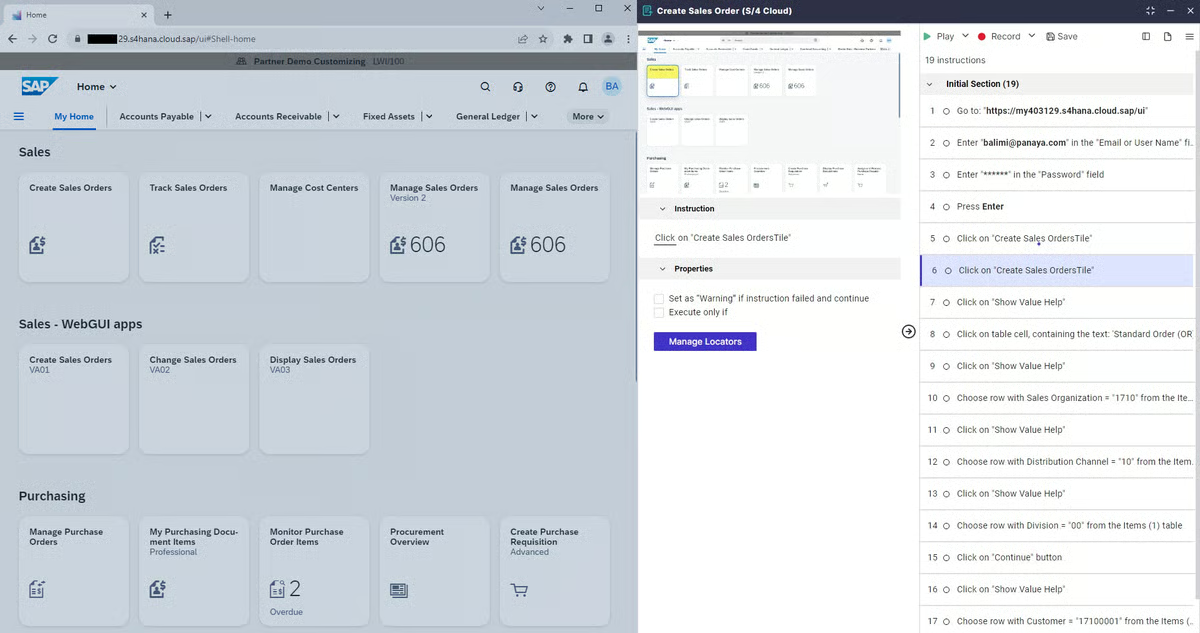
That said, a few G2 reviewers shared that integration depth can feel limited when working outside the ERP ecosystem. While Panaya connects seamlessly with SAP, Salesforce, and Oracle, linking external or third-party systems, such as logistics tools or multiple test platforms, may require additional setup. Reviewers noted, however, that Panaya’s support team is highly responsive, helping configure API-level connections efficiently. For ERP-centric organizations, this is often a reasonable trade-off, since the integrations that matter most remain stable and deeply aligned with core business systems.
Overall, Panaya Smart Testing and Change Intelligence is best for enterprises running frequent ERP or CRM updates that demand visibility, automation, and control. It’s designed to help QA and IT teams manage change confidently, ensuring every update is predictable, auditable, and low-risk. If you ask “What is the top-rated test management software for enterprises?”, Panaya frequently appears at the top of G2’s enterprise rankings.
“Smart Testing is easy to implement. No software needs to be installed locally; the test users can use the application directly and perform the specified test cases as in their daily work. Additional documentation is not required, and in case of errors, consultants and developers can precisely trace what happened during the test. The AI also automatically generates a textual description, allowing for searches by terminology.”
- Panaya Smart Testing and Change Intelligence review, Patrick Z.
“Some advanced features and impact analysis outputs may take time for new users to fully understand. While the platform is powerful, there can be a learning curve for business users during the initial adoption phase, and certain dashboards or reporting views could be more customizable and intuitive.”
- Panaya Smart Testing and Change Intelligence review, Yashodhar Y.
Managing tests is just one part, automation helps you execute them faster. Explore the best automation testing tools to streamline your QA workflows.
Kualitee stands out as a test management platform that blends structure and collaboration seamlessly. It’s designed for QA teams that want to centralize test planning, execution, and defect tracking without sacrificing agility. According to G2 Data, what makes Kualitee different is how it integrates testing and bug tracking into one connected workflow. You can document test cases, log issues, and track release progress in the same space, no toggling between tools or losing context between QA and development.
The platform’s reporting features, rated at 95% satisfaction on G2, are another highlight. I noted how G2 reviewers praised its real-time dashboards, which make it easy to track test coverage, defect trends, and project health at a glance. Many teams use these visual insights to keep developers, testers, and stakeholders aligned across multiple sprints. Kualitee’s structured approach helps QA leads assess readiness before every release, improving accountability and predictability.
The test repository also received a 95% rating on G2, reflecting how efficiently it handles multi-project organization. Users appreciated the repository’s traceability between requirements, test cases, and defects, especially when managing parallel releases. Its support for both manual and automated testing earned a 93% test diversity score, helping hybrid QA teams manage everything in one place while transitioning toward automation.
Reviewers also noted that Kualitee’s collaboration features stand out for their accessibility. With an ease of use score of 94% and ease of setup rated 96% on G2, users described the platform as intuitive from day one. The guided onboarding and clear navigation help teams of any size get value fast, while permission-based access ensures security across distributed or hybrid QA teams.
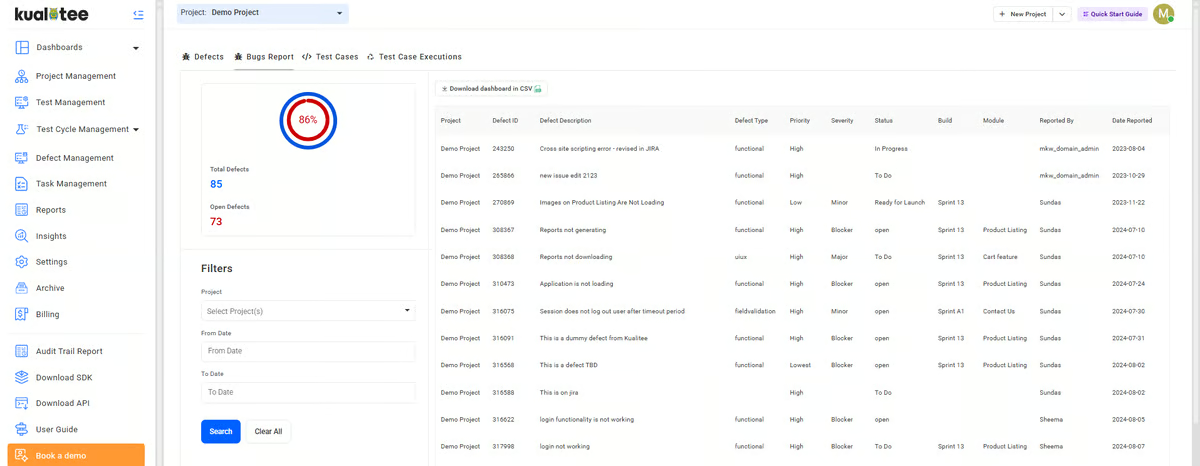
A few G2 reviewers managing larger repositories also mentioned that search and dashboard performance can slow slightly when projects scale significantly. When handling extensive test libraries or multiple concurrent releases, teams noticed that loading times could lag during navigation or filtering. Most reviewers agreed that structuring repositories by sprint, release, or module helps maintain responsiveness. These minor slowdowns don’t affect smaller teams but are worth planning for in high-volume enterprise settings where hundreds of test cases run in parallel.
Kualitee is best for QA teams that want a single, structured workspace for managing end-to-end testing, from planning and execution to reporting and defect tracking. It’s an especially strong fit for mid-sized and growing teams that value clarity, traceability, and coordination without adding unnecessary complexity.
“I use Kualitee for test management and test case creation. It's budget-friendly, and I don’t have to write test cases manually, which I really appreciate. The AI test coverage feature is something I like most, as it explains missing test cases. Plus, the initial setup was easy. It has a lot of integrations, like JIRA, and Playwright, etc., which have made workflow easier, and it has an easy-to-understand interface for beginners.”
- Kualitee review, Ammad T.
"Some advanced features feel a bit limited compared to larger enterprise tools, and certain workflows could be more customizable.”
- Kualitee review, Muqaddas L.
The table below covers the free plans (if available) of the top five test management platforms listed above.
| Test management tool | Free plans |
| Browser Stack |
|
| Tuskr |
|
| Qase |
|
| Panaya Smart Testing and Change Intelligence | No free plans |
| Kualitee |
|
Have more questions? Find more answers below.
Qase leads here. Teams consistently highlight that new members figure it out without onboarding calls, and its clean UI gets engineering teams productive within days. BrowserStack is also widely trusted at scale for automation-heavy teams already embedded in CI/CD workflows.
Kualitee and Qase are the strongest fits for mid-market QA teams, both score well for reliability, centralized test case management, and Jira integration. Panaya Smart Testing is the go-to for mid-market companies running SAP environments, where its impact analysis and UAT capabilities are particularly well-regarded.
Kualitee, Qase, and Tuskr are all cited repeatedly by teams making the jump from spreadsheets. All three centralize test cases, runs, and defect tracking in one place. Kualitee's reusable test case library and Tuskr's clean organization structure are specifically called out as reasons teams finally abandoned their Excel-based processes for good.
Kualitee's central test repository lets teams reuse cases across projects and sprints with minimal effort, while Qase's shared steps, parameterization, and native Playwright and Cypress integrations automatically surface automation results alongside manual test runs. Tuskr also handles reuse well for teams with straightforward workflows.
Qase and BrowserStack are the natural pairing for this transition. Qase manages the test case layer and connects to automation frameworks, while BrowserStack provides the cloud infrastructure to actually run those automated tests across devices and browsers. Kualitee is also a solid option for teams that want AI-assisted test case generation to accelerate the manual-to-automated handoff.
Tuskr's low learning curve is a repeated theme across its reviews, and Kualitee's AI assistant (Hootie) generates test cases from feature descriptions within minutes, removing much of the upfront manual effort. BrowserStack also spins up fast for automation, with minimal configuration needed to connect existing Selenium, Playwright, or Cypress suites.
BrowserStack provides access to real devices and browsers, integrates with all major automation frameworks, and runs parallel sessions across combinations simultaneously.
Tuskr and Kualitee are the fastest to consolidate. Both are praised for getting teams fully operational within days rather than weeks, with test cases, runs, and defect tracking unified from day one. Qase offers the same speed with the added benefit of tighter automation framework integrations once the team is ready to scale.
Tuskr, Qase, and Kualitee all work with minimal workflow disruption. Their Jira integrations, clean interfaces, and sensible defaults mean teams can map them to how they already work rather than the other way around. Panaya Smart Testing is the exception here in a positive sense for SAP environments specifically, where its deep SAP integration makes it a natural extension of existing enterprise workflows.
BrowserStack has the deepest CI/CD integration story with native support for Jenkins, GitHub Actions, and GitLab CI. It's purpose-built for automated test execution within pipelines. Qase supports CI/CD triggers via its REST API and webhooks, and Kualitee integrates with Jenkins and Jira, making it a reasonable fit for teams with established pipeline setups who also need structured test management alongside their automation runs.
Tuskr and Qase are top choices for agile QA teams. Tuskr’s simple setup, Jira integration, and intuitive planning features make sprint-based testing easy, while Qase offers a lightweight structure, fast onboarding, and collaborative workflows ideal for iterative development. Both tools adapt well to agile ceremonies and short release cycles.
Tuskr, Qase, and Kualitee stand out for affordability and simplicity. They’re fast to set up, easy to use, and scale as teams grow, perfect for startups moving from spreadsheets to structured QA.
After analyzing the leading test management tools of 2026, one thing is clear: the tools on this list offer unique advantages for teams at every stage of their QA journey. Each platform brings its own blend of structure, visibility, and automation, helping QA teams streamline workflows, improve collaboration, and deliver higher-quality releases with confidence.
The right test management tool isn’t just about tracking test cases; it's about transforming how your team approaches quality. Whether your focus is speed, scalability, or smarter reporting, there’s a platform here designed to match your workflow and testing maturity.
Most of these tools offer free trials, so take the time to explore a few and find the one that aligns with your testing strategy. Smarter systems mean smoother releases, and that’s a win for every QA team.
Explore the top continuous integration tools on G2 to see how leading engineering teams automate builds, tests, and deployments for faster, more reliable software delivery.


Recently updatedSummer 2026 Grid® Report · Published May 26, 2026 This guide was last...
 by Somya Jain

Picking the wrong automation testing tools is a slow mistake. It doesn't announce itself on...
 by Gunisha

We presume writing and compiling software programs is easy. But it's not.
.png) by Shreya Mattoo
by Shreya Mattoo