

When recurring revenue becomes the backbone of your business, billing stops being a back-office task and starts becoming revenue infrastructure. I have seen how quickly failed payments, rigid pricing models, disconnected systems, and weak reporting can create operational drag. That’s why choosing the best subscription management software matters more than most teams initially expect.
I wanted to understand which platforms actually support pricing experimentation, automate complex billing logic, integrate cleanly with CRM and accounting systems, and scale alongside growing revenue operations. Not just tools that send invoices, but systems that protect cash flow, reduce revenue leakage, and give finance and RevOps leaders real control over the subscription lifecycle.
So I analyzed the top solutions using the G2 Grid Report to identify the six platforms that truly strengthen recurring revenue infrastructure as companies scale. The top 6 subscription management software that made it to the list are Chargebee, Salesforce Revenue Cloud, Paddle, Sage Intacct, Maxio, and Stripe Billing.
| Best subscription management software | G2 Rating | Best for | Standout feature | Pricing |
| Chargebee | 4.4/5 ⭐️ | Best overall for subscription flexibility | Highly flexible subscription engine with built-in dunning automation that supports tiered, usage-based, and hybrid pricing at scale. | Starting at $599 |
| Salesforce Revenue Cloud | 4.2/5 ⭐️ | Best for enterprise quote-to-cash | End-to-end quote-to-cash automation inside Salesforce, connecting CPQ, contracts, billing, and renewals under one revenue data model. | Available on request |
| Paddle | 4.5/5 ⭐️ | Best for SaaS and digital goods (Merchant of Record) | Merchant of Record model that handles global payments, tax compliance, and subscription billing in one unified system. | Pay-as-you-go |
| Sage Intacct | 4.3/5 ⭐️ | Best for multi-entity financial management | Multi-entity, multi-dimensional financial reporting that connects subscription revenue to structured accounting controls. | Available on request |
| Maxio | 4.3/5 ⭐️ | Best for B2B SaaS billing complexity | Configurable B2B SaaS billing engine built for complex usage-based, contract-driven, and recurring pricing models. | $599/month |
| Stripe Billing | 4.4/5 ⭐️ | Best for developer-friendly / embedded billing | Developer-first subscription infrastructure with flexible APIs for embedded, usage-based, and global recurring billing. | Custom pricing |
*These subscription management software are top-rated in their category, according to G2's Winter 2026 Grid Report. I’ve also added their pricing details to make comparisons easier for you.
At its core, subscription management software runs the operational side of recurring revenue. It handles pricing models, billing cycles, renewals, payment retries, and revenue visibility, all the moving parts that keep SaaS income predictable. Once billing complexity increases, having the right system in place makes a noticeable difference.
That importance is reflected in market growth. The global subscription billing management market is projected to reach $17.95 billion by 2030, growing at a 16.9% CAGR. As recurring revenue models expand across SaaS, digital goods, and hybrid businesses, billing infrastructure is becoming a core growth lever rather than a back-office function.
What I’ve seen in G2 Data is that the best platforms go beyond invoicing. They support usage-based pricing, automate workflows, integrate with CRM and accounting tools, and scale as they grow. G2 Data also reflects a strong real-world impact, with subscription management tools in this category reporting an average user adoption rate of 71% and an ROI score of 14. Some are built for developer flexibility, while others are built for financial control or global compliance.
Based on feature depth and user feedback, these six tools stand out, each strong in different areas, depending on your revenue model and growth stage.
I started with G2’s Grid Reports to shortlist the top subscription management software based on G2 Score, user satisfaction, and market presence.
From there, I analyzed G2 reviews at scale to identify recurring themes: how well each tool handles pricing flexibility, billing automation, integrations, reporting depth, and scalability. I focused on patterns that consistently appeared across multiple reviews, especially around subscription lifecycle control, failed payment management, global compliance handling, and financial visibility.
Since I couldn’t test each platform directly, I relied on detailed feedback from verified users and cross-checked those insights against feature documentation and G2 satisfaction metrics.
All screenshots included in this article are sourced from G2 vendor profiles and publicly available product materials.
To build this list, I analyzed recurring themes across G2’s satisfaction metrics and detailed user reviews to see how these platforms perform once billing complexity increases. I focused on how well each tool supports evolving pricing models, recurring revenue automation, system integrations, and long-term scalability. The goal was to identify which platforms actually strengthen revenue operations as businesses grow.
No platform leads across every criterion, and trade-offs show up in different areas. The tools below stand out for their strength in core revenue infrastructure, from pricing flexibility and automation to integrations and financial visibility, all supported by consistent G2 user feedback.
The list below contains genuine user reviews from the Subscription Management Software category. To be included in this category, a solution must:
*This data was pulled from G2 in 2026. Some reviews may have been edited for clarity.
When I look at Chargebee, everything starts with how flexible its subscription engine is. The platform is built to handle recurring revenue in all its messy, real-world complexity, multiple pricing tiers, add-ons, usage-based billing, plan changes, coupons, trials, and mid-cycle upgrades, without forcing rigid structures. G2 reviewers repeatedly call out how easy it is to model different pricing scenarios and manage subscription lifecycles without breaking billing logic. That flexibility shows up in the G2 Data too, with 90% saying it meets their requirements and 90% believing the product is heading in the right direction.
That flexibility would fall apart without a strong billing infrastructure, and this is where Chargebee earns consistent praise. Users frequently highlight automated invoicing, accurate recurring billing, smooth payment processing, and reliable checkout. The system manages renewals, prorations, and subscription adjustments without requiring constant manual oversight. It’s not just about sending invoices, it’s about keeping recurring revenue predictable and operationally clean.
Automation is another theme that shows up again and again in the reviews. From automated dunning workflows to recurring billing cycles and subscription updates, Chargebee reduces the amount of manual work finance and RevOps teams typically handle. Instead of chasing failed payments or manually adjusting invoices, teams can rely on system-driven workflows that keep revenue moving. That efficiency is one of the reasons 89% of users rate it highly for ease of doing business, based on verified G2 user ratings.
Integrations are equally central to the experience. Chargebee connects smoothly with payment gateways, CRMs, and accounting systems, allowing subscription data to flow across tools without constant reconciliation work. G2 reviewers often mention the API flexibility as a major plus, especially for teams that need to connect billing with internal systems or build custom workflows. Payments integration scores reflect that strength, with 89% satisfaction in that category.
Even with all this depth, users consistently describe the interface as clean and intuitive. Managing subscriptions, customers, and invoices doesn’t require navigating cluttered screens or obscure menus.
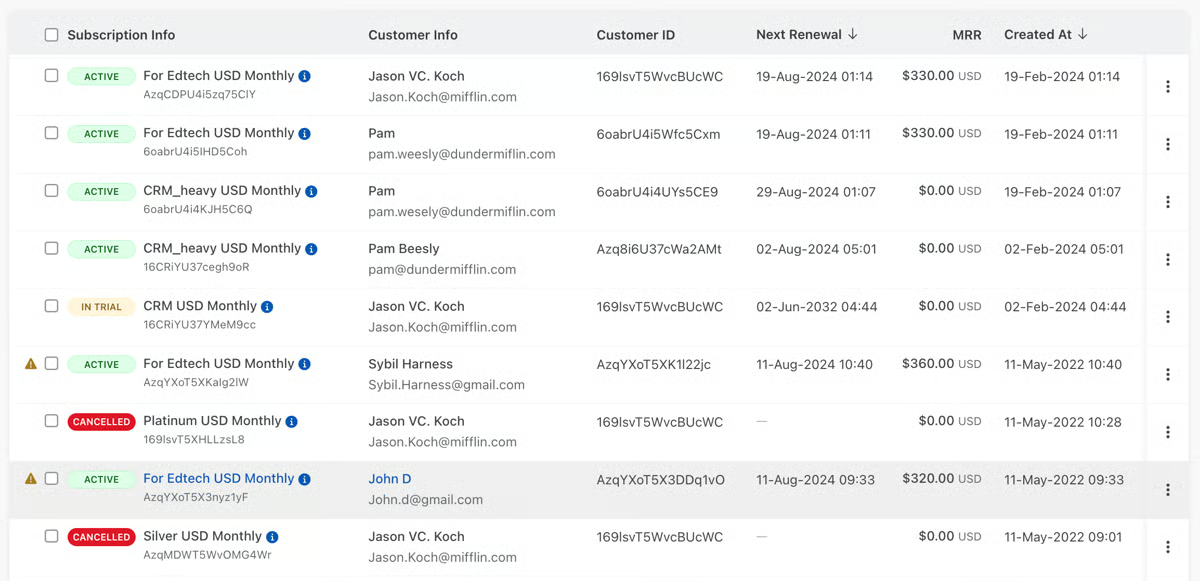
Support is another area where Chargebee earns trust. Many reviewers specifically mention responsive customer service, quick issue resolution, and helpful onboarding guidance. For teams implementing subscription billing for the first time, having that level of assistance makes a measurable difference.
Some reviewers mention that customization around invoices, dashboards, or certain workflow configurations can feel somewhat limited compared with more open-ended billing systems. For SaaS companies operating under standardized subscription models, the structure works well, but organizations that need highly tailored invoice layouts or deeply bespoke billing workflows may want to evaluate how much customization they require. That said, some users find Chargebee’s structured architecture rigid when trying to adapt workflows quickly, but it ultimately helps maintain consistent subscription data and stable billing logic at scale for complex recurring revenue operations.
The platform also brings a wide range of billing capabilities into one platform, from pricing configuration to automation rules and subscription lifecycle management. While that depth is valuable for scaling subscription operations, a few reviewers note that getting fully comfortable with the platform’s more advanced features can take time. Teams with dedicated RevOps or finance ownership tend to adapt quickly, but organizations seeking a very lightweight, plug-and-play billing setup may encounter a learning curve during the initial onboarding phase.
Overall, Chargebee stands out as a purpose-built subscription management platform that balances flexibility, automation, and integration depth without sacrificing usability.
“1. Powerful subscription and billing automation: Chargebee handles the full subscription lifecycle — trials, upgrades, downgrades, proration, renewals, and cancellations — without needing custom code or manual workflows. This drastically reduces billing errors and saves teams a lot of time.
2. Flexible pricing and experiments: It supports a wide range of pricing models (tiered, volume, hybrid, usage-based) and lets you experiment with new plans or promotions quickly. For fast-moving SaaS businesses, this agility is a huge advantage.
3. Exceptional revenue recovery tools: Features like smart dunning, payment retries, and automated reminders help recover failed payments effectively, which can add up to significantly saved revenue.“
- Chargebee review, Vishal R.
“I think for now, the concern of our members or our internal team is the automated emails. We'd like to see more customization options there. For instance, when a member transitions from a trial to cancellation, they should receive a specific email rather than our usual cancellation email. It would be great to have more features like this, and also when it comes to adding plans or coupons, so I don't have to pile them up.”
- Chargebee reviews, Mercy P.
Subscription management starts with getting your billing structure right. Learn how billing cycles work and how to set one up to support predictable recurring revenue.
Salesforce Revenue Cloud has the greatest impact by centralizing quoting, pricing, billing, and renewals into a tightly connected revenue system. This isn’t just a billing add-on; it’s an extension of Salesforce CRM, CPQ, and billing infrastructure working as one continuous system.
G2 reviewers repeatedly emphasize how seamless it feels to move from opportunity to quote to contract to invoice without leaving Salesforce. That tight ecosystem alignment is reflected in strong CRM & Sales integration scores of 92%, along with 90% satisfaction in opportunity management, according to G2 Data.
The CPQ engine is one of the most consistently praised capabilities. Advanced product configuration, layered pricing rules, discount controls, and automated quote generation are mentioned again and again in reviews. Sales teams managing complex product catalogs or subscription bundles highlight how guided selling flows reduce manual pricing errors.
Beyond quoting, what makes Revenue Cloud powerful is its true end-to-end quote-to-cash coverage. Users describe being able to manage contracting, renewals, amendments, billing, and revenue adjustments within one unified system. Instead of stitching together separate CPQ and billing tools, organizations can centralize revenue operations under one data model.
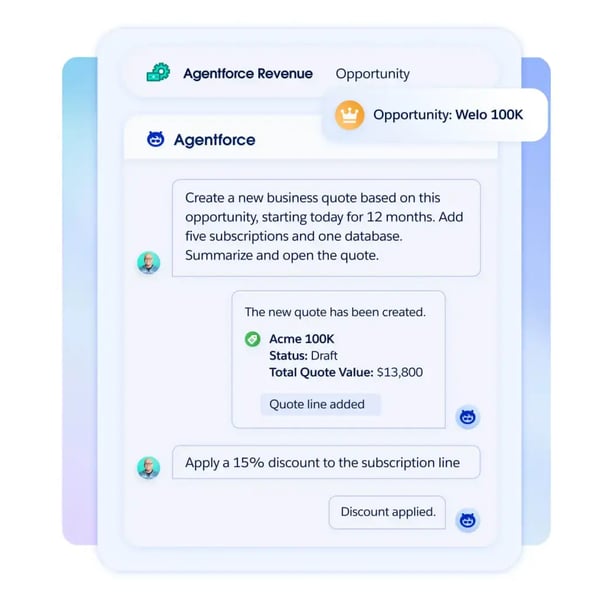
Customization is another theme that surfaces frequently in G2 feedback. Teams appreciate the ability to create complex pricing structures, custom approval chains, rule-based workflows, and tailored sales processes. This level of configurability makes the platform adaptable across industries and global sales motions. Whether it’s enterprise SaaS subscriptions or multi-line product portfolios, reviewers consistently mention flexibility as a defining strength.
Automation also plays a central role. Approval routing, pricing validations, and guided workflows reduce back-and-forth between sales and finance. Automated controls ensure discount policies and revenue logic are enforced consistently. That operational control contributes to 90% satisfaction in opportunity management and 89% in order history on G2, signaling strong backend reliability once the system is in place.
Scalability is where Revenue Cloud clearly positions itself. Many reviewers describe it as well-suited for large sales teams, complex product catalogs, and global operations. It supports layered pricing models, cross-sell motions, and structured renewals at scale. This isn’t a lightweight billing tool; it’s built for organizations managing revenue across regions and business units.
Revenue Cloud’s deep configurability and tight integration with the Salesforce ecosystem are part of what make it powerful for enterprise quote-to-cash operations. However, several G2 reviewers note that this level of flexibility can make the initial implementation more involved, often requiring dedicated Salesforce admins, technical expertise, or consulting support. Smaller organizations without internal Salesforce ownership may find the rollout more demanding, but enterprises with established RevOps teams tend to handle this well.
The platform also combines CPQ, billing, and revenue automation into one unified system, which many users see as a major advantage for consolidating revenue operations. At the same time, some reviewers mention that licensing and add-ons can add up depending on the modules and scale of deployment. For larger enterprises already invested in the Salesforce ecosystem, the investment can make sense, but teams with tighter budgets may want to evaluate the overall cost structure carefully.
Overall, Salesforce Revenue Cloud feels purpose-built for enterprises that want full control over quoting, pricing, billing, and renewals inside the Salesforce environment.
“Salesforce Revenue Cloud is the industry leader in AI-driven revenue management, everything from parts and quote management, all the way to billing and invoicing. It is by far the most powerful tool on the market that does this. Combine that with Agentforce, and you get a top-notch solution, and there's nothing it can't handle.”
- Salesforce Revenue Cloud review, Kevin P.
“One aspect that can be challenging with Salesforce Revenue Cloud is that, due to its breadth and flexibility, the initial setup and configuration can be complex, especially for companies with very unique pricing or billing models. Customization and integration with existing systems can require careful planning and technical resources. However, once configured properly, these challenges are outweighed by the efficiencies and insights the platform provides.”
- Salesforce Revenue Cloud review, Davide D.
If you’re exploring lighter billing options before investing in full subscription management, compare free invoicing tools that simplify payment collection and recurring charges.
If selling globally without worrying about tax compliance sounds appealing, Paddle’s Merchant of Record model is where everything begins. Instead of just giving you subscription billing tools, Paddle actually steps in as the merchant, handling payments, tax compliance, invoicing, and regulatory obligations on your behalf. That design choice reshapes how subscription management works, especially for SaaS companies selling internationally.
G2 users consistently highlight Paddle’s all-in-one approach to billing, payments, subscriptions, and compliance. Rather than stitching together payment processors, tax engines, and billing systems, teams manage everything from one dashboard. G2 Data shows 94% satisfaction for ease of doing business and 92% for likelihood to recommend, reinforcing how much users value this consolidated structure.
Global tax compliance is another area where Paddle earns repeated praise. G2 reviewers frequently mention VAT calculation, international tax handling, and the Merchant of Record structure as major operational advantages. Instead of manually tracking regional tax rules, Paddle automates compliance and remittance. That capability makes expansion into new countries far less operationally heavy. In fact, G2 Data reflects strong renewal satisfaction at 94%, suggesting confidence in its ongoing subscription reliability.
Recurring billing management is also described as dependable and flexible. Users talk about handling multiple pricing tiers, plan changes, and billing cycles without complicated backend adjustments. The subscription lifecycle, from sign-up to renewal, is structured in a way that reduces manual intervention.
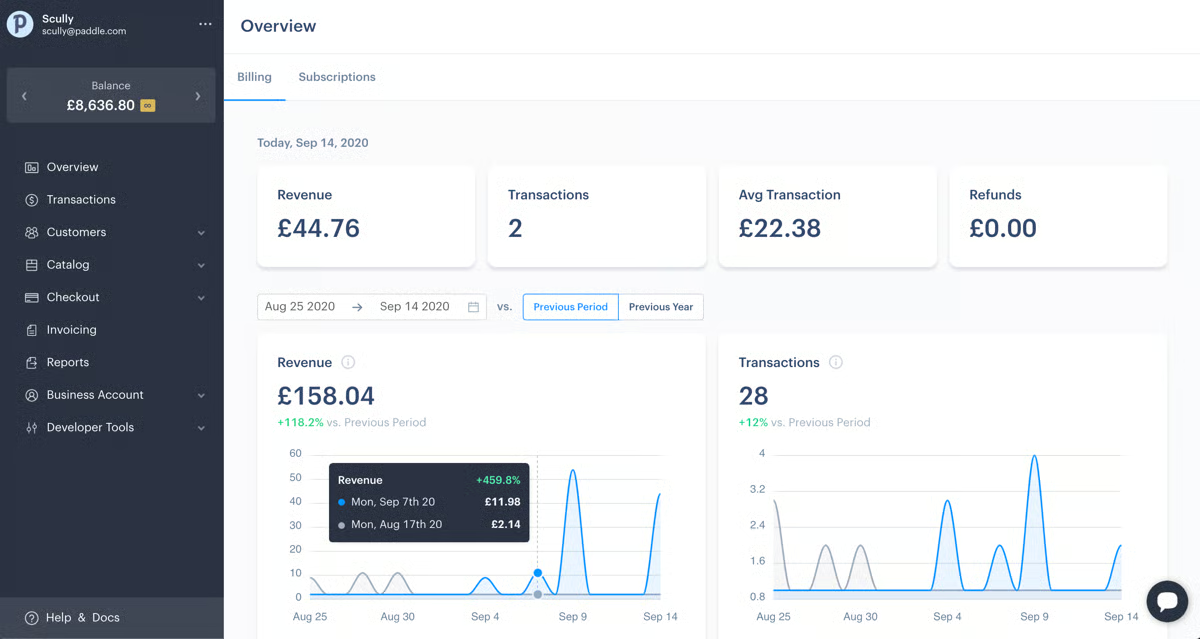
The interface itself is often described as clean and straightforward. G2 reviewers mention being able to navigate subscriptions, payments, and customers without feeling overwhelmed. According to G2, ease of use scores sit at 92%, reinforcing that even though Paddle manages complex global billing tasks, the surface experience remains approachable.
Developers also seem comfortable working with the platform. G2 feedback frequently highlights well-documented APIs, webhooks, and integration flexibility. Payment integration satisfaction stands at 89%, which supports the repeated mentions of smooth connectivity. Whether embedding checkout or syncing data to internal systems, reviewers describe the API layer as reliable.
Some G2 reviewers mention that Paddle’s support response times can occasionally stretch beyond 24 hours, which may feel slow for teams that need immediate help during operational issues. That said, Paddle’s support team is often described as knowledgeable and helpful when addressing billing or compliance questions, so for SaaS companies with less time-sensitive needs, the guidance is generally seen as reliable and useful.
Its reporting tools follow a similar pattern. Paddle provides core financial and subscription metrics that give teams clear visibility into billing performance, but several G2 reviewers mention that dashboard customization and advanced analytics are not as deep as what dedicated BI platforms offer. For most operational reporting, the built-in tools are sufficient, though companies needing more complex financial analysis may rely on external reporting solutions.
On the whole, Paddle feels purpose-built for SaaS companies that want to simplify global billing without assembling multiple systems.
“Paddle is very simple to integrate and set up. The solution comes with complete and very clear documentation. I have dealt with the customer service of the solution several times via their online chat in the dashboard for various elements that I hadn't necessarily understood well; they have always been able to meet my expectations.
We use Paddle Billing very regularly to manage our monetary transactions. We particularly appreciate the fact that Paddle automatically handles the taxes (VAT) to be applied to customers based on their country.”
- Paddle review, William S.
“The structure of subscriptions is less flexible than Stripe, and I often have to design my products around Paddle rather than the other way around. Lemon Squeezy is more capable but also more expensive.”
- Paddle review, Teslemetry A.
Subscription models directly impact revenue strategy. Explore how revenue management principles help optimize pricing, retention, and long-term growth.
For me, Sage Intacct begins and ends with its multi-dimensional financial reporting. This isn’t just about running a profit and loss statement; it’s about slicing financial data by department, location, project, customer, or any custom dimension you define. According to G2 Data, 90% of users say it meets their requirements, and much of that confidence shows up in how frequently reviewers highlight customizable reports, real-time dashboards, and deep financial visibility. The reporting engine doesn’t feel like an add-on; it feels like the backbone of the platform.
Underneath that reporting layer is a general ledger that reviewers consistently describe as reliable and structured. G2 feedback repeatedly calls out strong core accounting capabilities across accounts payable, accounts receivable, and financial controls. The general ledger isn’t just stable, it’s built to handle complex accounting logic while maintaining auditability. That reliability is reflected in high satisfaction across accounting integrations, with 93% in accounting-related integration categories on G2.
Scalability is another theme that comes up often in G2 reviews. Sage Intacct is frequently praised for supporting multi-entity organizations, especially those managing multiple subsidiaries or operating across regions. Consolidation processes are structured and centralized, which reduces manual spreadsheet work. G2 Data shows strong ratings around consolidation and billing types, reinforcing its strength in structured financial management.
Automation plays a major role in how teams use the system day to day. Reviewers mention automated journal entries, approval workflows, and recurring accounting processes that reduce manual workload. Instead of relying on manual adjustments or disconnected processes, Sage Intacct centralizes those financial workflows. Automation satisfaction scores reflect that consistency, with strong marks across billing types and financial adjustments categories.
Integrations are another pillar of the platform. Users frequently mention smooth connectivity with CRM systems, payroll platforms, and other operational tools. The API flexibility allows financial data to flow between departments without repeated reconciliation. According to G2 Data, CRM & Sales integration sits at 90%, reinforcing that Sage Intacct doesn’t operate in isolation from revenue operations.
Role-based permissions and internal controls also surface repeatedly in reviews. Finance leaders appreciate the ability to define granular access levels, enforce approval structures, and maintain compliance standards. This structured control framework makes it easier to manage financial governance across growing teams without compromising data integrity.
Sage Intacct’s strength lies in its deep financial architecture and high configurability across reporting dimensions, entities, and workflows. However, several G2 reviewers note that this flexibility can make the initial implementation more involved, often requiring structured onboarding, consulting support, and a significant time investment during setup. Finance teams with dedicated implementation resources usually navigate this well, but smaller teams may want to plan for a more structured rollout.
The platform also delivers enterprise-grade accounting capabilities, including multi-entity consolidation, automation, and strong financial controls. That level of depth comes with a higher pricing tier, and some G2 reviewers note that the cost can feel steep for smaller or early-stage businesses. For growing or mid-market organizations managing complex financial structures, the investment tends to align more closely with the value delivered.
All things considered, Sage Intacct feels purpose-built for finance teams that need dimensional reporting, structured automation, and strong internal controls across multiple entities.
“It seems to me that Sage Intacct has many tools and functionalities. We switched to Sage Intacct because it has too many functionalities. While some things may be lacking, it makes up for it with many other functionalities and add-ons that the application has. It helps us a lot in the accounting area when it comes to recording, modifying, and adjusting invoices, as well as in the automated calculation of taxes and the download of complete reports. Additionally, the connection with other applications, like Rippling, allows us to synchronize transactions with corporate credit cards. I also value the greater customization option that Sage Intacct offers to create specific and detailed reports, something we didn't have with our previous software, QuickBooks.”
- Sage Intacct review, Luis M.
“One downside of Sage Intacct is that customization and report building can sometimes feel complex for new users and may require additional training. Additionally, certain advanced features or integrations can increase overall costs, which may be a concern for smaller teams.”
- Sage Intacct review, Bhavik V.
Subscription management and cloud billing go hand in hand for small businesses with recurring revenue. Here's how the best cloud-based billing solutions compare across key dimensions on G2.
If there’s one thing that defines Maxio for me, it’s how much control it gives you over subscription billing logic.
The core billing engine is the center of gravity here. Instead of forcing rigid subscription templates, Maxio allows granular configuration across recurring, tiered, and usage-based pricing models.
Flexibility shows up repeatedly in G2 feedback. Users frequently describe the platform as highly configurable, especially when it comes to subscription structures, billing rules, and workflow controls. This isn’t surface-level customization; it’s granular billing logic that adapts to different contract types and revenue models. For SaaS teams experimenting with pricing or managing hybrid billing models, that configurability is often highlighted as a differentiator.
The billing engine itself receives consistent praise. G2 reviewers repeatedly call out reliable recurring billing, usage tracking, and structured subscription lifecycle management. According to G2, billing types satisfaction reflects that strength at 83%, reinforcing that the system handles varied billing structures effectively. Instead of patching together billing add-ons, Maxio centralizes those mechanics into a cohesive engine.
Automation is another strong theme across reviews. Finance teams mention automated billing cycles, workflow triggers, and reduced manual reconciliation work. According to G2 Data, automation satisfaction sits at 85%, which mirrors the repeated references to efficiency gains. The ability to streamline invoicing and subscription updates without constant oversight reduces operational drag.
Integration and API capabilities also stand out. Users consistently highlight developer-friendly APIs and the ability to connect Maxio with CRM, accounting, and other operational systems. The API layer isn’t an afterthought; it’s part of how the billing infrastructure connects into broader revenue operations.
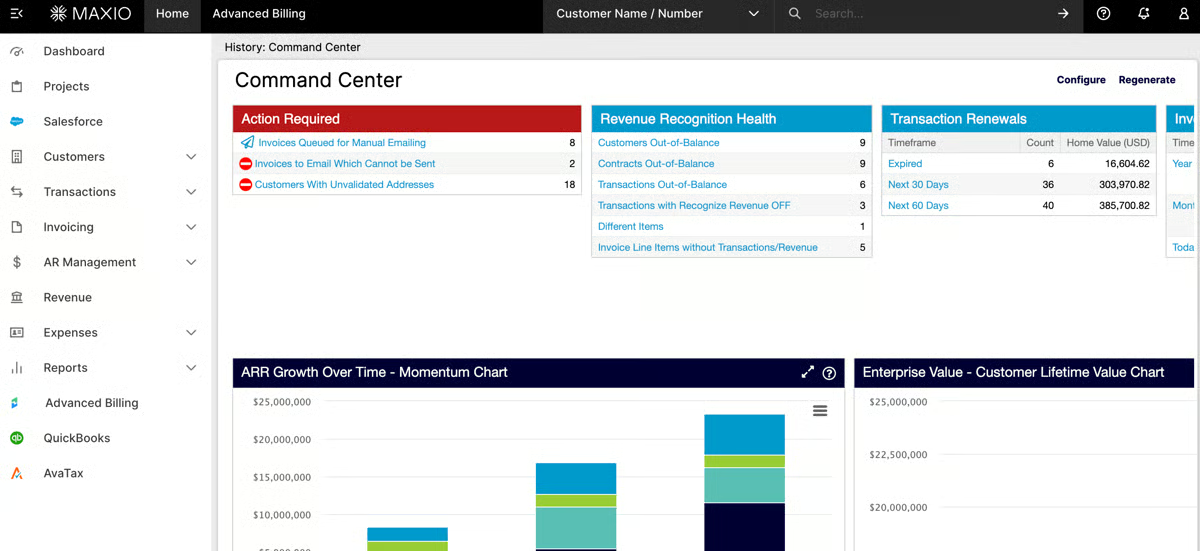
Ease of navigation comes up often in G2 reviews as well. Users describe the interface as intuitive and straightforward for managing subscriptions and billing workflows. G2 Data shows ease of use at 85%, reinforcing that even with configurable billing logic, day-to-day navigation doesn’t feel complicated.
Maxio provides detailed financial and subscription reporting that gives teams strong visibility into billing data across accounts and revenue streams. However, several G2 reviewers note that configuring custom reports or extracting specific insights can take more effort than with more visual analytics tools. Teams comfortable working with structured financial data usually adapt well, but those expecting highly visual or instantly configurable dashboards may find the reporting workflow less intuitive.
Its invoicing system is also designed with strong billing accuracy and transaction integrity in mind, which helps maintain consistency across subscription lifecycles. That structured approach, however, means that modifying invoices or adjusting transactions after generation can sometimes feel more complex. Organizations that prioritize controlled, audit-friendly billing processes tend to appreciate the structure, while teams that frequently need post-generation invoice edits may experience operational friction.
Ultimately, Maxio feels engineered for SaaS finance teams that need configurable subscription billing, automation, and API extensibility in one platform.
“I use Maxio for keeping track of all my clients' invoices and subscription details. What I like most about Maxio is the ease of being able to look up an invoice or subtask subscription really easily while I'm on a call with a client. I can review an invoice quickly, within about two minutes, and access contact information easily. The platform is really easy to use. The initial setup was very easy for me, and I could access Maxio and review subscriptions and invoices from the first day.”
- Maxio review, Yessie Z.
“Maxio still has a ways to go in terms of reporting and process efficiencies before I could say that I would go with Maxio again at my next startup. Right now, we don't believe the value is there for the subscription and are starting to scope out a replacement. The shortfall on the reporting side cannot be understated, as that's where much of the perceived value came from when we originally joined 2+ years ago.
Maxio recently had an audit prep webinar in which they incorrectly showcased reports that do not consolidate properly when there are different currencies. I stated this in the chat and was subsequently censored during the customer-facing webinar. How bad does that make Maxio look?! This was all recorded on my end as well. I shared it internally with leadership, and it just places so much doubt on Maxio's future.”
- Maxio review, Tieg B.
Stripe Billing really earns its reputation through pricing flexibility. If you’re building tiered plans, usage-based models, trials, coupons, or hybrid subscription structures, this is where the platform feels strongest. According to G2 Data, 94% of users say it meets their requirements, which aligns with the frequency with which reviewers mention advanced billing logic and lifecycle control. Instead of locking you into rigid templates, Stripe Billing lets you architect pricing around your product, not the other way around.
That flexibility is amplified by the API layer. G2 reviewers consistently highlight clean API design, strong webhook support, and detailed documentation. The developer-first structure makes it easier to embed subscription workflows directly into your product experience. Payments integration satisfaction sits at 93% on G2, reinforcing how tightly Stripe Billing connects to Stripe’s broader infrastructure. For engineering-driven teams, that technical coherence is a major advantage.
The integration with Stripe Payments and Checkout is another repeated theme in G2 feedback. Subscription billing, payment processing, and global payment methods work together without patchwork connections. Multi-currency support, tax handling, and international transaction capabilities are built into the same ecosystem.
Automation plays a significant role in reducing manual overhead. G2 reviewers frequently mention automated invoice generation, recurring billing cycles, and built-in retry attempts for failed payments. Dunning workflows and subscription lifecycle automation help keep revenue predictable without constant monitoring.
Stripe Billing also scales comfortably with growth. Infrastructure stability, support for international currencies, and handling of high transaction volumes appear repeatedly in G2 feedback. The centralized subscription dashboard adds visibility into customer plans, renewals, and payment status.
Stripe Billing provides core subscription and revenue metrics directly within its dashboard, giving teams clear visibility into billing performance and customer activity. However, several G2 reviewers mention that the out-of-the-box reporting depth can feel limited for more advanced financial analysis. Teams needing highly customized revenue models or deeper analytics often connect Stripe Billing with external BI or reporting tools.
The platform’s pricing structure reflects the scale and infrastructure behind Stripe’s global payment network. While users value the reliability and seamless payment connectivity, some G2 reviewers note that transaction fees and processing costs can increase as billing volume grows. For businesses prioritizing developer flexibility and global payment reach, the structure often aligns well with their growth needs.
Stripe Billing ultimately feels engineered for teams that want full control over subscription logic, strong API extensibility, and global payment connectivity under one platform.
“Stripe gives us the ability to customize how we want to present our invoices to our customers, structure our products, and accept payments. We were even able to overcome a product display problem relating to how Stripe displays items on our invoices through a way that wasn't recommended by Stripe, and Stripe continued to work the way we wanted it to anyway. The fact that we later had to change it to take advantage of a paywalled Revenue Recognition feature in no way downplays the value that Stripe provided us during this time by allowing us to use its system "incorrectly" and still function well!
- Stripe Billing review, Frank S.
“The pricing is the main pain point. Stripe Billing is expensive, especially for a startup like ours. The per-transaction fees and the additional percentage on top for billing features add up quickly as you scale. For a company based in a market like Mexico, where margins can be tighter, the cost can be hard to justify compared to alternatives. I wish there were more flexible or volume-based pricing tiers for growing startups.”
- Stripe Billing review, Maximiliano J.
Have more questions? Find more answers below.
Subscription management software is a platform that automates recurring billing, manages pricing plans, handles renewals, and tracks customer subscriptions. It helps businesses manage the full subscription lifecycle, from sign-up and invoicing to payment retries, upgrades, downgrades, and cancellations, while providing visibility into recurring revenue performance.
Subscription management software works by:
It connects pricing logic with payment infrastructure to ensure accurate, automated recurring revenue.
The best subscription management software depends on your business model:
The right choice depends on pricing complexity, integrations, scalability, and reporting needs.
Salesforce Revenue Cloud is often considered a top-rated subscription management platform for enterprises. It combines subscription billing, CPQ, and revenue lifecycle management within the Salesforce ecosystem. Enterprise teams on G2 frequently highlight its scalability, automation capabilities, and deep CRM integrations for managing complex subscription models.
Chargebee is widely recognized as an affordable subscription management platform for SMBs. G2 reviewers often note its flexible pricing tiers, automated billing workflows, and easy subscription setup. It helps small and mid-sized businesses manage recurring billing, invoicing, and subscription lifecycle operations without requiring complex enterprise infrastructure.
Stripe Billing is commonly used to manage recurring revenue streams. According to G2 reviewers, it simplifies subscription billing, recurring invoicing, and usage-based pricing models. Businesses value its developer-friendly APIs and seamless integration with Stripe’s payment infrastructure for automating recurring revenue management.
Paddle is a subscription management platform that integrates billing and payment processing into a single solution. G2 users highlight that it handles subscription billing, payments, and global tax compliance in one platform. This approach helps SaaS businesses manage subscriptions and payment gateways without relying on multiple vendors.
Chargebee provides advanced customer retention capabilities through tools like dunning management, smart retries, and churn reduction workflows. G2 reviewers often mention its automation features that help recover failed payments and improve subscription renewal rates, making it useful for businesses focused on reducing involuntary churn.
Maxio offers subscription analytics tools that help businesses track churn rates and revenue performance. According to G2 reviews, its reporting dashboards provide insights into subscription metrics such as customer churn, recurring revenue trends, and cohort performance, helping SaaS companies understand subscription health and retention patterns.
Chargebee supports flexible subscription plan creation through features like tiered pricing, usage-based billing, and custom subscription models. G2 reviewers frequently highlight how easily businesses can experiment with different pricing structures, making it suitable for companies that frequently adjust subscription plans.
Paddle supports subscription management for global audiences by handling international payments, tax compliance, and currency localization. G2 users often highlight its ability to manage global subscriptions without requiring businesses to build complex tax and compliance infrastructure themselves.
Salesforce Revenue Cloud supports AI-driven upsell and cross-sell opportunities through its integration with Salesforce’s broader AI and CRM capabilities. G2 reviewers often highlight how businesses can use customer data and automation tools within Salesforce to identify expansion revenue opportunities across subscription accounts.
Stripe Billing enables automated subscription renewal notifications and billing alerts. According to G2 reviewers, businesses use Stripe’s billing automation to notify customers about renewals, upcoming invoices, and payment updates, helping reduce missed payments and maintain continuous subscription revenue.
The most effective teams I’ve seen treat subscription management software as core revenue infrastructure, not just a billing tool. They don’t implement it once and forget about it. They use it to test pricing, automate renewals, reduce failed payments, and maintain visibility as the business scales. That’s where these platforms prove their value, not just in sending invoices, but in supporting long-term recurring revenue control.
Across the tools on this list, one theme is consistent: the best subscription management software balances flexibility with reliability. Whether you prioritize developer customization, enterprise-grade financial governance, or global compliance coverage, the goal is the same: predictable revenue with fewer operational bottlenecks.
Once billing is stable, the next step is to optimize the systems connected to it.
If you’re looking beyond billing to control overall SaaS costs, explore G2’s guide to the 7 best SaaS spend management software to see how teams track, optimize, and reduce software spend across the stack.


I evaluated 15+ tools to find the best sales tax compliance software. These are Avalara,...
 by Harshita Tewari

Pricing is no longer just a finance function; it’s a strategic growth lever. The best pricing...
by Yashwathy Marudhachalam

While studying accounting, I realized how inefficient accounts payable processes can be in...
/DarshayitaThakur-OrangeBG.webp) by Darshayita Thakur
by Darshayita Thakur