/DarshayitaThakur-OrangeBG.webp?width=400&height=150&name=DarshayitaThakur-OrangeBG.webp)


I didn’t start looking for the best SaaS spend management software because I wanted to. I did it because at some point, every finance conversation I was part of started with the same question: Why are we paying for this?
What I’ve seen again and again is that SaaS subscription overload doesn’t happen because teams are careless. It happens because teams are too busy for strategic spend management. Tools get added quickly to solve real problems, but they don’t get revisited. Over time, software spends add up, renewals go unnoticed, and finance shifts from proactive planning to reactive cleanup.
That’s what pushed me to take a closer look at the best SaaS spend management software. To build this list, I dug through G2 reviews, adoption data, and user feedback from finance, procurement, IT, and operations teams using this software in their day-to-day work.
I looked for software that brings structure to renewals, grounds vendor conversations in data, and gives financial visibility without slowing everyone down.
This list of the seven best SaaS spend management software for 2026 is based on what actually holds up once spreadsheets stop working and SaaS spend becomes difficult to manage.
Vertice: Best for mid-market and modern enterprise SaaS procurement optimization
Access a database of 16,000+ vendor pricing benchmarks and dedicated procurement specialists to cut software costs and manage renewals. (Custom pricing)
SpendHound: Best for budget-conscious teams managing multiple SaaS vendors
A 100% free platform for managing renewals with an automated vendor dashboard, negotiation support, and seamless ERP or billing system integration. (Custom pricing)
Mesh Payments: Best for real-time visibility over expense control
Provides support for local currency cards in 40+ countries, real-time transaction visibility, workflow automation, and virtual cards to streamline expenses. ($10/user/month)
Cledara: Best for finance teams looking for a centralized software to monitor SaaS spending
Centralizes subscription oversight with unified dashboards, automated invoice approval workflows, and real-time analytics to focus on underused tools. (£75 per month)
Spendbase: Best for company-wide expense tracking
Delivers large software discounts, cloud credits, and free cashback virtual cards while charging only 25% of the savings achieved. (Custom pricing)
Flexera One: Best for large enterprises with complex IT environments
Unifies visibility across software, hardware, SaaS, and cloud assets with advanced optimization and license management. (Custom pricing)
Tropic: Best for data-driven SaaS purchasing teams dealing with large vendor lists
Comes with AI-driven procurement, automated workflows, seamless platform integrations, dynamic analytics and reporting, supplier intelligence, and cost management tools. (Custom pricing)
* These SaaS spend management software are top-rated in their category, according to G2's Winter 2026 Grid Reports. I have included pricing information for the ones that publicly share their pricing plans.
As I evaluated the best SaaS spend management software, it became clear that adoption and impact are closely linked. 99% of finance leaders using spend management tools believe they’re operating efficiently, with 84% saying these tools have been very effective in accelerating digital business efforts.
According to the G2 Grid Report, the average user adoption rate for a SaaS spend management software comes in at 63%, signaling strong, consistent engagement across finance, procurement, and operations teams.
At its core, I found that the best SaaS spend management software helps companies understand where software dollars are going and ensures spending decisions are intentional.
The best solutions influence how organizations buy, renew, and govern SaaS spending, introducing early approval checkpoints, aligning budgets with everyday decisions, and reducing waste long before renewal deadlines arrive.
As SaaS stacks grow and vendor lists expand, these software have become essential for teams looking to stay efficient, data-driven, and in control of spend management.
I started by analyzing 20+ SaaS spend management software on G2 and reviewing Grid® Reports to identify the tools most trusted by procurement and sourcing teams, and finance professionals. From there, I shortlisted the seven best platforms that stood out for contract and renewal management, automating workflows, managing vendor relationships, and optimizing spending budget.
In my evaluation, I considered depth of visibility, automation abilities, integration capabilities, pricing, scalability, usage and license tracking, breadth of integrations, and user experience. To enrich this analysis, I used AI to process thousands of G2 reviews, surfacing recurring themes around likes, dislikes, and common pain points.
The screenshots throughout this article include verified visuals from vendor listings on G2.
When I compared the top software for SaaS cost optimization, I focused on the following criteria.
The list below contains genuine user reviews from our best SaaS Spend Management Software category page. To qualify for inclusion in the category, a product must:
*This data was pulled from G2 in 2026. Some reviews may have been edited for clarity.
According to G2 Data, I found that Vertice is predominantly used by 85% of mid-market companies to optimize their SaaS procurement, reduce software costs, and streamline spend management processes.
One aspect that stood out to me is Vertice’s intuitive user interface. Many reviewers noted that transitioning from previous manual or siloed systems was quick and seamless, and that the clean design made it easy for teams to find features and start gaining value without extensive training. The platform feels approachable without sacrificing depth of insights, so even those new to spend management can get up to speed quickly.
Another common theme I saw in G2 reviews was praise for Vertice’s analytics and cost-saving impact. The platform gives clear visibility into all SaaS spend and uncovers opportunities for optimization that would otherwise take hours of manual effort.
Teams no longer have to spend days dissecting contracts or usage reports as Vertice presents the data in an easy-to-interpret way, with benchmarking insights that help users negotiate better deals from a position of knowledge.
Many users highlighted how exciting it is to track their savings on the Vertice dashboard because the results are tangible and actionable. Features like automated renewal reminders, license usage analytics, and spend trend reports and forecasting greatly reduce the need to analyze each vendor manually.
I noticed that Vertice provides extensive support and expertise as part of its service. Many reviewers praised how the Vertice team works as an extension of their own procurement department, offering expert guidance in negotiations and renewals. The high-touch support made even challenging procurement tasks feel more manageable.
Vertice’s planning and workflow tools were frequently mentioned as a major plus by users. Reviewers appreciated the ability to plan and budget for software contract renewals well in advance across all their SaaS vendors, which helped maintain consistency and avoid last-minute surprises.
The platform’s centralized dashboard means that instead of chasing renewals or tracking contracts in different places, everything is in one clear hub. This proactive approach simplifies renewals and ensures that nothing falls through the cracks. Several users said it saved them time and stress, because they could be confident that no vendor agreement would auto-renew without their knowledge.
I also noticed reviewers praising Vertice’s collaboration features. Tools like shared dashboards, comment tagging, and especially the Slack integration were called out for making it easier to coordinate across departments. These collaboration capabilities helped distributed teams stay on the same page and work together on SaaS management tasks.
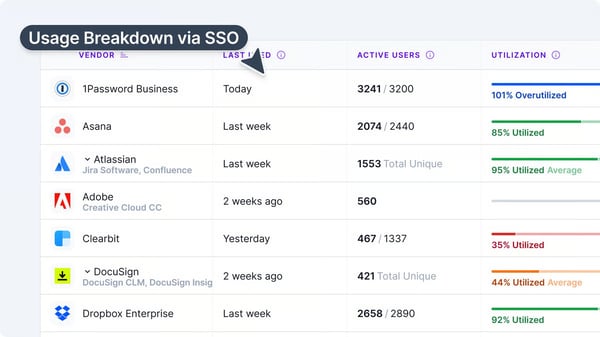
Vertice is a strong fit for teams seeking a comprehensive SaaS spend management platform with advanced controls and automation. Teams with lighter needs or those new to spend management may want to plan some onboarding time to focus on the most relevant features. Reviewers mention that once familiar, navigation feels intuitive, and the platform’s depth becomes a clear long-term advantage.
Vertice works well for teams with standard procurement and integration needs. Organizations relying on niche capabilities may need temporary workarounds or manual steps. Reviewers describe these gaps as minor and highlight Vertice’s responsiveness to customer feedback.
Based on my evaluation, Vertice is widely regarded for its intuitive UI, knowledgeable support team, advanced analytics, proactive planning tools, collaboration features, and the significant cost savings it delivers. It’s a trusted choice for mid-market and modern enterprise teams seeking to take control of their SaaS spend and streamline procurement.
"The platform gives clear visibility into spend, simplifies renewals, and helps uncover opportunities for optimization that would otherwise take hours of manual effort. I especially appreciate how user-friendly the interface is. It feels approachable without sacrificing the depth of insights. Vertice has made it easier to negotiate better contracts and ensure our organization is getting the most value from its software investments."
- Vertice review, Dushan B.
"I haven't identified any major issues with Vertice so far. However, it would be beneficial if Vertice could expand its capabilities to include features like vendor assessment questionnaires or vendor assessment. This addition would streamline the procurement process, providing a more comprehensive service experience from negotiations to onboarding."
- Vertice review, Lee A.
Automate the entire purchasing cycle, control spending, and improve supplier relationships with the best procure-to-pay software.
SpendHound is popular among small and mid-market companies as a way to centralize SaaS vendor management and software spend optimization. It is used by 77% of mid-market teams and 23% of small businesses.
One aspect that stands out is its pricing. SpendHound is 100% free, which makes it especially appealing for budget-conscious teams that want better control over SaaS spend without adding another line item to their budget.
Reviewers frequently mention how easy it is to share access with teammates and start using the platform right away, which lowers the barrier to adoption across the organization.
A theme I saw repeatedly in G2 reviews is praise for SpendHound’s hands-on support. Users rave about the white-glove approach, noting that the team helps import and organize vendor data and provides expert assistance during renewals.
Reviewers specifically highlighted how SpendHound’s real-time SaaS pricing benchmarks and aggregated market data give them confidence in renewal negotiations and have led to meaningful savings on large contracts.
I noticed strong feedback around SpendHound’s visibility and optimization capabilities. Reviewers mention that the platform helps teams clearly see license usage and overall SaaS spend through an easy-to-understand dashboard, eliminating the need for manual spreadsheets.
Users said this visibility made it easier to identify overspending, spot redundant tools, and recognize when multiple applications could be consolidated into one, helping teams prioritize quick wins without deep procurement expertise.
SpendHound’s proactive spend management features were another highlight. G2 reviewers appreciated automatic renewal alerts that prevent surprise renewals and give teams time to reassess whether tools are still needed.
I noticed reviewers calling out SpendHound’s integrations as a key strength. Users mentioned that integrations with AP systems, corporate cards, and ERPs were easy to set up, helping eliminate blind spots by tying tech spend directly back to contracts. This connection between spend data and vendor agreements gives teams a more complete, accurate picture of their SaaS environment.
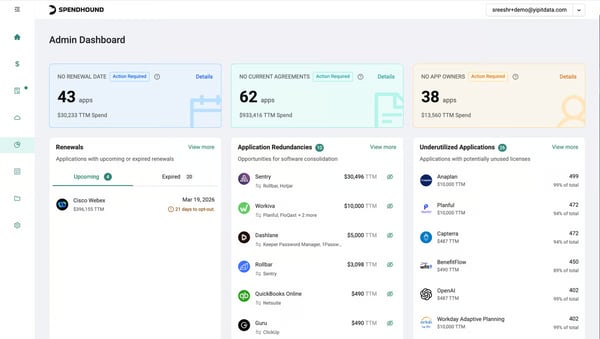
SpendHound is well-suited for teams focused on SaaS visibility and budget control without added complexity. Teams with advanced procurement or contract negotiation needs may require additional support. Based on G2 reviews I analyzed, many value that it delivers what’s needed in a clear, efficient way.
SpendHound’s automation and reporting features are intentionally lightweight. Teams that want highly customized reports or complex approval workflows may need additional tools. Reviewers often consider this a conscious design choice that keeps the platform easy to use and affordable, which aligns well with SpendHound’s target audience.
Based on my evaluation, SpendHound is well regarded for its intuitive interface, strong spend visibility, renewal tracking, and budget-friendly approach. It’s a solid choice for teams managing multiple SaaS vendors who want clarity, control, and cost savings, without investing in a heavy enterprise procurement solution.
"The weekly emails consolidating all our upcoming renewals have been a major upgrade to our ability to track our subscriptions, big or small. Before Spendhound, we often overlooked the lower cost subscriptions and even missed a few larger ones that we would have terminated or negotiated lower rates for. We won't miss those renewals anymore thanks to SpendHound! And it’s free and very easy to implement! I love it!"
- SpendHound review, PJ A.
"There are still some features that would be more beneficial, such as being able to disable renewal reminders."
- SpendHound review, Kyle L.
Enable finance teams to shape spending habits across the business with the best spend management software.
Mesh Payments is making company spending transparent and giving finance teams real-time visibility and control over expenses. Teams use it to automate expense processes and gain clarity on where money is going.
One aspect that stands out to me is Mesh Payments’ ease-of-use. I noticed many reviewers highlighting how easy the platform is to navigate and adopt.
Real-time spend tracking and control were repeatedly praised in reviews. The software makes every transaction transparent and manageable in real time. Finance managers can set limits and monitor budgets continuously, so there are no surprises at month-end. This level of visibility helps companies stay on top of spend across departments and regions.
I also found that many users love the card management feature. The platform makes it easy to issue virtual and physical corporate cards with predefined budgets or vendor locks. Reviewers appreciate the flexibility of virtual cards as they can create dedicated cards for specific vendors or projects, then freeze or cancel them instantly if needed. Features like Apple Pay and Google Pay integration for virtual cards boost employee adoption and improve the digital employee experience, since teams can spend quickly and securely without waiting for a physical card.
Expense reporting automation stands out as a recurring strength in G2 feedback. Mesh Payments significantly cuts down manual work. Several users praised the automatic receipt capture and linking, which means receipts get attached to the right expense without the usual hassle. Digital receipt management makes expense reporting far more efficient and error-free.
Users also frequently highlighted the streamlined approval workflows. The platform allows teams to request spend or new cards and get manager approvals all in one place, replacing long email chains and spreadsheets.
Integration is also a consistent highlight. It connects with popular ERPs, HR systems, and travel platforms to fit into your tech stack.
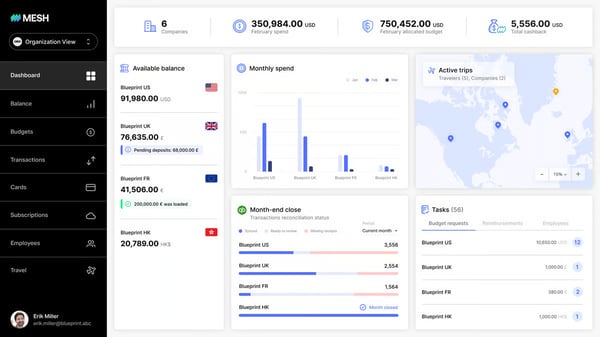
Mesh Payments is designed for teams that value granular control and automation across spend. For organizations with simpler expense tracking needs, this level of depth may feel more robust than necessary.
Mesh integrates smoothly with widely used accounting systems and supports automated workflows out of the box. Teams using less common or highly customized financial systems may require light configuration to align the platform with their processes.
Based on insights from G2 reviews, Mesh Payments is widely regarded for its intuitive UI, robust spend controls, real-time visibility, and time-saving automation. These strengths, along with its flexible card management and supportive customer service, make Mesh Payments a trusted choice.
"Mesh Payments has completely transformed the way we manage company expenses. The platform is intuitive, flexible, and gives our team the visibility and control we didn’t have before. From setting up virtual cards for specific vendors to streamlining approvals and reconciling transactions, everything feels faster and more organized.”
- Mesh Payments review, Haley K.
"There’s a bit of a learning curve if your team isn’t used to this kind of platform."
- Mesh Payments review, Dana B.
Spend management gives visibility, but forecasting keeps you ahead. Compare the best budgeting and forecasting software to plan and optimize future spend.
According to G2 Data, I found that Cledara is used by about 57% mid-market and 42% small-business teams to centralize and control their SaaS subscriptions, streamline spending workflows, and cut unnecessary software costs. It is geared towards finance teams, giving them visibility into the software stack to reduce excess spend while simplifying subscription management tasks.
One aspect that stood out to me from G2 reviews is Cledara’s intuitive, easy-to-use interface. Reviewers noted that even team members found it straightforward to navigate, thanks to a clean design that lowers the learning curve. This user-friendly approach encourages broad adoption across an organization, allowing various teams to get on board quickly without extensive training.
Another big plus users mention is having all software subscriptions and expenses centralized in one place. Reviewers love having a single source of truth for SaaS spend that shows all the company’s tools and subscription details, helping prevent redundant spend.
Cledara also includes built-in request and approval workflows. Even in remote teams, finance could greenlight new purchases quickly through the platform. All this makes tasks like month-end reconciliation and budgeting much cleaner.
I found that Cledara’s virtual card system and spend controls also earned frequent praise. Teams can easily spin up unique virtual cards for each subscription, each with its own budget limit. If someone leaves the company, their card can be instantly canceled to prevent unwanted charges, and setting budgets on each card ensures no tool overspends.
Users value how proactively Cledara helps manage renewals. It sends timely renewal reminders that help teams avoid surprise charges, and with Cledara’s spend analytics, users can negotiate better deals or cancel underused tools before they auto-renew.
I liked that Cledara automates tedious tasks like collecting invoices via email and syncing with accounting software, which saves time on manual reconciliations.
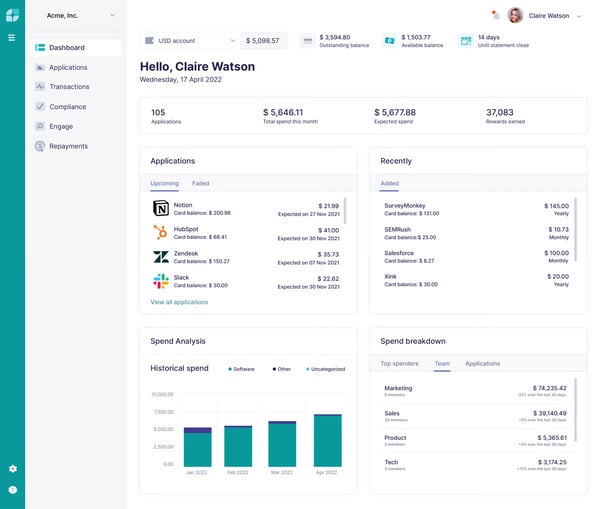
Cledara supports automated SaaS spend tracking and invoice management, but some reviewers note that invoice capture and related workflows may occasionally require manual follow-up. This can add extra steps for teams that rely on fully hands-off financial processes or high-volume invoice ingestion.
The software works well for teams centralizing SaaS spend in one system. Teams without direct accounting integrations may need to plan for light manual checks. Based on G2 reviews I analyzed, the time saved through centralized visibility outweighs these steps, with ongoing product improvements adding value.
Cledara is widely regarded for its user-friendly interface, robust spend controls, centralized subscription tracking, proactive renewal management, and responsive support. I found that these strengths make it a trusted choice for teams looking to gain full visibility and control over their SaaS investments and maximize the value of every software subscription.
"Cledara gives us immediate visibility into our entire software stack—what we’re using, who owns it, how much it costs, and whether it’s still worth it. Instead of chasing down scattered invoices or guessing what’s actually being used, we can make clear, data-backed decisions. It’s helped us cut duplicate tools, reclaim unused licenses, and stay in control of spending without slowing down the teams that need the tools to do their jobs.
The built-in workflows around approvals, renewals, and budgeting are simple but powerful. They strike the right balance between control and speed—no more rogue SaaS subscriptions or nasty auto-renewal surprises. It’s like having a real-time operating system for SaaS management."
- Cledara review, Minhaz P.
"I find the integration with our accounting system lacking, as we're not currently on the list of systems that Cledara links to. This means we have to manually export CSV files and upload them, adding more manual intervention than we would like. Additionally, handling multiple entities is not as seamless as it could be; it would be beneficial if we could integrate them into our whole subscription package rather than taking out a totally new subscription."
- Cledara review, Emma C.
Spendbase is a SaaS and cloud spend management platform with a strong emphasis on cost optimization, vendor negotiations, and actionable savings rather than just visibility. According to G2 data, the software is used by 62% mid-market and 38% small businesses.
Centralized visibility into SaaS and cloud spend is one of Spendbase’s most consistently valued capabilities. Reviewers consistently mention how helpful it is to see all software and cloud costs in one place, giving teams a clear picture of what they’re actually paying for without relying on scattered spreadsheets or tools.
Another theme I saw in reviews is Spendbase’s ability to drive real SaaS savings. Users highlight that the platform actively supports cost reduction, especially around renewals, helping teams lower spend rather than just track it. This hands-on approach makes savings more achievable without deep procurement expertise.
Vendor usage insights are also a recurring highlight in user feedback. Spendbase helps teams understand how vendors and tools are actually being used, which supports better decisions around renewals, consolidation, and right-sizing as the SaaS stack grows.
Audit support comes up as a distinct benefit as well. Users appreciate that the software keeps vendor and spend data organized, making audits and compliance reviews easier and less time-consuming.
Reviewers highlight company-wide expense tracking as a practical advantage. Spendbase helps teams monitor SaaS and cloud expenses over time in a structured way, improving financial oversight without adding manual work.
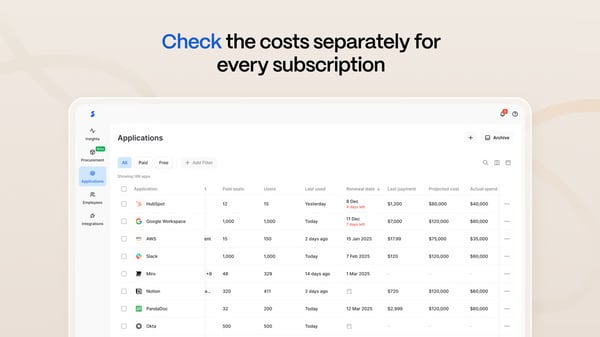
This software is built for teams that prioritize straightforward visibility over complex reporting. Teams that depend on highly customized dashboards or advanced analytics may supplement them with external reporting tools. From my review analysis, many teams still find the built-in views sufficient for day-to-day oversight.
Spendbase offers a wide range of features, which is great for teams that want to go deep on SaaS optimization, but reviewers mention that for smaller teams focused mainly on subscription savings, more learning time may be needed. Users do find value in taking time to fully understand what’s most relevant.
Based on my evaluation, Spendbase is widely regarded for its strong cost optimization focus, clear spend visibility, vendor usage insights, and company-wide expense tracking. It’s a compelling choice for teams that are looking to actively reduce SaaS costs and maximize the value of their software investments.
"We were scaling fast and really needed more room and budget for implementing new tactics. So, they helped us cut unnecessary expenses while still getting the tools we need."
- Spendbase review, Yevhen K.
"I'm a forever fan, but I wish for more flexible dashboard options and advanced analytics. That would be nice."
- Spendbase review, Taras T.
Use the best expense management software to maintain visibility as spending becomes more complex.
According to G2 Data, I found that 74% of users of Flexera One come from large enterprises with complex IT footprints. This platform helps organizations centralize software asset management, optimize SaaS and cloud spend, and maintain compliance across sprawling tech landscapes.
One feature that stood out to me is Flexera One’s comprehensive visibility across on-premise, cloud, and SaaS applications. This approach helps IT teams track software usage and compliance across the entire organization. Reviewers appreciated how the broad visibility makes it easier to spot underutilized resources and bridge gaps between systems.
Another common theme I saw in reviews was praise for the cost optimization and license management capabilities. Users reported that the platform quickly identifies unused software licenses or oversized cloud instances, leading to significant savings. Automated license reconciliation reduces audit risk and saves teams from manual tracking.
Flexera One’s reporting and analytics earned praise for making data easy to digest. The platform converts raw usage and cost data into intuitive dashboards, so teams can quickly see key metrics like software utilization or cloud spend. Reviewers noted this makes it easier to communicate value to leadership, since the numbers come pre-packaged in clear, actionable summaries.
I found that Flexera One is built to integrate with other enterprise systems. It connects to major IT service management (ITSM) tools and cloud platforms to pull in data, giving teams an aligned view of spend across tools and regions. These integrations keep inventory and usage data automatically up-to-date, helping organizations enforce governance.
Flexera One’s interface gets positive feedback for being quite intuitive. Reviewers said the navigation is logical and many functions are self-explanatory, which helps new users come up to speed faster.
Users mention that the team is responsive and that the provided documentation makes implementation easier for large organizations.
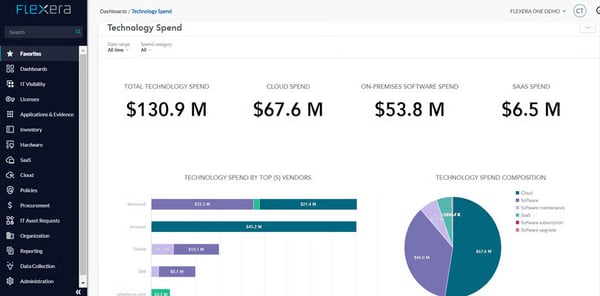
This platform is designed for teams that want a broad, feature-rich solution. Teams seeking only basic functionality may plan some time to focus on the most relevant tools. With familiarity, navigation smooths out, and the platform’s capabilities deliver lasting value.
Flexera One can be a significant investment. However, enterprise teams often feel the advanced capabilities and savings justify the cost, and that for large organizations, the benefits outweigh the expense in the long run.
Overall, based on my evaluation, Flexera One is widely regarded for its unified visibility, powerful optimization tools, robust analytics, and strong integrations, backed by solid support, making it a trusted choice for large enterprises looking to efficiently manage and optimize technology spend across complex, hybrid IT environments.
"Flexera One gives us a single, consolidated view of both our on-premises and cloud applications, which makes it much easier to manage software across the organization. The license reconciliation feature is especially helpful because it keeps us compliant while reducing unnecessary spending. Another strength is how it lets us track software usage and assign clear ownership across different departments and business units, which has greatly simplified internal reporting for senior management."
- Flexera One review, Aryan T.
"While Flexera One is powerful, it has a steep learning curve due to its many features, which can make onboarding challenging. Initial setup and integration with multiple systems can be time-consuming, and some dashboards and interfaces feel less intuitive than they could be. Additionally, performance can be slower with very large datasets, and support response times are sometimes longer than expected. Finally, the cost of licensing and subscriptions may be high for smaller organizations."
- Flexera One review, Žanete R.
Automate purchase orders, control spending, and increase financial visibility with the best purchasing software.
Tropic is an intelligent SaaS spend management solution that streamlines the procurement process and saves teams countless hours in purchasing and renewals while providing data-driven confidence that they’re getting fair deals on software.
According to G2 Data, Tropic is predominantly adopted by mid-market companies, with around 86% of users, with fewer small-business or enterprise teams using it.
One thing I noticed in user reviews is how feature-rich and comprehensive Tropic is. It packs a wealth of capabilities, such as a supplier intelligence module that offers valuable pricing insights.
I noticed strong praise for how Tropic centralizes procurement operations. Reviewers appreciate that benchmark insights, vendor negotiations, contract management, and invoice matching all live in one place, which helps teams stay organized with minimal effort.
I also saw a lot of praise for Tropic’s workflow and vendor management features. The software allows teams to set up custom approval workflows that involve all the right stakeholders, ensuring finance, legal, and security teams are looped in, and every purchase is properly documented.
It acts as a single source of truth for contracts and provides timely reminders for renewals, almost like a virtual assistant watching over upcoming expirations.
Another aspect that stood out to me is Tropic’s customer support and account management. The Tropic account managers and support staff routinely check in and flag anything that needs attention, and they’re quick to assist with setup or any issues.

Tropic is a strong fit for teams that need comprehensive SaaS spend coverage from day one. Teams with highly specific workflows may notice areas still maturing. Overall, core functionality is well established, with continued refinements steadily expanding flexibility.
Tropic brings a lot of structure to contract and procurement management, which is valuable for teams handling large vendor volumes. Teams relying heavily on automated contract extraction may notice areas still being refined. This is, however, seen as an improvement opportunity rather than a drawback.
Overall, based on my evaluation, Tropic is widely regarded for its rich data insights, workflow automation, vendor management capabilities, and supportive team, all of which make it a trusted choice for procurement teams looking to proactively manage their SaaS cost optimization.
"Great insights into saas benchmarking. Robust dataset. The business team is responsive and very attentive, and works hard to make sure I'm getting value out of the platform. It has paid for itself several times over as we've been able to leverage the insights to obtain better pricing."
- Tropic review, Cameron D.
"I find the dashboard a bit challenging to follow, and think it could be simplified for easier navigation. Also, the OCR functionality isn't reading contracts correctly, failing to extract the correct information, which leads to issues in tasks like invoice matching. There's also a problem with the system inaccurately categorizing contracts, such as treating consulting agreements with auto-renewal as SaaS contracts. It would be beneficial if the platform could better differentiate between vendor types, such as SaaS, consultant, or marketing vendors."
- Tropic review, Mony N.
Mentioned below are some more SaaS spend management software options that expand on the main list.
All the software listed above, except Spendflo, offers custom pricing or pricing on request.
Got more questions? G2 has got the answers.
Flexera One combines SaaS management, IT asset management, and FinOps on a unified platform, offering the depth, visibility, and governance demanded by complex large enterprises.
SpendHound offers a free tier with real-time budgeting tools, vendor insights, and a community-driven approach to spend management, making it highly accessible for SMBs seeking affordability.
Felexera One is widely recognized as a market leader for enterprise SaaS management, praised for its depth of discovery, optimization analytics, and integrated IT governance.
Both Vertice and Tropic emphasize automation and efficiency in procurement, making them excellent choices for organizations seeking to optimize SaaS purchasing alongside spend management.
SpendHound, Cledara, and Mesh Payments offer automated alerts for underutilized or duplicate applications using their Insights tool and user activity analysis.
Vertice, Flexera One, and Tropic stand out for their high-accuracy cost attribution and tracking.
Flexera One, Vertice, SpendHound, and Mesh Payments support cost allocation across multiple departments.
Both Vertice and Tropic are designed to prevent missed renewals and help optimize terms, making them strong choices for organizations prioritizing contract lifecycle management.
Mesh payments provides real-time visibility and analytics into SaaS subscriptions and expenditures, enabling organizations to monitor spend, quickly identify inefficiencies, and automate insights-driven financial control.
Vertice leverages AI-driven insights, automated procurement workflows, and benchmarking to deliver rapid, ongoing savings.
The list of SaaS spend management software covered in this article brings order to growing SaaS stacks, helping teams move from fragmented purchases and surprise renewals to clear, centralized control over where money is going and why.
What stood out to me most is how differently these platforms support finance and procurement teams. Some focus on negotiation and pricing benchmarks, others excel at renewals and contract governance, while a few go deeper into compliance, usage insights, or enterprise-scale asset management. Each tool takes a distinct approach to making SaaS spend predictable.
I evaluated their strengths and drawbacks. Now it’s time to compare the options that align with how your organization buys, renews, and manages software, and choose a SaaS spend management software that helps you stay ahead of spend decisions.
Want a centralized repository to oversee your vendor relationships? Check out the best vendor management software for keeping everything organized and running smoothly.
/DarshayitaThakur-OrangeBG.webp)

I evaluated 20+ spend management software to identify the seven solutions that consistently...
 by Harshita Tewari

Cloud costs have a sneaky way of ballooning. One month, the bill looks normal, and the next,...
 by Soundarya Jayaraman

To find the best free product analytics software for SaaS startups in 2026, I worked through...
 by Hasitha Varre