


Attracting qualified candidates today is harder than it looks.
Between managing job postings, tracking engagement across multiple channels, nurturing talent pools, and maintaining a consistent employer brand, the recruitment process can quickly become complex, even for seasoned talent acquisition teams.
While I don’t work as a recruiter myself, I’ve spent months analyzing how hiring teams use recruitment marketing tools by digging through hundreds of G2 reviews and speaking with talent leaders about the challenges they face. What I learned is clear: the right recruitment marketing platform doesn’t just help you promote jobs; it shapes every touchpoint of the candidate journey.
This blend of hands-on research, user interviews, and real-world feedback provided me with a practical understanding of what actually drives results, which features are most effective, which workflows are time-saving, and which platforms consistently deliver high-quality pipelines.
After evaluating more than 20 recruitment marketing tools, I narrowed the list down to the 9 platforms that truly stand out for 2026. I examined targeting capabilities, job distribution, CRM-style nurturing, employer branding tools, and integration strength to understand how each one performs in fast-paced hiring environments.
In this article, I’ll break down everything I found, from standout features to usability insights, so you can choose the best recruitment marketing platform that helps your team attract, engage, and convert the right talent more efficiently.
*These best recruitment marketing platforms solutions are top-rated in their category, according to the G2 Fall 2025 Grid Report. I've also included their monthly or annual pricing to facilitate easier comparisons for you.
Recruitment marketing tools, at least in my experience, play a bigger role in hiring than most people realize. To me, they’re not just software; they’re the systems that help attract the right talent long before a recruiter ever reviews a resume. These platforms turn job ads into campaigns, candidate interest into measurable engagement, and employer brand content into real pipelines. And when you’re working in fast-moving hiring environments, having the right tools behind the scenes makes everything feel more intentional and structured.
What surprised me most while evaluating these platforms is how different they are beneath the surface. Some tools focus heavily on job distribution and automation, making it easy to publish roles simultaneously and track candidate behavior in real-time. Others shine through their CRM-style features, nurturing talent pools, sending personalized campaigns, and helping teams stay proactive instead of reactive. A few platforms go even deeper, offering analytics that show which messages resonate, which audiences convert, and where your employer brand has the strongest pull.
And it makes sense that this category is gaining momentum. The global recruitment marketing platforms market is projected to grow to $2,656.9 billion by 2033, expanding at a steady 8.4% CAGR. With hiring becoming more competitive and candidate expectations shifting quickly, companies are turning to recruitment marketing not just to reach more people, but to reach the right people at the right time.
In my view, the best recruitment marketing software should help teams do three things really well: attract qualified talent, stay visible in competitive markets, and create a consistent, engaging candidate experience. When a tool can support all of that without forcing teams into complicated workflows, it becomes a real advantage in today’s recruiting landscape. Alongside recruitment marketing platforms, recruiting automation tools help teams convert candidate interest into efficient hiring workflows.
I started by reviewing the G2 Grid Reports for recruitment marketing platforms to identify the top-rated tools, and then spent time digging into hundreds of verified G2 reviews to understand how these platforms actually perform for real recruiting teams. From there, I looked closely at how each platform supports the core pillars of recruitment marketing: talent sourcing, job distribution, employer branding, campaign personalization, and candidate engagement.
I wanted to go beyond surface-level features, so I explored real-world use cases shared by recruiters, talent acquisition teams, and staffing firms. I paid attention to how these platforms help teams promote roles, build talent pipelines, measure engagement, and integrate with existing ATS systems. Understanding how each tool handled things like targeted messaging, candidate segmentation, and multi-channel outreach gave me a clearer sense of their strengths and limitations.
After gathering insights from professionals who use these tools daily, I validated everything against verified G2 feedback to make sure the experiences aligned. Any screenshots you’ll see in this article may be taken from vendor G2 pages or from publicly available product materials.
Recruitment marketing platforms aren’t just add-ons to the hiring process, at least not in my experience. They’re the foundation for how effectively companies attract talent, run campaigns, understand audience behavior, and compete in increasingly crowded markets. When I evaluated these tools, I focused on the features that directly shape how well recruiters can reach, nurture, and convert candidates into actual applicants.
Across the 20+ platforms I explored, I examined how they handled job distribution, audience targeting, CRM workflows, and employer branding. From that broader list, I narrowed it down to the 9 recruitment marketing platforms that clearly stood out for performance, reliability, and real-world impact.
Here are the key factors that shaped my recommendations:
*This data was pulled from G2 in 2025. Some reviews may have been edited for clarity.
When I started going through Bullhorn’s G2 reviews, one theme surfaced almost immediately: this platform is built around keeping every part of the recruiting workflow organized and visible in one place. Reviewers consistently highlight how easy it is to track candidates, clients, communications, and outreach without having to switch between multiple tools. Several users have even said that Bullhorn helps them maintain order across large pipelines, and this focus on centralized tracking aligns with Bullhorn's strong "meets requirements" score of 90%, according to G2.
The more I read, the clearer it became that Bullhorn’s filters and search capabilities are the backbone of how most teams work. Recruiters described the filtering options as a practical way to quickly find jobs, candidates, and past conversations, especially when managing hundreds of profiles at once. This is also where Bullhorn’s ease of use rating of 90% on G2 is reflected; users repeatedly mention that once they understand the system, searching and managing activities become far smoother than in other ATS tools.
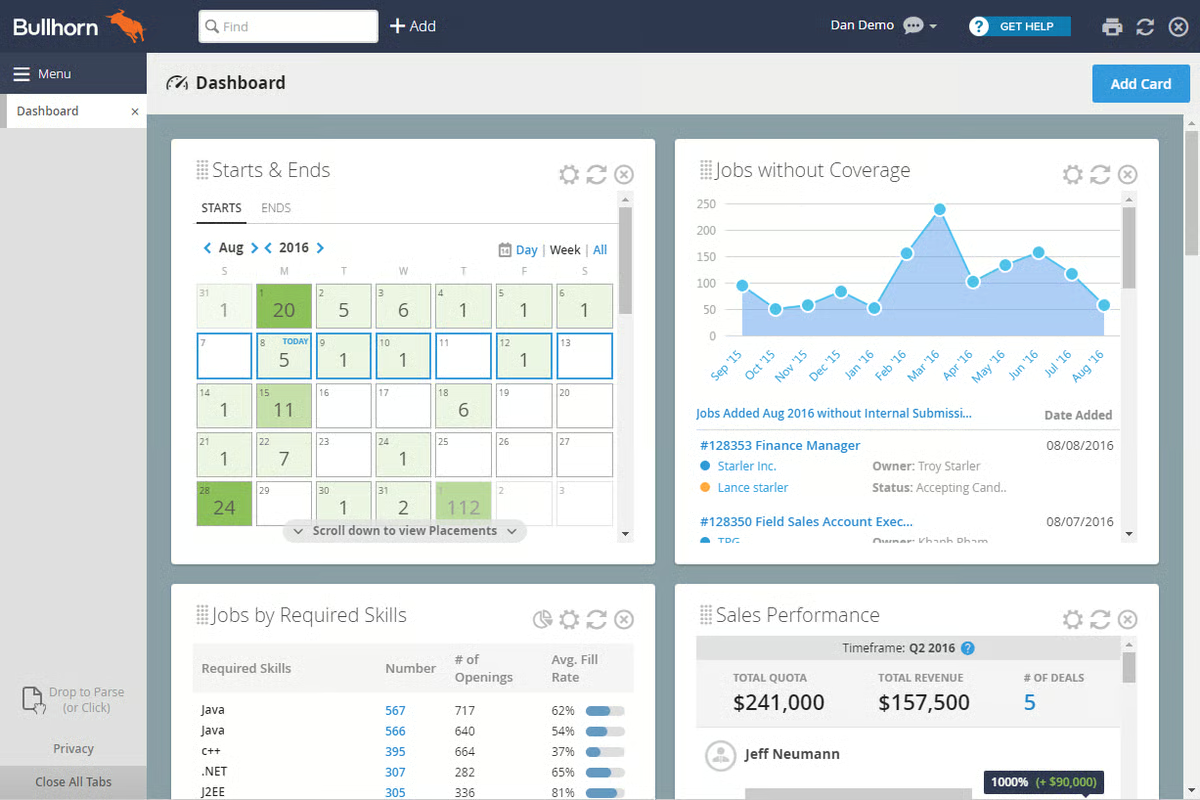
A theme I kept seeing across the G2 reviews is how well Bullhorn’s integrations fit into daily recruiting workflows. Users describe the process as smooth and reliable, especially when it comes to connecting timesheets, onboarding tools, and other contractor-facing systems. Several reviewers pointed out that these integrations cut down on manual steps and help candidates move through required tasks without confusion, which makes high-volume staffing environments run more predictably. Bullhorn is also a top-rated recruitment marketing platform for enterprises.
Some reviewers mentioned that Bullhorn’s wide set of tools, particularly its filtering options, CV parsing, and multi-step workflows for managing candidate data, requires time to learn. These features give recruiters a lot of control, but teams without structured onboarding or those bringing in new recruiters frequently may need extra training to use them effectively.
A number of users also pointed out that Bullhorn can load slowly during specific actions, especially when switching between candidate profiles, applying multiple filters, or navigating across several tabs inside the ATS. These delays tend to show up most in high-volume environments where recruiters move rapidly through records. For teams that manage moderate workloads or rely on steadier, scheduled searches instead of constant profile switching, these performance issues are less impactful.
In the broader context, Bullhorn proves itself as a system that not only organizes high-volume recruiting activity but also supports the momentum needed to fill roles quickly and consistently.
“Bullhorn is a great Recruiting and Staffing Software. The best part is that we can keep all kinds of databases in Bullhorn, which we do on a daily basis. It keeps a great track of candidates, candidate complete profiles, submissions, interviews, placements, and much more data that it can hold on our candidates. I can put a note in Bullhorn to make the candidate exclusive from the whole organization so that if one candidate is in the interview process, no one else can submit that to other positions. Bullhorn also keeps track of candidates, including when they were entered into Bullhorn, when they submitted, when they were placed, when they were interviewed, and how many times someone has submitted that candidate. Additionally, we can enter a complete profile for a candidate, including address, email, contact information, location, visa status, and the portal from which they were sourced, among other details.
We can also review our activities from past years. We can directly get the whole report of different teams. We can also search candidates with a Boolean search, with so many filters according to our need. With Bullhorn, my recruitment process gets better each day".
- Bullhorn review, Richa S.
“The system can be slow to load at times. Occasional glitches or lag when searching or updating records. The Mobile app doesn’t always offer the same functionality as the desktop”.
- Bullhorn review, Bri L.
Want to strengthen the front end of your hiring funnel even further? Learn how AI transforms early qualification in our guide on the role of AI candidate screening in modern recruitment.
As I worked through the Greenhouse reviews, one pattern showed up immediately: users consistently praise how structured and organized the hiring workflow is. Reviewers often mention that Greenhouse’s pipeline stages, interview plans, and progress tracking give them a dependable framework for running hiring processes at scale. According to G2 Data, 90% of users find it easy to do business with Greenhouse, which aligns with how many reviewers describe their day-to-day experience using these structured workflows to keep candidates moving smoothly from one stage to the next.
Another theme that stood out is how effectively Greenhouse manages information across roles, teams, and candidate histories. Recruiters noted that having past applicants, warm candidates, and long-term interactions in one place makes it easier to re-engage talent when new roles become available. Users also highlighted how Greenhouse simplifies external job posting and organizes incoming applications without extra effort. Several reviewers highlighted customization as a significant strength, particularly the ability to tailor pipelines, interview plans, and stage transitions to match their organization's hiring practices.
Reporting and visibility also appeared repeatedly in reviews. While most teams rely on the built-in reporting to understand pipeline health or referral activity, reviewers noted that these insights help them maintain consistent hiring across teams. This steady usefulness supports Greenhouse’s broader momentum. G2 Data shows that 91% of users believe the product is moving in the right direction, which lines up with feedback about recent improvements to workflows, job posting flows, and referral tracking.
Several reviewers shared that while Greenhouse supports customization, building highly detailed or tailored reports requires more effort. For teams that rely heavily on advanced analytics or specialized dashboard formats, this can add extra time and may require additional tools. Greenhouse tends to be a better fit for recruiting teams that mainly use standard reports and only occasionally need deeper breakdowns.

Scheduling came up as another area that some users pointed out. A few reviewers noted that scheduling interviews, especially when relying on specific calendar integrations or mass-sending invitations, can necessitate additional steps. This tends to impact teams that coordinate high volumes of interviews or rely on automated scheduling flows. For organizations with steadier hiring rhythms or smaller interview loops, the scheduling flow is usually sufficient.
On the whole, reviewers describe Greenhouse as a structured and dependable platform that supports consistent hiring from start to finish. Companies that value process visibility and coordinated hiring across multiple roles tend to benefit the most from the way Greenhouse brings every part of the candidate journey into one place.
“I like how flexible Greenhouse is when it comes to setting up every aspect, whether it be permissions or job-based. The interface is generally easy enough to navigate that most new hiring managers need minimal training to get started. The Greenhouse team is very helpful and knowledgeable, and always willing to help with any issues and suggest solutions”.
- Greenhouse review, Mark H.
“I see an opportunity to improve the search functionality so it can retrieve more relevant candidate results from the entire database. Enhancing keyword matching and filtering would make it even more effective for recruiters handling large volumes of profiles”.
- Greenhouse review, Shivananda G.
Once you’ve built strong pipelines, the next step is reducing manual work. Learn how recruiting automation can help your team move faster with less effort.
As I reviewed Ceipal ATS feedback, one theme dominated nearly every comment: users consistently praise how well the platform connects with job boards, email, LinkedIn, and multiple sourcing channels at once.
Recruiters rely heavily on these integrations to pull in applicants, search across portals, and manage profiles from a single interface, and reviewers frequently point to this ecosystem as the core strength of Ceipal. This aligns with the strong sentiment in G2 Data, where 97% of users are likely to recommend the platform, reflecting the high value that staffing teams place on these integrations in their daily workflows.
Another theme that appears repeatedly is Ceipal’s ability to centralize large volumes of candidate data. Reviewers noted that the platform streamlines the management of sourcing, submissions, onboarding checklists, and communication records, eliminating the need to switch between tools.
Many users have called out the resume harvesting capabilities and AI-driven ranking as time-savers, highlighting how Ceipal supports recruiting teams that work through hundreds of applications simultaneously. According to G2, Ceipal scores 94% in meets requirements and 95% in ease of setup, which aligns with what reviewers describe, especially teams that emphasized how quickly they were able to adopt the platform and plug it into existing processes.
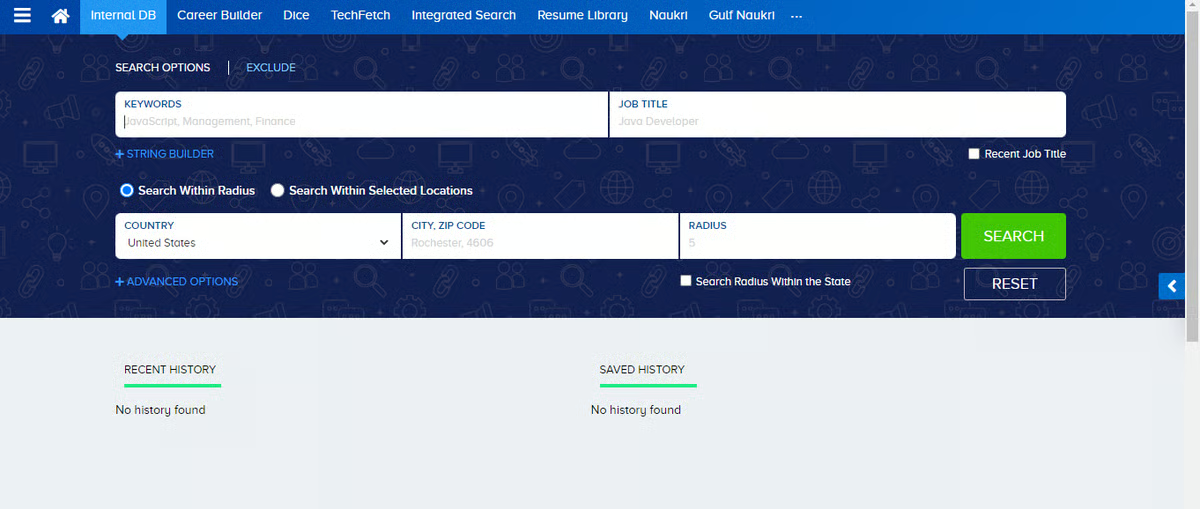
Users also mentioned that Ceipal’s automation plays a meaningful role in streamlining high-volume recruiting tasks. From shortlisting to email reminders to onboarding workflows, the platform reduces manual steps that typically slow down large staffing teams. Recruiters working across multiple clients seemed to appreciate how these automations help them stay organized while dealing with shifting requirements and heavy sourcing loads.
A few reviewers did mention areas that depend on team workflows. Several users have pointed out that the user interface becomes more difficult to navigate when working across advanced modules or when switching quickly between detailed candidate profiles. This tends to be more noticeable for teams coordinating large databases or managing multiple job pipelines simultaneously. Organizations with structured training processes or experienced recruiters typically adapt more easily, making Ceipal a better fit for staffing firms with defined workflows rather than small teams that need minimal UI complexity.
Performance at scale also frequently came up. Some reviewers noted that Ceipal slows down when handling deep searches, large resume banks, or high-volume activity. Teams that rely on rapid profile switching or run intensive searches throughout the day may encounter occasional delays. However, staffing teams with steady workloads or those who run searches in batches often find these slowdowns manageable within their overall processes.
All things considered, reviewers describe Ceipal ATS as a powerful and highly integrated platform designed for high-volume recruiting. Its ecosystem of job boards, centralized candidate management, and strong automation support make it a strong match for staffing agencies and talent teams that prioritize scale, breadth of sourcing, and fast execution.
“CEIPAL utilizes AI to scan job requirements and compare them with candidate profiles (skills, experience, location, willingness, etc.), automatically ranking the best-fit candidates. This helps recruiters focus their efforts on the most promising applicants first. All incoming applications (from job boards, social media, email, referrals, etc.) are collected into a single, unified database. The system automatically parses resumes (extracting information into structured fields), making searching, filtering, and retrieving candidate information much easier compared with spreadsheets or manual files.
By automating resume parsing, matching, and communications, hiring teams don’t have to manually sift through hundreds of applications, which speeds up selection and placement. With centralized data and efficient matching, even qualified candidates from older applications or passive databases are searchable”.
- Ceipal ATS review, Sarath S.“The platform has made candidate recruitment easy, and it boasts all amazing features - no dislikes”.
- Ceipal ATS review, Gerald S.
Recruitment marketing brings candidates in, but your ATS determines what happens next. Explore the best ATS tools of 2025 to strengthen your entire hiring funnel.
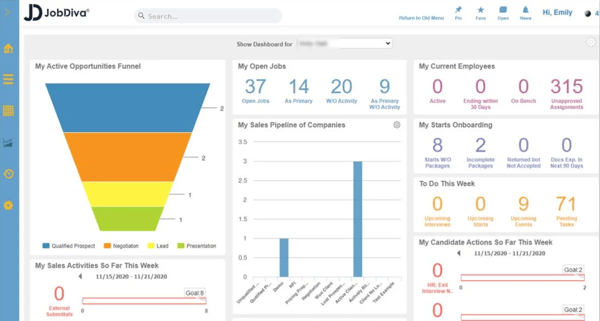
As I moved through the JobDiva reviews, one core theme was impossible to miss: users consistently praise how well JobDiva brings sourcing, submissions, client updates, and communication into one connected workflow.
Recruiters rely heavily on its integrated environment to search for candidates, review resumes from multiple job boards, and send updates without having to jump between tools. This end-to-end visibility is a big part of why JobDiva maintains strong satisfaction metrics. According to G2 Data, 92% of users say the platform meets their requirements, which aligns with how often reviewers describe it as a comprehensive system for daily staffing operations.
Another recurring theme is JobDiva’s sourcing capabilities. Reviewers noted that the platform gives them broad access to talent across job portals, and many pointed out how effective the search experience is when finding candidates with specific skills or backgrounds. Several users mentioned that they rely on JobDiva to quickly identify qualified applicants and move them into pipeline stages without manual work. This sourcing depth, combined with its applicant tracking tools, is a major reason why staffing teams describe it as a productivity booster for high-volume recruiting.
Workflow management also appears repeatedly in the feedback. Users appreciate how JobDiva streamlines submissions, keeps records organized across clients, and centralizes updates in a single location. Recruiters working across multiple roles highlighted that being able to see activity end-to-end helps them coordinate faster. And with G2 showing 90% ease of doing business, this aligns with reviewers who describe JobDiva as a supportive system for staying on top of shifting client needs.
Some G2 users noted that the system would benefit from more precise filtering options, particularly when searching for specific candidate levels or refining integrated job board results. This tends to matter more for teams that rely on highly segmented searches or need very granular talent mapping. Organizations with broader sourcing needs or teams that mostly search mid-level roles often find the current filters sufficient.
Performance during heavier usage also surfaced in several G2 reviews. Several G2 users reported that JobDiva can run slowly or feel sluggish when switching between modules or reviewing large numbers of profiles simultaneously. This is most noticeable for staffing agencies that work through large databases or run frequent, deep searches throughout the day. Teams with moderate activity or a steadier recruiting pace typically experience fewer slowdowns.
When you weigh it all up, reviewers describe JobDiva as a comprehensive, workflow-driven ATS that supports sourcing, submissions, and client activity within a single, connected platform. Its strong job board reach, consistent workflow visibility, and all-in-one structure make it a strong fit for staffing firms that prioritize breadth, coordination, and efficiency across every stage of the hiring process.
“I appreciate that JobDiva combines an ATS and CRM into one platform, making it easy to manage candidates, clients, and job pipelines without needing to switch systems. Its automation features and AI matching significantly reduce manual work”.
- JobDiva review, Ali S.
“The interface can feel dated and a bit cluttered, especially for new users. It takes some time before everything feels intuitive. Some features feel buried under too many clicks, so simple tasks can take longer than they should.
The system is powerful, but because of that, the learning curve is steeper compared to newer ATS platforms. And occasionally, certain modules feel less flexible; you can do the task, but not always in the smoothest or most customizable way”.
- JobDiva review, Aashish S.
Explore our breakdown of key recruitment marketing platform features, which cover employer branding, integrations, analytics, and multi-channel campaigns based on G2 user review data.
One of the clearest themes in CareerBuilder Talent Network reviews is how reliable it is for sourcing a wide range of candidates across industries, roles, and experience levels. Recruiters often mentioned that they can customize the platform to fit their workflow, integrate it with their own ATS, and rely on it throughout the entire workday to find relevant talent quickly.
Many users highlighted how easy it is to implement and how helpful CareerBuilder’s customer support team is during setup and daily use, which aligns with CareerBuilder’s strong G2 Data, 90% of users say they are satisfied with the platform, and 92% highlight ease of doing business, which matches the straightforward sourcing experience reviewers talk about.
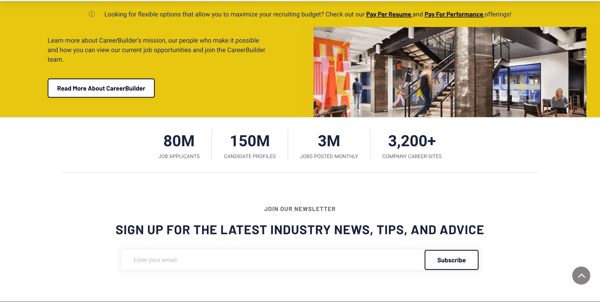
CareerBuilder also stands out for the volume of applicants it brings in. Recruiters mentioned that the platform consistently delivers strong inbound applications and helps them fill roles that otherwise would take longer to staff. Several G2 reviewers appreciated how simple it was to post jobs, manage applicants, and filter through profiles at speed. The system’s structure supports common staffing workflows, and users often rely on it as their primary tool for high-frequency sourcing.
Another theme that showed up often is its usefulness for matching candidates with client requirements. Many reviewers mentioned that CareerBuilder helps them locate profiles closely aligned with job descriptions, making it easier to move qualified applicants into the next stages quickly. This steady performance across sourcing and matching is reflected in G2 sentiment, where 92% of users say CareerBuilder meets their requirements, reinforcing its reliability as a core sourcing engine.
I also noticed reviewers consistently calling out the platform’s ability to surface candidates who may not appear on other job boards. Several recruiters explained that CareerBuilder’s talent pool felt broader and more varied, which helped them identify applicants who would otherwise be difficult to reach.
Others highlighted the platform’s filtering and sorting tools, explaining that they make it easier to navigate large batches of applicants without losing track of qualified profiles. And for teams that rely on ongoing sourcing throughout the day, users repeatedly mentioned that CareerBuilder delivers a steady flow of relevant candidates without requiring constant adjustments or campaign resets.
Reviewers noted that while CareerBuilder handles sourcing well, limitations in email-based outreach, such as the inability to run mail merges directly within the platform, can slow down teams that rely heavily on bulk communication. This tends to matter more for staffing agencies or high-volume coordinators who send batch outreach regularly. Smaller teams or organizations with steadier hiring rhythms may not feel this limitation as strongly.
A few G2 reviewers also pointed out restrictions around resume downloads, mentioning that caps or limits can impact teams that manage large pipelines or frequently hand off candidate profiles to clients. This is more relevant for agencies working across many simultaneous roles; companies with fewer openings or internal hiring teams typically operate comfortably within the platform’s download boundaries.
CareerBuilder Talent Network is consistently described as a dependable sourcing tool for recruiters who value reach, speed, and reliable access to active job seekers. Its broad candidate pool and straightforward workflows make it a strong choice for staffing teams and in-house recruiters who need fast, high-volume sourcing without complexity.
“Career Builder is very use, you can implement it and customize it as per your need, you get excellent customer support, based on your subscription, you can almost use it throughout your day, it has multiple useful features for talent search, and most importantly, you can integrate it with your own ATS as well”.
- CareerBuilder Talent Network review, Aazam S.
“Nothing to dislike. Limits to downloading resumes should be increased because profiles in CareerBuilder are the best, and who wants to miss those profiles?”
- CareerBuilder Talent Network review, Ashraf Hussain Z.
One of the clearest themes in Teamtailor’s G2 reviews is how clean, modern, and intuitive the platform’s interface is. Users consistently mention the layout, the drag-and-drop workflows, and the structured candidate cards as reasons why the tool makes hiring feel organized rather than overwhelming.
Recruiters often point out that the visual clarity helps hiring managers collaborate more effectively, since anyone can log in and instantly understand where candidates stand in the pipeline. That ease of adoption is echoed in G2 sentiment: 94% of users rate the platform highly for overall satisfaction, and 95% say it meets their requirements, reflecting how well the system supports day-to-day hiring activities.
G2 reviewers also highlighted how customizable and flexible Teamtailor is during implementation. Many mentioned that configuring pipelines, stages, and templates takes minimal effort, and the platform’s intuitive setup aligns with G2’s 96% ease of setup score. This flexibility extends to employer branding as well.
Users frequently praised how simple it is to build an attractive careers site, create job pages, and tailor the application journey to show off the company’s culture. For many teams, this becomes one of the tool’s core strengths: making the hiring process feel polished and professional from a candidate’s perspective.
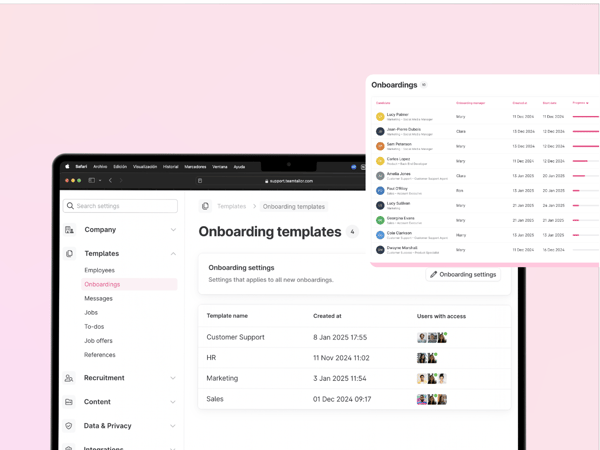
Candidate evaluation tools came up often in the reviews, particularly features like star ratings, notes, drag-and-drop sorting, and structured communication. Recruiters appreciate being able to compare applicants quickly and keep all interactions documented in one place. I also saw several mentions of how easy it is to collaborate internally, hiring managers and interviewers can jump in, leave feedback, and help move people forward without training or micromanagement.
Some G2 reviewers pointed out that Teamtailor’s mobile view doesn’t yet offer the full functionality of the desktop version. This is mostly relevant for teams that manage pipelines on the go or rely on mobile devices during high-volume hiring periods. Organizations that work primarily from desktops or operate in more structured office environments usually don’t feel this limitation.
Another topic mentioned occasionally was the presence of small bugs or minor inconsistencies across modules. While not disruptive, these issues can slow down teams that rely heavily on very fast, precise navigation. Teams with slower hiring cycles or fewer concurrent requisitions typically adjust without difficulty, but high-volume staffing environments may prefer more rigid stability across every interaction.
Overall, G2 reviewers describe Teamtailor as a polished, easy-to-adopt ATS that elevates the candidate and recruiter experience. Its design, customization flexibility, and strong branding tools make it a great fit for teams that want a visually appealing, collaborative hiring platform without adding complexity to their workflows.
“I’ve had a really positive experience working with Teamtailor. I’ve been using this tool for almost two years now, and we recently transitioned to it from an older, more outdated platform. Honestly, the change has been a great decision.
I’ve found it extremely helpful for organizing interviews and tracking which candidates are at each stage of the recruitment process. Communicating with candidates through the platform makes everything much easier, and the integration with WhatsApp is a huge plus for day-to-day operations.
The ability to record interviews and transcribe them, highlighting key points from each session, has been incredibly useful. The interview scorecards are also a great feature they can be filled out directly in the system and provide a much more comprehensive view of each candidate.
Additionally, you can store all candidate information, from documents we send to candidates to everything they share with us, while working within the platform’s data protection framework. The environment is visually appealing and easy to use, making day-to-day work much smoother.
Overall, my experience with TeamTail has significantly improved my workflow, efficiency, and visibility into each recruitment process. It’s easy to generate reports for each stage, which helps me monitor progress and analyze trends. Truly, it’s a very powerful and effective tool”.
- Teamtailor review, Lorena L.
“I believe that the process of searching for profiles within the Teamtailor platform could be improved. Currently, I think it would be beneficial to have more filters available and a more effective integration of artificial intelligence. This could facilitate the search and management of profiles. Additionally, I would like Teamtailor to offer the possibility to record and automatically provide instant feedback, which would speed up and enhance the selection process”.
- Teamtailor review, Judit R.
One of the strongest themes in the 100Hires reviews is how simple and intuitive the platform is from the moment you first sign in. Users repeatedly mention how easy it is to learn, navigate, and use the system even without prior ATS experience.
Several reviewers said they could manage their entire hiring workflow, sourcing, reviewing applicants, communicating, and scheduling without needing extra guidance or training. This aligns closely with 100Hires’ extremely strong G2 sentiment, where the platform holds 100% satisfaction for meeting requirements and 98% ease of setup, reflecting how accessible the tool is for teams that want minimal friction.
Another capability that comes up frequently is how well 100Hires integrates with LinkedIn. Reviewers highlighted how convenient it is to connect job posts, import candidate information, and manage LinkedIn-sourced applicants directly through the platform. This connection makes it much easier for recruiters who rely on LinkedIn as a primary sourcing channel, especially when moving candidates into automated workflows for communication and follow-ups.
Automation itself is also a major strength. Reviewers specifically mentioned automated emails, tagging, reminders, and background tracking as features that help reduce repetitive tasks significantly. Many appreciated how the platform handles routine communication without requiring manual intervention, allowing teams to focus more on evaluating candidates rather than managing administrative work.
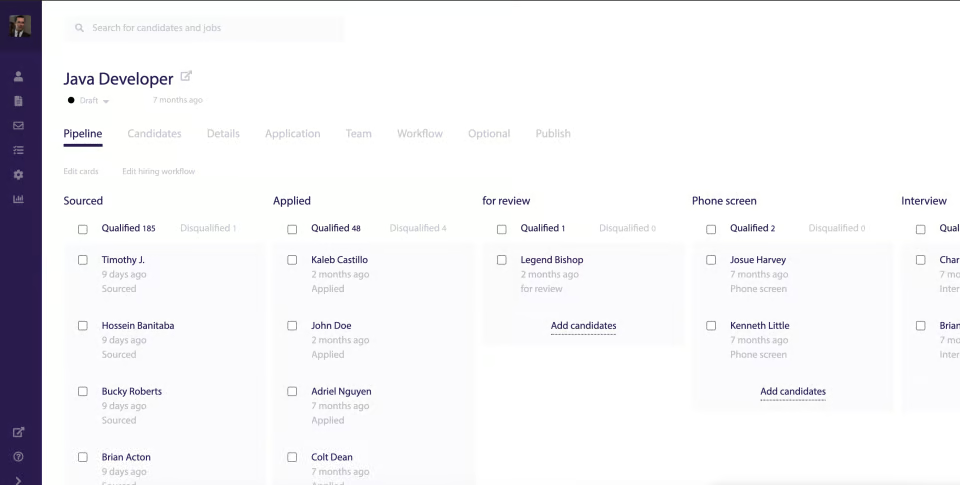
Several users also pointed out that 100Hires functions as a true one-stop shop, keeping job postings, pipelines, notes, evaluations, and communication logs in one place. This consolidated experience is especially helpful for small companies and early-stage teams that don’t want to manage multiple tools. According to G2 Data, 97% of reviewers praised the platform for ease of use, a reflection of how well this centralized structure supports daily hiring tasks.
Some users mentioned that the reporting capabilities are fairly basic, which may not be sufficient for organizations that rely on deeper analytics or heavily customized dashboards. This is more relevant for large, data-driven teams, while smaller organizations or those with straightforward hiring needs often find the existing reports adequate.
A handful of reviewers also mentioned UI details, such as certain buttons or dashboard placements, that they felt could be clearer or more intuitive. This feedback primarily came from users working quickly through multiple tasks in a fast-paced environment. Teams with steadier hiring rhythms or fewer concurrent roles typically adapt without much difficulty.
On the whole, G2 reviewers describe 100Hires as a simple, automation-focused ATS that keeps hiring workflows organized and easy to manage. Its intuitive setup, LinkedIn integration, and consolidated tools make it a strong fit for small HR teams, early-stage startups, and organizations that want a lightweight yet capable system for managing recruiting from end to end.
“It has AI integration for different uses such as writing job ads, candidate scoring, etc, which helps a lot to speed up recruitment processes. I also liked that there are automations on the pipeline and thus making pipeline management easier and efficient. Lastly, I liked that I can have different options when it comes to sourcing candidates (which is very important). I can use my website, different job boards, and LinkedIn as well”.
- 100Hires review, Johanna A.
“One thing I found a bit limiting was the initial learning curve. It took a little time to figure out where everything was and how to set up the hiring flow just right. A few parts of the dashboard could be more intuitive, especially for first-time users. That said, once I got used to the layout, it became much easier to navigate and use efficiently”.
- 100Hires review, Vasudeva Rao K.
What stood out immediately as I read through Handshake’s reviews is how effectively it helps employers reach early-career talent. Recruiters consistently highlight the platform’s access to universities, career centers, and large student networks, describing it as a channel they simply can’t replicate anywhere else.
Posting roles, promoting events, and identifying qualified students feels fast and streamlined, which lines up perfectly with Handshake’s 98% ease of use score on G2. Many teams shared that they were able to start connecting with students quickly after onboarding, and the platform’s 96% ease of setup rating reinforces how little friction they experienced getting started.
A major advantage reviewers mention is the targeting capability. Handshake allows employers to build precise student segments by major, skillset, graduation year, interests, and even campus activity, which is especially valuable when promoting internships, rotational programs, or entry-level roles. Recruiters appreciate how these targeted campaigns help them reach the most relevant candidates without sending broad, unfocused outreach to students who aren’t a match. This level of relevance contributes to Handshake’s 97% likelihood to recommend, showing just how strongly users advocate for it as a dedicated early-talent platform.
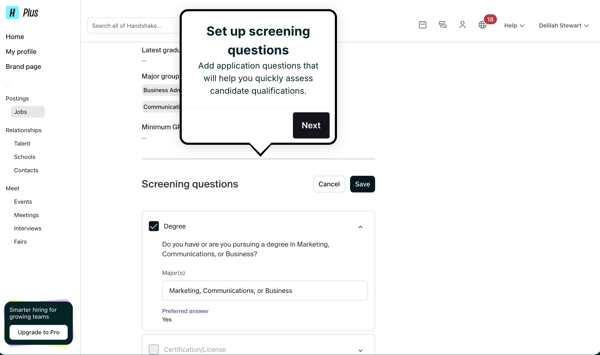
Another theme that appeared repeatedly is event and campaign engagement. Employers like how easy it is to promote career fairs, virtual events, and information sessions directly to the student populations they want to attract. G2 Reviewers also mentioned that visibility on Handshake helps smaller employers stand out on campuses where they previously struggled to build awareness. Several shared that student engagement data gives them a clearer sense of which universities and programs respond best to their messaging, helping them refine their recruiting strategy over time.
Some G2 users noted that the more advanced features, like detailed analytics or multi-layered campaign tools, require time and practice to fully understand. This tends to matter most for employers running complex, multi-school programs or those that want to build very sophisticated targeting strategies. Teams with simpler internship pipelines or smaller hiring volumes typically find the learning curve manageable.
A few G2 reviewers also highlighted pricing as to key consideration, particularly for organizations that run high-volume campaigns or require broad visibility across multiple campuses. This point showed up mostly among larger companies scaling early-talent hiring across regions or divisions. Smaller teams and employers with more focused outreach needs generally find Handshake’s offering aligned with their budgets and talent goals.
Overall, reviewers describe Handshake for Employers as a high-impact platform built specifically for early-career hiring. Its unmatched student reach, targeted campaigns, and strong event tools make it especially valuable for organizations that want to build meaningful presence across universities and attract the right students quickly and consistently.
“I really like how easy it is to connect with a large pool of qualified students from different schools. The platform makes it simple to promote roles, manage applicants, and reach the right audience. I’ve hired most of my interns through Handshake, so it’s definitely been a great tool for early-career recruiting”.
- Handshake for Employers review, Luccas L.
“Price. They're not cheap by any stretch, but they are market competitive with their more established competitors. They're also very active in partnering with their customers to ensure they achieve the ROI on their investment. They were speaking our company's language, specifically in relation to our hiring goals, and asking intelligent ROI questions. The price is steep for an emerging platform, but they have penetration into a deep market to warrant it. I'm especially curious how the user interface on their student social feed continues to develop better”.
- Handshake for Employers review, Paul R.
One of the things that shows up instantly in JazzHR’s G2 reviews is how quickly teams are able to get up and running. Recruiters consistently mention that the platform feels simple from the very first login, posting jobs, reviewing resumes, messaging candidates, and moving applicants through the pipeline all happen in one place without extra steps. That ease of adoption aligns well with JazzHR’s 94% ease of use score on G2, which reflects how naturally the platform integrates into daily hiring routines.
Reviewers also praised JazzHR for centralizing tasks that usually require multiple tools. Many users described how much they rely on the system to keep candidate communication, resume reviews, notes, and scheduling organized within a single dashboard. This all-in-one setup is especially helpful for small HR teams or hiring managers who want structure without the overhead of a complex, enterprise platform. According to G2 Data, JazzHR maintains a 91% satisfaction rating, which mirrors how frequently reviewers say the tool helps them stay on top of every step of the hiring process.
Candidate communication is another area that gets strong attention. Users appreciated being able to send templated emails directly from a candidate’s profile, automatically trigger reminders, and maintain clear records of every exchange. Several mentioned that it helps prevent candidates from slipping through the cracks simply because all messages and updates stay visible to everyone involved. When teams need quick support, reviewers also noted JazzHR’s 95% Quality of Support score, which reflects what they described as responsive and practical help from the support team.
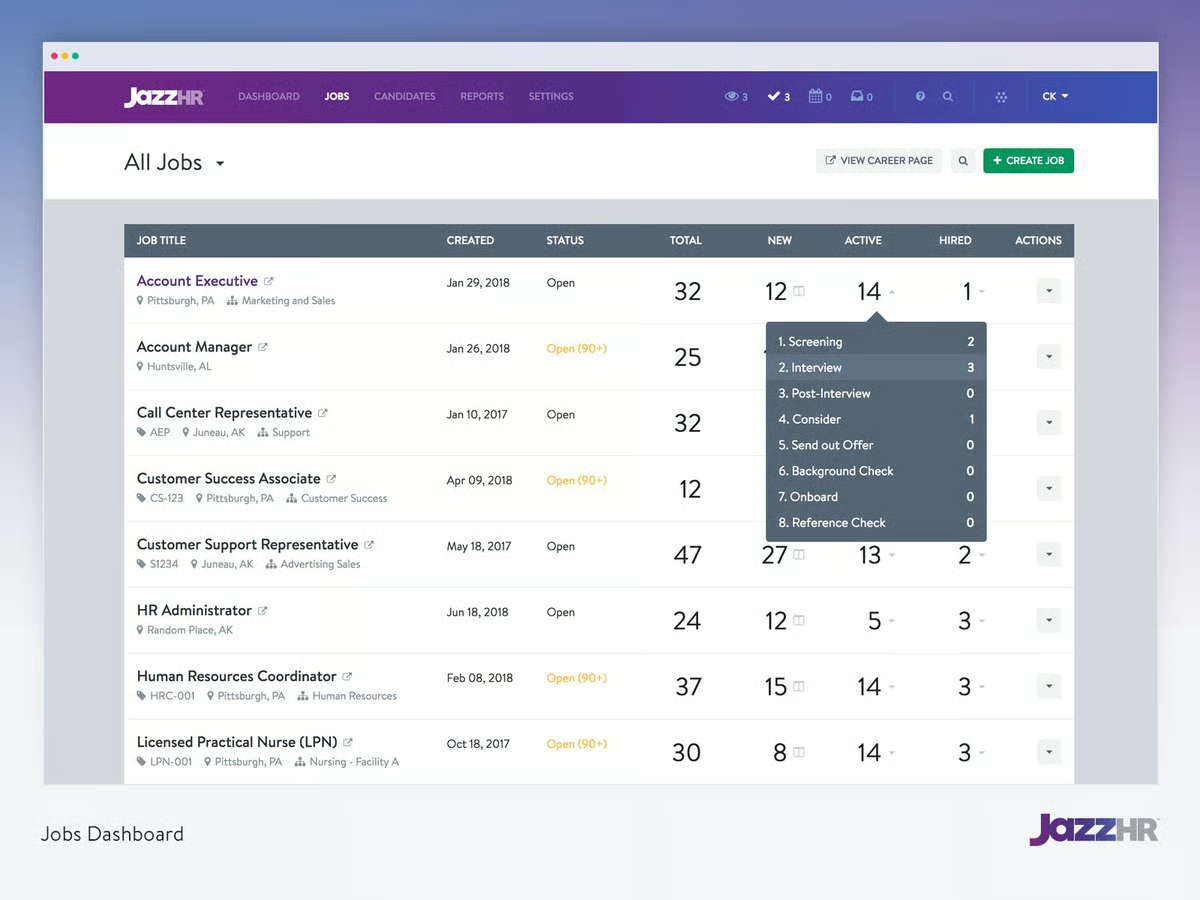
Some G2 reviewers mentioned that a few of JazzHR’s more detailed modules, such as screening questions, resume parsing, or automated task assignments, don’t always behave the same way across different roles. For teams that build highly structured pre-screening steps or depend on strict automation rules, these inconsistencies can require a bit of extra oversight. On the other hand, companies with simpler screening processes or fewer automation layers usually move through these steps without difficulty.
Reviewers also brought up occasional instances where the system slows down or becomes briefly unavailable. This is something that fast-scaling teams or organizations reviewing candidates throughout the day will notice more clearly, especially when managing a long queue of active applicants. Teams hiring at a steadier pace, or those reviewing smaller batches at a time, typically don’t experience the same level of disruption and can work comfortably within the platform’s day-to-day performance.
Given the full picture, reviewers describe JazzHR as a straightforward, dependable ATS built for small and mid-sized teams that want a clean workflow without unnecessary complexity. Its ease of use, centralized communication tools, and fast setup make it a strong choice for companies that need an efficient hiring process they can put in place quickly and maintain comfortably over time.
“JazzHR is easy to use and is already pre-built with options to help you keep the Recruiting process streamlined. Also helps you keep your applicants organized. This is a program I participate in daily, and I've gotten it down very quickly. If you're not big on storing a lot of details on candidates, then this is an easy program to utilize and help you organize/categorize your candidates”.
- JazzHR review, Julia H.
“It can get slightly laggy when managing a very high volume of applicants. Bulk actions are limited in some views”.
- JazzHR review, Vanessa S.
Have more questions? Find more answers below.
Teamtailor is one of the strongest recruitment marketing tools for employer branding. It offers customizable career sites, branded job pages, storytelling blocks, and candidate-friendly application flows that help companies present a polished, consistent brand across every touchpoint.
100Hires is among the most affordable options for small and mid-sized businesses. It starts at $49/month, includes automation, LinkedIn integration, and streamlined pipeline tools, making it cost-effective without sacrificing core recruitment marketing capabilities.
Greenhouse consistently ranks as a top-rated choice for enterprise teams due to its structured workflows, customization capabilities, advanced reporting features, and seamless integrations with major HR systems. It scales well for organizations with complex hiring processes.
Bullhorn is the strongest platform for teams that need ATS + CRM capabilities in one system. It centralizes candidate relationships, communication logs, activity tracking, and talent pipelines, making it ideal for high-volume staffing teams that rely on robust CRM workflows.
Ceipal ATS excels at automated job distribution. It connects to multiple job boards, social platforms, and sourcing channels, allowing recruiters to publish roles everywhere at once while tracking performance from a single dashboard.
Platforms like Teamtailor and Greenhouse tend to score highest for conversion rates because of their optimized application flows, clean UI, and personalized candidate experiences. Their branded career pages and structured processes reduce drop-offs and improve completion rates.
JobDiva, Ceipal ATS, and CareerBuilder Talent Network all support multi-channel recruitment campaigns, enabling job distribution across job boards, email, social platforms, university networks, and niche channels simultaneously.
JobDiva and Bullhorn are preferred in niche industries like healthcare, IT staffing, finance, and engineering because they offer deep search, custom workflows, and integrations tailored to specialized recruiting needs.
Greenhouse and Teamtailor provide some of the strongest analytics dashboards, offering insights into source effectiveness, campaign engagement, funnel drop-off points, and long-term hiring trends to accurately measure recruitment marketing ROI.
Ceipal ATS stands out for AI-driven candidate matching and targeting. Its AI scans job descriptions, ranks candidates, predicts best-fit matches, and helps teams run smarter, more targeted outreach campaigns.
Improve recruitment marketing by sharpening your targeting, strengthening your employer brand, and optimizing every step of the candidate journey. Focus on high-performing channels, personalize outreach, refresh your careers content, and use analytics to track what actually drives qualified applicants.
Attract talent by combining strong employer branding with targeted, personalized outreach. Highlight your culture and benefits, simplify your application process, and engage passive candidates through email, social content, and ongoing nurturing campaigns.
A recruitment marketing specialist creates and manages campaigns that attract and engage candidates. They handle job ads, employer branding, careers site content, targeted outreach, and campaign analytics, essentially acting as a marketer for the hiring team.
And the right recruitment marketing platform can make every part of that ecosystem work together seamlessly.
After evaluating 20+ tools and narrowing them down to the 9 strongest performers, one thing became clear: the best recruitment marketing platforms are the ones that balance candidate experience, automation, analytics, and employer branding without overwhelming your team or complicating your workflows.
Whether you need deeper sourcing integrations, stronger employer branding capabilities, automated job distribution, or CRM-style nurturing, choosing the right platform gives you the clarity and structure to run a more predictable, high-quality talent pipeline.
By understanding your hiring volume, target audiences, internal workflows, and long-term goals, you can confidently invest in the recruitment marketing solution that elevates your visibility, sharpens your targeting, and strengthens every touchpoint of the candidate journey.
Once you’ve attracted the right candidates, the next step is setting them up for success. Explore the best onboarding software for HR teams to create a smooth transition from hire to day one.


Recently updatedSummer 2026 Grid® Report · Published May 26, 2026 This guide was last...
 by Harshita Tewari

Recently updatedSummer 2026 Grid® Report · Published May 26, 2026 This guide was last...
/DarshayitaThakur-OrangeBG.webp) by Darshayita Thakur
by Darshayita Thakur

Hiring teams have more talent data than ever, but turning it into better decisions is still...
 by Hasitha Varre