


The best predictive analytics tools do more than forecast; they tell me when a model is drifting before the impact shows up in results.
I reviewed the best predictive analytics tools to understand which platforms actually support reliable forecasting at scale. As adoption grows, reflected in a market projected to exceed $104 billion by 2033, the cost of getting this wrong increases. My conclusions are based on an analysis of large volumes of verified G2 user reviews, focusing on how tools handle modeling flexibility, operational handoff, and performance under real-world conditions.
Strong platforms support repeatable modeling, transparent assumptions, and clear paths from prediction to action. Weaker ones slow iteration, introduce friction between teams, and erode confidence in outputs. When trust in predictions drops, decisions stall and errors compound over time.

Across reviews, SAS Viya stands out for enterprise-grade modeling and governance, IBM Cognos Analytics for controlled forecasting within reporting workflows, and Dataiku for teams balancing data science with operational deployment.
*These predictive analytics tools are top-rated according to G2’s Winter Grid Report. The best roles reflect common use-case themes across organizations. Pricing details have also been added.
Predictive analytics software helps teams turn raw historical data, signals, and trends into forward-looking insight. The right tools help teams understand what is likely to happen next, why it might happen, and how much confidence to place in those projections.
What I’ve found is that the strongest predictive analytics platforms go beyond isolated models or static outputs. They surface patterns that matter, show how assumptions influence outcomes, and make it easier to test scenarios as conditions change. Whether it’s forecasting demand, anticipating customer behavior, or modeling risk, the best tools reduce guesswork and help teams act with intent rather than instinct.
Ultimately, good predictive analytics software provides what modern planning workflows need most: visibility into future trends, consistency in how forecasts are built and updated.
I started by using G2’s Winter Grid Reports to shortlist leading predictive analytics tools based on verified user satisfaction and market presence across small teams, mid-market organizations, and enterprises. This helped narrow the field to platforms that show consistent adoption rather than niche or short-term interest.
Next, I analyzed patterns across hundreds of verified G2 user reviews. Instead of focusing on feature lists, I looked for recurring feedback around what actually matters in predictive analytics workflows. This included data preparation effort, model transparency, forecasting accuracy, scalability, ease of iteration, integration with data warehouses and BI tools, and how well insights travel from analysts to decision-makers. These patterns made it clear which tools support confident planning and which tend to slow teams down as complexity grows.
Since I haven’t personally used every platform on this list, I relied on aggregated feedback from G2 user reviews, alongside publicly available product documentation and vendor listings. The visuals and product references in this article are sourced directly from G2 and official vendor materials.
When I evaluated predictive analytics tools, I looked at large volumes of G2 user reviews and how teams actually rely on predictive outputs in day-to-day operations. My perspective comes from reviewing user feedback alongside real workflow exposure across manufacturing, supply chain, retail, marketing, sales, and financial services teams.
Below are the criteria I focused on:
Based on these criteria, I narrowed the list to platforms that consistently support decision-making under real operational pressure. The right choice depends on whether your priority is forecasting accuracy, model transparency, ease of iteration, governance, or the ability to scale predictive insight across teams and use cases.
Below, you’ll find tools drawn from authentic user reviews in the Predictive Analytics Tools category. To appear in this category, a platform must:
This data was pulled from G2 in 2026. Some reviews have been edited for clarity.
Tableau focuses less on automated prediction and more on analyst-led exploration, giving analysts the control needed to explore data. Looking at how it performs in the predictive analytics category on G2, it’s clear why it continues to rank well.
One of Tableau’s strongest advantages is how quickly teams can move from raw data to analysis. Analysts can connect multiple data sources, blend them into a single view, and begin testing hypotheses. The drag-and-drop interface lowers setup friction while still allowing detailed analytical control, which supports early-stage predictive exploration without heavy modeling overhead.
Scenario analysis is another area where Tableau consistently performs well. Filters, parameters, and calculated fields allow users to model different outcomes, identify key factors, and examine how changes in variables affect future outcomes. This flexibility helps analysts understand what might happen next and the conditions that influence those outcomes.
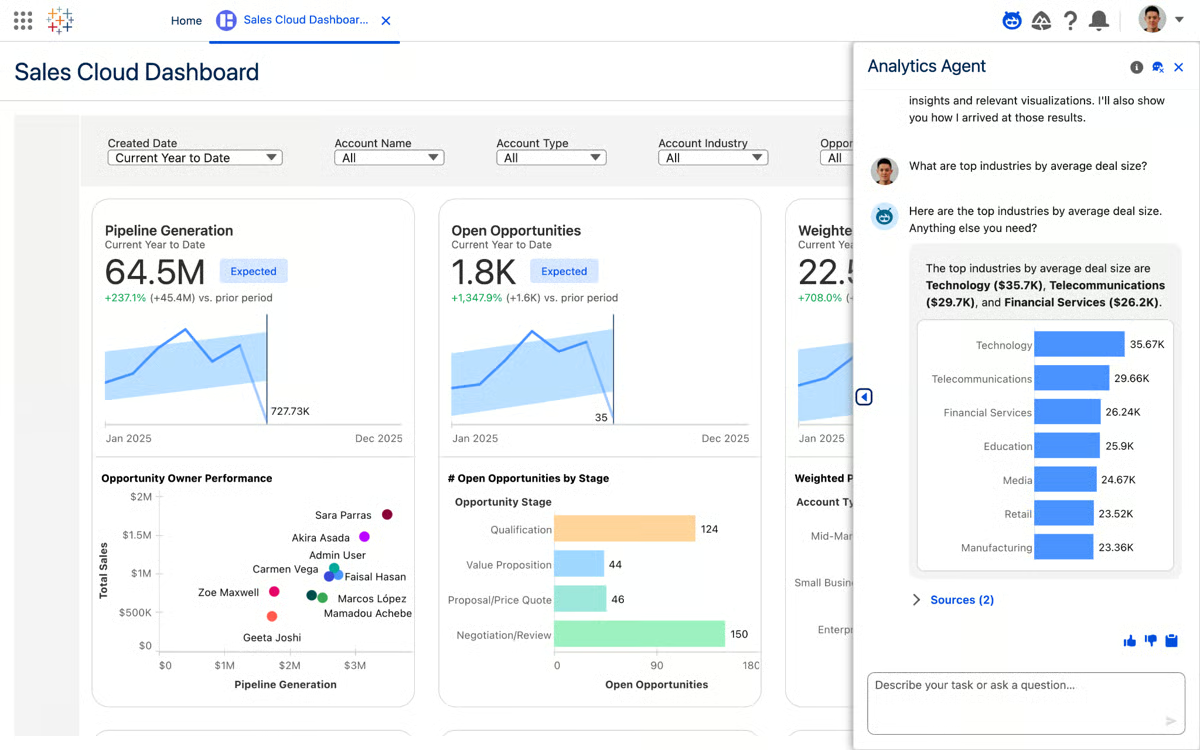
Tableau’s visualization strength is key to communicating insights. Data visualization has a 95% rating on G2, making it the platform’s highest-rated capability. This high score reflects how effectively Tableau translates complex, multidimensional data into visuals that clearly surface trends, anomalies, and emerging signals.
That visual clarity extends into reporting and analysis workflows. Report generation is rated 92% and analysis 91% on G2, reinforcing Tableau’s ability to support both exploratory work and report generation for stakeholders. Teams use these dashboards to contextualize predictive signals, helping technical and non-technical audiences understand not just projections, but the reasoning behind them.
G2 reviewers frequently note that connecting Excel, SQL databases, BigQuery, Snowflake, and cloud platforms is relatively straightforward. This flexibility supports teams working across different data ecosystems and reduces the need to consolidate sources before analysis begins.
Tableau’s market adoption also reflects its depth.
Tableau scales well for teams that need to analyze large datasets, blend enterprise data platforms, and support multiple use cases from operational reporting to predictive exploration. It’s flexible enough for business users to get started, but powerful enough for analysts who want precise control over how insights are surfaced.
Tableau's feature depth means new users take time to move beyond basic charts into more advanced exploratory workflows. Teams doing lightweight reporting or occasional analysis tend to notice this more than dedicated analysts who work in the platform daily. For teams that invest the time, the payoff is significant.
Performance can vary when working with very large datasets. Teams running high-volume queries against live connections are more likely to see slower response times than those working with extracts or smaller data. Tableau's architecture is built for analytical richness and visual interactivity, and most teams find the experience holds up well once their data infrastructure is set up to match the workload.
Overall, Tableau remains a strong choice for teams that want predictive insight through visual exploration rather than automated forecasts. For analysts, consultants, and data-driven organizations that rely on understanding why trends form and how signals evolve, it continues to be one of the most trusted platforms in the predictive analytics space.
“Tableau makes data exploration extremely smooth with its intuitive drag-and-drop interface and powerful visualization capabilities. As a data scientist at Accenture, I find it very helpful for quickly converting complex datasets into clear, interactive dashboards. Its integration with multiple enterprise data platforms and ability to handle large volumes of data make it an excellent tool for analytics and client presentations.”
- Tableau review, Ajit M.
“There is only one issue with it, that it takes more time to load when data is large or coming from live connections, managing permissions and user access also feels a bit confusing at times. But overall, these are little issues; it's a great tool.”
- Tableau review, Janhvi R.
If you're evaluating how predictive analytics fits into your broader data stack, explore the best analytics platforms to see how teams unify reporting, dashboards, and advanced analysis in one place.
With a 4.5/5 rating on G2, BigQuery is designed to support large-scale modeling while maintaining consistent performance as data volumes and analytical complexity grow. This makes it a natural fit for teams treating prediction as an ongoing operational capability rather than a periodic exercise.
BigQuery removes infrastructure from the predictive analytics workflow. The serverless, pay-as-you-go model means teams can move straight from question to analysis without provisioning clusters or tuning resources. That freedom changes how modeling and forecasting are approached, where users consistently highlight speed and scalability.
Instead of limiting experimentation, BigQuery encourages running larger feature sets, testing multiple hypotheses, and iterating quickly, which is exactly what predictive work demands.
The platform is designed for fast, interactive analysis. Running complex SQL across massive datasets takes seconds, not minutes, and that responsiveness shows up in G2’s highest-rated features, including analysis and data interaction. The faster teams can explore signals, validate assumptions, and adjust models, the more useful the outputs become for decision-making.
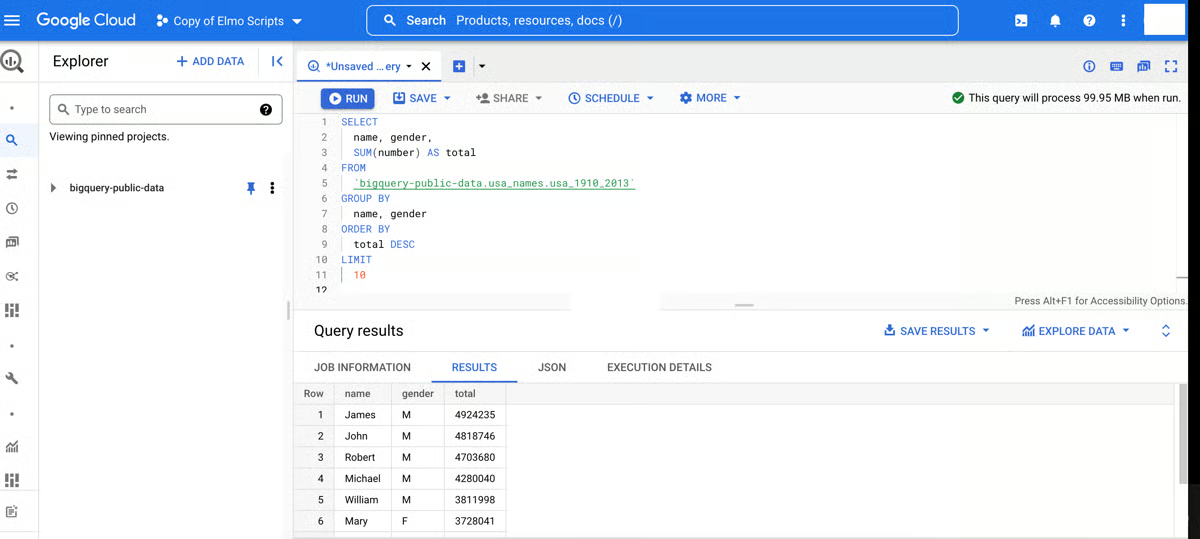
BigQuery’s approach to machine learning also fits naturally into predictive workflows. BigQuery ML lets teams train and deploy models directly in SQL, which keeps analysts close to the data instead of pushing everything into separate tooling. When paired with Gemini-assisted workflows, data preparation and feature engineering feel more tightly connected to modeling, reducing handoffs and context switching.
Another strength is how well BigQuery supports time-sensitive prediction. Near real-time ingestion through Datastream and streaming inserts means forecasts, dashboards, and AI-driven outputs reflect current conditions rather than historical snapshots. For marketing analytics, demand forecasting, or operational predictions, freshness improves confidence in both dashboards and model outputs. In e-commerce specifically, this kind of real-time modeling is often paired with e-commerce analytics tools to monitor how predicted demand, campaigns, or pricing decisions actually perform across customer journeys.
Integration across the Google Cloud ecosystem is another area where BigQuery is highlighted. G2 reviewers frequently mention smooth connections with Vertex AI for model training, Dataflow for ETL pipelines, Looker Studio and Tableau for visualization, and Pub/Sub for streaming data. This ecosystem integration reduces engineering overhead when building end-to-end ML and analytics workflows.
Query cost estimation gives teams visibility into spend before queries run, not after. G2 reviewers note that knowing the projected scan volume at the point of writing changes how exploratory work is planned, particularly when iterating across large feature sets. Teams build cost-aware habits without restricting analytical output, and decisions about query scope and cost get made early rather than discovered as overruns.
Adoption data on G2 supports BigQuery’s positioning across predictive use cases. Usage is spread across mid-market teams (40%), enterprises (36%), and small businesses (24%), contributing to its 98 G2 Market Presence. This distribution reflects how predictive insights are often tied directly to revenue and operations across organization sizes.
BigQuery's usage-based pricing model requires active cost governance as analytical workloads scale. Teams running frequent exploratory queries or real-time ingestion can see costs increase quickly without filters, partitioning, or query optimization. G2 reviewers describe learning to manage scan volumes carefully, which adds steps to everyday use. Once query patterns are understood and optimized, cost predictability improves significantly.
Advanced capabilities such as Gemini-assisted workflows, multi-engine execution, and cross-region governance assume teams have established data practices. For organizations earlier in their predictive analytics journey, these features can require coordination across data engineering and analytics roles. The platform's serverless foundation means teams can start simple and grow into complexity as needs evolve.
BigQuery stands out as a strong platform for predictive analytics at scale, combining serverless performance with deep analytical and native ML capabilities. It is especially well-suited for teams that treat prediction as a core part of their data strategy and work with large, fast-moving datasets.
“I appreciate Google Cloud BigQuery's serverless design, which allows me to analyze large datasets quickly without the burden of managing the underlying infrastructure. The built-in machine learning capabilities are a significant advantage, enabling me to create and predict patterns directly in SQL within the data warehouse, thereby enhancing our data analysis processes. Its ability to handle big datasets swiftly and easily solves the challenge of managing complex data efficiently. I also enjoy its seamless integration with the Google ecosystem, which enhances scalability and performance. The setup is convenient with no need for physical infrastructure, focusing more on project and access setup, which simplifies the initial configuration phase.”
- Google Cloud BigQuery review, Karunakar M.
“In the beginning, I struggled a bit with understanding the cost structure because everything depends on the data scanned, so if you run one careless SELECT*, your query cost goes up. This is the only issue, but it's okay if I can optimize my queries.”
- Google Cloud BigQuery review, Ujjwal M.
Predictive insights are only useful if people understand them. See the best data visualization software for turning complex forecasts into clear, decision-ready visuals.
Amazon QuickSight keeps forecasting close to AWS-native data. By keeping forecasting and trend analysis near services like S3, Redshift, and other AWS sources, it reduces the friction between raw data and forward-looking insight. This makes it especially relevant for organizations already operating inside the AWS ecosystem.
Users describe building dashboards independently, whether they’re business users, QA engineers, or analytics practitioners. That independence shows up in the product’s highest-rated capabilities, including report generation and analysis at 88% each, along with strong scores for data interaction. For predictive analytics teams, this means less reliance on specialists just to explore trends, test assumptions, or share projections across the organization.
QuickSight’s user base also reflects this versatility. Adoption is well balanced between small businesses (44%) and mid-market companies (42%), according to G2 Data, indicating broad applicability without skewing toward only large enterprises.
Teams bring multiple AWS-based data sources into a single environment to support ad hoc reporting and forward-looking decision-making. This consolidation helps predictive insights stay consistent across dashboards, stakeholders, and use cases.
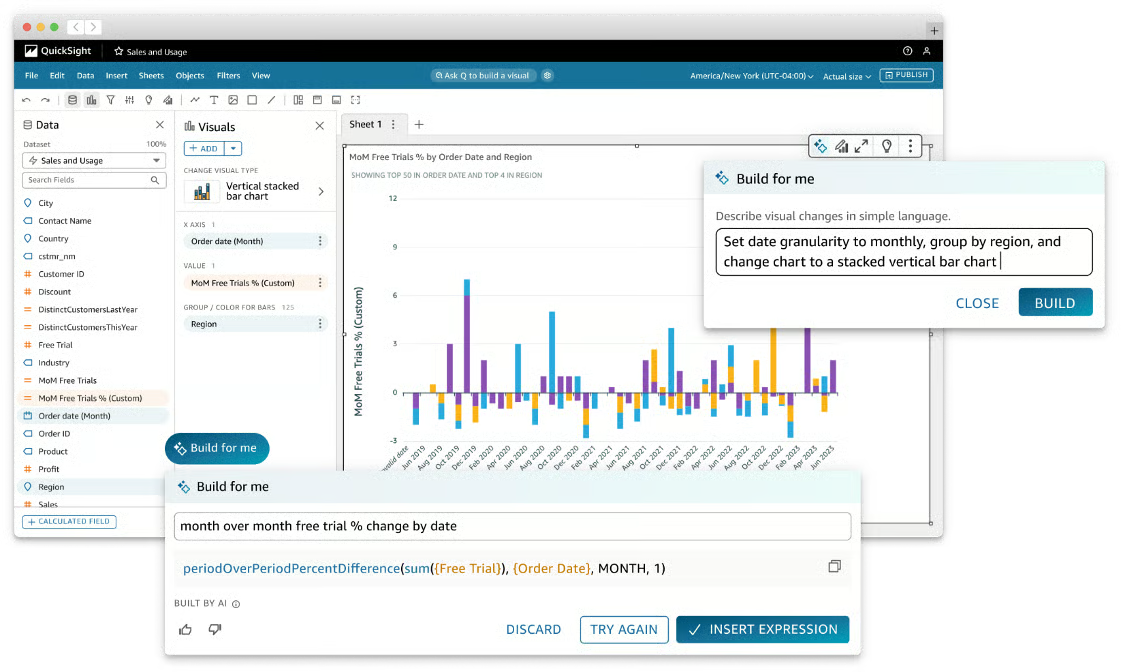
Built-in ML features like anomaly detection, forecasting, and natural language queries add predictive value without requiring separate platforms. This integration helps teams surface insights and anticipate trends directly within dashboards.
QuickSight’s SPICE in-memory engine is frequently mentioned by reviewers as a key performance advantage. It enables fast processing of large datasets with near real-time responsiveness, making it easier to scale analytics workloads without sacrificing speed. This becomes especially valuable in environments where dashboards are accessed frequently across teams.
The platform’s serverless architecture removes the need for infrastructure setup and ongoing maintenance. Users highlight how quickly they can deploy and scale analytics without managing servers, allowing teams to focus on insights rather than system administration. This simplicity supports faster adoption and operational efficiency.
Reviewers highlight how easily QuickSight integrates with existing data systems, especially within operational environments where multiple services generate continuous data. This allows teams to connect logs, performance metrics, and application data without complex setup, making it easier to monitor things like API latency, error patterns, and feature usage in one place. The ability to build custom dashboards on top of these integrations supports more responsive, real-time decision-making.
QuickSight favors speed and consistency over deep visual customization, which means highly tailored layouts can take additional effort. Capabilities such as advanced chart formatting, custom styling, and complex calculated fields are available but less intuitive than in design-centric BI tools. For teams accustomed to pixel-level design control, this reflects the platform's focus on rapid deployment over extensive customization.
Advanced modeling and automated narrative insights play a smaller role compared to core analytics and forecasting tasks. Features like scripting, data mining, and AI text summarization are rated lower, reflecting a platform built for operational dashboards rather than deep predictive modeling. Teams focused on extended analytics or presentation-heavy reporting often complement QuickSight with specialized tools to address those needs.
Amazon QuickSight is well-suited for organizations that want predictive analytics tightly integrated with AWS and delivered at cloud scale. Its strengths in report generation, analysis, and fast access to live data support practical forecasting workflows rather than surface-level reporting. With an overall G2 Score of 92, it remains a reliable option for AWS-centric teams seeking forward-looking insight without infrastructure friction.
“What I value most about Amazon QuickSight is how effortlessly it allows me to create visualizations and dashboards directly from raw, unprocessed data. The user interface is both intuitive and easy to navigate, which makes integrating with AWS services a smooth process. For instance, accessing data from S3 or Redshift is especially convenient. I use Amazon QuickSight regularly for my daily work tasks as well as for personal projects. Furthermore, the customer support has been excellent, and setting up data analytics with Amazon QuickSight is both straightforward and accessible.”
- Amazon QuickSight review, Darothi C.
"The UI feels a bit limited compared to tools like Power BI or Tableau, especially in custom formatting and advanced visualization. Some features (like calculated fields or parameters) can be unintuitive. Performance drops slightly with large datasets, and debugging permission or SPICE issues sometimes takes longer than expected."
- Amazon QuickSight review, Daniil K.
For teams focused on user behavior and retention, check out the best product analytics software to see how predictive insights translate into product and growth decisions.
SAS Viya is designed to support predictive decision-making across the business, not just model building. It’s commonly used in environments where analytics must scale consistently across teams and functions.
What stands out about SAS Viya is the way it’s designed to keep predictive work connected from start to finish. Rather than splitting data prep, modeling, visualization, and reporting across separate tools, everything runs within one cloud-native platform on Kubernetes. That structure helps analytical work move forward without stalling in isolated environments, making it easier for teams to carry insights from early analysis into production-ready decisions.
Visualization is another area where Viya performs strongly. Data visualization is rated 91% on G2, reflecting consistent feedback around clarity and analytical depth. The drag-and-drop interface supports statistical and analytical visuals without heavy reliance on code, helping teams explore patterns and validate assumptions efficiently.
Viya also supports decision-focused analysis beyond visualization. Analysis is rated at 90% on G2, reinforcing its ability to support end-to-end predictive workflows. These capabilities help teams move from model outputs to stakeholder-ready insights without re-creating work in separate reporting tools.
Openness to multiple languages strengthens Viya’s appeal in mixed analytics environments. Support for Python, R, Lua, and REST APIs allows teams to incorporate open-source work while maintaining governance and collaboration. This flexibility makes it easier to standardize predictive workflows without forcing teams into a single development style.
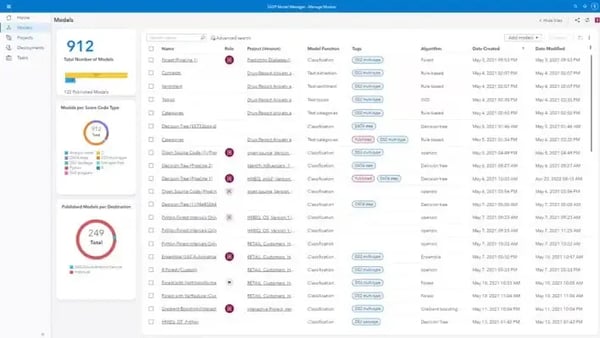
The customer mix reflects Viya’s reach across organization sizes: 38% enterprise, 32% mid-market, and 30% small business, according to G2 Data. Viya is most often adopted when predictive analytics needs to serve multiple teams and use cases, rather than living with a small group of specialists.
The drag-and-drop interface and visual workflows allow users to build models, create custom data steps, and generate analytics without deep programming knowledge. The no-code approach, combined with support for Python and R when needed, helps teams with mixed skill levels contribute to predictive projects.
SAS Viya's architecture and depth assume that data infrastructure and governance practices are already in place. Teams newer to enterprise-scale analytics, or those without dedicated technical support, tend to need more time to standardize workflows and get consistent value. Organizations that treat predictive analytics as a long-term, governed capability tend to get the most from what the platform offers.
Pricing and deployment are designed for production-scale predictive analytics, which may exceed lighter or exploratory needs. G2 reviewers describe licensing costs and cloud infrastructure expenses as considerations for smaller organizations or teams in early-stage adoption. For enterprises treating predictive analytics as a long-term, governed capability, the investment aligns with the platform's depth and enterprise-grade features.
SAS Viya is a strong option for organizations running predictive analytics at scale with governance in mind. Its combination of unified workflows, strong visualization, and enterprise-grade analysis supports production-level decision-making across teams. With a 4.3 out of 5 G2 rating, it remains a dependable choice for mid-market and enterprise teams investing deeply in advanced statistical modeling.
“The data visualization features are truly impressive. I appreciate the ability to create custom data steps, which adds flexibility to my workflow. The user interface is outstanding and very intuitive. I also like that no coding is required, making data processing much easier and more accessible.”
- SAS Viya review, Naman J B.
“Sometimes, when I generate score code in the Explore and Visualize section, the output is unnecessarily long and complicated. I feel that these codes could be created much more simply.”
- SAS Viya review, Nishant G.
IBM Cognos Analytics is a forecasting platform suited to structured, enterprise-scale planning and analysis. Its emphasis is on consistent, scalable insights that support established planning and decision-making processes, rather than rapid experimentation.
Cognos brings dashboards, reporting, modeling, and predictive analysis together in a single platform, reducing fragmentation across workflows. Once data pipelines are established, users frequently note how quickly interactive dashboards can be assembled and reused across teams.
Cognos also performs well in core analytical interaction. On G2, data interaction is rated at 90%, reflecting how easily users navigate reports and explore trends within governed datasets. This strength supports predictive workflows where users need confidence that insights are consistent and traceable across analyses.
Analytical depth is another area where Cognos stands out. Analysis is rated at 89% and modeling at 88% on G2, reinforcing its role beyond surface-level reporting. These capabilities support scenario forecasting, KPI tracking, and trend analysis in environments where metrics must remain standardized.
The platform’s assistant further supports day-to-day analytical work. Users describe it as helpful for guiding visual construction and exploration, especially for business users working alongside analysts. This reduces dependency on specialists for routine predictive reporting and accelerates insight sharing.
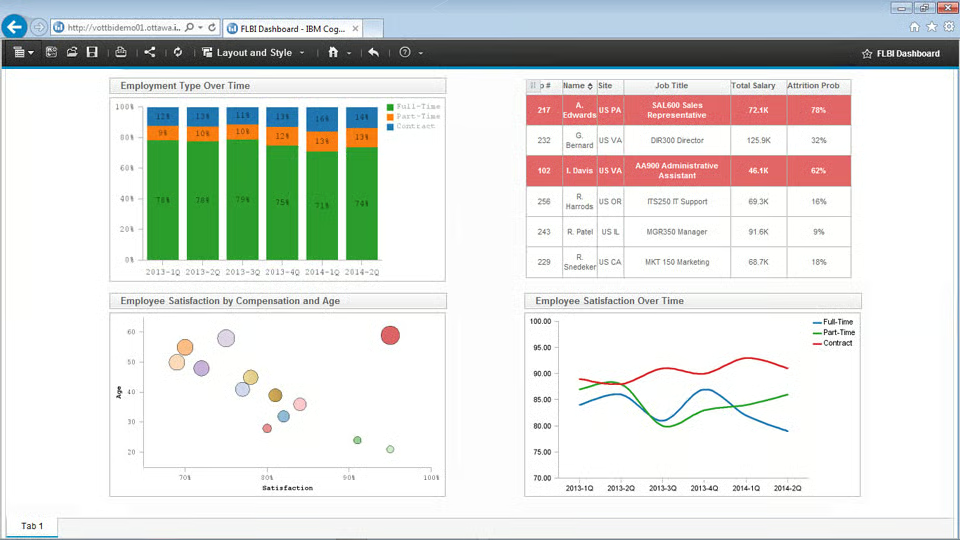
Cognos Analytics supports broader organizational alignment in predictive analytics workflows. Governed metrics and centralized data models allow teams to work from a shared analytical foundation when identifying trends, monitoring KPIs, running scenario forecasts, and supporting business planning. This reduces the need to stitch together multiple point solutions just to maintain consistency across teams and decisions.
G2 users describe building interactive dashboards within minutes when data sources are connected, using drag-and-drop functionality without coding requirements. This combination of speed and structure reflects a platform designed for reliable, governed analytics rather than exploratory flexibility. The approach supports rapid insight sharing across teams and reduces dependency on technical specialists for routine reporting.
What truly sets Cognos apart in the predictive analytics category is its support for broader organizational alignment. A significant portion of its user base comes from enterprise (40%) and mid-market (32%) companies, with another 29% from small businesses, underscoring its strength in environments where structured reporting and cross-team consistency are priorities.
IBM Cognos Analytics prioritizes analytical function over visual polish, which means the interface feels more utilitarian than design-centric BI tools. Teams that place high value on modern aesthetics or sleek dashboards tend to notice this more during daily use. For organizations where structured, reliable output matters more than visual flair, the interface delivers exactly what is needed.
Cognos is built around standardized, repeatable analysis, which means highly bespoke or exploratory reporting patterns require more effort to configure. Teams that frequently experiment with report structures or need heavy customization tend to find the platform more prescriptive than flexible. That same structure is what makes Cognos dependable for governed, consistent reporting at scale.
Taken together, Cognos delivers strong value for data-driven enterprises and mid-market teams that need predictable, governed insight. It remains a dependable choice for organizations seeking to embed predictive analytics into their reporting fabric and decision rhythm, especially where consistency, scale, and analytical depth matter most.
“What I liked best about IBM Cognos Analytics was its user-friendly interface and the ability to create visually appealing and interactive dashboards with minimal effort. The platform offers a wide range of data visualization options and allows for seamless data integration, which makes the analysis process more efficient. I also appreciated the built-in AI features that helped guide insights and suggestions, making it easier to understand patterns in the data. Overall, it felt like a powerful tool for both beginners and experienced users in the business intelligence space.”
- IBM Cognos Analytics review, Muhammad F.
“It takes some time to learn if you're new, and building custom dashboards isn’t as smooth or flexible as in tools like Tableau.”
- IBM Cognos Analytics review, Sandeep P.
Adobe Analytics is built around understanding customer behavior patterns and how those patterns are likely to evolve. This approach supports decision-making that extends beyond reporting into forward-looking planning.
Market adoption across enterprise (37%), mid-market (32%), and small businesses (31%), according to G2 Data, shows it's built to support decision-making at scale. This balanced distribution supports its 74 G2 Market Presence, indicating steady adoption across organization sizes with complex predictive needs.
The platform delivers strong support for turning complex behavioral data into usable insight, helping teams move from raw interaction data to projections that inform marketing, experience optimization, and investment decisions. This analytical rigor supports forward-looking planning rather than just historical reporting.
AI-assisted insight generation also plays a role in predictive workflows. AI text summarization is rated at 92% on G2, indicating its usefulness in helping teams interpret analytical outputs more efficiently. This reduces the effort required to surface key signals and communicate predictive findings to stakeholders.
For teams working with very large volumes of traffic, Adobe’s unsampled data model is a meaningful advantage. Users talk about being able to make high-stakes decisions, budget reallocations, channel investments, and experience changes, without worrying whether the numbers are extrapolated. From a predictive analytics standpoint, that reliability matters because forecasts are only as strong as the data beneath them.
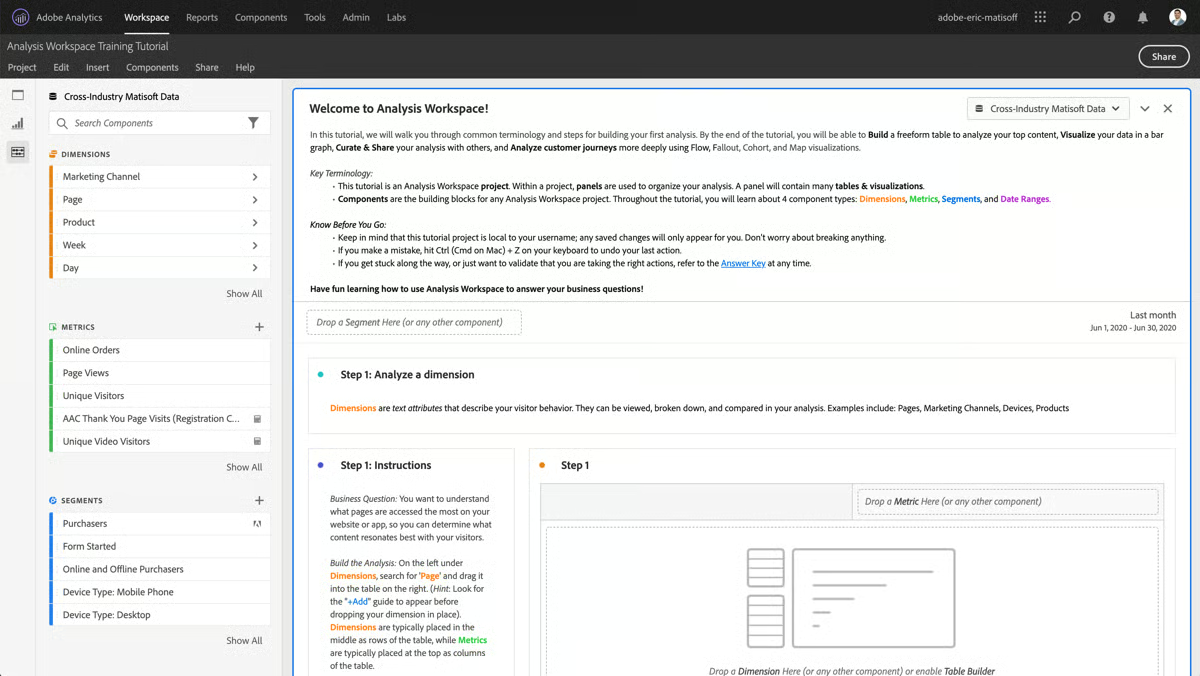
Users frequently highlight Adobe Analytics’ customizable dashboards and flexible visualization options, which make tracking and measuring user behavior easier across digital platforms. The ability to tailor dashboards, metrics, and date ranges to specific business questions helps teams turn complex behavior data into actionable insights. This flexibility, reflected in its 70 G2 Satisfaction Score, indicates the platform serves teams that value analytical depth and configurability over out-of-the-box simplicity. The approach supports deeper analysis while keeping reports relevant to different stakeholder needs.
Teams also find its segmentation and journey analysis capabilities particularly strong. Adobe Analytics allows teams to analyze sequential behaviors across devices and channels, then layer predictive logic on top of that context. Being able to follow a customer from first interaction through conversion, and understand where future drop-offs or opportunities might emerge, adds a level of foresight that simpler tools struggle to provide.
G2 reviewers describe tracking complete user journeys across devices and channels, understanding not just what users did but why behavior patterns emerged. This granular visibility into conversion paths, engagement signals, and drop-off points helps teams make informed decisions about digital experience optimization and resource allocation.
Adobe Analytics’ depth and flexibility require meaningful technical involvement, which is more noticeable for teams without dedicated analytics or development support, as setup, tracking, and reporting workflows can take longer to fully operationalize. This can extend the ramp-up phase. With the right resources in place, the same configurability enables highly precise and scalable analytics tailored to complex business needs.
Some predictive workflows are less guided than lighter tools, which is more noticeable for teams expecting automated or plug-and-play insights. This can require more hands-on interpretation during analysis. The platform’s focus on analyst-led workflows supports deeper control and accuracy, making it well-suited for teams that prioritize analytical rigor over automation.
Adobe Analytics stands out as a predictive analytics tool for organizations that prioritize accuracy, behavioral context, and long-term insight over speed of setup. Its combination of unsampled data, advanced segmentation, and highly rated analytical capabilities supports confident predictive decision-making. With steady G2 scores and broad adoption, it remains a dependable choice for data-intensive teams where precision matters most.
"People often ask me how I make such accurate marketing decisions, the answer is simple: Adobe Analytics. This tool not only shows how many clicks a campaign had, but also reveals the full story behind user behavior, from first contact to conversion. I can see every step clearly.”
- Adobe Analytics review, Tesalyn S.
“Setting up this tool requires a significant commitment. Unlike other solutions where you can simply add a tag and immediately start collecting data, this one demands custom coding, as well as configuring eVars and props. As a result, I constantly have to submit tickets to the development team just to update tags, which leads to a major bottleneck especially whenever we want to track something new. I really wish it were more self-service, but unfortunately, that's not the case.”
- Adobe Analytics review, Sree K.
Hurree is a unified analytics and dashboard platform built around the premise that fragmented data is the main obstacle to fast decisions. G2 review patterns describe it as a tool for connecting marketing, sales, CRM, and operational data sources into a single, visually clean reporting environment. Its AI assistant, Riva, generates plain-language summaries of performance shifts and highlights contributing segments. With a G2 satisfaction score of 94, the platform ranks well on day-to-day usability.
Mid-market teams make up 45% of its G2 reviewer base, with small businesses and enterprise accounts each at 27%. This spread reflects a platform that scales reasonably across team sizes without being architected exclusively for any one. Mid-market ops and marketing teams appear most naturally served, where the value of centralized reporting is high and dedicated BI teams are rare.
G2 reviewers point to multi-source data integration as the feature that saves the most time. Teams replacing multiple manual exports with a single, automatically refreshed view report the biggest time gains. The Data Unification feature score of 94% reflects this consistently. The reduction in manual reporting cycles is the most repeated workflow outcome across the G2 review set.
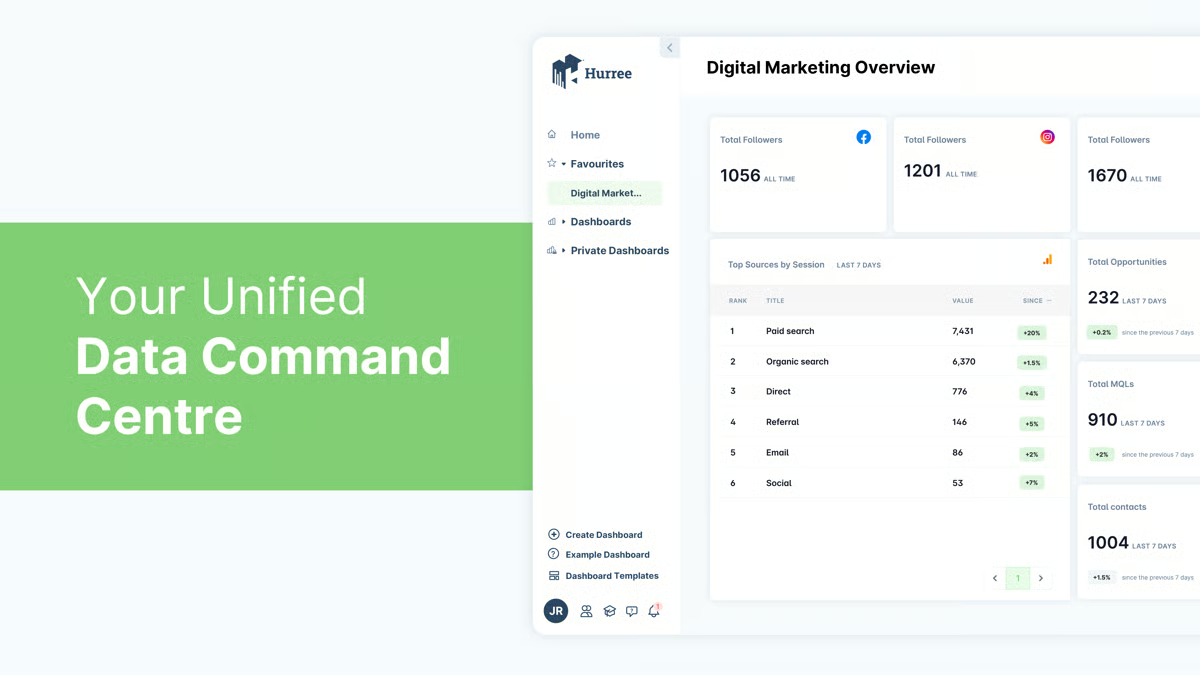
Flexible dashboard construction without requiring SQL proficiency is where the builder earns its praise. Non-technical users, including executives, account managers, and project leads, can build and modify dashboards without analyst support. Firms managing large volumes of client and internal dashboards specifically note the builder's transformation tool, which enables dataset manipulation for users with limited coding knowledge. At 96% on G2, Data visualizations reflect how consistently that flexibility translates into outputs users can actually work with.
Riva's week-over-week summaries identify what changed, explain contributing segments, and flag patterns that are easy to miss in raw data. G2 reviewers consistently report a shorter gap between data delivery and the moment a decision gets made. The AI text generation feature scores 96% on G2.
Operational teams across logistics, healthcare, retail, and marketing agencies report a clear shift from lagging monthly reports to live, real-time dashboard views. Alert functionality notifies teams when metrics deviate from expected ranges, removing the need to monitor dashboards manually. Underpinning this is an algorithm score of 94% on G2, which reflects how reliably the platform detects and surfaces those deviations.
Scheduled reporting functionality receives consistent attention from agency teams managing multiple client accounts. Reports can be automated for delivery at set intervals, removing the manual pull-and-format cycle that consumed weekly hours. G2 review patterns across agency contexts highlight this as the feature that most directly changed how reporting time gets allocated.
Hurree's predictive analytics layer, built into Riva, draws specific attention from product and SaaS G2 reviewers. Churn prediction capability allows customer success teams to act before users disengage, not after. G2 reviewers also note forecasting of future resource requirements from operational data, pointing to a forward-looking layer that goes beyond dashboarding.
The initial configuration of data connections requires more hands-on technical time than teams typically expect, particularly for API-based integrations and non-standard data sources. Organizations without dedicated IT support feel this most during the setup phase, especially those connecting complex ERP systems or custom event tracking. Once connections are stable, G2 reviewers report that the ongoing experience is smooth and low-maintenance.
Report export and white-labelling options are narrower in scope than some G2 reviewers would prefer, particularly for agencies producing client-facing outputs. Chart styling can drop when dashboards are exported to PDF, and branding customization for shared reports lacks the depth of dedicated presentation tools. Teams focused on internal reporting rather than external delivery are unlikely to encounter this boundary. G2 reviewers in those contexts consistently describe the export output as fully adequate for their needs.
Taken together, Hurree is a well-positioned choice for mid-market teams that need reporting clarity without building a full BI stack. The platform's strength is in bringing disconnected data sources into a single, live, and accessible environment that non-technical users can navigate confidently. It suits organizations where the gap between raw data and a decision-ready view is wide and where manual reporting cycles are the main drag on team capacity.
"The way Hurree effortlessly unifies data from our partner portal, marketing automation, and sales CRM. Riva's AI summaries save me hours each week by automatically highlighting key trends in partner-driven merchant growth.”
- Hurree review, Tobi L.
"The setup process took a bit of time since we had several integrations to connect, and a few required manual configuration. It's not difficult, but it could be smoother for users who are new to the analytics platform. Also, I wish there were a few more design options for customizing the look of dashboards."
- Hurree review, Natalie G.
Predictive analytics platforms built to carry models from exploration into production, Dataiku shows up frequently. With a 68 G2 Satisfaction Score, it suggests regular use among organizations that rely on predictive analytics as part of ongoing operations, not just isolated projects.
Dataiku treats predictive analytics as a full lifecycle rather than a single modeling step. Data preparation, feature engineering, model development, validation, deployment, and monitoring all operate within one environment. This reduces handoffs between tools and helps teams carry predictive work forward without rework as models mature.
Day-to-day interaction with data is another area where teams consistently highlight value. On G2, Data Interaction is rated at 89%, reflecting how fluid it feels to explore, transform, and iterate on datasets throughout the modeling process. This supports predictive workflows where rapid testing and adjustment are essential to refining model outcomes.
Another area where Dataiku stands out is accessibility without limiting scale. The visual, no-code “click-and-go” recipes make it easier for analysts and less code-heavy users to contribute early, while Python, R, APIs, and workflow playbooks support more advanced predictive work as needs grow. That progression fits well with Dataiku’s user mix, 67% enterprise, 18% mid-market, and 16% small business, according to G2 Data.
Data unification also plays a meaningful role in predictive workflows. With data unification rated at 87% on G2, teams are able to bring fragmented sources into a single modeling layer before applying predictive logic. This helps ensure models are built on consistent inputs, which is especially important when predictions support cross-team decisions.
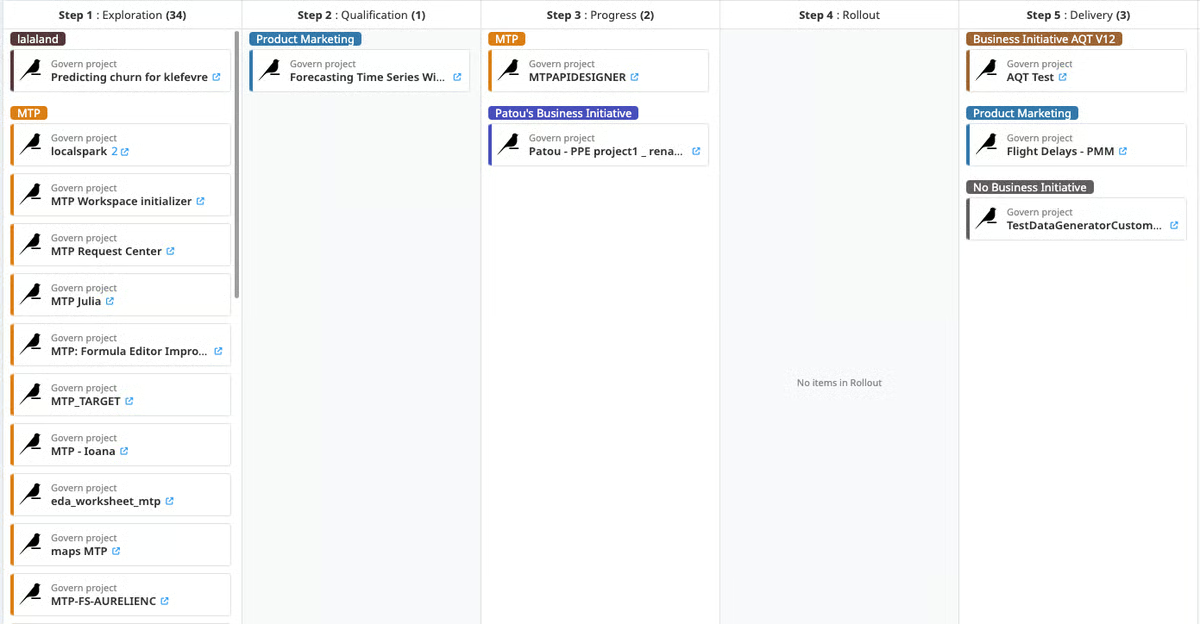
No-code and code-based flexibility is frequently praised in G2 reviews. The visual "click-and-go" recipes make data preparation and modeling accessible to analysts without programming backgrounds, while Python, R, and workflow playbooks support advanced users. This dual approach allows teams with varied technical skills to collaborate on the same platform without forcing everyone into a single development style.
Support for modern AI-driven workflows further reinforces Dataiku’s production focus. Capabilities around AI text generation, along with newer work on LLMs and agentic AI, reflect a platform that continues to evolve alongside current predictive and AI practices. For teams working on customer segmentation, operational forecasting, or KPI prediction, this breadth helps scale analytics consistently across use cases.
Dataiku's depth and pricing align best with organizations planning predictive analytics at scale across multiple projects. Teams with lighter or single-use needs may find the investment harder to justify before broader adoption takes hold. Where multi-project deployment is the goal, the platform's architecture supports that scope well.
Reporting and visualization in Dataiku are supporting capabilities rather than primary ones. Teams focused on presentation-heavy dashboards tend to complement the platform with a dedicated BI tool. For organizations where building and operationalizing models is the priority, that focus is exactly what the platform is designed to deliver.
Dataiku fits organizations that treat predictive analytics as a structured, production-ready capability rather than an isolated modeling exercise, supported by an overall G2 Score of 65. Its ability to balance accessibility with depth supports collaboration across roles while maintaining rigor in how models are built, deployed, and governed. For enterprise and data-mature teams running ongoing predictive workflows, it remains a dependable and differentiated choice in the category.
"I started using Dataiku as a junior data analyst. The visual recipes have turned around how you build an analytics project from end to end. As I started tackling complex projects and expanding my knowledge of data science and the domain I am working on, I started to discover the capabilities that I can adopt from the Dataiku tools and api. It has immensely helped me to expedite my career goals. Another fantastic aspect would be the consistent upgradation of the features and tools like Data quality management, LLM mesh, and Agentic AI in the studio, which becomes an inspiration for me to try out and implement additional steps (in the ML flow) that help me increase business value in the projects I am working on. I enrolled in the Dataiku Academy, too."
- Dataiku review, Teeka Raman K.
“I wish there were more customization available to some of the visual recipes. Another thing is version control - although Dataiku does handle version control, it is very non-intuitive and difficult to go back to a previous version, or even understand the changes made between different versions. We need to have committed comments and other Git-like features for that to work better.”
- Dataiku review, Katyayani P.
Among predictive analytics tools, Minitab is consistently associated with statistically disciplined predictive analytics. It is designed for teams that prioritize methodological rigor, repeatable analysis, and predictions that can be clearly explained and defended with data. This focus makes it especially relevant in environments where accuracy and transparency matter more than rapid experimentation.
Its positioning in G2’s Predictive Analytics category, along with an overall G2 Score of 65, reflects how the platform performs in real-world environments. Users consistently highlight the platform’s extensive library of statistical tests, clear output interpretation, and strong supporting documentation. These capabilities help analysts build predictive models that are both technically sound and easy to validate across teams.
On G2, data visualization, modeling, and data interaction each score 90%, reinforcing its strength in hands-on predictive analysis. These scores reflect how reliably users can explore data, test assumptions, and interpret results during day-to-day modeling work.
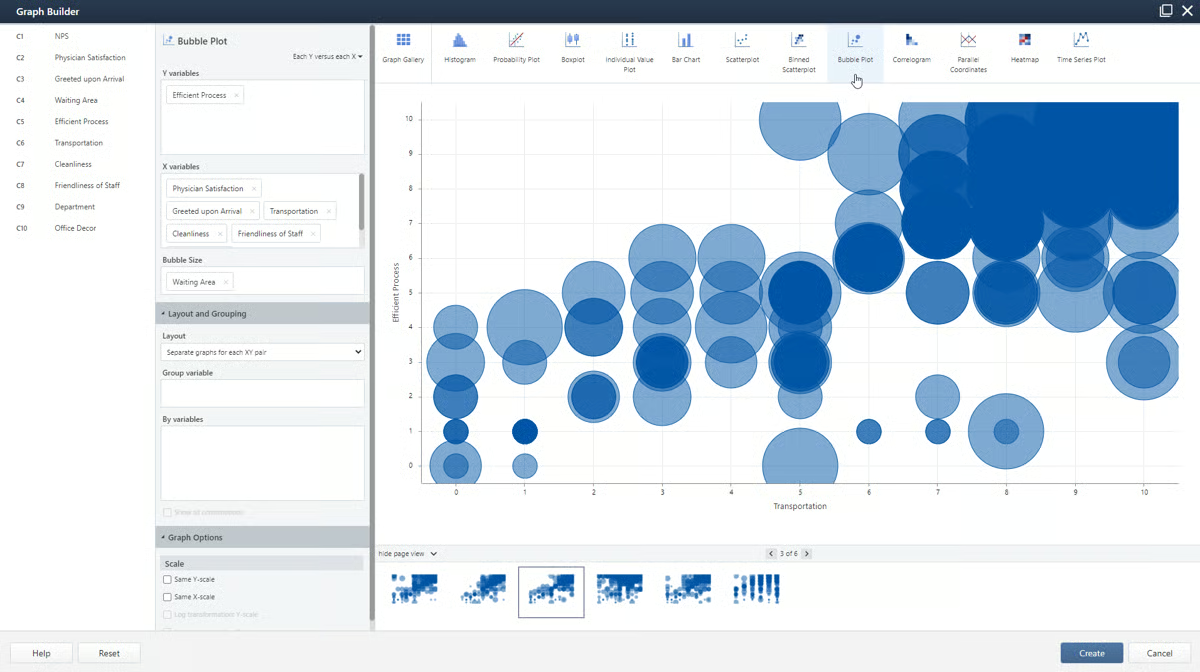
G2 reviews frequently reference trust in results, supported by a 71 G2 satisfaction score among teams that value statistical correctness. In predictive analytics, where decisions depend on understanding assumptions, variability, and confidence intervals, this emphasis on interpretability plays a central role.
Minitab is also widely used for structured scenario testing before committing resources. G2 reviewers describe correlating small internal experiments with larger, more expensive external tests. Being able to model variability and predict outcomes before scaling efforts helps teams reduce risk and make more informed decisions in quality-focused environments.
A G2 Market Presence score of 58 reflects a focused, established product rather than a broad, all-purpose analytics platform. Its customer mix reinforces this focus. About 47% of users come from enterprise organizations, with another 35% from the mid-market and 18% from small businesses, according to G2 Data. That tells me Minitab is most valuable in environments where predictive analytics feeds structured processes like quality control, manufacturing optimization, R&D, and formal training programs, rather than quick exploratory analysis.
G2 reviewers describe building complex statistical models through point-and-click workflows, supported by excellent help documentation, clear result interpretation, and strong customer support. This accessibility makes rigorous analysis available to teams with varied statistical backgrounds.
Users highlight the vast number of analysis options, from basic descriptive statistics to advanced predictive analytics and quality control methods. This range supports diverse use cases from manufacturing quality analysis to academic research without requiring multiple specialized tools.
Advanced capabilities such as Monte Carlo simulation and the full predictive analytics module sit outside Minitab's base license, requiring separate purchases to access. Teams working within fixed software budgets often find the features most relevant to predictive and simulation work need additional approval before they can be used. G2 reviewers with access to the full suite consistently describe the breadth of capability as worth the investment.
The interface is built for precision and statistical depth, which means users expecting spreadsheet-style workflows or tight office-tool integrations may need time to adjust. Teams without a statistical background tend to notice this more than trained analysts. For those who work within its conventions, the platform offers a level of analytical control that few tools in the category match.
All in all, Minitab remains a dependable predictive analytics tool for organizations that value accuracy, interpretability, and statistically validated outcomes. Its strength in modeling, data interaction, and process-oriented prediction makes it especially well-suited for quality-driven and regulated environments where confidence in results is essential.
"Very helpful! I used it for my thesis and got great reports; the data handling was very easy to do."
- Minitab Statistical Software Review, Ricardo R.
“Predictive Analytics menu pull-down shows items that are included and those that are not-- can not tell which is which. Then add screen takes to Minitab online, but again, no clear way to add or try, e.g., Treenet.”
- Minitab Statistical Software review, Loren F.
|
Software
|
G2 rating
|
Free plan
|
Ideal for
|
|
Tableau
|
4.4/5
|
Free student version
|
Visual exploration of predictive insights, trend analysis, and interactive dashboards
|
|
Google Cloud BigQuery
|
4.5/5
|
No free tier (usage-based)
|
Large-scale predictive modeling on cloud data with SQL and ML workflows
|
|
Amazon QuickSight
|
4.3/5
|
No free tier
|
AWS-centric predictive reporting and embedded analytics
|
|
SAS Viya
|
4.3/5
|
Free trial available
|
Advanced statistical modeling, forecasting, and regulated enterprise use cases
|
|
IBM Cognos Analytics
|
4.1/5
|
Free trial available
|
Predictive reporting within enterprise BI stacks
|
|
Adobe Analytics
|
4.1/5
|
No free tier
|
Predictive insights tied to digital customer behavior, churn, and engagement
|
|
Hurree
|
4.8/5
|
Yes (Freemium plan)
|
Mid-market teams needing unified analytics with AI-assisted insights
|
|
Dataiku
|
4.4/5
|
Free trial available
|
Collaborative machine learning and end-to-end predictive workflows
|
|
Minitab Statistical Software
|
4.6/5
|
Free trial available
|
Quality, reliability, and process-driven predictive analysis
|
*These predictive analytics tools are top-rated in their category, based on G2’s Winter Grid® Report. All offer custom pricing tiers and demos on request.
Got more questions? G2 has the answers!
The right choice depends less on modeling sophistication and more on how predictions are used after they’re created. Teams focused on visual exploration and stakeholder communication often lean toward Tableau. Organizations running large-scale, SQL-driven models typically favor BigQuery. Enterprises that require governance, auditability, and consistency often choose SAS Viya or IBM Cognos. The strongest fit is the tool that aligns with how forecasts are reviewed, challenged, and acted on in your planning cycles.
Based on G2 review patterns, BigQuery, SAS Viya, IBM Cognos Analytics, Adobe Analytics, and Dataiku are most commonly adopted at enterprise scale. These platforms support governance, role-based access, scalability, and cross-team consistency, critical when forecasts influence budgets, inventory, or strategic commitments across multiple functions.
Tools like Tableau, Amazon QuickSight, and Hurree are frequently cited for accessibility. Tableau and QuickSight support predictive analysis through visual workflows and SQL without requiring deep ML engineering. Hurree takes this further for teams that want plain-language interpretation: its AI assistant, Riva, surfaces trends and explains what drove a change, so analysts and business users can act on predictions without maintaining complex models or writing queries.
Predictive analytics tools focus on forecasting, scenario analysis, and decision support, often tightly integrated with BI and planning workflows. Machine learning platforms prioritize model training, experimentation, and deployment. Tools like Dataiku and BigQuery sit closer to the middle, supporting both predictive analytics and ML, while others like Tableau or Cognos emphasize consumption and decision alignment over model engineering.
Review patterns show that Tableau, BigQuery, and SAS Viya perform well when teams need transparency into drivers, variables, and logic behind predictions. These tools make it easier to trace why a forecast changed, which is critical for maintaining trust once predictions are used in planning meetings or executive reviews.
Integration is often a deciding factor at the buying stage. BigQuery fits naturally into Google Cloud and modern data stacks. Amazon QuickSight works best in AWS-native environments. Adobe Analytics integrates deeply with digital experience and marketing stacks. Tools that don’t align with existing data infrastructure often introduce downstream workarounds, which reviews flag consistently as a source of long-term friction.
Yes, but not all equally. SAS Viya, IBM Cognos Analytics, and Adobe Analytics are frequently chosen in regulated industries due to their focus on governance, auditability, and methodological rigor. These platforms are better suited when forecasts must be defensible, repeatable, and traceable under scrutiny.
Pricing models often reflect how tools are meant to be used. Usage-based pricing (like BigQuery) favors flexible, high-volume analytics but requires cost awareness. Per-user pricing (like Tableau) makes sense for analyst-owned workflows. Enterprise licensing (SAS, Adobe, Cognos) aligns with organization-wide adoption. The key is matching pricing structure to expected usage patterns, not just headline cost.
Tools like BigQuery, Dataiku, SAS Viya, and IBM Cognos Analytics are most commonly used across multiple teams once adopted. They scale across functions such as finance, operations, marketing, and supply chain. More specialized tools may excel in a single domain but require pairing with other platforms as predictive needs expand.
The most common mistake is choosing based on model-building capability alone. G2 reviews repeatedly show that issues emerge later, when forecasts are debated, reused, or updated. Tools that don’t support iteration, transparency, and decision consumption quietly erode trust over time. The best purchases prioritize how predictions live inside real planning workflows, not just how they’re created.
Predictive analytics decisions show their impact over time, not at rollout. The real signal is whether teams can adjust models as conditions change, trust forecasts under pressure, and move insights into execution without friction. Strong systems lower cognitive load by keeping assumptions clear and output usable. Weak ones force workarounds that slow decisions and blur ownership.
I focus on how these tools hold up inside daily workflows. When modeling, validation, and delivery are connected, teams move faster and confidence compounds. When they are fragmented, effort shifts from decision-making to fixing gaps. Over time, that loss of trust matters more than any single forecasting error.
That’s why predictive analytics software is an operating model choice, not just a purchase. The right platform supports how teams learn, adapt, and commit under uncertainty. A poor fit quietly adds execution risk that’s hard to reverse. Choosing well means prioritizing sustained clarity and decision confidence, not short-term capability.
Want to build and deploy predictive models? Explore the top data science platforms to turn raw data into production-ready insights.


Working in content strategy, I spend a lot of time analyzing trends, traffic shifts, search...
/DarshayitaThakur-OrangeBG.webp) by Darshayita Thakur
by Darshayita Thakur

Let AI shortlist the best tool for your use case Ask AI 1 Click on the button below2...
 by Sudipto Paul

Recently updatedSummer 2026 Grid® Report · Published May 26, 2026 This guide was last...
 by Soundarya Jayaraman